A great weekend hack(worth $8k)
The author found two error-based SQL injections, two stored XSS, and one IDOR on a Synack program. An attacker could extract database data, execute JavaScript in victims' browsers, and view other users' data by changing IDs.
 Published on infosecwriteups.com
This post is a writeup of my recent findings on Synack which got me $8k for 5 bugs, on a single day.
The full write-up lives on its author's site
It belongs to its author, so we link to it rather than copy it. The other two tabs are our own rewrites, checked against it.
Context
This is a write-up of five rewarded findings on a Synack program, submitted during a QR period. A QR period is a specific window defined by Synack in which researchers with the best reports are rewarded. The author had seven hours left in that window when the work started. Six bugs were submitted on the same program in a single day: five were rewarded and one was rejected. The rewarded set was two SQL injections, two stored XSS and one IDOR (read only). The total payout was $8,000.
The report does not name the target application, the product or the specific feature beyond the input fields and endpoints involved. What it does describe is the class of functionality: parameters whose values are reflected or processed by the server, input fields that store and later render user content, and object references that can be changed to reach other users' data.

Setup
The work was done with Burp Suite and two of its capabilities:
- Match and Replace, used to inject test values into parameters automatically.
- AutoRepeater, a Burp extension that also has an option to match and replace things, used for the IDOR testing.
SQLmap was used afterwards to confirm and exploit the SQL injections. No versions are given in the report. The only precondition described is the QR period itself, which set the deadline of seven remaining hours.
Finding it
The SQL injections were found by automating parameter tampering rather than by testing each request by hand. In Burp's Match and Replace, the author added an item for Param Value so that a parameter value such as test was changed to test' on every request passing through the proxy. When the replacement produces a different response, that difference is visible directly in Burp, which is what surfaced the candidates.
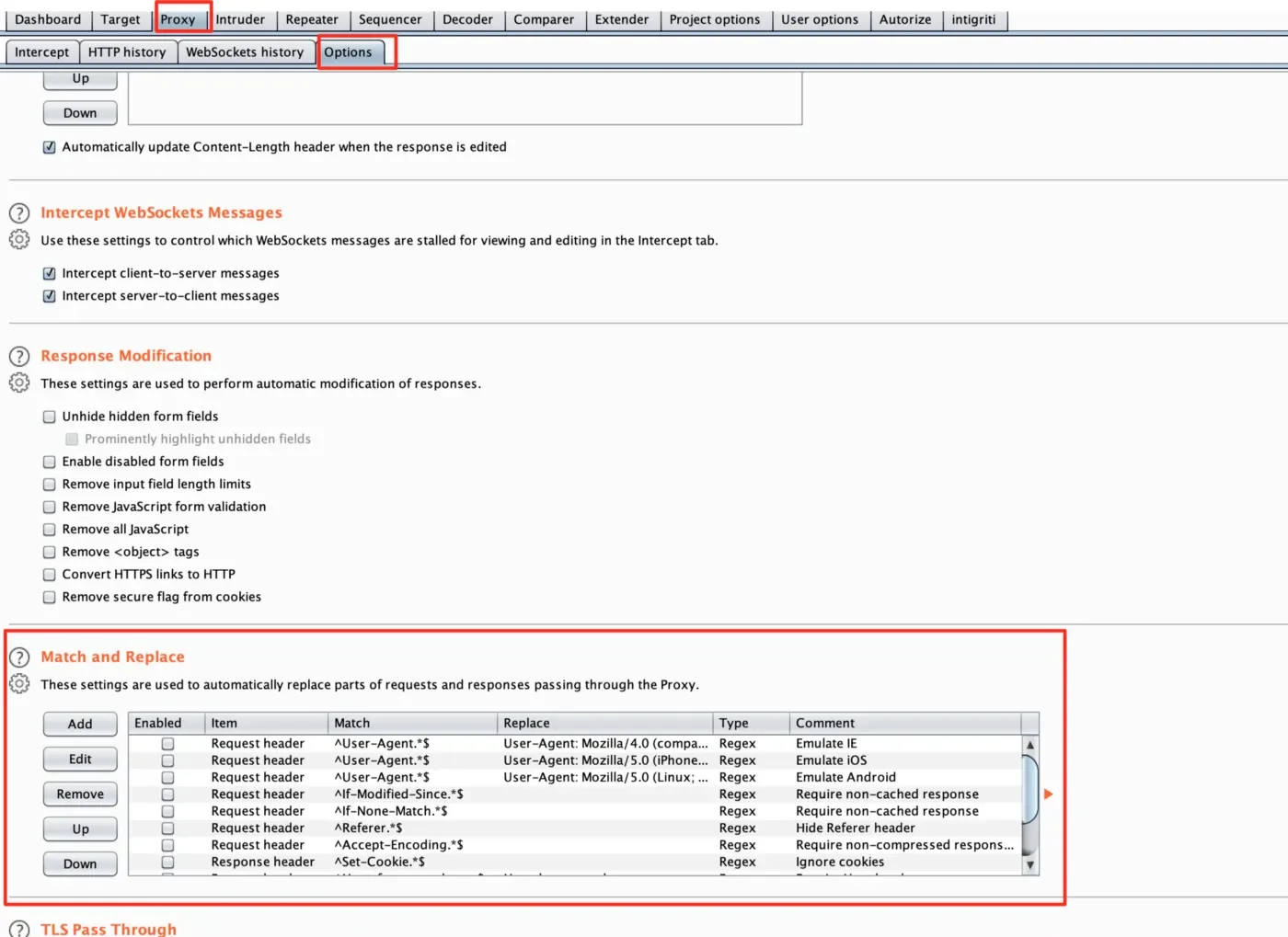
Match and Replace lets you define parameter values and many other things to match and replace with your desired input. The author points to PortSwigger's documentation on the feature for readers who have not used it.
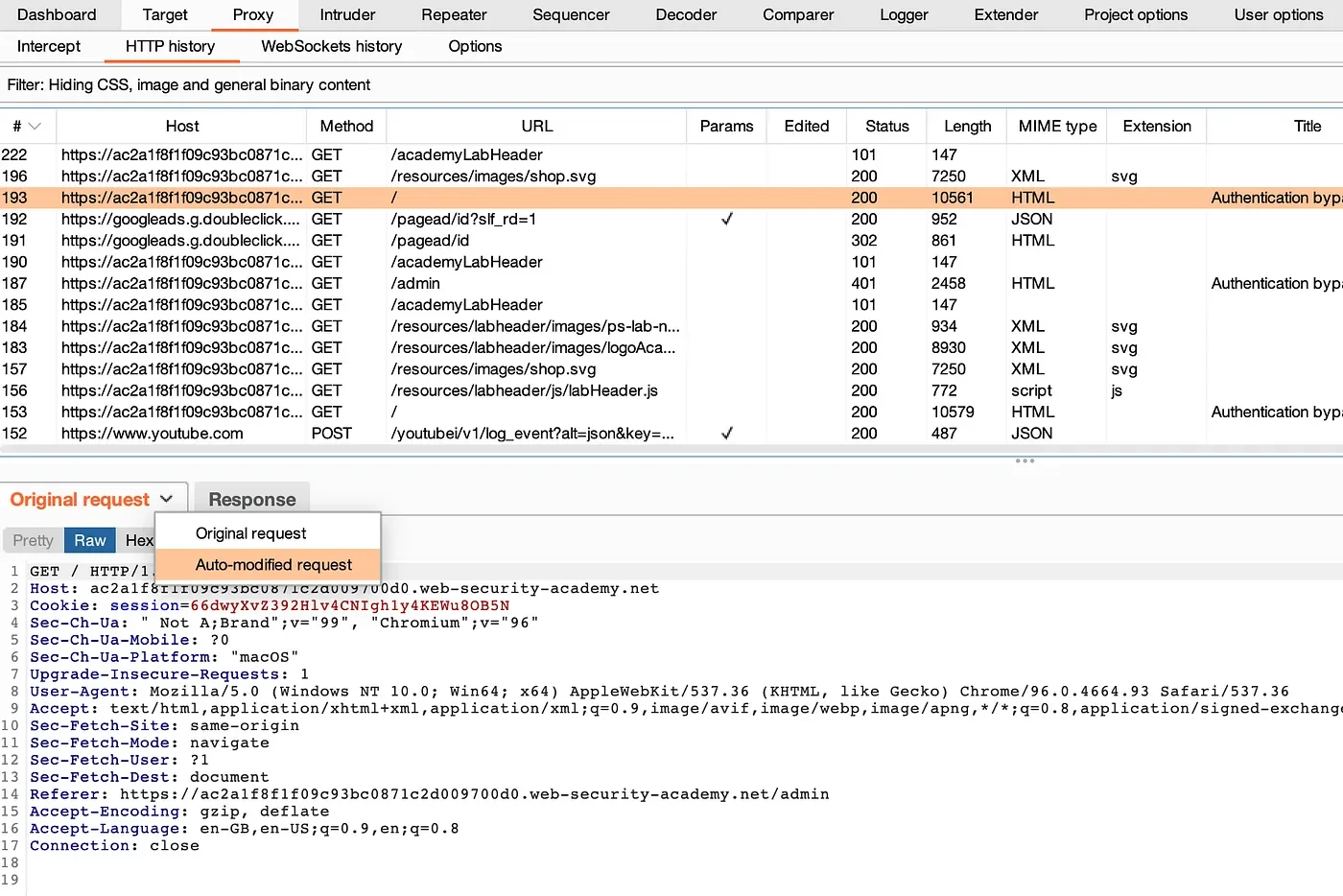
Toggling between the original and the modified request shows the differing responses. That difference is the signal that the parameter is worth following up.
Exploitation
Step 1: First error-based SQL injection
The Match and Replace rule changed a parameter value from test to test'. The resulting response differed from the baseline, indicating an error-based SQL injection. The author then sent the request to SQLmap and was able to fetch data from it. The report does not include the request, the endpoint, the parameter name or the SQLmap command.
Step 2: Second error-based SQL injection
The second injection came in the same way. This time the replacement value was test'' instead of test', and it landed on another endpoint where the injection could be escalated further and data dumped. For this one the author had to get in touch with several SRTs (Synack's security response team members) to push it through.
Step 3: Two stored XSS
Both XSS findings were stored and both were rewarded. The author describes them as simple and straightforward: the same payload was used twice in input fields. A few other payloads were tried first and did not work. After looking at the JavaScript output, a few filters had to be bypassed, and then the payload was reflected:
'><input autofocus onfocus=alert(1)>
The payload closes an existing attribute and tag with '>, then injects an <input> element carrying the autofocus attribute and an onfocus handler. Because the element takes focus automatically, the handler fires without user interaction. The author notes that this is a famous payload and reckons more than 30 to 35 XSS were reported with it on the same program.
Step 4: IDOR
Two IDORs were submitted, but the payout did not come for both. By changing IDs, the author could see the data of other users. The issue was found in two places, but it was accepted in only one report, and the author wonders why the second did not win. AutoRepeater was used for this testing, taking advantage of its match and replace option.
Step 5: Payout
The rewards broke down as follows:
| Finding | Payout |
|---|---|
| SQL injection 1 | $2,900 |
| SQL injection 2 | $2,900 |
| Stored XSS 1 | $880 |
| Stored XSS 2 | $880 |
| IDOR (accepted under a broken access control payout) | $387 |

Root cause
The report does not describe the server-side code. What can be said from the behaviour observed:
- The SQL injections are error based, so the application likely passes user-controlled parameter values into SQL queries without parameterisation.
- The stored XSS payload was reflected after a few filters were bypassed, so input filtering was present but incomplete.
- The IDOR allowed reading other users' data by changing IDs, and it was accepted in only one of the two places where it was found.
Impact
- The SQL injections allowed data to be fetched from the database, and the second one could be escalated further to dump data.
- The stored XSS payload was reflected after a few filters were bypassed, and the author describes it as firing automatically through
autofocusandonfocus. - The IDOR exposed other users' data in a read-only fashion.
Fix
Based on the findings, the fixes would be parameterised queries for the SQL injections, output encoding plus server-side validation for the stored XSS, and per-object authorisation checks for the IDOR.
Variants to test
- Match and Replace for parameter fuzzing. Add a Param Value rule that appends a single quote to every parameter value and watch for responses that differ from the baseline. A positive result is a response containing a database error or otherwise diverging from the original.
- Double quote variant. Repeat the same rule with
test''instead oftest'. A positive result is a second endpoint where the injection can be escalated and data dumped. - Autofocus payload in stored fields. Submit
'><input autofocus onfocus=alert(1)>into input fields that persist and are rendered to other users. A positive result is the handler firing when the stored value is displayed, after any filters have been bypassed by inspecting the JavaScript output. - ID enumeration with AutoRepeater. Use AutoRepeater's match and replace option to change object IDs across requests. A positive result is another user's data appearing in the response.
- Report quality. The author's own tip is to write great reports, including everything: resources, video POCs and clear screenshots of every step. The other tip is to use Match and Replace to automate testing across bounty work, and to keep checking: error-based SQLIs are still out there.
What happened, in plain words
A security researcher spent one day testing a single bug bounty program on Synack, a platform where companies pay people to find weaknesses in their websites and apps. The program was in a QR period, which is a specific window of time defined by Synack in which researchers who write the best reports are rewarded. When the researcher started, seven hours were left in that window.
By the end of the day, six bugs had been submitted on the same program. Five were rewarded and one was rejected. The five rewarded bugs were:
- Two SQL injections
- Two stored XSS
- One IDOR (read only)
The total payout was $8,000. The report does not name the target application, the product, or the exact feature beyond the input fields and endpoints involved. What it does describe is the kind of functionality involved: parameters whose values are processed by the server, input fields that store and later display user content, and object references that can be changed to reach other users' data.
The tools, explained from zero
Before the findings, it helps to understand the three tools the researcher used. None of them are complicated once you know what they do.
Burp Suite is a program that sits between your browser and a website. Imagine a postal worker who handles every letter you send and every reply you get. Burp is that postal worker for web traffic: it can read, pause, change, and resend requests. Security testers use it because it lets them see and modify what the browser sends, which a normal browser hides.
Match and Replace is a feature inside Burp. It works like the "find and replace" in a word processor, except it runs automatically on every request that passes through Burp. You tell it: "whenever you see this text, swap it for that text." The researcher used it to change parameter values automatically, without editing each request by hand.
AutoRepeater is an extension (an add-on) for Burp. It also has a match and replace option. The researcher used it for the IDOR testing.
SQLmap is a separate tool that automates the exploitation of SQL injection. The researcher used it after the manual testing to confirm the injections and pull data out.
No versions of any tool are given in the report. The only precondition described is the QR period itself, which set the deadline of seven remaining hours.
Finding the SQL injections
A SQL injection is a vulnerability where user input is placed into a database query in a way that lets the user change the query itself. To understand it, imagine a librarian who takes your written request, "Give me the book called [your text here]", and pastes your text straight into a sentence. If you write a normal book title, the librarian fetches that book. If you write something clever that changes the sentence's meaning, the librarian may fetch every book in the building instead. That is SQL injection: your input changes the instruction, not just the value.
The researcher did not test each request by hand. Instead, the work was automated with Burp's Match and Replace. An item was added for Param Value, so that a parameter value such as test was changed to test' on every request passing through the proxy. A parameter is a named value sent with a request, like ?name=test in a URL. A proxy here is Burp, sitting between browser and server.
Why a single quote? In SQL, text values are wrapped in single quotes, like 'test'. Adding an extra quote breaks the syntax of the query. If the server returns a different response, that is a strong hint that the input reached the database without being handled safely. This is called an error-based SQL injection: the database's error message leaks back to the response.
When the replacement produces a different response, that difference is visible directly in Burp. That is what surfaced the candidates.
Match and Replace lets you define parameter values and many other things to match and replace with your desired input. The researcher points to PortSwigger's documentation on the feature for readers who have not used it.
Toggling between the original and the modified request shows the differing responses. That difference is the signal that the parameter is worth following up.
Step 1: First error-based SQL injection
The Match and Replace rule changed a parameter value from test to test'. The resulting response differed from the baseline, indicating an error-based SQL injection. The researcher then sent the request to SQLmap and was able to fetch data from it. The report does not include the request, the endpoint, the parameter name, or the SQLmap command.
Step 2: Second error-based SQL injection
The second injection came in the same way. This time the replacement value was test'' instead of test', and it landed on another endpoint where the injection could be escalated further and data dumped. An endpoint is a specific address on a server that handles a particular kind of request, like a counter in a large office building: each counter does one job. For this one the researcher had to get in touch with several SRTs (Synack's security response team members) to push it through.
Finding the stored XSS
Cross-site scripting, or XSS, is a vulnerability where an attacker gets their own code (usually JavaScript) to run in another user's browser, as if it were part of the trusted website. A simple comparison: imagine a noticeboard where visitors can pin notes. If the board does not check what is written, someone can pin a note that says "please hand your keys to the person at the door", and other visitors will believe it because it is on the official board. XSS is that, but with code instead of notes.
Stored XSS means the malicious input is saved by the server and shown to other users later. The payload sits in the database or on the page and fires whenever someone views it.
Both XSS findings were stored and both were rewarded. The researcher describes them as simple and straightforward: the same payload was used twice in input fields. A few other payloads were tried first and did not work. After looking at the JavaScript output, a few filters had to be bypassed, and then the payload was reflected:
'><input autofocus onfocus=alert(1)>
Line by line, in plain words:
'>closes whatever attribute and tag the page had already opened. If the page had written something like<input value=', this closes the value and the tag, so the next thing is treated as new HTML rather than as text.<inputstarts a new input element, the same kind of box you type into on a form.autofocusis an HTML attribute that tells the browser to put the cursor into this element automatically as soon as the page loads. No click needed.onfocus=alert(1)is an event handler: a piece of JavaScript that runs when the element receives focus. Becauseautofocusgives it focus immediately, the handler runs immediately.alert(1)is the classic harmless test: it pops up a box with the number 1. Seeing that box proves the code ran.
The researcher notes that this is a famous payload and reckons more than 30 to 35 XSS were reported with it on the same program.
Finding the IDOR
IDOR stands for Insecure Direct Object Reference. It is a vulnerability where a website uses a simple identifier (like a number or a name) to point at a record, and does not check whether the person asking is allowed to see that record. A comparison: a hotel where room numbers are written on the keys, and the front desk hands you any key you ask for, as long as you say the number. The lock works; the checking does not.
Two IDORs were submitted, but the payout did not come for both. By changing IDs, the researcher could see the data of other users. The issue was found in two places, but it was accepted in only one report, and the researcher wonders why the second did not win. AutoRepeater was used for this testing, taking advantage of its match and replace option.
The payout
The rewards broke down as follows:
| Finding | Payout |
|---|---|
| SQL injection 1 | $2,900 |
| SQL injection 2 | $2,900 |
| Stored XSS 1 | $880 |
| Stored XSS 2 | $880 |
| IDOR (accepted under a broken access control payout) | $387 |
Why these bugs exist
The report does not describe the server-side code. What can be said from the behaviour observed:
- The SQL injections are error based, so the application likely passes user-controlled parameter values into SQL queries without parameterisation. Parameterisation means keeping the user's input separate from the query's structure, so the input can never change the instruction.
- The stored XSS payload was reflected after a few filters were bypassed, so input filtering was present but incomplete. Output encoding means converting characters like
<and>into harmless text so the browser shows them instead of treating them as code. - The IDOR allowed reading other users' data by changing IDs, and it was accepted in only one of the two places where it was found.
What an attacker could do with these
- The SQL injections allowed data to be fetched from the database, and the second one could be escalated further to dump data.
- The stored XSS payload was reflected after a few filters were bypassed, and the author describes it as firing automatically through
autofocusandonfocus. - The IDOR exposed other users' data in a read-only fashion.
How to fix them
Based on the findings, the fixes would be parameterised queries for the SQL injections, output encoding plus server-side validation for the stored XSS, and per-object authorisation checks for the IDOR.
Things you can try yourself
- Match and Replace for parameter fuzzing. Add a Param Value rule that appends a single quote to every parameter value and watch for responses that differ from the baseline. A positive result is a response containing a database error or otherwise diverging from the original.
- Double quote variant. Repeat the same rule with
test''instead oftest'. A positive result is a second endpoint where the injection can be escalated and data dumped. - Autofocus payload in stored fields. Submit
'><input autofocus onfocus=alert(1)>into input fields that persist and are rendered to other users. A positive result is the handler firing when the stored value is displayed, after any filters have been bypassed by inspecting the JavaScript output. - ID enumeration with AutoRepeater. Use AutoRepeater's match and replace option to change object IDs across requests. A positive result is another user's data appearing in the response.
- Report quality. The researcher's own tip is to write great reports, including everything: resources, video POCs and clear screenshots of every step. The other tip is to use Match and Replace to automate testing across bounty work, and to keep checking: error-based SQLIs are still out there.
Glossary
- Bug bounty program: a scheme where an organisation pays people to find and report security weaknesses in its systems.
- Synack: a platform that runs bug bounty programs and manages the researchers who take part.
- QR period: a specific window of time defined by Synack in which researchers with the best reports are rewarded.
- SRT: Synack's security response team members, who handle and triage submitted reports.
- SQL injection: a vulnerability where user input changes the structure of a database query, not just its value.
- Error-based SQL injection: a SQL injection where the database's error message comes back in the response, revealing that the input reached the query.
- Parameter: a named value sent with a request, such as
?name=testin a URL. - Endpoint: a specific address on a server that handles a particular kind of request.
- Proxy: a program that sits between browser and server and can read, pause, change, and resend traffic; Burp Suite is one.
- Burp Suite: a tool for intercepting and modifying web traffic.
- Match and Replace: a Burp feature that automatically swaps text in requests, like find and replace for web traffic.
- AutoRepeater: a Burp extension that also offers a match and replace option.
- SQLmap: a tool that automates the exploitation of SQL injection.
- XSS (cross-site scripting): a vulnerability where an attacker's code runs in another user's browser as if it were part of the trusted website.
- Stored XSS: XSS where the malicious input is saved by the server and shown to other users later.
- Payload: the piece of input an attacker sends to trigger a vulnerability.
- Filter: a check that tries to block dangerous input; filters can be incomplete and bypassed.
- Output encoding: converting characters like
<and>into harmless text so the browser displays them instead of treating them as code. - IDOR (Insecure Direct Object Reference): a vulnerability where a simple identifier points at a record and the site does not check whether the requester is allowed to see it.
- Broken access control: the broader category of vulnerabilities where a site fails to check who is allowed to do what; an IDOR is one example.
- Parameterisation: keeping user input separate from a query's structure so the input cannot change the instruction.
- POC (proof of concept): evidence, such as a video or screenshots, showing that a vulnerability can actually be triggered.