Bragging Rights: Let’s head back to bug bucket
The report describes multiple vulnerabilities: two cross-site scripting (XSS) issues where filters were bypassed, two insecure direct object references (IDORs) allowing access to patient details, and a two-factor authentication (2FA) bypass achieved by tampering with the server's JSON response. An attacker could execute scripts in victims' browsers, access other users' data, and bypass 2FA to log in without a valid code.
 Published on infosecwriteups.com
Welcome back my hacker homies! I hope you all are doing great, like me!
The full write-up lives on its author's site
It belongs to its author, so we link to it rather than copy it. The other two tabs are our own rewrites, checked against it.
Context
The target was a program on Synack with two user roles: an admin and a normal user with less privilege. The application had several functionalities, and the researcher spent three days on it over a long weekend, coming away with two XSS findings, two IDORs and one 2FA bypass.
The XSS findings both lived in a review feature. Users could post a review for a doctor service, and anyone visiting that review page could read the posted review. The first XSS was stored: the payload was submitted as a review and executed when someone visited it. The second was a reflected XSS, triggered by a payload in the URL.
The 2FA functionality let a user log in to the application with a 6-digit code received on their contact number.
Setup
The researcher hunted on the program through Synack. The application had two roles, admin and normal user, and the review functionality was available to post reviews for a doctor service. No tooling, versions or specific endpoints are given in the report.
Finding it
The review feature looked like a simple stored input: post a review, and it is displayed to whoever visits. The researcher tried payloads and the usual bypasses, including ">, />, %00 and others, but they did not work. The payloads were being accepted as normal reviews, so the filter was stripping or neutralising the obvious break-out characters.
For the 2FA bypass, the researcher had been reading about 2FA bypass methods recently, and one of those methods applied here. During authentication, submitting a wrong code returns a JSON error in the response:
{

“status”: “false”,

“error”: “Incorrect code provided”

}
The response is a JSON error body returned during authentication.
Exploitation
Step 1: stored XSS in the review
After the normal bypasses failed, the researcher went back to Brute Logic's methods on his site and found a payload that got through:
‘`”><><div/onmouseover=’alert(document.cookie)’> style=”x:”>
The payload combines quote characters, angle brackets and a div with an onmouseover handler that runs alert(document.cookie). The trailing style=”x:”> is part of the same construction. Once the review was stored, anyone visiting that review triggered the handler.
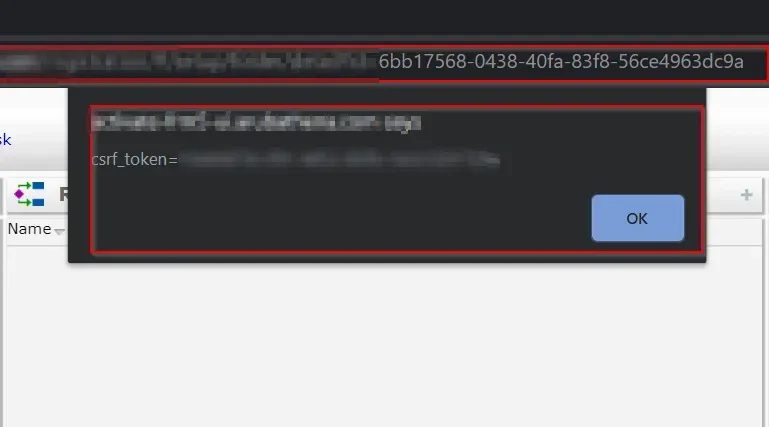
The screenshot shows the resulting pop-up on the review page.
Step 2: reflected XSS
The second XSS was a reflected one and simpler once the filtering behaviour was known. The researcher applied the correct payload in the URL and got a pop-up. The payload was:
‘`”><\x00script>javascript:alert(1)</script>
It adds bypass characters before the tag, and the payload includes a null byte (\x00) between < and script.
Step 3: IDORs
The two IDORs were generic and the report does not detail them. Both were simple number changes in URL-encoded data, which let the researcher see the details of a particular patient. One was on the receipt page, and the other was on the page showing how many times a user had made appointments. The second had a lower severity. The researcher also received a duplicate for one of them.
Step 4: 2FA bypass
The application asked for a 6-digit code sent to the user's contact number. The researcher captured the request containing an incorrect 2FA code and changed the response body to:
{

“status”: “true”,

}
The response status code also had to be changed from 401 UNAUTHORISED to 200 OK. With both changes, the login succeeded.
Root cause
For the stored XSS, the filter was likely a blocklist or pattern match that the crafted quote and bracket combination got around. The reflected XSS relied on the same weakness: the filter did not recognise the tag because of the null byte, while the browser did.
For the 2FA bypass, changing the response body and status code was enough to log in, so the outcome was not enforced server-side. Changing the body and the status code was enough to log in.
Impact
The stored XSS ran in the browser of anyone who visited the affected review, and the reflected XSS ran for whoever opened the crafted URL. The IDORs let the researcher view another patient's details, including the receipt page and appointment counts. The 2FA bypass let the researcher log in without a valid 6-digit code by changing the response body and status code.
Fix
The report does not say what was changed. The fixes that would address these issues are: encode output contextually and use an allowlist rather than a blocklist for the review input; reject null bytes and validate the reflected parameter; enforce authorisation checks on the receipt and appointment endpoints; and make the server, not the client, decide whether the 2FA code was correct, so that a modified response cannot grant access.
Variants to test
- On review or comment features, submit payloads that mix quote characters and angle brackets, and try null bytes before tag names. A positive result is a stored pop-up when the review is visited.
- On reflected parameters, try the same bypass characters and a null byte before
script. A positive result isalert(1)firing from the URL. - On endpoints that take URL-encoded numeric identifiers, change the number and check whether another user's data comes back. A positive result is a receipt or appointment record belonging to a different patient.
- On 2FA flows, capture the request with a wrong code and change the response body and status code to success. A positive result is a successful login without a valid code.
What happened, in plain words
A security researcher spent a long weekend testing a web application through a bug bounty platform called Synack. A bug bounty platform is a website where companies list their applications and pay researchers for finding security problems in them. The application had two kinds of accounts: an administrator, who can do everything, and a normal user, who can do less. Over three days the researcher found five problems: two cross-site scripting (XSS) bugs, two insecure direct object reference (IDOR) bugs, and one two-factor authentication (2FA) bypass. The rewards were $441 for the XSS work, $300 for the IDORs and $410 for the 2FA bypass.
This article walks through each finding, explains what each kind of bug means, and shows the payloads that were used. A payload is the piece of text an attacker sends to try to make the application do something it should not. You do not need any security background to follow along: if you can use a browser, you can understand what happened.
The application and the features involved
Two features matter here.
- A review feature. Users could write a review for a doctor service, and anyone who visited that review page could read it. This is called user-generated content: text that one visitor writes and other visitors later see.
- A login protected by 2FA. Two-factor authentication means logging in with two things instead of one: normally a password plus a second proof, here a 6-digit code sent to the user's contact number. The idea is that even if someone steals your password, they still cannot get in without the code.
The researcher worked through Synack and does not name the application, its endpoints, its software versions or any tools used. Everything below is what the report describes.
What XSS is, from zero
A web page is built from HTML, a language of tags such as <div> (a box) and <script> (a place for code). When you type text into a form, the application is supposed to treat it as text: if you write <b>hello</b>, you should see the literal characters, not bold text. Cross-site scripting happens when the application instead treats your text as part of the page's code. Then an attacker can write something that the browser runs, such as a small script that reads the visitor's cookies.
A cookie is a small piece of data a website stores in your browser so it can recognise you on the next request, a bit like a cloakroom ticket: whoever holds the ticket can collect the coat. If an attacker can read someone else's cookie, they may be able to act as that person.
There are two flavours:
- Stored XSS: the malicious text is saved by the application (for example as a review) and runs for every visitor who later views it.
- Reflected XSS: the malicious text is not saved; it is placed in a link, and it runs in the browser of whoever clicks that link.
Finding the first bug: stored XSS in the review
The review feature looked simple: post a review, and it is shown to whoever visits. The researcher tried to inject code and also tried the usual tricks for getting past input filters, including ">, />, %00 and others. A filter is a piece of code that inspects what you submit and removes or blocks anything dangerous. %00 is a null byte, a character with value zero that some filters mishandle.
None of those worked. The payloads were accepted as ordinary reviews, which told the researcher the filter was stripping or neutralising the obvious break-out characters. Break-out characters are the quotes and angle brackets that would let text escape from where it is supposed to sit in the page and become code.
So the researcher went back to the methods published by Brute Logic on his site and found a payload that got through:
‘`”><><div/onmouseover=’alert(document.cookie)’> style=”x:”>
Line by line, in plain words:
‘and`and”are different kinds of quote characters. A filter that only expects one kind of quote may not account for the others.><closes whatever tag the input was sitting inside and opens a new one. The filter's assumption about where the input sits in the page is now wrong.<div/onmouseover=...>creates a box on the page with an event handler. An event handler is code that runs when something happens;onmouseovermeans "when the mouse pointer moves over this element".alert(document.cookie)is the action: it shows a pop-up containing the visitor's cookies for that site.document.cookieis how a script reads cookies in the browser.style=”x:”>is part of the same construction, closing the tag in a way that keeps the filter confused.
Once the review was saved, anyone who visited that review page triggered the handler and saw the pop-up.
The screenshot shows the resulting pop-up on the review page.
Why this step was taken: the obvious payloads were blocked, so the researcher went back to Brute Logic's methods and crafted input that did not match the filter's expectations. The takeaway in the report is exactly that: spend time understanding the code behind the filter, and try combinations rather than single characters.
Finding the second bug: reflected XSS
The second XSS was reflected and simpler once the filtering behaviour was known. The researcher put the payload in the URL and got a pop-up. The payload was:
‘`”><\x00script>javascript:alert(1)</script>
Line by line:
‘and`and”and><do the same job as before: they confuse the filter about quotes and about where the input sits.\x00is a null byte written in escaped form. It sits between<andscript. The filter does not recognise the tag because of the null byte, while the browser still parses it as a script tag.javascript:alert(1)is a URI that runs JavaScript when followed. Here it is the action that produces the pop-up.</script>closes the tag.
Why this step was taken: the researcher already knew what the filter was doing from the first bug, so bypass characters were added before the tag in a URL parameter. A URL parameter is the part of a link after the ?, for example ?name=value; the application reads it and often puts it back into the page.
Finding the third and fourth bugs: IDORs
The two IDORs were generic and the report does not detail them. An IDOR, insecure direct object reference, is when an application lets you reach a record simply by changing an identifier in a request, without checking that the record belongs to you. The everyday comparison is a hotel: if your room key opens every door in the corridor because the doors are numbered and nobody checks, that is an IDOR.
Both bugs were simple number changes in URL-encoded data, which let the researcher see the details of a particular patient. One was on the receipt page, and the other was on the page showing how many times a user had made appointments. The second had a lower severity. The researcher also received a duplicate for one of them, meaning someone else had reported the same issue first.
Why this step was taken: wherever a page shows a record by number, it is worth changing the number and seeing whose data comes back. The report does not give the exact URLs or parameters.
Finding the fifth bug: the 2FA bypass
The application asked for a 6-digit code sent to the user's contact number. During authentication, submitting a wrong code returned a JSON error in the response:
{

“status”: “false”,

“error”: “Incorrect code provided”

}
JSON is a text format for structured data, a bit like a very simple form with labelled fields. Here the field status is false and the field error explains why. The important point is that the response is a JSON error body returned during authentication.
To test this, the researcher captured the request containing an incorrect 2FA code and changed the response body to:
{

“status”: “true”,

}
The response status code also had to be changed from 401 UNAUTHORISED to 200 OK. The status code is a three-digit number every web response carries: 200 means "here is the page you asked for", 401 means "you are not authorised". With both changes, the login succeeded.
Why this step was taken: the researcher had been reading about 2FA bypass methods recently, and one of those methods applied here. The lesson is that changing the response body and status code was enough to log in, so the outcome was not enforced server-side.
Why the bugs worked
For the stored XSS, the filter was likely a blocklist or pattern match that the crafted quote and bracket combination got around. The reflected payload added bypass characters before the tag.
For the 2FA bypass, changing the response body and status code was enough to log in, so the outcome was not enforced server-side. Changing the body and the status code was enough to log in.
What an attacker could do with these bugs
The stored XSS ran in the browser of anyone who visited the affected review, and the reflected XSS ran for whoever opened the crafted URL. The IDORs let the researcher view another patient's details, including the receipt page and appointment counts. The 2FA bypass let the researcher log in without a valid 6-digit code by changing the response body and status code.
How to fix it
The fixes that would address these issues are: encode output contextually and use an allowlist rather than a blocklist for the review input; reject null bytes and validate the reflected parameter; enforce authorisation checks on the receipt and appointment endpoints; and make the server, not the client, decide whether the 2FA code was correct, so that a modified response cannot grant access.
Things to try on your own
- On review or comment features, submit payloads that mix quote characters and angle brackets, and try null bytes before tag names. A positive result is a stored pop-up when the review is visited.
- On reflected parameters, try the same bypass characters and a null byte before
script. A positive result isalert(1)firing from the URL. - On endpoints that take URL-encoded numeric identifiers, change the number and check whether another user's data comes back. A positive result is a receipt or appointment record belonging to a different patient.
- On 2FA flows, capture the request with a wrong code and change the response body and status code to success. A positive result is a successful login without a valid code.
Glossary
- Bug bounty platform: a website where companies list applications and pay researchers for finding security problems.
- Payload: the text or data an attacker sends to try to make an application misbehave.
- XSS (cross-site scripting): a bug where an application treats user text as code, so the browser runs it.
- Stored XSS: XSS where the malicious text is saved by the application and runs for every visitor.
- Reflected XSS: XSS where the malicious text is not saved but placed in a link and runs when someone opens it.
- Filter: code that inspects input and removes or blocks anything considered dangerous.
- Blocklist: a filter that blocks known-bad patterns, as opposed to an allowlist that permits only known-good ones.
- Allowlist: a filter that permits only known-good input and rejects everything else.
- Break-out characters: quotes and angle brackets that can let text escape its intended place in a page and become code.
- Null byte: a character with value zero, written
%00or\x00, that some filters mishandle. - Event handler: code that runs when something happens in the browser, such as
onmouseoverwhen the mouse moves over an element. - Cookie: a small piece of data a website stores in your browser to recognise you on later requests.
document.cookie: the way a script in the browser reads the site's cookies.- URL parameter: the part of a link after
?, such as?name=value, which the application reads. - IDOR (insecure direct object reference): a bug where changing an identifier in a request lets you reach another user's record.
- 2FA (two-factor authentication): logging in with two proofs, such as a password plus a code sent to your phone.
- JSON: a text format for structured data made of labelled fields.
- Status code: the three-digit number in a web response, such as
200 OKor401 UNAUTHORISED. - Client-side: happening in the browser rather than on the server.
- Server-side: happening on the server, where the application's owner controls the code.
- Duplicate: a report of a bug that someone else has already reported.