Stored XSS in the Classic block element path
A default Author could save an image whose data-wp-more attribute held an entity-encoded HTML payload that WordPress KSES preserved. When an Administrator edited the post in the Classic block and selected the image, the decoded value was inserted as HTML into the element-path UI, running script in the Administrator's browser.
pinkdraconian Follow with aikido_security
 Originally disclosed on HackerOne
- Triaged in 1 hour
- Fixed in 21 hours
- Paid in 31 hours
- Disclosed after 33 days
Stored XSS in the Classic block element path
Affected: WordPress development build 7.2-alpha-64254, commit 7fdd5ebe4bbcf9e92d7f85ae662efabc936f4235. No released version contained this change as of 2026-10-09; stock 7.1.3 retains elementpath = false.
Summary: A default Author can save an image with an entity-encoded HTML payload in data-wp-more. WordPress KSES preserves the data-* attribute. When an Administrator edits the post in the Classic block and selects the image, the WordPress TinyMCE plugin copies its decoded attribute value into ResolveName. TinyMCE's modern theme inserts that name into the element-path UI as HTML. The development commit removed the editor setting that previously disabled this path, enabling stored script execution in the Administrator's browser. The relevant code is class-wp-editor.php, the WordPress TinyMCE ResolveName handler, and the modern theme element-path renderer.
Minimal reproduction
-
From this directory, run
cp .env.example .envanddocker compose up -d --build, openhttp://127.0.0.1:18081, complete WordPress installation, and create a user with the Author role. The Dockerfile pins the affected development commit and includes its compiled editor assets. -
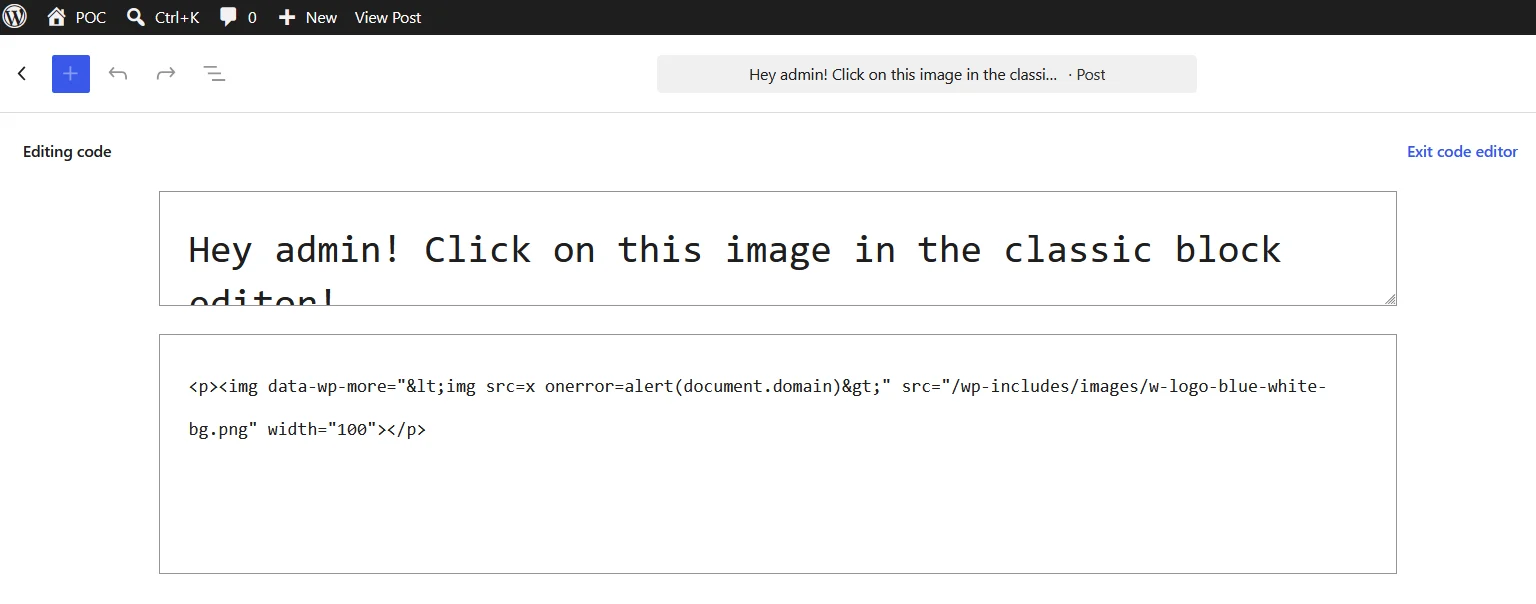
Sign in as the Author. In Posts → Add New, open the top-right ⋮ → Code editor and enter a title and this content:
HTML <p>{{media:2}}</p>
- Switch to Visual editor and save the draft. The content becomes a Classic (
core/freeform) block, with the encoded attribute intact. - Sign in as an Administrator and edit that draft. Select the Classic block, click Edit, then click the image inside the Classic Editor modal.
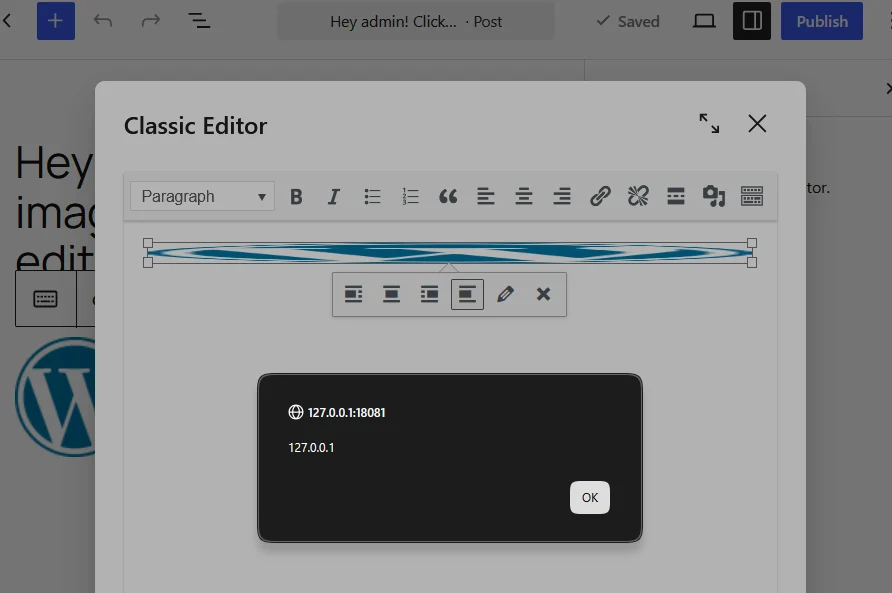
Observed result: The image's data-wp-more value is decoded and inserted into the element-path HTML. The nested image fails to load and alert(document.domain) runs in the Administrator's editor page. This requires the Administrator to open the Classic editor and select the image; merely viewing the post does not trigger it.
Impact
A WordPress author is able to create a malicious post. If an admin select the image in the post in the classic block editor, then an attacker-chosen XSS payload executes.
Attachments
Context
WordPress ships two editing experiences: the block editor (Gutenberg) and the older TinyMCE-based editor, which is still reachable through the Classic block (core/freeform). When an Administrator edits a Classic block, WordPress opens a modal containing the classic TinyMCE editor. TinyMCE's modern theme renders an element-path bar at the bottom of the editor, showing the HTML ancestors of the current selection (for example body » p » img).
The WordPress TinyMCE plugin hooks into TinyMCE's ResolveName event to give elements friendlier names in that path. The report shows that in a development build this naming path became an HTML injection sink, and that a low-privileged Author could plant the payload in post content that survives KSES sanitisation.
Setup
The affected target is a WordPress development build, 7.2-alpha-64254, at commit [redacted]. No released version contained the change as of 2026-10-09; stock 7.1.3 still retains elementpath = false, the setting that disables the vulnerable path.
The researcher provides a Docker-based lab. From the report directory:
cp .env.example .env
docker compose up -d --build
Then open http://[redacted]:18081, complete the WordPress installation, and create a user with the Author role. The Dockerfile pins the affected development commit and includes its compiled editor assets, so the lab matches the vulnerable code exactly.
Two accounts are needed: an Author (the attacker) and an Administrator (the victim).
Finding it
The chain has three links, each individually unremarkable:
- WordPress KSES preserves
data-*attributes on images, so an Author can store an entity-encoded HTML payload indata-wp-more. - The WordPress TinyMCE plugin's
ResolveNamehandler copies the decoded attribute value into the element name. - TinyMCE's modern theme inserts that name into the element-path UI as HTML rather than as text.
The development commit removed the editor setting that previously disabled this path (elementpath = false), which is what turned a latent encoding issue into stored script execution in the Administrator's browser. The relevant code is in class-wp-editor.php, the WordPress TinyMCE ResolveName handler in wp-includes/js/tinymce/plugins/wordpress/plugin.js, and the modern theme element-path renderer in wp-includes/js/tinymce/themes/modern/theme.js.
Exploitation
Step 1: Prepare the lab
Run the two commands above, complete the WordPress installation at http://[redacted]:18081, and create an Author account. The Dockerfile pins the affected commit and ships the compiled editor assets.
Step 2: Store the payload as the Author
Sign in as the Author. Go to Posts → Add New, open the top-right ⋮ → Code editor, and enter a title and this content:
<p>{{media:2}}</p>
The payload is an image whose data-wp-more attribute holds an entity-encoded HTML fragment. Because it is entity-encoded, it passes through the code editor and KSES as attribute text rather than as markup.
Step 3: Convert to a Classic block and save
Switch to Visual editor and save the draft. The content becomes a Classic (core/freeform) block, with the encoded attribute intact. This is the persistence step: the payload now lives in the post as ordinary block content.
Step 4: Trigger as the Administrator
Sign in as an Administrator and edit that draft. Select the Classic block, click Edit, then click the image inside the Classic Editor modal.
Observed result: the image's data-wp-more value is decoded and inserted into the element-path HTML. The nested image fails to load, and alert(document.domain) runs in the Administrator's editor page.
The trigger is narrow: the Administrator must open the Classic editor and select the image. Merely viewing the post does not fire the payload.
Root cause
The element-path renderer in TinyMCE's modern theme inserts the element name into the UI as HTML, so any element name it receives is interpreted as markup. The WordPress plugin's ResolveName handler copies the element's decoded data-wp-more value into the element name. KSES does not remove data-* attributes, so the encoded payload survives sanitisation and is only decoded at render time, after the sanitisation boundary has been crossed.
The second half of the root cause is configuration. The editor setting that previously disabled the element path (elementpath = false) was removed in the development commit, re-enabling the renderer. Stock 7.1.3 keeps the setting, which is why the report states no released version was affected at the time of writing.
Impact
A default Author can plant a stored payload in a draft. If an Administrator opens that post in the Classic block editor and selects the image, attacker-chosen JavaScript runs in the Administrator's session on the editor page. The script runs in the Administrator's browser on the editor page.
The conditions are explicit in the report: the Administrator must open the Classic editor for that post and select the image. Viewing the post alone is not enough. The report does not describe any further escalation beyond script execution in the Administrator's browser.
Fix
The report does not state which change was made in response.
Variants to test
- Other
data-*attributes consumed by editor plugins. Look for TinyMCE or editor plugins that read attribute values and place them into UI strings. A positive result is a decoded attribute value appearing as live markup in the editor chrome. - Other KSES-preserved attributes. Test attributes that KSES keeps on images and links, such as
title,altanddata-*, with entity-encoded payloads. A positive result is the payload surviving save and executing when the attribute is rendered. - Other element-path consumers. Check whether other editor themes or third-party TinyMCE integrations render the element path with HTML concatenation. A positive result is script execution from a crafted element name.
- Configuration drift. Compare editor settings across versions and builds for
elementpathand similar flags. A positive result is a build where a previously disabled sink is re-enabled without a corresponding escaping fix. - Role boundaries. Confirm which roles can store the payload and which roles trigger it. A positive result is a lower-privileged user storing content that executes in a higher-privileged user's session.
What happened, in plain words
WordPress is a popular system for building websites and blogs. It has two ways of writing and editing posts. One is the newer block editor, where a post is made of separate pieces called blocks. The other is the older editor, which is built on a piece of software called TinyMCE. Even in the newer block editor you can still reach the old editor through a block called the Classic block.
This report describes a way for a user with a low level of permission, called an Author, to plant a small piece of code inside a post. The code does nothing when the post is simply viewed. It only runs later, when an Administrator (a user with much more power) opens that post in the old editor and clicks on an image inside it. When that happens, the planted code runs in the Administrator's browser, inside the Administrator's logged-in session.
This kind of problem is called stored cross-site scripting, or stored XSS. "Stored" means the harmful content is saved on the server and waits there. "Cross-site scripting" means the server ends up sending that content back to a different user's browser, and the browser treats it as code to run rather than as harmless text. A simple comparison: imagine a guestbook where visitors can write messages. If the guestbook prints every message exactly as written, a visitor could write a message that is actually a set of instructions, and the next person to read the guestbook would follow those instructions without knowing.
The report was filed against a development build of WordPress, not a released version. The author of the report says that no released version contained the change that made this possible at the time of writing.
Context
WordPress ships two editing experiences. The first is the block editor, also known as Gutenberg. The second is the older TinyMCE-based editor. TinyMCE is a separate, widely used piece of software that turns a plain text box into a rich editor with buttons for bold, links and images. WordPress bundles it and adds its own customisations.
The old editor is still reachable through the Classic block, whose internal name is core/freeform. When an Administrator edits a Classic block, WordPress opens a pop-up window (a modal) containing the classic TinyMCE editor.
TinyMCE's modern theme draws an element-path bar at the bottom of the editor. This bar shows where the cursor currently is in the structure of the page, listing the HTML elements that contain the selection. For example, if the cursor is inside an image that sits inside a paragraph, the bar might show body » p » img. HTML elements are the building blocks of a web page: p is a paragraph, img is an image, and body is the whole visible page.
The WordPress TinyMCE plugin listens for an event called ResolveName. An event is a signal that something happened, and a plugin can react to it. This event lets the plugin give elements friendlier names in that path, so instead of a bare img the bar can show something more descriptive.
The report shows that in a development build this naming step became an HTML injection sink. A sink is any place in a program where data ends up being used in a way that matters, here being placed into the page as HTML. The report also shows that a low-privileged Author could plant the payload in post content, and that the payload survives KSES sanitisation. KSES is WordPress's built-in filter that strips dangerous HTML from content saved by users who are not trusted with full HTML. Sanitisation means cleaning input so that only safe parts remain.
Setup
The affected target is a WordPress development build, 7.2-alpha-64254, at commit [redacted]. A commit is a saved snapshot of a code project, identified by a long string of letters and numbers. The report says no released version contained the change as of 2026-10-09, and that stock 7.1.3 still retains elementpath = false, the setting that disables the vulnerable path. "Stock" here means an ordinary, unmodified release.
The researcher provides a Docker-based lab. Docker is a tool that runs a pre-packaged copy of software, including its exact version and settings, so that anyone can reproduce the same environment. From the report directory, the setup commands are:
cp .env.example .env
docker compose up -d --build
Line by line:
cp .env.example .envcopies a template file of settings,.env.example, to a working file called.env. Programs often read configuration from a file with this name.docker compose up -d --buildstarts the lab.upmeans start the containers, which are the isolated running copies of software.-dmeans run them in the background so the terminal is free.--buildmeans build the container images from the included instructions first, rather than downloading a ready-made one.
Then open http://[redacted]:18081, complete the WordPress installation, and create a user with the Author role. The address [redacted] means "this computer", so the lab runs locally and nothing is exposed to the internet. A role is a named set of permissions in WordPress; Author is a low role that can write and publish its own posts but cannot change site settings.
The Dockerfile pins the affected development commit and includes its compiled editor assets, so the lab matches the vulnerable code exactly. A Dockerfile is the recipe Docker uses to build the environment. "Pins" means it locks to one exact version instead of taking whatever is newest. "Compiled editor assets" are the ready-to-run files of the editor, produced from source code, that the browser actually loads.
Two accounts are needed: an Author (the attacker) and an Administrator (the victim). Keeping them separate is what makes the test realistic: the whole point is that one user's saved content affects a different, more powerful user.
Finding it
The chain has three links, each individually unremarkable:
- WordPress KSES preserves
data-*attributes on images, so an Author can store an entity-encoded HTML payload indata-wp-more. - The WordPress TinyMCE plugin's
ResolveNamehandler copies the decoded attribute value into the element name. - TinyMCE's modern theme inserts that name into the element-path UI as HTML rather than as text.
Some terms in that list need unpacking. An attribute is extra information attached to an HTML element, written as a name and a value, for example data-wp-more="something". Attributes whose names start with data- are custom attributes: they are not part of standard HTML, and they exist for scripts to read. Entity-encoded means special characters are replaced by codes. For example, < can be written as < and > as >. A browser turns these codes back into the real characters when it displays the page. This matters because a filter that looks for < will not see one inside <, yet the browser will still produce a < later. A handler is the piece of code that runs when an event fires.
The development commit removed the editor setting that previously disabled this path (elementpath = false), which is what turned a latent encoding issue into stored script execution in the Administrator's browser. "Latent" means the problem was present but not reachable. The relevant code is in class-wp-editor.php, the WordPress TinyMCE ResolveName handler in wp-includes/js/tinymce/plugins/wordpress/plugin.js, and the modern theme element-path renderer in wp-includes/js/tinymce/themes/modern/theme.js. A renderer is the part of the code that produces what you see on screen.
Exploitation
Step 1: Prepare the lab
Run the two commands above, complete the WordPress installation at http://[redacted]:18081, and create an Author account. The Dockerfile pins the affected commit and ships the compiled editor assets. This step exists so that the rest of the test runs against exactly the code the report is about, not against a newer or older version where the behaviour might differ.
Step 2: Store the payload as the Author
Sign in as the Author. Go to Posts → Add New, open the top-right ⋮ → Code editor, and enter a title and this content:
<p>{{media:2}}</p>
The payload is an image whose data-wp-more attribute holds an entity-encoded HTML fragment. Because it is entity-encoded, it passes through the code editor and KSES as attribute text rather than as markup. In other words, the filter sees a long string of characters inside quotes, not a tag it should remove. The code editor is used deliberately: it lets the Author type raw HTML, which is what makes it possible to place the attribute exactly where the report wants it.
Step 3: Convert to a Classic block and save
Switch to Visual editor and save the draft. The content becomes a Classic (core/freeform) block, with the encoded attribute intact. This is the persistence step: the payload now lives in the post as ordinary block content. Persistence is what makes this stored XSS rather than a one-off trick: the content is saved on the server and will still be there when someone else opens the post later.
Step 4: Trigger as the Administrator
Sign in as an Administrator and edit that draft. Select the Classic block, click Edit, then click the image inside the Classic Editor modal.
Observed result: the image's data-wp-more value is decoded and inserted into the element-path HTML. The nested image fails to load, and alert(document.domain) runs in the Administrator's editor page. alert is a browser function that shows a pop-up message, and document.domain is the address of the current page. Using alert(document.domain) is a common, harmless way to prove that code ran: if the pop-up appears, the script executed. The nested image failing to load is a side effect of the payload's structure.
The trigger is narrow: the Administrator must open the Classic editor and select the image. Merely viewing the post does not fire the payload. This is worth stating clearly, because it limits how serious the issue is in practice: an attacker cannot simply wait for an Administrator to browse the site.
Root cause
The element-path renderer in TinyMCE's modern theme inserts the element name into the UI as HTML, so any element name it receives is interpreted as markup. String concatenation means joining pieces of text together, for example building "<span>" + name + "</span>". If name contains HTML, the browser treats it as part of the page rather than as plain text. The WordPress plugin's ResolveName handler copies the element's decoded data-wp-more value into the element name. Escaping means converting characters that have special meaning in HTML into harmless equivalents, so they display as text instead of being interpreted.
KSES does not remove data-* attributes, so the encoded payload survives sanitisation and is only decoded at render time, after the sanitisation boundary has been crossed. The "sanitisation boundary" is the point where the filter has finished checking the content. Anything that changes after that point is no longer covered by the filter's protection.
The second half of the root cause is configuration. The editor setting that previously disabled the element path (elementpath = false) was removed in the development commit, re-enabling the renderer. Stock 7.1.3 keeps the setting, which is why the report states no released version was affected at the time of writing. In plain terms: the unsafe code existed, but a switch kept it turned off. The development commit removed the switch.
Impact
A default Author can plant a stored payload in a draft. If an Administrator opens that post in the Classic block editor and selects the image, attacker-chosen JavaScript runs in the Administrator's session on the editor page. A session is the period during which a browser is logged in as a particular user; while it lasts, the browser holds a credential that proves who it is. The script runs in the Administrator's browser on the editor page. That is why XSS in an admin page is taken seriously: the script does not need to steal a password, because the browser is already logged in.
The conditions are explicit in the report: the Administrator must open the Classic editor for that post and select the image. Viewing the post alone is not enough. The report does not describe any further escalation beyond script execution in the Administrator's browser.
Fix
The report does not state which change was made in response.
Variants to test
These are directions for further testing, not confirmed findings.
- Other
data-*attributes consumed by editor plugins. Look for TinyMCE or editor plugins that read attribute values and place them into UI strings. A positive result is a decoded attribute value appearing as live markup in the editor chrome. "Chrome" here means the editor's own interface, such as toolbars and bars, as opposed to the content being edited. - Other KSES-preserved attributes. Test attributes that KSES keeps on images and links, such as
title,altanddata-*, with entity-encoded payloads. A positive result is the payload surviving save and executing when the attribute is rendered. - Other element-path consumers. Check whether other editor themes or third-party TinyMCE integrations render the element path with HTML concatenation. A positive result is script execution from a crafted element name.
- Configuration drift. Compare editor settings across versions and builds for
elementpathand similar flags. A positive result is a build where a previously disabled sink is re-enabled without a corresponding escaping fix. "Configuration drift" means settings slowly diverging between versions, so that a protection present in one build is missing in another. - Role boundaries. Confirm which roles can store the payload and which roles trigger it. A positive result is a lower-privileged user storing content that executes in a higher-privileged user's session. This is the general shape of a privilege-escalation bug: low trust in, high trust out.
Glossary
- Administrator: the highest standard WordPress role, able to change site settings and manage other users.
- Attribute: extra information attached to an HTML element, written as a name and a value.
- Author: a low WordPress role that can create and manage its own posts.
- Block editor (Gutenberg): WordPress's newer editor, where a post is built from separate blocks.
- Classic block (
core/freeform): a block that contains content edited with the older editor. - Commit: a saved snapshot of a code project, identified by a long string of characters.
- Compiled assets: ready-to-run files produced from source code, which the browser loads directly.
- Configuration drift: settings slowly diverging between versions or builds.
- Container: an isolated running copy of software, managed by Docker.
- Cross-site scripting (XSS): a class of bug where content supplied by one user is treated as code by another user's browser.
data-*attribute: a custom HTML attribute whose name starts withdata-, meant for scripts to read.- Docker: a tool that packages and runs software in containers so environments can be reproduced exactly.
- Dockerfile: the recipe Docker uses to build a container image.
- Element: a building block of an HTML page, such as a paragraph or an image.
- Element-path bar: a bar in TinyMCE showing the chain of elements containing the cursor.
- Entity-encoded: special characters replaced by codes such as
<, which the browser turns back into the real characters. - Escaping: converting characters with special meaning into harmless equivalents so they display as text.
- Event: a signal that something happened, which code can react to.
- Handler: the piece of code that runs when an event fires.
- HTML injection sink: a place where data ends up being placed into a page as HTML.
- KSES: WordPress's filter that strips dangerous HTML from content saved by less trusted users.
- Latent: present but not currently reachable.
- Modal: a pop-up window that sits on top of the page until dismissed.
- Payload: the content an attacker plants to achieve an effect.
- Persistence: the property of saved content remaining on the server for later visitors.
- Renderer: the part of the code that produces what appears on screen.
- Role: a named set of permissions in WordPress.
- Sanitisation: cleaning input so only safe parts remain.
- Session: the period during which a browser is logged in as a particular user, backed by a credential.
- Sink: any place in a program where data is used in a way that matters.
- Stock: an ordinary, unmodified release.
- Stored XSS: XSS where the harmful content is saved on the server and served to another user later.
- String concatenation: joining pieces of text together to build a larger string.
- TinyMCE: a widely used rich-text editor component that WordPress bundles and customises.
- Visual editor: the normal, WYSIWYG view of the editor, as opposed to the code view.



