Blog: OmniSpace, from automated 0day XSS to RCE
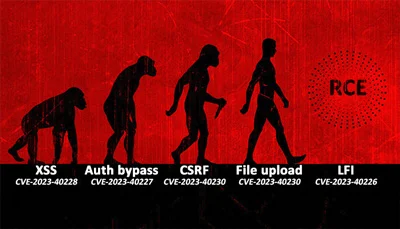
The report describes a chain of vulnerabilities in OmniSpace/Agora-project: an unauthenticated XSS, a CSRF password change, an unrestricted file upload, and an arbitrary file inclusion. An attacker could combine these to achieve remote code execution.

While you're reading this article, we assume you have a clear understanding of Patrowl's automation. However, the subsequent example effectively demonstrates how the combination of Patrowl along with our automated Pentest-as-a-Service methodology, enables us to navigate the extensive expanse of our client's exposed…
The full write-up lives on its author's site
It belongs to its author, so we link to it rather than copy it. The other two tabs are our own rewrites, checked against it.
Context
OmniSpace (the Agora-Project) is an open-source application used for document sharing and collaboration. The write-up describes a chain of vulnerabilities found on a client's internet-exposed instance of the product, running version 23.2.3, and how the chain leads from an unauthenticated cross-site scripting flaw to remote code execution. The features involved are the login page and its notify[] parameter, the "remember me" cookie mechanism, the administrator's user-edit form, the file upload flow (UploadTmpFile and AddEditFiles), and the translation loader that reads the curTrad parameter.
The author thanks the OmniSpace / Agora-project administrators, who patched the vulnerabilities quickly and acknowledged them.
Setup
The testing combined Patrowl's continuous automated pentesting of internet-exposed assets with manual analysis by offensive analysts. The version installed for the client was 23.2.3. For source review, the author obtained the most recent version available during testing, 23.5.0, and worked on a laboratory copy. The application is open-source, so the code behind each behaviour could be read directly.
No specific accounts or roles beyond the application's normal user and administrator functions are described. The CSRF step assumes the attacker knows the user-ID of a target, which the report says is readily obtained if both belong to the same space.
Finding it
Patrowl's automation flagged a validated cross-site scripting vulnerability in an unauthenticated parameter. The author correlated this with the fact that several XSS vulnerabilities had already been disclosed for the same product in 2017, affecting four parameters: targetObjIdChild, action, ditObjId and msgNotif[]. None of those parameters are collected and examined for common XSS by the web application scanners the author refers to. The presence of four vulnerable parameters in 2017 suggested more were waiting, so all newly introduced parameters deserved scrutiny.
Automated crawling collected the accessible parameters and tested widely recognised variables. A recently introduced notify[] variable was flagged as susceptible to XSS, requiring only a little encoding. The exploit was:
https://x.x.x.x/index.php?disconnect=1¬ify[]=%3ci%3eiii%3c%2fi%3e68617%22)%3balert(1)%2f%2f869
An unauthenticated XSS on an external login page is interesting on its own, since it can facilitate account takeover or streamline phishing. A second automated finding then caught the author's attention: a cookie named AGORAP_PASS that appeared to be a simple SHA1 hash. Because the product is open-source, the next step was to dig into a laboratory version to understand that hash.
Exploitation
Step 1: the XSS and the SHA1 cookie
In version 23.5.0, the application had deprecated AGORAP_PASS in favour of a modern authentication mechanism, and sessions older than a year are purged each time a user connects or disconnects:
if(!empty($_COOKIE["AGORAP_PASS"]))  {setcookie("AGORAP_LOG",null,-1);  setcookie("AGORAP_PASS",null,-1);}
        Db::query("DELETE FROM ap_userAuthToken WHERE UNIX_TIMESTAMP(dateCrea) < ".(time()-31536000));
The client's installed version, 23.2.3, still created the cookie with the SHA1:
//Enregistre login & password pour une connexion auto (10ans)
            if(Req::isParam("rememberMe")){
                setcookie("AGORAP_LOG", $login, (time()[redacted]));
                setcookie("AGORAP_PASS", $passwordSha1, (time()[redacted]));
            }
In versions before 23.4.1 this makes the XSS quite hazardous. An attacker able to hijack a user's cookie can:
- Execute a Pass The Hash attack on the application, using it for a span exceeding 10 years.
- Retrieve a user's password by cracking the SHA1-hashed password and re-using it on other applications.
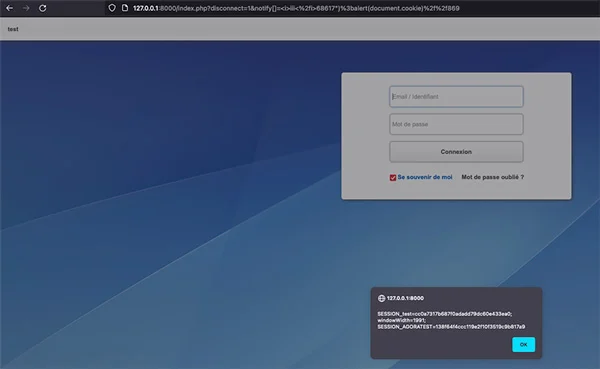
The cookie is deleted and not created anymore in version > 23.4.1.
Step 2: CSRF on the password change (CVE-2023-40230)
After a successful login, a quick look at the user interface shows a weakness in the administrator's ability to change a user's password. The action is susceptible to CSRF and is not appropriately implemented:
- Changing a user's password does not require the old password. An attacker can therefore craft malicious links, needing only the user-ID of the target, which is readily obtained if the target belongs to the same space.
- The application accepts POST parameters as GET parameters, which simplifies crafting malicious links.
- No CSRF protections are implemented.
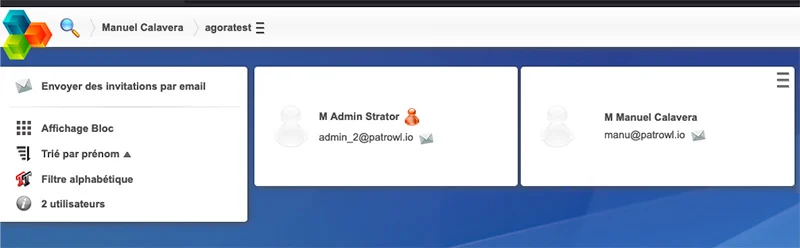
An attacker can forge a link that changes the user's password in one click, and can even send it through the internal messaging:

Example of the link, with just the user-ID to change:
http://[redacted]:8000/index.php?personImgFile=&personImgAction=change&login=[redacted]&password=toto&passwordVerif=toto&civility=&name= &firstName= &mail= [redacted]&telmobile=&telephone=&adress=&postalCode=&city=&country=&function=&companyOrganization=&comment=&connectionSpace=1&lang=francais&ctrl=user&action=userEdit&formValidate=1&typeId=user-1
The report states the vulnerability will not be patched for the moment: the developer indicated that changing a password without the old one is a specific function needed by administrators.
Step 3: unrestricted file upload (CVE-2023-40229)
With the ability to take over an account on a platform used for document sharing, the next step is to upload a malicious PHP file and attempt remote code execution. The upload functionality works as follows:
- Once files are uploaded, a quick client-side check restricts some specific files.
- A first call to
?ctrl=file&action=UploadTmpFile&tmpFolderName= [redacted]creates the file inside the DATAS/tmp/[redacted] web directory, where the folder name can be set arbitrarily. - A direct POST request to index.php with the AddEditFiles action stores the file in the database and deletes it from the /tmp folder.
Avoiding direct storage of uploaded files on the web server is sound practice, but an attacker who can call UploadTmpFile directly can skip the AddEditFiles call and therefore bypass the deletion from the temporary folder. The author then modifies the content-type and keeps the PHP extension:
The file is stored within DATAS/tmp/azerty/hack.php:
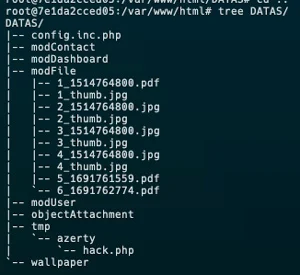
Trying to reach it directly does not work:
curl http://localhost:8000/DATAS/tmp/azerty/hack.php -I
HTTP/1.1 403 Forbidden
Date: Fri, 11 Aug 2023 14:24:37 GMT
Server: Apache/2.4.38 (Debian)
Content-Type: text/html; charset=iso-8859-1
Checking the default .htaccess file explains why:
$cat DATAS/.htaccess
order allow,deny

<Files ~ '\.(?i:png|jpeg|jpg|gif|mp3|mp4|webm|flv)$'>
allow from all
</Files>%
Only the listed extensions are allowed, so another way in is needed. The vulnerability was patched in version 23.7.1.
Step 4: arbitrary file inclusion (CVE-2023-40226)
With a PHP file sitting inside the web server, the next mission is to reach it. The search is for a place where users control which files are included. A short review leads to the curTrad parameter, and the source code is interesting:
//Charge les trads si besoin (et garde en session) if(empty(self::$trad)) {
//Sélectionne la traduction if(Req::isParam("curTrad"))
{$_SESSION["curTrad"]=Req::param("curTrad");} ... //Charge les trads
(classe & methode) require_once "app/trad/".$_SESSION["curTrad"].".php";
Trad::loadTradsLang(); } }
The curTrad value is taken directly from the user's parameter and passed to a require_once(). The malicious PHP file can therefore be included:
https://[redacted]/?curTrad=../../DATAS/tmp/azerty/hack.php
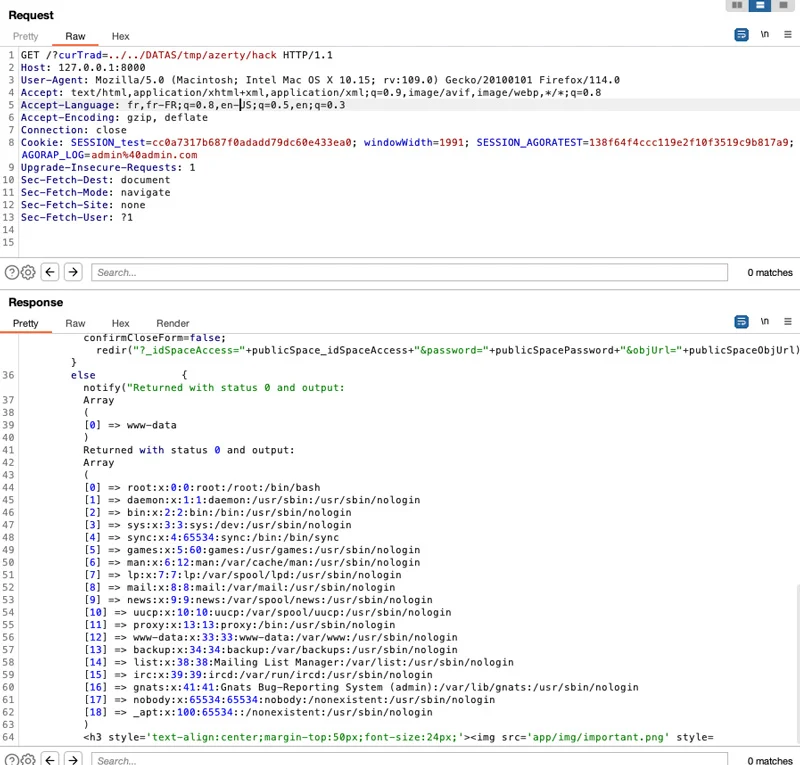
This gives RCE. The curTrad parameter is accessible without authentication, and the inclusion works seamlessly. The author says that if we were rewinding to 2010, a null byte extension could have been used to reach files that were not uploaded and were not PHP scripts, such as database backups, but PHP versions older than 5.3 are history.
Root cause
The chain involves several separate mistakes:
- The
notify[]parameter was flagged as susceptible to XSS on an unauthenticated page, so script can run in the context of the login page. - The "remember me" feature in versions before 23.4.1 creates the AGORAP_PASS cookie with the SHA1 for ten years, so script running in the user's browser can read a reusable credential.
- The administrator's user-edit action accepts POST parameters as GET parameters, does not require the old password and has no CSRF protection, so a crafted link performs the change.
- The upload flow makes a quick client-side check and relies on the subsequent
AddEditFilescall to delete the temporary file. CallingUploadTmpFiledirectly leaves the file in a web directory, and the content-type can be changed to keep the PHP extension. - The
.htaccessin DATAS only allows a list of media extensions, which blocks direct access, but thecurTradparameter is directly taken from the user and passed to arequire_once(), so the uploaded file can be included from inside the application.
Impact
The chain, to summarise, is:
- Account takeover via XSS (CVE-2023-40228), cookies (CVE-2023-40227) or CSRF (CVE-2023-40230).
- Unrestricted file upload (CVE-2023-40229).
- Arbitrary PHP file inclusion (CVE-2023-40226).
Together these lead to remote code execution. The report says the chain could pose significant consequences for companies that deploy this software on their external attack surface. The cookie-based account takeover depends on versions before 23.4.1, and the CSRF issue will not be patched for the moment because the developer considers password change without the old password a required administrator function.
Fix
The timeline is:
| Event | Date |
|---|---|
| Discovery of flaws | 06/17/2023 |
| Editor warned | 06/20/2023 |
| Response of the editor | 06/24/2023 |
| First patch release 23.7.1 | 07/17/2023 |
| CVE/MITRE request | 08/08/2023 |
| CVE-2023-40226, CVE-2023-40227, CVE-2023-40228, CVE-2023-40229, CVE-2023-40230 reserved | 08/11/2023 |
The AGORAP_PASS cookie is deleted and not created anymore in version > 23.4.1. The CSRF on password change will not be patched for the moment, per the developer's stated position.
Variants to test
- Crawl for parameters introduced after a product's last public XSS advisories, especially array-style names such as
notify[], and test them with encoding. A positive result is script execution from an unauthenticated page. - Inspect authentication cookies for hashed or reusable credentials, particularly "remember me" cookies with long expiry. A positive result is a cookie whose value can be replayed or cracked into a working password.
- Test administrative forms for state changes that accept GET parameters and do not require the current password. A positive result is a password change performed by loading a single crafted URL.
- Call temporary upload endpoints directly, skipping the finalisation call, and vary the content-type while keeping an executable extension. A positive result is a file left in a web-reachable directory.
- When a directory is protected by an extension allow-list in
.htaccess, look for parameters concatenated intoincludeorrequirepaths. A positive result is inclusion of the uploaded file and code execution.
What happened, in plain words
OmniSpace, also known as the Agora-Project, is a piece of open-source software that organisations install on their own servers so that staff can share documents and work together. Think of it as a shared filing cabinet that everyone in a company can open in their web browser, with logins, folders, messages and file uploads. Because it is open-source, anyone, including security researchers, can read the code that makes it work.
A security company called Patrowl was watching the internet-facing systems of one of its clients. One of those systems was an OmniSpace installation, running version 23.2.3. Patrowl's automated tools scan such systems continuously, looking for weaknesses, and when something interesting turns up, human analysts dig into it by hand.
What the analysts found was not one bug but a chain of them. Each bug on its own is a problem; put together, they let an attacker go from a harmless-looking web link all the way to running their own code on the client's server. That last step is called remote code execution, and it is about as bad as it gets: the attacker effectively controls the machine.
The author thanks the OmniSpace / Agora-project administrators, who patched the vulnerabilities quickly and acknowledged them.
Before going further, a few words that will come up constantly:
- Vulnerability: a mistake in software that lets someone use it in a way its makers did not intend.
- Exploit: the actual technique or link that abuses a vulnerability.
- Attacker: anyone trying to abuse the software, whether a criminal, a competitor or a researcher doing a test.
- Server: the computer somewhere in the world that runs the website and stores its data. Your browser talks to it over the internet.
- Parameter: a named value you see in a web address after a question mark, like
?name=florent. The website reads it and does something with it. Parameters are how a website receives instructions from a browser. - Cookie: a small piece of text that a website asks your browser to store and send back on every later visit. It is how a website remembers who you are between page loads, a bit like a cloakroom ticket: you show the ticket, they hand back your coat. If someone steals your ticket, they can collect your coat.
- Open-source: software whose underlying code is published for anyone to read. That is a gift to researchers, because they can see exactly why the software behaves the way it does.
Setup
The testing combined Patrowl's continuous automated pentesting of internet-exposed assets with manual analysis by offensive analysts. In plain terms: robots did the first sweep, humans did the thinking.
The version installed for the client was 23.2.3. For source review, the author obtained the most recent version available during testing, 23.5.0, and worked on a laboratory copy. A laboratory copy is simply the software installed on the researcher's own machine, where they can poke at it freely without touching the client's live system. Because the application is open-source, the code behind each behaviour could be read directly, like being handed the blueprint of a building instead of having to guess where the walls are.
No specific accounts or roles beyond the application's normal user and administrator functions are described. The CSRF step assumes the attacker knows the user-ID of a target, which the report says is readily obtained if both belong to the same space. A user-ID is the internal number or label the system uses to tell one account from another; a space is a shared area inside OmniSpace that a group of users can see.
Finding it
Patrowl's automation flagged a validated cross-site scripting vulnerability in an unauthenticated parameter. Cross-site scripting, usually shortened to XSS, means the website takes something a visitor supplied and puts it into the page in a way that lets the visitor's text be treated as code. If the visitor supplies a snippet of JavaScript (the language browsers run), the browser will run it as if the website itself had written it. Unauthenticated means you do not need to log in to trigger it: anyone on the internet can.
The author correlated this with the fact that several XSS vulnerabilities had already been disclosed for the same product in 2017, affecting four parameters: targetObjIdChild, action, ditObjId and msgNotif[]. None of those parameters are collected and examined for common XSS by the web application scanners the author refers to. A scanner is an automated tool that visits a website and tries a long list of known tricks against it.
The reasoning here is worth spelling out, because it is the heart of the discovery. If a house had four broken windows a few years ago, you would not assume the builder has suddenly become perfect; you would walk around and check the newer windows too. The presence of four vulnerable parameters in 2017 suggested more were waiting, so all newly introduced parameters deserved scrutiny.
Automated crawling collected the accessible parameters and tested widely recognised variables. Crawling means a tool walks through the website like a very fast, very patient visitor, following every link and noting every parameter it sees. A recently introduced notify[] variable was flagged as susceptible to XSS, requiring only a little encoding. Encoding here means writing characters in a coded form (for example %3c instead of <) so that the value survives the trip through the web address and arrives at the server intact. The exploit was:
https://x.x.x.x/index.php?disconnect=1¬ify[]=%3ci%3eiii%3c%2fi%3e68617%22)%3balert(1)%2f%2f869
Line by line, in plain words:
https://x.x.x.x/index.phpis the address of the application's main page. Thex.x.x.xis a placeholder for the server's address, the way a form might say "insert your address here".?starts the list of parameters.disconnect=1is one parameter telling the application something about a disconnect action.&separates one parameter from the next.notify[]=%3ci%3eiii%3c%2fi%3e68617%22)%3balert(1)%2f%2f869is the interesting one. The name isnotify[]; the square brackets tell the application to treat this as a list of values rather than a single value. The value after the equals sign is the encoded payload. Decoded, the%3cand%3ebecome angle brackets,%22becomes a double quote,%3bbecomes a semicolon and%2fbecomes a slash. Thealert(1)part is the classic harmless test: if the browser pops up a box saying "1", the code ran.
An unauthenticated XSS on an external login page is interesting on its own, since it can facilitate account takeover or streamline phishing. Account takeover means an attacker ends up in control of someone else's account. Phishing is tricking a person into handing over their details or clicking something harmful, usually with a message that looks genuine.
A second automated finding then caught the author's attention: a cookie named AGORAP_PASS that appeared to be a simple SHA1 hash. A hash is the result of running text through a mathematical blender: the same input always gives the same output, but you cannot run the output backwards to get the input. Websites store hashes of passwords instead of the passwords themselves, so that a stolen database does not immediately hand over everyone's password. SHA1 is one particular hashing recipe. It is old and fast, which matters later: fast is good for attackers, because they can try billions of guesses per second.
Because the product is open-source, the next step was to dig into a laboratory version to understand that hash.
Exploitation
Step 1: the XSS and the SHA1 cookie
In version 23.5.0, the application had deprecated AGORAP_PASS in favour of a modern authentication mechanism, and sessions older than a year are purged each time a user connects or disconnects:
if(!empty($_COOKIE["AGORAP_PASS"]))  {setcookie("AGORAP_LOG",null,-1);  setcookie("AGORAP_PASS",null,-1);}
        Db::query("DELETE FROM ap_userAuthToken WHERE UNIX_TIMESTAMP(dateCrea) < ".(time()-31536000));
Line by line:
if(!empty($_COOKIE["AGORAP_PASS"]))asks: does the browser still carry an oldAGORAP_PASScookie?$_COOKIEis how the server reads cookies sent by the browser.{setcookie("AGORAP_LOG",null,-1); setcookie("AGORAP_PASS",null,-1);}then tells the browser to forget both cookies. Setting a cookie to nothing with an expiry in the past is the standard way to delete it.Db::query("DELETE FROM ap_userAuthToken WHERE UNIX_TIMESTAMP(dateCrea) < ".(time()-31536000));runs a database command that deletes stored login tokens older than a year.31536000is the number of seconds in a year, andtime()is the current moment, sotime()-31536000means "one year ago". A token here is a stored proof of login, a bit like a stamped hand at a club: show the hand, get back in without queueing again.
The client's installed version, 23.2.3, still created the cookie with the SHA1:
//Enregistre login & password pour une connexion auto (10ans)
            if(Req::isParam("rememberMe")){
                setcookie("AGORAP_LOG", $login, (time()[redacted]));
                setcookie("AGORAP_PASS", $passwordSha1, (time()[redacted]));
            }
Line by line:
- The comment says, in French, that this saves the login and password for automatic connection for ten years.
if(Req::isParam("rememberMe")){checks whether the user ticked the "remember me" box on the login form.setcookie("AGORAP_LOG", $login, (time()[redacted]));stores the username in a cookie that expires in ten years (315360000seconds).setcookie("AGORAP_PASS", $passwordSha1, (time()[redacted]));stores the hashed password in another cookie, also for ten years.
In versions before 23.4.1 this makes the XSS quite hazardous. An attacker able to hijack a user's cookie can:
- Execute a Pass The Hash attack on the application, using it for a span exceeding 10 years. Pass The Hash means presenting the hash itself as if it were the password: if the system only checks the hash, the attacker never needs to know the original password.
- Retrieve a user's password by cracking the SHA1-hashed password and re-using it on other applications. Cracking means guessing inputs until one produces the same hash. Because people reuse passwords, a password recovered from one site often opens others.
The cookie is deleted and not created anymore in version > 23.4.1.
Step 2: CSRF on the password change (CVE-2023-40230)
CSRF stands for cross-site request forgery. The idea is simple: your browser automatically attaches your cookies to every request to a website, so if an attacker can make your browser send a request without you noticing, the website will believe the request came from you. It is like someone posting a signed letter in your name because your signature was already on the envelope.
After a successful login, a quick look at the user interface shows a weakness in the administrator's ability to change a user's password. The action is susceptible to CSRF and is not appropriately implemented:
- Changing a user's password does not require the old password. An attacker can therefore craft malicious links, needing only the user-ID of the target, which is readily obtained if the target belongs to the same space.
- The application accepts POST parameters as GET parameters, which simplifies crafting malicious links. GET and POST are two ways a browser can send data to a server. GET puts the data in the web address, so it can be put in a link, bookmarked or emailed. POST sends it separately, so it cannot simply be pasted into a link. If a form that should only accept POST also accepts GET, an attacker can turn it into a clickable link.
- No CSRF protections are implemented. A CSRF protection is usually a secret, unpredictable value that the page includes and the server checks, so that a request forged from elsewhere will not carry the right value.
An attacker can forge a link that changes the user's password in one click, and can even send it through the internal messaging:
Example of the link, with just the user-ID to change:
http://[redacted]:8000/index.php?personImgFile=&personImgAction=change&login=[redacted]&password=toto&passwordVerif=toto&civility=&name= &firstName= &mail= [redacted]&telmobile=&telephone=&adress=&postalCode=&city=&country=&function=&companyOrganization=&comment=&connectionSpace=1&lang=francais&ctrl=user&action=userEdit&formValidate=1&typeId=user-1
Line by line, in plain words:
http://[redacted]:8000/index.phpis the address of the application on the researcher's own machine.[redacted]is the standard address a computer uses to talk to itself, and8000is the port, a numbered door on that computer.personImgFile=&personImgAction=changeare parameters about the profile picture, left empty here.login=[redacted]says which account is being edited. This is the user-ID in practice: the login name identifies the target.password=toto&passwordVerif=totosets the new password and its confirmation.totois a placeholder, the French equivalent of typing "password123".- The long run of empty parameters (
civility=,name=,firstName=,mail=,telmobile=,telephone=,adress=,postalCode=,city=,country=,function=,companyOrganization=,comment=) are the other profile fields, left blank because the attacker does not care about them. connectionSpace=1&lang=francaisset the space and the language.ctrl=user&action=userEdit&formValidate=1&typeId=user-1tell the application which screen and action to run: the user editor, with the form marked as validated.
The whole point is that this entire password change is expressed as a single web address. Anyone who clicks it, while logged in, has their password changed to toto without ever being asked for the old one.
The report states the vulnerability will not be patched for the moment: the developer indicated that changing a password without the old one is a specific function needed by administrators.
Step 3: unrestricted file upload (CVE-2023-40229)
With the ability to take over an account on a platform used for document sharing, the next step is to upload a malicious PHP file and attempt remote code execution. PHP is a programming language commonly used to build websites; a .php file on a web server is not just text, it is a set of instructions the server will run. Remote code execution, or RCE, means an attacker gets their own instructions executed on the server, from a distance. It is the difference between reading someone's diary and being able to write in it.
The upload functionality works as follows:
- Once files are uploaded, a quick client-side check restricts some specific files. Client-side means the check happens in your browser, before anything is sent. It is a polite request, not a lock: an attacker can simply skip the browser and talk to the server directly.
- A first call to
?ctrl=file&action=UploadTmpFile&tmpFolderName= [redacted]creates the file inside the DATAS/tmp/[redacted] web directory, where the folder name can be set arbitrarily. A directory is a folder. Arbitrary means the attacker chooses it, rather than the application. - A direct POST request to index.php with the AddEditFiles action stores the file in the database and deletes it from the /tmp folder.
Avoiding direct storage of uploaded files on the web server is sound practice, but an attacker who can call UploadTmpFile directly can skip the AddEditFiles call and therefore bypass the deletion from the temporary folder. In everyday terms: the system has a waiting room and a filing cabinet, and normally a file moves from one to the other and is removed from the waiting room. If you can walk straight into the waiting room and never file anything, the file just sits there.
The author then modifies the content-type and keeps the PHP extension. Content-type is a label the browser attaches to a file saying what kind of thing it is, such as "this is an image". Extension is the ending of a filename, like .php or .png. The trick is to tell the server "this is a harmless image" while keeping a name that ends in .php.
The file is stored within DATAS/tmp/azerty/hack.php:
Trying to reach it directly does not work:
curl http://localhost:8000/DATAS/tmp/azerty/hack.php -I
HTTP/1.1 403 Forbidden
Date: Fri, 11 Aug 2023 14:24:37 GMT
Server: Apache/2.4.38 (Debian)
Content-Type: text/html; charset=iso-8859-1
Line by line:
curlis a command-line tool for fetching web addresses.-Iasks only for the headers, the summary information, not the page body.http://localhost:8000/DATAS/tmp/azerty/hack.phpis the address of the uploaded file.localhostmeans "this computer".HTTP/1.1 403 Forbiddenis the server's answer: no. A 403 is the standard code for "you are not allowed to see this".Date,ServerandContent-Typeare headers describing when the answer was sent, what software produced it and what kind of content it is.
Checking the default .htaccess file explains why. .htaccess is a small configuration file that tells an Apache web server how to treat files in a folder.
$cat DATAS/.htaccess
order allow,deny

<Files ~ '\.(?i:png|jpeg|jpg|gif|mp3|mp4|webm|flv)$'>
allow from all
</Files>%
Line by line:
$cat DATAS/.htaccessis the command used to print the file's contents.catmeans "show me this file".order allow,denysets the general rule: start by denying, then allow only what is listed.<Files ~ '\.(?i:png|jpeg|jpg|gif|mp3|mp4|webm|flv)$'>targets files whose names end in one of those media extensions. The(?i:...)means the match ignores upper and lower case.allow from allsays those media files may be fetched by anyone.</Files>%closes the block. The stray%is just a character left over in the output.
Only the listed extensions are allowed, so another way in is needed. The vulnerability was patched in version 23.7.1.
Step 4: arbitrary file inclusion (CVE-2023-40226)
With a PHP file sitting inside the web server, the next mission is to reach it. The search is for a place where users control which files are included. File inclusion is a feature where one script pulls in another file and runs it, a bit like a recipe saying "now follow the instructions on page 42". If the cook can choose page 42, they can choose any page in the kitchen.
A short review leads to the curTrad parameter, and the source code is interesting:
//Charge les trads si besoin (et garde en session) if(empty(self::$trad)) {
//Sélectionne la traduction if(Req::isParam("curTrad"))
{$_SESSION["curTrad"]=Req::param("curTrad");} ... //Charge les trads
(classe & methode) require_once "app/trad/".$_SESSION["curTrad"].".php";
Trad::loadTradsLang(); } }
Line by line:
- The comments, in French, say this loads translations if needed and keeps them in the session. A session is the server's memory of your visit, tied to your cookie.
if(empty(self::$trad)) {checks whether translations have already been loaded.if(Req::isParam("curTrad"))checks whether the visitor supplied acurTradparameter.curTradstands for current translation, the language file to load.{$_SESSION["curTrad"]=Req::param("curTrad");}copies the visitor's value straight into the session, without checking it.require_once "app/trad/".$_SESSION["curTrad"].".php";is the dangerous line. It glues the folderapp/trad/, then the visitor's value, then.php, and asks PHP to run that file.require_oncemeans "load this file and run it, and only once".Trad::loadTradsLang(); } }finishes the loading routine.
The curTrad value is taken directly from the user's parameter and passed to a require_once(). The malicious PHP file can therefore be included:
https://[redacted]/?curTrad=../../DATAS/tmp/azerty/hack.php
Line by line:
https://[redacted]/is the application's address.?curTrad=starts the parameter.../../DATAS/tmp/azerty/hack.phpis the value. The..means "go up one folder", so../../climbs out ofapp/trad/and back to the top of the application, then walks down intoDATAS/tmp/azerty/where the uploaded file sits. The result is that the application runs the attacker's file as if it were a translation file.
This gives RCE. The curTrad parameter is accessible without authentication, and the inclusion works seamlessly. The author says that if we were rewinding to 2010, a null byte extension could have been used to reach files that were not uploaded and were not PHP scripts, such as database backups, but PHP versions older than 5.3 are history. A null byte is a character that some old systems treated as "the string ends here", which let an attacker cut off an unwanted ending such as .php.
Root cause
The chain involves several separate mistakes:
- The
notify[]parameter was flagged as susceptible to XSS on an unauthenticated page, so script can run in the context of the login page. Reflected means the value you sent is echoed straight back into the page. - The "remember me" feature in versions before 23.4.1 creates the AGORAP_PASS cookie with the SHA1 for ten years, so script running in the user's browser can read a reusable credential. A credential is anything that proves who you are.
- The administrator's user-edit action accepts POST parameters as GET parameters, does not require the old password and has no CSRF protection, so a crafted link performs the change.
- The upload flow makes a quick client-side check and relies on the subsequent
AddEditFilescall to delete the temporary file. CallingUploadTmpFiledirectly leaves the file in a web directory, and the content-type can be changed to keep the PHP extension. - The
.htaccessin DATAS only allows a list of media extensions, which blocks direct access, but thecurTradparameter is directly taken from the user and passed to arequire_once(), so the uploaded file can be included from inside the application.
Impact
The chain, to summarise, is:
- Account takeover via XSS (CVE-2023-40228), cookies (CVE-2023-40227) or CSRF (CVE-2023-40230).
- Unrestricted file upload (CVE-2023-40229).
- Arbitrary PHP file inclusion (CVE-2023-40226).
Together these lead to remote code execution. A CVE is a public catalogue number given to a known vulnerability, so that everyone discussing it means the same thing. The report says the chain could pose significant consequences for companies that deploy this software on their external attack surface. The external attack surface is everything of yours that can be reached from the internet, whether you remember it is there or not. The cookie-based account takeover depends on versions before 23.4.1, and the CSRF issue will not be patched for the moment because the developer considers password change without the old password a required administrator function.
Fix
The timeline is:
| Event | Date |
|---|---|
| Discovery of flaws | 06/17/2023 |
| Editor warned | 06/20/2023 |
| Response of the editor | 06/24/2023 |
| First patch release 23.7.1 | 07/17/2023 |
| CVE/MITRE request | 08/08/2023 |
| CVE-2023-40226, CVE-2023-40227, CVE-2023-40228, CVE-2023-40229, CVE-2023-40230 reserved | 08/11/2023 |
A patch is an update that fixes a bug. MITRE is the organisation that runs the CVE catalogue, and "reserved" means the numbers were set aside for these issues.
The AGORAP_PASS cookie is deleted and not created anymore in version > 23.4.1. The CSRF on password change will not be patched for the moment, per the developer's stated position.
Variants to test
These are the general lessons a tester can carry to other software:
- Crawl for parameters introduced after a product's last public XSS advisories, especially array-style names such as
notify[], and test them with encoding. A positive result is script execution from an unauthenticated page. - Inspect authentication cookies for hashed or reusable credentials, particularly "remember me" cookies with long expiry. A positive result is a cookie whose value can be replayed or cracked into a working password.
- Test administrative forms for state changes that accept GET parameters and do not require the current password. A positive result is a password change performed by loading a single crafted URL.
- Call temporary upload endpoints directly, skipping the finalisation call, and vary the content-type while keeping an executable extension. A positive result is a file left in a web-reachable directory.
- When a directory is protected by an extension allow-list in
.htaccess, look for parameters concatenated intoincludeorrequirepaths. A positive result is inclusion of the uploaded file and code execution.
Ref: https://github.com/xech/agora-project/releases
Glossary
- Account takeover: an attacker gaining control of someone else's account.
- Arbitrary: chosen freely by the attacker rather than fixed by the application.
- Attacker: anyone trying to abuse the software.
- Client-side: happening in the visitor's browser, before the server is involved.
- Content-type: a label saying what kind of file something is, such as an image or a web page.
- Cookie: a small piece of text a website asks the browser to store and send back on later visits, used to remember who you are.
- Cracking: guessing inputs until one produces the same hash as a stolen one.
- Credential: anything that proves who you are, such as a password or a token.
- CSRF (cross-site request forgery): tricking a logged-in user's browser into sending a request the user did not intend.
- CVE: a public catalogue number for a known vulnerability.
- Crawling: automatically walking through a website, following links and recording parameters.
- curl: a command-line tool for fetching web addresses.
- Directory: a folder.
- Encoding: writing characters in a coded form, such as
%3cfor<, so they survive a trip through a web address. - Exploit: the technique or link that abuses a vulnerability.
- Extension: the ending of a filename, such as
.phpor.png. - External attack surface: everything of yours that can be reached from the internet.
- File inclusion: a feature where one script loads and runs another file.
- GET: a way of sending data to a server inside the web address, so it can be put in a link.
- Hash: the output of a one-way mathematical function; the same input always gives the same output, but you cannot reverse it.
- .htaccess: a configuration file that tells an Apache web server how to treat files in a folder.
- localhost / [redacted]: the address a computer uses to talk to itself.
- MITRE: the organisation that runs the CVE catalogue.
- Null byte: a character some old systems treated as "the string ends here".
- Open-source: software whose code is published for anyone to read.
- Parameter: a named value in a web address, after a question mark, that the website reads.
- Pass The Hash: using a stolen hash directly as if it were the password.
- Patch: an update that fixes a bug.
- Phishing: tricking a person into handing over details or clicking something harmful.
- PHP: a programming language commonly used to build websites;
.phpfiles are run by the server. - Port: a numbered door on a computer, such as 8000.
- POST: a way of sending data to a server separately from the web address, so it cannot simply be pasted into a link.
- RCE (remote code execution): getting your own instructions executed on a server from a distance.
- Reflected: a value you sent being echoed straight back into the page.
- Scanner: an automated tool that tries a long list of known tricks against a website.
- Server: the computer that runs the website and stores its data.
- Session: the server's memory of your visit, tied to your cookie.
- SHA1: an old, fast hashing recipe.
- Space: a shared area inside OmniSpace that a group of users can see.
- Token: a stored proof of login that lets you back in without re-entering your password.
- Unauthenticated: reachable without logging in.
- User-ID: the internal number or label the system uses to identify an account.
- 403 Forbidden: the standard server answer meaning "you are not allowed to see this".




