[github.algolia.com] DOM Based XSS github-btn.html
The github-btn.html page on github.algolia.com read the 'user' parameter from the URL fragment and inserted it into the page without sanitisation, allowing HTML injection in Chrome and Internet Explorer and script execution in Internet Explorer. An attacker could craft a link that runs JavaScript in the victim's browser on that domain.

- Fixed in 3 days
- Paid in 3 days
- Disclosed after 2 months
Description
Vulnerable parameter: user Vulnerable script: https://github.algolia.com/github-btn.html Vulnerable code:
        var params = function() {
                for (var t, e = [], o = window.location.href.slice(window.location.href.indexOf("?") + 1).split("&"), r = 0; r < o.length; r++) t = o[r].split("="), e.push(t[0]), e[t[0]] = t[1];
                return e
            }(),
            user = params.user,
            repo = params.repo,
            type = params.type,
 ...
  "follow" == type && (mainButton.className += " github-me", text.innerHTML = "Follow @" + user, button.href = "https://github.com/" + user
PoCs
PoC #1 HTML Injection for Chrome, Internet Explorer
https://github.algolia.com/github-btn.html?#&user=<h1><marquee>HTML<br>HTML<br>HTML<br>HTML<br>HTML<br>HTML<br>&type=follow
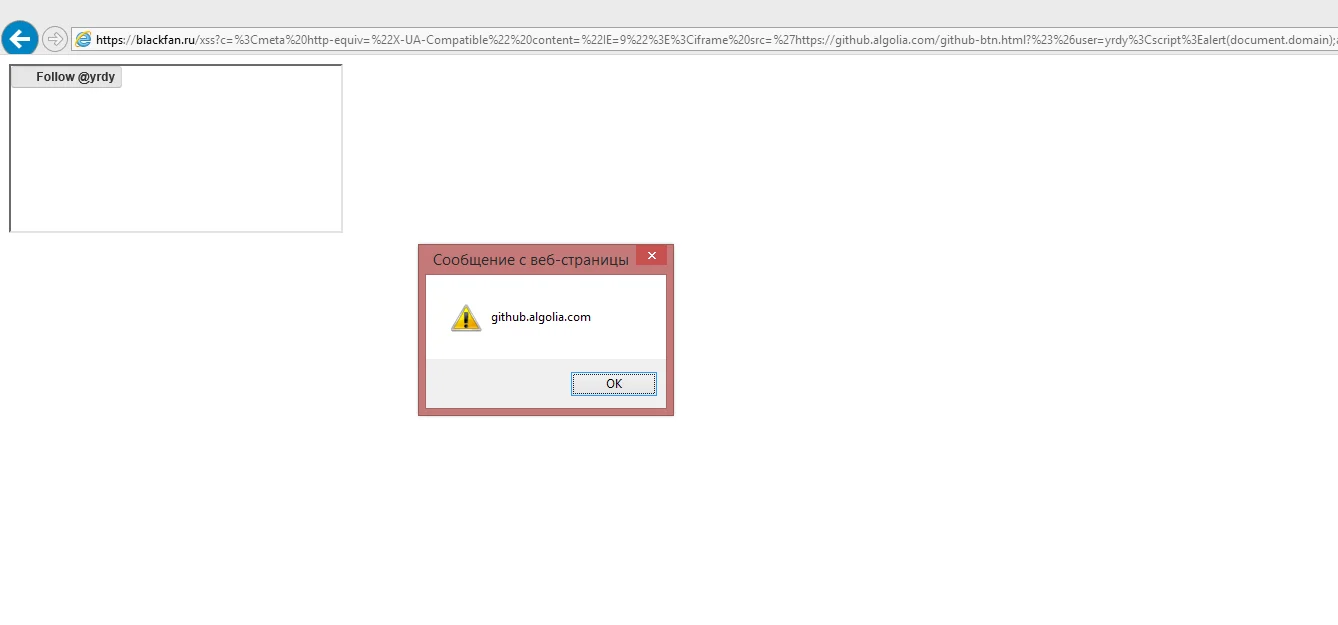
PoC #2 XSS for Internet Explorer (using X-UA-Compatible IE=9)
https://blackfan.ru/xss?c=%3Cmeta%20http-equiv=%22X-UA-Compatible%22%20content=%22IE=9%22%3E%3Ciframe%20src=%27https://github.algolia.com/github-btn.html?%23%26user=yrdy%3Cscript%3Ealert(document.domain);alert(document.cookie);//%26type=follow%27%3E%3C/iframe%3E
Another vulns
Also, this script has potential vulnerabilities using user controlled parameters in the path to the JS script. But for the exploitation it requires additional vulnerability on api.github.com (for example, Open Redirect or user controlled output).
function jsonp(t) {
  var e = document.createElement("script");
  e.src = t + "?callback=callback", head.insertBefore(e, head.firstChild)
}
...
jsonp("follow" == type ? "https://api.github.com/users/" + user : "https://api.github.com/repos/" + user + "/" + repo);
PoC
https://github.algolia.com/github-btn.html?#&user=../../another/endpoint&repo=../../another/endpoint&type=fork
Result
https://api.github.com/another/endpoint?callback=callback
Attachments
Context
Algolia hosted a small helper page at https://github.algolia.com/github-btn.html. It is a button generator: the page reads parameters from the query string and renders a GitHub style button, either a follow button for a user or a fork button for a repository. The parameters that drive it are user, repo and type.
The page reads its parameters with JavaScript. It takes the part of window.location.href after the first ?, splits it on &, then splits each piece on = and stores the values in an array keyed by parameter name. The relevant code is:
        var params = function() {
                for (var t, e = [], o = window.location.href.slice(window.location.href.indexOf("?") + 1).split("&"), r = 0; r < o.length; r++) t = o[r].split("="), e.push(t[0]), e[t[0]] = t[1];
                return e
            }(),
            user = params.user,
            repo = params.repo,
            type = params.type,
 ...
  "follow" == type && (mainButton.className += " github-me", text.innerHTML = "Follow @" + user, button.href = "https://github.com/" + user
Two things stand out in that snippet. The parameter values are used as they appear in the URL. and the user value is concatenated into text.innerHTML when type is follow. The same value is also concatenated into button.href, and later into a JSONP script URL.
Setup
No account, role or special tooling is described. The two proofs of concept are labelled for Chrome and Internet Explorer. The second proof of concept relies on the page being framed and on Internet Explorer's compatibility mode, set through X-UA-Compatible.
Finding it
The parser slices from the first ? in the full URL, so the ?# form still yields parameters. It slices from the first ? in the full URL, so anything after ?# is still parsed as parameters. That means a URL such as github-btn.html?#&user=...&type=follow reaches the same code path as a normal query string, and the user value flows unescaped into innerHTML.
Exploitation
Step 1: HTML injection in Chrome and Internet Explorer
The first payload places markup in user and sets type=follow so the follow branch runs:
https://github.algolia.com/github-btn.html?#&user=<h1><marquee>HTML<br>HTML<br>HTML<br>HTML<br>HTML<br>HTML<br>&type=follow
The ?# makes the parser read everything after it as parameters. user receives the <h1><marquee> markup, and because the follow branch assigns "Follow @" + user to text.innerHTML, the browser parses the markup instead of displaying it as text. The researcher labels this HTML injection for Chrome and Internet Explorer.
Step 2: Script execution in Internet Explorer
The second payload wraps the target in an iframe from an attacker page and forces Internet Explorer into IE=9 compatibility mode:
https://blackfan.ru/xss?c=%3Cmeta%20http-equiv=%22X-UA-Compatible%22%20content=%22IE=9%22%3E%3Ciframe%20src=%27https://github.algolia.com/github-btn.html?%23%26user=yrdy%3Cscript%3Ealert(document.domain);alert(document.cookie);//%26type=follow%27%3E%3C/iframe%3E
Decoded, the c parameter contains a meta tag setting X-UA-Compatible to IE=9 and an iframe pointing at:
The user value is yrdy<script>alert(document.domain);alert(document.cookie);//. The trailing // comments out the rest of the generated line, so the injected script tag survives the concatenation. In IE=9 mode the innerHTML assignment executes the script, and the two alerts show the document domain and the document cookie. The researcher labels this XSS for Internet Explorer.
Step 3: Path traversal into the JSONP URL
The page also builds a JSONP request from the same parameters:
function jsonp(t) {
  var e = document.createElement("script");
  e.src = t + "?callback=callback", head.insertBefore(e, head.firstChild)
}
...
jsonp("follow" == type ? "https://api.github.com/users/" + user : "https://api.github.com/repos/" + user + "/" + repo);
With type=fork, the URL becomes https://api.github.com/repos/ + user + / + repo. The researcher supplied traversal sequences in both parameters:
https://github.algolia.com/github-btn.html?#&user=../../another/endpoint&repo=../../another/endpoint&type=fork
and reports the resulting request as:
https://api.github.com/another/endpoint?callback=callback
This lets the page load a script from a different path on api.github.com than the one intended. The researcher notes that exploitation requires an additional vulnerability on api.github.com, such as an open redirect or user controlled output, so this is presented as a potential issue rather than a working exploit.
Root cause
The follow branch writes the raw user value into innerHTML. and the follow branch writes the raw user value into innerHTML. The same values are concatenated into the JSONP script URL.
Impact
In Internet Explorer the payload runs script that alerts the document domain and the document cookie. In Chrome the researcher demonstrated HTML injection rather than script execution. The JSONP path traversal is only exploitable in combination with a separate flaw on api.github.com.
Fix
The report does not describe a fix.
Variants to test
- Try
?#and#?forms on other pages that parsewindow.location.hrefmanually: a positive result is a parameter value being reflected where a normal query string would not be. - Try markup in any parameter that reaches
innerHTML,outerHTMLordocument.write: a positive result is the markup rendering in the page. - Try
../sequences in parameters concatenated into script or API URLs: a positive result is a request to a different path than intended. - Try forcing older compatibility modes with
X-UA-Compatiblewhen framing a page: a positive result is script execution in a browser where the direct payload does not run.
Hunting notes
Button generators, badge builders and embeddable widgets are common places for this pattern, because they are designed to be framed and to read configuration from the URL. During recon, look for pages that build DOM from location.href rather than location.search, and for innerHTML assignments that include parameter values.
Attachments
What happened, in plain words
Algolia ran a small helper page at https://github.algolia.com/github-btn.html. Its job was simple: you put some settings in the web address, and the page drew a GitHub style button for you. You could ask for a "follow" button for a GitHub user, or a "fork" button for a GitHub repository. The settings were passed as parameters in the address, named user, repo and type.
A parameter is the part of a web address after a question mark, like ?name=value. Websites read these values and use them to decide what to show. The problem here was that the page took the user value and pasted it straight into the page as if it were part of the page's own design, without checking it first. If the value contained formatting instructions (HTML, the language web pages are written in), the browser would follow them. That is the heart of the bug: the page trusted text that a stranger could put in the address bar.
The report shows it could be abused in two ways: to inject HTML, and in Internet Explorer to run JavaScript.
The page and the code behind it
The page is a single static HTML file with JavaScript written inside it. To get the settings, the script looks at the full address of the page (window.location.href), finds the first ?, takes everything after it, splits that text on & (the character that separates parameters), then splits each piece on = (the character that separates a name from its value). The result is stored in a list where each name points to its value.
Here is the relevant code:
        var params = function() {
                for (var t, e = [], o = window.location.href.slice(window.location.href.indexOf("?") + 1).split("&"), r = 0; r < o.length; r++) t = o[r].split("="), e.push(t[0]), e[t[0]] = t[1];
                return e
            }(),
            user = params.user,
            repo = params.repo,
            type = params.type,
 ...
  "follow" == type && (mainButton.className += " github-me", text.innerHTML = "Follow @" + user, button.href = "https://github.com/" + user
Line by line, in plain words:
var params = function() { ... }()runs a small function immediately and stores its result inparams. The result is the list of settings taken from the address.window.location.href.slice(window.location.href.indexOf("?") + 1)finds the first?in the full address and keeps everything after it. This is the key detail: it uses the whole address, not just the part a server would normally treat as parameters..split("&")cuts that text into pieces at every&, so each piece is one setting.- The
forloop goes through each piece, splits it at=, and stores the left side as the name and the right side as the value. user = params.user,repo = params.repo,type = params.typecopy the three settings into variables with those names.- The last line checks whether
typeisfollow. If it is, it adds a CSS class to the button, sets the button's visible text withtext.innerHTML = "Follow @" + user, and sets the button's link withbutton.href = "https://github.com/" + user.
Two things matter in that snippet. First, the values are never decoded or cleaned: whatever text is in the address is used as is. Second, when the button type is follow, the user value is glued into text.innerHTML. innerHTML is a browser feature that means "treat this text as page markup and build it". If the text contains HTML tags, the browser creates real elements from them. The same user value is also glued into the button's link, and later into the address of a script the page loads.
Setting up
The report describes no account, no special role and no special tools. The two proofs of concept are labelled for Chrome and Internet Explorer. The second proof of concept also relies on the page being placed inside a frame (an iframe, a page within a page) and on Internet Explorer's compatibility mode, which can be switched with a setting called X-UA-Compatible.
Finding it
The parser slices from the first ? in the full address, so the ?# form still yields settings. A fragment is the part of an address after a #, normally used to jump to a section of a page and normally not sent to a server. Because the script slices from the first ? in the full address, anything after ?# is still read as settings. So an address like github-btn.html?#&user=...&type=follow reaches exactly the same code as a normal ?user=...&type=follow, and the user value lands in innerHTML without escaping.
Exploitation
Step 1: HTML injection in Chrome and Internet Explorer
The first payload puts markup in user and sets type=follow so the follow branch runs:
https://github.algolia.com/github-btn.html?#&user=<h1><marquee>HTML<br>HTML<br>HTML<br>HTML<br>HTML<br>HTML<br>&type=follow
What each part does:
github-btn.html?#ends the normal address and starts the part the script will still read as settings.&user=<h1><marquee>HTML<br>HTML<br>HTML<br>HTML<br>HTML<br>HTML<br>setsuserto a heading tag containing a scrolling marquee element, with line breaks between repeated words.&type=followmakes the page take the follow branch, which is the branch that writesuserintoinnerHTML.
Because the follow branch assigns "Follow @" + user to text.innerHTML, the browser parses the markup instead of showing it as plain text. The researcher labels this HTML injection for Chrome and Internet Explorer. HTML injection means you can add your own elements to the page; it does not by itself mean you can run code.
Step 2: Script execution in Internet Explorer
The second payload wraps the target in an iframe from an attacker page and forces Internet Explorer into IE=9 compatibility mode:
https://blackfan.ru/xss?c=%3Cmeta%20http-equiv=%22X-UA-Compatible%22%20content=%22IE=9%22%3E%3Ciframe%20src=%27https://github.algolia.com/github-btn.html?%23%26user=yrdy%3Cscript%3Ealert(document.domain);alert(document.cookie);//%26type=follow%27%3E%3C/iframe%3E
The c parameter is URL encoded, which is why it is full of %3C and %22 style sequences. Decoded, it contains a meta tag setting X-UA-Compatible to IE=9 and an iframe pointing at:
What each part does:
- The outer page at
blackfan.ruis the attacker's page. It is only there to load the target inside a frame and to switch the browser's rendering mode. %3Cmeta ...%3Edecodes to ametatag.X-UA-CompatiblewithIE=9tells Internet Explorer to behave like an older version of itself.%3Ciframe src=...%3Edecodes to an iframe whose source is the crafted Algolia address.- In that address,
useris set toyrdy<script>alert(document.domain);alert(document.cookie);//. alert(document.domain)would pop up the domain of the page, andalert(document.cookie)would pop up the page's cookies.- The trailing
//comments out the rest of the generated line, so the injected script tag survives the concatenation.
A cookie is a small piece of data a site stores in your browser and sends back with later requests, often used to keep you logged in. Reading it from another site's page is exactly what an attacker wants. In IE=9 mode the innerHTML assignment executes the script, and the two alerts show the document domain and the document cookie. The researcher labels this XSS for Internet Explorer. XSS, cross-site scripting, means an attacker gets their own script to run as if it came from the victim site.
Step 3: Path traversal into the JSONP URL
The page also builds a request for a script from GitHub's API using the same settings:
function jsonp(t) {
  var e = document.createElement("script");
  e.src = t + "?callback=callback", head.insertBefore(e, head.firstChild)
}
...
jsonp("follow" == type ? "https://api.github.com/users/" + user : "https://api.github.com/repos/" + user + "/" + repo);
Line by line:
function jsonp(t)defines a helper that takes a web addresst.document.createElement("script")makes a new script element in the page.e.src = t + "?callback=callback"sets that script's address to the given address plus a callback parameter. JSONP is an old trick for loading data as a script; thecallbackname tells the remote server which function to call with the data.head.insertBefore(e, head.firstChild)puts the script into the page, which makes the browser fetch and run it.- The final line chooses the address: if
typeisfollow, it useshttps://api.github.com/users/plususer; otherwise it useshttps://api.github.com/repos/plususerplus/plusrepo.
An API is a way for one program to ask another program for data over the web, usually at a fixed address pattern. Here the pattern is meant to be a user or a repository on GitHub. With type=fork, the address becomes https://api.github.com/repos/ + user + / + repo. The researcher supplied traversal sequences in both parameters:
https://github.algolia.com/github-btn.html?#&user=../../another/endpoint&repo=../../another/endpoint&type=fork
../ means "go up one folder" in a file path. Web addresses use the same idea, so a value containing ../ can climb out of the intended folder and point somewhere else. The researcher reports the resulting request as:
https://api.github.com/another/endpoint?callback=callback
This lets the page load a script from a different path on api.github.com than the one intended. The researcher notes that exploitation requires an additional vulnerability on api.github.com, such as an open redirect (a link that sends you to another site) or user controlled output, so this is presented as a potential issue rather than a working exploit.
Root cause
The follow branch writes the raw user value into innerHTML. The same values are concatenated into the JSONP script address.
Impact
In Internet Explorer the payload runs script that alerts the document domain and the document cookie. An origin is the combination of scheme, host and port that a browser uses to decide which pages may touch each other's data. In Chrome the researcher demonstrated HTML injection rather than script execution. The JSONP path traversal is only exploitable in combination with a separate flaw on api.github.com.
Fix
The report does not describe a fix.
Variants to test
- Try
?#and#?forms on other pages that parsewindow.location.hrefmanually: a positive result is a parameter value being reflected where a normal query string would not be. - Try markup in any parameter that reaches
innerHTML,outerHTMLordocument.write: a positive result is the markup rendering in the page. - Try
../sequences in parameters concatenated into script or API addresses: a positive result is a request to a different path than intended. - Try forcing older compatibility modes with
X-UA-Compatiblewhen framing a page: a positive result is script execution in a browser where the direct payload does not run.
Hunting notes
Button generators, badge builders and embeddable widgets are common places for this pattern, because they are designed to be framed and to read configuration from the address. During recon, look for pages that build the page from location.href rather than location.search, and for innerHTML assignments that include parameter values.
Attachments
Glossary
- API: a way for one program to ask another program for data over the web, usually at a fixed address pattern.
- Bounty: a payment a company makes to a researcher who reports a security bug.
- Callback: a parameter that tells a JSONP server which function to call with the data it returns.
- Cookie: a small piece of data a site stores in your browser and sends back with later requests, often used to keep you logged in.
- CSS class: a label attached to an element that a stylesheet uses to decide how it looks.
- DOM: the browser's live model of the page, made of elements the script can read and change.
- Fragment: the part of a web address after a
#, normally used to jump to a section of a page. - HTML: the language web pages are written in, made of tags such as headings and links.
- HTML injection: getting your own markup into someone else's page, without necessarily running code.
- iframe: a page placed inside another page.
- innerHTML: a browser feature that treats a piece of text as markup and builds real elements from it.
- JavaScript: the programming language browsers run to make pages interactive.
- JSONP: an old trick for loading data as a script, using a callback parameter.
- Open redirect: a link on a site that sends you to another site, which an attacker can abuse.
- Origin: the combination of scheme, host and port that a browser uses to decide which pages may touch each other's data.
- Parameter: a name and value pair in a web address after the
?, used to pass settings to a page. - Path traversal: using
../sequences to climb out of an intended folder in a file path or web address. - Payload: the crafted input an attacker sends to trigger a bug.
- Proof of concept (PoC): a small demonstration that a bug can actually be triggered.
- Query string: the part of a web address after the
?that carries parameters. - Recon: the early stage of looking around a target to find things worth testing.
- Severity: a rating of how serious a bug is.
- URL encoding: writing special characters as
%codes so they can travel safely in an address. - XSS (cross-site scripting): getting an attacker's script to run as if it came from the victim site.
- X-UA-Compatible: a setting that tells Internet Explorer which compatibility mode to use.