And Credit Card Number Too
A JavaScript file exposed CSRF and session tokens via cross-site script inclusion (XSSI). An attacker could use these tokens to trigger a security challenge and then retrieve the victim's plaintext email and password from the captcha validation response.
 Published on medium.com
When hunting for security issues, the pursuit for uncharted assets and obscure endpoints often ends up taking the focus away from obvious, but still critical, functionality.
The full write-up lives on its author's site
It belongs to its author, so we link to it rather than copy it. The other two tabs are our own rewrites, checked against it.
Context
PayPal's main login form is the target here, one of the most visited pages on the platform. Around it sits the security challenge, PayPal's main protection against brute-force attacks on authentication. The idea is simple: after a few failed login attempts, the user must solve a reCAPTCHA challenge before trying again. The same mechanism is used in many places, but this write-up focuses on the main login form.
The bug described here is a chain: a cross-site script inclusion (XSSI) leak of session tokens, combined with a captcha validation endpoint that echoes back the user's last login request, including the plain text password. The same vulnerable process was later found on some unauthenticated checkout pages, where it leaked plain text credit card data.
Setup
The write-up does not describe any special accounts, roles, tools or versions. The only precondition is a victim who visits an attacker-controlled page and then logs in to PayPal in the same browser. The proof of concept did not integrate a captcha solving service; that step is described but left out of the code.
Finding it
While exploring PayPal's main authentication flow, the researcher noticed a JavaScript file that contained what appeared to be a CSRF token and a session ID:
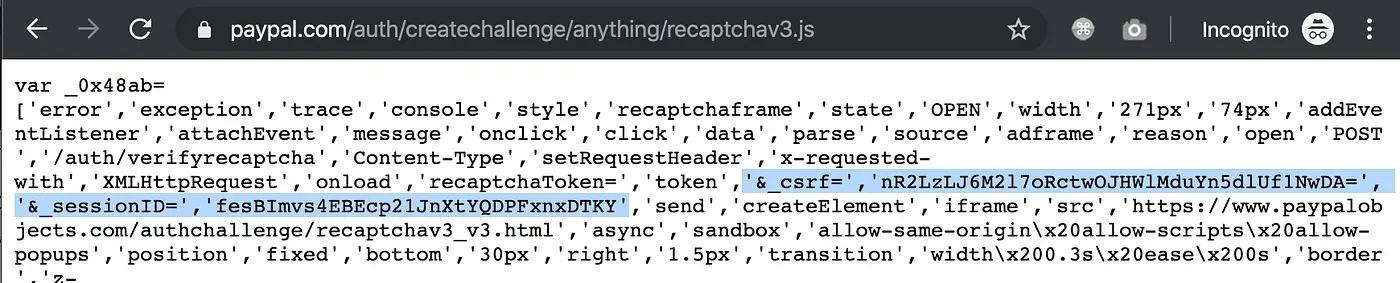
Session data inside a valid JavaScript file is interesting because a malicious page can import that script cross-origin with an HTML <script> tag. This is a cross-site script inclusion (XSSI) attack: the attacker's page cannot read the response body directly, but it can load the script and, depending on how the file is written, extract data from it. A quick test confirmed the XSSI vulnerability. A JavaScript obfuscator randomised variable names on each request, but the interesting tokens were still placed in fairly predictable locations, so they could be retrieved with a bit of extra work.
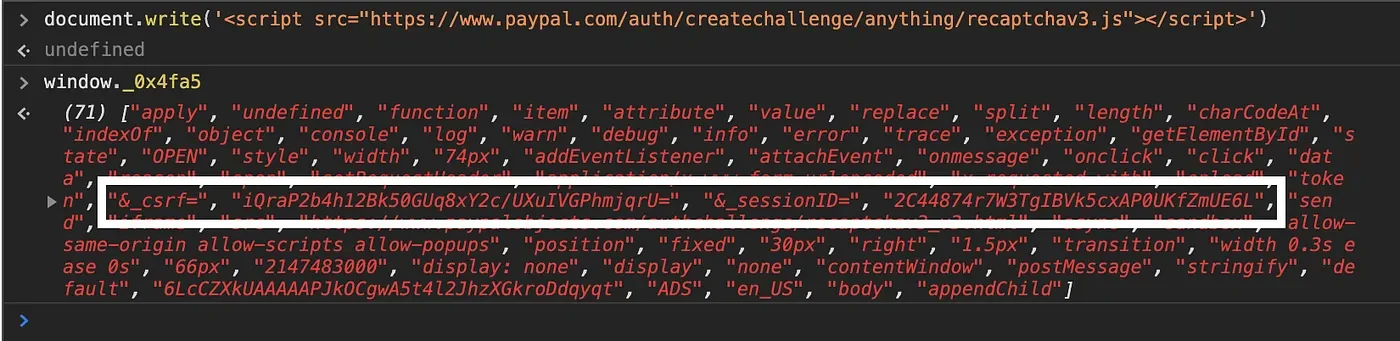
A leaked secret is only useful if it causes damage, so the next question was what _csrf and _sessionID actually do and whether they can be used in a real attack.
Exploitation
Step 1: Test the tokens against classic attacks
After many attempts to replace regular CSRF tokens inside authenticated requests with the value of _csrf, the researcher concluded that a classic cross-site request forgery attack was not possible with this specific token. Likewise, a victim's _sessionID was not enough to impersonate them on PayPal's site.
Step 2: Follow the tokens to their real use
Going back to the vulnerable script and following the tokens showed what they were used for: the security challenge, PayPal's brute-force protection. After a few failed login attempts, the user must solve a reCAPTCHA before trying again.
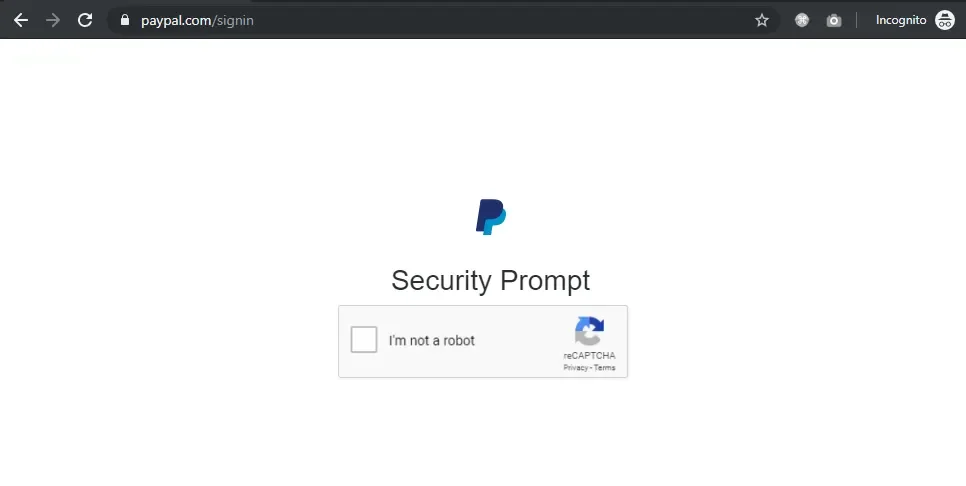
When a possible brute-force attempt is detected, the response to the next authentication attempt is a page containing nothing but a Google captcha. If the user solves it, an HTTP POST request to /auth/validatecaptcha is initiated.
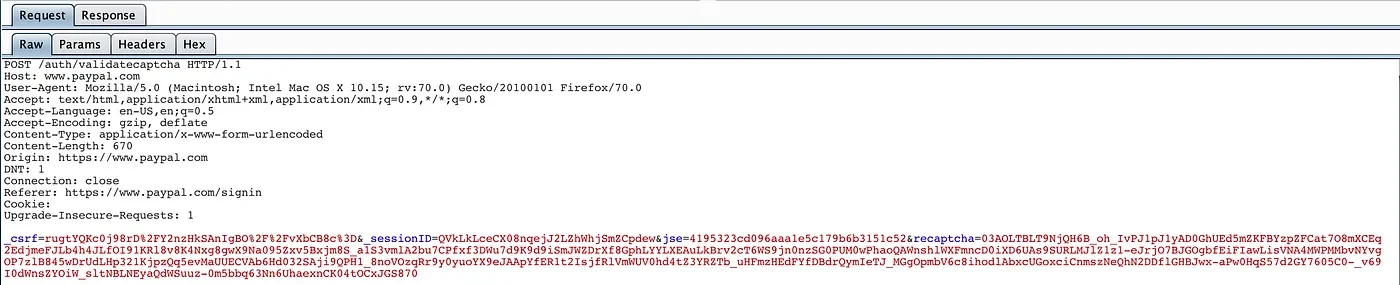
The request body contains the familiar _csrf and _sessionID, plus two other values: jse and recaptcha.
Step 3: Read the captcha validation response
The response to the captcha validation request is meant to re-introduce the user into the authentication flow. To do this, it contains a self-submitting form with all the data from the user's latest login request, including their email and plain text password.
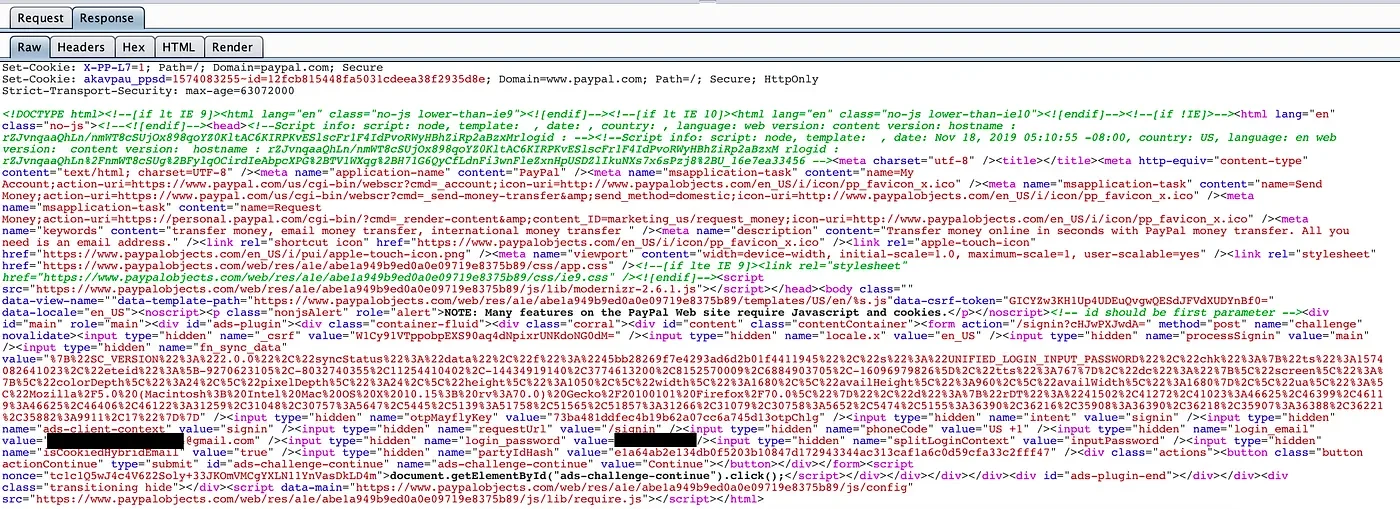
With the right timing and some user interaction, knowing all the tokens used in this request was enough to obtain the victim's PayPal credentials. In a real attack, the only user interaction needed would be a single visit to an attacker-controlled page.
Step 4: Work out the missing parameters
Two parameters were still unknown, and finding them was easier than expected:
- The value of
jsewas not validated at all. recaptchawas the token provided by Google after solving a reCAPTCHA challenge. It was not tied to a specific session, so any valid token, for example one from an automated solving service, would be accepted.
Step 5: Build the proof of concept
The proof of concept demonstrated the whole process except for integrating a captcha solving service. It worked in this order:
- Exploit the XSSI vulnerability to get a set of tokens valid in the victim's session.
- Launch a few authentication requests with random credentials from the victim's browser, simulating a brute-force attempt and triggering the security challenge flow.
- Wait for the victim to log in to PayPal in the same browser. The cached random credentials are then replaced by the user's own email and password.
- Obtain a fresh reCAPTCHA token.
- Retrieve the plain text credentials with a server-side request to the
/auth/validatecaptchaendpoint and display them on the page.
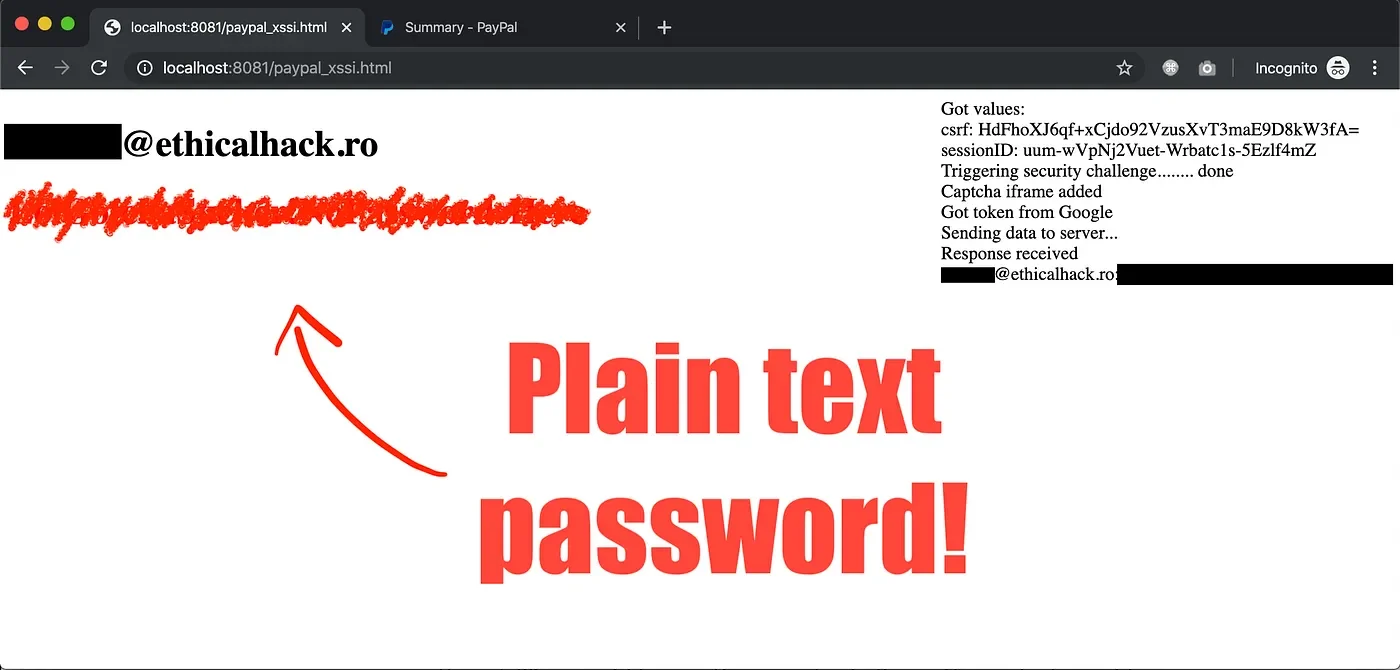
The final page shown by my proof of concept code contained your email and password
The same vulnerable process was later found on some unauthenticated checkout pages, where the same technique leaked plain text credit card data.
Root cause
The /auth/validatecaptcha endpoint accepted a request whose tokens could all be obtained or forged by an attacker: _csrf and _sessionID leaked through XSSI, jse not validated at all, and recaptcha not bound to a session. The endpoint then responded with a self-submitting form containing the user's last login request, including the plain text password. Because the response carried the credentials in clear text, anyone who could make the request with valid tokens could read them.
The design mistake behind the credential leak is storing and replaying passwords in plain text. The write-up states that the whole issue could have been prevented at design time by following one of the oldest pieces of infosec advice: never store passwords in plain text. The existing defences did not stop the chain: the JavaScript obfuscator only randomised variable names, and the reCAPTCHA was not tied to a session, so a token from any source was accepted.
Impact
An attacker who convinces a victim to visit an attacker-controlled page can obtain the victim's PayPal email and plain text password, provided the victim then logs in to PayPal in the same browser. The only user interaction needed is that single visit. The same technique leaked plain text credit card data on some unauthenticated checkout pages. The reward amount corresponds with the bug's 8.0 (High) CVSS score, the same score the researcher had initially suggested.
Fix
The /auth/validatecaptcha endpoint now requires an additional CSRF token that cannot be leaked using cross-site script inclusion. That is the change that was applied. The write-up also argues that the system should never store passwords in plain text, which would have prevented the credential leak at the design stage.
Variants to test
- XSSI on JavaScript files that embed session data. Load a script cross-origin with a
<script>tag and check whether tokens such as CSRF values or session IDs can be extracted. A positive result is a script that returns session-specific values and can be read from another origin, even if variable names are randomised. - Captcha validation endpoints that echo the last request. Submit a captcha validation request and inspect the response for a self-submitting form or other replay of the previous login data. A positive result is a response containing the email, password or other submitted fields in clear text.
- Parameters that are not validated. Change or remove values such as
jsein the captcha request and see whether the endpoint still accepts it. A positive result is a successful response with an arbitrary or missing value. - Captcha tokens not bound to a session. Use a reCAPTCHA token obtained in a different session or from a solving service against the endpoint. A positive result is acceptance of a token that was not issued for that session.
- The same flow on checkout pages. Repeat the chain on unauthenticated checkout pages. A positive result is plain text credit card data returned in a response that an attacker can trigger.
What happened, in plain words
PayPal's login page is one of the busiest pages on the whole platform. It is probably one of PayPal's most visited pages. This story is about a bug that let an attacker steal those two things, the email and the password, from a victim who did nothing more than visit a web page and then log in to PayPal in the same browser.
Before going further, a few words about how the pieces fit together, because the whole attack is a chain of small, ordinary web behaviours that become dangerous when combined.
A web page is a document your browser downloads and displays. It is made of HTML (the structure), CSS (the styling) and JavaScript (the code that runs inside your browser and makes the page interactive). When you open a page, your browser also downloads files that page asks for: images, stylesheets, and JavaScript files. A JavaScript file is just a text file full of code, and the browser runs it.
A cookie is a small piece of text that a website asks your browser to store and send back on every later request to that site. It is how a website remembers who you are between page loads. A session is the server-side record of your logged-in state; the cookie usually carries a session ID, a long random string that points to that record. If someone else gets your session ID, they may be able to act as you, which is why sites guard it carefully.
A token is a value that a server hands out and later checks. A CSRF token (Cross-Site Request Forgery token) is a special token whose only job is to prove that a request came from the site's own pages and not from some other website that is trying to make your browser send requests for you. The attack it defends against, CSRF, works like this: because your browser automatically attaches your cookies to requests to a site, a malicious page can make your browser send a request to that site, and the site would think it was you. The CSRF token is a value the malicious page cannot know, so the request fails without it.
An endpoint is a specific address on a server that accepts requests, for example /auth/validatecaptcha. When people talk about an API, they mean the collection of these addresses and the rules for talking to them: which address accepts what, and what comes back. A request is what your browser sends (a URL, a method such as GET or POST, headers, and sometimes a body with data). A response is what the server sends back (a status code, headers, and usually a body: HTML, JSON, an image, and so on).
A reCAPTCHA is the little puzzle, often a checkbox or a grid of images, that Google provides to websites. Its purpose is to tell humans apart from automated programs. When you solve it, Google gives the site a reCAPTCHA token, a value the site can send to Google to confirm the puzzle was solved. A captcha solving service is a paid service that solves these puzzles automatically and hands back a valid token.
Brute force means guessing. In login terms, it means an attacker tries many passwords, one after another, hoping one is right. Sites defend against it by slowing down or blocking repeated attempts. PayPal's defence here is called the security challenge: after a few failed logins, you must solve a reCAPTCHA before you can try again.
Finally, cross-site script inclusion (XSSI) is a subtle attack. Normally, a web page from one site cannot read the contents of a response from another site; the browser blocks that. But there is an old exception: a page is allowed to include a script from another site with an HTML <script> tag, and the browser will run it. The attacker's page cannot read the script's text directly, but if the script is written in a certain way, the attacker can still extract data from it. Think of it like being unable to read a letter, but being allowed to ask the post office to read it aloud in a way you can interpret.
The bug in this story is a chain: an XSSI leak of session tokens, combined with a captcha validation endpoint that sends back the user's last login request, including the plain text password. The same vulnerable process was later found on some unauthenticated checkout pages, where it leaked plain text credit card data.
Setup
The write-up does not describe any special accounts, roles, tools or versions. The only precondition is a victim who visits an attacker-controlled page and then logs in to PayPal in the same browser. The proof of concept did not integrate a captcha solving service; that step is described but left out of the code.
Finding it
While exploring PayPal's main authentication flow, the researcher noticed a JavaScript file that contained what appeared to be a CSRF token and a session ID:
The image shows the JavaScript file that contained what appeared to be a CSRF token and a session ID. The point is that a file the browser downloads and runs like any other script contained values that are supposed to be secret to the user's session.
Session data inside a valid JavaScript file is interesting because a malicious page can import that script cross-origin with an HTML <script> tag. "Cross-origin" means from a different website: the attacker's page lives on one domain, the script lives on PayPal's domain, and the browser normally keeps those two separate. The <script> tag is the exception. This is a cross-site script inclusion (XSSI) attack: the attacker's page cannot read the response body directly, but it can load the script and, depending on how the file is written, extract data from it.
A quick test confirmed the XSSI vulnerability. A JavaScript obfuscator randomised variable names on each request, but the interesting tokens were still placed in fairly predictable locations, so they could be retrieved with a bit of extra work.
An obfuscator is a tool that rewrites code to make it harder for a human to read, for example by renaming variables to meaningless strings. It is not encryption; the code still runs the same way. Here it changed the names on every request, which sounds like a strong defence, but the values themselves still sat in the same kind of place in the file, so a script could still find them.
The image relates to the obfuscated script, where the interesting tokens were still placed in fairly predictable locations. This is why the obfuscator did not stop the attack: it hid the labels, not the data.
A leaked secret is only useful if it causes damage, so the next question was what _csrf and _sessionID actually do and whether they can be used in a real attack.
Exploitation
Step 1: Test the tokens against classic attacks
After many attempts to replace regular CSRF tokens inside authenticated requests with the value of _csrf, the researcher concluded that a classic cross-site request forgery attack was not possible with this specific token. Likewise, a victim's _sessionID was not enough to impersonate them on PayPal's site.
In plain words: the researcher tried the obvious thing first. If you have a CSRF token, can you use it to forge requests? If you have a session ID, can you become the victim? Both answers were no. This step matters because it shows the tokens were not useful on their own; the value came from where they were used, which is the next step.
Step 2: Follow the tokens to their real use
Going back to the vulnerable script and following the tokens showed what they were used for: the security challenge, PayPal's brute-force protection. After a few failed login attempts, the user must solve a reCAPTCHA before trying again.
The image relates to the security challenge used on the main login form. The idea is simple: a few wrong passwords, then a puzzle. The puzzle is meant to slow down automated guessing, because a program cannot easily solve it.
When a possible brute-force attempt is detected, the response to the next authentication attempt is a page containing nothing but a Google captcha. If the user solves it, an HTTP POST request to /auth/validatecaptcha is initiated.
The image relates to the captcha page and the POST request to /auth/validatecaptcha. An HTTP POST request is a request that carries data in its body, as opposed to a GET request that only asks for a page. Here the browser posts the captcha answer and the session tokens to the server so it can check them.
The request body contains the familiar _csrf and _sessionID, plus two other values: jse and recaptcha.
Step 3: Read the captcha validation response
The response to the captcha validation request is meant to re-introduce the user into the authentication flow. To do this, it contains a self-submitting form with all the data from the user's latest login request, including their email and plain text password.
A self-submitting form is an HTML form that fills itself in and submits itself automatically as soon as the page loads, without the user clicking anything. It is a common trick for moving a user from one step of a flow to the next. Here, the form carried the user's previous login data so the login could continue after the captcha. The problem is that the data it carried included the password, in plain text, meaning not hashed or encrypted, just the characters the user typed.
The image relates to the self-submitting form containing the user's latest login request. This is the heart of the bug: the server was willing to hand the password back to whoever made the request.
With the right timing and some user interaction, knowing all the tokens used in this request was enough to obtain the victim's PayPal credentials. In a real attack, the only user interaction needed would be a single visit to an attacker-controlled page.
Step 4: Work out the missing parameters
Two parameters were still unknown, and finding them was easier than expected:
- The value of
jsewas not validated at all. recaptchawas the token provided by Google after solving a reCAPTCHA challenge. It was not tied to a specific session, so any valid token, for example one from an automated solving service, would be accepted.
A parameter is a named value sent with a request, like a field in a form. "Not validated" means the server did not check it at all: it could be anything, or missing, and the request would still be accepted. "Not tied to a specific session" means the reCAPTCHA token was not checked against the person who solved it, so a token solved anywhere, by anyone or anything, worked here.
Step 5: Build the proof of concept
A proof of concept is a demonstration that the bug is real and exploitable, usually a small program or page built only to show the attack works, not a weaponised tool. The proof of concept demonstrated the whole process except for integrating a captcha solving service. It worked in this order:
- Exploit the XSSI vulnerability to get a set of tokens valid in the victim's session.
- Launch a few authentication requests with random credentials from the victim's browser, simulating a brute-force attempt and triggering the security challenge flow.
- Wait for the victim to log in to PayPal in the same browser. The cached random credentials are then replaced by the user's own email and password.
- Obtain a fresh reCAPTCHA token.
- Retrieve the plain text credentials with a server-side request to the
/auth/validatecaptchaendpoint and display them on the page.
Step 1 uses the script inclusion to read the victim's tokens. Step 2 makes the victim's own browser send a few deliberately wrong logins, which is what triggers the security challenge. Step 3 is the waiting game: the victim then logs in normally, and the server's record of "the latest login request" becomes the real one. Step 4 gets a captcha token from somewhere else. Step 5 is a server-side request, meaning the attacker's own server makes the request rather than the victim's browser, and then shows the result on the page.
The final page shown by my proof of concept code contained your email and password
The final page shown by the proof of concept contained your email and password. That is the whole attack in one screenshot: a page the victim never saw, showing credentials the victim never typed there.
The same vulnerable process was later found on some unauthenticated checkout pages, where the same technique leaked plain text credit card data.
An unauthenticated checkout page is a checkout page you can use without logging in first, for example when paying as a guest. The same flaw, a server echoing back the last submitted data, meant card numbers came back in plain text too.
Root cause
The /auth/validatecaptcha endpoint accepted a request whose tokens could all be obtained or forged by an attacker: _csrf and _sessionID leaked through XSSI, jse not validated at all, and recaptcha not bound to a session. The endpoint then responded with a self-submitting form containing the user's last login request, including the plain text password. Because the response carried the credentials in clear text, anyone who could make the request with valid tokens could read them.
The design mistake behind the credential leak is storing and replaying passwords in plain text. The write-up states that the whole issue could have been prevented at design time by following one of the oldest pieces of infosec advice: never store passwords in plain text. The existing defences did not stop the chain: the JavaScript obfuscator only randomised variable names, and the reCAPTCHA was not tied to a session, so a token from any source was accepted.
"Replaying" here means sending the same data back again later. A password should normally be turned into a hash, a one-way scrambled value that can be checked but not turned back into the password. If the server only ever holds the hash, a bug that leaks the stored value does not leak the password itself. Here the password was kept and sent back as typed, so a leak was a full credential leak.
Impact
An attacker who convinces a victim to visit an attacker-controlled page can obtain the victim's PayPal email and plain text password, provided the victim then logs in to PayPal in the same browser. The only user interaction needed is that single visit. The same technique leaked plain text credit card data on some unauthenticated checkout pages. The reward amount corresponds with the bug's 8.0 (High) CVSS score, the same score the researcher had initially suggested.
CVSS is a standard scoring system for the severity of a security bug. Scores run from 0 to 10, and 8.0 falls in the High band. The score is a shared language for comparing bugs, not a measure of how much money a bug is worth.
Fix
The /auth/validatecaptcha endpoint now requires an additional CSRF token that cannot be leaked using cross-site script inclusion. That is the change that was applied. The write-up also argues that the system should never store passwords in plain text, which would have prevented the credential leak at the design stage.
In plain words: the endpoint now asks for one more proof that the request came from PayPal's own pages, and that proof is not sitting in a script an attacker can load. The deeper lesson is about design: if the password had never been kept in a form that could be sent back, the endpoint could not have leaked it even when the tokens were known.
Variants to test
These are the same checks, phrased for someone learning to look for this class of bug. Each one describes what to try and what a positive result looks like.
- XSSI on JavaScript files that embed session data. Load a script cross-origin with a
<script>tag and check whether tokens such as CSRF values or session IDs can be extracted. A positive result is a script that returns session-specific values and can be read from another origin, even if variable names are randomised. - Captcha validation endpoints that echo the last request. Submit a captcha validation request and inspect the response for a self-submitting form or other replay of the previous login data. A positive result is a response containing the email, password or other submitted fields in clear text.
- Parameters that are not validated. Change or remove values such as
jsein the captcha request and see whether the endpoint still accepts it. A positive result is a successful response with an arbitrary or missing value. - Captcha tokens not bound to a session. Use a reCAPTCHA token obtained in a different session or from a solving service against the endpoint. A positive result is acceptance of a token that was not issued for that session.
- The same flow on checkout pages. Repeat the chain on unauthenticated checkout pages. A positive result is plain text credit card data returned in a response that an attacker can trigger.
Glossary
- API: the set of addresses and rules a server offers so that programs (and browsers) can talk to it.
- Brute force: guessing a password or other secret by trying many possibilities in a row.
- Captcha: a puzzle meant to be easy for a human and hard for a program.
- Captcha solving service: a paid service that solves captchas automatically and returns a valid token.
- Cookie: a small piece of text a site asks your browser to store and send back on later requests, often used to remember who you are.
- Cross-origin: from a different website (different domain) than the one the page belongs to.
- CSRF (Cross-Site Request Forgery): an attack where a malicious page makes your browser send a request to another site, relying on your browser attaching your cookies automatically.
- CSRF token: a secret value a site puts in its forms and checks on the server, so that requests from other sites fail.
- CVSS: a standard 0 to 10 score for how severe a security bug is.
- Endpoint: a specific address on a server that accepts requests, such as
/auth/validatecaptcha. - Hash: a one-way scrambled form of a value, used to check a password without storing the password itself.
- HTTP POST request: a request that carries data in its body, used when submitting forms or sending information to a server.
- JavaScript: the programming language that runs inside your browser and makes web pages interactive.
- JavaScript obfuscator: a tool that rewrites code to make it harder for a human to read, for example by renaming variables.
- Parameter: a named value sent with a request, like a field in a form.
- Plain text: data stored or sent exactly as typed, with no encryption or hashing.
- Proof of concept: a small demonstration that a bug is real and can be exploited.
- reCAPTCHA: Google's captcha service, which gives the site a token when a puzzle is solved.
- reCAPTCHA token: the value Google issues after a puzzle is solved, which a site can check.
- Request: what a browser (or a program) sends to a server: a URL, a method, headers and sometimes a body.
- Response: what the server sends back: a status code, headers and usually a body.
- Security challenge: PayPal's brute-force protection that asks for a captcha after a few failed logins.
- Self-submitting form: an HTML form that fills itself in and submits itself automatically when the page loads.
- Server-side request: a request made by a server rather than by a browser.
- Session: the server-side record of your logged-in state, usually pointed to by a session ID in a cookie.
- Session ID: a long random string that identifies your session to the server.
- Token: a value a server hands out and later checks, used to prove identity or origin.
- Unauthenticated checkout page: a checkout page you can use without logging in, for example as a guest.
- XSSI (Cross-Site Script Inclusion): an attack where a malicious page loads another site's script with a
<script>tag and extracts data from it, even though it cannot read the response directly.



