A CSP-bypass XSS via GitLab Flavored Markdown render: A bypass of CVE-2025-9222

GitLab
Originally disclosed on GitLab
- Fixed in 54 days
- Disclosed after 54 days
⚠️ Please read the process on how to fix security issues before starting to work on the issue. Vulnerabilities must be fixed in a security mirror.
HackerOne report #3502450 by yvvdwf on 2026-01-09, imported by @fvpotvin:
Report | Attachments | How To Reproduce
HackerOne Analyst Summary
Summary of the issue
The researcher found Stored XSS with payload injected in JSON file in the project. The payload can be fetched from tag name, and linked to the label of a snippet.
The researcher mentioned that this is a bypass of previous fix in CVE-2025-9222 #3297483.
The researcher shared details how to bypass the previous fix:
The patch allows in to hyperlink injecting
"character which will break html elements once being redacted. This leads to arbitrary html injection, then XSS.
Steps to reproduce
- As the victim, connect self-hosted GDK, with latest commit
18.8.0-pre c240392075e-> Rungdk rails consoleto start console -> EnterFeature.enable(:markdown_placeholders)to enable feature flag - As the attacker, sign in attacker's account on GDK -> Create public group, called
group450-> Create public project in the group, calledproject450:
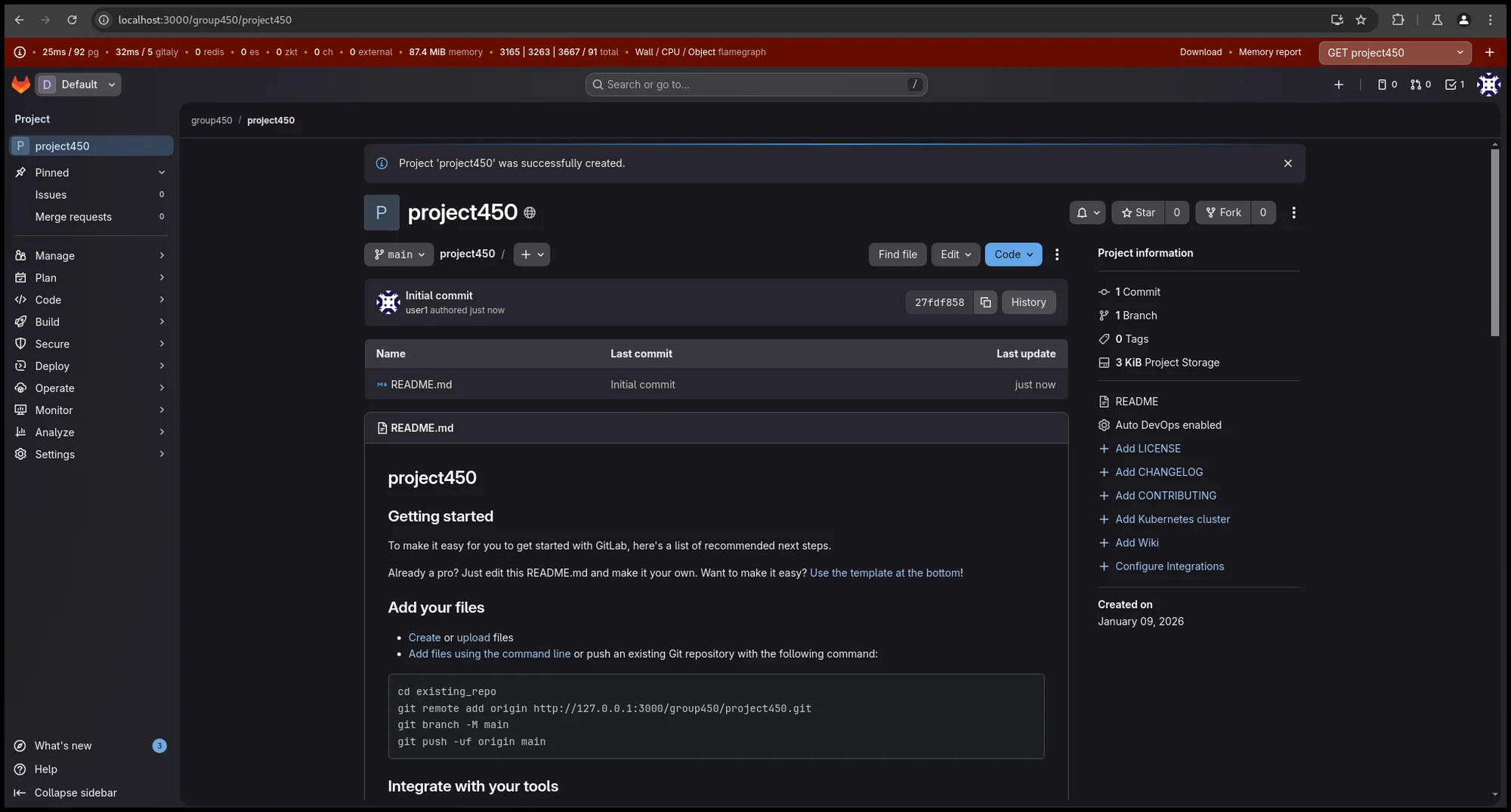
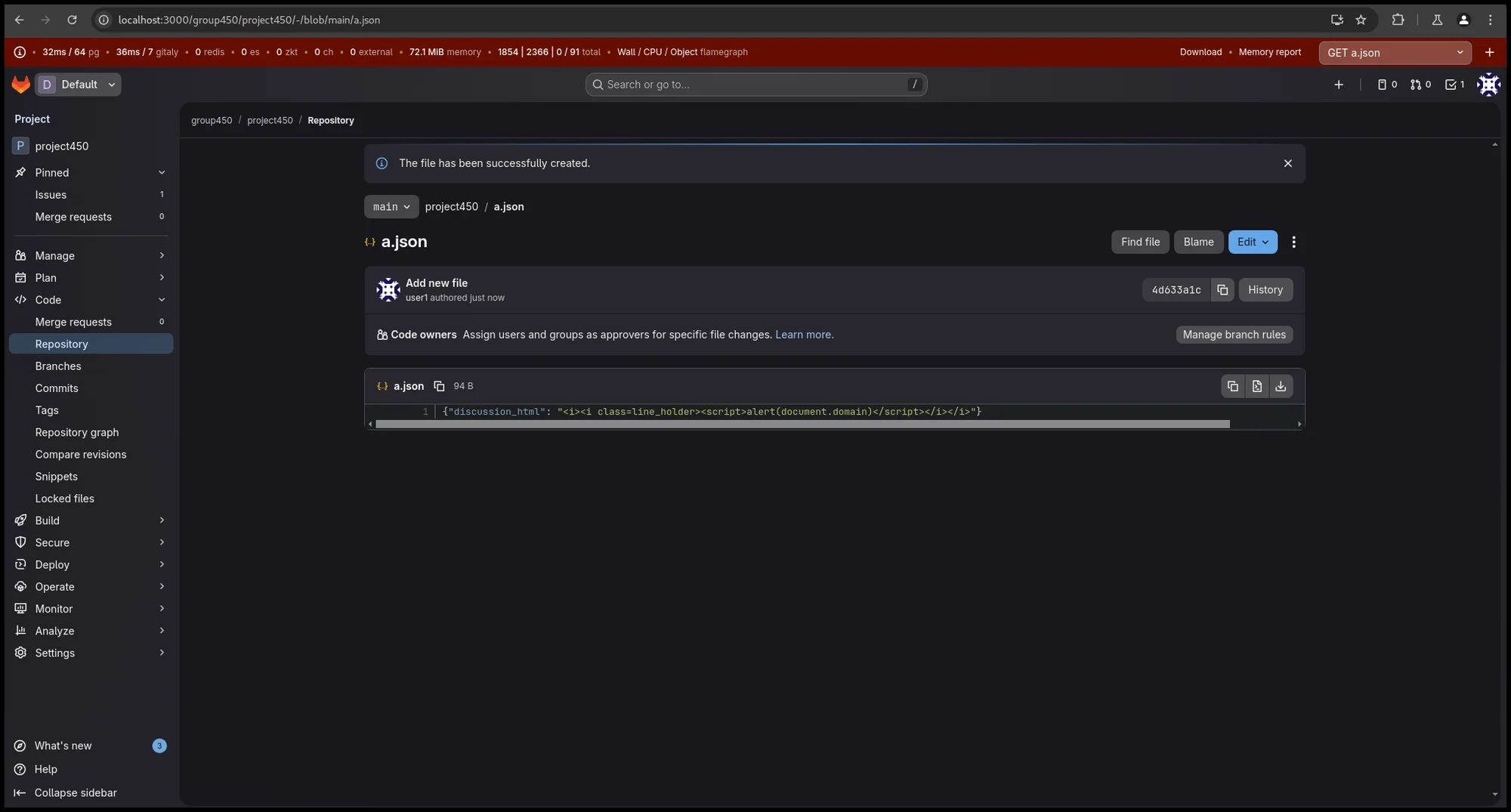
- As the attacker, add
a.jsonin the project, with following content:
{
  "discussion_html": "<i><i class=line_holder><script>alert(document.domain)</script></i></i>"
}
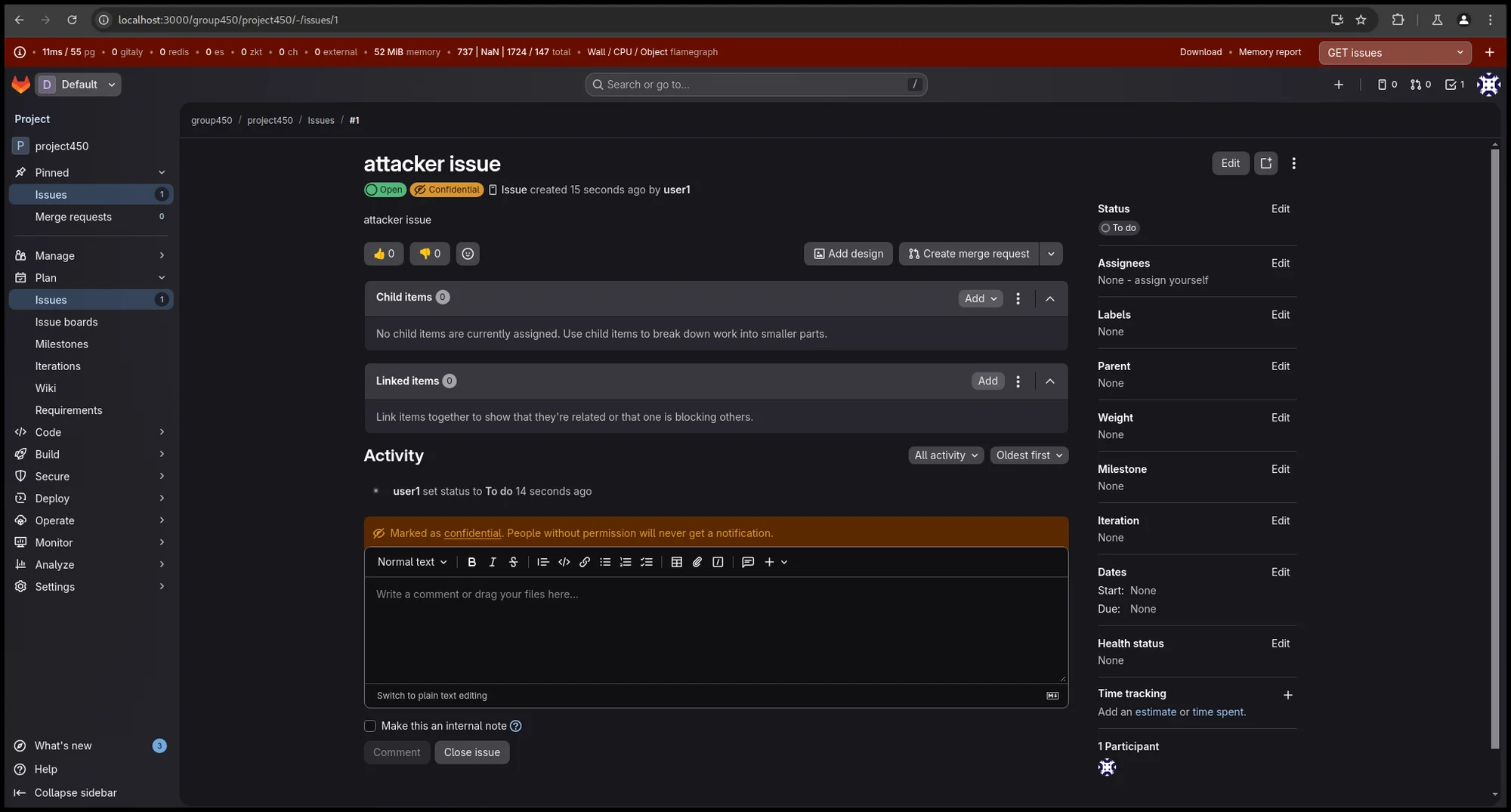
- As the attacker, in the project, create a confidential issue with any content:
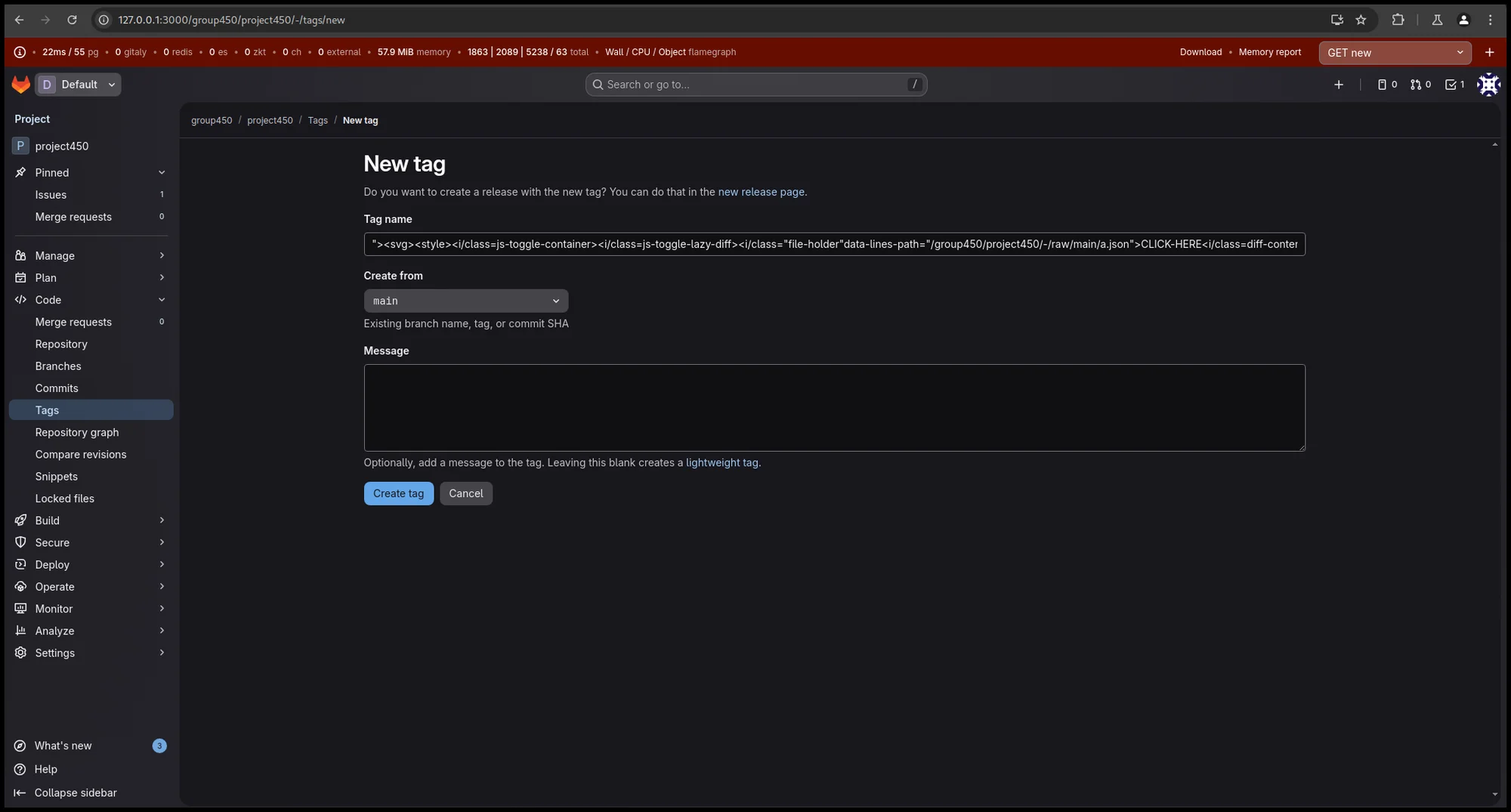
- As the attacker, go to Code -> Tags -> New tag -> In Tag name, add following payload -> Create tag:
"><svg><style><i/class=js-toggle-container><i/class=js-toggle-lazy-diff><i/class="file-holder"data-lines-path="/group450/project450/-/raw/main/a.json">CLICK-HERE<i/class=diff-content><table><tbody/></table></i></i></i></style></svg><!--
- As the attacker, go to Snippets -> New snippet -> Enter any title -> Switch to plain text editing -> Enter following payload -> Fill out all necessary information -> Select Public -> Create snippet:
<a href="http://127.0.0.1:3000/group450/project450/-/issues/1">
  {{media:11}}
</a>
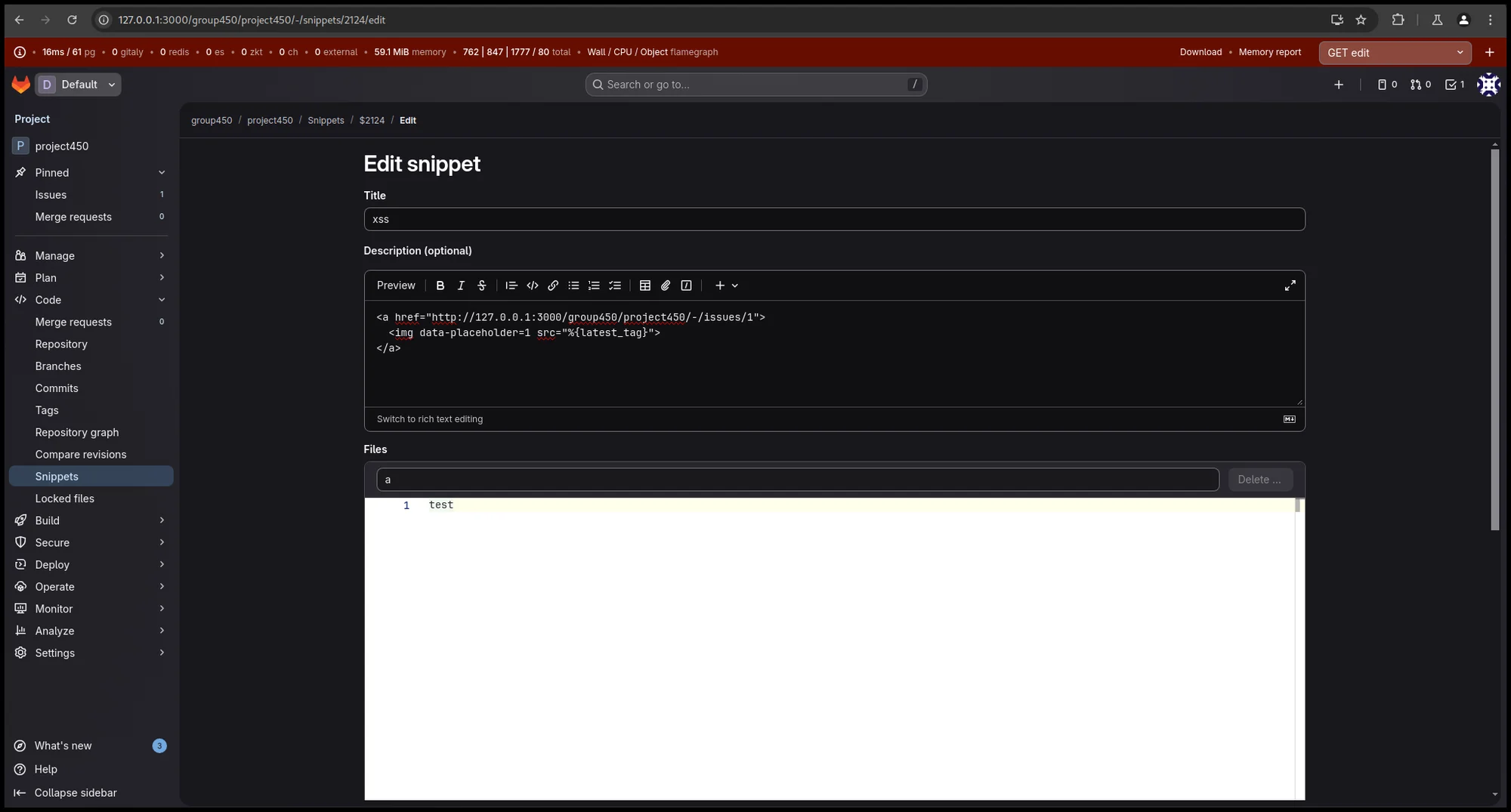
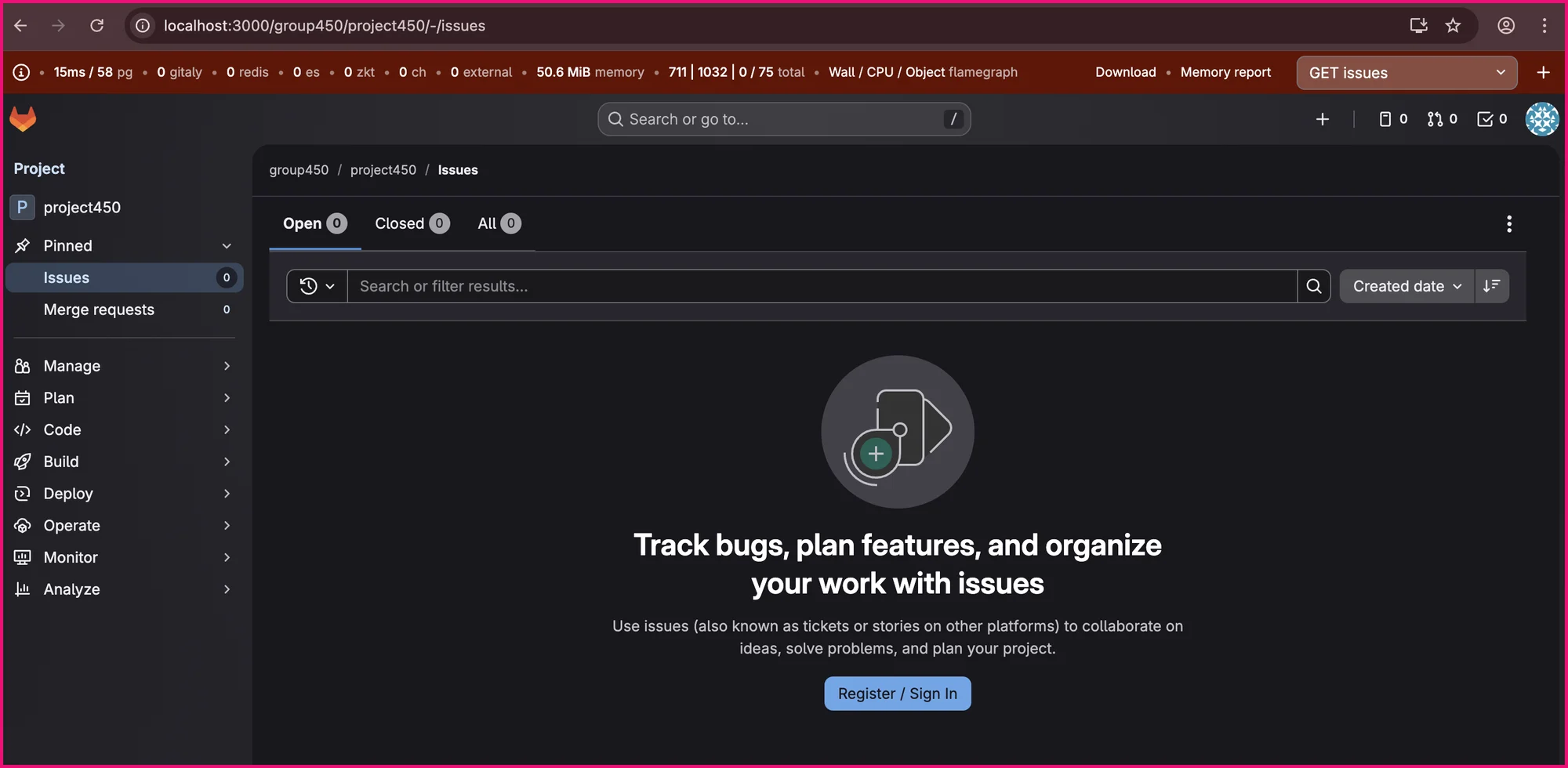
- As the victim, in victim's browser, sign in victim's non-root/regular user account on GDK -> Go to attacker's project -> Issues. You can see victim cannot see attacker's confidential issue, as expected:
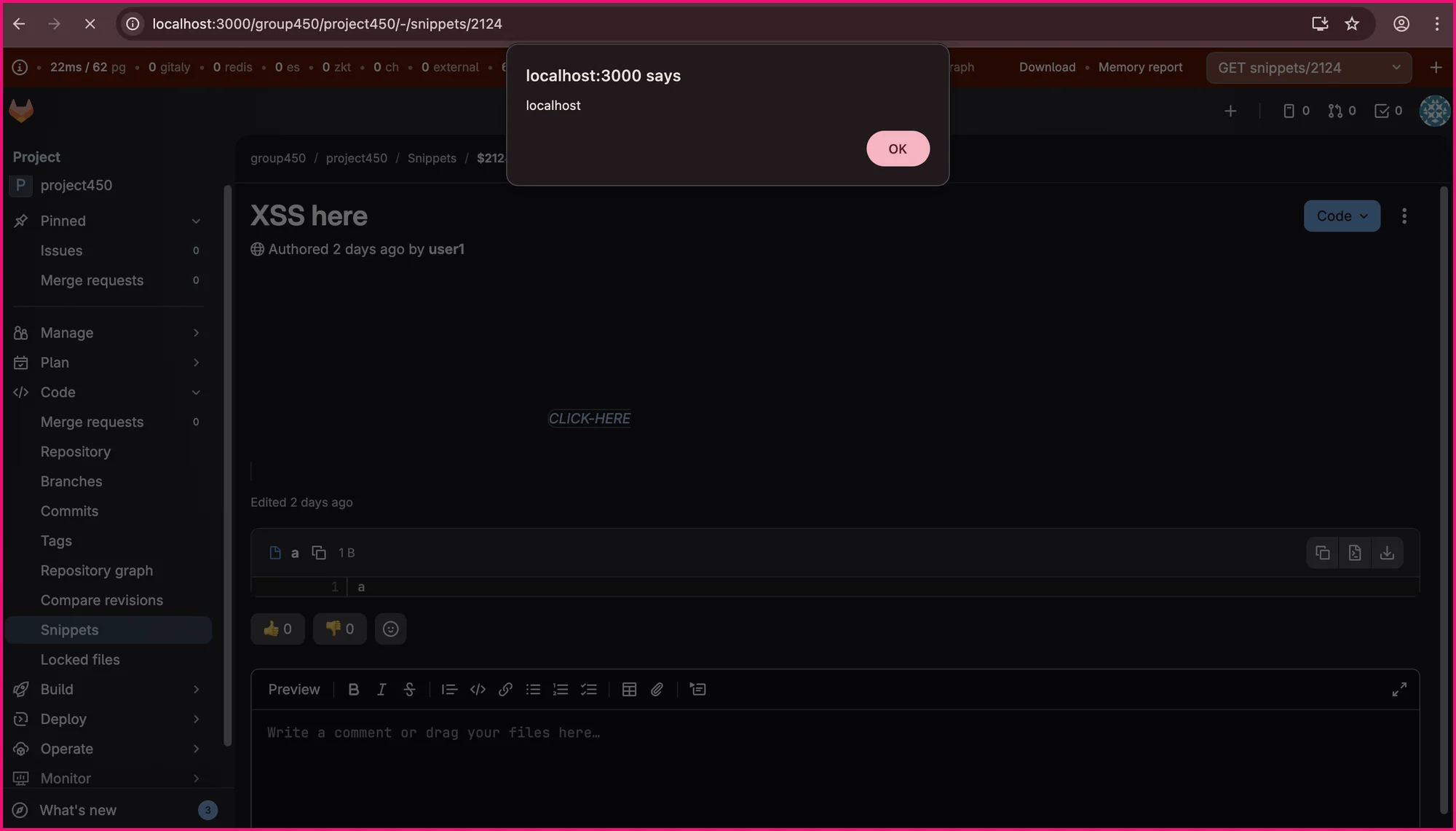
- As the victim, go to Snippets -> Open attacker's snippet -> Click CLICK-HERE. You can see payload triggered in the victim's browser:
Impact statement
The impact of a successful XSS exploitation varies. In a worst-case scenario, an attacker is able to execute JavaScript code within the victim's browser. This opens the door to many scenarios of which the most common are:
- Session Hijacking: An attacker might be able to steal the user's cookies if no proper flags are set. As an example, the "HttpOnly" flag.
- User Impersonation: An attacker might be able to interact with user data or settings and in certain scenarios bypass the CSRF protection by deploying a payload that retrieves the CSRF token automatically and submits legitimate requests to the endpoint.
- Client-Side Attacks: An attacker is also able to inject a JavaScript payload that interacts with the victim's browser allowing for the delivery of exploits and thus affecting the end user's perimeter.
If you have any questions or concerns about this report, feel free to assign it to H1 Triage via the action picker with a comment indicating your request.
Original Report
Hello,
Gitlab recently released a patch to address my XSS report. Although this patch fixed the payload I used to trigger XSS but it still can be bypassed by using other kind of payloads.
The patch allows in to hyperlink injecting " character which will break html elements once being redacted. This leads to arbitrary html injection, then XSS.
Reproduce
The following steps are to reproduce on a self-managed instance runing Gitlab-ee 18.7.1
Step 0: Enable markdown_placeholders
- start Rails console:
sudo gitlab-rails console - then, enter:
Feature.enable(:markdown_placeholders)
Step 1. Create a new public project group-a/b:
- open Gitlab, then create a public new group
group-a, then a public projectb - note: the project path
group-a/bis important as it is used in Step 4
Step 2. Create a confidential issue
- title and description as you want
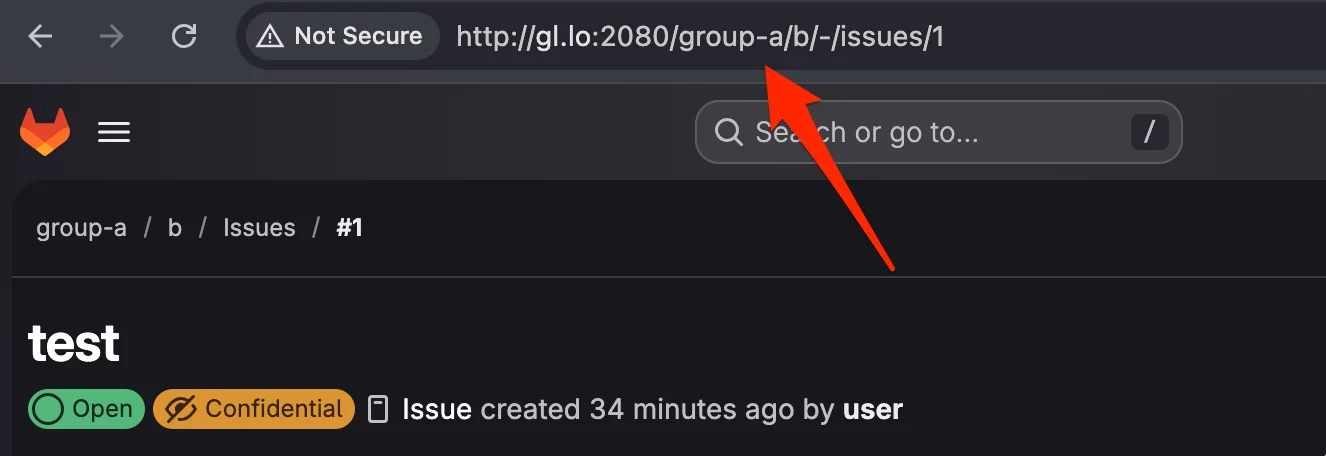
Turn on confidentiality: Limit visibility to project members with at least the Planner role: checked- Note its url, e.g.,
http://gl.lo:2080/group-a/b/-/issues/1(it will be used in Step 5)
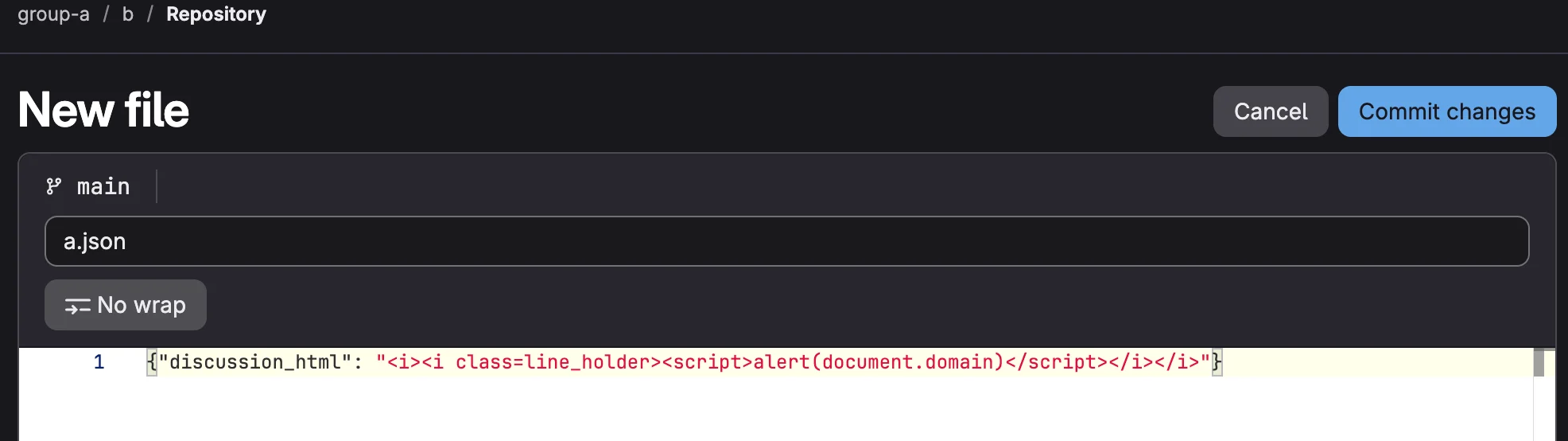
Step 3. Add payload
- add a
a.jsonfile into the project using the following content:
{"discussion_html": "<i><i class=line_holder><script>alert(document.domain)</script></i></i>"}
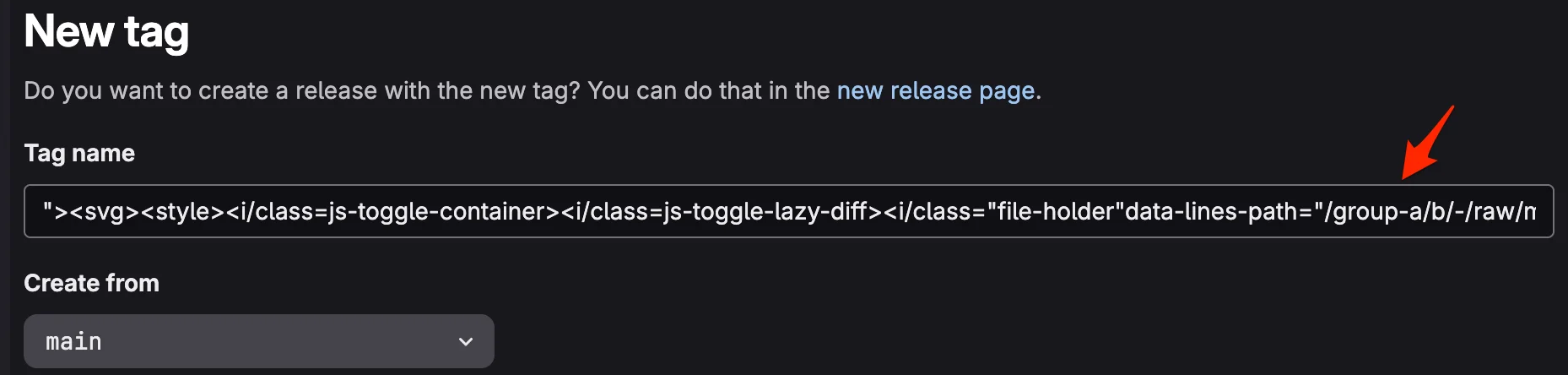
Step 4. Create a new tag
- goto
Code / Tags, then create a new tag using the following Tag name:
"><svg><style><i/class=js-toggle-container><i/class=js-toggle-lazy-diff><i/class="file-holder"data-lines-path="/group-a/b/-/raw/main/a.json">CLICK-HERE<i/class=diff-content><table><tbody/></table></i></i></i></style></svg><!--
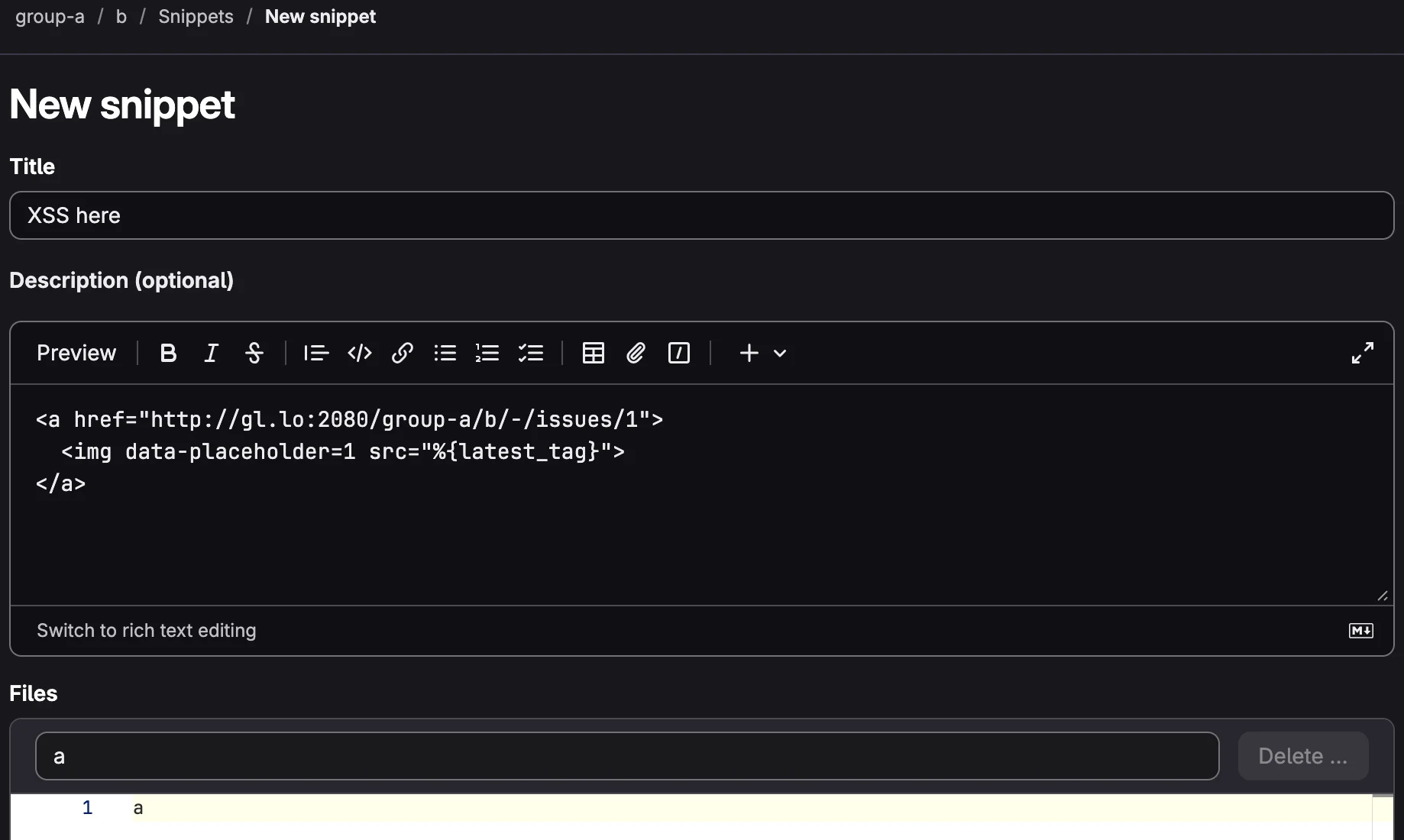
Step 5. Create a snippet
- go to
Code / Snippets, then create a new public snippet within the following parameters:- Title:
XSS here - Description (note: you need to
Switch to plain text editing) :
- Title:
<a href="http://gl.lo:2080/group-a/b/-/issues/1">
  {{media:12}}
</a>
- Files:
a - Visibility level:
Public
Step 6. Exploit
- In your web browser, view the snippet in a new incognito window, then click on
CLICK-HERE, you should see a popup which is created by the javascript created in Step 3
Impact
Stored-XSS with CSP-bypass allows attackers to execute arbitrary actions on behalf of victims at the client side.
Attachments
Warning: Attachments received through HackerOne, please exercise caution!
How To Reproduce
Please add reproducibility information to this section:
Context
GitLab renders user-supplied Markdown through Banzai, its HTML pipeline. A relatively new feature flag, markdown_placeholders, changes how the pipeline handles placeholders: instead of leaving raw HTML in place while the document is processed, it swaps certain fragments for placeholder tokens and restores them at the end in a post-filter (lib/banzai/filter/placeholders_post_filter.rb).
The report concerns a stored cross-site scripting issue that survives GitLab's Content Security Policy, because the injected script is not written inline by the attacker but is loaded from a JSON file hosted in the same project. The researcher describes it as a bypass of the fix shipped for CVE-2025-9222 (HackerOne report 3297483), released in the 18.7.1 patch release of January 2026.
The feature that is abused is ordinary GitLab Flavored Markdown rendering: tag names, snippet descriptions and issue references are all rendered as Markdown/HTML, and the placeholder post-filter is what puts the attacker-controlled fragments back into the page.
Setup
Two variants of the environment appear in the report.
Self-managed instance (original report):
- GitLab EE 18.7.1, self-managed.
- The
markdown_placeholdersfeature flag must be enabled, which the researcher does from the Rails console.
GDK instance (triage reproduction):
- Self-hosted GDK at commit
18.8.0-pre c240392075e. - The same feature flag enabled via
gdk rails console.
Accounts and roles:
- An attacker account, which only needs to be able to create a public group, a public project, a confidential issue, a tag and a public snippet.
- A victim account, described as a non-root/regular user. The victim must be able to browse the attacker's public project and open the attacker's public snippet.
Two project paths are used across the two write-ups: group-a/b in the original report and group450/project450 in the triage reproduction. The path matters because it is embedded in the payload.
Finding it
The researcher had previously reported an XSS (HackerOne report 3297483) that was fixed in the 18.7.1 patch release. The fix was incomplete. In the researcher's words:
The patch allows in to hyperlink injecting
"character which will break html elements once being redacted. This leads to arbitrary html injection, then XSS.
The HackerOne analyst summary restates the same point: the payload is injected into a JSON file in the project, fetched from a tag name, and linked to the label of a snippet. The patch allowed a double quote into a hyperlink, and when the placeholder is redacted back into the document that quote breaks the HTML element, giving arbitrary HTML injection and then XSS.
The CSP bypass comes from the fact that the script itself is not inline. The script is not inline: it is stored in a JSON file in the project, and the report describes the result as a CSP bypass. Because the script arrives through a same-origin resource that the application itself loads, the CSP does not block it.
Exploitation
The original report uses a self-managed GitLab EE 18.7.1 instance. The steps below follow it, with the triage reproduction noted where it differs.
Step 0: Enable markdown_placeholders
Start the Rails console and enable the feature flag:
sudo gitlab-rails console
Then, inside the console:
Feature.enable(:markdown_placeholders)
On GDK the equivalent is gdk rails console followed by the same Feature.enable(:markdown_placeholders) call. Without this flag the placeholder post-filter path is not exercised and the payload does not render.
Step 1: Create a public project group-a/b
Create a public group group-a, then a public project b inside it. The researcher notes that the project path group-a/b is important because it is used in Step 4. In the triage reproduction the names are group450 and project450.
Step 2: Create a confidential issue
Create an issue with any title and description, with the confidentiality option checked:
Turn on confidentiality: Limit visibility to project members with at least the Planner role: checked
Note its URL, for example:
http://gl.lo:2080/group-a/b/-/issues/1
This URL is used in Step 5.
Step 3: Add the payload file
Add a file a.json to the project with the following content:
{"discussion_html": "<i><i class=line_holder><script>alert(document.domain)</script></i></i>"}
The discussion_html value contains the script that will run in the victim's browser. The value contains the actual script that will run in the victim's browser. The script is stored in a JSON file in the project rather than written inline, and the report describes the result as a CSP bypass.
Step 4: Create a tag with the injection payload
Go to Code / Tags and create a new tag whose name is:
"><svg><style><i/class=js-toggle-container><i/class=js-toggle-lazy-diff><i/class="file-holder"data-lines-path="/group-a/b/-/raw/main/a.json">CLICK-HERE<i/class=diff-content><table><tbody/></table></i></i></i></style></svg><!--
The important parts:
- The leading
">closes whatever attribute the placeholder post-filter has placed the tag name into, breaking out of the element. CLICK-HEREis the visible text the victim will click.
In the triage reproduction the same payload is used with the path /group450/project450/-/raw/main/a.json.
Step 5: Create a public snippet
Go to Code / Snippets and create a new public snippet with:
- Title:
XSS here - Description, entered after choosing
Switch to plain text editing:
<a href="http://gl.lo:2080/group-a/b/-/issues/1">
  {{media:12}}
</a>
- Files:
a - Visibility level:
Public
The link points at the confidential issue from Step 2. The link points at the confidential issue from Step 2, which the victim cannot open. The snippet is the delivery vehicle: it is public, so the victim can open it, and its description is where the injected markup appears.
Step 6: Trigger the payload
Open the snippet in a new incognito window and click CLICK-HERE. The researcher states that a popup appears, created by the JavaScript from Step 3.
In the triage reproduction the victim is a non-root/regular user who first visits the attacker's project Issues page and confirms that the confidential issue is not visible, as expected:
Then the victim goes to Snippets, opens the attacker's snippet and clicks CLICK-HERE. The payload fires in the victim's browser:
Root cause
The placeholder post-filter in lib/banzai/filter/placeholders_post_filter.rb restores placeholder content into the rendered HTML. The fix for CVE-2025-9222 allowed a " character to pass through into a hyperlink context. When the placeholder is redacted back into the document, that quote terminates the attribute it was placed in, and the rest of the attacker-controlled string is parsed as markup. That gives arbitrary HTML injection, and from there XSS.
The CSP does not stop the final script because the script is not inline in the page. The injected markup only sets up a lazy-loaded diff container pointing at a raw JSON file in the same project. The report does not go further into the exact CSP directives involved; the bypass is described at this level.
The confidential issue in Step 2 is not the source of the script. It is there to show that the victim has no legitimate access to the linked resource, so the payload is not simply reflecting content the victim could already read.
Impact
The researcher's impact statement is deliberately hedged: the impact of a successful XSS exploitation varies. In a worst-case scenario an attacker can execute JavaScript in the victim's browser. The report lists the common consequences:
- Session hijacking: stealing the user's cookies if proper flags, such as
HttpOnly, are not set. - User impersonation: interacting with user data or settings, and in some scenarios bypassing CSRF protection by deploying a payload that retrieves the CSRF token automatically and submits legitimate requests to the endpoint.
- Client-side attacks: injecting a JavaScript payload that interacts with the victim's browser, allowing delivery of exploits and affecting the end user's perimeter.
The original report summarises it as stored XSS with CSP bypass that allows attackers to execute arbitrary actions on behalf of victims at the client side. The conditions are that the victim opens the attacker's public snippet and clicks the injected element, and that the instance has the markdown_placeholders feature flag enabled.
Fix
The report does not describe the fix that was applied for this bypass. What it does say is that the previous fix, in the 18.7.1 patch release, was insufficient because it still allowed a " character into the hyperlink context.
Variants to test
These follow from the mechanism described in the report; each is a concrete thing to try on a GitLab instance with markdown_placeholders enabled.
- Different attribute-breaking characters. The report names
"specifically. Try other characters that can terminate or alter an attribute in the restored context and see whether the tag name still breaks out of the element. A positive result is markup from the tag name appearing as elements in the rendered page rather than as text. - Different placeholder sources. The report uses a tag name and a snippet description. Try other fields that pass through the placeholder post-filter (issue titles, milestone names, branch names) and check whether the same breakout is possible. A positive result is the same kind of structural break in the rendered HTML.
- Different lazy-load containers. The payload uses
js-toggle-container,js-toggle-lazy-diff,file-holderanddiff-contentwithdata-lines-path. Try other front-end components that fetch a URL from a data attribute and inject the response. A positive result is a request from the victim's browser to an attacker-controlled path whose response is rendered as HTML. - Different JSON fields. The report uses
discussion_html. Try other keys that the front-end reads from a lines file. A positive result is a script executing from a field other thandiscussion_html. - Confidentiality as a signal. Repeat the setup with a confidential resource the victim cannot access and confirm the victim still cannot read it directly while the payload still fires. A positive result is the same behaviour as in the report: no direct access, but script execution through the snippet.
Hunting notes
This kind of bug tends to hide in the boundary between a Markdown pipeline and the front-end code that consumes its output. The placeholder post-filter is a good example: it takes strings from many sources (tag names, snippet descriptions, references) and reinserts them into HTML, so any character that is meaningful in an attribute context is a candidate for a breakout.
The signals during recon are:
- A recent security patch release that touches the Markdown pipeline. The researcher started from the fix for CVE-2025-9222 and looked for what the fix still allowed.
- Feature flags that change rendering behaviour, such as
markdown_placeholders. If a flag is off by default, the bug may only be reachable once it is enabled, which is worth noting in the report. - Front-end components that read a URL from a data attribute and inject the response. These are the natural CSP bypass gadgets, because the script arrives through a same-origin fetch rather than an inline tag.
In the triage reproduction the victim is a regular, non-root user who confirms the confidential issue is not visible, then clicks the injected element in the public snippet and the payload fires. That combination, a low-privilege victim, a resource they cannot read, and script execution from a public page, is what makes the report convincing.
That makes the bypass easy for triage to confirm.
What happened, in plain words
GitLab is a website where teams keep their code, their notes and their to-do lists in one place. Like most such sites, it lets people write text with simple formatting marks (this is called Markdown) and it turns that text into a web page. The part of GitLab that does the turning is called Banzai.
A security researcher found a way to make GitLab show a small piece of JavaScript (a tiny program that runs inside a visitor's browser) to somebody who did not write it. That kind of bug is called cross-site scripting, or XSS. The dangerous part is that the program runs with the visitor's own permissions, so it can do anything that visitor could do on the site.
GitLab had already fixed an earlier version of this bug in a patch release in January 2026. The researcher then showed that the fix could be worked around. The workaround is the subject of this report.
Two ideas make the bug work:
- GitLab has a new internal switch (a feature flag) called
markdown_placeholders. When it is on, GitLab temporarily replaces some pieces of a page with short stand-in tokens, and puts the real content back at the end. The putting-back step is where the flaw lives. - GitLab has a defence called Content Security Policy (CSP). In simple terms, it is a rule the website gives the browser saying which scripts are allowed to run. The attacker gets around it by not writing the script into the page directly, but storing it in a file on the same site and letting GitLab's own code fetch and display it.
The pieces you need to know
Before the steps, here are the words that will keep coming back.
- Markdown: a way of writing text where
**bold**becomes bold and a link looks like[text](address). GitLab uses its own version, GitLab Flavored Markdown. - HTML: the language web pages are written in. It is made of tags such as
<a>for a link or<i>for italic text. Tags can carry extra information called attributes, for example<a href="...">wherehrefis the attribute holding the address. - JavaScript: the programming language browsers run. A
<script>tag in a page tells the browser to run the JavaScript inside it. - XSS (cross-site scripting): a bug where an attacker gets their own JavaScript to run in someone else's browser on a website they trust. Think of it as slipping a note into a noticeboard that everyone reads, and the note tells the reader to do something on the attacker's behalf.
- Stored XSS: the malicious content is saved on the server (in a file, a name, a comment) and served to every visitor who views it, rather than being sent once in a link.
- CSP (Content Security Policy): a set of rules a website sends to the browser, for example "only run scripts that come from this site". It is a safety net against XSS.
- CSP bypass: a way of making the script run anyway, usually by hiding it inside something the rules allow.
- Feature flag: a switch inside the software that turns a feature on or off without changing the code. Developers use them to test new behaviour.
- Rails console: GitLab is built with a framework called Ruby on Rails. The console is a command line where an administrator can type instructions that run directly inside the application. It is a powerful tool, so only administrators use it.
- GDK (GitLab Development Kit): a way to run a full GitLab on your own computer for testing. It is not a production server.
- Self-managed instance: a GitLab installation that an organisation runs on its own servers, as opposed to gitlab.com.
- Project: a container for code and related items in GitLab. A group is a folder that holds projects.
- Issue: a note or task inside a project. An issue can be marked confidential, meaning only certain project members can see it.
- Tag: a label attached to a point in a project's history, usually to mark a release. The label is just text, and that text is what the attacker abuses here.
- Snippet: a small piece of shared text or code. A snippet can be public, so anyone can open it.
- JSON: a plain text format for data, made of names and values, like
{"name": "value"}. Programs read it easily. - Placeholder: a temporary stand-in. GitLab swaps a piece of content for a token, processes the page, then swaps the real content back in.
- Post-filter: a processing step that runs at the end of the pipeline, after the main work is done. The file involved here is
lib/banzai/filter/placeholders_post_filter.rb. - Attribute context: the inside of an HTML attribute, for example the part between the quotes in
href="...". If attacker text lands there and contains a quote, it can end the attribute early and start new markup. - Lazy loading: loading something only when it is needed, for example fetching a file when the user clicks to expand a section.
- Same-origin: content served from the same website address. Browsers and CSP rules generally trust same-origin content more.
The setup
The report describes two environments. Both need the markdown_placeholders feature flag turned on.
| Environment | Version | How the flag is enabled |
|---|---|---|
| Self-managed instance (original report) | GitLab EE 18.7.1 | sudo gitlab-rails console |
| GDK instance (triage reproduction) | commit 18.8.0-pre c240392075e |
gdk rails console |
Two accounts are involved:
- An attacker account. It only needs ordinary abilities: create a public group, a public project, a confidential issue, a tag and a public snippet.
- A victim account, described as a non-root/regular user. The victim must be able to browse the attacker's public project and open the attacker's public snippet.
Two project paths appear: group-a/b in the original report and group450/project450 in the triage reproduction. The path matters because it is written into the payload, so the payload has to match the project it lives in.
How the researcher found it
The researcher had reported an XSS before (HackerOne report 3297483). GitLab fixed it in the 18.7.1 patch release. The fix was not complete. In the researcher's words:
The patch allows in to hyperlink injecting
"character which will break html elements once being redacted. This leads to arbitrary html injection, then XSS.
In plain words: the fix let a double quote character through into a place where a link is built. When the placeholder is put back into the page, that quote ends the attribute it sits in, and everything after it is read as new HTML. That is arbitrary HTML injection, and from there, XSS.
The HackerOne analyst summary says the same thing in different words: the payload is injected into a JSON file in the project, fetched from a tag name, and linked to the label of a snippet.
Why does CSP not stop it? Because the script is not written inline in the page. The injected markup only sets up a section that GitLab's own front-end code will fill in later. That code fetches a JSON file from the same project and displays a field from it, and that field contains the <script>. Since the script arrives through a same-origin file the application itself chose to load, the CSP does not block it. Think of a security guard who checks everyone at the front door but lets a delivery van through because it has the company logo on it.
Exploitation, step by step
The steps below follow the original report. Where the triage reproduction differs, it is noted.
Step 0: Enable markdown_placeholders
Start the Rails console:
sudo gitlab-rails console
sudo runs the command with administrator rights. gitlab-rails console opens an interactive session inside the running GitLab application. On a GDK setup the command is gdk rails console instead.
Then, inside the console, type:
Feature.enable(:markdown_placeholders)
Feature.enable is the instruction that flips a feature flag on. The name in brackets is the flag. Without this flag, the placeholder post-filter is not used, and the payload never gets a chance to render. This step is done by the person running the server, not by the attacker; it is part of setting up a test environment that matches the affected configuration.
Step 1: Create a public project group-a/b
Create a public group called group-a, then a public project called b inside it. The researcher notes that the path group-a/b is important because it is used in Step 4. In the triage reproduction the names are group450 and project450.
Step 2: Create a confidential issue
Create an issue with any title and description, and tick the confidentiality option:
Turn on confidentiality: Limit visibility to project members with at least the Planner role: checked
Note its URL, for example:
http://gl.lo:2080/group-a/b/-/issues/1
This is the address of the issue on the test server. gl.lo is a local test hostname and 2080 is the port. The URL is used in Step 5.
The confidential issue is a resource the victim has no legitimate access to, and the attack still works.
Step 3: Add the payload file
Add a file called a.json to the project with this content:
{"discussion_html": "<i><i class=line_holder><script>alert(document.domain)</script></i></i>"}
Line by line:
- The outer braces
{and}mark the start and end of a JSON object, which is a collection of name and value pairs. "discussion_html"is the name of the field.- The value is a string containing HTML.
<i>and</i>are italic tags, used here as harmless wrapping.class=line_holderis an attribute giving the element a CSS class name. <script>alert(document.domain)</script>is the actual payload.alert(...)opens a popup box in the browser.document.domainis the address of the current page. So if the popup appears, the script ran, and it ran on the site's own address.
Why store the script in a file? Because of the CSP. A script written directly into a page can be blocked by the rules. The script is stored in a file in the project rather than written inline, and the report describes the result as a CSP bypass.
Step 4: Create a tag with the injection payload
Go to Code / Tags and create a new tag whose name is:
"><svg><style><i/class=js-toggle-container><i/class=js-toggle-lazy-diff><i/class="file-holder"data-lines-path="/group-a/b/-/raw/main/a.json">CLICK-HERE<i/class=diff-content><table><tbody/></table></i></i></i></style></svg><!--
This is the heart of the attack. It is a tag name, which sounds harmless, but it is written to be read as HTML. Piece by piece:
">at the very start closes whatever attribute the placeholder post-filter has placed the tag name into. The quote ends the attribute, and the>ends the tag. Everything after this is new markup, not text.<svg><style>opens an SVG element (a graphics container) and inside it a style element.data-lines-pathis a data attribute holding a URL, and the URL points at the raw JSON file from Step 3. Note the path matches the project from Step 1.CLICK-HEREis the visible text the victim will see and click.<i/class=diff-content><table><tbody/></table></i>sets up the container where the fetched content will be placed.
In the triage reproduction the same payload is used with the path /group450/project450/-/raw/main/a.json.
The attacker is using a field that looks like plain text as a way to inject markup.
Step 5: Create a public snippet
Go to Code / Snippets and create a new public snippet with:
- Title:
XSS here - Description, entered after choosing
Switch to plain text editing:
<a href="http://gl.lo:2080/group-a/b/-/issues/1">
  {{media:12}}
</a>
- Files:
a - Visibility level:
Public
Line by line:
<a href="...">opens a link. Thehrefattribute holds the address the link points to.- The address is the confidential issue from Step 2. The victim cannot open it, but the link is there to be rendered.
- `` is where an image sits in the description.
</a>closes the link.
The snippet is the delivery vehicle. It is public, so the victim can open it, and its description is rendered as Markdown. The snippet is public, so the victim can open it, and its description is rendered as Markdown.
Step 6: Trigger the payload
Open the snippet in a new incognito window and click CLICK-HERE. The researcher states that a popup appears, created by the JavaScript from Step 3.
In the triage reproduction the victim is a non-root/regular user. First the victim visits the attacker's project Issues page and confirms that the confidential issue is not visible, as expected:
Then the victim goes to Snippets, opens the attacker's snippet and clicks CLICK-HERE. The payload fires in the victim's browser:
Why it works
The placeholder post-filter in lib/banzai/filter/placeholders_post_filter.rb puts placeholder content back into the rendered HTML. The fix for CVE-2025-9222 allowed a " character to pass through into a hyperlink context. When the placeholder is put back into the document, that quote ends the attribute it was placed in, and the rest of the attacker's string is read as markup. That gives arbitrary HTML injection, and from there XSS.
The CSP does not stop the final script because the script is not inline in the page. The injected markup only sets up a lazy-loaded diff container pointing at a raw JSON file in the same project. The report does not go further into the exact CSP directives involved; the bypass is described at this level.
Impact
The researcher's impact statement is deliberately hedged: the impact of a successful XSS exploitation varies. In a worst-case scenario an attacker can run JavaScript in the victim's browser. The report lists the common consequences:
- Session hijacking: stealing the user's cookies if proper flags, such as
HttpOnly, are not set. A cookie is a small piece of data the browser stores to remember who you are; if an attacker steals it, they can act as you. - User impersonation: interacting with user data or settings, and in some scenarios bypassing CSRF protection by deploying a payload that retrieves the CSRF token automatically and submits legitimate requests to the endpoint. CSRF is a protection that stops other sites from making requests on your behalf; a CSRF token is a secret value the site checks.
- Client-side attacks: injecting a JavaScript payload that interacts with the victim's browser, allowing delivery of exploits and affecting the end user's perimeter.
The original report summarises it as stored XSS with CSP bypass that allows attackers to execute arbitrary actions on behalf of victims at the client side. The conditions are that the victim opens the attacker's public snippet and clicks the injected element, and that the instance has the markdown_placeholders feature flag enabled.
Fix
The report does not describe the fix that was applied for this bypass. What it does say is that the previous fix, in the 18.7.1 patch release, was insufficient because it still allowed a " character into the hyperlink context.
Variants to test
These follow from the mechanism described in the report. Each is a concrete thing to try on a GitLab instance with markdown_placeholders enabled.
- Different attribute-breaking characters. The report names
"specifically. Try other characters that can end or change an attribute in the restored context and see whether the tag name still breaks out of the element. A positive result is markup from the tag name appearing as elements in the rendered page rather than as text. - Different placeholder sources. The report uses a tag name and a snippet description. Try other fields that pass through the placeholder post-filter (issue titles, milestone names, branch names) and check whether the same breakout is possible. A positive result is the same kind of structural break in the rendered HTML.
- Different lazy-load containers. The payload uses
js-toggle-container,js-toggle-lazy-diff,file-holderanddiff-contentwithdata-lines-path. Try other front-end components that fetch a URL from a data attribute and insert the response. A positive result is a request from the victim's browser to an attacker-controlled path whose response is rendered as HTML. - Different JSON fields. The report uses
discussion_html. Try other keys that the front-end reads from a lines file. A positive result is a script running from a field other thandiscussion_html. - Confidentiality as a signal. Repeat the setup with a confidential resource the victim cannot access and confirm the victim still cannot read it directly while the payload still fires. A positive result is the same behaviour as in the report: no direct access, but script execution through the snippet.
Hunting notes
This kind of bug tends to hide at the boundary between a Markdown pipeline and the front-end code that consumes its output. The placeholder post-filter is a good example: it takes strings from many sources (tag names, snippet descriptions, references) and puts them back into HTML, so any character that means something in an attribute context is a candidate for a breakout.
The signals during recon are:
- A recent security patch release that touches the Markdown pipeline. The researcher started from the fix for CVE-2025-9222 and looked for what the fix still allowed.
- Feature flags that change rendering behaviour, such as
markdown_placeholders. If a flag is off by default, the bug may only be reachable once it is enabled, which is worth noting in the report. - Front-end components that read a URL from a data attribute and insert the response. These are the natural CSP bypass gadgets, because the script arrives through a same-origin fetch rather than an inline tag.
In the triage reproduction the victim is a regular, non-root user who confirms the confidential issue is not visible, then clicks the injected element in the public snippet and the payload fires. That combination, a low-privilege victim, a resource they cannot read, and script execution from a public page, is what makes the report convincing.
That makes the bypass easy for triage to confirm.
Glossary
- Attribute: extra information attached to an HTML tag, such as the address in a link.
- Attribute context: the inside of an attribute value, where a stray quote can end it early.
- Banzai: GitLab's pipeline that turns Markdown into HTML.
- Confidential issue: an issue only certain project members can see.
- Cookie: a small piece of data a browser stores for a site, often used to remember who you are.
- CSP (Content Security Policy): rules a site sends to the browser saying which scripts may run.
- CSP bypass: a way of running a script despite those rules.
- CSRF: a class of attack where another site makes requests on your behalf; sites defend with CSRF tokens.
- CSRF token: a secret value a site checks to confirm a request came from its own pages.
- Feature flag: an internal switch that turns a feature on or off.
- GDK (GitLab Development Kit): a way to run GitLab locally for testing.
- Group: a folder that holds projects in GitLab.
- HTML: the language web pages are written in, made of tags and attributes.
- HttpOnly: a cookie flag that stops JavaScript from reading the cookie.
- Issue: a note or task inside a project.
- JSON: a plain text format for data made of names and values.
- Lazy loading: loading something only when it is needed.
- Markdown: a simple way of writing formatted text.
- Placeholder: a temporary stand-in for content that is swapped back later.
- Post-filter: a processing step that runs at the end of a pipeline.
- Rails console: a command line that runs instructions inside a Ruby on Rails application.
- Self-managed instance: a GitLab installation an organisation runs on its own servers.
- Stored XSS: XSS where the malicious content is saved on the server and served to visitors.
- Tag: a label attached to a point in a project's history, usually for a release.
- XSS (cross-site scripting): a bug where an attacker's JavaScript runs in someone else's browser on a trusted site.




