Leak confidential/private issues' titles of public projects
A Banzai reference filter stored the inner HTML of a link, including the title of a confidential issue, without redacting it. An attacker could create a merge request comment with a nested link to a victim's confidential issue and read its title from the comment's HTML source.

GitLab
Originally disclosed on GitLab
- Fixed in 52 days
- Disclosed after 52 days
⚠️ Please read the process on how to fix security issues before starting to work on the issue. Vulnerabilities must be fixed in a security mirror.
HackerOne report #3515716 by yvvdwf on 2026-01-18, imported by @katwu:
Report | Attachments | How To Reproduce
HackerOne Analyst Summary
Summary of the issue
The researcher found unauthorized user can view other user's confidential issue title created in public project, via merge request comment HTML source code.
Steps to reproduce
- As the victim, sign in victim's GitLab account -> Create a public project -> In project General Settings -> Expand Visibility, project features, permissions -> Change Issues visibility to
Only Project Members-> Save changes:
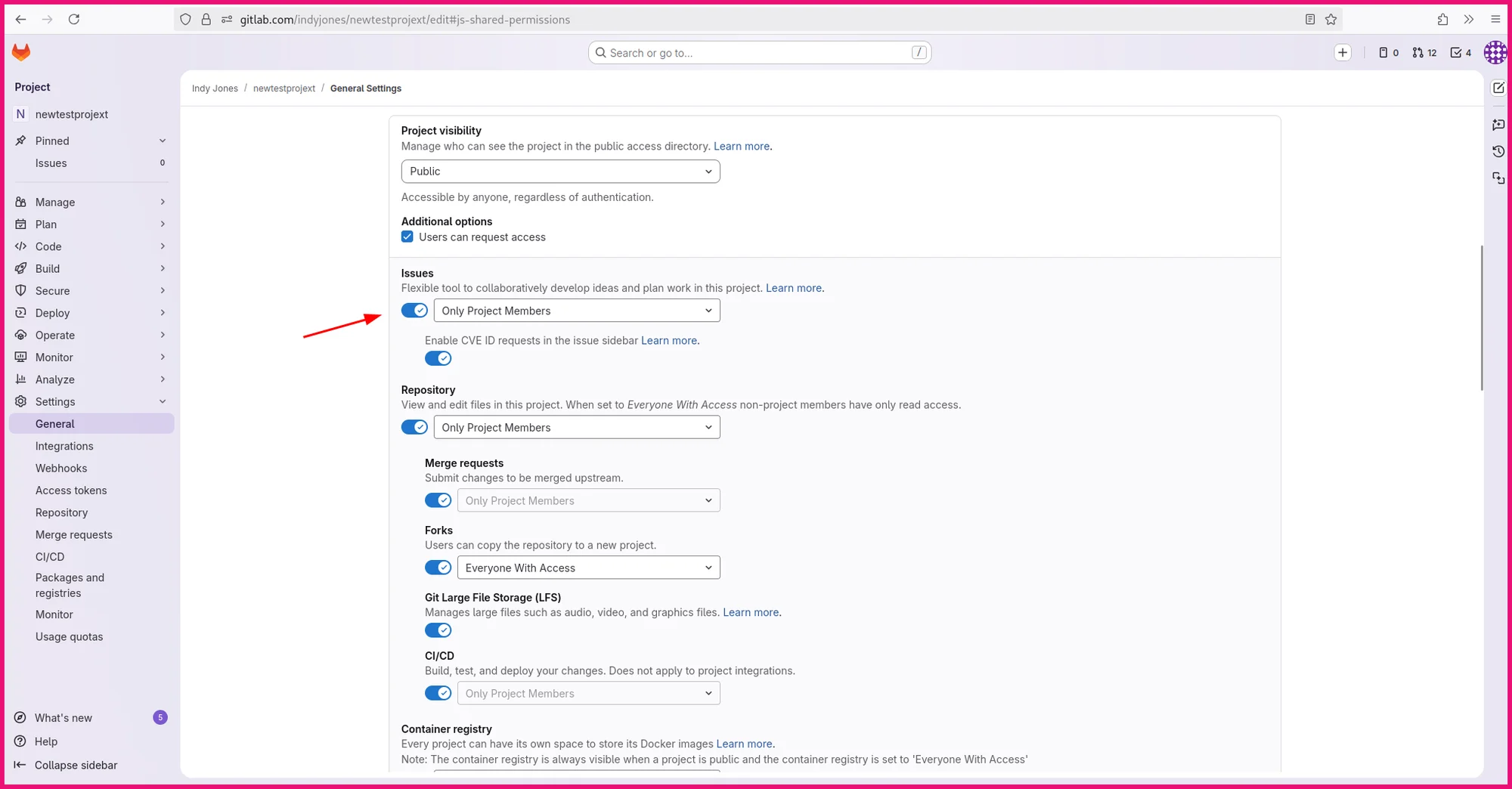
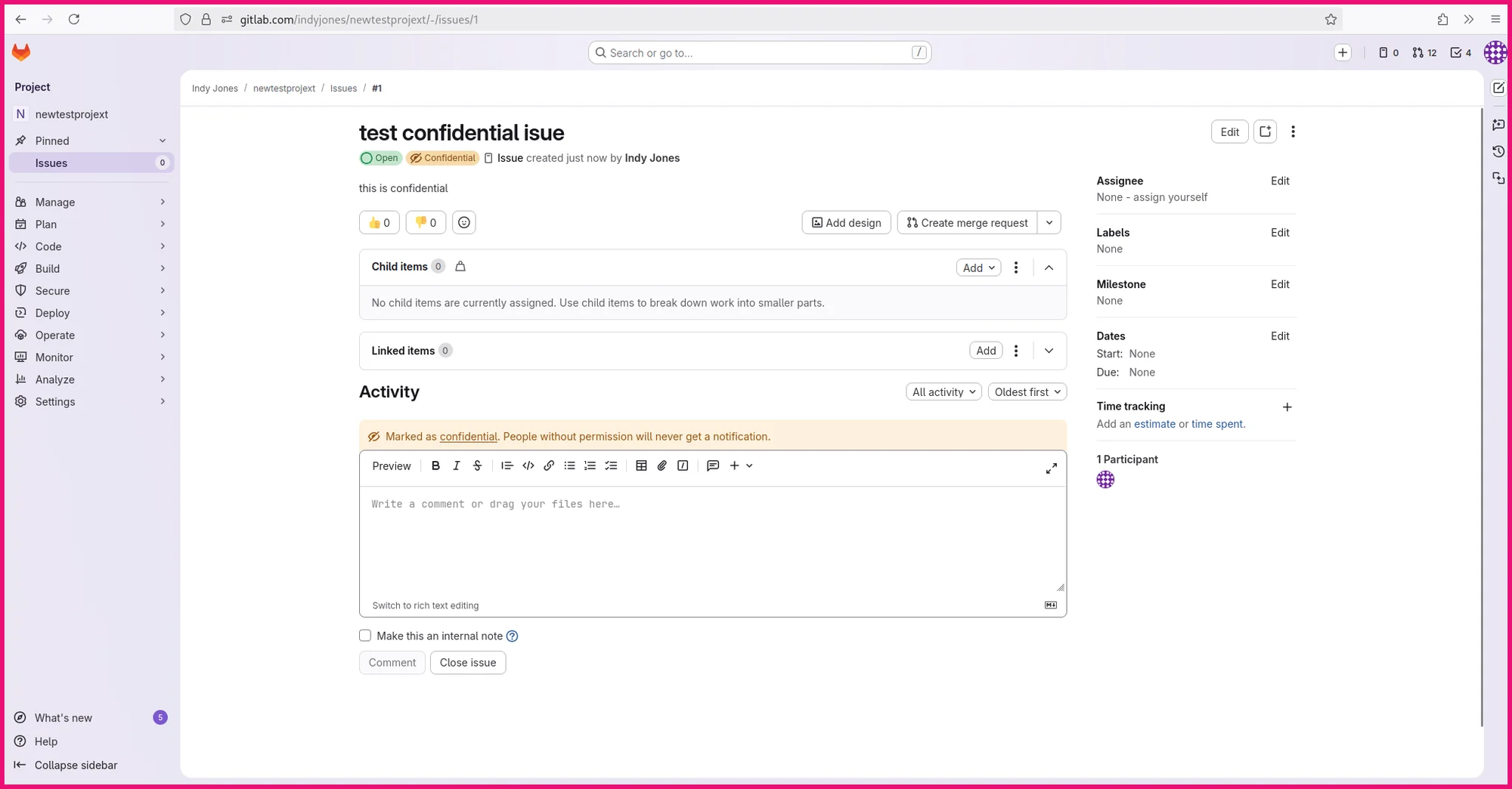
- As the victim, in project Issues, create a Confidential issue with any title -> Get victim's issue URL:
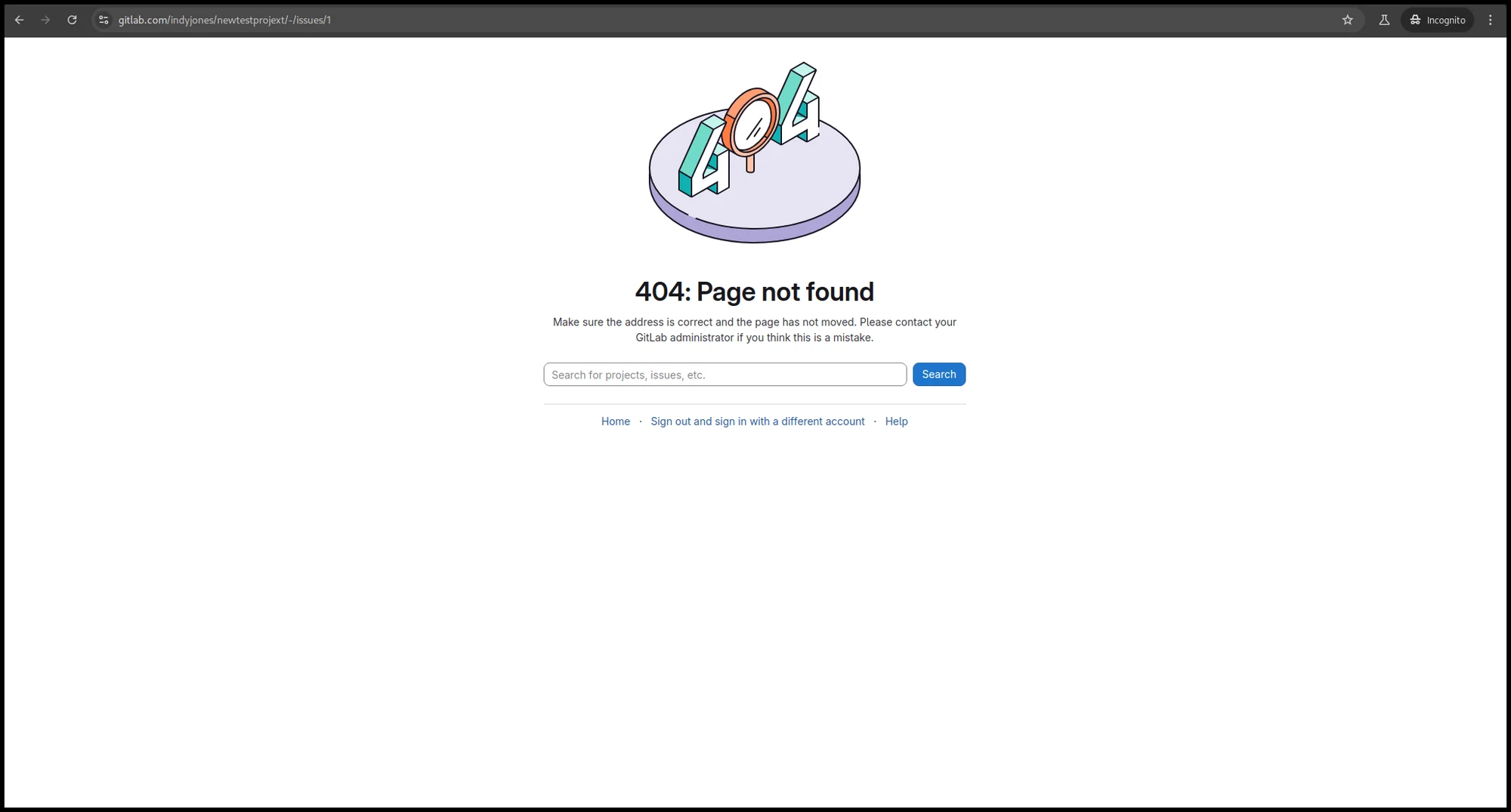
- As the attacker, sign in attacker's GitLab account -> Go to victim's issue. You can see attacker cannot view it, as expected:
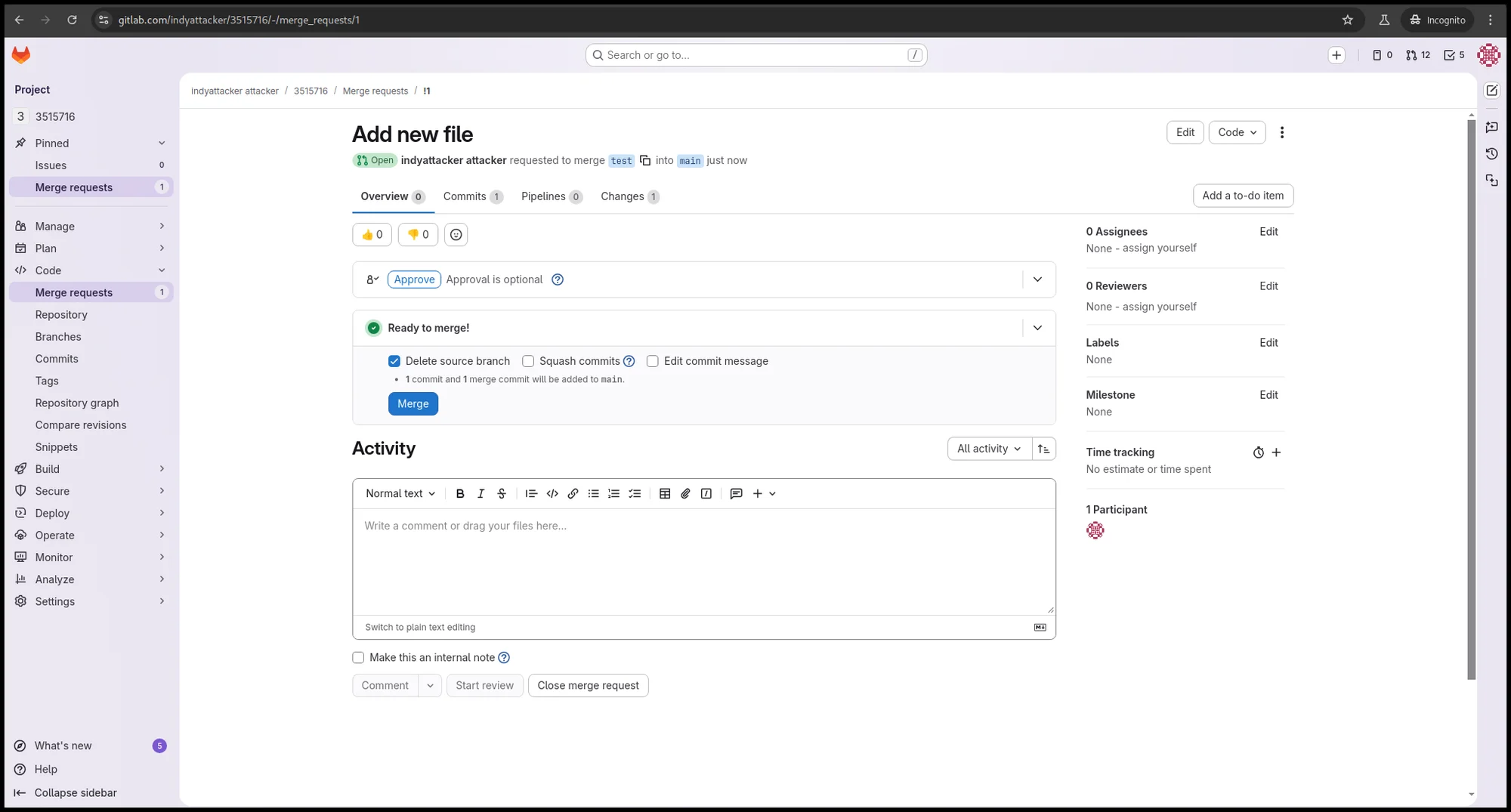
- As the attacker, create a private project -> Make any change and start a merge request in the attacker's project -> Get attacker's merge request URL:
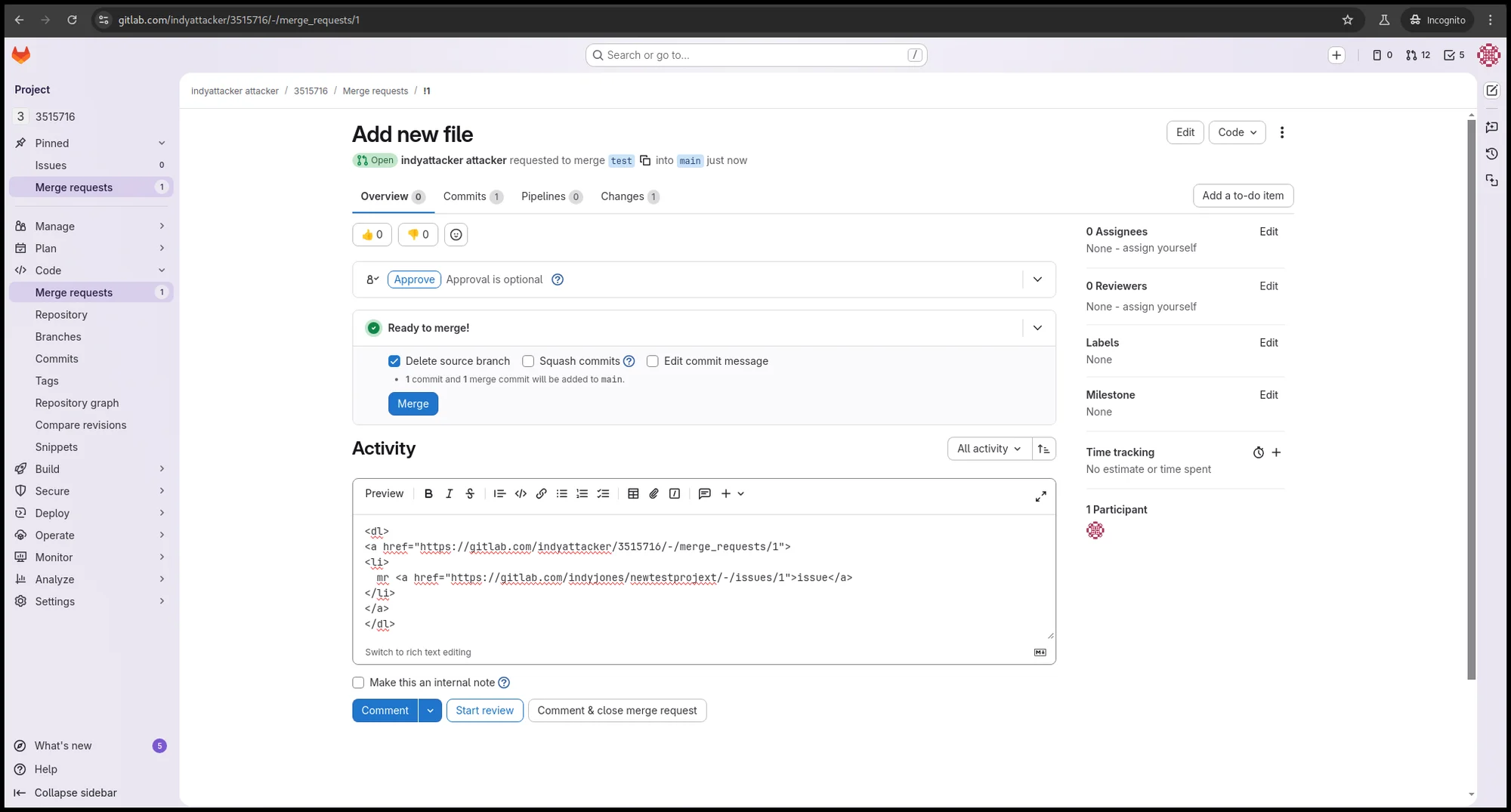
- As the attacker, in the merge request comment, add following content:
- Replace
ATTACKER_MERGE_REQUEST_URLwith attacker's merge request URL from previous step - Replace
VICTIM_ISSUE_URLwith victim's issue URL from Step 2
<dl>
<a href="ATTACKER_MERGE_REQUEST_URL">
<li>
  mr <a href="VICTIM_ISSUE_URL">issue</a>
</li>
</a>
</dl>
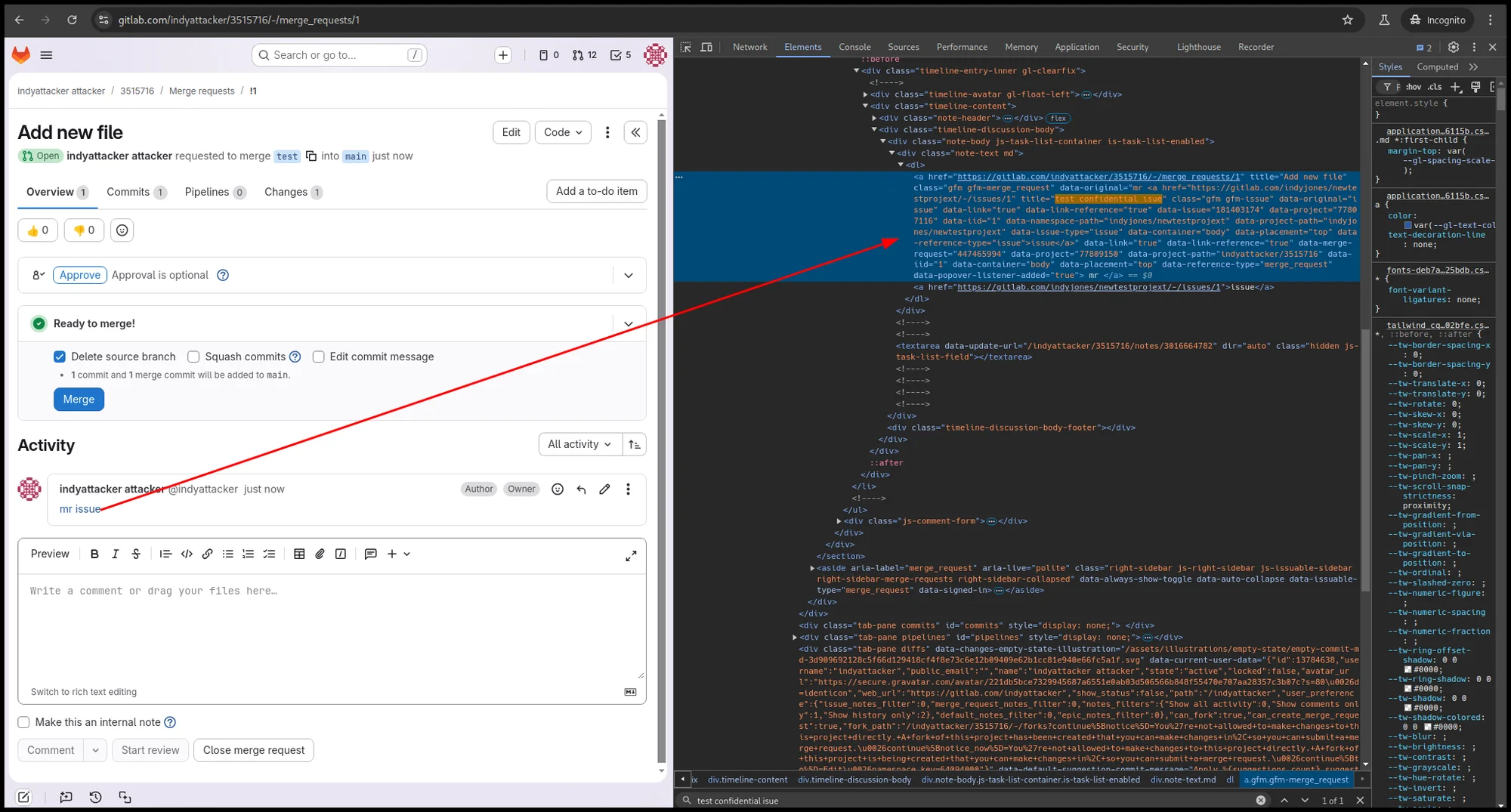
- As the attacker, check HTML source code of the comment. You can see victim's confidential issue title disclosed:
Impact statement
Unauthorized user can view other user's confidential issue title created in public project.
If you have any questions or concerns about this report, feel free to assign it to H1 Triage via the action picker with a comment indicating your request.
Original Report
A Banzai reference keeps its inner html content in link_content_html. This content is not redacted even if itself is a reference to a confidential or private issue, e.g., attackers can access to its title.
Reproduce
As victim:
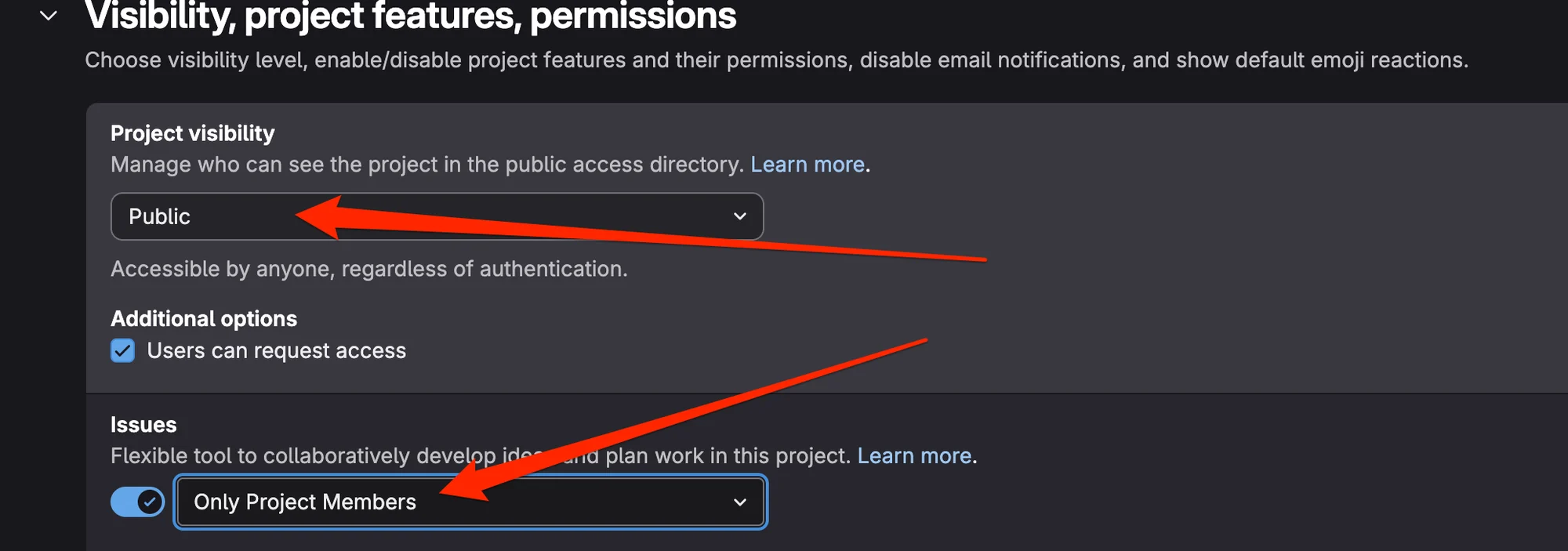
- Create a public project, then set its
Issuesaccess toOnly Project Members
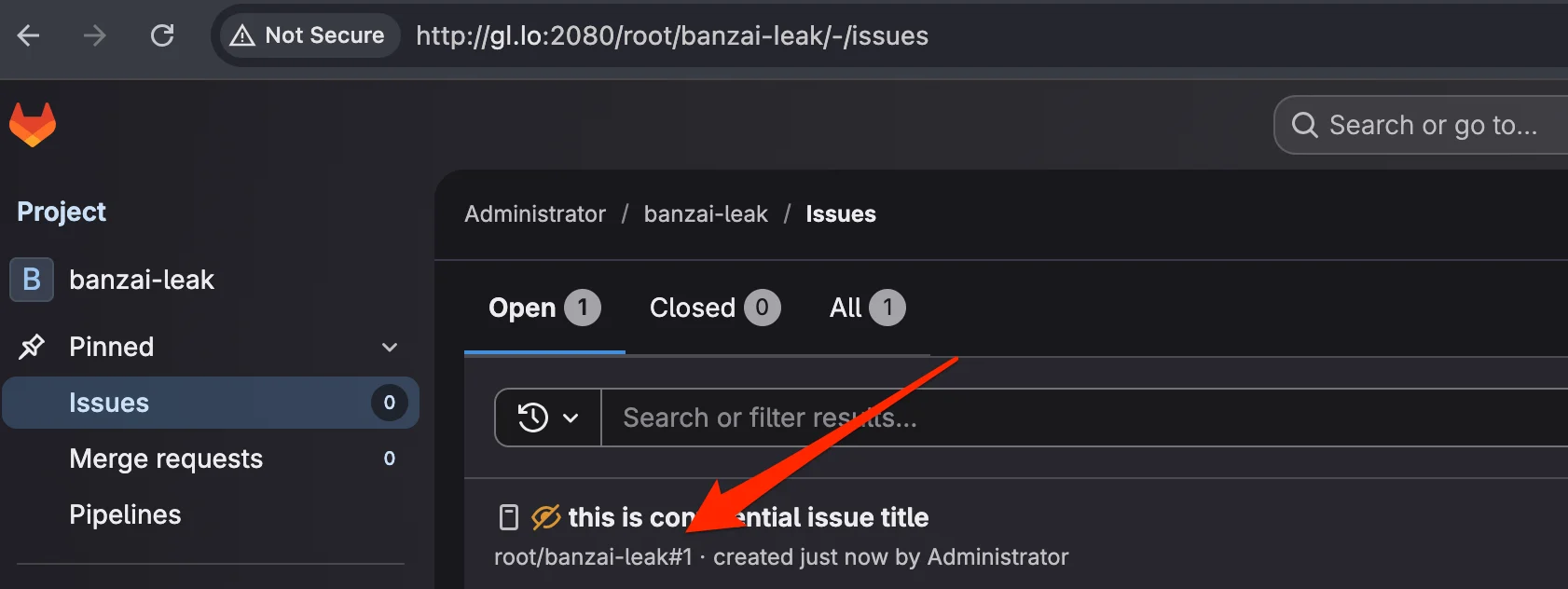
- Create a confidential issue
As attacker
- Create a new project, create some modification then create a new merge request on that project. Note the url of the merge request
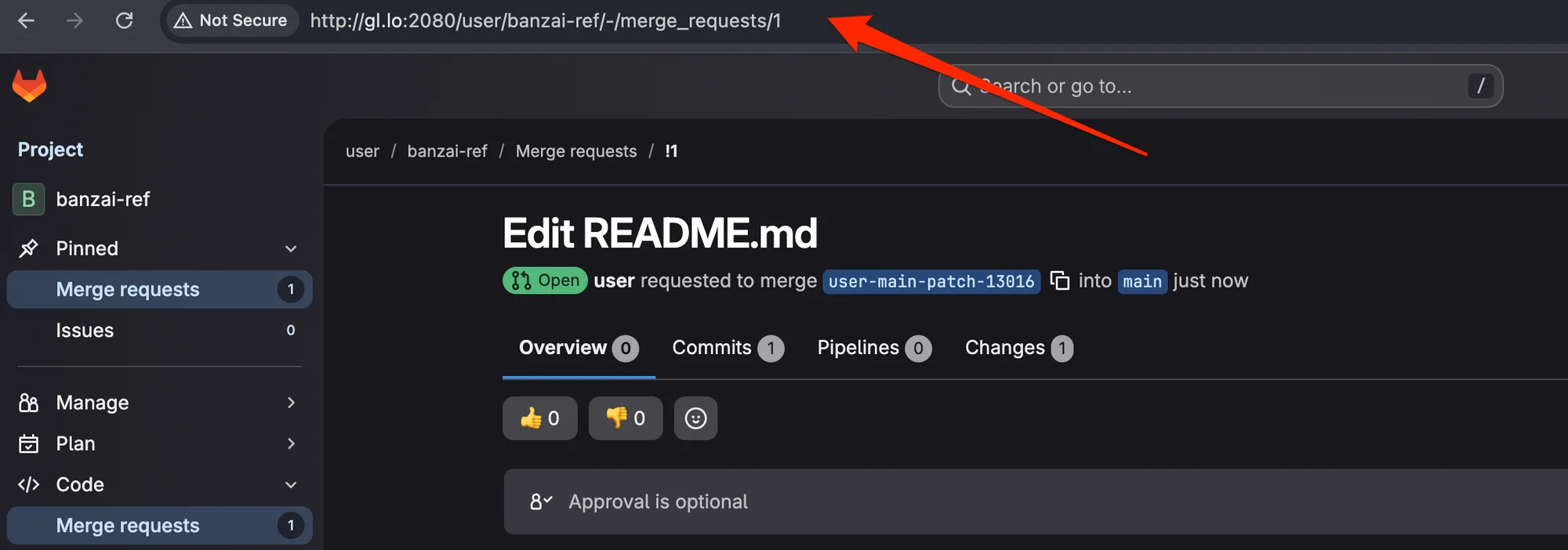
-
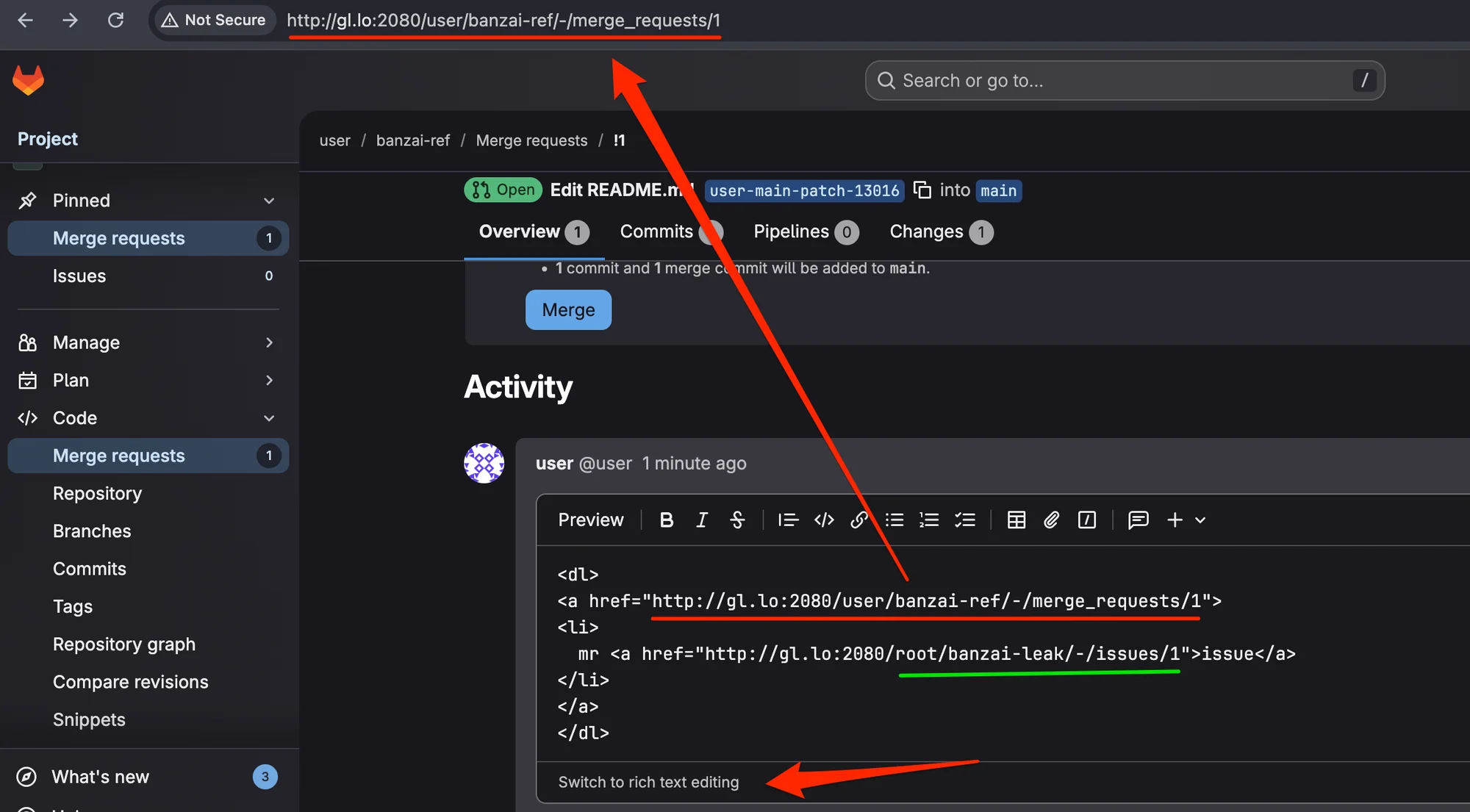
Create a new comment on the merge request using the following content (you need to switch to
plain text editingbefore enter the content)- the first
hrefis the url of the merge request - the second
hrefis the url of the victim's confidential issue (as the project is public, its nameroot/banzai-leakis available; the issue number1can be enumerated)
- the first
<dl>
<a href="http://gl.lo:2080/user/banzai-ref/-/merge_requests/1">
<li>
  mr <a href="http://gl.lo:2080/root/banzai-leak/-/issues/1">issue</a>
</li>
</a>
</dl>
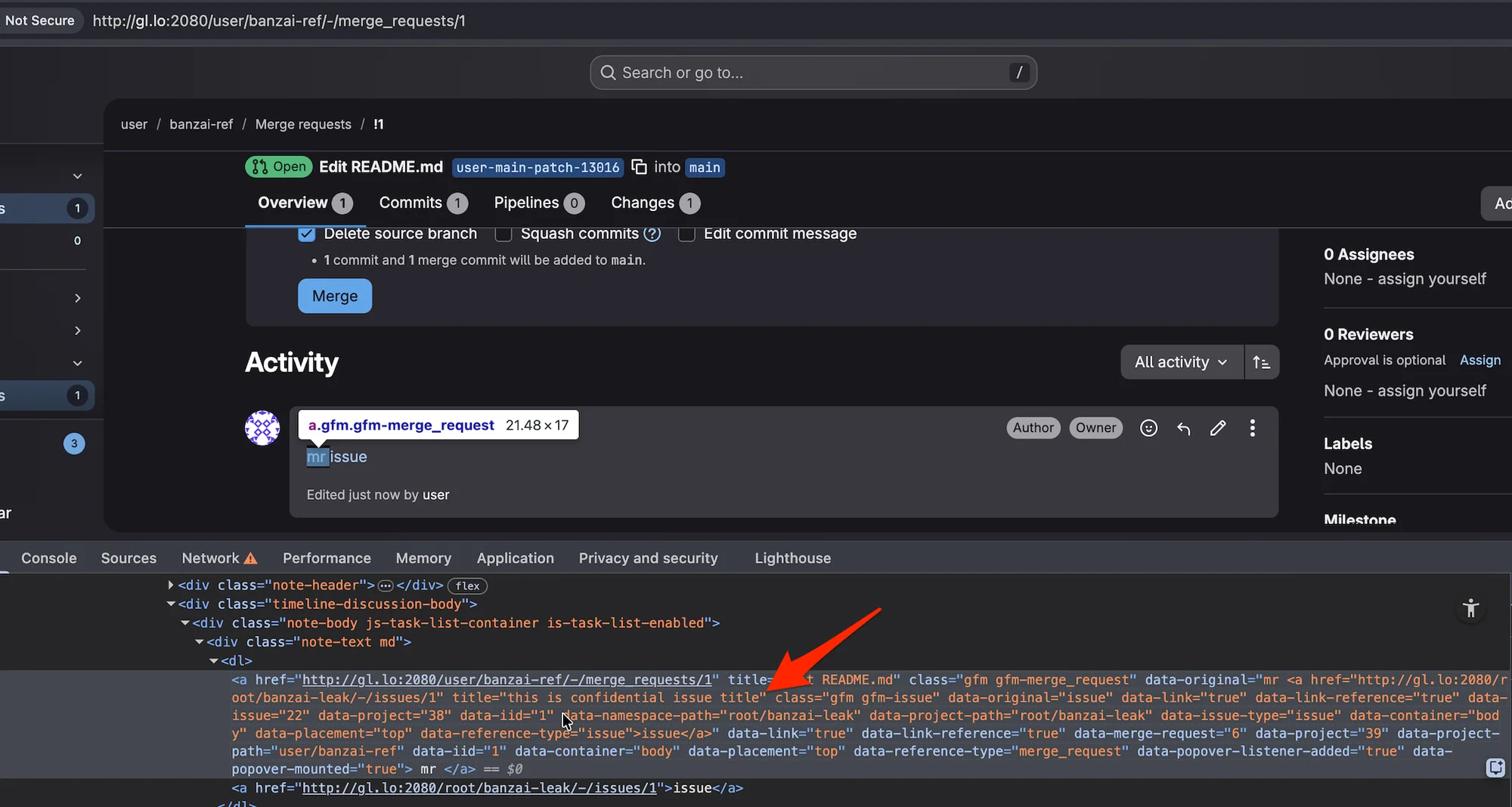
- After saving the comment, inspect
mrelement (see figure below), you should see the confidential issue's title
Impact
Access to any private or confidential issues' titles of any public project
Attachments
Warning: Attachments received through HackerOne, please exercise caution!
How To Reproduce
Please add reproducibility information to this section:
Context
GitLab renders references to issues, merge requests and other objects inside Markdown text using Banzai, its Markdown pipeline. When a comment contains a link to an issue, Banzai turns it into a reference with a title, so readers see a readable label instead of a bare URL. The report concerns a public project whose Issues feature has been restricted to Only Project Members, and a confidential issue inside it. A user who is not a project member cannot open that issue, but the researcher found that its title could still be read from the HTML source of a merge request comment in an unrelated project.
The report was filed on HackerOne as report 3515716 by yvvdwf on 2026-01-18 and imported into GitLab's tracker.
Setup
Two GitLab accounts are needed: a victim and an attacker. The victim owns a public project whose Issues feature is limited to project members and which contains a confidential issue. The attacker owns a separate private project with a merge request and can post comments on it. The attacker does not need any membership or permission on the victim's project. The researcher's own reproduction used a local instance reachable at http://gl.lo:2080, with the victim project named root/banzai-leak.
Finding it
The researcher looked at how Banzai builds a reference. In lib/banzai/filter/references/abstract_reference_filter.rb, a reference keeps its inner HTML content in link_content_html. That content is not redacted, even when it is itself a reference to a confidential or private issue. Because the inner content carries the issue title, an attacker who can get Banzai to render a reference to a confidential issue can read that title from the resulting HTML, even though the issue itself is not accessible to them.
Exploitation
Step 1: Restrict issues on a public project
As the victim, create a public project. In the project's General Settings, expand Visibility, project features, permissions and change the Issues visibility to Only Project Members, then save.
The project is public, so its name root/banzai-leak is available and the issue number 1 can be enumerated.
Step 2: Create a confidential issue
As the victim, open the project's Issues and create a Confidential issue with any title. Note the issue URL.
Step 3: Confirm the attacker is locked out
As the attacker, sign in to the attacker's own GitLab account and open the victim's issue URL. The attacker cannot view it, as expected.
This establishes the baseline: the issue is genuinely protected from the attacker through the normal interface.
Step 4: Prepare the attacker's merge request
As the attacker, create a private project, make any change and start a merge request in it. Note the merge request URL.
The merge request is only a vehicle for a comment. It lives in the attacker's own project, so the attacker fully controls it.
Step 5: Post a crafted comment
As the attacker, add a comment to the merge request with the following content. Replace ATTACKER_MERGE_REQUEST_URL with the attacker's merge request URL from the previous step and VICTIM_ISSUE_URL with the victim's issue URL from Step 2.
<dl>
<a href="ATTACKER_MERGE_REQUEST_URL">
<li>
  mr <a href="VICTIM_ISSUE_URL">issue</a>
</li>
</a>
</dl>
The original report gives the concrete version of this payload, with the attacker's merge request as the first href and the victim's confidential issue as the second. The project is public, so its name root/banzai-leak is known, and the issue number 1 can be enumerated. The comment must be entered after switching to plain text editing.
<dl>
<a href="http://gl.lo:2080/user/banzai-ref/-/merge_requests/1">
<li>
  mr <a href="http://gl.lo:2080/root/banzai-leak/-/issues/1">issue</a>
</li>
</a>
</dl>
The outer link points at the attacker's merge request, and the inner link points at the victim's confidential issue.
Step 6: Read the title from the HTML source
After saving the comment, inspect the mr element in the HTML source. The victim's confidential issue title is disclosed there.
The attacker never gains access to the issue page. The title simply appears in the markup of a comment the attacker is allowed to read.
Root cause
Banzai's reference filter keeps the inner HTML of a reference in link_content_html, and that content is not redacted when it is itself a reference to a confidential or private issue. The access check that blocks the attacker from opening the issue page does not apply to the title embedded in the rendered reference, so the title leaks into HTML the attacker can view. The report does not describe any additional defence that was expected to catch this.
Impact
An unauthorised user can view the titles of other users' confidential issues created in a public project. The original report states the impact more broadly as access to any private or confidential issues' titles of any public project. The original report states the impact as access to any private or confidential issues' titles of any public project.
Fix
The report does not describe a fix.
Variants to test
- Other reference types: try the same nested-link comment with references to private merge requests, snippets or other objects that Banzai renders with a title, and check the HTML source for the title.
- Different nesting: place the protected reference inside other Markdown structures that Banzai renders as references, and inspect the generated markup for the title.
- Enumerating issue numbers on a public project with restricted issues, to confirm which titles can be recovered.
A positive result is the protected object's title appearing in the HTML source of a comment the attacker can read, while the object itself remains inaccessible through the normal interface.
Hunting notes
This kind of bug tends to hide in Markdown and reference rendering pipelines, where one rendering pass embeds the output of another and access checks are applied to the outer object rather than the inner one. During recon, public projects with restricted issue visibility are the interesting targets, because their issue numbers remain enumerable while the issues themselves are closed.
What happened, in plain words
GitLab is a website where teams keep their code and track work. Inside a GitLab project you can have issues, which are like to-do notes or bug reports, and merge requests, which are proposals to change code. People talk to each other in comments under those items, and GitLab turns plain text in a comment into clickable links automatically.
A confidential issue is an issue that only certain people are meant to see. In this report, a project was public (anyone could see the project exists) but its issues were limited to project members, and one issue inside it was confidential. A person who was not a member could not open that issue, as expected.
The researcher found that the issue's title could still be read anyway. The trick was to post a comment in a completely different project, one the attacker owned, containing a specially shaped link. When GitLab turned that link into a nice-looking reference, it quietly copied the confidential issue's title into the page's HTML source code. The attacker could then open the page source in their browser and read the title, even though the issue page itself stayed closed to them.
The report was filed on HackerOne as report 3515716 by yvvdwf on 2026-01-18 and imported into GitLab's own tracker.
Background you need first
A few ideas come up again and again below, so here they are from zero.
- HTML source code: every web page your browser shows is built from text called HTML. Right-clicking a page and choosing something like "View page source" shows you that text. Anything written into the HTML is readable by anyone who can load the page, even if it is not drawn visibly on screen.
- Markdown: a simple way of writing text where you mark formatting with plain characters, for example
**bold**or[text](address). GitLab lets you write comments in Markdown. - Banzai: GitLab's own program (a Markdown pipeline) that reads the Markdown you typed and turns it into finished HTML. It also recognises links to GitLab issues and merge requests and replaces them with a readable label, called a reference, so readers see a title instead of a bare web address.
- Reference: a link to another GitLab item that GitLab renders with a title. When you paste a link to an issue, GitLab shows the issue's title as the clickable text.
- Confidential issue: an issue whose contents are restricted to chosen people. Think of a locked drawer in an otherwise open office: everyone can see the cabinet, but only some people can open that drawer.
- Access control: the rules a website uses to decide who may see what. The bug here is an access control bypass: the rule was in place for the issue page, but a side channel (the comment HTML) let the title out anyway.
- Enumeration: guessing a series of numbers one after another. GitLab gives issues numbers (1, 2, 3, ...), so if you know a project's name you can try each number to see what exists.
The setup
Two GitLab accounts are needed: a victim and an attacker. The victim owns a public project whose Issues feature is limited to project members, and that project contains a confidential issue. The attacker owns a separate private project with a merge request and can post comments on it. The attacker needs no membership or permission on the victim's project at all.
The researcher's own reproduction used a local GitLab instance reachable at http://gl.lo:2080, with the victim project named root/banzai-leak.
Finding it
The researcher looked at how Banzai builds a reference. In the file lib/banzai/filter/references/abstract_reference_filter.rb, a reference keeps its inner HTML content in a field called link_content_html. That content is not redacted, even when it is itself a reference to a confidential or private issue. Because the inner content carries the issue title, an attacker who can get Banzai to render a reference to a confidential issue can read that title from the resulting HTML, even though the issue itself is not accessible to them.
In everyday terms: GitLab builds a link, and inside that link it builds another link, and it copies the inner link's label (the title) into the outer link's stored text without checking whether the reader is allowed to see that label.
Exploitation
Step 1: Restrict issues on a public project
As the victim, create a public project. In the project's General Settings, expand Visibility, project features, permissions and change the Issues visibility to Only Project Members, then save.
The project is public, so its name root/banzai-leak is available and the issue number 1 can be enumerated. This is the realistic situation the bug affects: a public project that has deliberately closed its issues.
Step 2: Create a confidential issue
As the victim, open the project's Issues and create a Confidential issue with any title. Note the issue URL.
The URL matters because it is what the attacker will later place inside the crafted comment. The title is the secret that should not leak.
Step 3: Confirm the attacker is locked out
As the attacker, sign in to the attacker's own GitLab account and open the victim's issue URL. The attacker cannot view it, as expected.
This establishes the baseline: the issue is genuinely protected from the attacker through the normal interface. Without this check, you could not tell whether the later leak is a real bypass or just a page the attacker was allowed to see anyway.
Step 4: Prepare the attacker's merge request
As the attacker, create a private project, make any change and start a merge request in it. Note the merge request URL.
The merge request is only a vehicle for a comment. It lives in the attacker's own project, so the attacker fully controls it and can post whatever comment they like there.
Step 5: Post a crafted comment
As the attacker, add a comment to the merge request with the following content. Replace ATTACKER_MERGE_REQUEST_URL with the attacker's merge request URL from the previous step and VICTIM_ISSUE_URL with the victim's issue URL from Step 2.
<dl>
<a href="ATTACKER_MERGE_REQUEST_URL">
<li>
  mr <a href="VICTIM_ISSUE_URL">issue</a>
</li>
</a>
</dl>
Line by line, in plain words:
<dl>opens a definition list, a simple HTML container. It is only there to wrap the rest.<a href="ATTACKER_MERGE_REQUEST_URL">opens a link pointing at the attacker's own merge request. This is the outer link.<li>opens a list item inside that link.mris just the visible text "mr".<a href="VICTIM_ISSUE_URL">issue</a>is a second, inner link pointing at the victim's confidential issue, with the visible text "issue".</li>closes the list item,</a>closes the outer link, and</dl>closes the container.
The inner link sits inside the outer link, and the inner reference's rendered content, including the issue title, is stored in link_content_html.
The original report gives the concrete version of this payload, with the attacker's merge request as the first href and the victim's confidential issue as the second. The project is public, so its name root/banzai-leak is known, and the issue number 1 can be enumerated. The comment must be entered after switching to plain text editing.
<dl>
<a href="http://gl.lo:2080/user/banzai-ref/-/merge_requests/1">
<li>
  mr <a href="http://gl.lo:2080/root/banzai-leak/-/issues/1">issue</a>
</li>
</a>
</dl>
Here the placeholders are filled in: the outer link points at the attacker's merge request (/user/banzai-ref/-/merge_requests/1) and the inner link points at the victim's confidential issue (/root/banzai-leak/-/issues/1). The issue number 1 is a guess that can be tried for each number in turn, which is what enumeration means.
Step 6: Read the title from the HTML source
After saving the comment, inspect the mr element in the HTML source. The victim's confidential issue title is disclosed there.
The attacker never gains access to the issue page. The title simply appears in the markup of a comment the attacker is allowed to read. That is the whole bypass: the permission check guards the issue page, but not the title copied into the comment's HTML.
Root cause
Banzai's reference filter keeps the inner HTML of a reference in link_content_html, and that content is not redacted when it is itself a reference to a confidential or private issue. The access check that blocks the attacker from opening the issue page does not apply to the title embedded in the rendered reference, so the title leaks into HTML the attacker can view. The report does not describe any additional defence that was expected to catch this.
A useful comparison: a receptionist checks your badge before letting you into a room, but a photocopier in the lobby keeps printing the room's name on every sheet anyone picks up. The door is locked; the information still escapes.
Impact
An unauthorised user can view the titles of other users' confidential issues created in a public project. The original report states the impact more broadly as access to any private or confidential issues' titles of any public project. The original report states the impact as access to any private or confidential issues' titles of any public project.
Fix
The report does not describe a fix.
Variants to test
- Other reference types: try the same nested-link comment with references to private merge requests, snippets or other objects that Banzai renders with a title, and check the HTML source for the title.
- Different nesting: place the protected reference inside other Markdown structures that Banzai renders as references, and inspect the generated markup for the title.
- Enumerating issue numbers on a public project with restricted issues, to confirm which titles can be recovered.
A positive result is the protected object's title appearing in the HTML source of a comment the attacker can read, while the object itself remains inaccessible through the normal interface.
Hunting notes
This kind of bug tends to hide in Markdown and reference rendering pipelines, where one rendering pass embeds the output of another and access checks are applied to the outer object rather than the inner one. During recon, public projects with restricted issue visibility are the interesting targets, because their issue numbers remain enumerable while the issues themselves are closed.
Glossary
- Access control: the rules a website uses to decide who may see or do what.
- Access control bypass: getting at information or actions that the rules were meant to block.
- Attacker: in a security report, the person trying to see or do something they are not allowed to.
- Banzai: GitLab's Markdown pipeline, the program that turns Markdown text into finished HTML and renders references.
- Confidential issue: an issue restricted to chosen people rather than everyone who can see the project.
- Enumeration: trying a series of numbers or names one after another to discover what exists.
- HTML: the text format web pages are built from; it can be viewed with the browser's page source feature.
- HTML source code: the raw HTML text behind a page, readable by anyone who can load the page.
href: the HTML attribute that holds the address a link points to.link_content_html: the field in GitLab's reference filter that stores the inner HTML content of a reference.- Markdown: a plain-text way of writing formatting, such as links and bold text.
- Merge request: a proposal to change code in a GitLab project, with its own discussion comments.
- Private project: a project visible only to its members.
- Public project: a project anyone can see.
- Redacted: removed or hidden so it cannot be read.
- Reference: a link to a GitLab item that GitLab renders with a readable title.
- Severity: a rating of how serious a security issue is; this one is recorded as medium.
- Victim: in a security report, the person whose data or account is being protected.




