Confidential Issue Title Leak via cached description_html in Project and Label API endpoints leads to information disclosure
GitLab's Project and Label API endpoints return cached description_html that includes the full title of confidential issues referenced from other projects. A Guest user with access only to the referencing project can therefore read confidential issue titles from projects they cannot access.

GitLab
Originally disclosed on GitLab
- Fixed in 38 days
- Disclosed after 38 days
⚠️ Please read the process on how to fix security issues before starting to work on the issue. Vulnerabilities must be fixed in a security mirror.
HackerOne report #3532881 by modhanami on 2026-01-31, imported by @fvpotvin:
Report | Attachments | How To Reproduce
HackerOne Analyst Summary
Summary of the Issue
GitLab's Project and Label API endpoints expose cached description_html that contains confidential issue titles, leading to information disclosure. When project descriptions or label descriptions reference confidential issues from other projects (using syntax like private-project#18), the cached HTML output includes the full confidential issue title in the title attribute of the generated link. This allows Guest users who have access to a project with such references to read confidential issue titles from projects they cannot directly access.
Steps to reproduce
Setup (Victim):
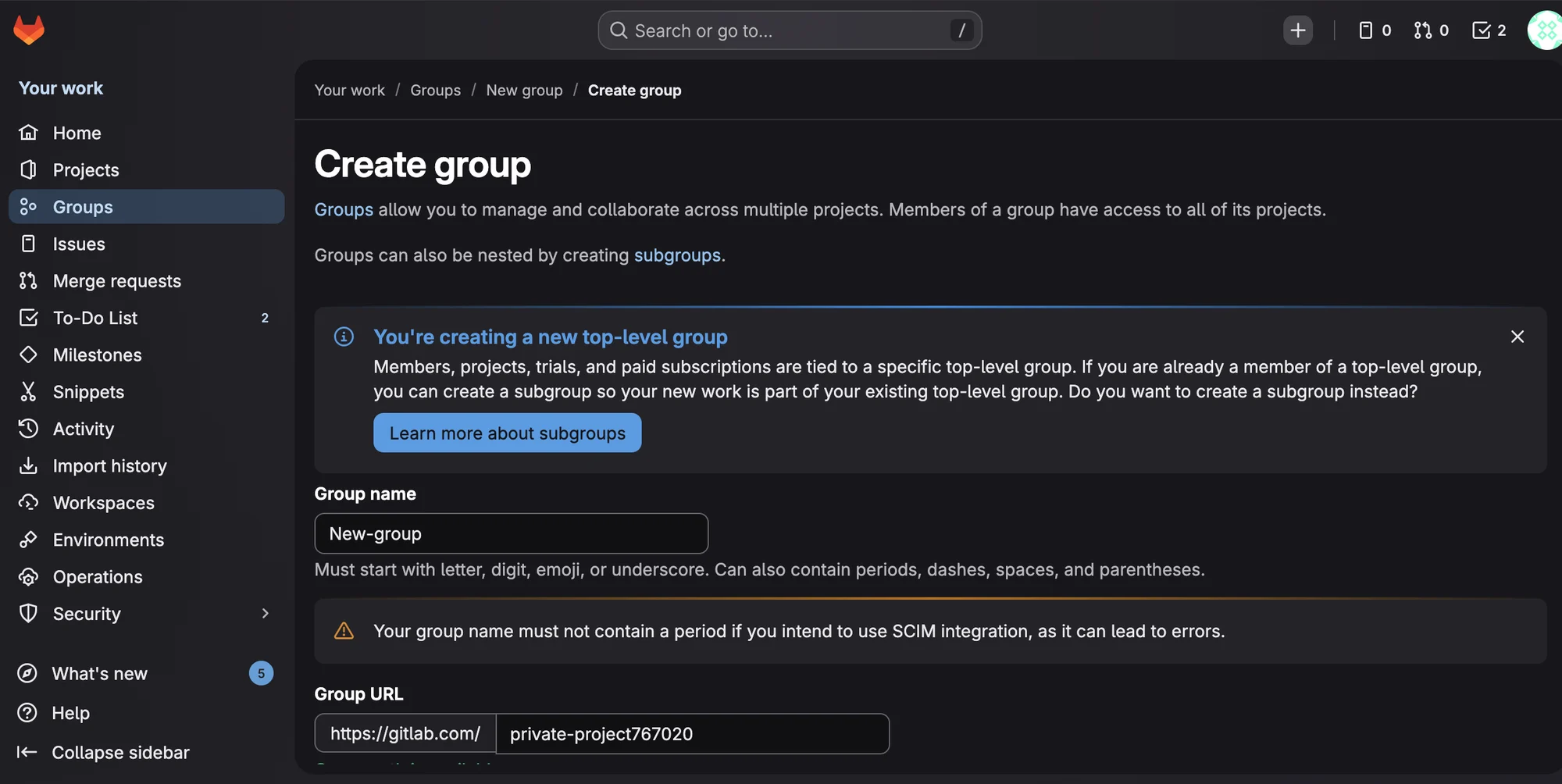
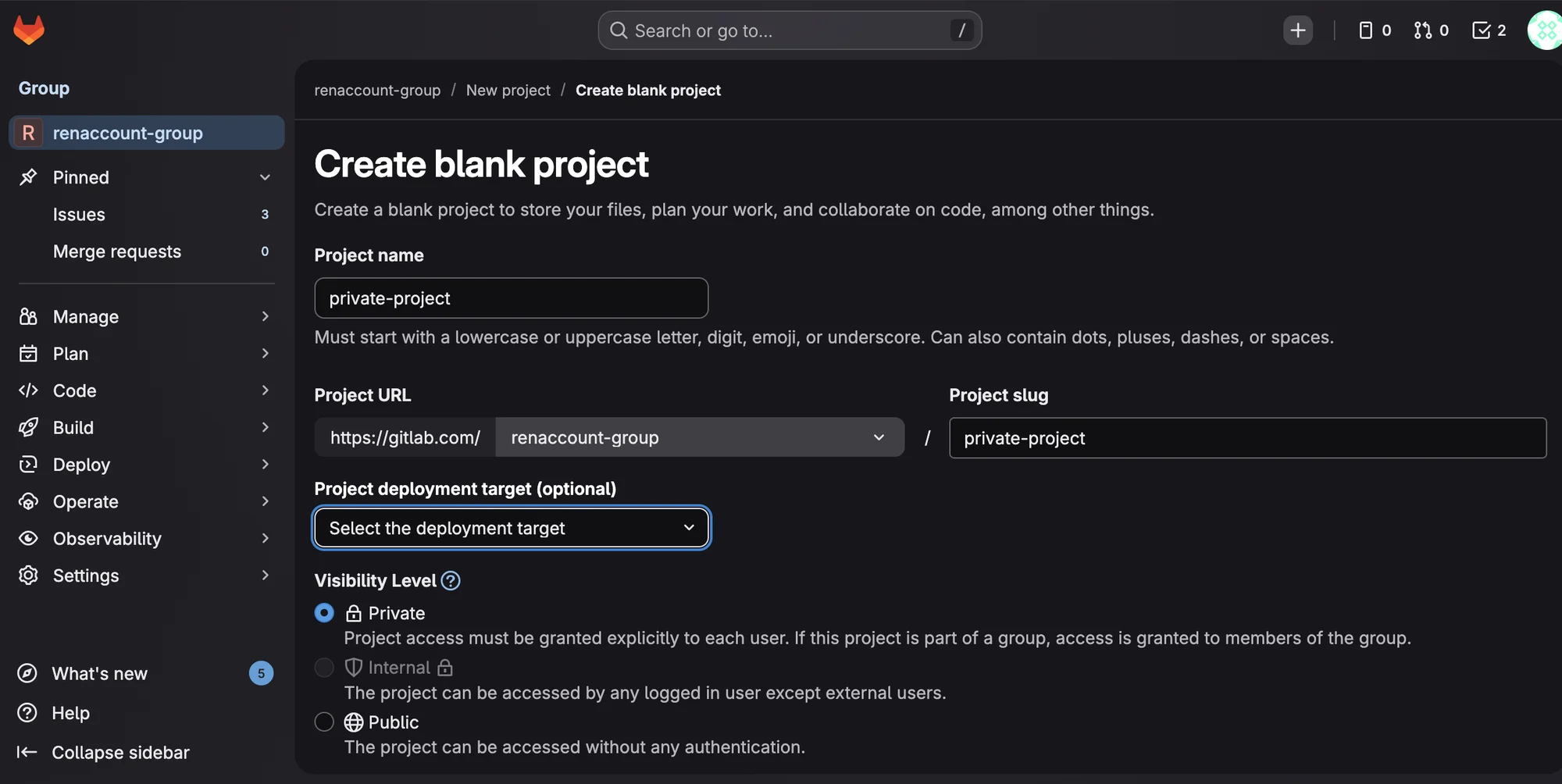
- Create a group with two projects:
private-projectandshared-project
- Create a confidential issue in
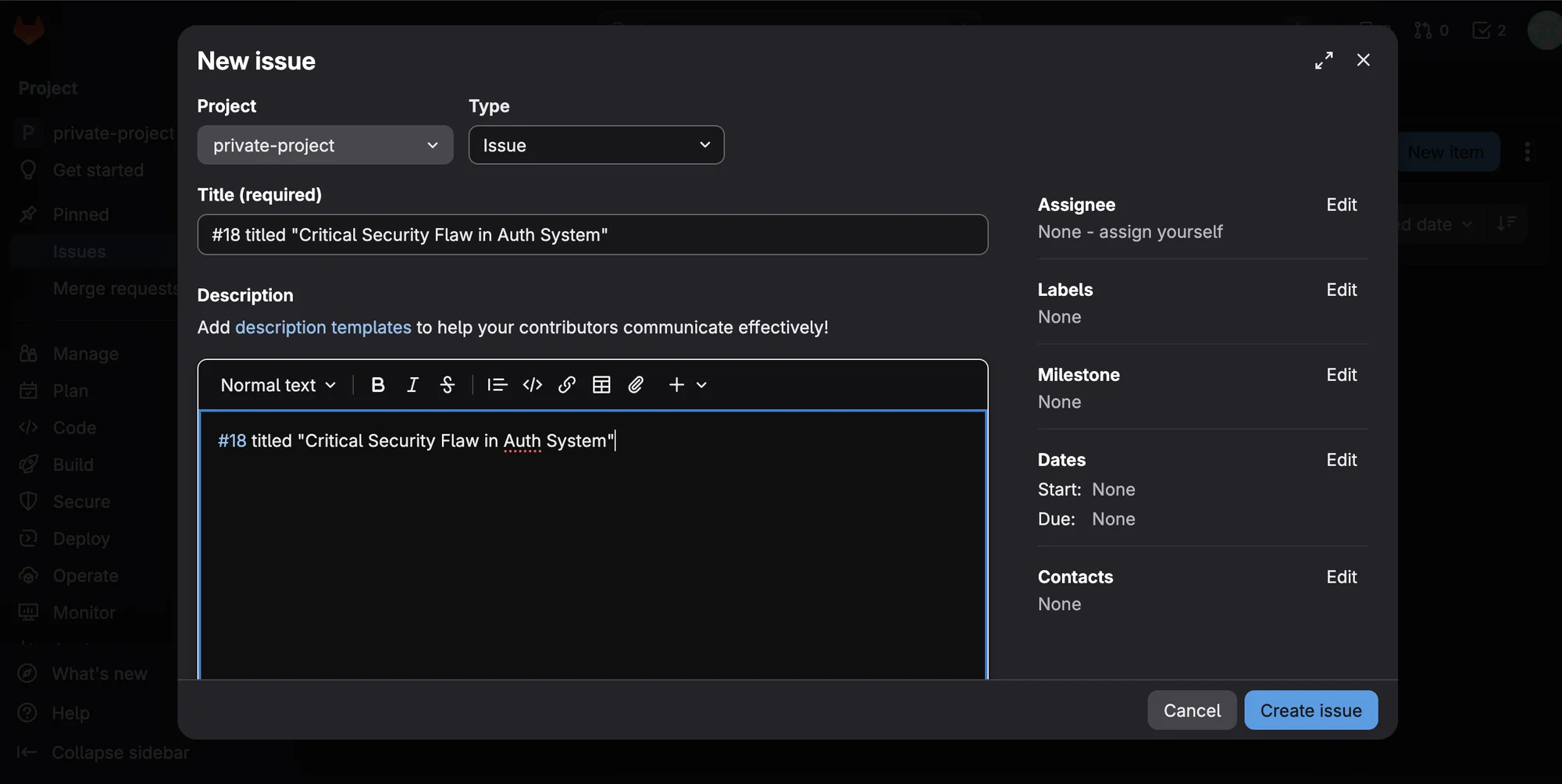
private-project(e.g., #18 titled "Critical Security Flaw in Auth System") - Update
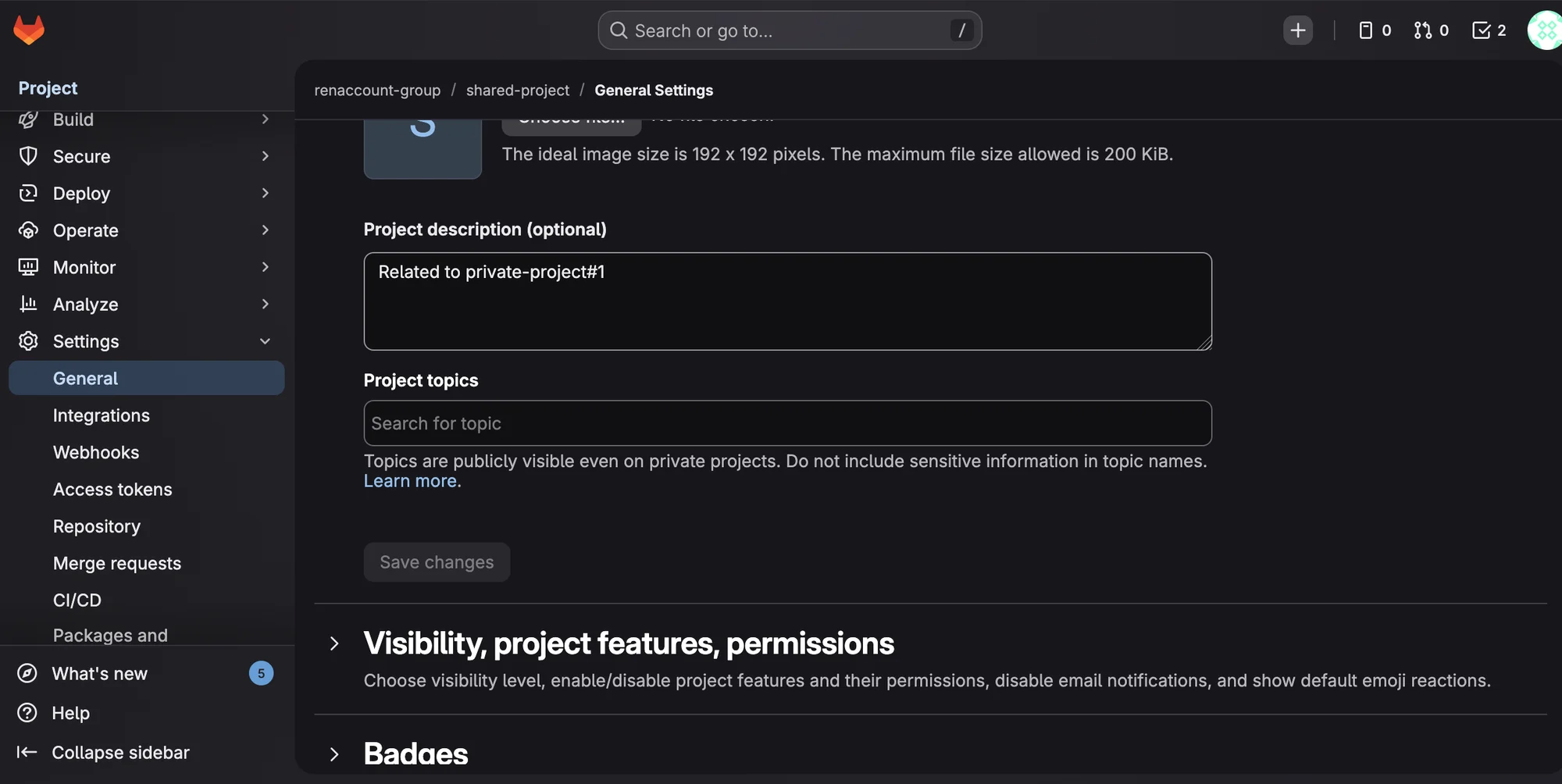
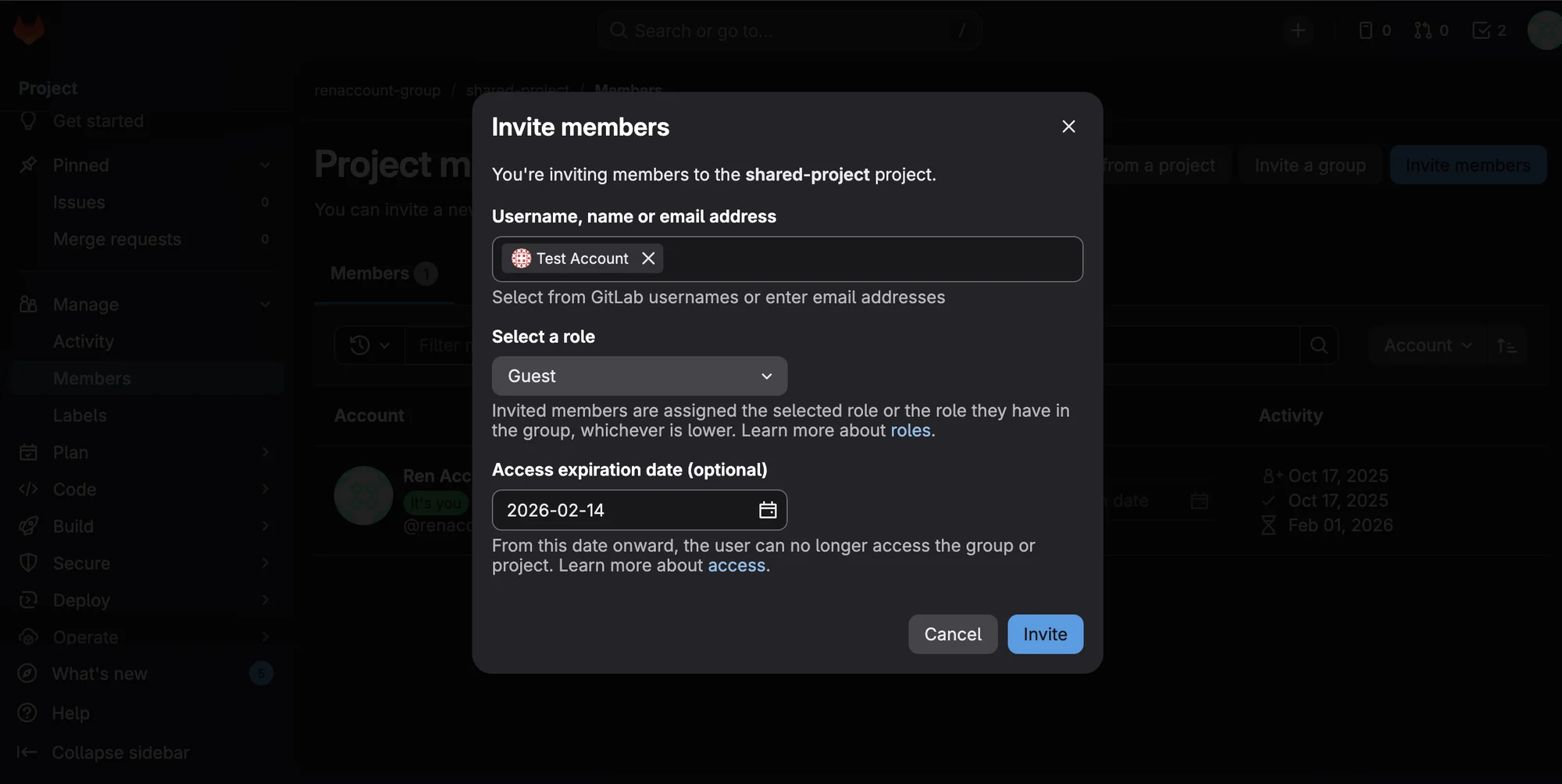
shared-projectdescription to reference it:Related to private-project#18 - Invite attacker as Guest to
shared-projectonly
Exploit (Attacker):
# Attacker CANNOT access confidential issue directly
curl -s "https://gitlab.com/api/v4/projects/$PRIVATE_PROJECT_ID/issues/18" \
  -H "PRIVATE-TOKEN: $ATTACKER_TOKEN"
# Returns: 404 Project Not Found

# Attacker CAN see leaked title via project's description_html
curl -s "https://gitlab.com/api/v4/projects/$SHARED_PROJECT_ID" \
  -H "PRIVATE-TOKEN: $ATTACKER_TOKEN" | jq -r '.description_html'
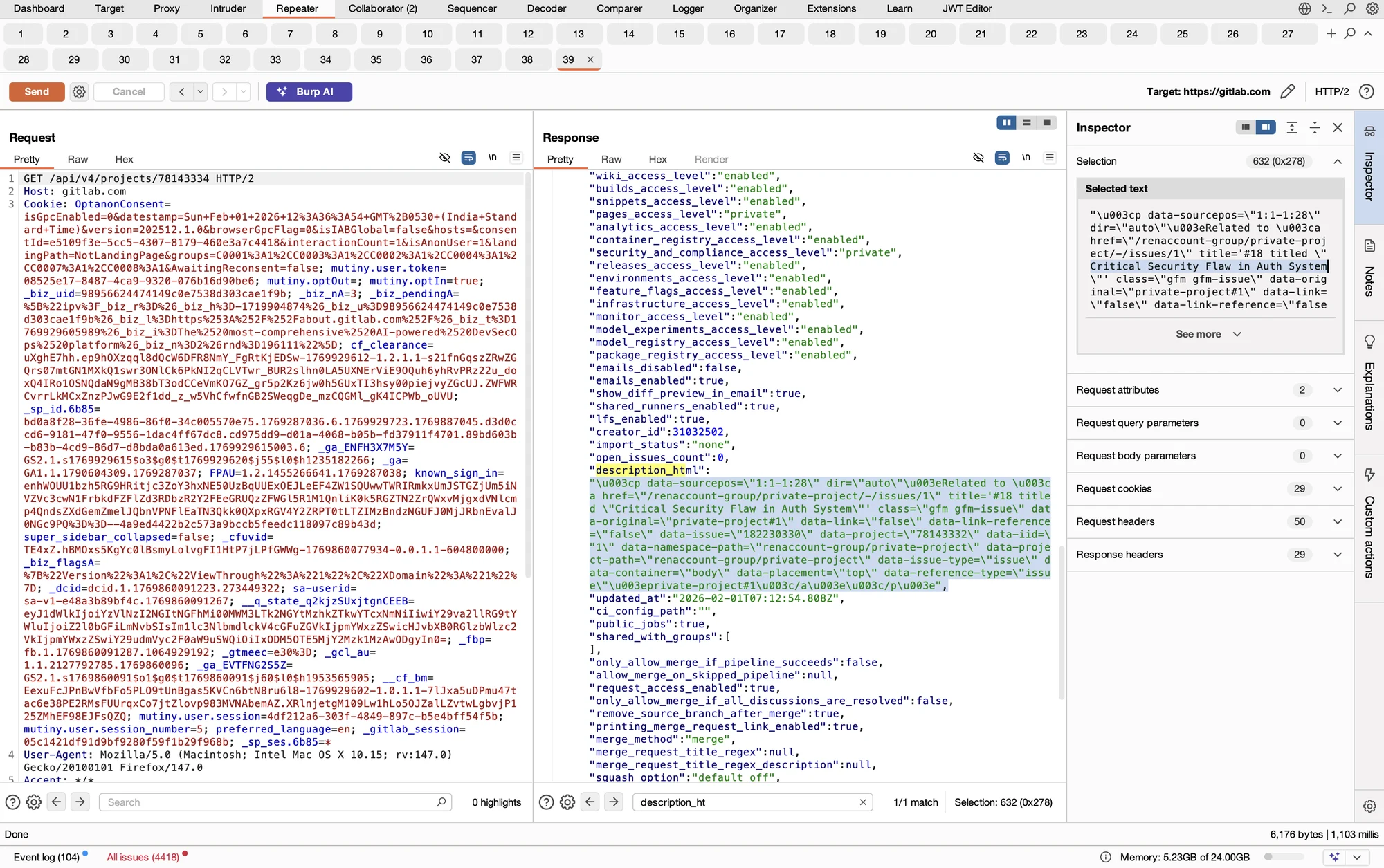
GET /api/v4/projects/78143334 HTTP/2
Host: gitlab.com
Cookie: REDACTED
User-Agent: Mozilla/5.0 (Macintosh; Intel Mac OS X 10.15; rv:147.0) Gecko/20100101 Firefox/147.0
Accept: */*
Accept-Language: en-US,en;q=0.9
Accept-Encoding: gzip, deflate, br
Referer: https://gitlab.com/dashboard/groups
X-Csrf-Token: --K4J1VRykF-F8Zoe3nTbxRd1NVZ78x_Xg3RIvUeNZzLBUnpzK1ANtoL1wz0_u2B3IyizUM9JvW6SJnB96Mc2A
X-Gitlab-Version: 18.9.0-pre
X-Gitlab-Feature-Category: groups_and_projects
Sentry-Trace: a022a2a921d54e3e8ca260352992de57-a26a6970b4decdaf-0
Baggage: sentry-environment=gprd,sentry-release=2a4948d27fc,sentry-public_key=f5573e26de8f4293b285e556c35dfd6e,sentry-trace_id=a022a2a921d54e3e8ca260352992de57,sentry-transaction=dashboard%3Agroups%3Aindex,sentry-sampled=false,sentry-sample_rand=0.8680903363466995,sentry-sample_rate=0.05
Origin: https://gitlab.com
Sec-Fetch-Dest: empty
Sec-Fetch-Mode: cors
Sec-Fetch-Site: same-origin
X-Pwnfox-Color: green
Priority: u=4
Te: trailers
Alternative vector (Label):
# Victim creates label with description: "Tracked in private-project#18"

# Attacker reads label description_html
curl -s "https://gitlab.com/api/v4/projects/$SHARED_PROJECT_ID/labels" \
  -H "PRIVATE-TOKEN: $ATTACKER_TOKEN" | jq '.[].description_html'
Impact statement
This vulnerability allows unauthorized disclosure of confidential information that should be restricted based on project access controls. Guest users can extract confidential issue titles from private projects they have no legitimate access to, potentially exposing sensitive security information, internal project details, or other confidential data contained in issue titles. This breaks GitLab's access control model and could lead to information leakage in enterprise environments where teams use issue references to track dependencies or security-related work across projects with different permission levels.
Original Report
Summary
Project and Label API endpoints expose cached description_html, leaking confidential issue titles to Guest users who shouldn't see them.
Steps to reproduce
Setup (Victim):
- Create a group with two projects:
private-projectandshared-project - Create a confidential issue in
private-project(e.g., #18 titled "Critical Security Flaw in Auth System") - Update
shared-projectdescription to reference it:Related to private-project#18 - Invite attacker as Guest to
shared-projectonly
Exploit (Attacker):
###  Attacker CANNOT access confidential issue
curl -s "https://gitlab.com/api/v4/projects/$PRIVATE_PROJECT_ID/issues/18" \
  -H "PRIVATE-TOKEN: $ATTACKER_TOKEN"
###  Returns: 404 Project Not Found

###  Attacker CAN see leaked title via project's description_html
curl -s "https://gitlab.com/api/v4/projects/$SHARED_PROJECT_ID" \
  -H "PRIVATE-TOKEN: $ATTACKER_TOKEN" | jq -r '.description_html'
Alternative vector (Label):
###  Victim creates label with description: "Tracked in private-project#18"

###  Attacker reads label description_html
curl -s "https://gitlab.com/api/v4/projects/$SHARED_PROJECT_ID/labels" \
  -H "PRIVATE-TOKEN: $ATTACKER_TOKEN" | jq '.[].description_html'
Impact
- Guest users can read confidential issue titles from projects they cannot access
- Two vectors: project description, label description
- Label scenario: teams create labels with descriptions like "Blocked by: security#42" to track dependencies
Examples
Tested on gitlab.com:
- Private project:
modhanami-h1-group/modhanami-h1-project(ID: 77451172) - Shared project:
modhanami-h1-group/project2(ID: 78130988) - Confidential issue: #18
What is the current bug behavior?
API returns cached HTML with embedded confidential title:
<a href="...-/issues/18" title="Critical Security Flaw in Auth System" ...>
  modhanami-h1-project#18
</a>
What is the expected correct behavior?
Confidential issue titles should be redacted before API response.
MR and Release entities already handle this correctly by running post-process redaction via MarkupHelper.markdown_field (see https://gitlab.com/gitlab-org/gitlab/-/blob/1bf4e6cd36eb18fa2f0a49e8951e33e13e77c749/lib/api/entities/merge_request_basic.rb#L25-L27).
Vulnerable components:
- https://gitlab.com/gitlab-org/gitlab/-/blob/1bf4e6cd36eb18fa2f0a49e8951e33e13e77c749/lib/api/entities/project.rb#L114 -
expose :description_html - https://gitlab.com/gitlab-org/gitlab/-/blob/1bf4e6cd36eb18fa2f0a49e8951e33e13e77c749/lib/api/entities/label_basic.rb#L6 -
expose :description_html
Relevant logs and/or screenshots
Via UI
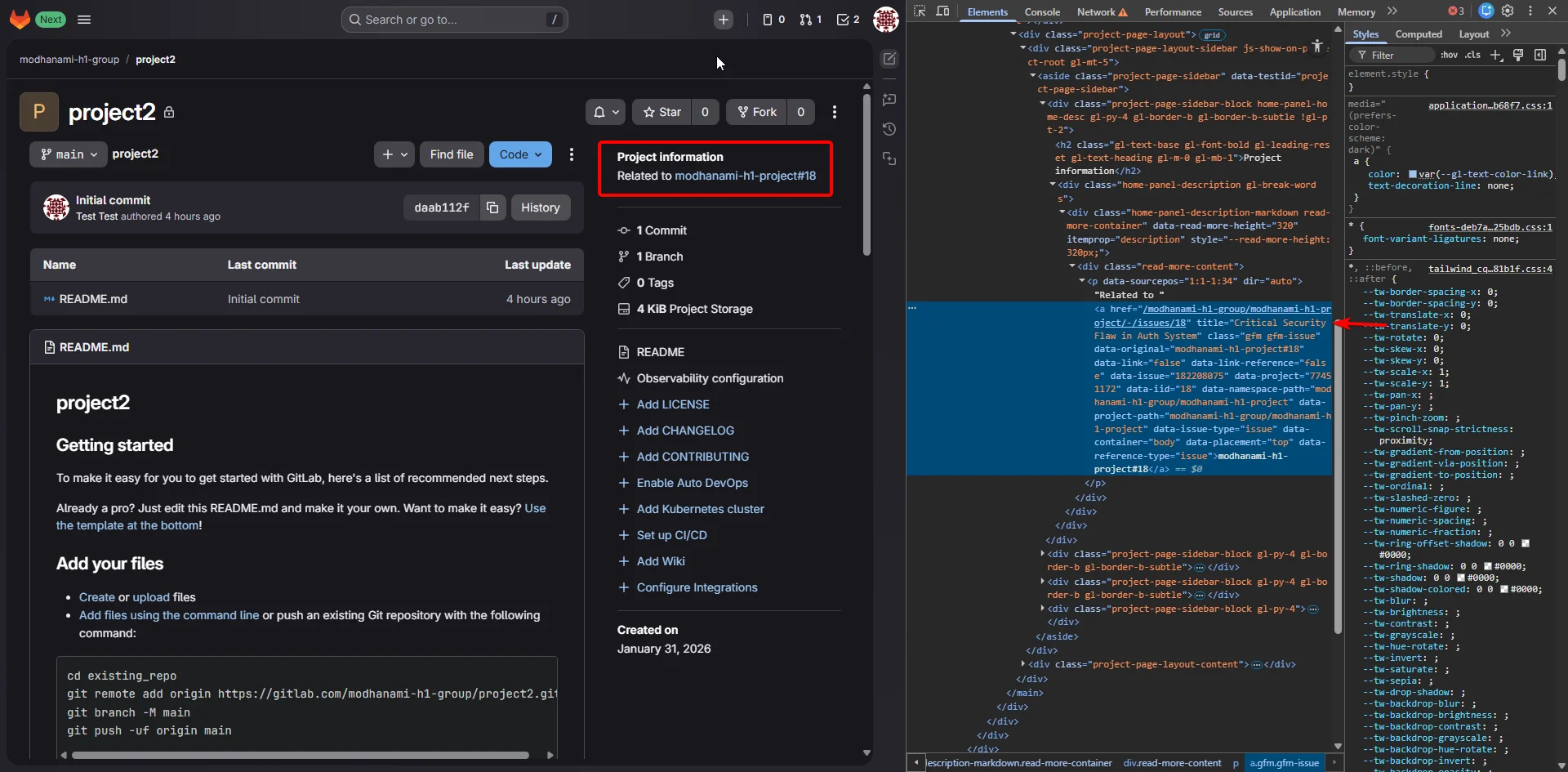
The victim can see the reference resolved and can hover to see the title.
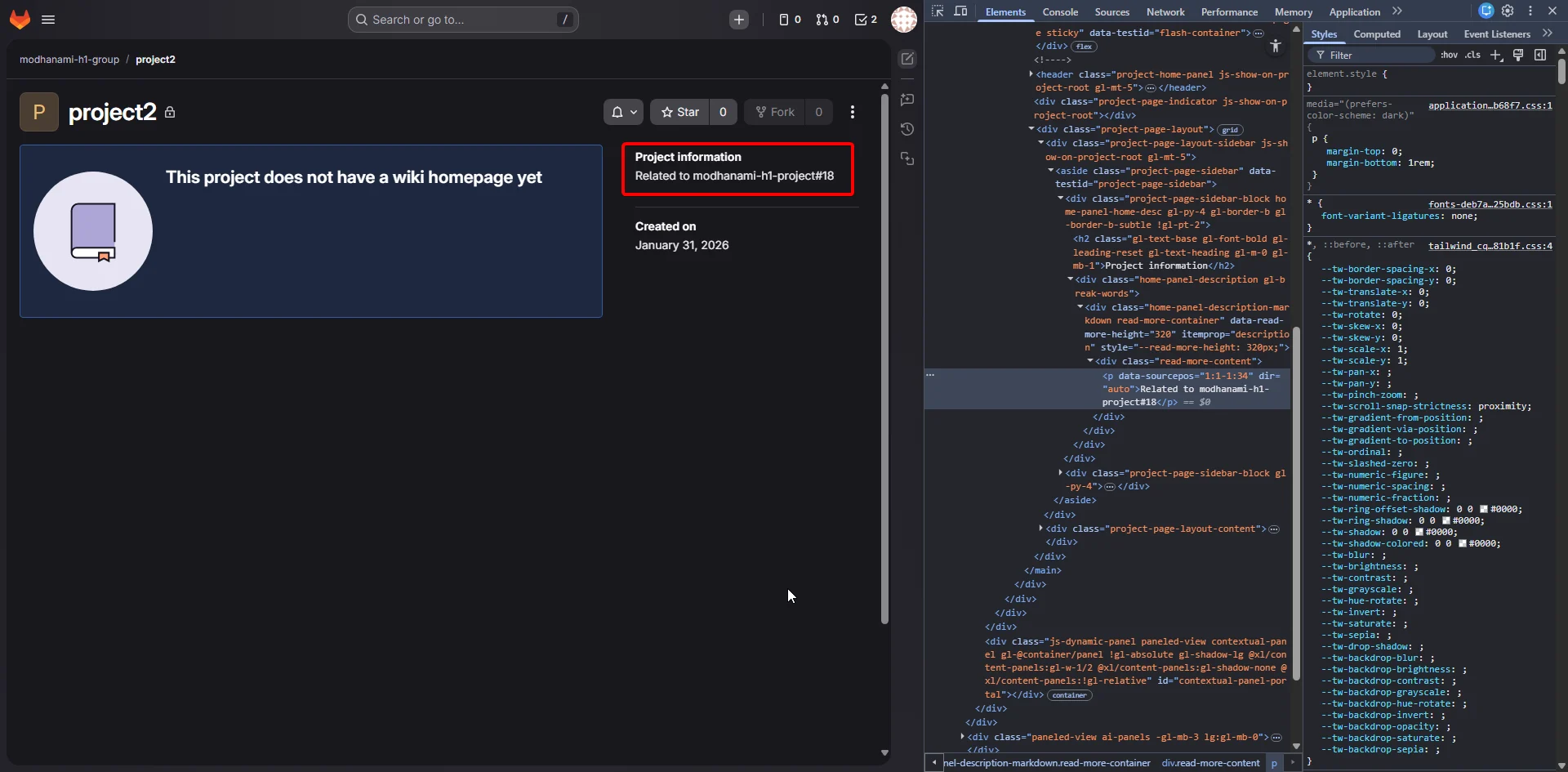
The attacker can only see the unresolved reference.
Via API
The attacker can see the issue title
$ curl -s "https://gitlab.com/api/v4/projects/78130988" \
    -H "PRIVATE-TOKEN: $ATTACKER_TOKEN" | jq -r '.description_html'

<p dir="auto">Related to <a href=".../-/issues/18"
title="Critical Security Flaw in Auth System"    <-- LEAKED
class="gfm gfm-issue">modhanami-h1-project#18</a></p>

Output of checks
This bug happens on GitLab.com.
Attachments
Warning: Attachments received through HackerOne, please exercise caution!
How To Reproduce
Please add reproducibility information to this section:
Context
GitLab renders issue references in Markdown text. When a description contains something like private-project#18, the Markdown renderer turns it into a link to that issue, and the generated HTML carries the issue title in the title attribute of the anchor. That is the normal, intended behaviour: a reader who is allowed to see the issue gets a hover tooltip with its title.
The problem described here is that the rendered HTML is cached and then served through the API as description_html. The Project API entity and the Label API entity both expose description_html, and the cached HTML was produced without regard to who is now reading it. A Guest user of a project whose description (or label description) references a confidential issue in another project therefore receives the confidential issue title inside the HTML, even though they cannot open the issue itself.
The report was filed on gitlab.com and tested there. The affected components are the expose :description_html declarations in lib/api/entities/project.rb and lib/api/entities/label_basic.rb.
Setup
The researcher used two projects inside one group and a single attacker account with the lowest role that still gives access to a project.
- Create a group with two projects:
private-projectandshared-project
- Create a confidential issue in
private-project(for example #18, titled "Critical Security Flaw in Auth System"). - Update the
shared-projectdescription to reference it:Related to private-project#18. - Invite the attacker as Guest to
shared-projectonly.
The concrete objects used in the test on gitlab.com were:
| Object | Value |
|---|---|
| Private project | modhanami-h1-group/modhanami-h1-project (ID: 77451172) |
| Shared project | modhanami-h1-group/project2 (ID: 78130988) |
| Confidential issue | #18 |
The attacker authenticates to the API with a personal access token. The report does not state which scopes the token had.
Finding it
The rendered HTML returned by the API embeds the referenced issue's title in the anchor's title attribute, and this HTML is cached rather than rendered per viewer. Because the reference is written in a project the attacker can read, the attacker receives the cached HTML for that project, and with it the title of an issue in a project they cannot read.
The two views diverge in the UI. The victim, who can see the confidential issue, sees the reference resolved and can hover over it to read the title.
The attacker, looking at the same description, only sees the unresolved reference.
So the UI shows the attacker only the unresolved reference, while the API's cached description_html leaks the title. That mismatch is the signal: the same underlying text produces different output depending on the surface, and the API surface is the one that leaks.
Exploitation
Step 1: confirm the attacker cannot reach the issue directly
The attacker first proves that the confidential issue is genuinely out of reach through the normal endpoint.
# Attacker CANNOT access confidential issue directly
curl -s "https://gitlab.com/api/v4/projects/$PRIVATE_PROJECT_ID/issues/18" \
  -H "PRIVATE-TOKEN: $ATTACKER_TOKEN"
# Returns: 404 Project Not Found
The request targets issue 18 of the private project with the attacker's token. The response is 404 Project Not Found.
Step 2: read the leaked title from the shared project's description_html
# Attacker CAN see leaked title via project's description_html
curl -s "https://gitlab.com/api/v4/projects/$SHARED_PROJECT_ID" \
  -H "PRIVATE-TOKEN: $ATTACKER_TOKEN" | jq -r '.description_html'
This fetches the project the attacker is a Guest of and extracts only the rendered description. The output contains the confidential title:
$ curl -s "https://gitlab.com/api/v4/projects/78130988" \
    -H "PRIVATE-TOKEN: $ATTACKER_TOKEN" | jq -r '.description_html'

<p dir="auto">Related to <a href=".../-/issues/18"
title="Critical Security Flaw in Auth System"    <-- LEAKED
class="gfm gfm-issue">modhanami-h1-project#18</a></p>
The anchor text is the reference as written (modhanami-h1-project#18), but the title attribute holds the full issue title from the private project. The attacker never queried the private project; the title arrived as part of a response for a project they are entitled to read.
The report also includes a captured browser request against the same project, showing the shape of the traffic and the GitLab version in use:
GET /api/v4/projects/78143334 HTTP/2
Host: gitlab.com
Cookie: [redacted]
User-Agent: Mozilla/5.0 (Macintosh; Intel Mac OS X 10.15; rv:147.0) Gecko/20100101 Firefox/147.0
Accept: */*
Accept-Language: en-US,en;q=0.9
Accept-Encoding: gzip, deflate, br
Referer: https://gitlab.com/dashboard/groups
X-Csrf-Token: [redacted]
X-Gitlab-Version: 18.9.0-pre
X-Gitlab-Feature-Category: groups_and_projects
Sentry-Trace: [redacted]
Baggage: [redacted]
Origin: https://gitlab.com
Sec-Fetch-Dest: empty
Sec-Fetch-Mode: cors
Sec-Fetch-Site: same-origin
X-Pwnfox-Color: green
Priority: u=4
Te: trailers
The X-Gitlab-Version header records 18.9.0-pre. The request is a plain authenticated GET of a project resource; nothing unusual is needed to trigger the leak.
Step 3: the same leak through labels
Labels carry a description that is rendered the same way, and the labels endpoint exposes description_html too.
# Victim creates label with description: "Tracked in private-project#18"

# Attacker reads label description_html
curl -s "https://gitlab.com/api/v4/projects/$SHARED_PROJECT_ID/labels" \
  -H "PRIVATE-TOKEN: $ATTACKER_TOKEN" | jq '.[].description_html'
The attacker lists the labels of the shared project and pulls the rendered description of each. Any label whose description references a confidential issue returns the same embedded title. The report notes that teams create labels with descriptions such as Blocked by: security#42 to track dependencies.
Root cause
The rendered Markdown is cached as HTML and served verbatim as description_html. The cached HTML contains the anchor with the title baked in. Serving that cached string to a different user does not re-evaluate whether that user may see the referenced issue.
The report points to the two entities that expose the field:
lib/api/entities/project.rb,expose :description_htmllib/api/entities/label_basic.rb,expose :description_html
It also points to the pattern already used elsewhere: Merge Request and Release entities run a post-process redaction through MarkupHelper.markdown_field before returning the field. Those entities handle the same class of reference correctly; the Project and Label entities do not apply that step. The UI, as the screenshots show, does not expose the title to the attacker.
Impact
A Guest user of a project can read the titles of confidential issues in other projects they have no access to, provided someone with access to the shared project has written a reference to those issues in a project description or a label description. The titles alone are disclosed; the report does not claim that issue bodies, comments or metadata leak.
Titles can still be sensitive: they may name a security flaw or internal project details. The report frames this as a break of GitLab's access control model, with the risk concentrated in organisations that use cross-project issue references to track dependencies or security work across teams with different permission levels. The severity recorded for the report is medium.
Fix
The correct behaviour, as stated in the report, is that confidential issue titles are redacted before the API response is produced. The suggested mechanism is the one already used by Merge Request and Release entities: run post-process redaction via MarkupHelper.markdown_field on the exposed description_html in the Project and Label entities. The report does not describe a patch that was applied.
Variants to test
- Other entities exposing
description_html. Enumerate API entities that serialise rendered Markdown and check whether they apply the same redaction step. A positive result is atitleattribute containing the title of an issue the requesting user cannot open. - Other reference types. The report demonstrates issue references. Try merge request, epic, commit and user references in descriptions and see whether any of them embed data the viewer is not entitled to. A positive result is any attribute or text in the cached HTML that reveals a restricted object's name or title.
- Other places rendered Markdown is cached. Anywhere a description is rendered once and served to many viewers is a candidate. A positive result is the same divergence between what the UI shows the attacker and what the API returns.
- Role boundaries. Repeat with the lowest role that can read the shared project and confirm the leak persists, since the point is that the reader's permissions are never consulted.
Hunting notes
This bug lives at the boundary between a renderer that resolves references with full context and a cache that is served to viewers with less context. During recon, look for API fields ending in _html that return pre-rendered Markdown, and compare them against what the UI shows the same low-privileged account. A reference that renders as plain text in the UI but as a titled link in the API is the tell.
The researcher established impact cleanly: a 404 on the direct issue endpoint proved the object was out of reach, and a single authenticated GET on a project the attacker legitimately reads returned the title. The label vector widened the surface without needing any new precondition beyond a description that contains a reference.
What happened, in plain words
GitLab is a website where teams keep their code and track work. Inside GitLab, a project is a container for a repository and its issues, and an issue is a task, bug or discussion item. Some issues can be marked confidential, which means only certain people are allowed to see them.
GitLab lets people write descriptions in a simple formatting language called Markdown. If you type a reference such as private-project#18, GitLab turns it into a clickable link to issue number 18 in the project called private-project. When it builds that link, it also stores the issue's title inside the link, so that a reader who is allowed to see the issue can hover over the link and read the title in a small tooltip.
The problem in this report is that the finished link, with the title already baked into it, is saved (cached) and then handed out through GitLab's API. The API is the machine-readable side of a website: instead of a page designed for a human, it returns structured data that programs can read. Two API endpoints, one for projects and one for labels, return a field called description_html, which is the pre-rendered description. Because the title was written into that HTML when it was first rendered, anyone who can read the project description receives the confidential title, even if they are not allowed to open the issue.
The attacker in this report is a Guest in a project. The attacker can read the shared project's description, and through it learns the title of a confidential issue in a different project they cannot access at all.
A label is a tag teams attach to issues and merge requests to group them, for example "bug" or "security". Labels can have descriptions too, and those descriptions are rendered the same way, so the same leak appears through the labels endpoint.
The report was filed against gitlab.com and tested there. The severity recorded for it is medium.
The pieces you need to know
Before the steps, a few ideas that come up again and again:
- API endpoint: a URL that returns data rather than a web page. Think of a restaurant: the website is the dining room, the API is the kitchen hatch where waiters (programs) pick up dishes (data).
curl: a command-line program that fetches a URL and prints the response. It is the waiter in the comparison above.- Personal access token: a long secret string that acts like a password for the API. You put it in a request header instead of logging in through a browser. Treat it like a key: whoever holds it can act as you.
- Header: extra information sent alongside a request, like the label on a parcel that says who sent it and what is inside.
PRIVATE-TOKENis the header GitLab uses to carry the token. - Cookie: a small piece of data a browser stores for a site so it can remember who you are between requests. The captured browser request below includes one, which is why it is redacted.
jq: a command-line tool that picks fields out of JSON, the text format APIs usually return.jq -r '.description_html'means "give me the value of thedescription_htmlfield, as raw text".- HTML attribute: HTML is the language of web pages, built from tags like
<a href="...">text</a>. Thehrefandtitleparts are attributes: extra settings on the tag.titleis what a browser shows as a tooltip when you hover. - Caching: storing a finished result so it can be reused instead of recomputed. Like photocopying a letter once and handing the same copy to everyone, rather than retyping it for each reader. That is efficient, but dangerous if the letter contains something not every reader should see.
- Information disclosure: a vulnerability class where data that should be restricted becomes visible to someone who should not see it. Nothing is changed or broken; the harm is that a secret leaks.
- Access control: the rules deciding who may see or do what. The bug here is that access control is applied when you open an issue, but not when a cached description is served to you.
Setup
The researcher built a small scenario with two projects inside one group and one attacker account with the lowest role that still gives access to a project.
- Create a group with two projects:
private-projectandshared-project
- Create a confidential issue in
private-project(for example #18, titled "Critical Security Flaw in Auth System"). - Update the
shared-projectdescription to reference it:Related to private-project#18. - Invite the attacker as Guest to
shared-projectonly.
Why each step: the private project holds the secret (the confidential issue). The shared project is the one the attacker is legitimately allowed to read. The reference in the shared project's description is the bridge between the two: it is ordinary text the victim writes, and it is what causes GitLab to look up the confidential issue and write its title into the rendered HTML. Inviting the attacker only to the shared project makes sure the attacker has no rights on the private one, so any title they obtain is a genuine leak.
The concrete objects used in the test on gitlab.com were:
| Object | Value |
|---|---|
| Private project | modhanami-h1-group/modhanami-h1-project (ID: 77451172) |
| Shared project | modhanami-h1-group/project2 (ID: 78130988) |
| Confidential issue | #18 |
The attacker authenticates to the API with a personal access token. The report does not state which scopes the token had.
How the researcher found it
The HTML returned by the API contains the referenced issue's title inside the link's title attribute, and this HTML is cached rather than rendered fresh for each viewer. Because the reference sits in a project the attacker can read, the attacker receives that cached HTML, and with it the title of an issue in a project they cannot read.
The two views diverge in the browser. The victim, who can see the confidential issue, sees the reference resolved and can hover over it to read the title.
The attacker, looking at the same description, only sees the unresolved reference.
So the web interface shows the attacker only the unresolved reference, while the API's cached description_html leaks the title. That mismatch is the clue: the same text produces different output on different surfaces, and the API surface is the one that leaks. When you are hunting for bugs, a difference like this between two views of the same data is worth following.
Exploitation
Step 1: confirm the attacker cannot reach the issue directly
The attacker first proves that the confidential issue is genuinely out of reach through the normal endpoint.
# Attacker CANNOT access confidential issue directly
curl -s "https://gitlab.com/api/v4/projects/$PRIVATE_PROJECT_ID/issues/18" \
  -H "PRIVATE-TOKEN: $ATTACKER_TOKEN"
# Returns: 404 Project Not Found
Line by line:
curl -sfetches a URL. The-smeans silent: do not print progress noise, just the response.- The URL points at the API (
/api/v4/), then at a specific project by its numeric ID ($PRIVATE_PROJECT_IDis a shell variable holding that number), then at issue 18 of that project. -H "PRIVATE-TOKEN: $ATTACKER_TOKEN"attaches the attacker's token as a header, so GitLab knows who is asking.- The response is
404 Project Not Found. A 404 is the standard "not found" answer.
This step matters because it establishes the baseline. Without it, a leaked title would be unremarkable: perhaps the attacker was allowed to see the issue anyway. With it, the next step shows data crossing a boundary that the first step proved exists.
Step 2: read the leaked title from the shared project's description_html
# Attacker CAN see leaked title via project's description_html
curl -s "https://gitlab.com/api/v4/projects/$SHARED_PROJECT_ID" \
  -H "PRIVATE-TOKEN: $ATTACKER_TOKEN" | jq -r '.description_html'
Line by line:
- This time the URL asks for the shared project itself, by its ID, using the same attacker token.
- The
|(pipe) sends the response intojq, a tool for reading JSON. jq -r '.description_html'extracts only thedescription_htmlfield and prints it as raw text, so the surrounding JSON does not clutter the output.
The output contains the confidential title:
$ curl -s "https://gitlab.com/api/v4/projects/78130988" \
    -H "PRIVATE-TOKEN: $ATTACKER_TOKEN" | jq -r '.description_html'

<p dir="auto">Related to <a href=".../-/issues/18"
title="Critical Security Flaw in Auth System"    <-- LEAKED
class="gfm gfm-issue">modhanami-h1-project#18</a></p>
What this HTML says: there is a paragraph (<p>) containing the words "Related to" and then a link (<a>). The link's href points at issue 18. The link's title attribute holds the full issue title from the private project, which is the leaked part. The visible link text is just the reference as written, modhanami-h1-project#18.
The attacker never queried the private project. The title arrived as part of a response for a project they are entitled to read, which is exactly why this is a leak rather than normal access.
The report also includes a captured browser request against the same project, showing the shape of the traffic and the GitLab version in use:
GET /api/v4/projects/78143334 HTTP/2
Host: gitlab.com
Cookie: [redacted]
User-Agent: Mozilla/5.0 (Macintosh; Intel Mac OS X 10.15; rv:147.0) Gecko/20100101 Firefox/147.0
Accept: */*
Accept-Language: en-US,en;q=0.9
Accept-Encoding: gzip, deflate, br
Referer: https://gitlab.com/dashboard/groups
X-Csrf-Token: [redacted]
X-Gitlab-Version: 18.9.0-pre
X-Gitlab-Feature-Category: groups_and_projects
Sentry-Trace: [redacted]
Baggage: [redacted]
Origin: https://gitlab.com
Sec-Fetch-Dest: empty
Sec-Fetch-Mode: cors
Sec-Fetch-Site: same-origin
X-Pwnfox-Color: green
Priority: u=4
Te: trailers
Reading this request:
GET /api/v4/projects/78143334 HTTP/2is the request line: fetch this project resource, using version 2 of the HTTP protocol.Host: gitlab.comsays which site the request is for.Cookiecarries the browser's session, which is why it is redacted here: it would let anyone reading the report act as the logged-in user.User-Agentidentifies the browser and operating system.Accept,Accept-LanguageandAccept-Encodingtell the server which formats, languages and compression the browser can handle.Referersays which page the request came from.X-Csrf-Tokenis an anti-forgery token the site includes so that other websites cannot silently submit requests on your behalf. It is redacted for the same reason as the cookie.X-Gitlab-Version: 18.9.0-prerecords the GitLab version in use.X-Gitlab-Feature-Category,Sentry-TraceandBaggageare internal bookkeeping headers for logging and error tracking; the trace values are redacted.Origin,Sec-Fetch-Dest,Sec-Fetch-ModeandSec-Fetch-Siteare browser security headers describing where the request came from and what kind it is.X-Pwnfox-Color,PriorityandTeare further browser or tooling details.
The important point is that this is a plain authenticated GET of a project resource. Nothing unusual is needed to trigger the leak: no special payload, no trick, just asking for a project you are allowed to read.
Step 3: the same leak through labels
Labels carry a description that is rendered the same way, and the labels endpoint exposes description_html too.
# Victim creates label with description: "Tracked in private-project#18"

# Attacker reads label description_html
curl -s "https://gitlab.com/api/v4/projects/$SHARED_PROJECT_ID/labels" \
  -H "PRIVATE-TOKEN: $ATTACKER_TOKEN" | jq '.[].description_html'
Line by line:
- The URL now ends in
/labels, so it lists the labels of the shared project. - The same attacker token is used.
jq '.[].description_html'walks through the list of labels (the[]means "every item in the array") and prints thedescription_htmlof each one.
Any label whose description references a confidential issue returns the same embedded title. The report notes that teams create labels with descriptions such as Blocked by: security#42 to track dependencies.
Why it happens
The rendered Markdown is cached as HTML and served as-is in the description_html field. The cached HTML contains the link with the title baked in. Serving that stored string to a different user does not re-check whether that user may see the referenced issue. It is the photocopy problem again: the copy was made for someone allowed to read the original, and then handed to someone who is not.
The report points to the two places that expose the field:
lib/api/entities/project.rb,expose :description_htmllib/api/entities/label_basic.rb,expose :description_html
These are code files in GitLab's source. expose :description_html is the line that says "include this field in the API response".
It also points to the pattern already used elsewhere: Merge Request and Release entities run a post-process redaction through MarkupHelper.markdown_field before returning the field. In plain terms, those parts of GitLab take the rendered HTML and strip out anything the current viewer is not allowed to see before sending it. They handle the same kind of reference correctly; the Project and Label entities do not apply that step. The web interface, as the screenshots show, does not expose the title to the attacker either.
Impact
A Guest user of a project can read the titles of confidential issues in other projects they have no access to, provided someone with access to the shared project has written a reference to those issues in a project description or a label description. Only the titles are disclosed; the report does not claim that issue bodies, comments or other metadata leak.
Titles can still be sensitive. A title may name a security flaw or internal project details. The report frames this as a break of GitLab's access control model, with the risk concentrated in organisations that use cross-project issue references to track dependencies or security work across teams with different permission levels. The severity recorded for the report is medium.
The fix
The correct behaviour, as stated in the report, is that confidential issue titles are redacted before the API response is produced. The suggested mechanism is the one already used by Merge Request and Release entities: run post-process redaction via MarkupHelper.markdown_field on the exposed description_html in the Project and Label entities. The report does not describe a patch that was applied.
Other places to look
- Other entities exposing
description_html. List the API responses that include rendered Markdown and check whether each applies the same redaction step. A positive result is atitleattribute containing the title of an issue the requesting user cannot open. - Other reference types. The report demonstrates issue references. Try merge request, epic, commit and user references in descriptions and see whether any of them embed data the viewer is not entitled to. A positive result is any attribute or text in the cached HTML that reveals a restricted object's name or title.
- Other places rendered Markdown is cached. Anywhere a description is rendered once and served to many viewers is a candidate. A positive result is the same divergence between what the web interface shows the attacker and what the API returns.
- Role boundaries. Repeat with the lowest role that can read the shared project and confirm the leak persists, since the point is that the reader's permissions are never consulted.
Notes for anyone hunting similar bugs
This bug lives at the boundary between a renderer that resolves references with full context and a cache that is served to viewers with less context. During recon, look for API fields ending in _html that return pre-rendered Markdown, and compare them against what the web interface shows the same low-privileged account. A reference that renders as plain text in the interface but as a titled link in the API is the tell.
The researcher established impact cleanly: a 404 on the direct issue endpoint proved the object was out of reach, and a single authenticated GET on a project the attacker legitimately reads returned the title. The label vector widened the surface without needing any new precondition beyond a description that contains a reference.
Glossary
- API: the machine-readable side of a website, returning structured data instead of pages designed for people.
- API endpoint: a specific URL in that API that returns a particular resource or list.
- Access control: the rules that decide who may see or do what.
- Attribute (HTML): an extra setting on an HTML tag, such as
href(the link target) ortitle(the hover tooltip). - Caching: storing a finished result so it can be reused for later requests instead of being recomputed.
- Confidential issue: an issue in GitLab that only certain people are allowed to see.
- Cookie: a small piece of data a browser stores for a site so the site can recognise the user between requests.
- CSRF token: an anti-forgery value included in requests so that other websites cannot silently act on your behalf.
curl: a command-line program for fetching URLs and printing the responses.description_html: the API field holding a description that has already been converted from Markdown into HTML.- GET: the HTTP method used to ask for a resource, as opposed to sending or changing one.
- GitLab: a website and platform where teams host code and track work such as issues and merge requests.
- Group: a container in GitLab that holds projects and manages who can access them.
- Guest: the lowest GitLab role that still gives access to a project.
- Header: extra information sent with a request or response, such as who is asking or which version is in use.
- HTML: the language web pages are written in, built from tags and attributes.
- Issue: a task, bug or discussion item tracked in a GitLab project.
jq: a command-line tool for extracting fields from JSON.- JSON: a text format for structured data, commonly used by APIs.
- Label: a tag teams attach to issues and merge requests to group them, which can carry its own description.
- Markdown: a simple formatting language for writing text with links, lists and emphasis.
- Merge request: a GitLab feature for proposing and reviewing changes to code.
- Personal access token: a long secret string used like a password for the API, sent in a header.
- Project: a container in GitLab for a code repository and its issues.
- Redaction: removing or hiding sensitive parts of data before it is shown or returned.
- Reference: text such as
private-project#18that GitLab turns into a link to a specific issue. - Role: the level of permission a user has in a project or group, such as Guest.
- Severity: the rating given to a vulnerability to express how serious it is.
- Tooltip: the small pop-up text a browser shows when you hover over an element, often taken from a
titleattribute. - 404: the standard HTTP response meaning the requested resource was not found, also used to avoid confirming that a restricted resource exists.




