Accidental $70k Google Pixel Lock Screen Bypass
A lock screen bypass on Google Pixel phones let someone with the device unlock it, giving access to the device.
 Published on bugs.xdavidhu.me
I found a vulnerability affecting seemingly all Google Pixel phones where if you gave me any locked Pixel device, I could give it back to you unlocked. The bug just got fixed in the November 5, 2022 security update.
The full write-up lives on its author's site
It belongs to its author, so we link to it rather than copy it. The other two tabs are our own rewrites, checked against it.
Context
This is a write-up by David Schütz (@xdavidhu) of a lock screen bypass affecting Google Pixel phones, tracked as CVE-2022-20465 and fixed in the November 5, 2022 Android security update. The researcher states that the issue affected seemingly all Google Pixel phones and that it might affect other Android vendors as well. The bug was reported through the Android VRP (Android and Google Devices Security Reward Program) and was rewarded with $70,000.
The feature involved is the device lock screen and the SIM PIN and SIM PUK entry screens that Android shows on top of it. Normally, after a reboot the device requires the lock screen PIN or password at least once before the device is decrypted, and the fingerprint icon should not be usable at that point. The SIM PIN and SIM PUK screens are examples of what the report calls security screens, which can be stacked on top of each other.
The report links to the researcher's patch advisory and the raw bug report at feed.bugs.xdavidhu.me/bugs/0016, and to the public AOSP commit that fixed the issue.
Setup
The researcher did not use any special tooling. The preconditions described in the report are:
- Physical access to a locked Pixel device. The report says the attacker could bring their own PIN-locked SIM card, so nothing other than physical access was required for exploitation.
- A SIM card that has a PIN lock and for which the attacker knows the correct PUK code.
- The ability to remove and re-insert the SIM tray, which the researcher did by hot-swapping the tray while the device was locked.
The devices used were a Pixel 6 (fully patched at the time) and an older Pixel 5, on which the researcher reproduced the bug as well. The report does not give Android build numbers or versions beyond the statement that the Pixel 6 was fully patched and that the September 2022 patch still did not fix the issue.
Finding it
The researcher found the bug by accident. After 24 hours of travelling, his Pixel 6 was at 1% battery and died while he was sending text messages. When he booted it again, the phone asked for the SIM PIN. He could not remember it, entered three incorrect PINs, and the SIM card locked itself and required the PUK code.
He found the SIM's original packaging, scratched off the back and got the PUK code. He entered the PUK on the Pixel, the phone asked him to set a new PIN, he did so, and after finishing the process he ended up on the lock screen. Something was off:
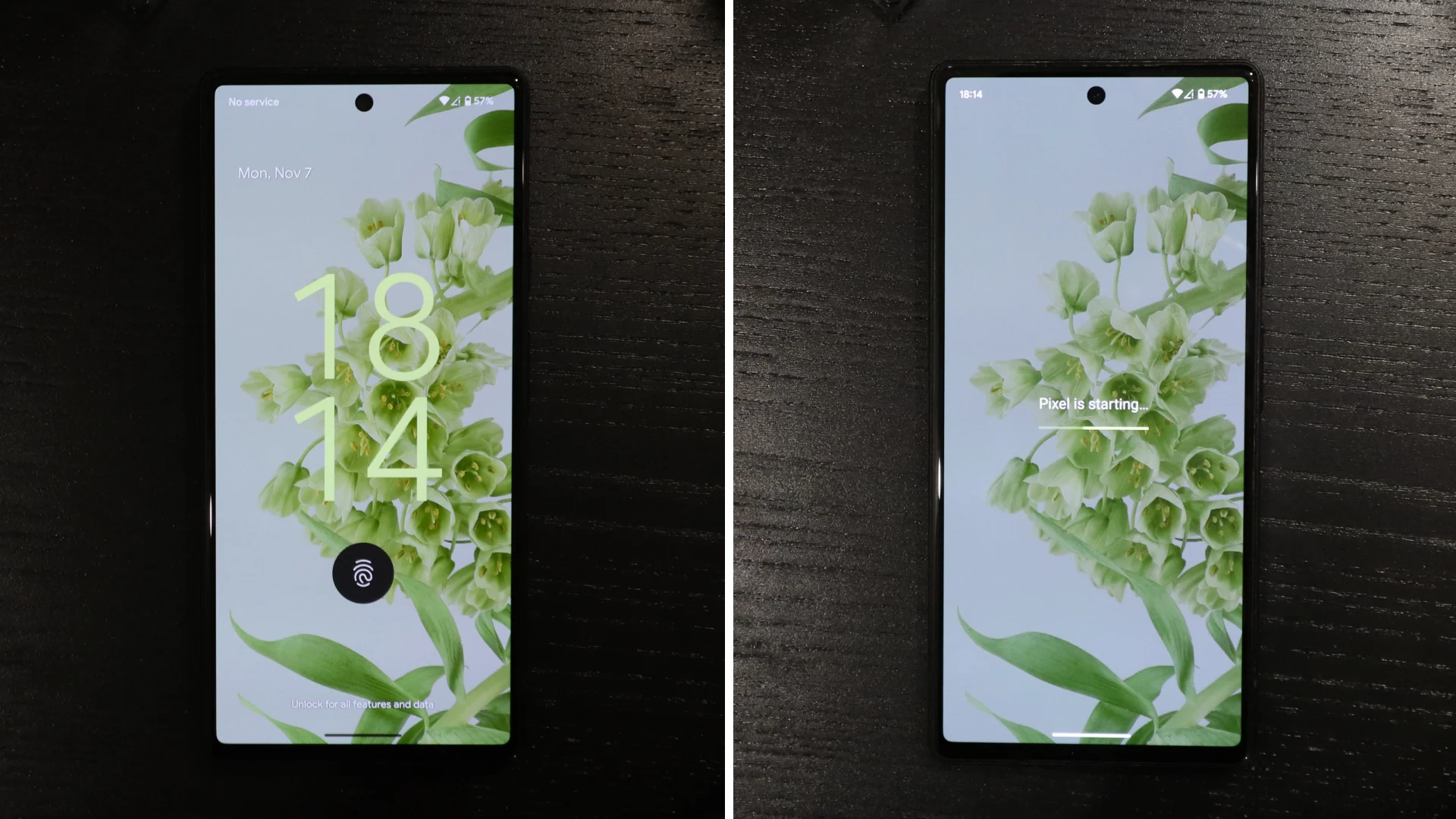
The image shows the unusual fingerprint icon and the "Pixel is starting" text. The report explains why this looked wrong: it was a fresh boot, and instead of the usual lock icon, the fingerprint icon was showing. It accepted his finger, which should not happen, since after a reboot you must enter the lock screen PIN or password at least once to decrypt the device. After accepting the finger, the phone got stuck on a weird "Pixel is starting..." message and stayed there until he rebooted it again.
He noted that this might have security implications and decided to look at it later. The next day he started investigating again.
Exploitation
Step 1: reproduce the SIM PIN reset flow
After rebooting the phone, he put in the incorrect PIN three times, entered the PUK, and chose a new PIN. He got to the same "Pixel is starting..." state. He played with this process multiple times.
Step 2: start from a locked, already booted device
One time he forgot to reboot the phone and started from a normal unlocked state. He locked the device, hot-swapped the SIM tray, and did the SIM PIN reset process. He entered the PUK code and chose a new PIN. This time the phone glitched and he was on his personal home screen, even though the device had been locked before.
Step 3: confirm the bypass
He did it again: lock the phone, re-insert the SIM tray, reset the PIN. Again he ended up on the home screen. He then confirmed it was a full lock screen bypass on the fully patched Pixel 6, and reproduced it on his old Pixel 5 as well. The report includes a video of the unlock process in action:
The report does not include any HTTP requests, payloads, commands or code for the exploitation steps. The entire exploit is the physical sequence above: lock the device, swap in a PIN-locked SIM whose PUK the attacker knows, trigger the SIM PIN reset with the PUK, and set a new PIN.
Step 4: report to Google
The researcher sent the report, which he describes as the shortest report of his yet, taking only 5 simple steps. The Android VRP triaged and filed an internal bug within 37 minutes. After that, the quality and frequency of responses deteriorated.
Before reporting, he checked the Android VRP reward table, which states that a lock screen bypass that would affect multiple or all Pixel devices can get a maximum of $100k bounty. He believed he ticked all the required boxes and expected a strong chance of $100k.
After triage there was about a month of silence. He heard it might be closed as a duplicate, and 31 days after reporting he received an automated email saying that "The Android Security Team believes that this is a duplicate of an issue previously reported by another external researcher." On day 59 he pinged the ticket and got a template response saying they were still working on the fix.
Step 5: test after the September 2022 patch
Three months after the report, in September, he was in London attending Google's bug hunter event ESCAL8. The September 2022 patch had just come out, he updated his phone, and one night in his hotel room he tried to reproduce the bug, hoping it was fixed. It was not: he was still able to unlock the phone.
He then reached out to Googlers at the event. The next day he explained the situation to multiple people and did a live demo with some Pixels inside Google's office. They did not have a SIM ejection tool. They first tried a needle, and he cut his finger in multiple places and his hand started bleeding. A Google engineer put a band-aid on his finger. Since the needle did not work, they asked around and a woman gave them her earrings to try with. It worked, they swapped the SIMs, and managed, with some difficulties, to unlock the devices.

The image shows the researcher in the London Google office a day after he cut his finger.
Step 6: disclosure deadline and bounty
He set a disclosure deadline for October 15. The Android VRP team responded that the bug would not be patched in October and that they were aiming at December. He decided to stick with his October deadline. After talking to Googlers about the deadline, a member of the Android VRP team commented on the bug ticket and asked for a call. On a Meet call with multiple people they listened to his story about being in the dark for months, getting template responses (even for the $100k to $0 duplicate), and feeling like he cared more about the bug than Google. They said the fix was now planned for November, not December.
Two weeks after the call he got a message confirming that even though his report was a duplicate, it was only because of his report that they started working on the fix. They decided to make an exception and reward $70,000 for the lock screen bypass. He had already decided, before the bounty, that he was too scared to publish the live bug, and since the fix was less than a month away it was not worth it anyway, so he waited for the fix.
Root cause
The researcher read the public AOSP commit that fixed the issue and gives a high level explanation, noting that he is not an Android engineer.
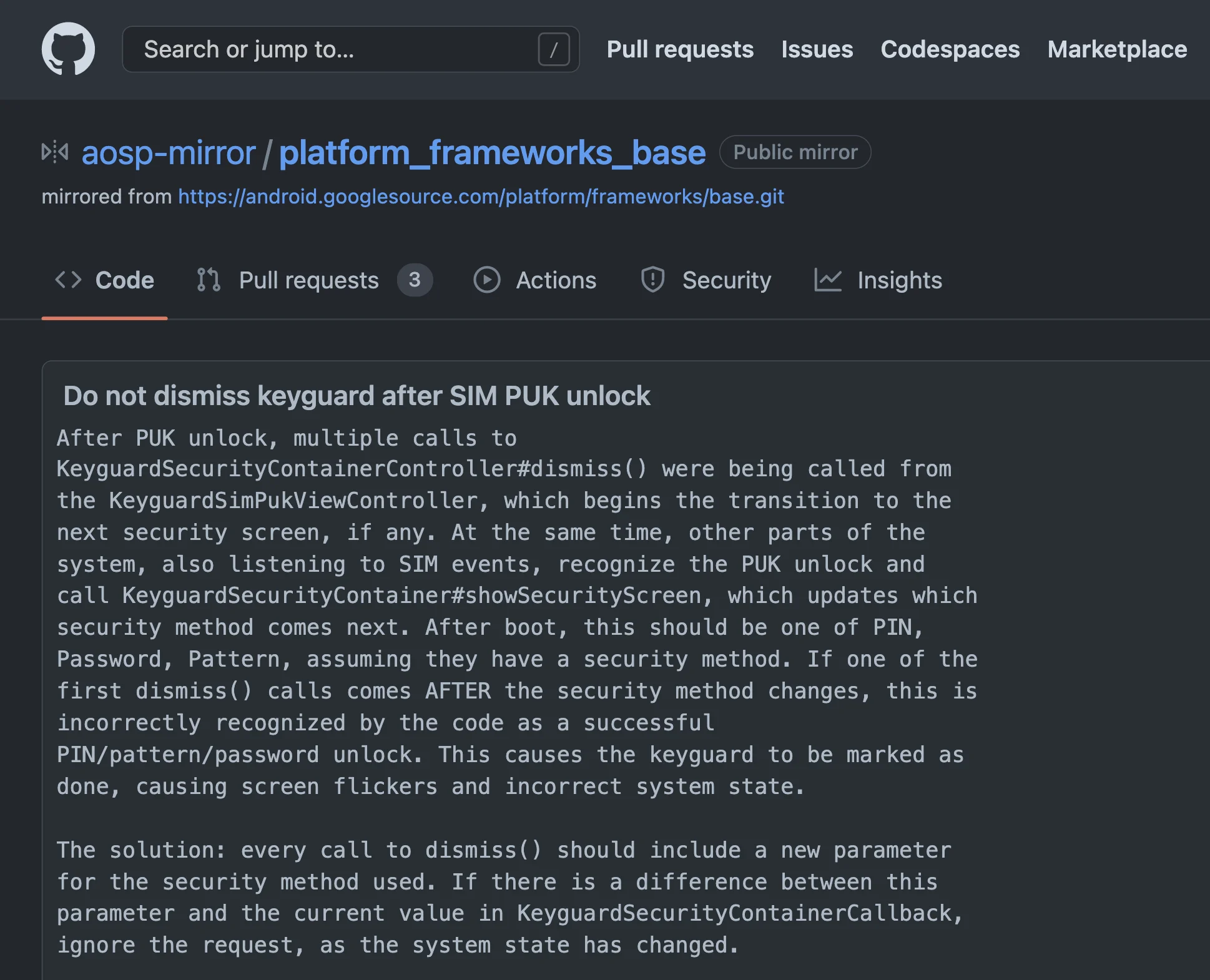
The image is a screenshot of the commit message. The commit is at https://github.com/aosp-mirror/platform_frameworks_base/commit/[redacted].
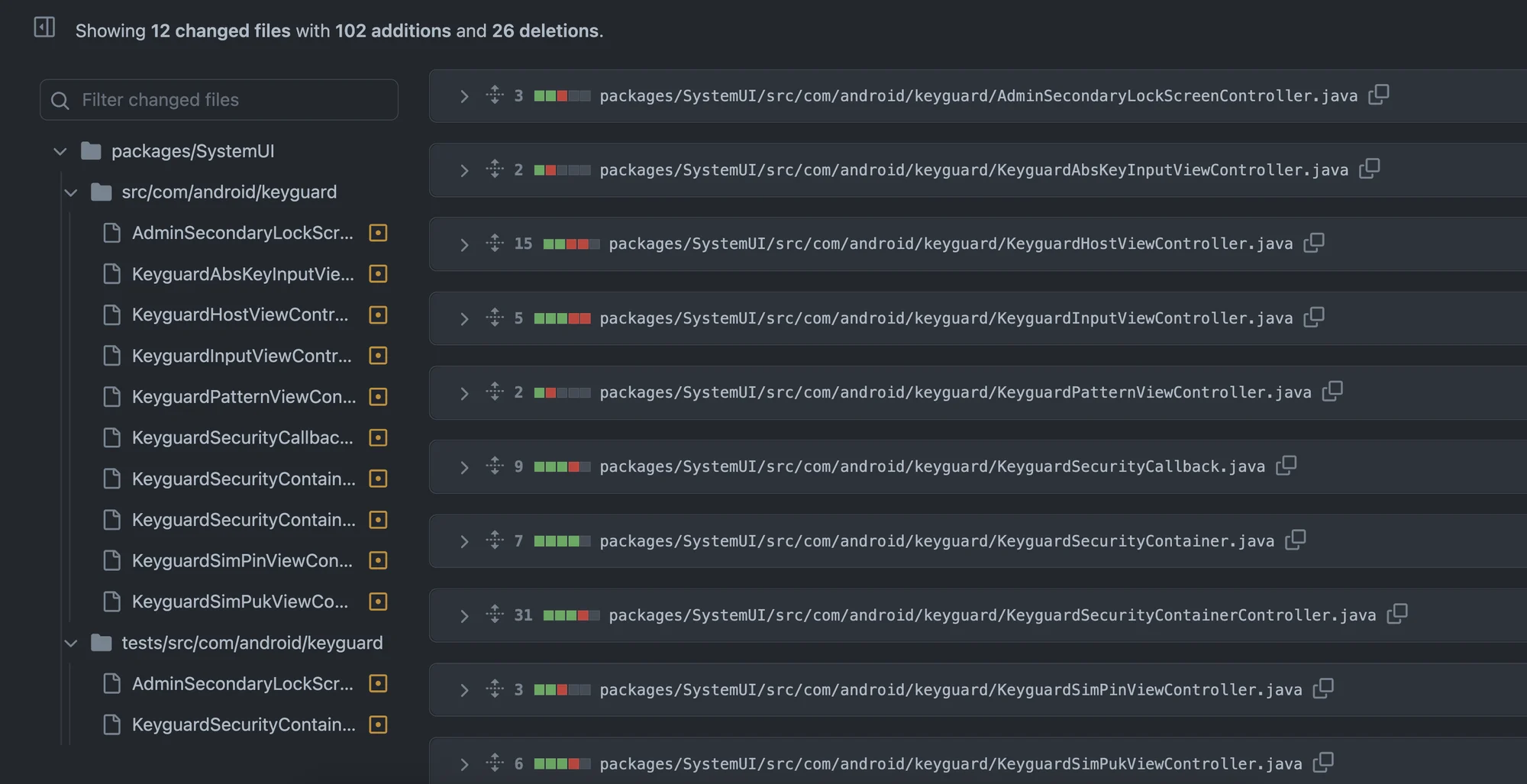
The image is a screenshot of the commit's changed files section. The researcher was surprised by the number of files changed. He had thought the bug would be a simple one-liner fix removing the incorrect line of code responsible for triggering an unlock, but it was not that simple.
On Android there is a concept of a "security screen". A security screen can be the PIN entry screen, the fingerprint scanning screen, the password entry screen, or, in this case, the SIM PIN and SIM PUK entry screen. These security screens can be stacked on top of each other. When the phone was locked and the SIM PIN entry was visible, it had a SIM PIN security screen on top of a fingerprint security screen.
When the SIM PUK was reset successfully, a .dismiss() function was called by the PUK resetting component on the security screen stack, causing the device to dismiss the current one and show the security screen that was under it in the stack. In the example, that was the fingerprint security screen.
Because .dismiss() simply dismissed the current security screen, it was vulnerable to race conditions. Some other part of the system was monitoring the state of the SIM in the background, and when it detected a change it updated which security screen was currently active. That background component set the normal, for example fingerprint, screen as the active security screen even before the PUK component was able to get to its own .dismiss() call. By the time the PUK component called .dismiss(), it actually dismissed the fingerprint security screen instead of just dismissing the PUK security screen as intended. Calling .dismiss() on the fingerprint security screen caused the phone to unlock.
The report does not describe the exact timing window or the specific background component beyond this high level picture.
Impact
An attacker with physical access could bypass the lock screen protections (fingerprint, PIN, etc.) and gain complete access to the user's device. The attacker could bring their own PIN-locked SIM card, so nothing other than physical access was required: they could swap the SIM in the victim's device and perform the exploit with a SIM card that had a PIN lock and for which the attacker knew the correct PUK code.
The report says the vulnerability might affect other Android vendors as well, and that it affected seemingly all Google Pixel phones. The researcher reproduced it on a Pixel 6 and a Pixel 5.
Fix
The fix is the public AOSP commit referenced above, shipped in the November 5, 2022 security update. According to the researcher's reading of the commit, the Android engineers refactored the .dismiss() function and made it require an additional parameter, where the caller can specify what type of security screen it wants to dismiss. The PUK component now explicitly calls .dismiss(SecurityMode.SimPuk) to only dismiss security screens with the type SimPuk. If the currently active security screen is not a SimPuk screen, because some background component changed it as in this case, the dismiss function does nothing. The researcher describes this as a pretty elegant and robust solution that defends against this and future race conditions as well.
Variants to test
- Other callers of the security screen dismiss function. Look for components that dismiss a security screen without specifying its type, and check whether a background state change can swap the current screen before the dismiss call. A positive result is a dismiss that removes a screen the caller did not own, for example landing on the home screen instead of the expected screen.
- Other SIM related flows. The report only describes the SIM PIN and SIM PUK entry screens. Try other flows that push and pop security screens while the device is locked, and watch whether the screen underneath is dismissed. A positive result is the device becoming usable without the lock screen credential.
- Other Android vendors. The report says the bug might affect other vendors. Reproduce the same physical sequence, lock the device, swap in a PIN-locked SIM with a known PUK, reset the PIN, on devices from other manufacturers. A positive result is reaching the home screen from a locked state.
- Race timing. The report describes a race between the PUK component's dismiss call and a background component that updates the active security screen. Try to widen or shift that window, for example by repeating the reset process or by changing the SIM state at different moments. A positive result is an unlock that happens only sometimes, which would confirm the race rather than a deterministic logic error.
- Post-reboot state. The report notes that after a reboot the fingerprint icon appeared where the lock icon should be, and that the fingerprint was accepted even though the device should require the PIN or password first. Test whether the fingerprint can be used to reach further screens after a reboot following a SIM PUK reset. A positive result is any access to device data before the lock screen credential is entered.
What happened, in plain words
Imagine you find a locked phone on a table. You cannot get past the lock screen because you do not know the PIN or password, and the fingerprint sensor will not work until the owner has unlocked the phone at least once after turning it on. Now imagine that you can take out the SIM card, put in your own SIM card that has a PIN lock, and then, by entering a special code called a PUK, you can reset the SIM PIN. If you do this in the right order, the phone suddenly unlocks itself and shows the home screen. That is exactly what happened here. The researcher, David Schütz, discovered this by accident on his own Google Pixel 6 phone. He reported it to Google, and Google fixed it in the November 5, 2022 security update. The bug is tracked as CVE-2022-20465, and Google paid him $70,000 for finding it. The report says the bug affected seemingly all Google Pixel phones and might affect other Android phone makers too.
This article explains the whole story in simple terms, assuming you know how to use a computer and a browser but nothing about security. We will go through the same steps as the original technical write-up, in the same order, and explain every technical idea as it comes up.
Context
This is a write-up by David Schütz (known online as @xdavidhu) about a lock screen bypass on Google Pixel phones. A lock screen bypass is a weakness that lets someone get past the lock screen without knowing the PIN, password, or fingerprint. The bug is tracked as CVE-2022-20465. CVE stands for Common Vulnerabilities and Exposures; it is a unique ID given to a publicly known security flaw so people can refer to it easily. It was fixed in the November 5, 2022 Android security update. The researcher says the issue affected seemingly all Google Pixel phones and might affect other Android vendors as well. He reported it through the Android VRP (Android and Google Devices Security Reward Program). A VRP is a bug bounty program: a company offers money to people who find and report security bugs in its products. The reward was $70,000.
The feature involved is the device lock screen and the SIM PIN and SIM PUK entry screens that Android shows on top of it. A SIM card is the small chip you get from a mobile network operator; it identifies your phone to the network. A SIM PIN is a secret code you can set to lock the SIM card itself, so that if someone puts your SIM in another phone, they cannot use it without the PIN. A PUK (Personal Unblocking Key) is a special code provided by the network operator that unlocks a SIM card when you have entered the wrong SIM PIN too many times. The lock screen is the screen you see when you turn on the phone; it asks for your PIN, pattern, password, or fingerprint. Normally, after a reboot (turning the phone off and on again), the device requires the lock screen PIN or password at least once before the device is decrypted. Encryption scrambles the data on the phone so that it cannot be read without the correct key; the lock screen PIN or password is used to derive that key. So after a reboot, the fingerprint icon should not be usable, because the data is still encrypted and the fingerprint alone cannot decrypt it. The SIM PIN and SIM PUK screens are examples of what the report calls security screens. A security screen is any screen that asks for some kind of credential: the PIN entry screen, the fingerprint scanning screen, the password entry screen, or the SIM PIN and SIM PUK entry screens. These security screens can be stacked on top of each other, like sheets of paper on a desk. The top one is the one you see and interact with.
The report links to the researcher's patch advisory and the raw bug report at feed.bugs.xdavidhu.me/bugs/0016, and to the public AOSP commit that fixed the issue. AOSP stands for Android Open Source Project; it is the publicly available source code of Android. A commit is a recorded change to the source code, like a saved edit in a document's history.
Setup
The researcher did not use any special tooling. The preconditions described in the report are:
- Physical access to a locked Pixel device. The report says the attacker could bring their own PIN-locked SIM card, so nothing other than physical access was required for exploitation. Physical access means you can hold the phone in your hands and press its buttons.
- A SIM card that has a PIN lock and for which the attacker knows the correct PUK code. The attacker can use their own SIM card, as long as they know its PUK.
- The ability to remove and re-insert the SIM tray, which the researcher did by hot-swapping the tray while the device was locked. Hot-swapping means removing and re-inserting the SIM tray while the phone is still turned on, without rebooting.
The devices used were a Pixel 6 (fully patched at the time) and an older Pixel 5, on which the researcher reproduced the bug as well. The report does not give Android build numbers or versions beyond the statement that the Pixel 6 was fully patched and that the September 2022 patch still did not fix the issue.
Finding it
The researcher found the bug by accident. After 24 hours of travelling, his Pixel 6 was at 1% battery and died while he was sending text messages. When he booted it again, the phone asked for the SIM PIN. He could not remember it, entered three incorrect PINs, and the SIM card locked itself and required the PUK code. This is a normal safety feature: after too many wrong SIM PIN attempts, the SIM locks and only the PUK can unlock it.
He found the SIM's original packaging, scratched off the back and got the PUK code. He entered the PUK on the Pixel, the phone asked him to set a new PIN, he did so, and after finishing the process he ended up on the lock screen. Something was off:
The image shows the unusual fingerprint icon and the "Pixel is starting" text. The report explains why this looked wrong: it was a fresh boot, and instead of the usual lock icon, the fingerprint icon was showing. It accepted his finger, which should not happen, since after a reboot you must enter the lock screen PIN or password at least once to decrypt the device. After accepting the finger, the phone got stuck on a weird "Pixel is starting..." message and stayed there until he rebooted it again.
He noted that this might have security implications and decided to look at it later. The next day he started investigating again.
Exploitation
Exploitation means actually using a weakness to achieve something, in this case unlocking the phone. The report does not include any HTTP requests, payloads, commands or code for the exploitation steps. The entire exploit is a physical sequence of actions. We will go through the steps as described.
Step 1: reproduce the SIM PIN reset flow
After rebooting the phone, he put in the incorrect PIN three times, entered the PUK, and chose a new PIN. He got to the same "Pixel is starting..." state. He played with this process multiple times. The goal here was to see whether the strange behaviour was repeatable. In security research, a bug is only useful if you can make it happen again and again under the same conditions.
Step 2: start from a locked, already booted device
One time he forgot to reboot the phone and started from a normal unlocked state. He locked the device, hot-swapped the SIM tray, and did the SIM PIN reset process. He entered the PUK code and chose a new PIN. This time the phone glitched and he was on his personal home screen, even though the device had been locked before. This was the key moment: by not rebooting, he changed the starting conditions, and the phone unlocked to the home screen.
Step 3: confirm the bypass
He did it again: lock the phone, re-insert the SIM tray, reset the PIN. Again he ended up on the home screen. He then confirmed it was a full lock screen bypass on the fully patched Pixel 6, and reproduced it on his old Pixel 5 as well. The report includes a video of the unlock process in action:
The entire exploit is the physical sequence above: lock the device, swap in a PIN-locked SIM whose PUK the attacker knows, trigger the SIM PIN reset with the PUK, and set a new PIN. No special apps, cables, or software are needed. This is why the researcher says that nothing other than physical access was required.
Step 4: report to Google
The researcher sent the report, which he describes as the shortest report of his yet, taking only 5 simple steps. The Android VRP triaged and filed an internal bug within 37 minutes. Triaged means the security team looked at the report, confirmed it was a real issue, and started tracking it internally. After that, the quality and frequency of responses deteriorated.
Before reporting, he checked the Android VRP reward table, which states that a lock screen bypass that would affect multiple or all Pixel devices can get a maximum of $100k bounty. A reward table is a list that says how much money a company pays for different kinds of bugs. He believed he ticked all the required boxes and expected a strong chance of $100k.
After triage there was about a month of silence. He heard it might be closed as a duplicate, and 31 days after reporting he received an automated email saying that "The Android Security Team believes that this is a duplicate of an issue previously reported by another external researcher." A duplicate means someone else already reported the same bug. In bug bounty programs, duplicates usually get no reward, because the company only pays the first reporter. On day 59 he pinged the ticket and got a template response saying they were still working on the fix. A ticket is the internal record of the bug report, where the researcher and the company can exchange messages.
Step 5: test after the September 2022 patch
Three months after the report, in September, he was in London attending Google's bug hunter event ESCAL8. The September 2022 patch had just come out, he updated his phone, and one night in his hotel room he tried to reproduce the bug, hoping it was fixed. It was not: he was still able to unlock the phone. A patch is a software update that fixes a bug or security hole.
He then reached out to Googlers at the event. The next day he explained the situation to multiple people and did a live demo with some Pixels inside Google's office. They did not have a SIM ejection tool. They first tried to use a needle, and he cut his finger in multiple places and his hand started bleeding. A Google engineer put a band-aid on his finger. Since the needle did not work, they asked around and a woman gave them her earrings to try with. It worked, they swapped the SIMs, and managed, with some difficulties, to unlock the devices.
The image shows the researcher in the London Google office a day after he cut his finger.
Step 6: disclosure deadline and bounty
He set a disclosure deadline for October 15. Disclosure means making the details of a bug public. Researchers often set a deadline to pressure companies to fix the bug in a reasonable time. The Android VRP team responded that the bug would not be patched in October and that they were aiming at December. He decided to stick with his October deadline. After talking to Googlers about the deadline, a member of the Android VRP team commented on the bug ticket and asked for a call. On a Meet call with multiple people they listened to his story about being in the dark for months, getting template responses (even for the $100k to $0 duplicate), and feeling like he cared more about the bug than Google. They said the fix was now planned for November, not December.
Two weeks after the call he got a message confirming that even though his report was a duplicate, it was only because of his report that they started working on the fix. They decided to make an exception and reward $70,000 for the lock screen bypass. He had already decided, before the bounty, that he was too scared to publish the live bug, and since the fix was less than a month away it was not worth it anyway, so he waited for the fix. Publishing the live bug would mean releasing the exact steps to exploit it, which could let others use it against people who had not yet updated their phones.
Root cause
The root cause is the underlying reason the bug exists. The researcher read the public AOSP commit that fixed the issue and gives a high level explanation, noting that he is not an Android engineer.
The image is a screenshot of the commit message. The commit is at https://github.com/aosp-mirror/platform_frameworks_base/commit/[redacted].
The image is a screenshot of the commit's changed files section. The researcher was surprised by the number of files changed. He had thought the bug would be a simple one-liner fix removing the incorrect line of code responsible for triggering an unlock, but it was not that simple. A one-liner is a fix that changes just one line of code.
On Android there is a concept of a "security screen". A security screen can be the PIN entry screen, the fingerprint scanning screen, the password entry screen, or, in this case, the SIM PIN and SIM PUK entry screen. These security screens can be stacked on top of each other. When the phone was locked and the SIM PIN entry was visible, it had a SIM PIN security screen on top of a fingerprint security screen. Think of it like a stack of cards: the top card is the one you see, and when you remove it, the next card is revealed.
When the SIM PUK was reset successfully, a .dismiss() function was called by the PUK resetting component on the security screen stack, causing the device to dismiss the current one and show the security screen that was under it in the stack. In the example, that was the fingerprint security screen. A function is a piece of code that does a specific job; here, .dismiss() removes the current security screen. A component is a part of the Android system that handles a particular task, like resetting the SIM PUK.
Because .dismiss() simply dismissed the current security screen, it was vulnerable to race conditions. A race condition happens when two things happen at almost the same time and the result depends on which one finishes first. Imagine two people trying to take the top sheet off a stack of papers at the same time: if one person removes a sheet, the other might remove the wrong one. Here, some other part of the system was monitoring the state of the SIM in the background, and when it detected a change it updated which security screen was currently active. That background component set the normal, for example fingerprint, screen as the active security screen even before the PUK component was able to get to its own .dismiss() call. By the time the PUK component called .dismiss(), it actually dismissed the fingerprint security screen instead of just dismissing the PUK security screen as intended. Calling .dismiss() on the fingerprint security screen caused the phone to unlock.
The report does not describe the exact timing window or the specific background component beyond this high level picture.
Impact
Impact is what an attacker could do if they exploited the bug. An attacker with physical access could bypass the lock screen protections (fingerprint, PIN, etc.) and gain complete access to the user's device. The attacker could bring their own PIN-locked SIM card, so nothing other than physical access was required: they could swap the SIM in the victim's device and perform the exploit with a SIM card that had a PIN lock and for which the attacker knew the correct PUK code.
The report says the vulnerability might affect other Android vendors as well, and that it affected seemingly all Google Pixel phones. The researcher reproduced it on a Pixel 6 and a Pixel 5. CVSS is a standard way to score the severity of a vulnerability; it is not mentioned in the report.
Fix
The fix is the public AOSP commit referenced above, shipped in the November 5, 2022 security update. According to the researcher's reading of the commit, the Android engineers refactored the .dismiss() function and made it require an additional parameter, where the caller can specify what type of security screen it wants to dismiss. Refactored means the code was restructured, not just patched. A parameter is extra information you give to a function to tell it what to do. The PUK component now explicitly calls .dismiss(SecurityMode.SimPuk) to only dismiss security screens with the type SimPuk. If the currently active security screen is not a SimPuk screen, because some background component changed it as in this case, the dismiss function does nothing. The researcher describes this as a pretty elegant and robust solution that defends against this and future race conditions as well.
Variants to test
Variants are other ways the same bug might appear. If you were a security researcher, here are some things you could try, based on the report:
- Other callers of the security screen dismiss function. Look for components that dismiss a security screen without specifying its type, and check whether a background state change can swap the current screen before the dismiss call. A positive result is a dismiss that removes a screen the caller did not own, for example landing on the home screen instead of the expected screen.
- Other SIM related flows. The report only describes the SIM PIN and SIM PUK entry screens. Try other flows that push and pop security screens while the device is locked, and watch whether the screen underneath is dismissed. A positive result is the device becoming usable without the lock screen credential.
- Other Android vendors. The report says the bug might affect other vendors. Reproduce the same physical sequence, lock the device, swap in a PIN-locked SIM with a known PUK, reset the PIN, on devices from other manufacturers. A positive result is reaching the home screen from a locked state.
- Race timing. The report describes a race between the PUK component's dismiss call and a background component that updates the active security screen. Try to widen or shift that window, for example by repeating the reset process or by changing the SIM state at different moments. A positive result is an unlock that happens only sometimes, which would confirm the race rather than a deterministic logic error. A deterministic logic error is a bug that happens every time under the same conditions, unlike a race condition which depends on timing.
- Post-reboot state. The report notes that after a reboot the fingerprint icon appeared where the lock icon should be, and that the fingerprint was accepted even though the device should require the PIN or password first. Test whether the fingerprint can be used to reach further screens after a reboot following a SIM PUK reset. A positive result is any access to device data before the lock screen credential is entered.
Glossary
- Lock screen bypass: a weakness that lets someone get past the lock screen without knowing the PIN, password, or fingerprint.
- CVE: Common Vulnerabilities and Exposures; a unique ID for a publicly known security flaw.
- Android VRP: Android and Google Devices Security Reward Program; a bug bounty program that pays for security bugs.
- Bug bounty program: a program where a company offers money to people who find and report security bugs.
- SIM card: a small chip from a mobile network operator that identifies your phone to the network.
- SIM PIN: a secret code that locks the SIM card itself.
- PUK: Personal Unblocking Key; a code from the network operator that unlocks a SIM card after too many wrong SIM PIN attempts.
- Lock screen: the screen you see when you turn on the phone, asking for your PIN, pattern, password, or fingerprint.
- Reboot: turning the phone off and on again.
- Decrypted: data that has been unscrambled using the correct key; after a reboot, the phone is encrypted until the lock screen credential is entered.
- Encryption: scrambling data so it cannot be read without the correct key.
- Security screen: any screen that asks for a credential, such as PIN entry, fingerprint scanning, password entry, or SIM PIN/PUK entry.
- AOSP: Android Open Source Project; the publicly available source code of Android.
- Commit: a recorded change to source code.
- Physical access: being able to hold and operate the device.
- Hot-swapping: removing and re-inserting the SIM tray while the phone is still on.
- Exploitation: actually using a weakness to achieve something, like unlocking the phone.
- Triaged: a security team has looked at a report, confirmed it is a real issue, and started tracking it.
- Reward table: a list that says how much money a company pays for different kinds of bugs.
- Duplicate: a bug that has already been reported by someone else.
- Ticket: the internal record of a bug report where messages are exchanged.
- Patch: a software update that fixes a bug or security hole.
- Disclosure: making the details of a bug public.
- Publishing the live bug: releasing the exact steps to exploit a bug.
- Root cause: the underlying reason a bug exists.
- One-liner: a fix that changes just one line of code.
- Function: a piece of code that does a specific job.
- Component: a part of the Android system that handles a particular task.
- Race condition: a situation where two things happen at almost the same time and the result depends on which finishes first.
- Impact: what an attacker could do if they exploited the bug.
- CVSS: a standard way to score the severity of a vulnerability.
- Refactored: restructured code, not just patched.
- Parameter: extra information given to a function to tell it what to do.
- Variants: other ways the same bug might appear.
- Deterministic logic error: a bug that happens every time under the same conditions, unlike a race condition.


