I Built a TV That Plays All of Your Private YouTube Videos
A one-click bug let an attacker make a victim's browser play their private videos on an attacker-controlled TV, then obtain tokens to watch them.
 Published on bugs.xdavidhu.me
In my previous two YouTube writeups, we were limited by having to know the victim’s private video IDs to do anything with them. Let’s be honest, that’s a bit hard to exploit in the real world.
The full write-up lives on its author's site
It belongs to its author, so we link to it rather than copy it. The other two tabs are our own rewrites, checked against it.
Context
The target here is the YouTube TV experience, the web application that runs on smart TVs and TV boxes. The YouTube for Android TV app turned out not to be a native application at all: after decompiling the APK, the researcher found that it simply loads https://www.youtube.com/tv into a WebView-like browser called Cobalt. That means the whole TV product is a website, and it can be tested from an ordinary desktop browser.
The feature under examination is the remote-control pairing between a phone or desktop browser and a TV. At the time, the desktop YouTube site (https://www.youtube.com/) could control a TV even when the two were on different networks. You linked a TV by entering the TV code it displayed, and afterwards a Play on TV icon appeared next to the player so a video could be transferred to the TV. The internal API behind this is called the Lounge API.
The question that started the research was simple: how does a TV that is not signed in play a private video? The answer is a video-specific token called ctt. When a user asks to play a private video, the event the TV receives from the /bind endpoint carries an extra ctt parameter next to the videoId. To play the video, the TV requests the raw video URL from /get_video_info and passes the ctt as a GET parameter named vtt. Without the ctt, the TV cannot watch the private video. The token only grants permission for that one video, so a TV cannot reach the account's other private videos through it.
Setup
No special accounts or roles were needed beyond a normal YouTube account holding private videos, a browser, and Burp as the HTTP proxy. The TV side was simulated in a second browser.
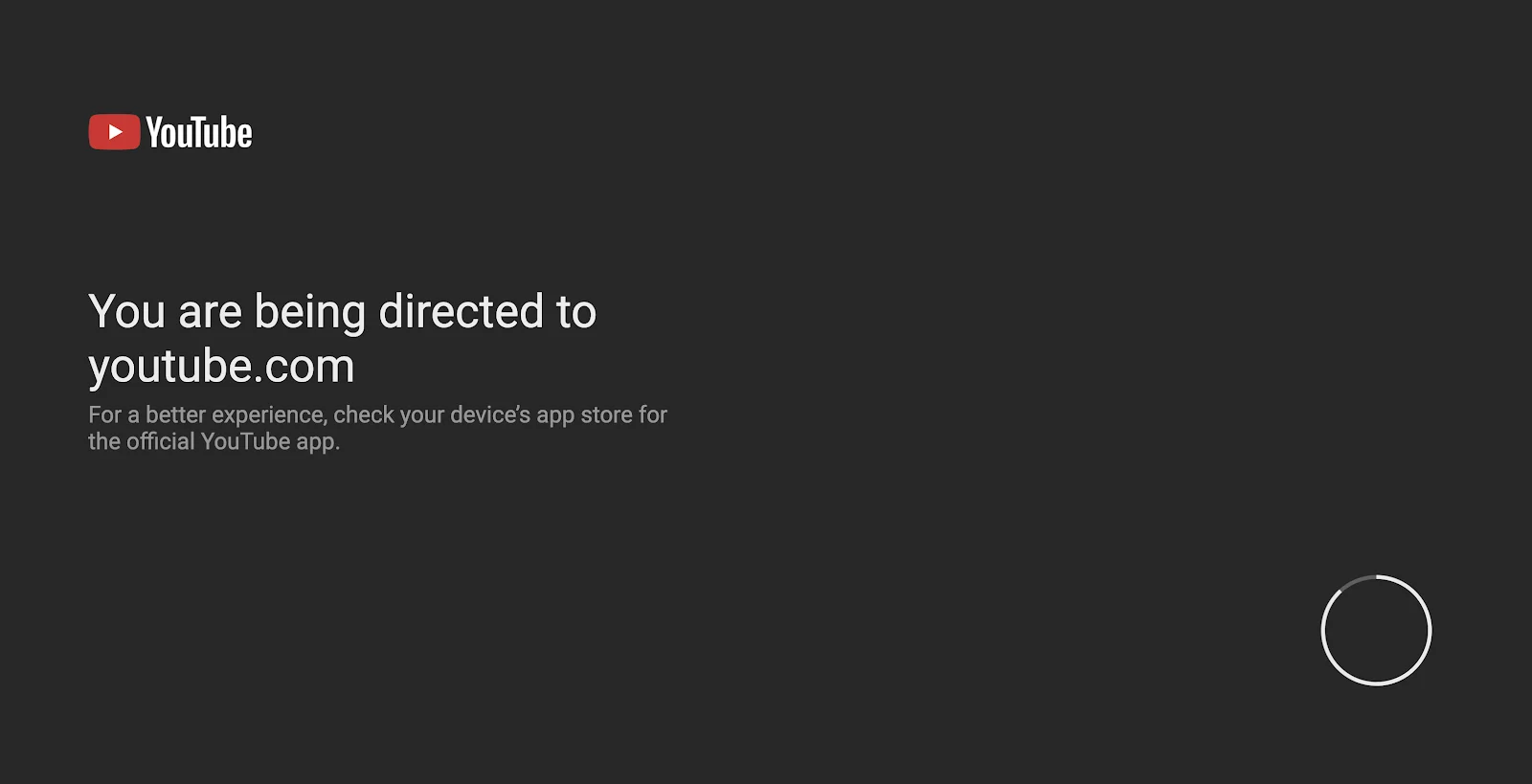
To reach the TV application from a desktop browser, the User-Agent header has to look like a TV. Opening https://www.youtube.com/tv normally redirects to the desktop site:
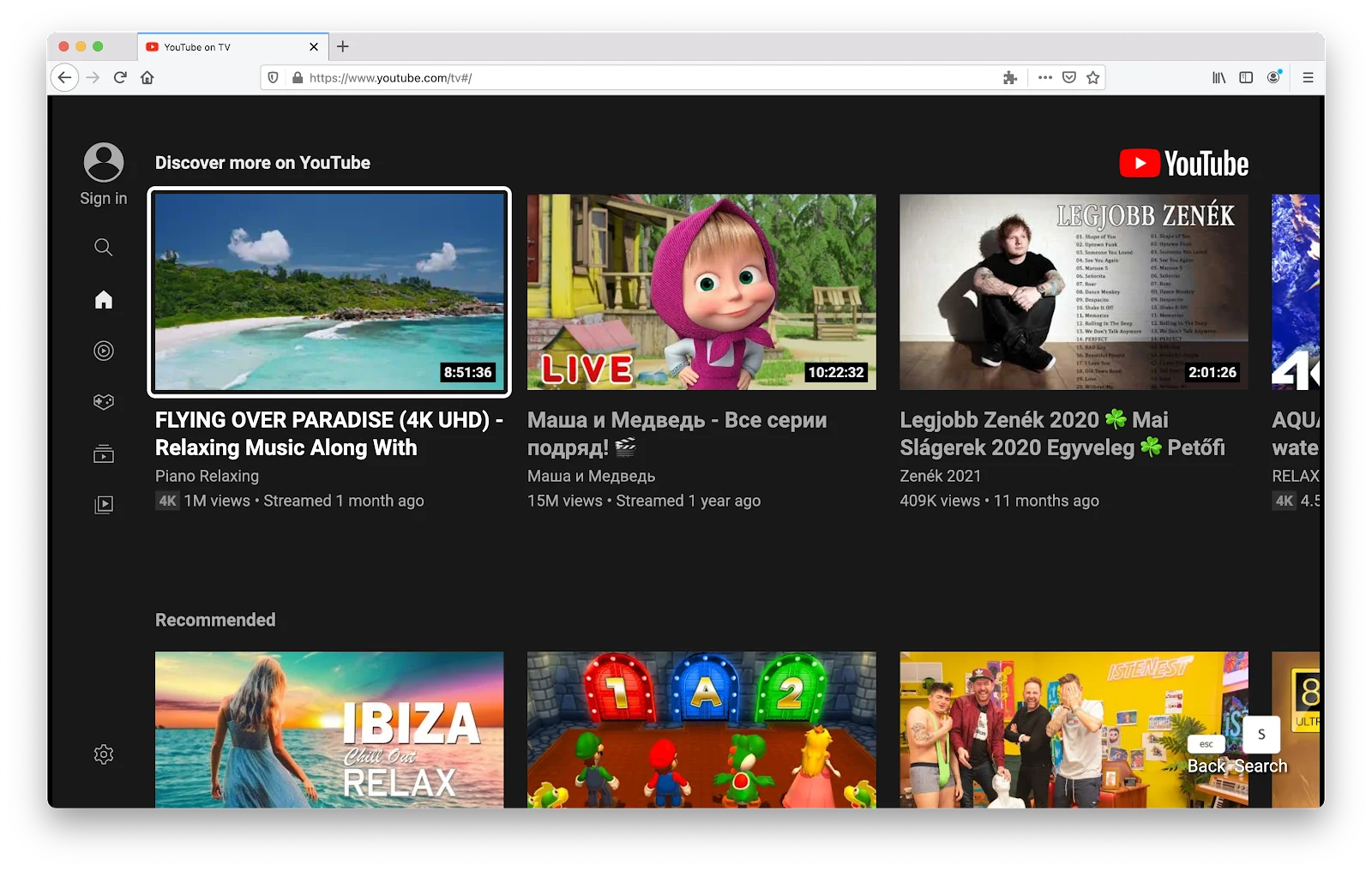
After finding no other option, the researcher suspected the User-Agent header, and changing Firefox to Cobalt in the initial request returned the full YouTube TV app instead of the "You are being directed to youtube.com" screen:
// change ‘Firefox’ to ‘Cobalt’ in the User-Agent
“User-Agent: Mozilla/5.0 (Macintosh; Intel Mac OS X 10.15; rv:87.0) Gecko/20100101 Firefox/87.0”
->
“User-Agent: Mozilla/5.0 (Macintosh; Intel Mac OS X 10.15; rv:87.0) Gecko/20100101 Cobalt/87.0”
With that, the browser is a TV and testing can begin. The pairing UI used for testing has since been removed from the desktop site, so the screenshots of it below come from public sources rather than from the original research.
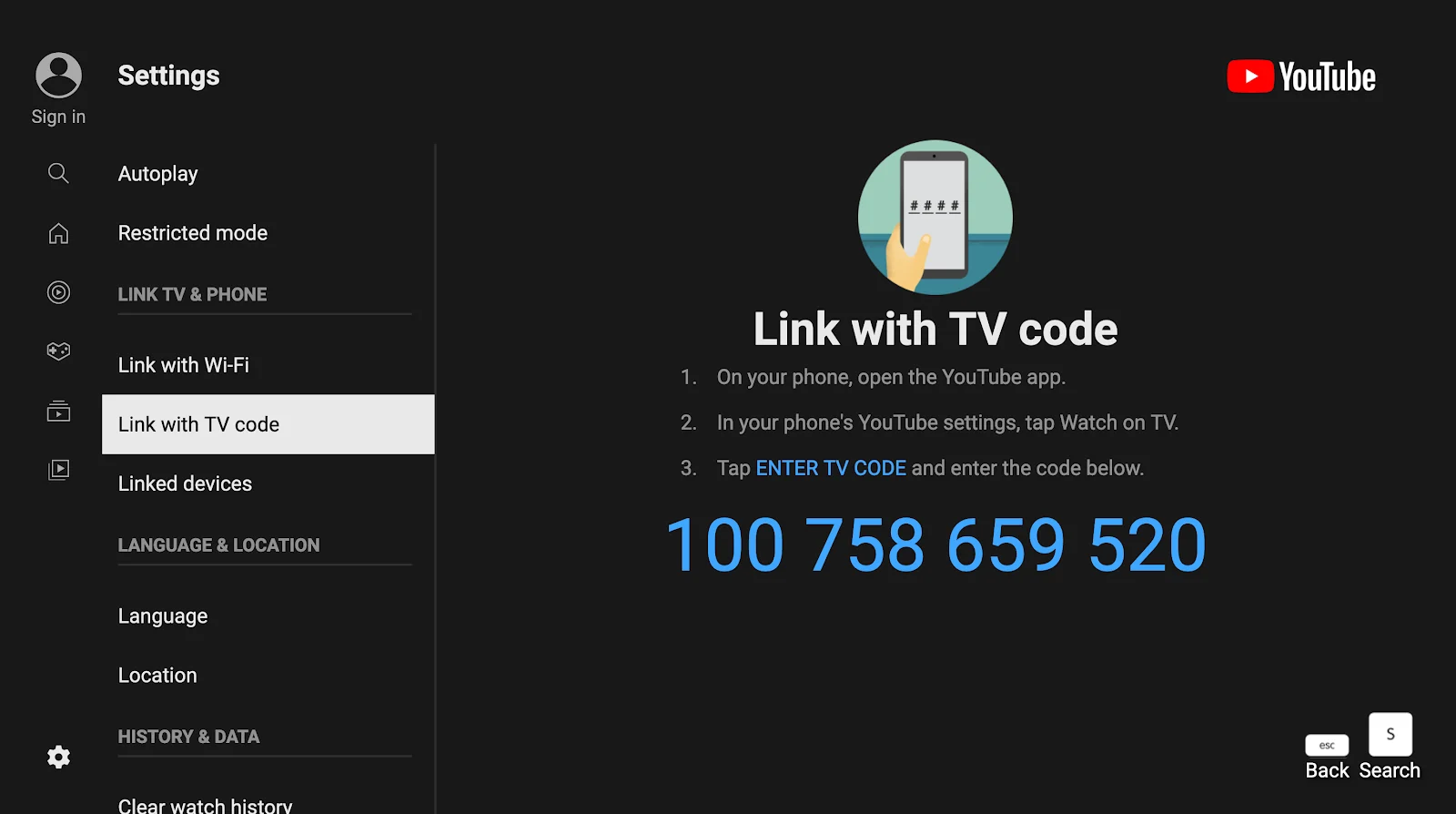
On the "TV", a TV code is generated:
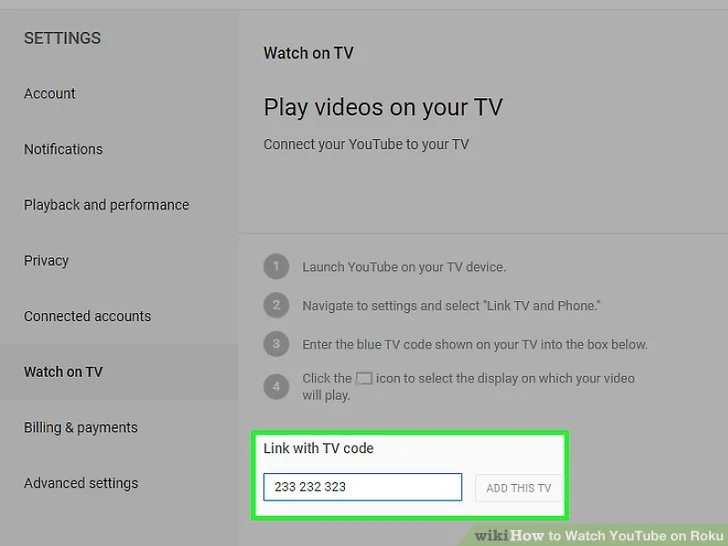
That code is entered in the other browser at https://youtube.com/pair:
After linking, opening a video shows a small Play on TV icon on the right side of the player, which transfers the video to the TV:
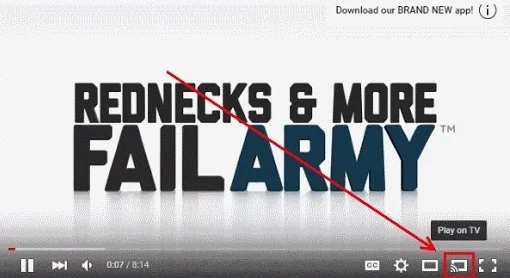
This worked with private videos as well, which gave the researcher the tools to investigate the mechanism.
Finding it
The pairing process in the Lounge API works like this:
- The TV requests a
screen_idfrom/pairing/generate_screen_id. - Using the
screen_id, the TV requests alounge_tokenfrom/pairing/get_lounge_token_batch. - With the
lounge_token, the TV requests a pairing PIN from/pairing/get_pairing_code. - The TV displays the pairing PIN.
The user then enters the PIN on their device. With the PIN, the device calls /pairing/get_screen, and if the PIN is correct the API returns a lounge_token for the user as well. Pairing is then complete and the user can control the TV with that token.
After pairing, the TV switches into a polling mode. Instead of WebSockets, Google uses bind requests: HTTP requests that stay open for a long time when there are no new events and return immediately when there are some. The TV calls the /bind endpoint over and over.
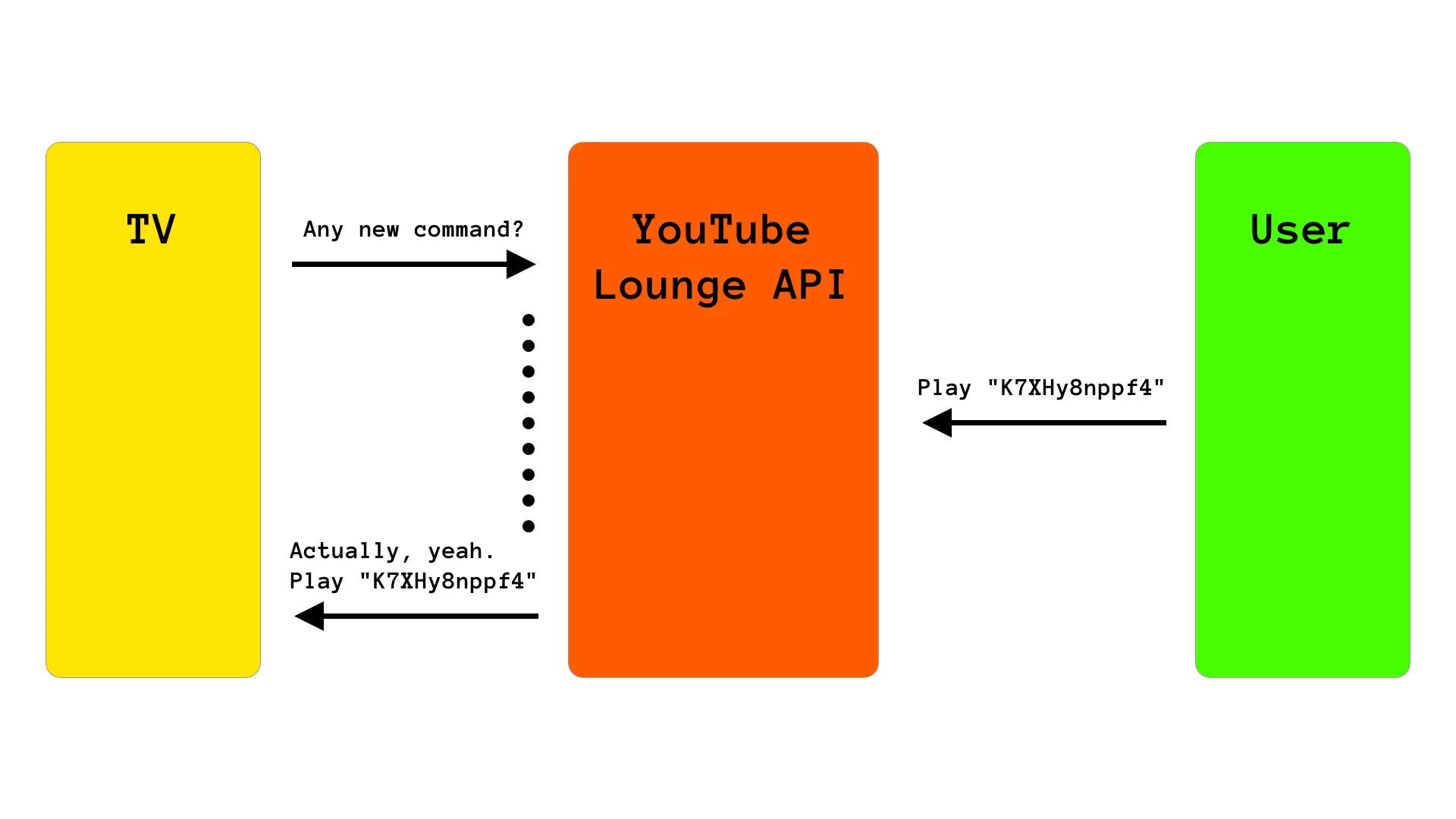
The TV asks /bind for new events; with nothing pending, the API holds the request open. As soon as the user sends a command to the Lounge API, the held request returns to the TV with the new event, and the TV issues /bind again. If no events arrive at all, the request eventually returns with an empty body so it does not time out.
While watching Burp logs, the researcher looked for the single request the browser made that actually started playback on the TV. It was a POST to the /bind endpoint with a very large number of parameters, most of which were unnecessary. Reducing the request step by step still played the video, until the only long and unpredictable value left was the lounge_token. At that point no CSRF token could be found anywhere: not in the GET parameters, not in the headers. A simple HTML form that posted to the Lounge API started the video on the TV, confirming that the endpoint had no CSRF protection.
Exploitation
Step 1: the vulnerable play request
Because /bind accepts a POST without any CSRF token, a malicious site can make the victim's browser send a play command in the victim's name. The request only needs the lounge_token of the target TV and the ID of the video to play. Since the request is made as the victim, a private video specified there causes the TV to receive a ctt token for that video, which gives the TV access to it.
The stripped-down request looked like this:
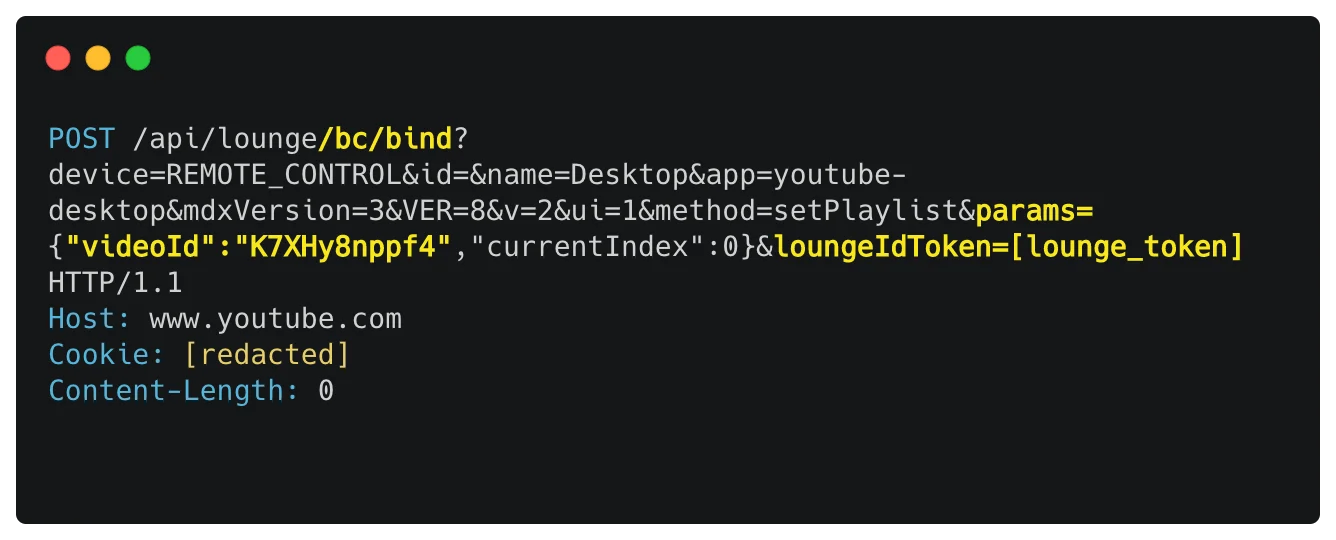
Many of the original parameters are not understood by the researcher either, and the original request had roughly ten times as many.
Step 2: build your own TV
The obvious objection is that the attacker does not know which TVs the victim has paired, or their lounge_token. The answer is that the attacker can build a TV. A script that behaves like a barebones TV can obtain a lounge_token for itself and poll /bind for play events. The PIN pairing steps can be skipped entirely by using the lounge_token returned to the TV from the initial /pairing/get_lounge_token_batch request.
So the attacker registers a fake TV, then makes the victim's browser send the CSRF play request naming that TV. The fake TV polls /bind, receives the play event, and with it the ctt for the victim's private video.
Step 3: get the video IDs through the Uploads playlist
The remaining problem is the same one that limited the two previous YouTube writeups: the attacker does not know the victim's private video IDs. The play request solves it, because it can play playlists as well as single videos. Changing videoId to listID in the POST request specifies a playlist instead of a video:
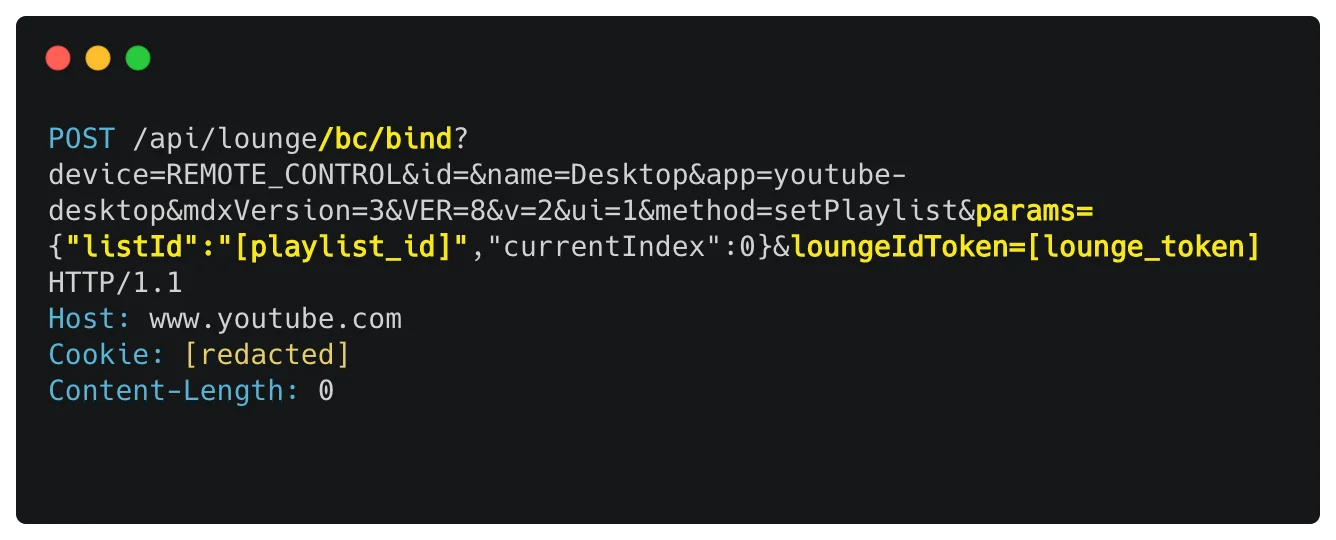
When a playlist is played this way, the TV receives a play event from the Lounge API containing the list of video IDs in that playlist.
The playlist to use is the special Uploads playlist. When the channel owner views it, it contains all of the channel's Public, Unlisted and Private videos; when any other user views it, only the Public videos appear. Its ID is derived from the channel ID by changing the second character from C to U:
// just have to change the second char of the channel ID
// from ‘C’ -> `U` to get the ID of the special “Uploads” playlist

“UCBvX9uEO0a3fZNCK12MAgug” -> ”UUBvX9uEO0a3fZNCK12MAgug”
The channel ID is public for every channel and can usually be read from the channel page URL:
https://www.youtube.com/channel/[channel_id]
Playing the victim's Uploads playlist in the victim's name on the malicious TV therefore delivers all of the victim's Public, Unlisted and Private video IDs to the attacker.
Step 4: the full attack
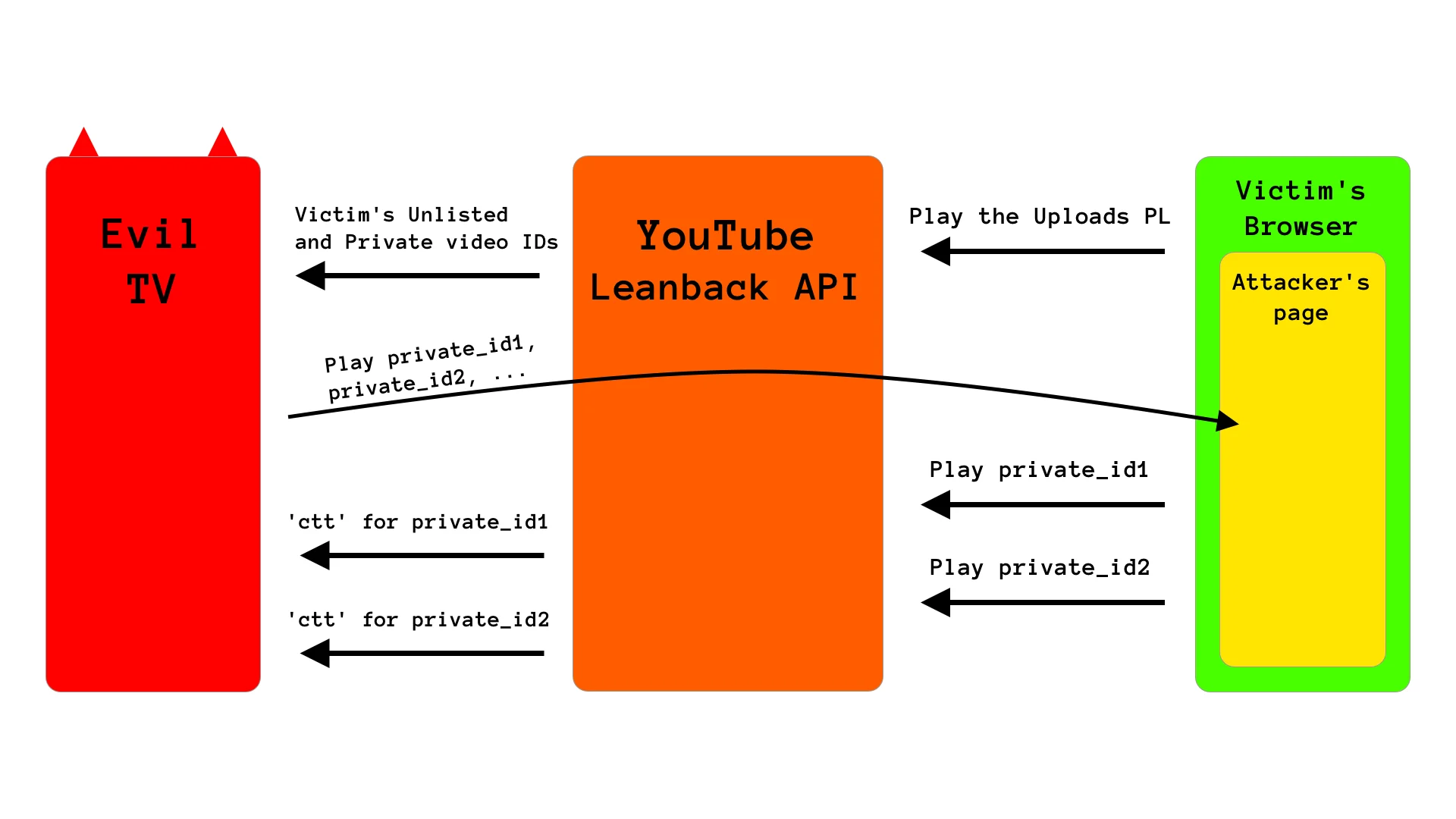
The complete chain:
- Set up a malicious page for the victim, with her channel ID hardcoded, and make her open it.
- The page makes the victim play her
Uploadsplaylist on the attacker's TV. - The attacker's TV listens for the play event and records the victim's video IDs, including
UnlistedandPrivateones. - The attacker's TV tells the malicious page to play each
Privatevideo ID on the TV one by one, so thecttfor each is captured from the play events. - The private videos can then be watched.
The same trick also reaches the contents of private playlists, liked videos and the watch later playlist.
Step 5: the automated proof of concept
An overengineered POC script automates the attack. It has two components: a backend web server that also acts as the evil TV, and a frontend running in the victim's browser that talks to the backend. In action, it stole all Private and Unlisted videos of a victim:
The flow, as described to Google:
- The POC starts a Flask web server to serve the malicious page to the victim. The Python script is the
backend. - The victim opens the malicious page, the
frontend. - The
backendasks the attacker to enter the victim's channel ID. - The second character of the channel ID is changed to
U, giving the ID of the victim'sUploadsplaylist, which contains allPrivateandUnlisteduploads for the owner only. - The POC sets up a fake TV and starts polling events for it.
- The
frontendis instructed to send the CSRF request and play the playlist from step 4 on the malicious TV. - When the
frontendsends the request, thebackendreceives the TV play event with the IDs of all the victim's videos, includingPrivateandUnlistedones. - The
backendqueries the YouTube Data API with the obtained IDs to determine which arePrivateorUnlisted. - The
Unlistedvideos are ready: thebackendprints their IDs, since watching them only requires the ID. - The
backendinstructs thefrontendto play the victim'sPrivatevideos one by one. For each video it sets up a new malicious TV, tells thefrontendto play that video, listens for the play event and receives the event with the specialcttparameter. Using thectt, it queries theget_video_infoendpoint for that private video, authenticates with thectt, and extracts the title and direct video URL from the response. - After every private video has been played, the
backendprints the details of all obtained private videos. - The script finishes.
If the mechanics of a CSRF attack are unfamiliar, the report points to this video by PwnFunction.
Root cause
The /bind endpoint of the Lounge API accepted state-changing POST requests authenticated only by cookies, with no CSRF token in the parameters or headers. A cross-site form submission therefore acted with the victim's identity, and the play command was executed as if the victim had issued it. The lounge_token was the only unpredictable value needed, and it is not a CSRF defence: it identifies the target TV, not the origin of the request.
The design also made the impact larger than a single video. Playing the special Uploads playlist as the owner exposes private and unlisted IDs, and the ctt token handed to the TV on each play event turns those IDs into watchable private videos.
Impact
An attacker who knows a victim's channel ID can, with one visit to a malicious page, obtain all of the victim's Unlisted and Private video IDs and the ctt tokens needed to watch the private ones. The same technique also reaches private playlists, liked videos and the watch later playlist. The attack requires the victim to open the attacker's page while the attacker's fake TV is polling, and it requires the victim's channel ID, which is public. The ctt token itself is scoped to a single video, so it does not grant access to anything beyond the videos the attack explicitly plays.
Fix
YouTube fixed the issue by changing the /bind endpoint so that it requires an Authorization header with an OAuth Bearer token. The desktop remote-control feature was also removed from the UI. Mobile apps and similar clients can still use it. When the endpoint is called with cookies only, as in the CSRF attack, it behaves like an anonymous request without authentication, so videos and playlists can no longer be played in a victim's name.
Variants to test
- Look for other long-polling
bind-style endpoints that acceptPOSTwith cookie authentication only. A positive result is a state-changing request that succeeds from a cross-site HTML form with no token. - Check whether playlist playback parameters such as
listIDare accepted wherever a single item ID is accepted. A positive result is an event that returns the full list of item IDs, including ones not visible to an anonymous viewer. - Test owner-scoped derived identifiers, such as the
Uploadsplaylist derived from a channel ID, for information disclosure when played as the owner. A positive result is private or unlisted IDs appearing in the response. - Enumerate pairing and token endpoints for tokens issued before full pairing, as with
get_lounge_token_batch. A positive result is a usable token obtained without completing the PIN step. - Check whether per-object tokens such as
cttare accepted as aGETparameter on media-info endpoints. A positive result is metadata or a direct media URL for a private object returned to an unauthenticated client holding only that token.
What happened, in plain words
Imagine you are at a friend's house, you open YouTube on your phone, pick one of your own private videos, and tap a button to play it on their smart TV. The video plays. But you were never signed in on that TV. How did the TV get permission to show a video that only you are allowed to see?
That question is what this whole story is about. The researcher who wrote this report asked it years before he found the bug, and the answer turned out to be a small, video-specific token called ctt. Along the way he discovered that the mechanism which lets a phone control a TV could be abused by any website to make a victim's browser play the victim's own private videos on a TV that the attacker controls, and then hand the attacker the keys to watch them.
The bug class is called CSRF, short for Cross-Site Request Forgery. In everyday terms: a website you visit can quietly make your browser send a request to another website, and that other website will treat the request as if you had made it yourself, because your browser automatically attaches your login cookies. The defence against this is a CSRF token, a random value that only the real site knows and that an attacker's page cannot guess. This report is about an endpoint that had no such token.
Below is the full story, step by step.
Background: what the product is
The target is the YouTube TV experience, the web application that runs on smart TVs and TV boxes. The YouTube for Android TV app turned out not to be a native application at all: after decompiling the APK, the researcher found that it simply loads https://www.youtube.com/tv into a WebView-like browser called Cobalt.
Two terms worth unpacking here. An APK is the installable package file of an Android app, a bit like a .zip full of the app's code and resources. Decompiling means taking that package apart to read what is inside. A WebView is a small browser embedded inside an app: the app shows a web page, but it looks like part of the app. So the whole TV product is really a website, and it can be tested from an ordinary desktop browser.
The feature under examination is the remote-control pairing between a phone or desktop browser and a TV. At the time, the desktop YouTube site (https://www.youtube.com/) could control a TV even when the two were on different networks. You linked a TV by entering the TV code it displayed, and afterwards a Play on TV icon appeared next to the player so a video could be transferred to the TV. The internal API behind this is called the Lounge API.
An API (Application Programming Interface) is the set of addresses and rules a program uses to talk to a service, like a waiter taking orders to a kitchen: you do not go into the kitchen yourself, you send a request and get a response. The Lounge API is YouTube's internal waiter for the remote-control feature.
The question that started the research was simple: how does a TV that is not signed in play a private video? The answer is a video-specific token called ctt. When a user asks to play a private video, the event the TV receives from the /bind endpoint carries an extra ctt parameter next to the videoId. To play the video, the TV requests the raw video URL from /get_video_info and passes the ctt as a GET parameter named vtt. Without the ctt, the TV cannot watch the private video. The token only grants permission for that one video, so a TV cannot reach the account's other private videos through it.
A token, in this context, is a short string that acts like a claim ticket: whoever holds it is allowed to do one specific thing. A GET parameter is a value appended to a URL after a ?, the way a search query appears in the address bar. A POST request is the other common way to send data to a server, used when you submit a form or change something.
Setup: turning a normal browser into a TV
No special accounts or roles were needed beyond a normal YouTube account holding private videos, a browser, and Burp as the HTTP proxy. The TV side was simulated in a second browser.
An HTTP proxy is a program that sits between your browser and the internet and records every request and response, so you can read and replay them. Burp is one such tool.
To reach the TV application from a desktop browser, the User-Agent header has to look like a TV. Opening https://www.youtube.com/tv normally redirects to the desktop site:
The image shows the YouTube TV page sending the researcher back to the desktop site instead of loading the TV app.
A header is a small piece of information your browser attaches to every request, such as which browser and operating system you use. The User-Agent header is the one that says "I am Firefox on a Mac" or "I am a smart TV". Servers often use it to decide which version of a site to show you.
The researcher suspected the User-Agent header was used, and changing Firefox to Cobalt in the initial request returned the full YouTube TV app instead of the "You are being directed to youtube.com" screen:
// change ‘Firefox’ to ‘Cobalt’ in the User-Agent
“User-Agent: Mozilla/5.0 (Macintosh; Intel Mac OS X 10.15; rv:87.0) Gecko/20100101 Firefox/87.0”
->
“User-Agent: Mozilla/5.0 (Macintosh; Intel Mac OS X 10.15; rv:87.0) Gecko/20100101 Cobalt/87.0”
Line by line: the first line is a comment saying what is being changed. The second line is the original User-Agent string, which identifies a Firefox browser on a Mac. The arrow means "becomes". The last line is the same string with the word Firefox replaced by Cobalt, the name of the TV browser. The rest of the string is untouched, so the server still sees a plausible browser, just one that claims to be a TV.
The image shows the YouTube TV page loading successfully in Firefox once the header was changed.
With that, the browser is a TV and testing can begin. The pairing UI used for testing has since been removed from the desktop site, so the screenshots of it below come from public sources rather than from the original research.
On the "TV", a TV code is generated:
The image shows the YouTube TV settings page with the "Link with TV code" option and the TV code it displays.
That code is entered in the other browser at https://youtube.com/pair:
The image shows the old pairing page on the desktop YouTube site where the TV code is typed in.
After linking, opening a video shows a small Play on TV icon on the right side of the player, which transfers the video to the TV:
The image shows the old "Play on TV" button next to the video player on the desktop site.
This worked with private videos as well, which gave the researcher the tools to investigate the mechanism.
Finding it: how the remote control works
The pairing process in the Lounge API works like this:
- The TV requests a
screen_idfrom/pairing/generate_screen_id. - Using the
screen_id, the TV requests alounge_tokenfrom/pairing/get_lounge_token_batch. - With the
lounge_token, the TV requests a pairing PIN from/pairing/get_pairing_code. - The TV displays the pairing PIN.
The user then enters the PIN on their device. With the PIN, the device calls /pairing/get_screen, and if the PIN is correct the API returns a lounge_token for the user as well. Pairing is then complete and the user can control the TV with that token.
Think of it like a hotel: the TV gets a room number (screen_id), then a key to that room (lounge_token), then a short code to show at reception (the PIN). When you type the code on your phone, reception hands your phone its own key to the same room. From then on both sides can talk to each other through the hotel's front desk, the Lounge API.
After pairing, the TV switches into a polling mode. Instead of WebSockets, Google uses bind requests: HTTP requests that stay open for a long time when there are no new events and return immediately when there are some. The TV calls the /bind endpoint over and over.
A WebSocket is a connection that stays open in both directions, like a phone call. Polling is the alternative: you keep asking "anything new?" like checking your letterbox every few seconds. A bind request is a clever middle ground: you ask once and the server simply does not answer until there is something to say, like a shop assistant saying "wait here, I'll call you when it's ready".
The image is a diagram showing how the TV sends a bind request, the server holds it open, and then returns it with a new event once one arrives.
The TV asks /bind for new events; with nothing pending, the API holds the request open. As soon as the user sends a command to the Lounge API, the held request returns to the TV with the new event, and the TV issues /bind again. If no events arrive at all, the request eventually returns with an empty body so it does not time out.
While watching Burp logs, the researcher looked for the single request the browser made that actually started playback on the TV. It was a POST to the /bind endpoint with a very large number of parameters, most of which were unnecessary. Reducing the request step by step still played the video, until the only long and unpredictable value left was the lounge_token. At that point no CSRF token could be found anywhere: not in the GET parameters, not in the headers. A simple HTML form that posted to the Lounge API started the video on the TV, confirming that the endpoint had no CSRF protection.
A parameter is one named value inside a request, like videoId=abc. "Long and unpredictable" matters because a CSRF token works by being impossible for an attacker to guess; if the only unpredictable value is the lounge_token, and that token is not checked against the origin of the request, then nothing stops a foreign page from sending the request.
Exploitation
Step 1: the vulnerable play request
Because /bind accepts a POST without any CSRF token, a malicious site can make the victim's browser send a play command in the victim's name. The request only needs the lounge_token of the target TV and the ID of the video to play. Since the request is made as the victim, a private video specified there causes the TV to receive a ctt token for that video, which gives the TV access to it.
The stripped-down request looked like this:
The image shows the CSRF-vulnerable bind request with its parameters.
Many of the original parameters are not understood by the researcher either, and the original request had roughly ten times as many. The point of stripping them away was to prove that none of them was a secret check: if the request still works with almost everything removed, then the only thing that matters is the lounge_token and the video ID, and neither of those is a CSRF defence.
Step 2: build your own TV
The obvious objection is that the attacker does not know which TVs the victim has paired, or their lounge_token. The answer is that the attacker can build a TV. A script that behaves like a barebones TV can obtain a lounge_token for itself and poll /bind for play events. The PIN pairing steps can be skipped entirely by using the lounge_token returned to the TV from the initial /pairing/get_lounge_token_batch request.
In plain terms: the attacker does not need to hijack the victim's real TV. He registers a fake TV of his own, gets a key for it, and then tricks the victim's browser into sending a play command aimed at that fake TV. The victim's browser is the one that is logged in, so the command is accepted as coming from the victim, and the fake TV receives the private video's ctt.
So the attacker registers a fake TV, then makes the victim's browser send the CSRF play request naming that TV. The fake TV polls /bind, receives the play event, and with it the ctt for the victim's private video.
Step 3: get the video IDs through the Uploads playlist
The remaining problem is the same one that limited the two previous YouTube writeups: the attacker does not know the victim's private video IDs. The play request solves it, because it can play playlists as well as single videos. Changing videoId to listID in the POST request specifies a playlist instead of a video:
The image shows the same vulnerable bind request, but with a playlist specified instead of a single video.
When a playlist is played this way, the TV receives a play event from the Lounge API containing the list of video IDs in that playlist.
The playlist to use is the special Uploads playlist. When the channel owner views it, it contains all of the channel's Public, Unlisted and Private videos; when any other user views it, only the Public videos appear. Its ID is derived from the channel ID by changing the second character from C to U:
// just have to change the second char of the channel ID
// from ‘C’ -> `U` to get the ID of the special “Uploads” playlist

“UCBvX9uEO0a3fZNCK12MAgug” -> ”UUBvX9uEO0a3fZNCK12MAgug”
Line by line: the first two lines are comments explaining the trick. The third line shows a channel ID starting with UC and the arrow means "becomes". The fourth line shows the same string with the second character changed from C to U, which is the ID of that channel's Uploads playlist. Nothing else changes.
The channel ID is public for every channel and can usually be read from the channel page URL:
https://www.youtube.com/channel/[channel_id]
This is just the address of a channel page, with [channel_id] standing in for the real ID. Anyone can open a channel and copy that ID from the address bar, so the attacker does not need any secret to start the attack.
Playing the victim's Uploads playlist in the victim's name on the malicious TV therefore delivers all of the victim's Public, Unlisted and Private video IDs to the attacker.
Step 4: the full attack
The complete chain:
- Set up a malicious page for the victim, with her channel ID hardcoded, and make her open it.
- The page makes the victim play her
Uploadsplaylist on the attacker's TV. - The attacker's TV listens for the play event and records the victim's video IDs, including
UnlistedandPrivateones. - The attacker's TV tells the malicious page to play each
Privatevideo ID on the TV one by one, so thecttfor each is captured from the play events. - The private videos can then be watched.
The image is a diagram of this attack flow, from the victim opening the page to the attacker collecting the private videos.
The same trick also reaches the contents of private playlists, liked videos and the watch later playlist.
Step 5: the automated proof of concept
An overengineered POC script automates the attack. It has two components: a backend web server that also acts as the evil TV, and a frontend running in the victim's browser that talks to the backend. In action, it stole all Private and Unlisted videos of a victim:
The video shows the proof-of-concept script running and collecting the victim's private and unlisted videos.
A POC, or proof of concept, is a small working demonstration that a bug is real and exploitable, rather than just a theory. Flask is a small web framework for Python, a toolkit for building a simple web server.
The flow, as described to Google:
- The POC starts a Flask web server to serve the malicious page to the victim. The Python script is the
backend. - The victim opens the malicious page, the
frontend. - The
backendasks the attacker to enter the victim's channel ID. - The second character of the channel ID is changed to
U, giving the ID of the victim'sUploadsplaylist, which contains allPrivateandUnlisteduploads for the owner only. - The POC sets up a fake TV and starts polling events for it.
- The
frontendis instructed to send the CSRF request and play the playlist from step 4 on the malicious TV. - When the
frontendsends the request, thebackendreceives the TV play event with the IDs of all the victim's videos, includingPrivateandUnlistedones. - The
backendqueries the YouTube Data API with the obtained IDs to determine which arePrivateorUnlisted. - The
Unlistedvideos are ready: thebackendprints their IDs, since watching them only requires the ID. - The
backendinstructs thefrontendto play the victim'sPrivatevideos one by one. For each video it sets up a new malicious TV, tells thefrontendto play that video, listens for the play event and receives the event with the specialcttparameter. Using thectt, it queries theget_video_infoendpoint for that private video, authenticates with thectt, and extracts the title and direct video URL from the response. - After every private video has been played, the
backendprints the details of all obtained private videos. - The script finishes.
The YouTube Data API is YouTube's public interface for programs to ask questions about videos and channels. "Authenticates with the ctt" means the request presents the token as proof that it is allowed to see that one video.
If the mechanics of a CSRF attack are unfamiliar, the report points to this video by PwnFunction.
Root cause
The /bind endpoint of the Lounge API accepted state-changing POST requests authenticated only by cookies, with no CSRF token in the parameters or headers. A cross-site form submission therefore acted with the victim's identity, and the play command was executed as if the victim had issued it. The lounge_token was the only unpredictable value needed, and it is not a CSRF defence: it identifies the target TV, not the origin of the request.
A cookie is a small piece of data your browser stores for a site and sends back automatically with every request to that site. That automatic sending is exactly what makes CSRF possible: the attacker's page does not need to read your cookie, it only needs your browser to attach it to a request the attacker caused.
The design also made the impact larger than a single video. Playing the special Uploads playlist as the owner exposes private and unlisted IDs, and the ctt token handed to the TV on each play event turns those IDs into watchable private videos.
Impact
An attacker who knows a victim's channel ID can, with one visit to a malicious page, obtain all of the victim's Unlisted and Private video IDs and the ctt tokens needed to watch the private ones. The same technique also reaches private playlists, liked videos and the watch later playlist. The attack requires the victim to open the attacker's page while the attacker's fake TV is polling, and it requires the victim's channel ID, which is public. The ctt token itself is scoped to a single video, so it does not grant access to anything beyond the videos the attack explicitly plays.
Fix
YouTube fixed the issue by changing the /bind endpoint so that it requires an Authorization header with an OAuth Bearer token. The desktop remote-control feature was also removed from the UI. Mobile apps and similar clients can still use it. When the endpoint is called with cookies only, as in the CSRF attack, it behaves like an anonymous request without authentication, so videos and playlists can no longer be played in a victim's name.
An Authorization header is where a request carries proof of who it is, and an OAuth Bearer token is a credential issued to an app after it has logged in properly. The key difference from a cookie is that a browser does not attach it automatically to requests caused by other websites, so a cross-site form cannot supply it.
Variants to test
- Look for other long-polling
bind-style endpoints that acceptPOSTwith cookie authentication only. A positive result is a state-changing request that succeeds from a cross-site HTML form with no token. - Check whether playlist playback parameters such as
listIDare accepted wherever a single item ID is accepted. A positive result is an event that returns the full list of item IDs, including ones not visible to an anonymous viewer. - Test owner-scoped derived identifiers, such as the
Uploadsplaylist derived from a channel ID, for information disclosure when played as the owner. A positive result is private or unlisted IDs appearing in the response. - Enumerate pairing and token endpoints for tokens issued before full pairing, as with
get_lounge_token_batch. A positive result is a usable token obtained without completing the PIN step. - Check whether per-object tokens such as
cttare accepted as aGETparameter on media-info endpoints. A positive result is metadata or a direct media URL for a private object returned to an unauthenticated client holding only that token.
Glossary
- API: the set of addresses and rules a program uses to talk to a service, like a waiter carrying orders to a kitchen.
- APK: the installable package file of an Android app.
- Authorization header: a request header that carries proof of identity, such as a token.
- Bearer token: a credential that grants access to whoever holds it, issued to an app after it logs in.
- bind request: a long-polling HTTP request that stays open until there is an event to return.
- Burp: a proxy tool that records, inspects and replays HTTP requests and responses.
- channel ID: the public identifier of a YouTube channel, visible in the channel page URL.
- Cobalt: the WebView-like browser YouTube uses on TVs.
- cookie: a small piece of data a browser stores for a site and sends back automatically with every request to it.
- CSRF (Cross-Site Request Forgery): an attack where a website you visit makes your browser send a request to another site, which treats it as if you sent it yourself.
- CSRF token: a random value the real site checks on state-changing requests, which an attacker's page cannot guess.
- ctt: a video-specific token that grants permission to watch one particular video.
- decompiling: taking a compiled app package apart to read its contents.
- Flask: a small web framework for Python used to build simple web servers.
- GET parameter: a value appended to a URL after a
?. - header: a small piece of information attached to an HTTP request or response, such as the browser type.
- HTTP proxy: a program that sits between your browser and the internet and records the traffic.
- Lounge API: YouTube's internal API for remote-controlling a TV.
- OAuth: a standard way for apps to obtain credentials after logging in.
- parameter: one named value inside a request, such as
videoId=abc. - PIN: a short code shown on the TV and typed on the user's device to pair them.
- POC (proof of concept): a small working demonstration that a bug is real and exploitable.
- polling: repeatedly asking a server whether there is anything new.
- POST request: a request that sends data to a server, used when submitting a form or changing something.
- private video: a video only its owner can watch.
- public video: a video anyone can watch.
- token: a short string that acts like a claim ticket, granting permission for one specific thing.
- unlisted video: a video anyone with the link can watch, but which does not appear in public listings.
- Uploads playlist: the special playlist holding all of a channel's uploads; the owner sees private and unlisted videos in it, other viewers see only public ones.
- User-Agent: the request header that says which browser and operating system you use.
- WebSocket: a connection that stays open in both directions, like a phone call.
- WebView: a small browser embedded inside an app.

