Bypassing Threads Block System: Blocked Users Can Still View Custom Feed Content
A blocked user could still view the blocking user's public custom feed by modifying a GraphQL request to pin the feed to their home interface. The backend did not enforce the block restriction, allowing the blocked user to access content they should not see.
 Published on medium.com
Business Logic Flaw
The full write-up lives on its author's site
It belongs to its author, so we link to it rather than copy it. The other two tabs are our own rewrites, checked against it.
Context
Threads lets a user create a public custom feed and pin it to their home interface as a column. The feature is meant to give users a curated view of content they choose. Threads also documents a blocking guarantee, quoted in the report as:
"Blocked users won't be able to find your profile or content on Threads or Instagram."
The report examines whether that guarantee holds for public custom feeds when a blocked user tries to pin the blocking user's feed to their own home interface.
Setup
The researcher used two accounts and a proxy:
- User A: the blocking user, who owns a public custom feed.
- User B: the blocked user.
- Platform: Threads.
- Browser: Firefox.
- OS: Windows.
- Proxy tool: Burp Suite (or similar) to intercept and modify requests.
Preconditions: User A has created a public custom feed, and User A has blocked User B.
Finding it
The researcher first confirmed that the UI enforces the block. When User B visits User A's public custom feed by direct URL, the interface returns an error:
"Something went wrong, please try again later."
That error suggested the restriction existed at the UI level. The request used when pinning a feed to the home interface is the GraphQL mutation useBarcelonaCreateColumnMutation, and its body contains a relativeURL parameter that identifies which feed is pinned. The value is supplied by the client, so the blocked user can substitute the blocking user's feed ID.
Exploitation
Step 1: Create the feed as User A
- Log in as User A.
- Create a public custom feed.
Step 2: Confirm the block as User B
- Log in as User B.
- Visit User A's profile and navigate to their public custom feed.
- Copy the Custom Feed ID from the URL.
- Log back in as User A and block User B.
- Log in again as User B and attempt to access User A's custom feed via direct URL.
The application returns the error message:
So the direct URL path is blocked in the UI.
Step 3: Pin a feed and intercept the request
- As User B, create your own public custom feed.
- Click "Pin to Home" while intercepting the request using a proxy tool (e.g. Burp Suite).
- Locate the following request:
POST /api/graphql HTTP/2Host: www.threads.comX-Fb-Friendly-Name: useBarcelonaCreateColumnMutation
The request targets the GraphQL endpoint and is identified by the friendly name useBarcelonaCreateColumnMutation, the mutation that creates a home column.
Step 4: Change the target feed
- In the request body, find the parameter:
"relativeURL": "/custom_feed/USER_B_CUSTOM_FEED_ID"
- Replace it with User A's custom feed ID:
"relativeURL": "/custom_feed/USER_A_CUSTOM_FEED_ID"
- Send the modified request.
Step 5: Observe the result
- The server responds with:
HTTP/2 200 OK
- Return to the Threads interface and click the Home icon.
- The feed column containing User A's public custom feed content appears and can be viewed by User B, even though they are blocked.
Root cause
The blocking mechanism is enforced at the UI level but not validated server-side for this mutation. The UI refuses to render the feed URL and shows an error, but the backend accepts the useBarcelonaCreateColumnMutation request with an arbitrary relativeURL value and does not check whether the requesting user is blocked by the owner of the referenced feed. Because the client controls relativeURL, the blocked user can substitute the blocking user's feed ID and the server creates the column anyway.
Impact
This weakens the privacy guarantees of the blocking feature. A blocked user should not be able to access or view any content from the user who blocked them. Due to insufficient server-side validation, blocked users can still retrieve and view content from the blocking user's public custom feed. The report scopes the issue to public custom feeds; it does not describe access to private content.
Fix
The report does not describe a fix. The implied requirement is server-side enforcement: the backend should validate, when handling useBarcelonaCreateColumnMutation, that the requesting user is not blocked by the owner of the referenced feed, and reject the request otherwise, rather than relying on the UI to hide the feed.
Variants to test
- Other column or feed mutations: try mutations that reference a feed or profile by ID and check whether the server validates the block relationship. A positive result is a
200 OKand content from the blocking user appearing in the blocked user's interface. - Other client-supplied identifiers: look for parameters similar to
relativeURLin other GraphQL operations and substitute a blocked relationship's identifier. A positive result is the server returning the blocked user's content. - Direct URL versus API: compare the UI error path with the API path for the same resource. A positive result is the UI refusing while the API returns the resource.
- Block direction: test both directions (A blocks B, and B blocks A) to see whether validation is applied symmetrically. A positive result is content visible in the direction that should be blocked.
Timeline
- November 11, 2025: Report submitted.
- November 11, 2025: Automatic reply.
- November 11, 2025: Initial evaluation.
Hi Abu Idris, A member of Meta's security team has seen your report and performed an initial evaluation. We will get back to you once we have more information to share. Thanks, MetaSecurity
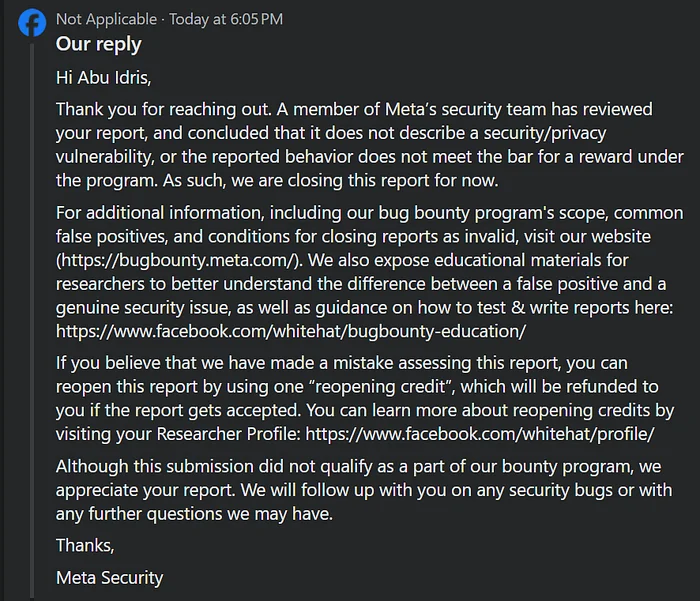
- March 11, 2026: Not Applicable.
What happened, in plain words
Threads is a social app where people post short messages and follow each other. It lets you build a custom feed, which you can then pin to your home screen. You can then pin that feed to your home screen so it appears as a column next to your normal feed. The report calls this a public custom feed.
Threads also has a block feature. When you block someone, Threads promises that the blocked person cannot find your profile or your content. The report quotes that promise:
"Blocked users won't be able to find your profile or content on Threads or Instagram."
The researcher, Abu Idris Al-Muhaqqiq, tested whether that promise holds for public custom feeds. He found that the app's visible interface does stop a blocked user from opening the feed by its normal web address. But the hidden machinery behind the app, the part that actually fetches and stores data, did not check the block. By changing one value in a request that the app sends when you pin a feed, a blocked user could still add the blocking user's feed to their own home screen and read its contents.
The report was submitted to Meta's bug bounty programme on 11 November 2025 and closed as Not Applicable on 11 March 2026.
The pieces you need to know
Before walking through the steps, here are the ideas the report relies on.
- The interface (UI) is what you see and click: buttons, pages, error messages. It runs in your browser.
- The backend (or server) is the computer that stores the data and answers the app's questions. The interface is only a shop window; the backend is the stockroom.
- An API is the set of doors through which the interface asks the backend for things. Think of a restaurant: the menu and waiter are the interface, the kitchen is the backend, and the API is the order slip passed through the hatch. If the kitchen accepts any order slip, it does not matter that the menu says a dish is unavailable.
- GraphQL is a particular style of API. Instead of many separate addresses for different actions, there is usually one address (here
/api/graphql) and each request names the operation it wants, such asuseBarcelonaCreateColumnMutation. A mutation is a GraphQL operation that changes something, as opposed to a query that only reads. - A request is the message your browser sends to the server. It has a method (
POSTmeans "send data"), a path (/api/graphql), headers (extra labels such as which operation this is), and a body (the actual data). - A parameter is a named value inside the request body, for example
"relativeURL": "/custom_feed/...". The server reads these values to decide what to do. - A proxy tool such as Burp Suite sits between your browser and the server. It lets you pause a request, read it, change it, and then send it on. This is how the researcher edited a request that the app normally builds for you.
- A feed ID is the unique code in a feed's web address that identifies that feed. If you know someone's feed ID, you can refer to their feed in a request.
- Server-side validation means the backend checks the rules itself, rather than trusting the interface to hide things. If the interface hides a button but the backend still accepts the action, the restriction is only cosmetic.
The setup
The researcher used two accounts and a proxy:
- User A: the blocking user, who owns a public custom feed.
- User B: the blocked user.
- Platform: Threads.
- Browser: Firefox.
- OS: Windows.
- Proxy tool: Burp Suite (or similar) to intercept and modify requests.
Two conditions had to be true before the test: User A had created a public custom feed, and User A had blocked User B.
Finding it
The researcher first checked that the visible interface really does enforce the block. When User B opened User A's public custom feed by its direct web address, the page returned an error:
"Something went wrong, please try again later."
That error is a good sign that a restriction exists, but it only proves the interface refuses to show the page. It does not prove the backend refuses to hand over the data. The request the app sends when you pin a feed to your home screen is a GraphQL mutation named useBarcelonaCreateColumnMutation. That request is a GraphQL mutation named useBarcelonaCreateColumnMutation, and its body contains a parameter called relativeURL that says which feed to pin. The value comes from the browser, so the blocked user can substitute the blocking user's feed ID.
Exploitation
Step 1: Create the feed as User A
- Log in as User A.
- Create a public custom feed.
This gives us a feed to protect. Without a feed owned by User A, there is nothing for User B to try to reach.
Step 2: Confirm the block as User B
- Log in as User B.
- Visit User A's profile and navigate to their public custom feed.
- Copy the Custom Feed ID from the URL.
- Log back in as User A and block User B.
- Log in again as User B and attempt to access User A's custom feed via direct URL.
The application returns the error message:
So the direct URL path is blocked in the UI.
Steps 3 to 5 happen before the block; step 6 applies the block. Step 6 applies the block. Step 7 is the control test: it shows what the interface does after the block, which is to refuse with an error. That refusal is the behaviour the researcher will later compare against the API.
Step 3: Pin a feed and intercept the request
- As User B, create your own public custom feed.
- Click "Pin to Home" while intercepting the request using a proxy tool (e.g. Burp Suite).
- Locate the following request:
POST /api/graphql HTTP/2Host: www.threads.comX-Fb-Friendly-Name: useBarcelonaCreateColumnMutation
Line by line:
POST /api/graphqlmeans "send data to the GraphQL endpoint at/api/graphql". This is the single door through which the app asks the backend to perform operations.HTTP/2is the version of the web protocol used for the connection.Host: www.threads.comtells the server which site the request is for.X-Fb-Friendly-Name: useBarcelonaCreateColumnMutationis a header that names the operation. It tells the backend which mutation this is: the one that creates a home column, which is what "pin to home" does.
User B creates their own feed first, then clicks "Pin to Home" while intercepting the request. Clicking it produces a legitimate request that the proxy can pause. The researcher then edits that request instead of building one from scratch.
Step 4: Change the target feed
- In the request body, find the parameter:
"relativeURL": "/custom_feed/USER_B_CUSTOM_FEED_ID"
This is the body value that says which feed to pin. relativeURL is the path of the feed, and USER_B_CUSTOM_FEED_ID is the placeholder for User B's own feed ID. In a real request, that placeholder would be the actual code copied from the URL.
- Replace it with User A's custom feed ID:
"relativeURL": "/custom_feed/USER_A_CUSTOM_FEED_ID"
Here USER_A_CUSTOM_FEED_ID is the placeholder for the ID that User B copied in step 5. The only change is the identifier: the request still looks like a normal "pin my feed" request, but it now points at User A's feed.
- Send the modified request.
This is the actual test. If the backend checks the block, it should reject the request. If it only trusts the value, it will create the column.
Step 5: Observe the result
- The server responds with:
HTTP/2 200 OK
200 OK is the standard success code. The backend accepted the request and created the column, which means it did not reject the request because of the block.
- Return to the Threads interface and click the Home icon.
- The feed column containing User A's public custom feed content appears and can be viewed by User B, even though they are blocked.
Step 16 is the proof: the content is not only accepted by the server, it is rendered in User B's home screen. The block that the interface enforced in step 7 is absent on this path.
Root cause
The blocking mechanism is enforced at the UI level but not validated server-side for this mutation. The UI refuses to render the feed URL and shows an error, but the backend accepts the useBarcelonaCreateColumnMutation request with an arbitrary relativeURL value and does not check whether the requesting user is blocked by the owner of the referenced feed. Because the client controls relativeURL, the blocked user can substitute the blocking user's feed ID and the server creates the column anyway.
In everyday terms: the shop window says "closed to you", but the stockroom door has no lock. Anyone who knows the stockroom's address can walk in.
Impact
This weakens the privacy guarantees of the blocking feature. A blocked user should not be able to access or view any content from the user who blocked them. Due to insufficient server-side validation, blocked users can still retrieve and view content from the blocking user's public custom feed. The report scopes the issue to public custom feeds; it does not describe access to private content.
Fix
The report does not describe a fix. The implied requirement is server-side enforcement: the backend should validate, when handling useBarcelonaCreateColumnMutation, that the requesting user is not blocked by the owner of the referenced feed, and reject the request otherwise, rather than relying on the UI to hide the feed.
Variants to test
These are follow-up ideas for someone repeating the research. Each one asks: does the backend check the block, or does it trust what the browser sends?
- Other column or feed mutations: try mutations that reference a feed or profile by ID and check whether the server validates the block relationship. A positive result is a
200 OKand content from the blocking user appearing in the blocked user's interface. - Other client-supplied identifiers: look for parameters similar to
relativeURLin other GraphQL operations and substitute a blocked relationship's identifier. A positive result is the server returning the blocked user's content. - Direct URL versus API: compare the UI error path with the API path for the same resource. A positive result is the UI refusing while the API returns the resource.
- Block direction: test both directions (A blocks B, and B blocks A) to see whether validation is applied symmetrically. A positive result is content visible in the direction that should be blocked.
Timeline
- November 11, 2025: Report submitted.
- November 11, 2025: Automatic reply.
- November 11, 2025: Initial evaluation.
Hi Abu Idris, A member of Meta's security team has seen your report and performed an initial evaluation. We will get back to you once we have more information to share. Thanks, MetaSecurity
- March 11, 2026: Not Applicable.
The image shows the end of the report thread: the initial evaluation message from Meta's security team, followed by the March 11, 2026 entry marking the report as Not Applicable.
Glossary
- API: the set of addresses and rules through which one program asks another for data or actions.
- Backend: the server-side part of an app that stores data and performs actions; users do not see it directly.
- Block (feature): a setting that stops one user from finding or viewing another user's profile and content.
- Bug bounty programme: a scheme where a company pays or thanks researchers who report security problems.
- Burp Suite: a proxy tool used to pause, inspect and edit web requests between a browser and a server.
- Business logic flaw: a bug where the code runs as written but the product's rules are not enforced in every place they should be.
- Client: the program on the user's side, here the browser and the Threads interface.
- Column: a panel on the Threads home screen that shows a feed.
- Custom feed: a user-made collection of accounts whose posts are shown together.
- Feed ID: the unique code in a feed's web address that identifies that feed.
- GraphQL: a style of API with a single endpoint where each request names the operation it wants.
- Header: an extra label in a request, such as the operation name or the target host.
- HTTP/2: a version of the protocol browsers and servers use to exchange requests and responses.
- Interface (UI): the visible part of an app that a person clicks and reads.
- Mutation: a GraphQL operation that changes something on the server.
- Parameter: a named value inside a request body, such as
relativeURL. - POST: an HTTP method used to send data to a server.
- Proxy tool: software that sits between browser and server and can record and alter traffic.
- Public custom feed: a custom feed that anyone can open, as opposed to a private one.
- Request: the message a browser sends to a server asking for data or an action.
- Response: the message a server sends back, including a status code such as
200 OK. relativeURL: the request parameter that names which feed to pin.- Server-side validation: checks performed by the backend itself, rather than relying on the interface to hide or refuse something.
useBarcelonaCreateColumnMutation: the GraphQL mutation the app uses to create a home column when a feed is pinned.200 OK: the HTTP status code meaning the request succeeded.


