Remote code execution though vulnerability in Facebook Messenger for Windows (June 2024)
A path traversal flaw in Facebook Messenger for Windows allowed an attacker to write files to arbitrary locations on the victim's machine by sending a specially crafted attachment in an encrypted chat. By exploiting a Windows path length limitation and a DLL hijacking vulnerability in Viber, the attacker could achieve remote code execution without user interaction.
 Published on vulnano.com
By Dzmitry - September 02, 2025
The full write-up lives on its author's site
It belongs to its author, so we link to it rather than copy it. The other two tabs are our own rewrites, checked against it.
Context
In June 2024 I looked at Facebook Messenger for Windows, specifically at how the client handles attachments received inside encrypted chats. Meta had introduced encrypted chats between Messenger users: you select a friend and start an encrypted conversation, in the same way you would start a secret chat in Telegram. Because the chat is end-to-end encrypted, the recipient's client is the component that has to validate everything it receives from the other side. That makes the receiving client an interesting place to look for parsing and file-handling mistakes.
The write-up covers a path traversal in the Windows client that lets a sender place a file outside the attachment storage directory, and how that traversal was combined with a DLL search-order weakness in a third-party application to obtain remote code execution. It was reported during the Meta BountyCon hacking event and put me at the top of the results table.
Setup
The test environment was:
- Attacker: Pixel Fold, Android 14, security patch level 2024-04-05, fingerprint
google/felix/felix:14/AP1A.240405.002.A1/11583385:user/release-keys, Messenger for Android (com.facebook.orca)versionName=459.1.0.57.108. - Victim: Windows 11 Home 22H, 22621.2861, Messenger for Windows v. 212.1.0.15.233.
The attacker needs to be able to send messages to the victim, and the victim must run Viber for the DLL to be loaded.
Finding it
I played with Messenger for Android, sending attachments to a victim on Windows inside an encrypted chat. Since the chat is encrypted, the recipient's client must validate all data it receives from third parties, and that is where I expected to catch something.
I sent an attachment whose name contained %2e%2e%5c sequences, which decode to ..\. Messenger for Windows placed the attachment at the following path:
C:\Users\vulna\AppData\Local\Messenger\TamStorage\media_bank\AdvancedCrypto\100027775233281\persistent\da7a85eb-aac7-46da-9cba-7a2f38f88e08\2024\06\03\20240603T091559605.att.04484a15-4cbf-4a1d-9e65-a48c59dcc7a2\..\test.bat
The ..\ in the file name was not sanitised, and the attachment was placed at the path shown above. This is a path traversal triggered simply by sending an encrypted chat message to the victim. If the victim can receive messages from you, you can place a file into a location of your choosing on the victim's Windows machine. Or so it seemed.
Exploitation
Step 1: Measure the room the traversal gives you
Windows limits path length to 256 characters, which constrains how far ..\ sequences can climb. The base directory the client writes into is:
C:\Users\vulna\AppData\Local\Messenger\TamStorage\media_bank\AdvancedCrypto\100027775233281\persistent\da7a85eb-aac7-46da-9cba-7a2f38f88e08\2024\06\03\20240603T091559605.att.04484a15-4cbf-4a1d-9e65-a48c59dcc7a2\
That is 212 characters, leaving 44 available. Climbing with repeated ..\ segments:
C:\Users\vulna\AppData\Local\Messenger\TamStorage\media_bank\AdvancedCrypto\100027775233281\persistent\da7a85eb-aac7-46da-9cba-7a2f38f88e08\2024\06\03\20240603T091559605.att.04484a15-4cbf-4a1d-9e65-a48c59dcc7a2\..\..\..\..\..\..\..\..\..\..\..\

->

C:\Users\vulna\AppData\Local\
That is 244 characters, leaving only 12. So the reachable destination is C:\Users\vulna\AppData\Local\, a folder shared with many other applications, for example Viber and Slack. With 12 characters left and no ability to overwrite existing files, the question became what could be done with a single new file in that directory.
Step 2: Turn the write into code execution with DLL hijacking
I read the article at https://itm4n.github.io/windows-dll-hijacking-clarified/ about DLL hijacking and found that Viber and Slack are vulnerable to this kind of attack. Viber tried, and may still try, to load qwave.dll from C:\Users\vulna\AppData\Local\Viber, and that file did not exist in that folder.
The relative path ..\qwave.dll is exactly 12 characters, which fits the remaining budget.
Step 3: Send the crafted attachment
- Send a file with the name:
%2e%2e%5c%2e%2e%5c%2e%2e%5c%2e%2e%5c%2e%2e%5c%2e%2e%5c%2e%2e%5c%2e%2e%5c%2e%2e%5c%2e%2e%5c%2e%2e%5cViber%5cqwave.dll
Each %2e%2e%5c decodes to ..\, and %5c before qwave.dll decodes to a backslash, so the name resolves to eleven parent-directory hops followed by Viber\qwave.dll.
- The file is written to
c:\Users\vulna\AppData\Local\Viber\qwave.dll. - When Viber launches, it starts executing
c:\Users\vulna\AppData\Local\Viber\qwave.dll. - The result is remote code execution without user interaction, provided the attacker can send messages to the victim.
A demonstration video is available at https://youtu.be/wvywPUdTIPA?si=rPCoGAukL80pv5Fw.
Root cause
The Messenger for Windows client takes the attachment file name supplied by the sender and uses it when constructing the local storage path, without stripping or rejecting .. path segments. Percent-encoded sequences in the name are decoded into ..\ and then interpreted by the filesystem, so the write escapes the per-attachment directory. The client does not strip or reject .. segments in the file name it derives from the chat.
The traversal alone is limited by the Windows path length limit, which caps the climb at C:\Users\vulna\AppData\Local\ and leaves room for only a short relative path. The second half of the issue is on the application side: Viber loads qwave.dll from its own per-user folder under AppData\Local rather than from a protected location, so a file planted there is executed when Viber starts. The combination of an unvalidated file name and a predictable DLL search location turns a file write into code execution.
Impact
An attacker who can send messages to a victim can write a file to C:\Users\vulna\AppData\Local\Viber\qwave.dll on the victim's Windows machine, and Viber executes it on launch. That gives remote code execution without user interaction, under the condition that the attacker can send messages to the victim and that the victim runs Viber. The report also names Slack as vulnerable to this kind of DLL hijacking.
Fix
The report does not describe what Meta changed.
Report timeline
- 03.06.2024: Report with the path traversal bug was sent. Meta responded that demonstrating code execution could significantly increase the reward.
- 05.06.2024: Code execution through Viber was submitted to Meta.
- 08.08.2024: Reward 34500$.
- 08.08.2024: I sent an explanation of why I thought that reward did not correlate with the rewards table described at https://bugbounty.meta.com/payout-guidelines/mobile-rce/.
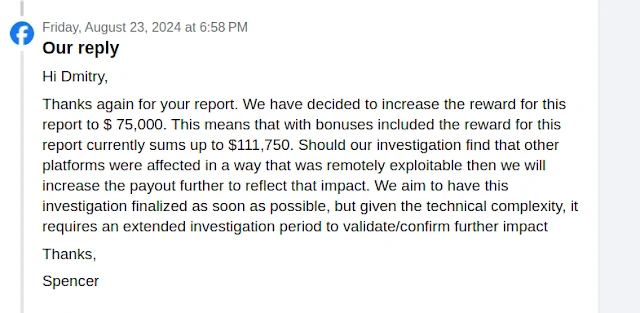
- 23.08.2024: Reward 75000 plus bonuses: total amount 111750$.
Variants to test
- Other attachment sinks in the same client. Send attachments with
..\sequences in other fields that end up in a path (thumbnails, voice notes, cached media). A positive result is a file appearing outside the per-attachment directory. - Other third-party applications under
AppData\Local. Look for applications that load a DLL from their own per-user folder where the file does not exist. A positive result is a missing DLL name that fits within the remaining path budget and is loaded on launch. - Longer path budgets. Test on systems with long path support enabled, where the 256-character limit no longer applies and the traversal can reach further than
AppData\Local. A positive result is a write into a more sensitive directory. - Other clients of the same messaging platform. Check whether the traversal exists in the macOS or web clients, where path handling and separators differ. A positive result is a file written outside the intended storage directory.
What happened, in plain words
In June 2024 I found a bug in Facebook Messenger for Windows. Messenger is the chat app from Meta that runs on phones and computers. The Windows version is a normal desktop program that stores files on your computer's hard drive.
Meta had added encrypted chats to Messenger. An encrypted chat is a conversation where the messages are scrambled so that only the two people in the chat can read them, not even the company running the servers. You start one by picking a friend, much like starting a secret chat in Telegram.
Because the messages are scrambled, the server in the middle cannot check what is inside them. That job falls to the receiving app: the program on the victim's computer has to inspect everything that arrives from the other side. Whenever a program has to trust and process data from a stranger, that is a good place to look for mistakes. That is exactly where I looked.
The mistake I found is called a path traversal. Every file on a computer lives at an address called a path, which looks like a list of folders separated by backslashes, for example C:\Users\vulna\Documents\notes.txt. Inside a path, the two dots .. mean "go up one folder". If a program lets a stranger put .. into a file name and then uses that name to decide where to save the file, the stranger can make the file land in a folder the program never intended. It is like a hotel clerk who writes a guest's room number on an envelope without checking it: a guest who writes "room 12, then up one floor" can get their letter delivered somewhere else.
In this case the sender could make Messenger save a file outside the folder where attachments are supposed to go. On its own that is already a problem, but I wanted to go further and turn it into remote code execution, which means making the victim's computer run code that the attacker wrote, without the victim doing anything. I managed that by planting a file that another popular program, Viber, loads and runs automatically when it starts.
The report was submitted during Meta's BountyCon hacking event, a competition where security researchers look for bugs in Meta's products, and it put me in first place on the results table.
The setup
I tested with two devices:
- Attacker: a Pixel Fold phone running Android 14, security patch level 2024-04-05, fingerprint
google/felix/felix:14/AP1A.240405.002.A1/11583385:user/release-keys, with Messenger for Android (com.facebook.orca)versionName=459.1.0.57.108. - Victim: a computer running Windows 11 Home 22H, 22621.2861, with Messenger for Windows v. 212.1.0.15.233.
A fingerprint here is just a long identifier string that describes exactly which build of Android is installed, so that a test can be repeated on the same software. The com.facebook.orca part is the internal package name of the Messenger app on Android.
The attacker needs the ability to send messages to the victim, and the victim must run Viber for the planted DLL to load.
Finding the bug
I used Messenger on my Android phone to send attachments to the victim on Windows, inside an encrypted chat. An attachment is any file you send in a chat: a photo, a document, a voice note. When you send one, the receiving app has to save it somewhere on the recipient's disk so it can be displayed later.
Since the chat is encrypted, the receiving app has to check all the data it gets from the other side. That is where I expected to find something, so I experimented with unusual file names.
I sent an attachment whose name contained the sequence %2e%2e%5c. This is percent encoding, a way of writing characters that might otherwise be awkward or unsafe to put in a name. Each character is written as a percent sign followed by two hexadecimal digits, which are the numbers 0 to 9 and letters A to F used as digits. %2e is the dot . and %5c is the backslash \. So %2e%2e%5c decodes to ..\, the "go up one folder" instruction.
Messenger for Windows saved my attachment at this path:
C:\Users\vulna\AppData\Local\Messenger\TamStorage\media_bank\AdvancedCrypto\100027775233281\persistent\da7a85eb-aac7-46da-9cba-7a2f38f88e08\2024\06\03\20240603T091559605.att.04484a15-4cbf-4a1d-9e65-a48c59dcc7a2\..\test.bat
Reading it from left to right: C:\Users\vulna\AppData\Local\ is the per-user application data folder on Windows, a place where programs keep their own files. Inside it, Messenger\TamStorage\media_bank\AdvancedCrypto\ is where Messenger keeps encrypted-chat media. The long number is an account identifier, persistent and the long code after it are internal folder names, and 2024\06\03 is the date. The file name itself is 20240603T091559605.att.04484a15-4cbf-4a1d-9e65-a48c59dcc7a2, followed by ..\test.bat.
That last part is the bug: the ..\ was not cleaned out of the name, and the file was saved at the path shown above. This is a path traversal, and it happens simply because someone sends an encrypted chat message. If the victim can receive messages from you, you can place a file wherever you like on their Windows machine. Or so it seemed at first.
Exploitation
Step 1: Measure how much room the traversal gives you
Windows has a limit on how long a path can be: 256 characters. A character here means a single letter, digit, backslash or other symbol, so the whole address of the file cannot be longer than that. This limits how many ..\ steps you can chain together, because every step adds characters.
The folder Messenger writes into is:
C:\Users\vulna\AppData\Local\Messenger\TamStorage\media_bank\AdvancedCrypto\100027775233281\persistent\da7a85eb-aac7-46da-9cba-7a2f38f88e08\2024\06\03\20240603T091559605.att.04484a15-4cbf-4a1d-9e65-a48c59dcc7a2\
That is 212 characters, which leaves 44 characters for the rest. Then I tried climbing up with repeated ..\ segments:
C:\Users\vulna\AppData\Local\Messenger\TamStorage\media_bank\AdvancedCrypto\100027775233281\persistent\da7a85eb-aac7-46da-9cba-7a2f38f88e08\2024\06\03\20240603T091559605.att.04484a15-4cbf-4a1d-9e65-a48c59dcc7a2\..\..\..\..\..\..\..\..\..\..\..\

->

C:\Users\vulna\AppData\Local\
Each ..\ moves up one folder. Eleven of them take the path from the deep attachment folder all the way up to C:\Users\vulna\AppData\Local\. That result is 244 characters, leaving only 12. So the furthest I could reliably reach was C:\Users\vulna\AppData\Local\, a folder shared with many other programs, for example Viber and Slack. With 12 characters left and no way to overwrite a file that already exists, the question became: what can one new file in that folder do?
Step 2: Turn the file write into code execution with DLL hijacking
I read an article at https://itm4n.github.io/windows-dll-hijacking-clarified/ about DLL hijacking. A DLL is a dynamic link library, a file full of ready-made code that a Windows program loads and uses while it runs, a bit like a shared toolbox that several programs can borrow from. When a program starts, it asks Windows to find each DLL it needs. If the program looks for a DLL in a folder that an ordinary user can write to, and that DLL is not there, an attacker can put their own file with that name in the folder. The program then loads the attacker's file and runs its code. That is DLL hijacking: the program is tricked into picking up the wrong toolbox.
The article led me to check Viber and Slack, and I found that both are vulnerable to this kind of attack. Viber tried, and may still try, to load a DLL called qwave.dll from C:\Users\vulna\AppData\Local\Viber, and that file did not exist in that folder. A missing file in a writable folder is exactly the opening DLL hijacking needs.
The relative path ..\qwave.dll is exactly 12 characters, which fits the remaining budget perfectly.
Step 3: Send the crafted attachment
- Send a file with the name:
%2e%2e%5c%2e%2e%5c%2e%2e%5c%2e%2e%5c%2e%2e%5c%2e%2e%5c%2e%2e%5c%2e%2e%5c%2e%2e%5c%2e%2e%5c%2e%2e%5cViber%5cqwave.dll
Each %2e%2e%5c decodes to ..\, and the %5c before qwave.dll decodes to a backslash. So the whole name means eleven hops up the folder tree, then into Viber, then the file qwave.dll.
- The file is written to
c:\Users\vulna\AppData\Local\Viber\qwave.dll. - When Viber launches, it starts executing
c:\Users\vulna\AppData\Local\Viber\qwave.dll. - The result is remote code execution without user interaction, as long as the attacker can send messages to the victim.
A demonstration video is available at https://youtu.be/wvywPUdTIPA?si=rPCoGAukL80pv5Fw.
Root cause
The Messenger for Windows client takes the attachment file name supplied by the sender and uses it when building the local storage path, without stripping or rejecting .. path segments. Percent-encoded sequences in the name are decoded into ..\ and then interpreted by the filesystem, so the write escapes the per-attachment directory. The client does not strip or reject .. segments in the file name it derives from the chat.
The traversal alone is limited by the Windows path length limit, which caps the climb at C:\Users\vulna\AppData\Local\ and leaves room for only a short relative path. The second half of the issue is on the application side: Viber loads qwave.dll from its own per-user folder under AppData\Local rather than from a protected location, so a file planted there is executed when Viber starts. The combination of an unvalidated file name and a predictable DLL search location turns a file write into code execution.
Impact
An attacker who can send messages to a victim can write a file to C:\Users\vulna\AppData\Local\Viber\qwave.dll on the victim's Windows machine, and Viber executes it on launch. That gives remote code execution without user interaction, under the condition that the attacker can send messages to the victim and that the victim runs Viber. The report also names Slack as vulnerable to this kind of DLL hijacking.
Fix
The report does not describe what Meta changed.
Report timeline
- 03.06.2024: Report with the path traversal bug was sent. Meta responded that demonstrating code execution could significantly increase the reward.
- 05.06.2024: Code execution through Viber was submitted to Meta.
- 08.08.2024: Reward 34500$.
- 08.08.2024: I sent an explanation of why I thought that reward did not correlate with the rewards table described at https://bugbounty.meta.com/payout-guidelines/mobile-rce/.
- 23.08.2024: Reward 75000 plus bonuses: total amount 111750$.
Variants to test
- Other attachment sinks in the same client. Send attachments with
..\sequences in other fields that end up in a path (thumbnails, voice notes, cached media). A positive result is a file appearing outside the per-attachment directory. - Other third-party applications under
AppData\Local. Look for applications that load a DLL from their own per-user folder where the file does not exist. A positive result is a missing DLL name that fits within the remaining path budget and is loaded on launch. - Longer path budgets. Test on systems with long path support enabled, where the 256-character limit no longer applies and the traversal can reach further than
AppData\Local. A positive result is a write into a more sensitive directory. - Other clients of the same messaging platform. Check whether the traversal exists in the macOS or web clients, where path handling and separators differ. A positive result is a file written outside the intended storage directory.
Glossary
- Attachment: any file sent inside a chat, such as a photo, document or voice note.
- Bug bounty: a programme where a company pays researchers for reporting security problems in its products.
- BountyCon: Meta's hacking event where researchers look for bugs in Meta's products.
- DLL (dynamic link library): a file of ready-made code that a Windows program loads and uses while it runs.
- DLL hijacking: tricking a program into loading an attacker's DLL from a folder the attacker can write to, because the program looks there first.
- Encrypted chat: a conversation where messages are scrambled so only the two participants can read them.
- End-to-end encryption: encryption where only the sender and receiver hold the keys, so the servers in the middle cannot read the messages.
- Fingerprint (Android): a long identifier string describing exactly which build of Android is installed on a device.
- Hexadecimal: a way of writing numbers using the digits 0 to 9 and the letters A to F.
- Package name: the internal identifier of an Android app, such as
com.facebook.orcafor Messenger. - Path: the address of a file or folder on a computer, made of folder names separated by backslashes on Windows.
- Path traversal: a bug where
..sequences in a name let a file be written outside the intended folder. - Percent encoding: writing characters as a percent sign followed by two hexadecimal digits, for example
%2efor a dot. - Remote code execution: making a victim's computer run code written by the attacker, usually without the victim doing anything.
- Root cause: the underlying mistake in the code that makes a bug possible.
- Sanitise: clean up input by removing or rejecting dangerous parts before using it.
- Security patch level: the date of the latest security fixes installed on an Android device.
- Version name: the human-readable version number of an app.


