$7.5k Google Cloud Platform organization issue
A deprecated API allowed an attacker to rename their GCP organization to impersonate another company's domain, and the console forced users to create projects in that organization if it was their only one. An attacker could trick victims into creating billing accounts or projects in the attacker's organization, potentially leading to charges or access to sensitive resources.
 Published on ezequiel.tech
on January 30, 2019
The full write-up lives on its author's site
It belongs to its author, so we link to it rather than copy it. The other two tabs are our own rewrites, checked against it.
Context
Google Cloud Platform (GCP) lets G Suite and Cloud Identity users create what are called Organizations. A GCP organization is a container for resources such as projects, billing accounts and IAM roles, managed in one place. Most resources cannot be detached from the organization they were created in, and although they can be deleted, most of them can be restored within a month. That makes it important for users to pay attention to where they put their resources: a billing account created inside an organization the user does not trust could end up charging them for someone else's actions.
There are two normal ways for a user to end up creating a resource in an organization: being part of the G Suite or Cloud Identity domain (an employee or a student, for example), or having the organization shared with them. Organizations can be shared with any Google user through Cloud Identity and Access Management (IAM).
Organizations have names, their domains. The researcher's own organization was called ezequiel.tech, so the obvious question was whether a victim would notice that they were creating resources in a strange organization they had never seen before. Usually yes, but the name turned out to be changeable.
Setup
The researcher had his own GCP organization, called ezequiel.tech. The attack as described is cheap to set up: an attacker could buy a $4 domain, sign up for the 14-day free trial of G Suite and then create a GCP organization.
Finding it
The researcher found that the organization name could be changed through the deprecated organizations.update method in the Resource Manager, even though the documentation said the displayName was read-only. That mismatch between the documented behaviour and the actual behaviour is the core of the finding: a field presented as immutable was in fact writable.
With a writable display name, an attacker can make their own organization look like another one and confuse users. The plan the researcher describes is:
- Name the organization
<IMPORTANT-COMPANY>.com. - Share it with
domain:<IMPORTANT-COMPANY>.com, which effectively shares it with every Google user holding an@<IMPORTANT-COMPANY>.comaccount. - Profit from unsuspecting users creating resources in the organization, especially billing accounts (which can be closed, not deleted, and then re-opened and used), or projects that manage sensitive information, for instance a project that accesses other servers the attacker previously had no credentials for.
A second issue compounded the first. If the organization was shared with a normal @gmail.com user, the Google Cloud Console interface forced that user to choose an organization whenever they created a project. If the attacker's organization was the only one they had access to, they were forced to create the project in it. The underlying API can create organization-less projects with no issue, so the restriction came from the interface, not from the platform. The researcher notes he could easily have called the organization No organization, since there was no requirement for the name to be a domain, and most users would probably never have realised what happened. For some reason this also removed the Google Cloud Platform free trial banner if the victim had not signed up to it already.
Exploitation
Step 1: create an organization
Buy a cheap domain, sign up for the G Suite free trial and create a GCP organization.
Step 2: rename it through the deprecated API
Use the deprecated organizations.update method in the Resource Manager to change the displayName, despite the documentation describing it as read-only. The report does not include the request body or the response.
Step 3: share it with the target domain
Share the organization with domain:<IMPORTANT-COMPANY>.com through Cloud IAM. This shares it with every Google user who has an account on that domain.
Step 4: wait for a victim to create a resource
A user of the impersonated company sees an organization whose name matches their own company and creates resources in it, most damagingly a billing account, which the attacker can close and later re-open and use, or a project that holds credentials for other systems.
Step 5: the interface-forced variant
If the organization is shared with a plain @gmail.com user and it is the only organization they can access, the Cloud Console forces them to pick an organization when creating a project, so the project lands in the attacker's organization. Naming it No organization makes the choice look innocuous. The API itself would have allowed an organization-less project.
Root cause
The displayName of an organization was documented as read-only but could still be modified through the deprecated organizations.update method. The name is what users would notice, so making it writable removed that warning. The second flaw is in the Cloud Console: when a user has access to exactly one organization, the interface forces project creation into it instead of allowing an organization-less project, which the API supports.
Impact
An attacker with a cheap domain and a G Suite trial could impersonate an organization's name and share it with the whole target domain, then collect resources that victims create under the mistaken belief that the organization belongs to their employer. Billing accounts are the clearest target because they can be closed and re-opened rather than deleted, and projects that hold credentials for other servers extend the reach beyond GCP. The interface-forced variant also affects ordinary @gmail.com users who have no other organization.
According to Google, the issue had an interesting effect when done against the google.com organization, which Google uses internally as a GCP organization: the fake organization would look more realistic than the real google.com organization. The Google Security Team sent a picture of how this looked.
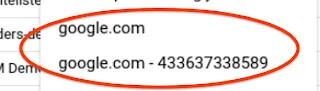
The picture the Google Security Team sent: a fake organization is on top, the real one below.
Attacking the google.com organization could have had big effects, since confused Google employees using GCP could have created resources without realising their mistake and done internal or confidential work in them. The researcher hedges this: Google probably has lots of checks to avoid serious issues, and the platform is theirs anyway.
Fix
Google quickly fixed the causes. It is now not possible to change the name of an organization, and when sharing an organization, users are no longer forced by the interface to create resources in it.
Variants to test
- Try updating read-only-looking fields on other resource types through deprecated API versions. A positive result is a successful update response where the documentation says the field cannot change.
- Check whether other consoles force a choice when a user has access to exactly one container (folder, project, tenant). A positive result is an interface that offers no way to create the resource outside that container while the API allows it.
- Test sharing semantics with
domain:principals on other platforms. A positive result is a share that silently covers every user of a domain rather than named individuals. - Look for display names that are not validated as domains. A positive result is an organization or tenant that can be named
No organizationor a company name it does not own.
Timeline
- Issue found and reported on November 29th, 2018.
- Issue quickly fixed.
- Reward decision delayed by the holidays.
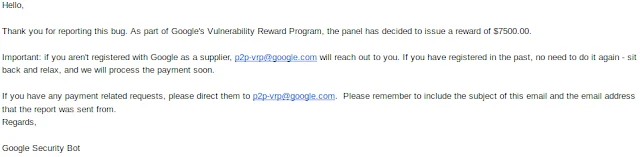
- Reward of $7500 issued on January 29th, 2019.
What happened, in plain words
Google Cloud Platform (GCP) is Google's collection of online services for running servers, storing data and managing accounts. G Suite and Cloud Identity are Google's business account systems: instead of an @gmail.com address, a company gets addresses on its own domain, such as @example.com. GCP lets those business users group their resources into something called an Organization.
Think of a GCP organization as a labelled box in a warehouse. Projects, billing accounts and permission settings (IAM roles) go inside the box. Once something is put in a box, it is hard to move it to another box: most resources cannot be detached from the organization they were created in. They can be deleted, but most can be restored within a month. So if you put a billing account, the thing that pays for services, into a box you do not control, the person who owns the box may be able to close it and later re-open it and use it. You could end up paying for someone else's actions.
How does a user end up putting resources into an organization? There are two normal ways. Either the user is part of the company's G Suite or Cloud Identity domain (an employee or a student, for example), or the organization has been shared with them. Organizations can be shared with any Google user through Cloud Identity and Access Management (IAM), Google's system for deciding who is allowed to do what.
Every organization has a name, usually its domain. The researcher's own organization was called ezequiel.tech. The obvious question was whether a victim would notice that they were creating resources in a strange organization they had never seen before. Usually they would, but the name turned out to be changeable.
The researcher found that the organization name could be changed through an old, deprecated method called organizations.update in the Resource Manager, even though the documentation said the displayName was read-only. "Deprecated" means the method is old and Google discourages its use, but it still works. "Read-only" means the documentation promises the field cannot be changed. The mismatch between what the documentation said and what the system actually allowed is the heart of the finding: a field presented as unchangeable was in fact writable.
With a writable display name, an attacker can make their own organization look like another one and confuse users. The plan the researcher describes is:
- Name the organization
<IMPORTANT-COMPANY>.com. - Share it with
domain:<IMPORTANT-COMPANY>.com, which effectively shares it with every Google user holding an@<IMPORTANT-COMPANY>.comaccount. - Profit from unsuspecting users creating resources in the organization, especially billing accounts (which can be closed, not deleted, and then re-opened and used), or projects that manage sensitive information, for instance a project that accesses other servers the attacker previously had no credentials for.
A second issue made the first one worse. If the organization was shared with a normal @gmail.com user, the Google Cloud Console interface forced that user to choose an organization whenever they created a project. The Cloud Console is the website where users click around to manage their GCP resources. If the attacker's organization was the only one the user had access to, the interface forced them to create the project in it. The underlying API, the programming interface that the website itself uses behind the scenes, can create projects that belong to no organization at all, so the restriction came from the website, not from the platform. The researcher notes he could easily have called the organization No organization, since there was no requirement for the name to be a domain, and most users would probably never have realised what happened. For some reason this also removed the Google Cloud Platform free trial banner if the victim had not signed up to it already.
Setup
The researcher had his own GCP organization, called ezequiel.tech. The attack as described is cheap to set up: an attacker could buy a $4 domain, sign up for the 14-day free trial of G Suite and then create a GCP organization.
Finding it
The researcher found that the organization name could be changed through the deprecated organizations.update method in the Resource Manager, even though the documentation said the displayName was read-only. That mismatch between the documented behaviour and the actual behaviour is the core of the finding: a field presented as immutable was in fact writable.
The plan the researcher describes is:
A second issue compounded the first. If the attacker's organization was the only one they had access to, they were forced to create the project in it. The underlying API can create organization-less projects with no issue, so the restriction came from the interface, not from the platform.
Exploitation
Step 1: create an organization
Buy a cheap domain, sign up for the G Suite free trial and create a GCP organization.
Step 2: rename it through the deprecated API
Use the deprecated organizations.update method in the Resource Manager to change the displayName, despite the documentation describing it as read-only. The report does not include the request body or the response.
Step 3: share it with the target domain
Share the organization with domain:<IMPORTANT-COMPANY>.com through Cloud IAM. This shares it with every Google user who has an account on that domain.
Step 4: wait for a victim to create a resource
A user of the impersonated company sees an organization whose name matches their own company and creates resources in it, most damagingly a billing account, which the attacker can close and later re-open and use, or a project that holds credentials for other systems.
Step 5: the interface-forced variant
If the organization is shared with a plain @gmail.com user and it is the only organization they can access, the Cloud Console forces them to pick an organization when creating a project, so the project lands in the attacker's organization. Naming it No organization makes the choice look innocuous. The API itself would have allowed an organization-less project.
Root cause
The displayName of an organization was documented as read-only but could still be modified through the deprecated organizations.update method. The name is what users would notice, so making it writable removed that warning. The second flaw is in the Cloud Console: when a user has access to exactly one organization, the interface forces project creation into it instead of allowing an organization-less project, which the API supports.
Impact
An attacker with a cheap domain and a G Suite trial could impersonate an organization's name and share it with the whole target domain, then collect resources that victims create under the mistaken belief that the organization belongs to their employer. Billing accounts are the clearest target because they can be closed and re-opened rather than deleted, and projects that hold credentials for other servers extend the reach beyond GCP. The interface-forced variant also affects ordinary @gmail.com users who have no other organization.
According to Google, the issue had an interesting effect when done against the google.com organization, which Google uses internally as a GCP organization: the fake organization would look more realistic than the real google.com organization. The Google Security Team sent a picture of how this looked.
The picture the Google Security Team sent: a fake organization is on top, the real one below.
Attacking the google.com organization could have had big effects, since confused Google employees using GCP could have created resources without realising their mistake and done internal or confidential work in them. The researcher hedges this: Google probably has lots of checks to avoid serious issues, and the platform is theirs anyway.
Fix
Google quickly fixed the causes. It is now not possible to change the name of an organization, and when sharing an organization, users are no longer forced by the interface to create resources in it.
Variants to test
- Try updating read-only-looking fields on other resource types through deprecated API versions. A positive result is a successful update response where the documentation says the field cannot change.
- Check whether other consoles force a choice when a user has access to exactly one container (folder, project, tenant). A positive result is an interface that offers no way to create the resource outside that container while the API allows it.
- Test sharing semantics with
domain:principals on other platforms. A positive result is a share that silently covers every user of a domain rather than named individuals. - Look for display names that are not validated as domains. A positive result is an organization or tenant that can be named
No organizationor a company name it does not own.
Timeline
- Issue found and reported on November 29th, 2018.
- Issue quickly fixed.
- Reward decision delayed by the holidays.
- Reward of $7500 issued on January 29th, 2019.
Glossary
- API: a way for one program to talk to another, like a waiter taking your order to the kitchen; here, the programming interface the Cloud Console uses to create and manage resources.
- Billing account: the payment method attached to a Google Cloud project; charges for services go through it.
- Cloud Console: the website where users click around to manage their Google Cloud resources.
- Cloud Identity: Google's service for managing user accounts and domains without G Suite's office apps.
- Cloud Identity and Access Management (IAM): Google's system for deciding who is allowed to do what with which resources.
- Deprecated: old and discouraged, but still working; here, the
organizations.updatemethod. - Display name: the human-readable label shown for an organization, as opposed to its underlying identifier.
- Domain: a name like
example.comthat identifies a website or a company's email addresses. - G Suite: Google's business account system that gives users email addresses on a company domain.
- GCP organization: a container that groups projects, billing accounts and permissions under one company.
- Google Cloud Platform (GCP): Google's collection of online services for running servers, storing data and managing accounts.
- Google Vulnerability Rewards Program: Google's bug bounty programme, which pays researchers for reporting security issues.
- IAM role: a set of permissions granted to a user or service.
- Organization-less project: a project that does not belong to any organization.
- Project: a workspace inside GCP that holds resources such as servers and databases.
- Read-only: a field that the documentation says cannot be changed.
- Resource Manager: the part of GCP that manages organizations, folders and projects.
- Root cause: the underlying reason a vulnerability exists.
- Server-side check: a validation performed by the server, as opposed to the browser or interface.
- Vulnerability: a weakness in a system that can be used to cause harm or break rules.





