RCE in Google Cloud Deployment Manager
 Published on ezequiel.tech
By using an internal (dogfood) version of the Google Cloud Deployment Manager, I was able to issue requests to some Google internal endpoints through Google's Global Service Load Balancer, which could have led to RCE.
The full write-up lives on its author's site
It belongs to its author, so we link to it rather than copy it. The other two tabs are our own rewrites, checked against it.
Context
Google Cloud Deployment Manager is a Google Cloud service for managing infrastructure resources programmatically, that is, infrastructure as code. The write-up introduces the concepts that matter for the bug:
- Type: describes the properties of a specific kind of infrastructure resource (VMs, issue tickets, user permissions). Several pre-defined Types ship with Deployment Manager and are called base types.
- Type Provider: provides a service's RESTful API endpoint, together with its descriptor document, so that Deployment Manager can manage Types within that service.
- Resource: an instance of a single infrastructure resource provided by a Type.
- Templates: reusable Python or Jinja2 files used to configure Resources programmatically.
- Deployment: a collection of Resources deployed and managed together.
- Operation: every creation, modification or deletion returns an Operation that can be polled for completion or error.
There are two documented REST API versions: v2 (generally available) and v2beta (public beta). Type Providers exist only in v2beta.
Setup
The research was done against the Deployment Manager REST API, using the v2beta endpoints for Type Providers and Deployments. No special tooling is described beyond the API itself, the Google Cloud Console (to enable the API and read its metrics page), and later protoc with its --decode_raw option to decode protobuf responses. The researcher used his own project; the service account Deployment Manager uses for tokens on that project appeared in the EndUserCreds header data.
Finding it
The first approach was to look for hidden or internal Types, since some Google services such as App Engine Flexible use Deployment Manager internally (visible in a project's logs when deploying an app). None were found.
Next came the Jinja2 and Python templates of Deployments. Through trial and error the researcher created Deployments with specially crafted templates that returned data as a Python exception on their Operations. That allowed inspecting Python libraries, reading Python code, and listing and reading files, but the template interpreting script runs on an isolated container with zero privileges, not even network connectivity.
After that, Type Providers were created pointing to internal Google Corp APIs such as [redacted].googleapis.com. The Operations always failed with an error saying no valid response was received for the descriptor document, and showed the HTML of the login portal that [redacted].googleapis.com redirects to when accessed externally. Specifying any private IP address failed with an error saying it was not a valid address; attempts to bypass this with domains and redirections pointing to private IPs gave the same result.
These failures were demotivating, and research paused for a while. Then the researcher looked at the Deployment Manager API methods by enabling the API on the Google Cloud Console, opening the metrics page, and looking at the Filters section, where a drop-down list titled Methods contains all of them, including undocumented ones. Methods usually include the API version in their names.
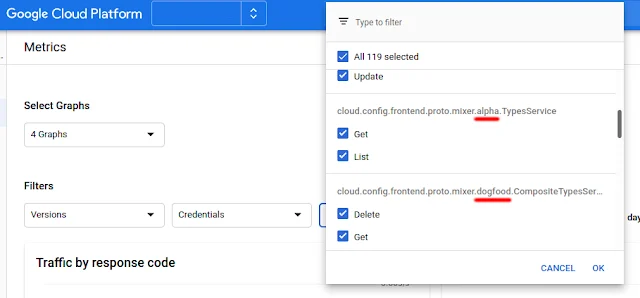
Two more API versions appeared besides v2 and v2beta: alpha and dogfood. Methods on those versions could be called simply by replacing v2 or v2beta with alpha or dogfood in every API call. The alpha version was played with but yielded nothing interesting. The dogfood version was more interesting, because dogfood is the word Google uses for internal testing: dogfood versions are usually intended only for googlers, who use the product and report bugs before changes reach customers. Perhaps this version had internal features intended only for googlers.
Listing the base types on that version showed that most of them returned an extra field in their definitions: googleOptions.
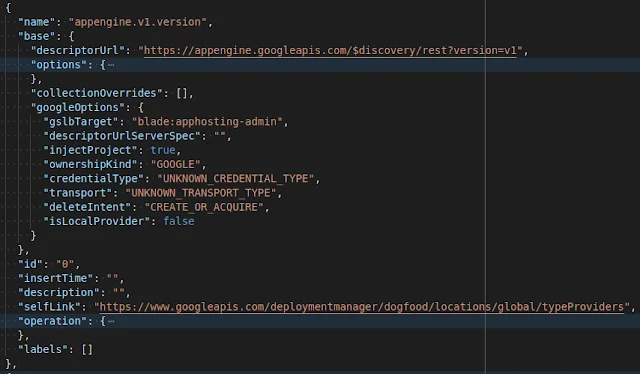
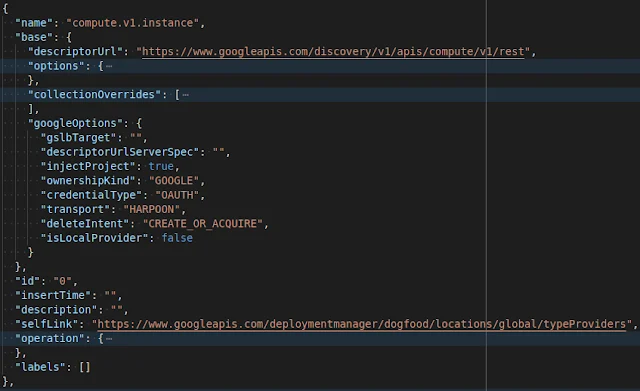
Listing the researcher's own Type Providers also included this extra field, and specifying the $outputDefaults system parameter in the query revealed which fields googleOptions contained. Creating Type Providers with different values in those fields gave an idea of what each one does and its expected values (at that point most of them were still unexplained):
| Field | Type | Observed behaviour |
|---|---|---|
injectProject |
Boolean | Whatever value was specified, the API always set it to false on the Type Providers. Effect unknown. |
deleteIntent |
Enum | A single valid value found: CREATE_OR_ACQUIRE. Effect unknown. |
isLocalProvider |
Boolean | When set to true, the Type Provider was always created successfully regardless of the other fields, but Deployments using it always failed with an error saying the descriptor document could not be retrieved. |
ownershipKind |
Enum | Valid values: UNKNOWN, USER, GOOGLE. No effects observed; it was always set to GOOGLE during the research. |
transport |
Enum | Valid values found at first: UNKNOWN_TRANSPORT_TYPE and HARPOON. No effects observed. |
credentialType |
Enum | Valid values found at first: UNKNOWN_CREDENTIAL_TYPE and OAUTH. No effects observed. |
gslbTarget |
String | Either empty or something like blade:*<TARGET>* or gslb:*<TARGET>. No effects observed. |
descriptorUrlServerSpec |
String | Either the same as gslbTarget or empty. No effects observed. |
GSLB is Google's Global Service Load Balancer, which acts like a mix between an internal DNS server and a load balancer. According to the SRE Book, when GSLB is given a symbolic name (roughly like a domain name), it directs traffic to a linked BNS address (Borg Naming Service), the Google equivalent of an internal IP address. That looked like a route to SSRF against internal servers, but no value tried on gslbTarget and descriptorUrlServerSpec had any effect.
Brute forcing valid credentialType values produced a new one: GAIAMINT. The name had been seen before, for example in a Google Git commit. While testing Deployments with a Type Provider using that value, the researcher also tested what happens when the Type Provider uses an OAuth 2.0 access token as its authentication mechanism. A fake API that had been set up then received, instead of an access token in the Authorization header, a header like this:
EndUserCreds 1 <URL-safe Base64 data>
The data could not be decoded, but it looks like protobuf inside some other binary format, and some strings can be retrieved: anonymous, [redacted] (the email of the service account Deployment Manager uses for tokens on the project), cloud-dm and cloudgaia::vjgv73:9898. It looks intended for internal use, and some googlers confirmed it is meant for authentication between internal Google systems; it is probably not usable externally. No other valid credentialType values, and no transport values, could be brute forced.
At this point the researcher also tried prefixing the API version with staging_, since the Google Compute Engine API does that for the Staging environment (mentioned, for instance, in a Kubernetes GitHub PR). It worked, but the Staging environment behaved exactly like Production.
After several failed attempts, research stopped for a couple of weeks.
Exploitation
Step 1: Use Proto over HTTP to enumerate enum values
The idea was to use protocol buffers to find the missing values of the credentialType and transport enums, since protobuf represents enums as numbers rather than strings, so one can count up from 1 until no new values appear.
Deployment Manager does not support gRPC, but it does support a relatively unknown feature: Proto over HTTP, an experimental gRPC fallback available in some Google APIs. It is not well documented, availability varies per API, and different APIs may implement it differently. Checking it on Deployment Manager established that:
- URL paths stay the same (
/deploymentmanager/<VERSION>/projects/<PROJECT>/global/...). - The
Content-Typeheader must be set toapplication/x-protobuf. - In Production it fails with the error message:
Proto over HTTP is not allowed for service. - It works in Staging.
Step 2: Reverse engineer the Type Providers proto message
With Proto over HTTP working in Staging, the researcher called the get Type Provider method and decoded the response protobuf with protoc --decode_raw. That produced unnamed proto field numbers and their values. Comparing those values with the JSON API output matched each field number to its field name, and from there an approximation of the Type Providers proto message definition was reconstructed.
The example sequence:
-
Create a Type Provider through the JSON API:
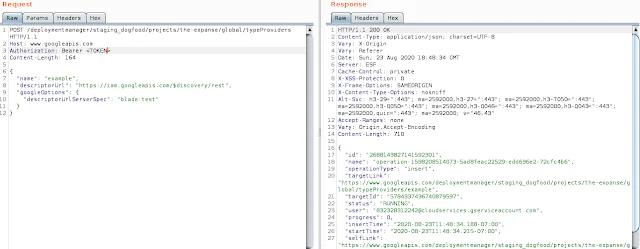
From the original on ezequiel.tech -
Get the same Type Provider through the JSON API:
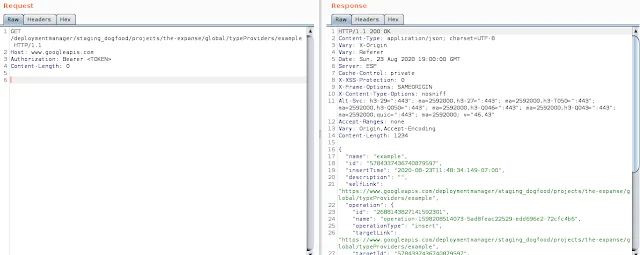
From the original on ezequiel.tech -
Get the same Type Provider through the Proto over HTTP API:
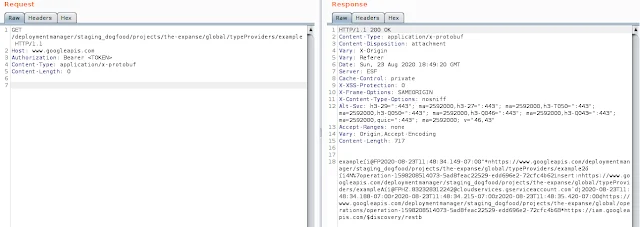
From the original on ezequiel.tech -
Decode the response with
protoc: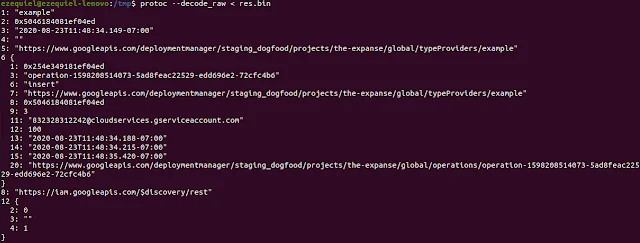
From the original on ezequiel.tech -
Figure out which number corresponds to each field (for example, 1=name, 2=id, 3=insertTime, ...).
-
Construct an approximation of the original proto message definition with that information.
By creating Type Providers with different values in the proto fields through Proto over HTTP and decoding the protobuf answers, a good enough approximation of the missing values was obtained, including transport and credentialType. Setting transport to GSLB was the key to issuing internal requests.
Step 3: Point a Type Provider at an internal endpoint
With the GSLB value for transport, a Type Provider can be crafted so that Deployment Manager directs requests to internal Google endpoints, as long as the gslbTarget is known. The example given is a Type Provider for the Google App Engine Admin API, Test environment, which since the researcher's 2018 GAE RCE has been blocked externally with a 429 error at test-appengine.sandbox.googleapis.com.
The value blade:apphosting-admin came from listing Types on the dogfood version: the appengine.v1.version Type had gslbTarget set to it. The suffix -nightly was added because, before the GAE Test API was blocked externally in 2018, the string nightly appeared often in it.
That Type Provider worked flawlessly, and a Deployment using it launched a new app into GAE Test to check whether the 2018 bug was properly fixed (it was).
Step 4: Read internal information from error messages
With an invalid gslbTarget (and descriptorUrlServerSpec always set to the same value as gslbTarget), the Operation for creating a Type Provider fails, either with an error saying it could not connect to the GSLB endpoint, the error the internal endpoint returned (often 404 Not Found), or a message that the response was not a valid descriptor document (some endpoints returned normal HTML) along with the response data. One endpoint returned an error page with a Java stack trace and a message along the lines of: Debugging information, only visible to internal IPs! So internal information can be retrieved this way.
Step 5: Call internal APIs
With a valid gslbTarget, such as blade:corp-issuetracker-api for [redacted].googleapis.com (the GSLB name came from past research), calls to the API can be performed. Not knowing the format of Issue Tracker's resources is easily overcome by calling listTypes on the new Type Provider.
These were interesting issues, but their impact was doubtful, especially since requests were made with the Deployment Manager service account's credentials for the project, which would probably be restricted in which endpoints it may talk to.
Step 6: Understand the authorisation model
While researching, the researcher told some googlers that he had found a way to perform requests to GSLB endpoints, and they asked him to write it down on a VRP grant ticket so the SRE team would have a heads up in case his requests were detected. They also explained a potential issue with requests to GSLB endpoints:
If service A makes a request with service B on behalf of user C, the authorization of user C is checked. If there are no credentials for C, then the authorization of A is checked instead.
This was interesting because the service account credentials used by Deployment Manager were delegated by [redacted] (the delegator's ID is visible in the Cloud Console logs), which suggests that Google prod account has, at least, permissions to delegate tokens for some service accounts. The remaining step would be to find a way to do so and remove the service account's credentials so that the identity of Deployment Manager itself is used instead.
It was night in Uruguay, so the research was written down in the grant ticket and work stopped for the day. Next morning, the dogs woke the researcher at about 6 AM, and notifications of updates on the grant ticket included one that arrived just as he was reading them:
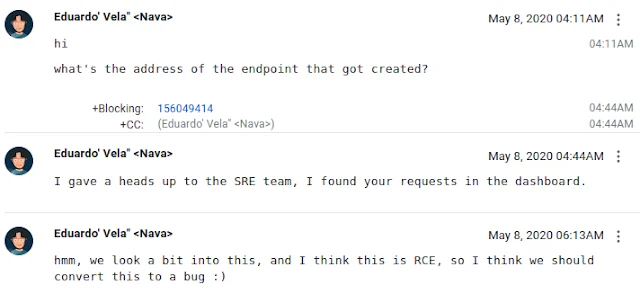
Eduardo quickly submitted a VRP report, triaged it, escalated it to P0, and issued a Nice catch! It took less than 5 minutes from report submission to Nice catch.
Later that day Eduardo explained that the bug was being treated as an incident, simply because RCE bugs are treated that way, and asked the researcher to stop further research and send the details of his actions and findings.
Root cause
The dogfood version of Deployment Manager exposed an undocumented googleOptions field on Type Providers, including transport and gslbTarget. Setting transport to the GSLB value let a Type Provider direct requests to internal Google endpoints, as long as the gslbTarget was known. The descriptorUrlServerSpec field was set to the same value as gslbTarget in the research.
Private IP addresses were rejected as invalid, and domains or redirections pointing to private IPs failed the same way, but a GSLB symbolic name was accepted. Proto over HTTP was blocked in Production (Proto over HTTP is not allowed for service) but allowed in Staging, which is where the enum values were enumerated.
Impact
According to the researcher's understanding, privilege escalation may be achieved through the identity of the Deployment Manager service ([redacted]), so it might have access to internal services a normal service account would not have access to. It is not known whether attack vectors exist that would allow an attacker to achieve a shell in Google's internal systems, but the privileges could be high enough. Because of this probable maximum impact, Google treated the issue as RCE and issued a $31,337 reward, their current standard amount for RCE.
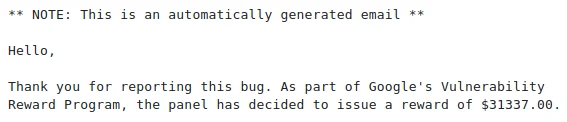
In March 2021 the write-up was chosen as the first place winner of the 2020 GCP VRP prize, and Google paid an additional $133,337, for a total of $164,674 for the report plus write-up. LiveOverflow made a video explaining how the vulnerability was found.
Fix
The issue has been fixed. The fix appears to be that gslbTarget and descriptorUrlServerSpec are now ignored when specified on the create, patch or update Type Provider operations. The dogfood version might still be accessible on the API for a while, but that is not a security issue by itself, though there could be some hidden security hole in it.
Separately, after reporting the findings and even after finishing the first few drafts of the write-up, the researcher checked whether the discovery document for the dogfood version of the Staging Deployment Manager API could be accessed publicly. It can:
https://staging-deploymentmanager.sandbox.googleapis.com/$discovery/rest?version=dogfood
The discovery document includes the googleOptions field and gives a little more insight into what its fields do, but not nearly enough, so noticing it earlier would probably not have avoided the same research steps.
Timeline
- May 7th, 2020: issue found and mentioned in a VRP grant ticket
- May 8th, 2020: googler checks the issue, submits the RCE report and quickly escalates it
- May 19th, 2020: reward of $31,337.00 issued
- May 20th, 2020: issue confirmed as fixed
- March 2021: prize of $133,337 issued for the vulnerability write-up
Variants to test
- Undocumented API versions. Enable an API, open its metrics page and inspect the Methods drop-down for version names beyond the documented ones, then substitute them into normal calls. A positive result is a method that answers on an undocumented version (here
alphaanddogfood). - Staging prefixes. Prefix the API version with
staging_as Compute Engine does. A positive result is a working Staging endpoint, which here behaved exactly like Production. - Proto over HTTP. Send a request with
Content-Type: application/x-protobufto a normal REST path. A positive result is a binary protobuf response instead of theProto over HTTP is not allowed for serviceerror, which lets you enumerate enum numbers withprotoc --decode_raw. - Extra fields in resource definitions. List base types and your own resources and look for fields not present in the documentation, especially with
$outputDefaultsin the query. A positive result is an undocumented field such asgoogleOptionswhose sub-fields can be set on create. - Server-side fetch fields. For any field that names a host or URL (here
gslbTarget,descriptorUrlServerSpec), try internal symbolic names and observe the Operation error. A positive result is an internal error page, a stack trace, or a response body echoed back in the error. - Credential handling. Point a resource at a fake API you control and inspect the Authorization header. A positive result is an unexpected scheme such as
EndUserCredscarrying internal identity data. - Public discovery documents. Request
/$discovery/rest?version=<undocumented version>on staging hosts. A positive result is a JSON discovery document describing the hidden fields.
What happened, in plain words
Google runs a service called Google Cloud Deployment Manager. You can think of it as a robot assistant that builds and manages computer infrastructure for you: instead of clicking through screens to create servers, databases or app hosting, you write a description of what you want and the robot goes and creates it. This style of working is called infrastructure as code.
The researcher, Ezequiel Pereira, found that a hidden, internal-only version of this robot could be tricked into making requests to computers inside Google's own private network. Those computers are not reachable from the normal internet. If you can make a Google server talk to them on your behalf, that is a serious problem, because those internal machines may trust each other more than they trust the outside world.
Google classified the finding as RCE, short for Remote Code Execution, which is the worst class of security bug: an attacker getting their code to run on someone else's machine. In this case the researcher did not actually run code on Google's machines. Google treated it as RCE because the potential impact could have been that high. They paid $31,337 for the report, and later an extra $133,337 when the write-up won the 2020 GCP VRP prize, for a total of $164,674.
This article walks through the whole story in the order it happened, explaining every concept from scratch.
The building blocks: what Deployment Manager is
Before the bug makes sense, you need a small vocabulary. Deployment Manager has its own words for things, and the write-up uses them constantly.
- Type: a description of one kind of thing you can create, such as a virtual machine, an issue ticket or a user permission. Deployment Manager ships with several ready-made Types, called base types.
- Type Provider: a connector. It tells Deployment Manager where a service's API lives, plus a document describing that API, so Deployment Manager can manage Types inside that service. A useful comparison: a Type Provider is like a phone book entry that says "to talk to this company, dial this number and here is their menu of options".
- Resource: one actual instance of something, for example one virtual machine.
- Templates: reusable Python or Jinja2 files (Jinja2 is a templating language, a way of writing text with blanks that get filled in) used to configure Resources programmatically.
- Deployment: a bundle of Resources that are created and managed together.
- Operation: every create, change or delete action returns an Operation, which is a little progress ticket you can keep checking ("polling") to see whether the job finished or failed.
Two more terms appear immediately:
- API (Application Programming Interface): a way for one program to talk to another over the network. When your browser loads a page, it is often calling an API behind the scenes. An API has endpoints, which are specific addresses for specific actions, like "list all items" or "create a new item".
- REST / RESTful: a common style for building APIs on top of ordinary web requests (the same kind your browser makes). A REST API usually has URLs that look like paths, for example
/projects/my-project/global/typeProviders.
Deployment Manager has two documented versions of its REST API: v2, which is generally available, and v2beta, which is in public beta. A beta version is one that is still being tested and may change. The important difference for this story is that Type Providers only exist in v2beta.
Setting up the research
The research was done against the Deployment Manager REST API, using the v2beta endpoints for Type Providers and Deployments. The tools involved were not exotic: the API itself, the Google Cloud Console (the web dashboard where you enable services and look at statistics), and later a program called protoc, which we will meet properly in a moment. The researcher used his own Google Cloud project, and the email address of the service account Deployment Manager uses on that project appeared in the EndUserCreds header data.
A service account is a robot user account. It is not a person; it is an identity that a program uses to prove who it is when calling other services. Just like a person logs in with a username and password, a program presents a token, which is a short-lived string of characters that acts as proof of identity.
First attempts: looking for hidden Types
The first idea was to look for hidden or internal Types. Some Google services, such as App Engine Flexible, use Deployment Manager internally, and you can see this in a project's logs when you deploy an app. If internal Types were exposed, they might reveal internal services. None were found.
Next came the Jinja2 and Python templates of Deployments. Through trial and error, the researcher created Deployments with specially crafted templates that returned data as a Python exception on their Operations. An exception is an error message a program produces when something goes wrong; if you can make a program throw an error that contains data you want, the error message becomes a way of reading that data out. This allowed inspecting Python libraries, reading Python code, and listing and reading files.
But there was a wall: the script that interprets the templates runs on an isolated container with zero privileges, not even network connectivity. A container is a sealed-off mini-computer inside a bigger computer; an isolated one cannot reach anything else. So this path gave file reading but no way out.
After that, Type Providers were created pointing to internal Google Corp APIs such as [redacted].googleapis.com. The Operations always failed with an error saying no valid response was received for the descriptor document, and showed the HTML of the login portal that [redacted].googleapis.com redirects to when accessed externally. A descriptor document is the menu document mentioned earlier: a file that describes what an API can do. A redirect is a server telling your browser "not here, go over there instead".
Specifying any private IP address failed with an error saying it was not a valid address. A private IP address is an address on an internal network, like a room number inside a building that does not exist on the public street map. Attempts to bypass the check with domains and redirections pointing to private IPs gave the same result. A domain is a human-friendly name like example.com that gets translated into an IP address.
These failures were demotivating, and research paused for a while.
The metrics page and two hidden API versions
Then the researcher looked at the Deployment Manager API methods by enabling the API on the Google Cloud Console, opening the metrics page, and looking at the Filters section. There, a drop-down list titled Methods contains all of them, including undocumented ones. Methods usually include the API version in their names.
The screenshot shows that drop-down list of Methods on the metrics page, which is where the undocumented versions first became visible.
Two more API versions appeared besides v2 and v2beta: alpha and dogfood. Methods on those versions could be called simply by replacing v2 or v2beta with alpha or dogfood in every API call. In other words, the hidden versions were not behind any special door; the same URL with a different word in it worked.
The alpha version was played with but yielded nothing interesting. The dogfood version was more interesting, because dogfood is the word Google uses for internal testing. The idea of dogfooding is that a company uses its own product before customers do, so employees hit the bugs first. Dogfood versions are usually intended only for googlers. Perhaps this version had internal features intended only for googlers.
An undocumented field: googleOptions
Listing the base types on that version showed that most of them returned an extra field in their definitions: googleOptions. A field here means one named piece of data inside a larger record, like one box on a form.
The two screenshots show examples of base type definitions carrying that extra googleOptions field.
Listing the researcher's own Type Providers also included this extra field. Specifying the $outputDefaults system parameter in the query revealed which fields googleOptions contained. A system parameter is a special instruction you can add to a request URL to change how the server answers; $outputDefaults asks the server to include default values in the output, which is how hidden sub-fields became visible.
Creating Type Providers with different values in those fields gave an idea of what each one does and its expected values. At that point most of them were still unexplained:
| Field | Type | Observed behaviour |
|---|---|---|
injectProject |
Boolean | Whatever value was specified, the API always set it to false on the Type Providers. Effect unknown. |
deleteIntent |
Enum | A single valid value found: CREATE_OR_ACQUIRE. Effect unknown. |
isLocalProvider |
Boolean | When set to true, the Type Provider was always created successfully regardless of the other fields, but Deployments using it always failed with an error saying the descriptor document could not be retrieved. |
ownershipKind |
Enum | Valid values: UNKNOWN, USER, GOOGLE. No effects observed; it was always set to GOOGLE during the research. |
transport |
Enum | Valid values found at first: UNKNOWN_TRANSPORT_TYPE and HARPOON. No effects observed. |
credentialType |
Enum | Valid values found at first: UNKNOWN_CREDENTIAL_TYPE and OAUTH. No effects observed. |
gslbTarget |
String | Either empty or something like blade:*<TARGET>* or gslb:*<TARGET>. No effects observed. |
descriptorUrlServerSpec |
String | Either the same as gslbTarget or empty. No effects observed. |
Two of those column values need explaining. A Boolean is a value that is either true or false. An Enum (enumeration) is a field that accepts only a fixed list of named choices, like a drop-down menu with a set number of options.
GSLB: the interesting word
GSLB is Google's Global Service Load Balancer. It acts like a mix between an internal DNS server and a load balancer. A DNS server is the internet's phone book: it turns names into addresses. A load balancer is a traffic cop that spreads incoming requests across several machines so no single one is overwhelmed.
According to the SRE Book (Google's public book about running reliable systems), when GSLB is given a symbolic name, roughly like a domain name, it directs traffic to a linked BNS address (Borg Naming Service), which is the Google equivalent of an internal IP address.
That looked like a route to SSRF against internal servers. SSRF stands for Server-Side Request Forgery: a bug where you trick a server into making a request on your behalf, usually to somewhere you cannot reach yourself. The everyday comparison: you cannot get into a restricted building, but you can persuade the receptionist to walk in and read a document out loud to you.
But no value tried on gslbTarget and descriptorUrlServerSpec had any effect.
Brute forcing and an odd header
Brute forcing means trying many possibilities in a row, like spinning a combination lock through every number. Brute forcing valid credentialType values produced a new one: GAIAMINT. The name had been seen before, for example in a Google Git commit. A Git commit is a saved change in a code repository, the shared history of a software project.
While testing Deployments with a Type Provider using that value, the researcher also tested what happens when the Type Provider uses an OAuth 2.0 access token as its authentication mechanism. OAuth 2.0 is a widely used system for granting a program permission to act on your behalf without giving it your password; the access token is the temporary pass it receives. Authentication is proving who you are.
A fake API that had been set up then received, instead of an access token in the Authorization header, a header like this:
EndUserCreds 1 <URL-safe Base64 data>
Line by line: EndUserCreds is what appeared in the Authorization header instead of an access token. The rest is data encoded in URL-safe Base64, which is a way of writing binary data using only characters that are safe to put in a URL. A header is a small labelled line of metadata sent along with a web request, like the label on a parcel.
The data could not be decoded, but it looks like protobuf inside some other binary format, and some strings can be retrieved: anonymous, [redacted] (the email of the service account Deployment Manager uses for tokens on the project), cloud-dm and cloudgaia::vjgv73:9898. Protobuf (protocol buffers) is a compact binary format Google uses to serialise data, that is, to turn structured data into a stream of bytes and back. It looks intended for internal use, and some googlers confirmed it is meant for authentication between internal Google systems; it is probably not usable externally.
No other valid credentialType values, and no transport values, could be brute forced.
At this point the researcher also tried prefixing the API version with staging_, since the Google Compute Engine API does that for the Staging environment (mentioned, for instance, in a Kubernetes GitHub PR). Staging is a pre-production copy of an environment, where changes are tested before going live. It worked, but the Staging environment behaved exactly like Production.
After several failed attempts, research stopped for a couple of weeks.
Exploitation, step 1: Proto over HTTP
The idea was to use protocol buffers to find the missing values of the credentialType and transport enums. Why would that help? Because in protobuf, enums are represented as numbers rather than strings, so one can count up from 1 until no new values appear. If the menu is a numbered list, you can read the whole menu by ordering item 1, item 2, item 3 and so on.
Deployment Manager does not support gRPC, a remote procedure call system developed by Google and supported by many Google APIs. A remote procedure call is a way of calling a function on another computer as if it were local. But Deployment Manager does support a relatively unknown feature: Proto over HTTP.
Proto over HTTP is an experimental gRPC fallback available in some Google APIs. A fallback is a backup route used when the main one is unavailable. It is not well documented, availability varies per API, and different APIs may implement it differently. Checking it on Deployment Manager established that:
- URL paths stay the same (
/deploymentmanager/<VERSION>/projects/<PROJECT>/global/...). - The
Content-Typeheader must be set toapplication/x-protobuf. - In Production it fails with the error message:
Proto over HTTP is not allowed for service. - It works in Staging.
The Content-Type header tells the server what format the body of the request is in, the same way a parcel label says whether the contents are fragile or liquid. Here it says "the body is protobuf binary".
Exploitation, step 2: reverse engineering the message
With Proto over HTTP working in Staging, the researcher called the get Type Provider method and decoded the response protobuf with protoc --decode_raw. protoc is the Protocol Buffers compiler, a program that reads and writes protobuf data. The --decode_raw option tells it to decode without knowing the schema, so it prints field numbers and values instead of field names. Reverse engineering means working backwards from the output to figure out how the thing was built.
That produced unnamed proto field numbers and their values. Comparing those values with the JSON API output matched each field number to its field name, and from there an approximation of the Type Providers proto message definition was reconstructed. JSON is a plain-text format for structured data, easy for humans to read, and it is what the normal API returns.
The example sequence:
-
Create a Type Provider through the JSON API:
From the original on ezequiel.tech -
Get the same Type Provider through the JSON API:
From the original on ezequiel.tech -
Get the same Type Provider through the Proto over HTTP API:
From the original on ezequiel.tech -
Decode the response with
protoc:From the original on ezequiel.tech -
Figure out which number corresponds to each field (for example, 1=name, 2=id, 3=insertTime, ...).
-
Construct an approximation of the original proto message definition with that information.
By creating Type Providers with different values in the proto fields through Proto over HTTP and decoding the protobuf answers, a good enough approximation of the missing values was obtained, including transport and credentialType. Setting transport to GSLB was the key to issuing internal requests.
Exploitation, step 3: pointing at an internal endpoint
With the GSLB value for transport, a Type Provider can be crafted so that Deployment Manager directs requests to internal Google endpoints, as long as the gslbTarget is known. The example given is a Type Provider for the Google App Engine Admin API, Test environment, which since the researcher's 2018 GAE RCE has been blocked externally with a 429 error at test-appengine.sandbox.googleapis.com. A 429 error is the HTTP status code for "too many requests", a standard way servers say "slow down".
The value blade:apphosting-admin came from listing Types on the dogfood version: the appengine.v1.version Type had gslbTarget set to it. The suffix -nightly was added because, before the GAE Test API was blocked externally in 2018, the string nightly appeared often in it. A suffix is something added to the end of a name.
That Type Provider worked flawlessly, and a Deployment using it launched a new app into GAE Test to check whether the 2018 bug was properly fixed (it was).
Exploitation, step 4: reading internal information from errors
With an invalid gslbTarget (and descriptorUrlServerSpec always set to the same value as gslbTarget), the Operation for creating a Type Provider fails. The failure comes in one of several forms: an error saying it could not connect to the GSLB endpoint, the error the internal endpoint returned (often 404 Not Found), or a message that the response was not a valid descriptor document (some endpoints returned normal HTML) along with the response data. 404 Not Found is the standard HTTP status for "there is nothing at this address". HTML is the language web pages are written in.
One endpoint returned an error page with a Java stack trace and a message along the lines of: Debugging information, only visible to internal IPs! A stack trace is the list of steps a program was taking when it crashed, useful for debugging and often revealing about the internals. So internal information can be retrieved this way, even when the request itself fails.
Exploitation, step 5: calling internal APIs
With a valid gslbTarget, such as blade:corp-issuetracker-api for [redacted].googleapis.com (the GSLB name came from past research), calls to the API can be performed. Not knowing the format of Issue Tracker's resources is easily overcome by calling listTypes on the new Type Provider. In plain terms: if you do not know the menu, ask the restaurant to list its dishes.
These were interesting issues, but their impact was doubtful, especially since requests were made with the Deployment Manager service account's credentials for the project, which would probably be restricted in which endpoints it may talk to. Credentials are the proof of identity a program presents, and they usually come with permissions attached.
Exploitation, step 6: the authorisation model
While researching, the researcher told some googlers that he had found a way to perform requests to GSLB endpoints. They asked him to write it down on a VRP grant ticket so the SRE team would have a heads up in case his requests were detected. VRP is the Vulnerability Reward Program, Google's bug bounty scheme: report a security bug, get paid. A grant ticket is a support ticket used to track research access. SRE stands for Site Reliability Engineering, the team that keeps services running.
They also explained a potential issue with requests to GSLB endpoints:
If service A makes a request with service B on behalf of user C, the authorization of user C is checked. If there are no credentials for C, then the authorization of A is checked instead.
Authorisation is the question of what you are allowed to do, as opposed to authentication, which is who you are. The quote describes a chain of trust: a request can carry the identity of a user, or fall back to the identity of the service making the call.
This was interesting because the service account credentials used by Deployment Manager were delegated by [redacted] (the delegator's ID is visible in the Cloud Console logs). Delegation is passing your permission to someone else, like giving a friend your library card so they can borrow books for you. That suggests Google's prod account has, at least, permissions to delegate tokens for some service accounts. The remaining step would be to find a way to do so and remove the service account's credentials so that the identity of Deployment Manager itself is used instead.
It was night in Uruguay, so the research was written down in the grant ticket and work stopped for the day. Next morning, the dogs woke the researcher at about 6 AM, and notifications of updates on the grant ticket included one that arrived just as he was reading them:
The screenshot shows the ticket update that arrived that morning.
Eduardo quickly submitted a VRP report, triaged it, escalated it to P0, and issued a Nice catch! Triaged means the report was checked and sorted by severity. P0 is the highest priority level, the one used for emergencies. It took less than 5 minutes from report submission to Nice catch.
Later that day Eduardo explained that the bug was being treated as an incident, simply because RCE bugs are treated that way, and asked the researcher to stop further research and send the details of his actions and findings.
Root cause
The dogfood version of Deployment Manager exposed an undocumented googleOptions field on Type Providers, including transport and gslbTarget. Setting transport to the GSLB value let a Type Provider direct requests to internal Google endpoints, as long as the gslbTarget was known. The descriptorUrlServerSpec field was set to the same value as gslbTarget in the research.
Private IP addresses were rejected as invalid, and domains or redirections pointing to private IPs failed the same way, but a GSLB symbolic name was accepted. Proto over HTTP was blocked in Production (Proto over HTTP is not allowed for service) but allowed in Staging, which is where the enum values were enumerated.
Impact
According to the researcher's understanding, privilege escalation may be achieved through the identity of the Deployment Manager service ([redacted]), so it might have access to internal services a normal service account would not have access to. Privilege escalation means gaining more permissions than you were meant to have. It is not known whether attack vectors exist that would allow an attacker to achieve a shell in Google's internal systems, but the privileges could be high enough. A shell is a command line on a machine, the thing that lets you run commands directly.
Because of this probable maximum impact, Google treated the issue as RCE and issued a $31,337 reward, their current standard amount for RCE.
The screenshot shows the reward notification.
In March 2021 the write-up was chosen as the first place winner of the 2020 GCP VRP prize, and Google paid an additional $133,337, for a total of $164,674 for the report plus write-up. LiveOverflow made a video explaining how the vulnerability was found.
Fix
The issue has been fixed. The fix appears to be that gslbTarget and descriptorUrlServerSpec are now ignored when specified on the create, patch or update Type Provider operations. Patch and update are the two ways of changing an existing object through the API.
The dogfood version might still be accessible on the API for a while, but that is not a security issue by itself, though there could be some hidden security hole in it.
Separately, after reporting the findings and even after finishing the first few drafts of the write-up, the researcher checked whether the discovery document for the dogfood version of the Staging Deployment Manager API could be accessed publicly. A discovery document is a machine-readable description of an API, listing its methods and fields. It can:
https://staging-deploymentmanager.sandbox.googleapis.com/$discovery/rest?version=dogfood
Line by line: the host is staging-deploymentmanager.sandbox.googleapis.com, the Staging copy of the service. The path /$discovery/rest is the standard place where a discovery document is served. The query string ?version=dogfood asks for the dogfood version specifically.
The discovery document includes the googleOptions field and gives a little more insight into what its fields do, but not nearly enough, so noticing it earlier would probably not have avoided the same research steps.
Timeline
- May 7th, 2020: issue found and mentioned in a VRP grant ticket
- May 8th, 2020: googler checks the issue, submits the RCE report and quickly escalates it
- May 19th, 2020: reward of $31,337.00 issued
- May 20th, 2020: issue confirmed as fixed
- March 2021: prize of $133,337 issued for the vulnerability write-up
Variants to test
These are the general techniques from this story, written so that someone else can try them on other APIs.
- Undocumented API versions. Enable an API, open its metrics page and inspect the Methods drop-down for version names beyond the documented ones, then substitute them into normal calls. A positive result is a method that answers on an undocumented version (here
alphaanddogfood). - Staging prefixes. Prefix the API version with
staging_as Compute Engine does. A positive result is a working Staging endpoint, which here behaved exactly like Production. - Proto over HTTP. Send a request with
Content-Type: application/x-protobufto a normal REST path. A positive result is a binary protobuf response instead of theProto over HTTP is not allowed for serviceerror, which lets you enumerate enum numbers withprotoc --decode_raw. - Extra fields in resource definitions. List base types and your own resources and look for fields not present in the documentation, especially with
$outputDefaultsin the query. A positive result is an undocumented field such asgoogleOptionswhose sub-fields can be set on create. - Server-side fetch fields. For any field that names a host or URL (here
gslbTarget,descriptorUrlServerSpec), try internal symbolic names and observe the Operation error. A positive result is an internal error page, a stack trace, or a response body echoed back in the error. - Credential handling. Point a resource at a fake API you control and inspect the Authorization header. A positive result is an unexpected scheme such as
EndUserCredscarrying internal identity data. - Public discovery documents. Request
/$discovery/rest?version=<undocumented version>on staging hosts. A positive result is a JSON discovery document describing the hidden fields.
Glossary
- API: a way for one program to talk to another over the network, with defined addresses and formats.
- Authentication: proving who you are.
- Authorisation: deciding what you are allowed to do once you are known.
- Base types: the ready-made Types that ship with Deployment Manager.
- Boolean: a value that is either true or false.
- BNS (Borg Naming Service): Google's internal equivalent of an IP address for a service.
- Brute forcing: trying many possibilities in sequence until one works.
- Container: a sealed-off mini-computer inside a bigger computer.
- Content-Type header: a request header that says what format the body is in.
- Credentials: proof of identity a program presents, usually with permissions attached.
- Delegation: passing your permission to another identity so it can act for you.
- Deployment: a bundle of Resources created and managed together.
- Descriptor document: a file describing what an API can do, used by a Type Provider.
- Discovery document: a machine-readable description of an API, listing its methods and fields.
- DNS server: the internet's phone book, turning names into addresses.
- Dogfood: Google's word for internal testing, where employees use a product before customers.
- Domain: a human-friendly name that resolves to an IP address.
- Enum: a field that accepts only a fixed list of named choices.
- Exception: an error a program produces when something goes wrong.
- Field: one named piece of data inside a larger record.
- gRPC: a remote procedure call system developed by Google.
- GSLB (Global Service Load Balancer): Google's system that maps symbolic names to internal addresses and spreads traffic.
- Header: a small labelled line of metadata sent with a web request.
- HTML: the language web pages are written in.
- Infrastructure as code: describing infrastructure in files so a service can create it for you.
- JSON: a plain-text format for structured data.
- Load balancer: a traffic cop that spreads requests across machines.
- OAuth 2.0: a system for granting a program permission to act on your behalf without your password.
- Operation: a progress ticket returned by Deployment Manager for each action, which can be polled.
- P0: the highest priority level, used for emergencies.
- Patch / update: the two ways of changing an existing object through the API.
- Private IP address: an address on an internal network, not reachable from the public internet.
- Privilege escalation: gaining more permissions than you were meant to have.
- Protobuf (protocol buffers): a compact binary format for serialising structured data.
- Proto over HTTP: an experimental gRPC fallback that sends protobuf over ordinary HTTP requests.
protoc: the Protocol Buffers compiler, used here with--decode_rawto decode data without a schema.- RCE (Remote Code Execution): the worst class of bug, where an attacker gets code to run on someone else's machine.
- Redirect: a server telling the client to go to a different address.
- Remote procedure call: calling a function on another computer as if it were local.
- Resource: one actual instance of something, such as one virtual machine.
- REST / RESTful: a common style for building APIs on top of ordinary web requests.
- Reverse engineering: working backwards from output to figure out how something was built.
- Service account: a robot user account that a program uses to prove its identity.
- Shell: a command line on a machine that lets you run commands directly.
- SRE (Site Reliability Engineering): the team that keeps services running.
- SSRF (Server-Side Request Forgery): tricking a server into making a request on your behalf to somewhere you cannot reach.
- Stack trace: the list of steps a program was taking when it crashed.
- Staging: a pre-production copy of an environment used for testing.
- Suffix: something added to the end of a name.
- System parameter: a special instruction added to a request URL to change the server's answer.
- Template: a reusable file with blanks that get filled in, used to configure Resources.
- Token: a short-lived string that acts as proof of identity.
- Triaged: checked and sorted by severity.
- Type: a description of one kind of thing you can create.
- Type Provider: a connector telling Deployment Manager where a service's API lives and how to describe it.
- URL-safe Base64: a way of writing binary data using only characters safe for URLs.
- VRP (Vulnerability Reward Program): Google's bug bounty scheme.
- 429 error: the HTTP status for "too many requests".
- 404 Not Found: the HTTP status for "nothing at this address".



