SSRF on project import via the remote_attachment_url on a Note
The project import process did not strip the CarrierWave remote_attachment_url attribute from notes, so an attacker could supply a URL in the exported project JSON that the server would fetch during import. This allowed server-side requests to internal services, cloud metadata endpoints, and potentially Redis, with a possible path to remote code execution.

- Triaged in 32 hours
- Fixed in 8 days
- Paid in 32 hours
- Disclosed after 3 months
Summary
The Note model has an attachment which is provided by a CarrierWave uploader:
mount_uploader :attachment, AttachmentUploader
One of the features this provides is the ability to download and attach a file via a url, see https://github.com/carrierwaveuploader/carrierwave/blob/v1.3.1/lib/carrierwave/mount.rb#L80. This means that the Note model has a method remote_attachment_url= which can be used to perform this action.
As this attribute isn't removed by the AttributeCleaner on project import, it can be set in the project.json for a note and will be set when the note is created, downloading the file:
https://github.com/carrierwaveuploader/carrierwave/blob/v1.3.1/lib/carrierwave/mounter.rb#L72
  def remote_urls=(urls)
      return if not urls or urls == "" or urls.all?(&:blank?)

      @remote_urls = urls
      @download_error = nil
      @integrity_error = nil

      @uploaders = urls.zip(remote_request_headers || []).map do |url, header|
        uploader = blank_uploader
        uploader.download!(url, header || {})
        uploader
      end
    def file
          if @file.blank?
            headers = @remote_headers.
              reverse_merge('User-Agent' => "CarrierWave/#{CarrierWave::VERSION}")

            @file = Kernel.open(@uri.to_s, headers)
            @file = @file.is_a?(String) ? StringIO.new(@file) : @file
          end
The downloaded file is then attached to the note and can be viewed from the newly imported project.
Any model that has a mount_uploader and is importable is potentially vulnerable to the same attack, although the majority of the others are AvatarUploader which checks the file type and prevents the response from being viewed.
Steps to reproduce
- Create a new project
- Create an issue in the project
- Add a note to the issue
- Export the project
- Extract the export
- Add
remote_attachment_urlto thenotehash with a url - Recompress the export and import it
- View the note on the issue
Demo
Examples
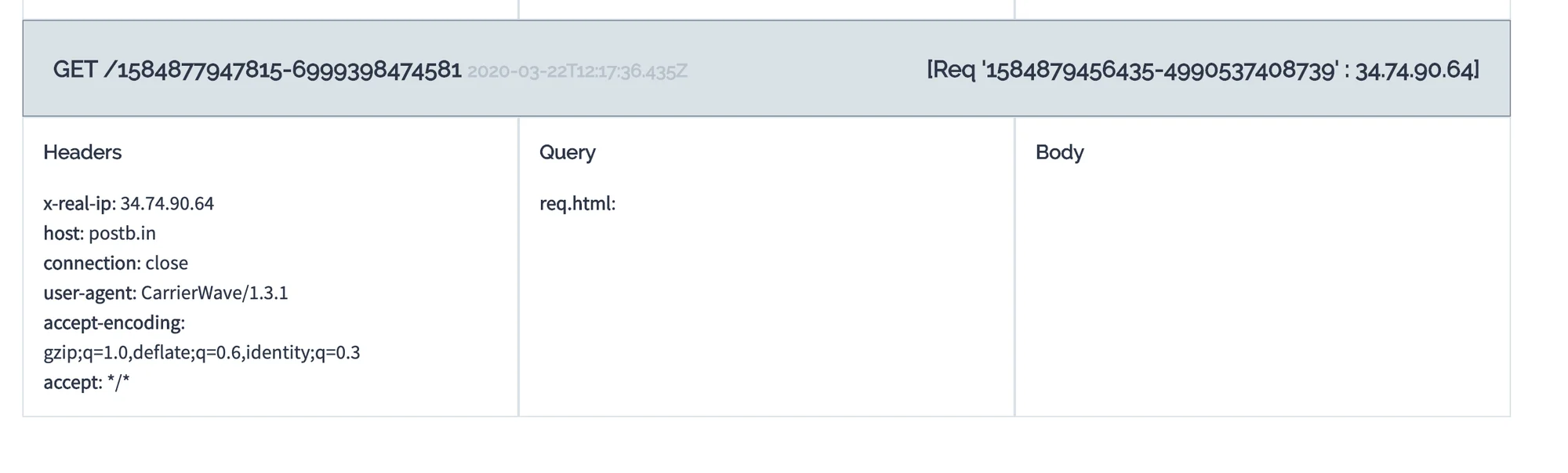
Example of project import on gitlab.com hitting postbin:
https://gitlab.com/wbowling/ssrf1/-/issues/1#note_309127303
What is the current bug behavior?
When importing a model that has a mount_uploader it's possible to use the carrierwave uploader seed attributes to download a file from any host: https://github.com/carrierwaveuploader/carrierwave/wiki/How-to:-Upload-remote-image-urls-to-your-seedfile
What is the expected correct behavior?
The attributes should be prohibited and removed via the AttributeCleaner
Output of checks
This bug happens on gitlab.com
Results of GitLab environment info
System information
System:		Ubuntu 18.04
Proxy:		no
Current User:	git
Using RVM:	no
Ruby Version:	2.6.5p114
Gem Version:	2.7.10
Bundler Version:1.17.3
Rake Version:	12.3.3
Redis Version:	5.0.7
Git Version:	2.24.1
Sidekiq Version:5.2.7
Go Version:	unknown

GitLab information
Version:	12.8.7-ee
Revision:	2643fd87200
Directory:	/opt/gitlab/embedded/service/gitlab-rails
DB Adapter:	PostgreSQL
DB Version:	10.12
URL:		http://gitlab-vm.local
HTTP Clone URL:	http://gitlab-vm.local/some-group/some-project.git
SSH Clone URL:	[email protected]:some-group/some-project.git
Elasticsearch:	no
Geo:		no
Using LDAP:	no
Using Omniauth:	yes
Omniauth Providers:

GitLab Shell
Version:	11.0.0
Repository storage paths:
- default: 	/var/opt/gitlab/git-data/repositories
GitLab Shell path:		/opt/gitlab/embedded/service/gitlab-shell
Git:		/opt/gitlab/embedded/bin/git
Impact
- Allows an attacker to access internal services, for example the Omnibus GitLab has all of the exporters, Prometheus, Alertmanager exposed on localhost.
- If GitLab is hosted on AWS it allows for the instance metadata to be accessed.
- Redis is running locally or accessible via tcp (address could be found by looking at the targets in Prometheus at http://localhost:9090/api/v1/targets) it could be possible to obtain RCE (similar to https://github.com/jas502n/gitlab-SSRF-redis-RCE#poc). A POST request is not possible here, but as
remote_attachment_request_header=is also available (https://github.com/carrierwaveuploader/carrierwave/blob/v1.3.1/lib/carrierwave/mount.rb#L169) and not blacklisted, the payload could be set via a header. - If GitLab is hosted on Google Cloud, the above could be used to set the
Metadata-Flavor: Googleheader and accesshttp://metadata.google.internal/
Context
GitLab projects can be exported and imported. An export is an archive that contains a project.json describing the project and its related records, including issues and the notes attached to them. On import, GitLab rebuilds those records from the JSON.
The Note model has an attachment provided by a CarrierWave uploader:
mount_uploader :attachment, AttachmentUploader
CarrierWave's mount feature adds a remote_attachment_url= setter, which downloads a file from a URL and attaches it. The report points at the CarrierWave source for this behaviour (lib/carrierwave/mount.rb). The feature is intended for seeding records from remote images, not for use during a project import.
Setup
The bug was confirmed on gitlab.com. The reporter also included the output of the GitLab environment checks from a local instance:
System information
System:		Ubuntu 18.04
Proxy:		no
Current User:	git
Using RVM:	no
Ruby Version:	2.6.5p114
Gem Version:	2.7.10
Bundler Version:1.17.3
Rake Version:	12.3.3
Redis Version:	5.0.7
Git Version:	2.24.1
Sidekiq Version:5.2.7
Go Version:	unknown

GitLab information
Version:	12.8.7-ee
Revision:	2643fd87200
Directory:	/opt/gitlab/embedded/service/gitlab-rails
DB Adapter:	PostgreSQL
DB Version:	10.12
URL:		http://[redacted]
HTTP Clone URL:	http://[redacted]/some-group/some-project.git
SSH Clone URL:	[redacted]:some-group/some-project.git
Elasticsearch:	no
Geo:		no
Using LDAP:	no
Using Omniauth:	yes
Omniauth Providers:

GitLab Shell
Version:	11.0.0
Repository storage paths:
- default: 	/var/opt/gitlab/git-data/repositories
GitLab Shell path:		/opt/gitlab/embedded/service/gitlab-shell
Git:		/opt/gitlab/embedded/bin/git
The only precondition for the attack is the ability to create a project, export it, modify the archive and import it again. No special role beyond that is described.
Finding it
The Note model does, through AttachmentUploader. The setter that CarrierWave generates, remote_attachment_url=, is a normal assignable attribute, so if it survives into the import path it will be called when the note is created.
GitLab's project import runs an AttributeCleaner over imported attributes to strip ones that should not be settable from an export. remote_attachment_url is not removed by it. That is the gap: an attribute that triggers an outbound HTTP request is accepted straight from attacker-controlled JSON.
The download itself happens in CarrierWave's mounter:
  def remote_urls=(urls)
      return if not urls or urls == "" or urls.all?(&:blank?)

      @remote_urls = urls
      @download_error = nil
      @integrity_error = nil

      @uploaders = urls.zip(remote_request_headers || []).map do |url, header|
        uploader = blank_uploader
        uploader.download!(url, header || {})
        uploader
      end
and in the uploader's download code:
    def file
          if @file.blank?
            headers = @remote_headers.
              reverse_merge('User-Agent' => "CarrierWave/#{CarrierWave::VERSION}")

            @file = Kernel.open(@uri.to_s, headers)
            @file = @file.is_a?(String) ? StringIO.new(@file) : @file
          end
The URL is passed to Kernel.open, so the server makes the request from its own network position. The response body becomes the attachment, which is then stored on the note and served back to the user who views it.
Exploitation
Step 1: create the project, issue and note
Create a new project, create an issue in it, and add a note to the issue. This gives a normal note record to work with.
Step 2: export and extract
Export the project and extract the resulting archive. The export contains a project.json with the project's records.
Step 3: add the remote URL attribute
In the note hash inside project.json, add remote_attachment_url with the URL to fetch. The report does not give the exact JSON fragment, only that the key is added to the note hash with a URL as its value.
Step 4: recompress and import
Recompress the export and import it into GitLab. During import the note is created, the setter runs, and the server fetches the URL.
Step 5: view the note
The downloaded file is attached to the note and can be viewed from the newly imported project. The demo video shows the flow end to end.
Confirming the outbound request
The report gives an example of project import on gitlab.com hitting postbin:
https://gitlab.com/wbowling/ssrf1/-/issues/1#note_309127303
Root cause
The import path trusts attributes that map onto CarrierWave's remote URL setters. AttributeCleaner does not strip remote_attachment_url, so the value from project.json reaches remote_attachment_url=, which calls download!, which calls Kernel.open on the attacker-supplied URL. The request originates from the GitLab server, and its response is persisted as the note's attachment, giving the attacker a read channel back through the UI.
The reporter notes that any importable model with a mount_uploader is potentially vulnerable to the same attack. Most of the others use AvatarUploader, which checks the file type and prevents the response from being viewed, so the note attachment is the practical path.
Impact
The attacker can make the GitLab server issue requests to hosts of their choosing and read the response through the attachment. The report lists the following consequences:
- Access to internal services. In an Omnibus GitLab installation, the exporters, Prometheus and Alertmanager are exposed on localhost.
- On AWS-hosted GitLab, access to the instance metadata service.
- If Redis is running locally or reachable over TCP (the address can be found from the targets listed in Prometheus at
http://localhost:9090/api/v1/targets), remote code execution may be possible, similar to the technique in https://github.com/jas502n/gitlab-SSRF-redis-RCE#poc. A POST request is not possible through this path, butremote_attachment_request_header=is also available and not blacklisted, so the payload could be placed in a header. - On Google Cloud, the same header mechanism could set
Metadata-Flavor: Googleand reachhttp://metadata.[redacted]/.
These outcomes depend on the deployment: which services listen on localhost, whether the instance runs on AWS or Google Cloud, and whether Redis is reachable.
Fix
The expected behaviour, as stated in the report, is that these attributes should be prohibited and removed by the AttributeCleaner. The report does not describe the change that was actually made.
Variants to test
- Other importable models with a
mount_uploader: add the correspondingremote_<mount>_urlkey to the model's hash in the export and import it. A positive result is an outbound request from the server and the fetched content visible on the imported record. - The matching
remote_<mount>_request_headerattribute: set it alongside the URL and point the URL at a listener you control. A positive result is your listener receiving the header you supplied. - Cloud metadata endpoints: use the URL to reach the metadata service of the hosting provider. A positive result is metadata content stored as the attachment and readable in the UI.
- Localhost services: target ports that commonly expose administrative or metrics interfaces. A positive result is a response body from that service appearing as the attachment.
Hunting notes
This class of bug hides in import and export features, where a serialised representation of records is trusted more than a normal API request. The signal is a model attribute that maps onto a framework feature with side effects, such as CarrierWave's remote URL setters, combined with an import path that filters attributes by name. Comparing the attributes the importer accepts against the attributes the model exposes is the quickest way to spot a gap.
What happened, in plain words
GitLab is a website where teams keep their code and track work. A project in GitLab can hold code, issues (task tickets) and notes (comments on those tickets). GitLab lets you take a whole project, pack it into a single file called an export, and later unpack it into a new project. That unpacking is called an import.
The export is not a magic black box. It is an archive (think of a zip file) that contains a file called project.json. JSON is a plain text format for describing data, a bit like a very structured shopping list: names on the left, values on the right. project.json describes the project and everything in it, including its issues and the notes on those issues. When you import, GitLab reads that file and rebuilds every record from it.
The problem the researcher found is that one of those records, a note, has a hidden extra setting. If you put that setting into project.json by hand before importing, GitLab's server will quietly fetch a web address of your choosing. The fetch happens from the server itself, from inside GitLab's own network, not from your browser. The fetched content is then saved as the note's attachment, and you can open it in the normal GitLab page.
That is the whole bug in one sentence: you can make GitLab's server visit an address it should never visit, and read the answer back through the website. This kind of bug is called Server-Side Request Forgery, or SSRF. "Forgery" because the request looks like it came from GitLab, and "server-side" because the server, not you, is the one making it.
Why does that matter? Servers often sit next to other machines that are not reachable from the internet: internal dashboards, monitoring tools, cloud provider metadata services. Those machines trust anything coming from the server. If you can make the server talk to them, you get to talk to them too, through the server as a middleman.
The background you need
What an uploader is
GitLab is written in Ruby, a programming language, and it uses a popular Ruby library called CarrierWave to handle file uploads. A library is a bundle of ready-made code that many projects reuse instead of writing everything themselves.
CarrierWave lets a programmer attach a file to a record with one line. In GitLab's code, the note record (the Note model, where "model" means the code that represents one kind of stored thing) has this line:
mount_uploader :attachment, AttachmentUploader
Line by line:
mount_uploaderis a CarrierWave instruction. It says "this record can carry one uploaded file".:attachmentis the name of that file slot. Every note can have one attachment.AttachmentUploaderis the piece of code that decides how the file is stored and checked.
So a note can have a file attached to it, and CarrierWave is the machinery behind that.
The hidden feature: fetch a file from a URL
CarrierWave has an extra convenience. Besides letting a user pick a file from their computer, it lets a programmer say "download this file from this web address and attach it". The report links to CarrierWave's own source code to show where this is defined. The feature was designed for filling a database with sample records from remote images, not for use during a project import.
When you mount an uploader called attachment, CarrierWave automatically creates a setter named remote_attachment_url=. A setter is simply a way to assign a value to a field. In everyday terms: the note record gains a field called remote_attachment_url, and writing a web address into that field makes CarrierWave download that address and attach the result.
What the import does with attributes
When GitLab imports a project, it reads every field from project.json and assigns it to the matching record. Some fields should never be settable from a file, because they could do dangerous things. So GitLab runs a filter called AttributeCleaner over the incoming fields and removes the ones that are not allowed.
The researcher's finding is simple: remote_attachment_url is not on that removal list. So a value placed in the JSON travels straight through the filter and reaches the setter, which triggers a download.
Setting up the test
The bug was confirmed on gitlab.com, the public hosted version of GitLab. The reporter also ran GitLab on their own machine and included the output of GitLab's environment check, which lists versions and paths. It is shown here as it appeared:
System information
System:		Ubuntu 18.04
Proxy:		no
Current User:	git
Using RVM:	no
Ruby Version:	2.6.5p114
Gem Version:	2.7.10
Bundler Version:1.17.3
Rake Version:	12.3.3
Redis Version:	5.0.7
Git Version:	2.24.1
Sidekiq Version:5.2.7
Go Version:	unknown

GitLab information
Version:	12.8.7-ee
Revision:	2643fd87200
Directory:	/opt/gitlab/embedded/service/gitlab-rails
DB Adapter:	PostgreSQL
DB Version:	10.12
URL:		http://[redacted]
HTTP Clone URL:	http://[redacted]/some-group/some-project.git
SSH Clone URL:	[redacted]:some-group/some-project.git
Elasticsearch:	no
Geo:		no
Using LDAP:	no
Using Omniauth:	yes
Omniauth Providers:

GitLab Shell
Version:	11.0.0
Repository storage paths:
- default: 	/var/opt/gitlab/git-data/repositories
GitLab Shell path:		/opt/gitlab/embedded/service/gitlab-shell
Git:		/opt/gitlab/embedded/bin/git
What this block tells you, in plain words:
System: Ubuntu 18.04is the operating system of the machine running GitLab.Current User: gitis the Linux account GitLab runs under. It is not a person's name; it is the service account.Ruby Version,Gem Version,Bundler Version,Rake Versionare versions of Ruby and its packaging tools.Redis Version: 5.0.7matters later: Redis is a fast in-memory data store, and it is one of the internal services an attacker might reach.Git Version,Sidekiq Versionare versions of other supporting software. Sidekiq is the background job runner.Version: 12.8.7-eeis the GitLab version. The-eesuffix means Enterprise Edition.DB Adapter: PostgreSQLandDB Version: 10.12describe the database.URL: http://[redacted]is the address of this local test installation. It is an internal name, not a public website.- The clone URLs are the addresses used to copy code with Git over HTTP or SSH.
Elasticsearch: no,Geo: no,Using LDAP: nosay those optional features were off.Using Omniauth: yesmeans login through external providers was enabled.- The GitLab Shell section lists where GitLab keeps its code repositories on disk.
The only thing an attacker needs is the ability to create a project, export it, edit the archive and import it again. The report does not describe any role beyond that.
How the researcher found it
Any record with an uploader automatically gets a remote_<name>_url field, and that field causes a download.
The note record qualifies, because of AttachmentUploader. Its generated field is remote_attachment_url=. Since it is an ordinary assignable field, the only question left was whether the import path lets it through. It does: AttributeCleaner does not remove it.
That is the gap. A field that causes the server to make an outgoing web request is accepted directly from a file the attacker controls.
The code that does the download
The download happens in two places in CarrierWave. First, the code that handles the list of remote URLs:
  def remote_urls=(urls)
      return if not urls or urls == "" or urls.all?(&:blank?)

      @remote_urls = urls
      @download_error = nil
      @integrity_error = nil

      @uploaders = urls.zip(remote_request_headers || []).map do |url, header|
        uploader = blank_uploader
        uploader.download!(url, header || {})
        uploader
      end
Line by line:
def remote_urls=(urls)defines the setter.urlsis the value being assigned.return if not urls or urls == "" or urls.all?(&:blank?)stops immediately if there is no URL, an empty string, or only blank values. Nothing to download, nothing to do.@remote_urls = urlsstores the URLs on the object. The@prefix means an instance variable, a value remembered by that particular object.@download_error = niland@integrity_error = nilclear any previous error state.urls.zip(remote_request_headers || []).map do |url, header|pairs each URL with a matching request header, if any were supplied.remote_request_headersis a companion field for extra headers.mapmeans "do the following for each pair".uploader = blank_uploadercreates a fresh, empty uploader for this URL.uploader.download!(url, header || {})tells the uploader to fetch the URL, passing the header (or an empty set of headers if none).uploaderreturns the uploader so it can be collected into the list.
Second, the code that actually opens the address:
    def file
          if @file.blank?
            headers = @remote_headers.
              reverse_merge('User-Agent' => "CarrierWave/#{CarrierWave::VERSION}")

            @file = Kernel.open(@uri.to_s, headers)
            @file = @file.is_a?(String) ? StringIO.new(@file) : @file
          end
Line by line:
def filedefines a method that returns the downloaded file.if @file.blank?checks whether the file has already been fetched. If not, it fetches it now.headers = @remote_headers.reverse_merge('User-Agent' => "CarrierWave/#{CarrierWave::VERSION}")builds the headers to send.reverse_mergemeans "use the supplied headers, but fill in a default User-Agent if none was given". A User-Agent is a label a program sends to say what software it is.@file = Kernel.open(@uri.to_s, headers)is the key line.Kernel.openis Ruby's general-purpose "open this thing" function. Given a URL, it makes an HTTP request. The request comes from the server, using the server's network position.@file = @file.is_a?(String) ? StringIO.new(@file) : @filewraps the result so it behaves like a file. If the result is a plain string, it is wrapped inStringIO, which makes a string look like a file. Otherwise it is used as is.
The response body becomes the attachment. It is stored on the note and served back to whoever views the note in GitLab.
Carrying out the attack, step by step
Step 1: create the project, issue and note
Create a new project, create an issue in it, and add a note to the issue. This gives you an ordinary note record to work with, so the export has something to modify.
Step 2: export and extract
Export the project and unpack the resulting archive. Inside is project.json, which describes the project and its records.
Step 3: add the remote URL field
In the note section of project.json, add remote_attachment_url with the address you want GitLab's server to fetch. The report does not show the exact JSON fragment; it only says the key is added to the note hash with a URL as its value. A hash here means a group of name-and-value pairs, the JSON equivalent of a labelled box.
Step 4: recompress and import
Pack the archive back up and import it into GitLab. During the import, GitLab creates the note, the setter runs, and the server fetches the address.
Step 5: view the note
The downloaded content is attached to the note and can be opened from the newly imported project. The demo video shows the whole flow from start to finish.
Proving the request really came from GitLab
The report gives an example of project import on gitlab.com hitting postbin: Postbin is a simple service that records any request sent to it and shows you what arrived.
https://gitlab.com/wbowling/ssrf1/-/issues/1#note_309127303
Why it works
The import path trusts fields that map onto CarrierWave's remote URL setters. AttributeCleaner does not strip remote_attachment_url, so the value from project.json reaches remote_attachment_url=, which calls download!, which calls Kernel.open on the attacker's address. The request leaves from the GitLab server, and its response is saved as the note's attachment. That gives the attacker a way to read the answer back through the normal web interface.
The researcher also notes that any importable record with a mount_uploader is potentially vulnerable in the same way. Most of the others use AvatarUploader, which checks the file type and stops the response from being displayed, so the note attachment is the practical route.
What an attacker could do with it
The attacker can make the GitLab server send requests to hosts of their choosing and read the responses through the attachment. The report lists these consequences:
- Access to internal services. In an Omnibus GitLab installation (the standard all-in-one package), the exporters, Prometheus and Alertmanager are exposed on localhost. Prometheus is a monitoring system, Alertmanager handles its alerts, and exporters are small programs that report metrics. Localhost means the same machine, reachable only from there.
- On GitLab hosted on AWS (Amazon's cloud), access to the instance metadata service. Cloud providers run a small internal service that tells a machine about itself, including temporary credentials. It is meant to be reachable only from that machine.
- If Redis is running locally or reachable over TCP, remote code execution may be possible, similar to the technique at https://github.com/jas502n/gitlab-SSRF-redis-RCE#poc. The address can be found from the targets listed in Prometheus at
http://localhost:9090/api/v1/targets. Remote code execution means running your own commands on the server. A POST request is not possible through this path, butremote_attachment_request_header=is also available and not blacklisted, so the payload could be placed in a header instead. - On Google Cloud, the same header mechanism could set
Metadata-Flavor: Googleand reachhttp://metadata.[redacted]/. That header is how Google's metadata service is told the caller is allowed to ask.
These outcomes depend on the deployment: which services listen on localhost, whether the instance runs on AWS or Google Cloud, and whether Redis is reachable.
The fix
The expected behaviour, as stated in the report, is that these fields should be prohibited and removed by AttributeCleaner.
Other things worth testing
- Other importable records with a
mount_uploader: add the matchingremote_<mount>_urlkey to that record's section in the export and import it. A positive result is an outgoing request from the server and the fetched content visible on the imported record. - The matching
remote_<mount>_request_headerfield: set it alongside the URL and point the URL at a listener you control. A positive result is your listener receiving the header you supplied. - Cloud metadata endpoints: use the URL to reach the hosting provider's metadata service. A positive result is metadata content stored as the attachment and readable in the interface.
- Localhost services: target ports that commonly expose administrative or metrics interfaces. A positive result is a response body from that service appearing as the attachment.
Notes for anyone hunting similar bugs
This kind of bug hides in import and export features, where a saved representation of records is trusted more than a normal request made through the website. The signal to look for is a record field that maps onto a framework feature with side effects, such as CarrierWave's remote URL setters, combined with an import path that filters fields by name. Comparing the fields the importer accepts against the fields the record exposes is the quickest way to spot a gap.
A blind SSRF is one where the server makes the request but you cannot see the answer; here the answer comes back as an attachment.
Glossary
- API: a defined way for one program to ask another program to do something, like a menu of allowed requests.
- Archive: a single file that packs several files together, such as a zip file.
- Attachment: a file stored alongside a record, here a file attached to a note.
- Attribute: a named field on a record, such as a note's text or its attachment.
- AttributeCleaner: GitLab's filter that removes fields from imported data when they should not be settable from a file.
- AWS: Amazon Web Services, a cloud provider that rents out servers.
- CarrierWave: a Ruby library for handling file uploads.
- Cloud metadata service: a small internal service on a cloud machine that reports information about that machine, including temporary credentials.
- CVSS: a scoring system for rating the severity of a security bug.
- Database: software that stores records in a structured way so they can be looked up later.
- DB adapter: the piece of code that lets an application talk to a particular database.
- Endpoint: a specific address on a service that accepts requests.
- Export: packing a project and its records into a file.
- Field: another word for attribute, a named value on a record.
- Gem: a packaged Ruby library that projects can install and reuse.
- Git: a version control system that tracks changes to code.
- GitLab: a website and application for hosting code and tracking work such as issues and notes.
- Hash: a group of name-and-value pairs, the JSON equivalent of a labelled box.
- Header: extra information sent alongside a web request, such as what software is asking or what format is wanted.
- HTTP: the protocol browsers and servers use to exchange web requests and responses.
- Import: unpacking an export file and rebuilding the project and its records from it.
- Instance: one running installation of a piece of software.
- Issue: a ticket in GitLab used to track a task, bug or piece of work.
- JSON: a plain text format for describing data as names and values.
- Kernel.open: a general-purpose Ruby function that opens a file or, given a URL, makes a web request.
- Library: a bundle of ready-made code that projects reuse.
- Localhost: the same machine; an address reachable only from that machine.
- Metadata-Flavor: a header used by Google Cloud's metadata service to confirm the caller is allowed to ask.
- Model: the code that represents one kind of stored record, such as a note.
- Mount: in CarrierWave, attaching an uploader to a record so it can carry a file.
- Note: a comment on an issue in GitLab.
- Omnibus: the standard all-in-one GitLab installation package.
- Outbound request: a request a server makes to somewhere else, rather than one it receives.
- Payload: the content an attacker sends to achieve an effect.
- POST request: an HTTP request that sends data to a server, often used to submit forms or trigger actions.
- Postbin: a simple service that records requests sent to it and shows you what arrived.
- Prometheus: a monitoring system that collects and stores measurements from services.
- Alertmanager: the component that handles alerts raised by Prometheus.
- Exporter: a small program that reports a service's measurements to Prometheus.
- Redis: a fast in-memory data store often used for caching and background jobs.
- Remote code execution (RCE): running your own commands on someone else's server.
- Ruby: a programming language, the one GitLab is written in.
- Server: a computer that answers requests from other computers.
- Setter: a way to assign a value to a field.
- Sidekiq: a background job runner used by GitLab.
- SSRF (Server-Side Request Forgery): a bug where an attacker makes a server send a request to an address of the attacker's choosing.
- Blind SSRF: an SSRF where the server makes the request but the attacker cannot see the response.
- StringIO: a Ruby object that makes a string behave like a file.
- TCP: the underlying protocol that carries most internet traffic, including HTTP.
- User-Agent: a header that says what software is making a request.
- URL: a web address.
- Zip: a common archive format.




