SSRF vulnerability in AppSheet - Google VRP
AppSheet's webhook feature allowed server-side requests to internal metadata endpoints, enabling an attacker to obtain the application's access token. After the initial fix, the attacker bypassed it by using an alternative security header to retrieve the token again.
 Published on nechudav.blogspot.com
December 05, 2021
The full write-up lives on its author's site
It belongs to its author, so we link to it rather than copy it. The other two tabs are our own rewrites, checked against it.
Context
AppSheet is a no-code app generator, acquired by Google, that lets users build applications from the browser without deep app development knowledge. The feature in scope is Workflows (since replaced by "AppSheet Bots"), which automates app behaviour by defining rules. A rule can, for example, send an email notification when a user creates a new row in a table. Among the options for defining a rule is calling a webhook on the rule trigger, and that is the feature this report examines.
Setup
The researcher created a new workflow with the rule: call a webhook when data in a table are changed. The webhook form allowed only POST, DELETE and PATCH requests. The researcher controlled a domain (<MY_DOMAIN>) used to host a redirect. No further account, role or version details are given in the report.
Finding it
The first thing the researcher tried was to call a metadata API. The immediate obstacle was that the webhook form offered no GET request, which is what obtaining metadata appeared to require. Only POST, DELETE and PATCH were available.
The idea that followed was to turn a POST into a GET through redirection. The HTTP redirect documentation states that some redirect types "may or may not" change the HTTP method to GET. The researcher tested this with a few HTTP clients and libraries, and all of them changed the method to GET.
Exploitation
Step 1: a redirect that converts POST to GET
On a domain owned by the researcher, a 301 redirect was created using the Location header:
http://<MY_DOMAIN>/<ROUTE> to http://[redacted]/<ROUTE>
The expected behaviour was that the AppSheet HTTP client would change the POST method to GET:
POST http://<MY_DOMAIN>/<ROUTE> to GET http://[redacted]/<ROUTE>
Step 2: the webhook pointing at the legacy metadata API
The redirect was used in a webhook with the following setup, with the request pointing to the legacy metadata API:
POST http://<MY_DOMAIN>/computeMetadata/v1beta1/instance/service-accounts/default/token
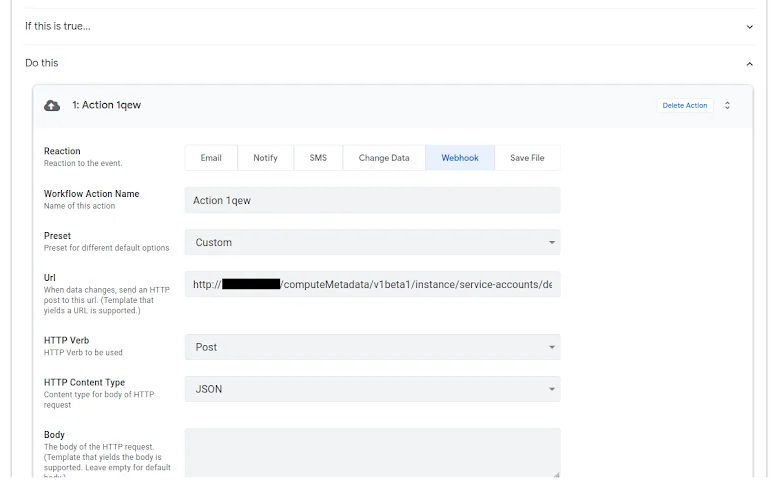
The screenshot shows the webhook setup in the AppSheet workflow form.
Step 3: triggering and reading the logs
The workflow was saved and the action triggered by adding a new row into a table in an AppSheet app. After a few minutes, the application logs were opened and the record for the webhook call was found. The logs showed a response body from the metadata server, and in the response was the access token for the AppSheet application.
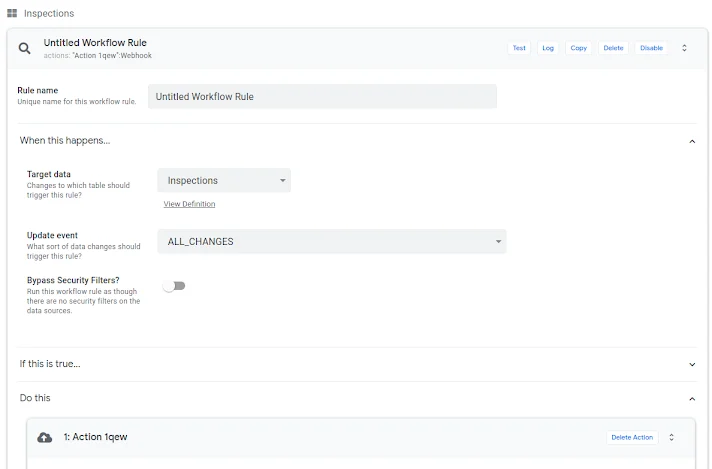
The screenshot shows the workflow rule settings, where the webhook call is configured on the rule trigger.
The bug was reported to Google and got accepted, rewarded and marked as fixed.
Step 4: retesting the fix
The researcher retested the fix by creating the same webhook. The legacy API used before was now disabled (/v1beta1/). The next attempt targeted the current metadata API, which requires an added security header. Since the webhook form allowed appending headers, this did not look like an obstacle.
POST http://<MY_DOMAIN>/computeMetadata/v1/instance/service-accounts/default/token
Header: Metadata-Flavor: Google
The workflow was saved, the action triggered and the logs checked. This time the log showed that the server returned a Forbidden error.
Step 5: probing what reached the metadata server
The researcher played around with the webhook and assumed the request did reach a metadata server, because calling http://[redacted]/computeMetadata/ returned a successful response. That endpoint does not require the security header and holds no valuable or sensitive information. The conclusion drawn was that the error response came from the Metadata-Flavor header being filtered from the request.
Two types of security header can be added. The first is Metadata-Flavor, and the other option is:
X-Google-Metadata-Request: True
Another finding from testing: the metadata endpoint for obtaining an access token supports both GET and POST methods. This is not in the documentation, so the earlier research on redirects was not necessary, though it is left in the write-up as it may be helpful.
Step 6: the bypass
The final webhook created was:
POST http://[redacted]/computeMetadata/v1/instance/service-accounts/default/token
Header: X-Google-Metadata-Request: True
The logs were checked and the access token appeared there again. Only one of the security headers was being filtered.
The bypass was reported, accepted and fixed. The fix now is (probably) that the security header used is removed from the request as well.
Root cause
The webhook feature let a user supply a URL and headers, and the request to the researcher's domain was redirected with a 301 that changed the POST into a GET. That combination allowed requests to reach the link-local metadata address [redacted] and return the response body, including the application's access token, into the workflow logs.
After the first fix, the legacy /v1beta1/ API was disabled, but the current metadata API was still reachable. The researcher assumed the Metadata-Flavor header was filtered from the request, while the alternative header X-Google-Metadata-Request: True was not, so the request was still authorised. The report does not describe the filtering implementation, so the exact mechanism is not stated.
Impact
A user who can configure a workflow webhook could make the AppSheet backend issue requests to the metadata server and read the response, including the access token for the AppSheet application, from the application logs. The report does not go further into what that token grants or to whom the impact extends.
Fix
Google fixed the initial bug, then fixed the bypass. The report states that the fix now is (probably) that the security header used in the bypass is removed from the request as well. The report does not describe any other change.
Variants to test
- Redirect-based method conversion: point a webhook at a controlled domain that returns a 301 with a Location header to an internal address, and check whether the server-side client follows it and changes POST to GET. A positive result is a response body from the internal target appearing in the workflow logs.
- Alternative metadata headers: when one security header is filtered, try the other accepted form (
X-Google-Metadata-Request: TruealongsideMetadata-Flavor: Google). A positive result is a successful metadata response in the logs. - Method support on the token endpoint: send a POST directly to the token endpoint without a redirect. A positive result is a token in the response, showing the redirect step is unnecessary.
- Header filtering coverage: append each security header the target accepts and compare which ones survive to the backend. A positive result is any header that is not stripped.
- Legacy versus current API paths: test both
/v1beta1/and/v1/paths after a fix. A positive result is the older path still responding when it was meant to be disabled.
Reported: October 2020. Reward: $3133,7 + $3133,7 (for the initial bug and the bypass).
What happened, in plain words
A security researcher found a way to make a Google service called AppSheet fetch a web address of his choosing, from inside Google's own network. That kind of bug is called SSRF, short for Server-Side Request Forgery. The name sounds complicated, but the idea is simple: a website normally fetches pages on your behalf, and if you can trick it into fetching a page it was never meant to reach, you can read things that are only visible from inside its network.
A useful comparison is a hotel concierge. You ask the concierge to fetch something from a shop across the street, and that is fine. But if you can write any address on the request slip, you could ask the concierge to walk into the staff-only room and bring you back the master key. The concierge has access you do not have, and it does what the slip says. In this report, AppSheet played the concierge, and the staff-only room was a special address that cloud servers use to hand out credentials.
AppSheet is a no-code app generator: a service, acquired by Google, that lets people build applications in the browser without deep app development knowledge. One of its features, Workflows (since replaced by "AppSheet Bots"), lets you automate what an app does by defining rules. A rule might say: send an email notification when a user creates a new row in a table. Among the options for a rule is calling a webhook when the rule triggers. A webhook is simply an automatic request that one system sends to another when something happens. That feature is what the researcher examined, and it is where the problem lived.
Setting up the test
The researcher created a new workflow with the rule: call a webhook when data in a table are changed. The webhook form allowed only POST, DELETE and PATCH requests. The researcher controlled a domain (<MY_DOMAIN>) used to host a redirect. No further account, role or version details are given in the report.
A few of those words need unpacking. An HTTP request has a method, which is a verb telling the server what you want to do. GET means "give me this page". POST means "here is some data, please process it". DELETE means "remove this". PATCH means "change part of this". A header is a small line of extra information attached to a request, such as the format you accept or a proof of who you are. A domain is a name like example.com that points to a server; owning one means you can decide what that server answers.
Finding it
The first thing the researcher tried was to call a metadata API. The immediate obstacle was that the webhook form offered no GET request, which is what obtaining metadata appeared to require. Only POST, DELETE and PATCH were available.
An API is a way for one program to talk to another, a set of addresses and rules for asking questions and getting answers back. Metadata, in cloud computing, is information a server can ask about itself, and on Google Cloud that includes a very sensitive item: an access token. A token is a short string that works like a temporary key or a wristband at an event. Whoever holds it can act as the account it belongs to, without needing a password. The metadata service lives at a fixed internal address, [redacted], which is only reachable from inside the machine or its local network. That is the staff-only room from the comparison.
The idea that followed was to turn a POST into a GET through redirection. A redirect is a server's way of saying "not here, look over there": it answers with a special status code and a Location header holding the new address, and the client automatically goes to that address. The HTTP redirect documentation states that some redirect types "may or may not" change the HTTP method to GET. The researcher tested this with a few HTTP clients and libraries, and all of them changed the method to GET.
Why does that matter? Because the metadata service answers a GET request with the information, but the webhook form could not send a GET. If a POST could be bounced through a redirect that turns it into a GET, the limitation disappears. The researcher's own domain was the bounce point: he could configure it to answer with a redirect to anywhere he liked.
Exploitation
Step 1: a redirect that converts POST to GET
On a domain owned by the researcher, a 301 redirect was created using the Location header:
http://<MY_DOMAIN>/<ROUTE> to http://[redacted]/<ROUTE>
This line describes the redirect rule: a request arriving at a path on the researcher's domain is answered with a 301, which is the status code for "moved permanently", and a Location header pointing at the same path on [redacted], the internal metadata address. <ROUTE> is a placeholder for the rest of the path, so whatever path the client asked for is carried over to the internal address.
The expected behaviour was that the AppSheet HTTP client would change the POST method to GET:
POST http://<MY_DOMAIN>/<ROUTE> to GET http://[redacted]/<ROUTE>
Read this as a before and after. Before: AppSheet sends a POST to the researcher's domain. After following the redirect: AppSheet sends a GET to the internal metadata address. The client is the program on AppSheet's servers that actually makes the outgoing request, and it is the piece that decides whether to keep the method or switch it during a redirect.
Step 2: the webhook pointing at the legacy metadata API
The redirect was used in a webhook with the following setup, with the request pointing to the legacy metadata API:
POST http://<MY_DOMAIN>/computeMetadata/v1beta1/instance/service-accounts/default/token
Line by line: the method is POST, because that is all the form offered. The address is the researcher's own domain, so the request starts somewhere he controls. The path /computeMetadata/v1beta1/instance/service-accounts/default/token is the metadata API path that returns an access token; v1beta1 marks it as the older, legacy version of that API. Because the path is carried through the redirect, the same path is requested on the internal address, and the internal server sees a GET for a token.
The screenshot shows the webhook setup in the AppSheet workflow form.
Step 3: triggering and reading the logs
The workflow was saved and the action triggered by adding a new row into a table in an AppSheet app. After a few minutes, the application logs were opened and the record for the webhook call was found. The logs showed a response body from the metadata server, and in the response was the access token for the AppSheet application.
A log is a record the service keeps of what it did, including the requests it sent and the answers it received. The response body is the actual content the server sent back. So the token, the temporary key, had travelled from the internal metadata service, through AppSheet's own request, into a log page the researcher could read. That is the whole impact in one sentence: the researcher obtained a credential that belonged to the application.
The screenshot shows the workflow rule settings, where the webhook call is configured on the rule trigger.
The bug was reported to Google and got accepted, rewarded and marked as fixed.
Step 4: retesting the fix
The researcher retested the fix by creating the same webhook. The legacy API used before was now disabled (/v1beta1/). The next attempt targeted the current metadata API, which requires an added security header. Since the webhook form allowed appending headers, this did not look like an obstacle.
POST http://<MY_DOMAIN>/computeMetadata/v1/instance/service-accounts/default/token
Header: Metadata-Flavor: Google
Here the method and the starting address are the same as before, but the path now uses v1 instead of v1beta1, the current version of the API. The second line adds a header named Metadata-Flavor with the value Google. The metadata service uses this header as proof that the caller really means to talk to it, a bit like a form that asks you to write a specific word so that a random automated request cannot fill it in by accident. The researcher added it because the form allowed custom headers, and the current API demands it.
The workflow was saved, the action triggered and the logs checked. This time the log showed that the server returned a Forbidden error. Forbidden is the status code for "I understood you, but you are not allowed". So the request arrived, but something about it was not accepted.
Step 5: probing what reached the metadata server
The researcher played around with the webhook and assumed the request did reach a metadata server, because calling http://[redacted]/computeMetadata/ returned a successful response. That endpoint does not require the security header and holds no valuable or sensitive information. The conclusion drawn was that the error response came from the Metadata-Flavor header being filtered from the request.
Filtering here means the service inspects the outgoing request and removes certain headers before sending it on, as a safety measure. If the proof header is stripped, the metadata server sees a request without proof and refuses it, which explains the Forbidden answer. The test with the harmless computeMetadata/ address was a way to check that the connection itself still worked, separating "the request never arrived" from "the request arrived but was rejected".
Two types of security header can be added. The first is Metadata-Flavor, and the other option is:
X-Google-Metadata-Request: True
This is a second accepted form of the same proof. The metadata service accepts either header, so if the filter only knew about one of them, the other might slip through.
Another finding from testing: the metadata endpoint for obtaining an access token supports both GET and POST methods. This is not in the documentation, so the earlier research on redirects was not necessary, though it is left in the write-up as it may be helpful. In other words, the token endpoint would have answered a plain POST all along; the redirect trick was a clever detour, not a requirement.
Step 6: the bypass
The final webhook created was:
POST http://[redacted]/computeMetadata/v1/instance/service-accounts/default/token
Header: X-Google-Metadata-Request: True
This time the address is the internal metadata server directly, with no redirect in between, because the endpoint accepts POST. The path is the current v1 token path. The header is the alternative proof, X-Google-Metadata-Request set to True, instead of the one that had been filtered.
The logs were checked and the access token appeared there again. Only one of the security headers was being filtered. A bypass, in security, means getting past a fix without undoing it: the first hole was closed, but a second route to the same result was still open.
The bypass was reported, accepted and fixed. The fix now is (probably) that the security header used is removed from the request as well.
Root cause
The webhook feature let a user supply a URL and headers, and the request to the researcher's domain was redirected with a 301 that changed the POST into a GET. That combination allowed requests to reach the link-local metadata address [redacted] and return the response body, including the application's access token, into the workflow logs.
After the first fix, the legacy /v1beta1/ API was disabled, but the current metadata API was still reachable. The researcher assumed the Metadata-Flavor header was filtered from the request, while the alternative header X-Google-Metadata-Request: True was not, so the request was still authorised. The report does not describe the filtering implementation, so the exact mechanism is not stated.
Impact
A user who can configure a workflow webhook could make the AppSheet backend issue requests to the metadata server and read the response, including the access token for the AppSheet application, from the application logs. The report does not go further into what that token grants or to whom the impact extends.
Fix
Google fixed the initial bug, then fixed the bypass. The report states that the fix now is (probably) that the security header used in the bypass is removed from the request as well. The report does not describe any other change.
Variants to test
- Redirect-based method conversion: point a webhook at a controlled domain that returns a 301 with a Location header to an internal address, and check whether the server-side client follows it and changes POST to GET. A positive result is a response body from the internal target appearing in the workflow logs.
- Alternative metadata headers: when one security header is filtered, try the other accepted form (
X-Google-Metadata-Request: TruealongsideMetadata-Flavor: Google). A positive result is a successful metadata response in the logs. - Method support on the token endpoint: send a POST directly to the token endpoint without a redirect. A positive result is a token in the response, showing the redirect step is unnecessary.
- Header filtering coverage: append each security header the target accepts and compare which ones survive to the backend. A positive result is any header that is not stripped.
- Legacy versus current API paths: test both
/v1beta1/and/v1/paths after a fix. A positive result is the older path still responding when it was meant to be disabled.
Reported: October 2020. Reward: $3133,7 + $3133,7 (for the initial bug and the bypass).
Glossary
- API: a defined set of addresses and rules that lets one program ask another for information or actions.
- AppSheet: a no-code app generator, acquired by Google, for building applications in the browser.
- Access token: a temporary string that acts as proof of identity, letting its holder act as an account without a password.
- Bypass: getting past a security fix and reaching the same result by another route.
- DELETE: an HTTP method meaning "remove this".
- Domain: a name such as
example.comthat points to a server on the internet. - Filtering (of headers): inspecting an outgoing request and removing certain headers before it is sent.
- Forbidden: an HTTP status code meaning the server understood the request but refuses to allow it.
- GET: an HTTP method meaning "give me this page or data".
- Header: a small line of extra information attached to an HTTP request or response, such as a proof of identity or a content type.
- HTTP client: the program that sends HTTP requests and handles the responses, here the one running on AppSheet's servers.
- HTTP method: the verb of a request, such as GET, POST, DELETE or PATCH, saying what kind of action is wanted.
- Link-local address: an address such as
[redacted]that is only reachable from the local machine or network, not from the public internet. - Location header: the header in a redirect response that holds the address the client should go to next.
- Log: a record a service keeps of the requests it made and the answers it received.
- Metadata (cloud): information a cloud server can ask about itself, including credentials such as access tokens.
- Metadata-Flavor: a header the metadata service accepts as proof that the caller intends to talk to it.
- No-code: a way of building software through a visual interface, without writing program code.
- PATCH: an HTTP method meaning "change part of this".
- POST: an HTTP method meaning "here is some data, please process it".
- Redirect: a server response telling the client to go to a different address instead, using a status code and a Location header.
- Response body: the actual content a server sends back.
- Rule (workflow): a condition and an action that automate app behaviour, such as sending an email or calling a webhook.
- SSRF (Server-Side Request Forgery): a bug where an attacker makes a server send a request to an address the attacker chooses, often to reach internal systems.
- Status code: a number in an HTTP response saying how it went, such as 301 for a permanent redirect or 403 for forbidden.
- 301: the HTTP status code for "moved permanently", a permanent redirect.
- Token: see access token.
- Webhook: an automatic HTTP request one system sends to another when an event happens.
- Workflow: an AppSheet feature, since replaced by "AppSheet Bots", for automating app behaviour with rules.
- X-Google-Metadata-Request: an alternative header the metadata service accepts as proof that the caller intends to talk to it.
/v1beta1/: the older, legacy version of the metadata API path, later disabled./v1/: the current version of the metadata API path.




