31k$ SSRF in Google Cloud Monitoring led to metadata exposure
 Published on nechudav.blogspot.com
November 12, 2020
The full write-up lives on its author's site
It belongs to its author, so we link to it rather than copy it. The other two tabs are our own rewrites, checked against it.
Context
Google Cloud Monitoring (formerly Stackdriver) provides monitoring for cloud resources such as VM instances, App Engine and Cloud Functions, and is available from the Google Cloud Console. Among its features are alerting and Uptime checks. An Uptime check periodically sends a request to a resource (App Engine, a VM instance, a URL and so on) to determine whether it responds.
The important detail for this research is that the Cloud Monitoring service itself runs on Google Cloud virtual machines. Every Google Cloud VM stores its metadata on the metadata server: project ID, service account information, information about the virtual machine, public SSH keys. That metadata can be queried from within the instance at [redacted], or through the Compute Engine API.
Setup
No special account setup is described beyond access to Google Cloud Monitoring and the ability to create an Uptime check from the Cloud Console. The researcher used the Uptime check creation form, its Test button, and a small Python script (published as a gist) to automate parsing of the response. The report was made in June 2020.
Finding it
The researcher started testing the Uptime check feature for SSRF by creating a check that sends a request to a URL or IP address. Most of the URLs and IP addresses that are usual SSRF targets were blocked. But because Cloud Monitoring itself runs on Google Cloud VM instances, there was a possibility of calling metadata endpoints: the request to the metadata endpoint would be sent from within the instance.
When metadata are queried from inside the virtual machine, metadata API version v1 requires the header Metadata-Flavor: Google (older versions of the metadata API did not require it). The Uptime check form offered an option to add custom headers, so that requirement was not an obstacle.
Exploitation
Step 1: point an Uptime check at the metadata server
The check was created with these parameters:
Protocol: HTTP
Hostname: [redacted]
Path: /computeMetadata/v1/project/project-id
Custom Headers: Metadata-Flavor: Google (required for /v1/ metadata endpoints)
Pressing the Test button at the bottom of the creation form sent a request to the metadata server and reported that the check was successful. The response shown was:
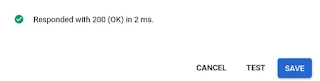
Because the response code was 200 and the response time was 2 ms, the researcher was sure the metadata endpoint was reachable through the uptime check: a request to an external URL would take much longer. The response body itself was not visible; only the response code and response time were returned. At this point it was a blind SSRF.
Step 2: turn blind SSRF into a body oracle with response validation
To get the response body, the researcher used another Uptime check feature, Response validation, which checks whether the response body contains a specific string. The example configuration is shown below.
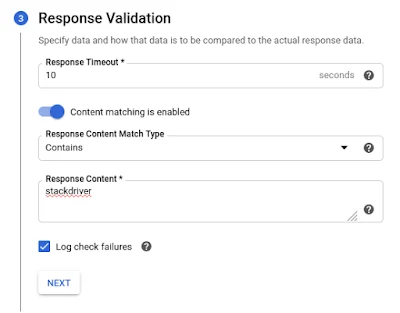
The extraction method worked character by character:
- Find one character contained in the response by gradually testing whether the response contains one of all possible characters.
- Once a character is found, find the second character by appending or prepending characters to the already found character and testing again whether the result is contained in the response.
- Repeat until the full response is parsed from the metadata server.
As an example: test whether the response contains a, b, c and so on. If c is contained, try prepending or appending another character and test for ca, cb, cc and so on. If ca is returned in the response, try caa, cab, cac and so on, repeating until the response is recovered.
Step 3: automate against the Test endpoint
To perform the response body validation, the researcher used the endpoint that is called when the Test button in the Uptime check form is pressed. The request looked like this:
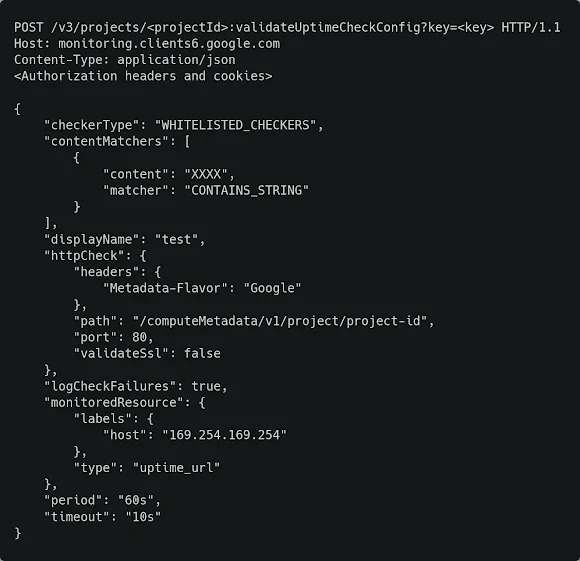
A simple Python script automated the parsing using the method above; it is published at https://gist.github.com/nechudav/[redacted].
What was obtained, and where it stopped
With the script, the researcher obtained project-level metadata: a public SSH key, the project name and other information about the Google Cloud Monitoring project. Instance-level metadata that are the same for all instances (machine type, CPU platform and so on) were also obtainable.
The researcher struggled with instance-level metadata unique to each instance, or data that are periodically refreshed, such as service account tokens and IP addresses of the instances. The reason is that the Uptime check service runs on multiple instances across the world (about 54 running instances) and requests to the service are load-balanced, so there was no assurance that multiple requests would reach the same instance. Getting unique instance-level metadata would have required a large number of requests, which was problematic because the API was rate-limited and the process would have been very time-consuming. At that point the research was not continued.
The Google engineers' approach to access tokens
After the report, Google engineers found a way to obtain access tokens by reducing the number of requests using binary search and regex. Their comment:
We actually ended up writing an exploit to get an access token, after struggling with the same limitation. The two main tricks were binary search for each character (to send fewer requests) and probing both positive and negative matches (to get reliably results). For example:
foo[a-n]foo[^a-n]One of those requests must eventually return a success response when we hit the correct backend. We'd repeat queries (up to some limit) until we get any OK response and then adjust the search space based on that. Thanks to regexps you can probe multiple characters in parallel (
foo[a-n],foo.[a-n],foo..[a-n]). In the beginning tokens will overlap, but after ~10 characters or so we usually had a unique prefix. Access tokens are valid for 60 minutes, so on average you have 30 minutes. In the end the exploit took ~15 minutes to get a full access token, including rate limiting. Fun bug. :)
Root cause
The Uptime check feature let the user choose the hostname, path and custom headers of the request it sends, and the request originates from Google Cloud Monitoring's own VM instances. The metadata server at [redacted] is reachable from inside those instances, and the Metadata-Flavor: Google header required by metadata API v1 could simply be supplied as a custom header. Most of the usual SSRF targets were blocked, but the metadata address was reachable. The response body was not returned to the user, but Response validation turned the check into an oracle on the body contents, which is enough to extract data character by character.
Impact
The researcher could read project-level metadata of the Google Cloud Monitoring project itself, including a public SSH key and the project name, and instance-level metadata common to all instances. Service account tokens and other per-instance or periodically refreshed data were harder because of load balancing across roughly 54 instances and API rate limiting, but the Google engineers' exploit showed that a full access token could be obtained in about 15 minutes, within the 60-minute token lifetime. Google VRP rewarded the report with $31,337.
Fix
Not described in the report.
Variants to test
- Point an uptime or health-check feature at
[redacted]with the required metadata header as a custom header. A positive result is a fast 200 response (milliseconds rather than the latency of an external host). - Use response-body validation (contains / does not contain a string) as an oracle. A positive result is a match that changes as you vary the tested string, proving you control what is compared against the body.
- Apply binary search with character classes such as
foo[a-n]andfoo[^a-n], repeating until an OK response arrives, to reduce request counts under rate limiting. A positive result is convergence on a unique prefix after roughly ten characters. - Probe several positions in parallel with patterns like
foo.[a-n]andfoo..[a-n]. A positive result is faster recovery of a token before its lifetime expires.
What happened, in plain words
A security researcher found a way to make one of Google's own monitoring tools send requests to a special internal address that only machines inside Google's cloud can reach. That address holds information about the machine, such as its project ID, service account information and public SSH keys. The tool did not show the researcher the answer it got back, so at first he could only tell that something answered. By abusing another small feature of the same tool, he turned it into a yes/no question machine: he could ask "does the secret contain this text?" over and over, and slowly rebuild the secret one character at a time. Google paid him $31,337 for the finding.
This article walks through the whole thing from zero. You do not need to know anything about security, servers or programming to follow it. Every term is explained the first time it appears, and there is a glossary at the end.
The product: Google Cloud Monitoring
Google Cloud Monitoring (it used to be called Stackdriver) is a service for keeping an eye on things you run in Google's cloud. "The cloud" here just means computers owned by Google that you rent by the hour instead of buying yourself. Those rented computers are called virtual machines (VMs): a piece of software that behaves like a complete computer, with its own operating system, that runs on a much bigger physical machine shared with other customers.
Cloud Monitoring watches those VMs, plus other Google services such as App Engine (a way to run web applications without managing servers) and Cloud Functions (small pieces of code that run on demand). It can raise alerts when something looks wrong. You use it through the Google Cloud Console, which is simply a website where you click around to manage your cloud resources.
One of the features we care about is the Uptime check. An uptime check is a scheduled request: you tell Cloud Monitoring "every so often, send a request to this address and tell me whether it answered". People use it to notice when their website goes down. Think of it like a robot that knocks on your front door every minute and writes down whether anyone opened it.
The secret address: the metadata server
Every virtual machine in Google Cloud keeps a small file of facts about itself on a special internal address. That collection of facts is called metadata, which is just "data about data": the project ID (a unique name for your cloud account), information about service accounts (robot accounts used by software rather than people), details about the machine itself, and public SSH keys (SSH is a way to log in to a remote computer securely; a public key is the half of a key pair that is safe to share).
The metadata lives on a metadata server, reachable from inside the VM at the address [redacted]. That address belongs to a special range called link-local: addresses that are only meaningful on the local network segment and are never routed across the internet. In practice, only something running inside that machine can talk to it. This is deliberate: the metadata is meant for the machine itself, not for the outside world.
You can also reach the metadata through the Compute Engine API. An API (Application Programming Interface) is a way for one piece of software to talk to another: instead of a human clicking buttons on a website, a program sends structured requests and gets structured answers back.
The vulnerability class: SSRF
The researcher was hunting for a bug class called SSRF, short for Server-Side Request Forgery. The name sounds intimidating, but the idea is simple.
Many web features make a server fetch something for you. A "preview this link" button, an image importer, a website-status checker: in each case you supply an address, and the server goes and fetches it. Normally that is fine. But if the server does not carefully check which addresses it is allowed to fetch, you can point it at places you could never reach yourself. You are, in effect, forging a request that the server makes on your behalf, from a position of trust.
A useful comparison: imagine a building where visitors cannot enter the staff room, but the receptionist will happily walk into the staff room and read out anything you ask. If you can trick the receptionist into reading the staff room noticeboard, you have the same access as if you had walked in yourself. SSRF is tricking the receptionist.
Here, the "receptionist" is the Uptime check feature. It sends requests on your behalf, and it runs on Google's own machines. If it can be pointed at [redacted], it will reach the metadata server from inside the Google Cloud network, which is exactly the position of trust an attacker wants.
Step 1: testing the Uptime check for SSRF
The researcher started by creating an uptime check that sends a request to a URL or IP address of his choosing. An IP address is the numeric label a computer uses to find another computer on a network, like a postal address for machines.
Most of the addresses that people normally use for SSRF attacks were blocked. That makes sense: Google knows its uptime checker could be abused, so it refuses to send requests to the obvious dangerous destinations.
But there was a promising gap. Cloud Monitoring itself runs on Google Cloud virtual machines. So a request sent by an uptime check originates from inside a Google Cloud VM. And the metadata server is reachable from inside a Google Cloud VM.
There was one obstacle. When metadata are queried from inside the virtual machine, metadata API version v1 requires a specific header to be present. A header is a small labelled line of extra information attached to a web request, like the "From:" line on an envelope. The required header is:
Metadata-Flavor: Google
Older versions of the metadata API did not require this header, but version v1 does. Fortunately, the uptime check form offered an option to add custom headers to the request, so the researcher could simply supply it himself.
Step 2: pointing the check at the metadata server
The check was created with these parameters:
Protocol: HTTP
Hostname: [redacted]
Path: /computeMetadata/v1/project/project-id
Custom Headers: Metadata-Flavor: Google (required for /v1/ metadata endpoints)
Line by line:
- Protocol: HTTP tells the checker which language to speak when it makes the request. HTTP is the standard language of the web; it is what your browser uses every time you load a page.
- Hostname: [redacted] is the destination. This is the link-local metadata address described above. The researcher is aiming the receptionist straight at the staff room.
- Path: /computeMetadata/v1/project/project-id is the specific piece of information being requested. A path is the part of a web address after the machine name, like the folder and file name in a file system. Here it asks for the project ID, the unique name of the cloud project.
- Custom Headers: Metadata-Flavor: Google is the extra envelope line that version
v1of the metadata API demands. Without it, the metadata server would refuse the request.
Then the researcher pressed the Test button at the bottom of the creation form. That button sends the request immediately so you can check your configuration before saving it. The form reported that the check was successful. The response shown was:
The screenshot shows the result of the test: a response code of 200 and a response time of 2 milliseconds. Two things made the researcher confident.
First, the response code was 200. Response codes are three-digit numbers a server sends back to say how things went; 200 means "OK, here is your answer". Second, the response time was 2 ms, meaning two thousandths of a second. A request to an external website on the internet would take far longer, because it has to travel across the network. Two milliseconds is the kind of speed you only get when the destination is right next door, inside the same machine. That combination told him the metadata endpoint really was reachable through the uptime check.
But there was a catch. The response body, the actual content the server sent back, was not visible. Only the response code and the response time were shown. So the researcher knew the request succeeded, but he could not read the answer. In security terms, this was a blind SSRF: the attack works, but you cannot see the data coming back. It is like the receptionist telling you "yes, I read the noticeboard" without telling you what was on it.
Step 3: turning blind SSRF into a body oracle
To get past the blindness, the researcher used another feature of uptime checks: Response validation. Response validation lets you tell the checker "check whether the response body contains this specific string". A string here just means a piece of text. Response validation lets you tell the checker to check whether the response body contains a specific string.
That is a powerful thing. Even though you cannot see the body, you can ask yes/no questions about its contents. In security language, this turns the check into an oracle: a system you can query to learn hidden information one bit at a time. The example configuration is shown below.
The screenshot shows the Response validation option in the uptime check form, where you enter the string to look for in the response body.
The extraction method worked character by character:
- Find one character contained in the response by gradually testing whether the response contains one of all possible characters.
- Once a character is found, find the second character by appending or prepending characters to the already found character and testing again whether the result is contained in the response.
- Repeat until the full response is parsed from the metadata server.
As an example: test whether the response contains a, b, c and so on. If c is contained, try prepending or appending another character and test for ca, cb, cc and so on. If ca is returned in the response, try caa, cab, cac and so on, repeating until the response is recovered.
Why does this work? Imagine a secret word written on a card you cannot see. You are allowed to ask "does the card contain the letters 'ca'?" and get a yes or no. You try letters one at a time until you get a yes. Then you extend your guess: "does it contain 'caa'? 'cab'? 'cac'?" Eventually one answer is yes, and you have two characters. Keep extending and you rebuild the whole word, one character at a time, purely from yes/no answers. It is slow, but it is reliable, and it needs nothing more than the ability to ask questions.
Step 4: automating against the Test endpoint
Doing this by hand would be impossibly tedious, so the researcher automated it. To perform the response body validation, he used the endpoint that is called when the Test button in the Uptime check form is pressed. An endpoint is a specific address on a server that accepts a particular kind of request; it is the doorway a program knocks on. The request looked like this:
The screenshot shows the request that the Test button sends, which the researcher used to run the validation.
A simple Python script automated the parsing using the method above. Python is a popular programming language, and a script is a short program written to do one job automatically. The script is published at https://gist.github.com/nechudav/[redacted]. A gist is a small public snippet-hosting service run by GitHub, used for sharing short pieces of code.
What was obtained, and where it stopped
With the script, the researcher obtained project-level metadata: a public SSH key, the project name and other information about the Google Cloud Monitoring project. Instance-level metadata that are the same for all instances (machine type, CPU platform and so on) were also obtainable.
Then he hit a wall. He struggled with instance-level metadata unique to each instance, or data that are periodically refreshed, such as service account tokens and IP addresses of the instances. A service account token is a short-lived credential that software uses to prove its identity, much like a temporary password that expires.
The reason is that the Uptime check service runs on multiple instances across the world (about 54 running instances) and requests to the service are load-balanced. Load balancing means spreading incoming requests across several machines so no single one is overwhelmed. The practical consequence is that there was no assurance that multiple requests would reach the same instance. If each question goes to a different machine, you cannot build up a picture of any one machine's private data.
Getting unique instance-level metadata would have required a large number of requests, which was problematic because the API was rate-limited. Rate limiting means a server refuses to answer more than a certain number of requests in a given time, to protect itself. Combined with the load balancing, the process would have been very time-consuming. At that point the research was not continued.
The Google engineers' approach to access tokens
After the report, Google engineers found a way to obtain access tokens by reducing the number of requests using binary search and regex. Their comment:
We actually ended up writing an exploit to get an access token, after struggling with the same limitation. The two main tricks were binary search for each character (to send fewer requests) and probing both positive and negative matches (to get reliably results). For example:
foo[a-n]foo[^a-n]One of those requests must eventually return a success response when we hit the correct backend. We'd repeat queries (up to some limit) until we get any OK response and then adjust the search space based on that. Thanks to regexps you can probe multiple characters in parallel (
foo[a-n],foo.[a-n],foo..[a-n]). In the beginning tokens will overlap, but after ~10 characters or so we usually had a unique prefix. Access tokens are valid for 60 minutes, so on average you have 30 minutes. In the end the exploit took ~15 minutes to get a full access token, including rate limiting. Fun bug. :)
Two ideas in there are worth unpacking for a beginner.
Binary search is a way of finding a value by halving the possibilities each time. Instead of asking "is it 'a'? is it 'b'? is it 'c'?" one by one, you ask "is it in the first half of the alphabet?" If yes, you have halved the work; if no, you know it is in the other half. Repeat and you narrow down fast. Fewer questions means fewer requests, which matters when the server is rate-limited.
Regex (regular expression) is a pattern language for matching text. foo[a-n] means "the text 'foo' followed by any single character from 'a' to 'n'". foo[^a-n] means "the text 'foo' followed by any single character that is not from 'a' to 'n'". The ^ inside the brackets means "not". By asking both a positive and a negative version, one of the two must eventually succeed when the request lands on the right machine, which makes the results reliable despite the load balancing. Patterns like foo.[a-n] and foo..[a-n] use . to mean "any single character", letting several positions be probed at once.
Root cause
The Uptime check feature let the user choose the hostname, path and custom headers of the request it sends, and the request originates from Google Cloud Monitoring's own VM instances. The metadata server at [redacted] is reachable from inside those instances, and the Metadata-Flavor: Google header required by metadata API v1 could simply be supplied as a custom header. Most of the usual SSRF targets were blocked, but the metadata address was reachable. The response body was not returned to the user, but Response validation turned the check into an oracle on the body contents, which is enough to extract data character by character.
Impact
The researcher could read project-level metadata of the Google Cloud Monitoring project itself, including a public SSH key and the project name, and instance-level metadata common to all instances. Service account tokens and other per-instance or periodically refreshed data were harder because of load balancing across roughly 54 instances and API rate limiting, but the Google engineers' exploit showed that a full access token could be obtained in about 15 minutes, within the 60-minute token lifetime. Google VRP rewarded the report with $31,337. VRP stands for Vulnerability Reward Program: a scheme where companies pay researchers for reporting security bugs responsibly instead of exploiting them.
Fix
Not described in the report.
Variants to test
- Point an uptime or health-check feature at
[redacted]with the required metadata header as a custom header. A positive result is a fast 200 response (milliseconds rather than the latency of an external host). - Use response-body validation (contains / does not contain a string) as an oracle. A positive result is a match that changes as you vary the tested string, proving you control what is compared against the body.
- Apply binary search with character classes such as
foo[a-n]andfoo[^a-n], repeating until an OK response arrives, to reduce request counts under rate limiting. A positive result is convergence on a unique prefix after roughly ten characters. - Probe several positions in parallel with patterns like
foo.[a-n]andfoo..[a-n]. A positive result is faster recovery of a token before its lifetime expires.
Glossary
- API: a way for one piece of software to talk to another, sending structured requests and receiving structured answers.
- Binary search: a method of finding a value by repeatedly halving the set of possibilities, so far fewer questions are needed.
- Blind SSRF: an SSRF attack where the request succeeds but the attacker cannot see the response body.
- Cloud: computers owned by a provider and rented by the hour over the internet.
- Cloud Console: the website where you click around to manage your cloud resources.
- Endpoint: a specific address on a server that accepts a particular kind of request.
- Gist: a small public snippet-hosting service run by GitHub for sharing short pieces of code.
- Header: a small labelled line of extra information attached to a web request, like the "From:" line on an envelope.
- HTTP: the standard language of the web, used by browsers and servers to exchange requests and responses.
- IP address: the numeric label a computer uses to find another computer on a network.
- Link-local: an address range only meaningful on the local network segment, never routed across the internet.
- Load balancing: spreading incoming requests across several machines so no single one is overwhelmed.
- Metadata: data about data; here, facts a virtual machine keeps about itself, such as its project ID and keys.
- Metadata server: the internal service that stores and serves a virtual machine's metadata, reachable at
[redacted]from inside the machine. - Oracle: a system you can query to learn hidden information one bit at a time.
- Path: the part of a web address after the machine name, like the folder and file name in a file system.
- Protocol: the agreed language two computers use to talk, such as HTTP.
- Python: a popular programming language.
- Rate limiting: a server refusing to answer more than a certain number of requests in a given time, to protect itself.
- Regex (regular expression): a pattern language for matching text, where
[a-n]means any character from a to n and[^a-n]means any character not in that range. - Response body: the actual content a server sends back, as opposed to the status code and timing.
- Response code: a three-digit number a server sends back to say how things went; 200 means OK.
- Response time: how long a request took to get an answer.
- Response validation: an uptime check feature that tests whether the response body contains a specified string.
- Script: a short program written to do one job automatically.
- Service account: a robot account used by software rather than a person.
- Service account token: a short-lived credential software uses to prove its identity, like a temporary password that expires.
- SSH key: a pair of cryptographic keys used to log in to a remote computer securely; the public half is safe to share.
- SSRF (Server-Side Request Forgery): tricking a server into making a request to an address the attacker could not reach directly.
- String: a piece of text.
- Uptime check: a scheduled request that tests whether a resource responds, used to detect outages.
- Virtual machine (VM): software that behaves like a complete computer, running on a larger shared physical machine.
- VRP (Vulnerability Reward Program): a scheme where companies pay researchers for reporting security bugs responsibly.




