How I made $31500 by submitting a bug to Facebook
A MicroStrategy task endpoint on a Facebook subdomain accepted a URL parameter without authentication and fetched it server-side, allowing SSRF. Separately, Facebook's fb.me shortener lacked rate limiting, letting brute force reveal short links that redirected to internal URLs and leaked internal paths and query data.
 Published on medium.com
Facebook is the largest social networking site in the world and one of the most widely used. I have always been interested in testing the security of Facebook.
The full write-up lives on its author's site
It belongs to its author, so we link to it rather than copy it. The other two tabs are our own rewrites, checked against it.
Context
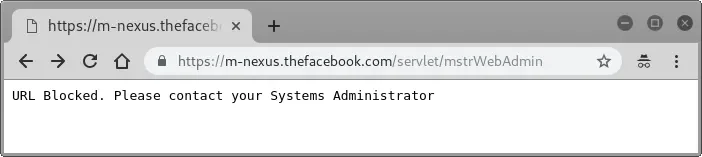
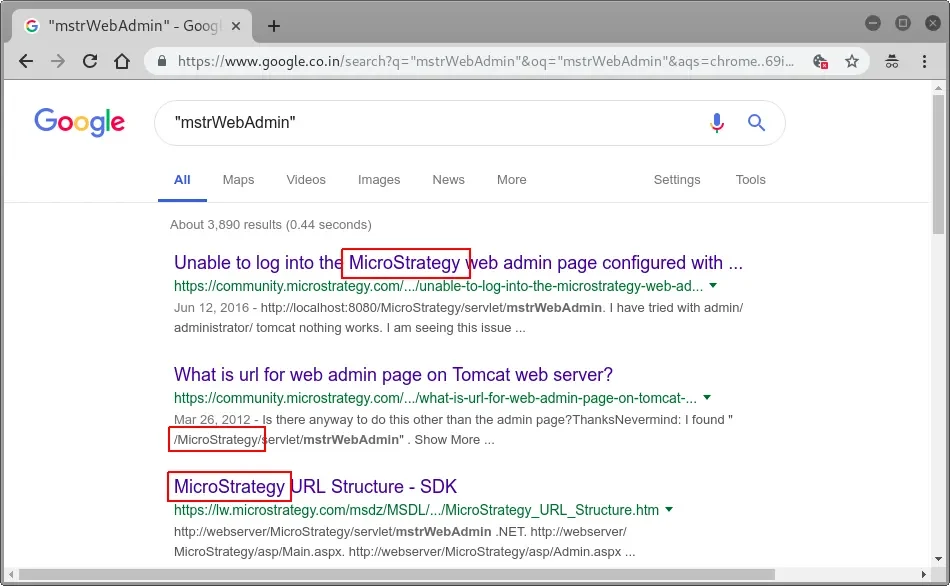
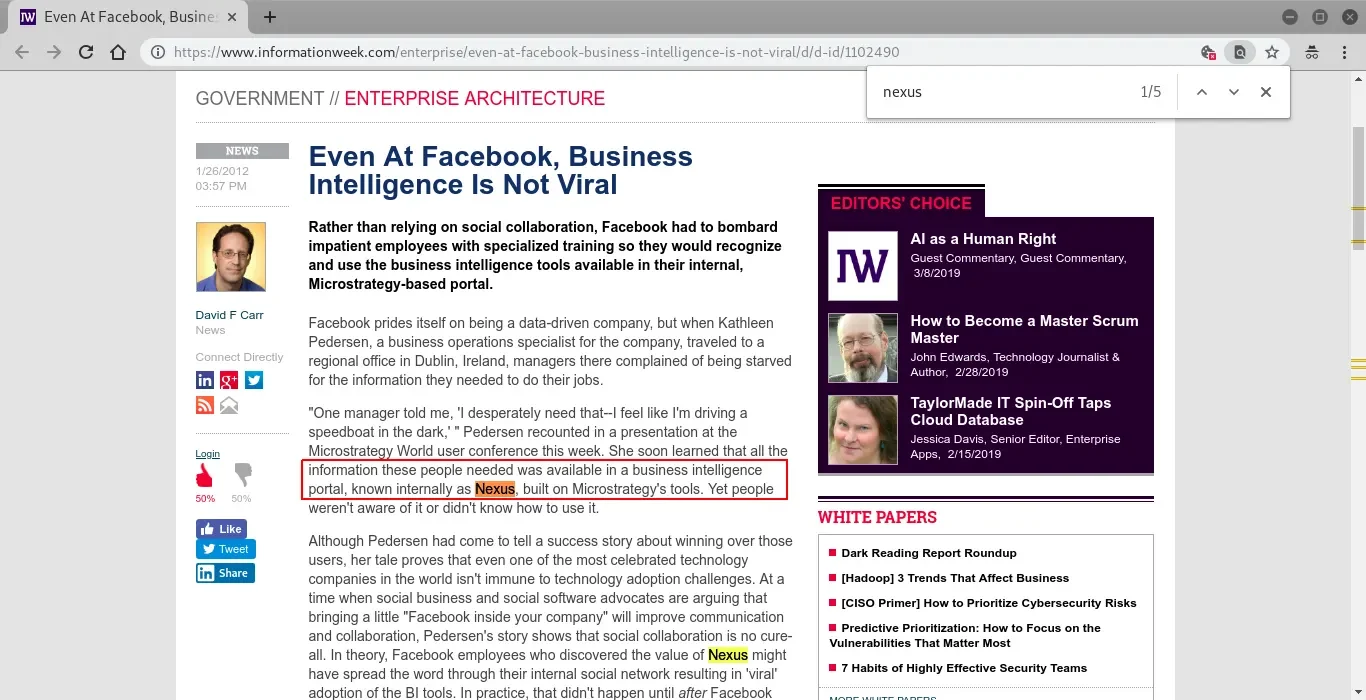
Facebook runs a large number of subdomains, and during subdomain enumeration the researcher came across https://m-nexus.thefacebook.com/. That host redirected to https://m-nexus.thefacebook.com/servlet/mstrWebAdmin, which turned out to be a Business Intelligence Portal built on MicroStrategy's tools. A quick search for the keyword mstrWebAdmin confirmed the product, and a blog post corroborated it.
The MicroStrategy configuration documentation lists two endpoints that are publicly accessible:
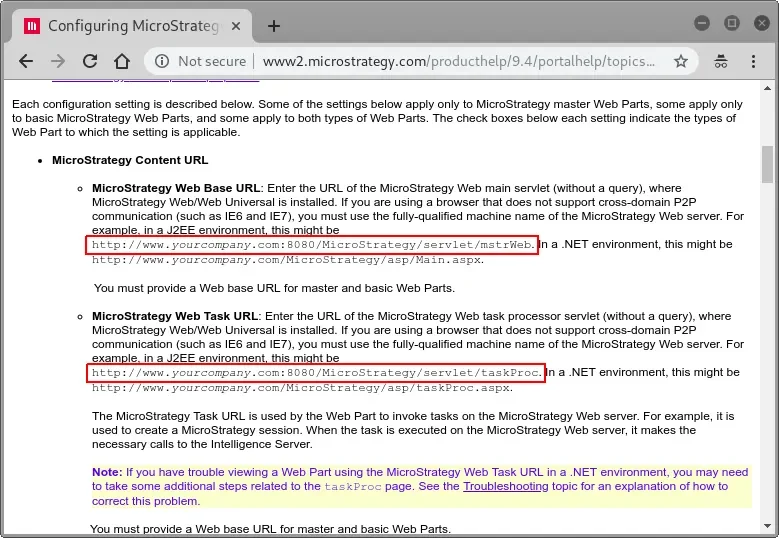
According to the same documentation, HTTP basic authentication is enabled by default on the Business Intelligence Portal at https://m-nexus.thefacebook.com/servlet/mstrWeb, but https://m-nexus.thefacebook.com/servlet/taskProc does not require authentication. That servlet takes a value from the taskId parameter to perform custom data collection and content generation.
Setup
The work used a browser, Burp Suite (Proxy, Intruder and the Collaborator client), the shortener at https://tinyurl.com/, the jd-gui decompiler, and later a private server to host a phishing page. The target was the unauthenticated taskProc servlet on m-nexus.thefacebook.com.
Finding it
Enumerating the pre-built tasks with Burp Intruder showed that each pre-built task checks for a valid authentication session parameter, except the shortURL task, which processes a short URL and does not check for a valid authentication session. That task can therefore be reached without any authentication.
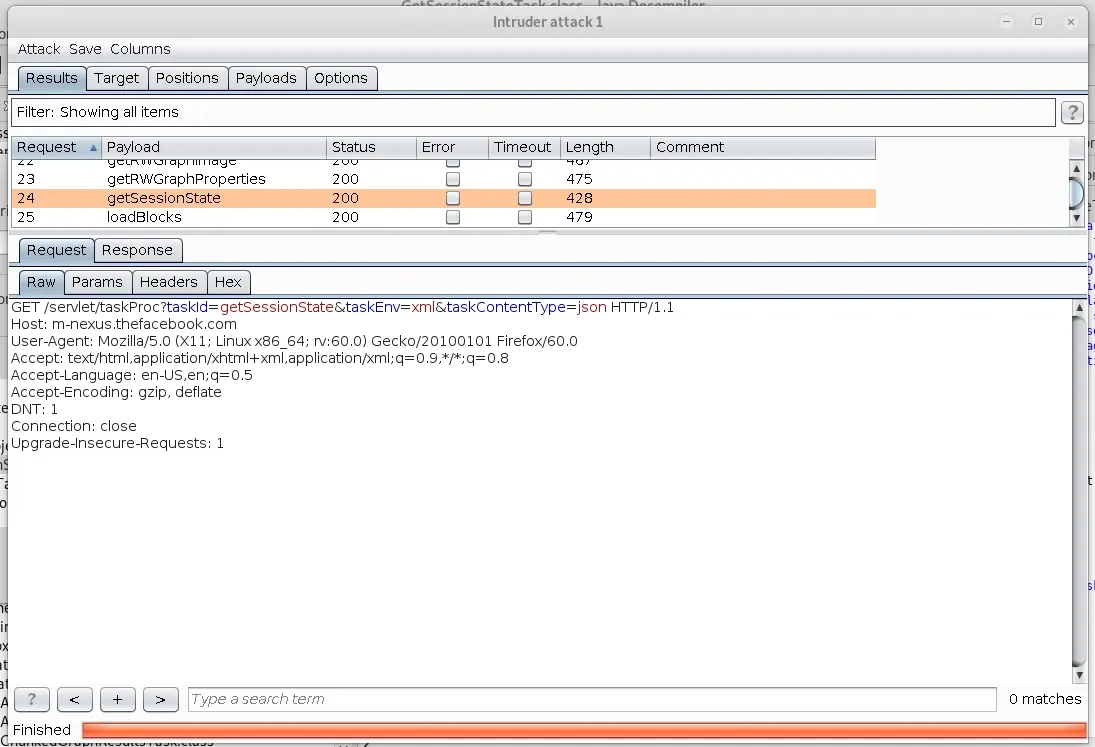
Pre-built tasks enumeration using Burp suite intruder
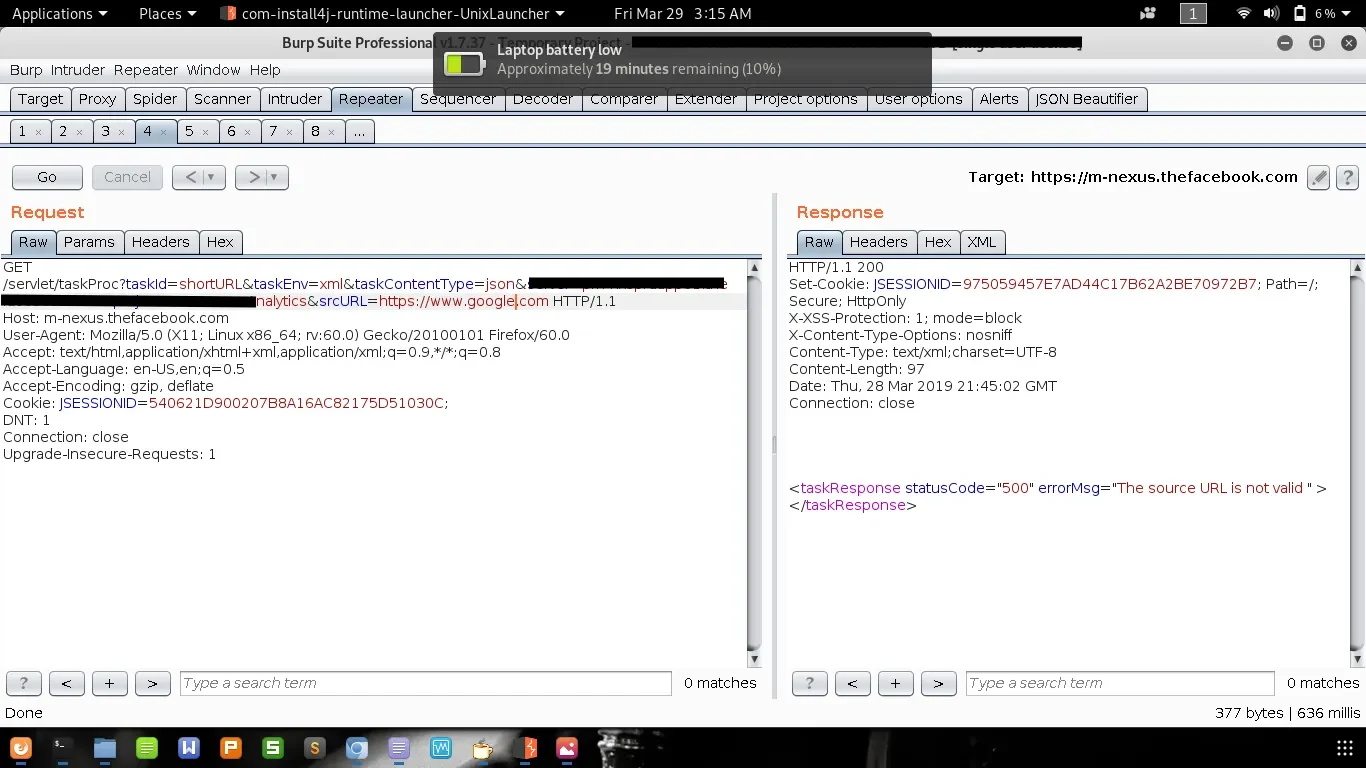
Fuzzing every parameter mentioned in the official documentation produced nothing: each attempt returned the error message "The source URL is not valid" with status code 500. To understand why, the researcher downloaded the hosted web application, an application package of more than 400 MB containing several scripts and jar files.
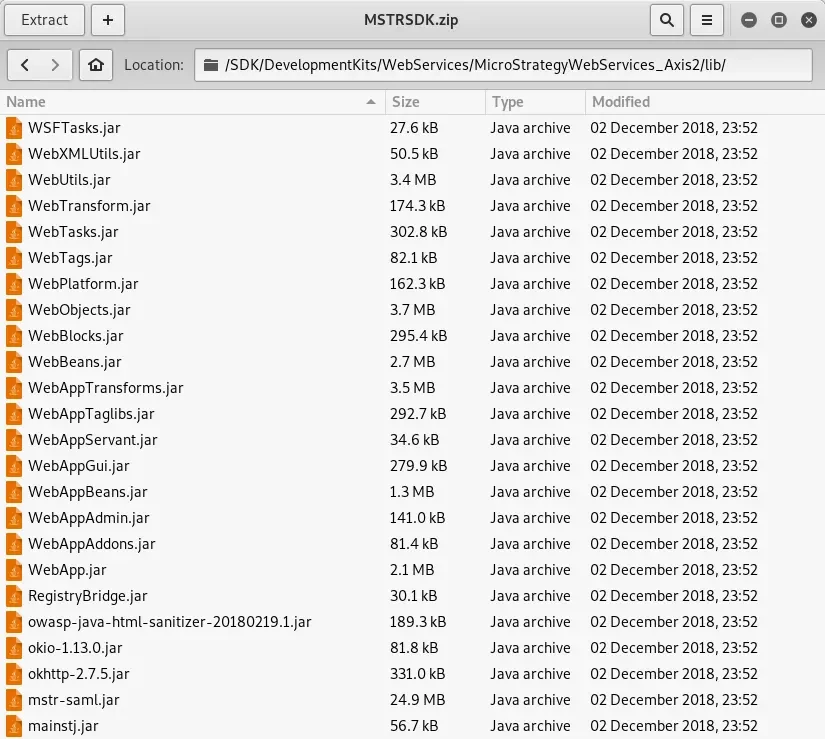
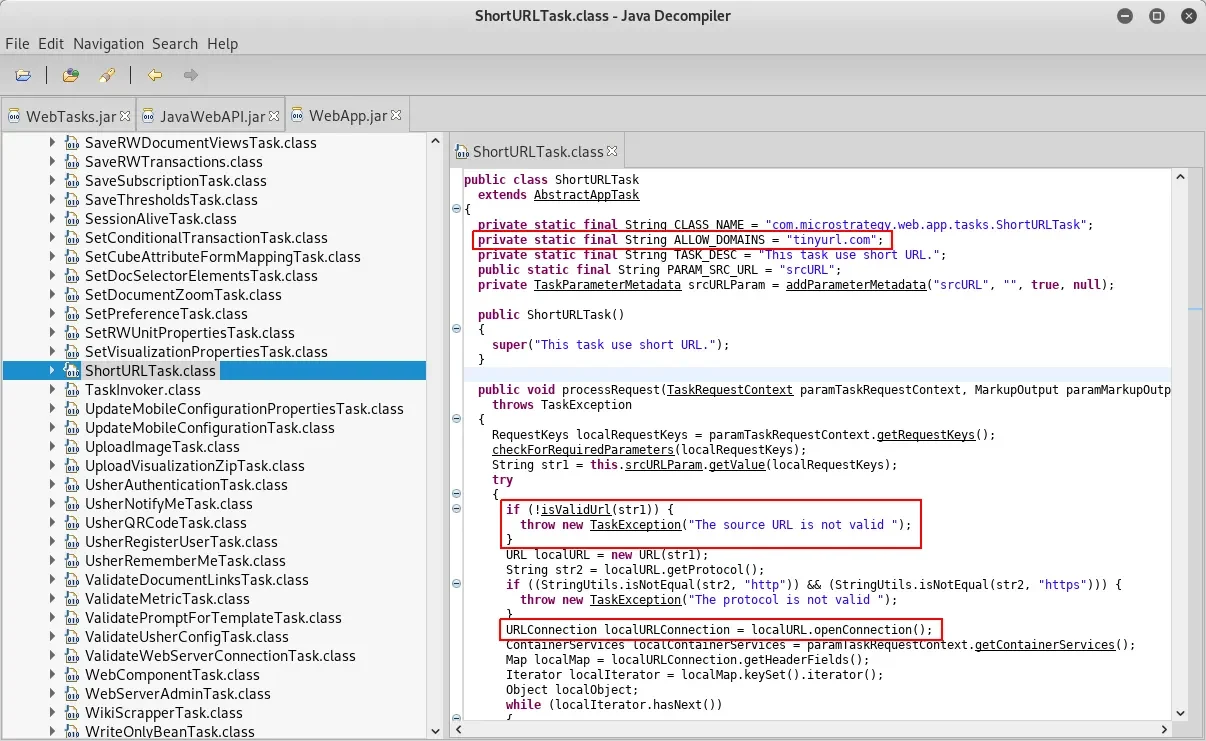
The jar files were decompiled with jd-gui and reviewed, with the unauthenticated shortURL task as the main target. The relevant Java class was found in one of the jar files.
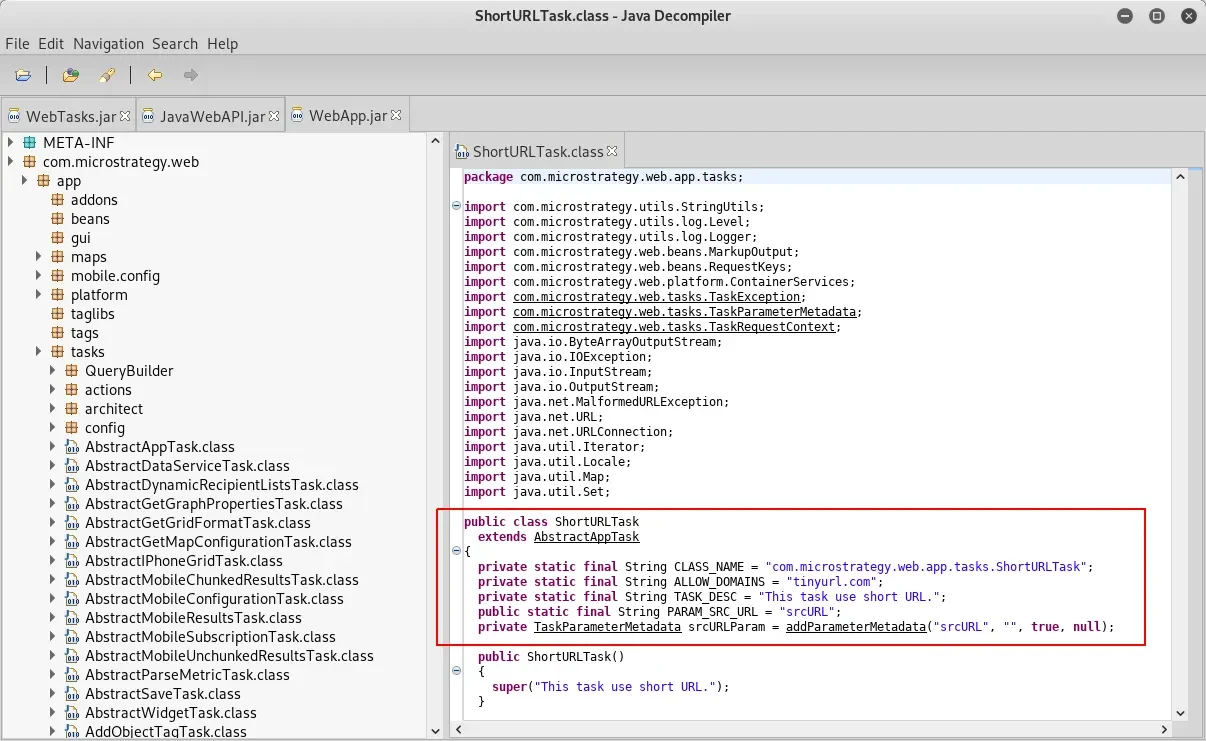
The code explained the constant error: the srcURL parameter of the shortURL task only accepts a URL created with https://tinyurl.com/ for importing or reading data from that URL.
Exploitation
Step 1: external SSRF confirmation
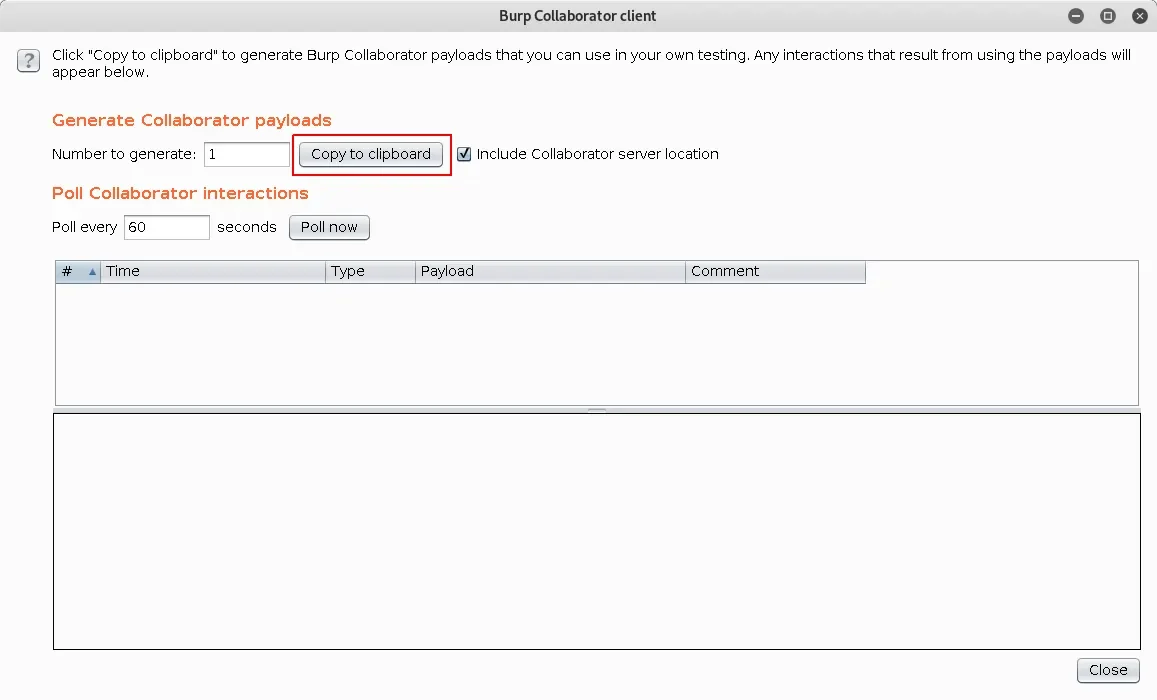
- Open Burp Suite Proxy, go to the Burp menu and select "Burp Collaborator client". Generate a Collaborator payload and copy it to the clipboard.
- Open
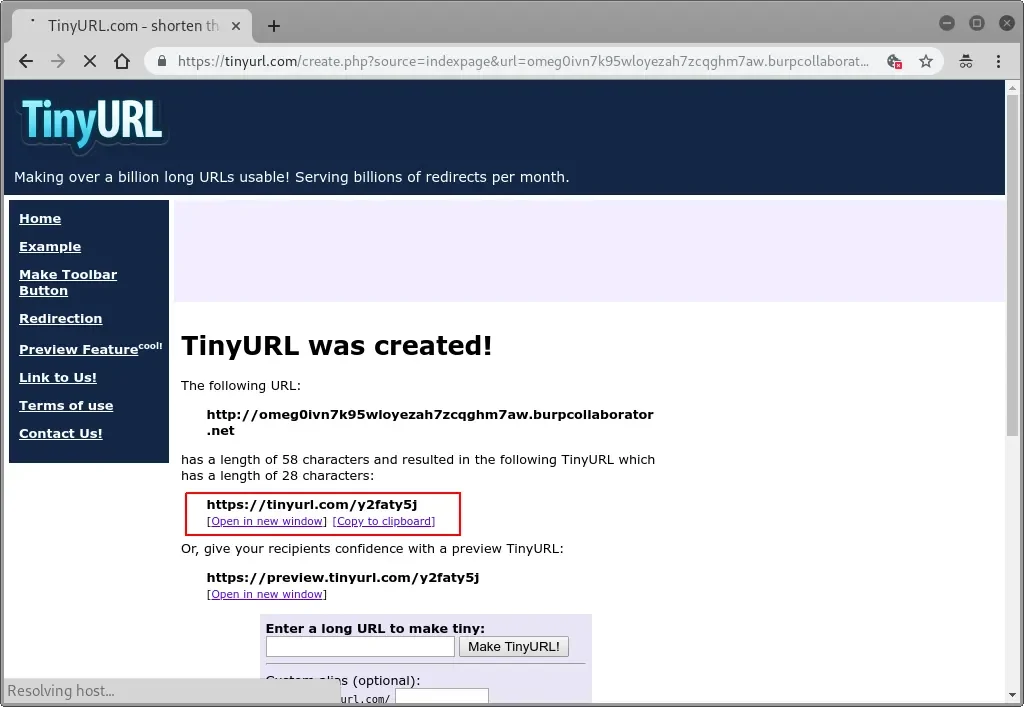
https://tinyurl.com/in a browser, enter the Collaborator payload and create its tiny URL. Copy the created tiny URL.
- Insert the copied tiny URL into the
srcURLparameter of the following URL and open it in a browser:
https://m-nexus.thefacebook.com/servlet/taskProc?taskId=shortURL&taskEnv=xml&taskContentType=json&srcURL={YOUR_TINY_URL_HERE}

- The Burp Collaborator received a hit immediately, showing the IP address
[redacted]as the source of the request.
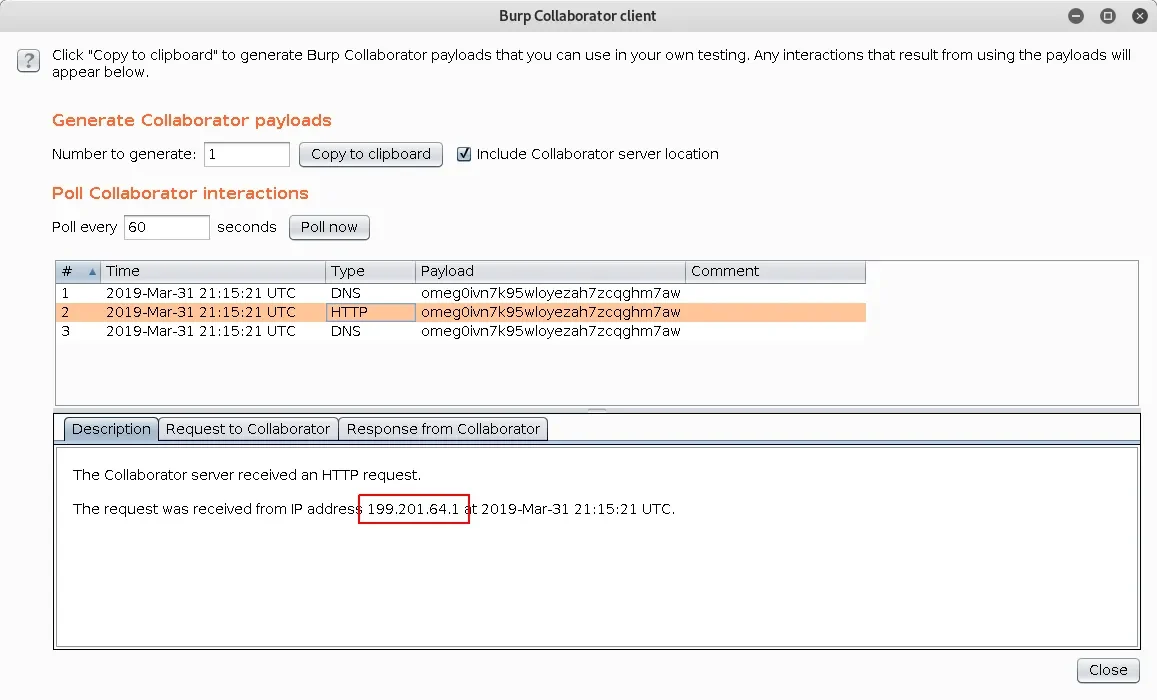
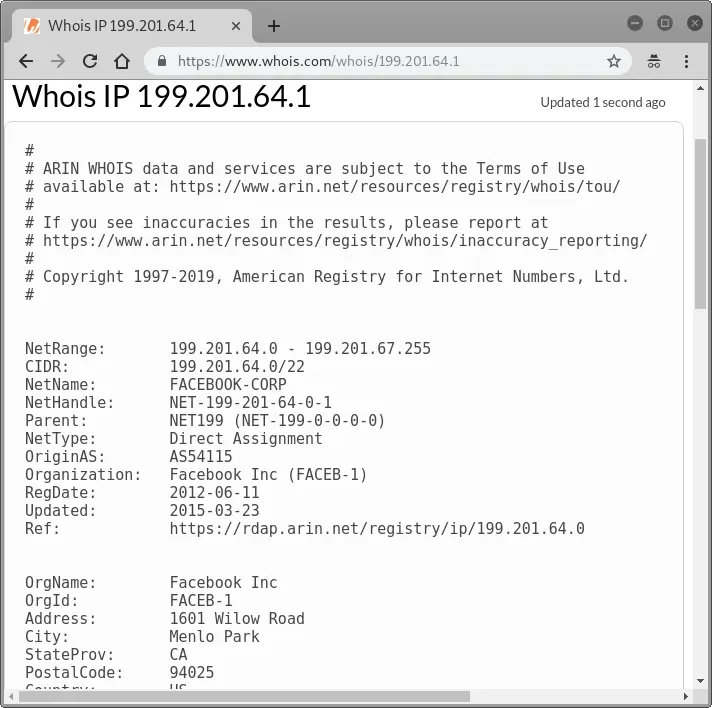
This demonstrates an external SSRF: the server fetched the URL supplied through the shortener. A whois lookup confirmed that [redacted] belongs to Facebook.
Step 2: internal SSRF probing
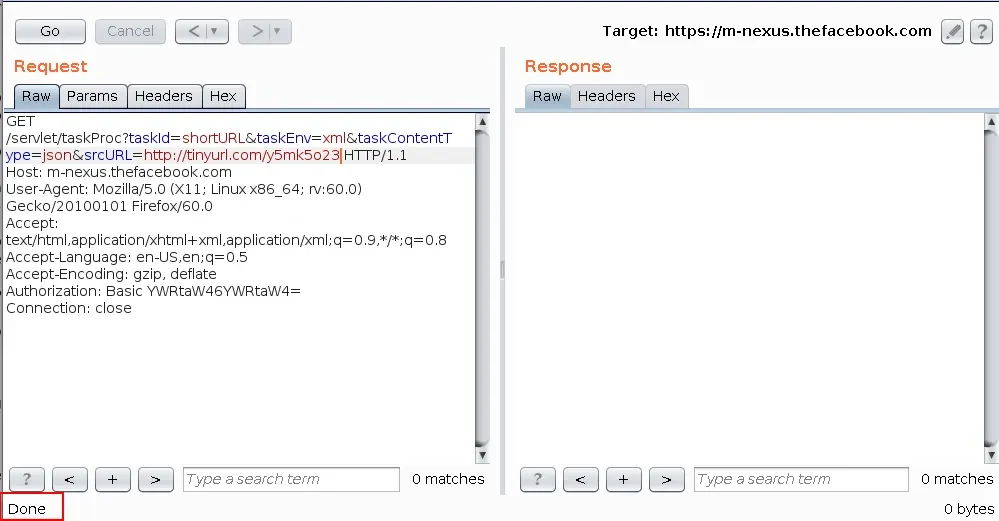
- To test internal SSRF, create a tiny URL of an invalid internal IP address (for example
[redacted]), insert it in thesrcURLparameter and observe that there is no response from the server.
- Create a tiny URL of a valid internal address,
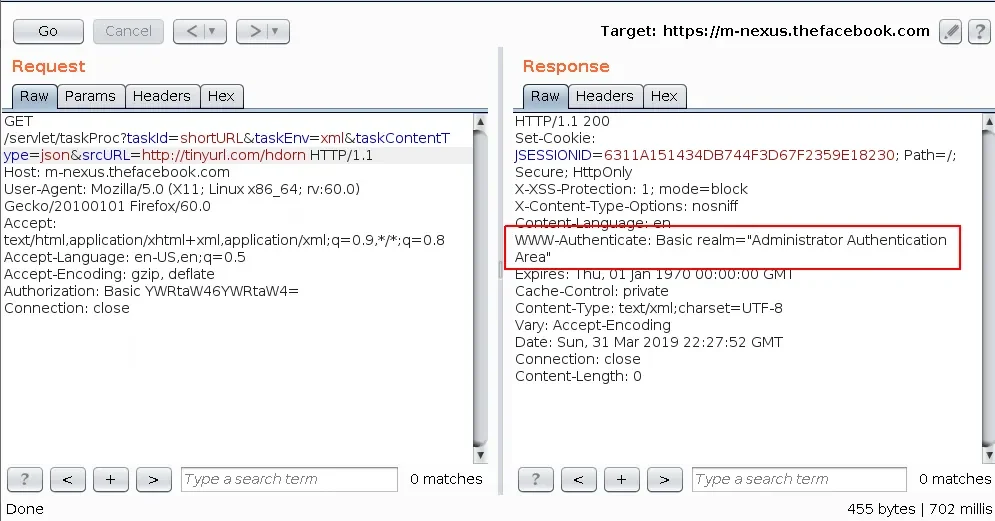
[redacted]:8080, insert it insrcURLand observe that the server asks for HTTP basic authentication.
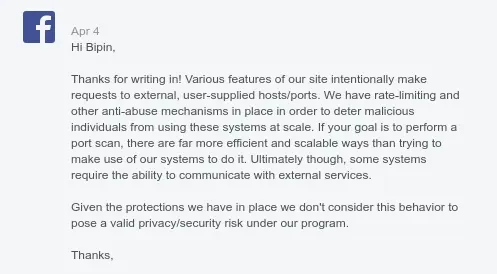
This behaviour allows enumeration of the internal infrastructure behind a firewalled environment. The finding was reported to Facebook and rejected, as the team did not believe it to be a security vulnerability.
Step 3: building impact
To produce evidence, the researcher tried reading internal information through URL schemas such as file://, dict://, ftp:// and gopher://, and tried fetching cloud instance metadata, without success. Instead, three real-time attack scenarios were developed and sent to Facebook with reproduction steps.
Reflected Cross Site Scripting (XSS)
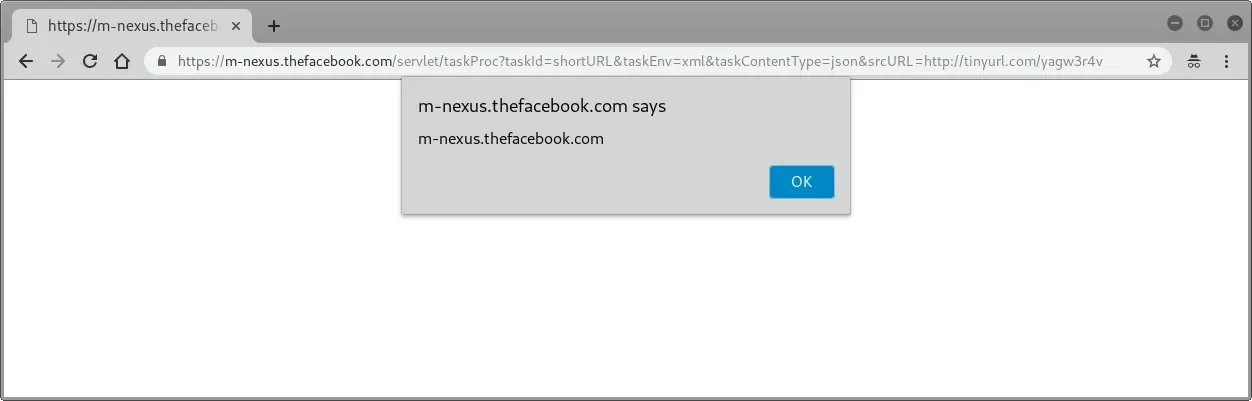
Phishing with the help of SSRF
STEP 1. Create and host a phishing page of the Facebook login that steals victims' Facebook login credentials and looks like a legitimate login portal.
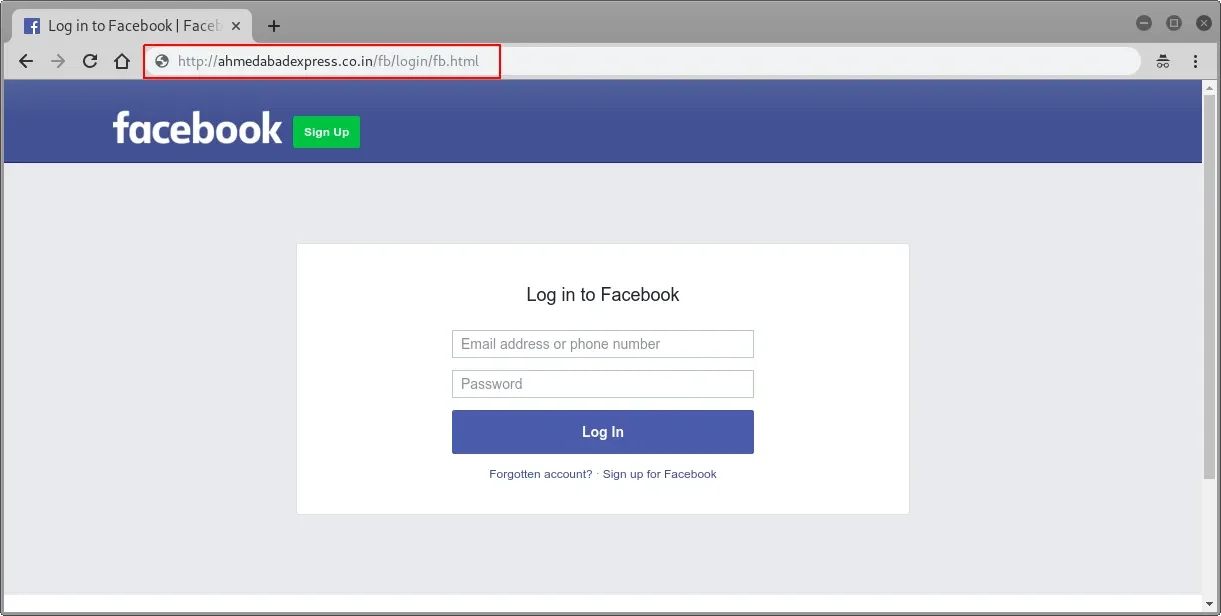
The page was hosted on a private server at http://ahmedabadexpress.co.in/.
STEP 2. Open https://tinyurl.com/ in a browser and create a tiny URL of the hosted phishing page, http://ahmedabadexpress.co.in/fb/login/fb.html. Copy the created tiny URL.
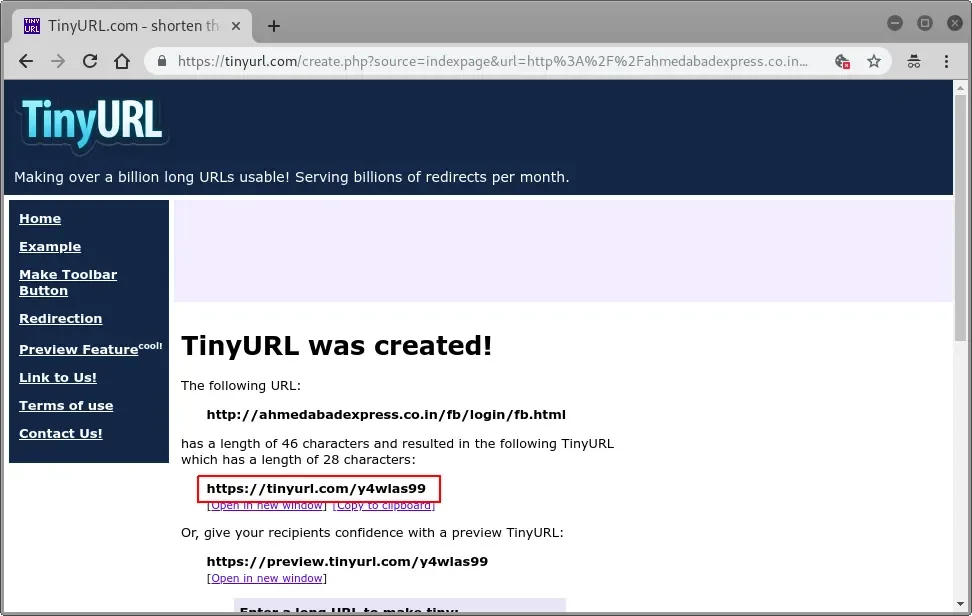
STEP 3. Insert the copied tiny URL in the srcURL parameter of the following URL and send it to the victim:
https://m-nexus.thefacebook.com/servlet/taskProc?taskId=shortURL&taskEnv=xml&taskContentType=json&srcURL={YOUR_TINY_URL_HERE}
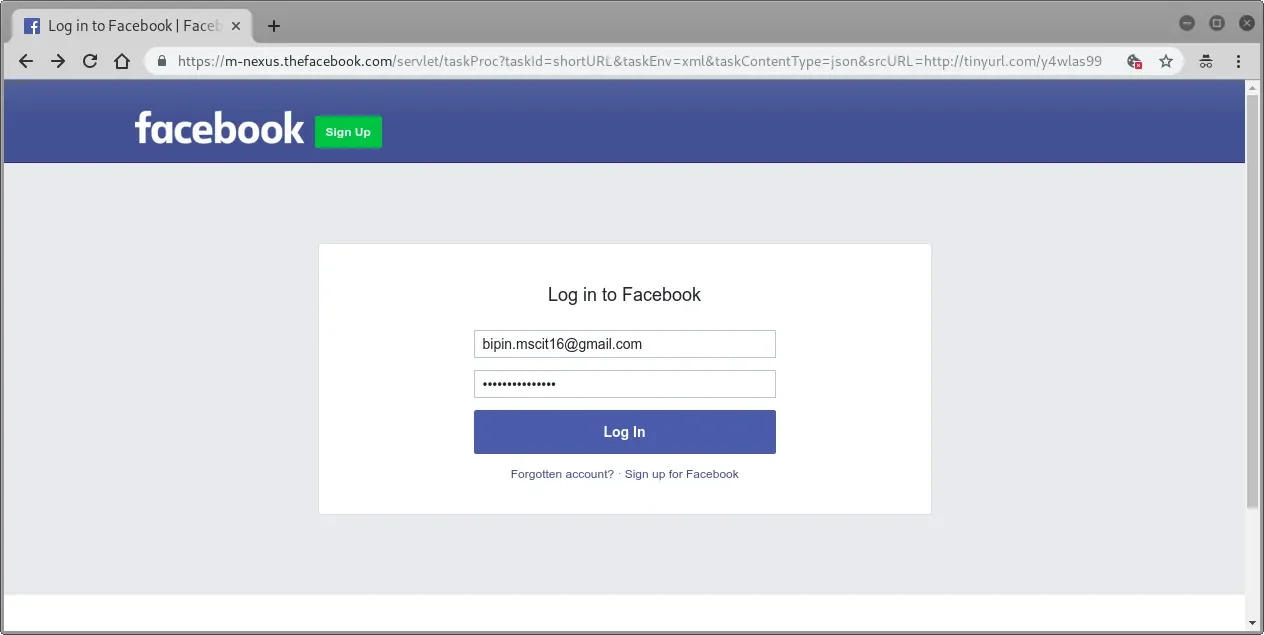
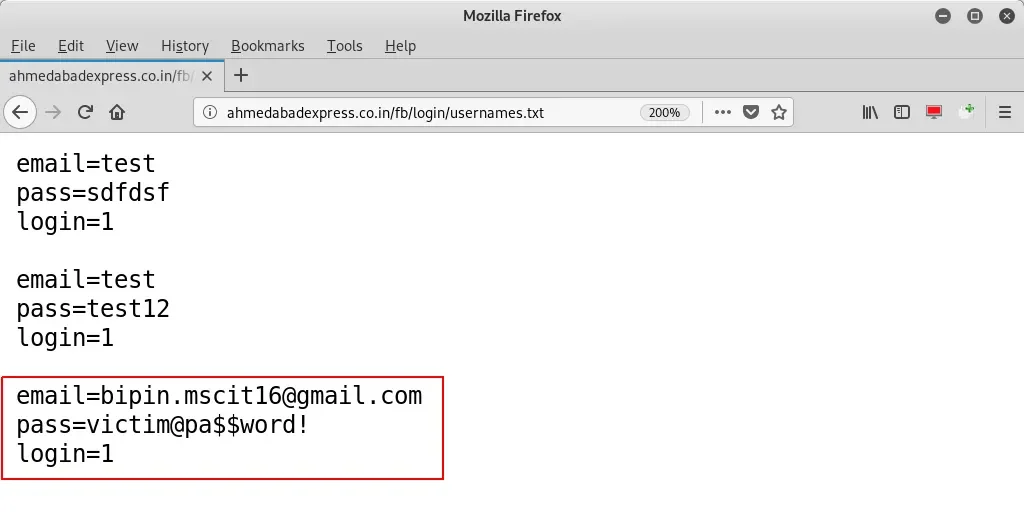
As soon as the victim enters a username and password on this page, the credentials are saved to the file http://ahmedabadexpress.co.in/fb/login/usernames.txt, and the victim is redirected to the real Facebook login page. The host name in the address bar is the string m-nexus.thefacebook.com, so the page looks legitimate. The same vulnerability could be used to redirect users to other malicious pages that serve malware and similar attacks.
STEP 4. Navigate to http://ahmedabadexpress.co.in/fb/login/usernames.txt and observe the stolen credentials.
Fingerprinting internal, non-Internet-exposed network-aware services
The internal network behind the firewall could be scanned. Burp Suite Intruder was used to send more than 10000 requests to find an open port on the server or an application running on that port.
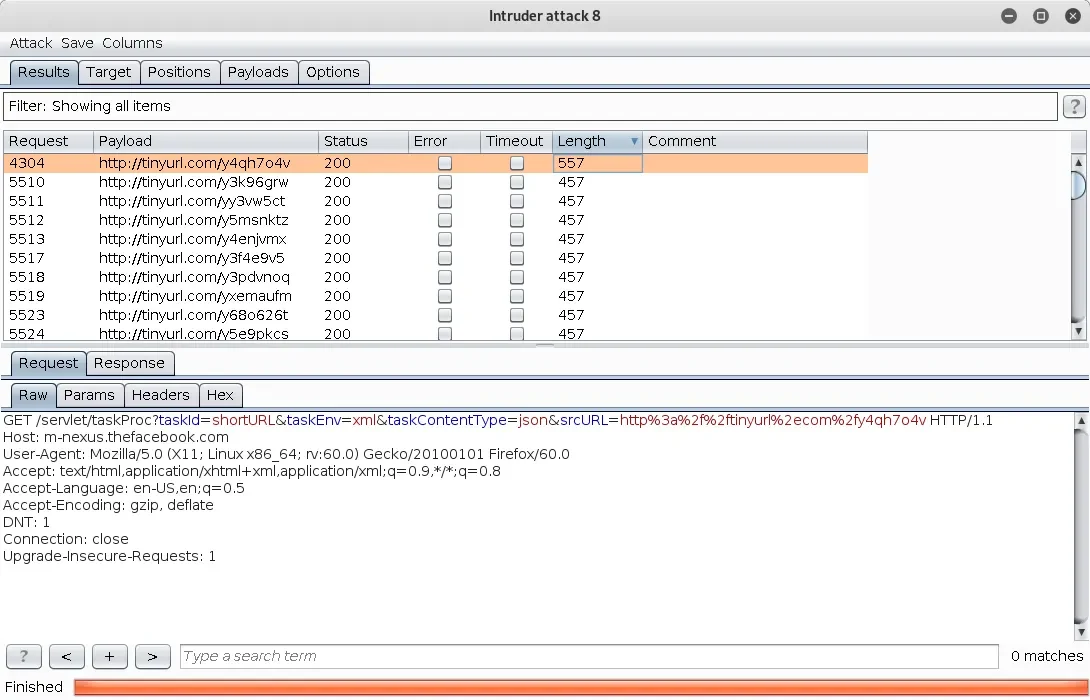
After scanning, an application running on port 10303 named "LightRay" was found.
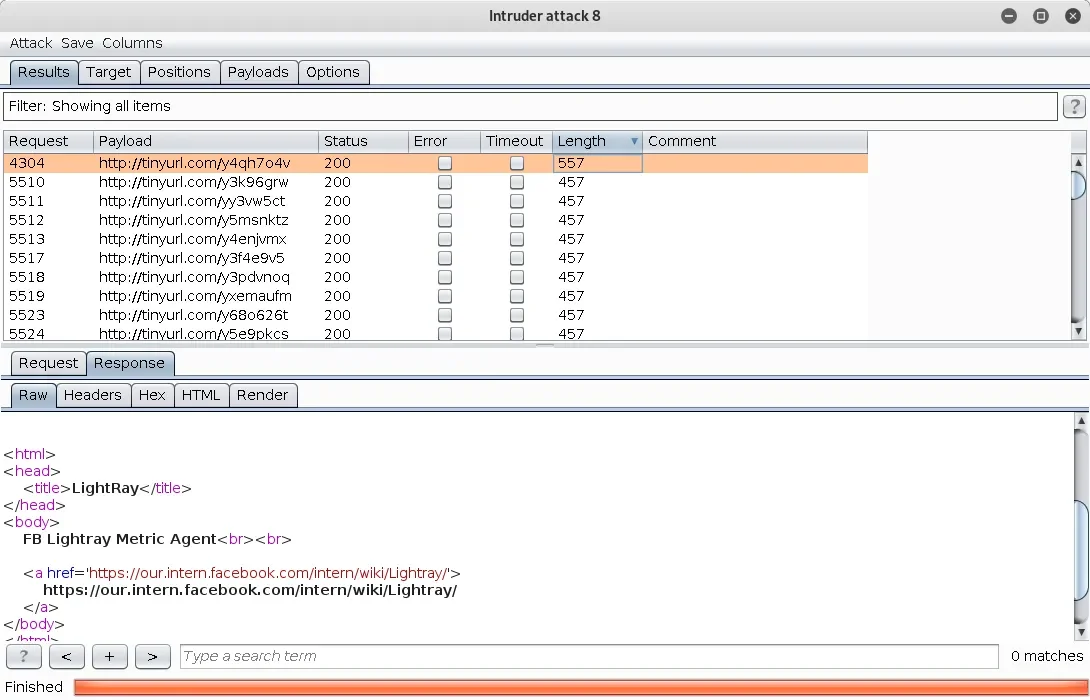
Before further investigation, the Facebook Security Team resolved the vulnerability.
Digging deeper: a second SSRF in the SDK
The MicroStrategy Web SDK was hosted on Facebook's production server. It is written in Java, so each jar file of the SDK was decompiled with the JD Decompiler and reviewed. The SDK was also hosted on the researcher's own server so that anything suspicious in the code could be checked there. After 26 days of work, an interesting observation emerged.
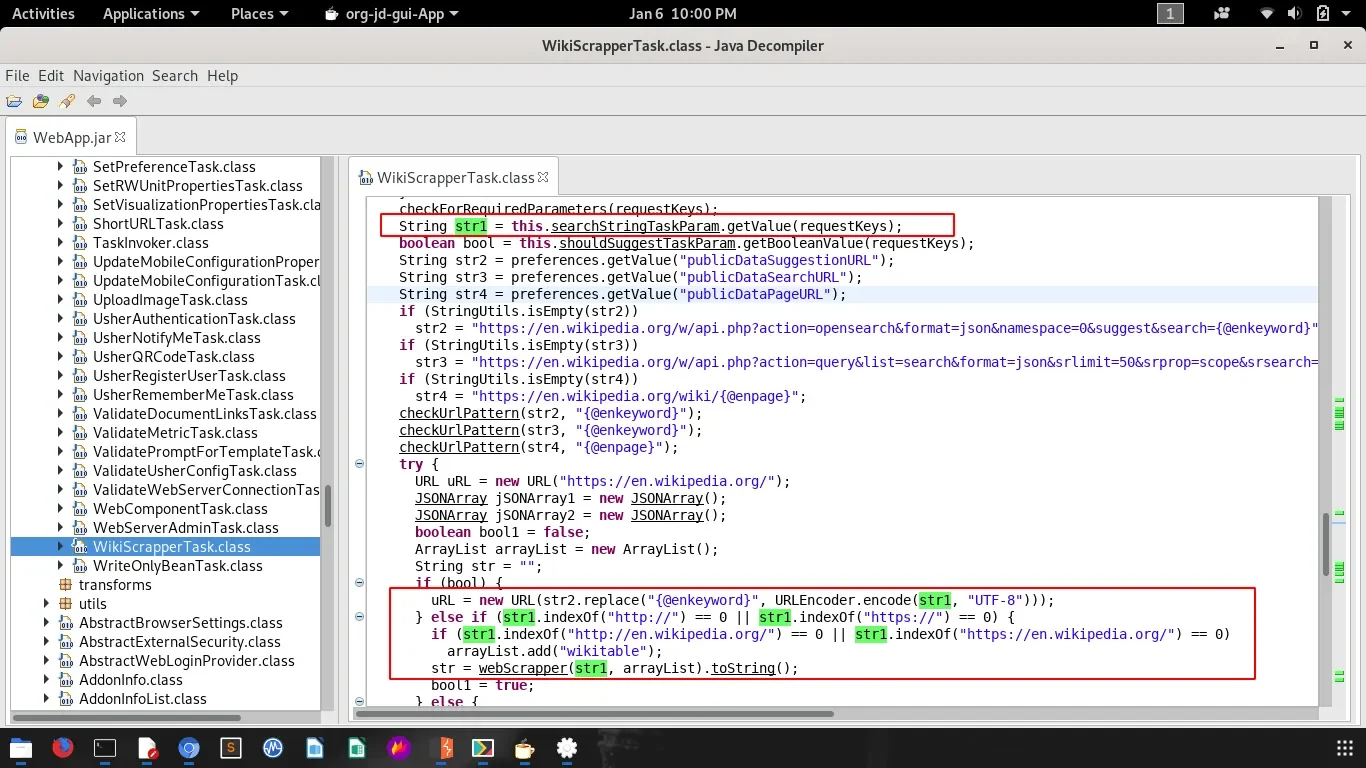
In the com.microstrategy.web.app.task.WikiScrapperTask class, the string str1 is initialised from user-supplied input sent as a parameter. The code checks whether the provided string starts with http:// (or https://), and if it does, calls the function webScrapper.
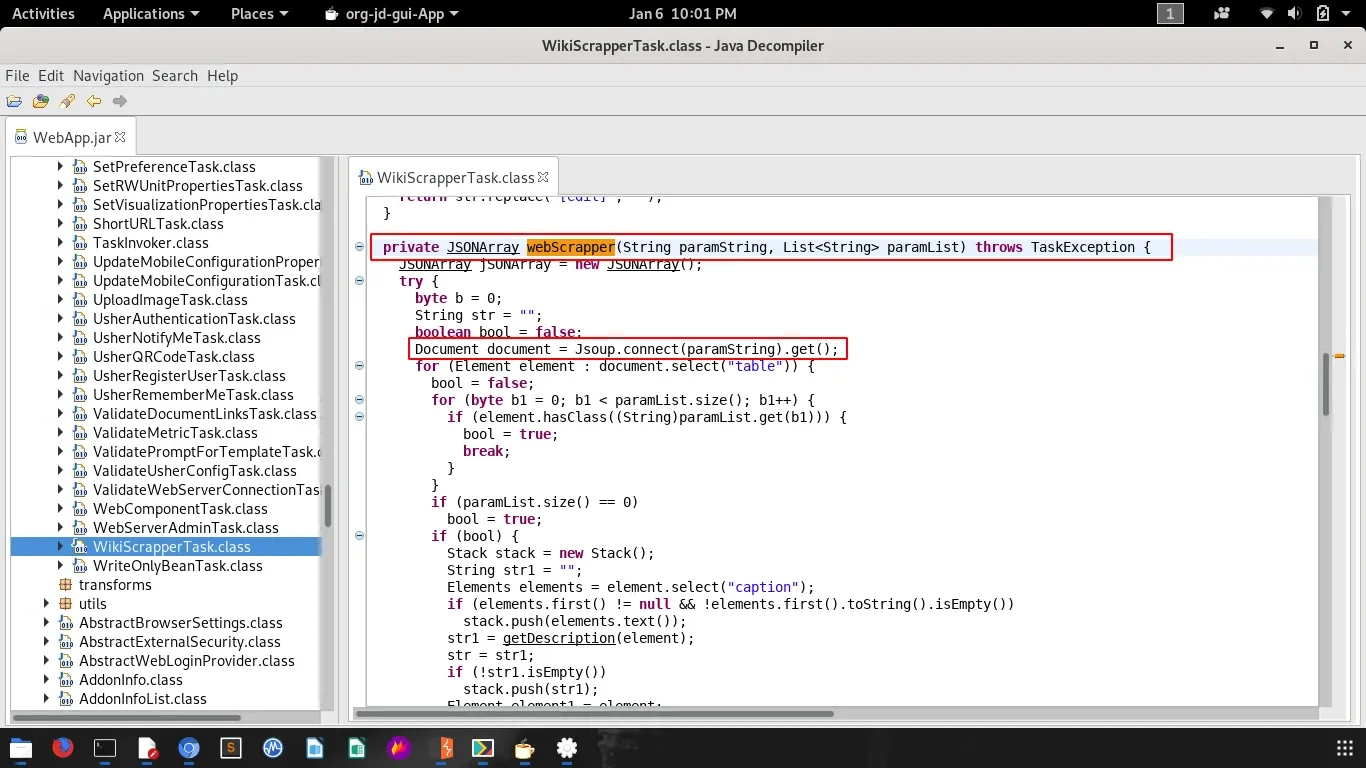
The webScrapper function internally sends a GET request to the provided URL using JSOUP, which fetches and parses an HTML page.
This was another SSRF.
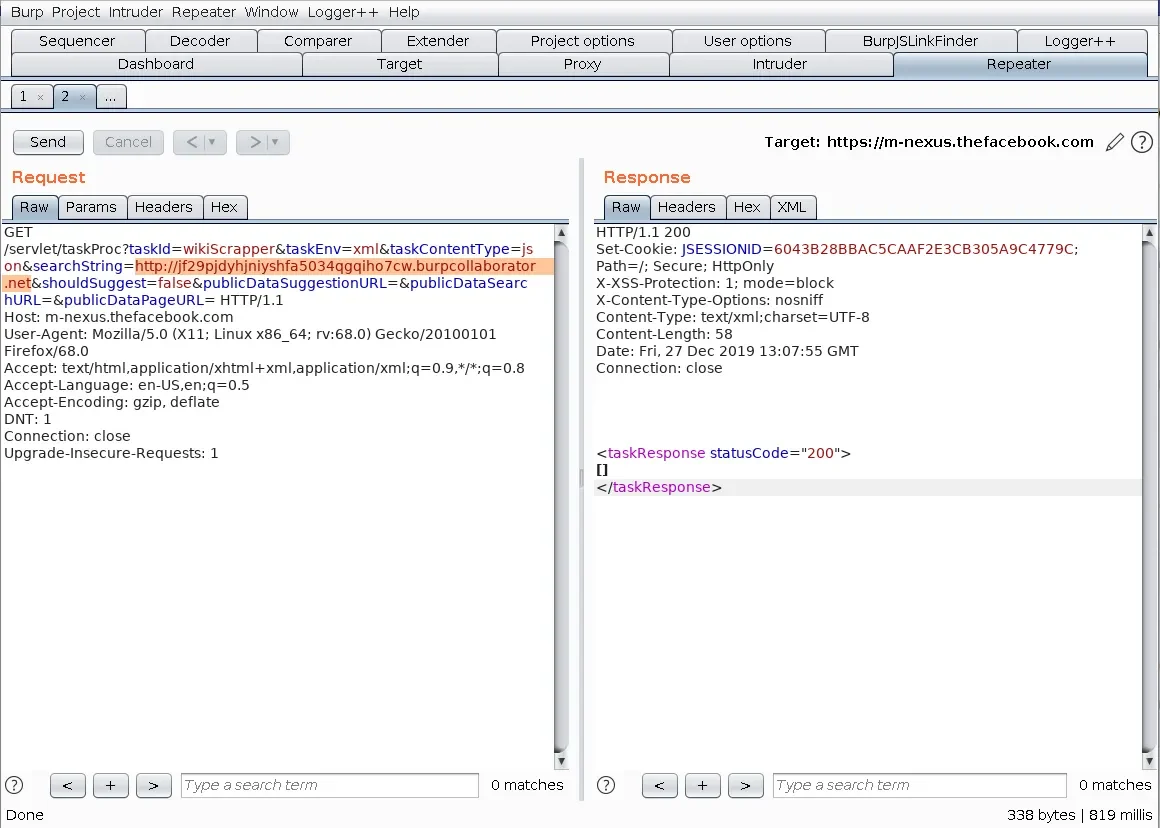
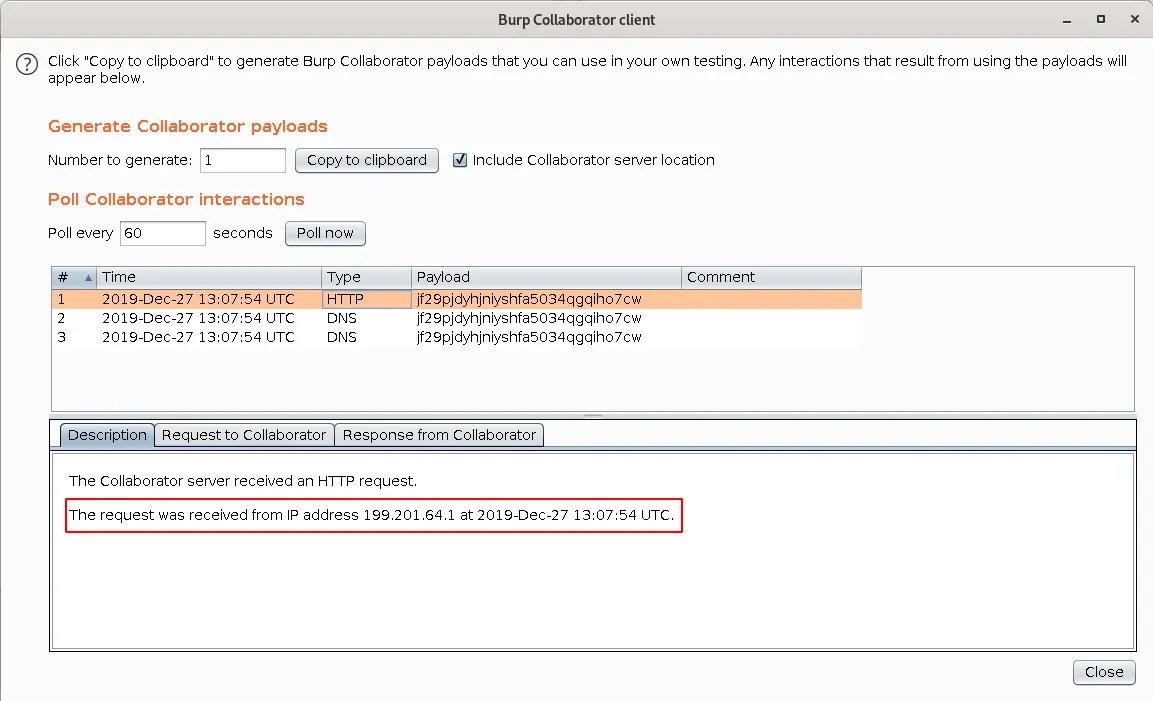
This time it was a blind SSRF, so it could not be proven that internal GET requests were being submitted. The source code of the MicroStrategy Web SDK deployed on m-nexus.thefacebook.com confirmed that it was an internal SSRF. From this observation alone the internal infrastructure cannot be enumerated and no sensitive information can be leaked, so the researcher expected a rejection for lack of impact and set the finding aside.

A few months later: information leakage through fb.me
Attention moved to the main Facebook domain, where another vulnerability was found: a URL shortener that could leak sensitive information about the server. Facebook runs its own URL shortening service at https://fb.me/, used by both internal employees and public users. The short URL simply redirects to the long URL using the HTTP Location header. The site had no rate limit, so a dictionary-based brute force attack with around 2000 words was launched against the web server and the responses were analysed with Burp Suite Intruder. Several short links were captured that redirect the user to an internal system, which in turn redirects the user to the main Facebook domain. A scenario looks like this:
https://fb.me/xyz ==> 301 Moved Permanently — https://our.intern.facebook.com/intern/{some-internal-data} ==> 302 Found — https://www.facebook.com/intern/{some-internal-data} ==> 404 Not Found
Some of the short links that redirect to the internal system were generated by Facebook's internal staff and may contain sensitive internal information, for example:
https://our.intern.facebook.com/intern/webmanager?domain=xyz.com&user=admin&[redacted]
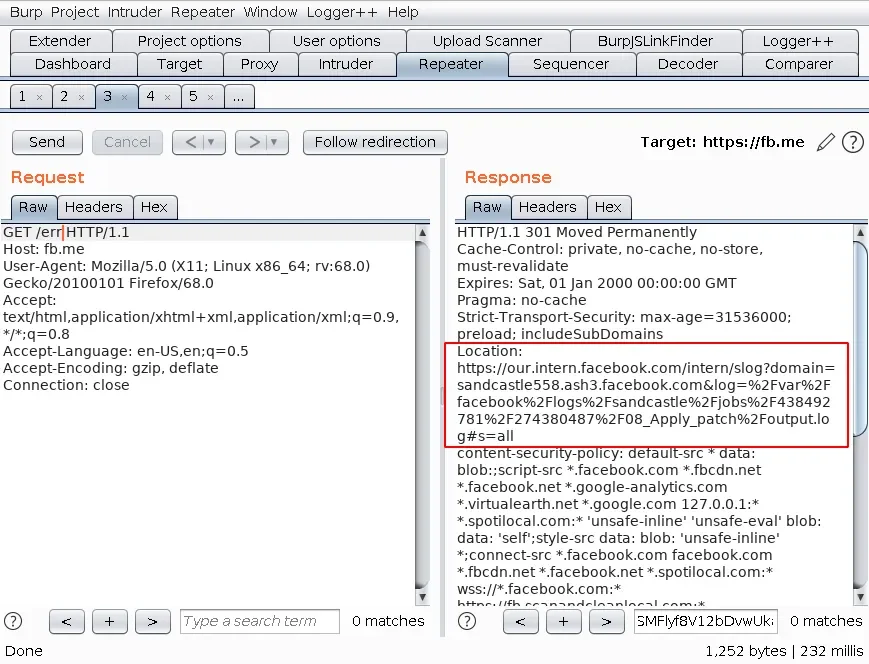
Observe HTTP response of https://fb.me/err URL in burp suite proxy tool which shows internal full path of logs folder.
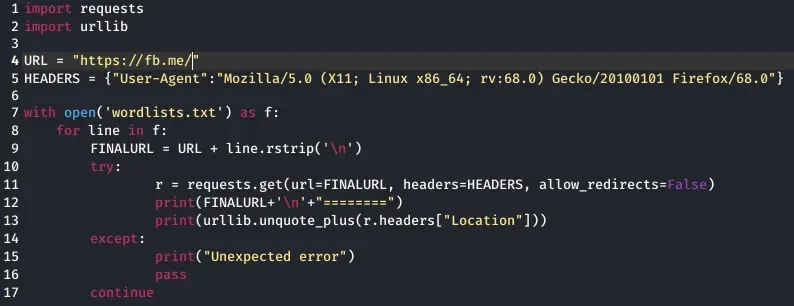
More information of this kind was obtained with a word list and Intruder, and a simple Python script was written to automate the task.
Screenshots of the information obtained during testing:
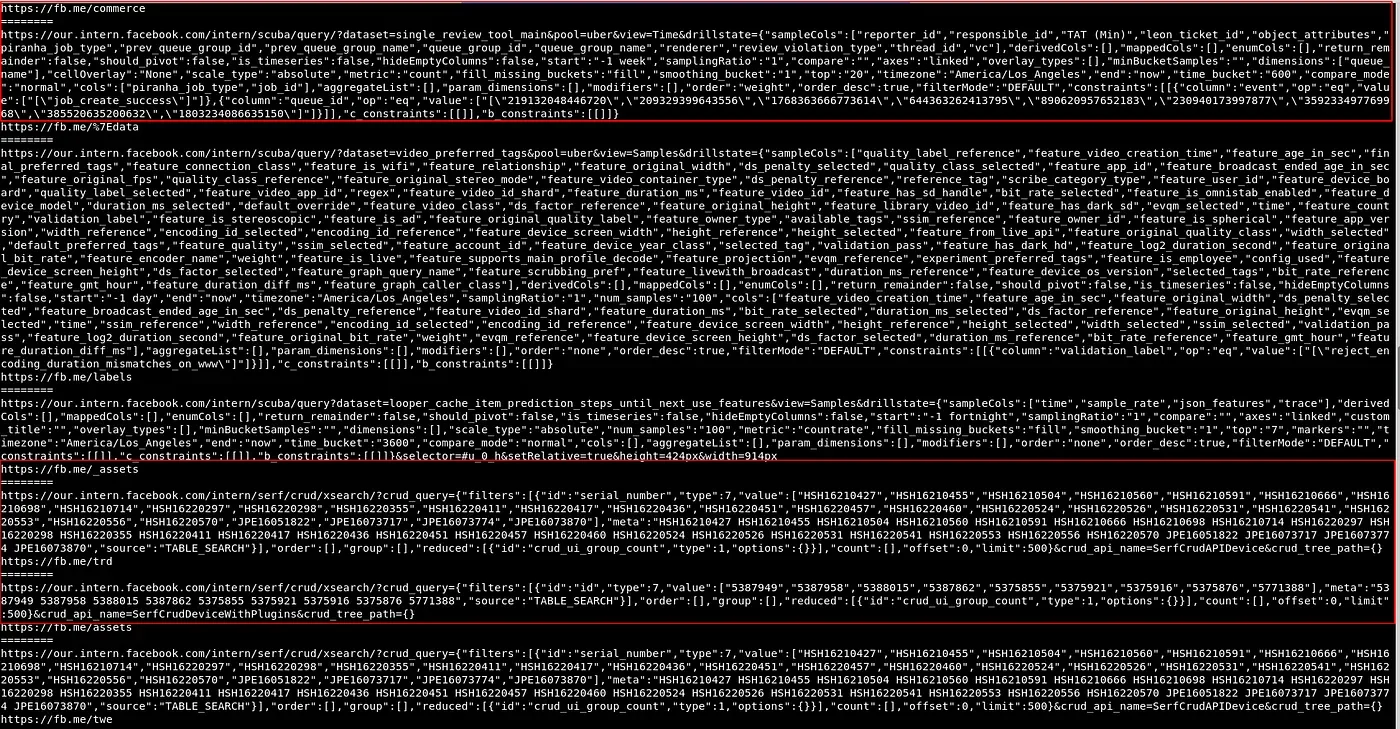
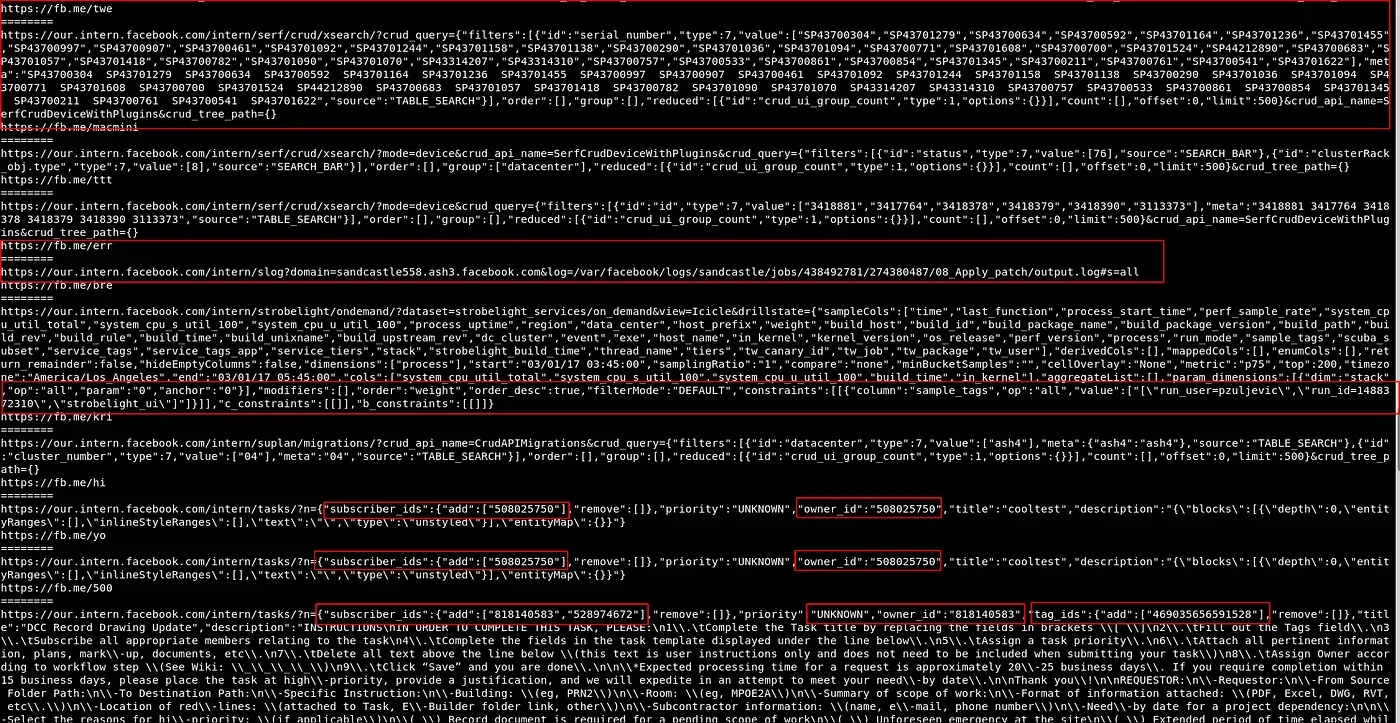
Only two screenshots were added; Facebook policy prevented disclosure of all the information. The vulnerability discloses internal HTTP GET queries, the internal path to the logs folder, other file paths, internal system queries used to fetch data, internal IP addresses, internal IDs, configuration-related information and private documents, all without authentication. It would also allow an attacker to enumerate valid internal URLs present in the system.
Vulnerability chaining
At this point there were two vulnerabilities:
- Blind SSRF: submit GET requests to internal and external systems.
- Server sensitive information leakage: internal path to the logs folder, other file paths, internal system queries used to fetch data, internal IP address, internal ID.
A scenario was created showing how the information leakage may help launch specific attacks such as path traversal and SSRF. Knowing the internal IP addresses of the network makes it much easier to target systems in the internal network.
Both PoCs were submitted to Facebook and a reply was received:
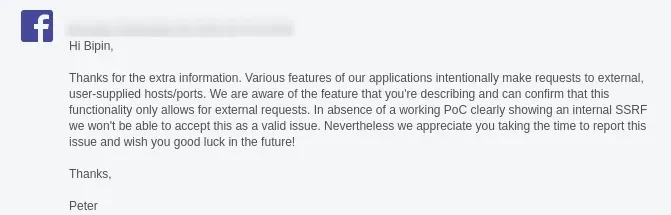
The blind SSRF had by then been patched: the wikiScrapper task was no longer accessible or registered. The researcher responded:
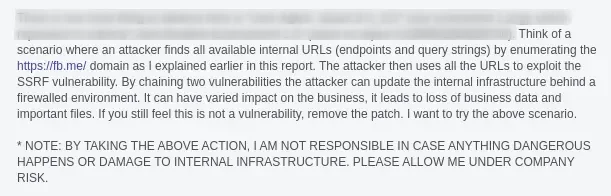
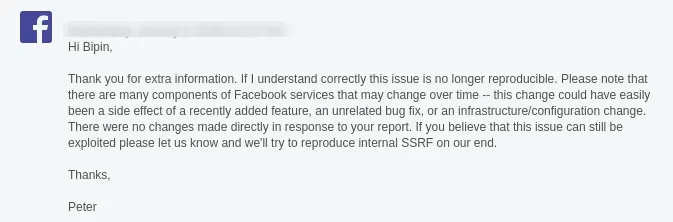
A reply came back:

Another blind SSRF
After a few days of research, another blind SSRF was found. From the source code of the MicroStrategy web SDK it was confirmed to be an internal SSRF. In the com.microstrategy.web.app.utils.usher class, the validateServerURL function processes the serverURL parameter and internally sends a GET request to the provided URL.
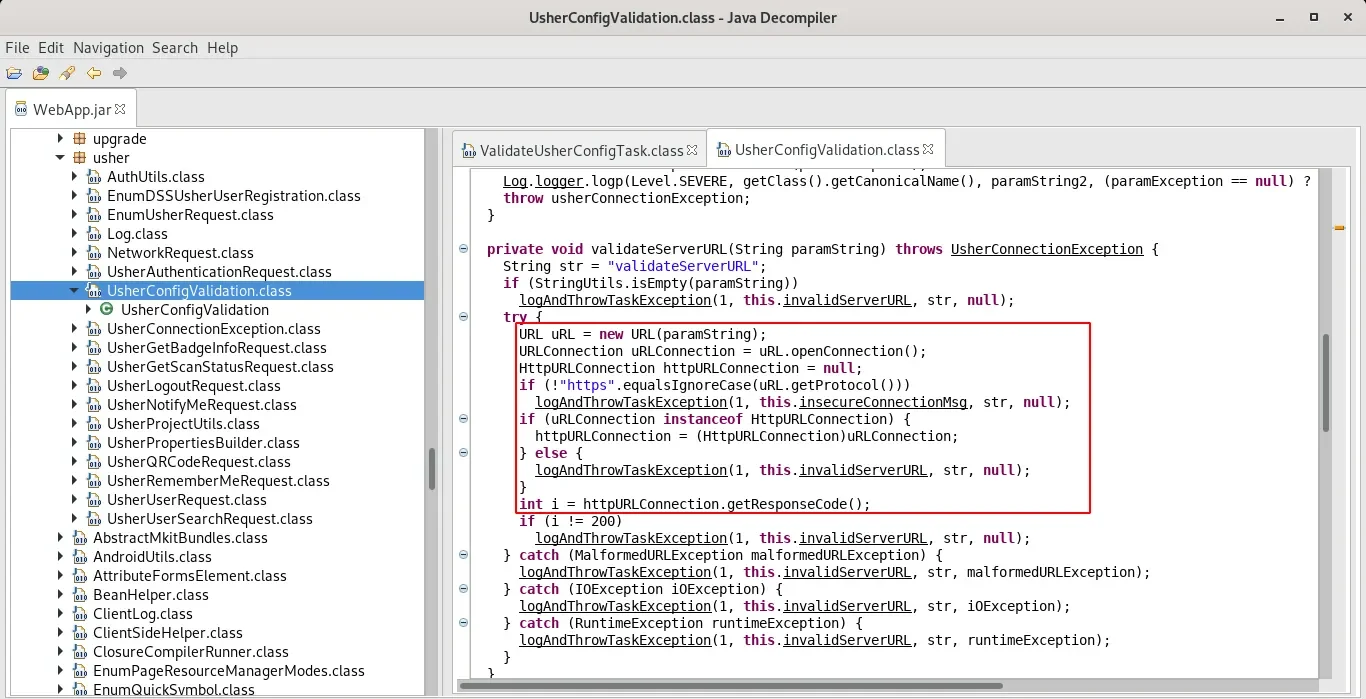
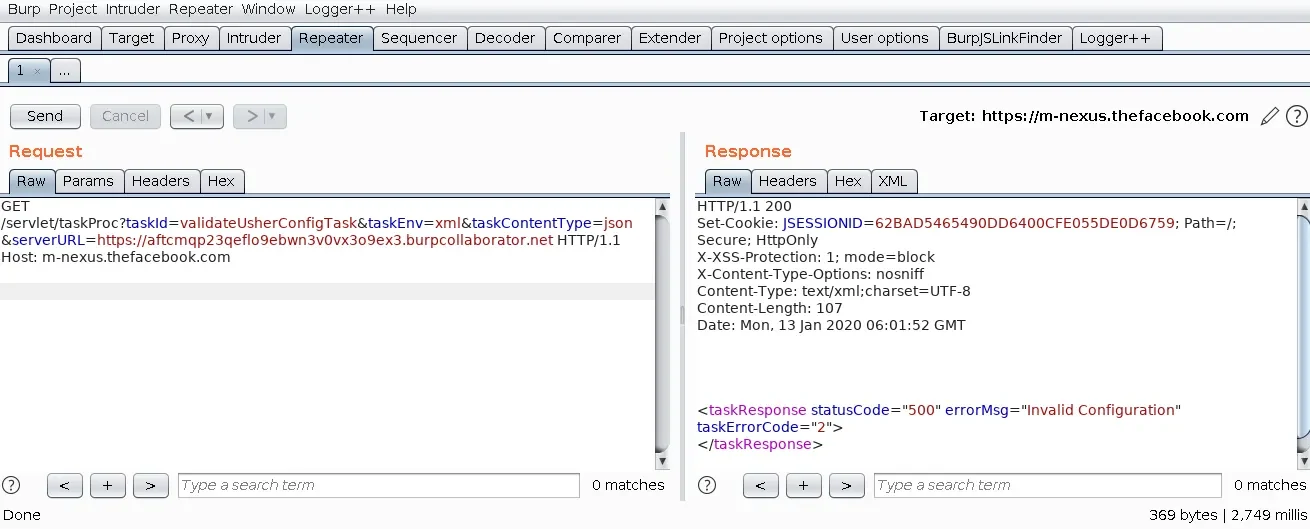
I replaced the value of "serverURL" parameter with the Burp Collaborator URL and send the GET request.
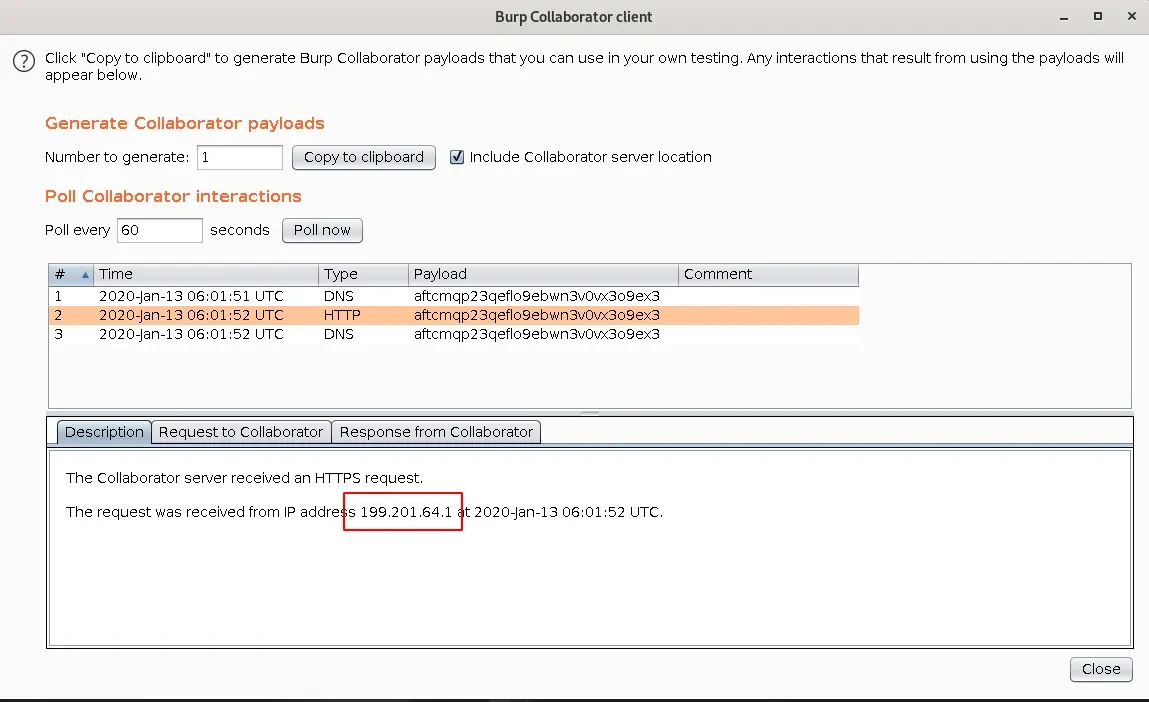
It observed that Burp Collaborator hits immediately, it will show IP address "[redacted]" from where request was received. This shows SSRF vulnerability is present.
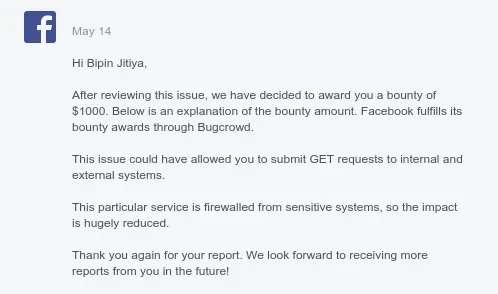
Facebook was asked to allow the action described in the previous email. They replied that they were able to reproduce the bug and were working on the patch, and would update on the bounty decision. The final response came after a few days:
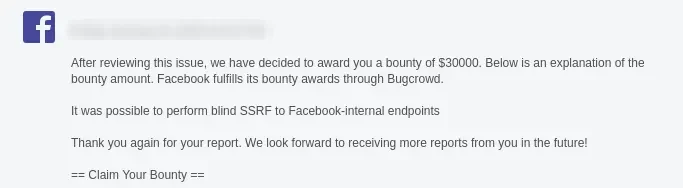
Rewarded by Facebook
The same flaw on the MicroStrategy demo portal
Next, the researcher tested whether the SSRF existed on the MicroStrategy demo portal and found that it did. Some information was obtained from that server using the AWS metadata API.
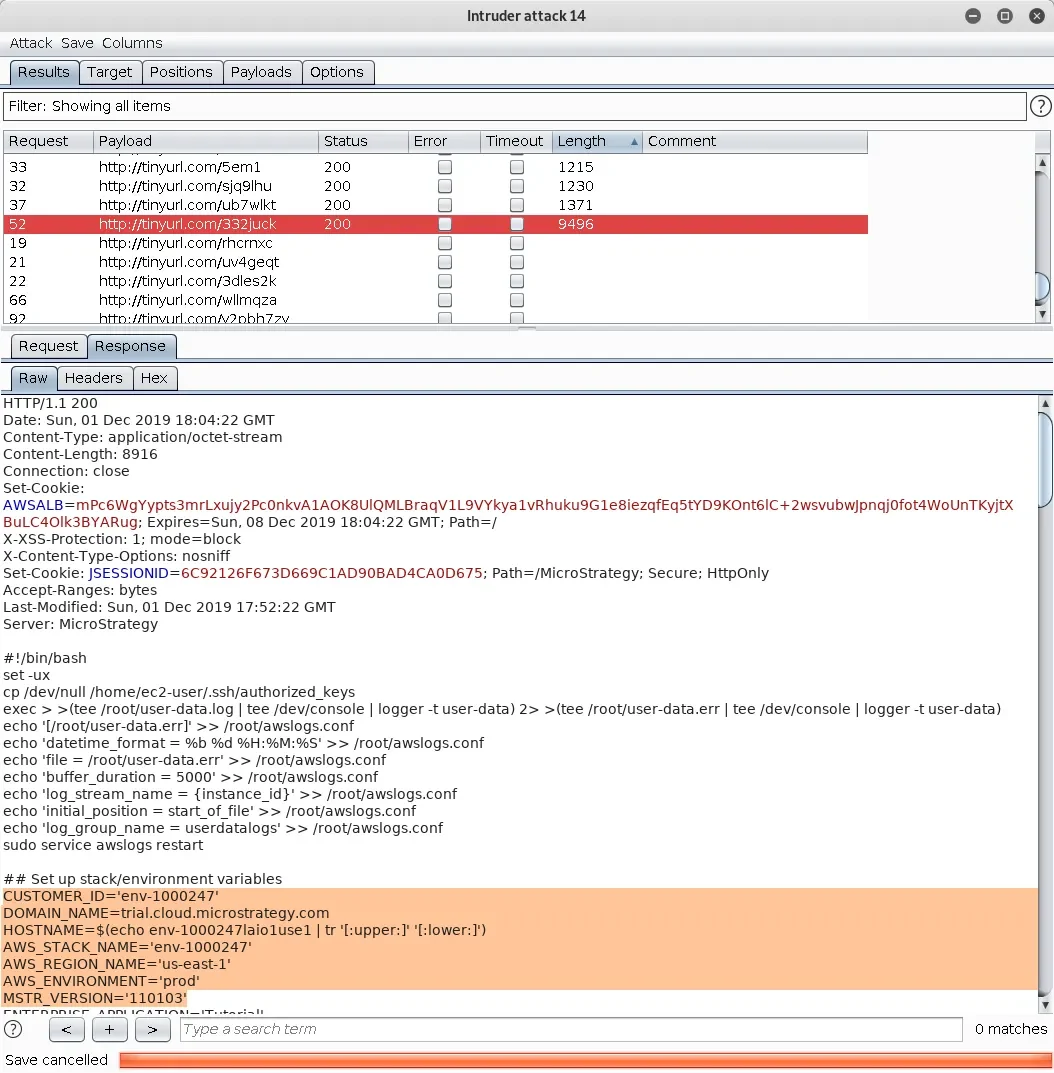
Response of http://[redacted]/latest/user-data meta-data API call using SSRF
The issue was reported to MicroStrategy's security team, which acknowledged and rewarded it:
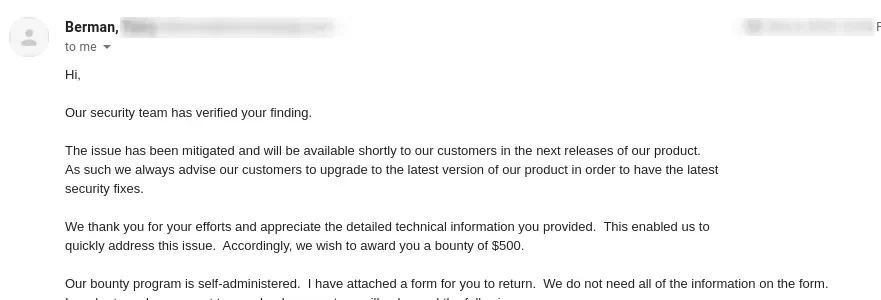
Acknowledged and rewarded by MicroStrategy
Root cause
The taskProc servlet exposes pre-built tasks, and the shortURL task is the one task that does not check for a valid authentication session. Its srcURL parameter is meant to accept a short URL for importing or reading data, and the code restricts the value to URLs created with https://tinyurl.com/. That allow-list is the only validation, and it is trivially satisfied by anyone who can create a TinyURL pointing at an arbitrary destination, so the server ends up fetching attacker-chosen URLs. The later WikiScrapperTask and validateServerURL findings follow the same pattern: user-supplied input starting with http:// or https:// is passed to a server-side fetch (JSOUP in the first case) without adequate restriction. The fb.me shortener had no rate limit, which made dictionary-based enumeration of short links practical.
Impact
With the shortURL SSRF an attacker could make the Facebook server issue requests to external hosts and to internal addresses, enumerate internal infrastructure behind the firewall (including fingerprinting a service on port 10303 named "LightRay"), and use the trusted m-nexus.thefacebook.com host name to host a convincing phishing page that captured credentials. The fb.me issue leaked internal paths, internal queries, internal IP addresses, internal IDs, configuration information and private documents without authentication, and could be used to enumerate valid internal URLs. The WikiScrapperTask and validateServerURL issues were blind SSRF: the source code confirmed internal requests, but they could not be used to enumerate internal infrastructure or leak sensitive information on their own. On the MicroStrategy demo portal the SSRF reached the AWS metadata API and returned instance user data. The researcher notes that an attempt to escalate the Facebook bug to RCE failed because good security measures were in place, and that the total earned from this vulnerability was $31500 ($1,000 + $30,000 + $500).
Fix
The wikiScrapper task was patched and is no longer accessible or registered, and the Facebook Security Team resolved the shortURL vulnerability. The issue has now been fixed.
Variants to test
- Enumerate pre-built tasks on other MicroStrategy
taskProcdeployments with Intruder and look for tasks that skip the authentication session check, asshortURLdid. A positive result is a task that returns data without a session. - Check whether a URL parameter is validated only by prefix (
http://orhttps://) before being passed to a server-side fetcher such as JSOUP. A positive result is a Collaborator hit from the target's IP. - Test whether an allow-list based on a shortener domain can be bypassed by creating a short URL to an arbitrary destination. A positive result is the server fetching the destination you chose.
- Probe internal addresses through the fetcher, comparing an invalid internal IP (no response) with a valid one (for example
[redacted]:8080, which asked for HTTP basic authentication). A difference in behaviour confirms internal reachability. - Try cloud metadata endpoints such as
http://[redacted]/latest/user-datathrough the SSRF. A positive result is instance metadata in the response. - Brute force short-link services that lack rate limiting with a word list and inspect
Locationheaders for internal hostnames and query strings. A positive result is a redirect chain into an internal system carrying tokens or paths.
What happened, in plain words
A security researcher found a way to make one of Facebook's own servers fetch any web address he chose. That sounds harmless, but it is not: a server sits inside a private network, behind firewalls, next to other machines that the public internet cannot reach. If you can make that server go and fetch a page for you, you can use it as a kind of puppet to look around inside the network, or to make a page that looks like it belongs to Facebook.
The bug class is called SSRF, short for Server-Side Request Forgery. The everyday comparison: imagine a hotel concierge who will fetch anything you ask for from anywhere in the building. Normally guests ask for a newspaper from the lobby. But if the concierge does not check, you can ask him to open the manager's office and read out what is on the desk. You never entered the office yourself; the concierge did it for you, and he has keys you do not have.
The researcher found this on a Facebook subdomain running a product called MicroStrategy, which is business-intelligence software (software that builds reports and dashboards from company data). Facebook first rejected the report, saying it was not a security vulnerability. He then built proof that it could be abused for phishing and for scanning Facebook's internal network, and the bug was eventually fixed. Later he found another blind SSRF of the same family, and the same flaw on MicroStrategy's own demo site. In total he earned $31500 from this work.
This article walks through the whole story from zero. You only need to be comfortable using a browser. Every technical term is explained the first time it appears, and there is a glossary at the end.
The starting point: finding the subdomain
Facebook runs a very large number of subdomains. A subdomain is a name that sits in front of the main domain: if facebook.com is the building, m-nexus.thefacebook.com is a particular office inside it. Companies use subdomains for separate services: mail, internal tools, developer portals, and so on.
Subdomain enumeration is the practice of listing as many of those names as possible. You do it because each subdomain is a separate application with its own code and its own bugs, and some of them are forgotten or less carefully protected than the main site. During that enumeration the researcher came across https://m-nexus.thefacebook.com/.
That address redirected him to https://m-nexus.thefacebook.com/servlet/mstrWebAdmin.
A redirect is when a web server answers your request by saying "not here, go there instead". Your browser follows it automatically, so you often do not notice. The word servlet in the path is a Java term for a small program that runs on a web server and produces a page when asked. So the redirect told him: this host is running a Java web application, and one of its pages is called mstrWebAdmin.
He then searched the web for the keyword mstrWebAdmin. Searching a product's page name is a standard first move: it tells you what software you are looking at, and once you know the product you can read its documentation, which describes every feature and every URL it exposes.
The search showed that mstrWebAdmin is the administration page of a Business Intelligence Portal built on MicroStrategy's tools.
A blog post confirmed the identification.
Why does identifying the product matter so much? Because the documentation of a commercial product is public and detailed. It lists the URLs the product uses, the parameters they accept, and the default settings. For someone testing security, that is a map of the building handed out at reception.
Reading the documentation
The official configuration document for MicroStrategy listed two endpoints that are publicly accessible.
An endpoint is simply a specific address on a server that accepts requests and does something in response. Think of it as a counter in a large office: the building address is the domain, the counter number is the path.
The same documentation said that HTTP basic authentication is enabled by default on the portal at https://m-nexus.thefacebook.com/servlet/mstrWeb.
Authentication means proving who you are, usually with a username and password. HTTP basic authentication is the simplest form built into the web protocol: the browser shows a small pop-up asking for a username and password, and sends them with every request. It is basic in the sense of plain and old-fashioned, not in the sense of weak by itself.
But the documentation also showed that https://m-nexus.thefacebook.com/servlet/taskProc does not require authentication. That is the interesting part: a counter in the building that anyone can walk up to, no badge needed.
That servlet takes a value from a parameter called taskId to perform custom data collection and content generation.
A parameter is a named value you attach to a URL, after a question mark. In page?name=value, name is the parameter and value is what you are handing over. Parameters are how you tell a web application what you want it to do. Here, taskId tells taskProc which of its built-in jobs to run.
Finding the one task that skips the login check
The researcher enumerated the pre-built tasks with Burp Intruder.
Burp Suite is a tool used by security testers that sits between your browser and the website and lets you see and modify every request. It has several parts. Proxy records and lets you edit traffic. Intruder takes one request and automatically repeats it many times, swapping in different values from a list each time. That is called fuzzing or brute forcing: trying many inputs quickly instead of one at a time by hand.
He found that each pre-built task checks for a valid authentication session parameter, except the shortURL task, which processes a short URL and does not check for a valid authentication session. An attacker can use this observation to access this service without any authentication.
A session is how a website remembers that you logged in. After you sign in, the server gives your browser a small piece of data, often called a session cookie or session token, and the browser sends it back with every following request. The server looks at it and thinks "this is the person who logged in five minutes ago". If a page does not check for that token, it will serve anyone, logged in or not. That is exactly what shortURL did.
Pre-built tasks enumeration using Burp suite intruder
Why every attempt failed
He then fuzzed every parameter mentioned in the official documentation, and found nothing. Every attempt returned the error message "The source URL is not valid" with status code 500.
A status code is a three-digit number a server sends back to say how the request went. You have probably seen 404 for "page not found". 500 means "internal server error": the server tried to do something and failed. The message and the code together said: the server is rejecting my input, but it is reaching some code that judges it.
To understand why, he downloaded the hosted web application. This is the application package the server itself runs, more than 400 MB, containing several scripts and jar files.
A jar file is a bundle of Java code, the way a zip file is a bundle of documents. Java applications are usually shipped as many jar files, and the compiled code inside can be turned back into readable source code with a tool called a decompiler. Reading that code is called source code review: instead of guessing how the application behaves, you read the instructions it actually follows.
He decompiled the jar files with jd-gui and reviewed the code, with the unauthenticated shortURL task as his main target. The relevant Java class was found in one of the jar files.
In Java, a class is a named block of code that groups related behaviour. Finding the class that handles shortURL means finding the exact instructions that decide what the task accepts.
The code explained the constant error: the srcURL parameter of the shortURL task only accepts a URL created with https://tinyurl.com/ for importing or reading data from that URL.
TinyURL is a free public service that turns a long web address into a short one. You paste a long link, it gives you back something like https://tinyurl.com/abc123, and when anyone opens the short link they are sent to the long one. The shortURL task was designed to accept only these short links, presumably so that people could pass around convenient short addresses.
That restriction is the whole security check. And it is not much of a check at all: anyone can create a TinyURL that points anywhere they like. The server was asking "is this a TinyURL?" when the real question was "where does this TinyURL lead?".
Exploiting it: proving the server fetches what you choose
Step 1: external SSRF confirmation
- Open Burp Suite Proxy, go to the Burp menu and select "Burp Collaborator client". Generate a Collaborator payload and copy it to the clipboard.
Burp Collaborator is a service that gives you a unique, throwaway address on the internet and then tells you if anything ever contacts it. It is the classic way to prove that a server made a request on your behalf: you hand the server your Collaborator address, and if the Collaborator reports a visit, the server really did go and fetch it. Without this, you would only be guessing.
- Open
https://tinyurl.com/in a browser, enter the Collaborator payload and create its tiny URL. Copy the created tiny URL.
This step is the trick that defeats the check. The server only accepts TinyURL links, so he made a TinyURL link whose destination was his Collaborator address. The link passes the check because it is a genuine TinyURL; the destination is entirely his choice.
- Insert the copied tiny URL into the
srcURLparameter of the following URL and open it in a browser:
https://m-nexus.thefacebook.com/servlet/taskProc?taskId=shortURL&taskEnv=xml&taskContentType=json&srcURL={YOUR_TINY_URL_HERE}
Line by line, in plain words:
https://m-nexus.thefacebook.comis the Facebook host he found./servlet/taskProcis the unauthenticated counter that runs pre-built tasks.?starts the list of parameters.taskId=shortURLtells it which task to run: the one that processes short URLs.taskEnv=xmlandtaskContentType=jsontell the task what format to use for its input and output. They are settings for the job, not the payload.srcURL={YOUR_TINY_URL_HERE}is the actual input: the address the server is asked to read from. This is where the TinyURL goes.&separates one parameter from the next.
- The Burp Collaborator received a hit immediately, showing the IP address
[redacted]as the source of the request.
An IP address is the numeric address of a machine on a network, the way a postal address identifies a building. Every request on the internet comes from some IP address. The Collaborator hit means: something contacted my throwaway address, and it came from [redacted].
This demonstrates an external SSRF: the server fetched the URL supplied through the shortener. "External" here means the destination was on the public internet, outside Facebook's network. A whois lookup confirmed that [redacted] belongs to Facebook.
Whois is a public directory lookup that tells you which organisation an IP address or domain is registered to. It is how you prove that the machine that made the request was the target's own server and not some unrelated machine.
Step 2: internal SSRF probing
- To test internal SSRF, create a tiny URL of an invalid internal IP address (for example
[redacted]), insert it in thesrcURLparameter and observe that there is no response from the server.
Internal here means addresses inside Facebook's private network, which the public internet cannot reach directly. The researcher cannot reach them from his laptop, but the Facebook server can, because it lives there. That is the whole point of SSRF: you borrow the server's position inside the network.
An invalid address is one where no machine answers. The absence of a response is itself information: it tells you the server tried and found nothing there.
- Create a tiny URL of a valid internal address,
[redacted]:8080, insert it insrcURLand observe that the server asks for HTTP basic authentication.
[redacted] is a special address that always means "this same machine". Every computer uses it to talk to itself. :8080 is a port, a numbered door on a machine; one machine can run many services, each listening on a different port. So this address means "the service on port 8080 of the Facebook server itself".
The server asking for a username and password is a strong signal: there is something alive at that address, and it is protected. An invalid address gave silence; a valid one gave a login prompt. That difference is how you map a network you cannot see.
This behaviour allows enumeration of the internal infrastructure behind a firewalled environment. A firewall is a filter that blocks unwanted traffic between networks; it is the reason the public cannot reach internal machines directly. The researcher reported the finding to Facebook and it was rejected, as the team did not believe it to be a security vulnerability.
Building impact: turning a rejection into a case
A report that says "I can make your server fetch a page" is easy to dismiss. A report that says "I can steal your users' passwords with your own domain name" is not. So the researcher set out to show real consequences.
To produce evidence, he tried reading internal information through URL schemas such as file://, dict://, ftp:// and gopher://, and tried fetching cloud instance metadata, without success.
A URL schema (or scheme) is the part before :// that says how to reach something. https:// means a web page. file:// means a file on the local disk. dict:// and gopher:// are older protocols. If a server-side fetcher accepts these, it may read local files or talk to services that only understand those protocols. Cloud instance metadata is a special internal address that cloud providers expose so a machine can learn its own configuration; it often contains credentials, which is why SSRF hunters look for it. None of these worked here.
Instead, three real-time attack scenarios were developed and sent to Facebook with reproduction steps.
Reflected Cross Site Scripting (XSS)
Cross Site Scripting, or XSS, is a bug where an attacker gets their own code (usually JavaScript) to run in someone else's browser as if it came from the trusted website. "Reflected" means the malicious input is echoed straight back in the response rather than stored on the server. The consequence can be stealing the victim's session, or acting as the victim on the site.
Phishing with the help of SSRF
Phishing is tricking someone into typing their password into a fake page that looks real. The strongest phishing pages are hosted on the real company's domain, because the address bar then shows the real name. This scenario shows how the SSRF could be used to achieve exactly that.
STEP 1. Create and host a phishing page of the Facebook login that steals victims' Facebook login credentials and looks like a legitimate login portal.
The page was hosted on a private server at http://ahmedabadexpress.co.in/.
STEP 2. Open https://tinyurl.com/ in a browser and create a tiny URL of the hosted phishing page, http://ahmedabadexpress.co.in/fb/login/fb.html. Copy the created tiny URL.
STEP 3. Insert the copied tiny URL in the srcURL parameter of the following URL and send it to the victim:
https://m-nexus.thefacebook.com/servlet/taskProc?taskId=shortURL&taskEnv=xml&taskContentType=json&srcURL={YOUR_TINY_URL_HERE}
This is the same request as before, with one difference: the TinyURL now points at the fake login page instead of the Collaborator. The server fetches the fake page and serves it to whoever opens the link, so the page appears to come from m-nexus.thefacebook.com.
As soon as the victim enters a username and password on this page, the credentials are saved to the file http://ahmedabadexpress.co.in/fb/login/usernames.txt, and the victim is redirected to the real Facebook login page. The host name in the address bar is the string m-nexus.thefacebook.com, so the page looks legitimate. The same vulnerability could be used to redirect users to other malicious pages that serve malware and similar attacks.
Malware is software designed to harm or take over a machine. The point of this scenario is not the fake page itself, which anyone could host, but the address bar: the victim sees a Facebook-owned name, which is what makes the trick convincing.
STEP 4. Navigate to http://ahmedabadexpress.co.in/fb/login/usernames.txt and observe the stolen credentials.
Fingerprinting internal, non-Internet-exposed network-aware services
Fingerprinting means identifying what software is running somewhere: its name, its version, what it does. "Non-Internet-exposed" means it cannot be reached from outside; only machines inside the network can talk to it. If you can fingerprint such a service through an SSRF, you have proven you can see parts of the network the public cannot.
The internal network behind the firewall could be scanned. Burp Suite Intruder was used to send more than 10000 requests to find an open port on the server or an application running on that port.
After scanning, an application running on port 10303 named "LightRay" was found.
Before further investigation, the Facebook Security Team resolved the vulnerability.
Digging deeper: a second SSRF in the SDK
The MicroStrategy Web SDK was hosted on Facebook's production server. An SDK (software development kit) is a set of code libraries that developers use to build on top of a product; here it is the code that makes MicroStrategy's features work inside the Facebook deployment. It is written in Java, so each jar file of the SDK was decompiled with the JD Decompiler and reviewed. The SDK was also hosted on the researcher's own server so that anything suspicious in the code could be checked there. After 26 days of work, an interesting observation emerged.
In the com.microstrategy.web.app.task.WikiScrapperTask class, the string str1 is initialised from user-supplied input sent as a parameter. The code checks whether the provided string starts with http:// (or https://), and if it does, calls the function webScrapper.
A string is just a piece of text in code. A function is a named block of code that does one job and can be called by name. "Initialised from user-supplied input" means the text came from whoever sent the request, not from the program itself. The only check is the prefix: does the text begin with http:// or https://? That tells you nothing about where the address leads.
The webScrapper function internally sends a GET request to the provided URL using JSOUP, which fetches and parses an HTML page.
A GET request is the ordinary kind of request a browser makes when you open a page: "give me the content at this address". JSOUP is a Java library for downloading and reading HTML, the language web pages are written in. So the function takes the user's text, downloads whatever page is at that address, and reads it. That is a server-side fetch, which is the definition of SSRF when the address is attacker-controlled.
This was another SSRF.
This time it was a blind SSRF, so it could not be proven that internal GET requests were being submitted. Blind means you can make the server send a request, but you cannot see the response. It is like sending a letter and never getting a reply: you know it was sent, not what happened next. The source code of the MicroStrategy Web SDK deployed on m-nexus.thefacebook.com confirmed that it was an internal SSRF. From this observation alone the internal infrastructure cannot be enumerated and no sensitive information can be leaked, so the researcher expected a rejection for lack of impact and set the finding aside.
A few months later: information leakage through fb.me
Attention moved to the main Facebook domain, where another vulnerability was found: a URL shortener that could leak sensitive information about the server.
Facebook runs its own URL shortening service at https://fb.me/, used by both internal employees and public users. The short URL simply redirects to the long URL using the HTTP Location header.
A header is extra information sent alongside a request or response, separate from the page content. The Location header is the standard way a server says "the thing you want is over there", and the browser follows it automatically. So fb.me/xyz does not contain the destination; it just points to it.
The site had no rate limit, meaning it did not restrict how many requests one person could make in a short time. Without a rate limit, you can try thousands of guesses quickly. So a dictionary-based brute force attack with around 2000 words was launched against the web server and the responses were analysed with Burp Suite Intruder. A dictionary attack means trying a list of common words as the short code, one after another, and looking at what comes back.
Several short links were captured that redirect the user to an internal system, which in turn redirects the user to the main Facebook domain. A scenario looks like this:
https://fb.me/xyz ==> 301 Moved Permanently — https://our.intern.facebook.com/intern/{some-internal-data} ==> 302 Found — https://www.facebook.com/intern/{some-internal-data} ==> 404 Not Found
Line by line, in plain words:
https://fb.me/xyzis the short link someone created.301 Moved Permanentlyis the status code for a permanent redirect, and theLocationheader carries the next address.https://our.intern.facebook.com/intern/{some-internal-data}is an internal Facebook host.internin the name suggests internal tooling. The{some-internal-data}part is a placeholder for whatever the real link contained.302 Foundis the status code for a temporary redirect, so the internal system sends the browser onward again.https://www.facebook.com/intern/{some-internal-data}is the public site, which answers404 Not Found, meaning that page does not exist there.
The important part is the middle hop: even though the browser ends up on a public page, the short link revealed an internal address on the way.
Some of the short links that redirect to the internal system were generated by Facebook's internal staff and may contain sensitive internal information, for example:
https://our.intern.facebook.com/intern/webmanager?domain=xyz.com&user=admin&[redacted]
This is an internal URL with parameters: domain, user, and token. A token is a secret string that proves identity or grants access, much like a password but usually generated by the system. Anyone who sees it may be able to use it. The value here is a placeholder from the report; real tokens are secrets and must never be published.
Observe HTTP response of https://fb.me/err URL in burp suite proxy tool which shows internal full path of logs folder.
More information of this kind was obtained with a word list and Intruder, and a simple Python script was written to automate the task. Python is a popular programming language; a script is a short program that does a repetitive job automatically, here sending many guesses and collecting the answers.
Screenshots of the information obtained during testing:
Only two screenshots were added; Facebook policy prevented disclosure of all the information. The vulnerability discloses internal HTTP GET queries, the internal path to the logs folder, other file paths, internal system queries used to fetch data, internal IP addresses, internal IDs, configuration-related information and private documents, all without authentication. It would also allow an attacker to enumerate valid internal URLs present in the system.
A path is the part of a URL that points to a file or folder on a server, like /var/log/ on a disk. Knowing internal paths and internal addresses is valuable because it tells an attacker what exists and where to aim next.
Vulnerability chaining
Chaining means combining two or more small issues so that together they do more than either could alone. A locked door plus a key left on a desk is not two separate problems; it is one way in.
At this point there were two vulnerabilities:
- Blind SSRF: submit GET requests to internal and external systems.
- Server sensitive information leakage: internal path to the logs folder, other file paths, internal system queries used to fetch data, internal IP address, internal ID.
A scenario was created showing how the information leakage may help launch specific attacks such as path traversal and SSRF. Path traversal is a bug where an attacker uses ../ in a file path to climb out of the intended folder and read files elsewhere. Knowing the internal IP addresses of the network makes it much easier to target systems in the internal network, because you know what is there and where to point.
Both PoCs were submitted to Facebook and a reply was received. A PoC, proof of concept, is a minimal demonstration that a bug is real: the smallest set of steps that shows the problem happening.
The blind SSRF had by then been patched: the wikiScrapper task was no longer accessible or registered. Patched means the vendor changed the code to close the hole. The researcher responded:
A reply came back:
Another blind SSRF
After a few days of research, another blind SSRF was found. From the source code of the MicroStrategy web SDK it was confirmed to be an internal SSRF. In the com.microstrategy.web.app.utils.usher class, the validateServerURL function processes the serverURL parameter and internally sends a GET request to the provided URL.
The name validateServerURL suggests the function is meant to check an address. In practice it fetched it, which is the same mistake as before: user input reaches a server-side request.
I replaced the value of "serverURL" parameter with the Burp Collaborator URL and send the GET request.
It observed that Burp Collaborator hits immediately, it will show IP address "[redacted]" from where request was received. This shows SSRF vulnerability is present.
Facebook was asked to allow the action described in the previous email. They replied that they were able to reproduce the bug and were working on the patch, and would update on the bounty decision. A bounty is a payment a company makes to a researcher who reports a valid security bug, as a reward and an incentive to report rather than exploit. The final response came after a few days:
Rewarded by Facebook
The same flaw on the MicroStrategy demo portal
Next, the researcher tested whether the SSRF existed on the MicroStrategy demo portal and found that it did. A demo portal is a public sample installation a vendor provides so people can try the product. It is still a real server, and bugs found there belong to the vendor, not to the customer whose site led you to it.
Some information was obtained from that server using the AWS metadata API.
AWS is Amazon Web Services, a major cloud provider. An API is a defined way for one program to ask another for something, like a service counter with a fixed list of requests it accepts. The AWS metadata API is a special internal address that a cloud machine can query to learn about itself. It is reachable only from inside the machine, which is why it is a favourite target for SSRF: if the server can be made to fetch it, the answer comes back with configuration data that was never meant to be public.
Response of http://[redacted]/latest/user-data meta-data API call using SSRF
[redacted] is the address of that metadata service. /latest/user-data is the path for the startup data given to the machine when it was created, which can contain secrets. The issue was reported to MicroStrategy's security team, which acknowledged and rewarded it:
Acknowledged and rewarded by MicroStrategy
Root cause
The taskProc servlet exposes pre-built tasks, and the shortURL task is the one task that does not check for a valid authentication session. Its srcURL parameter is meant to accept a short URL for importing or reading data, and the code restricts the value to URLs created with https://tinyurl.com/. That allow-list (a list of things that are permitted, everything else refused) is the only validation, and it is trivially satisfied by anyone who can create a TinyURL pointing at an arbitrary destination, so the server ends up fetching attacker-chosen URLs. The later WikiScrapperTask and validateServerURL findings follow the same pattern: user-supplied input starting with http:// or https:// is passed to a server-side fetch (JSOUP in the first case) without adequate restriction. The fb.me shortener had no rate limit, which made dictionary-based enumeration of short links practical.
Impact
Impact is what an attacker could actually do with the bug, and it is what decides whether a report is accepted and what it is worth.
With the shortURL SSRF an attacker could make the Facebook server issue requests to external hosts and to internal addresses, enumerate internal infrastructure behind the firewall (including fingerprinting a service on port 10303 named "LightRay"), and use the trusted m-nexus.thefacebook.com host name to host a convincing phishing page that captured credentials. The fb.me issue leaked internal paths, internal queries, internal IP addresses, internal IDs, configuration information and private documents without authentication, and could be used to enumerate valid internal URLs. The WikiScrapperTask and validateServerURL issues were blind SSRF: the source code confirmed internal requests, but they could not be used to enumerate internal infrastructure or leak sensitive information on their own. On the MicroStrategy demo portal the SSRF reached the AWS metadata API and returned instance user data. The researcher notes that an attempt to escalate the Facebook bug to RCE failed because good security measures were in place. RCE, remote code execution, means running your own commands on the target machine; it is the most severe outcome, which is why researchers try to climb from SSRF to RCE. The total earned from this vulnerability was $31500 ($1,000 + $30,000 + $500).
Fix
The wikiScrapper task was patched and is no longer accessible or registered, and the Facebook Security Team resolved the shortURL vulnerability. The issue has now been fixed. In plain words: check where the link actually goes, not just what it looks like.
Variants to test
These are the same ideas applied elsewhere, written so you can try them on systems you are allowed to test.
- Enumerate pre-built tasks on other MicroStrategy
taskProcdeployments with Intruder and look for tasks that skip the authentication session check, asshortURLdid. A positive result is a task that returns data without a session. - Check whether a URL parameter is validated only by prefix (
http://orhttps://) before being passed to a server-side fetcher such as JSOUP. A positive result is a Collaborator hit from the target's IP. - Test whether an allow-list based on a shortener domain can be bypassed by creating a short URL to an arbitrary destination. A positive result is the server fetching the destination you chose.
- Probe internal addresses through the fetcher, comparing an invalid internal IP (no response) with a valid one (for example
[redacted]:8080, which asked for HTTP basic authentication). A difference in behaviour confirms internal reachability. - Try cloud metadata endpoints such as
http://[redacted]/latest/user-datathrough the SSRF. A positive result is instance metadata in the response. - Brute force short-link services that lack rate limiting with a word list and inspect
Locationheaders for internal hostnames and query strings. A positive result is a redirect chain into an internal system carrying tokens or paths.
Glossary
- Allow-list: a list of values that are permitted, with everything else refused.
- API: a defined way for one program to ask another for something, with a fixed set of requests it accepts.
- Authentication: proving who you are, usually with a username and password.
- AWS: Amazon Web Services, a major cloud computing provider.
- Blind SSRF: an SSRF where the server makes the request but you cannot see the response.
- Bounty: a payment a company makes to a researcher who reports a valid security bug.
- Brute force: trying many inputs quickly, usually from a list, instead of one at a time by hand.
- Burp Collaborator: a Burp Suite service that gives you a unique address and reports when anything contacts it, used to prove a server made a request.
- Burp Intruder: the part of Burp Suite that repeats one request many times with different values.
- Burp Suite: a tool used by security testers to see, edit and replay web traffic.
- Business Intelligence Portal: software that builds reports and dashboards from a company's data.
- Chaining: combining several small issues so that together they achieve more than either alone.
- Class: in Java, a named block of code grouping related behaviour.
- Cloud instance metadata: a special internal address a cloud machine can query to learn its own configuration, sometimes including credentials.
- Cross Site Scripting (XSS): a bug where an attacker's code runs in someone else's browser as if it came from the trusted site.
- Decompiler: a tool that turns compiled code back into readable source code.
- Dictionary attack: trying a list of common words as guesses, one after another.
- Endpoint: a specific address on a server that accepts requests and does something in response.
- External SSRF: an SSRF where the destination is on the public internet.
- Firewall: a filter that blocks unwanted traffic between networks.
- Fingerprinting: identifying what software is running somewhere, such as its name and version.
- Function: a named block of code that does one job and can be called by name.
- Fuzzing: sending many varied inputs to see how an application reacts.
- GET request: the ordinary request a browser makes to fetch a page.
- Header: extra information sent alongside a request or response, separate from the page content.
- HTTP basic authentication: the simplest login built into the web protocol, where the browser shows a pop-up and sends a username and password with each request.
- Impact: what an attacker could actually do with a bug, which decides whether a report is accepted and what it is worth.
- Internal (network): addresses inside a private network that the public internet cannot reach directly.
- IP address: the numeric address of a machine on a network.
- Jar file: a bundle of Java code, like a zip file for programs.
- JSOUP: a Java library for downloading and reading HTML pages.
- Location header: the standard header a server uses to say where to redirect to.
- Malware: software designed to harm or take over a machine.
- Parameter: a named value attached to a URL after a question mark, used to tell the application what you want.
- Path: the part of a URL that points to a file or folder on a server.
- Path traversal: a bug where
../in a file path lets an attacker climb out of the intended folder and read other files. - Patched: changed by the vendor to close a security hole.
- Phishing: tricking someone into typing their password into a fake page that looks real.
- PoC (proof of concept): a minimal demonstration that a bug is real.
- Port: a numbered door on a machine; one machine can run many services, each on a different port.
- Rate limit: a restriction on how many requests one person can make in a given time.
- RCE (remote code execution): running your own commands on the target machine; the most severe outcome.
- Redirect: a server answer that tells the browser to go to a different address instead.
- Reflected XSS: XSS where the malicious input is echoed straight back in the response rather than stored.
- SDK (software development kit): a set of code libraries developers use to build on top of a product.
- Servlet: a small Java program that runs on a web server and produces a page when asked.
- Session: how a website remembers that you logged in, usually via a cookie or token sent with each request.
- Source code review: reading an application's code to understand what it actually does, instead of guessing.
- SSRF (Server-Side Request Forgery): a bug where an attacker makes a server fetch an address of the attacker's choosing.
- Status code: a three-digit number a server sends back to say how the request went, such as 404 or 500.
- String: a piece of text in code.
- Subdomain: a name in front of the main domain, such as
m-nexus.thefacebook.comunderthefacebook.com. - Subdomain enumeration: listing as many of a company's subdomains as possible.
- TinyURL: a free public service that turns a long web address into a short one.
- Token: a secret string that proves identity or grants access, usually generated by the system.
- URL schema (scheme): the part before
://that says how to reach something, such ashttps://orfile://. - Whois: a public directory lookup that tells you which organisation an IP address or domain is registered to.
- XSS: see Cross Site Scripting.





