How did I found multiple reflected cross-site scripting (rXSS) vulnerabilities on Facebook
The MicroStrategy Web SDK on a Facebook server had an uploadFile task that processed uploaded file contents and rendered them without output encoding, and a wikiScrapper task that fetched arbitrary URLs and rendered the scraped HTML without encoding. An attacker could get a victim to visit a crafted page that submits a file or triggers the scraper, causing JavaScript to run in the victim's browser under the Facebook subdomain.
 Published on medium.com
Welcome to my another blog post. I hope you all are doing well and safe.
The full write-up lives on its author's site
It belongs to its author, so we link to it rather than copy it. The other two tabs are our own rewrites, checked against it.
Context
Facebook's production infrastructure hosted a deployment of the MicroStrategy Web SDK, a third-party business intelligence portal. The SDK exposes a servlet endpoint, taskProc, which dispatches to a set of pre-built tasks registered on the server. Two of those tasks are the subject of this write-up: uploadFile, which processes a file submitted through an HTML form and returns the contents of that file to the client, and wikiScrapper, which scrapes Wikipedia content based on a keyword. Both were reachable under the host m-nexus.thefacebook.com.
The researcher had previously reported several SSRF issues against the same deployment, and this article builds on that earlier work. The goal at the start was not XSS at all: it was to find file upload functionality that would allow a web shell to be placed on the server.
Setup
The work was done against Facebook's production server hosting the MicroStrategy Web SDK. The researcher downloaded the MicroStrategy Web SDK to a local system and decompiled its jar files with the jd-gui tool to read the Java source. Burp Suite's proxy was used to observe HTTP responses. For the second vulnerability, a specially crafted HTML page was hosted on HTML Pasta, a free service that allows anonymous hosting of HTML.
No accounts, roles or credentials are described. The parseUploadedExcelFile path required a valid session, but the parseUploadedFile path did not, which is what made the first issue reachable without authentication.
Finding it
By enumerating pre-built tasks, the researcher found that the uploadFile task was registered and accessible.
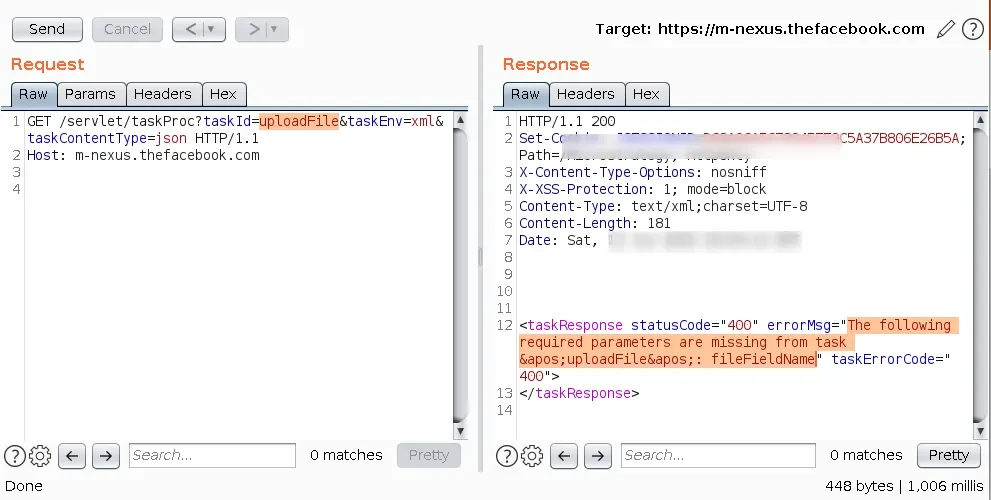
Documentation on the MicroStrategy website about this task was scarce, so the source code was reviewed manually. Decompiling each jar of the SDK and searching for com.microstrategy.web.tasks.UploadFileTask showed that the WebTasks.jar file contained that class.
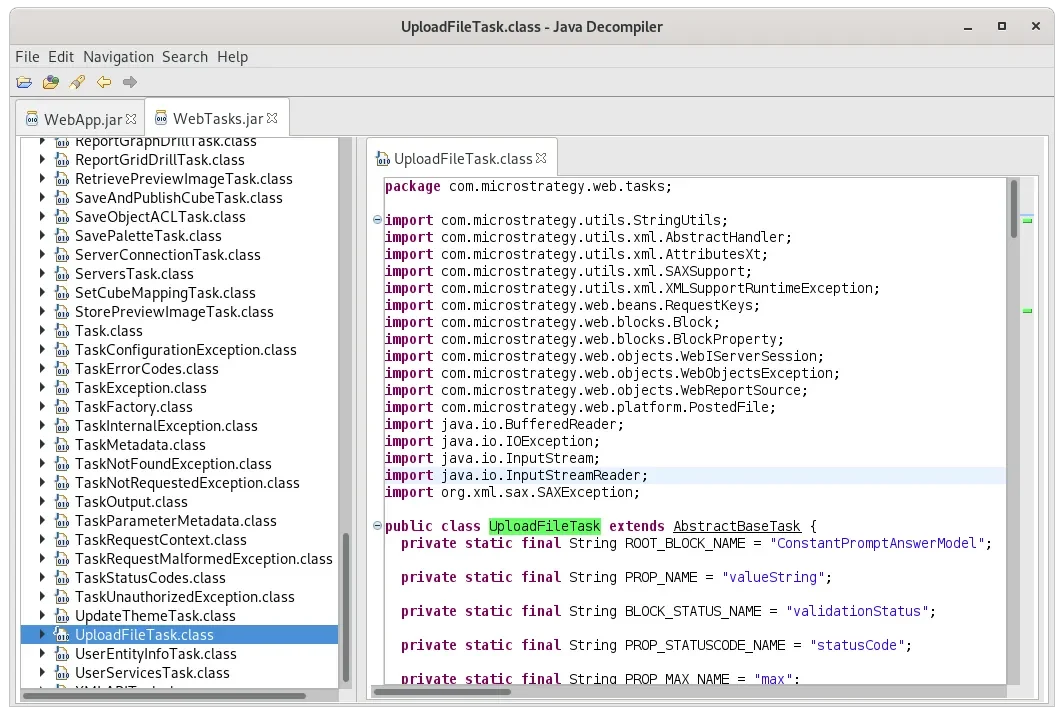
The class supports file upload and processing. It first checks the fileFieldName URL parameter, which must match the name of the file being uploaded. It then checks the file extension: for Excel files (xlsx and xls) it calls parseUploadedExcelFile, and for any other file it processes the file with parseUploadedFile.
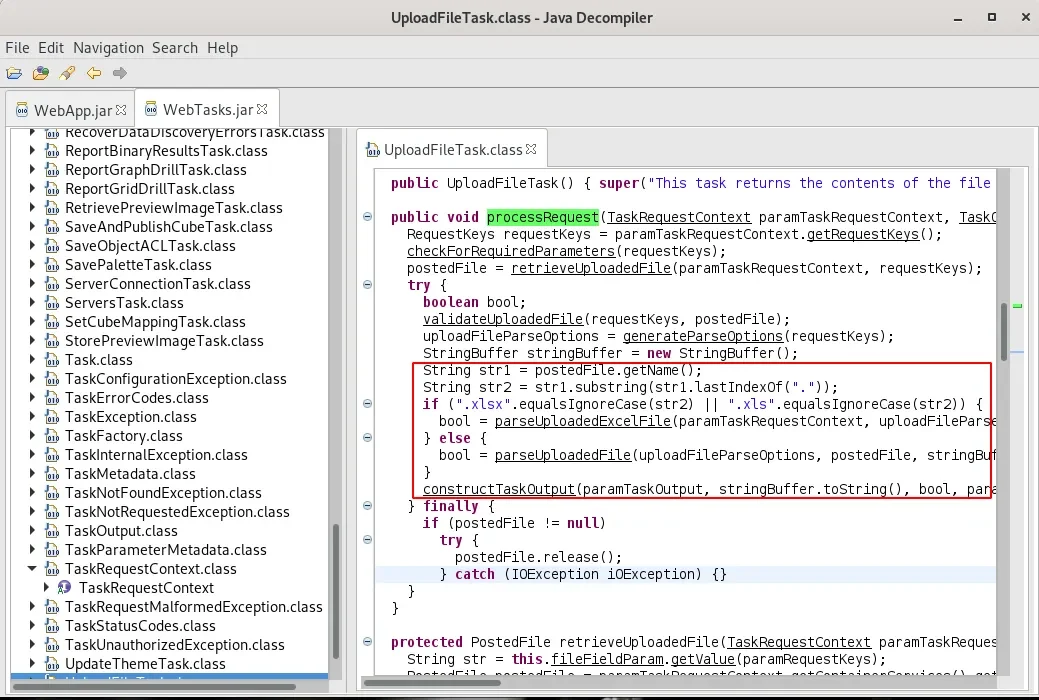
parseUploadedExcelFile checks for a valid session first, so Excel files could not be uploaded. parseUploadedFile performed no such check.
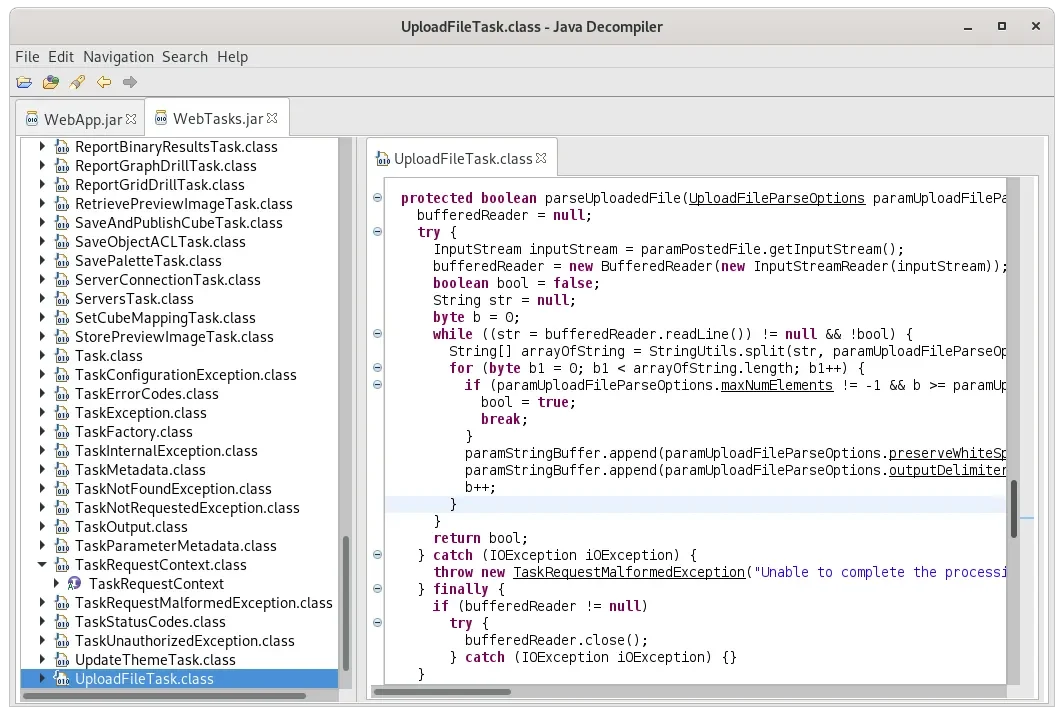
The task did not store the uploaded file on the server. Instead it processed the file from the HTML form and returned the contents to the client. That ruled out the original plan of uploading a web shell, because nothing was persisted.
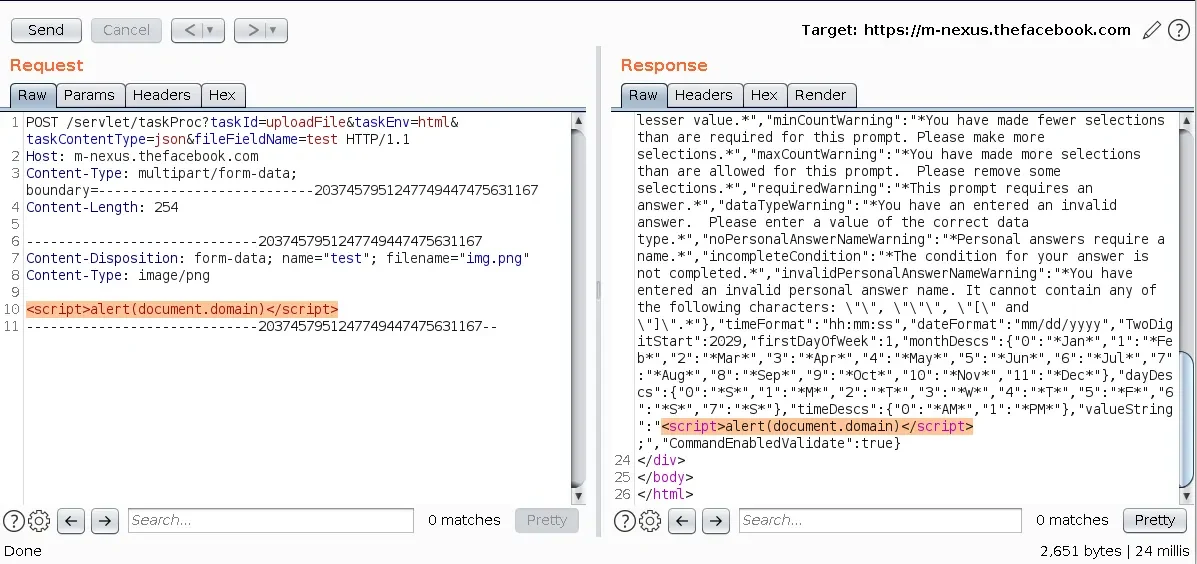
What mattered was that UploadFileTask processes data from the uploaded file and renders it without output encoding. That allows arbitrary JavaScript execution in the context of m-nexus.thefacebook.com.
Exploitation
Step 1: confirm the reflection
A reflected XSS was confirmed, but the open question was how to exploit it. A web page was created to exploit the XSS.

The attempt failed: as an attacker, the contents of the file cannot be controlled.
Research confirmed that form-based file uploads do not allow an attacker to specify file contents. The relevant specification is RFC 1867, referenced in the article as https://tools.ietf.org/html/rfc1867.
Step 2: send a file with attacker-chosen contents
After much trial and error, the researcher wrote a small HTML plus JavaScript page that sends a file through a typical POST form and triggers the cross-site scripting vulnerability.
The page is hosted on the researcher's server and its link is sent to the victim. When the victim clicks the link, the page triggers an XSS popup showing the domain name.
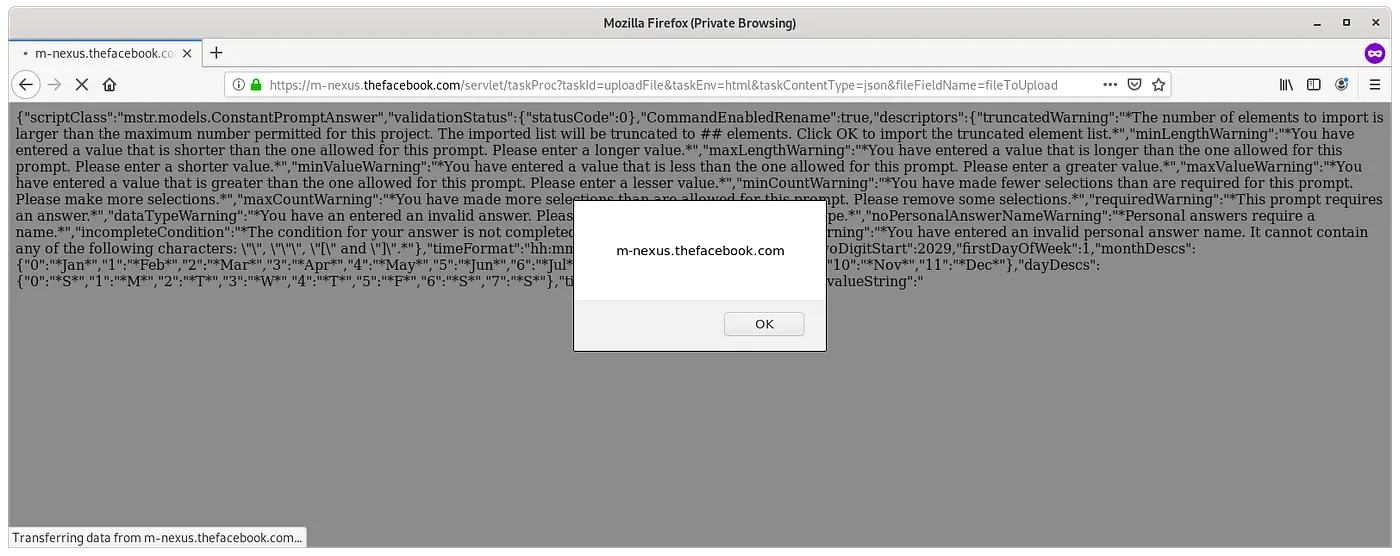
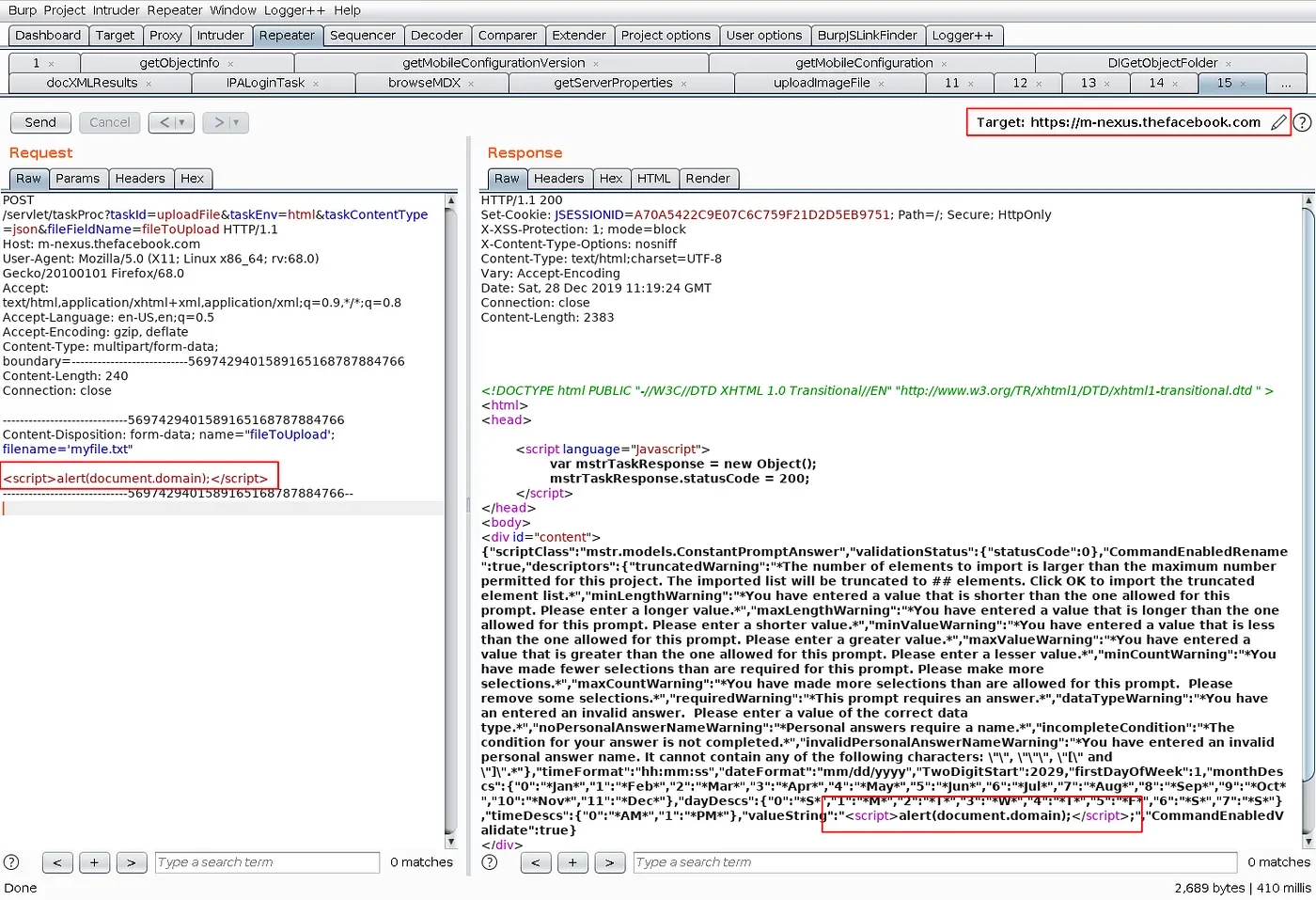
The HTTP response of the vulnerable URL was observed in Burp Suite: the HTML/JavaScript code is reflected without output encoding.
The researcher created a small HTML plus JavaScript page that sends a file through a typical POST form and triggers the vulnerability.
Step 3: the wikiScrapper variant
A second task, wikiScrapper, was found by enumerating pre-built tasks. It scrapes Wikipedia content and takes a searchString parameter that accepts a keyword and extracts data from Wikipedia.
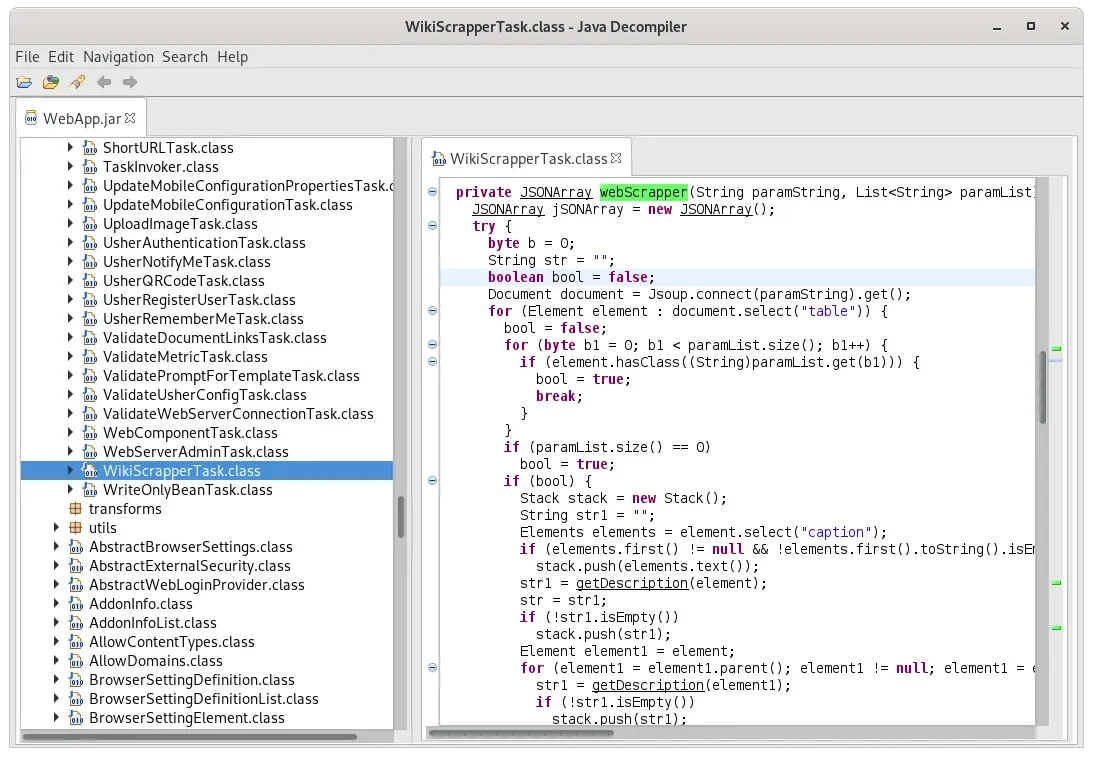
If the supplied string starts with http:// or https://, the task extracts data from that arbitrary website instead. The extracted data is rendered without encoding, which makes searchString vulnerable to reflected cross-site scripting.
Scraping an arbitrary page has conditions. The page must be HTML with the required tags HTML, BODY and H1. It must also contain a table, and the table tag must carry at least one wikitable class.
An HTML page meeting all of these conditions, containing the XSS payload, was hosted on HTML Pasta.
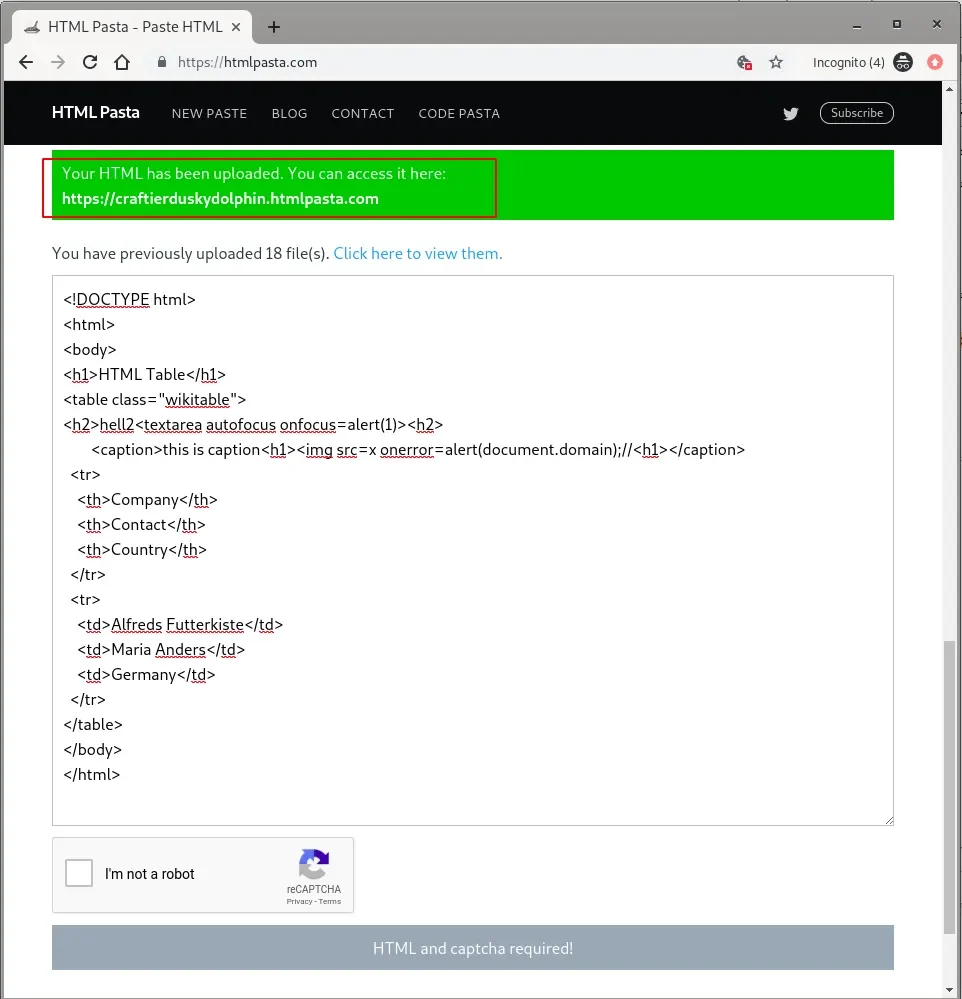
The link to that page is passed to the searchString parameter:
https://m-nexus.thefacebook.com/servlet/taskProc?taskId=wikiScrapper&taskEnv=html&taskContentType=json&searchString=https://{PASTE_LINK_HERE}&shouldSuggest=false&publicDataSuggestionURL=&publicDataSearchURL=&publicDataPageURL=
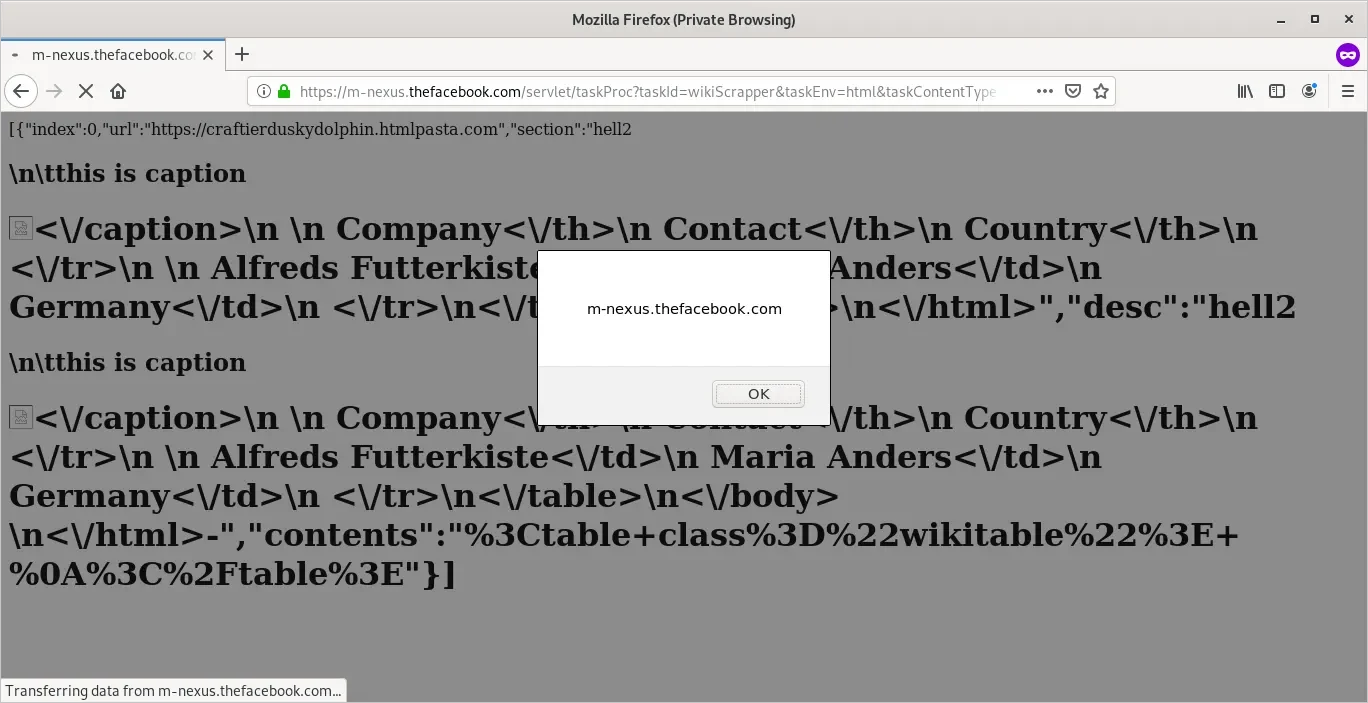
Opening this link in the browser produces an XSS popup with the domain name.
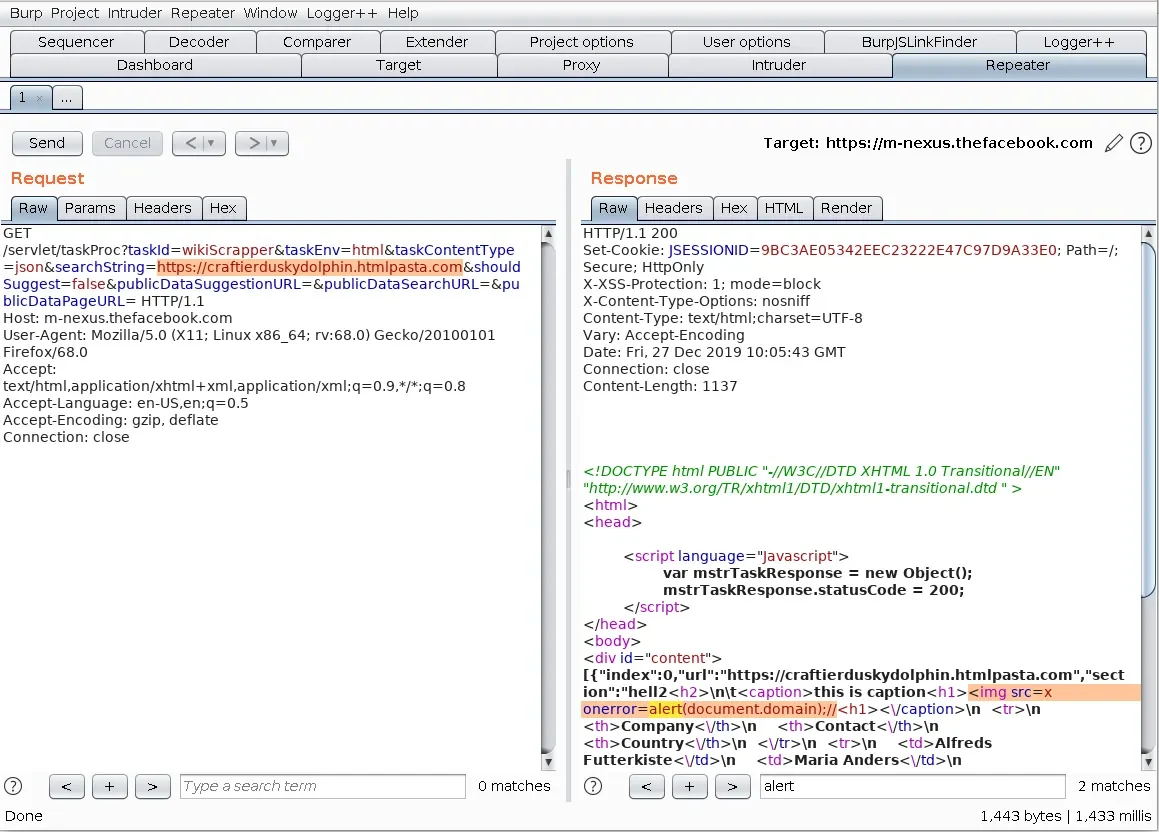
In Burp Suite, the HTTP response of the vulnerable URL shows the HTML/JavaScript code reflected without output encoding.
Root cause
In both cases the server takes attacker-influenced content and renders it into an HTML response without output encoding. In the uploadFile case, the content is the body of the uploaded file, processed by UploadFileTask and returned to the client. In the wikiScrapper case, the content is data scraped from an arbitrary URL supplied through searchString. The missing session check on parseUploadedFile (as opposed to parseUploadedExcelFile) removed the authentication barrier on the first path. The report does not describe any other defence that was present and bypassed.
Impact
An attacker can execute scripts on the client's machine, gather information about the system and send it to a malicious third party. An attacker can also trick a user into performing unintended tasks by manipulating the application DOM. Both issues run in the context of m-nexus.thefacebook.com. Exploitation of the upload path requires the victim to open an attacker-hosted page, which then submits the crafted file; exploitation of the wikiScrapper path requires the victim to open a crafted link, and the attacker's page must satisfy the scraping conditions described above.
Fix
The report states that all issues have been fixed and that the m-nexus.thefacebook.com domain is no longer publicly accessible. It does not describe the specific code changes made. The general fix would be output encoding of the file contents and of the scraped data before they are rendered, together with a session check on parseUploadedFile consistent with the one on parseUploadedExcelFile.
Variants to test
- Enumerate registered task names on servlet-style dispatchers (
taskProcand similar) and look for tasks that echo input back. A positive result is a task whose response contains your marker string unencoded. - Test file-processing tasks for a
fileFieldName-style parameter and compare behaviour across file extensions, since different extensions may route to different code paths with different checks. A positive result is a path that processes the file without a session check. - For any task that fetches a URL, supply
http://andhttps://values pointing at a page you control and see whether its content is reflected. A positive result is your HTML appearing in the response without encoding. - Where a scraper imposes structural conditions (required tags, a table with a specific class), build a page that satisfies them and embed a payload in the reflected part. A positive result is script execution in the target origin.
- Where a form-based upload reflects file contents, build the file client-side in JavaScript and submit it through a POST form. A positive result is the payload executing when the victim loads the attacker's page.
What happened, in plain words
A security researcher was poking around a Facebook server that ran a piece of third-party software called the MicroStrategy Web SDK. That software is a business intelligence portal: a tool that companies use to build reports and dashboards from data. Facebook had deployed it on a host called m-nexus.thefacebook.com.
His original plan had nothing to do with cross-site scripting. He wanted to find a file upload feature so he could put a web shell on the server. A web shell is a small script that, once it sits on a server, lets an attacker run commands on that machine through the browser, like a remote control left behind in someone's house.
While looking for that upload feature, he found two separate bugs. Both let an attacker run their own JavaScript inside a page served by m-nexus.thefacebook.com. That class of bug is called reflected cross-site scripting, or rXSS. In both cases the server took some content, pasted it into a web page it sent back, and never cleaned it up first. The browser then treated that content as part of the page, including any script hidden in it.
He reported the issues, Facebook fixed them, and he received a five-digit bounty. The m-nexus.thefacebook.com domain is no longer publicly accessible.
This article walks through both bugs from the beginning, assuming you have never done security work before. You only need to know how to use a browser and a computer.
Background: the pieces involved
Before the bugs make sense, a few everyday ideas need to be clear.
A server and a client. A server is a computer somewhere that holds a website and answers requests. A client is your browser, the program on your machine that asks for pages. When you type an address, your browser sends a request to the server, and the server sends back a response, usually a page of HTML.
HTML. HTML is the language web pages are written in. It is made of tags like <h1> for a heading or <table> for a table. A browser reads the tags and draws the page.
JavaScript. JavaScript is a programming language that runs inside the browser. It is what makes pages interactive. It can also read things the page can see, such as cookies, and send them somewhere else.
Cross-site scripting (XSS). Imagine a noticeboard where visitors can pin notes. If the board simply pins whatever anyone hands in, someone can pin a note that says "whoever reads this, hand me your wallet". XSS is the web version of that. The server takes text from a user and puts it into a page without checking it. If the text contains JavaScript, the browser runs it as if the site itself had written it. The script then runs with the site's permissions.
Reflected XSS. In reflected XSS, the malicious text is not stored on the server. It goes in with a request and comes straight back out in the response, like a mirror. The victim has to be tricked into sending that request, usually by clicking a link or opening a page the attacker controls.
Output encoding. This is the defence. Before putting user text into a page, the server replaces characters that have special meaning in HTML, such as < and >, with harmless codes. The browser then shows the text as text instead of treating it as a tag or a script. When a report says content was rendered "without output encoding", it means this cleaning step was missing.
A servlet and a task. A servlet is a piece of Java software on a server that handles web requests. The MicroStrategy SDK exposes a servlet endpoint called taskProc. You send it a request naming a task, and it runs that task. Think of it as a reception desk: you say which department you want, and the desk forwards you. The tasks are pre-built pieces of functionality registered on the server.
An API. An API is a way for one program to talk to another. Instead of a human clicking buttons, a program sends a structured request and gets a structured answer. The taskProc endpoint is effectively an API: you name a task and pass it parameters, and it does the work.
A URL parameter. A URL can carry extra information after a question mark, in the form name=value, with several pairs joined by &. For example, ?taskId=uploadFile tells the server which task to run. These pairs are called parameters.
A session and a cookie. When you log in somewhere, the server gives your browser a small piece of data called a session cookie. Your browser sends it back with every request, and the server uses it to recognise you. A "valid session check" means the server looks for that cookie and refuses the request if it is missing or wrong. If a feature has no session check, anyone on the internet can use it, logged in or not.
A jar file and decompiling. Java programs are often packaged in files ending in .jar. The code inside is compiled, meaning it is stored in a form meant for machines, not people. Decompiling is the reverse: turning that machine form back into readable source code so you can study it.
Burp Suite. Burp Suite is a tool that sits between your browser and a server and records every request and response. Security testers use it to see exactly what was sent and what came back.
A web shell. A web shell is a script uploaded to a server that lets an attacker run commands on it remotely. Uploading one is a common goal when testing file upload features.
SSRF. Server-side request forgery is a bug where an attacker can make the server itself fetch a URL of the attacker's choosing. The researcher had reported several of these against the same deployment in an earlier article, and this article builds on that work.
The setup
The work was done against Facebook's production server hosting the MicroStrategy Web SDK. The researcher downloaded the SDK to his own computer and decompiled its jar files with a tool called jd-gui so he could read the Java source. He used Burp Suite's proxy to watch HTTP responses. For the second bug, he hosted a specially crafted HTML page on HTML Pasta, a free service that lets anyone host HTML anonymously.
No accounts, roles or credentials are described. The Excel path required a valid session, but the other path did not, and that is what made the first bug reachable without logging in.
Finding the first bug
By enumerating pre-built tasks, the researcher found that the uploadFile task was registered and accessible.
Enumerating means trying a list of likely names to see which ones the server recognises. It is like walking down a corridor trying door handles. The screenshot shows the task being reachable.
Documentation on the MicroStrategy website about this task was scarce, so he reviewed the source code by hand. He decompiled each jar of the SDK and searched for com.microstrategy.web.tasks.UploadFileTask. The WebTasks.jar file contained that class.
A class is a named block of code. Finding the class that implements the task means you can read exactly what the task does, rather than guessing from its name.
The class supports file upload and processing. It first checks the fileFieldName URL parameter, which must match the name of the file being uploaded. It then checks the file extension: for Excel files (xlsx and xls) it calls parseUploadedExcelFile, and for any other file it processes the file with parseUploadedFile.
In plain words: the task looks at the name you gave the file field, then looks at the end of the filename. If the file ends in .xlsx or .xls, it takes one route. Anything else takes another route. Two routes means two sets of checks, and that is where bugs often hide.
parseUploadedExcelFile checks for a valid session first, so Excel files could not be uploaded. parseUploadedFile performed no such check.
This is the important difference. The Excel route asked "are you logged in?" and turned away anyone who was not. The other route never asked. So an outsider could reach the second route without any account.
The task did not store the uploaded file on the server. Instead it processed the file from the HTML form and returned the contents to the client. That ruled out the original plan of uploading a web shell, because nothing was kept on the server.
What mattered was that UploadFileTask processes data from the uploaded file and renders it without output encoding. That allows arbitrary JavaScript execution in the context of m-nexus.thefacebook.com.
"In the context of" a domain means the script runs as if the site itself had written it. It can read what the site can read and act with the site's permissions. That is what makes XSS serious.
Exploiting the first bug
Step 1: confirm the reflection
A reflected XSS was confirmed, but the open question was how to exploit it. A web page was created to exploit the XSS.
The bug was real, but a bug you cannot trigger in a realistic attack is not much use. The next question was how to get a victim's browser to send a file whose contents the attacker controls.
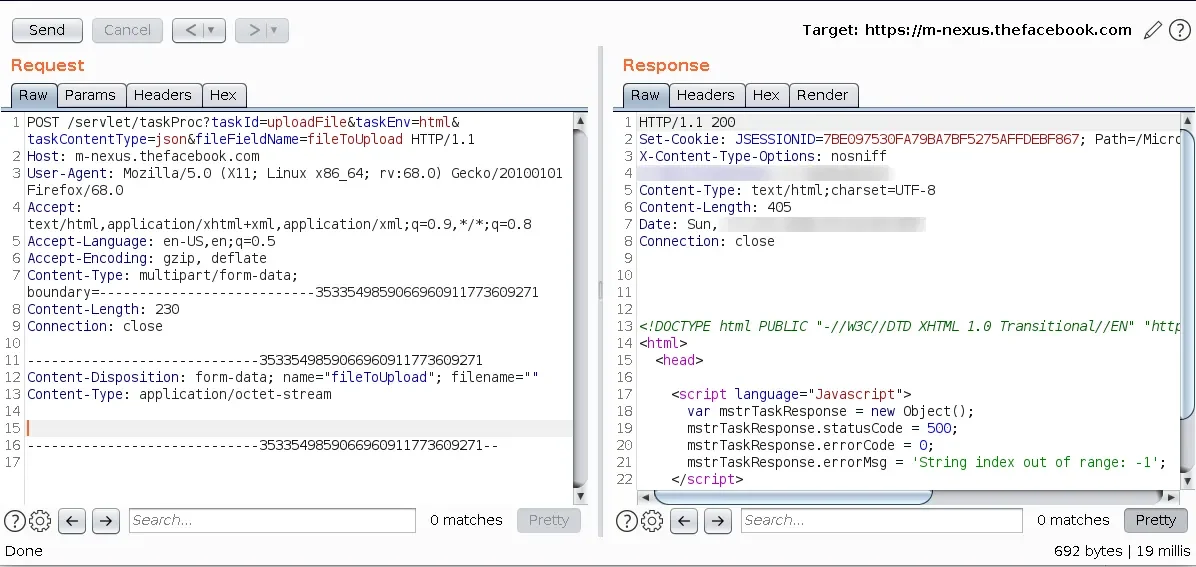
The attempt failed: as an attacker, the contents of the file cannot be controlled.
Here is the problem in everyday terms. A normal upload form lets the victim pick a file from their own computer. The attacker cannot reach into the victim's computer and choose what is in that file. So the attacker cannot put a script inside it.
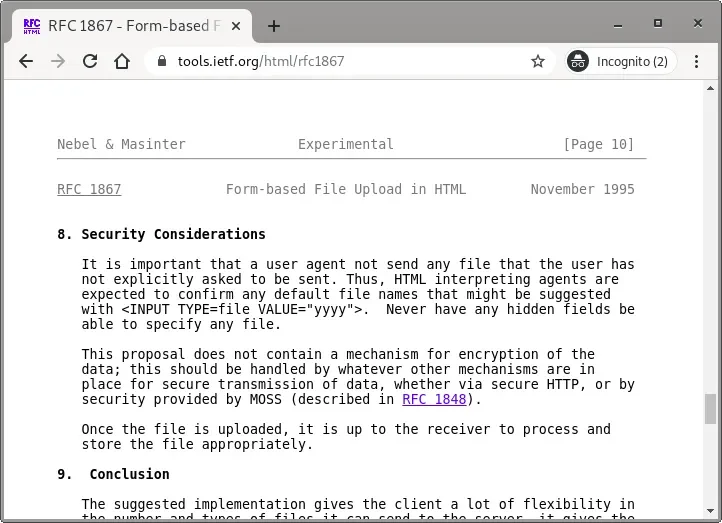
Research confirmed that form-based file uploads do not allow an attacker to specify file contents. The relevant specification is RFC 1867, referenced in the article as https://tools.ietf.org/html/rfc1867.
RFC 1867 is the document that describes how browsers send files through forms.
Step 2: send a file with attacker-chosen contents
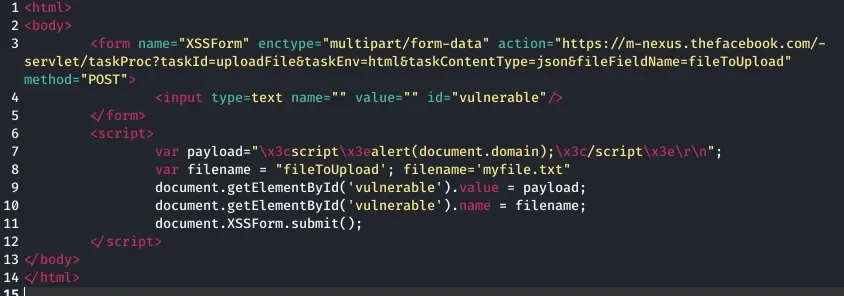
After much trial and error, the researcher wrote a small HTML plus JavaScript page that sends a file through a typical POST form and triggers the cross-site scripting vulnerability.
A POST form is a form that sends its data in the body of the request rather than in the URL. The researcher wrote a small HTML plus JavaScript page that sends a file through a typical POST form and triggers the vulnerability.
The page is hosted on the researcher's server and its link is sent to the victim. When the victim clicks the link, the page triggers an XSS popup showing the domain name.
A popup showing the domain name is a simple proof that JavaScript ran in the page's context.
The HTTP response of the vulnerable URL was observed in Burp Suite: the HTML/JavaScript code is reflected without output encoding.
Burp Suite shows the raw response. Seeing the script come back unchanged, rather than turned into harmless text, is the direct evidence of the missing encoding.
Step 3: the wikiScrapper variant
A second task, wikiScrapper, was found by enumerating pre-built tasks. It scrapes Wikipedia content and takes a searchString parameter that accepts a keyword and extracts data from Wikipedia.
Scraping means fetching a web page and pulling out the parts you want, rather than showing the whole page. This task was built to fetch Wikipedia pages and return pieces of them.
If the supplied string starts with http:// or https://, the task extracts data from that arbitrary website instead. The extracted data is rendered without encoding, which makes searchString vulnerable to reflected cross-site scripting.
In other words, the task was meant to fetch Wikipedia, but it will fetch any address you give it. Whatever it pulls back is pasted into the response without cleaning. So if the attacker controls the page being fetched, the attacker controls what gets pasted in.
Scraping an arbitrary page has conditions. The page must be HTML with the required tags HTML, BODY and H1. It must also contain a table, and the table tag must carry at least one wikitable class.
A class is a label attached to an HTML tag, used for styling. The scraper requires a table carrying the wikitable class.
An HTML page meeting all of these conditions, containing the XSS payload, was hosted on HTML Pasta.
The link to that page is passed to the searchString parameter:
https://m-nexus.thefacebook.com/servlet/taskProc?taskId=wikiScrapper&taskEnv=html&taskContentType=json&searchString=https://{PASTE_LINK_HERE}&shouldSuggest=false&publicDataSuggestionURL=&publicDataSearchURL=&publicDataPageURL=
Line by line, in plain words:
https://m-nexus.thefacebook.com/servlet/taskProcis the address of the task dispatcher, the reception desk described earlier.taskId=wikiScrappernames the task to run, the Wikipedia scraper.taskEnv=htmlandtaskContentType=jsontell the task what kind of output is expected.searchString=https://{PASTE_LINK_HERE}is the important one. Instead of a keyword, it is given the address of the attacker's page.{PASTE_LINK_HERE}is a placeholder for that address.shouldSuggest=false,publicDataSuggestionURL=,publicDataSearchURL=andpublicDataPageURL=are further parameters, left empty or set to false.
Opening this link in the browser produces an XSS popup with the domain name.
In Burp Suite, the HTTP response of the vulnerable URL shows the HTML/JavaScript code reflected without output encoding.
Again, the raw response is the proof: the attacker's script came back inside the page, unchanged.
Why it worked
In both cases the server takes content influenced by an attacker and renders it into an HTML response without output encoding. In the uploadFile case, the content is the body of the uploaded file, processed by UploadFileTask and returned to the client. In the wikiScrapper case, the content is data scraped from an arbitrary URL supplied through searchString. The missing session check on parseUploadedFile, as opposed to parseUploadedExcelFile, removed the authentication barrier on the first path. The report does not describe any other defence that was present and bypassed.
What an attacker could do with it
An attacker can execute scripts on the client's machine, gather information about the system and send it to a malicious third party. An attacker can also trick a user into performing unintended tasks by manipulating the application DOM.
The DOM is the browser's live model of the page, the structure the browser builds from the HTML and updates as things change. A script running in the page can change that structure, which is how it can make the page do things the user did not intend.
Both issues run in the context of m-nexus.thefacebook.com. Exploiting the upload path requires the victim to open an attacker-hosted page, which then submits the crafted file. Exploiting the wikiScrapper path requires the victim to open a crafted link, and the attacker's page must satisfy the scraping conditions described above.
The fix
The report states that all issues have been fixed and that the m-nexus.thefacebook.com domain is no longer publicly accessible. It does not describe the specific code changes made. The general fix would be output encoding of the file contents and of the scraped data before they are rendered, together with a session check on parseUploadedFile consistent with the one on parseUploadedExcelFile.
Things worth trying on your own
- Enumerate registered task names on servlet-style dispatchers (
taskProcand similar) and look for tasks that echo input back. A positive result is a task whose response contains your marker string unencoded. - Test file-processing tasks for a
fileFieldName-style parameter and compare behaviour across file extensions, since different extensions may route to different code paths with different checks. A positive result is a path that processes the file without a session check. - For any task that fetches a URL, supply
http://andhttps://values pointing at a page you control and see whether its content is reflected. A positive result is your HTML appearing in the response without encoding. - Where a scraper imposes structural conditions (required tags, a table with a specific class), build a page that satisfies them and embed a payload in the reflected part. A positive result is script execution in the target origin.
- Where a form-based upload reflects file contents, build the file client-side in JavaScript and submit it through a POST form. A positive result is the payload executing when the victim loads the attacker's page.
Glossary
- API: a way for one program to talk to another, sending structured requests and getting structured answers.
- Burp Suite: a tool that sits between browser and server and records requests and responses.
- Class: a named block of code in a program.
- Client: the program on your machine, usually the browser, that asks a server for pages.
- Cookie: a small piece of data a site gives your browser, sent back with later requests so the site can recognise you.
- Decompiling: turning compiled code back into readable source code.
- DOM: the browser's live model of a page, which scripts can read and change.
- HTML: the language web pages are written in, made of tags.
- HTML Pasta: a free service that lets anyone host HTML anonymously.
- HTTP response: what a server sends back after a request.
- JavaScript: the programming language that runs inside browsers.
- Jar file: a package file for Java programs.
- jd-gui: a tool for decompiling Java code.
- Output encoding: replacing characters with special meaning in HTML with harmless codes before showing user text.
- Parameter: a
name=valuepair carried in a URL or a request. - POST form: a form that sends its data in the body of the request rather than in the URL.
- Reflected XSS: XSS where the malicious text goes in with a request and comes straight back in the response, without being stored.
- RFC 1867: the document describing how browsers send files through forms.
- Scraping: fetching a web page and pulling out selected parts of it.
- Server: a computer that holds a website and answers requests.
- Servlet: a piece of Java software on a server that handles web requests.
- Session: the server's record of who you are, usually tied to a cookie.
- SSRF: server-side request forgery, a bug where an attacker makes the server fetch a URL of their choosing.
- Task: a pre-built piece of functionality registered on the server and run by name.
- Web shell: a script uploaded to a server that lets an attacker run commands on it remotely.




