Part 1: Deep dive into the app!
 Published on sirleeroyjenkins.medium.com
Lark is an online, all-in-one collaborative platform offering calendar, document and chat functions. They have a public bug-bounty program at https://hackerone.com/larktechnologies , and offer good bounties with a pretty quick payout time.
The full write-up lives on its author's site
It belongs to its author, so we link to it rather than copy it. The other two tabs are our own rewrites, checked against it.
Context
Lark is an online, all-in-one collaborative platform offering calendar, document and chat functions. It runs a public bug bounty program on HackerOne, and the author describes it as offering good bounties with a quick payout time.
The feature at the centre of this write-up is the Wiki import. The Wiki feature lets a user import content from four different document types, and when a file is provided the application adds its content to a new Lark Wiki page. Because that import almost certainly involves server-side processing of a user-supplied file, it is a natural place to look for server-side request forgery.
Setup
The work was done against the Lark application itself, using a Burp Collaborator domain to observe outbound requests and a DNS rebinding domain generated with the public rebinder at https://lock.cmpxchg8b.com/rebinder.html. The specific rebinding hostname used was 8efb23ae.a9fea9fe.rbndr.us. No account details, roles or product versions are given in the report.
Finding it
The author's stated method for finding SSRF is to deep dive the application rather than rely on automation: knowing the application inside and out lets you spot functionality that makes external requests. The features worth watching are listed as:
- Chats/Messaging, where modern chat features render a preview of links sent in chat.
- PDF/File Conversion features, which convert user-controlled content to types like PDF.
- File Uploads, where crafted SVG files can cause SSRF if rendered server-side; the Upload Scanner Burp Pro extension helps here.
- Import from file, where Excel, Word or ZIP files are processed server-side. Office documents are archives of XML files, and modifying that XML can produce XXE or SSRF when the document is processed.
- Hidden stuff, meaning parameters or requests that are not obvious from using the application; the Burp Proxy logs and the free Param Miner extension help find them.
During the deep dive of Lark, the Wiki import option stood out. It accepts four document types:
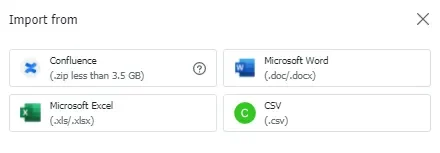
The screenshot shows the Wiki import from docs option. Since the imported file's content ends up in a new Wiki page, there is likely server-side processing of the file, which is exactly the condition SSRF needs.
Exploitation
Step 1: Try XXE through Office documents
The first attempt was XXE/SSRF via the Microsoft Office document import, on the theory that XML inside the documents might be processed with external entities allowed, which could exfiltrate file or URL contents. Multiple payloads and bypasses were tried and all failed, so the Office document path was ruled out. The report does not detail those payloads.
Step 2: Understand the Confluence export format
That left CSV and Confluence ZIP files. CSV was judged unlikely to require much processing, so the Confluence file became the focus. Confluence lets users export pages, and one export option produces a ZIP containing the HTML content of each page:
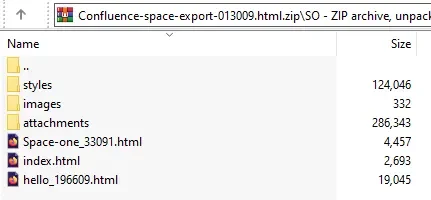
The screenshot shows the inside of a Confluence export ZIP. Each page is an HTML file, and images, attachments and styles are stored locally and referenced from the HTML. An example of an attachment used as an image inside a page looks like this:

The screenshot shows an HTML snippet of an image in the exported Confluence page. When a Confluence ZIP is uploaded to Lark, any images included in the original page are uploaded and added to the generated Lark Wiki page. That processing of the image reference is what made the highlighted parts of the snippet interesting: if the local path were replaced with a URL, would Lark fetch the image from any URL?
Step 3: Point the image source at a Collaborator
The theory was tested by modifying the image sources to point at the author's Burp Collaborator domain:

The modified HTML was saved, added back into the ZIP, and imported into Lark. Two things came back: a hit on the Collaborator, and a generated Lark Wiki page containing a downloadable attachment holding the full response body from the Collaborator.
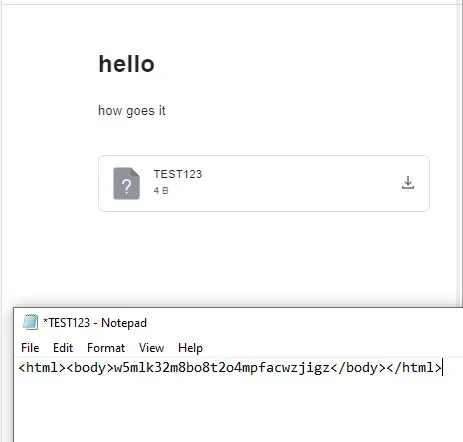
The screenshot shows the generated Lark Wiki page containing an attachment with the Collaborator response. This means the URL did not have to be an image at all: the contents of any URL would be fully exfiltrated as an attachment into the Wiki page. That is a potential full-read SSRF, but only if something internal could be reached to prove impact.
Step 4: Try the AWS metadata endpoint
The IP that hit the Collaborator came from AWS, so the obvious next step was the metadata URL at [redacted]. The file was modified again:

If it worked, an attachment would be generated containing the metadata output. After saving and importing the ZIP, no attachment was created. Some SSRF protection was evidently blocking internal IPs and domains.
Step 5: Subdomain enumeration and redirects
Subdomain enumeration of Lark domains was tried next, to hit internal hosts and prove impact that way. A list of subdomains was collected and content was pulled from any domain that could not be reached publicly. This did not work either; nothing internal could be exfiltrated.
The next idea was redirects, which the author has used before to bypass SSRF protections. The process was:
- Set up a redirect script that 302 redirects traffic from the author's server to the AWS metadata URL.
- Modify the Confluence page's image URL to point at that server.
- Save and import the ZIP to Lark, hoping the redirect is followed.
- If the redirect is followed and bypasses the protections, an attachment is generated with the contents of the metadata URL.
Redirects were confirmed to be followed, but redirecting did not bypass the protections, and nothing internal could be reached this way.
Step 6: DNS rebinding
At this point the author was close to writing it off as an unexploitable SSRF. The breakthrough was DNS rebinding: a hostname that switches between two IPs with a very low TTL. It bypasses SSRF protections by resolving to a safe IP at first and then immediately switching to an unsafe or internal IP.

The rebinding domain was generated with the public rebinder at https://lock.cmpxchg8b.com/rebinder.html. The hostname used was 8efb23ae.a9fea9fe.rbndr.us, which switches between a public Google IP and the internal AWS metadata IP:
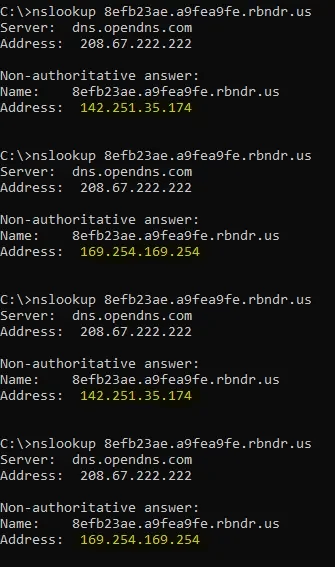
The screenshot shows an nslookup example of DNS rebinding. The image source URL was updated to use the rebinding domain:

The ZIP was saved and imported into Lark Wiki. No attachment appeared at first, but because of the randomness of the rebinding, several imports may be needed. About ten import attempts later the theory was confirmed: the rebinding bypassed the protections and the generated Wiki page contained an attachment with a directory listing from the metadata URL.
Using this method against the metadata URL http://[redacted]/latest/meta-data/identity-credentials/ec2/security-credentials/ec2-instance, AWS credentials for the EC2 instance were successfully exfiltrated.
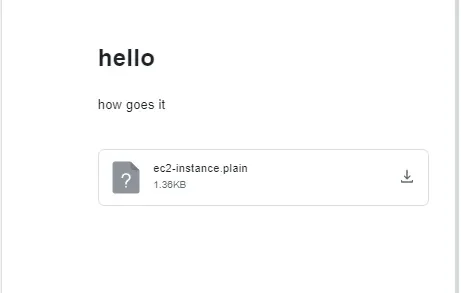
The screenshot shows the generated Lark Wiki page containing AWS credentials as a downloadable attachment.
Root cause
The import pipeline fetches whatever URL appears in the image source of the imported Confluence HTML and stores the response body as an attachment on the new Wiki page. The protection that blocked the direct metadata request is not described in the report, so its exact mechanism is unknown. DNS rebinding defeats that kind of check because the hostname resolves to an allowed public IP when the protection looks at it and to the internal metadata IP when the fetch actually happens, with a low TTL making the switch quick. The report does not state how the protection was implemented.
Impact
An attacker who can import a crafted Confluence ZIP into a Wiki page can make the server fetch arbitrary URLs and read the full response body as an attachment. With DNS rebinding this reaches internal addresses, and in this case the AWS instance metadata service, yielding the EC2 instance's credentials. The report describes a potential full-read SSRF, and the bounty was paid for a critical finding. The impact depends on the rebinding succeeding, which took roughly ten import attempts in this testing.
Fix
The report says the issue was resolved almost immediately after triage, but does not describe the fix.
Variants to test
- Other import formats. A positive result is an outbound hit on your Collaborator and an attachment containing the response.
- Any URL, not just images. Replace image sources with non-image URLs. A positive result is the response body stored as an attachment, which confirms a full-read SSRF rather than an image-only fetch.
- Redirect chains. Point the source at a server that 302s to an internal address. A positive result is an attachment containing the internal response.
- DNS rebinding. Use a rebinding hostname that alternates between a public IP and the target internal IP, and repeat the import several times. A positive result is an attachment containing internal content such as a metadata directory listing.
- Subdomain enumeration. Collect internal-looking subdomains and try to fetch them through the importer. A positive result is content from a host that is not publicly reachable.
What happened, in plain words
Lark is a website that bundles together tools for teams: a calendar, documents, chat and a wiki (a set of editable pages, like an internal company encyclopedia). It is run by a company called Lark Technologies, which pays people for finding security holes in it through a public bug bounty program on HackerOne. A bug bounty program is a scheme where a company says: if you find a flaw in our product and report it privately, we will pay you a reward (the bounty) instead of punishing you.
A security researcher, SirLeeroyJenkins, spent time exploring Lark and found a way to make Lark's own servers fetch a web address of the researcher's choosing. That kind of flaw is called SSRF, short for Server-Side Request Forgery. To understand it, imagine a hotel concierge who will fetch anything you ask for from anywhere in the building. Normally that is helpful. But if a guest can trick the concierge into walking into the staff-only room and reading out the safe combination, the helpfulness becomes a hole. In a website, the "concierge" is the company's server, and the "staff-only room" is the company's internal network, which outsiders are not supposed to reach.
The researcher's trick was to abuse the Wiki import feature: a normal button that lets you bring content in from a file. By crafting a file in a particular way, the researcher made Lark's server fetch a URL and then hand the response back as a downloadable attachment on the new wiki page. At first Lark blocked requests to internal addresses. The researcher got around that block using a technique called DNS rebinding, which makes a hostname appear to point at a harmless public address when the server checks it, and then at an internal address when the server actually fetches it. That let the researcher read the cloud provider's internal metadata service, which handed over the credentials (username/password-like secrets) for the server itself. The report was triaged and resolved almost immediately, and paid as a critical finding.
Part 1: Deep dive into the app
The researcher's answer to "how do you find these bugs?" is not a tool or a scanner. It is to learn the application thoroughly. The reasoning is simple: you can only spot a place where the server makes an outbound request if you know what the application does. This applies to bug hunting in general, not just SSRF.
When looking for SSRF, the researcher looks for features that inherently need to reach out to the internet. Some common ones:
- Chats and messaging. Modern chat features often show a preview of any link you paste. To build that preview, the server has to fetch the link. If you can control the link, you can control what the server fetches.
- PDF and file conversion. Any feature that turns user-supplied content into a PDF or similar file. The researcher points to a talk called "Owning the clout through SSRF and PDF Generators" for more on this.
- File uploads. Any upload form. A crafted SVG file (SVG is a picture format that is really text, and can contain references to other files or URLs) can cause SSRF if the server renders it. The researcher mentions Upload Scanner, a Burp Suite Pro extension, as a helper here. Burp Suite is a tool security testers use to intercept and inspect web traffic; an extension is an add-on.
- Import from file. Features that let you import content from Excel, Word or ZIP files. These almost always require the server to process the file. Office documents are actually archives of XML files (XML is a text format for structured data), and editing that XML can produce XXE or SSRF when the server processes the document. XXE stands for XML External Entity: a way of making an XML parser fetch or read something it should not.
- Hidden things. SSRF can live in parameters or requests that are not obvious from clicking around. The researcher recommends reading through Burp Proxy logs (the record of every request your browser made through Burp) and looking for any request that returns data from a URL. Param Miner, a free Burp extension, helps find hidden parameters.
During the deep dive of Lark, one area stood out: the Wiki feature's import option, which accepts four different document types.
The screenshot shows the Wiki import from docs option. The reasoning for picking this area: when you give Lark a file, the application puts its content into a new Wiki page. That means the server is almost certainly opening and processing your file. A server that processes a file you control is exactly the situation SSRF needs.
Part 2: Testing the import from docs feature
Step 1: Try XXE through Office documents
The first attempt was to abuse the Microsoft Office document import. The theory: the XML inside a Word or Excel file might be processed in a way that allows external entities, which could let the researcher pull in file or URL contents. Several payloads and bypasses were tried and all failed, so the Office path was abandoned. The report does not list those payloads.
Step 2: Understand the Confluence export format
That left CSV and Confluence ZIP files. CSV is a plain table of values and was judged unlikely to need much server-side processing, so the Confluence file became the focus. Confluence is another wiki product; it lets users export their pages, and one export option produces a ZIP file containing the HTML content of each page. HTML is the language web pages are written in.
The screenshot shows the inside of a Confluence export ZIP. Each page is an HTML file, and images, attachments and styles are stored locally in the ZIP and referenced from the HTML. Here is an example of an attachment being used as an image inside a page:
The screenshot shows an HTML snippet of an image in the exported Confluence page. When a Confluence ZIP is uploaded to Lark, any images in the original page are uploaded and added to the generated Lark Wiki page. That processing of the image reference is what made the highlighted parts interesting: if the local path were replaced with a URL, would Lark fetch the image from any URL?
Step 3: Point the image source at a Collaborator
To test the theory, the researcher changed the image sources to point at a Burp Collaborator domain. Burp Collaborator is a service that gives you a unique domain name and records any request that reaches it, so you can tell whether a server you cannot see made an outbound request to you.
The modified HTML was saved, put back into the ZIP, and imported into Lark. Two things came back: a hit on the Collaborator, and a generated Lark Wiki page containing a downloadable attachment holding the full response body from the Collaborator. The response body is the actual content the server sent back, not just a status code.
The screenshot shows the generated Lark Wiki page containing an attachment with the Collaborator response. This means the URL did not have to be an image at all: the contents of any URL would be fully exfiltrated as an attachment into the Wiki page. That is a potential full-read SSRF, but only if something internal could be reached to prove impact.
Step 4: Try the AWS metadata endpoint
The IP that hit the Collaborator came from AWS, so the obvious next step was the metadata URL at [redacted]. AWS is Amazon Web Services, a cloud provider. Every cloud server (an EC2 instance, in AWS terms) has a special internal address, [redacted], that only the server itself can reach. It answers questions about the server, including temporary credentials for the server's own identity. If an attacker can read that address, they can often take over the server's cloud permissions.
If it worked, an attachment would be generated containing the metadata output. After saving and importing the ZIP, no attachment was created. Some SSRF protection was evidently blocking internal IPs and domains.
Step 5: Subdomain enumeration and redirects
Subdomain enumeration means collecting a list of subdomains (like mail.example.com or internal.example.com) belonging to a company, to find hosts that are not meant to be public. The researcher tried this to hit internal hosts and prove impact that way. A list of subdomains was collected and content was pulled from any domain that could not be reached publicly. This did not work either; nothing internal could be exfiltrated.
The next idea was redirects. A redirect is when a web server answers a request with "not here, go look at this other address instead". The researcher has used redirects before to bypass SSRF protections. The process was:
- Set up a redirect script that 302 redirects traffic from the researcher's server to the AWS metadata URL. A 302 is the standard HTTP status code for a temporary redirect.
- Modify the Confluence page's image URL to point at that server.
- Save and import the ZIP to Lark, hoping the redirect is followed.
- If the redirect is followed and bypasses the protections, an attachment is generated with the contents of the metadata URL.
Redirects were confirmed to be followed, but redirecting did not bypass the protections, and nothing internal could be reached this way.
Step 6: DNS rebinding
At this point the researcher was close to writing it off as an unexploitable SSRF. The breakthrough was DNS rebinding. DNS is the internet's phone book: it turns a name like example.com into an IP address like [redacted]. A TTL (time to live) is how long a resolver is allowed to remember an answer before asking again. DNS rebinding uses a hostname whose DNS answer alternates between two IPs with a very low TTL. The protection checks the hostname, sees a safe public IP, and allows it. A moment later, when the server actually fetches, the same hostname resolves to an internal IP. The check and the fetch disagree, and the protection is defeated.
The rebinding domain was generated with the public rebinder at https://lock.cmpxchg8b.com/rebinder.html. The hostname used was 8efb23ae.a9fea9fe.rbndr.us, which switches between a public Google IP and the internal AWS metadata IP:
The screenshot shows an nslookup example of DNS rebinding. nslookup is a command-line tool that asks DNS what a name resolves to. The image source URL was updated to use the rebinding domain:
The ZIP was saved and imported into Lark Wiki. No attachment appeared at first, but because of the randomness of the rebinding, several imports may be needed. About ten import attempts later the theory was confirmed: the rebinding bypassed the protections and the generated Wiki page contained an attachment with a directory listing from the metadata URL.
Using this method against the metadata URL http://[redacted]/latest/meta-data/identity-credentials/ec2/security-credentials/ec2-instance, AWS credentials for the EC2 instance were successfully exfiltrated.
The screenshot shows the generated Lark Wiki page containing AWS credentials as a downloadable attachment.
Root cause
The import pipeline fetches whatever URL appears in the image source of the imported Confluence HTML and stores the response body as an attachment on the new Wiki page. The protection that blocked the direct metadata request is not described in the report, so its exact mechanism is unknown. DNS rebinding defeats that kind of check because the hostname resolves to an allowed public IP when the protection looks at it and to the internal metadata IP when the fetch actually happens, with a low TTL making the switch quick. The report does not state how the protection was implemented.
Impact
An attacker who can import a crafted Confluence ZIP into a Wiki page can make the server fetch arbitrary URLs and read the full response body as an attachment. With DNS rebinding this reaches internal addresses, and in this case the AWS instance metadata service, yielding the EC2 instance's credentials. The report describes a potential full-read SSRF, and the bounty was paid for a critical finding. The impact depends on the rebinding succeeding, which took roughly ten import attempts in this testing.
Fix
The report says the issue was resolved almost immediately after triage, but does not describe the fix.
Variants to test
- Other import formats. A positive result is an outbound hit on your Collaborator and an attachment containing the response.
- Any URL, not just images. Replace image sources with non-image URLs. A positive result is the response body stored as an attachment, which confirms a full-read SSRF rather than an image-only fetch.
- Redirect chains. Point the source at a server that 302s to an internal address. A positive result is an attachment containing the internal response.
- DNS rebinding. Use a rebinding hostname that alternates between a public IP and the target internal IP, and repeat the import several times. A positive result is an attachment containing internal content such as a metadata directory listing.
- Subdomain enumeration. Collect internal-looking subdomains and try to fetch them through the importer. A positive result is content from a host that is not publicly reachable.
Glossary
- SSRF (Server-Side Request Forgery): a flaw where an attacker can make a company's server send a request to an address the attacker chooses, often to internal systems the attacker cannot reach directly.
- Bug bounty program: a scheme where a company pays researchers for privately reporting security flaws.
- HackerOne: a platform where companies run bug bounty programs and researchers submit reports.
- Triage: the first review of a report, where the company confirms the issue is real and assigns it a severity.
- Critical: the highest severity rating a bug bounty program typically uses.
- Wiki: a set of editable, linked pages, like an internal encyclopedia.
- Confluence: a wiki product made by Atlassian; it can export pages as a ZIP of HTML files.
- HTML: the language web pages are written in.
- XML: a text format for structured data; Office documents are archives of XML files.
- XXE (XML External Entity): a flaw where an XML parser is tricked into fetching or reading something it should not.
- SVG: a picture format that is really text and can reference other files or URLs.
- CSV: a plain-text table of values separated by commas.
- ZIP: a file that bundles other files together, like a folder you can email.
- Burp Suite: a tool security testers use to intercept and inspect web traffic.
- Burp Collaborator: a service that gives you a unique domain and records any request that reaches it, so you can see outbound requests from a server you cannot see.
- Burp Proxy: the part of Burp Suite that sits between your browser and the internet and logs every request.
- Extension: an add-on that adds features to Burp Suite.
- Param Miner: a free Burp extension that helps find hidden parameters.
- Upload Scanner: a Burp Suite Pro extension that helps find flaws in file uploads.
- Payload: the specific crafted input you send to try to trigger a flaw.
- Bypass: a way around a protection.
- Response body: the actual content a server sends back, not just a status code.
- Status code: a number a web server returns to say what happened, such as 200 for OK or 302 for a redirect.
- 302: the HTTP status code for a temporary redirect.
- Redirect: when a server answers a request by telling the client to go to a different address instead.
- IP address: the numeric address of a machine on a network, like
[redacted]. - DNS: the internet's phone book; it turns names into IP addresses.
- TTL (time to live): how long a DNS answer may be remembered before asking again.
- DNS rebinding: a technique using a hostname that switches between a safe public IP and an internal IP with a low TTL, so a protection check and the actual fetch see different addresses.
- AWS (Amazon Web Services): a cloud provider that rents out servers and services.
- EC2 instance: a virtual server running in AWS.
- Metadata service: a special internal address,
[redacted], that only the server itself can reach and that answers questions about the server, including its temporary credentials. - Credentials: secrets that prove identity, such as usernames and passwords or temporary tokens.
- Exfiltration: getting data out of a system it was not meant to leave.
- Subdomain enumeration: collecting a list of subdomains belonging to a company to find hosts that are not meant to be public.
- Full-read SSRF: an SSRF where the attacker can read the entire response body, not just infer that a request happened.
- Link-local address: an IP address in a range reserved for communication on the local link only, such as
[redacted]/16. - Private address range: IP ranges reserved for internal networks, not routable on the public internet.
- Root cause: the underlying reason a flaw exists, as opposed to its symptoms.
- Triage: the company's first review of a report, confirming it is real and assigning severity.



