RepositoryPipeline allows importing of local git repos
The BulkImports repository pipeline accepted a client-supplied URL without restricting its scheme, so an attacker could supply a file:// URL pointing to a local repository path. By calculating the storage path from a project ID, the attacker could import and clone any GitLab repository, including private ones.

- Triaged in 3 hours
- Fixed in 31 days
- Paid in 3 hours
- Disclosed after 2 months
Summary
When importing a project via the BulkImports, the response field httpUrlToRepo from the client is used to fetch the repo:
        def load(context, data)
          url = data['httpUrlToRepo']
          return unless url.present?

          url = url.sub("://", "://oauth2:#{context.configuration.access_token}@")
          project = context.portable

          Gitlab::UrlBlocker.validate!(url, allow_local_network: allow_local_requests?, allow_localhost: allow_local_requests?)

          project.ensure_repository
          project.repository.fetch_as_mirror(url)
        end
Gitlab::UrlBlocker.validate is called, but since no schemas are passed in it allows any (such as file) so long as the rest of the url is valid.
This means that if a url such as file://aw.rs/var/opt/gitlab/git-data/repositories/@hashed/b1/74/b174103b399555239923697fbe124faa61de4d441bd5c5678275eb0a5a27a562.git is supplied, this will end up being used by git fetch, eg:
$ git fetch file://aw.rs/var/opt/gitlab/git-data/repositories/@hashed/b1/74/b174103b399555239923697fbe124faa61de4d441bd5c5678275eb0a5a27a562.git
fatal: '/var/opt/gitlab/git-data/repositories/@hashed/b1/74/b174103b399555239923697fbe124faa61de4d441bd5c5678275eb0a5a27a562.git' does not appear to be a git repository
fatal: Could not read from remote repository.

Please make sure you have the correct access rights
and the repository exists.
This allows an attacker to import any local repository that the current machine has access to if the path is known.
The storage path for projects in gitlab is just based on a configurable folder combined with a bucketed sha2 hash of the id, eg for project 38006449 the Digest::SHA2.hexdigest("38006449") is b174103b399555239923697fbe124faa61de4d441bd5c5678275eb0a5a27a562 so the path will be at @hashed/b1/74/b174103b399555239923697fbe124faa61de4d441bd5c5678275eb0a5a27a562.git.
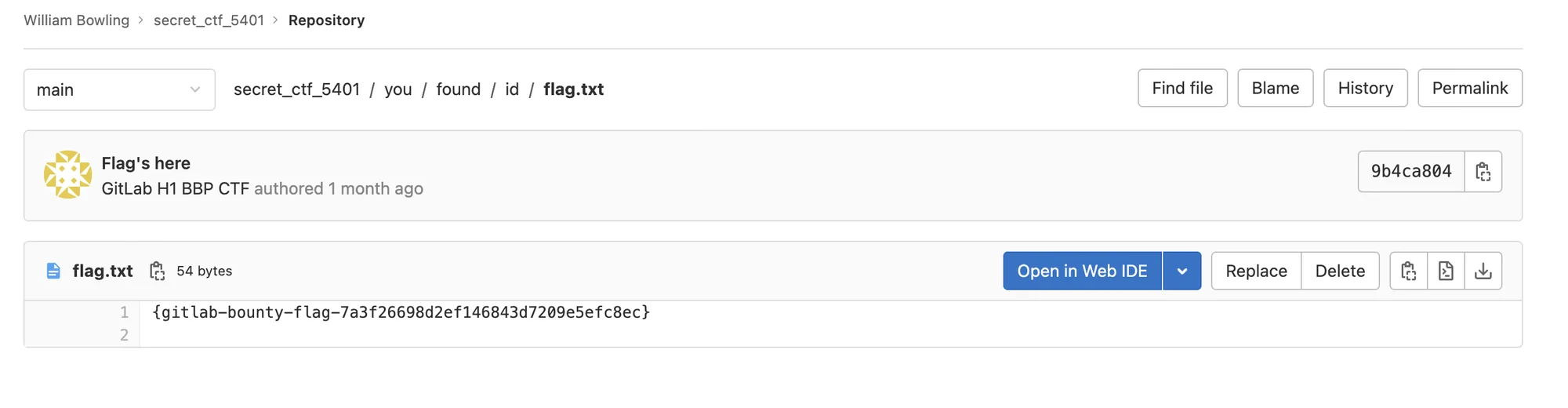
This can then be used to import any gitlab repository via the project id by calculating the path, such as the gitlab ctf project!
{gitlab-bounty-flag-7a3f26698d2ef146843d7209e5efc8ec}
Steps to reproduce
- Create a private project with User A and edit the readme file, make note of the project id
- Download (Attachment on the original report: fake_server.py) and edit line 99 with the new path to the repository above (replace
b1/74/b174103b399555239923697fbe124faa61de4d441bd5c5678275eb0a5a27a562with the newsha2[0:2]/sha2[2:4]/sha2) - Run the server with
FLASK_APP=fake_server.py FLASK_ENV=development flask run - Start ngrok with
ngrok http 500 - User B, visit https://gitlab.com/groups/new#import-group-pane and enter your ngrok url, any token and hit connect
- In the browser console, replace
"destination_namespace":"vakzz"with your gitlab username (or a group you have access too) in the code below and run it:
await fetch("/import/bulk_imports.json", { method: "POST", headers: { "X-CSRF-Token": document.querySelector("[name=csrf-token]").content, "Content-Type": "application/json" }, body: `{"bulk_import":[{"source_type":"project_entity","source_full_path":"group1/project1","destination_namespace":"vakzz","destination_slug":"some_project_z_${Math.floor(Math.random() * 10000)}"}]}` });
- After a few minutes you should see a new project appear
- Initially it will just show
No repository - After another minute or so the project will either show
The repository for this project is emptyor it will be a clone of the project from User A - If you see
The repository for this project is emptythen just repeat the fetch call again, it can take a few tries to end up on the same server as the victim (I think that's what is happening)
This can also be done with a Helm install of gitlab using the base path of /home/git/repositories or using the omnibus edition, but you will need to check where the repositories are located on disk and use that as the base path.
Impact
Allows an attacked to clone any repo on gitlab with just the project id
Examples
Example of me cloning the gitlab ctf project - https://gitlab.com/vakzz-h1/secret_ctf_5401/-/blob/main/you/found/id/flag.txt
What is the current bug behavior?
The RepositoryPipeline allows for arbitrary url protocols to be passed to project.repository.fetch_as_mirror(url)
What is the expected correct behavior?
It should be restricted to https/git/ssh
Relevant logs and/or screenshots
Output of checks
This bug happens on GitLab.com
Impact
Allows an attacked to clone any repo on gitlab with just the project id
Context
GitLab's BulkImports feature lets a user import a project (or a group) from another GitLab instance. When a project is imported, one of the pipelines involved is RepositoryPipeline, whose job is to fetch the source repository into the newly created project. The report targets the GitLab.com instance and the gitlab-org/gitlab codebase at tag v15.3.1-ee.
The relevant code is in lib/bulk_imports/projects/pipelines/repository_pipeline.rb. The load method takes the httpUrlToRepo field supplied by the import client, injects an OAuth token into it, validates it, and then hands it to git as a mirror fetch.
Setup
To reproduce, the researcher used:
- Two GitLab users, User A (owner of a private project) and User B (the attacker).
- A small Flask server,
fake_server.py, attached to the report, acting as the fake import source. ngrokto expose that server publicly.- A browser console on GitLab.com to issue the import request directly.
The attacker needs an account on the target GitLab instance and the ability to start a bulk import from a URL they control. The victim's project id must be known, because the on-disk path is derived from it.
Finding it
The researcher looked at how RepositoryPipeline#load handles the httpUrlToRepo value coming from the client:
        def load(context, data)
          url = data['httpUrlToRepo']
          return unless url.present?

          url = url.sub("://", "://oauth2:#{context.configuration.access_token}@")
          project = context.portable

          Gitlab::UrlBlocker.validate!(url, allow_local_network: allow_local_requests?, allow_localhost: allow_local_requests?)

          project.ensure_repository
          project.repository.fetch_as_mirror(url)
        end
Gitlab::UrlBlocker.validate is called, but no schemas are passed in. As a result it allows any scheme, including file, as long as the rest of the URL is valid. The validated URL is then passed straight to project.repository.fetch_as_mirror(url), which runs a git fetch. That means the client controls the protocol and path that git will fetch from.
Exploitation
Step 1: Confirm that git accepts a file:// URL
The researcher first checked what git does with a file:// URL pointing at a repository path on disk:
$ git fetch file://aw.rs/var/opt/gitlab/git-data/repositories/@hashed/b1/74/[redacted].git
fatal: '/var/opt/gitlab/git-data/repositories/@hashed/b1/74/[redacted].git' does not appear to be a git repository
fatal: Could not read from remote repository.

Please make sure you have the correct access rights
and the repository exists.
The error shows git reading the local path rather than making a network request. The error confirms git is reading the local path rather than making a network request.
Step 2: Work out the on-disk path of a target repository
GitLab stores project repositories under a configurable base folder, followed by a bucketed SHA-2 hash of the project id. For project 38006449, Digest::SHA2.hexdigest("38006449") is [redacted], so the repository lives at:
@hashed/b1/74/[redacted].git
The bucket directories are the first two and next two characters of the hash. Given a project id, anyone can compute this path. The report includes the flag value and a link to an example clone of the GitLab CTF project:
{gitlab-bounty-flag-[redacted]}
Step 3: Create a victim project
- Create a private project with User A and edit the readme file, make note of the project id.
Step 4: Prepare the fake import server
- Download
fake_server.py(attached to the report) and edit line 99 with the new path to the repository above. Replaceb1/74/[redacted]with the newsha2[0:2]/sha2[2:4]/sha2. - Run the server with:
FLASK_APP=fake_server.py FLASK_ENV=development flask run
- Start ngrok with:
ngrok http 500
The fake server is edited at line 99 to use the new repository path.
Step 5: Start the import as User B
- As User B, visit
https://gitlab.com/groups/new#import-group-pane, enter the ngrok URL, any token, and hit connect.
Step 6: Trigger the bulk import request
In the browser console, replace "destination_namespace":"vakzz" with your GitLab username (or a group you have access to) in the code below and run it:
await fetch("/import/bulk_imports.json", { method: "POST", headers: { "X-CSRF-Token": document.querySelector("[name=csrf-token]").content, "Content-Type": "application/json" }, body: `{"bulk_import":[{"source_type":"project_entity","source_full_path":"group1/project1","destination_namespace":"vakzz","destination_slug":"some_project_z_${Math.floor(Math.random() * 10000)}"}]}` });
This POSTs a bulk import of a single project entity into the chosen destination namespace, with a randomised destination slug so repeated attempts do not collide.
Step 7: Observe the result
- After a few minutes a new project appears.
- Initially it shows
No repository. - After another minute or so the project either shows
The repository for this project is emptyor it is a clone of User A's project. - If it shows
The repository for this project is empty, repeat the fetch call. It can take a few tries to end up on the same server as the victim, which the researcher thinks may be because the import lands on a different server.
Other deployments
The same technique works with a Helm install of GitLab using the base path /home/git/repositories, or with the omnibus edition, provided you check where the repositories are located on disk and use that as the base path.
Root cause
RepositoryPipeline#load passes the client-supplied httpUrlToRepo to Gitlab::UrlBlocker.validate! without restricting the allowed schemes. The URL blocker therefore accepts file:// (and any other scheme) as long as the rest of the URL is well formed. The validated URL is then used by project.repository.fetch_as_mirror(url), so git fetches from the local filesystem path the attacker chose. Because repository paths are deterministic from the project id, an attacker who knows a project id can compute the path and import that repository.
The report states the expected behaviour: the URL should be restricted to https, git and ssh.
Impact
An attacker can clone any repository on the GitLab instance, including private ones, with only the project id. The report says the same can also be done on Helm and omnibus installs once the repository base path is known. The report includes the GitLab CTF flag and a link to an example clone of that project.
Fix
The report does not describe the fix that was applied. The expected behaviour it states is that the URL scheme should be restricted to https, git and ssh, which would prevent file:// URLs from reaching fetch_as_mirror.
Variants to test
- Try other schemes that
Gitlab::UrlBlockermay accept when no schema list is passed, such asssh://orgit://pointing at internal hosts, and see whether the fetch reaches them. - On self-managed instances, try the deployment-specific base paths (
/var/opt/gitlab/git-data/repositories,/home/git/repositories) with a computed hash for a known project id. - Look for other import or mirror features that take a client-supplied repository URL and pass it to git without a scheme allowlist.
- A positive result is a project that ends up containing the contents of a repository the attacker should not be able to read.
Hunting notes
This kind of bug hides in import, export and mirroring features where a URL from an external source is validated and then handed to a tool that understands more schemes than the validator expects. During recon, look for parameters named like httpUrlToRepo, import_url or mirror_url, and check whether the validation call specifies allowed schemes. The deterministic on-disk path (bucketed SHA-2 of the project id) is what turns a local file read into a targeted clone of any project, so knowing a project id is enough.
What happened, in plain words
GitLab is a website where teams keep their code. Each piece of code lives in a project, and each project has a repository (the actual store of files and their history). Projects can be private, meaning only invited people can see them.
GitLab has a feature called BulkImports. It lets you copy a project (or a whole group of projects) from one GitLab server into another. You point GitLab at the other server, give it a token, and GitLab fetches the code across and creates a new project for you.
When GitLab does that fetching, it asks the source server a question: "where is the repository for this project?" The source server answers with a web address, stored in a field called httpUrlToRepo. GitLab then takes that address and runs a normal git fetch against it, the same command a developer would type in a terminal.
The problem: GitLab checked that the address was well formed, but it never checked what kind of address it was. Addresses come in flavours, called schemes: https:// means "go over the internet with encryption", ssh:// means "log in to another machine", and file:// means "read a file on this very computer". Because GitLab accepted any scheme, an attacker could run their own fake source server, make it answer with a file:// address, and GitLab would happily read a file from its own disk instead of downloading from the internet.
That on its own would be a curiosity, except for one more detail: GitLab stores every project's repository at a path that can be calculated from the project's numeric id. So if the attacker knows the id of a private project, they can work out exactly where its files sit on disk, put that path in a file:// address, and have GitLab copy the private repository into a project the attacker owns. The attacker then reads the code at their leisure.
In short: a missing check on the address scheme turned "import a project from another server" into "clone any private repository on the machine, given its id".
The pieces you need to know
Before walking through the report, here are the ideas it leans on, explained from scratch.
- Repository: the folder where a project's code and its full change history live. Git is the tool that manages it.
git fetch: a command that downloads commits from another repository into yours. You give it an address to fetch from.- URL scheme: the first part of a web address, before
://. It tells the software how to reach the thing.httpsgoes over the network;filemeans a path on the local disk. - API: a way for one program to talk to another over the network, usually by sending a request to a specific address and getting data back. Here, the browser talks to GitLab's API to start an import.
- Token: a long random string that acts like a password for a program. GitLab puts a token into the address it fetches from so the source server can recognise the request.
- CSRF token: a value the website puts in its pages so it can tell a genuine form submission from a forged one. The browser script below reads it from the page and sends it back.
ngrok: a small tool that takes a server running on your own computer and gives it a public web address, so other machines on the internet can reach it.- Flask: a simple Python web framework. The report uses a tiny Flask app as the fake source server.
- SHA-2 hash: a mathematical fingerprint of some input. Feed it the same input and you always get the same fixed-length string of characters out. GitLab uses one to turn a project id into a folder name.
- Access control: the rules about who is allowed to see or do what. A bug where someone can reach something they should not is called an improper access control issue, which is the category this report was filed under.
The setup
To reproduce the bug, the researcher needed:
- Two GitLab accounts: User A, who owns a private project (the victim), and User B, the attacker.
- A small Flask server,
fake_server.py, attached to the report. It pretends to be a GitLab server that the attacker is importing from. ngrok, to give that fake server a public address.- A browser logged in as User B on GitLab.com, with the developer console open.
The attacker needs an account on the target GitLab and the ability to start a bulk import from a server they control. They also need the victim's project id, because the on-disk path is calculated from it.
Finding the flaw
The researcher read the code that handles the import. The relevant file is lib/bulk_imports/projects/pipelines/repository_pipeline.rb, and the method is load:
        def load(context, data)
          url = data['httpUrlToRepo']
          return unless url.present?

          url = url.sub("://", "://oauth2:#{context.configuration.access_token}@")
          project = context.portable

          Gitlab::UrlBlocker.validate!(url, allow_local_network: allow_local_requests?, allow_localhost: allow_local_requests?)

          project.ensure_repository
          project.repository.fetch_as_mirror(url)
        end
Line by line:
url = data['httpUrlToRepo']takes the address that the source server supplied. This value comes from outside GitLab, so it is attacker-controlled.return unless url.present?stops early if the address is empty.url.sub("://", "://oauth2:#{...}@")inserts the import token into the address, right after the scheme. This is how GitLab authenticates to the source server.project = context.portablegrabs the project being created.Gitlab::UrlBlocker.validate!(...)is the safety check. It is meant to reject dangerous addresses. The two options passed in control whether local network addresses andlocalhostare allowed.project.ensure_repositorymakes sure the new project has a repository ready.project.repository.fetch_as_mirror(url)runs the actualgit fetchagainst the address.
The flaw is in step 5. The validator was called without a list of allowed schemes. It therefore accepted any scheme, including file, as long as the rest of the address looked valid. The address then went straight into step 7, so the attacker controlled both the protocol and the path that git would fetch from.
Exploitation, step by step
Step 1: Check that git accepts a file:// address
First the researcher confirmed what git does when handed a file:// address pointing at a repository on disk:
$ git fetch file://aw.rs/var/opt/gitlab/git-data/repositories/@hashed/b1/74/[redacted].git
fatal: '/var/opt/gitlab/git-data/repositories/@hashed/b1/74/[redacted].git' does not appear to be a git repository
fatal: Could not read from remote repository.

Please make sure you have the correct access rights
and the repository exists.
What this shows:
- The address starts with
file://, so git treats it as a local path, not a network location. - The
aw.rspart is ignored forfile://addresses. Only the path after it matters. - The error says the path does not exist on this machine. That is the point: git is looking at the local disk, not contacting a server. If the path had existed, git would have fetched from it.
This confirmed the mechanism before trying it against GitLab.
Step 2: Work out where a target repository lives on disk
GitLab stores project repositories under a base folder, followed by a folder name derived from the project id. The derivation is a SHA-2 hash of the id, split into buckets.
For project id 38006449, the hash Digest::SHA2.hexdigest("38006449") is [redacted]. The repository therefore sits at:
@hashed/b1/74/[redacted].git
How to read that path:
@hashedis the folder GitLab uses for these hashed paths.b1is the first two characters of the hash, and74is the next two. They are used as sub-folders so no single folder holds too many entries.- The full hash, followed by
.git, is the repository folder itself.
Because the hash is deterministic, anyone who knows a project id can compute the path. The researcher used this to import the GitLab CTF project and read its flag:
{gitlab-bounty-flag-[redacted]}
A CTF is a capture-the-flag exercise: a deliberately planted secret that proves you reached somewhere you should not have. Finding it demonstrated the impact concretely.
Step 3: Create a victim project
- Create a private project with User A and edit the readme file, make note of the project id.
Why: this gives the attacker a target. The project id is the one input needed to compute the on-disk path.
Step 4: Prepare the fake import server
- Download
fake_server.py(attached to the report) and edit line 99 with the new path to the repository above. Replaceb1/74/[redacted]with the newsha2[0:2]/sha2[2:4]/sha2.
Why: the fake server is what answers GitLab's question "where is the repository?". Editing line 99 sets the new repository path, using the hash computed in step 2.
- Run the server with:
FLASK_APP=fake_server.py FLASK_ENV=development flask run
What this does:
FLASK_APP=fake_server.pytells Flask which file contains the app.FLASK_ENV=developmentputs Flask in development mode.flask runstarts the web server on the local machine.
- Start ngrok with:
ngrok http 500
What this does: ngrok http 500 takes the local server listening on port 500 and gives it a public address. GitLab.com can now reach the fake server over the internet.
Step 5: Start the import as User B
- As User B, visit
https://gitlab.com/groups/new#import-group-pane, enter the ngrok URL, any token, and hit connect.
Why: this is the normal, legitimate way to begin a bulk import. This is the normal way to begin a bulk import, and here the address given is the fake server. Here that address is the fake server, so GitLab is talking to the attacker.
Step 6: Trigger the bulk import request
In the browser console, replace "destination_namespace":"vakzz" with your GitLab username (or a group you have access to) in the code below and run it:
await fetch("/import/bulk_imports.json", { method: "POST", headers: { "X-CSRF-Token": document.querySelector("[name=csrf-token]").content, "Content-Type": "application/json" }, body: `{"bulk_import":[{"source_type":"project_entity","source_full_path":"group1/project1","destination_namespace":"vakzz","destination_slug":"some_project_z_${Math.floor(Math.random() * 10000)}"}]}` });
What each part does:
fetch("/import/bulk_imports.json", ...)sends a request to GitLab's import API.fetchis the browser's built-in way to make such requests.method: "POST"means "send data", as opposed to just asking for a page."X-CSRF-Token": document.querySelector("[name=csrf-token]").contentreads the CSRF token out of the page and sends it along, so GitLab accepts the request as coming from a real logged-in session."Content-Type": "application/json"says the body is JSON, a common text format for structured data.- The body describes one import:
source_typeisproject_entity(a single project),source_full_pathnames the project on the source server,destination_namespaceis where it lands on GitLab (the value you replace with your own username), anddestination_slugis the new project's name. Math.floor(Math.random() * 10000)adds a random number to the slug, so repeated attempts do not clash with each other.
Why do this by hand instead of clicking through the interface? Because the interface may not let you pick exactly what you want. Sending the request directly gives full control over the fields.
Step 7: Watch the result
- After a few minutes a new project appears.
- Initially it shows
No repository. - After another minute or so the project either shows
The repository for this project is emptyor it is a clone of User A's project. - If it shows
The repository for this project is empty, repeat the fetch call. It can take a few tries to end up on the same server as the victim, which the researcher thinks may be because the import lands on a different server.
The researcher thinks the retries help because the import may land on a different server, though the report does not explain further.
Other deployments
The same technique works with a Helm install of GitLab using the base path /home/git/repositories, or with the omnibus edition, provided you check where the repositories are located on disk and use that as the base path. In other words, the trick is not specific to GitLab.com: any installation where you can learn the repository folder layout is exposed.
Why it works
The root cause is a missing allowlist. RepositoryPipeline#load hands the client-supplied httpUrlToRepo to Gitlab::UrlBlocker.validate! without saying which schemes are acceptable. The validator therefore lets file:// through, as long as the rest of the address is well formed. That address then goes to project.repository.fetch_as_mirror(url), so git reads from a path on the local disk that the attacker chose.
Because repository paths are calculated from the project id, an attacker who knows an id can compute the path and import that repository. The report states the expected behaviour: the address should be restricted to https, git and ssh.
Impact
An attacker can clone any repository on the GitLab instance, including private ones, with only the project id. The report says the same can also be done on Helm and omnibus installs once the repository base path is known. The report includes the GitLab CTF flag and a link to an example clone of that project.
Fix
The report does not describe the fix that was applied. The expected behaviour it states is that the address scheme should be restricted to https, git and ssh, which would stop file:// addresses from reaching fetch_as_mirror.
Variants to test
- Try other schemes that
Gitlab::UrlBlockermay accept when no scheme list is passed, such asssh://orgit://pointing at internal hosts, and see whether the fetch reaches them. - On self-managed instances, try the deployment-specific base paths (
/var/opt/gitlab/git-data/repositories,/home/git/repositories) with a computed hash for a known project id. - Look for other import or mirror features that take a client-supplied repository address and pass it to git without a scheme allowlist.
- A positive result is a project that ends up containing the contents of a repository the attacker should not be able to read.
Hunting notes
This kind of bug hides in import, export and mirroring features, where an address from an external source is validated and then handed to a tool that understands more schemes than the validator expects. During recon, look for parameters named like httpUrlToRepo, import_url or mirror_url, and check whether the validation call specifies allowed schemes. The deterministic on-disk path (bucketed SHA-2 of the project id) is what turns a local file read into a targeted clone of any project, so knowing a project id is enough.
Glossary
- Access control: the rules about who may see or do what; a bug that lets someone reach what they should not is an access control issue.
- Allowlist: an explicit list of things that are permitted, with everything else rejected.
- BulkImports: GitLab's feature for copying projects or groups from one GitLab server to another.
- CSRF token: a value embedded in a web page so the server can tell a genuine request from a forged one.
- CTF (capture the flag): an exercise with a planted secret that proves you reached somewhere you should not have.
- Deterministic: producing the same output every time for the same input.
fetch: the browser function used to send a request to a server from JavaScript.- Flask: a small Python web framework used to build simple web servers.
git fetch: a git command that downloads commits from another repository into yours.- Hash (SHA-2): a fixed-length fingerprint computed from some input; the same input always gives the same fingerprint.
- Helm: a tool for installing software (such as GitLab) into a Kubernetes cluster.
- JSON: a common text format for structured data, used in request bodies.
ngrok: a tool that exposes a server on your own computer at a public web address.- Omnibus: the packaged, all-in-one way of installing GitLab on a single machine.
- OAuth token: a long random string that acts like a password for a program, here inserted into the fetch address so the source server recognises the request.
- Pipeline: in this context, one stage of the import process that does a specific job, such as fetching the repository.
- Project id: the number GitLab assigns to each project; it is used to compute the repository's on-disk path.
- Repository: the folder holding a project's code and its full change history, managed by git.
- Scheme: the first part of an address, before
://, that says how to reach the target, such ashttps,sshorfile. - Self-managed: a GitLab installation run by an organisation on its own machines, rather than GitLab.com.
- Slug: a short name used in a web address or as a project name.
ssh: a protocol for logging in to another machine securely.- URL: a web address.
- URL blocker / validator: a check that inspects an address and rejects ones deemed unsafe.
- Vulnerability: a flaw in software that lets someone do something the designers did not intend.