Snippet Markup Rendering Bypasses ReferenceRedactor, Leaking Private Issue/Epic/MR/Milestone/Commit Titles and Metadata
Snippet markup rendering stores pre-rendered HTML in context[:rendered], causing the rendering service to skip the post-processing pipeline that includes the reference redactor filter. An attacker can import a crafted snippet without a repository and leak private issue, epic, merge request, milestone, or commit titles via cross-reference syntax.

GitLab
Originally disclosed on GitLab
- Fixed in 2 months
- Disclosed after 2 months
⚠️ Please read the process on how to fix security issues before starting to work on the issue. Vulnerabilities must be fixed in a security mirror.
HackerOne report #3486504 by go7f0 on 2026-01-04, imported by @gandrews7:
Report | Attachments | How To Reproduce
HackerOne Analyst Summary
Summary of the issue
The researcher has identified a vulnerability in GitLab's snippet markup rendering system where pre-rendered HTML content bypasses the ReferenceRedactorFilter security mechanism. When snippets are imported without an associated repository, the Markdown rendering process stores HTML directly in the context[:rendered] field, causing the Markup::RenderingService to skip the PostProcessPipeline that normally includes the ReferenceRedactorFilter. This filter is responsible for redacting references to private resources that users should not have access to.
The vulnerability is specifically triggered because the
empty_repocheck inapp/controllers/concerns/snippets_actions.rb:82-88ensures that only blobs inempty_repocan enterSnippetBloband trigger the vulnerable rendering path.
Steps to reproduce
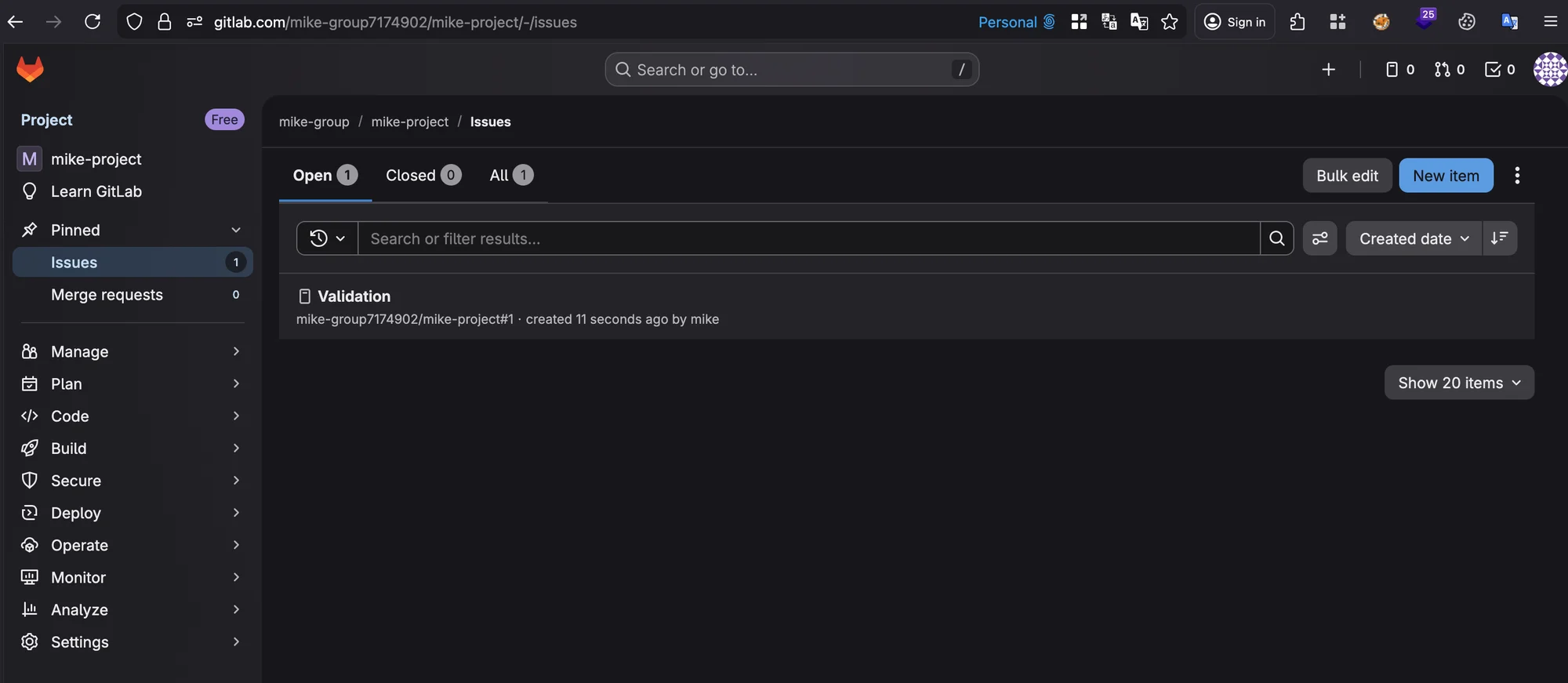
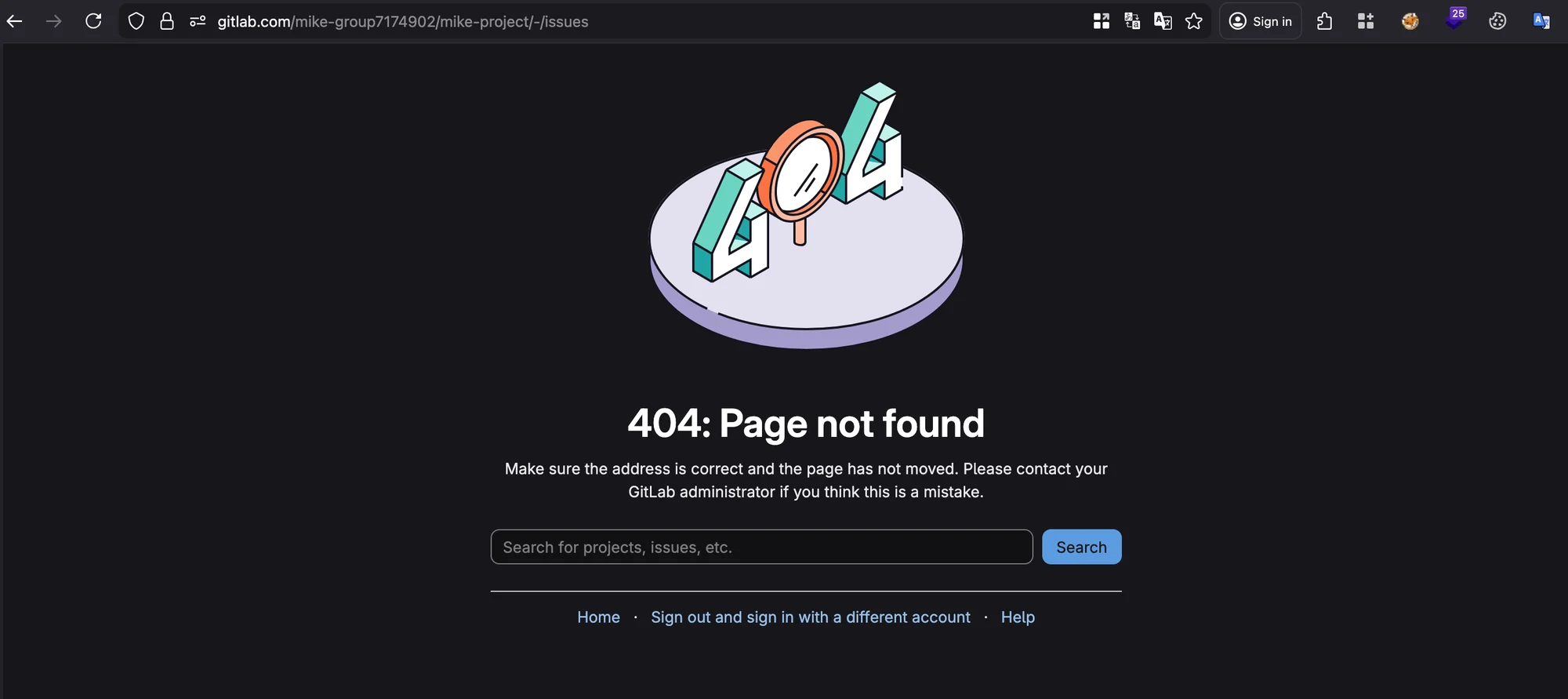
- As the victim, sign in victim's GitLab account -> Create a private project with a new issue, ensuring the attack user does not have access to it.
-
Construct the malicious import package using the following shell commands:
Shell mkdir -p /tmp/poc/tree/project echo "0.2.4" > /tmp/poc/VERSION echo '{"description":"test","visibility_level":20}' > /tmp/poc/tree/project.json echo '{"title":"test","content":"gkn901/hgh#1","file_name":"a.md","visibility_level":20,"author_id":1,"created_at":"2024-01-01T00:00:00Z","updated_at":"2024-01-01T00:00:00Z"}' > /tmp/poc/tree/project/snippets.ndjson cd /tmp/poc && tar -czf /tmp/poc.tar.gz . && cd -Note: Replace
gkn901/hghwith the target project path and#1with the target issue ID. Other reference types can be used:!iidfor merge requests,&iidfor epics,$idfor snippets. -
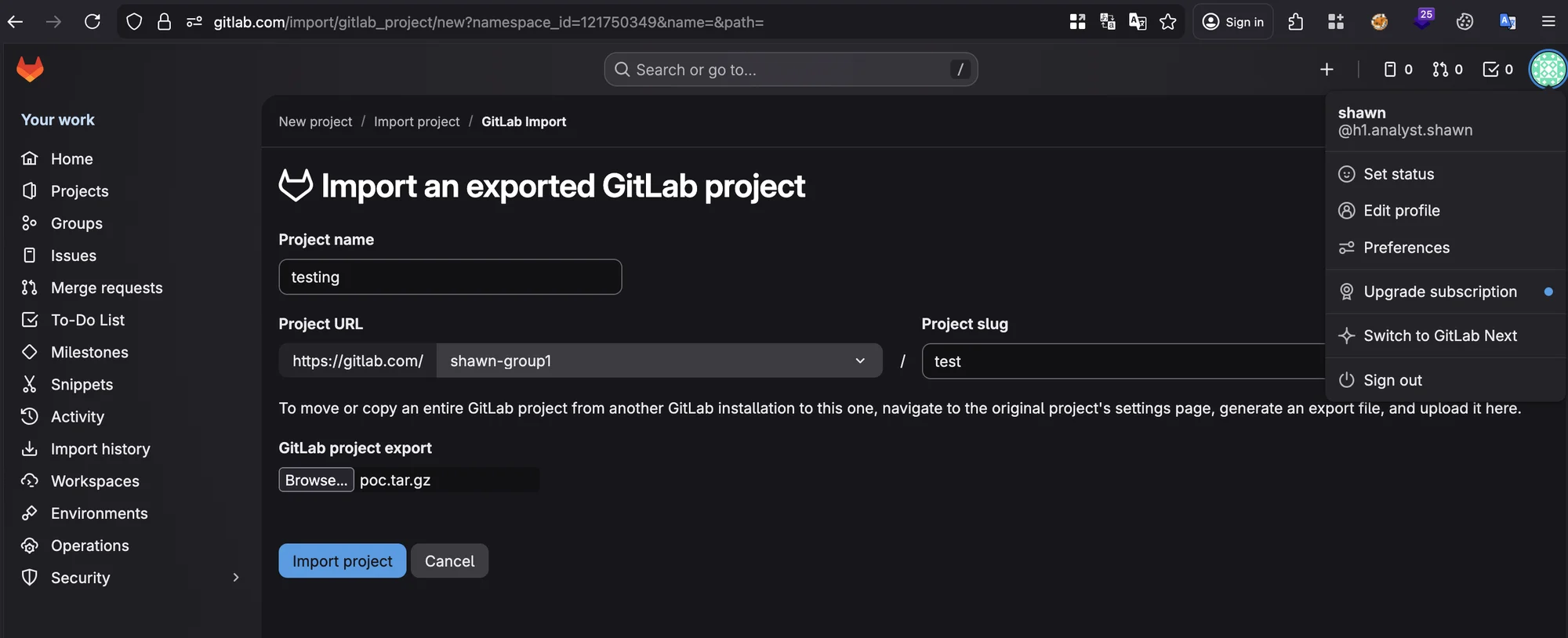
As the attacker, sign in attacker's GitLab account and navigate to the project import functionality and import the
poc.tar.gzfile as a GitLab project.
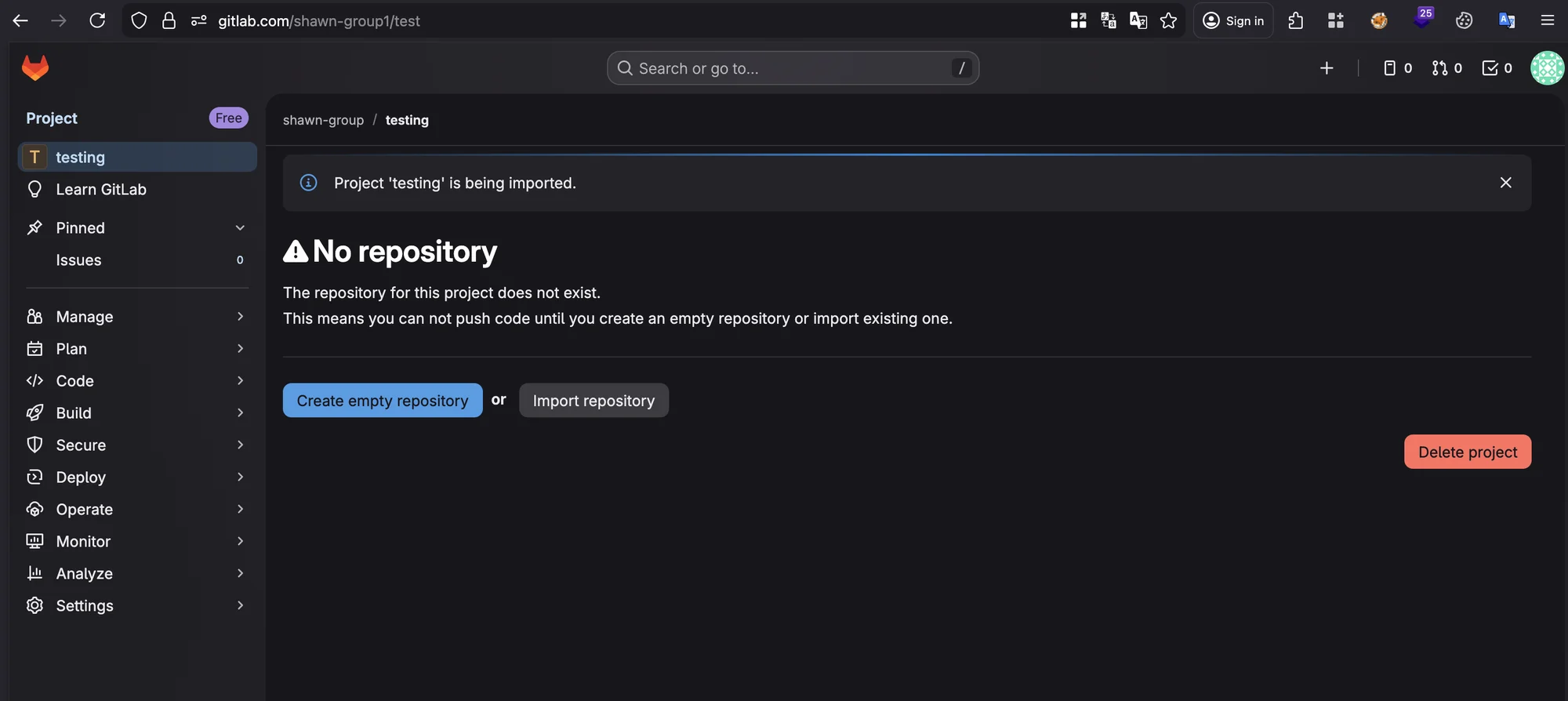
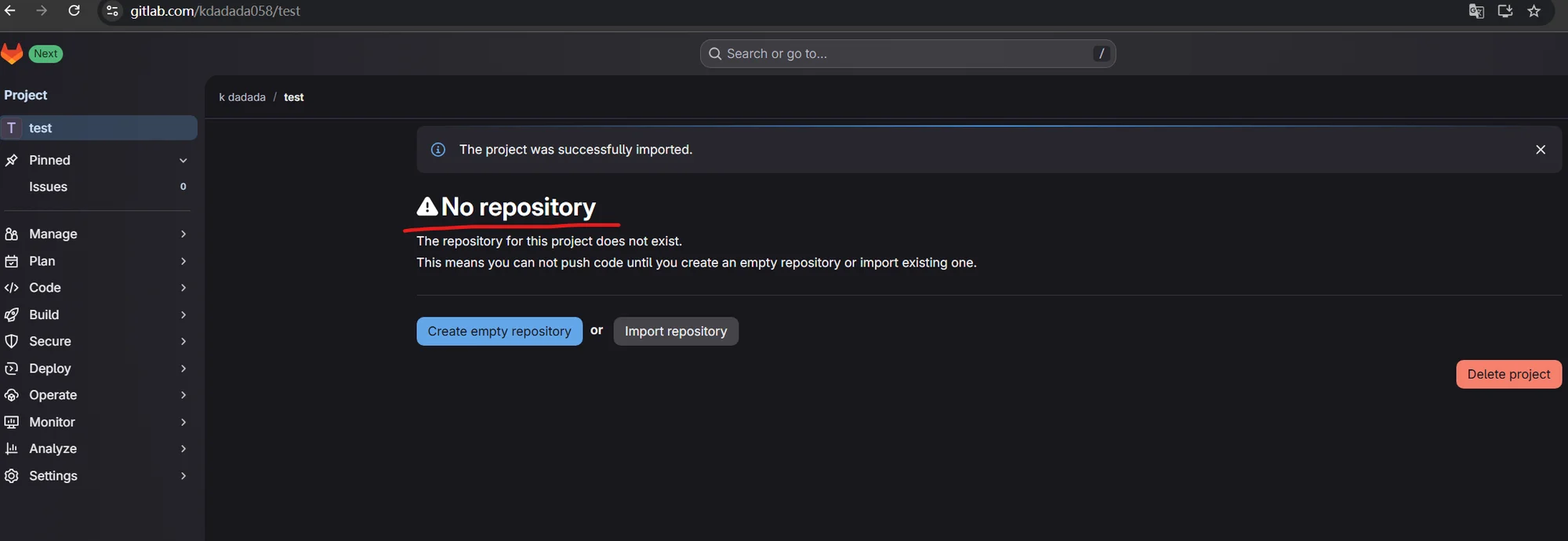
- After successful import, a project with no repository is generated. Navigate to the project's snippets section.
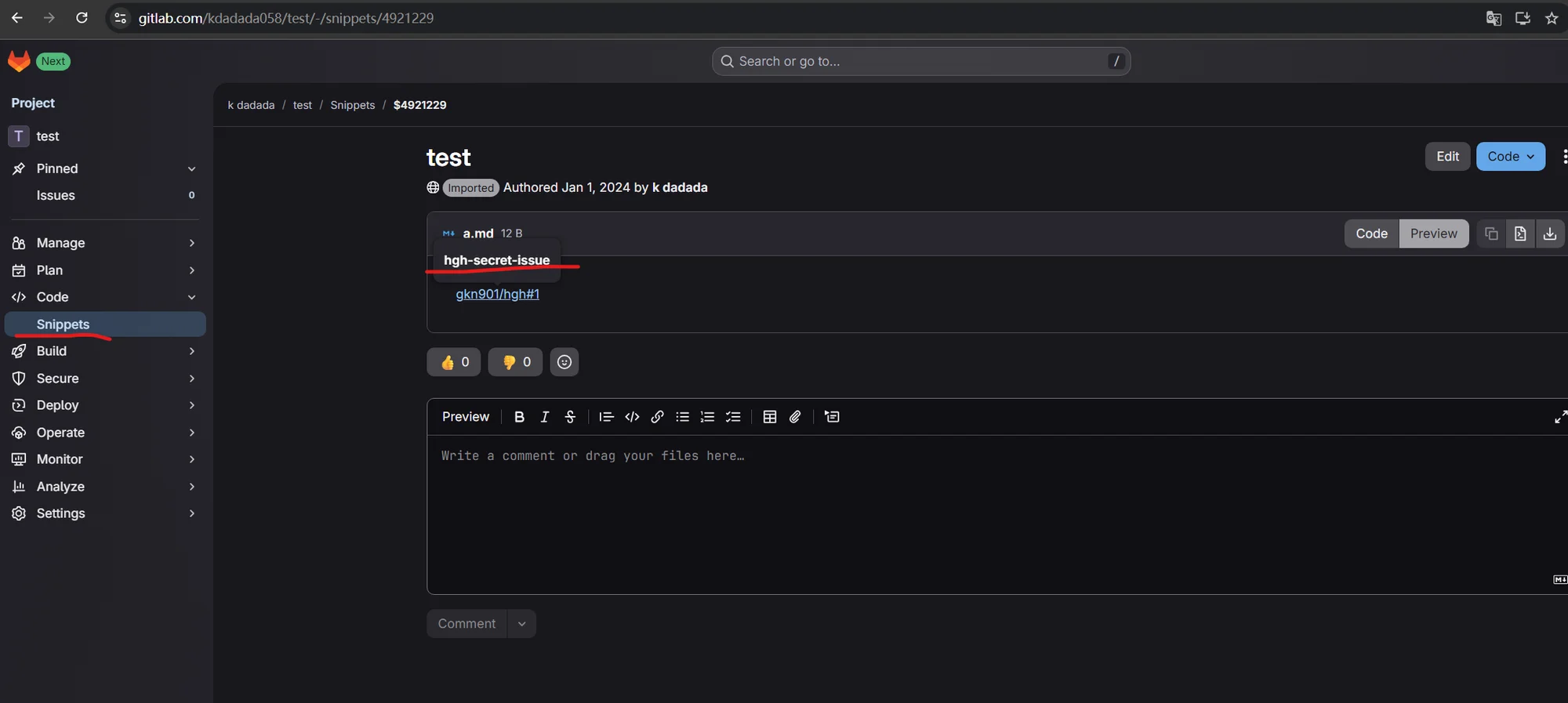
- When viewing the rendered snippet and hovering over the reference link, the private issue title is displayed even though the current user has no access rights to the referenced private resource.
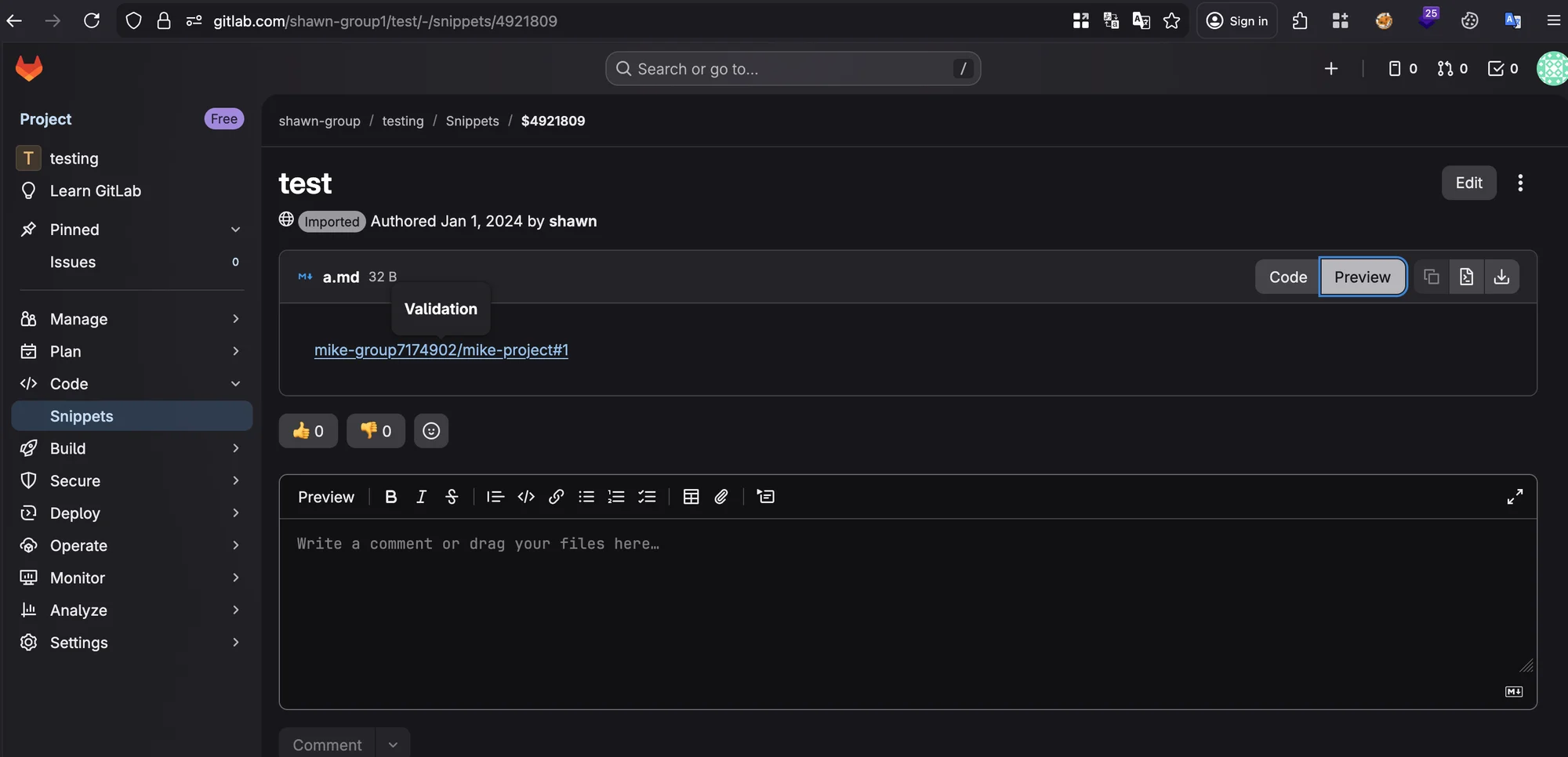
Impact statement
Unauthorized disclosure of private Issue/Epic/MR titles, Milestone names, Commit messages, and metadata from any accessible group or project—affecting all reference types supported by https://docs.gitlab.com/user/markdown/#gitlab-specific-references enabling reconnaissance and potential exposure of sensitive business information, security vulnerabilities, or product roadmaps.
If you have any questions or concerns about this report, feel free to assign it to H1 Triage via the action picker with a comment indicating your request.
Best Regards, @h1_analyst_mike
Original Report
Summary
Snippet Markdown pre-rendering stores HTML in context[:rendered], causing Markup::RenderingService to bypass PostProcessPipeline and skip ReferenceRedactorFilter, allowing attackers to leak private Issue/Epic/MR/Milestone/Commit titles via cross-reference syntax in imported Snippets without repository.
Steps to reproduce
Scene
To facilitate reproduction, this example only uses issue disclosure. Other types of disclosures can be provided later.
In a private project, create a new issue and ensure that the attack user does not have access to it.
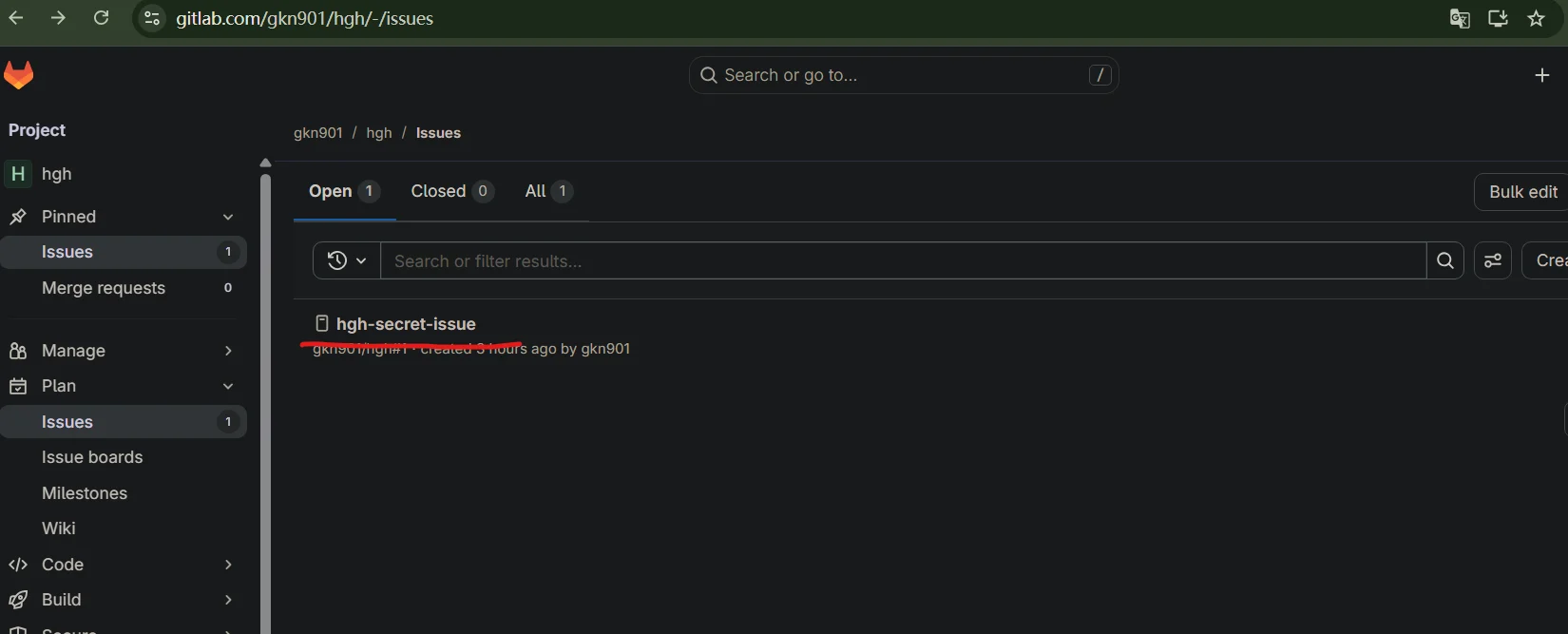
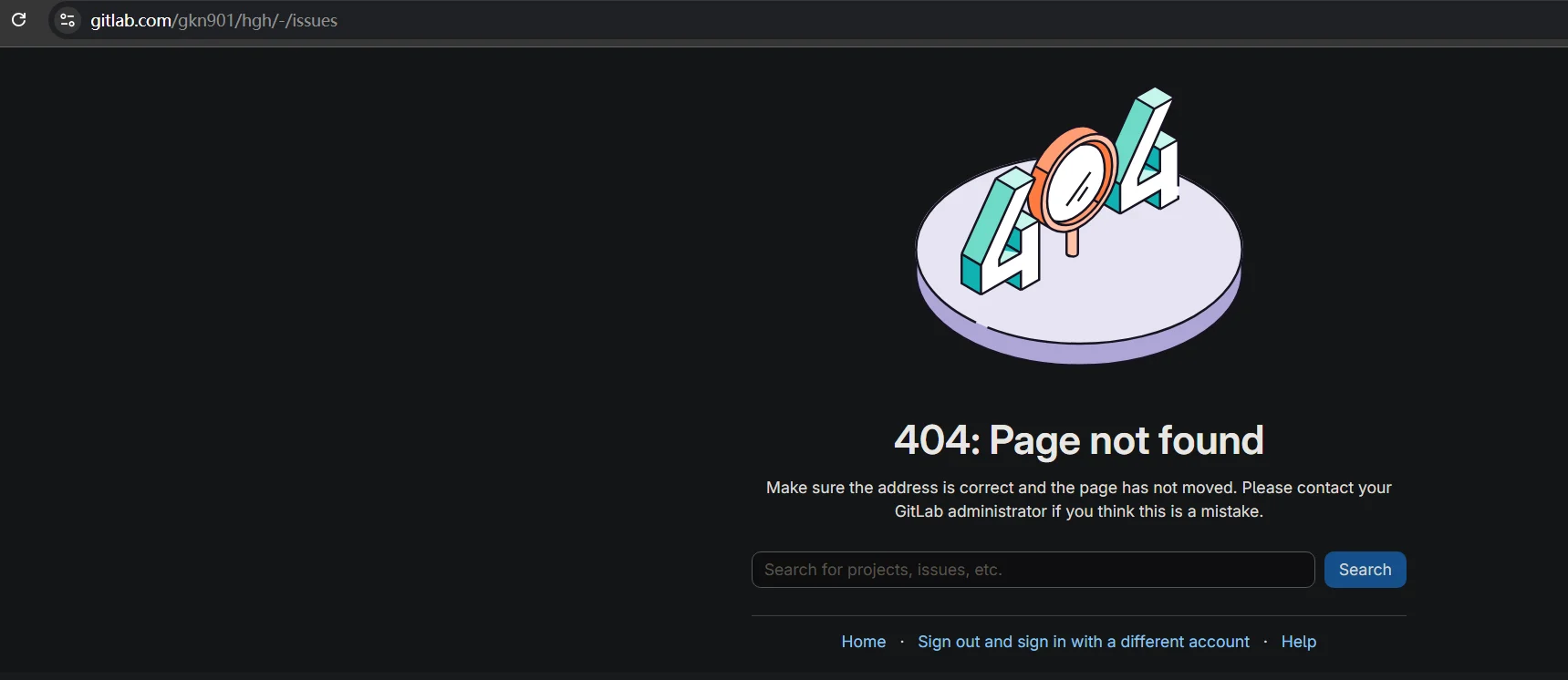
Construct POC
Because the empty_repo check was performed in the SnippetsActions#blobs method.
### app/controllers/concerns/snippets_actions.rb:82-88
def blobs
[@]blobs ||= if snippet.empty_repo?
[snippet.blob]
else
snippet.blobs
end
end
Only blobs in empty_repo can enter SnippetBlob and thus trigger the vulnerability.
Therefore, the following command is needed to construct the malicious import package.
Replace
gkn 901/hghin the fourth command with your target project, and replace#1with the issue ID in the target project.
PS: If you need to test other types,
!iidcorresponds to MR,&iidcorresponds to Epic,$idcorresponds to Snippet, etc., please refer to https://docs.gitlab.com/user/markdown/#gitlab-specific-references
mkdir -p /tmp/poc/tree/project
echo "0.2.4" > /tmp/poc/VERSION
echo '{"description":"test","visibility_level":20}' > /tmp/poc/tree/project.json
echo '{"title":"test","content":"gkn901/hgh#1","file_name":"a.md","visibility_level":20,"author_id":1,"created_at":"2024-01-01T00:00:00Z","updated_at":"2024-01-01T00:00:00Z"}' > /tmp/poc/tree/project/snippets.ndjson
cd /tmp/poc && tar -czf /tmp/poc.tar.gz . && cd -
Using the attack account, import poc.tar.gz as project
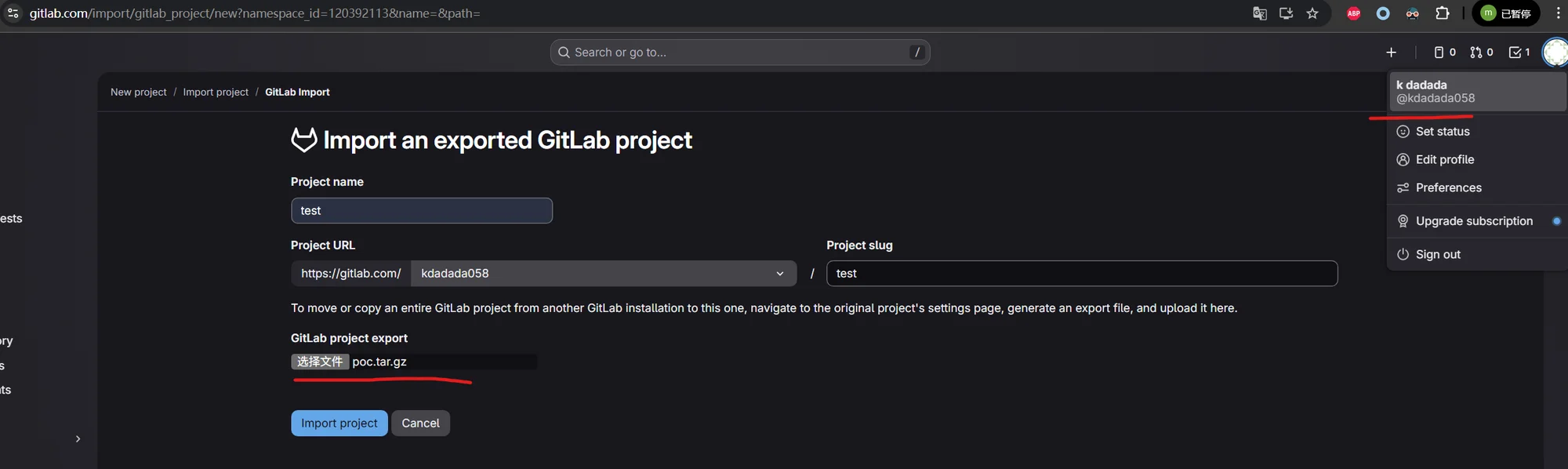
After a successful import, a project with no repository will be generated.
When viewing the project's snippets and hovering the mouse over a rendered link, the page still renders the issue's title even though the current user has no access rights to gkn901/hgh/-/issues/1.
Impact
Unauthorized disclosure of private Issue/Epic/MR titles, Milestone names, Commit messages, and metadata from any accessible group or project—affecting all reference types supported by https://docs.gitlab.com/user/markdown/#gitlab-specific-references enabling reconnaissance and potential exposure of sensitive business information, security vulnerabilities, or product roadmaps.
Attachments
Warning: Attachments received through HackerOne, please exercise caution!
How To Reproduce
Please add reproducibility information to this section:
Context
GitLab renders Markdown in many places: issues, merge requests, epics, snippets and more. One of the features of that Markdown is GitLab-specific cross-references, which let a user write a reference such as project#1 and have GitLab turn it into a link to the referenced issue, with the issue title shown when the link is hovered. The documentation page for these references is https://docs.gitlab.com/user/markdown/#gitlab-specific-references, and it lists the syntax for the different reference types: #iid for issues, !iid for merge requests, &iid for epics and $id for snippets.
Because a reference can point at a private resource, GitLab has a redaction step. The report names it as ReferenceRedactorFilter, part of the PostProcessPipeline that Markup::RenderingService normally runs over rendered Markdown. Its job is to remove references to private resources that the current viewer is not allowed to see.
The report describes a path where that filter is skipped: snippet Markdown that is pre-rendered and stored as HTML in context[:rendered], in a project that has no repository. The result is that a reference to a private issue is rendered with its title intact, and any user who can view the snippet can read that title.
Setup
The reproduction needs two accounts:
- A victim account that owns a private project containing a new issue. The attacker account must not have access to that project.
- An attacker account that can use the project import functionality.
The only tooling shown is a shell for building a tar archive and the GitLab web interface for the import and for viewing the snippet. The report does not state GitLab versions or a specific deployment.
Finding it
The researcher traced the rendering path and found that when a snippet is rendered, the Markdown output can be stored directly as HTML in context[:rendered]. When that field is already populated, Markup::RenderingService treats the content as pre-rendered and does not run the PostProcessPipeline, so ReferenceRedactorFilter never executes. The reference link therefore keeps the title of the private resource it points to.
A second condition narrows the attack surface. The blobs method in app/controllers/concerns/snippets_actions.rb only returns snippet.blob when the snippet's repository is empty:
###  app/controllers/concerns/snippets_actions.rb:82-88
  def blobs
    [@]blobs ||= if snippet.empty_repo?
                 [snippet.blob]
               else
                 snippet.blobs
               end
  end
Only blobs in an empty_repo reach SnippetBlob and trigger the vulnerable rendering path. That is why the proof of concept imports a project with no repository: the import creates the snippet, but the project has no repository behind it, so the snippet's repository is empty and the pre-rendered path is taken.
Exploitation
Step 1: Create the private target
As the victim, sign in to the victim's GitLab account and create a private project with a new issue. The attacker account must not have access to this project.
Step 2: Build the malicious import package
The import package is a tar archive with a VERSION file, a project.json describing the project, and a snippets.ndjson file containing the snippet. The snippet content is the cross-reference to the private issue:
mkdir -p /tmp/poc/tree/project
echo "0.2.4" > /tmp/poc/VERSION
echo '{"description":"test","visibility_level":20}' > /tmp/poc/tree/project.json
echo '{"title":"test","content":"gkn901/hgh#1","file_name":"a.md","visibility_level":20,"author_id":1,"created_at":"2024-01-01T00:00:00Z","updated_at":"2024-01-01T00:00:00Z"}' > /tmp/poc/tree/project/snippets.ndjson
cd /tmp/poc && tar -czf /tmp/poc.tar.gz . && cd -
The important parts:
VERSIONholds0.2.4, the import format version.project.jsonsetsvisibility_levelto20, which is the private visibility level.snippets.ndjsondefines one snippet withtitletest,file_namea.md, andcontentgkn901/hgh#1. The content is the cross-reference:gkn901/hghis the target project path and#1is the issue ID. The snippet is also created withvisibility_level20.- The final command packs the directory into
/tmp/poc.tar.gz.
The report notes that gkn901/hgh must be replaced with the target project path and #1 with the target issue ID. Other reference types can be used: !iid for merge requests, &iid for epics and $id for snippets.
Step 3: Import the package as the attacker
As the attacker, sign in to the attacker's GitLab account, go to the project import functionality and import poc.tar.gz as a GitLab project.
Step 4: Open the imported project's snippets
After a successful import, a project with no repository is generated. Navigate to the project's snippets section.
The report states that only blobs in an empty_repo trigger the vulnerable rendering path.
Step 5: Read the leaked title
When viewing the rendered snippet and hovering over the reference link, the private issue title is displayed, even though the current user has no access rights to the referenced private resource.
In the original report's own reproduction, the same result is shown for gkn901/hgh/-/issues/1: the page renders the issue's title even though the current user has no access rights to that issue.
Root cause
Snippet Markdown pre-rendering stores HTML in context[:rendered]. When that field is populated, Markup::RenderingService treats the content as already rendered and skips PostProcessPipeline, which is where ReferenceRedactorFilter lives. The redaction that normally strips references to private resources therefore never runs, and the reference link keeps the private title.
The empty_repo check in app/controllers/concerns/snippets_actions.rb:82-88 is what makes the path reachable: only blobs in an empty_repo enter SnippetBlob and trigger the vulnerable rendering path. A project imported without a repository satisfies that condition, which is why the proof of concept uses an import rather than a normal snippet creation.
Impact
The report states the impact as unauthorised disclosure of private Issue/Epic/MR titles, Milestone names, Commit messages and metadata from any accessible group or project. It affects all reference types supported by https://docs.gitlab.com/user/markdown/#gitlab-specific-references. The researcher frames the consequence as enabling reconnaissance and potential exposure of sensitive business information, security vulnerabilities or product roadmaps.
Fix
The report does not describe a fix or a change that was made.
Variants to test
- Other reference types. Replace
#1in the snippet content with!iidfor a merge request,&iidfor an epic or$idfor a snippet, pointing at private resources. A positive result is the private title appearing on hover for a user without access. - Milestones and commits. The impact statement names milestone names and commit messages as leakable metadata. Try references to those resource types in the same imported-snippet setup and check whether their titles or messages render.
- Other pre-rendered contexts. Look for other places where rendered HTML is stored in
context[:rendered]and served without the post-process pipeline. A positive result is any such context where a private reference renders with its title. - Non-empty repositories. The report ties the path to
empty_repo. Check whether other import or creation flows can produce a snippet whose rendering takes the same pre-rendered path without an empty repository.
Hunting notes
This bug sits at the boundary between two subsystems: Markdown rendering and the redaction of references to private resources. The signal during recon is any feature that stores rendered HTML rather than raw Markdown, because pre-rendered content is a natural place for post-processing steps to be skipped. Snippet import is one such feature, and the empty_repo condition in snippets_actions.rb is the specific gate that makes the vulnerable path reachable.
The report gives reproduction steps: create a private issue under a victim account the attacker cannot access, import a crafted project archive as the attacker, and observe the private issue title rendered on hover in the imported snippet. That end-to-end demonstration, with the exact reference syntax and the import package, is what makes the disclosure concrete.
What happened, in plain words
GitLab is a website where teams keep their code and track their work. Inside GitLab you can write notes in a simple formatting language called Markdown, and GitLab turns that text into a nicely formatted page. One special trick in GitLab's Markdown is the cross-reference: you type something like project#1 and GitLab turns it into a clickable link to issue number 1 in that project. If you hover your mouse over the link, GitLab shows the title of that issue in a small pop-up.
That is handy, but it creates a problem. What if the issue is private and the person looking at the link is not allowed to see it? GitLab has a safety step for exactly this. Before the page is shown, a piece of code called ReferenceRedactorFilter goes through the rendered text and removes references to private things the viewer cannot access. Think of it as a doorman who checks every link against the guest list and crosses out the ones you are not allowed to see.
The researcher found a way to walk past that doorman. When a snippet (a small piece of text or code that GitLab lets you share) is imported from a file rather than typed in by hand, and the project it lands in has no code repository behind it, GitLab stores the already-formatted page in a field called context[:rendered]. When that field is already filled in, the rendering service (Markup::RenderingService) assumes the work is done and skips the whole clean-up pipeline (PostProcessPipeline), and the doorman never gets to look. The link to the private issue stays in the page with its title attached, and anyone who can view the snippet can hover over it and read the private title.
The leaked information is titles and metadata of private issues, epics, merge requests, milestones and commits. Still, titles alone can reveal what a company is working on, which can be useful to someone doing reconnaissance.
The pieces you need to know first
Before walking through the steps, here are the ideas the report relies on, explained from scratch.
- Markdown: a way of writing text where simple symbols mean formatting.
# Headingbecomes a heading,**bold**becomes bold text. It is popular because it is readable as plain text and still turns into a formatted page. - Cross-reference: a shortcut in GitLab's Markdown that points at another item in GitLab. You write a project path and a number, and GitLab replaces it with a link to that item. The documentation page for these is https://docs.gitlab.com/user/markdown/#gitlab-specific-references, and the syntax differs by item type:
#iidfor issues,!iidfor merge requests,&iidfor epics and$idfor snippets. (iidmeans the number you see in the URL, like the 1 in/issues/1.) - Snippet: a small standalone piece of text or code you can save and share inside GitLab, separate from a full project.
- Repository: the storage area where a project's code and its history live. A project can exist without one, for example right after an import that only brings over metadata.
- Private project: a project only its members can see. Someone outside the member list gets an error if they try to open it.
- Rendering: turning raw text (Markdown) into the formatted page a browser displays. GitLab does this once and can store the result so it does not have to redo the work every time.
- Filter / pipeline: a series of checks that content passes through before it reaches your screen. Each check can modify or block the content.
PostProcessPipelineis the name of that series in GitLab, andReferenceRedactorFilteris one check inside it. - Redaction: removing or hiding information the viewer is not allowed to see. The doorman comparison above.
- Tar archive: a single file that bundles several files together, like a folder zipped into one item. The report uses
.tar.gz, which is a tar archive compressed to be smaller. - NDJSON: a text file where each line is one complete piece of data in JSON format (JSON is a common way to write structured data with names and values). One line, one record.
- Import: GitLab's feature for creating a project from an exported archive. It reads the files inside and recreates the project, its settings and its snippets.
- Shell: the text window on a computer where you type commands instead of clicking. The report uses it to build the archive.
- Hover: resting the mouse pointer over something without clicking. GitLab uses hover to show a small pop-up with extra information, such as the title of a linked issue.
Setting up the scene
The reproduction needs two accounts, because the whole point is that one user should not be able to see what the other user owns.
- A victim account that owns a private project containing a new issue. The attacker account must not have access to that project.
- An attacker account that can use the project import functionality.
The only tools shown are a shell for building the archive and the GitLab web interface for the import and for viewing the snippet. The report does not state GitLab versions or a specific deployment.
Finding it
The researcher traced the rendering path and found that when a snippet is rendered, the Markdown output can be stored directly as HTML (the language web pages are written in) in context[:rendered]. When that field is already populated, Markup::RenderingService treats the content as pre-rendered and does not run the PostProcessPipeline, so ReferenceRedactorFilter never executes. The reference link therefore keeps the title of the private resource it points to.
A second condition narrows the attack surface. The blobs method in app/controllers/concerns/snippets_actions.rb only returns snippet.blob when the snippet's repository is empty:
###  app/controllers/concerns/snippets_actions.rb:82-88
def blobs
  [@]blobs ||= if snippet.empty_repo?
               [snippet.blob]
             else
               snippet.blobs
             end
end
Line by line:
def blobsstarts the definition of a method (a named block of code) calledblobs. Its job is to hand back the file contents of the snippet.[@]blobs ||= if snippet.empty_repo?is a caching trick. If the result has already been worked out and stored, reuse it; otherwise work it out now. The condition it checks issnippet.empty_repo?, which asks: does this snippet's repository have nothing in it?[snippet.blob]is the answer when the repository is empty: return the single blob (one stored file) directly.elsecovers the normal case, where the repository has content.snippet.blobsreturns the collection of blobs in the usual way.endcloses theif, and the secondendcloses the method.
Only blobs in an empty_repo reach SnippetBlob and trigger the vulnerable rendering path. That is why the proof of concept imports a project with no repository: the import creates the snippet, but the project has no repository behind it, so the snippet's repository is empty and the pre-rendered path is taken.
Exploitation
Step 1: Create the private target
As the victim, sign in to the victim's GitLab account and create a private project with a new issue. The attacker account must not have access to this project.
This step exists to create something secret that the attacker is definitely not allowed to read. Without a known secret, there would be nothing to prove the leak with.
Step 2: Build the malicious import package
The import package is a tar archive with a VERSION file, a project.json describing the project, and a snippets.ndjson file containing the snippet. The snippet content is the cross-reference to the private issue:
mkdir -p /tmp/poc/tree/project
echo "0.2.4" > /tmp/poc/VERSION
echo '{"description":"test","visibility_level":20}' > /tmp/poc/tree/project.json
echo '{"title":"test","content":"gkn901/hgh#1","file_name":"a.md","visibility_level":20,"author_id":1,"created_at":"2024-01-01T00:00:00Z","updated_at":"2024-01-01T00:00:00Z"}' > /tmp/poc/tree/project/snippets.ndjson
cd /tmp/poc && tar -czf /tmp/poc.tar.gz . && cd -
Line by line:
mkdir -p /tmp/poc/tree/projectcreates the folder structure for the package.-pmeans create any missing parent folders too, and do not complain if they already exist./tmpis a temporary area on the computer.echo "0.2.4" > /tmp/poc/VERSIONwrites the text0.2.4into a file calledVERSION. This tells GitLab which version of the import format the archive uses, so it knows how to read it.echo '{"description":"test","visibility_level":20}' > /tmp/poc/tree/project.jsonwrites a small settings file for the project.visibility_level20means private, so the imported project is not public.echo '{"title":"test","content":"gkn901/hgh#1",...}' > /tmp/poc/tree/project/snippets.ndjsonwrites one line describing one snippet. Thetitleistest, thefile_nameisa.md, and thecontentisgkn901/hgh#1. That content is the cross-reference:gkn901/hghis the target project path and#1is the issue ID. The snippet is also created withvisibility_level20, so it is private too. Theauthor_id,created_atandupdated_atfields fill in the author and timestamps the import expects.cd /tmp/poc && tar -czf /tmp/poc.tar.gz . && cd -moves into the package folder, packs everything in it into/tmp/poc.tar.gz(cfor create,zfor gzip compression,ffor file name), thencd -returns to the previous folder.
The report notes that gkn901/hgh must be replaced with the target project path and #1 with the target issue ID. Other reference types can be used: !iid for merge requests, &iid for epics and $id for snippets. This step matters because the report states that only blobs in an empty_repo trigger the vulnerable rendering path.
Step 3: Import the package as the attacker
As the attacker, sign in to the attacker's GitLab account, go to the project import functionality and import poc.tar.gz as a GitLab project.
Step 4: Open the imported project's snippets
After a successful import, a project with no repository is generated. Navigate to the project's snippets section.
The report states that only blobs in an empty_repo trigger the vulnerable rendering path. This is the part that connects back to the blobs code above: an empty repository is what makes GitLab take the shortcut that skips the redaction.
Step 5: Read the leaked title
When viewing the rendered snippet and hovering over the reference link, the private issue title is displayed, even though the current user has no access rights to the referenced private resource.
In the original report's own reproduction, the same result is shown for gkn901/hgh/-/issues/1: the page renders the issue's title even though the current user has no access rights to that issue.
Root cause
Snippet Markdown pre-rendering stores HTML in context[:rendered]. When that field is populated, Markup::RenderingService treats the content as already rendered and skips PostProcessPipeline, which is where ReferenceRedactorFilter lives. The redaction that normally strips references to private resources therefore never runs, and the reference link keeps the private title.
The empty_repo check in app/controllers/concerns/snippets_actions.rb:82-88 is what makes the path reachable: only blobs in an empty_repo enter SnippetBlob and trigger the vulnerable rendering path. A project imported without a repository satisfies that condition, which is why the proof of concept uses an import rather than a normal snippet creation.
In everyday terms: the doorman only checks the guest list at the main entrance. There is a side door (the pre-rendered path) that leads straight into the room, and it is only unlocked when the building has no storage room (the empty repository). The researcher found the side door and the key.
Impact
The report states the impact as unauthorised disclosure of private Issue/Epic/MR titles, Milestone names, Commit messages and metadata from any accessible group or project. It affects all reference types supported by https://docs.gitlab.com/user/markdown/#gitlab-specific-references. The researcher frames the consequence as enabling reconnaissance and potential exposure of sensitive business information, security vulnerabilities or product roadmaps.
Fix
The report does not describe a fix or a change that was made. In the doorman comparison: make sure the side door also has a doorman, or lock it.
Variants to test
- Other reference types. Replace
#1in the snippet content with!iidfor a merge request,&iidfor an epic or$idfor a snippet, pointing at private resources. A positive result is the private title appearing on hover for a user without access. - Milestones and commits. The impact statement names milestone names and commit messages as leakable metadata. Try references to those resource types in the same imported-snippet setup and check whether their titles or messages render.
- Other pre-rendered contexts. Look for other places where rendered HTML is stored in
context[:rendered]and served without the post-process pipeline. A positive result is any such context where a private reference renders with its title. - Non-empty repositories. The report ties the path to
empty_repo. Check whether other import or creation flows can produce a snippet whose rendering takes the same pre-rendered path without an empty repository.
Hunting notes
This bug sits at the boundary between two subsystems: Markdown rendering and the redaction of references to private resources. The signal during recon is any feature that stores rendered HTML rather than raw Markdown, because pre-rendered content is a natural place for post-processing steps to be skipped. Snippet import is one such feature, and the empty_repo condition in snippets_actions.rb is the specific gate that makes the vulnerable path reachable.
The report gives reproduction steps: create a private issue under a victim account the attacker cannot access, import a crafted project archive as the attacker, and observe the private issue title rendered on hover in the imported snippet. That end-to-end demonstration, with the exact reference syntax and the import package, is what makes the disclosure concrete.
Glossary
- Markdown: a plain-text way of writing that uses simple symbols for formatting, which a website then turns into a formatted page.
- Cross-reference: a GitLab Markdown shortcut that points at another item, such as
project#1for an issue, and becomes a link with a hover pop-up. - iid: the number shown in a GitLab item's URL, such as the 1 in
/issues/1. - Snippet: a small standalone piece of text or code saved inside GitLab, separate from a full project.
- Repository: the storage area holding a project's code and its history.
- Private project: a project visible only to its members.
- Rendering: turning raw text into the formatted page a browser displays.
- HTML: the language web pages are written in.
- Filter: a check that content passes through before it reaches the screen, which can change or block it.
- Pipeline: a series of such checks run one after another.
- PostProcessPipeline: the name of GitLab's series of checks applied after Markdown is rendered.
- ReferenceRedactorFilter: the check inside that pipeline that removes references to private resources the viewer cannot access.
- Redaction: hiding or removing information the viewer is not allowed to see.
context[:rendered]: a storage field where already-rendered HTML can be kept so it does not have to be rendered again.Markup::RenderingService: the GitLab code that turns Markdown into HTML and decides whether the post-processing pipeline runs.empty_repo: a repository with nothing in it.SnippetBlob: the GitLab object representing one stored file of a snippet.- Tar archive: a single file bundling several files together;
.tar.gzis a compressed tar archive. - NDJSON: a text file where each line is one complete JSON record.
- JSON: a common text format for structured data, written as names and values.
- Shell: a text window where you type commands instead of clicking.
- Hover: resting the mouse pointer over something without clicking, often to show a pop-up.
- Reconnaissance: gathering information about a target before acting, in security often to learn what a company is working on.
- Metadata: descriptive information about an item, such as its title, author or dates, rather than its full contents.




