IDOR enables Allow Facebook stories shared from Instagram
A page setting that controls whether Instagram stories can tag a Facebook page could be changed by a non-admin user. An attacker could enable this setting on a victim's page without authorisation.
 Published on medium.com
Cybersecurity
The full write-up lives on its author's site
It belongs to its author, so we link to it rather than copy it. The other two tabs are our own rewrites, checked against it.
Context
The target is Facebook web (m.facebook.com), specifically the page settings area used by page admins. Pages can have a linked Instagram account, and one of the settings in that area controls whether Facebook stories shared from Instagram are allowed to tag the page. The setting is meant to let an admin choose whether to enable or disable that tagging behaviour.
The report describes an IDOR in the endpoint that updates this setting. The endpoint accepts a page_id and an enable flag, and the researcher showed that a non-admin could change the setting for another page. As a result, a user who is not an admin of a page could still change the setting for that page.
Setup
The report does not describe any special tooling, accounts or versions. The only stated precondition is that the victim page has a linked Instagram account, because the setting only exists in that context. The attacker needs a valid session on m.facebook.com, since the request carries a cookie, but does not need any role on the victim page.
Finding it
The researcher was looking at the page settings screen at m.facebook.com/pages/edit/général, where the setting "facebook stories shared from Instagram to tag my page" is exposed. Toggling it produces a request that carries the page identifier and the new value as parameters. The page identifier is supplied by the client, and changing it to a victim page's identifier still applied the change.
Exploitation
Step 1: reach the settings screen
The attacker opens the page settings screen:
m.facebook.com/pages/edit/général
This is the normal admin-facing screen where the stories tagging setting is available.
Step 2: toggle the setting and capture the request
The attacker enables the setting "facebook stories shared from Instagram to tag my page" and captures the resulting request:
POST /pages/profile/stories/tag_megaphone/update/?
Page_id=[page victim id]&enable=true HTTP/1.1
Host:m.facebook.com
Cookie:[require cookie parametre]
The request body carries two parameters: Page_id, which identifies the page whose setting is being changed, and enable=true, which turns the setting on. The Host is m.facebook.com and the request is authenticated with the attacker's own cookie.
Step 3: swap in the victim's page identifier
The attacker changes Page_id to the victim page's identifier and sends the request again, keeping their own cookie. The attacker changes Page_id to the victim page's identifier and sends the request again, keeping their own cookie, and the setting is enabled on the victim's page.
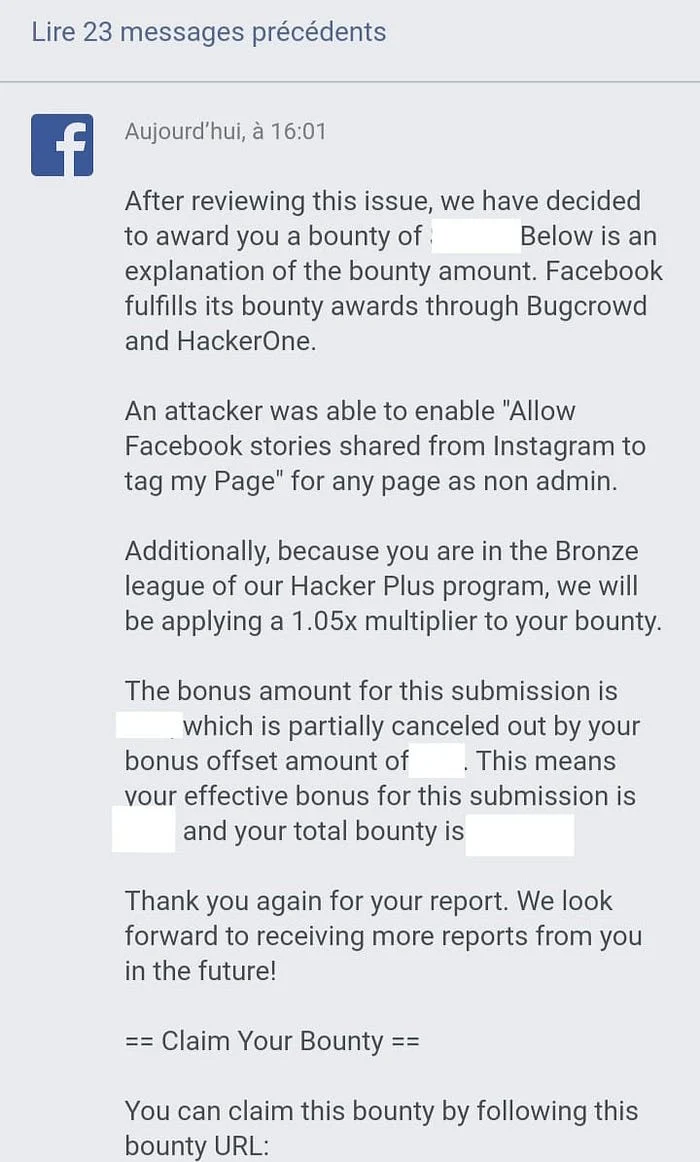
The image shows the request being modified and sent, followed by the disclosure timeline: report sent 08/05/2021, acknowledged by the Facebook security team 18/05/2021, fixed by Facebook 11/06/2021, and bounty awarded 09/07/2021.
Root cause
The endpoint takes the page identifier from the request. The report does not describe the code, so the exact cause is not stated. A user who is not an admin of a page could substitute another page's identifier.
Impact
An attacker who is not an admin of a page can enable the "Allow Facebook stories shared from Instagram to tag my page" setting on that page, provided the page has a linked Instagram account. The report describes this as an unauthorised user enabling the setting on a page with a linked Instagram account.
Fix
Facebook fixed the issue on 11/06/2021, before the bounty was awarded on 09/07/2021.
Variants to test
- Other page settings endpoints that take a
page_idin the body: try substituting a page you do not administer and look for a success response or a changed setting on the victim page. - The same endpoint with
enable=false: check whether disabling a victim's setting is equally possible, which would confirm the check is missing on the write path generally rather than only on the enable branch. - Pages without a linked Instagram account: the report ties the setting to pages with a linked Instagram account, so test whether the endpoint still accepts the update for pages without one.
- Identifier handling: try the victim's page identifier in different forms or positions in the request to see whether any normalisation step bypasses an authorisation check that exists elsewhere.
- Adjacent features that share the
tag_megaphonepath: look for other update endpoints under the same prefix and test whether they apply the same object-level check.
What happened, in plain words
Facebook pages can be connected to an Instagram account. When a page is connected like this, Facebook gives the page's admins a switch: should stories that are shared from Instagram be allowed to tag this page? The admin is supposed to be the only person who can flip that switch.
A security researcher found that this was not true. Any logged-in Facebook user, even someone with no role at all on a page, could send a request that turned the switch on for a page they did not own. The server accepted the request, and the setting was enabled on a page the sender did not administer.
This kind of mistake has a name: IDOR, short for Insecure Direct Object Reference. The idea is simple. Imagine a hotel where every room key is just a number written on a card, and the front desk hands out a key to room 12 without checking that you booked room 12. If you write 13 on the card instead, the door opens. The number is a "direct reference" to an object (a room, a page, a photo), and the system fails to check that you are allowed to use it. Here the "object" is a Facebook page, and the number is its page_id.
Below I walk through the report step by step, explaining each concept as it comes up.
The product and the feature
Facebook web here means the mobile web version of Facebook, reachable at m.facebook.com. It is the same site you get in a phone browser, built with simpler pages than the desktop version.
A Facebook page is the public profile a business, brand or public figure uses, as opposed to a personal profile. Pages have admins: people with permission to change the page's settings, post as the page, and so on. Not every logged-in user is an admin of every page; that is the whole point of the roles.
When a page is linked to an Instagram account, Facebook exposes an extra setting in the page settings area. The setting is called "facebook stories shared from Instagram to tag my page". A story is a post that disappears after a while. Tagging means attaching the page's name to a post so it links back to the page. The setting is a yes/no switch: allow Instagram stories to tag this page, or do not. Only an admin of the page should be able to change it.
The vulnerability
The report describes an IDOR in the endpoint that updates this setting. An endpoint is a specific address on a server that does one job, like a counter in a shop that only handles returns. The endpoint here accepts two pieces of information: a page_id (which page to change) and an enable flag (turn the setting on or off).
The researcher showed that a user who is not an admin of a page could still change the setting for that page.. The result: a user who is not an admin of a page could still change the setting for that page.
Setup
The report does not describe any special tools, accounts or software versions. The only stated precondition is that the victim page has a linked Instagram account, because the setting only exists in that context. The attacker needs a valid session on m.facebook.com, since the request carries a cookie, but does not need any role on the victim page.
A session is the state of being logged in. When you log in, the server gives your browser a cookie: a small piece of text that the browser stores and sends back with every request to that site. The cookie is how the server recognises you on the next request without asking for your password again. Think of it as a wristband at an event: you show it once at the door, and after that staff glance at your wrist instead of checking your ID. Because the cookie proves who you are, it is sensitive: anyone who steals it can act as you. In this report the cookie value is not shown, only a placeholder.
Finding it
The researcher was looking at the page settings screen at m.facebook.com/pages/edit/général, where the setting "facebook stories shared from Instagram to tag my page" is exposed. Note the accented é in général; that is the French word for "general", and it is part of the real address.
When you flip a switch on a web page, the browser usually does not reload the whole page. Instead it sends a small request in the background to tell the server "the user changed this". These background requests are often called API calls. An API (Application Programming Interface) is the set of addresses and rules a website's front end uses to talk to its back end: the browser asks, the server answers with data or performs an action. You can think of the API as the waiter in a restaurant: you do not walk into the kitchen yourself, you tell the waiter what you want, and the waiter brings it or passes the order on.
Toggling the setting produced a request carrying the page identifier and the new value as parameters. A parameter is a named value sent with a request, like page_id=123. The page identifier is supplied by the client, and changing it to a victim page's identifier still applied the change.
Exploitation
Step 1: reach the settings screen
The attacker opens the page settings screen:
m.facebook.com/pages/edit/général
This is the normal admin-facing screen where the stories tagging setting is available.
Step 2: toggle the setting and capture the request
The attacker enables the setting "facebook stories shared from Instagram to tag my page" and captures the resulting request:
POST /pages/profile/stories/tag_megaphone/update/?
Page_id=[page victim id]&enable=true HTTP/1.1
Host:m.facebook.com
Cookie:[require cookie parametre]
Line by line:
POST /pages/profile/stories/tag_megaphone/update/?is the first line of an HTTP request. HTTP is the language browsers and servers use to talk.POSTis the method, meaning "I am sending data that should change something on the server". The path/pages/profile/stories/tag_megaphone/update/is the endpoint: the specific address that updates this stories setting. The trailing?marks the start of the query string, the part of the address that carries parameters.Page_id=[page victim id]&enable=true HTTP/1.1is the rest of that first line.Page_idis the parameter naming which page to change.[page victim id]is a placeholder: in the real attack the attacker puts the victim page's identifier here.&separates parameters, andenable=trueturns the setting on.HTTP/1.1is the version of the protocol being used.Host:m.facebook.comtells the server which website the request is for. One server can host many sites, so the request names the one it wants.Cookie:[require cookie parametre]is where the browser attaches the session cookie. The value is not shown in the report; the placeholder says a cookie parameter is required. This is what proves the request comes from a logged-in user.
Tools built into browsers (the developer tools, usually opened with F12) let you see these requests and copy them.
Step 3: swap in the victim's page identifier
The attacker changes Page_id to the victim page's identifier and sends the request again, keeping their own cookie. The attacker changes Page_id to the victim page's identifier and sends the request again, keeping their own cookie, and the setting is enabled on the victim's page.
This is the heart of the bug. The cookie identifies the attacker and Page_id names the victim's page, and the change goes through.
The image shows the request being modified and sent, followed by the disclosure timeline: report sent 08/05/2021, acknowledged by the Facebook security team 18/05/2021, fixed by Facebook 11/06/2021, and bounty awarded 09/07/2021.
Root cause
The endpoint takes the page identifier from the request. The report does not describe the code, so the exact cause is not stated. A user who is not an admin of a page could substitute another page's identifier.
Authorisation is the process of deciding whether a user is allowed to do something. It is different from authentication, which is deciding who the user is. The cookie handles authentication ("this is user X"). Authorisation would be the next question ("is user X allowed to change page Y?"). The bug is that the second question is never asked. "Object-level" means the check should be about the specific object being touched, here the page, not just about whether the user is logged in at all.
Impact
An attacker who is not an admin of a page can enable the "Allow Facebook stories shared from Instagram to tag my page" setting on that page, provided the page has a linked Instagram account. The report describes this as an unauthorised user enabling the setting on a page with a linked Instagram account.
CVSS is a standard scoring system for rating how serious a vulnerability is, on a scale from 0 to 10.
Fix
Facebook fixed the issue on 11/06/2021, before the bounty was awarded on 09/07/2021.
"Server-side" is the key phrase. A check done in the browser can be bypassed, because the user controls the browser. A check done on the server, after the request arrives, cannot be bypassed by editing the request. The rule of thumb: never trust anything the client sends, including identifiers, and always verify permissions on the server for the specific object being changed.
Variants to test
If you want to practise this kind of thinking, here are directions the same idea points to. These are suggestions for further testing, not things the report says were found.
- Other page settings endpoints that take a
page_idin the body: try substituting a page you do not administer and look for a success response or a changed setting on the victim page. - The same endpoint with
enable=false: check whether disabling a victim's setting is equally possible, which would confirm the check is missing on the write path generally rather than only on the enable branch. - Pages without a linked Instagram account: the report ties the setting to pages with a linked Instagram account, so test whether the endpoint still accepts the update for pages without one.
- Identifier handling: try the victim's page identifier in different forms or positions in the request to see whether any normalisation step bypasses an authorisation check that exists elsewhere.
- Adjacent features that share the
tag_megaphonepath: look for other update endpoints under the same prefix and test whether they apply the same object-level check.
Glossary
- API: the set of addresses and rules a website's front end uses to talk to its back end; the browser asks, the server answers or acts.
- Authentication: proving who you are, for example by logging in and receiving a cookie.
- Authorisation: deciding whether an identified user is allowed to perform a specific action on a specific object.
- Cookie: a small piece of text a site stores in your browser and receives back with each request, used to recognise your logged-in session.
- CVSS: a standard 0 to 10 scoring system for rating the severity of a vulnerability.
- Endpoint: a specific address on a server that performs one job, such as updating a setting.
- Facebook page: a public profile for a business, brand or public figure, managed by admins.
- Host: the part of a request that names which website on the server is being addressed, here
m.facebook.com. - HTTP: the protocol browsers and servers use to exchange requests and responses.
- IDOR (Insecure Direct Object Reference): a bug where a request names an object by an identifier the user controls, and the server fails to check that the user is allowed to access that object.
- Instagram: a photo and video sharing service; here, an account can be linked to a Facebook page.
- Object-level check: an authorisation check about one specific object (this page, this photo), rather than about the user in general.
- Parameter: a named value sent with a request, such as
page_id=123orenable=true. - POST: an HTTP method meaning the request sends data that should change something on the server.
- Server-side: happening on the server, after the request arrives, and therefore not bypassable by editing the request in the browser.
- Session: the state of being logged in, maintained across requests by a cookie.
- Story: a post that disappears after a period of time.
- Tagging: attaching a page's or person's name to a post so it links back to them.
- Toggle: a switch on a settings screen that turns a feature on or off.



