XS-Searching Google’s bug tracker to find out vulnerable source code
The Monorail issue tracker allowed cross-site search attacks because CSV export lacked CSRF protection and allowed duplicate columns, inflating response size. An attacker could use timing side channels to infer whether private bug reports matched search queries, leaking vulnerable source code file paths and line numbers.
 Published on medium.com
Monorail is an open-source issue tracker used by many “Chromium-orbiting” projects, including Monorail itself. Other projects include Angle, PDFium, Gerrit, V8, and the Alliance for Open Media.
The full write-up lives on its author's site
It belongs to its author, so we link to it rather than copy it. The other two tabs are our own rewrites, checked against it.
Context
Monorail is an open-source issue tracker used by many projects around Chromium, including Monorail itself, Angle, PDFium, Gerrit, V8 and the Alliance for Open Media. It is also used by Project Zero, Google's 0-day bug-finding team. The examples in the report use the Monorail instance at bugs.chromium.org. and the feature under examination was the ability to download the result of a search query as a CSV file.
The article explains how the researcher could have exploited the tracker to leak sensitive information, specifically vulnerable source code files and line numbers, from private bug reports through an XS-Search (Cross-Site Search) attack. The write-up is framed as a side-channel timing attack that turns out to be practical.
Setup
The report does not describe any specific accounts, tools or versions used. The only precondition that matters is the victim's session: the attack relies on a user who is logged in to Monorail and has access to private issues, such as a member of the Google security team or a high profile bug reporter. The attacker only needs to get such a user to access a malicious link.
Finding it
The first functionality the researcher analysed was the CSV download of a search query. It did not take long to notice that it was vulnerable to a CSRF attack: it was possible to force a user to download a CSV containing the results of a search query if a malicious link was accessed.
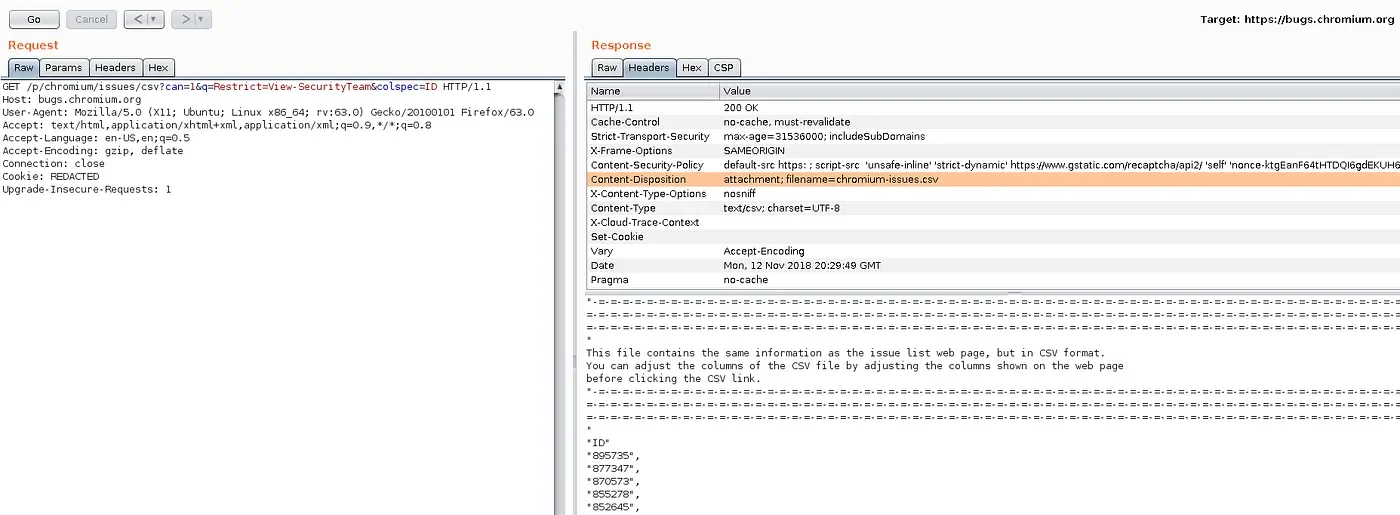
The example URL used to demonstrate this was:
https://bugs.chromium.org/p/chromium/issues/csv?can=1&q=Restrict=View-SecurityTeam&colspec=ID
As the image shows, there were no protections against CSRF attacks. A request made with the Restrict-View-SecurityTeam tag would filter the results to undisclosed security-related issues only. If a member of the Google security team or a high profile bug reporter accessed this link, they would download a CSV containing all undisclosed issues they had access to.
A second discovery was that the columns displayed in a search result could be duplicated, which allowed the researcher to arbitrarily increase the length of the generated CSV. Accessing the URL below:
https://bugs.chromium.org/p/chromium/issues/csv?can=1&q=id:51337&colspec=ID+Summary+Summary+Summary
produced a CSV containing three repeated Summary columns instead of only one.

Exploitation
Combining the two issues gives everything needed for an XS-Search attack:
- The capacity to perform complex search queries.
- The capacity to inflate the response of a search query.
The second point is the important one. If the response of a search query matches a bug, the CSV can be made significantly bigger than that of a query that does not match. Because of this difference in response length, it is possible to calculate the time each request takes to complete and infer whether the query returned results. That gives the ability to ask cross-origin boolean questions, such as whether there is any private bug that matches the folder src/third_party/pdfium/.
The core of the issue is shown by three cases.

In the first case, the CSV is generated from the query Summary: This bug exists.

In the second case, the CSV is generated from the query Summary: This bug doesn't exist.
In the third case, the CSV is generated from the query Summary: This bug exists OR Summary: This bug doesn't exist.
In the first and third cases the CSV is arbitrarily big, because both queries match a bug with the summary This bug exists. In the second case the CSV is empty, containing only the header, because the query did not match any bug with the summary This bug doesn't exist. The third case uses the OR logic operator to query the first and second cases together.
Step 1: choose what to search for
One problem when creating a PoC was deciding what to search. Monorail's search does not allow querying for specific letters in a report, only words, so the report could not be bruteforced character by character. The researcher stepped back and searched older bug reports for information that was relevant and could realistically be exfiltrated by the attack. Many Chromium bug reports indicate the file path and line number where the vulnerability can be found.
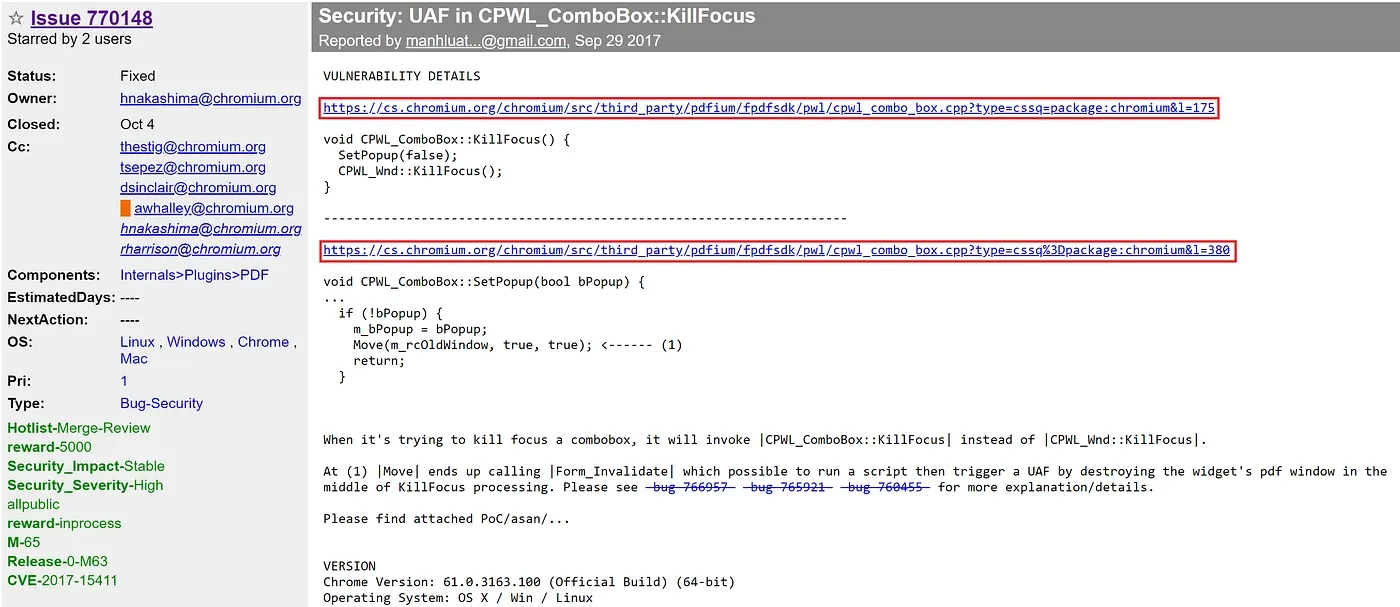
That is ideal for an XS-Search attack. The folder structure of Chromium is public, and Monorail treats slashes as word delimiters: a query for path/to/dir also includes results for bugs containing the string path/to/dir/sub/dir. That makes it easy to generate the appropriate search queries.
Step 2: walk the source tree with boolean questions
The attack proceeds as follows:
- Find out whether there is any private bug report that mentions a file in Chromium's source tree, using
https://cs.chromium.org/chromium/src/as the base query. - Search for the first half of all the directories under
src/using theORoperator, for examplesrc/blink OR src/build.... - Repeat step 2 using the binary search algorithm. If anything was found (a big CSV was generated), restrict the search space to the first half. Otherwise (an empty CSV was generated), restrict the search space to the second half.
- After eliminating all directories but one, restart step 2, now adding the newly found directory to the end of the base query.
At the end of this process the full URL has been leaked, and the attacker can look into the corresponding file and try to find the vulnerability that was reported.
Step 3: measure the response without reading it
The Same-Origin policy forbids accessing information across different origins, so a naive response.length will not work. The exact size of a response cannot be known for sure, but the time each request takes to complete can be measured. With the response-length inflation technique, searches returning a bug are a lot slower to finish than ones that do not.
A single request is not enough for a high degree of certainty: the same page would need to be requested many times and the average response time measured to obtain a reliable exploit. The Cache API solves this. By making only one request and repeatedly calculating the duration that the response takes to be cached, it is possible to infer with certainty whether the search query returned bugs. A small response takes less time to be cached than a bigger one. Because there are almost no limitations to the Cache API and it is extremely fast, the same response can be cached and measured several times and then compared with the measurements of a known empty search query result. That makes it easy to differentiate a large response from a small or empty one, filters out hardware and network variances, and increases the exploit's speed and reliability.
The implementation is available in the exploit's code, published as a gist.
Root cause
The CSV download endpoint accepted cross-site requests without any CSRF protection, so a third-party page could trigger a search and a download in the victim's authenticated session. Separately, the colspec parameter accepted the same column more than once, so the size of the generated CSV could be inflated at will. Neither behaviour is a vulnerability on its own in the sense of returning data cross-origin, but together they turn response length into an observable signal. The Same-Origin policy prevents reading the response, yet it does not hide how long the response takes to be cached, and the Cache API exposes that timing to the attacker's page. The report does not describe the server-side code, so the exact reason the endpoint lacked CSRF checks is not stated.
Impact
An attacker who gets a logged-in user with access to private issues to open a malicious link can ask cross-origin boolean questions about those private bug reports. In the scenario described, the questions concern whether private reports mention paths in Chromium's source tree, and binary search over the public directory structure recovers the full path. Because many Chromium bug reports include the file path and line number of the vulnerability, the leaked path points the attacker to the file to inspect for the reported flaw. The attack depends on the victim having access to the private issues being queried and on the attacker being able to deliver the link to that victim. The researcher found three different places where the attack could be carried on, which resulted in CVE-2018-10099, CVE-2018-19334 and CVE-2018-19335, and was rewarded $3133.7 for each vulnerability, totalling over $9400.
Fix
The report lists four commits in Monorail's infrastructure repository:
- A commit fixing the CSRF in Monorail's CSV file download.
- A commit fixing the duplicated columns bug.
- A commit disallowing double grid axes and the Cc axis.
- A commit preventing request inflation through the
groupbyparameter.
Variants to test
- CSV or export endpoints without CSRF protection. Look for search, export or report endpoints that accept a query in the URL and return a file. A positive result is a cross-site request that produces a download in the victim's session, as with the
Restrict-View-SecurityTeamexample. - Repeatable column or field parameters. Try passing the same column or field name several times in the parameter that selects output columns. A positive result is a response that grows with each repetition, as with
colspec=ID+Summary+Summary+Summary. - Other response inflation parameters. The fixes mention double grid axes, the Cc axis and the
groupbyparameter, so test those on other Monorail-derived or similar trackers. A positive result is a response whose size can be driven up by the parameter while the query still matches. - Timing oracles through the Cache API. On any cross-origin endpoint whose response size varies with a secret, measure cache duration repeatedly and compare against a known empty result. A positive result is a stable difference between matching and non-matching queries after filtering out network variance.
- Word-delimited search over public structures. Where search treats separators as word boundaries, use the public directory or naming structure as a base query and binary search with
OR. A positive result is a recovered path or name from private data, one segment at a time.
What happened, in plain words
Google runs a website called Monorail. It is a bug tracker: a place where software teams write down problems they have found in their code, discuss them, and mark them as fixed. Monorail is open source, which means its code is public and anyone can read it. Many projects that live around the Chromium browser use it, including Monorail itself, Angle, PDFium, Gerrit, V8 and the Alliance for Open Media. Google's Project Zero, the team that hunts for unknown security flaws, uses it too. The examples here use the instance at bugs.chromium.org.
Some of the bugs written in Monorail are private. Only certain people can see them, for example members of Google's security team or people who report a lot of serious bugs. A private bug often contains the exact file path and line number in the source code where the problem sits. If an outsider could read those private bugs, they would learn where the unfixed weaknesses are, which is exactly the information an attacker wants.
The researcher found a way to ask yes or no questions about those private bugs from a completely different website, without ever being able to read the private pages directly. The trick is called XS-Search, short for Cross-Site Search. It works by measuring how long the browser takes to handle a response, rather than reading the response itself. The write-up describes it as a side-channel timing attack, and shows that it is practical rather than theoretical.
The pieces you need to know first
Before following the attack, a few everyday ideas help.
- A bug tracker is like a shared notebook for a team. Each entry has a title (the summary), a description, comments, and often a label saying who is allowed to see it.
- A search query is what you type into the search box. On Monorail you can search for words, and you can combine conditions with operators such as
OR, which means "match either this or that". - A CSV file is a plain text table: rows of values separated by commas. Spreadsheet programs open it. Monorail can export the result of a search as a CSV, so you can download a list of matching bugs.
- A URL parameter is the part of a web address after the
?. Eachname=valuepair tells the server something, for example which search to run. The&sign separates parameters. - A session is how a website remembers that you are logged in. After you sign in, your browser stores a small piece of data (often a cookie) and sends it with every request. The server uses it to know who you are and what you are allowed to see.
- CSRF stands for Cross-Site Request Forgery. It means another website can make your browser send a request to a site where you are logged in, using your session, without you intending it. Imagine a stranger who can post a letter in your name because the post office only checks the envelope, not who wrote it.
- Same-Origin policy is a browser rule. A page from one website is not allowed to read the contents of a response from a different website. It stops a malicious page from simply fetching your private data and reading it.
- A side channel is any indirect signal that leaks information even when direct reading is blocked. If you cannot open a letter, but you can weigh the envelope, the weight still tells you something.
- The Cache API is a browser feature that lets a web page store responses locally and reuse them. It is normally used to make websites load faster offline.
Finding the first weakness: the CSV download
The researcher started by looking at the feature that downloads a search result as a CSV. It did not take long to notice that this feature was vulnerable to a CSRF attack. In plain words: if a logged-in user opened a malicious link, their browser would send the search request to Monorail with their session, and the CSV would be downloaded for them. The attacker never sees the file, but the request happens.
The image shows the CSV download URL used in the example.
The example URL used to demonstrate this was:
https://bugs.chromium.org/p/chromium/issues/csv?can=1&q=Restrict=View-SecurityTeam&colspec=ID
Line by line, in plain words:
https://bugs.chromium.orgis the Monorail server for the Chromium project./p/chromium/issues/csvis the address of the CSV export feature for that project's issues.?starts the list of parameters.can=1is a parameter that, in this context, is part of the search request. The report does not explain its meaning further.&q=Restrict=View-SecurityTeamsets the search queryqto the tagRestrict-View-SecurityTeam. That tag marks issues that are restricted to the security team, in other words undisclosed security bugs.&colspec=IDasks for a single column in the output, the issue ID.
Because there were no protections against CSRF, a request with the Restrict-View-SecurityTeam tag would filter the results down to undisclosed security-related issues only. If a member of the Google security team, or a high profile bug reporter, opened this link, their browser would download a CSV containing all the undisclosed issues they had access to. The attacker still cannot read that file, but the request has been made, and that is the seed of the whole attack.
Finding the second weakness: repeated columns
The next discovery was that the columns shown in a search result could be repeated. The parameter that chooses the columns is called colspec. If you name the same column several times, the server builds the CSV with that column several times. That lets an attacker make the generated file as large as they like.
To illustrate, the researcher accessed this URL:
https://bugs.chromium.org/p/chromium/issues/csv?can=1&q=id:51337&colspec=ID+Summary+Summary+Summary
Line by line:
- The address is again the CSV export of the Chromium issue tracker.
q=id:51337searches for the single issue whose ID is 51337.colspec=ID+Summary+Summary+Summaryasks for the ID column and then the Summary column three times. The+signs stand for spaces in a URL.
The downloaded CSV contained three repeated Summary columns instead of only one.
The image shows the resulting CSV with the Summary column appearing three times.
Why does this matter? Because the size of the response can now be controlled by the attacker. A search that matches one bug can be made to produce a very large file, simply by repeating a column many times. A search that matches nothing produces only a tiny file with the header row.
Putting the two together: the XS-Search idea
Combining the two weaknesses gives everything needed for a Cross-Site Search attack:
- The capacity to perform complex search queries.
- The capacity to inflate the response of a search query.
The second point is the important one. If a search matches a bug, the CSV can be made significantly bigger than the CSV of a search that does not match. Because of that difference in length, the time each request takes to complete can be measured, and from that timing the attacker can infer whether the query returned results. This gives the ability to ask cross-origin boolean questions: yes or no questions about another site's private data, answered by timing rather than by reading.
For example, the attacker can ask: is there any private bug that matches the folder src/third_party/pdfium/? The answer comes back through timing, even though the browser never lets the attacker's page read the response.
The core of the issue is shown by three cases.
In the first case, the CSV is generated from the query Summary: This bug exists. The search matches a bug, so the CSV is big.
In the second case, the CSV is generated from the query Summary: This bug doesn't exist. Nothing matches, so the CSV is empty apart from the header.
In the third case, the CSV is generated from the query Summary: This bug exists OR Summary: This bug doesn't exist. The OR operator means "match either condition". Since the first condition matches, the result is big again.
So in the first and third cases the CSV is arbitrarily big, because both queries match a bug whose summary is This bug exists. In the second case the CSV is empty, containing only the header, because no bug has the summary This bug doesn't exist. The third case shows how OR lets the attacker combine a condition they know is true with a condition they want to test.
Step 1: choose what to search for
One problem when building a proof of concept was deciding what to search. Monorail's search does not allow querying for individual letters inside a report, only whole words. That means the attacker cannot simply brute force a report one character at a time, the way a password cracker might try every combination.
So the researcher stepped back and looked through older bug reports for information that was relevant and could realistically be stolen by this attack. That is when they learned that many Chromium bug reports state the file path and line number where the vulnerability can be found.
The image shows an example bug report from https://bugs.chromium.org/p/chromium/issues/detail?id=770148 that includes a file path and line number.
That is ideal for an XS-Search attack, for two reasons. First, the folder structure of Chromium is public, so the attacker knows all the possible directory names to test. Second, Monorail treats slashes as word delimiters. A query for path/to/dir also includes results for bugs containing the longer string path/to/dir/sub/dir. In other words, searching for a folder also matches anything inside it, which is exactly what a search that walks down a directory tree needs.
Step 2: walk the source tree with yes or no questions
The attack then proceeds like this:
- Find out whether there is any private bug report that mentions a file in Chromium's source tree, using
https://cs.chromium.org/chromium/src/as the base query. That site is a public browser for Chromium's source code, so it gives the attacker the list of real folder names to try. - Search for the first half of all the directories under
src/using theORoperator, for examplesrc/blink OR src/build.... The...stands for the rest of the list. - Repeat step 2 using the binary search algorithm. If anything was found (a big CSV was generated), restrict the search space to the first half. Otherwise (an empty CSV was generated), restrict the search space to the second half.
- After eliminating all directories but one, restart step 2, now adding the newly found directory to the end of the base query.
Binary search deserves a plain explanation. Imagine a phone book and you want to know whether a name is in it. Instead of checking every page, you open it in the middle and ask "is the name before or after this page?". Each question halves the remaining pages. After a handful of questions you know the answer. Here, each question is a search query, and each answer is a yes or no delivered by timing. Step 2 asks about half the directories at once with OR. Step 3 narrows down which half contains a match. Step 4 then moves one level deeper, appending the found directory to the base query and starting again.
At the end of this process the full URL has been leaked. The attacker can then look into the corresponding file and try to find the vulnerability that was reported.
Step 3: measure the response without reading it
You might wonder how the attacker obtained the size of the CSV in step 3. The Same-Origin policy forbids reading information across different origins, so a naive response.length will not work. The browser simply refuses to hand the contents of the response to the attacker's page.
What can be measured is time. The exact size of a response cannot be known for sure, but the time each request takes to complete can be measured. With the response-length inflation technique, searches that return a bug are a lot slower to finish than searches that do not.
A single request is not enough for a high degree of certainty. Network conditions vary, and one slow moment proves nothing. The same page would need to be requested many times and the average response time measured to obtain a reliable exploit. That is where the Cache API comes in. By making only one request and repeatedly calculating the duration that the response takes to be cached, it is possible to infer with certainty whether the search query returned bugs.
In other words, a small response takes less time to be cached than a bigger response. Because there are almost no limitations to the Cache API, and it is extremely fast, the same response can be cached and measured several times. Those measurements are then compared with the measurements of a known empty search query result. That makes it easy to tell a large response from a small or empty one, filters out differences caused by hardware and network conditions, and increases the exploit's speed and reliability.
For more information on how this can be implemented, the researcher points to the exploit's code, published as a gist.
Why it worked
The CSV download endpoint accepted requests coming from other websites without any CSRF protection, so a third-party page could trigger a search and a download inside the victim's logged-in session. Separately, the colspec parameter accepted the same column more than once, so the size of the generated CSV could be inflated at will. Neither behaviour is a vulnerability on its own in the sense of returning data across origins, but together they turn response length into an observable signal. The Same-Origin policy prevents reading the response, yet it does not hide how long the response takes to be cached, and the Cache API exposes that timing to the attacker's page. The report does not describe the server-side code, so the exact reason the endpoint lacked CSRF checks is not stated.
What the attacker gains
An attacker who gets a logged-in user with access to private issues to open a malicious link can ask cross-origin yes or no questions about those private bug reports. In the scenario described, the questions concern whether private reports mention paths in Chromium's source tree, and binary search over the public directory structure recovers the full path. Because many Chromium bug reports include the file path and line number of the vulnerability, the leaked path points the attacker to the file to inspect for the reported flaw. The attack depends on the victim having access to the private issues being queried, and on the attacker being able to deliver the link to that victim.
The researcher found three different places where the attack could be carried on, which resulted in CVE-2018-10099, CVE-2018-19334 and CVE-2018-19335. A CVE is a public identifier given to a known security flaw, so that everyone can refer to the same issue. The researcher was rewarded $3133.7 for each vulnerability, totalling over $9400.
The fixes
The report lists four commits in Monorail's infrastructure repository:
- A commit fixing the CSRF in Monorail's CSV file download.
- A commit fixing the duplicated columns bug.
- A commit disallowing double grid axes and the Cc axis.
- A commit preventing request inflation through the
groupbyparameter.
A commit is a recorded change to a code repository, like a saved edit with a note explaining it. The first two commits close the two weaknesses described above. The other two close related ways of inflating a response.
Variants to test
If you want to look for similar problems elsewhere, these are the patterns to try. Each one is a question you can ask about a website, followed by what a positive result looks like.
- CSV or export endpoints without CSRF protection. Look for search, export or report endpoints that accept a query in the URL and return a file. A positive result is a cross-site request that produces a download in the victim's session, as with the
Restrict-View-SecurityTeamexample. - Repeatable column or field parameters. Try passing the same column or field name several times in the parameter that selects output columns. A positive result is a response that grows with each repetition, as with
colspec=ID+Summary+Summary+Summary. - Other response inflation parameters. The fixes mention double grid axes, the Cc axis and the
groupbyparameter, so test those on other Monorail-derived or similar trackers. A positive result is a response whose size can be driven up by the parameter while the query still matches. - Timing oracles through the Cache API. On any cross-origin endpoint whose response size varies with a secret, measure cache duration repeatedly and compare against a known empty result. A positive result is a stable difference between matching and non-matching queries after filtering out network variance.
- Word-delimited search over public structures. Where search treats separators as word boundaries, use the public directory or naming structure as a base query and binary search with
OR. A positive result is a recovered path or name from private data, one segment at a time.
Glossary
- Monorail: Google's open-source bug tracker, used by Chromium-related projects and Project Zero.
- Bug tracker: a website where a team records, discusses and tracks software problems.
- Issue: a single entry in a bug tracker, with a summary, description, comments and access restrictions.
- Summary: the title of an issue.
- Private issue: an issue only visible to certain people, such as a security team.
- CSV: a plain text table format where values are separated by commas, openable in a spreadsheet program.
- URL parameter: a
name=valuepair after the?in a web address that tells the server what to do. - Query (
q): the search text sent to the server, here in theqparameter. colspec: the parameter that chooses which columns appear in the exported CSV.- Session: the state that keeps you logged in, carried by data such as a cookie sent with each request.
- Cookie: a small piece of data a website stores in your browser and receives back on later requests.
- CSRF (Cross-Site Request Forgery): tricking a logged-in user's browser into sending a request to another site using their session, without their intent.
- Same-Origin policy: a browser rule that stops a page from one site reading responses from another site.
- Cross-origin: involving two different sites or origins.
- XS-Search (Cross-Site Search): using cross-origin search requests and an observable signal such as timing to learn about another site's data.
- Side channel: an indirect signal, such as timing or size, that leaks information even when direct reading is blocked.
- Timing attack: inferring secret information from how long an operation takes.
- Boolean question: a yes or no question, here answered by whether a search matched anything.
ORoperator: a search operator meaning "match either condition".- Response inflation: deliberately making a server's response larger, here by repeating a column.
- Binary search: a method that halves the remaining possibilities with each question, used here to narrow down directory names.
- Word delimiter: a character, such as a slash, that search treats as a boundary between words.
- Cache API: a browser feature that lets a page store responses locally and reuse them, used here to measure caching time repeatedly.
response.length: the size of a response in code, which the Same-Origin policy prevents reading across origins.- PoC (proof of concept): a small demonstration that a vulnerability is real.
- CVE: a public identifier assigned to a known security vulnerability.
- Commit: a recorded change to a code repository.
groupbyparameter: a parameter mentioned in one of the fixes as another way to inflate a request.- Grid axis / Cc axis: output options mentioned in one of the fixes as ways to inflate a response.
- Gist: a small public code snippet hosted by GitHub.