Patched Zoom Exploit: Altering Camera Settings via Remote SQL Injection
Old Zoom desktop clients on Mac and Linux built SQL queries at runtime and passed a meeting code from a custom URI scheme into them, so a malicious website could trigger a database update. By abusing a UTF-8 decoding quirk to slip past the quote-escaping sanitiser, an attacker could change privacy settings so the client would later join meetings with camera and audio on.
 Published on medium.com
Old versions of Zoom’s software contained a SQL injection vulnerability that allowed a remote attacker to alter a victim’s settings, including camera privacy options. This issue, which affected the Mac and Linux clients, was quickly patched, and Zoom users are no longer impacted.
The full write-up lives on its author's site
It belongs to its author, so we link to it rather than copy it. The other two tabs are our own rewrites, checked against it.
Context
Zoom's desktop clients, unlike the in-browser version, run outside a browser's security sandbox, which made them an attractive target for attackers as the product's popularity grew. The researcher chose to investigate the Linux client, where the testing tools were most familiar, looking for issues that would carry over to more popular platforms.
The attack surface that stood out was the communication between a web page and the desktop application. Visiting a Zoom meeting page in a browser can open the meeting in the application, so the two must talk to each other. The meeting page source shows that this browser-to-application communication happens through the zoommtg:// custom URI scheme. These URIs carry several parameters in a Base64-encoded blob, and it is not clear what all the parameters mean or how they might be exploited.
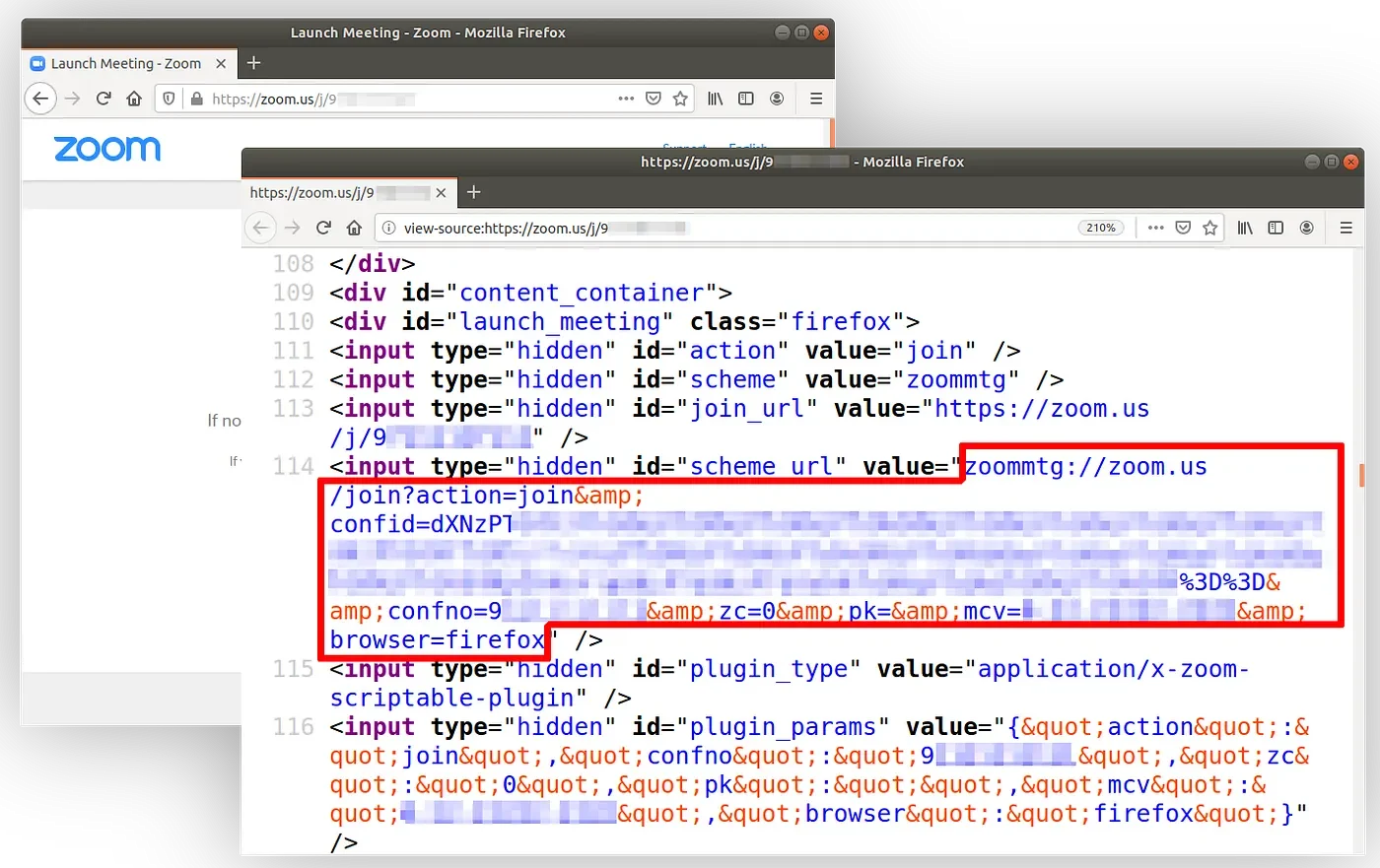
The “zoommtg://” URI contains data for the Zoom desktop client
Setup
The work was done against the Zoom desktop client on Linux. The binary is closed source and has no debugging symbols, so large-scale reverse engineering was ruled out as too time consuming. The work relied on a debugger attached to the running client, the public SQLite source, and a SQL explorer.
- A debugger attached to a running Zoom client, with a breakpoint set on the SQL query function.
- Ghidra for decompilation, cross-referenced against the public-domain SQLite source code.
- A SQL explorer (DB Browser for SQLite) to inspect and map the application's database.
A useful precondition came from the binary itself: one of its strings reveals that SQLite version 3.27.2 is compiled into the application. Because the SQLite source is public domain, locating one SQLite function in the Zoom binary makes it possible to identify all related functions quickly.
Finding it
Rather than decode every URI parameter, the researcher looked at the strings of the binary. Several partial SQL queries with format specifiers appear there, which indicates that SQL queries are composed at runtime instead of being properly hardcoded parameterised queries. That suggests potential SQL injection, but it is far from conclusive.
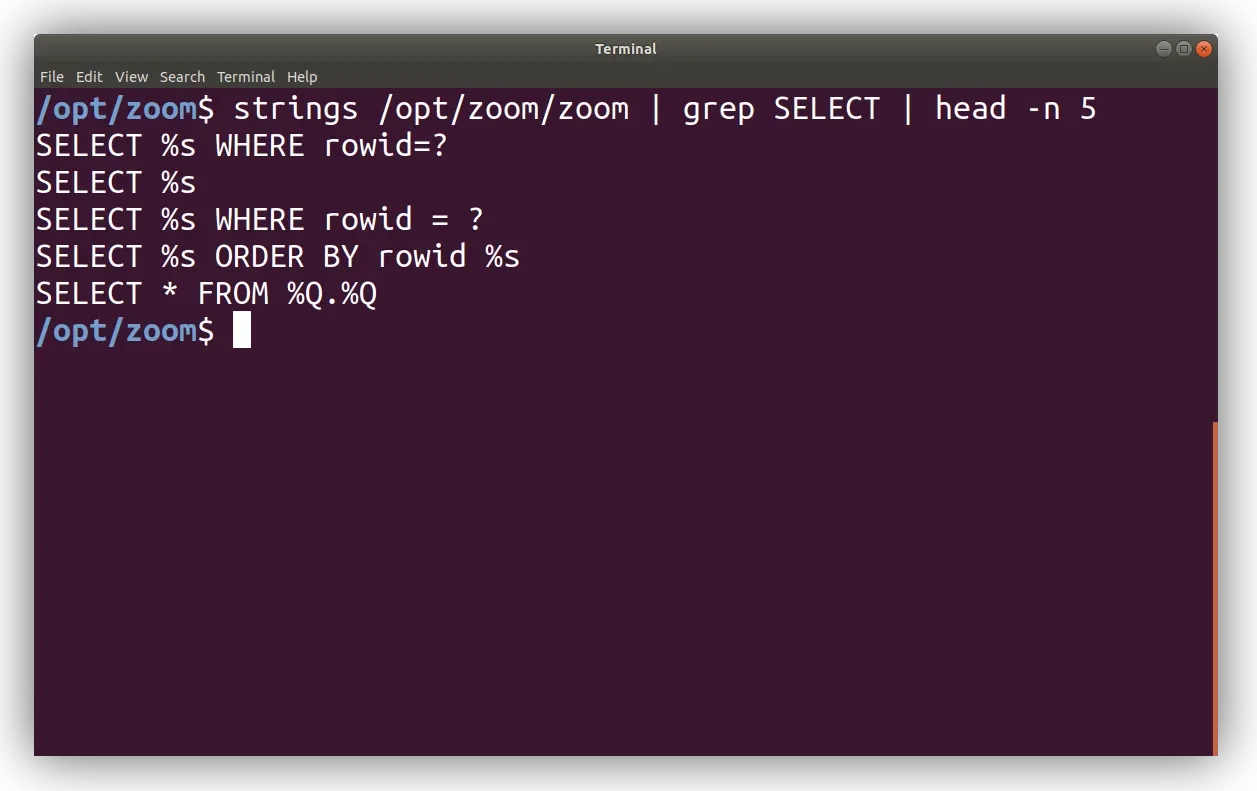
Partial SQL queries appear in the Zoom binary
To see which queries actually execute, the next step is to attach a debugger and break on the SQL query function. Without symbols there is no indication of where that function lives, so the embedded SQLite version is the way in: find one SQLite function, pivot to the related ones, and continue until reaching sqlite3LockAndPrepare, which prepares a SQL statement for execution. A breakpoint there shows the partial queries being filled in.
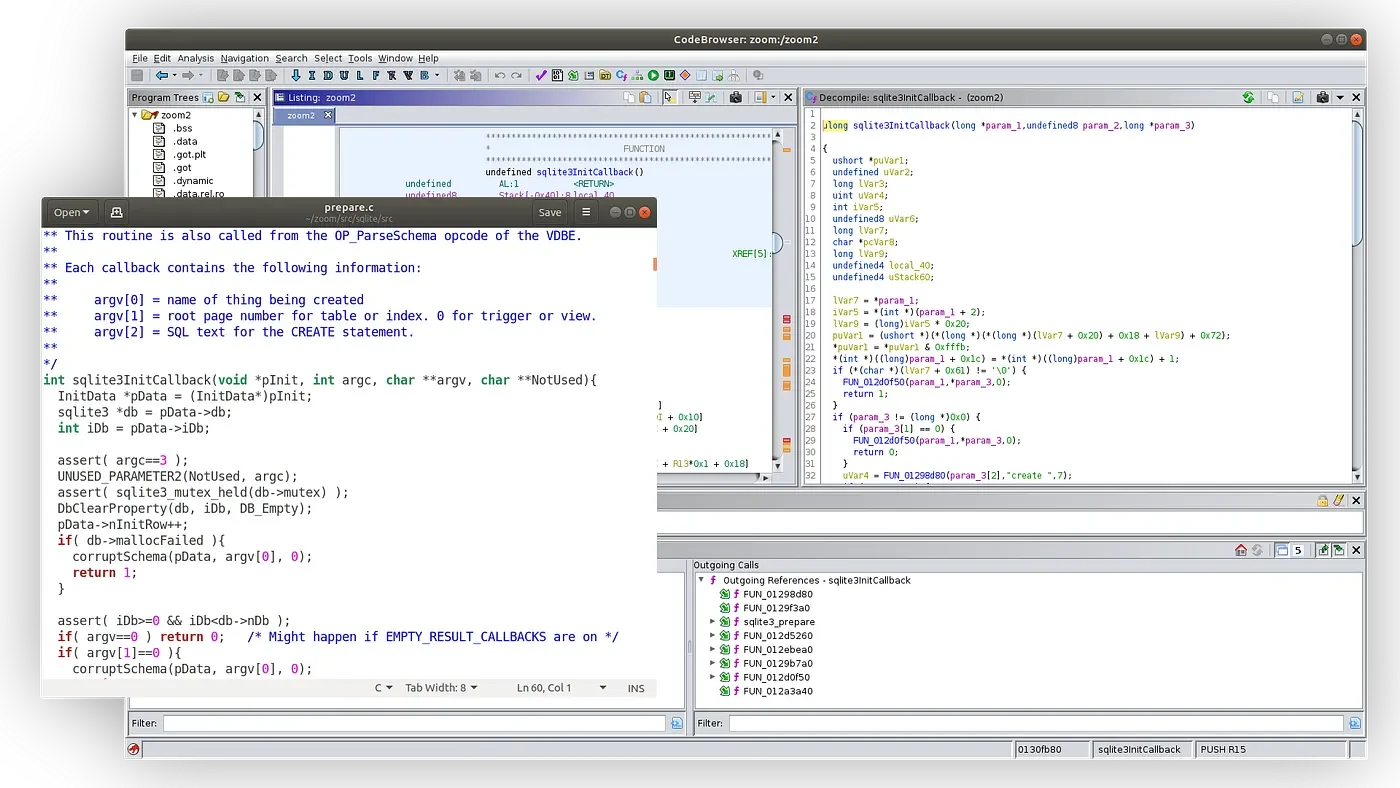
Ghidra decompilation and the SQLite source code aid reverse engineering
Triggering the zoommtg:// URI in the browser hits the breakpoint several times. One of the queries updates a database entry with a long hexadecimal meeting code, and that is the exact same hexadecimal code passed as the tid parameter in the URI's encoded data. This confirms that any website can use CSRF techniques to trigger a database call in Zoom. Whether that leads to SQL injection still needs investigation.
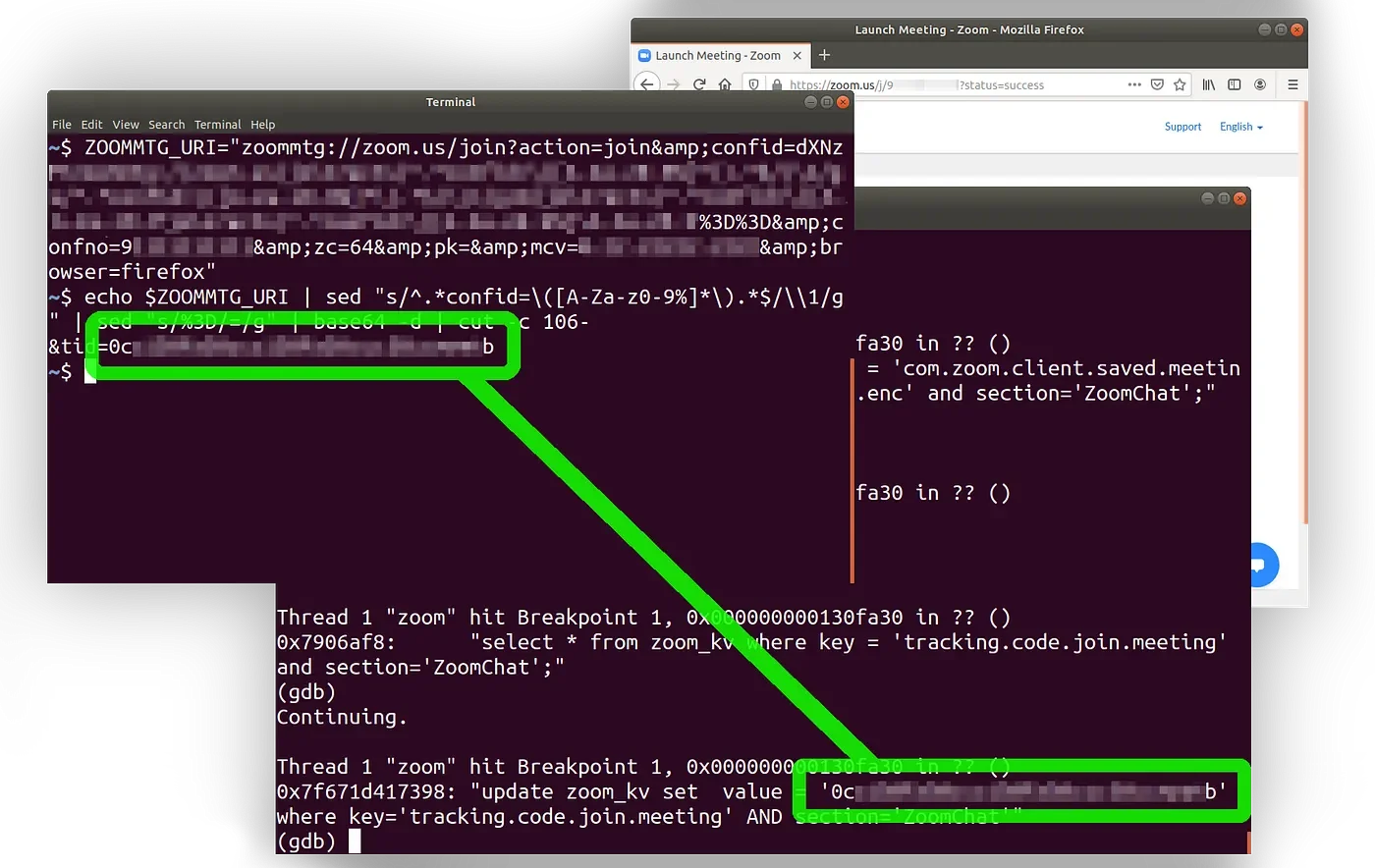
The hexadecimal code in the URI matches the code at the GDB breakpoint
Before pushing on exploitation, the researcher mapped the impact. Changing privacy settings in the application and watching which entries change in the database with a SQL explorer shows some particularly sensitive settings: automatically joining meetings without user approval, and joining meetings with webcam and audio enabled. A SQL injection that modified these values from their defaults would, once Zoom was closed and reopened, make Zoom automatically share the victim's camera and audio with any meeting a malicious web page sends it to.
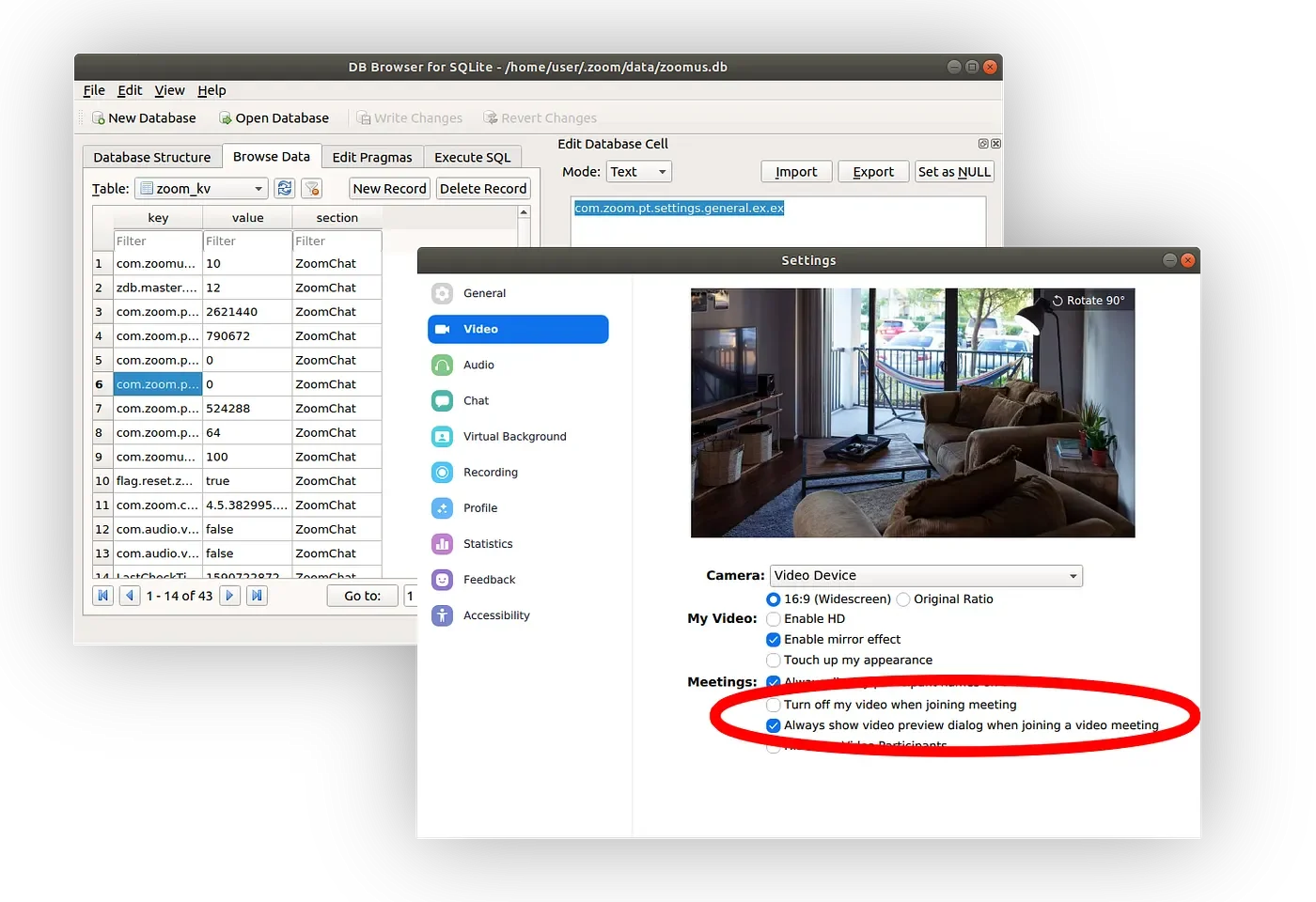
DB Browser for SQLite helps map out Zoom’s settings
Exploitation
Step 1: A simple payload fails
A crafted URI sends the application a simple payload containing a lone single quote, and the database is checked for results. The injection fails. In a successful attack the single quote would be interpreted as part of the SQL command and all table entries would be updated to the same value, but they are not. An input sanitisation function appears to replace every single quote with two single quotes, which prevents the attack. Common sanitisation bypasses, such as including a backslash character, also fail.
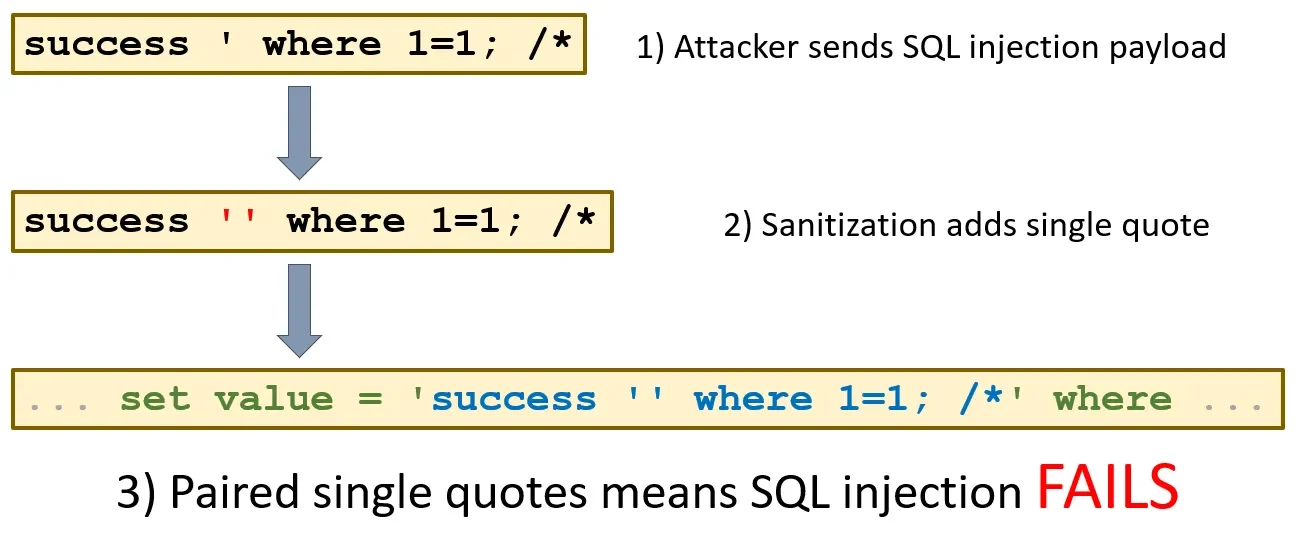
SQL injection fails for simple payloads
Step 2: A Unicode edge case slips past the filter
Old web-application bugs have exploited differences in how sanitisation functions and backend systems treat Unicode, and several Unicode edge cases are tricky to handle correctly. After several failed attempts, the researcher found the sequence that slips past the sanitisation filter:
success \xC2' or 1=1;
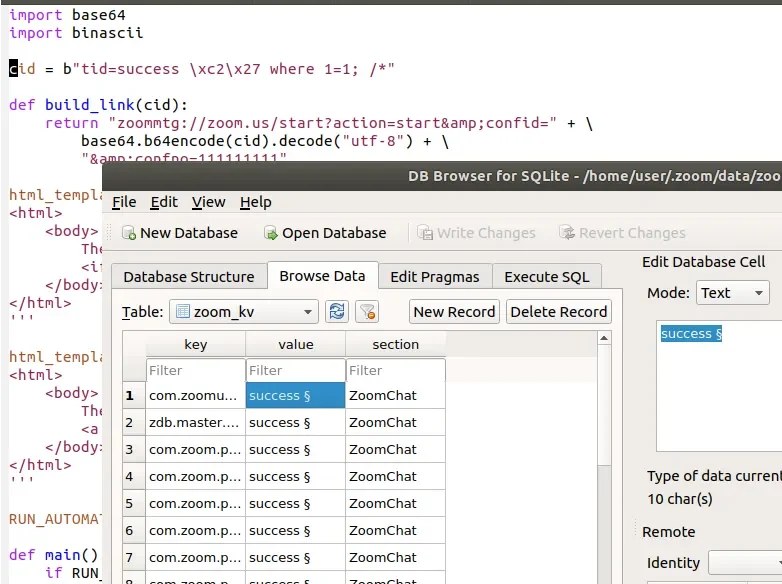
DB Browser for SQLite proves that injection was successful
Step 3: Why it works
In ASCII strings, each byte has a value below 0x80 and represents one character. In UTF-8 strings most byte values mean the same as in ASCII, but values above 0x80 mark the beginning of a multi-byte character. The sanitisation function processes the payload and produces an ASCII string containing a pair of single quote characters, which would not cause SQL injection. Before those bytes reach the query function, however, they are interpreted as a UTF-8 string. Byte 0xC2 in the payload shifts from representing an out-of-range ASCII character to representing the start of a two-byte UTF-8 character, so the next byte is no longer interpreted as a single quote. The UTF-8 interpretation contains only the remaining single quote, and the injection succeeds.
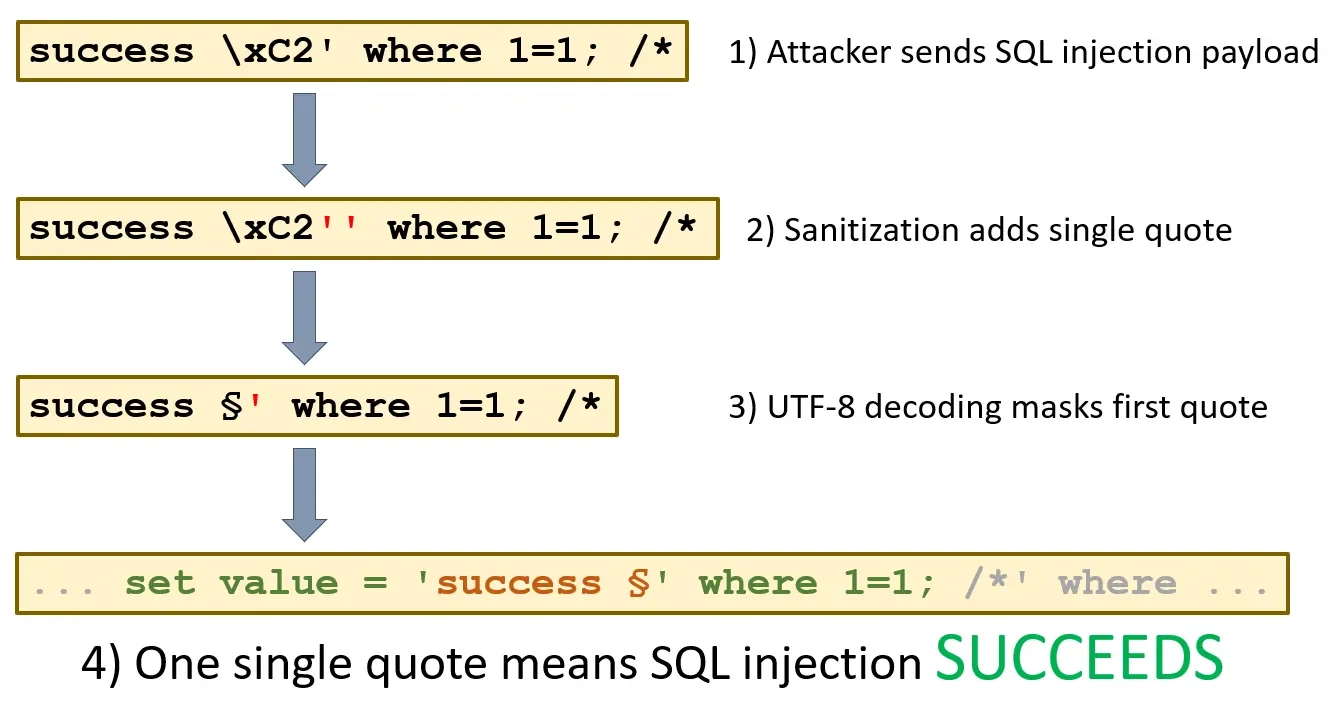
The payload abuses UTF-8 decoding, and SQL injection succeeds.
Root cause
The application builds SQL queries at runtime with format specifiers rather than using hardcoded parameterised queries, and the sanitisation function produces an ASCII string before the bytes are decoded as UTF-8. The filter doubles single quotes correctly for ASCII input, but the bytes are later decoded as UTF-8, so a lead byte such as 0xC2 consumes the following byte and changes how the escaped quote is interpreted. The sanitisation function produces an ASCII string, but the bytes are interpreted as UTF-8 before reaching the query function, which defeats the defence.
Impact
A malicious web page could use CSRF techniques to trigger a database call in the Zoom client, and with the UTF-8 payload it could alter the victim's settings. The sensitive values identified are automatic joining of meetings without user approval and joining with webcam and audio enabled. Once Zoom was closed and reopened, the client would automatically share the victim's camera and audio with any meeting the malicious page sent it to. The issue affected the Mac and Linux clients. The vulnerability was difficult to exploit, which the researchers cited as a reason for publishing the details.
Fix
Zoom fixed the vulnerability and issued updated clients: the macOS release 4.6.11 on April 12 and the Linux release 3.5.385850.0413 on April 14. The report does not describe the code change itself. All users are now required to upgrade to Zoom 5.0 or later, which contains the patch, and that mandatory upgrade closed the window on attackers who might want to exploit the issue. The researcher submitted findings, reproduction steps and recommendations to Zoom via HackerOne on April 7; the issue was triaged as high severity the following day, and the report earned a $2000 bounty. Evan Johnson replicated the issue on Mac, confirming that it affected a wide user base.
Variants to test
- Encoding mismatch in sanitisers. Send a lead byte such as
0xC2before a quote in any parameter that reaches a SQL query, and watch whether the quote survives escaping. A positive result is a database change that the escaped ASCII form would have prevented. - Other multi-byte lead bytes. Try lead bytes from other UTF-8 ranges in the same position. A positive result is the same behaviour as the
0xC2case: the following byte is consumed as part of a character and the quote is no longer escaped. - Custom URI scheme handlers. Enumerate parameters in the Base64 blob of a
zoommtg://-style URI and trace which ones reach database calls. A positive result is a parameter whose value appears verbatim in a query at a debugger breakpoint. - CSRF into desktop clients. From a web page, trigger the custom scheme and check whether a database write occurs without user interaction. A positive result is a write triggered purely by visiting the page.
- Sensitive settings as injection targets. Map which database entries control privacy-relevant behaviour, then attempt to modify them. A positive result is a changed default that persists after the application restarts.
What happened, in plain words
Zoom is a program for video meetings. You can use it in two ways: inside your web browser, or by installing a separate program on your computer, called the desktop client. The desktop client is the version that runs as its own application, outside the browser.
Browsers are built with a lot of protection around the pages you visit. A web page cannot normally reach into other programs on your computer. A desktop application does not have that same protective wall around it. So if a web page can somehow make the desktop application do something, that is a serious problem, because the application can do far more than a web page can.
In April 2020, a security researcher found a way for a malicious web page to change settings inside the Zoom desktop client without the user knowing. The settings that could be changed included whether Zoom turns on your camera and microphone automatically when you join a meeting. If an attacker changed those settings, then once Zoom was closed and reopened, it would automatically share your camera and audio with any meeting a malicious web page sent it to.
The researcher found the problem on 7 April, told Zoom the same day, and Zoom fixed it quickly: the macOS version 4.6.11 on 12 April and the Linux version 3.5.385850.0413 on 14 April. The issue affected the Mac and Linux clients. Zoom now requires everyone to use version 5.0 or later, which contains the fix. The researcher was paid a $2000 bounty for the report.
This article walks through how the researcher found the problem, step by step, in the same order as the original write-up. It explains every technical idea from scratch along the way.
Background: why desktop apps are a target
When a product becomes very popular very quickly, as Zoom did in early 2020, attackers take notice. There are suddenly millions of new potential victims. Security researchers try to find the problems first, so the company can fix them before criminals use them.
One concern was Zoom's desktop applications. Unlike the in-browser version, they run outside the browser's security sandbox. A sandbox is a set of restrictions that stops a program from doing things it should not, even if something goes wrong. A browser tab is heavily sandboxed: a malicious page cannot read your files or start other programs. A desktop application is not sandboxed in the same way, so if an attacker can make it do something, the consequences are bigger.
The researcher chose to investigate the Linux client, because that was the platform where the testing tools were most familiar. The idea was that a problem found on Linux would likely also exist on the more popular platforms.
The attack surface: how a web page talks to the app
The first thing that stood out was the communication between a web page and the desktop application. When you visit a Zoom meeting page in your browser, the page can offer to open the meeting in the Zoom app. For that to work, the browser and the app must be able to talk to each other. That conversation is the attack surface: the part of the system an attacker can reach and try to abuse.
The meeting page's source code shows that this browser-to-application communication happens through a custom URI scheme called zoommtg://. A URI scheme is the part before the :// in a link. You already know http:// and https:// for web pages, and mailto: for email addresses. When you click a link with a custom scheme, the browser hands it to whichever program on your computer has registered to handle that scheme. For zoommtg://, that program is the Zoom desktop client.
These URIs carry several parameters in a Base64-encoded blob. Base64 is a way of writing arbitrary data using only ordinary letters, digits and a couple of symbols, so it can be safely put inside a link. A parameter is a named value passed along with a request, like the ?name=value part of a web address. It is not clear what all the parameters mean or how they might be exploited.
The “zoommtg://” URI contains data for the Zoom desktop client
Setup: the tools used
The work was done against the Zoom desktop client on Linux. The program is closed source, meaning the code is not published, and it has no debugging symbols. Debugging symbols are labels left inside a compiled program that tell a debugger the names of functions and variables. Without them, a debugger sees only raw machine instructions with no helpful names. Because of that, reverse engineering large parts of the application was ruled out as too time consuming.
The tools used were:
- A debugger attached to a running Zoom client, with a breakpoint set on the SQL query function. A debugger is a tool that lets you pause a running program and inspect what it is doing. A breakpoint is a marker that tells the debugger to pause the program at a particular spot.
- Ghidra for decompilation, cross-referenced against the public-domain SQLite source code. Decompilation is the process of turning compiled machine code back into something closer to readable source code. Ghidra is a free decompilation tool.
- A SQL explorer (DB Browser for SQLite) to inspect and map the application's database. A SQL explorer is a program that lets you look inside a database file and see its tables and rows.
- A browser to trigger
zoommtg://URIs.
A useful precondition came from the binary itself. The binary is the compiled program file that runs on your computer. One of the strings inside it reveals that SQLite version 3.27.2 is compiled into the application. SQLite is a small, self-contained database engine that many programs embed inside themselves to store data. Because the SQLite source code is public domain, locating one SQLite function in the Zoom binary makes it possible to identify all related functions quickly. It is like finding one labelled room in a large unmarked building: once you know where one room is, you can find the neighbouring rooms by following the corridors.
Finding it: partial SQL queries in the binary
Rather than decode every URI parameter, the researcher looked at the strings of the binary. Strings are the readable pieces of text embedded in a compiled program, such as error messages, file paths and SQL statements. Several partial SQL queries with format specifiers appear there. A format specifier is a placeholder inside a template string, like %s, that gets filled in with a value at runtime. Its presence indicates that SQL queries are composed at runtime instead of being properly hardcoded parameterised queries. A parameterised query is one where the values are passed separately from the query text, so the database treats them as data and never as commands. That is the safe way to build queries. Composing queries by gluing strings together is the unsafe way, and it suggests potential SQL injection, but it is far from conclusive.
SQL injection is a class of vulnerability where an attacker manages to slip their own SQL commands into a query the program is building. SQL is the language databases use to store and retrieve data. If a program takes user input and pastes it directly into a SQL command, an attacker can craft input that changes the meaning of the command. A classic example: if the program builds SELECT * FROM users WHERE name = ' + input + ', and the attacker sends ' OR 1=1;, the resulting query becomes SELECT * FROM users WHERE name = '' OR 1=1;, which returns every row in the table.
Partial SQL queries appear in the Zoom binary
Watching the queries run
To see which queries actually execute, the next step is to attach a debugger and break on the SQL query function. Without symbols there is no indication of where that function lives, so the embedded SQLite version is the way in. Find one SQLite function, pivot to the related ones, and continue until reaching sqlite3LockAndPrepare, which prepares a SQL statement for execution. A breakpoint there shows the partial queries being filled in.
Ghidra decompilation and the SQLite source code aid reverse engineering
Triggering the zoommtg:// URI in the browser hits the breakpoint several times. One of the queries updates a database entry with a long hexadecimal meeting code, and that is the exact same hexadecimal code passed as the tid parameter in the URI's encoded data. Hexadecimal is a way of writing numbers using the digits 0 to 9 and the letters A to F. This confirms that any website can use CSRF techniques to trigger a database call in Zoom. CSRF stands for Cross-Site Request Forgery: it is when a malicious web page makes your browser send a request to another service on your behalf, without you intending it. Here, the malicious page simply causes your browser to open a zoommtg:// link, and the Zoom app on your computer does the rest. Whether that leads to SQL injection still needs investigation.
The hexadecimal code in the URI matches the code at the GDB breakpoint
Mapping the impact: which settings matter
Before pushing on exploitation, the researcher mapped the impact. Changing privacy settings in the application and watching which entries change in the database with a SQL explorer shows some particularly sensitive settings: automatically joining meetings without user approval, and joining meetings with webcam and audio enabled. A SQL injection that modified these values from their defaults would, once Zoom was closed and reopened, make Zoom automatically share the victim's camera and audio with any meeting a malicious web page sends it to. That is the real-world consequence: not just a changed setting, but a camera and microphone turned on without the user's knowledge.
DB Browser for SQLite helps map out Zoom’s settings
Exploitation
Step 1: A simple payload fails
A crafted URI sends the application a simple payload containing a lone single quote, and the database is checked for results. A payload is the piece of input an attacker sends to try to trigger a vulnerability. The injection fails. In a successful attack the single quote would be interpreted as part of the SQL command and all table entries would be updated to the same value, but they are not. An input sanitisation function appears to replace every single quote with two single quotes, which prevents the attack. Sanitisation is the process of cleaning up input before using it, for example by escaping dangerous characters. In SQL, a single quote marks the start or end of a text value, so doubling it tells the database to treat it as a literal quote character rather than as the end of the string. Common sanitisation bypasses, such as including a backslash character, also fail.
SQL injection fails for simple payloads
Step 2: A Unicode edge case slips past the filter
Old web-application bugs have exploited differences in how sanitisation functions and backend systems treat Unicode, and several Unicode edge cases are tricky to handle correctly. Unicode is the standard for representing text in computers, covering every writing system in the world. UTF-8 is the most common way of encoding Unicode as bytes. After several failed attempts, the researcher found the sequence that slips past the sanitisation filter:
success \xC2' or 1=1;
Here is what each part means:
successis ordinary text, just filler to make the payload look plausible.\xC2is a single byte with the hexadecimal value C2. In UTF-8, a byte starting with C2 signals the beginning of a two-byte character.'is a single quote, the character that normally ends a SQL string.or 1=1;is the classic SQL injection tail:OR 1=1makes the condition always true, and;ends the statement.
DB Browser for SQLite proves that injection was successful
Step 3: Why it works
In ASCII strings, each byte has a value below 0x80 and represents one character. ASCII is the older, simpler character encoding that covers English letters, digits and basic punctuation. In UTF-8 strings most byte values mean the same as in ASCII, but values above 0x80 mark the beginning of a multi-byte character. The sanitisation function processes the payload and produces an ASCII string containing a pair of single quote characters, which would not cause SQL injection. Before those bytes reach the query function, however, they are interpreted as a UTF-8 string. Byte 0xC2 in the payload shifts from representing an out-of-range ASCII character to representing the start of a two-byte UTF-8 character, so the next byte is no longer interpreted as a single quote. The UTF-8 interpretation contains only the remaining single quote, and the injection succeeds.
A simple comparison: imagine a security guard who checks every visitor's bag for a forbidden item, but only recognises the item when it is written in English. If you write the item's name in another language, the guard does not recognise it and lets it through. The sanitiser here is the guard, and the UTF-8 interpretation is the other language. The sanitiser replaces the single quote with two single quotes, producing an ASCII string that would not cause SQL injection. But the database reads the same bytes as UTF-8, where \xC2 swallows the next byte as part of a two-byte character, leaving only one quote visible to SQL. That single quote is enough to break out of the string and inject the OR 1=1 tail.
The payload abuses UTF-8 decoding, and SQL injection succeeds.
Root cause
The application builds SQL queries at runtime with format specifiers rather than using hardcoded parameterised queries, and the input sanitisation that guards those queries operates on ASCII assumptions. The filter doubles single quotes correctly for ASCII input, but the bytes are later decoded as UTF-8, so a lead byte such as 0xC2 consumes the following byte and changes how the escaped quote is interpreted. The mismatch between the encoding the sanitiser assumes and the encoding the query layer uses is what defeats the defence. The report does not describe the exact sanitisation routine beyond its behaviour.
Impact
A malicious web page could use CSRF techniques to trigger a database call in the Zoom client, and with the UTF-8 payload it could alter the victim's settings. The sensitive values identified are automatic joining of meetings without user approval and joining with webcam and audio enabled. Once Zoom was closed and reopened, the client would automatically share the victim's camera and audio with any meeting the malicious page sent it to. The vulnerability was difficult to exploit, which the researchers cited as a reason for publishing the details.
Fix
Zoom fixed the vulnerability and issued updated clients: the macOS release 4.6.11 on 12 April and the Linux release 3.5.385850.0413 on 14 April. The report does not describe the code change itself. All users are now required to upgrade to Zoom 5.0 or later, which contains the patch, and that mandatory upgrade closed the window on attackers who might want to exploit the issue. The researcher submitted findings, reproduction steps and recommendations to Zoom via HackerOne on 7 April. HackerOne is a platform where security researchers report vulnerabilities to companies and receive bounties. The issue was triaged as high severity the following day, and the report earned a $2000 bounty. Evan Johnson replicated the issue on Mac, confirming that it affected a wide user base.
Variants to test
Each one describes what to try and what a positive result would look like.
- Encoding mismatch in sanitisers. Send a lead byte such as
0xC2before a quote in any parameter that reaches a SQL query, and watch whether the quote survives escaping. A positive result is a database change that the escaped ASCII form would have prevented. - Other multi-byte lead bytes. Try lead bytes from other UTF-8 ranges in the same position. A positive result is the same behaviour as the
0xC2case: the following byte is consumed as part of a character and the quote is no longer escaped. - Custom URI scheme handlers. Enumerate parameters in the Base64 blob of a
zoommtg://-style URI and trace which ones reach database calls. A positive result is a parameter whose value appears verbatim in a query at a debugger breakpoint. - CSRF into desktop clients. From a web page, trigger the custom scheme and check whether a database write occurs without user interaction. A positive result is a write triggered purely by visiting the page.
- Sensitive settings as injection targets. Map which database entries control privacy-relevant behaviour, then attempt to modify them. A positive result is a changed default that persists after the application restarts.
Glossary
- ASCII: The older character encoding that covers English letters, digits and basic punctuation, using one byte per character with values below 0x80.
- Attack surface: The parts of a system an attacker can reach and try to abuse.
- Base64: A way of writing arbitrary data using only ordinary letters, digits and a couple of symbols, so it can be safely placed inside a link or text field.
- Binary: The compiled program file that runs on your computer.
- Breakpoint: A marker that tells a debugger to pause the program at a particular spot.
- Bounty: A payment a company gives a researcher for responsibly reporting a vulnerability.
- Closed source: Software whose source code is not published.
- CSRF (Cross-Site Request Forgery): When a malicious web page makes your browser send a request to another service on your behalf, without you intending it.
- Custom URI scheme: The part before
://in a link, such aszoommtg://, that tells the browser which program should handle the link. - Debugger: A tool that lets you pause a running program and inspect what it is doing.
- Debugging symbols: Labels left inside a compiled program that tell a debugger the names of functions and variables.
- Decompilation: The process of turning compiled machine code back into something closer to readable source code.
- Format specifier: A placeholder inside a template string, like
%s, that gets filled in with a value at runtime. - Ghidra: A free decompilation tool made by the NSA.
- HackerOne: A platform where security researchers report vulnerabilities to companies and receive bounties.
- Hexadecimal: A way of writing numbers using the digits 0 to 9 and the letters A to F.
- Input sanitisation: The process of cleaning up input before using it, for example by escaping dangerous characters.
- Parameter: A named value passed along with a request, like the
?name=valuepart of a web address. - Parameterised query: A SQL query where the values are passed separately from the query text, so the database treats them as data and never as commands.
- Payload: The piece of input an attacker sends to try to trigger a vulnerability.
- Reverse engineering: Working out how a compiled program works by examining its machine code.
- Sandbox: A set of restrictions that stops a program from doing things it should not, even if something goes wrong.
- SQL: The language databases use to store and retrieve data.
- SQL explorer: A program that lets you look inside a database file and see its tables and rows.
- SQL injection: A vulnerability where an attacker slips their own SQL commands into a query the program is building.
- SQLite: A small, self-contained database engine that many programs embed inside themselves to store data.
- Strings: The readable pieces of text embedded in a compiled program, such as error messages, file paths and SQL statements.
- Unicode: The standard for representing text in computers, covering every writing system in the world.
- UTF-8: The most common way of encoding Unicode as bytes, where values above 0x80 mark the beginning of a multi-byte character.


