Escaping well-configured VSCode extensions (for profit)
A path traversal vulnerability in VSCode's Webview resource loading allowed an attacker with JavaScript execution in a Webview to read arbitrary files outside the configured localResourceRoots. The bypass worked because VSCode decoded the URL path with decodeURIComponent and then checked the path against allowed roots using startsWith without normalizing it, so encoded traversal sequences like %2f.. could escape the root.
 Published on blog.trailofbits.com
In part one of this two-part series, we escaped Webviews in real-world misconfigured VSCode extensions. But can we still escape extensions if they are well-configured?
The full write-up lives on its author's site
It belongs to its author, so we link to it rather than copy it. The other two tabs are our own rewrites, checked against it.
Context
VSCode runs its UI and its Webviews inside an Electron-created Chromium instance. Extensions that render custom content in a Webview can read local files by fetching a "fake" domain, https://file+.vscode-resource.vscode-cdn.net, which is intercepted and served by VSCode itself rather than by a real server. The localResourceRoots option is the security control that limits which folders a Webview is allowed to read from. Most extensions leave it at its default, which only permits files in the current workspace and in the extensions folder.
This post is the second part of a two-part series. The first part covered escaping Webviews in misconfigured extensions, where localResourceRoots was effectively unrestricted. Here the question is whether the same class of attack still works when the extension is well-configured and localResourceRoots is set to sensible values. The answer is yes: the bypass lives in VSCode itself, not in the extension. Microsoft assigned it CVE-2022-41042 and paid a $7,500 bounty.
Setup
The preconditions carried over from the SARIF Viewer exploit in part one are:
- You can execute JavaScript in a Webview. This lets you add
linktags to the DOM. - The CSP's
connect-srcdirective includes the.vscode-resource.vscode-cdn.netsource. This lets youfetchlocal files.
With those two conditions met, files can be exfiltrated using DNS prefetches. The only remaining obstacle is localResourceRoots, which restricts reads to specific folders. The researcher's goal was to read files outside those folders.
Finding it
Webviews read files by fetching the fake domain, as in the example below.

Example of how to fetch a file from a VSCode extension Webview
Without reading the code that enforces localResourceRoots, the researcher began with ordinary path traversal payloads aimed at climbing out of the permitted root directories:
/etc/passwd/../../../../../etc/passwd/[valid_root]/../../../../../etc/passwd
None of them worked. The browser normalised the request path before it ever reached VSCode, collapsing the ../ sequences.
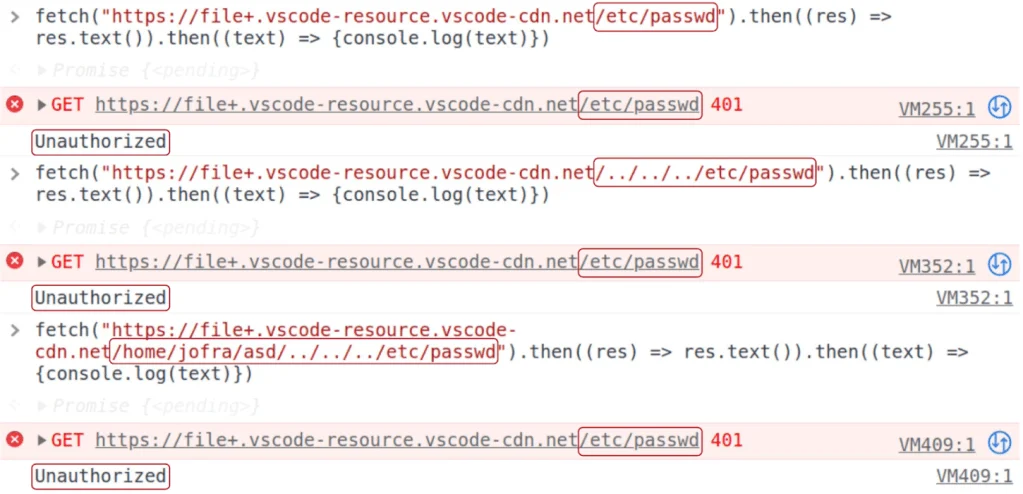
Unsuccessful fetches of the /etc/passwd file
The next idea was to find variants the browser would not normalise but that some part of VSCode would still treat as a valid path. Within about three minutes the researcher found that using %2f.. instead of /.. escaped the root folder.
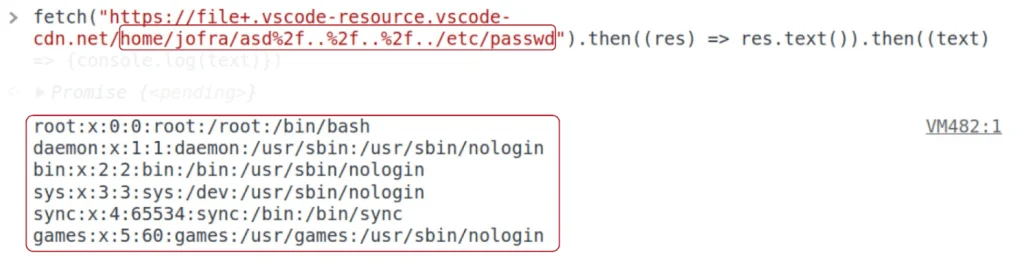
Successful fetch of the /etc/passwd file when using the / character URL encoded as %2f
At this point files anywhere on the filesystem could be fetched. The initial hypothesis was that the function reading the file (for example fs.readFile) decoded the %2f while the path normalisation function did not. That guess was close but not the real cause, which required tracing the request through VSCode.
Exploitation
Step 1: understand how the fake domain is served
Requests to vscode-resource.vscode-cdn.net are not real network requests. A service worker running on the Webview intercepts every request to that domain and turns it into a postMessage('load-resource') to the main VSCode thread.
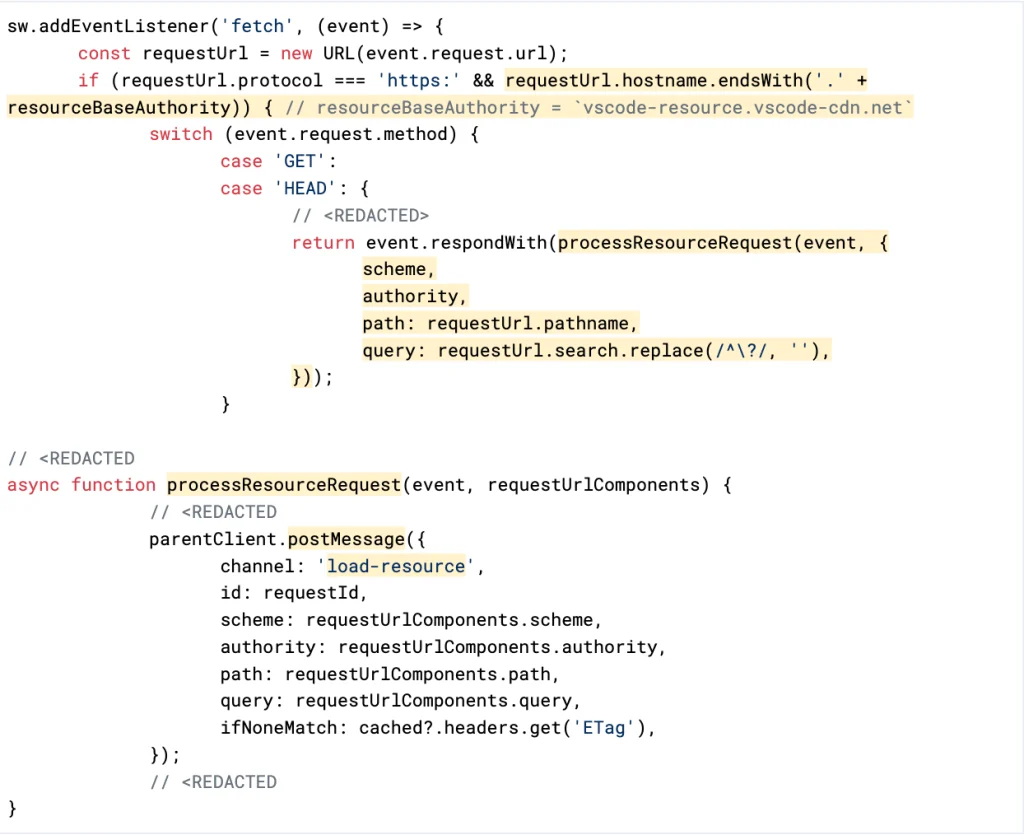
Code from the Webview's service worker that intercepts fetch requests that start with vscode-resource.vscode-cdn.net and transforms them in a postMessage to the main VSCode thread (source)
Step 2: the path is decoded
VSCode handles the postMessage('load-resource') call by building a URL object and calling loadResource.
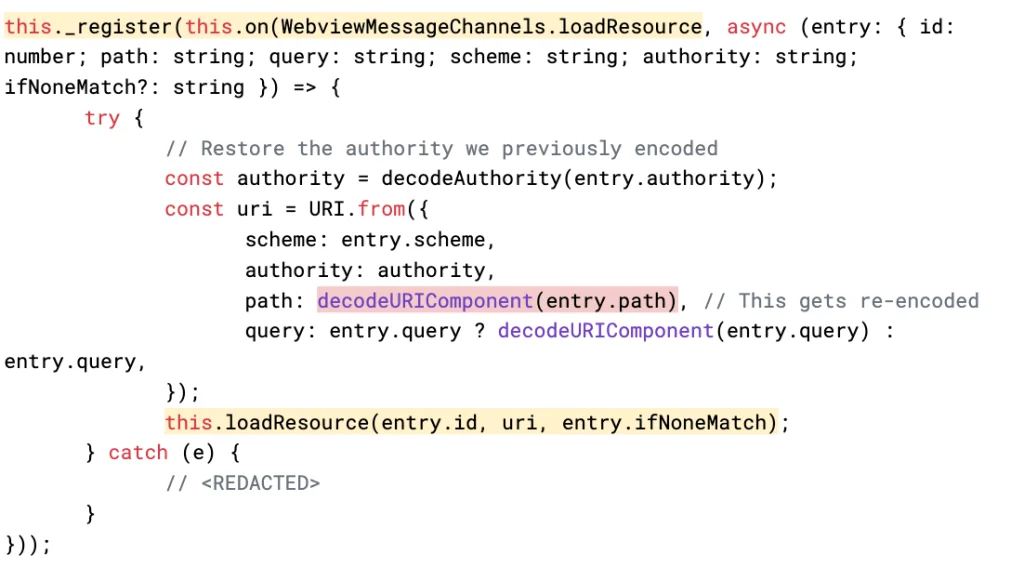
VSCode code that handles a load-resource postMessage. Highlighted in red is the code that decodes the fetched path, the first reason why our exploit works. (source)
The URL path is decoded with decodeURIComponent. That is where the %2f becomes a /. On its own this does not explain the traversal: normalising the path before the root check would still stop the attack. So the trace continues.
Step 3: the roots are passed down
The loadResource function simply calls loadLocalResource with roots: localResourceRoots.
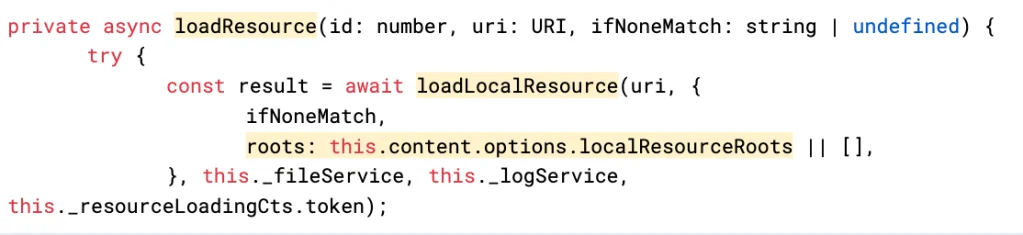
The loadResource function calling loadLocalResource with the localResourceRoots option (source)
Step 4: the root check
loadLocalResource calls getResourceToLoad, which iterates over each root in localResourceRoots and checks whether the requested path is inside one of them. If every check passes, loadLocalResource reads the file and returns its contents.
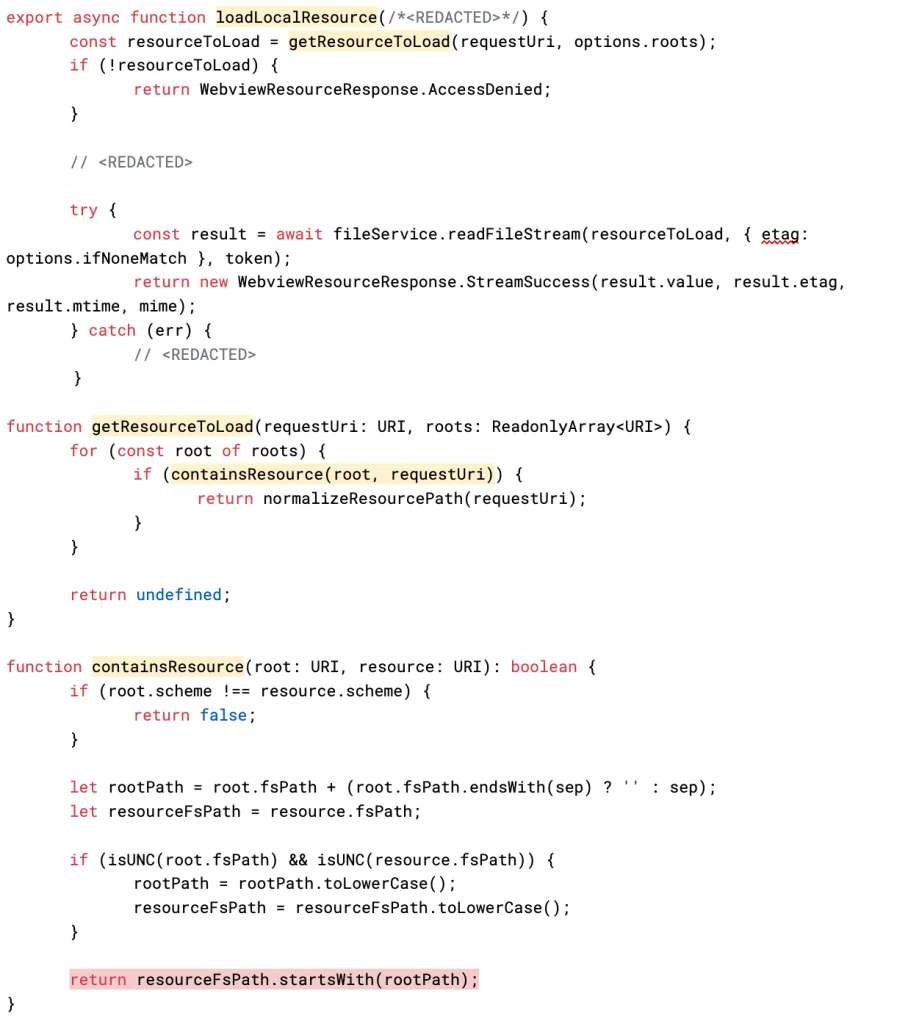
Code that checks if a path is within the expected root folders and returns the file contents on success. Highlighted in red is the .startsWith check without any prior normalization, the second reason our exploit works. (source)
There is no path normalisation, and the containment check is resourceFsPath.startsWith(rootPath). A path such as [valid-root-path]/../../../../../etc/issue passes the .startsWith check even though it points outside the root.
Step 5: put the two together
The payload that escapes is a valid root path followed by traversal sequences written with the encoded slash, for example %2f.. in place of /... The browser leaves the encoded form alone, so the request reaches VSCode with the traversal intact. VSCode then decodes %2f into /, producing a path that contains ../ sequences, and the startsWith check accepts it because the string still begins with the valid root path. The file is read and returned.
Root cause
Two mistakes combine to make the exploit work:
- VSCode calls
decodeURIComponent(path)on the path, decoding%2fto/. This bypasses the browser's normalisation and introduces../sequences into the path after the browser has finished with it. - The
containsResourcefunction checks that the requested file is inside the expectedlocalResourceRootsfolder withstartsWith, without first normalising the path (removing the../sequences). A payload such as[valid-root-path]/../../../therefore traverses outside the root.
The bug is hard to spot by manual auditing. Layers of abstraction and message passing obscure where the data flows and which details make the exploit work. Finding it through static analysis would require defining sources, sinks and sanitisers, plus an interprocedural engine that understands data passed in postMessage calls, and would still likely produce many false positives and false negatives. Dynamic analysis, executing the code and observing its behaviour at runtime, is what surfaced it.
The report notes that this is very similar to the third vulnerability in the previous post, where a path traversal came from parsing a URL query string with flawed hand-coded logic that circumvented the browser's path normalisation. In both cases, URL parsing differences and reliance on the browser to normalise paths produced path traversal with critical consequences.
Impact
An attacker who can execute JavaScript in a Webview, in an extension whose CSP connect-src includes .vscode-resource.vscode-cdn.net, can read files anywhere on the system, including files outside localResourceRoots. The localResourceRoots restriction, which is supposed to confine a Webview to the workspace and extensions folders, is fully bypassed. The report describes the consequences of this traversal as critical.
Fix
Microsoft fixed the bug in PR #163327 and assigned CVE-2022-41042. The report also sets out principles for handling URLs in this kind of code:
- Parse the URL from the path with an appropriate object (for example JavaScript's
URLclass) instead of hand-coded logic. - Do not transform any URL component after normalisation unless there is a very good reason. Decoding the path with
decodeURIComponent(path)alone was enough to bypasslocalResourceRoots, because other code assumed the browser had normalised the path. - Always normalise the file path before checking whether the file is inside the expected root. Doing both operations together, ideally in the same encapsulated function, ensures that no existing or future code transforms the path in a way that invalidates the normalisation.
Timeline
| Date | Event |
|---|---|
| September 7, 2022 | Bug reported to Microsoft |
| September 16, 2022 | Microsoft confirms the behaviour and says the case is being reviewed for a possible bounty |
| September 20, 2022 | Microsoft marks the report out of scope because "VS code extensions are not eligible for bounty award" |
| September 21, 2022 | Researcher replies that the bug is in how VSCode interacts with extensions, not in an extension |
| September 24, 2022 | Microsoft acknowledges the mistake and awards a $7,500 bounty |
| October 11, 2022 | Bug fixed in PR #163327 and assigned CVE-2022-41042 |
- Encoded separators in traversal payloads. Send
%2f..instead of/..in a path that is later decoded server-side or by an application layer. A positive result is a file outside the permitted root being returned. - Other encoded characters that decode to path separators or dots. Try encoded forms of
/,\and.where a component is decoded after the browser or framework has normalised the path. A positive result is the same escape with a different encoding. - Root checks based on string prefixes. Look for containment checks using
startsWithor equivalent without prior normalisation. A positive result is a path beginning with a valid root but containing../sequences that resolve outside it. - Decoding after normalisation. Look for any call that decodes or otherwise transforms a URL component after the point where normalisation is assumed to have happened. A positive result is a path that changes meaning between the check and the file read.
- Fake or intercepted domains served by a service worker. Where a Webview or similar sandbox fetches a synthetic origin, trace the message passing to the privileged side and check whether the path is normalised before the root check. A positive result is a read outside the declared roots.
What happened, in plain words
Visual Studio Code (VSCode) is a popular free code editor made by Microsoft. Like many modern desktop applications, it is built on top of a web browser engine: the part of the program that draws the interface and runs web pages is a stripped-down version of Google Chrome, packaged by a framework called Electron. That means the editor can show web content inside itself, in small embedded browser windows called Webviews.
Extensions are add-ons that people install to give VSCode extra features. Some extensions use a Webview to display custom content, for example a preview of a report or a rendered document. To make that content look right, the Webview sometimes needs to read files from the user's computer, such as an image or a stylesheet that sits next to the file being previewed.
Reading local files from inside a web page is dangerous. If a malicious page could read any file on your disk, it could steal your documents, your SSH keys, your saved passwords. So VSCode has a safety setting called localResourceRoots. Think of it as a list of folders a Webview is allowed to look inside, like a hotel guest who is only given a key to their own floor. By default, that list is narrow: the folder of the project you have open, and the folder where extensions are installed. Anything outside those folders should be off limits.
This report is about a way to get around that restriction. Even when an extension is configured correctly and localResourceRoots is set to sensible values, an attacker who can run JavaScript inside the Webview can still read files from anywhere on the computer, including files outside the allowed folders. The flaw is not in the extension; it is in VSCode itself, in the way it handles the file paths that Webviews ask for.
Microsoft gave the bug the identifier CVE-2022-41042 and paid a bounty of $7,500. The report notes that this works out to about $2,500 per minute of bug finding.
This is the second post in a two-part series. The first part showed how to escape Webviews in extensions that were badly configured, where localResourceRoots was effectively wide open. The natural next question, and the one this post answers, is whether the same kind of attack still works when the extension is locked down properly.
The starting point: what an attacker needs
The previous post's exploit against the SARIF Viewer extension taught the researcher that files can be stolen from a Webview if two conditions are met. Both are worth understanding from scratch.
- You can run JavaScript inside the Webview. JavaScript is the programming language that web pages use to make things happen: respond to clicks, load data, change the page. If an attacker can get their JavaScript to run inside a Webview, they can make that Webview do things on their behalf. In this case, the report says this lets the attacker add
linktags to the page. Alinktag is an HTML element normally used to attach stylesheets or icons to a page; the browser fetches whatever address the tag points to. An attacker can use it to make the browser request a file. - The page's security policy allows connections to a particular address. Web pages can carry a Content Security Policy (CSP), which is a set of rules the browser enforces about what the page is allowed to load and connect to. One of those rules,
connect-src, lists the addresses the page may contact. Ifconnect-srcincludes.vscode-resource.vscode-cdn.net, the page is allowed to usefetch, a JavaScript function for requesting a resource over the network, against that address.
With those two conditions, the report says files can be exfiltrated using DNS prefetches. DNS is the system that turns a human-readable name like example.com into a numeric address; a DNS prefetch is the browser quietly looking up a name ahead of time. An attacker can encode stolen data into the name being looked up, so the data travels out to a server the attacker controls even though the page itself is not allowed to send it directly. You do not need the details to follow this post; the point is that once a file can be read, there is a way to get it out.
The only remaining obstacle is localResourceRoots. It says which folders the Webview may read from. The researcher's goal was to read a file outside those folders. On Linux and similar systems, /etc/passwd is a well-known file that lists user accounts. It is a classic target in security testing because it is almost always present and readable, so if you can read it, you can read a lot of other things too.
Finding the issue
Webviews do not read local files the ordinary way. They read them by fetching a fake web address, https://file+.vscode-resource.vscode-cdn.net. It looks like a normal website address, but no such website exists on the internet. VSCode watches for requests to that address and answers them itself, handing back the contents of a local file. The example below shows how an extension fetches a file this way.
Example of how to fetch a file from a VSCode extension Webview
The image shows an example of fetching a file from a Webview.
Without first reading the code that enforces localResourceRoots, the researcher started trying ordinary path traversal payloads. Path traversal is a classic trick: file paths can contain the sequence .., which means "go up one folder". So photos/../documents means the same as documents. If a program checks that a path starts inside an allowed folder but does not clean up .. sequences, you can start with the allowed folder and then climb out of it with enough .. steps. It is like being told you may only take books from shelf A, then writing a label that begins "shelf A" but continues "...and then walk to shelf Z".
The payloads tried were:
/etc/passwd/../../../../../etc/passwd/[valid_root]/../../../../../etc/passwd
The first is the direct path to the target file, with no pretence of staying in an allowed folder. The second climbs up from the root of the filesystem several times (which does nothing useful on its own) and then goes to /etc/passwd. The third is the interesting one: it starts with a path that really is inside an allowed folder, [valid_root], and then uses .. to climb out and reach /etc/passwd. If the check is a simple "does this path start with an allowed folder?", the third payload should pass it.
None of them worked. The reason is that the browser got there first. Before a request is sent, the browser tidies up the path: it resolves .. sequences and removes them. So by the time VSCode saw the request, the ../ parts were already gone, and the path no longer pointed where the attacker wanted.
Unsuccessful fetches of the /etc/passwd file
The image shows those failed attempts.
The next idea was to find a way of writing the path that the browser would leave alone, but that some part of VSCode would still interpret as a path with .. in it. The browser did not normalise the encoded form, so the traversal survived the trip to VSCode.
Encoding is how characters that are awkward in a web address get represented. A slash / can be written as %2f, where %2f is the hexadecimal code for that character. To a browser, %2f is just three ordinary characters in a name, not a folder separator. To a program that later decodes it, %2f turns back into /.
Within about three minutes, the researcher found that using %2f.. instead of /.. escaped the root folder.
Successful fetch of the /etc/passwd file when using the / character URL encoded as %2f
The image shows the same request succeeding. The browser did not normalise the encoded slash, so the traversal survived the trip to VSCode, and VSCode then treated it as a real slash.
At this point the attacker can fetch files from anywhere on the filesystem. But why did it work? The researcher's first guess was that the function that actually reads the file, something like fs.readFile (a standard way for a program to open a file), was decoding the %2f, while the function that normalises the path was not. That guess was close but not the real cause. To find the real cause, the request had to be followed through VSCode step by step.
Root cause analysis: following the request
Let's start from the beginning and see how VSCode handles requests to vscode-resource.vscode-cdn.net. Remember, this is not a real domain; nothing is ever sent over the internet.
It all starts in a service worker running on the Webview. A service worker is a small program that a web page can install to sit between the page and the network, intercepting requests and deciding what to do with them. Here, the service worker intercepts every request the Webview makes to the vscode-resource.vscode-cdn.net domain and turns it into a postMessage('load-resource') sent to the main VSCode thread.
A message here is how two parts of a program that run separately talk to each other. The Webview is one part; the main VSCode process is another. They cannot simply call each other's functions, so they pass messages. postMessage('load-resource') means "please load this resource for me", with the details of the request attached.
Code from the Webview's service worker that intercepts fetch requests that start with vscode-resource.vscode-cdn.net and transforms them in a postMessage to the main VSCode thread (source)
The image shows the service worker code that intercepts requests to the fake domain and forwards them as messages to the main VSCode thread.
VSCode handles the postMessage('load-resource') call by building a URL object and calling loadResource.
VSCode code that handles a load-resource postMessage. Highlighted in red is the code that decodes the fetched path, the first reason why our exploit works. (source)
The image shows the handler, with the code that decodes the fetched path highlighted in red. That function is the reverse of encoding: it turns %2f back into /. This is the first reason the exploit works. The browser left %2f alone because it did not recognise it as a slash; VSCode then turns it into a slash itself, after the browser has finished its tidying. But this alone does not explain the traversal. If VSCode normalised the path before checking which folder it belonged to, the attack would still fail. So the trace continues.
The loadResource function simply calls loadLocalResource with roots: localResourceRoots.
The loadResource function calling loadLocalResource with the localResourceRoots option (source)
The image shows loadResource calling loadLocalResource with the localResourceRoots option.
Then, the loadLocalResource function calls getResourceToLoad, which will iterate over each root in localResourceRoots and check if the requested path is in one of these roots. If all checks pass, loadLocalResource reads and returns the file contents.
Code that checks if a path is within the expected root folders and returns the file contents on success. Highlighted in red is the .startsWith check without any prior normalization, the second reason our exploit works. (source)
The image shows the check, with the .startsWith check without prior normalisation highlighted in red. startsWith is a simple string comparison: does this text begin with that text? It does not understand folders or .. at all. It just looks at the first characters. So a path such as [valid-root-path]/../../../../../etc/issue passes the .startsWith check, because the string really does begin with the allowed root path, even though the path as a whole points somewhere else entirely. This is the second reason the exploit works.
Put the two together and the escape is complete. The attacker sends a path that begins with a valid root, followed by traversal sequences written with the encoded slash, for example %2f.. in place of /... The browser leaves the encoded form alone, so the request reaches VSCode with the traversal intact. VSCode decodes %2f into /, producing a path that contains ../ sequences. The startsWith check accepts it because the string still begins with the valid root path. The file is read and returned.
The two mistakes, side by side
Two mistakes combine to make the exploit work:
- VSCode calls
decodeURIComponent(path)on the path, decoding%2fto/. This bypasses the browser's normalisation and introduces../sequences into the path after the browser has finished with it. - The
containsResourcefunction checks that the requested file is inside the expectedlocalResourceRootsfolder withstartsWith, without first normalising the path (removing the../sequences). A payload such as[valid-root-path]/../../../therefore traverses outside the root.
Each mistake on its own would be harmless. If VSCode did not decode the path, the browser's normalisation would have removed the traversal. If VSCode normalised the path before the startsWith check, the decoded traversal would have been resolved and the check would have failed. It is the combination that opens the door.
Why this is hard to spot
The bug is hard to find by reading the code by hand. Layers of abstraction and message passing hide where the data flows and which details make the exploit work. The request passes through a service worker, a message, a URL object, several functions, and a string comparison; the dangerous detail is a single decoding call in the middle of that chain.
Finding it through static analysis, which means examining the code without running it, would require defining sources (where untrusted data enters), sinks (where it does something dangerous), and sanitisers (where it is cleaned), plus an engine that can follow data across function boundaries and through postMessage calls. Even then, the report says, you would likely end up with many false positives and false negatives. Dynamic analysis, which means running the code and watching what it actually does, is what surfaced the bug.
The report notes that this is very similar to the third vulnerability in the previous post, where a path traversal came from parsing a URL query string with flawed hand-coded logic that circumvented the browser's path normalisation. In both cases, differences in how URLs are parsed, and reliance on the browser to normalise paths, produced path traversal with critical consequences.
Impact
An attacker who can execute JavaScript in a Webview, in an extension whose CSP connect-src includes .vscode-resource.vscode-cdn.net, can read files anywhere on the system, including files outside localResourceRoots. The restriction that is supposed to confine a Webview to the workspace and extensions folders is fully bypassed. The report describes the consequences of this traversal as critical.
The fix and the lessons
Microsoft fixed the bug in PR #163327 and assigned CVE-2022-41042. The report also sets out principles for handling URLs in this kind of code, which are useful well beyond VSCode:
- Parse the URL from the path with an appropriate object (for example JavaScript's
URLclass) instead of hand-coded logic. A dedicated URL parser knows the rules for addresses and applies them consistently; hand-written string handling tends to miss cases. - Do not transform any URL component after normalisation unless there is a very good reason. Decoding the path with
decodeURIComponent(path)alone was enough to bypasslocalResourceRoots, because other code assumed the browser had normalised the path. Once you have cleaned something up, changing it again reopens the door. - Always normalise the file path before checking whether the file is inside the expected root. Doing both operations together, ideally in the same encapsulated function, ensures that no existing or future code transforms the path in a way that invalidates the normalisation. If the check and the cleanup live in one place, nobody can slip a change in between them.
Timeline
| Date | Event |
|---|---|
| September 7, 2022 | Bug reported to Microsoft |
| September 16, 2022 | Microsoft confirms the behaviour and says the case is being reviewed for a possible bounty |
| September 20, 2022 | Microsoft marks the report out of scope because "VS code extensions are not eligible for bounty award" |
| September 21, 2022 | Researcher replies that the bug is in how VSCode interacts with extensions, not in an extension |
| September 24, 2022 | Microsoft acknowledges the mistake and awards a $7,500 bounty |
| October 11, 2022 | Bug fixed in PR #163327 and assigned CVE-2022-41042 |
The middle of that timeline is worth pausing on. Microsoft first said the report was out of scope because VSCode extensions are not eligible for a bounty. The researcher pointed out that the flaw is in VSCode's own handling of extension requests, not in an extension. Microsoft agreed and paid.
Variants to test
- Encoded separators in traversal payloads. Send
%2f..instead of/..in a path that is later decoded server-side or by an application layer. A positive result is a file outside the permitted root being returned. - Other encoded characters that decode to path separators or dots. Try encoded forms of
/,\and.where a component is decoded after the browser or framework has normalised the path. A positive result is the same escape with a different encoding. - Root checks based on string prefixes. Look for containment checks using
startsWithor equivalent without prior normalisation. A positive result is a path beginning with a valid root but containing../sequences that resolve outside it. - Decoding after normalisation. Look for any call that decodes or otherwise transforms a URL component after the point where normalisation is assumed to have happened. A positive result is a path that changes meaning between the check and the file read.
- Fake or intercepted domains served by a service worker. Where a Webview or similar sandbox fetches a synthetic origin, trace the message passing to the privileged side and check whether the path is normalised before the root check. A positive result is a read outside the declared roots.
Glossary
- VSCode: Visual Studio Code, a free code editor made by Microsoft.
- Electron: a framework that lets desktop applications be built from web technology, bundling a browser engine inside the app.
- Chromium: the open-source browser engine that Google Chrome and Electron are built on.
- Webview: an embedded browser window inside an application, used to display web content.
- Extension: an add-on installed into VSCode to add features.
localResourceRoots: the VSCode setting that lists which folders a Webview is allowed to read files from.- CSP (Content Security Policy): a set of rules a web page gives the browser about what it may load and connect to.
connect-src: the CSP rule that lists addresses the page may contact with functions such asfetch.fetch: a JavaScript function for requesting a resource over the network.- JavaScript: the programming language that runs inside web pages and Webviews.
linktag: an HTML element that makes the browser fetch an address, normally for stylesheets or icons.- DOM: the in-memory tree of elements that makes up a web page; adding a
linktag to the DOM makes the browser act on it. - DNS: the system that turns names like
example.cominto numeric addresses. - DNS prefetch: the browser looking up a name ahead of time; it can be abused to send data out in the name.
- Exfiltration: getting stolen data out of the victim's machine to a place the attacker controls.
- Path traversal: a trick where
..sequences in a file path are used to climb out of an allowed folder. - Normalisation: cleaning up a path so that
..and similar sequences are resolved before the path is used. - URL encoding: writing awkward characters in a web address using
%followed by a code, for example%2ffor/. decodeURIComponent: a JavaScript function that turns encoded characters such as%2fback into/.startsWith: a string function that checks whether one piece of text begins with another; it knows nothing about folders.- Service worker: a small program a web page can install to intercept and handle its network requests.
postMessage: a way for separate parts of a program, such as a Webview and the main application, to send messages to each other.loadResource/loadLocalResource/getResourceToLoad/containsResource: the VSCode functions involved in turning a Webview's request into a file read and checking it against the allowed folders.fs.readFile: a standard way for a program to open and read a file.- Static analysis: examining code without running it.
- Dynamic analysis: running code and observing what it does.
- Source / sink / sanitiser: in static analysis, where untrusted data enters, where it does something dangerous, and where it is cleaned.
- False positive / false negative: a tool reporting a problem that is not real, or missing one that is.
- CVE: a public identifier for a known security vulnerability.
- Bounty: a payment a company makes to someone who reports a security bug.
- PR (pull request): a proposed change to a codebase, in this case the one that fixed the bug.




