Process injection: breaking all macOS security layers with a single vulnerability
A process injection vulnerability in macOS AppKit allowed an attacker to execute code in any AppKit-based application by crafting a malicious saved state file. This could be used to escape the sandbox, elevate privileges to root, and bypass SIP filesystem restrictions.
 Published on sector7.computest.nl
If you have created a new macOS app with Xcode 13.2, you may noticed this new method in the template:
The full write-up lives on its author's site
It belongs to its author, so we link to it rather than copy it. The other two tabs are our own rewrites, checked against it.
Context
This is a write-up of a process injection vulnerability that affected essentially all macOS AppKit-based applications. It was reported to Apple and fixed as CVE-2021-30873 in October 2021. The same research was presented at Black Hat USA 2022 and DEF CON 30.
The feature at the centre of it is the saved state, also called persistent UI. When you shut down a Mac, macOS asks whether the currently open windows should be reopened the next time you log in. In some applications the restored windows can even bring back documents that were never saved.
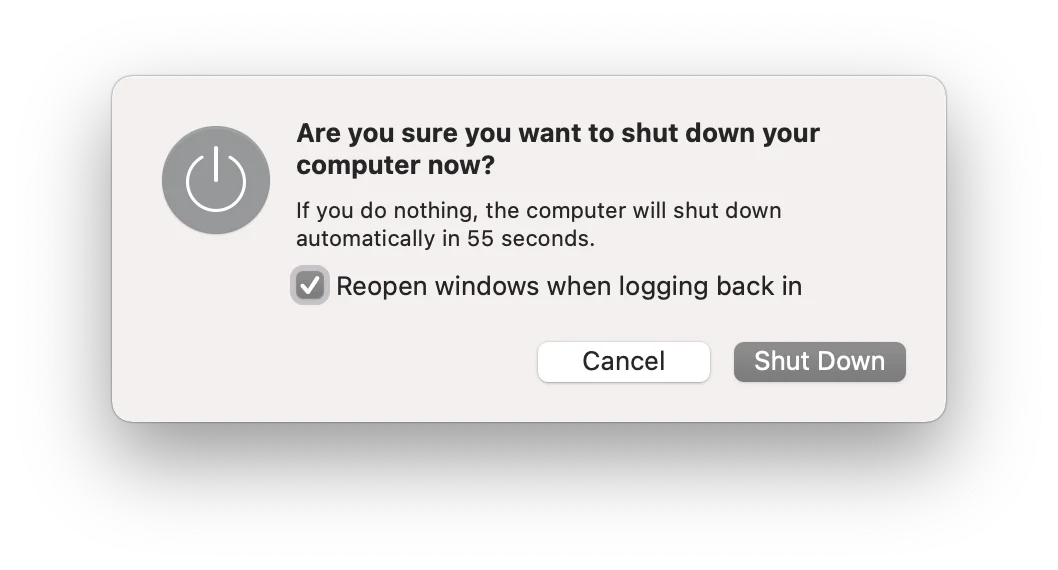
Saved state is used in more places than shutdown. App Nap uses it too: when an application has been inactive for a while (not focused, not playing audio), the system can tell it to save its state and terminate the process. macOS keeps showing a static image of the windows and the app still appears in the Dock, then relaunches it and resumes the state when the user switches back.
For an AppKit application, support for saving state is largely automatic. Some applications add their own objects to the saved state so the full state can be recovered, for example document-based applications.
Each time an application loses focus it writes two files:
~/Library/Saved Application State/<Bundle ID>.savedState/windows.plist
~/Library/Saved Application State/<Bundle ID>.savedState/data.data
windows.plist lists all open windows, plus some entries that do not look like windows, such as the menu bar and the Dock menu. A TextEdit example in the report shows entries with keys such as NSWindowID, NSWindowNumber, NSTitle, NSWindowFrame, NSDataKey, NSDockMenu and NSSystemVersion.
data.data is a custom binary format: a list of records, each holding an AES-CBC encrypted serialised object. The windows.plist holds the key (NSDataKey) and an ID (NSWindowID) for the record in data.data it corresponds to. A hex dump of the file begins with the marker NSCR1000:
00000000  4e 53 43 52 31 30 30 30  00 00 00 01 00 00 01 b0  |NSCR1000........|
00000010  ec f2 26 b9 8b 06 c8 d0  41 5d 73 7a 0e cc 59 74  |..&.....A]sz..Yt|
00000020  89 ac 3d b3 b6 7a ab 1b  bb f7 84 0c 05 57 4d 70  |..=..z.......WMp|
00000030  cb 55 7f ee 71 f8 8b bb  d4 fd b0 c6 28 14 78 23  |.U..q.......(.x#|
00000040  ed 89 30 29 92 8c 80 bf  47 75 28 50 d7 1c 9a 8a  |..0)....Gu(P....|
00000050  94 b4 d1 c1 5d 9e 1a e0  46 62 f5 16 76 f5 6f df  |....]...Fb..v.o.|
00000060  43 a5 fa 7a dd d3 2f 25  43 04 ba e2 7c 59 f9 e8  |C..z../%C...|Y..|
00000070  a4 0e 11 5d 8e 86 16 f0  c5 1d ac fb 5c 71 fd 9d  |...]........\q..|
00000080  81 90 c8 e7 2d 53 75 43  6d eb b6 aa c7 15 8b 1a  |....-SuCm.......|
00000090  9c 58 8f 19 02 1a 73 99  ed 66 d1 91 8a 84 32 7f  |.X....s..f....2.|
000000a0  1f 5a 1e e8 ae b3 39 a8  cf 6b 96 ef d8 7b d1 46  |.Z....9..k...{.F|
000000b0  0c e2 97 d5 db d4 9d eb  d6 13 05 7d e0 4a 89 a4  |...........}.J..|
000000c0  d0 aa 40 16 81 fc b9 a5  f5 88 2b 70 cd 1a 48 94  |..@.......+p..H.|
000000d0  47 3d 4f 92 76 3a ee 34  79 05 3f 5d 68 57 7d b0  |G=O.v:.4y.?]hW}.|
000000e0  54 6f 80 4e 5b 3d 53 2a  6d 35 a3 c9 6c 96 5f a5  |To.N[=S*m5..l._.|
000000f0  06 ec 4c d3 51 b9 15 b8  29 f0 25 48 2b 6a 74 9f  |..L.Q...).%H+jt.|
00000100  1a 5b 5e f1 14 db aa 8d  13 9c ef d6 f5 53 f1 49  |.[^..........S.I|
00000110  4d 78 5a 89 79 f8 bd 68  3f 51 a2 a4 04 ee d1 45  |MxZ.y..h?Q.....E|
00000120  65 ba c4 40 ad db e3 62  55 59 9a 29 46 2e 6c 07  |[email protected].)F.l.|
00000130  34 68 e9 00 89 15 37 1c  ff c8 a5 d8 7c 8d b2 f0  |4h....7.....|...|
00000140  4b c3 26 f9 91 f8 c4 2d  12 4a 09 ba 26 1d 00 13  |K.&....-.J..&...|
00000150  65 ac e7 66 80 c0 e2 55  ec 9a 8e 09 cb 39 26 d4  |e..f...U.....9&.|
00000160  c8 15 94 d8 2c 8b fa 79  5f 62 18 39 f0 a5 df 0b  |....,..y_b.9....|
00000170  3d a4 5c bc 30 d5 2b cc  08 88 c8 49 d6 ab c0 e1  |=.\..0.+....I....|
00000180  c1 e5 41 eb 3e 2b 17 80  c4 01 64 3d 79 be 82 aa  |..A.>+....d=y...|
00000190  3d 56 8d bb e5 7a ea 89  0f 4c dc 16 03 e9 2a d8  |=V...z...L....*.|
000001a0  c5 3e 25 ed c2 4b 65 da  8a d9 0d d9 23 92 fd 06  |.>%..Ke.....#...|
[...]
On launch, AppKit reads these files and restores the windows automatically, without the app implementing anything. The reading code is careful: if the application crashed, the state may be corrupted too, so if it crashes while restoring, the state is discarded next time and the app does a fresh start.
Setup
The research is about the macOS security model rather than a remote target. The relevant background is that in the classic Unix model each process runs as a user, and two processes of the same user share permissions: users are security boundaries, processes are not. One process could attach to another as a debugger and read or write its memory and registers. Root is the exception, with access to all files and processes.
macOS kept essentially that model until SIP, also called rootless. Root is still there but is less powerful on its own: some files cannot be read by root unless the process also holds specific entitlements, which are metadata included when the code signature for an executable is generated. Entitlement checks are an essential part of many macOS security measures, layered on top of the Unix ownership rules. Sensitive files (for example the Mail.app database) and features (for example the webcam) need more than root.
The entitlements of Mail.app can be inspected with:
$ codesign -dvvv --entitlements - /System/Applications/Mail.app
Among the output is:
...
	[Key] com.apple.rootless.storage.Mail
	[Value]
		[Bool] true
...
That entitlement is what lets Mail.app read the SIP-protected mail database while other malware cannot.
Separately, Transparency, Consent and Control (TCC) governs access to the webcam, microphone and, in recent macOS versions, files such as those in the Documents and Downloads folders. Even applications outside the Mac Application sandbox may lack access to certain features or files.
Entitlements and TCC would be pointless if any process could attach as a debugger to another process of the same user: an app with webcam access could be debugged by one without it, and code injected to steal the video. Apple therefore heavily restricted debugging other applications. Changing a decades-old security model is hard, and debugger attachment is only one of many techniques for injecting code into another process; Apple has squashed many, and many more are likely still undiscovered.
Process injection also occurs in third-party software. A vulnerability in one application puts that application's TCC permissions and entitlements up for grabs for all other processes, and getting these fixed is difficult because many third-party developers are not familiar with the new model. Electron applications are noted as infamous for being easy to inject into, since their JavaScript files can be replaced without invalidating the code signature. A technique that affects multiple, or all, applications is far more dangerous, because it reaches a large number of different entitlements and TCC permissions.
Finding it
The vulnerability is that the encrypted serialised object stored in data.data was not using secure coding.
To explain why that matters, the report covers serialisation. Many object-oriented languages support binary serialisation, a custom language-specific format unlike XML or JSON. In many implementations an object is created first and its type checked afterwards, and methods may be called on these objects when creating or destroying them. Combining objects in unusual ways can sometimes give remote code execution when a malicious object is deserialised, so these functions should not be used on data from an untrusted party. For Python pickle and Ruby Marshall.load RCE is straightforward; in Java ObjectInputStream.readObject and C# it is possible if certain commonly used libraries are present, with ysoserial and ysoserial.net generating payloads depending on the libraries in use; in PHP exploitability for RCE is rare.
In Objective-C, classes implement the NSCoding protocol to be serializable, and subclasses of NSCoder such as NSKeyedArchiver and NSKeyedUnarchiver serialise and deserialise them. A class implementing NSCoding must include:
- (id)initWithCoder:(NSCoder *)coder;
Inside it the object decodes its instance variables with methods such as -decodeObjectForKey:, -decodeIntegerForKey: and -decodeDoubleForKey:. -decodeObjectForKey: makes the coder recursively call -initWithCoder: on that object, eventually decoding the whole object graph.
Apple added the NSSecureCoding protocol in 10.8. Its documentation describes it as:
A protocol that enables encoding and decoding in a manner that is robust against object substitution attacks.
Instead of creating an object and then checking its type, a set of allowed classes is supplied when decoding. The unsafe construction is:
id obj = [decoder decodeObjectForKey:@"myKey"];
if (![obj isKindOfClass:[MyClass class]]) { /* ...fail... */ }
and the safe one is:
id obj = [decoder decodeObjectOfClass:[MyClass class] forKey:@"myKey"];
With a secure coder, -decodeObjectForKey: is no longer allowed and -decodeObjectOfClass:forKey: must be used. This makes exploitable bugs significantly harder, but not impossible: subclasses of the specified class are allowed, so specifying NSObject still permits every class implementing NSCoding, and a rarely used vulnerable subclass of an expected class such as NSDictionary in an imported framework could still create a vulnerability.
These serialised objects are used all over Apple's operating systems, often for inter-process data exchange. NSXPCConnection relies heavily on secure serialisation for remote method calls, and iMessage exchanges such serialised objects with other users over the network, so secure coding matters greatly there.
In the saved state data.data, objects were stored with an NSKeyedArchiver without secure coding, so objects of any class implementing NSCoding could be included. The likely reason is that applications can extend the saved state with their own objects, and the saved state feature predates NSSecureCoding, so upgrading it could break third-party applications.
Exploitation
Building a malicious serialised object
The goal was a chain of objects that executes arbitrary code. No ysoserial-like project for Objective-C appears to exist, and the researchers could not find other examples of abusing insecure deserialisation on macOS. In "Remote iPhone Exploitation Part 1: Poking Memory via iMessage and CVE-2019-8641", Samuel Groß of Google Project Zero describes attacking a secure coder through a vulnerability in NSSharedKeyDictionary, an uncommon NSDictionary subclass, but that was already fixed.
By decompiling a large number of -initWithCoder: methods in AppKit, the researchers found a combination of two objects that can call arbitrary Objective-C methods on another deserialised object.
The first is NSRuleEditor. Its -initWithCoder: creates a binding to an object from the same archive, with a key path also taken from the archive. Bindings are a reactive programming technique in Cocoa that connects a model directly to a view without controller boilerplate: changes in the model or in the view propagate automatically. A binding is created with:
- (void)bind:(NSBindingName)binding
    toObject:(id)observable
 withKeyPath:(NSString *)keyPath
     options:(NSDictionary<NSBindingOption, id> *)options;
This binds the property binding of the receiver to the keyPath of observable. A key path is a string used, for example, to access nested properties. Bindings are more commonly created in a XIB file in Xcode: if the model is a class Person with @property (readwrite, copy) NSString *name;, binding the "value" of a text field to the "name" key path of a Person gives a field that shows and edits the person's name.
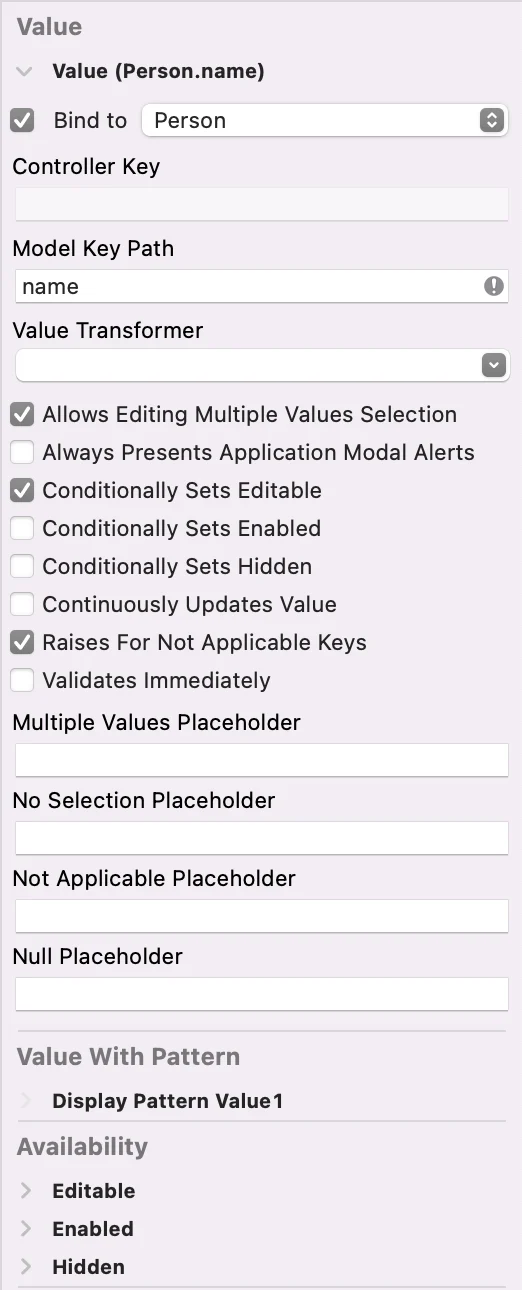
The meaning of a key path is quite complicated. For a key path of "foo", the system first checks whether one of the methods getFoo, foo, isFoo and _foo exists. This is usually used to access a property, but that is not required. When a binding is created, the method is called immediately to provide an initial value, and it does not matter if the method returns void. Creating a binding during deserialisation therefore calls zero-argument methods on other deserialised objects.
The decompiled -initWithCoder: of NSRuleEditor shows this:
ID NSRuleEditor::initWithCoder:(ID param_1,SEL param_2,ID unarchiver)
{
	...

	id arrayOwner = [unarchiver decodeObjectForKey:@"NSRuleEditorBoundArrayOwner"];

	...

	if (arrayOwner) {
	  keyPath = [unarchiver decodeObjectForKey:@"NSRuleEditorBoundArrayKeyPath"];
	  [self bind:@"rows" toObject:arrayOwner withKeyPath:keyPath options:nil];
	}

	...
}
In this chain it is used to call -draw on the next object.
The second object is NSCustomImageRep. It takes a selector (a method name) as a string and an object from the archive. When -draw is called, it invokes the method named by the selector on the object, passing itself as the first argument:
ID NSCustomImageRep::initWithCoder:(ID param_1,SEL param_2,ID unarchiver)
{
	...
	id drawObject = [unarchiver decodeObjectForKey:@"NSDrawObject"];
	self.drawObject = drawObject;
	id drawMethod = [unarchiver decodeObjectForKey:@"NSDrawMethod"];
	SEL selector = NSSelectorFromString(drawMethod);
	self.drawMethod = selector;
	...
}

...

void ___24-[NSCustomImageRep_draw]_block_invoke(long param_1)
{
  ...
  [self.drawObject performSelector:self.drawMethod withObject:self];
  ...
}
Deserializing these two classes gives the ability to call zero-argument methods and methods with multiple arguments, although the first argument will be an NSCustomImageRep object and the remaining arguments will be whatever happens to still be in those registers. The rest of the chain is covered in the follow-up post "Bringing process injection into view(s): exploiting all macOS apps using nib files".
Sandbox escape
The first use of the vulnerability was escaping the Mac Application sandbox. In a sandboxed application, many files that would live in ~/Library are stored in a separate container, so instead of:
~/Library/Saved Application State/<Bundle ID>.savedState/
sandboxed applications save state to:
~/Library/Containers/<Bundle ID>/Data/Library/Saved Application State/<Bundle ID>.savedState/
Apparently, when the system shuts down while an application is still running (while the prompt asking whether to reopen windows is shown), talagent symlinks the first location to the second. The report says the reason is unclear; it might relate to upgrading an application to a new sandboxed version.
Most applications do not have access to all files. Sandboxed applications are very restricted, and with TCC even the Downloads and Documents folders need user approval. To keep open and save panels usable, a different process is launched when such a panel opens: com.apple.appkit.xpc.openAndSavePanelService. The window belongs to the application, but its contents are drawn by this XPC service, which has full access to all files. When the user selects a file in the panel, the application gains temporary access to that file, so users can browse the entire disk even in applications that cannot list those files.
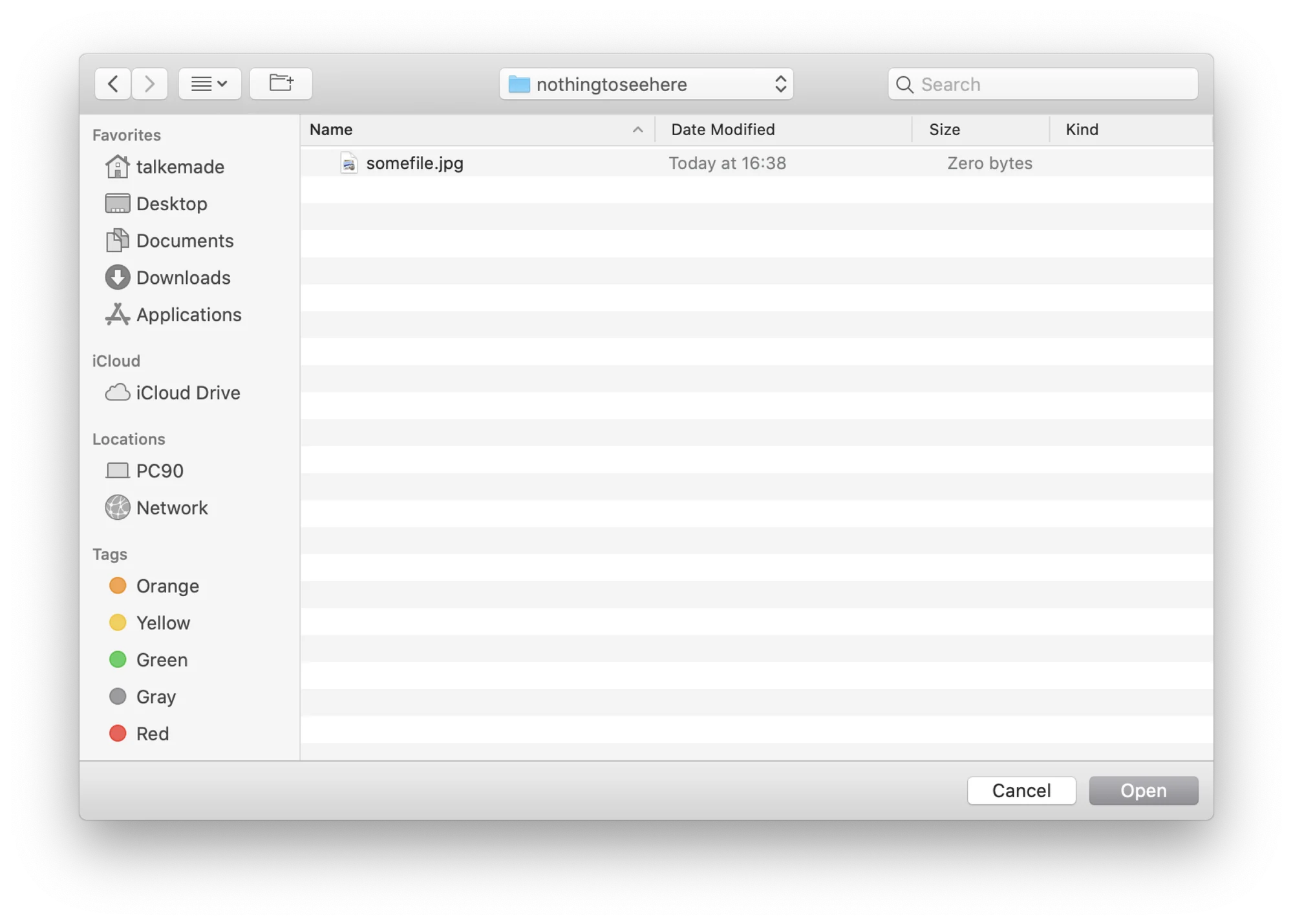
Because it is an XPC service with service type Application, it is launched separately for each app. The observation was that this XPC service reads its saved state using the bundle ID of the app that launched it, which makes some sense because the panel may be part of the saved state of multiple applications and its state needs to be separated per application. It reads that state from the location outside the container, with the application's bundle ID:
~/Library/Saved Application State/<Bundle ID>.savedState/
If the app was ever open when the user shut down the computer, that path is a symlink to the container path. The sandbox escape therefore works as follows:
- Wait for the user to shut down while the app is open, if the symlink does not yet exist.
- Write malicious
data.dataandwindows.plistfiles inside the app's own container. - Open an
NSOpenPanelorNSSavePanel.
The com.apple.appkit.xpc.openAndSavePanelService process then deserializes the malicious object, giving code execution in a non-sandboxed process.
This was fixed earlier than the other issues, as CVE-2021-30659 in macOS 11.3: the state is no longer loaded from the same location in com.apple.appkit.xpc.openAndSavePanelService.
Privilege escalation
Injecting code into an application with a specific entitlement elevates privileges to root, using the technique explained by A2nkF in "Unauthd - Logic bugs FTW". Some applications hold the com.apple.private.AuthorizationServices entitlement with the value system.install.apple-software, meaning they may install packages signed by Apple without user authorisation. "Install Command Line Developer Tools.app" and "Bootcamp Assistant.app" have this entitlement. A2nkF also found an Apple-signed package containing a vulnerability, macOSPublicBetaAccessUtility.pkg: when installed to a specific disk, it runs a post-install script from that disk as root. The script assumes the disk contains macOS, but this is not checked, so a malicious script at the same location executes code as root when the package is installed.
The steps are:
- Create a RAM disk and copy a malicious script to the path that will be executed by
macOSPublicBetaAccessUtility.pkg. - Inject code into an application with the
com.apple.private.AuthorizationServicesentitlement containingsystem.install.apple-softwareby creating thewindows.plistanddata.datafiles for that application and then launching it. - Use the injected code to install the
macOSPublicBetaAccessUtility.pkgpackage to the RAM disk. - Wait for the post-install script to run.
In A2nkF's write-up the post-install script ran without SIP's filesystem restrictions, inherited from the installation process, which needs them because package installation may write to SIP-protected locations. Apple fixed that: post- and pre-install scripts are no longer SIP exempt. The package and its privilege escalation can still be used, however, because Apple still uses the same vulnerable installer package.
SIP filesystem bypass
With the sandbox escaped and root obtained, the next goal was bypassing SIP. Searching all available applications for a suitable entitlement turned up "macOS Update Assistant.app" on the macOS Big Sur Beta installation disk image, which has the com.apple.rootless.install.heritable entitlement. That lets the process write to all SIP-protected locations, and because it is heritable a shell can simply be spawned. Although it is meant to be used only during beta installation, it can be copied to a normal macOS environment and run there.
The exploitation is simple:
- Create malicious
windows.plistanddata.datafiles for "macOS Update Assistant.app". - Launch "macOS Update Assistant.app".
Being exempt from SIP's filesystem restrictions allows reading all files from protected locations, such as the user's Mail.app mailbox. It also allows modifying the TCC database, granting permission to access the webcam, microphone and so on. Malware can be persisted in SIP-protected locations, making it very difficult for anyone other than Apple to remove. Finally, the database of approved kernel extensions can be changed, so a new kernel extension could be loaded silently without user approval; combined with a vulnerable kernel extension (or a code-signing certificate that allows signing kernel extensions), that would have allowed kernel code execution and disabling all other restrictions.
Demo
The recorded video first shows that the application "Sandbox" is sandboxed, then escapes its sandbox and launches "Privesc". That elevates privileges to root and launches "SIP Bypass". Finally it opens a reverse shell exempt from SIP's filesystem restrictions, demonstrated by writing a file in /var/db/SystemPolicyConfiguration, where the database of approved kernel modules is stored:
Root cause
The saved state in data.data was serialised with an NSKeyedArchiver without secure coding, so any class implementing NSCoding could be placed in the archive and its -initWithCoder: would run during restore. The NSRuleEditor and NSCustomImageRep pair turns that into a method-call primitive: a binding created during deserialisation invokes a key-path method immediately, and NSCustomImageRep invokes a selector on an object it holds. The existing defences did not stop it because the saved state predates NSSecureCoding, and the likely reason Apple could not simply require secure coding is that it could break third-party applications that store their own objects in the saved state. The AES encryption in data.data appears to add little protection: the key is stored right next to the ciphertext in windows.plist, and there is no MAC, so there is no integrity check.
Impact
A generic process injection vulnerability in AppKit reaches the entitlements and TCC permissions of every affected application. In this research it was used to escape the Mac Application sandbox through com.apple.appkit.xpc.openAndSavePanelService, to elevate to root through an application holding com.apple.private.AuthorizationServices with system.install.apple-software and the macOSPublicBetaAccessUtility.pkg installer, and to bypass SIP's filesystem restrictions through "macOS Update Assistant.app" and its com.apple.rootless.install.heritable entitlement. The SIP bypass allows reading protected files such as the Mail.app mailbox, modifying the TCC database to grant webcam and microphone access, persisting malware in SIP-protected locations, and changing the approved kernel extension database so a kernel extension could be loaded without user approval. The sandbox escape required the symlink created by talagent when the system shuts down while the app is running, if it does not already exist. The SIP bypass relied on an application from the Big Sur Beta disk image; it does not run on macOS Monterey because certain private frameworks no longer contain the necessary symbols, which the report calls a coincidental fix.
Fix
Apple first fixed the sandbox escape in 11.3 by no longer reading the application's saved state in com.apple.appkit.xpc.openAndSavePanelService (CVE-2021-30659). Fixing the rest was more complicated because third-party applications may store their own objects in the saved state and those objects might not support secure coding. Applications can now opt in to requiring secure coding for their saved state by returning TRUE from -applicationSupportsSecureRestorableState:, the method added to the Xcode 13.2 template:
- (BOOL)applicationSupportsSecureRestorableState:(NSApplication *)app {
	return YES;
}
Unless an app opts in, non-secure coding remains allowed, so process injection may remain possible. The report also points at downgrade attacks as a weakness of the design: an application's code signature and entitlements stay valid for a long time and its TCC permissions still work after a downgrade, so a non-sandboxed application could silently download an older vulnerable version and exploit it. The SIP bypass would not work that way because "macOS Update Assistant.app" does not run on Monterey, but that is coincidental, and the vulnerability will be present for as long as there is backwards compatibility with older macOS applications. The recommendation for Objective-C developers is to add -applicationSupportsSecureRestorableState: returning TRUE and to adopt secure coding for all classes used in saved states.
Variants to test
- Look for other
-initWithCoder:implementations in AppKit that create bindings or otherwise call methods on decoded objects during deserialisation. A positive result is a decoded object whose method is invoked before its type is checked. - Look for classes that store a selector string and an object from the archive and later perform the selector, like
NSCustomImageRep. A positive result is a deserialised object that calls an attacker-chosen method on another decoded object. - Check other XPC services with service type Application that read saved state or other per-application files using the launching app's bundle ID. A positive result is a privileged service reading attacker-controlled files from a path the sandboxed app can write.
- Enumerate applications holding
com.apple.private.AuthorizationServiceswithsystem.install.apple-softwareand test Apple-signed installer packages that run scripts from the target disk. A positive result is code execution as root from a script on a disk the attacker controls. - Search installation media and system images for applications with
com.apple.rootless.install.heritableor similar SIP-exempt entitlements that can be copied and run outside their intended context. A positive result is a shell able to write to SIP-protected paths such as/var/db/SystemPolicyConfiguration. - Test whether an application can be downgraded to an older version while keeping its code signature, entitlements and TCC permissions. A positive result is an older vulnerable build running with the same permissions as the current one.
What happened, in plain words
In October 2021, Apple fixed a bug tracked as CVE-2021-30873. It was a process injection vulnerability that affected essentially all macOS applications built with AppKit, the standard toolkit Apple provides for making Mac apps. The researchers who found it reported it to Apple together with ways to use it to escape the sandbox, to become the root user, and to bypass the filesystem restrictions of SIP. The same research was presented at Black Hat USA 2022 and DEF CON 30.
Process injection means one program manages to run its own code inside a different program. On Windows this is often used to hide malicious code inside a legitimate executable so antivirus scanners do not notice it. On macOS the impact can be much bigger, because two applications can have very different permissions. If you can inject into an application that is allowed to read your mail, use your webcam or install software, you inherit those permissions.
The feature at the centre of this bug is called saved state, or persistent UI. When you shut down a Mac, macOS asks whether the currently open windows should be reopened the next time you log in. In some applications the restored windows can even bring back documents that were never saved.
Saved state is used in more places than shutdown. App Nap uses it too: when an application has been inactive for a while (not focused, not playing audio), the system can tell it to save its state and terminate the process. macOS keeps showing a static image of the windows and the app still appears in the Dock, then relaunches it and resumes the state when the user switches back.
For an AppKit application, support for saving state is largely automatic. Some applications add their own objects to the saved state so the full state can be recovered, for example document-based applications.
Each time an application loses focus it writes two files:
~/Library/Saved Application State/<Bundle ID>.savedState/windows.plist
~/Library/Saved Application State/<Bundle ID>.savedState/data.data
Line by line: the ~ stands for your home folder, the place where your personal files live. Library is a hidden folder inside it where macOS and apps keep settings and support files. Saved Application State is the folder for saved state. <Bundle ID> is a placeholder for the app's bundle identifier, a unique name such as com.apple.TextEdit that macOS uses to tell applications apart. The .savedState suffix marks the folder that belongs to that one app. Inside it, windows.plist and data.data are the two files that together describe the windows and their contents.
windows.plist lists all open windows, plus some entries that do not look like windows, such as the menu bar and the Dock menu. A TextEdit example in the report shows entries with keys such as NSWindowID, NSWindowNumber, NSTitle, NSWindowFrame, NSDataKey, NSDockMenu and NSSystemVersion. A plist is a property list, a file format Apple uses to store structured settings as text; you can think of it as a well-organised form with labelled fields.
data.data is a custom binary format: a list of records, each holding an AES-CBC encrypted serialised object. Encryption scrambles data so it cannot be read without the key; AES-CBC is one common way of doing that. A serialised object is a program's in-memory data turned into a stream of bytes so it can be saved to disk and rebuilt later. The windows.plist holds the key (NSDataKey) and an ID (NSWindowID) for the record in data.data it corresponds to. A hex dump of the file begins with the marker NSCR1000. A hex dump is a view of a binary file where each byte is shown as two hexadecimal digits, with the readable characters on the right.
00000000  4e 53 43 52 31 30 30 30  00 00 00 01 00 00 01 b0  |NSCR1000........|
00000010  ec f2 26 b9 8b 06 c8 d0  41 5d 73 7a 0e cc 59 74  |..&.....A]sz..Yt|
00000020  89 ac 3d b3 b6 7a ab 1b  bb f7 84 0c 05 57 4d 70  |..=..z.......WMp|
00000030  cb 55 7f ee 71 f8 8b bb  d4 fd b0 c6 28 14 78 23  |.U..q.......(.x#|
00000040  ed 89 30 29 92 8c 80 bf  47 75 28 50 d7 1c 9a 8a  |..0)....Gu(P....|
00000050  94 b4 d1 c1 5d 9e 1a e0  46 62 f5 16 76 f5 6f df  |....]...Fb..v.o.|
00000060  43 a5 fa 7a dd d3 2f 25  43 04 ba e2 7c 59 f9 e8  |C..z../%C...|Y..|
00000070  a4 0e 11 5d 8e 86 16 f0  c5 1d ac fb 5c 71 fd 9d  |...]........\q..|
00000080  81 90 c8 e7 2d 53 75 43  6d eb b6 aa c7 15 8b 1a  |....-SuCm.......|
00000090  9c 58 8f 19 02 1a 73 99  ed 66 d1 91 8a 84 32 7f  |.X....s..f....2.|
000000a0  1f 5a 1e e8 ae b3 39 a8  cf 6b 96 ef d8 7b d1 46  |.Z....9..k...{.F|
000000b0  0c e2 97 d5 db d4 9d eb  d6 13 05 7d e0 4a 89 a4  |...........}.J..|
000000c0  d0 aa 40 16 81 fc b9 a5  f5 88 2b 70 cd 1a 48 94  |..@.......+p..H.|
000000d0  47 3d 4f 92 76 3a ee 34  79 05 3f 5d 68 57 7d b0  |G=O.v:.4y.?]hW}.|
000000e0  54 6f 80 4e 5b 3d 53 2a  6d 35 a3 c9 6c 96 5f a5  |To.N[=S*m5..l._.|
000000f0  06 ec 4c d3 51 b9 15 b8  29 f0 25 48 2b 6a 74 9f  |..L.Q...).%H+jt.|
00000100  1a 5b 5e f1 14 db aa 8d  13 9c ef d6 f5 53 f1 49  |.[^..........S.I|
00000110  4d 78 5a 89 79 f8 bd 68  3f 51 a2 a4 04 ee d1 45  |MxZ.y..h?Q.....E|
00000120  65 ba c4 40 ad db e3 62  55 59 9a 29 46 2e 6c 07  |[email protected].)F.l.|
00000130  34 68 e9 00 89 15 37 1c  ff c8 a5 d8 7c 8d b2 f0  |4h....7.....|...|
00000140  4b c3 26 f9 91 f8 c4 2d  12 4a 09 ba 26 1d 00 13  |K.&....-.J..&...|
00000150  65 ac e7 66 80 c0 e2 55  ec 9a 8e 09 cb 39 26 d4  |e..f...U.....9&.|
00000160  c8 15 94 d8 2c 8b fa 79  5f 62 18 39 f0 a5 df 0b  |....,..y_b.18...|
00000170  3d a4 5c bc 30 d5 2b cc  08 88 c8 49 d6 ab c0 e1  |=.\..0.+....I....|
00000180  c1 e5 41 eb 3e 2b 17 80  c4 01 64 3d 79 be 82 aa  |..A.>+....d=y...|
00000190  3d 56 8d bb e5 7a ea 89  0f 4c dc 16 03 e9 2a d8  |=V...z...L....*.|
000001a0  c5 3e 25 ed c2 4b 65 da  8a d9 0d d9 23 92 fd 06  |.>%..Ke.....#...|
[...]
Line by line: the left column is the position in the file, in hexadecimal. The middle columns are the bytes themselves, again in hexadecimal. The right column shows the same bytes as text where they are printable, with dots where they are not. The first line starts with 4e 53 43 52 31 30 30 30, which spells NSCR1000 in the right column: that is the marker the format begins with. The [...] at the end means the dump continues but is cut off here.
On launch, AppKit reads these files and restores the windows automatically, without the app implementing anything. The reading code is careful: if the application crashed, the state may be corrupted too, so if it crashes while restoring, the state is discarded next time and the app does a fresh start.
The security model you need to know
This research is about the macOS security model rather than a remote target, so the background matters. In the classic Unix model each process runs as a user, and two processes of the same user share permissions: users are security boundaries, processes are not. A process is a running program; a user is an account on the machine. One process could attach to another as a debugger and read or write its memory and registers. A debugger is a tool that lets a developer pause a program and inspect it from the inside; memory is the working space where a running program keeps its data, and registers are tiny storage slots inside the processor.
Root is the exception, with access to all files and processes. Root is the all-powerful administrator account on Unix systems.
macOS kept essentially that model until SIP, also called rootless. SIP stands for System Integrity Protection: a set of rules that stops even root from changing certain important parts of the system. Root is still there but is less powerful on its own: some files cannot be read by root unless the process also holds specific entitlements, which are metadata included when the code signature for an executable is generated. A code signature is a cryptographic stamp that proves who made a program and that it has not been altered; entitlements are extra permissions written into that stamp. Entitlement checks are an essential part of many macOS security measures, layered on top of the Unix ownership rules. Sensitive files (for example the Mail.app database) and features (for example the webcam) need more than root.
The entitlements of Mail.app can be inspected with:
$ codesign -dvvv --entitlements - /System/Applications/Mail.app
Line by line: the $ is the shell prompt, not something you type. codesign is the macOS tool that reads and checks code signatures. -dvvv asks it to display information with maximum verbosity, meaning it prints as much detail as it can. --entitlements - asks it to print the entitlements, and the - means print them to the screen rather than to a file. /System/Applications/Mail.app is the path to the Mail application. The purpose of running this is to see which extra permissions Mail has been granted.
Among the output is:
...
	[Key] com.apple.rootless.storage.Mail
	[Value]
		[Bool] true
...
Line by line: [Key] introduces the name of the entitlement, here com.apple.rootless.storage.Mail. [Value] introduces its value, and [Bool] true means the value is the boolean true, that is, the permission is switched on. The dots mean other output was left out. That entitlement is what lets Mail.app read the SIP-protected mail database while other malware cannot.
Separately, Transparency, Consent and Control (TCC) governs access to the webcam, microphone and, in recent macOS versions, files such as those in the Documents and Downloads folders. TCC is the system that shows you those pop-ups asking whether an app may use your camera or see your files, and remembers your answer. Even applications outside the Mac Application sandbox may lack access to certain features or files. A sandbox is a restricted playpen in which an app can only touch the files and features it is explicitly allowed to.
Entitlements and TCC would be pointless if any process could attach as a debugger to another process of the same user: an app with webcam access could be debugged by one without it, and code injected to steal the video. Apple therefore heavily restricted debugging other applications. Changing a decades-old security model is hard, and debugger attachment is only one of many techniques for injecting code into another process; Apple has squashed many, and many more are likely still undiscovered.
Process injection also occurs in third-party software. A vulnerability in one application puts that application's TCC permissions and entitlements up for grabs for all other processes, and getting these fixed is difficult because many third-party developers are not familiar with the new model. Electron applications are noted as infamous for being easy to inject into, since their JavaScript files can be replaced without invalidating the code signature. Electron is a framework that builds desktop apps out of web technology. A technique that affects multiple, or all, applications is far more dangerous, because it reaches a large number of different entitlements and TCC permissions.
Finding the flaw
The vulnerability is that the encrypted serialised object stored in data.data was not using secure coding. Secure coding is a stricter way of rebuilding saved objects in which the program states up front which classes of object it expects, so anything else is refused.
To explain why that matters, the report covers serialisation. Many object-oriented languages support binary serialisation, a custom language-specific format unlike XML or JSON. Object-oriented means the program is built from objects, bundles of data and behaviour; XML and JSON are common text formats for exchanging data. In many implementations an object is created first and its type checked afterwards, and methods may be called on these objects when creating or destroying them. A method is a named action an object can perform. Combining objects in unusual ways can sometimes give remote code execution when a malicious object is deserialised, so these functions should not be used on data from an untrusted party. Remote code execution means an attacker gets their own code to run on the machine. For Python pickle and Ruby Marshall.load RCE is straightforward; in Java ObjectInputStream.readObject and C# it is possible if certain commonly used libraries are present, with ysoserial and ysoserial.net generating payloads depending on the libraries in use; in PHP exploitability for RCE is rare. A payload is the piece of data crafted to trigger the bug.
In Objective-C, classes implement the NSCoding protocol to be serializable, and subclasses of NSCoder such as NSKeyedArchiver and NSKeyedUnarchiver serialise and deserialise them. Objective-C is the older programming language used for most Mac apps; a protocol is a set of rules a class promises to follow, and a class is a blueprint for objects. A class implementing NSCoding must include:
- (id)initWithCoder:(NSCoder *)coder;
Line by line: the leading - means this is an instance method, one that runs on a particular object. (id) is the return type, meaning it hands back a reference to some object. initWithCoder: is the method name, and the colon means it takes an argument. (NSCoder *)coder declares that argument: a coder object, the thing that reads the saved bytes. This method is the one called when an object is rebuilt from saved data.
Inside it the object decodes its instance variables with methods such as -decodeObjectForKey:, -decodeIntegerForKey: and -decodeDoubleForKey:. Instance variables are the pieces of data an object holds. -decodeObjectForKey: makes the coder recursively call -initWithCoder: on that object, eventually decoding the whole object graph. Recursively means the same process repeats inside itself, and an object graph is a set of objects that refer to one another.
Apple added the NSSecureCoding protocol in 10.8. Its documentation describes it as:
A protocol that enables encoding and decoding in a manner that is robust against object substitution attacks.
An object substitution attack is when an attacker swaps in a different kind of object than the program expected. Instead of creating an object and then checking its type, a set of allowed classes is supplied when decoding. The unsafe construction is:
id obj = [decoder decodeObjectForKey:@"myKey"];
if (![obj isKindOfClass:[MyClass class]]) { /* ...fail... */ }
Line by line: the first line asks the decoder for the object stored under the name myKey and puts it in obj. The second line then checks whether obj really is of the expected class MyClass; if it is not, the code is meant to fail. The problem is the order: the object already exists before anyone checks what it is, so any code that ran while it was being created has already run.
and the safe one is:
id obj = [decoder decodeObjectOfClass:[MyClass class] forKey:@"myKey"];
Line by line: this asks the decoder for the object under myKey but states in the same breath that it must be of class MyClass. If the saved data contains anything else, the decoder refuses before creating it. With a secure coder, -decodeObjectForKey: is no longer allowed and -decodeObjectOfClass:forKey: must be used. This makes exploitable bugs significantly harder, but not impossible: subclasses of the specified class are allowed, so specifying NSObject still permits every class implementing NSCoding, and a rarely used vulnerable subclass of an expected class such as NSDictionary in an imported framework could still create a vulnerability. A subclass is a more specific version of a class that inherits its behaviour.
These serialised objects are used all over Apple's operating systems, often for inter-process data exchange. NSXPCConnection relies heavily on secure serialisation for remote method calls, and iMessage exchanges such serialised objects with other users over the network, so secure coding matters greatly there. XPC is Apple's mechanism for one process to ask another to do something on its behalf.
In the saved state data.data, objects were stored with an NSKeyedArchiver without secure coding, so objects of any class implementing NSCoding could be included. The likely reason is that applications can extend the saved state with their own objects, and the saved state feature predates NSSecureCoding, so upgrading it could break third-party applications.
Building a malicious serialised object
The goal was a chain of objects that executes arbitrary code. A chain here means a sequence of objects where each one triggers the next, like a row of dominoes. No ysoserial-like project for Objective-C appears to exist, and the researchers could not find other examples of abusing insecure deserialisation on macOS. In "Remote iPhone Exploitation Part 1: Poking Memory via iMessage and CVE-2019-8641", Samuel Groß of Google Project Zero describes attacking a secure coder through a vulnerability in NSSharedKeyDictionary, an uncommon NSDictionary subclass, but that was already fixed.
By decompiling a large number of -initWithCoder: methods in AppKit, the researchers found a combination of two objects that can call arbitrary Objective-C methods on another deserialised object. Decompiling means turning a compiled program back into readable source-like code so you can study what it does.
The first is NSRuleEditor. Its -initWithCoder: creates a binding to an object from the same archive, with a key path also taken from the archive. An archive is the saved bundle of objects. Bindings are a reactive programming technique in Cocoa that connects a model directly to a view without controller boilerplate: changes in the model or in the view propagate automatically. Cocoa is Apple's collection of frameworks for building apps; a model is the data, a view is what you see, and a controller is the glue code that normally sits between them. A binding is created with:
- (void)bind:(NSBindingName)binding
    toObject:(id)observable
 withKeyPath:(NSString *)keyPath
     options:(NSDictionary<NSBindingOption, id> *)options;
Line by line: - (void) means an instance method that returns nothing. bind: is the method name. (NSBindingName)binding is the name of the property being bound. toObject:(id)observable is the object being watched. withKeyPath:(NSString *)keyPath is a string naming which part of that object to watch. options:(NSDictionary<NSBindingOption, id> *)options is an optional dictionary of extra settings. This binds the property binding of the receiver to the keyPath of observable. A key path is a string used, for example, to access nested properties. Bindings are more commonly created in a XIB file in Xcode: if the model is a class Person with @property (readwrite, copy) NSString *name;, binding the "value" of a text field to the "name" key path of a Person gives a field that shows and edits the person's name. Xcode is Apple's app-building program, and a XIB file is a saved layout of an interface.
The meaning of a key path is quite complicated. For a key path of "foo", the system first checks whether one of the methods getFoo, foo, isFoo and _foo exists. This is usually used to access a property, but that is not required. When a binding is created, the method is called immediately to provide an initial value, and it does not matter if the method returns void. Creating a binding during deserialisation therefore calls zero-argument methods on other deserialised objects. That is the trick: a harmless-looking setup step ends up running a method of the attacker's choosing.
The decompiled -initWithCoder: of NSRuleEditor shows this:
ID NSRuleEditor::initWithCoder:(ID param_1,SEL param_2,ID unarchiver)
{
	...

	id arrayOwner = [unarchiver decodeObjectForKey:@"NSRuleEditorBoundArrayOwner"];

	...

	if (arrayOwner) {
	  keyPath = [unarchiver decodeObjectForKey:@"NSRuleEditorBoundArrayKeyPath"];
	  [self bind:@"rows" toObject:arrayOwner withKeyPath:keyPath options:nil];
	}

	...
}
Line by line: ID NSRuleEditor::initWithCoder: declares the method on the NSRuleEditor class, taking the object itself, a selector and the unarchiver. SEL is the type for a selector, which is a method name used as a value. The first decodeObjectForKey: reads an object stored under NSRuleEditorBoundArrayOwner and calls it arrayOwner. The if (arrayOwner) checks that something was actually stored there. The second decodeObjectForKey: reads a string stored under NSRuleEditorBoundArrayKeyPath and calls it keyPath. The bind: call then binds the rows property to arrayOwner using that key path, with no options. Because both the object and the key path come from the saved data, an attacker controls which method gets called on which object. In this chain it is used to call -draw on the next object.
The second object is NSCustomImageRep. It takes a selector (a method name) as a string and an object from the archive. When -draw is called, it invokes the method named by the selector on the object, passing itself as the first argument:
ID NSCustomImageRep::initWithCoder:(ID param_1,SEL param_2,ID unarchiver)
{
	...
	id drawObject = [unarchiver decodeObjectForKey:@"NSDrawObject"];
	self.drawObject = drawObject;
	id drawMethod = [unarchiver decodeObjectForKey:@"NSDrawMethod"];
	SEL selector = NSSelectorFromString(drawMethod);
	self.drawMethod = selector;
	...
}

...

void ___24-[NSCustomImageRep_draw]_block_invoke(long param_1)
{
  ...
  [self.drawObject performSelector:self.drawMethod withObject:self];
  ...
}
Line by line: the first block is the method that rebuilds an NSCustomImageRep from saved data. It reads an object under NSDrawObject and stores it as self.drawObject. It reads a string under NSDrawMethod, turns that string into a selector with NSSelectorFromString, and stores it as self.drawMethod. The second block is the code that runs when the object is asked to draw itself. performSelector:withObject: calls the stored method on the stored object, passing the image representation itself as the argument. So the saved data decides both which method is called and on which object.
Deserializing these two classes gives the ability to call zero-argument methods and methods with multiple arguments, although the first argument will be an NSCustomImageRep object and the remaining arguments will be whatever happens to still be in those registers. The rest of the chain is covered in the follow-up post "Bringing process injection into view(s): exploiting all macOS apps using nib files".
Escaping the sandbox
The first use of the vulnerability was escaping the Mac Application sandbox. In a sandboxed application, many files that would live in ~/Library are stored in a separate container, so instead of:
~/Library/Saved Application State/<Bundle ID>.savedState/
sandboxed applications save state to:
~/Library/Containers/<Bundle ID>/Data/Library/Saved Application State/<Bundle ID>.savedState/
Line by line: the first path is the normal location in your home folder. The second path puts the same folder inside Containers, the private area macOS gives each sandboxed app, under that app's bundle ID. The app can write inside its container but not outside it.
Apparently, when the system shuts down while an application is still running (while the prompt asking whether to reopen windows is shown), talagent symlinks the first location to the second. talagent is a macOS background process involved in saved state, and a symlink is a shortcut file that points at another location, like a signpost. The report says the reason is unclear; it might relate to upgrading an application to a new sandboxed version.
Most applications do not have access to all files. Sandboxed applications are very restricted, and with TCC even the Downloads and Documents folders need user approval. To keep open and save panels usable, a different process is launched when such a panel opens: com.apple.appkit.xpc.openAndSavePanelService. A panel is the window that appears when you choose a file to open or a place to save. The window belongs to the application, but its contents are drawn by this XPC service, which has full access to all files. When the user selects a file in the panel, the application gains temporary access to that file, so users can browse the entire disk even in applications that cannot list those files.
Because it is an XPC service with service type Application, it is launched separately for each app. The observation was that this XPC service reads its saved state using the bundle ID of the app that launched it, which makes some sense because the panel may be part of the saved state of multiple applications and its state needs to be separated per application. It reads that state from the location outside the container, with the application's bundle ID:
~/Library/Saved Application State/<Bundle ID>.savedState/
Line by line: this is the normal, non-container path again. The service is privileged, so it can read there, and it uses the launching app's bundle ID to decide which folder to read. If the app was ever open when the user shut down the computer, that path is a symlink to the container path. The sandbox escape therefore works as follows:
- Wait for the user to shut down while the app is open, if the symlink does not yet exist.
- Write malicious
data.dataandwindows.plistfiles inside the app's own container. - Open an
NSOpenPanelorNSSavePanel.
The com.apple.appkit.xpc.openAndSavePanelService process then deserializes the malicious object, giving code execution in a non-sandboxed process. The reason each step is needed: the symlink is what makes the privileged service look inside the app's container, the app can only write inside its own container, and opening the panel is what starts the service and makes it read the files.
This was fixed earlier than the other issues, as CVE-2021-30659 in macOS 11.3: the state is no longer loaded from the same location in com.apple.appkit.xpc.openAndSavePanelService.
Becoming root
Injecting code into an application with a specific entitlement elevates privileges to root, using the technique explained by A2nkF in "Unauthd - Logic bugs FTW". Some applications hold the com.apple.private.AuthorizationServices entitlement with the value system.install.apple-software, meaning they may install packages signed by Apple without user authorisation. "Install Command Line Developer Tools.app" and "Bootcamp Assistant.app" have this entitlement. A2nkF also found an Apple-signed package containing a vulnerability, macOSPublicBetaAccessUtility.pkg: when installed to a specific disk, it runs a post-install script from that disk as root. A package is an installer file, and a post-install script is a small program the installer runs after copying files. The script assumes the disk contains macOS, but this is not checked, so a malicious script at the same location executes code as root when the package is installed.
The steps are:
- Create a RAM disk and copy a malicious script to the path that will be executed by
macOSPublicBetaAccessUtility.pkg. - Inject code into an application with the
com.apple.private.AuthorizationServicesentitlement containingsystem.install.apple-softwareby creating thewindows.plistanddata.datafiles for that application and then launching it. - Use the injected code to install the
macOSPublicBetaAccessUtility.pkgpackage to the RAM disk. - Wait for the post-install script to run.
A RAM disk is a disk that exists only in memory and disappears when the machine restarts. The reason for each step: the RAM disk gives a place the attacker fully controls, the injected code runs inside an app that is trusted to install Apple-signed packages, and the installer then runs the attacker's script with root rights.
In A2nkF's write-up the post-install script ran without SIP's filesystem restrictions, inherited from the installation process, which needs them because package installation may write to SIP-protected locations. Apple fixed that: post- and pre-install scripts are no longer SIP exempt. The package and its privilege escalation can still be used, however, because Apple still uses the same vulnerable installer package.
Bypassing SIP
With the sandbox escaped and root obtained, the next goal was bypassing SIP. Searching all available applications for a suitable entitlement turned up "macOS Update Assistant.app" on the macOS Big Sur Beta installation disk image, which has the com.apple.rootless.install.heritable entitlement. That lets the process write to all SIP-protected locations, and because it is heritable a shell can simply be spawned. Heritable means the permission is passed on to programs the process starts, and a shell is a text interface for running commands. Although it is meant to be used only during beta installation, it can be copied to a normal macOS environment and run there.
The exploitation is simple:
- Create malicious
windows.plistanddata.datafiles for "macOS Update Assistant.app". - Launch "macOS Update Assistant.app".
The reason this works: the app reads its saved state on launch, the malicious files are deserialised, and the injected code runs inside a process that is allowed to write anywhere SIP normally protects.
Being exempt from SIP's filesystem restrictions allows reading all files from protected locations, such as the user's Mail.app mailbox. It also allows modifying the TCC database, granting permission to access the webcam, microphone and so on. Malware can be persisted in SIP-protected locations, making it very difficult for anyone other than Apple to remove. Finally, the database of approved kernel extensions can be changed, so a new kernel extension could be loaded silently without user approval; combined with a vulnerable kernel extension (or a code-signing certificate that allows signing kernel extensions), that would have allowed kernel code execution and disabling all other restrictions. A kernel extension is a piece of code that runs inside the core of the operating system, the kernel, with the highest possible power.
The demo
The recorded video first shows that the application "Sandbox" is sandboxed, then escapes its sandbox and launches "Privesc". That elevates privileges to root and launches "SIP Bypass". Finally it opens a reverse shell exempt from SIP's filesystem restrictions, demonstrated by writing a file in /var/db/SystemPolicyConfiguration, where the database of approved kernel modules is stored. A reverse shell is a shell where the target machine connects back to the attacker, giving the attacker a command line on it.
Root cause
The saved state in data.data was serialised with an NSKeyedArchiver without secure coding, so any class implementing NSCoding could be placed in the archive and its -initWithCoder: would run during restore. The NSRuleEditor and NSCustomImageRep pair turns that into a method-call primitive: a binding created during deserialisation invokes a key-path method immediately, and NSCustomImageRep invokes a selector on an object it holds. A primitive here means a basic building block an attacker can use. The existing defences did not stop it because the saved state predates NSSecureCoding, and the likely reason Apple could not simply require secure coding is that it could break third-party applications that store their own objects in the saved state. The AES encryption in data.data appears to add little protection: the key is stored right next to the ciphertext in windows.plist, and there is no MAC, so there is no integrity check. Ciphertext is the scrambled output of encryption, and a MAC is a check value that proves the data has not been altered.
Impact
A generic process injection vulnerability in AppKit reaches the entitlements and TCC permissions of every affected application. In this research it was used to escape the Mac Application sandbox through com.apple.appkit.xpc.openAndSavePanelService, to elevate to root through an application holding com.apple.private.AuthorizationServices with system.install.apple-software and the macOSPublicBetaAccessUtility.pkg installer, and to bypass SIP's filesystem restrictions through "macOS Update Assistant.app" and its com.apple.rootless.install.heritable entitlement. The SIP bypass allows reading protected files such as the Mail.app mailbox, modifying the TCC database to grant webcam and microphone access, persisting malware in SIP-protected locations, and changing the approved kernel extension database so a kernel extension could be loaded without user approval. The sandbox escape required the symlink created by talagent when the system shuts down while the app is running, if it does not already exist. The SIP bypass relied on an application from the Big Sur Beta disk image; it does not run on macOS Monterey because certain private frameworks no longer contain the necessary symbols, which the report calls a coincidental fix.
The fix
Apple first fixed the sandbox escape in 11.3 by no longer reading the application's saved state in com.apple.appkit.xpc.openAndSavePanelService (CVE-2021-30659). Fixing the rest was more complicated because third-party applications may store their own objects in the saved state and those objects might not support secure coding. Applications can now opt in to requiring secure coding for their saved state by returning TRUE from -applicationSupportsSecureRestorableState:, the method added to the Xcode 13.2 template:
- (BOOL)applicationSupportsSecureRestorableState:(NSApplication *)app {
	return YES;
}
Line by line: - (BOOL) means an instance method that returns a boolean, true or false. applicationSupportsSecureRestorableState: is the method name, and (NSApplication *)app is the application object passed in. The body simply returns YES, which is Objective-C's way of writing true. By returning true, the app tells macOS that it wants secure coding enforced for its saved state.
Unless an app opts in, non-secure coding remains allowed, so process injection may remain possible. The report also points at downgrade attacks as a weakness of the design: an application's code signature and entitlements stay valid for a long time and its TCC permissions still work after a downgrade, so a non-sandboxed application could silently download an older vulnerable version and exploit it. A downgrade attack is when an attacker installs an older, weaker version of something that is still trusted. The SIP bypass would not work that way because "macOS Update Assistant.app" does not run on Monterey, but that is coincidental, and the vulnerability will be present for as long as there is backwards compatibility with older macOS applications. The recommendation for Objective-C developers is to add -applicationSupportsSecureRestorableState: returning TRUE and to adopt secure coding for all classes used in saved states.
Things worth testing further
- Look for other
-initWithCoder:implementations in AppKit that create bindings or otherwise call methods on decoded objects during deserialisation. A positive result is a decoded object whose method is invoked before its type is checked. - Look for classes that store a selector string and an object from the archive and later perform the selector, like
NSCustomImageRep. A positive result is a deserialised object that calls an attacker-chosen method on another decoded object. - Check other XPC services with service type Application that read saved state or other per-application files using the launching app's bundle ID. A positive result is a privileged service reading attacker-controlled files from a path the sandboxed app can write.
- Enumerate applications holding
com.apple.private.AuthorizationServiceswithsystem.install.apple-softwareand test Apple-signed installer packages that run scripts from the target disk. A positive result is code execution as root from a script on a disk the attacker controls. - Search installation media and system images for applications with
com.apple.rootless.install.heritableor similar SIP-exempt entitlements that can be copied and run outside their intended context. A positive result is a shell able to write to SIP-protected paths such as/var/db/SystemPolicyConfiguration. - Test whether an application can be downgraded to an older version while keeping its code signature, entitlements and TCC permissions. A positive result is an older vulnerable build running with the same permissions as the current one.
Glossary
- AppKit: Apple's standard toolkit for building Mac applications and their windows.
- Process: a running program on the computer.
- Process injection: making one process run code inside a different process.
- CVE: a public identifier given to a known security vulnerability.
- Sandbox: a restricted playpen in which an app can only touch the files and features it is explicitly allowed to.
- Root: the all-powerful administrator account on Unix systems.
- SIP (System Integrity Protection): a macOS feature that stops even root from changing certain important parts of the system; also called rootless.
- Entitlement: extra permission written into a program's code signature.
- Code signature: a cryptographic stamp proving who made a program and that it has not been altered.
- TCC (Transparency, Consent and Control): the macOS system that asks your permission for camera, microphone and file access and remembers your answer.
- Saved state (persistent UI): the feature that saves an app's open windows so they can be reopened later.
- App Nap: a macOS feature that pauses inactive apps and resumes them later.
- Bundle ID: a unique name such as
com.apple.TextEditthat identifies an application. - Plist (property list): an Apple file format for structured settings.
- Serialisation: turning an object in memory into a stream of bytes so it can be saved or sent.
- Deserialisation: rebuilding an object from such a stream of bytes.
- Encryption: scrambling data so it cannot be read without the key.
- AES-CBC: a common encryption method.
- Ciphertext: the scrambled output of encryption.
- MAC: a check value that proves data has not been altered.
- Hex dump: a view of a binary file with each byte shown as two hexadecimal digits.
- Debugger: a tool that pauses a running program and lets you inspect it from the inside.
- Memory: the working space where a running program keeps its data.
- Register: a tiny storage slot inside the processor.
- Method: a named action an object can perform.
- Class: a blueprint for objects in object-oriented programming.
- Subclass: a more specific class that inherits behaviour from another.
- Object: a bundle of data and behaviour in a program.
- Object graph: a set of objects that refer to one another.
- Instance variable: a piece of data an object holds.
- Objective-C: the older programming language used for most Mac apps.
- Protocol: a set of rules a class promises to follow.
- NSCoding: the Objective-C protocol that makes a class serializable.
- NSSecureCoding: the stricter protocol that requires stating which classes are allowed when decoding.
- Secure coding: decoding that only accepts the classes the program expects.
- Object substitution attack: swapping in a different kind of object than the program expected.
- Remote code execution (RCE): getting an attacker's own code to run on a machine.
- Payload: the crafted data that triggers a vulnerability.
- XPC: Apple's mechanism for one process to ask another to do something on its behalf.
- XPC service: a helper process that another app talks to through XPC.
- Cocoa: Apple's collection of frameworks for building apps.
- Binding: a Cocoa feature that connects a model directly to a view so changes propagate automatically.
- Key path: a string naming a property, or nested property, of an object.
- Model, view, controller: the data, what you see, and the glue code between them.
- Xcode: Apple's program for building apps.
- XIB file: a saved layout of an interface.
- Selector: a method name used as a value in Objective-C.
- Decompiling: turning a compiled program back into readable source-like code.
- Archive: a saved bundle of objects.
- Symlink: a shortcut file that points at another location.
- Container: the private area macOS gives each sandboxed app.
- Panel (open/save panel): the window that appears when you choose a file to open or a place to save.
- Package: an installer file.
- Post-install script: a small program an installer runs after copying files.
- RAM disk: a disk that exists only in memory and disappears on restart.
- Shell: a text interface for running commands.
- Reverse shell: a shell where the target machine connects back to the attacker.
- Heritable: a permission that is passed on to programs a process starts.
- Kernel: the core of the operating system.
- Kernel extension: code that runs inside the kernel with the highest possible power.
- Primitive: a basic building block an attacker can use.
- Downgrade attack: installing an older, weaker version of something that is still trusted.
- Electron: a framework that builds desktop apps out of web technology.




