Zero-day in Sign in with Apple
 Published on bhavukjain.com
What if I say, your Email ID is all I need to takeover your account on your favorite website or an app. Sounds scary, right?
The full write-up lives on its author's site
It belongs to its author, so we link to it rather than copy it. The other two tabs are our own rewrites, checked against it.
Context
Sign in with Apple is Apple's single sign-on feature for third-party websites and apps. It works similarly to OAuth 2.0. A third-party application can authenticate a user in one of two ways: by using a JWT (JSON Web Token) issued by Apple, or by using a code generated by the Apple server, which the application then exchanges for a JWT. The diagram below, from the write-up, shows how JWT creation and validation works.
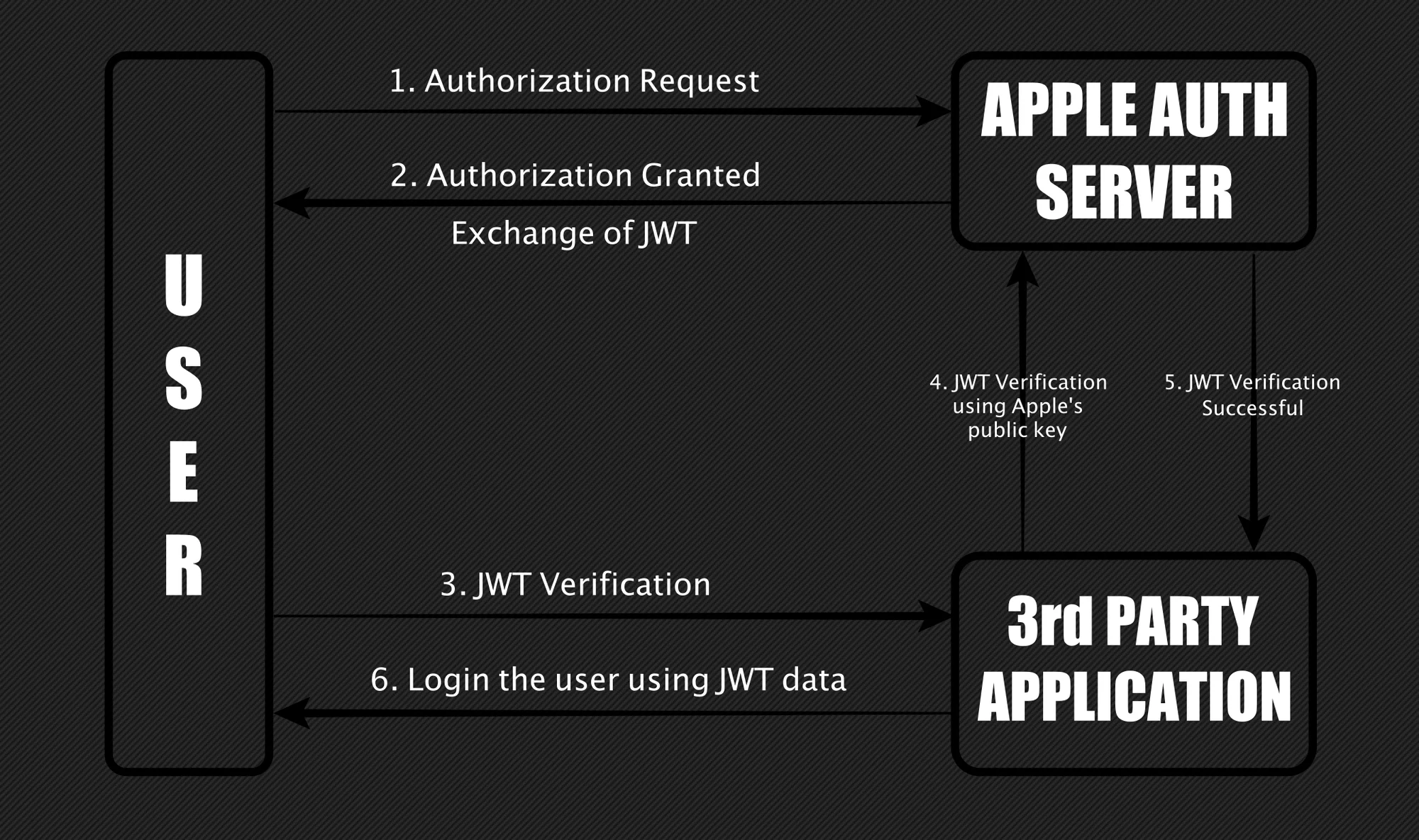
During authorisation, Apple lets the user decide whether to share their Apple Email ID with the third-party app. If the user chooses to hide it, Apple generates a user-specific Apple relay Email ID instead. After successful authorisation, Apple creates a JWT containing whichever Email ID applies, and the third-party app uses that JWT to log the user in.
A decoded JWT payload looks like this:
{ "iss": "https://appleid.apple.com", "aud": "com.XXXX.weblogin", "exp": 158XXXXXXX, "iat": 158XXXXXXX, "sub": "XXXX.XXXXX.XXXX", "c_hash": "FJXwx9EHQqXXXXXXXX", "email": "[redacted]", // or "[redacted]" "email_verified": "true", "auth_time": 158XXXXXXX, "nonce_supported": true}
The iss claim identifies Apple as the issuer, aud names the relying application, sub is the user identifier, and email carries the shared or relay address. The email_verified claim is set to "true".
Setup
The write-up does not describe any accounts, roles, tools or versions used during the research. The only precondition that matters for the attack is on the relying side: the third-party application must use Sign in with Apple without implementing its own additional security measures.
Finding it
The researcher found that it was possible to request JWTs for any Email ID from Apple, and that when the signature of these tokens was verified against Apple's public key, they showed as valid. In other words, an attacker could forge a JWT by linking any Email ID to it and gain access to the victim's account. The bug was found in April 2020.
Exploitation
Step 1: Request a JWT for an arbitrary Email ID
The request below is the second step of the flow, the one in which the client submits the chosen Email ID to Apple.
POST /XXXX/XXXX HTTP/1.1Host: appleid.apple.com
{"email":"[redacted]"}
On passing any email, Apple generated a valid JWT (id_token) for that particular Email ID. The path is redacted in the write-up, but the host is appleid.apple.com and the body carries a single email field.
Step 2: Read the valid token from the response
{ "authorization" : { "id_token" : "[redacted].XXXXX.XXXXX", "grant_code" : "XXX.0.nzr.XXXX", "scope" : [ "name", "email" ] }, "authorizedData" : { "userId" : "XXX.XXXXX.XXXX" }, "consentRequired" : false}
The response contains an id_token in the authorization object, alongside a grant_code and the granted scope. Because the signature verifies against Apple's public key, a relying application that trusts Apple's signature alone will accept the token and the Email ID inside it.
Step 3: Use the token against the relying application
The attacker links any Email ID to the forged token and presents it to the third-party application. If that application has no additional security measures of its own, the result is a full account takeover of the account associated with that Email ID, irrespective of whether the victim has a valid Apple ID or not.
Root cause
The flaw is in Apple's handling of the second step of the flow: the server accepted an arbitrary email value and issued a correctly signed JWT for it. Because the token was genuinely signed by Apple, signature verification on the relying side passed, and any application that trusted the signature and the email claim without further checks would log the attacker in as the owner of that address. The write-up does not describe the internal cause beyond this behaviour.
Impact
The impact was critical: full account takeover. The bug affected third-party applications that used Sign in with Apple and did not implement their own additional security measures. Since Sign in with Apple is mandatory for applications that support other social logins, many developers had integrated it. The write-up names Dropbox, Spotify, Airbnb and Giphy (now acquired by Facebook) as users of Sign in with Apple, while noting that these applications were not tested and could have been vulnerable to a full account takeover only if there were no other security measures in place while verifying a user.
Apple investigated their logs and determined that there was no misuse or account compromise due to this vulnerability. The researcher was paid $100,000 under the Apple Security Bounty program.
Fix
Variants to test
What happened, in plain words
Imagine a website that lets you log in with your Apple account instead of creating a new password. You click "Sign in with Apple", Apple confirms who you are, and the website trusts Apple's word and lets you in. That feature is called Sign in with Apple, and it is Apple's single sign-on feature for third-party websites and apps.
A security researcher found a flaw in that feature. The flaw meant that Apple would hand out a valid confirmation for any email address someone asked for, even an address the person did not own and had never proved they controlled. Because the confirmation was genuinely signed by Apple, the website receiving it had no reason to doubt it. If that website did not add extra checks of its own, the attacker could log in as the owner of that email address. That is a full account takeover: someone else ends up inside your account.
The researcher found the bug in April 2020. Apple paid $100,000 under their Apple Security Bounty program, which is a scheme that rewards people for finding and reporting security problems. Apple also checked their logs and found no sign that anyone had misused the bug or broken into an account because of it.
This article walks through the same technical details as the original write-up, but explains every term from scratch. You only need to be comfortable using a browser and a computer.
The feature: Sign in with Apple
Sign in with Apple works similarly to OAuth 2.0. OAuth 2.0 is a widely used set of rules that lets one website (the identity provider, here Apple) vouch for you to another website (the third-party app), without the second website ever seeing your password. Think of it like a passport office: you prove who you are once, the office issues a document, and other places accept that document because they trust the office.
A third-party application can authenticate a user in one of two ways:
- By using a
JWT (JSON Web Token)issued by Apple. - By using a
codegenerated by the Apple server, which the application then exchanges for a JWT.
A JWT is a small block of text that carries some facts about you (such as your email address) together with a cryptographic signature. The signature is what makes it trustworthy: anyone can read the contents, but only the holder of the right secret key can produce a valid signature. Websites check the signature against Apple's public key, which is published openly, and if it matches they accept the facts inside.
The diagram below, from the write-up, shows how JWT creation and validation works.
During authorisation, Apple lets the user decide whether to share their Apple Email ID with the third-party app. If the user chooses to hide it, Apple generates a user-specific Apple relay Email ID instead. A relay address is a stand-in address that forwards mail to your real inbox, so the app never learns your real address. After successful authorisation, Apple creates a JWT containing whichever Email ID applies, and the third-party app uses that JWT to log the user in.
A decoded JWT payload looks like this:
{ "iss": "https://appleid.apple.com", "aud": "com.XXXX.weblogin", "exp": 158XXXXXXX, "iat": 158XXXXXXX, "sub": "XXXX.XXXXX.XXXX", "c_hash": "FJXwx9EHQqXXXXXXXX", "email": "[redacted]", // or "[redacted]" "email_verified": "true", "auth_time": 158XXXXXXX, "nonce_supported": true}
Line by line, in plain words:
- The outer braces
{ ... }mark the start and end of a JSON object, which is just a way of writing labelled pieces of data. "iss": "https://appleid.apple.com"is the issuer: it says Apple produced this token."aud": "com.XXXX.weblogin"is the audience: it names the application the token is meant for."exp": 158XXXXXXXis the expiry time, written as a number of seconds since a fixed date in 1970. After that moment the token should no longer be accepted."iat": 158XXXXXXXis the issued-at time, when the token was created."sub": "XXXX.XXXXX.XXXX"is the subject: a stable identifier for the user."c_hash": "FJXwx9EHQqXXXXXXXX"is a value tied to the authorisation code, used to check that the token belongs with that code."email": "[redacted]"is the email address, either the real one the user shared or the relay address Apple generated. The comment// or "[redacted]"notes that either form can appear here."email_verified": "true"says Apple considers that email address verified."auth_time": 158XXXXXXXrecords when the user actually authenticated."nonce_supported": truesays the flow supports a nonce, which is a one-time random value used to stop tokens being replayed.
Setup
The write-up does not describe any accounts, roles, tools or versions used during the research. The only precondition that matters for the attack is on the relying side: the third-party application must use Sign in with Apple without implementing its own additional security measures. "Relying side" means the website that relies on Apple's confirmation to decide who you are.
Finding it
The researcher found that it was possible to request JWTs for any Email ID from Apple, and that when the signature of these tokens was verified against Apple's public key, they showed as valid. In other words, an attacker could forge a JWT by linking any Email ID to it and gain access to the victim's account. The bug was found in April 2020.
Why does this matter so much? Normally the whole point of the signature is that only Apple can produce it. Here Apple really did produce it, correctly signed, but for an address the requester had simply typed in. The signature was doing its job; the problem was that Apple issued the token without first checking that the requester owned that address.
Exploitation
Step 1: Request a JWT for an arbitrary Email ID
The request below is the second step of the flow, the one in which the client submits the chosen Email ID to Apple.
POST /XXXX/XXXX HTTP/1.1Host: appleid.apple.com
{"email":"[redacted]"}
Line by line, in plain words:
POST /XXXX/XXXX HTTP/1.1is the first line of an HTTP request. HTTP is the language browsers and servers use to talk.POSTmeans "here is some data for you to act on"./XXXX/XXXXis the path on the server; it is redacted in the write-up.Host: appleid.apple.comnames the server being contacted, Apple's identity server.{"email":"[redacted]"}is the body of the request: a small JSON object with a single field,email, holding the address the requester wants a token for.
The researcher sent this request with an address they chose, to see whether Apple would issue a token for it. On passing any email, Apple generated a valid JWT (id_token) for that particular Email ID. The path is redacted in the write-up, but the host is appleid.apple.com and the body carries a single email field.
Step 2: Read the valid token from the response
{ "authorization" : { "id_token" : "[redacted].XXXXX.XXXXX", "grant_code" : "XXX.0.nzr.XXXX", "scope" : [ "name", "email" ] }, "authorizedData" : { "userId" : "XXX.XXXXX.XXXX" }, "consentRequired" : false}
Line by line, in plain words:
- The outer braces hold the whole response as one JSON object.
"authorization" : { ... }is a nested object containing the authorisation results."id_token" : "[redacted].XXXXX.XXXXX"is the JWT itself. A JWT has three parts separated by dots: a header, a payload and a signature. The first part here is the header, encoded so it can travel safely as text."grant_code" : "XXX.0.nzr.XXXX"is the code mentioned earlier, which an application can exchange for a token."scope" : [ "name", "email" ]lists what the user agreed to share: their name and email address."authorizedData" : { ... }is another nested object with data about the authorised user."userId" : "XXX.XXXXX.XXXX"is the identifier for that user."consentRequired" : falsesays no further consent screen is needed.
The response contains an id_token in the authorization object, alongside a grant_code and the granted scope. RSA is a widely used public-key cryptography system: a private key creates the signature and a matching public key checks it. Because the signature verifies against Apple's public key, a relying application that trusts Apple's signature alone will accept the token and the Email ID inside it.
Step 3: Use the token against the relying application
The attacker links any Email ID to the forged token and presents it to the third-party application. If that application has no additional security measures of its own, the result is a full account takeover of the account associated with that Email ID, irrespective of whether the victim has a valid Apple ID or not. That last point is worth pausing on: the victim does not even need an Apple account for the attack to work, because the token is being used against the third-party app, not against Apple.
Root cause
The flaw is in Apple's handling of the second step of the flow: the server accepted an arbitrary email value and issued a correctly signed JWT for it. "Binding" here means tying the token to a person who has just proved they are that person, for example by entering a password or a one-time code. Because the token was genuinely signed by Apple, signature verification on the relying side passed, and any application that trusted the signature and the email claim without further checks would log the attacker in as the owner of that address. The write-up does not describe the internal cause beyond this behaviour.
Impact
The impact was critical: full account takeover. The bug affected third-party applications that used Sign in with Apple and did not implement their own additional security measures. Since Sign in with Apple is mandatory for applications that support other social logins, many developers had integrated it. The write-up names Dropbox, Spotify, Airbnb and Giphy (now acquired by Facebook) as users of Sign in with Apple, while noting that these applications were not tested and could have been vulnerable to a full account takeover only if there were no other security measures in place while verifying a user.
Apple investigated their logs and determined that there was no misuse or account compromise due to this vulnerability. The researcher was paid $100,000 under the Apple Security Bounty program.
Fix
Variants to test
These are the kinds of checks a researcher would repeat on similar systems, to see whether the same mistake exists elsewhere. Each one comes with what a positive result looks like.
Glossary
- Account takeover: a situation where an attacker gains control of someone else's account, for example by logging in as them.
- API: a defined way for one piece of software to ask another for data or actions, like a service counter with set forms to fill in.
- Apple Security Bounty program: Apple's scheme that pays researchers for finding and reporting security problems.
- Audience (
aud): the field in a token naming which application the token is meant for. - Authentication: proving who you are, for example with a password or a code.
- Authorisation: the step where a user agrees to let an app access certain details, and the app receives permission.
- Bug bounty: a reward programme that pays people for responsibly reporting security bugs.
- Claim: a labelled fact inside a token, such as the email address or the issuer.
- Code (grant code): a short value issued by the identity provider that an app can exchange for a token.
- Consent: a user's agreement to share particular details with an app.
- Email relay address: a stand-in email address that forwards to your real inbox, so the app never sees the real one.
- Expiry (
exp): the time after which a token should no longer be accepted. - Forgery: creating something that looks genuine, here a token that a website will accept.
- HTTP: the language browsers and servers use to exchange requests and responses.
- Identity provider: the service that confirms who you are to other websites, here Apple.
- Issuer (
iss): the field in a token naming who created it. - JSON: a simple text format for labelled data, using braces, quotes and colons.
- JWT (JSON Web Token): a small block of text carrying facts about a user plus a signature, used to prove identity between systems.
- Nonce: a one-time random value used to stop a token being reused by someone else.
- OAuth 2.0: a widely used set of rules letting one website vouch for you to another without sharing your password.
- Payload: the middle part of a JWT, holding the claims.
- Public key: the openly published half of a key pair, used to check a signature.
- Private key: the secret half of a key pair, used to create a signature.
- Relay email: see email relay address.
- Relying application (relying side): the third-party website or app that trusts the identity provider's confirmation.
- Root cause: the underlying mistake that makes a vulnerability possible.
- RSA: a widely used public-key cryptography system for signing and checking data.
- RS256: the name of the signing method that uses RSA with a SHA-256 hash.
- Scope: the list of details a user agreed to share, such as name and email.
- Session: the state of being logged in to a website, usually kept alive by a cookie or token.
- Signature: a cryptographic value that proves a token was created by the holder of the private key and has not been altered.
- Single sign-on (SSO): logging in to many websites using one account from a provider.
- Subject (
sub): the field in a token holding a stable identifier for the user. - Third-party application: a website or app other than the identity provider, here the app you are logging in to.
- Token: a piece of text that stands in for proof of identity or permission, like a stamped ticket.
- Verification: checking that a signature is genuine, using the public key.
- Vulnerability: a weakness in software that an attacker can use to do something harmful.
- Zero-day: a security flaw that the vendor did not know about before it was reported, so there was no fix available at the time.