Account takeover worth $1000
A 2FA verification endpoint continued to issue valid JWT tokens even after 2FA was disabled on an account, and the author could use such a token to set a password on an OAuth-linked account. This allowed an attacker who had previously enabled and then disabled 2FA to take over the account.

I cannot disclose that target because it was a private invite. Before getting into the vulnerability I want you to get a foothold on how everything works especially authentication this will help you to understand the bug more clearly.
The full write-up lives on its author's site
It belongs to its author, so we link to it rather than copy it. The other two tabs are our own rewrites, checked against it.
Context
This is a write-up by Faique (@imfaiqu3), a bug bounty hunter from India, about an account takeover in one of the largest organizations. The target was a private invite program, so the organization cannot be named. The product is a website with a customer account system that supports two ways of signing in:
- A normal email and password login.
- OAuth login, which the report says includes Google, GitHub and others. Later in the report the author lists the OAuth providers used by the site as Google, GitHub, Microsoft, Bitbucket and Azure Active Directory.
The site also offers two-factor authentication (2FA) as an extra security layer that a customer can enable on their account. The bug sits at the intersection of 2FA and OAuth: a request that is meant to verify a 2FA code during OAuth login keeps returning a valid JWT after 2FA has been disabled on the account, provided the customer had enabled and then disabled 2FA, and that JWT can then be used to take over the account.

Setup
The author started with basic reconnaissance, found nothing, and moved on to authentication testing. The work required:
- An account on the site, created by the author.
- 2FA enabled on that account, tested with both the email/password login and the OAuth login.
- A Google OAuth account with 2FA enabled on it the next day.
- An intercepting proxy, with requests captured and replayed from its repeater, in particular the request the website sends when it submits a 2FA code to the server.
The report does not name the proxy, the versions of anything, or the exact endpoints and parameters, because the target is under a private program.
Finding it
The first round of testing was conventional: duplicate registration, forgot password bugs, SQL injection and similar checks. None of it produced anything. The author then enabled 2FA and brute-forced the 2FA code, trying this against both the email/password login and the OAuth login. Neither worked.
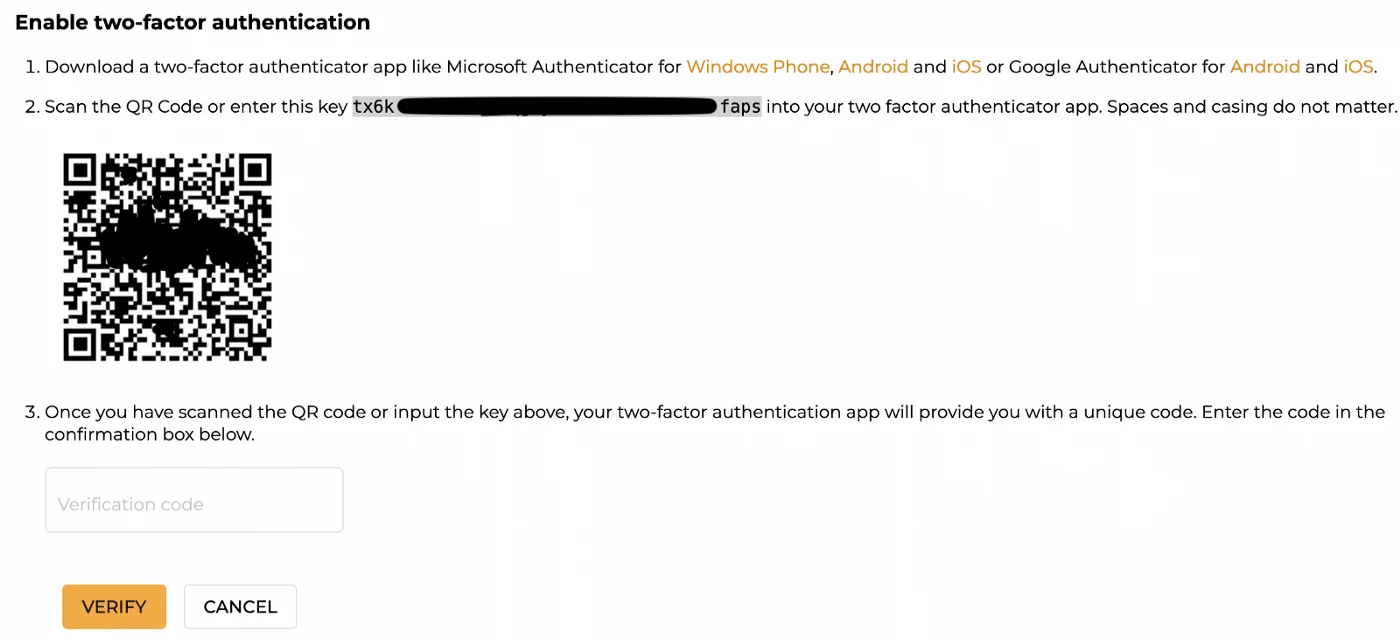
The next day the author enabled 2FA on the Google OAuth account and intercepted every request, sending the interesting ones to the repeater, including the request the website sends when it submits a 2FA code to the server.
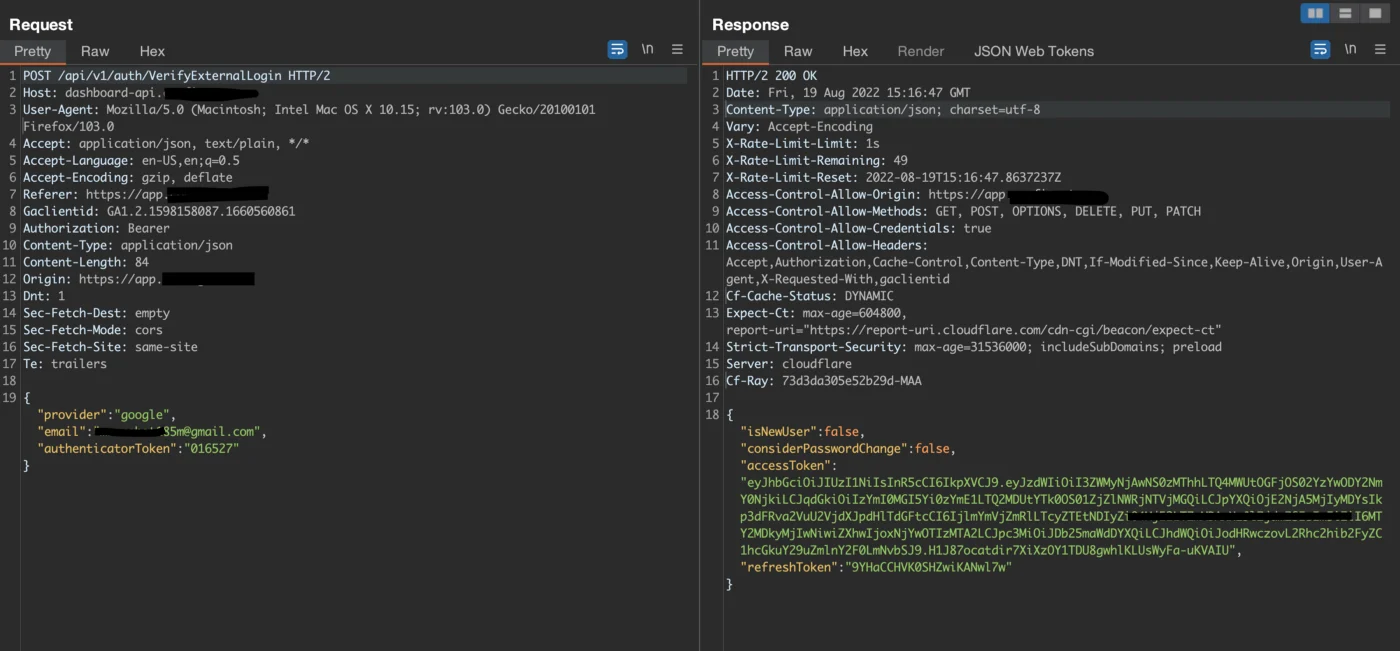
After testing some more 2FA bugs without success, the author got fed up and disabled 2FA on the account. While going back through the repeater history, the author stumbled on that earlier 2FA submission request, sent it again, and received a JWT token. That was the first sign something was wrong: the request was being replayed after 2FA had been turned off, and it still produced a token.
The author then tried changing the authenticator code in the request to a random value, 000000, and sent it again. The response was again a JWT token.
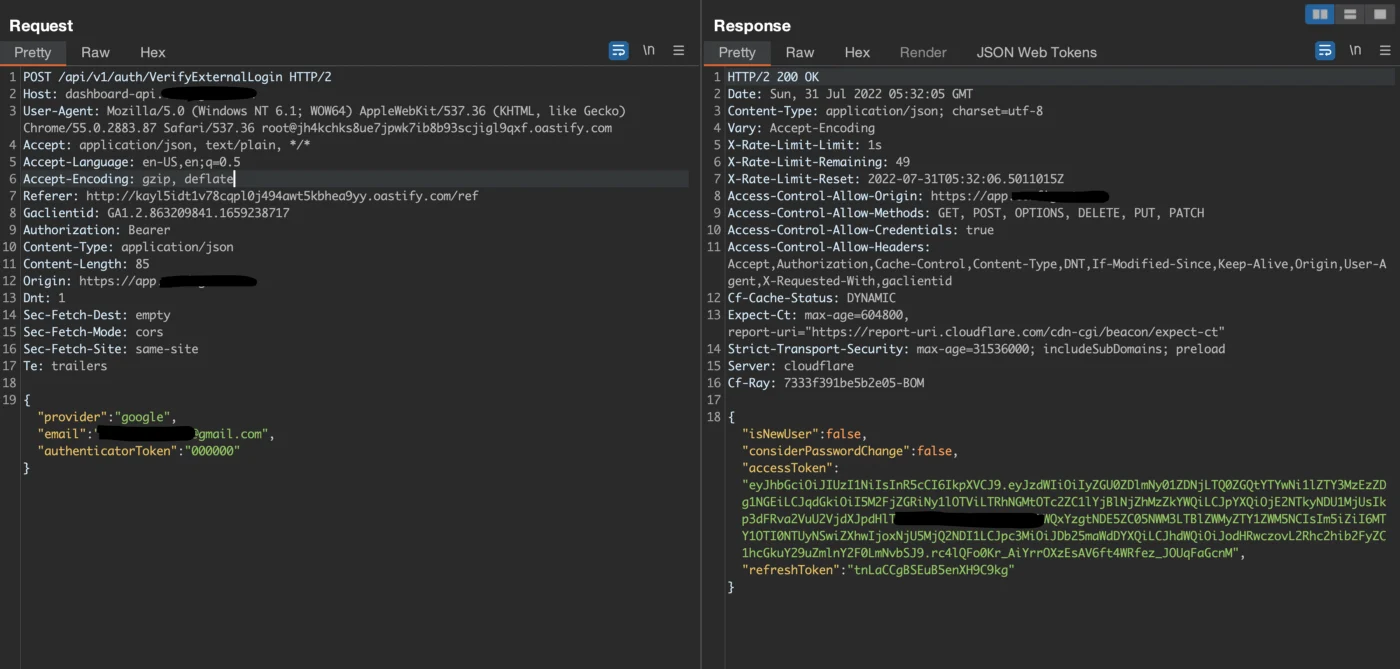
So even with 2FA disabled on the account, the 2FA verification request returned a JWT. The report explains that this JWT is basically the cookie used to authenticate users. To rule out a fluke, the author waited one day and sent the request again, and again received the JWT token.
Exploitation
Step 1: obtain a JWT from the 2FA verification request
The author replayed the captured request that the site uses to submit a 2FA code during OAuth login and received a JWT token in response, then changed the code to 000000 and received a JWT again. The report does not reproduce the raw request or response, only screenshots of the repeater traffic.
Two properties of this response matter:
- It is returned even though 2FA is no longer enabled on the account.
- It is returned for a code that was never valid.
The report describes the JWT as basically the cookie used to authenticate users.
Step 2: find a way to convert the token into persistent access
A JWT alone gives a session, but the author wanted a direct way to log in to the account. While browsing the site logged in, the author found a feature that lets a user set a password on an OAuth account, so that the account can also be accessed with email and password.
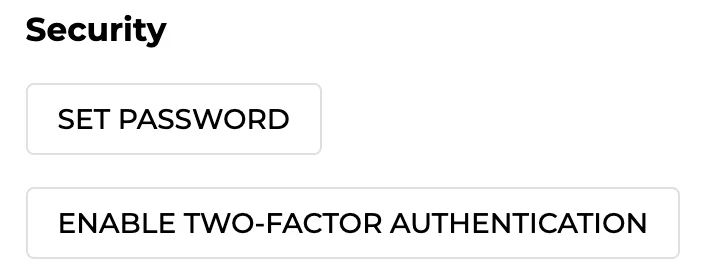
Step 3: set a password using the stolen JWT
The author took the set-password request and replaced its JWT with the token obtained in step 1, then sent it. The password was added to the account.
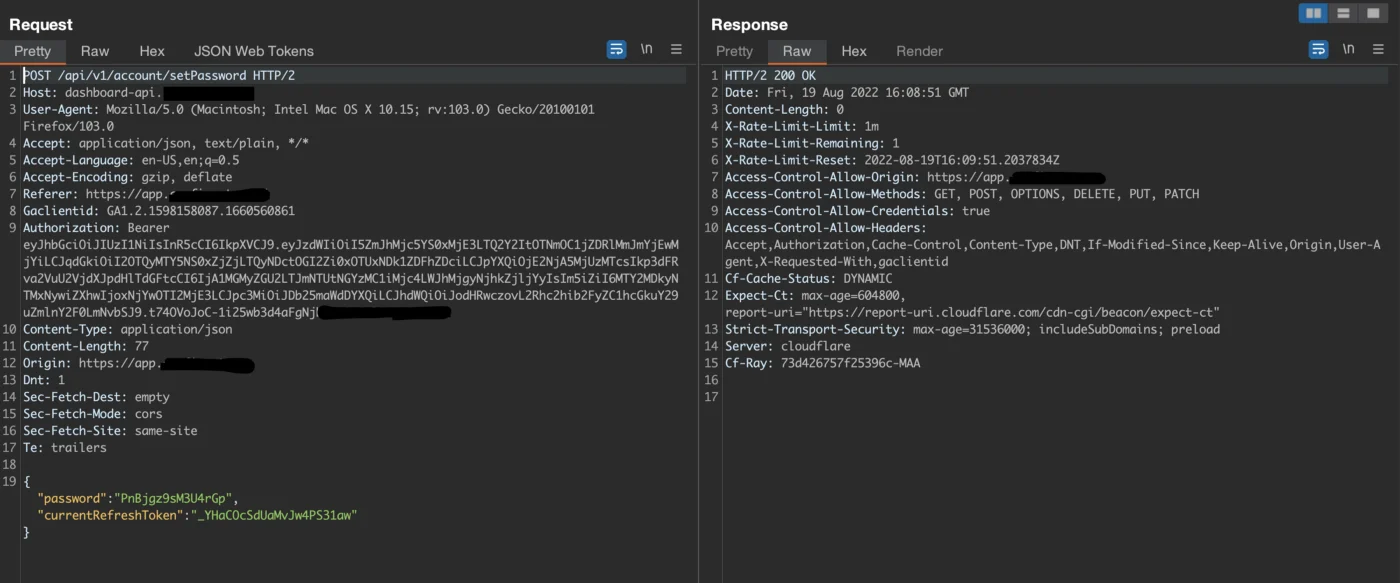
With the password set, the author could log in directly with the email address and the new password, bypassing OAuth entirely.
Scope and precondition
The report states that the bug affects not only Google OAuth login but all OAuth providers used by the site: GitHub, Microsoft, Bitbucket and Azure Active Directory. It also states a precondition: the bug is only possible if the customer had enabled and then disabled 2FA on their account.
Root cause
The report does not describe the server-side code, so the exact mistake is not shown. What the behaviour implies is that the 2FA verification endpoint used during OAuth login does not check whether 2FA is currently enabled for the account, and does not properly validate the submitted code, before issuing a JWT. Once 2FA has been enabled and then disabled, the endpoint apparently still treats the account as being in a state where a token should be issued, and it issues one for any code, including 000000. Likely the state that records "2FA was configured" is checked instead of the state that records "2FA is active", or the code check is skipped on a path that was only meant to run after a successful verification.
The set-password feature accepted the token obtained from the 2FA verification request, so the flaw in the 2FA step led to full account access.
Impact
Once the attacker has access to the account, the report lists the following:
- The attacker can see and edit confidential details such as API keys.
- Edit organization and product names.
- Invite members to the account.
- Remove users from the organization.
- Add a password to the account.
- Delete the account.
The precondition is that the victim customer had enabled and then disabled 2FA on their account.
Fix
Based on the behaviour, the verification endpoint should refuse to issue a token when 2FA is not currently enabled for the account, should validate the submitted code against the active 2FA secret, and should not accept a replayed verification request after the 2FA state has changed. The set-password feature should also only accept tokens issued through a completed authentication flow.
Timeline
- 00:09, 1 August: reported the bug.
- 02:20, 1 August: first rejected, as the triagers thought it was a false positive.
- 03:00, 1 August: accepted, and the author was asked for patience.
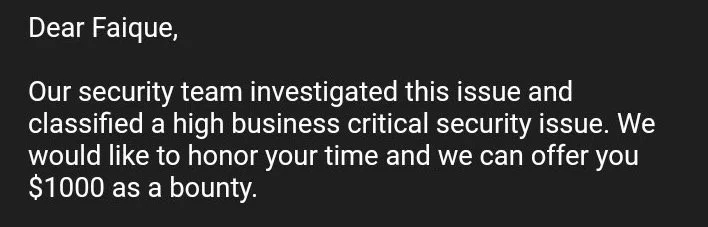
- 01:20, 5 August: marked as a high business critical security issue and a $1000 bounty was offered.
Variants to test
- Replay a 2FA verification request after disabling 2FA on your own account. A positive result is a JWT or session token returned when 2FA is off.
- Submit an obviously invalid code such as
000000to the 2FA verification endpoint. A positive result is a token instead of an error. - Repeat the same request a day later. A positive result is that the token is still issued, showing the behaviour is not a transient state.
- Try the same flow with each OAuth provider the target supports. A positive result is a token from any provider's verification path.
- Take a token obtained this way and use it against account-management features such as setting a password or inviting members. A positive result is that the action succeeds, turning a token leak into persistent access.
What happened, in plain words
A security researcher called Faique found a way to take over user accounts on a large website. The site let people sign in either with an email address and password, or through another service such as Google or GitHub (this is called OAuth). It also offered two-factor authentication (2FA), an extra code on top of the password.
The bug was in the step where the site checks the 2FA code during an OAuth login. If a customer had enabled and then switched off 2FA on an account, that step still handed back a valid login token, and it did so for any code, even a made-up one like 000000. With that token, the researcher could use a feature that sets a password on an OAuth account, and from then on log in normally with email and password. In effect, a broken 2FA check turned into full control of the account.
The site paid a $1000 bounty. The target was a private invite program, so the organization is not named.
The product and the two ways to sign in
The target is a website with customer accounts. The report says it is one of the largest organizations, but the name cannot be disclosed because the work was done under a private invite program, meaning the organization invited selected researchers to test it.
There are two ways to sign in:
-
Email and password. You type the address you registered with and a secret word only you know. The site compares it with what it stored and lets you in.
-
OAuth. Instead of giving the site a password, you click a button such as "Sign in with Google" and sign in to Google instead. Google then tells the site who you are. The report says the site supports Google, GitHub and others, and later lists the providers as Google, GitHub, Microsoft, Bitbucket and Azure Active Directory. The advantage for the user is that the site never sees the Google password; the disadvantage is that the site has to trust the answer that comes back.

A useful comparison: email and password is like showing your own ID card at the door. OAuth is like a friend you both trust vouching for you at the door. Either way, the club wants to know who you are before letting you in.
The site also offers 2FA. After the password (or the OAuth sign-in), the site asks for a second code, usually six digits generated by an app on your phone. The idea is that a stolen password alone is not enough: the thief also needs your phone. A customer can switch this on and off in their account settings.
The tools used
To study the traffic between the browser and the site, the researcher used an intercepting proxy. A proxy sits between your browser and the website and lets you read, pause, change and resend every request. Think of it as a post office clerk who opens every letter you send, lets you rewrite it, and can post the same letter again later.
One feature of such a proxy is the repeater: you take a captured request, edit it, and send it again as many times as you like, seeing the response each time. This matters because the whole bug was found by resending an old request.
The report does not name the proxy, the versions of anything, or the exact addresses and parameters of the requests, because the target is private.
First attempts: the ordinary checks
The researcher began with basic reconnaissance, looking around the site for anything interesting, and found nothing. The next step was authentication testing: creating an account and trying the classic mistakes sites make around login.
- Duplicate registration: can you register the same email address twice, perhaps to confuse the system?
- Forgot password bugs: does the password reset flow leak information or let you reset someone else's password?
- SQL injection: can you sneak database commands into a form field so the site runs them?
None of these produced anything. The researcher then switched on 2FA and tried to brute-force the 2FA code. Brute-forcing means guessing systematically: trying every possible value until one works. A six-digit code has a million possibilities, which sounds like a lot, but a computer can try many per second, so sites must limit attempts. The researcher tried this against both the email/password login and the OAuth login, and neither worked.
The discovery
The next day the researcher enabled 2FA on the Google OAuth account and intercepted every request, sending the interesting ones to the repeater. One of those was the request the website sends when it submits a 2FA code to the server.
After more unsuccessful 2FA testing, the researcher got fed up and switched 2FA off on the account. Later, going back through the repeater history, the researcher came across that earlier 2FA submission request, sent it again, and received a JWT token.
That was the first sign of a problem. The request was being replayed after 2FA had been turned off, and it still produced a token.
A JWT (JSON Web Token) is a compact string that a server hands to a browser after a successful login. The browser sends it back with later requests so the server knows who is asking. The report describes it as basically the cookie used to authenticate users. A comparison: it is like a wristband given at a festival entrance. Show the wristband and you get back in without queueing again. Anyone who has the wristband is treated as you.
The researcher then changed the authenticator code in the request to a random value, 000000, and sent it again. The response was again a JWT token.
So even with 2FA disabled on the account, the 2FA verification request returned a JWT, and it did so for a code that was never valid. To rule out a fluke, the researcher waited a day and sent the request again, and again received the JWT token.
Turning the token into a lasting login
Step 1: get a JWT from the 2FA verification request
The researcher replayed the captured request that the site uses to submit a 2FA code during OAuth login and received a JWT token in response, then changed the code to 000000 and received a JWT again. The report does not reproduce the raw request or response, only screenshots of the repeater traffic.
Two things about that response matter:
- It comes back even though 2FA is no longer enabled on the account.
- It comes back for a code that was never valid.
The report describes the token as basically the cookie used to authenticate users.
Step 2: find a way to make the access permanent
A JWT gives a session, but the researcher wanted a direct way to log in to the account. While browsing the site logged in, the researcher found a feature that lets a user set a password on an OAuth account, so that the account can also be accessed with email and password.
This feature exists for a sensible reason: some people start with "Sign in with Google" and later want a normal password as well. It is also a powerful feature, because it changes how the account can be entered.
Step 3: set a password using the stolen JWT
The researcher took the set-password request and replaced its JWT with the token obtained in step 1, then sent it. The password was added to the account.
With the password set, the researcher could log in directly with the email address and the new password, bypassing OAuth entirely.
Scope and precondition
The report states that the bug affects not only Google OAuth login but all OAuth providers used by the site: GitHub, Microsoft, Bitbucket and Azure Active Directory. It also states a precondition: the bug is only possible if the customer had enabled and then disabled 2FA on their account.
Why it worked
The report does not describe the server-side code, so the exact mistake is not shown. What the behaviour implies is that the 2FA verification endpoint used during OAuth login does not check whether 2FA is currently enabled for the account, and does not properly validate the submitted code, before issuing a JWT. Once 2FA has been enabled and then disabled, the endpoint apparently still treats the account as being in a state where a token should be issued, and it issues one for any code, including 000000. Likely the state that records "2FA was configured" is checked instead of the state that records "2FA is active", or the code check is skipped on a path that was only meant to run after a successful verification.
A comparison: a bouncer checks a guest list. The list should say who is allowed in tonight. Here the bouncer seems to be reading an old list that says "this person once had a ticket", and lets them in without checking the ticket at all.
The set-password feature accepted the token obtained from the 2FA verification request, so the flaw in the 2FA step led to full account access.
What an attacker could do
Once the attacker has access to the account, the report lists the following:
- The attacker can see and edit confidential details such as API keys.
- Edit organization and product names.
- Invite members to the account.
- Remove users from the organization.
- Add a password to the account.
- Delete the account.
An API key is a long secret string that lets a program talk to a service on your behalf, like a password for software rather than for a person. If someone else gets it, they can act as your application.
The precondition is that the victim customer had enabled and then disabled 2FA on their account.
How it should be fixed
Based on the behaviour, the verification endpoint should refuse to issue a token when 2FA is not currently enabled for the account, should validate the submitted code against the active 2FA secret, and should not accept a replayed verification request after the 2FA state has changed. The set-password feature should also only accept tokens issued through a completed authentication flow.
Timeline
- 00:09, 1 August: reported the bug.
- 02:20, 1 August: first rejected, as the triagers thought it was a false positive.
- 03:00, 1 August: accepted, and the researcher was asked for patience.
- 01:20, 5 August: marked as a high business critical security issue and a $1000 bounty was offered.
A false positive is a report that looks like a bug but is not one, for example because the behaviour is intended or cannot be reproduced. Triagers are the people on the receiving side who read reports and decide whether they are valid.
Things to try on your own targets
These are the same checks the researcher ran, written so you can repeat them on a site you are allowed to test:
- Replay a 2FA verification request after disabling 2FA on your own account. A positive result is a JWT or session token returned when 2FA is off.
- Submit an obviously invalid code such as
000000to the 2FA verification endpoint. A positive result is a token instead of an error. - Repeat the same request a day later. A positive result is that the token is still issued, showing the behaviour is not a transient state.
- Try the same flow with each OAuth provider the target supports. A positive result is a token from any provider's verification path.
- Take a token obtained this way and use it against account-management features such as setting a password or inviting members. A positive result is that the action succeeds, turning a token leak into persistent access.
Glossary
- 2FA (two-factor authentication): a second check after the password, usually a short code from an app or a text message, so a stolen password alone is not enough.
- Account takeover: a bug that lets someone else gain control of another person's account.
- API key: a long secret string that lets a program act on a service on your behalf, like a password for software.
- Authentication: the process of proving who you are, for example with a password or an OAuth sign-in.
- Brute-force: guessing systematically, trying every possible value until one works.
- Bug bounty: a program that pays researchers for reporting security bugs responsibly.
- Cookie: a small piece of data a site stores in your browser and reads back on later requests, often used to keep you logged in.
- Endpoint: a specific address on a server that performs one action, such as "submit a 2FA code".
- False positive: a report that looks like a bug but is not one.
- Intercepting proxy: a tool that sits between your browser and a website so you can read, pause, change and resend requests.
- JWT (JSON Web Token): a compact string issued after login that the browser sends back to prove who it is; the report calls it basically the cookie used to authenticate users.
- OAuth: a way to sign in to a site using another service such as Google or GitHub, without giving the site your password for that service.
- Private invite program: a bug bounty program that only selected researchers are invited to test, often with the organization's name kept secret.
- Reconnaissance: the early phase of looking around a target to understand what it does and where the interesting parts are.
- Repeater: a proxy feature that lets you edit a captured request and send it again as many times as you like.
- Request: a message your browser sends to a server asking it to do something.
- Response: the message the server sends back.
- Session: the period during which a site remembers that you are logged in, usually kept alive by a cookie or token.
- SQL injection: a bug where input from a form is placed into a database command, letting an attacker run their own commands.
- Token: a string that stands in for your login, so the server can recognise you on later requests.
- Triager: the person on the receiving side of a bug bounty who reads reports and decides whether they are valid.