First Bug Bounty from DOS: Taking the service down
An image-processing endpoint accepted extremely large width and height parameters, causing the service to become unresponsive when requests were repeated. An attacker could take the service down for other users.

Found the target using google dorking, The target was similar to google map and had multiple domains in scope like
The full write-up lives on its author's site
It belongs to its author, so we link to it rather than copy it. The other two tabs are our own rewrites, checked against it.
Context
Faique (@imfaiqu3) describes this as his first bug bounty, a denial of service found on a target he located through Google dorking. The product was similar to Google Maps, and the programme's scope covered multiple domains:
- *.target.com
- *.target.net
- *.target.me
The vulnerable asset was the subdomain photos.target.me, a service used to fetch user images and the other images used across the sites *target.com and *target.net. The report does not describe the application further than that.
Setup
The researcher worked with Burp Suite, using the proxy to intercept requests and Repeater to manipulate them, and later Intruder to repeat a request many times. Reconnaissance was done by collecting subdomains and then gathering waybackurls for the in-scope domains. No account, role or special precondition is mentioned: the requests shown were made without authentication details in the report.
Finding it
After an initial pass over subdomains and functionality-level bugs turned up nothing, the researcher returned the next day and analysed the waybackurls he had collected. On photos.target.me he found unusual URLs: the link carried width, height and q as parameters.

The screenshot accompanies the waybackurls analysis of the photos.target.me URLs. Image resizing parameters are a natural place to look for resource exhaustion, because the values are normally passed to an image processing library on the server.
Exploitation
Step 1: Intercept and inspect the request
The researcher opened Burp Suite, intercepted the request to the photos.target.me URL and sent it to Repeater so he could work on it more comfortably. The report does not reproduce the raw request.
Step 2: Push the parameters to extreme values
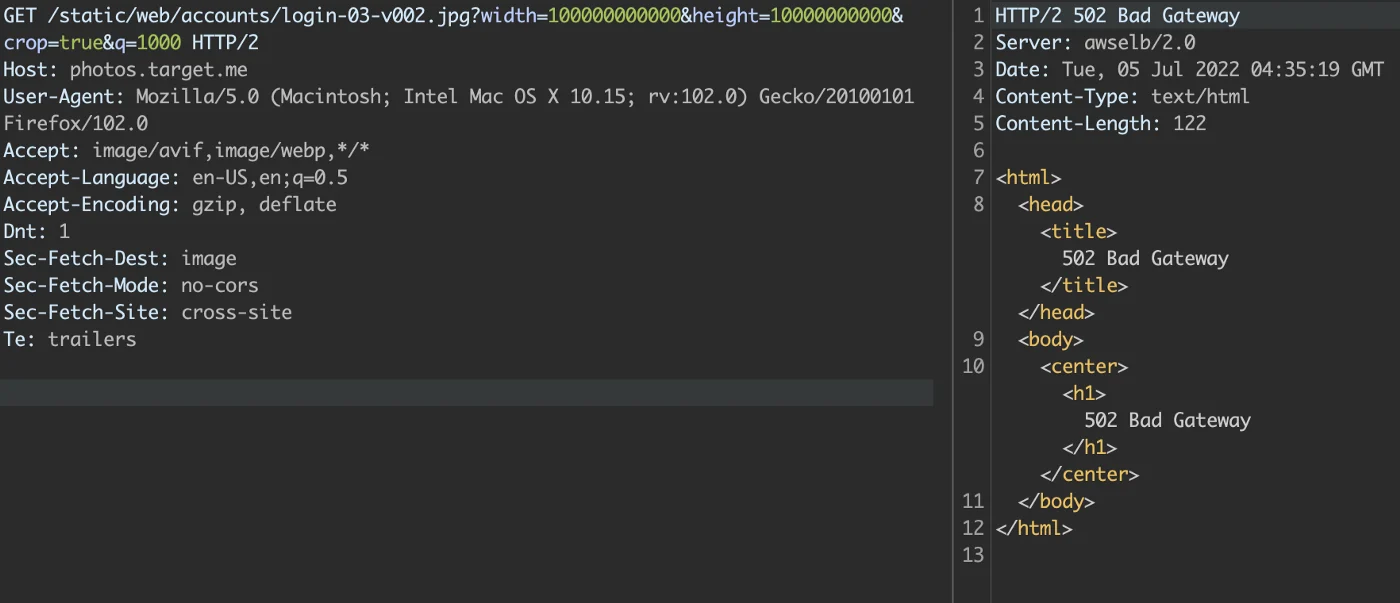
In Repeater he changed the height and width parameter values from 500 to something very high, like 1000000000000000000, and set the q value to 1000, then sent the request. The response took too long to come back.
Step 3: Repeat the request with Intruder
Taking the slow response as a signal, he sent the request to Intruder, set the payload type to null payloads and the value to 1000, so the same request would be fired 1000 times.
The screenshot accompanies the Intruder setup with null payloads and the value 1000.
Step 4: Observe the errors and confirm from another network
After some requests he started to get 502 and 503 errors. To confirm that the service had actually stopped working rather than only his own connection failing, he opened photos.target.me from another network, and the website returned an error there too.
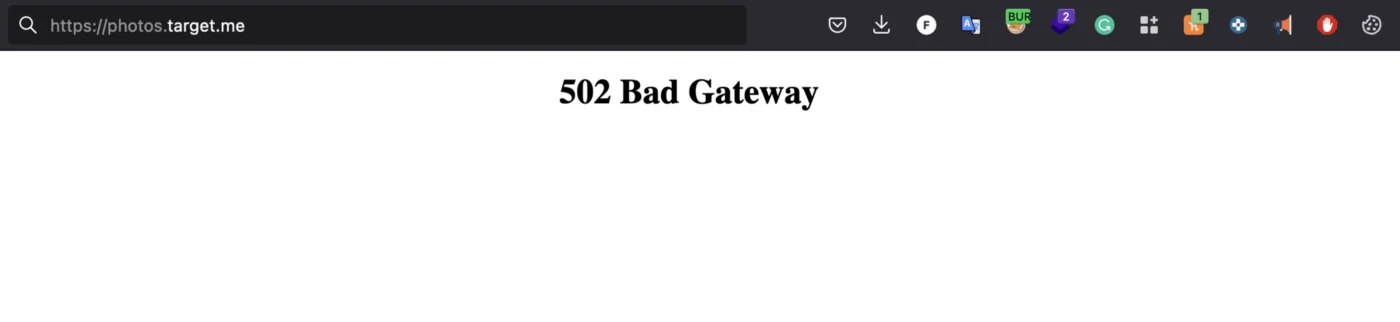
The screenshot relates to the error seen when opening photos.target.me from another network.
Step 5: Stop and report
The service stayed down for around 10 to 15 minutes. The researcher was nervous because this service fetched user images and the other images used in the sites *target.com and *target.net, so an outage had a wider effect than the single subdomain. The service restarted by itself. He stopped hunting because he did not want any trouble, reported the bug, and got a response from the programme after around 3 days.
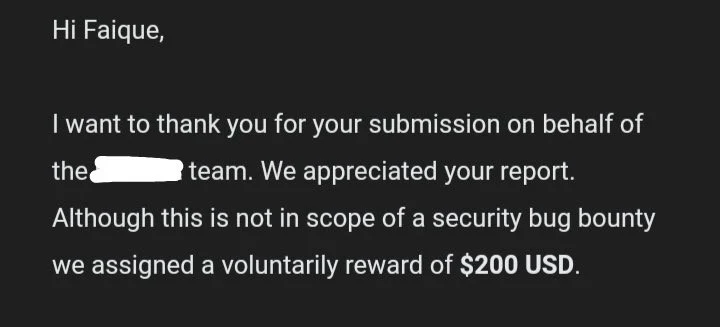
The report does not show the programme's response. The bounty recorded for the report is 200.00 USD.
Root cause
The report does not include any server-side detail, so the cause can only be inferred. The likely explanation is that the width, height and q values are passed to the image processing path without sane upper bounds, so a request with enormous dimensions forces the backend to allocate or compute far more than it can handle. Repeating that request 1000 times exhausts the workers behind the service, which is what produced the 502 and 503 responses at the edge.
Impact
The researcher took the image service offline for around 10 to 15 minutes by repeating the request 1000 times with extreme parameter values. Because photos.target.me served user images and the images used across *target.com and *target.net, the outage affected more than the subdomain itself.
Fix
The measures that would address this class of issue are to validate width, height and q against strict upper and lower bounds before any image processing, reject or clamp out-of-range values, cap the resources a single resize operation may consume, and apply rate limiting per client on the image endpoint so that repetition of a single expensive request cannot exhaust the workers.
Variants to test
- On other image or thumbnail endpoints, send extreme
widthandheightvalues and watch response time. A positive result is a response that takes noticeably longer than the same request with normal dimensions. - Vary the quality parameter (
qin this report) to its maximum and to unusual values. A positive result is a slow response or an error from the image backend. - Repeat a single expensive request a limited number of times from a test account and watch for 502 or 503 responses at the edge. A positive result is the edge returning errors while the request pattern is still small.
- Confirm any suspected outage from a second network, as the researcher did, so that a local connectivity problem is not mistaken for a service failure.
- Check whether the same parameters are honoured on other subdomains in scope that render images, since the report shows the pattern was reachable through archived URLs on one host.
What happened, in plain words
A security researcher called Faique found a way to make one of a company's websites stop working for a while by repeating a specially crafted web request 1000 times. The website was an image service: a piece of software whose job is to hand out pictures. When you ask it for a picture, you can also tell it how big you want the picture to be. Faique asked for pictures at absurdly huge sizes, over and over, and the service could not cope. It went down for around 10 to 15 minutes, then came back by itself. He reported it, and the bounty recorded for the report is 200.00 USD.
This is called a denial of service, or DoS: you do not steal data or break in; you just make a service unavailable to the people who need it. Think of a coffee shop with one barista. If one customer orders a thousand coffees at once, the barista is stuck making them and nobody else gets served. The shop is not robbed and nothing is broken, but for a while it is effectively closed.
Below I walk through exactly what he did, step by step, explaining every tool and term as it comes up. You only need to be comfortable using a browser to follow along.
The target and the scope
Faique found the target using Google dorking. A dork is just a clever search query typed into Google that surfaces pages the site owner may not have meant to advertise, for example pages that list login screens, file directories or technical files. It is the same Google you use every day, used with more precise search terms.
The product was similar to Google Maps, and the bug bounty programme's scope covered several domains:
- *.target.com
- *.target.net
- *.target.me
A domain is the main part of a web address, like example.com. The * at the front is a wildcard meaning "any subdomain". A subdomain is a prefix added in front of the main domain, so photos.target.me is a subdomain of target.me. Scope is the list of things a bug bounty programme authorises you to test. Anything outside scope is off limits, and testing it can get you into trouble.
The vulnerable asset was the subdomain photos.target.me. It was a service used to fetch user images and the other images used across the sites *target.com and *target.net. In other words, it was not a decorative side page: other sites depended on it to display their pictures.
The tools he used
Before the steps, here is what each tool does, because the write-up assumes you know.
- Burp Suite is a program that sits between your browser and a website. Normally your browser talks straight to the site. With Burp, the browser talks to Burp, and Burp talks to the site, so you can see and edit every message in both directions. It is like opening a letter, reading it, changing a word, and sealing it again before passing it on.
- Proxy is that middleman role. Burp's proxy is the part that catches the browser's traffic.
- Intercept means Burp pauses a request before it leaves your machine, so you can look at it and change it.
- Repeater is a Burp tab where you can send the same request again and again, editing it each time, and read each response. It is for careful, one-at-a-time experiments.
- Intruder is a Burp tab that sends a request many times automatically, optionally changing part of it each time. It is for repetition at scale.
- Payload in Burp means the value that gets inserted into the request on each attempt. A null payload is a special payload type that inserts nothing, so the request stays identical; its only purpose is to send the same request a chosen number of times.
- Waybackurls is a small command-line tool that asks the Internet Archive (the Wayback Machine, which has been saving copies of web pages for years) for every URL it has ever recorded for a domain. Old, forgotten URLs often reveal parameters and features that are no longer linked from the live site.
- Parameters are the named values at the end of a URL after a question mark, like
?width=500&height=500. They are how you tell a web page what you want. The name before the=is the parameter, the value after it is what you are asking for. - HTTP status codes are three-digit numbers a server sends back with every response.
200means fine.502(Bad Gateway) means a server in the middle asked another server for something and got a broken answer.503(Service Unavailable) means the server is overloaded or down. Seeing 502 and 503 is a strong hint that something behind the scenes is struggling.
No account, role or special precondition is mentioned: the requests shown were made without authentication details in the report.
Finding it
First of all, he gathered all subdomains and did some basic reconnaissance. Reconnaissance (recon) is the information-gathering phase: finding out what exists before you start poking at it. He then hunted for functionality-level bugs, meaning flaws in how a specific feature behaves, and found nothing. He got frustrated and stopped for the day.
The next day he came back, gathered all waybackurls of the domains, and analysed them. On photos.target.me he found unusual URLs: the link carried width, height and q as parameters.
The screenshot accompanies the waybackurls analysis of the photos.target.me URLs. In plain terms, the archive had saved old links to this image service that included instructions for resizing pictures: how wide, how tall, and q, which is the quality setting for the image. Image resizing parameters are a natural place to look for resource exhaustion, because the values are normally passed to an image processing library on the server. That library has to do real work, memory and processor time, proportional to the size you ask for. If nobody checks the upper limit, you can ask for something enormous.
Exploitation
Step 1: Intercept and inspect the request
He opened Burp Suite, intercepted the request to the photos.target.me URL and sent it to Repeater so he could work on it more comfortably. The point of this step is control: instead of reloading a page in the browser and hoping to catch the right request, he now holds the exact request in his hands and can change one value at a time. The report does not reproduce the raw request.
Step 2: Push the parameters to extreme values
In Repeater he changed the height and width parameter values from 500 to something very high, like 1000000000000000000, and set the q value to 1000, then sent the request. The response took too long to come back.
Why this step: 500 by 500 is a normal thumbnail. A number with eighteen zeros is not a picture anyone could display; it is a request that forces the server to think about an image of impossible size. The slow response is the first signal that the server is doing far more work than it should. A slow answer is not proof of a bug on its own, but it is a reason to look closer.
Step 3: Repeat the request with Intruder
Taking the slow response as a signal, he sent the request to Intruder, set the payload type to null payloads and the value to 1000, so the same request would be fired 1000 times.
The screenshot accompanies the Intruder setup with null payloads and the value 1000. The logic here is simple arithmetic: if one expensive request makes the server work hard, a thousand of them at once make it work a thousand times harder. A server has a limited number of workers, the processes that handle incoming requests. Once they are all busy on expensive jobs, new requests have nobody to answer them, and the edge of the service starts returning errors.
Step 4: Observe the errors and confirm from another network
After some requests he started to get 502 and 503 errors. To confirm that the service had actually stopped working rather than only his own connection failing, he opened photos.target.me from another network, and the website returned an error there too.
The screenshot relates to the error seen when opening photos.target.me from another network. This confirmation step matters. If your own internet is flaky, or your own IP address has been blocked for sending too many requests, you will also see errors, and you might wrongly conclude the whole service is down. Opening the site from a different network, with a different connection and a different address, rules that out. If it fails there too, the problem is on the server side.
Step 5: Stop and report
The service stayed down for around 10 to 15 minutes. He was nervous because this service fetched user images and the other images used in the sites *target.com and *target.net, so an outage had a wider effect than the single subdomain. The service restarted by itself. He stopped hunting because he did not want any trouble, reported the bug, and got a response from the programme after around 3 days.
The report does not show the programme's response. The bounty recorded for the report is 200.00 USD.
Stopping was the right call. Once you have demonstrated that a service can be taken down, continuing to hammer it adds no new information and only increases the harm. The responsible move is to stop, write down what you did and what you saw, and report it privately to the programme.
Why it worked
The report does not include any server-side detail, so the cause can only be inferred. The likely explanation is that the width, height and q values are passed to the image processing path without sane upper bounds, so a request with enormous dimensions forces the backend to allocate or compute far more than it can handle. Repeating that request 1000 times exhausts the workers behind the service, which is what produced the 502 and 503 responses at the edge. The report does not say whether any rate limiting, request size validation or per-request timeout existed; the fact that 1000 repeated requests were enough to take the service down for 10 to 15 minutes suggests that whatever defences were in place did not cap the cost of a single request.
In everyday terms: the service trusted the customer's order without checking whether the kitchen could actually make it. One absurd order is slow; a thousand absurd orders stop the kitchen entirely.
Impact
The researcher took the image service offline for around 10 to 15 minutes by repeating the request 1000 times with extreme parameter values. Because photos.target.me served user images and the images used across *target.com and *target.net, the outage affected more than the subdomain itself.
Fix
The measures that would address this class of issue are to validate width, height and q against strict upper and lower bounds before any image processing, reject or clamp out-of-range values, cap the resources a single resize operation may consume, and apply rate limiting per client on the image endpoint so that repetition of a single expensive request cannot exhaust the workers.
In plain words: decide what sizes are reasonable, refuse anything outside that range, put a ceiling on how much work one request may cause, and limit how many requests one visitor can send in a given time.
Variants to test
If you want to look for the same kind of flaw yourself, here is the same list in beginner terms. Each item says what to do and what a positive result looks like.
- On other image or thumbnail endpoints, send extreme
widthandheightvalues and watch response time. A positive result is a response that takes noticeably longer than the same request with normal dimensions. - Vary the quality parameter (
qin this report) to its maximum and to unusual values. A positive result is a slow response or an error from the image backend. - Repeat a single expensive request a limited number of times from a test account and watch for 502 or 503 responses at the edge. A positive result is the edge returning errors while the request pattern is still small.
- Confirm any suspected outage from a second network, as the researcher did, so that a local connectivity problem is not mistaken for a service failure.
- Check whether the same parameters are honoured on other subdomains in scope that render images, since the report shows the pattern was reachable through archived URLs on one host.
A word of caution for anyone starting out: only test systems you are authorised to test, stay inside the programme's scope, and stop as soon as you have proof. A denial of service is one of the easiest bugs to cause real harm with, so restraint is part of the skill.
Glossary
- Bug bounty programme: A scheme where an organisation invites outside researchers to report security flaws in its systems and pays for valid findings, within rules called scope.
- Scope: The list of domains, applications and systems a programme authorises you to test. Anything outside it is off limits.
- Domain: The main part of a web address, such as
example.com. - Subdomain: A prefix added to a domain, such as
photosinphotos.target.me. - Wildcard: The
*symbol, meaning "any value here", as in*.target.comcovering every subdomain. - Google dorking: Using precise Google search queries to find pages or files that are publicly indexed but not meant to be prominent.
- Reconnaissance (recon): The information-gathering phase before testing, such as collecting subdomains and archived URLs.
- Waybackurls: A tool that lists every URL the Internet Archive has recorded for a domain.
- Internet Archive / Wayback Machine: A long-running public archive that saves copies of web pages over time.
- URL: The full web address of a page or resource.
- Parameter: A named value in a URL after the question mark, such as
width=500, used to tell the server what you want. - Burp Suite: A tool that sits between your browser and a website so you can inspect and modify the traffic.
- Proxy: A middleman that forwards traffic between two parties; Burp's proxy is the part that catches browser requests.
- Intercept: Pausing a request in Burp so you can read and edit it before it is sent.
- Repeater: A Burp tab for sending the same request repeatedly, one at a time, with edits.
- Intruder: A Burp tab for sending a request many times automatically.
- Payload: The value Burp inserts into a request on each attempt.
- Null payload: A payload type that inserts nothing, used purely to repeat an identical request a set number of times.
- HTTP status code: A three-digit number in a response indicating the outcome, such as 200 for success, 502 for a bad gateway and 503 for service unavailable.
- 502 Bad Gateway: An error meaning a server in the middle received an invalid response from another server behind it.
- 503 Service Unavailable: An error meaning the server is overloaded or temporarily unable to handle the request.
- Denial of service (DoS): Making a service unavailable to its legitimate users, usually by exhausting its resources.
- Resource exhaustion: Using up a server's finite resources, such as processor time, memory or worker processes, so it cannot serve others.
- Worker: A server process that handles incoming requests; a limited number are available at once.
- Rate limiting: A control that caps how many requests a client may send in a given period.
- Validation: Checking that input falls within allowed rules, such as minimum and maximum values, before using it.
- Unauthenticated: Performed without logging in or presenting any credentials.
- Bounty: The money paid by a programme for a valid security report.



