Story of a $1k bounty — SSRF to leaking access token and other sensitive information
A server-side request forgery (SSRF) vulnerability in a __host parameter allowed an attacker to make the server fetch arbitrary URLs, including cloud metadata endpoints. By targeting the Google Cloud metadata service, the attacker could retrieve an access token and other sensitive instance details.

Hello and welcome everyone to my story of how I got my first bounty on HackerOne by exploiting an SSRF that leaked Google cloud access token and other sensitive data, Before moving forward I would like to thank this sweet community that has helped me in my overall journey.
The full write-up lives on its author's site
It belongs to its author, so we link to it rather than copy it. The other two tabs are our own rewrites, checked against it.
Context
The target was taken from a private invitation list on HackerOne, so the researcher does not name it and refers to it throughout as redacted.com. The feature that mattered is a parameter called __host, which the application uses to fetch some kind of data from GitHub. Because the value of __host is used to build an outbound request, it is a natural candidate for server-side request forgery (SSRF): if the server does not constrain where it connects, an attacker can point it at internal addresses and read the response.
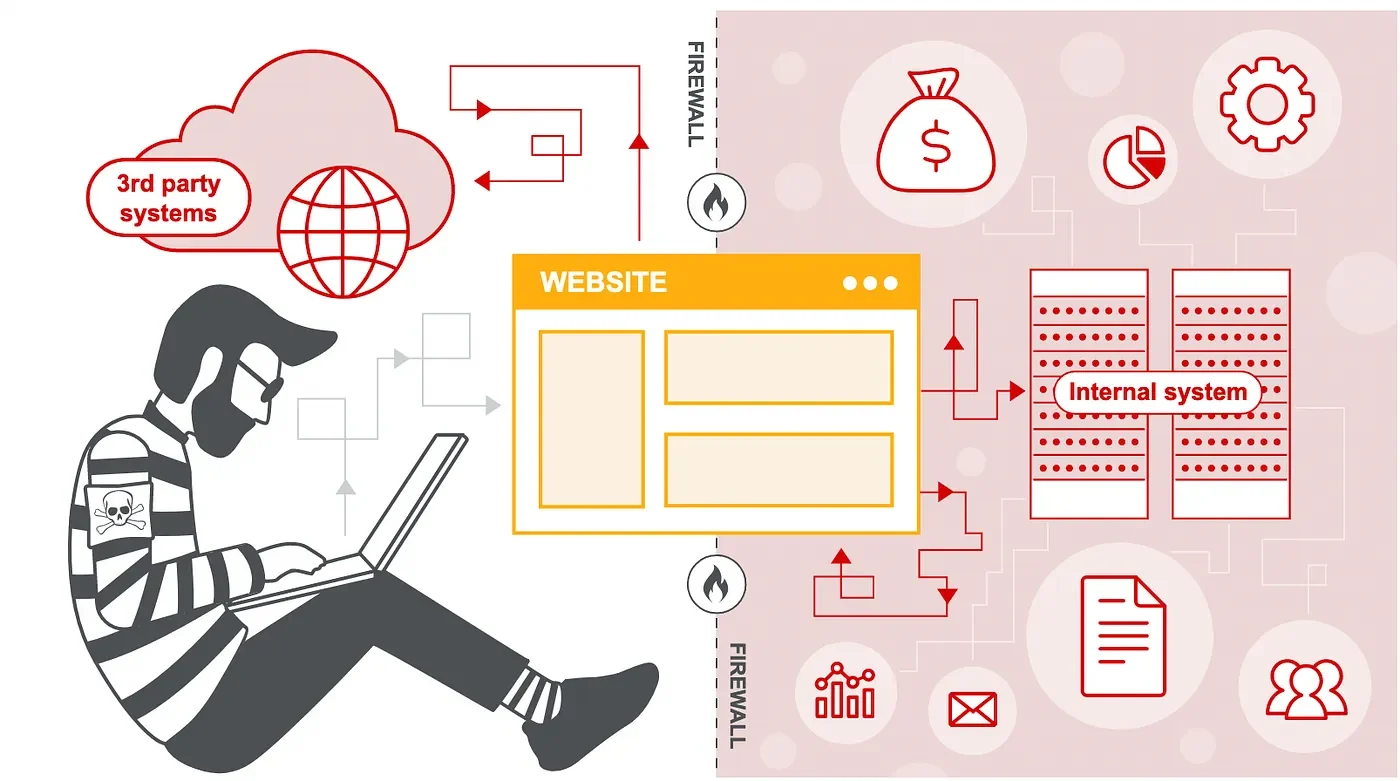
Setup
The work was done against a private program, so no account details, roles or versions are given. The tooling was a self-built recon automation that gathered subdomains, resolved live hosts, ran nuclei, performed directory brute forcing, ran nmap and collected waybackurls. For the exploitation itself the researcher used Burp Suite with the Burp Collaborator, gf patterns to filter candidate URLs, and an Apache server for a short XSS experiment. A PDF listing SSRF endpoints was used as a reference and is linked at the end of the report.
Finding it
After the automation finished, the collected data was reviewed. The waybackurls output looked interesting, so gf was used to pull out parameters that commonly indicate SSRF:
cat waybackurl | gf ssrf

This narrowed the historical URLs down to endpoints with parameters worth testing. The __host field stood out because the application fetches data from GitHub based on it, which means the server makes an outbound request whose destination is influenced by user input.
Exploitation
Step 1: Confirm outbound requests with Burp Collaborator
The __host value was replaced with a Burp Collaborator link and the request was sent. Clicking "poll now" produced an HTTP interaction, and the Collaborator response was reflected on the screen. That confirms the server follows the supplied host and returns what it receives, which is the precondition for a full-read SSRF.
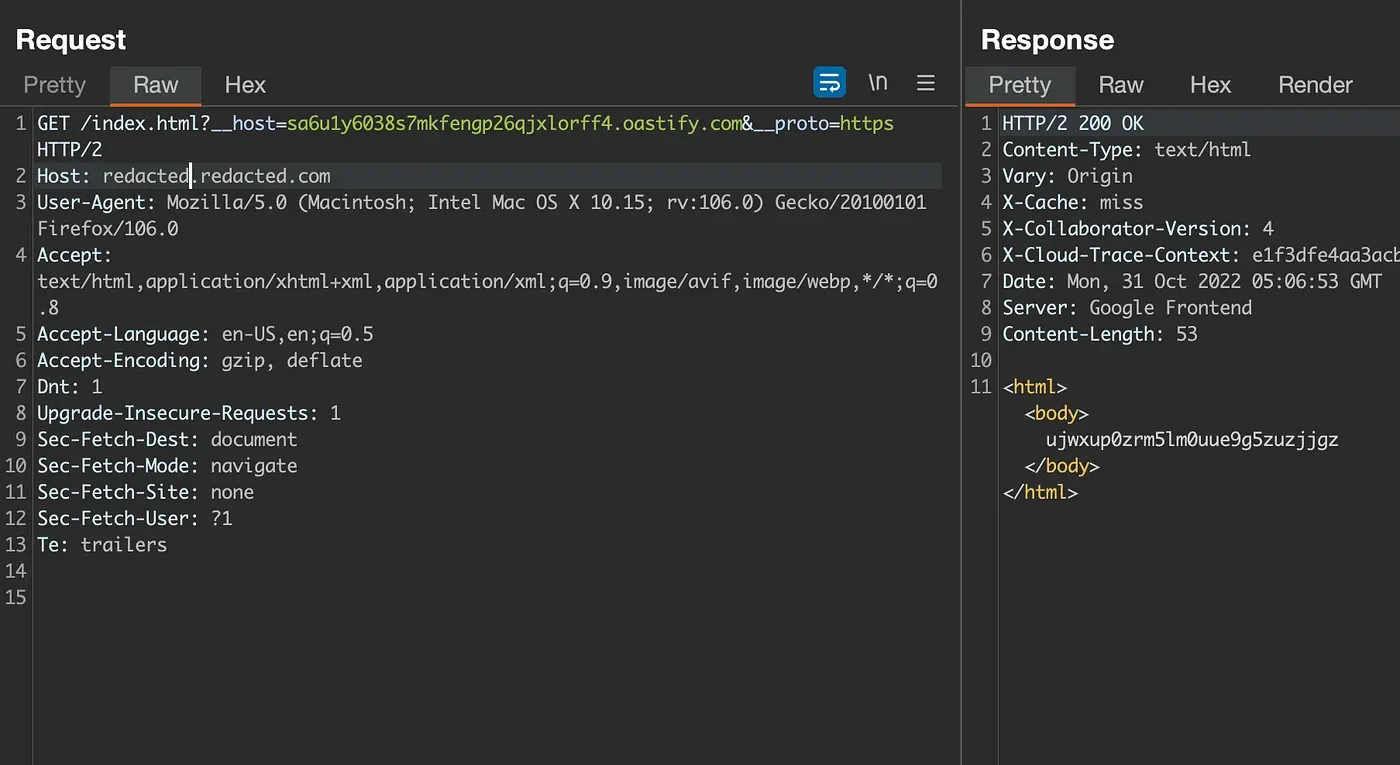
Step 2: A short XSS detour
With the reflected response in hand, the researcher tried XSS by starting an Apache server and serving an alert JavaScript payload.
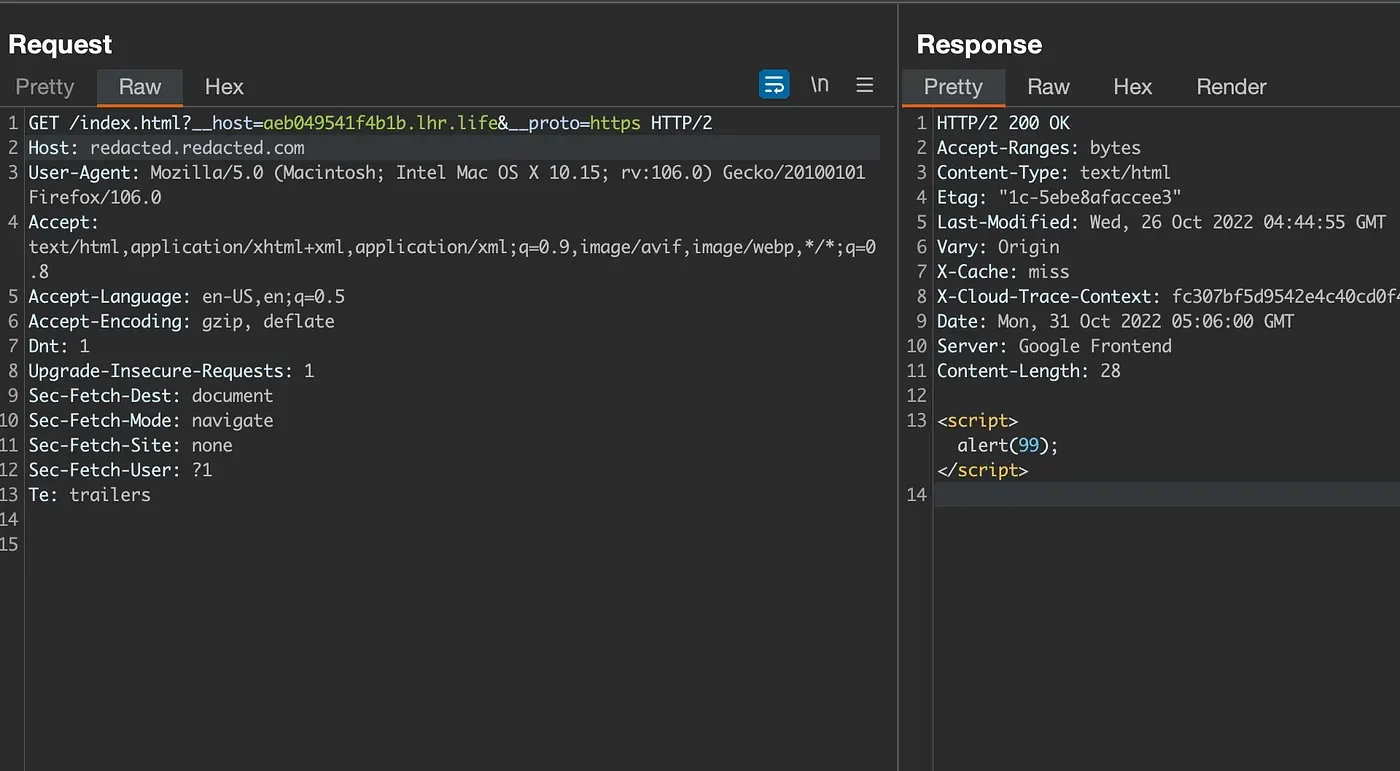
This was abandoned because XSS would not be as impactful, and the focus returned to SSRF.
Step 3: Try the cloud metadata endpoint
The next attempt pointed __host at the link-local metadata address [redacted] and put the metadata path in the URL, with __proto set to https:
https://redacted.redacted.com/latest/meta-data/iam/security-credentials/?__host=[redacted]&__proto=https
This returned 502 Bad Gateway. Changing __proto to http did not work either. The request returned 502 Bad Gateway, and changing __proto to http did not work either.
Step 4: Switch to the Google Cloud metadata endpoint
Other metadata endpoints were then tried, including Google and DigitalOcean ones, using the reference PDF. The Google Cloud endpoint finally returned something other than 502. The response contained:
Missing required header: Metadata-Flavour
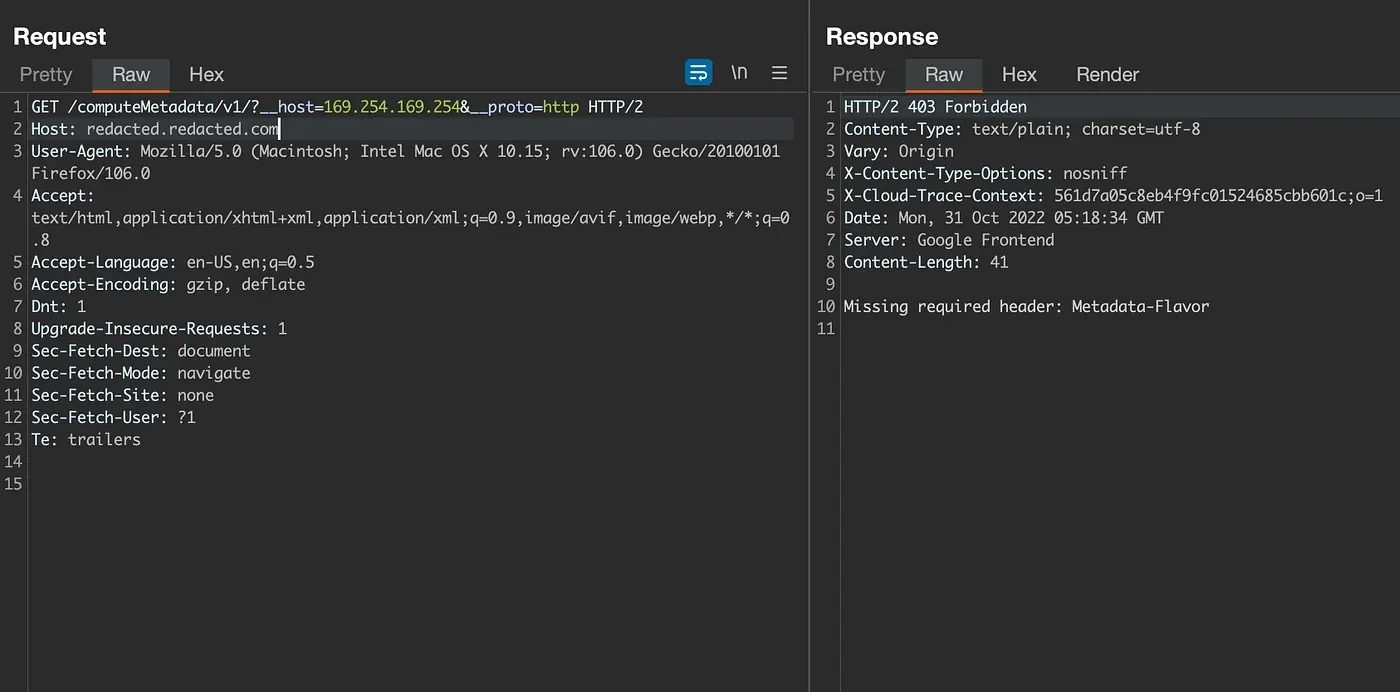
That error is the metadata server telling the client which header it expects. The header was added with the value Google (again taken from the PDF) and the request was resent, and this time it worked.
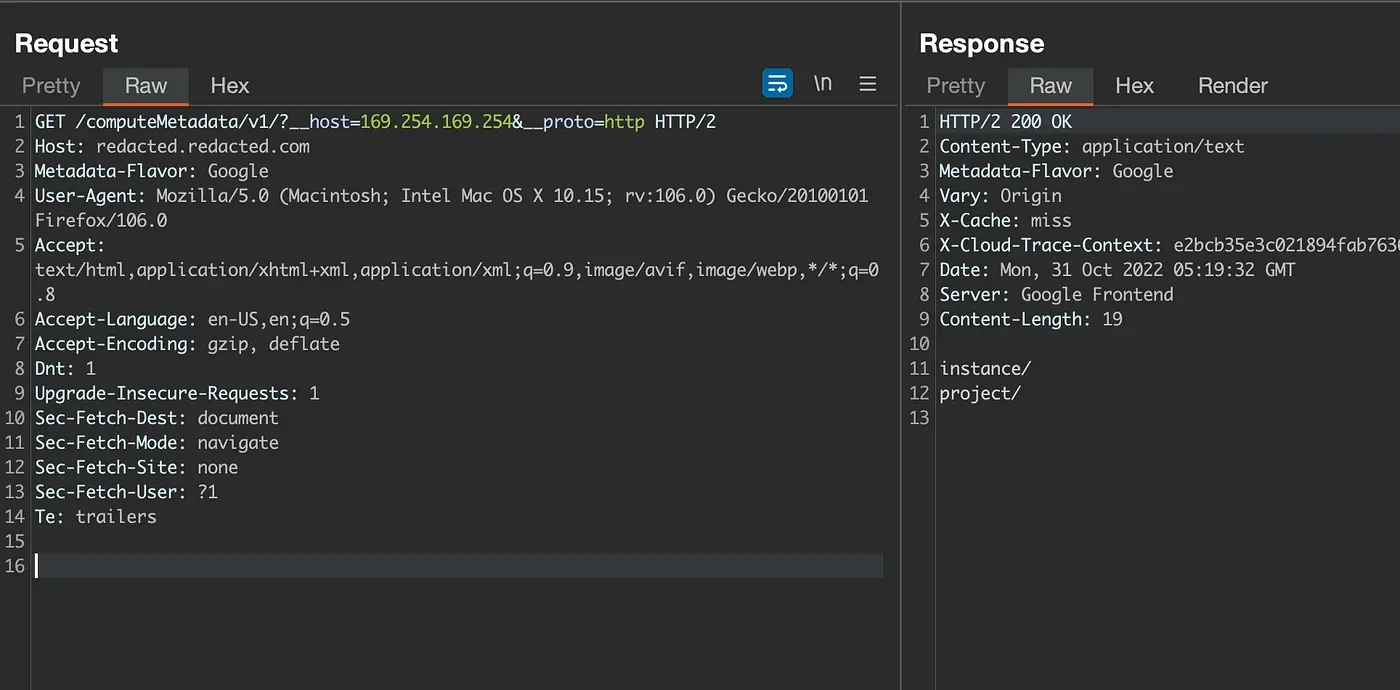
Step 5: Read the access token
The token endpoint was then requested through the same parameter:
GET /computeMetadata/v1/instance/service-accounts/default/token?__host=[redacted]&__proto=http
The response came back with the token, confirming SSRF against the metadata service.
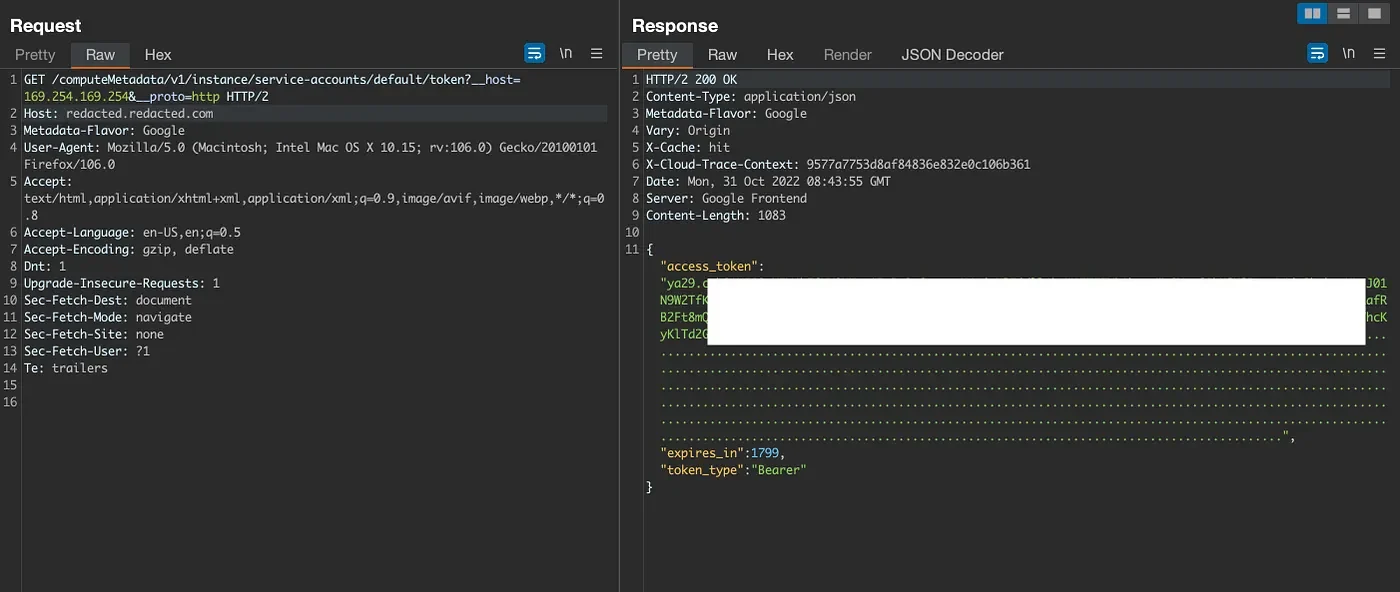
Other details were retrieved the same way, including scopes, emails, region and id.
Root cause
The application takes the __host parameter and uses it as the destination of a server-side request without restricting it to the intended GitHub host. Because the server will connect to [redacted] and return the body to the user, the cloud instance metadata service becomes readable. The Google Cloud metadata service requires the Metadata-Flavor: Google header; the report does not explain why the first attempt returned 502.
Impact
An attacker who can reach the vulnerable endpoint can make the server issue requests to arbitrary hosts and read the responses. In this case that meant reading the Google Cloud instance metadata, including a service account access token and other details such as scopes, emails, region and id.
Fix
The measure that would address the issue is to validate the __host value against an allowlist of permitted hosts before making the outbound request, and to block requests to link-local and internal addresses such as [redacted].
Variants to test
- Other metadata providers. Try the equivalent endpoints for AWS, Azure, DigitalOcean and Alibaba Cloud through the same parameter. A positive result is a response body containing instance credentials, tokens or identity documents rather than a gateway error.
- Header-dependent metadata services. When a metadata request returns an error naming a required header, add that header and resend. A positive result is a normal metadata response instead of the error.
- Scheme and path variations. Change
__protobetweenhttpandhttpsand vary the metadata path. A positive result is any response other than 502 that contains metadata content. - Redirect-based bypasses. Point
__hostat a host you control that redirects to[redacted]. A positive result is the metadata response arriving through the redirect. - DNS rebinding. Use a hostname that resolves first to an allowed address and then to an internal one. A positive result is the internal response being returned.
- Other parameters from
gf ssrf. Run the same filter on other targets' wayback data and test every parameter it surfaces with a Collaborator payload. A positive result is an HTTP interaction from the target's server.
What happened, in plain words
A security researcher was invited to test a private bug bounty program on HackerOne. Bug bounty programs are arrangements where companies pay people to find security problems in their systems and report them privately, instead of exploiting them or selling them. Because the program was private, the researcher is not allowed to name the company, so throughout the story the target is called redacted.com.
While testing, the researcher found a feature on the website that takes a value from the user and uses it to fetch data from GitHub. GitHub is a website where developers store and share code. The feature had a parameter called __host, and the value of that parameter decided where the server would go to fetch the data. That is the seed of the whole bug: if a server will fetch whatever address you give it, you can ask it to fetch addresses it should never reach, including internal ones that only the server itself can talk to. This class of bug is called server-side request forgery, or SSRF for short. The everyday comparison: imagine a hotel concierge who will fetch anything you ask for, from any shop in the world. If you ask for a parcel from the hotel's own locked staff room, the concierge can walk in and bring it to you, because the concierge is trusted inside the building. You could never enter that room yourself, but the concierge can.
The researcher confirmed the bug, then used it to reach a special internal address that cloud servers use to hand out credentials to themselves. That address is called the metadata service. Through it, the researcher read a Google Cloud access token and other details. An access token is a short string that acts like a temporary password: whoever holds it can act as the account it belongs to. The company acknowledged the finding and paid a $1000 bounty.
The setup
The researcher picked the target from a private invitation list on HackerOne, so no account details, user roles or software versions are described. The work started with reconnaissance, which in security means gathering information about a target before attacking it: what subdomains exist, which of them are alive, what software they run, which URLs have been seen before. The researcher had built an automation tool that did this recon: gathering subdomains, resolving live hosts, running nuclei (a scanner that checks for known issues), directory brute forcing (guessing common folder names to find hidden pages), running nmap (a tool that probes which services a host exposes) and collecting waybackurls.
Waybackurls are historical URLs that have been archived by the Internet Archive's Wayback Machine, a service that periodically saves copies of web pages. Old URLs often reveal parameters that are no longer linked from the live site but still work. For the exploitation itself the researcher used Burp Suite, a tool that sits between the browser and the website so you can see and edit every request. Inside Burp Suite there is Burp Collaborator, a service that gives you a unique throwaway address you can put into a request; if the target's server ever contacts that address, Collaborator records it, which proves the server made an outbound request. The researcher also used gf patterns, which are saved search patterns that flag URLs containing parameters commonly associated with a given bug class, and an Apache server (a simple web server program) for a short experiment with XSS. XSS, cross-site scripting, is a bug where an attacker gets their own JavaScript to run in another user's browser. A PDF listing SSRF endpoints was used as a reference and is linked at the end of the report.
Finding it
When the automation finished, the researcher reviewed the collected data. The waybackurls output looked interesting, so gf was used to pull out parameters that commonly indicate SSRF:
cat waybackurl | gf ssrf
Line by line:
cat waybackurlprints the contents of a file calledwaybackurl, which holds the list of historical URLs collected earlier.catis a standard command on Linux and macOS that simply outputs a file's contents.- The vertical bar
|is a pipe. It takes the output of the command on the left and feeds it as input to the command on the right, like passing a bucket of water down a line. gf ssrfruns thegftool with thessrfpattern.gfreads the URLs it receives and prints only the ones that match patterns known to be interesting for SSRF, for example parameters whose names suggest a URL or host is being supplied.
Why this step: the researcher had thousands of historical URLs and could not test them all by hand. Filtering with gf narrowed the list to endpoints with parameters worth testing, which is a way of spending time only where a bug is plausible.
The __host field stood out because the application fetches data from GitHub based on it. That means the server makes an outbound request whose destination is influenced by user input, which is exactly the precondition for SSRF.
Exploitation
Step 1: Confirm outbound requests with Burp Collaborator
The __host value was replaced with a Burp Collaborator link and the request was sent. Clicking "poll now" produced an HTTP interaction, and the Collaborator response was reflected on the screen.
Why this step: before trying anything complicated, the researcher wanted proof that the server actually follows the supplied host. A Collaborator link is a unique address that only the researcher controls. If the target's server contacts it, the researcher sees the hit. That hit is proof of an outbound request. The fact that the Collaborator response was also shown back on the screen is even stronger: the server not only made the request, it returned the response body to the user. That is the precondition for a full-read SSRF, where the attacker can read whatever the server fetches.
Step 2: A short XSS detour
With the reflected response in hand, the researcher tried XSS by starting an Apache server and serving an alert JavaScript payload. An alert payload is a tiny piece of JavaScript that pops up a dialog box; if it runs in a victim's browser, it proves you can execute code there.
Why this was abandoned: XSS would not be as impactful in this context, so the focus returned to SSRF. The researcher judged that the SSRF path was worth more, and moved on.
Step 3: Try the cloud metadata endpoint
The next attempt pointed __host at the link-local metadata address [redacted] and put the metadata path in the URL, with __proto set to https:
https://redacted.redacted.com/latest/meta-data/iam/security-credentials/?__host=[redacted]&__proto=https
Line by line:
https://redacted.redacted.comis the target site, with the name replaced byredacted.combecause the program is private./latest/meta-data/iam/security-credentials/is the path the researcher wants the server to fetch from the metadata service. On cloud servers, this path is where temporary credentials for the instance's identity are published.?starts the query string, the part of a URL that carries parameters.__host=[redacted]sets the__hostparameter to the metadata address.[redacted]is a special address that, on cloud instances, is answered by a local service running on the machine itself, not by anything on the internet. It is called link-local because it is only reachable from the same machine or local network.&separates parameters.__proto=httpstells the application to use HTTPS, the encrypted version of HTTP, when it makes the outbound request.
Why this step: the metadata service is the classic SSRF target on cloud servers. If the server can be made to fetch from it, the attacker can read the credentials the cloud platform hands to the instance. The researcher was testing whether the application would let __host point at this internal address.
This returned 502 Bad Gateway. A 502 is an error a proxy or gateway sends when the server behind it did not give a usable answer. Changing __proto to http did not work either. The request returned 502 Bad Gateway, and changing __proto to http did not work either.
Step 4: Switch to the Google Cloud metadata endpoint
Other metadata endpoints were then tried, including Google and DigitalOcean ones, using the reference PDF. Different cloud providers run their metadata services in slightly different ways, so a path that works on one may not work on another. The Google Cloud endpoint finally returned something other than 502. The response contained:
Missing required header: Metadata-Flavour
Line by line:
Missing required headermeans the metadata service received the request but refused to answer because a required piece of information was absent.Metadata-Flavouris the name of the header the service expects. A header is a small labelled field sent alongside a request, like the label on an envelope that tells the recipient what is inside or how to handle it.
Why this matters: the error is the metadata server telling the client which header it expects. That is useful information: it means the request reached the metadata service, and the only thing missing is one header. The researcher added the header with the value Google (again taken from the PDF) and resent the request, and this time it worked.
Step 5: Read the access token
The token endpoint was then requested through the same parameter:
GET /computeMetadata/v1/instance/service-accounts/default/token?__host=[redacted]&__proto=http
Line by line:
GETis the HTTP method used to ask for a resource. It is the same method a browser uses when you open a page./computeMetadata/v1/instance/service-accounts/default/tokenis the path on the metadata service that returns an access token for the instance's default service account. A service account is a non-human identity that a cloud application uses to call other cloud services.?__host=[redacted]again points the vulnerable parameter at the metadata address.&__proto=httpuses plain HTTP this time, not HTTPS.
The response came back with the token, confirming SSRF against the metadata service. An access token is a short string that acts like a temporary password: whoever holds it can act as the account it belongs to, within the permissions that account has.
Other details were retrieved the same way, including scopes, emails, region and id. Scopes are the list of permissions attached to a token, telling you what it is allowed to do. Region and id describe where the instance runs and which instance it is.
Root cause
The application takes the __host parameter and uses it as the destination of a server-side request without restricting it to the intended GitHub host. Because the server will connect to [redacted] and return the body to the user, the cloud instance metadata service becomes readable. The Google Cloud metadata service requires the Metadata-Flavor: Google header; the report does not explain why the first attempt returned 502. An allowlist is a list of addresses the server is permitted to contact; anything not on the list is refused. Egress filtering is the same idea applied at the network level, blocking outbound traffic to addresses that should never be contacted.
Impact
An attacker who can reach the vulnerable endpoint can make the server issue requests to arbitrary hosts and read the responses. In this case that meant reading the Google Cloud instance metadata, including a service account access token and other details such as scopes, emails, region and id.
Fix
The measure that would address the issue is to validate the __host value against an allowlist of permitted hosts before making the outbound request, and to block requests to link-local and internal addresses such as [redacted]. IMDSv2 is a newer version of the metadata service that requires a session token before it will answer, which makes it harder for an SSRF to read.
Variants to test
- Other metadata providers. Try the equivalent endpoints for AWS, Azure, DigitalOcean and Alibaba Cloud through the same parameter. A positive result is a response body containing instance credentials, tokens or identity documents rather than a gateway error.
- Header-dependent metadata services. When a metadata request returns an error naming a required header, add that header and resend. A positive result is a normal metadata response instead of the error.
- Scheme and path variations. Change
__protobetweenhttpandhttpsand vary the metadata path. A positive result is any response other than 502 that contains metadata content. - Redirect-based bypasses. Point
__hostat a host you control that redirects to[redacted]. A positive result is the metadata response arriving through the redirect. A redirect is a server telling the client "the thing you want is over there, go fetch it from this other address". - DNS rebinding. Use a hostname that resolves first to an allowed address and then to an internal one. A positive result is the internal response being returned. DNS is the system that turns a name like
example.cominto an IP address; rebinding means changing that answer between checks. - Other parameters from
gf ssrf. Run the same filter on other targets' wayback data and test every parameter it surfaces with a Collaborator payload. A positive result is an HTTP interaction from the target's server.
Glossary
- Bug bounty program: an arrangement where a company pays people to find and report security problems privately.
- Private program: a bug bounty program that only invited researchers can see and test.
- SSRF (server-side request forgery): a bug where an attacker makes a server send a request to an address the attacker chooses, often an internal one.
- Parameter: a named value in a URL, after the
?, that the application reads and acts on. __host: the parameter in this report whose value the application used as the destination of an outbound request.__proto: the parameter in this report that selected the scheme (http or https) for the outbound request.- Outbound request: a request a server makes to another server, as opposed to one a user's browser makes.
- Reconnaissance (recon): gathering information about a target before attacking it.
- Subdomain: a name under a main domain, like
shop.example.comunderexample.com. - Nuclei: a scanner that checks targets for known issues using templates.
- Directory brute forcing: guessing common folder names to find hidden pages.
- Nmap: a tool that probes which services a host exposes.
- Waybackurls: historical URLs archived by the Internet Archive's Wayback Machine.
- Burp Suite: a tool that sits between browser and website so you can see and edit requests.
- Burp Collaborator: a service that gives you a unique address and records any contact to it, proving an outbound request.
gfpatterns: saved search patterns that flag URLs containing parameters commonly associated with a bug class.- Apache server: a web server program.
- XSS (cross-site scripting): a bug where an attacker gets their own JavaScript to run in another user's browser.
- Payload: the piece of code or data an attacker sends to trigger a bug.
alertpayload: a tiny JavaScript snippet that pops up a dialog, used to prove code execution.- HTTP: the protocol browsers and servers use to exchange requests and responses.
- HTTPS: HTTP wrapped in encryption.
- HTTP method: the verb of a request, like
GETto fetch something. - Header: a small labelled field sent alongside a request or response.
- Link-local address: an address like
[redacted]that is only reachable from the same machine or local network. - Metadata service: a local service on cloud instances that hands out information and credentials about the instance.
- Access token: a short string that acts like a temporary password for an account.
- Service account: a non-human identity a cloud application uses to call other cloud services.
- Scope: a permission attached to a token, saying what it is allowed to do.
- Allowlist: a list of things that are permitted; anything not on the list is refused.
- Egress filtering: blocking outbound traffic to addresses that should never be contacted.
- IMDSv2: a newer version of the metadata service that requires a session token before answering.
- Redirect: a server telling the client to fetch the same thing from a different address.
- DNS: the system that turns a name like
example.cominto an IP address. - DNS rebinding: changing a hostname's DNS answer between checks so it points at an internal address after passing validation.
- IP address: a numeric address for a machine on a network.
- Root cause: the underlying reason a bug exists, as opposed to its symptoms.




