Instagram and Meta 2FA Bypass by Unprotected Backup Code Retrieval in Accounts Center
The backup code retrieval process in Meta Accounts Center did not require the password of the target Meta or Instagram account, only a logged-in Facebook session. An attacker who had compromised a victim's Facebook account could retrieve the victim's 2FA backup codes and use them to bypass two-factor authentication and take over the linked Meta or Instagram account.
 Published on medium.com
Hello, I'm Shuva Saha (scriptshuva). Today, I will be discussing a vulnerability I discovered: bypass of two-factor authentication (2FA) mechanisms in Meta and Instagram.
The full write-up lives on its author's site
It belongs to its author, so we link to it rather than copy it. The other two tabs are our own rewrites, checked against it.
Context
Meta runs a shared security settings surface called Accounts Center, reachable at accountscenter.facebook.com, where a user can manage password and two-factor authentication (2FA) settings across the Meta family of accounts (Facebook, Instagram and Meta accounts). One of the features there is the recovery codes dialog: a user can view the backup codes that can be used in place of a 2FA prompt when logging in.
The report describes a bypass of 2FA in Meta and Instagram. The core idea is that a person who already holds a compromised Facebook or Instagram account can use that session to retrieve the Meta or Instagram 2FA backup codes from Accounts Center, because the retrieval does not ask for the target account's password. With a backup code in hand, the attacker can complete a login to the victim account and skip the 2FA prompt entirely.
The researcher is Shuva Saha (@scriptshuva). The report was created on Monday, June 26, 2023. A bounty of $5,000 was awarded on July 8, 2023 for the Meta 2FA bypass, and another $5,000 on July 27, 2023 for the Instagram 2FA bypass, for a total of $10,000. Public disclosure was approved on August 21, 2024.
Setup
The precondition in both variants is the same: the attacker already has access to a victim Facebook or Instagram account (the report calls it a compromised account). The target account, whose 2FA is to be bypassed, has 2FA enabled.
The tools named in the report are a browser and a proxy tool such as Burp Suite, used to intercept and modify the GraphQL request that the Accounts Center recovery codes dialog sends. No specific browser, proxy version or account configuration beyond the above is given.
Finding it
The recovery codes dialog in Accounts Center can be queried for a given account without the account's password being requested. The report frames this as the flaw: the backup code retrieval process does not require the Instagram and Meta account password. That missing password check is what makes the rest of the chain possible, because a session that only proves control of one account can be pointed at another account's backup codes.
Exploitation
The report presents two variants with the same structure: one for a Meta account and one for an Instagram account. In both, the attacker starts from a compromised Facebook or Instagram login, is stopped by a 2FA prompt, and instead of completing it goes to Accounts Center to pull the target's backup codes.
Meta 2FA bypass
Step 1: Login initiation
- Go to Meta Auth.
- Log in using compromised Facebook or Instagram accounts.
Step 2: 2FA handling
- If 2FA is enabled on the Meta account, select the recovery code option when prompted for 2FA.
Step 3: Exploitation process
- Open a new tab in the browser and go to Facebook Accounts Center Two-factor authentication Settings.
- Click Additional methods and then click Recovery codes.
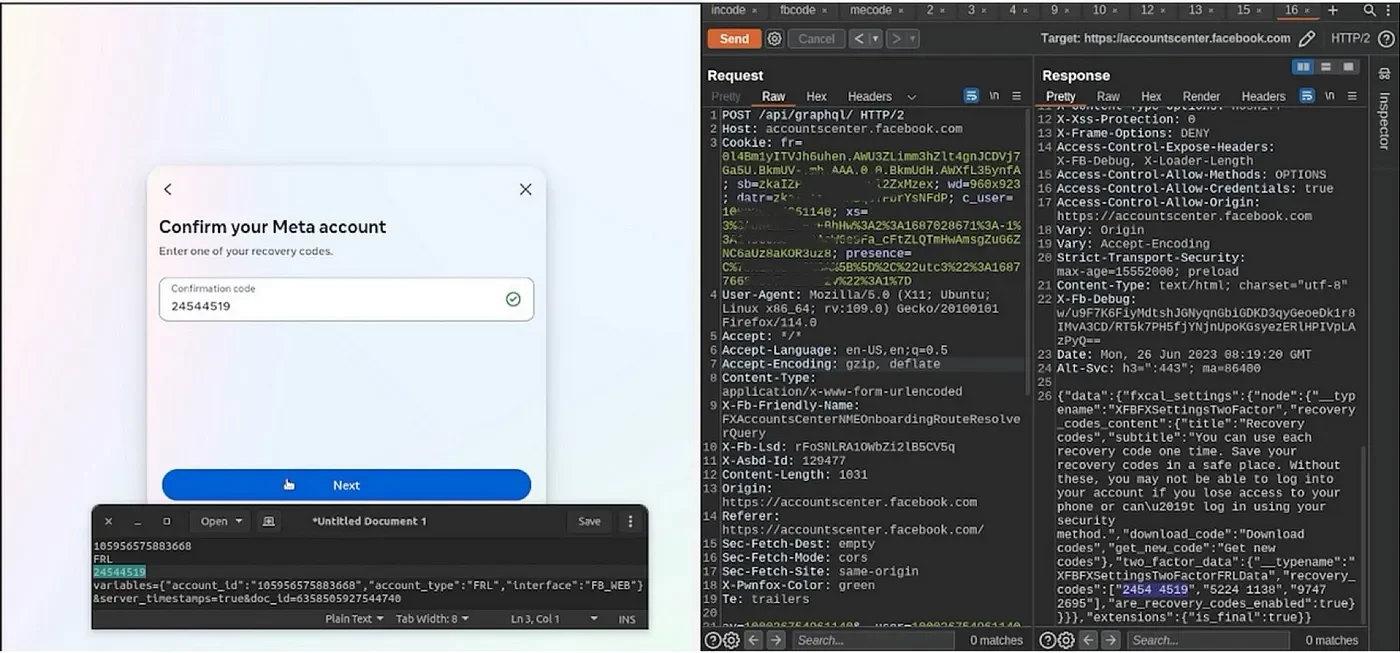
- Use a proxy tool, such as Burp Suite, to intercept the FXAccountsCenterTwoFactorRecoveryCodesDialogQuery GraphQL request.
Step 4: Request modification
- Modify the intercepted request by changing the variables and
doc_idas shown below:
variables={"account_id":"victim_meta_account_id","account_type":"FRL","interface":"FB_WEB"}&doc_id=6358505927544740
The account_id is swapped for the victim Meta account's identifier, account_type is set to FRL, and interface to FB_WEB. The doc_id identifies the GraphQL document being executed. The report notes the flaw here is the missing Meta account password protection.
Step 5: Recovery code retrieval
- Send the modified request.
- Extract the recovery code from the response.
Step 6: Account takeover
- Use the retrieved 2FA backup code to log in to the victim Meta account, effectively bypassing 2FA.
Instagram 2FA protection bypass
Step 1: Login initiation
- Go to Instagram.
- Log in using a compromised Facebook account.
Step 2: 2FA handling
- If 2FA is enabled on the Instagram account, select the recovery code option when prompted for 2FA.
Step 3: Exploitation process
Step 4: Request modification
variables={"account_id":"victim_instagram_account_id","account_type":"INSTAGRAM","interface":"FB_WEB"}&doc_id=6358505927544740
Here account_id is the victim Instagram account's identifier and account_type is INSTAGRAM; the doc_id is the same as in the Meta variant. The report notes the flaw here is the missing Instagram account password protection.
Step 5: Recovery code retrieval
- Send the modified request.
Step 6: Account takeover
- Use the retrieved 2FA backup code to log in to the victim Instagram account, effectively bypassing 2FA.
Outcome
By following these steps, the attacker successfully logs into the victim Instagram and Meta accounts by bypassing two-factor authentication, exploiting the missing password protection for accessing backup codes.
Root cause
The report states the cause directly: the backup code retrieval process for Instagram and Meta in Facebook Accounts Center does not require the Instagram and Meta account password. That lack of password protection lets an attacker who has access to the victim's Facebook account obtain the Instagram and Meta backup codes and bypass 2FA.
Impact
Under the precondition that the attacker already controls a victim Facebook or Instagram account, the attacker can retrieve the Meta and Instagram 2FA backup codes and use them to log in to the victim Meta and Instagram accounts, bypassing 2FA and gaining full access to those accounts. The report does not describe any other precondition, and it does not quantify how many accounts were affected.
Fix
The report states that after remediation, accessing Instagram and Meta backup codes requires verifying login to the Instagram and Meta accounts, so that backup codes are protected by an additional layer of security. The report does not name the specific code change.
Variants to test
- Other Accounts Center dialogs. Intercept other GraphQL queries that return sensitive material (for example, other recovery or security settings dialogs) and swap
account_idandaccount_typefor a second account. A positive result is a response containing the second account's data without a password prompt. - Cross-account type swaps. Try the same
doc_idwith differentaccount_typevalues (for example,FRLversusINSTAGRAM) against an account of the other type. A positive result is a successful response for an account the session does not own. - Session scope checks. With a session for account A, request recovery codes for account B and check whether the server enforces that the two belong to the same person. A positive result is codes returned for B.
- Re-authentication enforcement. After logging in, wait and then request recovery codes; check whether a recent password entry is required. A positive result is codes returned long after login with no re-authentication.
- Backup code reuse. Check whether a retrieved backup code can be used more than once, or whether it is invalidated after the first use. A positive result is a code that still works on a second login.
What happened, in plain words
Meta runs a shared settings page called Accounts Center, at accountscenter.facebook.com. From there you can manage security settings for the whole family of Meta accounts: Facebook, Instagram and the Meta account itself. One of the things you can do there is open a dialog that shows your two-factor authentication (2FA) backup codes. A backup code is a spare code you can type instead of the normal 2FA code when you log in.
The researcher, Shuva Saha (@scriptshuva), found that this dialog would hand over the backup codes for an account without asking for that account's password. So if an attacker already had access to a compromised Facebook or Instagram account, they could use that session to read the backup codes of the victim Meta or Instagram account, then use a code to log in and skip its 2FA prompt entirely.
The report was created on Monday, June 26, 2023. A bounty of $5,000 was awarded on July 8, 2023 for the Meta 2FA bypass, and another $5,000 on July 27, 2023 for the Instagram 2FA bypass, for a total of $10,000. Public disclosure was approved on August 21, 2024.
The pieces you need to know
Before the steps make sense, here are the ideas they rely on.
- Two-factor authentication (2FA) is a second proof of identity at login, on top of your password. The everyday comparison is a bank card plus a PIN: knowing one is not enough. Usually the second factor is a short code from an app or a text message.
- A backup code is a spare 2FA code, printed or stored in advance, that works when you cannot get the normal one. It is meant to be a legitimate way past the 2FA prompt, which is exactly why it is sensitive: whoever holds it can log in.
- A session is what the site remembers about you after you log in, so you do not retype your password on every page. Technically the browser stores a cookie, a small piece of data the server gave it, and sends it back with each request. Think of it as a wristband you get at an event: while you wear it, staff let you in without checking your ID again.
- An API is the way a web page talks to the server behind the scenes. The page you see is a picture; the API is the waiter taking your order to the kitchen. When you click a button, the browser sends a request to the API and the server sends data back.
- GraphQL is a style of API where the browser sends a query describing exactly what data it wants. Each query has an identifier, here called
doc_id, which tells the server which prepared query to run. - A proxy tool such as Burp Suite sits between your browser and the server. It lets you pause a request, read it, change it, and then send it on. The everyday comparison is intercepting a letter, editing it, and posting it again.
- The vulnerability class here is a 2FA bypass leading to account takeover. In plain words: a security check that should stand between an attacker and an account can be walked around, and once around it the attacker ends up controlling the account.
Setup
Both variants need the same starting point. The attacker already has access to a victim Facebook or Instagram account, which the report calls a compromised account. The target account, the one whose 2FA is to be bypassed, has 2FA enabled.
The only tools named in the report are a browser and a proxy tool such as Burp Suite, used to intercept and modify the GraphQL request that the Accounts Center recovery codes dialog sends. The report gives no specific browser, proxy version or further account configuration.
Finding it
The recovery codes dialog in Accounts Center can be queried for a given account without the account's password being requested. The report frames this as the flaw: the backup code retrieval process does not require the Instagram and Meta account password. That missing password check is what makes the rest of the chain possible, because a session that only proves control of one account can be pointed at another account's backup codes.
Exploitation
The report presents two variants with the same structure: one for a Meta account and one for an Instagram account. In both, the attacker starts from a compromised Facebook or Instagram login, is stopped by a 2FA prompt, and instead of completing it goes to Accounts Center to pull the target's backup codes.
Meta 2FA bypass
Step 1: Login initiation
- Go to Meta Auth.
- Log in using compromised Facebook or Instagram accounts.
Why: the attacker needs a valid session first. Logging in with the compromised account gives them the wristband described above, so the server will treat their later requests as coming from a logged-in user.
Step 2: 2FA handling
- If 2FA is enabled on the Meta account, select the recovery code option when prompted for 2FA.
Why: the login is stopped by the 2FA prompt, and the recovery code option is selected.
Step 3: Exploitation process
- Open a new tab in the browser and go to Facebook Accounts Center Two-factor authentication Settings.
- Click Additional methods and then click Recovery codes.
- Use a proxy tool, such as Burp Suite, to intercept the FXAccountsCenterTwoFactorRecoveryCodesDialogQuery GraphQL request.
Why: opening the dialog in the browser makes the page send the request that fetches backup codes. Intercepting it with the proxy pauses that request so it can be edited before it reaches the server. The name FXAccountsCenterTwoFactorRecoveryCodesDialogQuery is the identifier of that particular GraphQL query.
Step 4: Request modification
- Modify the intercepted request by changing the variables and
doc_idas shown below:
variables={"account_id":"victim_meta_account_id","account_type":"FRL","interface":"FB_WEB"}&doc_id=6358505927544740
Line by line:
variables=starts the part of the request that carries the parameters for the query."account_id":"victim_meta_account_id"is the identifier of the account whose codes are being asked for. The attacker swaps in the victim Meta account's identifier here, which is the whole point: the request now names a different account."account_type":"FRL"says which kind of account it is.FRLis the value used for the Meta account in this request."interface":"FB_WEB"says which client is making the call, here the Facebook web interface.&doc_id=6358505927544740is the identifier of the prepared GraphQL query to run. It tells the server which query this is, namely the recovery codes dialog query.
The report notes the flaw here is the missing Meta account password protection: the server accepts this request for the victim's account without asking for the victim's password.
Step 5: Recovery code retrieval
- Send the modified request.
- Extract the recovery code from the response.
Why: once the edited request is sent, the server answers with the data the query asked for. The attacker reads the backup code out of that answer.
Step 6: Account takeover
- Use the retrieved 2FA backup code to log in to the victim Meta account, effectively bypassing 2FA.
Instagram 2FA protection bypass
Step 1: Login initiation
- Go to Instagram.
- Log in using a compromised Facebook account.
Why: same idea as before. A valid session from the compromised Facebook account is the starting point.
Step 2: 2FA handling
- If 2FA is enabled on the Instagram account, select the recovery code option when prompted for 2FA.
Step 3: Exploitation process
Why: the same dialog is opened, so the same GraphQL query is sent, and the proxy pauses it for editing.
Step 4: Request modification
variables={"account_id":"victim_instagram_account_id","account_type":"INSTAGRAM","interface":"FB_WEB"}&doc_id=6358505927544740
Line by line:
variables=starts the parameters for the query."account_id":"victim_instagram_account_id"is the victim Instagram account's identifier, swapped in so the request names that account."account_type":"INSTAGRAM"says the account is an Instagram account."interface":"FB_WEB"says the call comes from the Facebook web interface.&doc_id=6358505927544740is the same query identifier as in the Meta variant, so the same prepared query runs.
The report notes the flaw here is the missing Instagram account password protection: the server accepts the request for the victim's Instagram account without asking for that account's password.
Step 5: Recovery code retrieval
- Send the modified request.
Why: the server answers the edited request with the data it asked for, and the attacker reads the backup code from that answer.
Step 6: Account takeover
- Use the retrieved 2FA backup code to log in to the victim Instagram account, effectively bypassing 2FA.
Outcome
By following these steps, the attacker successfully logs into the victim Instagram and Meta accounts by bypassing two-factor authentication, exploiting the missing password protection for accessing backup codes.
Root cause
The report states the cause directly: the backup code retrieval process for Instagram and Meta in Facebook Accounts Center does not require the Instagram and Meta account password. That lack of password protection lets an attacker who has access to the victim's Facebook account obtain the Instagram and Meta backup codes and bypass 2FA.
Impact
Under the precondition that the attacker already controls a victim Facebook or Instagram account, the attacker can retrieve the Meta and Instagram 2FA backup codes and use them to log in to the victim Meta and Instagram accounts, bypassing 2FA and gaining full access to those accounts. The report does not describe any other precondition, and it does not quantify how many accounts were affected.
Fix
The report states that after remediation, accessing Instagram and Meta backup codes requires verifying login to the Instagram and Meta accounts, so that backup codes are protected by an additional layer of security. The report does not name the specific code change.
Variants to test
- Other Accounts Center dialogs. Intercept other GraphQL queries that return sensitive material (for example, other recovery or security settings dialogs) and swap
account_idandaccount_typefor a second account. A positive result is a response containing the second account's data without a password prompt. - Cross-account type swaps. Try the same
doc_idwith differentaccount_typevalues (for example,FRLversusINSTAGRAM) against an account of the other type. A positive result is a successful response for an account the session does not own. - Session scope checks. With a session for account A, request recovery codes for account B and check whether the server enforces that the two belong to the same person. A positive result is codes returned for B.
- Re-authentication enforcement. After logging in, wait and then request recovery codes; check whether a recent password entry is required. A positive result is codes returned long after login with no re-authentication.
- Backup code reuse. Check whether a retrieved backup code can be used more than once, or whether it is invalidated after the first use. A positive result is a code that still works on a second login.
Glossary
- 2FA (two-factor authentication): a second proof of identity at login, on top of the password, such as a code from an app or a text message.
- Backup code: a spare one-time code that can be used instead of the normal 2FA code, for example when the phone is lost.
- Session: the state the server keeps about a logged-in user, usually carried by a cookie in the browser, so the password is not retyped on every page.
- Cookie: a small piece of data the server gives the browser, which the browser sends back with later requests.
- API: the interface a web page uses to talk to the server behind the scenes.
- GraphQL: a style of API where the browser sends a query describing exactly which data it wants.
- doc_id: the identifier of a prepared GraphQL query, telling the server which query to run.
- Proxy tool: software such as Burp Suite that sits between the browser and the server and can pause, read and edit requests.
- Accounts Center: Meta's shared settings page at
accountscenter.facebook.comfor managing security settings across Facebook, Instagram and Meta accounts. - Account takeover: a situation where an attacker ends up controlling someone else's account.
- 2FA bypass: getting past the second login check without satisfying it, for example by using a valid backup code.
- Re-authentication: asking the user to enter their password again before a sensitive action.
- Root cause: the underlying reason a vulnerability exists, here the missing password check on backup code retrieval.
- Remediation: the fix applied to close a vulnerability.
- Bounty: a reward paid by a company to a researcher who reports a valid security issue.


