How I got $$$ from AT&T
An Oracle dashboard was exposed without authentication on an IP address that presented an AT&T SSL certificate, allowing an attacker to read information about WebLogic Server components such as Enterprise Manager and Configuration Administration. The author could only read the information and could not take any action.
 Published on medium.com
Today I will tell you about my first valid Bug in my Bugbunty journey how i got $$$ Bounty
The full write-up lives on its author's site
It belongs to its author, so we link to it rather than copy it. The other two tabs are our own rewrites, checked against it.
Context
This is the story of my first valid bug and my first bounty. When I started in bug bounty I did what most newcomers do and hunted XSS, which earned me a duplicate. After that I decided to stop looking for XSS and to go where fewer hunters search. Watching Orwa's videos about reconnaissance pushed me towards Shodan, and I picked a wide scope target: AT&T, with att.com as the target.

The bug itself is a missing authentication issue: an Oracle dashboard reachable on an IP address, showing WebLogic Server information, with no login required.
Setup
The only tooling involved is Shodan for discovery, plus dirsearch and ffuf for content discovery once an IP was found. No accounts, roles or special access were needed. The precondition is simply that the host is indexed by Shodan and carries a certificate that ties it to the target.
Finding it
I used two Shodan dorks:
Ssl.cert.subject.CN:"att.com"
ssl:"AT&T Services Inc."
The first matches hosts whose certificate subject CN contains att.com; the second matches hosts presenting a certificate issued to AT&T Services Inc. If you do not know how to get the SSL string for a target, the screenshots below show the way.
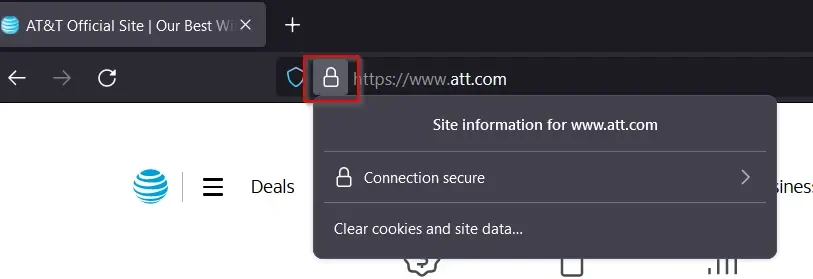
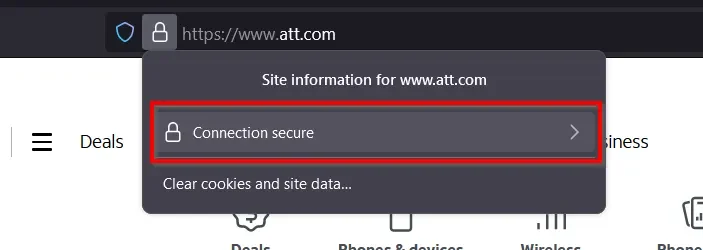
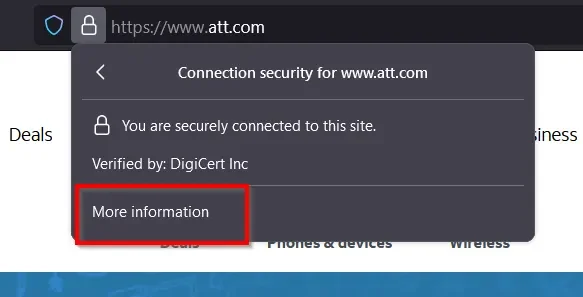
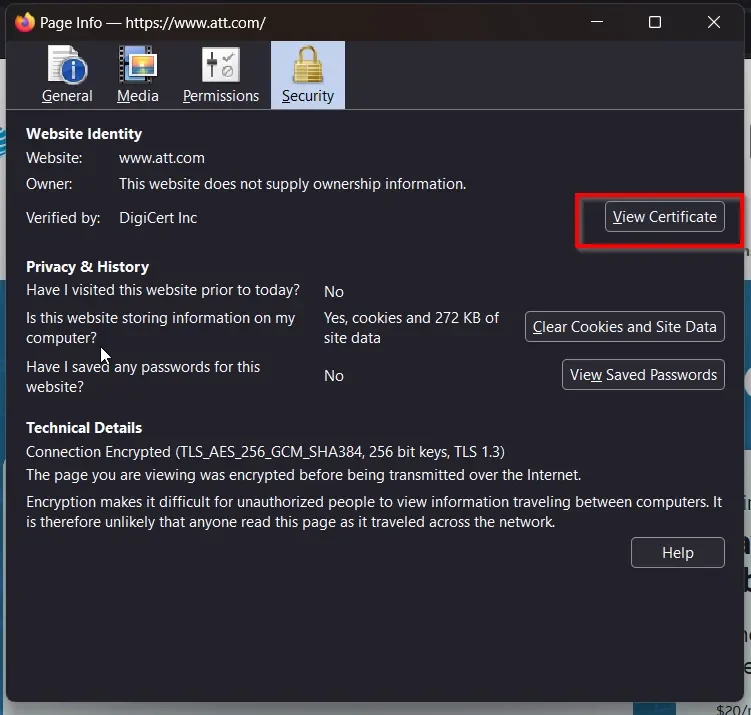
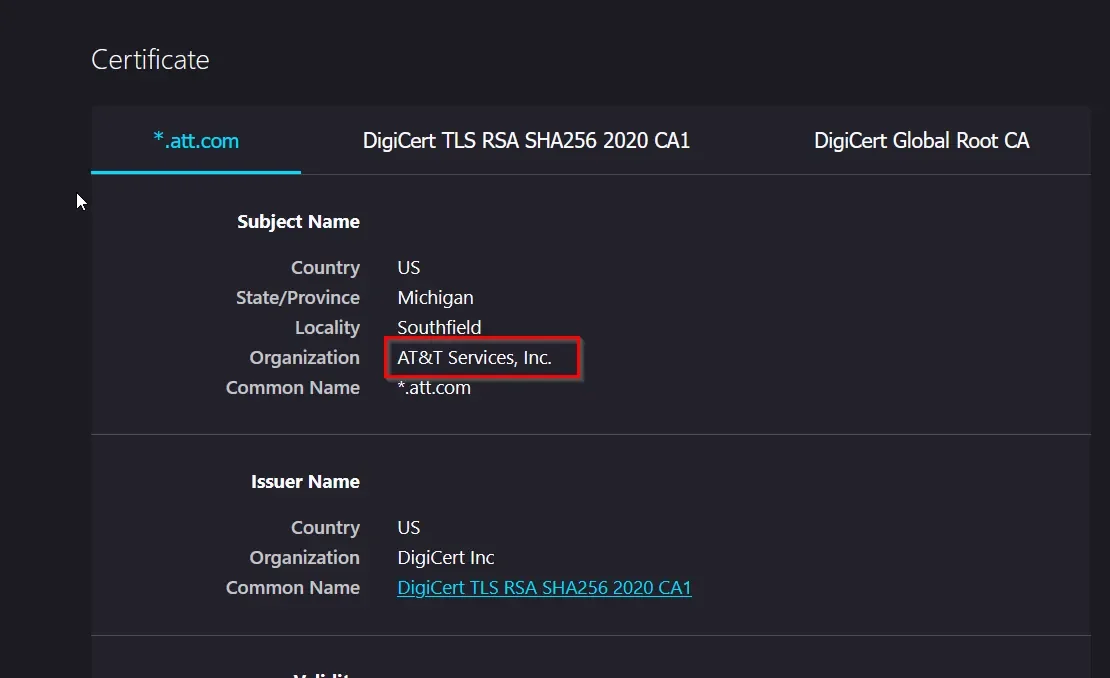
One practical detail: remove the comma. If you leave it in, you get the whole Shodan search result rather than the narrowed set.
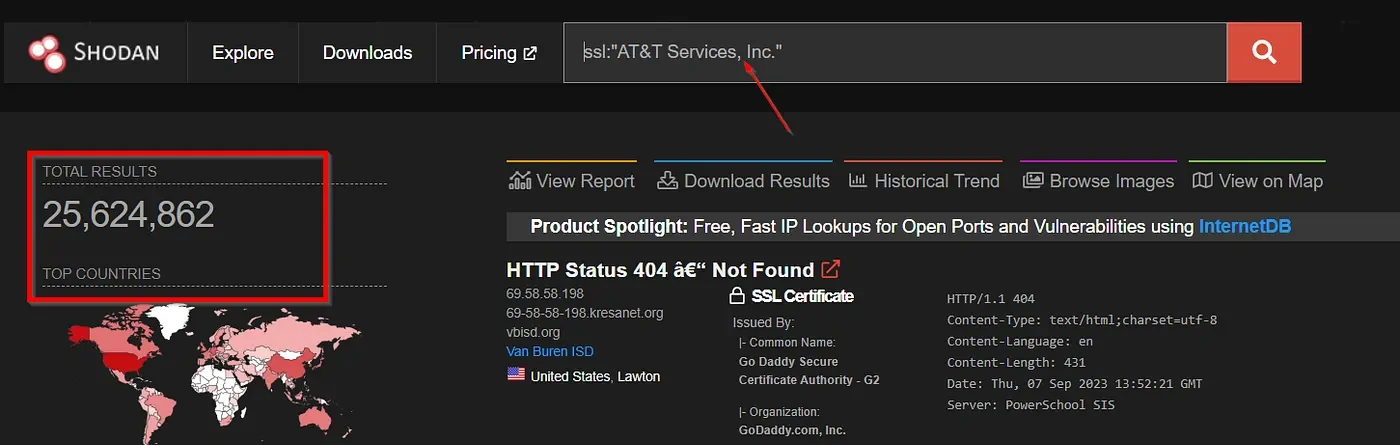
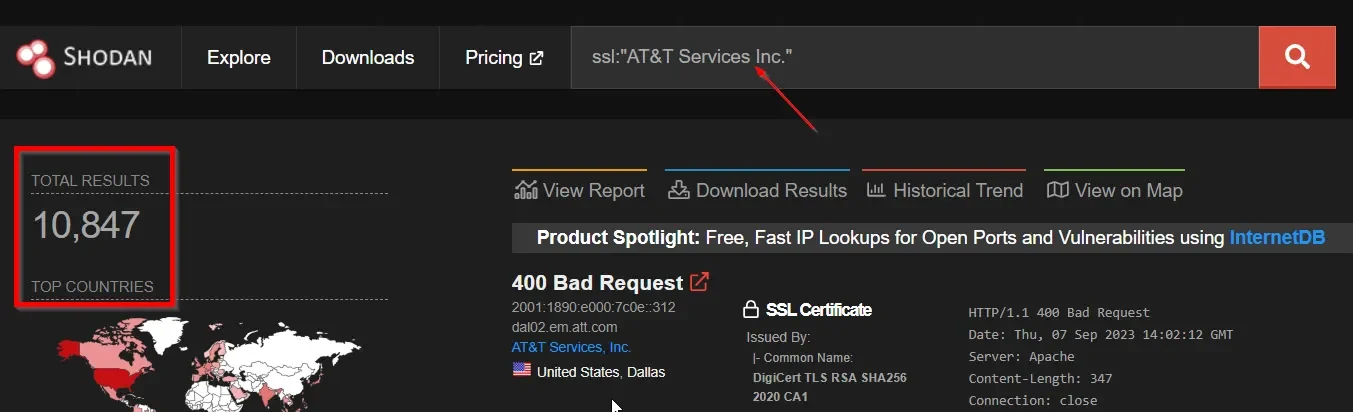
Without the comma:
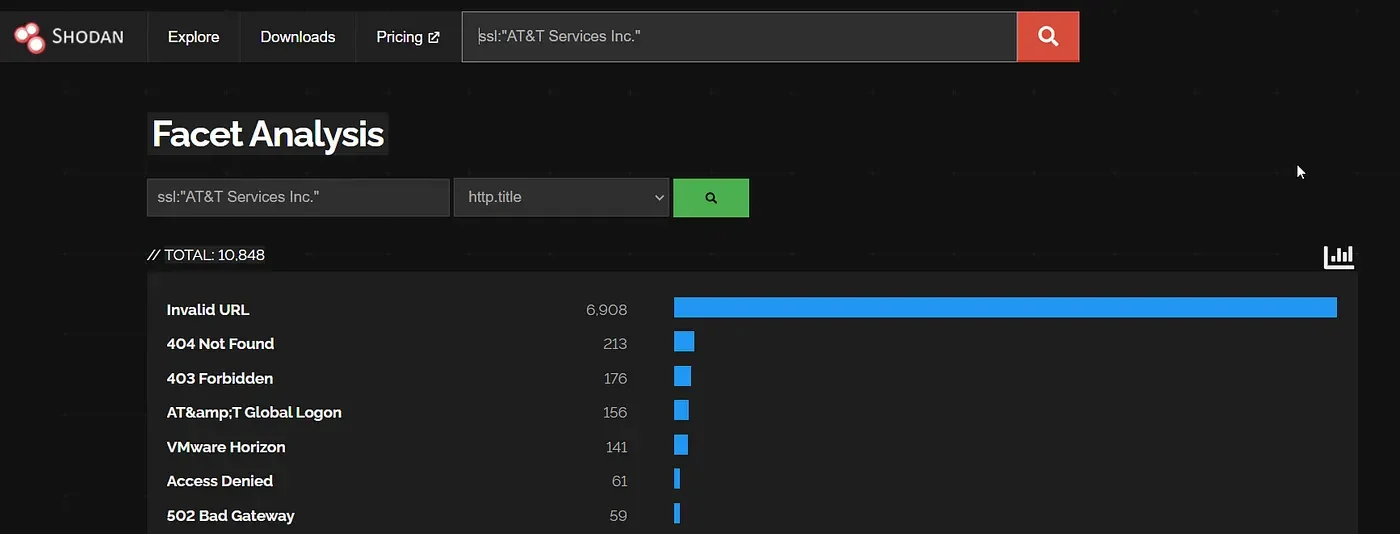
I then searched with http.title and opened all the pages and IPs to see what was behind them.
After a lot of searching I found a dashboard open on an IP address, reachable directly over HTTPS.
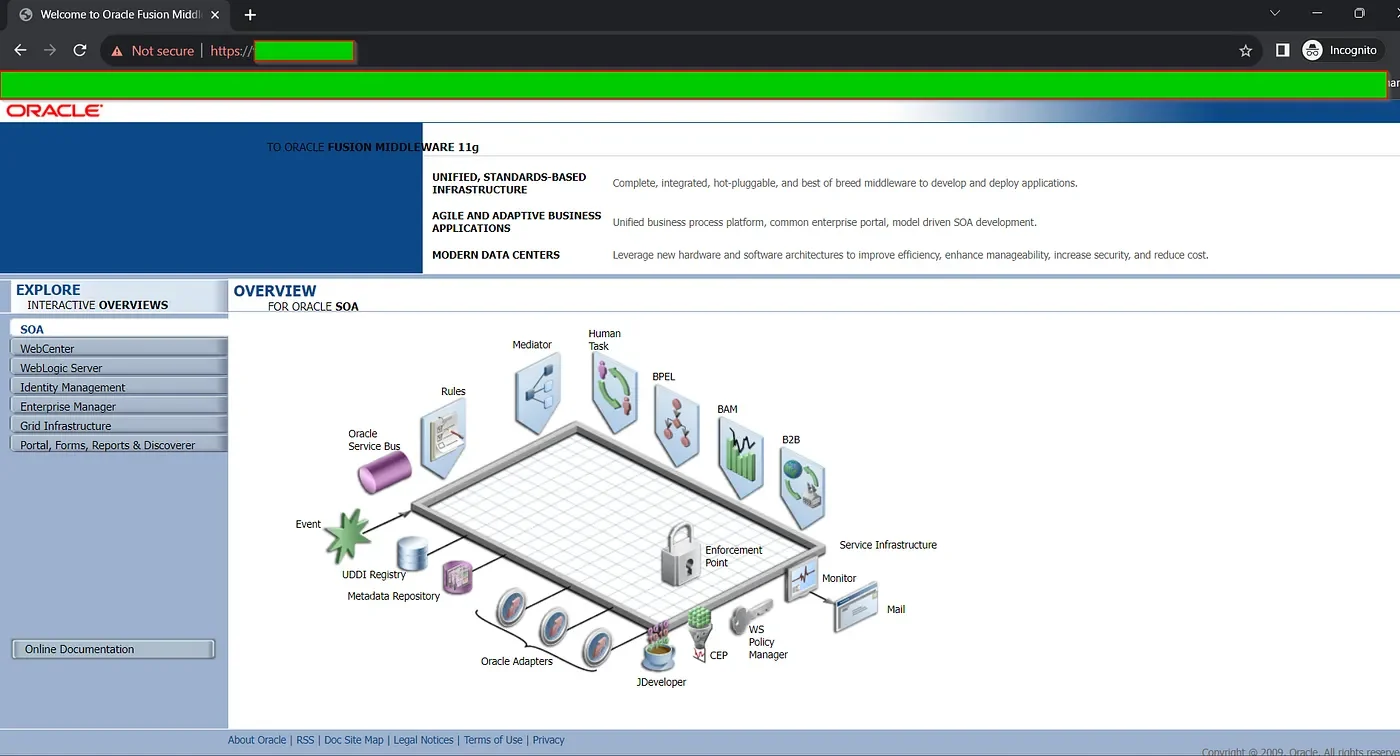
What made it interesting was the mismatch: the IP is connected to another domain, not an AT&T one. It was not *.att.com but another name, in the style of *.NOMAD.com.
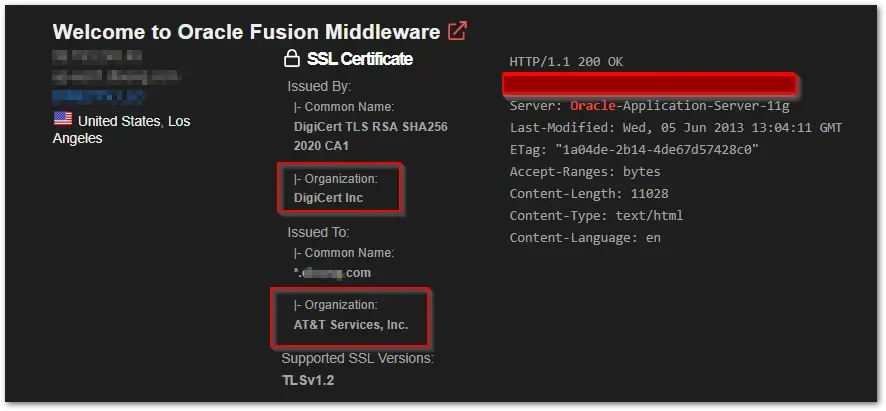
I asked friends whether anyone had seen this dashboard before, and nobody had. I hesitated because the IP was not affiliated with an AT&T company, and I asked myself why I was seeing an AT&T SSL certificate on this dashboard if that were true. After a week of searching I decided to submit it.
Exploitation
Step 1: content discovery with dirsearch
python3 dirsearch.py -u https://50.90.000.67
This runs a standard directory and file brute force against the host. It returned nothing.
Step 2: content discovery with ffuf
ffuf -w /path/to/mywordlist -u https://50.90.000.67/FUZZ
This fuzzes the path with a large wordlist. It also returned nothing.
Step 3: CVE search
I looked for any known CVE affecting what was exposed and found nothing.
Step 4: direct access to the dashboard
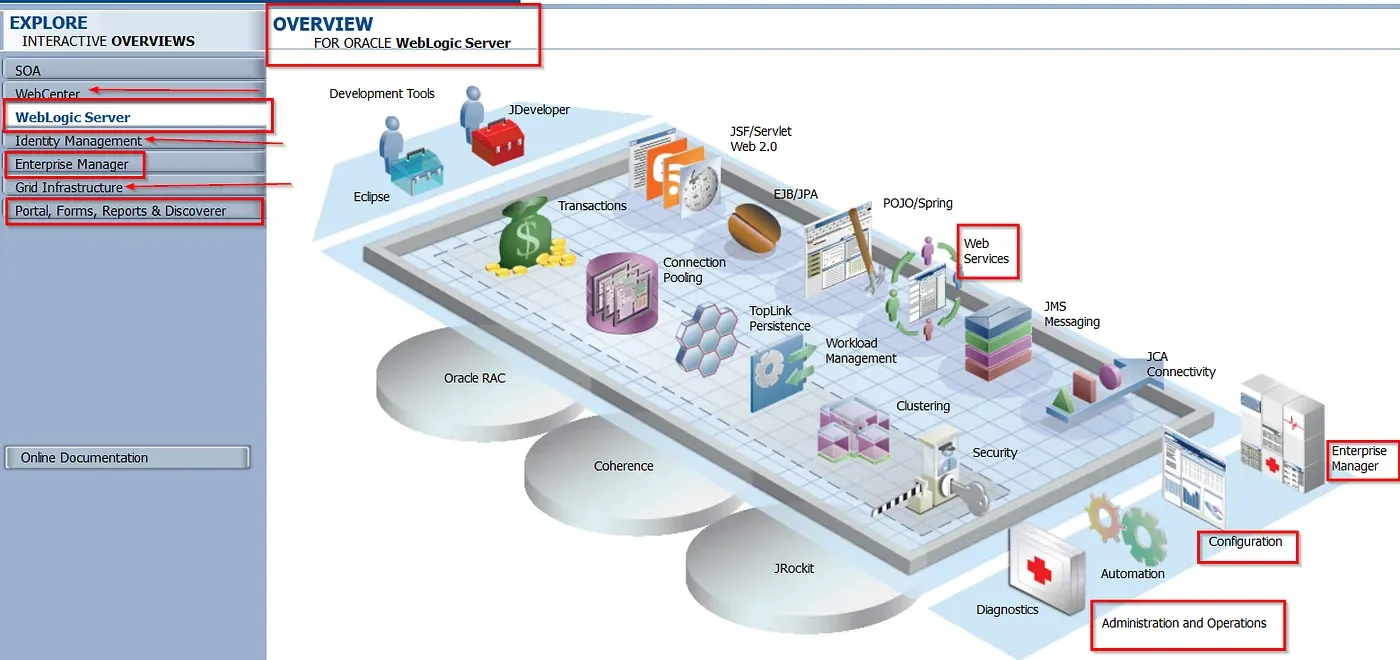
The dashboard was simply open on the IP. No authentication was required to reach it, and the pages I reached exposed information about WebLogic Server, including Enterprise Manager, Configuration, Administration and operation, and Web Services. My access was read-only: I could read the information but could not take any action. The red guideline in the screenshot marks what was visible.
Root cause
The dashboard was exposed without authentication. The report does not describe the server configuration behind that, so the exact reason the login was absent is not stated. What the report does establish is that the host presented an AT&T certificate while sitting on an IP associated with a different domain, which is why I hesitated before submitting.
Impact
As I wrote in the impact section: I was able to access an open Oracle dashboard without authentication and see information about WebLogic Server, including Enterprise Manager, Configuration, Administration and operation, and Web Services. The access was read-only; I could not take any action.
Fix
The report does not say what remediation was applied.
Timeline
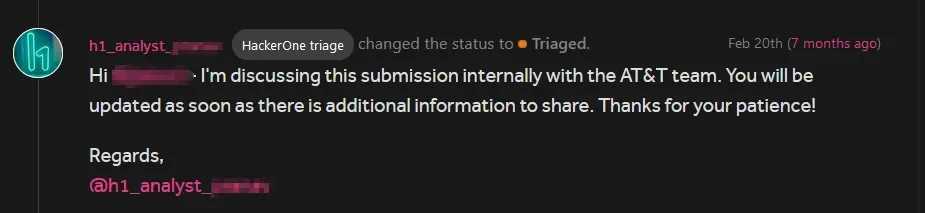
I submitted the report, it was triaged after 6 days, and I received the bounty in March.

Variants to test
- Certificate-based Shodan pivoting. Run
Ssl.cert.subject.CN:"target.com"andssl:"Company Name"against other programs with wide scope, then open every hit. A positive result is a host whose certificate ties it to the target but whose IP or hostname does not. - Title-based pivoting. Search with
http.titlefor product names (Oracle, WebLogic, Enterprise Manager) and open the results. A positive result is a management or administration interface that loads without a login prompt. - Direct access checks on discovered IPs. Request the root and common management paths over HTTPS and look for content rather than a redirect to a login. A positive result is readable configuration or server information.
- Wordlist discovery on hosts that look empty. Run
dirsearchandffufas above with a large wordlist; a positive result is any path that returns content without authentication. - Scope reasoning. When a host is not on the expected domain but carries the target's certificate, check the program's scope rules before submitting.
What happened, in plain words
This is the story of my first valid bug and my first bounty. When I started in bug bounty I did what most newcomers do and hunted XSS, which earned me a duplicate. After that I decided to stop looking for XSS and to go where fewer hunters search. Watching Orwa's videos about reconnaissance pushed me towards Shodan, and I picked a wide scope target: AT&T, with att.com as the target.
Before the details, a few words on the ideas involved, because they come up again and again below.
Bug bounty is a scheme where a company says: if you find a security problem in our systems and tell us about it responsibly, we will pay you a reward, called a bounty. A duplicate is when you report a problem that someone else already reported first; usually you get nothing for it.
XSS (cross-site scripting) is a class of bug where an attacker manages to get their own code to run inside another person's browser session on a website. It is very common, which is exactly why so many newcomers look for it and why reports of it get duplicated so often.
Reconnaissance (recon) is the information-gathering phase: before you test anything, you work out what exists. Think of it like casing a building before trying the doors, except here everything is public and legal as long as you stay within the program's rules.
Shodan is a search engine for internet-connected devices and servers, rather than for web pages. Instead of indexing page text, it records things like what software a server runs, what its page title is, and what security certificate it presents. You search it with dorks, which are search queries built from field names and values.
A certificate (SSL/TLS certificate) is the digital ID card a website presents so your browser can confirm it is talking to the right server and can encrypt the connection. It contains fields, including a subject CN (common name), which is normally the domain name the certificate was issued for, and an organisation name. Because certificates are public and tied to a company, they are a useful way to find a company's servers even when the server's own domain name does not look like the company's.
The bug itself is a missing authentication issue: an Oracle dashboard reachable on an IP address, showing WebLogic Server information, with no login required. Authentication means proving who you are, normally with a username and password. When a page that is meant to be private loads for anyone who knows the address, authentication is missing.
Oracle is a large software company. WebLogic Server is one of its products: a platform that organisations use to run their Java applications. It ships with management and administration pages, and those pages are exactly the kind of thing that should never be open to the public.
Setup
The only tooling involved is Shodan for discovery, plus dirsearch and ffuf for content discovery once an IP was found. No accounts, roles or special access were needed. The precondition is simply that the host is indexed by Shodan and carries a certificate that ties it to the target.
dirsearch and ffuf are both command-line tools that try a long list of common file and folder names against a website to see which ones exist. Think of them as trying every key on a big keyring in a door, one after another, and noting which ones turn.
Finding it
I used two Shodan dorks:
Ssl.cert.subject.CN:"att.com"
ssl:"AT&T Services Inc."
Line by line:
Ssl.cert.subject.CN:"att.com"asks Shodan for every host whose certificate hasatt.comin its subject common name field. In plain terms: find servers holding an ID card that names att.com.ssl:"AT&T Services Inc."asks Shodan for every host whose certificate was issued to the organisation AT&T Services Inc. In plain terms: find servers holding an ID card issued to that company, whatever name is written on the front.
The first matches hosts whose certificate subject CN contains att.com; the second matches hosts presenting a certificate issued to AT&T Services Inc. If you do not know how to get the SSL string for a target, the screenshots below show the way.
One practical detail: remove the comma. If you leave it in, you get the whole Shodan search result rather than the narrowed set.
Without the comma:
I then searched with http.title and opened all the pages and IPs to see what was behind them.
http.title is a Shodan field that matches the title of a web page, the text shown in the browser tab. Searching on it lets you find pages by what they call themselves, for example a login page or an administration console, rather than by domain name.
After a lot of searching I found a dashboard open on an IP address, reachable directly over HTTPS.
An IP address is the numeric address of a machine on the internet, the equivalent of a street address for a building. HTTPS is the encrypted version of the protocol browsers use to load websites; the padlock in the address bar means the connection is encrypted and the certificate checked out.
What made it interesting was the mismatch: the IP is connected to another domain, not an AT&T one. It was not *.att.com but another name, in the style of *.NOMAD.com.
A domain is a human-readable name for a place on the internet, like att.com. The *. notation means "any subdomain of", so *.att.com covers names such as something.att.com. Here the name attached to the IP was not under att.com at all.
I asked friends whether anyone had seen this dashboard before, and nobody had. I hesitated because the IP was not affiliated with an AT&T company, and I asked myself why I was seeing an AT&T SSL certificate on this dashboard if that were true. After a week of searching I decided to submit it.
Exploitation
Step 1: content discovery with dirsearch
python3 dirsearch.py -u https://50.90.000.67
Line by line:
python3runs the Python interpreter, version 3.dirsearchis written in Python, so this is how you start it.dirsearch.pyis the script file itself.-u https://50.90.000.67tells the tool which address to test.-ustands for URL.
This runs a standard directory and file brute force against the host. It returned nothing.
Step 2: content discovery with ffuf
ffuf -w /path/to/mywordlist -u https://50.90.000.67/FUZZ
Line by line:
ffufis the tool being run.-w /path/to/mywordlistgives it the wordlist, a plain text file with one candidate name per line. The path shown is a placeholder for wherever your list lives.-u https://50.90.000.67/FUZZgives the address to test, with the wordFUZZmarking the spot where each word from the list gets substituted. So the tool requestshttps://50.90.000.67/followed by each word in turn.
This fuzzes the path with a large wordlist. It also returned nothing.
Step 3: CVE search
I looked for any known CVE affecting what was exposed and found nothing.
A CVE (Common Vulnerabilities and Exposures) is a public catalogue entry for a specific, named security flaw in a specific product. Each one gets an identifier like CVE-YYYY-NNNN so everyone can refer to the same issue. Looking for one is a way of asking: is this software version known to be broken in a documented way?
Step 4: direct access to the dashboard
The dashboard was simply open on the IP. No authentication was required to reach it, and the pages I reached exposed information about WebLogic Server, including Enterprise Manager, Configuration, Administration and operation, and Web Services. My access was read-only: I could read the information but could not take any action. The red guideline in the screenshot marks what was visible.
Read-only means I could look but not change anything: no buttons that alter settings, no actions that affect the server. That matters for impact, because reading information is less severe than being able to change it.
Root cause
The dashboard was exposed without authentication. The report does not describe the server configuration behind that, so the exact reason the login was absent is not stated. What the report does establish is that the host presented an AT&T certificate while sitting on an IP associated with a different domain, which is why I hesitated before submitting.
Scope is the list of systems a program allows you to test. Testing outside scope is not allowed, even if the system is vulnerable. Here the certificate was the reason I was unsure whether the host belonged to the target.
Impact
As I wrote in the impact section: I was able to access an open Oracle dashboard without authentication and see information about WebLogic Server, including Enterprise Manager, Configuration, Administration and operation, and Web Services. The access was read-only; I could not take any action.
Information disclosure means private information can be read by people who should not see it. It is a confidentiality problem rather than a tampering problem.
Fix
The report does not say what remediation was applied.
Timeline
I submitted the report, it was triaged after 6 days, and I received the bounty in March.
Triaged means the program's team reviewed the report and accepted that it describes a real issue, before deciding on a reward.
Variants to test
- Certificate-based Shodan pivoting. Run
Ssl.cert.subject.CN:"target.com"andssl:"Company Name"against other programs with wide scope, then open every hit. A positive result is a host whose certificate ties it to the target but whose IP or hostname does not. - Title-based pivoting. Search with
http.titlefor product names (Oracle, WebLogic, Enterprise Manager) and open the results. A positive result is a management or administration interface that loads without a login prompt. - Direct access checks on discovered IPs. Request the root and common management paths over HTTPS and look for content rather than a redirect to a login. A positive result is readable configuration or server information.
- Wordlist discovery on hosts that look empty. Run
dirsearchandffufas above with a large wordlist; a positive result is any path that returns content without authentication. - Scope reasoning. When a host is not on the expected domain but carries the target's certificate, check the program's scope rules before submitting.
Glossary
- Authentication: the process of proving who you are, usually with a username and password.
- Bounty: a reward paid by a company for a responsibly reported security problem.
- Bug bounty: a programme where a company invites people to find and report security problems in exchange for rewards.
- Certificate (SSL/TLS): a digital ID card a server presents so the browser can verify its identity and encrypt the connection.
- CVE: a public catalogue entry identifying one specific known security flaw in a product.
- dirsearch: a command-line tool that tries many common file and folder names against a website.
- Domain: a human-readable name for a place on the internet, such as
att.com. - Dork: a search query built from field names and values, used in engines like Shodan.
- Duplicate: a report of a problem that someone else already reported first.
- ffuf: a command-line tool that substitutes words from a list into a URL to discover hidden paths.
- HTTPS: the encrypted version of the protocol browsers use to load websites.
- Information disclosure: a flaw where private information can be read by people who should not see it.
- IP address: the numeric address of a machine on the internet.
- Missing authentication: a flaw where a page or service meant to be private loads for anyone, with no login required.
- Oracle: a large software company; here, the maker of WebLogic Server.
- Read-only: access that allows viewing but not changing anything.
- Reconnaissance (recon): the information-gathering phase before testing, working out what exists.
- Scope: the list of systems a bug bounty programme allows you to test.
- Shodan: a search engine that indexes internet-connected devices and servers by their properties, not their page text.
- Subject CN: the common name field in a certificate, normally the domain name it was issued for.
- Triaged: reviewed and accepted by the programme's team as a real issue.
- WebLogic Server: an Oracle product used to run Java applications, which ships with management and administration pages.
- XSS (cross-site scripting): a bug class where an attacker gets their own code to run inside another person's browser session on a website.



